Flash Copy MT4

5

The program is use to copy trading from MT4 to MT4 and MT5 on local PC or copy over the Internet. Now you can easy copy trades to any where or share to friends.

  • Only run one Flash Server on VPS, also need allow the apps if you turn on Windows Firewall.
  • Can not add more than 20 account copier to server, include both MT4 and MT5
  • Get free Copier EA for MT4 and MT5 (only receive signal), download here
  • Instants copy, speed smaller 0.1 seconds, easy to setup

How to setup and guide

Main functions

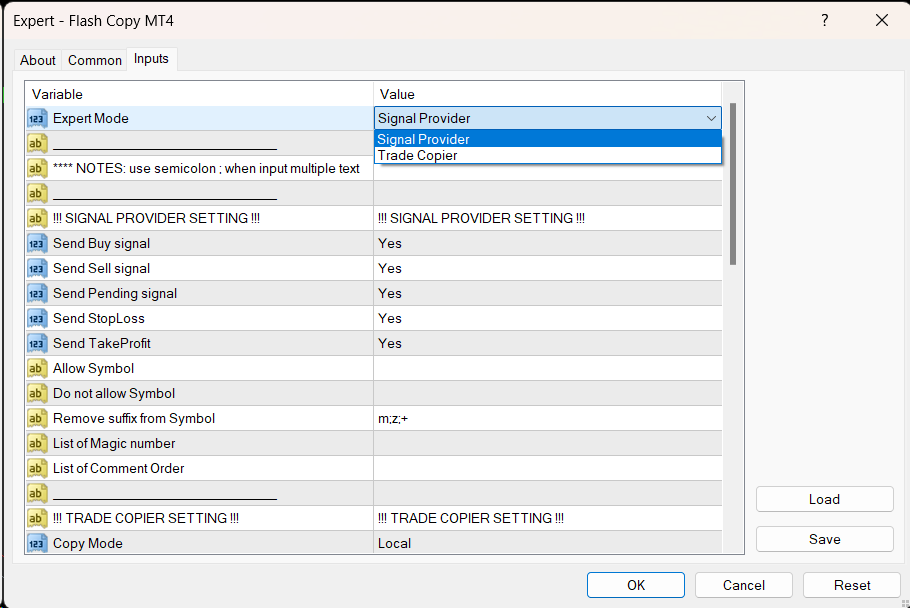
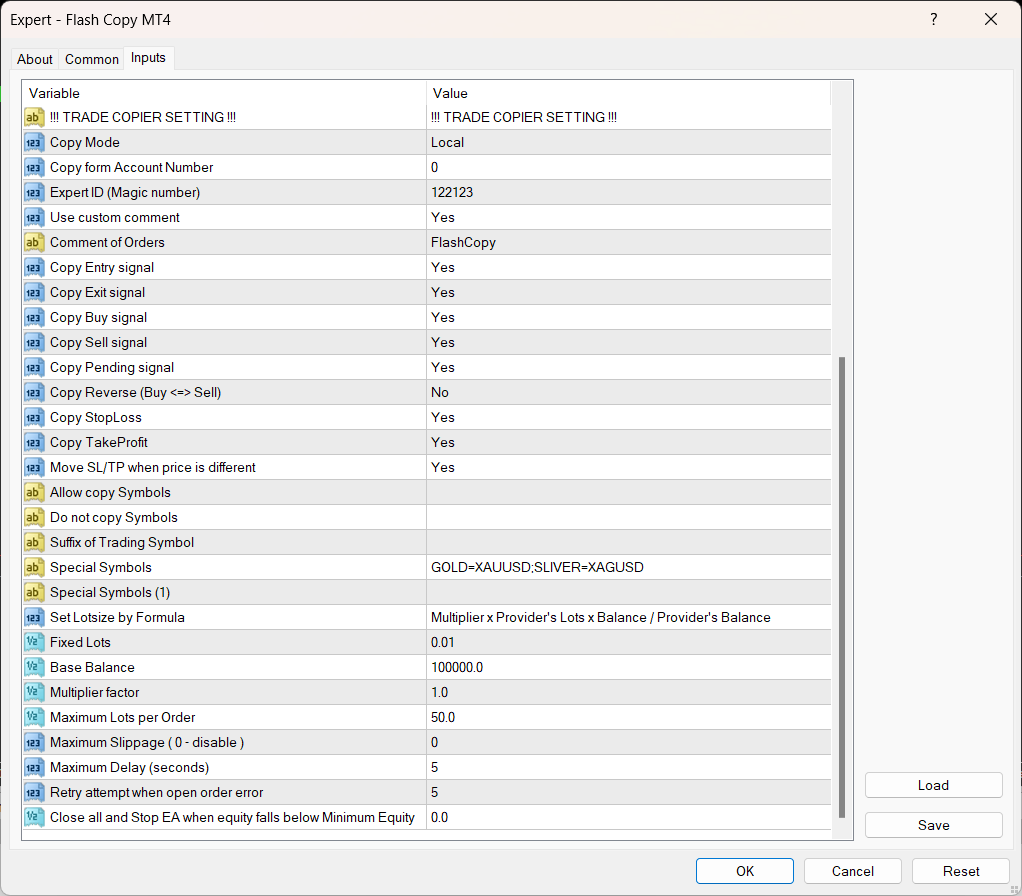
  • Copy Entry Signal: True / False
  • Copy Exit Signal:  True / False
  • Copy Buy Signal:  True / False
  • Copy Sell Signal: True / False
  • Copy Pending Signal:  True / False
  • Copy Reverse (Buy <=> Sell):  True / False
  • Copy StopLoss:  True / False
  • Copy TakeProfit:  True / False
  • Allow copy Symbols: can input list of symbol allow copy here
  • Do not copy Symbols: can input list of symbol do not allow copy here
  • Suffix: input suffix of broker symbol
  • Special Symbols : GOLD=XAUUSD
  • More options to set lots for copier
   

We always bring customers high quality products with the most professional service.

PM me if you have any problem.

评分 3
MD
670
MD 2025.02.04 16:04 
 

Very Good

推荐产品
Purpose: IF you are apart of a signal group or have a losing strategy this tool is perfect for you. This Expert Adviser is a Trade Copier which Copies Trades on the same account, It takes trades in the same direction or opposite direction. You can set 100% for same trade size or 200% to double up, while the same percentage rule also work for the stop-loss and take profit distances. input: Copy All or By Magic Take only new trades = False; Take same direction of existing trade or counter_direct
Trade copier MT4
Alfiya Fazylova
4.58 (33)
Trade Copier 是一种专业实用程序,旨在复制和同步交易账户之间的交易。 复制发生从供应商的帐户/终端到收件人的帐户/终端,安装在同一台计算机或 vps 上。 在购买之前,您可以在演示帐户上测试演示版本。 演示 这里 。 完整说明 这里 。 主要功能和优点: 支持复制MT4>MT4、MT4>MT5、MT5>MT4,包括МТ5 netting账户。 供应商和收件人模式在同一产品中实现。 简单直观的界面,允许您直接从图表中实时控制复制。 连接中断或终端重新启动时不会丢失设置和位置。 允许您选择要复制的符号,也可以替换接收者的符号,例如 EURUSD> USDJPY。 支持回拷贝。 能够仅复制某些订单。 允许您设置开仓交易价格的最大差异和最大时间延迟。 正确复制部分订单关闭的执行。 计算复制手数的几种方法。 同步止盈和止损。有几种方法可以计算它们的位置。 支持通过执行在“Market account”上工作,其中 SL / TP 仅在开仓后设置。 如何使用简单的设置复制交易 将供应商终端和接收终端安装在同一台计算机或 VPS 上。 在供应商终端上以“Master”模式安装复印机,然后
1、此跟单系统为本地跟单系统,即发射端和接收端必须在同一电脑操作,因为MT4/5账号可以在多台电脑同时登录,所以只需要把只读账号密码发给客户即可跟单。本地跟单因为不涉及网络跟单速度很快,非常稳定。 2.当前为接收端,加载到图表的时候需要在输入参数里“senderAccount”改成发 射 端的mt4/mt5帐号就可以正常工作,另外需要安装发射端。 3.支持一跟多 多跟一 多跟多,只要你电脑可以运行多个MT4/MT5,就可以运行多少个跟单,同一个平台可以用复制安装后的文件夹来实现同时登陆多个账号。 4.支持mt4接收端接收mt5发射端,实现mt4跟单mt5,也支持mt5跟单mt5. 5.功能介绍: 支持同平台/跨平台跟单 支持一跟多、多跟一、多跟多 支持正向跟单 支持固定单量跟单 支持比例单量跟单 参数说明: senderAccount:需要跟单的mt4/mt5帐号 sender_end: 发射端货币对不是标准时使用,比如发射端的货币对是EURUSDm时,这里需要填入m receive_end: 接收端货币对不是标准时使用,比如接收端的货币对是EURUSDm时,这里需
FREE
Exp COPYLOT CLIENT for MT4
Vladislav Andruschenko
4.65 (66)
MetaTrader 4 的交易复制器。     它从任何账户复制外汇交易、头寸、订单。 它是最好的贸易复印机之一     MT4 - MT4,MT5 - MT4     为了   复制 MT4     版本(或     MT4 - MT5 MT5 - MT5     为了   复制MT5     版本)。 MT5版本 详细描述   +DEMO +PDF 如何购买 如何安装     如何获取日志文件     如何测试和优化     Expforex 的所有产品 复印机 版本       MetaTrader 5 终端 (   МТ5 - МТ5, МТ4 - МТ5   )-   Copylot 客户端 MT5 独特的复制算法将所有交易从主账户准确复制到您的客户账户。 该产品还以其高运行速度而著称,并且具有强大的错误处理能力。 一组强大的功能。 该程序可以在多个终端绑定上运行。 使用它作为您在一个账户上交易的多个账户的交易 的同步器 , - COPYLOT 会将您的交易复制到其他终端。 从已关闭的账户中复制 Invest 密码; 部分关闭仅从 mt4 到 mt4 从模拟账户复制到
EA Risk Manager is a professional risk‑management Expert Advisor designed to protect your trading account and enforce disciplined money management. The EA does not open trades by itself – it only monitors and manages all existing positions (manual and automated) on the account. It is especially useful for traders who want to: Hard‑limit daily / weekly / monthly losses and profits. Restrict lot size and the number of open trades. Trade a basket of G7‑related Forex pairs using one centralized
Magic Curves
Aleksey Usachev
Indicator shows balance curves based on magic number for portfolio analysis. It allows to visually estimate different strategies performance on a single symbol. Any of magic number can be hidden by clicking on the value in legend. Parameters: HideAllOnStart - all magics are hidden and can be activated by clicking on its value; MAMode - shows average profit from trades; MAPeriod - Moving average period; Magics - a string with magic numbers separated by comma like "1,2,123". If this field is empty
SonicTradeCopier: (Best for scalping) Easy Fast Reliable trade copier. Copy trades from one terminal to an other (internet copy feature coming soon.) MT4 to MT4. MT4 to MT5. MT5 to MT5. MT5 to MT4. MT4/MT5 to any other platform copy possibility for custom made solutions. Reverse trading. Advance filters for traders. Features: (Setting up copying policies) Sender only has to setup  signal name and start sending signals [ You must start signal sender first always ]. Receiver sets up  signal na
Reverse copier is a tool that will open opposite buy/sell orders from your master account. It will help you with low profit EA's that lose consistenly and turn it to wins. Feel free to ask for new functions/features and I will add it. Now it's a simple MT5 to MT4 bridge with straightforward logic of one position open/close.  How to install: https://www.mql5.com/en/market/product/141604
FREE
Exp COPYLOT MASTER for MT4
Vladislav Andruschenko
4.52 (27)
МetaТrader的交易复印机4.它复制任何账户的外汇交易,头寸,订单。 这是МТ5↔️МТ4今天贸易复印机的最佳 МТ4   -   МТ4, МТ5   -   МТ5, МТ4   -   МТ5, МТ5   -   МТ4 。 独特的复制算法将所有交易从主账户复制到您的客户账户。运行速度快。严格的错误处理。一组强大的功能。 所有这些品质都合并在一个程序中 - EXP - COPYLOT。 该程序可以在多个终端绑定上运行。 在一个账户上交易的各种投资者账户中将其用作交易的同步器, - COPYLOT会将您的交易复制到其他终端。 安装 CopyLot Master - 要在帐户上安装的专家,您要从中复制职位和订单。 在终端中安装此专家,您可以从中将位置复制到投资帐户。 将任何文本标签名称指定为pathWrite(pathRead),例如“COPY”。 EA需要设置为1图表!默认情况下,我们的顾问会复制您帐户中的所有头寸和订单! 要复制您需要在第二个帐户或 Copylot客户端MT5 上安装 COPYLOT客户端MT4 的位置 注意:设置列表在我们的 特征   从有利可图的投
FREE
RSI Scanner
Tetyana Shcherba
Utility is designed to monitor and analyze the market conditions for all symbols of the MetaTrader 4 terminal using real-time data from the RSI indicator. Automatically detects all the pairs in your terminal, and also can filter them into groups. Gets the RSI indicator data for all timeframes and all selected pairs. Tracks up to 4 programmable signal patterns and notifies when they appear. Automatically opens a new chart for a given template when you click the desired pair in the table. Input p
Auto Trade Copier
Vu Trung Kien
4.76 (84)
自动交易复制器旨在以 100% 的准确度在多个 MT4/MT5 账户/终端之间复制交易。提供商和接收方账户必须位于同一台 PC/VPS 上。使用此工具,您可以将交易复制到同一台 PC/VPS 上的接收方账户。所有交易操作都将从提供商复制到接收方,不会有任何延迟。此版本仅适用于 MT4 账户。对于 MT5 账户,您必须使用 MT5 的自动交易复制器。参考: 参考: 对于 MT4 接收器,请下载“Trade Receiver Free” 这里 . 对于 MT5 接收器,请下载“Trade Receiver Free MT5”  这里 . 对于同一台 PC/VPS 上的 MT5 提供商,请检查“Auto Trade Copier MT5” 这里 . 如果您需要通过互联网在不同的 PC/VPS 上进行账户复制,请查看“Trade Copier Pro” 这里 . 如果您需要通过互联网在不同的 PC/VPS 账户之间进行复制,且接收方数量不限,请查看“无限交易复制器专业版” 这里 . 以下是重点功能 在 MT4 和 MT5 账户之间复制。 一个提供商可以将交易复制到多个接收者的账户。 一个提
一次性   关闭   所有   交易   ,   直接   通过   您的   移动  MT4  应用程序 进行管理 . 此  工具   可以   关闭   9   种   不同的   交易   类别. 要   激活   此   操作 ,   您  只需  放置   一个   挂单   在   预定   价格   (可以通过  远程   使用   移动   MT4 应用程序 完成). 之后   , 工具   将   检测   该   订单   并   关闭   所有   必要的   交易. 这样   您   可以   快速   管理   一组   交易. 多功能工具 : 包含 66+ 功能  |   联系我  如有任何问题  |    MT5 版本 可用   交易   类别 : 所有交易 (活跃和挂单); 活跃头寸; 挂单; 盈利; 亏损; 限价挂单 (Buy Limit / Sell Limit); 止价挂单 (Buy Stop / Sell Stop); 买入交易 (活跃买入和挂单卖出); 卖出交易 (活跃卖出和挂单卖出); 对于   每个   类别 ,   您   应该  
Fast Trade Copier
Volodymyr Hrybachov
4.2 (5)
The trade copier is designed for a fast and accurate copying of orders between the MetaTrader 4 terminals. The trade copier copies trades from the Master account to the Slave account by writing information to the total file, which is located in the common directory of the MetaTrader 4 terminals. This allows the trade copier to either customize various schemes for receiving and transmitting trade signals by changing the file name. Reading and writing the copier file is performed by timer. The tra
交易复制器 - 投资者密码 - 复制交易 - MT4 x MT5 跨平台 注意:您需要在客户账户所跟随的主账户上安装“Mirror Copier Master”,并在跟随主账户的客户账户上安装“Mirror Copier Client” 博客: https://www.mql5.com/en/blogs/post/756897 工作原理: https://www.youtube.com/watch?v=V7FNpuzrg5M MT4 版本 主账户: https://www.mql5.com/en/market/product/114774 客户端: https://www.mql5.com/en/market/product/114843 MT5 版本 主账户: https://www.mql5.com/en/market/product/114775 客户端: https://www.mql5.com/en/market/product/114844 “Mirror Copier”EA 是一款功能强大的工具,旨在实现不同 MetaTrader(MT4 或 MT
FREE
The utility copies trades from the signal provider accounts (master accounts, one or multiple providers) to unlimited number of receiver accounts (slave accounts). The provider is defined by the 'provider' parameter (any combination of numbers and letters). For example, there are two providers. Run the utility in master mode on them, and set different values to the provider parameter. On the account designated for copying these signals, run two utilities in slave mode in different windows, setti
Symbol Manager
Taras Slobodyanik
5 (4)
Symbol Manager or Grid Manager, designed to group orders into one position (by Symbol or by Magic Number). This utility will be useful to multi-currency traders (many EAs), who can have multiple orders on several pairs. You will be able to see the total number of lots, the total profit, and set virtual stop loss and virtual take profit. To set a real TP (or SL), you must first set the virtual value, and then enter the command in this cell: "set". If you want to set real TP/SL for all orders at
Disconnect Alerts
Yurij Izyumov
5 (1)
If you execute or test an Expert Advisor on a laptop, personal computer or a VPS, you may face the situation when Internet connection is lost and the EA stops. Of course, this utility ( Disconnect Alerts ) will not help you restore the Internet connection, but it will gather the information and will send an alert to you about when and how long your terminal was without access to the Internet and did not actually work. After receiving such a notification, you can check your trades or think about
FREE
ONECLICK COPIER EA – UNIFIED VERSION 1.0 Category: Trade Utility | Type: Local Trade Copier for MT4 Created by fxdancer (Hani Mabad) Version: 1.0 – May 2025 OVERVIEW OneClick Copier EA is a local trade copying utility, not a trading strategy. It is designed for manual traders, fund managers, or multi-account users who want to mirror trades across MT4 terminals running on the same computer. This EA does not generate signals or place trades by itself. Instead, it acts as a bridge between accou
Trade Copier Professional — 本地复制解决方案   Trade Copier Professional 是一款可靠的本地交易复制系统,适用于 MetaTrader 4/5。它允许交易者在同一台电脑上的多个账户之间即时复制仓位,内置安全控制,并配备专业级仪表盘。   概览   该 EA 可在单一文件中同时运行 Master 和 Slave 模式,并可无缝切换。交易可在 MT4 与 MT5 终端之间复制,无需依赖互联网,采用本地文件通信以实现最高速度与稳定性。实时仪表盘显示连接状态、复制统计以及每日表现。   手数与风险管理   提供四种手数模式:固定手数、倍数、风险百分比和余额百分比。止损与止盈可按比例调整或缩放,必要时可反向复制信号。安全功能包括每日亏损与交易限制、最小/最大手数控制、断线保护以及错误跟踪与自动关闭。   过滤与可靠性   交易可按品种或 magic number 进行过滤,配置灵活。系统通过错误检测、重试逻辑、安全关闭和全面日志确保可靠性。优化后的执行速度几乎即时,且资源占用极低。   使用方法   将 EA 附加到图表,设置为 Ma
Copy MT4 simply
VLADIMIR SHEVCHENKO
4 (1)
A free program for copying orders between terminals on the same computer. Any orders are copied in any direction, between any accounts. The principle of operation: On the terminal from which you want to copy, the "Server" parameter is set. On the terminal or terminals where the copied positions need to be opened, the "Client" parameter is set. It is also necessary to enter the account number of the "Server" terminal on the client. In the future, it is planned to increase the functionality
FREE
Local Trade Copier EA MT4
Juvenille Emperor Limited
4.96 (109)
通过 Local Trade Copier EA MT4 获得非常快速的交易复制体验。它的简单1分钟设置,使您可以在同一台Windows计算机或Windows VPS上在多个MetaTrader终端之间复制交易,具有闪电般快速的复制速度,低于0.5秒。 无论您是初学者还是专业交易者, Local Trade Copier EA MT4 都提供了广泛的选项,可根据您的特定需求进行自定义。对于任何希望增加利润潜力的人来说,这都是终极解决方案。 今天就尝试一下,看看为什么它是市场上最快、最简单的贸易复印机! 提示: 您可以在您的模拟账户中下载并试用 Local Trade Copier EA MT4 模拟版: 这里 将下载的免费演示文件粘贴到您的 MT4 >> 文件 >> 打开数据文件夹 >> MQL4 >> 专家文件夹并重新启动您的终端。  免费演示版本每次可在 4 小时内发挥全部功能,仅限演示帐户。 要重置试用期,请转至 MT4 >> 工具 >> 全局变量 >> Control + A >> 删除。 请仅在非关键模拟账户上执行此操作,不要在挑战道具公司账户中执行此操作。 如果您无法在
1、此跟单系统为本地跟单系统,即发射端和接收端必须在同一电脑操作,因为MT4/5账号可以在多台电脑同时登录,所以只需要把只读账号密码发给客户即可跟单。本地跟单因为不涉及网络跟单速度很快,非常稳定。 2.当前为发射端,加载到图表就可以正常工作,另外需要安装接收端来接收订单,然后在参数列表里输入发身端的mt5帐号。 3.支持一跟多 多跟一 多跟多,只要你电脑可以运行多个MT4/MT5,就可以运行多少个跟单,同一个平台可以用复制安装后的文件夹来实现同时登陆多个账号。 4.支持mt4接收端接收mt5发射端,实现mt4跟单mt5,也支持mt5跟单mt5. 5.功能介绍: 支持同平台/跨平台跟单 支持一跟多、多跟一、多跟多 支持正向跟单 支持固定单量跟单 支持比例单量跟单 支挂四种工作模式 : 1.mt4跟单mt4 2.mt4跟单mt5 3.mt5跟单mt4 4.mt5跟单mt5 注意:需要配合接收端,才能正常工作。 mt5   接收 端: https://www.mql5.com/zh/market/product/74023 mt4   接收 端: https://www.mql
FREE
Just Copier MT4
Agung Imaduddin
5 (4)
"Just copier" is designed to copy trading without any complicated settings. The copy can be done in one PC. One EA can be set as master (provider) or slave (receiver). The receiver lot can be set to multiple providers lots. Please also check this product at fxina.hostingerapp.com.  Any type of copy is available. MT4 -> MT5 MT4 -> MT4 MT5 -> MT5 MT5 -> MT4 If you want to copy MT4 -> MT5 or MT5 -> MT4, please purchase "Just copier" for MT4 and "Just copier" for MT5 separately. Just Copier can copy
Enthiran Slave CopyTrader MT4 EA
Orifox Technologies Private Limited
Enthiran CopyTrader for MT4 – Slave Trade Copier Mirror Trades Across Multiple Accounts with Precision and Speed Enthiran CopyTrader   is a powerful MT4 Expert Advisor that allows you to   replicate trades from one MetaTrader 4 account (Master)   to   one or multiple accounts (Slaves)   with complete control over trade size, symbol mapping, and execution speed. Whether you manage investor accounts, signal services, or prop firm strategies, this tool helps you maintain synchronization across a
FREE
CopierMT4
Dmitry Fedoseev
Copier for the MetaTrader4 terminal. Designed to copy trade from one terminal to another. Compatible with the version for the MetaTrader5 terminal; if available, copying can be performed between different terminals (regardless of the type of accounts: hedging or netting). The number of accounts to which copying is possible is not limited (depends only on the computing power of your computer). Directions for copying the version for MetaTrader 4 together with the version for MetaTrader 5: MT5 Net
Reward Risk Pro Tool
MARTIN ANDRES DEL NEGRO
5 (1)
Reward Risk PRO TOOL, its the ultimate tool for your trading money managment, stop wasting time calculating your reward risk percentaje , just making some clicks you can get your ideal distance for your stop loss, and next to it will get your corresponded Take profit point for your stop loss, for example if you set an 100 ticks stop loss and want to get an equivalent reward just make your next click were the text offers 1/1 reward risk, if you want to get a reward/risk relation more profitly jus
This is the Pro version, which replaces the first Rsi version of Rsi I posted, which has great multipliers, average prices and entry points for all currency pairs. Most importantly, it has the ability to preserve capital for you. I wish you a favorable transaction, reaping many profits Tutorial : Instruction for RSI Pro v1.0 1. Lot 1 st trade: volume for 1 st trade. 2. Max lot: Maximum volume for each trade. 3. DCA Step: Step between 2 trades 4. TP: Example: You have X orders with DCA step -1
Forex Gump
Andrey Kozak
2.4 (5)
Forex Gump is a fully finished semi-automatic trading system. In the form of arrows, signals are displayed on the screen for opening and closing deals. All you need is to follow the instructions of the indicator. When the indicator shows a blue arrow, you need to open a buy order. When the indicator shows a red arrow, you need to open a sell order. Close orders when the indicator draws a yellow cross. In order to get the most effective result, we recommend using the timeframes H1, H4, D1. There

OTRX Fimathe Backtest is a tool for the Trader or Enthusiast who uses the Fimathe technique created by Trader Marcelo Ferreira to carry out his training and validate if he can obtain profitability. In this tool you will be able to: 1. Define whether you are looking for a buy or sell entry. (Trend). 2. Define by clicking twice on the horizontal lines where your Reference Zone and your Neutral Zone will be. 3. Monitor the entry, subcycle and exit of the trade. 4. Trading Summary, Daily, Week
FREE
Risk Commander
Adisorn Soodkanueng
Product Name: Risk Commander: Trade Assistant & Strategy Simulator Risk Commander is more than just a trade panel—it is a complete Manual Trading Ecosystem . It serves two powerful purposes: Live Assistant: Helps you execute trades with speed, precision, and perfect risk management in real-time markets. Training Simulator: Fully compatible with the Strategy Tester (Visual Mode) , allowing you to practice manual trading on historical data without risking a cent. NEW! Built-in Simulator Mode S
该产品的买家也购买
The product will copy all telegram signal to MT4   ( which you are member  ) , also it can work as remote copier.  Easy to set up, copy order instant, can work with almost signal formats, image signal, s upport to translate other language to English Work with all type of channel or group, even channel have "Restrict Saving Content", work with  multi channel, multi MT5 Work as remote copier: with signal have ticket number, it will copy exactly via ticket number. Support to backtest signal. How to
ManHedger MT4
Peter Mueller
5 (2)
THIS EA IS A SEMI-AUTO EA, IT NEEDS USER INPUT. Manual & Test Version Please TEST this product before   BUYING  and watch my video about it. Contact me for user support or bug reports, or if you want the MT5 version! MT5 Version I do not guarantee any profits or financial success using this EA. With this Expert Advisor, you can: Implement your own   Zone Recovery   strategy to capitalize on trending markets. Create   Grid   trading strategies, to profit from ranging markets. Place orders easil
The product will copy all  Discord  signal   to MT4   ( which you are member  ) , also it can work as remote copier.  Easy to set up. Work with almost signal formats, support to translate other language to English Work with multi channel, multi MT4. Work with Image signal. Copy order instant, auto detect symbol. Work as remote copier: with signal have ticket number, it will copy exactly via ticket number. How to setup and guide: Let read all details about setup and download Discord To MetaTrader
Live Forex Signals 专为现场信号交易而设计   https://live-forex-signals.com/en   和  https://foresignal.com/en . Live Forex Signals for MetaTrader 5  https://www.mql5.com/ru/market/product/81448 参数 如果您已订阅网站,则用户名和密码live-forex-signals.com/foresignal.com ,然后您应该使用您的凭据填写这些参数;如果没有订阅,则将字段留空; 评论对正在开启的交易的评论 风险风险作为交易存款的百分比,如果风险=0,则使用价值地段 固定交易量 使用获利使用从网站获利 UseStopLoss从网站使用止损 FrequencySignalUpdateInMinute顾问访问网站的频率 交易的最大点差交易的最大允许点差,如果点差较高,则设置的挂单被取消 使用追踪止损 TrailingStop跟踪止损的值以点为单位 为了使实时外汇信号正常工作,您需要放置网站地址 https://live-fore
Crystal Trade Manager PRO – 高级 MT4 风险与交易控制系统 免费版: https://www.mql5.com/en/market/product/150632 概述 Crystal Trade Manager PRO(CTM)是一款为 MetaTrader 4 打造的完整专业级风险管理与交易控制工具。 它专为需要严格执行、稳定风险保护和智能自动化的交易者而设计。 系统可全面管理风险、保护账户权益、执行每日限制、自动设置 SL/TP,并提供专业级的一键式快速交易面板。 非常适合参与 prop firm 挑战、日内交易、剥头皮交易以及专业资金管理的交易者。 同时提供完整的 MT5 版本。 核心亮点功能 1. 高级风险与回撤保护 支持每日回撤限制 1%–70% 。 一旦达到回撤上限,系统将立即平掉 所有仓位 。 可选:突破后自动删除 所有挂单 。 每日锁仓模式:当天达到限制后阻止新下单,次日自动恢复。 完全符合各大 prop firm 的规则与要求。 2. 日内盈利与亏损目标自动化 可设置每日 盈利目标 与 亏损限制 (账户货币,例如 USD)。 达到任何目
Averaging Helper
Sergey Batudayev
5 (2)
平均助手——这种交易辅助工具将使用两种技术帮助您平均之前无利可图的头寸: 标准平均 对冲,随后根据趋势开仓 该实用程序能够 一次性筛选出多个不同方向的未平仓头寸,包括买入和卖出头寸。例如,您建了一个卖出仓位和一个买入仓位,但两个仓位均未盈利,或者一个仓位亏损,一个仓位盈利但盈利不足,您想对这两个仓位进行平均,以便平仓——我的“平均助手”实用程序可以帮助您。 平均助手实用程序 - 允许您自动计算下一个仓位的规模、下单价格、平均仓位和平仓的方向以及您指定的获利规模。 该实用程序还允许您使用“买入”和“卖出”按钮开仓。您只需指定所需的止盈大小和起始手数即可。实用程序本身将以最初指定的止盈价或平均价平仓,并会尝试以平均价平仓,同时考虑您为平均系列设置的止盈。 事实上,对于那些接受并理解平均线逻辑,同时又了解其风险的人来说,这款工具将是一个非常实用的助手。在 95% 的情况下,这项技术将帮助您全自动平仓并获利。 要开始工作,只需将实用程序拖到图表上,设置平均的 TP 大小并单击“开始平均”按钮,实用程序将尝试通过单个获利来关闭图表上所有未平仓交易。 使用此实用程序时,您初始开仓的交易量不应过大
With this Expert Advisor, you can seamlessly integrate various channel, arrow, and reversal indicators. It offers the flexibility to use all popular channel trading strategies, while also providing powerful tools to customize your trading conditions and risk management system.   The Expert Advisor opens orders when the price crosses the channel boundaries. Multiple crossing conditions are available for customization: Price touches boundary on re-entry into the channel Price touches boundary on


Unlimited Trade Copier Pro is a tool to copy trade remotely to multiple MT4, MT5 and cTrader accounts at different computers/locations over internet. This is an ideal solution for you if you are a signal provider and want to copy your trades to other receivers globally on your own rules. One provider can copy trades to multiple receivers and one receiver can get trade from multiple providers as well. The provider can even set the subscription expiry for each receiver, so that receiver will not b
欢迎使用 信号分析大师  使用教程视频 功能介绍:  本工具可以将MT4信号或者MT5信号的交易记录复盘到MT4图表上,方便直接观察信号的交易状况,从而了解信号的策略,比如可以比较容易看出是马丁策略,还是网格策略,还是早盘头皮策略,是否一次一单,或者带加仓等。 从而更好分析账号的安全性,稳定性等。 使用方法: 1.下载工具后,将它拖入MT4图表中(当成专家来使用,也就是方Experts目录里)。 2.到MQL5信号里面去下载信号 历史记录。 3.将下载好的历史记录文件粘贴到 MT4 文件->打开数据文件夹->MQL4->Files文件夹里面,并复制下文件的名字。 4.点击MT4上工具的笑脸图标,将复制文件名复制到  FIleName那一栏。 5.选择SignalType,默认MT4 信号复盘,如果是MT5信号复盘,请选择MT5_Signal. 6.点击确定,即可看到相应品种的交易记录状况。 7.如果需要切换查看品种的交易记录,可以直接将新的品种拖入已经加载了工具的图表上。
Custom Alerts AIO:多市场智能监控,一键启动,无需设置 概述 Custom Alerts AIO 是一款“开箱即用”的高级市场扫描工具,无需额外安装任何其他指标或进行复杂设置。它内置了 Stein Investments 的所有核心指标(FX Power、FX Volume、FX Dynamic、FX Levels 和 IX Power),可帮助您轻松监控所有主要资产类别,如外汇、黄金、指数和加密货币。如果您的经纪商支持股票,您也可以手动添加个股进行监控。 1. 为什么选择 Custom Alerts AIO? 无需额外购买任何指标 • 所有关键指标均已内置,开箱即用。 • 专注于实时预警,不包含任何图形元素,性能高效,界面简洁。 全面覆盖所有主要市场 • 支持监控外汇、金属、加密货币和指数市场。 • 无需手动输入任何交易品种,只需在设置中勾选资产类别即可启用。 • 股票并不属于默认类别,如有需要可手动通过参数输入添加。 高效、专业、便捷 • 无需图表模板和手动加载,适合自动化或远程交易环境。 • 非常适合 VPS 上长期运行,或作为后台市场预警工具使用。 2
EasyInsight AIO MT4
Alain Verleyen
4 (2)
EASY Insight AIO – 全能智能交易一站式解决方案 概述 想象一下,您可以在几秒钟内扫描整个市场——外汇、黄金、加密货币、指数,甚至股票——无需手动筛选图表、繁琐安装或配置指标。 EASY Insight AIO 是您专为 AI 交易打造的即装即用数据导出工具。它将整个市场快照一次性输出为简洁的 CSV 文件,直接支持 ChatGPT、Claude、Gemini、Perplexity 等各类 AI 平台的即时分析。 无需窗口切换,无需图表叠加,也没有任何杂乱。只需纯净、结构化的数据自动导出,让您专注于基于数据的高效决策,无需再盯盘耗时。 为什么选择 EASY Insight AIO? 真正的一体化 • 无需设置,无需安装指标,无图表叠加。只需安装、运行并导出——就是这么简单。 多资产全覆盖 • 扫描分析外汇、金属、加密货币、指数、股票——您的券商所能提供的一切市场。 AI 专属数据导出 • 高度结构化、针对 AI 优化的 CSV 文件,直接适配主流智能工具和平台。 完整导出内容: • 三个可选周期的货币强度分析 • 净多头头寸变化体现市场情绪 • 成交量变化、
Strategy Builder offers an incredible amount of functionality. It combines a trade panel with configurable automation (covert indicators into an EA), real-time statistics (profit & draw down) plus automatic optimization of SL, TP/exit, trading hours, indicator inputs. Multiple indicators can be combined into an single alert/trade signal and can include custom indicators, even if just have ex4 file or purchased from Market. The system is easily configured via a CONFIG button and associated pop-up
This is an Expert Adviser use for manual trading as a background EA or combine with external EA to open orders. Loss Recovery Trading is one of your options to handle the lose positions instead of using stop loss by setting a zone recovery area and target to exit the turn rounds sequence. How It Work? If the market goes against your first positions direction at the specific of losing points, the EA will open an opposite direction position with calculated larger lot size and also keep the first
Trade Copier for MT4   Supports multiple master and slave terminals   Local operation without DLL usage   Optional slow monitoring mode   Compatible with prop firm and personal accounts Trade Copier MT4 To MT4 Advanced Multi-Account Trade Copier for MT4/MT5 – Master & Slave Synchronization This Expert Advisor is a fully automated multi-account trade copying system designed for professional traders who require fast, stable, and flexible synchronization between MT4/MT5 accounts. It supports
面板 FFx 隐藏管理 轻松帮助您在图表上直接管理您的订单。下面描述所有特征: 止盈, 止损和尾随停止均隐藏 每笔交易在图表上都有自己的指示线 可按您的需要拖拽任何线来改变止盈/止损 当止盈 #1 到达,自动将止损位移到盈亏平衡位置的选项 选择止盈/止损类型的选项 (通过点数或价格) 选择尾随停止类型的选项 (通过点数, MA, 分形, PSAR 或 ATR) 定义哪些订单您希望在当前图表上进行管理 (所有订单或特定单号) 最大化 / 最小化面板按钮 在图表上将面板拖拽到任意位置 显示交易信息的选项 如何使用它? (参看以下截图) 选择您希望管理的订单 (所有或特定的) 设置您的目标, 止损和尾随停止 … 之后点击 “放置”。它们都独立工作,这样您就只需设置一次。 如果您希望删除一个止盈, 止损或尾随停止, 选择正确的订单 … 然后点击 “删除” 当您选择设置 “所有当前符号”, 则 “当前设置”显示在面板里。这些设置将自动用于所有新开订单。若要重置/删除这些设置, 点击 “重置所有”。 如果 “显示交易信息”被选中, 一个新的小表格显示在面板之下, 包括每笔订单及其当前的目标和尾随停
FFx Risk Calculator panel will help you to calculate very easily your trades size, SL or the risk directly on the chart. All features are described below: Option to select which parameter to calculate: Risk, Stop Loss or Lot Size The panel will show if the lot size is allowed according to the current account free margin Button to maximize/minimize the panel Drag and Drop the panel anywhere on the chart How to use it? Select the parameter you want to be calculated. It will be based on the 2 other
News Trader Pro
Vu Trung Kien
4.38 (16)
新闻操盘手专业版 是一个独特的机器人,让您使用您预先定义的策略进行消息交易。它从几个流行的外汇网站加载的每条消息的片断。您可以选择任何消息和预设的策略进行交易,之后新闻操盘手专业版根据选定的策略,在新闻来临时自动进行交易。 新闻发布给出了赚点数的机会,因为在那个时刻,价格通常有大动作。现在,利用这款工具,新闻交易变得比以往任何时候更容易,更灵活,更令人兴奋。不要等待,不要错失,不要再迷惑了。每周只需针对重要新闻设置一次,这个工具将完全按照您的计划进行精准交易。 演示版: 由于这不是一个自动交易机器人 (它是半自动), 您需要下载单独的演示版本: https://www.mql5.com/zh/market/product/5931 参考: 如果您只需要加载新闻 (无需交易), 您可以购买新闻加载机专业版: https://www.mql5.com/zh/market/product/5463 功能 包括所有 新闻加载机专业版 的功能 (查看详情)。 针对每条新闻构建您自己的策略,具有非常灵活的参数。 支持五种高级策略,带有大量控制参数 (止损, 止盈, 尾随, 网格间隔, 手数缩放,
FFx Watcher PRO
Eric Venturi-Bloxs
The FFx Watcher PRO is a dashboard displaying on a single chart the current direction of up to 15 standard indicators and up to 9 timeframes. It has 2 different modes: 1. Watcher mode: Multi Indicators User is able to select up to 15 indicators to be displayed User is able to select up to 9 timeframes to be displayed 2. Watcher mode: Multi Pairs User is able to select any number of pairs/symbols User is able to select up to 9 timeframes to be displayed This mode uses one of the standard indicat
Transaction Repeater Full
Alexandr Bryzgalov
5 (4)
Copies transactions between MT4 terminals. Possibilities: quick copy start minimum processor load direct and reverse (reverse) copying. copying Take Profit and Stop Loss levels copying deferred and their changes copy transactions one to many copy trades many to one local copy only Attention: The product is designed for copying trades only within a single computer or VPS with access to the desktop. The product will not work on the built-in Virtual Hosting of the terminal. We will help you set up
The product combines a manual trade panel with the ability to perform actions automatically in a highly configurable way. Actions include capturing indicator values and then based on those values raising alerts, open/close or partially close trades, scale-in, setting up pending orders, adjusting stop loss, take profit and more. On-chart controls can be configured, such as tick boxes and buttons, so can be fully interactive. The EA also handles money management, news events, hidden stop loss, tak
Elliott Wave Counter 是一个面板,用于快速和用户友好地手动标记 Elliott 波浪。可以选择一种颜色和一个级别的标记。还有用于删除最后一个标记和工具制作的整个标记的功能。一键制作标记。点击五次 - 有五波!艾略特波浪计数器对于艾略特波浪的初学者和专业分析师来说都是一个很好的工具。 艾略特波浪计数器安装和输入指南 如果你想得到   关于 EA 添加 URL (   http://autofxhub.com   ) MT5 终端的 通知 (见截图)。 MT4版本 https://www.mql5.com/en/market/product/14016 MT5版本 https://www.mql5.com/en/market/product/15081 一般输入: 波形类型按钮: 此按钮允许用户选择他们想要在图表上突出显示的波形类型。可用的选项包括推动波、调整波和其他自定义波模式。 波级按钮: 这个按钮   允许用户选择他们想要在图表上突出显示的波形级别。可用的选项包括初级、中级和次级波级别。 波浪颜色: 这个   按钮   允许用户选择他们想要在图表上突出显示的波浪图
If you wish to draw Support and Resistance lines, view: daily market opening, classical pivot levels, Fibonacci pivot levels, trend lines, Fibonacci levels, the remaining time to candle closing, and current spread. If you seek to place your orders with the exact lot that meets your desired stop loss risk. If you wish to do all this and more with just one click, then this is the perfect tool to use. This tool will allow you to feel more relaxed when deciding to open orders, as well as predicting
Unlimited Binary Options Copier Remote is a powerful tool to copy binary options trades remotely between multiple accounts at different locations over internet. This is an ideal solution for signal provider, who want to share his binary options trades with the others globally on his own rules. One provider can copy trades to unlimited receivers and one receiver can get trade from unlimited providers as well. The provider can set the subscription expiry for each receiver, so that receiver will no
Professional and highly customizable utility for automated trading. It can become an indispensable to any trader regardless of the skills. It will help to save the time that would be required for daily routine activities and it will allow to develop custom strategies. The utility can also work manually opened orders and orders opened by any other EAs. This can be applied to attempt to recover the losing trades or even save the trader form losing the deposit. The utility allows to automate the tr
Telegram Publisher Agent 是一个附加组件,允许交易者实时向他们的 Telegram 频道和群组发送信号。通过可定制的消息、图表截图和其他功能,该工具可以帮助交易者与他们的追随者分享他们的交易见解和策略。该工具还具有亮暗主题切换的精美设计,为用户提供美观和功能性的交易体验。 Telegram Publisher Agent 旨在将您的所有交易作为信号发布在您的频道和群组中。您所要做的就是提供交易,然后 Telegram 发布商代理将为您完成所有繁重的工作,只需单击一个按钮即可将交易信号发送到您的交易渠道或群组。 电报发布代理   安装和输入指南 如果您想获得有关 EA 添加 URL ( http://autofxhub.com ) MT4/MT5 终端的通知(见屏幕截图)。 MT4版本 https://www.mql5.com/en/market/product/18985 MT5版本 https://www.mql5.com/en/market/product/23946 主要特点: 信号发送 - 将信号发送到用户的 Telegram 频道和组,带有可自定义的
如果产品有任何问题或者您需要在此产品上添加功能,请联系我 Contact/message me if you encounter any issue using the product or need extra feature to add on the base version. There is Demo version of this panel Dashboard Babon Scalping System Demo in my product list, please try it out to get familiar with all functionalities for free, LINK . This system basically utilizes TDI, Heiken Ashi Trend, Price Trend on H1 time-frame and TMA on H1&H4 time-frame to generate the trend (big picture). Then the system will zoom in to genera
Pairs Trade
Oleg Pechenezhskiy
The Pairs Trade indicator is a utility for semi-automatic pair trading. It allows combining the charts of two arbitrary instruments, even if the schedules of their trading sessions are different. It displays a spread chart in the form of a histogram with an overlaying moving average. It calculates the swap that will be charged for the synthetic position (in the deposit currency). It is possible to set a level for automatic opening of a synthetic position on the spread chart (analogous to the 'se
Corporate Report
Pavel Verveyko
5 (1)
The script displays info about the share's corporate reports and dividends. The data is downloaded from   investing.com : Report date Profit per share (EPS) Revenue Market capitalization Amount of dividends Date of payment of dividends Dividend income The product cannot be tested in the tester (since it is not possible to receive data from the Internet). Before launching:  Add 2   URL   https://ru.investing.com/earnings-calendar/Service/getCalendarFilteredData  and   https://ru.investing.com/di
This Stacker EA will: Automatically set Stop loss on a new order Automatically set Take profit on a new order Stack (or open up to 4 additional orders at the same time) when a new order is placed, the SL/TP can be preset individually for each order. Provides a transparent replacement for the standard 1-click trading buttons in MetaTrader 4 (1 click still works and SL/TP will automatically be set as well as Stacking). Automatically calculate lot order size according to preset risk management perc
This small tool takes over the manually opened positions and treats them according to the predefined settings with the dynamic stop loss and Money Management, which predicts which position size should be used for the trade. The program dynamically tracks the stop loss as soon as the position comes into the plus. Possible commissions and swaps are taken into calculation. It should only be installed on one chart window per symbol. Settings LotRiskPercent = 25 - Percentage of the item size. Calcul
作者的更多信息
The product will copy all telegram signal to MT5 ( which you are member) , also it can work as remote copier.  Easy to set up, copy order instant, can work with almost signal formats, image signal,  s upport to translate other language to English Work with all type of channel or group, even channel have "Restrict Saving Content", work with  multi channel, multi MT5 Work as remote copier: with signal have ticket number, it will copy exactly via ticket number. Support to backtest signal. How to s
The product will copy all telegram signal to MT4   ( which you are member  ) , also it can work as remote copier.  Easy to set up, copy order instant, can work with almost signal formats, image signal, s upport to translate other language to English Work with all type of channel or group, even channel have "Restrict Saving Content", work with  multi channel, multi MT5 Work as remote copier: with signal have ticket number, it will copy exactly via ticket number. Support to backtest signal. How to
The product is used to trade base on any Alert signal in MT5 Easy to setup, simple format with custom keyword All option to management orders as trailing stop, breakeen, partial close, time filter, news filter ... Option to auto open grid orders How to setup and guide: Let read all details about setup and download indicator for auto get   Alert Signal   here Do not buy if you even can not install demo EA to your VPS ( some VPS block download EA from mql5 market) We always bring customers high q
Notify To Telegram MT5 Expert Advisor will send notifications via Telegram when orders are opened/modified/closed on your MetaTrader 5 account. Send message to person, channel or group chat.  Easy to customize message.  Support custom message for all languages Support full Emoji.  Parameters Telegram Bot Token - create bot on Telegram and get token. Telegram Chat ID    - input your Telegram   user ID,   group /   channel ID, use comma to input multi chat ID as chat_id_1, chat_id_1 Magic number f
The Expert Advisor will help you forward all alert from  MetaTrader 5 to Telegram channel/ group.  All alert must save to folder <Data folder>MQL5\Files\Alerts\ , text file with format *.txt and screenshot with format *.gif or *.png. Parameters: - Telegram Bot Token: - create bot on Telegram and get token. - Telegram Chat ID:  - input your Telegram user ID,  group / channel ID - Forward Alert: - default true, to forward alert. - Send message as caption of Screenshot: - default false, set true t
The product will copy all  Discord  signal   to MT4   ( which you are member  ) , also it can work as remote copier.  Easy to set up. Work with almost signal formats, support to translate other language to English Work with multi channel, multi MT4. Work with Image signal. Copy order instant, auto detect symbol. Work as remote copier: with signal have ticket number, it will copy exactly via ticket number. How to setup and guide: Let read all details about setup and download Discord To MetaTrader
The product will copy all  Discord  signal   to MT5   ( which you are member  ) , also it can work as remote copier.  Easy to set up. Work with almost signal formats, support to translate other language to English Work with multi channel, multi MT5. Work with Image signal. Copy order instant, auto detect symbol. Work as remote copier: with signal have ticket number, it will copy exactly via ticket number. How to setup and guide: Let read all details about setup and download Discord To MetaTrader
The program is use to copy trading from MT4   to MT4 and MT5  on same Windows   PC or VPS .   Now you can easy copy trades to any MT4 account or MT5 account. Instants copy, speed smaller 0.1 seconds, easy to setup. Need run EA as Signal provider on one MT4 account, other MT4 / MT5 will run EA as Trade copier. You can download and try demo version on demo account Copi Trade MT4 demo   version   here   Copi Trade MT5 demo   version  here  
The Expert Advisor will help you forward all pop-up alert with screenshot from  MetaTrader 4 to Telegram channel/ group, also forward all notifications to Telegram. Parameters  -  Telegram Bot Token - create bot on Telegram and get token.  -  Telegram Chat ID  - input your Telegram user ID,  group / channel ID  -  Forward Alert - default true, to forward alert.  -  Send message as caption of Screenshot - default false, set true to send message below Screenshot  How to setup and guide  - Telegram
The program is use to copy trading from MT5 to MT4 and MT5 on local PC or copy  over the Internet .  Now you can easy copy trades to any where or share to friends. Only run one Flash Server on VPS, also need allow the apps if you turn on Windows Firewall. Can not add more than 20 account copier to server at same time,  include both  MT4 and MT5 Get free Copier EA  for MT4 and MT5 (only  receive signal), download here Instants copy, speed smaller 0.1 seconds, easy to setup How to setup and guide
The program is use to copy trading from MT5   to MT4 and MT5  on same   Windows   PC or   VPS .   Now you can easy copy trades to any MT4 account or MT5 account. Instants copy, speed smaller 0.1 seconds, easy to setup. Need run EA as Signal provider on one MT5 account, other MT4 / MT5 will run EA as Trade copier. You can download and try demo version on  demo account Copi Trade MT4 demo   version   here   Copi Trade MT5 demo   version  here
The product will copy all WhatsApp signal to MT5 ( which you are member).  Easy to set up, copy order instant, can work with almost signal formats,  image signal. Work with all type of channel or group, work with  multi channel, multi MT5 Support to translate other language to English How to setup and guide: Let read all details about setup and download WhatsAppCopier apps   here Recommend to all: try install demo version from market to your PC/ VPS because some time you maybe have problem with
Notify To Telegram MT4 Expert Advisor will send notifications via Telegram when orders are opened/modified/closed on your MetaTrader 4 account.  Send message to person, channel or group chat.  Easy to customize message.  Support custom message for all languages. Support full Emoji.  Parameters: Telegram Bot Token - create bot on Telegram and get token. Telegram Chat ID  - input your Telegram user ID, group / channel ID Magic number filter - default all, or input magic number to notify with com
The Expert Advisor will send notifications via Discord when orders are opened/modified/closed on your MetaTrader 4 account. - Send message and screenshot to Discord group/channel.  - Easy to customize message.  - Support custom message for all languages - Support full Emoji.  - Send report Daily, Weekly, Monthly ( must show all history of orders ) Parameters - Discord url Webhook - create webhook on your Discord channel. - Magic number filter - default all, or input magic number to notify with
The Expert Advisor will help you forward all alert from MetaTrader 4 to discord channel. Parameters Discord url webhook - create webhook on your discord channel. Use multi webhook url - use file to input multi webhook url, with each line, input one link, input symbol before link to send only alert from the symbol to the channel. Example: EURUSD=link1 Forward alert - default true, to forward alert. Send message as caption of screenshot - default true, one message include alert and screenshot  For
The product is used to trade base on any Alert signal in MT4 Easy to setup, simple format with custom keyword All option to management orders as trailing stop, breakeen, partial close, time filter, news filter ... Option to auto open grid orders How to setup and guide: Let read all details about setup and download indicator for auto get Alert Signal   here Do not buy if you even can not install demo EA to your VPS ( some VPS block download EA from mql5 market) We always bring customers high qua
The Expert Advisor is used to create Renko chart, realtime updates, easy for technical analysis. Backtest your strategy with all indicators with Renko chart in MetaTrader 5. Parameters Box Size : input the number of box size. Show Wicks : if true , draw a candle with high/low. History Start: input the date to creat first candle. Maximum Bars: limit number of bars on renko chart How to use Attach the Expert Advisor to a chart (timeframe M1), for which you want to create a renko. Input box size a
The Expert Advisor will send notifications via Discord when orders are opened/modified/closed on your MetaTrader 5 account. - Send message and screenshot to Discord group/channel.  - Easy to customize message.  - Support custom message for all languages - Support full Emoji.  Parameters - Discord url Webhook - create webhook on your Discord channel. - Magic number filter - default all, or input magic number to notify with comma, like: 111,222,333. - Symbol filter - default all, or input symbol
筛选:
MD
670
MD 2025.02.04 16:04 
 

Very Good

Prathan Nuanprasit
608
Prathan Nuanprasit 2025.01.03 11:13 
 

用户没有留下任何评级信息

Nicholaschai171
29
Nicholaschai171 2024.09.23 06:37 
 

用户没有留下任何评级信息

回复评论