

价格行为分析工具包开发(第十四部分):抛物线转向与反转工具
 1 046
1 046
 0
0

内容
引言
技术指标是通过对历史数据模式(如价格、成交量和持仓量)进行分析而生成的信号。这些启发式工具使交易者能够评估市场行为,并根据经过验证的趋势和统计模型来预测未来的走势。
在本文中,我们重点介绍使用 MQL5 开发一个EA,该系统旨在识别潜在的市场反转。该 EA 采用抛物线转向指标进行信号检测,通过监控技术指标、实时评估其有效性,并在达到预定水平时识别最佳退出点来生成交易信号。
我们的讨论从对基础策略的概述以及在交易中采用技术指标的基本原理开始。随后,我们将详细介绍在 MQL5 中的实现过程,全面分析我们的测试结果,最后为寻求将这些技术集成到其系统中的交易者提供见解和建议。
理解策略
抛物线转向指标
在抛物线转向指标中,术语“抛物线”指的是所绘制曲线的形状。随着趋势的推进,指标的点以弯曲的、抛物线的方式加速,反映了当价格进一步远离近期极值时动能的增加。
另一方面,“SAR”代表“停止并反转”。指标的这一部分预示着潜在的趋势反转。当点从价格的一侧翻转到另一侧时,这表明当前趋势可能即将结束,促使交易者考虑停止当前持仓,并为市场方向可能出现的反转做好准备。
在深入探讨我们的概念之前,将抛物线转向添加到您的图表上以便于参考是至关重要的。有两种方法可以做到这一点,但我将解释其中一种。在您的 MetaTrader 5 应用程序中,点击“插入”菜单,然后导航到“指标”并选择“趋势”。找到并插入抛物线转向。添加后,根据您的偏好配置参数,确保它们与您的EA中使用的参数一致。
有关如何添加指标的更多详细信息,请参考下面的图 1。
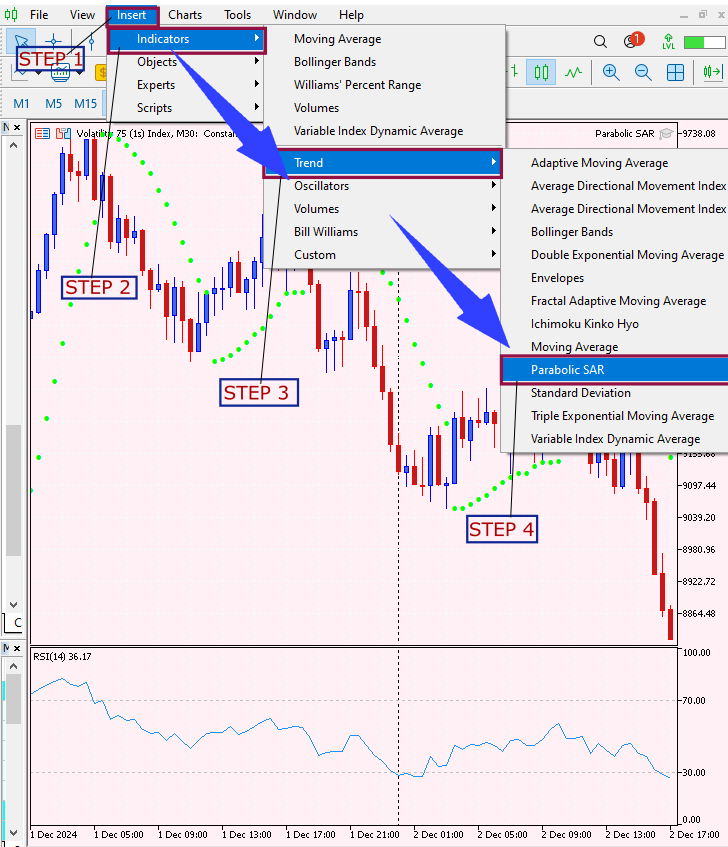
图 1. 添加指标
信号生成逻辑
使用抛物线转向指标涉及密切监控 SAR 抛物线与价格行为之间的相互作用。在此策略中,信号基于以下逻辑生成:
买入信号
当满足以下条件时,触发买入信号:
- 当前K线是看涨的(其收盘价高于开盘价)且其 PSAR 值低于收盘价。
- 前两根K线通过其 PSAR 点位于其收盘价之上来确认看跌趋势。
- 前几根K线的 PSAR 值之间的差距在可接受的范围内,以确保一致性。
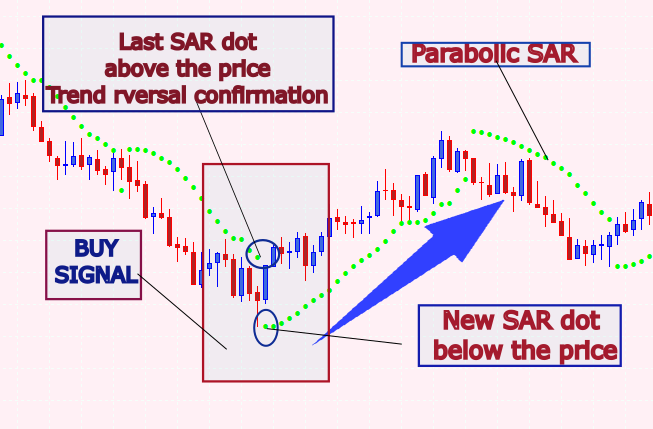
图 2. 买入条件
卖出信号
当满足以下条件时,触发卖出信号:
- 当前K线是看跌的(其收盘价低于开盘价)且其 PSAR 值高于收盘价。
- 前两根K线通过其 PSAR 点位于其收盘价之下来确认看涨趋势。
- 同样,前几根K线的 PSAR 值之间的差距必须在预定义的阈值之内。
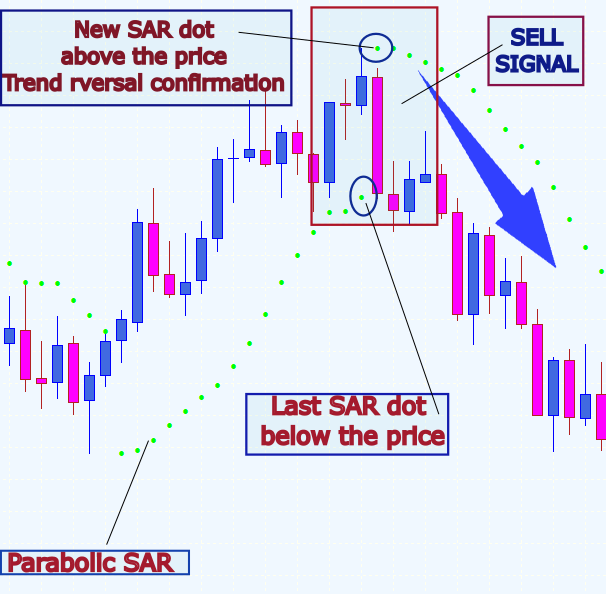
图 3. 卖出条件
在MQL5中的实现
文件头和属性
在代码的最顶端,我们以一个文件头开始,其中包含基本的文件信息,如文件名、版权详情和指向作者网页的链接,在本例中,我提供了我自己的。紧随其后的是几条 #property 指令,它们设置了关键的编译属性,如版本号和严格模式。
//+--------------------------------------------------------------------+
//|                                              Parabolic SAR EA.mql5 |
//|                                 Copyright 2025, Christian Benjamin |
//|                                               https://www.mql5.com |
//+--------------------------------------------------------------------+
#property copyright "2025, Christian Benjamin"
#property link      "https://www.mql5.com/en/users/lynnchris"
#property version   "1.0"
#property strict
使用 #property strict 是基础性的,它强制在 EA 内部进行严格的类型检查和参数验证。这项预防措施有助于在潜在的编码错误升级为运行时错误之前将其识别出来。无论您是计划发布该 EA 还是在实盘交易环境中使用它,此设置都充当了一道保障,确保平稳运行并与未来 MetaTrader 5 的更新保持兼容。您可以将其视为代码的一项基本质量控制措施。
输入参数
接下来,代码定义了一系列输入参数,您可以直接在 MetaTrader 5 界面中自定义这些参数。这些输入包括抛物线转向(Parabolic SAR)指标的参数,如 SARStep 和 SARMaximum,它们分别控制加速因子和最大加速度。还有一些用于优化信号检测的设置,例如 MinConsecutiveDots 还有一些用于优化信号检测的设置,例如 MinConsecutiveDots 和 MaxDotGapPercentage,它们有助于确保只有强劲的趋势才会触发信号。您还可以启用警报、声音通知以及在图表上绘制箭头。
// Input parameters for the Parabolic SAR indicator
input double SARStep    = 0.02;  // Acceleration factor for PSAR
input double SARMaximum = 0.2;   // Maximum acceleration for PSAR

// Input parameters for refining the signal based on PSAR dots
input int    MinConsecutiveDots = 2;          // Require at least 2 consecutive bars in one trend before reversal
input double MaxDotGapPercentage  = 1.0;      // Maximum allowed gap between consecutive PSAR dots (% of current close)

// Input parameters for alerts and arrow drawing
input bool   EnableAlerts  = true;            // Enable popup alerts
input bool   EnableSound   = true;            // Enable sound alerts
input bool   EnableArrows  = true;            // Draw arrows on chart
input string BuyArrowSymbol  = "233";         // Wingdings up arrow (as string)
input string SellArrowSymbol = "234";         // Wingdings down arrow (as string)
input int    ArrowWidth    = 2;               // Arrow thickness
input double ArrowOffsetMultiplier = 5;       // Multiplier for arrow placement offset
这些输入参数让您可以自定义 EA,以适应不同的市场条件和您的交易偏好。这里的一个重要方面是 MetaTrader 5 中箭头符号的多功能性。这些符号来源于 Wingdings 字体,并且很容易自定义。例如,根据您的交易风格,您可以为买入信号选择一个对勾(✓),为卖出信号选择一个“X”。调整箭头宽度等参数可以进一步增强信号的可见性,让您可以微调图表的视觉效果,以求清晰和即时识别。
全局变量和枚举
为了管理 EA 的内部状态,声明了几个全局变量和一个枚举。例如,我们将抛物线转向指标的句柄存储在 sarHandle 变量中,这使我们能够在整个代码中引用该指标。我们还使用 lastBarTime 跟踪最后处理的K线时间,以确保 EA 只处理每根 K 线一次。枚举 SignalType 定义了可能的信号状态:无信号、买入信号或卖出信号。
// Global indicator handle for PSAR
int sarHandle = INVALID_HANDLE;

// Global variable to track last processed bar time
datetime lastBarTime = 0;

// Enumeration for signal types
enum SignalType
  {
   NO_SIGNAL,
   BUY_SIGNAL,
   SELL_SIGNAL
  };

// Global variables for pending signal mechanism
SignalType pendingSignal = NO_SIGNAL;
int        waitCount     = 0;          // Counts new closed bars since signal detection
double     pendingReversalLevel = 0.0; // Stores the PSAR value at signal detection
此外,像 pendingSignal、waitCount和 pendingReversalLevel 这样的变量用于管理待处理的信号,这些信号在最终操作执行前需要等待几根K线的进一步确认。一个关键变量是 pendingReversalLevel,它捕获了信号生成时的 PSAR 值。作为一个参考点,这个水平帮助 EA 监控后续的价格变动,以判断反转是真实的还是仅仅是假信号。这种检查点机制对于减少不必要的交易和提高 EA 的整体准确性至关重要。
在图表上绘制箭头
为了提供更直观的可视化表示,该 EA 包含一个名为 DrawSignalArrow 的函数。此函数负责在检测到信号时在图表上绘制一个箭头。它的工作原理是:基于K线时间生成一个唯一的对象名称,检查是否存在具有该名称的现有对象,并将其删除以避免重复。
void DrawSignalArrow(string prefix, datetime barTime, double price, color arrowColor, long arrowCode)
  {
   string arrowName = prefix + "_" + TimeToString(barTime, TIME_SECONDS);
   // Remove existing object with the same name to prevent duplicates
   if(ObjectFind(0, arrowName) != -1)
      ObjectDelete(0, arrowName);

   if(ObjectCreate(0, arrowName, OBJ_ARROW, 0, barTime, price))
     {
      ObjectSetInteger(0, arrowName, OBJPROP_COLOR, arrowColor);
      ObjectSetInteger(0, arrowName, OBJPROP_ARROWCODE, arrowCode);
      ObjectSetInteger(0, arrowName, OBJPROP_WIDTH, ArrowWidth);
     }
   else
     {
      Print("Failed to create arrow object: ", arrowName);
     }
  }
该 EA 使用 OBJ_ARROW 对象在图表上直观地表示信号。为了避免重复标记造成的混乱,代码在绘制新箭头之前会先检查并移除任何现有的箭头。这种方法保持了图表的整洁和可读性,这对于实时交易决策至关重要。您还可以自定义箭头符号、颜色和偏移量等各个方面,以匹配您对视觉提示的个人偏好。
信号检测函数
EA 的核心在于 CheckForSignal 函数。在这里,代码检查最近三根K线的价格和 PSAR 数据。要识别买入信号,该函数会检查当前K线是否为看涨(即其收盘价高于开盘价)且 PSAR 点位于K线下方,而前两根K线为看跌,其 PSAR 点位于K线上方。卖出信号则应用相反的逻辑。
SignalType CheckForSignal(const double &sarArray[], const double &openArray[], const double &closeArray[])
  {
   // Mapping indices:
   // Index 0: Last closed bar (current candidate)
   // Index 1: Previous bar
   // Index 2: Bar before previous

   double sar0 = sarArray[0], sar1 = sarArray[1], sar2 = sarArray[2];
   double open0 = openArray[0], close0 = closeArray[0];
   double open1 = openArray[1], close1 = closeArray[1];
   double open2 = openArray[2], close2 = closeArray[2];

   // Check for BUY signal:
   if((close0 > open0) && (sar0 < close0) &&
      (sar1 > close1) && (sar2 > close2))
     {
      int countBearish = 0;
      if(sar1 > close1) countBearish++;
      if(sar2 > close2) countBearish++;
      double dotGap = MathAbs(sar1 - sar2);
      double gapThreshold = (MaxDotGapPercentage / 100.0) * close0;
      if(countBearish >= MinConsecutiveDots && dotGap <= gapThreshold)
         return BUY_SIGNAL;
     }

   // Check for SELL signal:
   if((close0 < open0) && (sar0 > close0) &&
      (sar1 < close1) && (sar2 < close2))
     {
      int countBullish = 0;
      if(sar1 < close1) countBullish++;
      if(sar2 < close2) countBullish++;
      double dotGap = MathAbs(sar1 - sar2);
      double gapThreshold = (MaxDotGapPercentage / 100.0) * close0;
      if(countBullish >= MinConsecutiveDots && dotGap <= gapThreshold)
         return SELL_SIGNAL;
     }

   return NO_SIGNAL;
  }
该函数还使用一个间隙阈值来确保连续的 PSAR 点之间的间距保持在可接受的限制内。如果满足条件,它将返回相应的信号类型(买入或卖出);否则,它返回无信号。该信号检测函数通过利用 PSAR 定位和K线图模式有效地识别反转。然而,其设计允许通过加入额外的过滤器(如移动平均线、RSI,甚至是波动率指数)来进行进一步增强。添加这些过滤器有助于消除横盘市场或受重大新闻事件影响时期的假信号。本质上,该 EA 被设计为可适应的,让您可以自由地根据您独特的交易策略和市场条件来调整其逻辑。
新K线检测
在处理任何数据之前,EA 需要确定是否有新的K线已经收盘。IsNewBar 函数通过检索最近收盘的K线的时间并将其与存储的 lastBarTime 进行比较来处理此任务。如果时间不同,则意味着形成了新的K线,因此该函数会更新 lastBarTime 并返回 true。
bool IsNewBar()
  {
   datetime times[];
   if(CopyTime(_Symbol, _Period, 1, 1, times) <= 0)
     {
      Print("Failed to retrieve bar time in IsNewBar().");
      return false;
     }
   if(times[0] != lastBarTime)
     {
      lastBarTime = times[0];
      return true;
     }
   return false;
  }
此检查至关重要,因为它确保 EA 仅在每个新K线上处理一次数据,从而防止重复或错误的信号处理。IsNewBar 函数是 EA 的一个智能效率助推器。通过确保信号仅在每个新K线上处理一次,它防止了冗余计算和重复警报。这个简单的检查使 EA 保持高效运行,并降低了误解单根K线内价格变动的风险。总的来说,它有助于在 MetaTrader 平台上保持一致和可预测的性能。
初始化与反初始化
当 EA 被加载时,OnInit函数首先运行。它的主要任务是使用用户提供的参数为内置的抛物线转向指标创建一个句柄。如果指标成功初始化,则会打印一条确认消息;如果未成功,则会生成一条错误消息,并且初始化失败。相反,当 EA 从图表上移除或终端关闭时,会调用 OnDeinit 函数。
int OnInit()
  {
   // Create the built-in Parabolic SAR indicator handle
   sarHandle = iSAR(_Symbol, _Period, SARStep, SARMaximum);
   if(sarHandle == INVALID_HANDLE)
     {
      Print("Error creating PSAR handle");
      return INIT_FAILED;
     }
   Print("SAR EA initialized successfully.");
   return INIT_SUCCEEDED;
  }
此函数负责释放指标句柄并清理在 EA 运行期间创建的任何图形对象(如箭头),确保不会留下任何不必要的混乱。一个设计良好的 EA 会在反初始化期间注意清理。移除在操作期间创建的任何箭头或其他视觉元素,可以防止图表被过时的标记弄得杂乱无章。这个清理过程就像良好的内务管理,它确保每次您启动 EA 时,您都在一个全新的、整洁的图表上工作,并且系统性能处于最佳状态。
Main Logic (OnTick Function)
最后,OnTick 函数是在每个 tick 上运行的主引擎。它首先使用 IsNewBar 函数检查是否有新的K线刚刚收盘。如果没有检测到新的K线,该函数会提前退出以避免冗余处理。一旦确认了新的K线,EA 就会检索最新的 PSAR 值以及最近K线相应的开盘价和收盘价。此时,EA 会评估是否有待处理的信号正在等待确认。如果信号待处理,一个计数器(waitCount)会递增,以跟踪已经过去了多少根K线。
void OnTick()
  {
   // Process only once per new closed bar
   if(!IsNewBar())
      return;

   // Retrieve PSAR and price data
   double sarArray[4];
   if(CopyBuffer(sarHandle, 0, 1, 4, sarArray) < 3) { /* error handling */ }
   double openArray[4], closeArray[4];
   if(CopyOpen(_Symbol, _Period, 1, 4, openArray) < 3 ||
      CopyClose(_Symbol, _Period, 1, 4, closeArray) < 3) { /* error handling */ }

   // Pending Signal Logic...
   if(pendingSignal != NO_SIGNAL)
     {
      waitCount++; // Increment waiting counter

      if(pendingSignal == BUY_SIGNAL)
        {
         if(closeArray[0] <= pendingReversalLevel)
           {
            // Confirm reversal: Close alert for BUY signal
           }
         else if(waitCount >= 3)
           {
            // Warn about a possible fake BUY signal
           }
        }
      else if(pendingSignal == SELL_SIGNAL)
        {
         if(closeArray[0] >= pendingReversalLevel)
           {
            // Confirm reversal: Close alert for SELL signal
           }
         else if(waitCount >= 3)
           {
            // Warn about a possible fake SELL signal
           }
        }
      return; // Wait until pending signal is resolved
     }

   // Check for a new reversal signal if no pending signal exists
   SignalType newSignal = CheckForSignal(sarArray, openArray, closeArray);
   if(newSignal != NO_SIGNAL)
     {
      pendingSignal = newSignal;
      waitCount = 0; // Reset counter
      pendingReversalLevel = sarArray[0]; // Store current PSAR value

      // Alert and optionally draw an arrow based on the new signal
      if(newSignal == BUY_SIGNAL) { /* process BUY signal */ }
      else if(newSignal == SELL_SIGNAL) { /* process SELL signal */ }
     }
  }
然后,EA 会检查当前价格是否已达到存储的反转水平:如果已达到,它会发出“在此处平仓”的警报以提示该信号;如果过去了三根K线仍未得到确认,EA 会警告这可能是一个假信号。如果没有待处理的信号处于活动状态,EA 会调用 CheckForSignal 函数来查看是否出现了新信号。如果是,它会存储该信号,重置等待计数器,根据当前的 PSAR 值设置待处理的反转水平,并触发相应的警报和视觉标记。OnTick 函数内的一个创新特性是其过滤潜在假信号的方法。
通过使用一个计数器 (waitCount) 来监控信号生成后经过了多少根K线,EA 在采取行动前留出了确认的时间。这种延迟在波动性较大的市场中特别有用,因为在这些市场中,快速的价格波动可能会触发过早的信号。调整确认K线的数量可以让您在响应速度和谨慎之间取得平衡,使 EA 足够灵活,既能支持短期剥头皮策略,也能支持长期趋势策略。
完整的 MQL5 EA 代码
//+--------------------------------------------------------------------+
//|                                              Parabolic SAR EA.mql5 |
//|                                 Copyright 2025, Christian Benjamin |
//|                                               https://www.mql5.com |
//+--------------------------------------------------------------------+

#property copyright "2025, Christian Benjamin"
#property link      "https://www.mql5.com/en/users/lynnchris"
#property version   "1.2"
#property strict

// Input parameters for the Parabolic SAR indicator
input double SARStep    = 0.1;  // Acceleration factor for PSAR
input double SARMaximum = 1;   // Maximum acceleration for PSAR

// Input parameters for refining the signal based on PSAR dots
input int    MinConsecutiveDots = 2;         // Require at least 2 consecutive bars in one trend before reversal
input double MaxDotGapPercentage  = 1.0;     // Maximum allowed gap between consecutive PSAR dots (% of current close)

// Input parameters for alerts and arrow drawing
input bool   EnableAlerts  = true;            // Enable popup alerts
input bool   EnableSound   = true;            // Enable sound alerts
input bool   EnableArrows  = true;            // Draw arrows on chart
input string BuyArrowSymbol  = "233";         // Wingdings up arrow (as string)
input string SellArrowSymbol = "234";         // Wingdings down arrow (as string)
input int    ArrowWidth    = 2;               // Arrow thickness
input double ArrowOffsetMultiplier = 5;       // Multiplier for arrow placement offset

// Global indicator handle for PSAR
int sarHandle = INVALID_HANDLE;

// Global variable to track last processed bar time
datetime lastBarTime = 0;

// Enumeration for signal types
enum SignalType
  {
   NO_SIGNAL,
   BUY_SIGNAL,
   SELL_SIGNAL
  };

// Global variables for pending signal mechanism
SignalType pendingSignal = NO_SIGNAL;
int        waitCount     = 0;        // Counts new closed bars since signal detection
double     pendingReversalLevel = 0.0; // Stores the PSAR value at signal detection

//+------------------------------------------------------------------+
//| DrawSignalArrow - Draws an arrow object on the chart             |
//+------------------------------------------------------------------+
void DrawSignalArrow(string prefix, datetime barTime, double price, color arrowColor, long arrowCode)
  {
   string arrowName = prefix + "_" + TimeToString(barTime, TIME_SECONDS);
// Remove existing object with the same name to prevent duplicates
   if(ObjectFind(0, arrowName) != -1)
      ObjectDelete(0, arrowName);

   if(ObjectCreate(0, arrowName, OBJ_ARROW, 0, barTime, price))
     {
      ObjectSetInteger(0, arrowName, OBJPROP_COLOR, arrowColor);
      ObjectSetInteger(0, arrowName, OBJPROP_ARROWCODE, arrowCode);
      ObjectSetInteger(0, arrowName, OBJPROP_WIDTH, ArrowWidth);
     }
   else
     {
      Print("Failed to create arrow object: ", arrowName);
     }
  }

//+-------------------------------------------------------------------+
//| CheckForSignal - Evaluates PSAR and price data to determine signal|
//+-------------------------------------------------------------------+
SignalType CheckForSignal(const double &sarArray[], const double &openArray[], const double &closeArray[])
  {
// Mapping indices:
// Index 0: Last closed bar (current candidate)
// Index 1: Previous bar
// Index 2: Bar before previous

   double sar0 = sarArray[0], sar1 = sarArray[1], sar2 = sarArray[2];
   double open0 = openArray[0], close0 = closeArray[0];
   double open1 = openArray[1], close1 = closeArray[1];
   double open2 = openArray[2], close2 = closeArray[2];

// Check for BUY signal:
   if((close0 > open0) && (sar0 < close0) &&
      (sar1 > close1) && (sar2 > close2))
     {
      int countBearish = 0;
      if(sar1 > close1)
         countBearish++;
      if(sar2 > close2)
         countBearish++;
      double dotGap = MathAbs(sar1 - sar2);
      double gapThreshold = (MaxDotGapPercentage / 100.0) * close0;
      if(countBearish >= MinConsecutiveDots && dotGap <= gapThreshold)
         return BUY_SIGNAL;
     }

// Check for SELL signal:
   if((close0 < open0) && (sar0 > close0) &&
      (sar1 < close1) && (sar2 < close2))
     {
      int countBullish = 0;
      if(sar1 < close1)
         countBullish++;
      if(sar2 < close2)
         countBullish++;
      double dotGap = MathAbs(sar1 - sar2);
      double gapThreshold = (MaxDotGapPercentage / 100.0) * close0;
      if(countBullish >= MinConsecutiveDots && dotGap <= gapThreshold)
         return SELL_SIGNAL;
     }

   return NO_SIGNAL;
  }

//+------------------------------------------------------------------+
//| IsNewBar - Determines if a new closed bar is available           |
//+------------------------------------------------------------------+
bool IsNewBar()
  {
   datetime times[];
   if(CopyTime(_Symbol, _Period, 1, 1, times) <= 0)
     {
      Print("Failed to retrieve bar time in IsNewBar().");
      return false;
     }
   if(times[0] != lastBarTime)
     {
      lastBarTime = times[0];
      return true;
     }
   return false;
  }

//+------------------------------------------------------------------+
//| Expert initialization function                                   |
//+------------------------------------------------------------------+
int OnInit()
  {
// Create the built-in Parabolic SAR indicator handle
   sarHandle = iSAR(_Symbol, _Period, SARStep, SARMaximum);
   if(sarHandle == INVALID_HANDLE)
     {
      Print("Error creating PSAR handle");
      return INIT_FAILED;
     }
   Print("SAR EA initialized successfully.");
   return INIT_SUCCEEDED;
  }

//+------------------------------------------------------------------+
//| Expert deinitialization function                                 |
//+------------------------------------------------------------------+
void OnDeinit(const int reason)
  {
   if(sarHandle != INVALID_HANDLE)
      IndicatorRelease(sarHandle);

// Remove all arrow objects from the current chart window
   ObjectsDeleteAll(0, (int)OBJ_ARROW, 0);
  }

//+------------------------------------------------------------------+
//| Expert tick function                                             |
//+------------------------------------------------------------------+
void OnTick()
  {
// Process only once per new closed bar
   if(!IsNewBar())
      return;

// Retrieve the last 4 PSAR values (we require at least 3 values)
   double sarArray[4];
   if(CopyBuffer(sarHandle, 0, 1, 4, sarArray) < 3)
     {
      Print("Failed to retrieve PSAR data.");
      return;
     }

// Retrieve the last 4 bars' price data (Open and Close)
   double openArray[4], closeArray[4];
   if(CopyOpen(_Symbol, _Period, 1, 4, openArray) < 3 ||
      CopyClose(_Symbol, _Period, 1, 4, closeArray) < 3)
     {
      Print("Failed to retrieve price data.");
      return;
     }

// Process pending signal logic if a signal is waiting confirmation
   if(pendingSignal != NO_SIGNAL)
     {
      waitCount++; // Increment the waiting counter

      if(pendingSignal == BUY_SIGNAL)
        {
         if(closeArray[0] <= pendingReversalLevel)
           {
            Print("Reversal level reached for BUY signal. Close here.");
            if(EnableAlerts)
               Alert("Close here for BUY signal on ", _Symbol, " at price ", DoubleToString(closeArray[0], _Digits));
            if(EnableSound)
               PlaySound("alert.wav");
            pendingSignal = NO_SIGNAL;
            waitCount = 0;
           }
         else
            if(waitCount >= 3)
              {
               Print("Warning: Possible fake BUY signal - reversal not confirmed in 3 candles.");
               if(EnableAlerts)
                  Alert("Warning: Possible fake BUY signal on ", _Symbol);
               pendingSignal = NO_SIGNAL;
               waitCount = 0;
              }
        }
      else
         if(pendingSignal == SELL_SIGNAL)
           {
            if(closeArray[0] >= pendingReversalLevel)
              {
               Print("Reversal level reached for SELL signal. Close here.");
               if(EnableAlerts)
                  Alert("Close here for SELL signal on ", _Symbol, " at price ", DoubleToString(closeArray[0], _Digits));
               if(EnableSound)
                  PlaySound("alert.wav");
               pendingSignal = NO_SIGNAL;
               waitCount = 0;
              }
            else
               if(waitCount >= 3)
                 {
                  Print("Warning: Possible fake SELL signal - reversal not confirmed in 3 candles.");
                  if(EnableAlerts)
                     Alert("Warning: Possible fake SELL signal on ", _Symbol);
                  pendingSignal = NO_SIGNAL;
                  waitCount = 0;
                 }
           }
      return;
     }

// Check for a new reversal signal
   SignalType newSignal = CheckForSignal(sarArray, openArray, closeArray);
   if(newSignal != NO_SIGNAL)
     {
      pendingSignal = newSignal;
      waitCount = 0; // Reset waiting counter
      pendingReversalLevel = sarArray[0]; // Set reversal level from current PSAR value

      if(newSignal == BUY_SIGNAL)
        {
         Print("Buy signal detected on ", TimeToString(lastBarTime, TIME_DATE|TIME_SECONDS),
               ". Waiting for reversal confirmation (up to 3 candles).");
         if(EnableAlerts)
            Alert("Buy signal detected on ", _Symbol, " at price ", DoubleToString(closeArray[0], _Digits));
         if(EnableArrows)
           {
            double lowVal[];
            if(CopyLow(_Symbol, _Period, 1, 1, lowVal) > 0)
              {
               double offset = _Point * ArrowOffsetMultiplier;
               DrawSignalArrow("BuyArrow", lastBarTime, lowVal[0] - offset, clrGreen, StringToInteger(BuyArrowSymbol));
              }
            else
               Print("Failed to retrieve low price for arrow placement.");
           }
        }
      else
         if(newSignal == SELL_SIGNAL)
           {
            Print("Sell signal detected on ", TimeToString(lastBarTime, TIME_DATE|TIME_SECONDS),
                  ". Waiting for reversal confirmation (up to 3 candles).");
            if(EnableAlerts)
               Alert("Sell signal detected on ", _Symbol, " at price ", DoubleToString(closeArray[0], _Digits));
            if(EnableArrows)
              {
               double highVal[];
               if(CopyHigh(_Symbol, _Period, 1, 1, highVal) > 0)
                 {
                  double offset = _Point * ArrowOffsetMultiplier;
                  DrawSignalArrow("SellArrow", lastBarTime, highVal[0] + offset, clrRed, StringToInteger(SellArrowSymbol));
                 }
               else
                  Print("Failed to retrieve high price for arrow placement.");
              }
           }
     }
  }
//+------------------------------------------------------------------+
测试及结果
在进入实盘交易之前,我建议您在模拟账户上进行回测。 以下是根据您的测试结果来微调 EA 的方法:- 在 MetaEditor 中成功编译您的 EA 后,打开 MetaTrader。
- 在 MetaTrader 中,导航至“策略测试器”。选择您想要测试的 EA,然后选择所需的时间周期、测试周期以及任何其他相关参数。
- 配置好您的设置后,点击“开始”以开始回测。
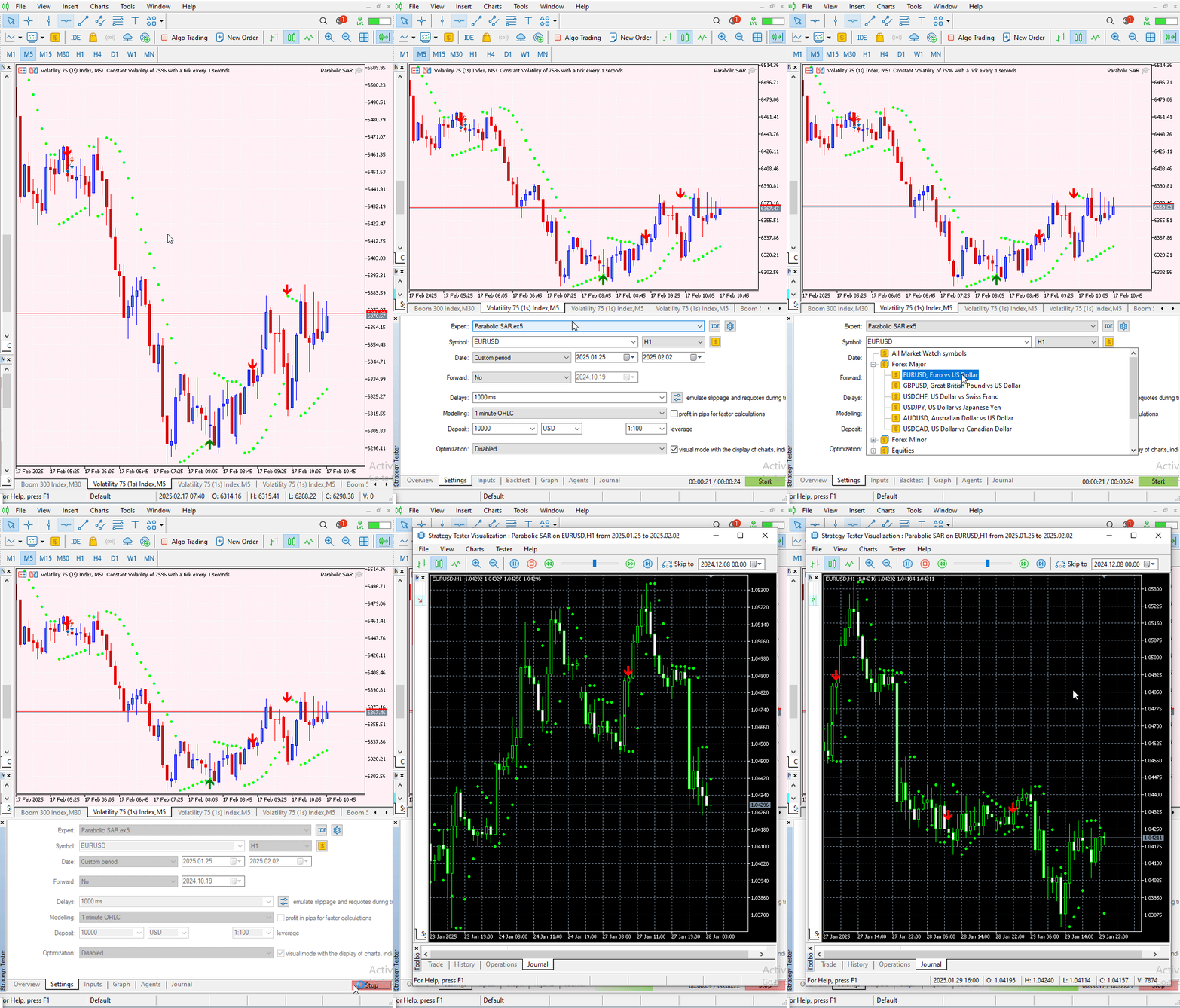
图 4. 初始化测试器
下面,提供了在我回测期间捕获的图片和多个 GIF。第一张图片是波动率 25 指数(Volatility 25 Index)的图表,其中高亮显示了测试期间确认的卖出和买入信号。其后是几个用于额外可视化的 GIF,这可能有助于您更好地理解 EA 的性能。
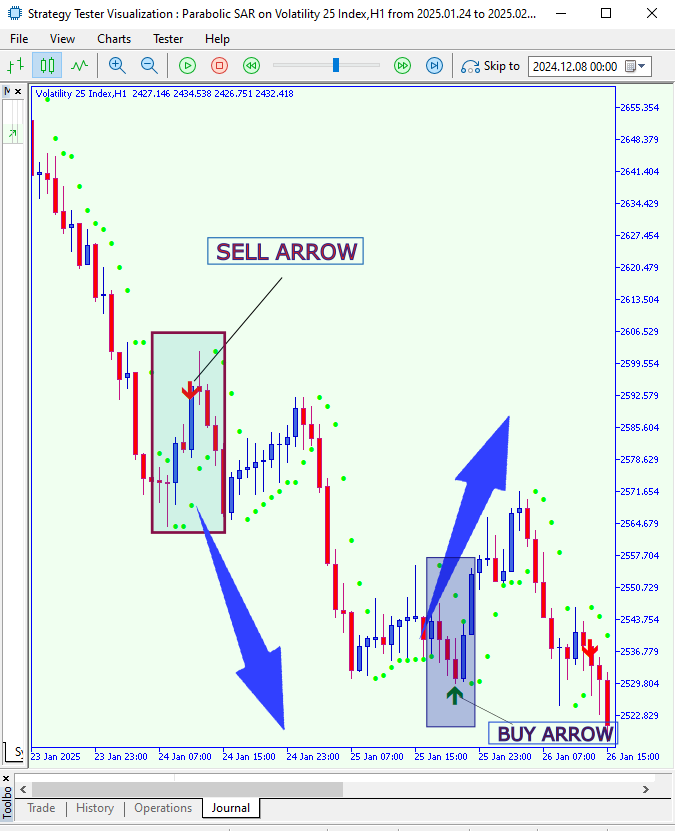
图 5. 在波动率 25 指数上回测
在波动率 25 指数上回测的 GIF。
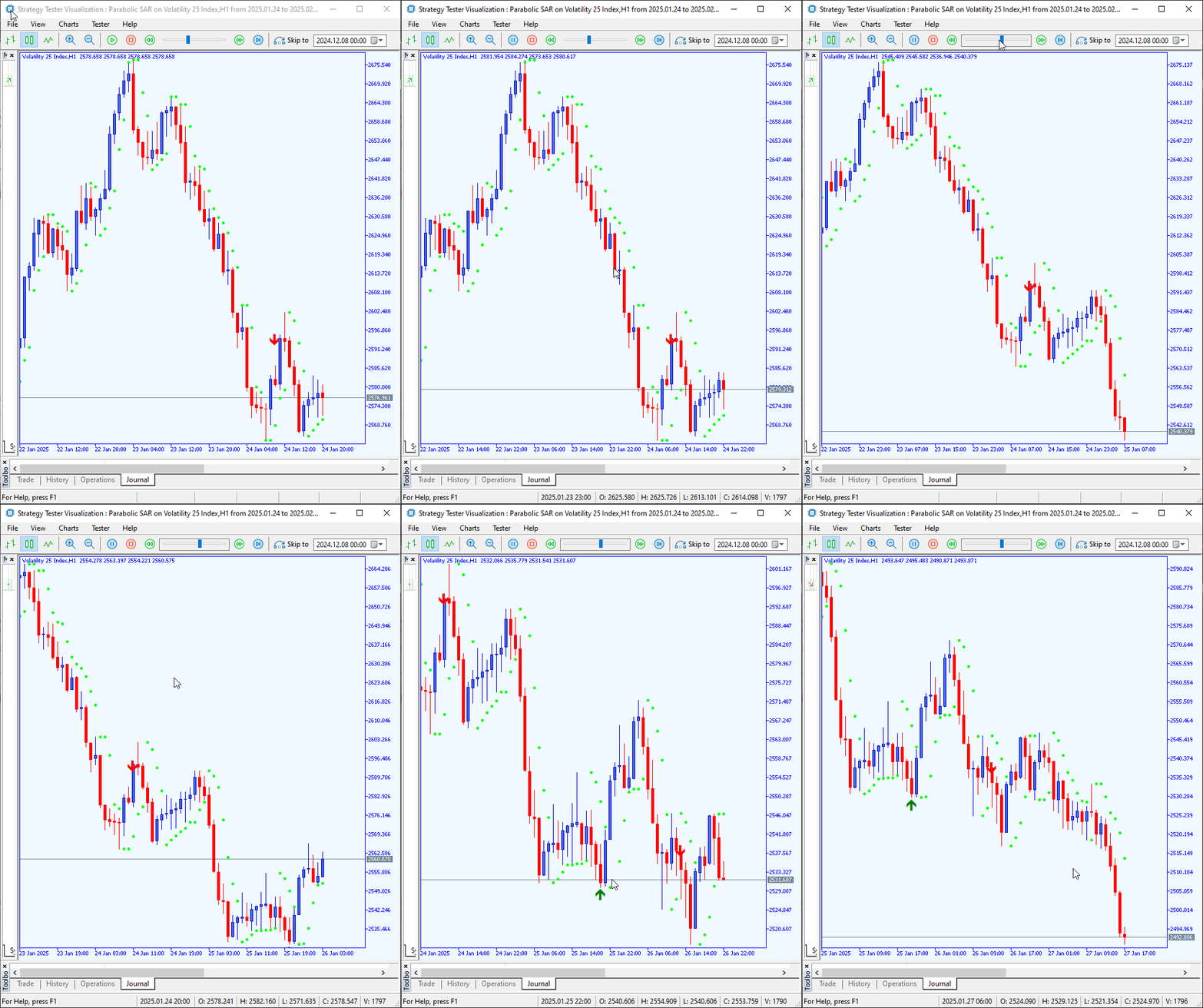
图 6:在波动率 25 指数上回测
在阶梯指数上回测。
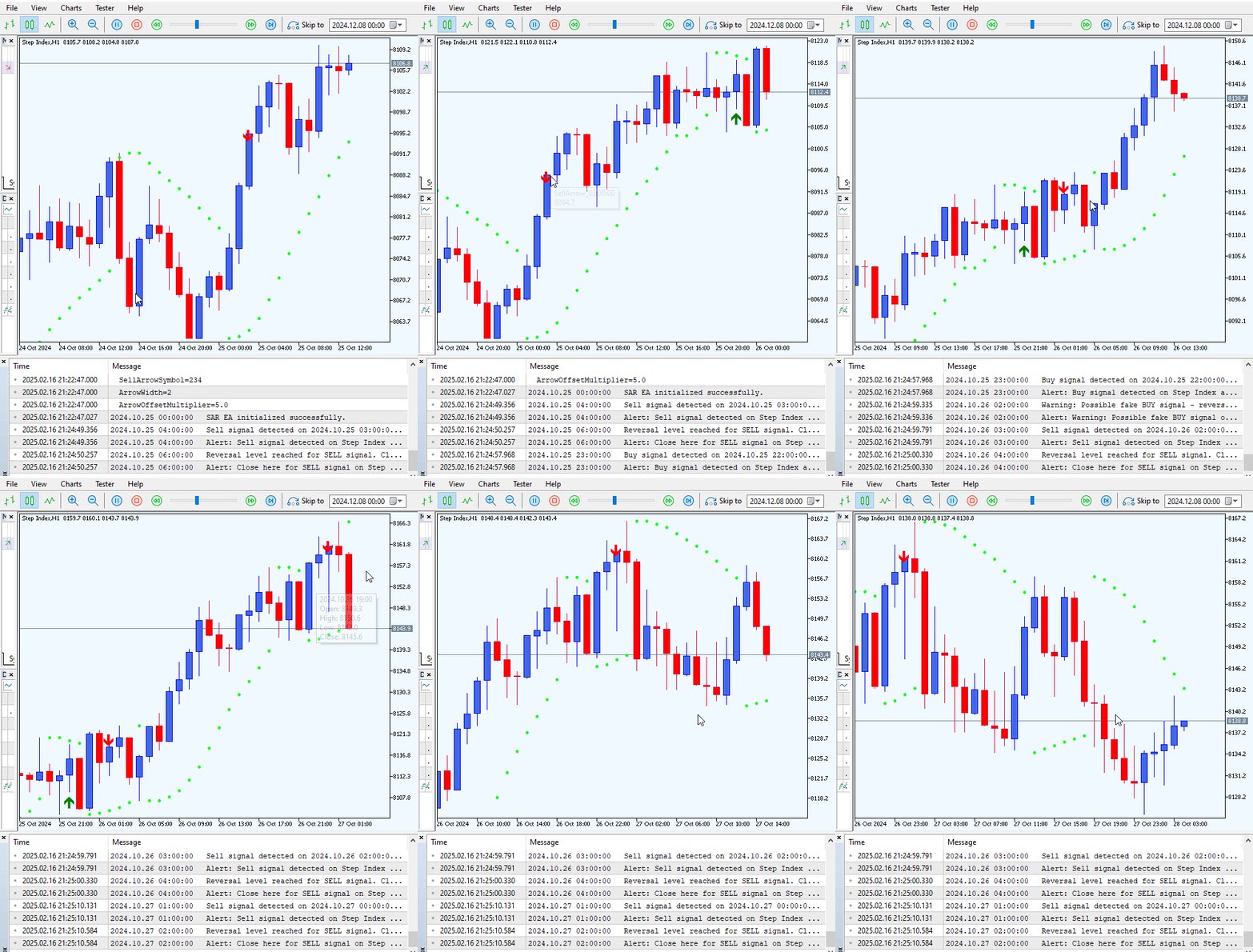
图 7:在阶梯指数上回测
阶梯指数实盘交易。
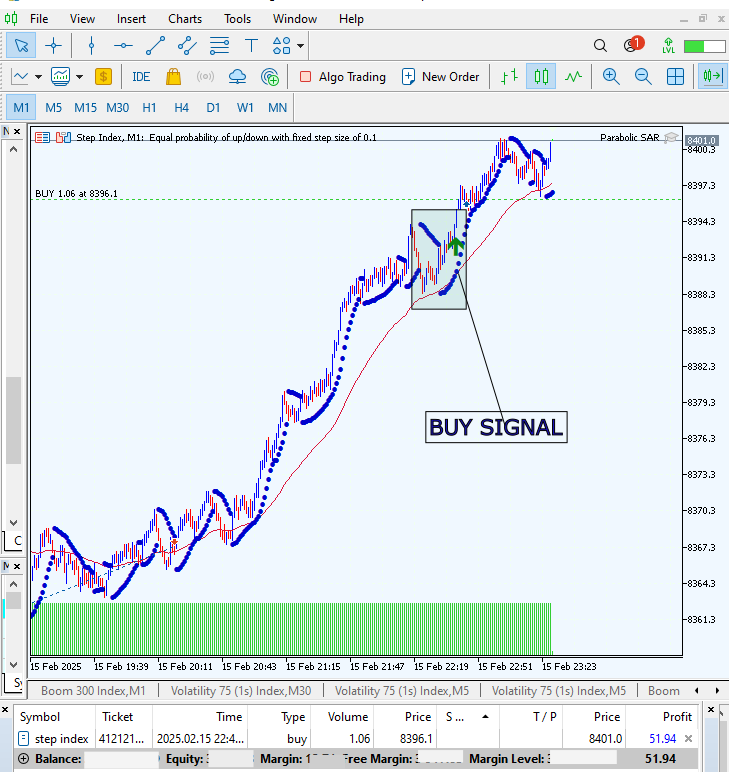
图 8:实盘交易
结论
我们已经开发并测试了该 EA,并取得了积极的结果。然而,一些信号可能需要额外的过滤。请记住,此 EA 旨在补充您自己的交易策略,而不是取代它们。在根据其信号执行任何交易之前,请务必验证所有相关条件。此外,使用更大的时间周期对于减少假信号至关重要。
| 日期 | 工具名称 | 说明 | 版本 | 更新 | 提示 |
|---|---|---|---|---|---|
| 01/10/24 | 图表投影仪 | 用于叠加前一天价格走势(带“幽灵”效果)的脚本。 | 1.0 | 首次发布 | 工具1 |
| 18/11/24 | 分析评论 | 它以表格形式提供前一日的市场信息,并预测市场的未来走向。 | 1.0 | 首次发布 | 工具2 |
| 27/11/24 | 分析大师 | 市场指标每两小时定期更新 | 1.01 | 第二版 | 工具3 |
| 02/12/24 | 分析预测器 | 每两小时定期更新市场指标,并集成Telegram推送功能。 | 1.1 | 第三版 | 工具4 |
| 09/12/24 | 波动性导航工具 | 该EA使用布林带、RSI和ATR指标分析市场状况。 | 1.0 | 首次发布 | 工具5 |
| 19/12/24 | 均值回归信号收割器 | 使用均值回归策略分析市场并提供信号 | 1.0 | 首次发布 | 工具6 |
| 9/01/25 | 信号脉冲 | 多时间框架分析器 | 1.0 | 首次发布 | 工具7 |
| 17/01/25 | 指标看板 | 带按钮的分析面板 | 1.0 | 首次发布 | 工具8 |
| 21/01/25 | 外部资金流 | 通过外部库进行分析 | 1.0 | 首次发布 | 工具9 |
| 27/01/25 | VWAP | 成交量加权平均价格 | 1.3 | 首次发布 | 工具10 |
| 02/02/25 | Heikin Ashi | 势平滑与反转信号识别 | 1.0 | 首次发布 | 工具11 |
| 04/02/25 | FibVWAP | 通过 Python 分析生成信号 | 1.0 | 首次发布 | 工具12 |
| 14/02/25 | RSI 背离 | 价格走势与 RSI 背离的对比 | 1.0 | 首次发布 | 工具13 |
| 17/02/2025 | 抛物线转向与反转 (PSAR) | 自动化PSAR策略 | 1.0 | 首次发布 | 工具14 |
本文由MetaQuotes Ltd译自英文
原文地址: https://www.mql5.com/en/articles/17234
注意: MetaQuotes Ltd.将保留所有关于这些材料的权利。全部或部分复制或者转载这些材料将被禁止。
本文由网站的一位用户撰写,反映了他们的个人观点。MetaQuotes Ltd 不对所提供信息的准确性负责,也不对因使用所述解决方案、策略或建议而产生的任何后果负责。

 算法交易中的神经符号化系统:结合符号化规则和神经网络

 在 MQL5 中构建自优化智能交易系统(第六部分):防止爆仓
 您应当知道的 MQL5 向导技术(第 52 部分):加速器振荡器
