Lib4 EAPadPRO for MT4

5

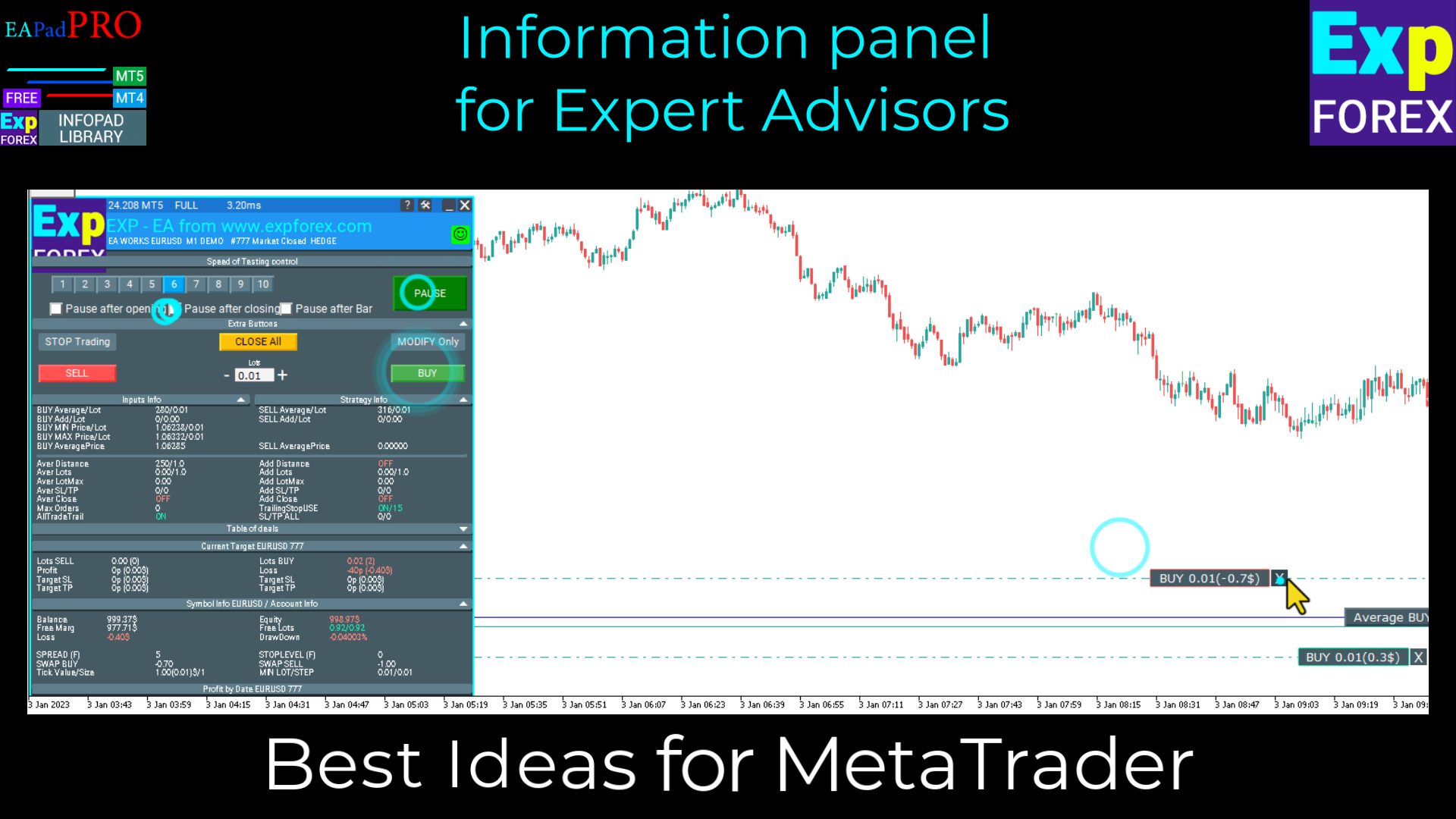
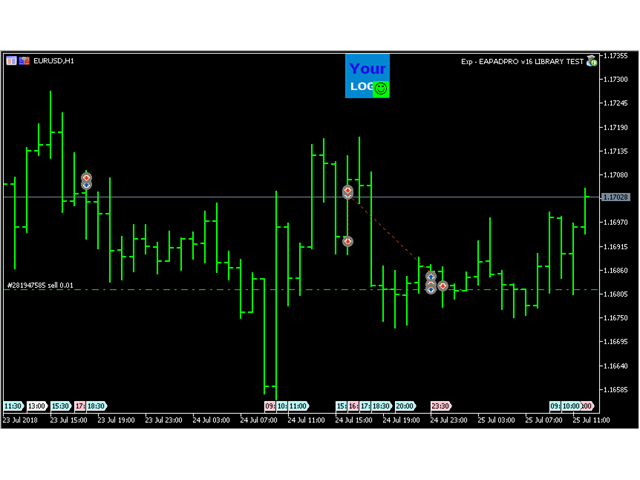
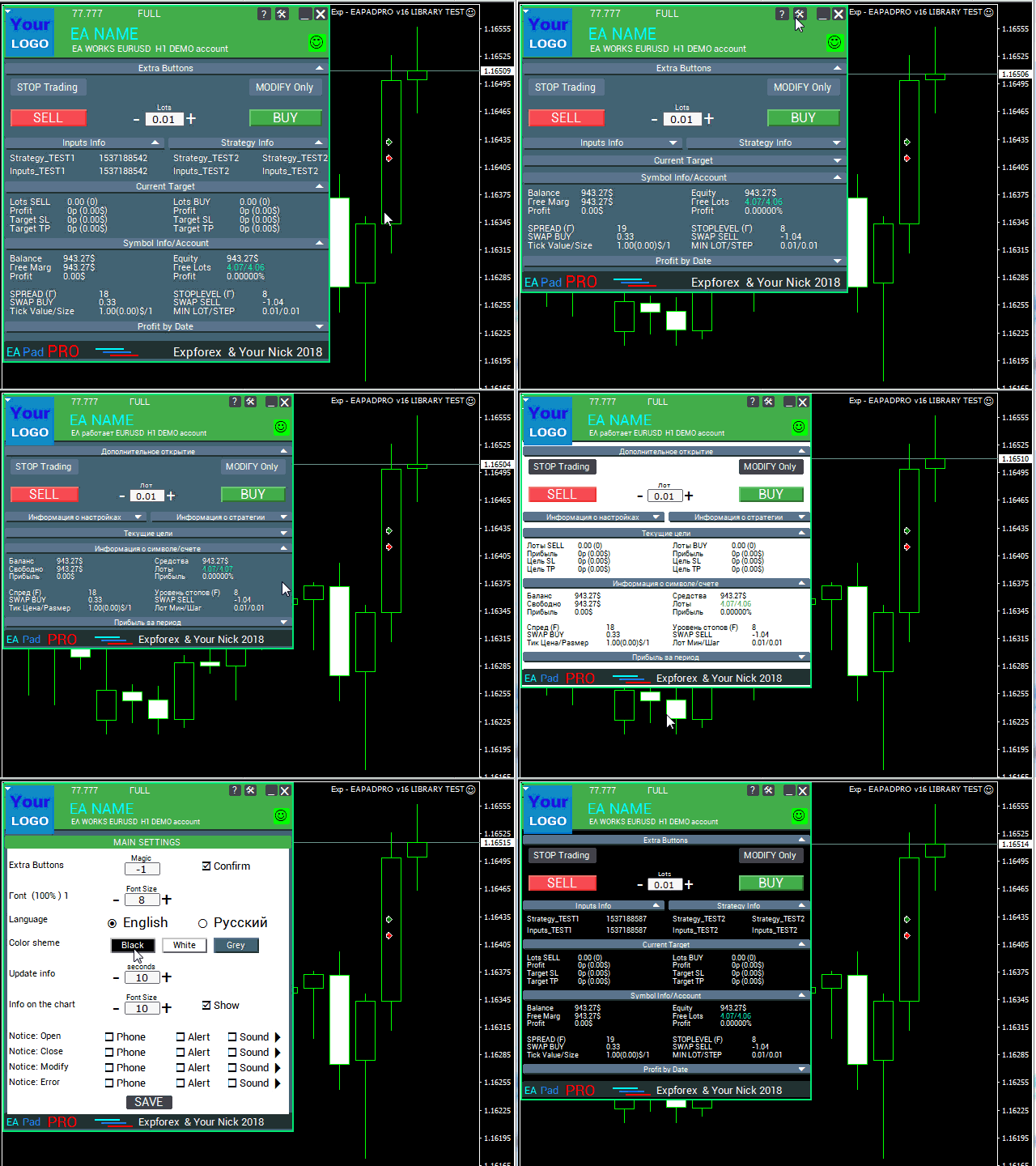
EAPADPRO Library for MetaTrader 4 est une bibliothèque d’interface professionnelle gratuite qui permet d’ajouter un panneau d’information moderne à votre Expert Advisor.

Cette bibliothèque a été créée pour les développeurs MQL4 qui souhaitent rendre leurs programmes de trading plus clairs, plus complets visuellement et plus professionnels directement sur le graphique de MetaTrader 4.

L’algorithme de trading est important, mais la première impression du produit compte aussi. Un panneau d’information bien structuré aide l’utilisateur à comprendre plus rapidement ce que fait l’Expert Advisor, quels paramètres sont actifs, quel symbole et quel Magic number sont traités, ainsi que quelles valeurs de stratégie sont importantes à ce moment précis.

EAPADPRO pour MT4 est une bibliothèque gratuite. Vous pouvez l’utiliser pour améliorer l’interface, l’affichage des informations et la qualité visuelle de votre Expert Advisor.

Guide complet d’intégration étape par étape : LIB - EAPADPRO instruction étape par étape

Description détaillée du panneau EAPADPRO : Panneau d’information EAPADPRO

Version pour MetaTrader 5 : EAPADPRO Library for MT5

MQL5 Channel https://www.mql5.com/en/channels/expforex


Ce qu’EAPADPRO ajoute à votre Expert Advisor

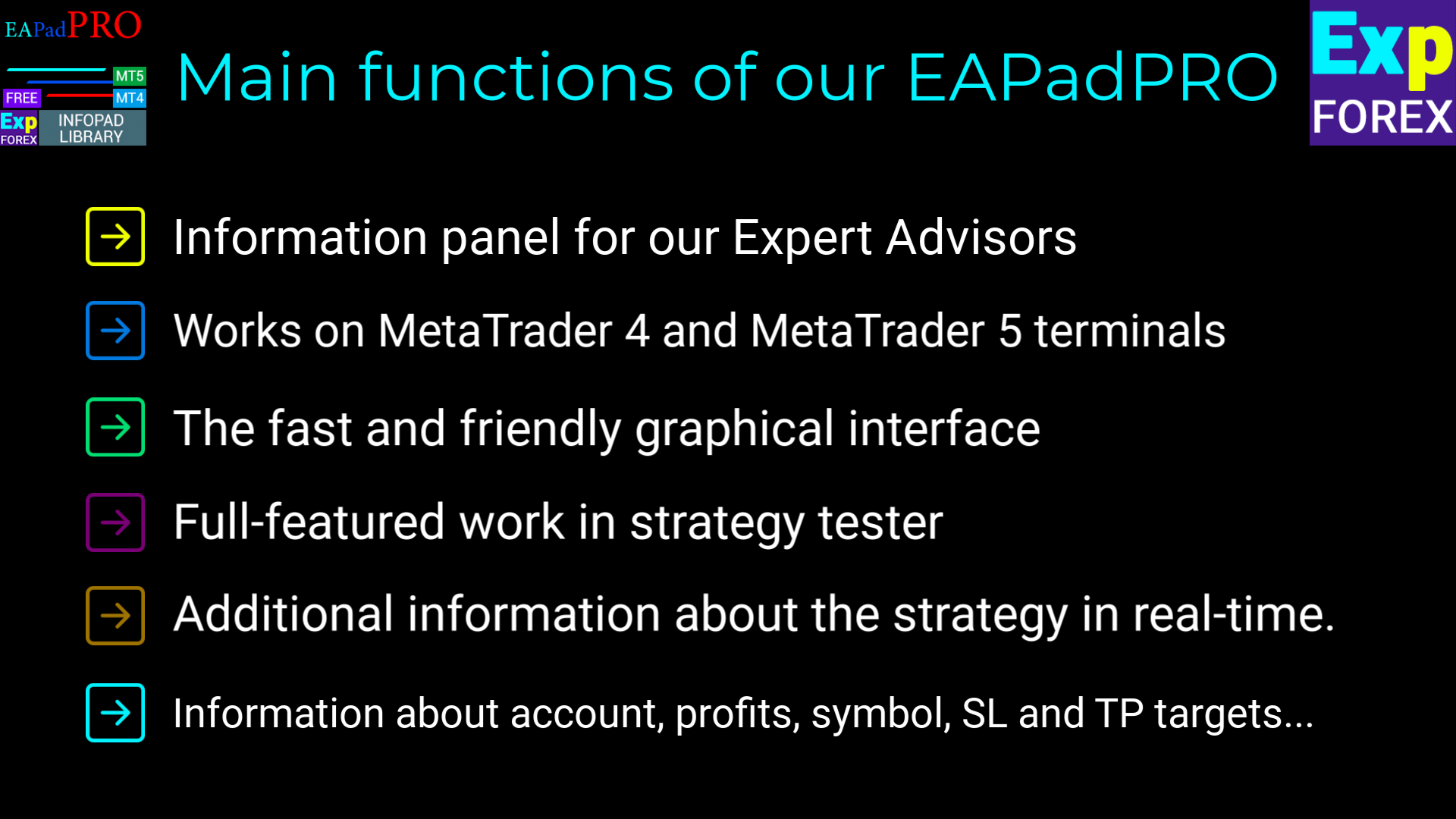
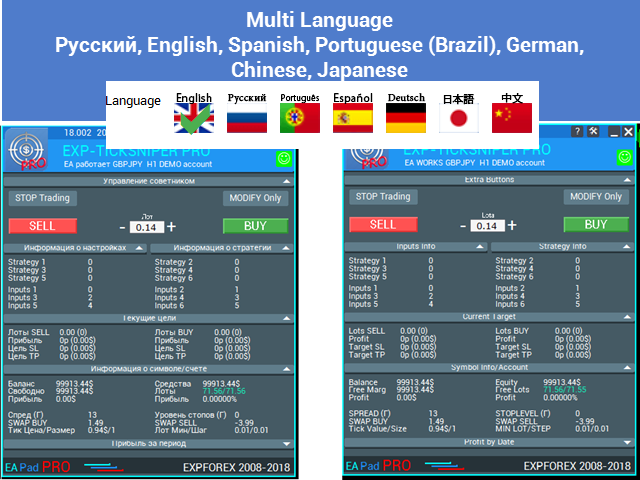
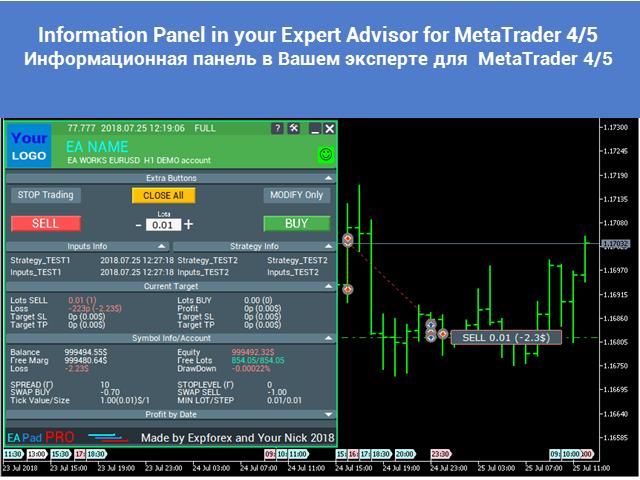
  • Un panneau d’information moderne directement sur le graphique de MetaTrader 4 ;
  • L’affichage du nom de l’Expert Advisor, de la version, du logo et des informations de l’auteur ;
  • L’affichage des paramètres externes input sélectionnés ;
  • L’affichage en temps réel des valeurs importantes de la stratégie ;
  • Le filtrage des informations du panneau par Magic number ;
  • Un bloc optionnel BUY / SELL pour le contrôle du trading en un clic ;
  • Des notifications, des logs et des informations d’erreur pour une meilleure transparence ;
  • Une présentation visuelle plus professionnelle de votre produit de trading.


Pourquoi utiliser cette bibliothèque ?

De nombreux Expert Advisors disposent d’une logique de trading solide, mais presque aucune interface visuelle confortable. L’utilisateur doit alors lire les logs, ouvrir les onglets du terminal et comprendre manuellement ce que fait le programme.

EAPADPRO aide à résoudre ce problème. La bibliothèque ajoute à votre Expert Advisor un dashboard d’information structuré, ce qui rend le produit plus facile à comprendre, plus simple à prendre en charge et plus attractif pour les utilisateurs.

La bibliothèque ne modifie pas votre stratégie de trading et ne promet pas de profit. Son objectif est d’améliorer l’interface, l’affichage des informations et l’expérience utilisateur de votre Expert Advisor.


Processus d’intégration

Le processus d’ajout du panneau comprend 10 étapes claires. Chaque étape est expliquée en détail dans l’article d’instruction étape par étape.

  1. Installez la bibliothèque depuis le MQL5 Market ;
  2. Ouvrez le code source de votre Expert Advisor ;
  3. Ouvrez l’exemple depuis l’instruction étape par étape dans le blog ;
  4. Copiez les blocs de code nécessaires étape par étape ;
  5. Personnalisez le panneau pour votre propre Expert Advisor ;
  6. Compilez et testez le résultat dans MetaTrader 4.


Personnalisation d’EAPADPRO

Vous pouvez adapter le panneau à votre propre produit :

  1. versionea — version de votre Expert Advisor affichée dans le panneau ;
  2. BMPLOGO — votre logo BMP 60x60 affiché dans le panneau ;
  3. icon — icône de votre Expert Advisor dans les propriétés du programme ;
  4. defEANAME — nom de votre Expert Advisor affiché dans le panneau ;
  5. YourName — votre nom ou nickname affiché dans le panneau ;
  6. copyright — information de copyright affichée dans les propriétés de l’Expert Advisor ;
  7. CreateInputs — fonction permettant d’afficher les variables externes sélectionnées dans le panneau ;
  8. CreateStrategy — fonction permettant d’afficher les valeurs sélectionnées de la stratégie dans le panneau ;
  9. MagicForEaPadPRO — filtre des informations du panneau par Magic number ;
  10. MagicForEaPadPRO_Open — Magic number attribué aux positions ouvertes depuis le panneau ;
  11. CommentForEaPadPRO — commentaire attribué aux positions ouvertes depuis le panneau ;
  12. ShowBuySell — option permettant d’afficher ou de masquer le bloc de trading BUY / SELL en un clic.

Vous pouvez également configurer des variables externes :

  1. ShowEaPadPro — afficher ou masquer le panneau EAPADPRO ;
  2. FontName — police utilisée par le panneau.


Conditions d’utilisation

La bibliothèque d’information EAPADPRO pour MetaTrader 4 est distribuée gratuitement, mais avec attribution obligatoire à l’auteur.

Si vous utilisez cette bibliothèque dans un Expert Advisor, un indicateur ou un autre produit de trading que vous publiez, vendez ou distribuez, veuillez ajouter l’attribution suivante dans la description de votre produit :

  1. Le panneau d’information EAPADPRO a été développé par Expforex.
  2. Tous les droits du panneau EAPADPRO appartiennent à Vladislav / Expforex.
  3. L’auteur du panneau EAPADPRO n’est pas responsable de l’Expert Advisor, de l’indicateur ou de la stratégie qui utilise ce panneau.
  4. Le panneau EAPADPRO est conçu uniquement pour fournir des informations visuelles et de trading supplémentaires dans MetaTrader.


Avis important

EAPADPRO est une bibliothèque d’interface et d’information. Elle ne fournit pas de signaux de trading, ne remplace pas votre logique de trading et ne garantit aucun profit.

Utilisez EAPADPRO pour rendre votre Expert Advisor plus informatif, plus pratique pour l’utilisateur et plus professionnel.

Avis 7
Zhong Liang Zhao
440
Zhong Liang Zhao 2024.01.20 13:29 
 

Wonderful. Thanks for sharing

Sergey Zhuravkov
2116
Sergey Zhuravkov 2019.09.18 14:24 
 

Всегда хорошие продукты

Produits recommandés
Exp4 Tester PAD for Strategy Tester
Vladislav Andruschenko
4.9 (20)
L'utilitaire vous permet de tester manuellement vos stratégies dans le testeur de stratégie. Trading en un clic sur le graphique de visualisation. La dernière version de l'utilitaire offre des fonctionnalités avancées permettant aux traders de tester manuellement leurs stratégies de trading. Avec le testeur de stratégie, vous pouvez désormais évaluer l'efficacité de vos stratégies de trading dans un environnement simulé. Cette fonctionnalité vous permet d'analyser les performances de vos techniq
FREE
High Low Open Close MT4
Alexandre Borela
4.81 (21)
Si vous aimez ce projet, laissez un examen 5 étoiles. Cet indicateur tire les prix ouverts, élevés, bas et de fermeture pour les prix spécifiés période et il peut être ajusté pour un fuseau horaire spécifique. Il s ' agit là d ' un niveau important qui s ' intéresse à de nombreux domaines institutionnels et professionnels. traders et peut être utile pour vous de connaître les endroits où ils pourraient être plus active. Les périodes disponibles sont les suivantes : Jour précédent. Semaine pré
FREE
Night Scalper EA Lite
Robots4Forex Ltd
2.25 (4)
The Night Scalper EA Lite is a fully automated Expert Advisor that trades at night and relies on price reversion. The EA trades using market orders and has the option to use time averaging to improve performance. This EA works best on EURUSD using the M5 timeframe, but will also work on AUDUSD, GBPUSD, NZDUSD, USDCAD, USDCHF and likely many more. A VPS is advisable when trading this system and a low spread and commission based broker is best. Check the comments for back test results and optimiz
FREE
Zigzag Extremum points
Oleg Popov
4.81 (32)
New version 8.00 is available. In this version, I tried to take into account the wishes of the user. Each of you can also take part in the improvement of this advisor. In the default settings, the adviser opens trades when the extremum point is broken       standard indicator       Zigzag. When the upper point of the zigzag extremum is broken, it opens a buy deal, and when the lower point of the zigzag extremum is broken, it opens a sell deal. In addition to the standard ZigZag indicator, which
FREE
Free automatic Fibonacci is an indicator that automatically plots a Fibonacci retracement based on the number of bars you select on the BarsToScan setting in the indicator. The Fibonacci is automatically updated in real time as new highest and lowest values appears amongst the selected bars. You can select which level values to be displayed in the indicator settings. You can also select the color of the levels thus enabling the trader to be able to attach the indicator several times with differe
FREE
Wise Men Indicator demo
Bohdan Kasyanenko
3 (2)
The indicator displays signals according to the strategy of Bill Williams on the chart. Demo version of the indicator has the same features as the paid, except that it can work only on a demo account . Signal "First Wise Man" is formed when there is a divergent bar with angulation.  Bullish divergent bar - with lower minimum and closing price in the upper half. Bearish divergent bar - higher maximum and the closing price at the bottom half. Angulation is formed when all three lines of Alligator
FREE
Indicator measures strength of each currency in your list. Main idea: It simply iterates through all combinations of pairs and adds difference between open and close in percent. Parameters: List of currencies - what currencies will be calculated (maximum is 8) Calculation type - from which data will be strength calculated Calculation data input - used as input related to calculation type Symbol suffix - used in case of suffix on symbols, e.g: when your symbols look like EURUSDm, EURUSDmicro etc
FREE
Signalator Lot Size Evaluator MT4 is a free local MetaTrader 4 utility for manual traders. It helps calculate an estimated lot size before opening a trade manually. The calculation is based on account size, trade direction, entry price, stop loss, risk percentage or fixed money risk, and broker symbol settings. The main purpose is simple: Enter your setup → define your risk → get the suggested lot size. The panel also shows useful pre-trade information such as spread, risk amount, SL/TP distance
FREE
Harvest FX
Sayan Vandenhout
4.56 (9)
Harvest FX USES THE TREND WAVE INDICATOR AND IT CAN IDENTIFY THE BEGINNING AND THE END OF A NEW WAVE TREND MOVEMENT. AS AN OSCILLATOR, THE INDICATOR IDENTIFIES THE OVERBOUGHT AND OVERSOLD ZONES. IT WORKS GREAT TO CATCH THE SHORT TERM PRICE REVERSALS AND USES A MARTINGALE STRATEGY TO CLOSE ALL TRADES IN PROFIT. USE DEFAULT SETTINGS ON H1 OR HIGHER TIME FRAME ON ANY PAIR FOR MORE ACCURATE TRADES WHY THIS EA : Smart entries calculated by 3 great strategies The EA can be run on even a $30000 a
FREE
Fibomathe for MT4
Almaquio Ferreira De Souza Junior
Fibomathe Indicator: Support and Resistance Tool for MT4 The Fibomathe Indicator is a technical analysis tool designed for MetaTrader 4 (MT4) that assists traders in identifying support and resistance levels, take-profit zones, and additional price projection areas. It is suitable for traders who use structured approaches to analyze price action and manage trades. Key Features Support and Resistance Levels: Allows users to define and adjust support and resistance levels directly on the chart. L
FREE
Email Drawdown Alert
Roman Starostin
5 (12)
Free informative Indicator-helper. It'll be usefull for traders who trade many symbols or using grid systems (Averaging or Martingale). Indicator counts drawdown as percent and currency separate. It has a number of settings: Count deposite drawdown according equity value and send e-mail or notifications to user if DD more than set; Sending e-mail when max open orders reached; Shows price and remaining pips amount before MarginCall on current chart and Account generally; Display summary trade lot
FREE
EA Scalping Expert
Gerard Valldosera Gomez
3 (1)
This is a fully automated scalping Expert Advisor that can be run successfully using EURUSD currency pair at H1 timeframe. This EA can't run in the same account. If you want an Expert Advisor that trades daily this is not because it requires patience to wait for a few days or weeks on the right opportunity for it to trade. It takes advantage of the volatility of the price movement.
FREE
Simple RSI Forex Trading Strategy
Victor Manuel Valderrama Zamora
4 (1)
Diversify the risk in your trading account by combining our Expert Advisors. Build your own custom trading system here:   Simple Forex Trading Strategies The expert advisor opens trades when RSI indicator enter in oversold or overbought areas. The Stop Loss, Take Profit, and Trailing Stop are calculated based on the ATR indicator. The recommended currency pair is EURGBP and the recommended timeframe to operate and to do backtests is H4. This Expert Advisor can be profitable in any TimeFrame an
FREE
PZ Goldfinch Scalper EA
PZ TRADING SLU
2.69 (42)
This is the latest iteration of my famous scalper, Goldfinch EA, published for the first time almost a decade ago. It scalps the market on sudden volatility expansions that take place in short periods of time: it assumes and tries to capitalize of inertia in price movement after a sudden price acceleration. This new version has been simplified to allow the trader use the optimization feature of the tester easily to find the best trading parameters. [ Installation Guide | Update Guide | Troublesh
FREE
OrderBlock TS Roman
Vladislav Vlastovskii
3.8 (5)
Индикатор строит блоки заказов (БЗ) по торговой системе (ТС) Романа. Поиск блоков осуществляется одновременно на двух таймфремах: текущем и старшем (определяемым в настройках). Для оптимизации и игнорирования устаревших блоков в настройках задается ограничение количества дней в пределах которых осуществляется поиск блоков. Блоки строятся по правилам ТС состоящем из трех шагов: какую свечу вынесли (что?); какой свечой вынесли (чем?); правило отрисовки (как?).
FREE
SL and TP Setter
Giacomo Barone
4 (1)
You can manually open a trade (one click), and this EA will take care of setting the SL and TP. SL and TP are set based on the number of pips you specify in the input screen. You can also choose monetary SL and TP. SL and TP are determined based on the weighted average price (WAP), so if you open a new trade, SL and TP will be updated according to the new WAP. The WAP is not unique but differentiated between buy and sell trades (this is useful only if you open opposite trades on the same chart)
FREE
PZ Penta O MT4
PZ TRADING SLU
2.33 (3)
The Penta-O is a 6-point retracement harmonacci pattern which usually precedes big market movements. Penta-O patterns can expand and repaint quite a bit. To make things easier this indicator implements a twist: it waits for a donchian breakout in the right direction before signaling the trade. The end result is an otherwise repainting indicator with a very reliable trading signal. The donchian breakout period is entered as an input. [ Installation Guide | Update Guide | Troubleshooting | FAQ | A
FREE
This simple but useful script calculates the lot in % of the deposit. It is indispensable for risk management. There is only one customizable parameter: MaxRisk - risk in % for lot calculation. The product works as a standard script. Launch it once on an appropriate chart and start trading using the calculated lot value. Genious is simplicity! Happy trading!
FREE
PZ Trade Pad EA
PZ TRADING SLU
4.29 (31)
This simple visual expert advisor allows you to trade easily from the chart. It handles risk management for you and can perform several useful tasks with your existing trades, saving time and making risk-management for each individual trade easier.  [ Installation Guide | Update Guide | Troubleshooting | FAQ | All Products   |  Get Help ] Trade easily from the chart Trade with precise risk management, hassle free Trade pending order with drag and drop price selection Set SL and TP levels with
FREE
Traditional MACD MT4
Daniel Lewis
4.58 (55)
MACD indicator in MetaTrader 4/5 looks different than MACD does in most other charting software. That is because the MetaTrader 4/5 version of MACD displays the MACD line as a histogram when it is traditionally displayed as a line. Additionally, the MetaTrader 4/5 version computes the Signal line using an SMA, while according to MACD definition it is supposed to be an EMA. The MetaTrader 4/5 version also does not compute a true MACD Histogram (the difference between the MACD/Signal lines). This
FREE
Grid Assistant Pro
Alessandro De Cristofaro
Grid Assistant Pro – Utility for Managing Grid Strategies on MetaTrader 4 Grid Assistant Pro is a professional utility that helps traders manage and monitor unidirectional grid strategies directly from the MT4 chart. It provides a visual dashboard , clear controls, and automated risk protection features for precise and efficient grid operation. Key Features Visual Dashboard Real-time metrics: Balance, Equity, Floating P/L, Drawdown %, Free Margin Grid status: active and pending or
FREE
Double HMA lines MTF
Pavel Zamoshnikov
5 (2)
This is a multi-timeframe version of the popular Hull Moving Average (HMA). The Double HMA MTF Light indicator combines two timeframes on a single chart. The HMA of the higher timeframe defines the trend, and the HMA of the current timeframe defines short-term price movements. The indicator is freely distributed and hasn't audio signals or messages. Its main function is the visualization of price movements. If you need advanced functionality of the HMA multi-timeframe indicator (information ab
FREE
Follow The Line
Oliver Gideon Amofa Appiah
3.94 (16)
FOLLOW THE LINE GET THE FULL VERSION HERE: https://www.mql5.com/en/market/product/36024 This indicator obeys the popular maxim that: "THE TREND IS YOUR FRIEND" It paints a GREEN line for BUY and also paints a RED line for SELL.  It gives alarms and alerts of all kinds. IT DOES NOT REPAINT and can be used for all currency pairs and timeframes. Yes, as easy and simple as that. Even a newbie can use it to make great and reliable trades. NB: For best results, get my other premium indicators for more
FREE
Limited-time free release: Relative Volume Breakout Signals MT4 is published free while MetaCoderStore collects trader feedback, comments, and feature requests. Relative Volume Breakout Signals measures the current bar tick volume against its recent average and marks range breakouts that happen on unusual participation. Use cases Identify breakouts with stronger-than-normal tick volume. Filter quiet range breaks from high-participation expansion moves. Feed relative-volume and signal buffers int
FREE
Trendline indicator
David Muriithi
2 (1)
Are you tired of drawing trendlines every time you're analyzing charts? Or perhaps you would like more consistency in your technical analysis. Then this is for you. This indicator will draw trend lines automatically when dropped on a chart. How it works Works similar to standard deviation channel found on mt4 and mt5. It has 2 parameters: 1. Starting Bar 2. Number of bars for calculation The   starting bar   is the bar which drawing of the trend lines will begin, while the   number of bars for c
FREE
EA Close All Set TPSL All  Panel MT4 EA Close All Set TPSL All MT4 is a professional utility tool for MetaTrader 4 that helps traders manage orders quickly and efficiently. With a clean on-chart control panel, you can close trades or set Take Profit / Stop Loss levels for all orders with just one click.       [MT5 Version --->  click . ] Key Features On-Chart Control Panel – Light gray background with simple and intuitive design. Close All Orders – Instantly close all active Buy, Sell, and Pe
FREE
Symbol Cycler is a lightweight on-chart utility that lets you quickly switch between symbols in your Market Watch list using two simple arrow buttons (). With a single click, you can scroll forward or backward through your predefined symbols without leaving the chart. Key Features: One-click symbol switching from the chart Works with your Market Watch list order Buttons can be placed in any chart corner or even the center Timeframe remains locked while switching symbols Clean, responsive UI
FREE
DF Fib Trader Pro DF Fib Trader Pro est un système de trading automatisé conçu pour MetaTrader 4. Il utilise les niveaux de prix basés sur Fibonacci, combinés à une analyse des tendances et des structures, pour définir les points d'entrée et de sortie. L'EA prend en charge les positions longues et courtes et intègre des paramètres de gestion des risques. Fonctionnalités principales : • Utilise la logique de retracement et d'extension de Fibonacci pour tracer les points d'entrée, SL et TP. • Ta
FREE
Macd Martin
Roman Yablonskiy
2.5 (2)
Double Breakout   is an automatic expert advisor with two separate strateges that uses martingale. The MACD indicator with adjustable parameters is used as inputs for each flow of orders. The specified takeprofit and stoploss levels are used to exit the position.  General recommendation The minimum recommended deposit is 1000 cents. Spread is recommended not more than 3 points. It is better to use trend currency pairs. The martingale parameter can be set from 0.1 to any value. When martingale i
FREE
Market Profile 3
Hussien Abdeltwab Hussien Ryad
3 (2)
Market Profile 3 MetaTrader 4 indicator  — is a classic Market Profile implementation that can show the price density over time, outlining the most important price levels, value area, and control value of a given trading session. This indicator can be attached to timeframes between M1 and D1 and will show the Market Profile for daily, weekly, monthly, or even intraday sessions. Lower timeframes offer higher precision. Higher timeframes are recommended for better visibility. It is also possible t
FREE
Les acheteurs de ce produit ont également acheté
Friends, join us! Ask questions and connect with like-minded traders: MetaCOT Public Group MetaCOT Information Channel: news, CFTC reports, and signals: MetaCOT Channel Here’s to successful trading and new profitable signals for us all! Attention! Recently, certain countries have been blocking access to the cftc.gov website. As a result, users in these countries are giving the product low ratings. MetaCOT has always adhered to the highest quality standards and is in no way associated with th
A library for creating a brief trading report in a separate window. Three report generation modes are supported: For all trades. For trades of the current instrument. For trades on all instruments except the current one. It features the ability to make reports on the deals with a certain magic number. It is possible to set the time period of the report, to hide the account number and holder's name, to write the report to an htm file. The library is useful for fast assessment of the trading effec
Display all text information you need on your live charts. First, import the library: #import "osd.ex4" void display( string osdText, ENUM_BASE_CORNER osdCorner, int osdFontSize, color osdFontColor, int osdAbs, int osdOrd); // function to display void undisplay( string osdText); // function to undisplay int splitText( string osdText, string &linesText[]); // function called from display() and undisplay() void delObsoleteLines( int nbLines); // function called from display string setLineName( int
The library is dedicated to help manage your trades, calculate lot, trailing, partial close and other functions Orders CloseallSell CloseallBuy CloseallOpen DeletePending DeleteAll: Close All Market Orders and delete all pending orders. CheckOpenBuyOrders: return the count of buy orders. CheckOpenSellOrders: return the count of sell orders. CheckOpenOrders: return the count of market orders. ModifyOrder DeleteOrder CloseOrder OpenOrder Lot Calculation Mode 0: Fixed Lot. Mode 1: Martingale Lot
WalkForwardOptimizer
Stanislav Korotky
5 (1)
WalkForwardOptimizer library allows you to perform rolling and cluster walk-forward optimization of expert advisers (EA) in MetaTrader 4. To use the library include its header file WalkForwardOptimizer.mqh into your EA source code, add call provided functions as appropriate. Once the library is embedded into EA, you may start optimization according to the procedure described in the User guide . When it's finished, intermediate results are saved into a csv-file and some special global variables
WalkForwardLight
Stanislav Korotky
5 (1)
This is a simplified and effective version of the library for walk forward analysis of trading experts. It collects data about the expert's trade during the optimization process in the MetaTrader tester and stores them in intermediate files in the "tester/Files" directory. Then these files can be used by the special WalkForwardBuilder script to build a cluster walk forward report and rolling walk forward reports for refining it. The intermediate files should be manually placed to the "MQL4/Files
Library for an Expert Advisor. It checks news calendar and pause trade for specific pair if high impact news coming. News Filter for an Exert Advisor. Easily apply to your EA, just needs simple scripts to call it from your EA. Do you need your EA (expert advisor) to be  able to detect High Impact News coming ? Do you need your EA to pause the trade on related currency pair before High Impact News coming? This News Filter library is the solution for you. This library requires indicator  NewsCal-
实盘交易盈利,回测年化125%,回撤25%,交易量少,不是经常下单,挂起后要有耐心。没有多牛的技术,只是一套简单的交易策略,贵在长期坚持,长期执行。我们有时候就是把自己高复杂,想想我们交易的历程,你就会发现,小白好赚钱,当你懂得越多的时候也是亏损的开始,总是今天用这个技术,明天用那个指标,到头来发现,没有一个指标适合你。其实每个技术指标都是概率性的,没有100%的胜率。很多技术指标你要融合一套交易策略,资金仓位控制,止损止盈比例,一套策略下来下一步你做的就是执行力了,必须要坚决执行你的交易策略,如果不能坚持的话最终还是在亏损。说实话不是每个人都有好的心态和执行力,所以我们做出来这款ea自己来用,发现时间久了扭亏为盈了,那现在就拿出来给大家分享,让更多的人来达到自己的盈利目标。购买后留下邮箱或添加软件里的qq,我们会根据你的资金来调整软件参数。 经测试过的柱数 14794 用于复盘的即时价数量 51321985 复盘模型的质量 n/a 输入图表错误 213935 起始资金 10000.00 点差 当前 (54) 总净盈利 12583.42 总获利 37630.02 总亏损 -25046.
Available with multi time frame choice to see quickly the TREND! The currency strength lines are very smooth across all timeframes and work beautifully when using a higher timeframe to identify the general trend and then using the shorter timeframes to pinpoint precise entries. You can choose any time frame as you wish. Every time frame is optimized by its own. Built on new underlying algorithms it makes it even easier to identify and confirm potential trades. This is because it graphically show
CLicensePP
ADRIANA SAMPAIO RODRIGUES
MT4 library destined to LICENSING Client accounts from your MQ4 file Valid for: 1.- License MT4 account number 2.- License BROKER 3.- License the EA VALIDITY DATE 4.- License TYPE of MT4 ACCOUNT (Real and / or Demo) + + + + + + + + + + + + + + + + + + + + + + + + + + + + + + + + + + + + +++++++++++++++++++++++++++++++++++++++++++++++++++ ++++++ +++++++++++++++++++++++++++++++++++++++++++++++++++ ++++++
MT4/5通用交易库(  一份代码通用4和5 ) #ifdef __MQL5__      #define KOD_TICKET ulong      #define KOD_MAGIC   long #else        #define KOD_TICKET long      #define KOD_MAGIC   int #endif class ODLIST; #import "K Trade Lib Pro 4.ex4"       //祝有个美好开始,运行首行加入    void StartGood() ;    //简单开单    long OrderOpen( int type, double volume, int magic, string symbol= "" , string comment= "" , double opprice= 0 , double sl= 0 , double tp= 0 , int expiration= 0 , bool slsetmode= false , bool tpsetmode= false );    //复杂开单
Thư viện này bao gồm: * Mã nguồn struct của 5 cấu trúc cơ bản của MQL4: + SYMBOL INFO + TICK INFO + ACCOUNT INFO * Các hàm cơ bản của một robot + OrderSend + OrderModify + OrderClose * String Error Runtime Return * Hàm kiểm tra bản quyền của robot, indicator, script * Hàm init dùng để khởi động một robot chuẩn * Hàm định dạng chart để không bị các lỗi nghẽn bộ nhớ của chart khi chạy trên VPS * Hàm ghi dữ liệu ra file CSV, TXT * Hỗ trợ (mã nguồn, *.mqh): dat.ngtat@gmail.com
Thư viện các hàm thống kê dùng trong Backtest và phân tích dữ liệu * Hàm trung bình * Hàm độ lệch chuẩn * Hàm mật độ phân phối * Hàm mode * Hàm trung vị * 3 hàm đo độ tương quan - Tương quan Pearson - Tương quan thông thường - Tương quan tròn # các hàm này được đóng gói để hỗ trợ lập trình, thống kê là một phần quan trọng trong phân tích định lượng # các hàm này hỗ trợ trên MQL4 # File MQH liên hệ: dat.ngtat@gmail.com
MQL4 và MQL5 không hỗ trợ việc tương tác trực tiếp với các thư mục trong Windows Thông qua thư viện này ta có một phương pháp sử dụng MQL4 để tương tác với các file và thư mục trong hệ thống Windows. xem thêm tại đây: https://www.youtube.com/watch?v=Dwia-qJAc4M&amp ; nhận file .mqh vui lòng email đến: dat.ngtat@gmail.com #property strict #import   "LShell32MQL.ex4" // MQL4\Library\LShell32.ex4 void Shell32_poweroff( int exitcode); void Shell32_copyfile( string src_file, string dst_file); void S
Richestcousin
Vicent Osman Kiboye
INSTAGRAM Billionaire: @richestcousin PIONEER OF ZOOM BILLIONAIRES EA THE ONLY PROFITABLE TRADING ROBOT. To trade without withdrawals is Scamming. Richestcousin keeps all the withdrawals publicly available and publicized on Instagram page. The trades are fr His very own Robot software. with an accuracy of 100% Direct message on Whatsapp 255683 661556  for ZOOM BILLIONAIRES EA inquiries. ABOUT Richestcousin is a self made Acclaimed forex Billionaire with an unmatched abilities in discerni
RedeeCash 4XLOTS
Patrick Odonnell Ingle
La bibliothèque RedeeCash 4XLOTS est une bibliothèque de gestion des risques localisée basée sur l'algorithme de l'API WEB 4xlots.com. Cet algorithme de gestion des risques ne dépend pas de la devise car l'équation rapide de la taille du lot de,       lots = CompteEquity / 10000 qui est pour chaque 100 $ de capitaux propres du compte aura 0,01 lot. La bibliothèque RedeeCash 4XLOTS utilise un algorithme plus détaillé et amélioré développé pour la première fois en 2011 sous forme de calcul man
[ Introduction ] . [ Installation ] Introduction This version can be used for live trading. If you want to try a free version for backtesting only, you can go to here . Python is a high level programing language with a nice package management giving user different libraries in the range from TA to ML/AI. Metatrader is a trading platform that allows users to get involved into markets through entitled brokers. Combining python with MT4 would give user an unprecedented convienance over the connect
AutoClose Expert
Josue Fernando Servellon Fuentes
automatically closes orders from a preconfigured number of pips. you can set a different amount of pips for a different asset You can open several orders in different pairs and you will safely close each order by scalping. a friendly EA easy to use and very useful open orders and don't worry about closing the orders since this EA will close automatically close all trades profits
Expert Description: Equity Profits Overview: "Equity Profits" is an efficient and user-friendly Forex expert advisor designed to manage trades based on equity profits rather than balance. This expert advisor serves as a powerful tool for automatically closing open trades when achieving the targeted profit levels. Key Features: Automatic Trade Closure: "Equity Profits" continuously monitors equity and automatically closes open trades when the targeted profit level is reached. Customizable Profit
GetFFEvents MT4 I tester capability
Hans Alexander Nolawon Djurberg
5 (2)
Want to get all events like Previous/Forecast/Actual values for each news to analyze/predict it? By this simple library you can do it easily,Just import/integrate the library into your system,then get all possible values for each news Even In Strategy Tester . Note: Please add the address " https://www.forexfactory.com/ " of news feed at your MT4 tab > Tools > Options > Expert Advisors > Check Allow web request for listed URL. Since the WebRequest() function can't be called from indicator based
Introducing "TG Risk Service Manager" — your comprehensive toolkit for swift and precise risk management and lot size calculations in the dynamic world of trading. Designed to streamline development processes and enhance trading strategies, this indispensable library equips developers with essential tools for optimizing risk assessment and trade profitability. Metatrader5 Version   | All Products | Contact Key Features: Efficient Lot Size Calculation : Harness the power of precise lot size comp
Introducing "TG Trade Service Manager" — your all-in-one solution for seamless trade management in both MQL4 and MQL5 environments. With a focus on speed, reliability, and convenience, this powerful library simplifies the complexities of trade execution and management, empowering developers with a single interface for enhanced efficiency. Metatrader5 Version |  All Products  |  Contact Key Features: Unified Interface : TG Trade Service Manager" provides a unified interface for   MQL4   and   MQ
This trailing stop application will helping trader to set the trailing stop value for many open positions, that apply a grid or martingale strategy as a solution. So if you apply a grid or martingale strategy (either using an EA or trading manually), and you don't have an application to set a trailing stop, then this application is the solution. For EAs with a single shot strategy, just use the FREE trailing stop application which I have also shared on this forum.
Cette bibliothèque vous permettra de gérer les transactions en utilisant n'importe lequel de vos EA et elle est très facile à intégrer sur n'importe quel EA que vous pouvez faire vous-même avec le code de script mentionné dans la description ainsi que des exemples de démonstration en vidéo qui montrent le processus complet. Ce produit permet des opérations de trading via API et n'inclut pas de graphiques. Les utilisateurs peuvent utiliser les graphiques des courtiers qui fournissent des graphiqu
Use a plain google sheet to license your product After years of developing trading software, I noticed the lack of a simple and cheap system to license the software to your customer.  Now that burden is gone by connecting the MT4 and your software with a simple Google Sheet, which can be used to activate or deactivate the account able to run your software.  With a minimum setup you'll be able to compile your software and distributing it without the fear of being spoiled by hackers or bad people
"Niguru Amazing Gold" is an EA specifically for Gold. This EA works in single shot, and does not use martingale or grid. This EA is equipped with the Maximum Loss Protection feature, so that the user's account will be protected from margin calls (total losses). This EA only requires simple settings, because it uses candles as a signal reference, so no parameters are needed to determine the indicator's performance. Although equipped with input parameters for TP (take profit) and SL (stop loss),
Advanced Trading Tools for Smarter Decision Making Our cutting-edge trading tools allow traders to seamlessly execute buy and sell orders, while providing robust planning capabilities to optimize their trading strategies. Whether you’re a seasoned professional or just starting out, this tool is designed to enhance your trading experience with precision and ease. Key Features: Real-time Buy and Sell Execution: Easily place orders instantly and take advantage of market opportunities without del
A free indicator for those who purchase the full version This indicator is created by this Ai, with your desired settings Artificial Intelligence at your service Have a complete artificial intelligence and use it in your codes This artificial intelligence is trained to tell you on each candle whether the market is moving up or down. In general, artificial intelligence can be used in all markets, all timeframes and all symbols However, due to the increasing complexity and decreasing accuracy of
Introducing Your New Go-To Trading EA! Boost your trading performance with this Bollinger Bands-based Expert Advisor, specially designed for XAU (Gold) and various Forex pairs. Why this EA is a must-have: Clean, user-friendly interface – perfect for all trader levels Built-in Hidden Take Profit & Stop Loss for added strategy security Ideal for both beginners and experienced traders Ready to use out of the box – no complex setup required. Trade smarter, not harder!
Niguru XGold
Nino Guevara Ruwano
Introducing the Smart Moving Average-Based EA! Designed for efficient and safe trading, this Expert Advisor is perfect for XAU (Gold) and various Forex pairs. Key Benefits: Simple, user-friendly interface – great for beginners and experienced traders alike No need for TP or SL – each trade automatically closes based on the opposite price signal Single Shot Mode – for better control Safer strategy – no Martingale, no Grid Ready to run with no complicated setup – the ideal choi
Plus de l'auteur
Exp COPYLOT CLIENT for MT5
Vladislav Andruschenko
3.91 (33)
Copieur professionnel de trades pour MetaTrader 5 Un copieur de trades rapide, professionnel et fiable pour MetaTrader . COPYLOT permet de copier des trades Forex entre les terminaux MT4 et MT5 avec prise en charge des comptes Hedge et Netting . La version MT5 de COPYLOT prend en charge : - MT5 Hedge → MT5 Hedge - MT5 Hedge → MT5 Netting - MT5 Netting → MT5 Hedge - MT5 Netting → MT5 Netting - MT4 → MT5 Hedge - MT4 → MT5 Netting Version MT4 Description complète + DEMO + PDF Comment acheter Comme
Exp COPYLOT CLIENT for MT4
Vladislav Andruschenko
4.69 (65)
Copieur de trades professionnel pour MetaTrader 4 Un copieur de trades rapide, fiable et professionnel pour MetaTrader 4 . COPYLOT permet de copier des opérations Forex entre les terminaux MetaTrader 4 et MetaTrader 5 , avec une synchronisation flexible adaptée à différents types de comptes et styles de trading. La version COPYLOT MT4 prend en charge : MetaTrader 4 → MetaTrader 4 MetaTrader 5 Hedge → MetaTrader 4 MetaTrader 5 Netting → MetaTrader 4   Version MT5 Description complète + DEMO + PDF
Exp5 AI Sniper for MT5
Vladislav Andruschenko
2 (3)
AI Sniper pour MetaTrader 5 — un robot de trading intelligent conçu pour la précision AI Sniper est un robot de trading puissant et intelligent pour MetaTrader 5 , développé pour les traders qui attendent bien plus qu’un Expert Advisor classique. Il combine une logique de marché avancée, un comportement adaptatif et un timing d’entrée précis afin d’identifier des opportunités BUY et SELL à forte probabilité sur des marchés dynamiques et volatils. AI Sniper est un système de trading auto-optimisé
Panneau de trading pour MetaTrader 5 — contrôle professionnel du trading en un clic depuis le graphique et le clavier Un panneau de trading avancé conçu pour les traders actifs, afin d’ouvrir, gérer et clôturer des positions bien plus rapidement qu’avec l’interface standard de MetaTrader. Cette solution s’adresse à ceux qui veulent contrôler positions, ordres en attente, profit global et exécution depuis un seul espace de travail professionnel. Il ne s’agit pas d’un simple utilitaire. C’est un

Exp TickSniper PRO FULL
Vladislav Andruschenko
3.95 (57)
TickSniper pour MetaTrader 5 — scalpeur haute vitesse basé sur les ticks avec adaptation automatique des paramètres Un Expert Advisor entièrement automatique, conçu pour ajuster sa logique de trading au symbole actuel sans configuration manuelle complexe. TickSniper pour MetaTrader 5 s’adresse aux traders qui recherchent un système rapide, intelligent et pratiquement prêt à l’emploi, sans devoir optimiser manuellement des dizaines de paramètres pour chaque paire de devises. L’Expert Advisor ana
Exp5 The xCustomEA for MT5
Vladislav Andruschenko
4.27 (11)
The xCustomEA pour MetaTrader 5 — Expert Advisor universel pour indicateurs personnalisés Transformez presque n’importe quel indicateur personnalisé en stratégie de trading automatisée. The xCustomEA pour MetaTrader 5 est un Expert Advisor universel conçu pour lire les signaux de vos propres indicateurs et exécuter les ordres selon la logique que vous définissez. Il vous suffit d’indiquer le nom de l’indicateur, les buffers de signaux et les paramètres essentiels, puis l’EA utilise ces données p
Exp4 AI Sniper for MT4
Vladislav Andruschenko
2.33 (3)
AI Sniper pour MetaTrader 4 — un robot de trading intelligent conçu pour la précision AI Sniper est un robot de trading intelligent et adaptatif, développé spécialement pour MetaTrader 4 . Il n’a pas été conçu pour être simplement un robot Forex de plus, mais pour offrir aux traders une solution plus précise, plus structurée et nettement plus professionnelle. AI Sniper pour MT4 associe une logique algorithmique avancée, une lecture du marché en temps réel et une exécution soigneusement pensée af
Exp4 Duplicator
Vladislav Andruschenko
4.5 (22)
Duplicator pour MetaTrader 4 — système professionnel de duplication de trades et d’ordres dans un seul terminal Un Expert Advisor puissant conçu pour les traders qui veulent dupliquer automatiquement des transactions déjà ouvertes, amplifier le volume, appliquer leur propre logique de lot et gérer les duplicatas selon des règles précises. C’est un outil pratique pour le trading manuel, pour les systèmes automatisés et pour la gestion flexible de positions déjà présentes dans le terminal. Duplic
SAFETYLOCK for MetaTrader 5 — système premium de verrouillage protecteur et de gestion des risques SAFETYLOCK for MT5 est un utilitaire professionnel pour MetaTrader 5 qui crée automatiquement un ordre en attente protecteur opposé pour une position déjà ouverte. Lorsqu’un trader ou un autre Expert Advisor ouvre une position, SAFETYLOCK peut placer un Buy Stop ou un Sell Stop protecteur à la distance spécifiée. Si le marché évolue contre la position initiale, cet ordre est activé et forme une str
Exp Tick Hamster MT5
Vladislav Andruschenko
3.59 (17)
Tick Hamster pour MetaTrader 5 — Expert Advisor de trading entièrement automatique Un trading sans configuration compliquée. Tick Hamster pour MetaTrader 5 a été conçu pour les traders qui recherchent une solution simple, prête à l’emploi et capable d’optimiser automatiquement sa logique interne pour n’importe quel symbole de trading. Ce produit s’adresse aux utilisateurs qui veulent démarrer rapidement, éviter de longues listes de paramètres et utiliser un système capable de s’adapter automatiq
VirtualTradePad PRO SE MT5 — centre de contrôle de trading professionnel pour MetaTrader 5 VirtualTradePad PRO SE est un panneau de trading premium basé sur le graphique et un espace de gestion des trades pour MetaTrader 5 . Il est conçu pour les traders qui souhaitent une exécution plus rapide, un contrôle plus clair des positions, une gestion structurée des trades, une planification visuelle des niveaux et un flux de travail professionnel directement depuis le graphique. Ce n’est pas seulement
Averager FULL
Vladislav Andruschenko
4.64 (14)
Averager pour MetaTrader 5 — système professionnel de moyennage et de gestion de séries de positions Un Expert Advisor puissant conçu pour moyenner des positions entrées en drawdown, avec la possibilité d’ouvrir des positions supplémentaires aussi bien dans le sens de la tendance qu’à contre-tendance. Ce produit ne se limite pas à un simple outil de moyennage. Il s’agit d’une solution flexible pour gérer une série de positions, améliorer le prix moyen d’entrée et piloter l’ensemble du panier ju
VirtualTradePad PRO SE MT4 — panneau de trading avancé et espace graphique pour MetaTrader 4 VirtualTradePad PRO SE est un panneau de trading professionnel et un espace de gestion des trades pour MetaTrader 4 . Il aide les traders à ouvrir, gérer, protéger, fermer et analyser leurs trades plus rapidement depuis une seule interface basée sur le graphique. Le produit a été créé pour les traders manuels actifs qui ont besoin de plus qu’un simple ensemble de boutons. PRO SE combine l’exécution en un
CloseIfProfitorLoss with Trailing
Vladislav Andruschenko
4.87 (31)
Close If Profit or Loss with Trailing pour MetaTrader 4 — fermeture automatique par profit total ou perte totale Un utilitaire pratique pour MetaTrader 4 qui ferme automatiquement les positions lorsque le profit total ou la perte totale atteint le niveau que vous avez défini. L’Expert Advisor surveille les opérations ouvertes, calcule le résultat flottant, peut utiliser Trailing Profit et aide à gérer les positions plus rapidement qu’une réaction manuelle. MetaTrader 4 reste très utilisé par le
Exp THE X FULL
Vladislav Andruschenko
4.79 (28)
Expert Advisor automatique universel pour MetaTrader 5 travaillant sur des indicateurs standards. UniverselEA Le constructeur EA est fourni avec un grand nombre de fonctions. Vous pouvez sélectionner l'un des 20 signaux pour ouvrir une position et 5 des 20 filtres pour trier les signaux des indicateurs standard inclus dans le package MetaTrader. En outre, vous pouvez ajuster les paramètres de l'indicateur, sélectionner une période et spécifier une barre de signal pour chaque signal. Vous pouvez
Profit or Loss Pad
Vladislav Andruschenko
4.27 (11)
Close If Profit or Loss with Trailing pour MetaTrader 5 — fermeture automatique par profit total ou perte totale Un utilitaire professionnel de gestion du risque pour MetaTrader 5, conçu pour fermer automatiquement les positions lorsque le profit total ou la perte totale atteint le niveau configuré. L’Expert Advisor surveille les positions ouvertes, calcule le résultat flottant, peut appliquer un trailing de profit et fermer les opérations selon vos règles. Ce n’est pas un simple script « tout
Exp Assistant 5
Vladislav Andruschenko
4.77 (125)
Réglage automatique, stop loss, take profit, trailing stop, seuils de rentabilité, permettant un stop loss   virtuel   et un take profit. Exp Assistant   vous aidera à organiser le maintien de vos positions. Ce programme, l'Expert Advisor, est conçu pour définir automatiquement le   réel ou le virtuel       Niveaux   Stop Loss et Take Profit   pour vos positions pendant la négociation. Vous pouvez facilement gérer toutes les opérations de l'Expert Advisor depuis le panneau de contrôle sur la car
FREE
Exp5 Tester PAD for Strategy Tester
Vladislav Andruschenko
4.53 (30)
L'utilitaire vous permet de tester manuellement vos stratégies dans le testeur de stratégie. Trading en un clic sur le graphique de visualisation. Une fonctionnalité pratique et complète permettant de tester les compétences en trading est désormais également disponible dans le testeur de stratégie. Forex Tester Pad est un simulateur de trading pour testeur de stratégie. Trading à l'aide d'indicateurs. Les principales fonctions de notre utilitaire Version MT4 Description complète +DEMO +PDF Comm
FREE
Lib5 EAPadPRO for MT5
Vladislav Andruschenko
4.5 (6)
EAPADPRO Library for MetaTrader 5 est une bibliothèque d’interface professionnelle gratuite permettant d’ajouter un panneau d’information moderne à votre Expert Advisor. Cette bibliothèque est destinée aux développeurs MQL5 qui souhaitent donner à leurs programmes de trading une présentation visuelle plus propre, plus informative et plus professionnelle directement sur le graphique de MetaTrader 5. Les Expert Advisors pour MetaTrader 5 contiennent souvent une logique plus complexe, de nombreux p
FREE
Assistant EA premium de clôture partielle et trailing stop pour MetaTrader 5. Ferme automatiquement une partie d’une position profitable lors d’un repli et continue de gérer le volume restant avec une logique de trailing intelligente. Exp Trail Partial Close PRO for MT5 est un Expert Advisor professionnel de gestion de position, conçu pour protéger les profits flottants étape par étape. L’EA suit une position ouverte en profit, fixe les niveaux de profit à mesure que le prix avance, attend un
Exp5 Swing PRO for MT5
Vladislav Andruschenko
5 (1)
La stratégie de trading basée sur le modèle Swing consiste à placer deux ordres en attente opposés avec des lots accrus. Lorsque le prix du marché évolue dans une certaine direction, l’un des ordres est déclenché tandis que la taille du lot de l’autre augmente. Cette approche permet aux traders de réaliser des profits tout en minimisant les risques, ce qui en fait un moyen fiable de négocier des devises, des actions et des matières premières. L'utilisation de cette stratégie dans le trading fina
Exp5 Duplicator
Vladislav Andruschenko
4.78 (9)
Duplicator pour MetaTrader 5 — système professionnel de duplication de positions dans un seul terminal Un Expert Advisor fiable conçu pour les traders qui veulent dupliquer automatiquement des positions déjà ouvertes dans MetaTrader 5, augmenter le volume global, appliquer leurs propres règles de lot et gérer les duplicatas avec une logique précise. C’est un outil pratique pour le trading manuel, les systèmes automatisés et la gestion plus flexible de positions déjà existantes dans un seul term
Exp SafetyLock PRO
Vladislav Andruschenko
4.57 (28)
SAFETYLOCK for MetaTrader 4 est un utilitaire premium de protection des trades conçu pour défendre les positions ouvertes contre les retournements brusques du marché en plaçant automatiquement un ordre de sécurité opposé. Dès qu'un trader ou un Expert Advisor (EA) ouvre une position, SAFETYLOCK for MT4 crée un ordre en attente correspondant (Buy Stop ou Sell Stop) dans la direction opposée. Si le marché évolue contre le trade initial, l'ordre en attente est déclenché et forme un verrou de protec
Exp Swing
Vladislav Andruschenko
4.51 (59)
Il utilise le modèle d'une stratégie célèbre appelée Swinger (Pendule, Cheburashka) - passation alternative des commandes en attente avec un lot accru. La stratégie consiste à passer deux ordres en attente opposés. Lorsque le prix évolue dans une certaine direction, un ordre en attente est déclenché, tandis que la taille du lot de l'autre ordre est augmentée. L'EA propose trois types d'ouverture d'ordres en attente (TypeofTrade) Ouverture automatique après placement (ouverture instantanée AutoT
FREE
Exp5 COPYLOT MASTER for MT5
Vladislav Andruschenko
4.42 (12)
Exp5 - COPYLOT MASTER est un copieur commercial pour МetaТrader 5 et MetaTrader 4. Il copie les transactions Forex à partir de n'importe quel compte. Installation Cet Expert Advisor est un copieur maître. Installez l'Expert Advisor dans le terminal à partir duquel vous souhaitez copier les transactions. Spécifiez n'importe quel nom d'étiquette de texte comme pathWrite, par exemple, "COPY". Installez COPYLOT MASTER pour MT5 sur le terminal à partir duquel vous souhaitez copier les transactions. I
FREE
VirtualTradePad mt4 Extra
Vladislav Andruschenko
4.85 (61)
Panneau de trading pour trader en 1 clic.   Travailler avec des positions et des commandes!   Trading à partir du graphique ou du clavier. En utilisant notre panel de trading, vous pouvez trader en un clic à partir du graphique et effectuer des opérations de trading 30 fois plus rapidement que le contrôle MetaTrader standard. Des calculs automatiques de paramètres et de fonctions qui facilitent la vie d'un trader et aident un trader à mener ses activités de trading beaucoup plus rapidement et pl
Ind5 Extra Report Pad
Vladislav Andruschenko
4.76 (34)
Journal des traders : Il s'agit d'un panneau de statistiques fournissant une analyse de votre compte de trading pour MetaTrader 5. Les résultats de l'analyse sont affichés sur le graphique en temps réel. Le trading multidevises est très populaire. Version MT4 Description complète +PDF Comment acheter Comment installer     Comment obtenir des fichiers journaux     Comment tester et optimiser     Tous les produits de Expforex Cependant, plus le nombre de transactions est élevé, plus il est dif

FREE
Exp COPYLOT MASTER for MT4
Vladislav Andruschenko
4.52 (27)
Copieur de commerce pour МetaТrader 4. Il copie les transactions de change, les positions et les ordres de tous les comptes. # C'est l'un des meilleurs МТ4   -   МТ4, МТ5   -   МТ5, МТ4   -   МТ5, МТ5   -   МТ4 copieurs commerciaux aujourd'hui. #       L'algorithme de copie unique copie exactement toutes les transactions du compte principal vers votre compte client. Vitesse de fonctionnement élevée. Traitement des erreurs difficile. Un ensemble puissant de fonctionnalités. #       Toutes ces qua
FREE
Exp Assistant 4
Vladislav Andruschenko
4.88 (76)
AutoSetting stop loss, take profit, trailing stop, seuils de rentabilité, permettant des arrêts virtuels. Exp Assistant   vous aidera à organiser la maintenance de vos positions. Cet Expert Advisor définira tous les niveaux de stop loss et de take profit nécessaires pour vos positions. Toutes les opérations de l'Expert Advisor sont gérées depuis le panneau de contrôle sur la carte. Si vous avez des positions ouvertes, mais que votre Expert Advisor ne peut pas définir de stop loss, take profit, t
FREE
Exp4 Tester PAD for Strategy Tester
Vladislav Andruschenko
4.9 (20)
L'utilitaire vous permet de tester manuellement vos stratégies dans le testeur de stratégie. Trading en un clic sur le graphique de visualisation. La dernière version de l'utilitaire offre des fonctionnalités avancées permettant aux traders de tester manuellement leurs stratégies de trading. Avec le testeur de stratégie, vous pouvez désormais évaluer l'efficacité de vos stratégies de trading dans un environnement simulé. Cette fonctionnalité vous permet d'analyser les performances de vos techniq
FREE
Filtrer:
Zhong Liang Zhao
440
Zhong Liang Zhao 2024.01.20 13:29 
 

Wonderful. Thanks for sharing

Rafael Vieira
87
Rafael Vieira 2023.11.20 20:39 
 

L'utilisateur n'a laissé aucun commentaire sur la note

Bradford Marsh
35
Bradford Marsh 2021.11.23 08:12 
 

L'utilisateur n'a laissé aucun commentaire sur la note

Vladislav Andruschenko
308003
Réponse du développeur Vladislav Andruschenko 2021.11.23 08:30
Thank you
Jovo Pavkovic
28
Jovo Pavkovic 2021.07.05 17:19 
 

I haven't bought anything yet.

But is ok.

Vladislav Andruschenko
308003
Réponse du développeur Vladislav Andruschenko 2021.07.05 17:21
Try my guide =======================================================
🏬🏬🏬 You can install all ea from your terminal 🏬🏬🏬
MARKET MQL5.COM: HOW TO INSTALL ea from terminal?: https://www.mql5.com/en/blogs/post/734585
====================================================
Sydney Pate
51
Sydney Pate 2021.02.24 12:41 
 

L'utilisateur n'a laissé aucun commentaire sur la note

Sergey Zhuravkov
2116
Sergey Zhuravkov 2019.09.18 14:24 
 

Всегда хорошие продукты

AirOne1
1344
AirOne1 2018.10.12 14:12 
 

L'utilisateur n'a laissé aucun commentaire sur la note

Répondre à l'avis