Ultra Sync Trade Copier MT5
- Yardımcı programlar
-
Mohamed Samsudeen
 Hem canlı işlem hem algoritmik strateji geliştirme alanlarında 15 yılı aşkın uygulamalı deneyimle, MetaTrader 4 ve MetaTrader 5 için en gelişmiş, en stabil ve performans odaklı Uzman Danışmanları (EA’leri) sunmaya kendimizi adadık. Yolculuğumuz, piyasa davranışını anlamaya yönelik derin bir tutkuyla
 - Sürüm: 1.0
- Etkinleştirmeler: 5
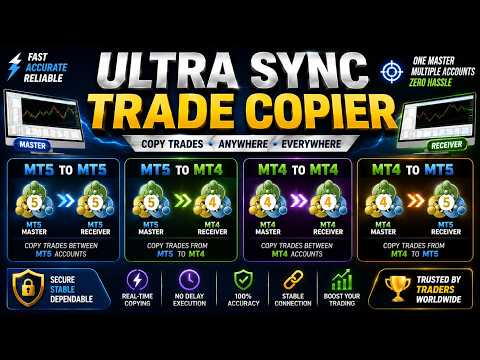
Copy trades between MT5 multi accounts and MT4 multi accounts on the same computer — instantly, reliably, completely offline.
Trade once on the Master account and up to 100 Receiver accounts follow in about 5–10 ms speed. No internet bridge, no cloud service, no DLLs, no complicated setup.
One EA does everything: attach it to a chart, choose Master or Receiver, and you are done.
How to Install Two or More MetaTrader 5 (MT5) Terminals on One Windows PC?
To copy trades between MT5 and MT4 terminals, you must purchase Ultra Sync Trade Copier MT4. (Separate purchase required for MT4)
WHY TRADERS CHOOSE ULTRASYNC
- 1 Master → up to 100 Receivers on one PC
- Typical copy speed 5-10 ms (local engine, works without internet copying)
- Any brokers, any mix of demo and real accounts, different brokers together
- Hedging and netting accounts supported
- Survives restarts: no duplicated trades, no lost trades (self-recovering engine)
- Every Receiver runs independently — one slow terminal never blocks the others
WHAT IS COPIED
- Market orders (Buy / Sell)
- All pending orders: Limit, Stop, Stop Limit
- Pending activation, modification, deletion, expiration
- Stop Loss / Take Profit and every later change (trailing stop included)
- Partial close, full close, volume changes
LOT SIZING — 7 MODES + REVERSE COPY
- Same Lot, Fixed Lot, Lot Multiplier
- Balance Ratio, Equity Ratio, Margin Ratio
- Risk % per trade (calculated from the Stop Loss distance)
- Mirror or Reverse copying (SL/TP swapped, pending types converted correctly)
FILTERS AND SYMBOL MAPPING
- Buy only / Sell only, manual or EA trades, magic numbers, symbols, comments
- Trading sessions and weekdays, minimum / maximum lot
- Unlimited symbol mapping (XAUUSD=GOLD; NAS100=USTEC; GER40=DE40 …)
- Broker prefix / suffix support (EURUSD.m and similar)
BUILT-IN ONE-CLICK TRADING PANEL (MASTER)
- BUY / SELL with adjustable lot, lot step buttons and quick-lot presets
- One-click pending orders at your chosen distance in points
- CLOSE BUY / CLOSE SELL / CLOSE ALL / CLOSE PROFIT / CLOSE LOSS / CLOSE SYMBOL
- Every order is validated before sending: permissions, volume, margin, spread
- Accidental double clicks are ignored; clear result message after every action
- Professional dark design: draggable, width-resizable, high-DPI aware, remembers position, size and lot after restart
RISK PROTECTION (EACH RECEIVER SEPARATELY)
- Maximum positions and maximum total lots
- Maximum daily loss and daily profit target
- Equity drawdown protection and minimum margin level
- Emergency Stop with two-click confirmation, Pause / Resume — all restart-safe
PROFESSIONAL EXTRAS
- Synchronization Audit: every copy action is recorded with a unique ID, timestamps, retries and final result
- Log export to CSV / TXT / JSON
- Settings profiles: save, load, backup, restore
- Low CPU and memory usage — designed for quiet 24/7 operation
HOW TO USE
- Attach the EA to any chart in the Master terminal → Mode = Master.
- Attach it to any chart in each Receiver terminal → Mode = Receiver, same Channel ID.
- That is all. Trade on the Master — every Receiver follows.
IMPORTANT NOTES
- This is a LOCAL copier: the Master and all Receivers must run on the same computer (same Windows user). This is what makes it fast, private and independent of your internet connection.
- A trade copier needs two running terminals, so the Strategy Tester cannot demonstrate copying. Please test the copier with two terminals on demo accounts.
- The EA never trades by itself. It only copies what the Master does and executes your own panel clicks.
- A complete beginner-friendly user guide (PDF/Word) is provided in the Comments section.