Prime Liquidity
- Göstergeler
- Artem Koliada
- Sürüm: 1.0
- Etkinleştirmeler: 8
Prime Liquidity Pro is an MT5 indicator designed for manual traders who work with price action and Smart Money concepts. It automatically detects and displays key liquidity levels on the chart, highlights swept levels and provides context-sensitive hints directly on the panel.
The indicator identifies areas where stop orders accumulate — equal highs and lows, previous session extremes and psychological round numbers. When price reaches one of these levels, the indicator marks it as swept and changes its color. This allows the trader to quickly assess the current market structure and make an informed trading decision.
Detected level types
The indicator displays the following levels simultaneously:
- EQH/EQL — equal highs and equal lows (double tops and bottoms)
- PDH/PDL — previous day high and low, up to 5 days back
- PWH/PWL — previous week high and low, up to 3 weeks back
- PMH/PML — previous month high and low, up to 2 months back
- ODH/ODL — current day high and low from midnight (server time)
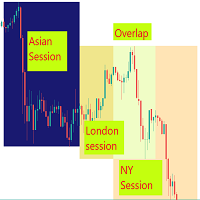
- Asia H/L — Asia session high and low, configurable hours and sessions count
- Round numbers — psychological levels with automatic step by timeframe
Panel and interaction
The indicator includes a collapsible interactive panel. The panel shows the current symbol and timeframe, the count of active and swept levels, and alert toggle buttons. The panel can be moved anywhere on the chart by dragging the header.
The panel contains a built-in scenario guide with three tabs: Sweep, Rejection and Target. Each tab shows an ASCII diagram of the trading scenario with a short description of the entry logic. When the trader clicks on a level line, the panel automatically switches to the relevant scenario and displays a hint with the level description.
A separate Guide panel can be opened next to the main panel. It contains a full description of all level types and three trading scenarios with entry and stop loss logic.
Alerts
Proximity alerts and sweep alerts can be toggled independently directly from the panel buttons. Proximity alerts fire when price approaches a level within a configurable buffer in points. Each level has its own cooldown timer to prevent repeated alerts. Sweep alerts fire once per level per session. Alerts support popup, push notification and email.
Input parameters
Levels:
- Show EQH/EQL, Lookback bars, Tolerance in points, Line color and style, Width
- Show ODH/ODL, Zone height in points, Colors
- Show PDH/PDL, Days back (1-10), Zone height, Colors
- Show PWH/PWL, Weeks back (1-5), Zone height, Colors
- Show PMH/PML, Months back (1-6), Zone height, Colors
- Show Asia H/L, Start hour, End hour (server time), Sessions back, Zone height, Colors
- Show Round Numbers, Auto step by timeframe, Manual step, Max levels on screen, Style, Colors
Labels:
- Show labels, Font name, Bars to the right, Minimum gap between labels in points
- Font size per level type: PM, PW, PD, OD, Asia, EQH/EQL, Round Numbers
Alerts:
- Proximity buffer in points
- Alert cooldown in seconds (per level)
- Enable popup, push notification, email
Panel:
- Show panel, Corner position, X and Y offset
Visual:
- Zone fill opacity
- Show swept levels dimmed
Supported instruments and timeframes
The indicator works on all symbols and timeframes available in MetaTrader 5. Round number step adjusts automatically based on the active timeframe. Asia session hours should be configured to match the server time of the broker.
Notes
The indicator is intended for manual trading assistance. It does not place orders and does not modify positions. Past level reactions do not guarantee future results.