StealthTrade Commander ST
- Yardımcı programlar
-
Artem Koliada
 MQL4/MQL5 Developer 💻 | Turning trading strategies into profitable code. Expert Advisors (EA) & Custom Indicators for MT4/MT5. Let's automate your trading
 - Sürüm: 2.20
- Güncellendi: 27 Mart 2026
- Etkinleştirmeler: 5
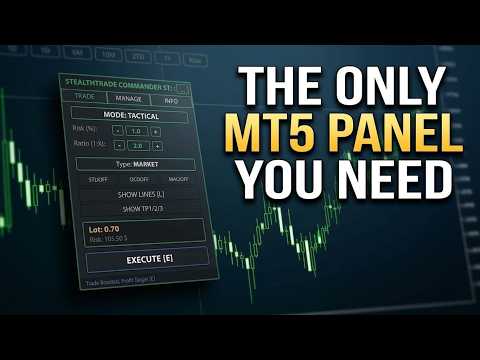
StealthTrade Commander ST is a visual trading panel and risk management utility for MetaTrader 5. It is designed for manual traders, scalpers, and Prop-Firm challengers who want precise risk control, fast order execution, and advanced position management. The ST Edition (Strategy Tester Edition) works fully inside the MT5 Strategy Tester with Visual Mode, allowing traders to practice their complete workflow on historical data before applying it in live conditions.
The panel handles all the mathematics — lot calculation, risk sizing, commission accounting — so the trader can focus entirely on chart analysis.
Two Trading Modes
The panel offers two distinct execution modes to suit different trading styles.
Tactical Mode is designed for planned, structured entries based on price action, support and resistance, or Smart Money concepts. The trader places Entry, Stop Loss, and Take Profit lines on the chart by dragging them to the desired levels. The panel calculates the correct lot size automatically based on the defined risk percentage or fixed dollar amount, and displays the projected dollar risk and reward in real time.
Rapid Mode is designed for fast scalping entries and news trading. The trader sets the lot size using plus and minus buttons, places a single Stop Loss line on the chart, and executes instantly with one click on the BUY or SELL button. No take profit is sent to the broker in this mode — the exit is managed manually or through the automatic trailing and breakeven system.
Strategy Tester Support
In the MT5 Strategy Tester, mouse dragging of lines is restricted. The ST Edition solves this with dedicated button rows on the panel for each line: Entry, Stop Loss, Take Profit, TP1, TP2, TP3, and Rapid SL. Each line can be moved up or down in steps of 1 or 10 pips directly from the panel. Every feature available in live trading works identically in the tester.
To use the panel in the Strategy Tester, Visual Mode must be enabled before starting the test.
Multi-Level Take Profit
Three independent take profit levels can be placed on the chart. Each level closes a configurable percentage of the initial position volume when price reaches it. The default distribution is 33%, 33%, and 34%. When TP3 is reached, the remaining volume is closed in full. Lines are draggable on live charts and controlled via buttons in the tester. When this feature is active, the broker-side take profit is set to zero and the automatic partial close is suspended to avoid conflicts.
Smart Position Manager
The panel includes an automatic position management system that runs on every tick.
Auto Partial Close reduces the position size by a defined percentage when price moves a configured number of pips in profit. This triggers once per position.
Auto Breakeven moves the stop loss to the entry price plus a defined offset when price moves a configured number of pips in profit. Commission cost can be included in the offset calculation.
Trailing Stop follows the price automatically. Five modes are available: fixed points distance, ATR-based dynamic trail using Average True Range, Moving Average level, last confirmed Fractal, and previous candle High or Low.
Stealth Mode and Ghost Entries
Stealth Mode hides the real stop loss and take profit levels from the broker. The panel tracks virtual lines internally and closes the position when price reaches them. This can be useful when a broker's execution is affected by visible stop levels.
Ghost Entry places an invisible pending order as a chart line. The broker does not receive any pending order. When price touches the line, the panel executes a market order immediately.
Risk Guardian
The Risk Guardian monitors daily performance on every tick. If the daily loss reaches the configured maximum, all positions and pending orders are closed and the panel is locked for the remainder of the session. If the daily profit target is reached, all positions are closed to protect the result. The close scope can be set to the panel's magic number only, or to all positions on the account — the latter is recommended for Prop-Firm accounts.
Live Position Monitor
Each open position managed by the panel is displayed in a status row below the panel. The row shows the ticket number, direction, lot size, entry price, current profit or loss in account currency, active management states such as trailing stop, breakeven, and partial close, and the elapsed time in the trade. The display updates approximately every 250 milliseconds.
Session Report
At the end of a session, the panel generates an HTML report saved to the MetaTrader Common Files folder. The report contains session date and symbol, starting and ending balance, total trades, win rate, profit factor, gross profit and gross loss, and a table of all closed deals with ticket, direction, lot, result, time, and comment. The report can be saved manually via a button in the INFO tab or is saved automatically when the panel is closed.
Interface
Two visual themes are available: Classic and Neon Pro. The panel is draggable, supports hover button highlighting, and can be minimized to a compact header. Hotkeys are available for primary actions: L to show or hide lines, E to execute a trade, X to close all positions immediately, and M to toggle the price magnet.
Notes
This is a manual trading utility, not an automated trading robot. All trades are opened based on the trader's input and decisions.
TP1, TP2, and TP3 levels are designed for market orders. For pending orders, it is recommended to disable the TP Levels feature and use the standard take profit line.
When TP Levels are active, the Auto Partial Close function is automatically suspended to prevent double execution on the same position.