
Prime Power
- Göstergeler
-
Artem Koliada
 MQL4/MQL5 Developer 💻 | Turning trading strategies into profitable code. Expert Advisors (EA) & Custom Indicators for MT4/MT5. Let's automate your trading
 - Sürüm: 1.0
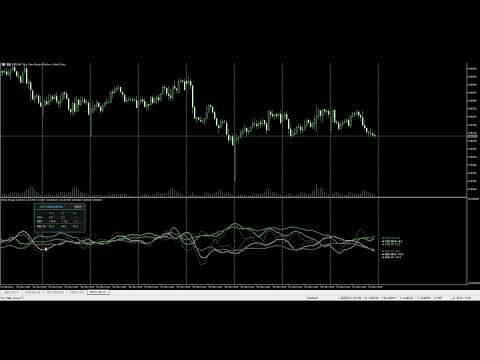
Prime Power, 8 ana para biriminin gerçek zamanlı gücünü ve zayıflığını belirlemek için tasarlanmış, MetaTrader 4 için profesyonel bir analitik araçtır. Tek bir pariteyi analiz eden geleneksel göstergelerin aksine, bu sistem tüm Forex piyasasını aynı anda izleyerek göreli sermaye akışlarının matematiksel karşılaştırması yoluyla güçlü trendleri ve yüksek olasılıklı dönüş noktalarını ortaya çıkarır.
Temel Özellikler ve Kullanıcı Talimatları
1. Akıllı Etkileşimli Gösterge Paneli Mevcut ivmelerine göre para birimlerini otomatik olarak sıralayan merkezi kontrol paneli.
-
Canlı Güç Sıralaması: Liste dinamiktir; en güçlü para birimleri en üstte (pozitif değerler) kalırken, en zayıf olanlar en altta (negatif değerler) kalır.
-
Dinamik Çizgi Değiştirici: Doğrudan panel üzerinden para birimi adına (ör. EUR veya JPY) tıklayarak grafik üzerindeki herhangi bir para birimi çizgisini anında açıp kapatabilirsiniz.
-
Sürükle ve Bırak Arayüzü: Gösterge paneli, üst başlıktan sürüklenerek ana fiyat penceresi dahil olmak üzere ekranınızın herhangi bir bölümüne serbestçe taşınabilir.
2. Hızlı Filtreleme Modları
-
[SHOW ALL] (Tümünü Göster): 8 para birimi çizgisinin tamamını anında grafiğe geri getirir.
-
[TOP PAIR] (En İyi Parite): Maksimum konsantrasyon modu. Gösterge, 6 ikincil para birimini otomatik olarak gizleyerek yalnızca mutlak lideri ve mutlak geride kalanı bırakır. Bu, piyasa sapmasını (divergence) görselleştirmek için mükemmeldir.
3. MTF Confluence Engine (Buluşma Motoru - En Önemli Özellik) Seçilen iki para birimini tek bir pencere içinde aynı anda üç farklı zaman diliminde (timeframe) analiz edin.
-
Nasıl Etkinleştirilir: [MTF MODE]'a tıklayın -> 1. para birimini seçin -> 2. para birimini seçin.
-
Görsel Hiyerarşi:
-
Noktalı Çizgi: Düşük zaman dilimi (ör. M15) — kısa vadeli oynaklığı temsil eder.
-
Düz Çizgi: Orta zaman dilimi (ör. H1) — ana trendi temsil eder.
-
Kalın Çizgi: Yüksek zaman dilimi (ör. H4) — küresel piyasa önceliğini temsil eder.
-
-
Confluence Delta Matrisi: Gösterge paneli ayrıntılı bir veri tablosuna dönüşür. Her üç DELTA değeri de aynı renkte hizalandığında, piyasanın maksimum senkronizasyonda olduğunu gösterir.
4. Otomatik Fırsat Merkezi (En İyi Sinyaller) Panelin alt kısmı, para birimleri arasındaki maksimum matematiksel sapmaya dayalı işlem fikirleri üretir.
-
Tek Tıkla Erişim: Bir sinyal düğmesine (ör. SELL NZDJPY) tıklandığında, önceden yapılandırılmış şablonunuz (template) uygulanmış olarak ilgili grafik anında açılır.
Teknik Avantajlar
-
RSI-Güç Algoritması: Daha pürüzsüz, gecikmesiz veriler için çoklu sembol sepetine uygulanan değiştirilmiş bir RSI formülüyle desteklenir.
-
Örtüşme Önleme Motoru (Anti-Overlap Engine): Akıllı bir etiketleme sistemi, sağ taraftaki etiketlerin asla üst üste binmemesini sağlayarak yüksek oynaklıkta bile %100 okunabilir kalmasını sağlar.
-
Otomatik Broker Sembol Taraması: Brokerınızın benzersiz sembol öneklerini ve soneklerini (ör. .pro , _ecn veya wt ) sorunsuz bir şekilde algılar.
-
Kaynak Optimizasyonu: Gerçek zamanlı olarak 28 döviz çiftini işlemesine rağmen, kod düşük bellek tüketimi ve yüksek performans için optimize edilmiştir.
Temel Ayarlar
-
RSI Periyodu: Hesaplama tabanı (Varsayılan: 14).
-
Yumuşatma Periyodu (Smoothing Period): Piyasa gürültüsünü filtrelemek için sinyal pürüzsüzlüğünü ayarlar.
-
MTF Ayarları: Confluence (Buluşma) modu için üç zaman dilimini özelleştirin.
-
Grafik Eylemi (Chart Action): Yeni grafiklerin nasıl açılacağını ve hangi .tpl şablonunun uygulanacağını yapılandırın.














































Kullanıcı değerlendirmeye herhangi bir yorum bırakmadı