Charts NAVIGATOR

The whole market in one click!

Do you value your time? Is ease of use important for you? Are you still looking for the symbol you want or do you have 100 charts open in one terminal? Forget that! Do everything in a single click, on one chart!


Advantages:

  • Quick navigation on all the symbols and timeframes you want in a single chart window;
  • Instant transfer to the required chart in one click;
  • All the necessary symbols and timeframes are clearly and compactly grouped on one chart;
  • Two navigation modes - compact and expanded;
  • Ease addition and sorting of the symbols via the Market Watch, without the need to manually enter each symbol in the settings;
  • Show or hide all the visual elements with a single button click;

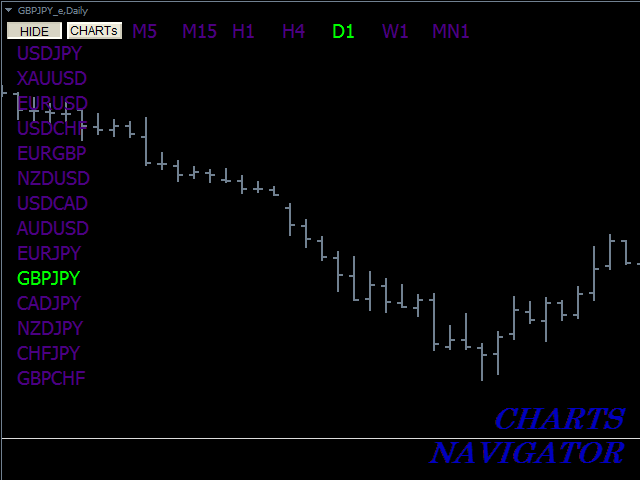
As a rule, to work, the trader needs to monitor a lot of trading instruments on different timeframes. The traded instrument is found in the market watch, dragged onto the chart, the required timeframe is set. This procedure is repeated hundreds of times. How to optimize this process? The answer is simple - Charts NAVIGATOR. In the corner of the screen there are two buttons for all the necessary manipulations.

Professionals appreciate the speed and convenience. Buy the Charts NAVIGATOR and you will no longer need to spend a lot of time searching for the right instrument, selecting the timeframe. If you value your time - this is your tool. Buy it now and focus on the process of trading, do not be distracted by routine operations.

Interested in the Charts NAVIGATOR product? You can buy this tool right now.

Instructions for users.

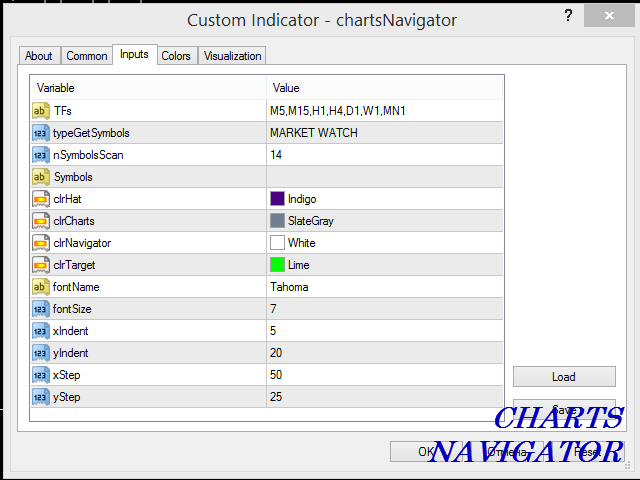
The settings window (figure 4) appears once the navigator is attached to the chart.


List of settings, description and examples of input values:

  • TFs="M1,M5,M15,M30,H1,H4,D1,W1,MN1"; //Used timeframes, separated by commas without spaces; you can set the timeframes in any sequence you wish
  • typeGetSymbols=MARKET_WATCH; //Symbol receiving method: from "Market Watch" or manual input
  • nSymbolsScan=20; //The number of symbols read from the "Market Watch", if 0 - all symbols in the "Market Watch"
  • Symbols=""; //Field for the manual input of symbols (is this input method is selected), enter the symbols separated by commas without spaces; see the correct symbols names in the "Market Watch"
  • clrHat=clrIndigo,clrCharts=clrSlateGray,clrNavigator=clrWhite,clrTarget=clrLime; //Customization of the navigator colors
  • fontName="Tahoma"; //Font
  • fontSize=7; //Font size
  • xIndent=5,yIndent=20, //Offset from the chart corner by the X and Y axes in pixels
  • xStep=50,yStep=25; //The step between the columns (x) and rows (y) in pixels


Configuration of the symbols for the navigator via the "Market Watch".

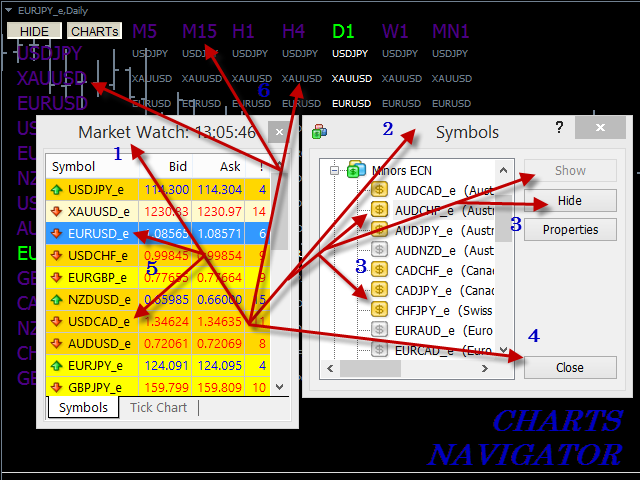
The symbols in the market watch can be configured both before attaching the navigator to the chart and after. Open the "Market Watch" window in the terminal, add all the necessary symbols and align them in the desired sequence. After that attach the navigator to the chart. If the navigator has already been attached to the chart, then to activate the new changes in the navigator, change the current symbol and (or) timeframe of the chart by clicking any of the visual links of the navigator - "symbols", "time-frames" or "charts". You can make changes to the "Market Watch" at any time, there are no limitations.

If you open the "Market Watch" window for the first time and there are no symbols you are interested in, then from the context menu of the "Market Watch", open the symbols window and add all the desired symbols to the "Market Watch" (video and Figure 3).

Navigator buttons.

The navigator has two buttons:

  1. "SHOW/HIDE" - opes/closes the navigator;
  2. "CHARTs" - toggles the navigator operation mode. When pressed - "expanded mode", when unpressed - "compact mode".

Navigator operation modes.

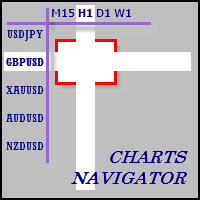
In the "compact mode" two types of visual links are available - "symbols" and "timeframes", which allow to change the symbols and the timeframes of the current chart (Figure 2).

In the "expanded mode" a third type of the visual links is available - "charts", which allows to change both the symbol and the timeframe of the current chart in one click (Figure 1).


Thank you for your attention and interest in the program. Enjoy!

Önerilen ürünler
This is a semi-automatic Expert Advisor. A user draws a support or a resistance line in the form of a horizontal line or a trendline on a chart. A command in the format of UP|DN_xxxx:yyyy is specified in the line name; the Expert Advisor understands it as a signal to buy or sell setting a stop loss and a take profit. EA settings include a parameter with a lot size and a value for moving stop loss to breakeven. If stop loss = 0, the EA does not use breakeven. If this parameter is greater than zer
Market Monitor
Rodrigo Rethka Goncalves
Market Monitor – Smart Asset Performance Dashboard for MT4 Turn your MetaTrader 4 into a professional trading intelligence center! Market Monitor is a powerful monitoring tool that displays, in real time, the most relevant performance metrics of each symbol being traded — helping you make faster, smarter, and more strategic decisions. What Does This Indicator Do? Market Monitor scans all open and historical orders, consolidates the data by symbol, and displays everything in visual pa

One Click Trader is a tool designed for MetaTrader 4 platform, which enables you to take your trading to the next level. It enables you to open, manage and close your trades in simple an efficient way by just one click of your mouse button. Up arrow minimizes the OCT panel Down arrow maximizes the OCT panel Right arrow displays the next panel with additional features Left arrow hides the panel with additional features Red SELL button enables you to open short market orders Red SELL STOP button e
The professional utilities "Ichimoku Waves Meter" to analyse graphs using the correct interpretation of Ichimoku kinkōhyō! Is a graphic program that allows traders to quickly and easily measure the proportions between the indicated points on the price graph. This time and price indicator is a basic tool for analysing the chart according to the Ichimoku strategy on the MT4 platform. Using this tool allows an insightful and complete analysis of time waves as well as price waves in a very short ti
This is a very simple, and easy-to-use Trade Manager with features like   Auto Partial Close, Auto Stop-loss, Breakeven. EA  closes a profitable position in partial closes when the price moves first in the direction of profits, and then comes back. EA monitors the position. If the price moves in the direction of profits, then ea establish the first level of rollback price at a distance. If the price continues to move in the direction of profits, this level of profit continues modifying this lev
Heaven Assistant: Simplify Your MT4 Management Simplify the management of the MetaTrader 4 (MT4) platform with the Heaven Assistant . This Expert Advisor (EA) is a robust tool that allows you to control and customize your trading environment in an efficient and user-friendly manner. Key Features: Multiple Pairs Opening: Quick access to most currency pairs, both major and minor, plus exotic pairs. The ability to open indices, metals, and cryptocurrencies with a single click. Template Change: Easi
This tool monitors your current Expert Advisors and manages stop losses and take profits. You can customize which EAs and/or which currencies to monitor. It is primarily meant for EAs that you feel manage stop losses and/or take profits poorly. If you want this tool to be able to monitor manual trades, please use '0' (zero) as the magic number. Supports hidden stoploss and take profit Supports ATR-calculated dynamic stoploss Supports Breakeven for individual trades Supports Trailing stop Lower r
Comprehensive on chart trade panel with the unique ability to be controllable from mobile as well. Plus has a library of downloadable configuration, e.g. exit rules, extra panel buttons, pending order setup and more. Please see our product video. Works with all symbols not just currency pairs. Features On chart panel plus controllable from free app for Windows, iPhone and Android Built-in script engine with library of downloadable configuration, e.g. add 'Close All Trades in Profit' button, exit
Buy Sell Multiple Panel - Execute Bulk Orders in a Single Click! Description: Save time and seize market opportunities instantly. This powerful panel allows you to place multiple buy or sell orders simultaneously, each with custom lot sizes, take-profit, and stop-loss levels. Perfect for sophisticated entry strategies and managing complex trades efficiently. Key Features: Bulk Order Execution:   Open multiple market orders at once with just one click. Flexible Lot Sizing:   Set individual lot
This utility allows to record the spread value to the file, which is equal to or greater than the value specified in the settings, at the specified time. The utility also displays useful information on the symbol's chart: current spread value in points, name of account holder, name of trading server, leverage, the size of the swap for buy orders, the size of the swap for sell orders, day of the week for accruing triple swap, the size of a point in the quote currency, the minimum allowed level of
Telegram to Discord
Yassine El Maamouni Rahali
Streamline your trading communication with our Telegram to Discord Trade Forwarder, a powerful Python-based tool designed for traders who want to effortlessly share trade information from Telegram to Discord. No more tedious copy-pasting—our software automates the process, ensuring that every crucial message, image, or video is seamlessly forwarded to your Discord community. Key Features: Effortless Trade Sharing: Instantly share trade updates, images, and videos from your Telegram channels to
This EA trades both with a stop loss, so it can trade without it, with an increase in the lot (martingale) and without an increase in the lot (without a martingale). The advisor trades in the continuation of the impulse. It has a number of filtering indicators. This Expert Advisor is not afraid of large spreads (there is protection), it also has protection from the maximum lot and has trading from the percentage of the deposit. There are two types of Martingale (by adding from the original lot,
Excellent   Multiplatform   Copier of deals. I use it regularly on VPS (copy from Mt5 to Mt4). Multiplatform : copying from MetaTrader 4 to MetaTrader 4; copying from   MetaTrader 4 to MetaTrader 5; copying from   MetaTrader 5 to MetaTrader 4; copying from   MetaTrader 5 to MetaTrader 5. Modes: master   - the current terminal is   source   of trades (deals are copied from it); slave   - the current terminal is the   receiver   of trades (trades are copied to it). from myself  - mode "deals mu
DepoControl – Full Control Over the Deposit Closers   Expert Advisor controls the overall account status and closes ALL market orders on the account when certain conditions occur. The trading robot closes ALL orders on the account in the following cases (by profit): Close ALL orders by a total profit on the account   in monetary terms . For example, suppose that the settings specify that   positions should be closed when profit of 100 is reached. In this case, the Expert Advisor closes all mark
Hello Traders! Version 3.0 of the script has been released!  What's new?  Thanks to your suggestions I have inserted these changes to the tool: 1 - Data input are now date picker, it will be easier and faster to set the data export period; 2 - A message box will check that there is not a file with the same name in your folder; 3 - Error message to check that data insert are correct. If you like this product, take a look to the FULL INTERFACE!   MT4 To Excel Interface This script is a very usefu
Super Copier G&G  Super Copier G&G FREE Here Expert Advisor copies orders to several trading accounts (regardless of a broker) if their respective MetaTrader 4 terminals are opened on a single PC/VPS. The EA may copy from multiple (unlimited) initial accounts to a single target one or from a single initial account to multiple (unlimited) target ones. The work of other EAs and manual trading on initial and target accounts are not affected by the copier. Support for four methods of managing the c
Scorpion Grid
Evgenii Kuznetsov
5 (2)
Multi-currency grid Expert Advisor, in most cases it receives quite accurate entries. If an entry is not accurate enough, the positions are managed using an elaborate martingale strategy. Work on real account:  http://tiny.cc/nkaqmz Entries are performed using the signals of RSI and Stochastic indicators, in the overbought/oversold areas, plus additional entry conditions based on a proprietary algorithm. Recommended timeframe - М15. The EA features a drawdown management system, which takes into
DrawDown Limiter MT4
Haidar, Lionel Haj Ali
5 (8)
Drawdown Limiter EA You are in the right place if you were searching for Drawdown control, Drawdown limiter, Balance protection, Equity Protection or Daily Drawdown Limit related to Prop Firm, FTMO, or Funded account trading, or if you want to protect your trading account. Have you suffered from controlling your drawdown when trading funded accounts? This EA is meant for you. Prop firms usually set a rule called “Trader Daily Drawdown”, and if it is not respected, you are disqualified.  I am an
News Hedging Pro  is a unique robot that allows you to trade during the most critical news announcement periods by your predefined strategy. You can preset the strategy to trade, and then it will trade that news automatically when the news comes. News release gives opportunity to have pips since the price usually has big move at that time. Now with this tool, trading news become easier, more flexible and more exciting than ever. No waiting, no confusing anymore. Product Links Fully  Description
Telegram Ultimate Manager MT4 Use Cases: Manager Order (open, close, modify order) Publish open and close order to Telegram Channel Open trade based on Forex Factory News Requirement: Telegram Chat ID Telegram Bot API Token Telegram Channel ID Please read the guide This tools can not be backtested Free n8n workflow template to : 1. Import Forex Factory news to Google Calendar 2. Send chat to Telegram bot about news release. Is it good or bad for the currency Inputs: Telegram Bot Token : your T
Wolseley Panel MT4 FREE
Walter Wolseley Pessoa Batista De Lima
WOLSELEY's Trading Panel - BASIC - - Feel free to contact me at instagram   @walter_robos  or whatsapp/telegram +5592981173937 View your history in a structured and detailed manner, with efficiency rate and profit rate separated by day, week, month and total, as well as asset details, server time and positions&orders in progress. This panel was created looking on HEDGE-type accounts, but it can be used on NETTING-type accounts without any problems. In the PREMIUM version of this Panel you have
Trade History Exporter automatically exports trade history to a CSV (comma separated values) file. Trade History Exporter: - automatically exports trade history every time a trade is closed - allows you to manually force an export by using the "W" key on your keyboard - can use Order Comments as Magic Numbers - useful for instance when using a Trade Copier - calculates the Net Profit per trade
We do not want to make you confused with an imaginary high profit screenshot from Strategy Tester which has no relation/guarantee of future profit! We just want to tell you the real thing about our EA. TrendEx Pro has been developed to trade on Gold specially, combining multiple strategies algorithm to ensure Trend catching and trading on. It can identify both short and long trends and opens positions accordingly with excellent built-in risk management logic. There is no use of any dangerous met
News Scalping Executor is an utility which helps to trade high impact and huge volatility   news . This utility helps to create two opposite orders with risk management and profit protection. It moves automatically stop loss level to avoid losses as much as possible by using many different algorithms. It helps to avoid trading the news if spread suddenly becomes very huge. It can lock profit by moving stop loss or partially closing of orders. To be profitable with this type of trading you shou
Forex Candle High/Low Alert Indicator Overview: Forex Candle High/Low Alert Indicator, designed to provide real-time insights and alerts for major currency pairs. This custom-built tool displays key High and Low values over a chosen number of candles and time frame, ensuring you stay informed about critical price movements and trends. (The candles observed are from the 1st candle back - The amount of the chosen number of candles) Key Features: Real-Time High/Low Tracking : The indicator dynamica
Program for automatic placement of stop loss and take profit orders. Values are calculated as points distance from open price. BreakEven option is also included. all options could be applied to BUY, SELL separately or together. Enter values ​​in points in the fields on the right side of the menu and press dedicated button to aplly your settings. If in doubt, The instruction is displayed in the tooltip.
FREE
The utility for manual trading to manage open positions.The built-in trailing stop has three modes and seven instruments: by pips, by bar extremes, by fractals, by volumes, by MA, by Parabolic SAR and by ATR. With the help of the built-in trading simulator, you can check how the EA works in the strategy tester. Guide to UTrailingMini can be found in the "Comments" section. Benefits 3 trailing stop modes: normal, total and mobile stop loss; 7 options: by points, by bar extremes, by fractals, by v
The adviser picks up all positions on any currency pair and in any direction of the transaction, on any time frame: the opening of the transaction is done manually, the adviser is installed separately on any chart window. Closes 5 goals automatically configured by you, call points and volume. You can also set a stop loss, and at what target it will shift to the value you have chosen. There is still a "breakeven" in the setup, which allows you to shift the stop loss by the volume of points you ha
Indicator Values Panel
AL MOOSAWI ABDULLAH JAFFER BAQER
Indicator Values Panel – Your Ultimate Indicator Monitoring Solution! Are you tired of constantly switching between indicators to check values? Want a simple, elegant, and real-time solution that puts all key indicator readings in one place? Indicator Values Panel is the ultimate utility for traders who want a clear and concise display of important indicator values – directly on their chart! What is Indicator Values Panel? Indicator Values Panel is a sleek, easy-to-use utility that provides rea
Hiçbir abonenizin alım satım terminalinizden alım satım etkinliklerinizi kaçırmaması için bildirim göndermek için otomatik bir sistem. Hesabınızdaki herhangi bir alım satım işlemi hakkında Telegram habercisine bildirim gönderen bir yardımcı program. Yardımcı programı Telegram'da bir kanala bağlamak için adım adım talimatlar ->   HERE   / MT5 ->   HERE Avantajlar: Kolay kurulum ve ayrıntılı talimatlar, Ayarlanabilir ekran görüntüleri gönderme imkanı, Emoji kullanarak özelleştirilebilir bildirim m
Bu ürünün alıcıları ayrıca şunları da satın alıyor
Local Trade Copier EA MT4
Juvenille Emperor Limited
4.96 (105)
Local Trade Copier EA MT4 ile olağanüstü hızlı işlem kopyalama deneyimi yaşayın. Kolay 1 dakikalık kurulumuyla bu işlem kopyalayıcısı, aynı Windows bilgisayarda veya Windows VPS'te birden fazla MetaTrader terminali arasında işlemleri kopyalamanıza olanak tanır ve 0.5 saniyenin altındaki şimşek hızında kopyalama hızları sunar. Başlangıç seviyesinde veya profesyonel bir tüccar olsanız da, Local Trade Copier EA MT4 , spesifik ihtiyaçlarınıza göre özelleştirmek için geniş bir seçenek yelpazesi sunar
Trade Assistant MT4
Evgeniy Kravchenko
4.42 (192)
It helps to calculate the risk per trade, the easy installation of a new order, order management with partial closing functions, trailing stop of 7 types and other useful functions. Additional materials and instructions Installation instructions   -   Application instructions   -   Trial version of the application for a demo account Line function -   shows on the chart the Opening line, Stop Loss, Take Profit. With this function it is easy to set a new order and see its additional characteris
Trade Manager EA’ye hoş geldiniz! Ticaretin daha sezgisel, hassas ve verimli hale gelmesi için tasarlanmış nihai risk yönetim aracı ile tanışın. Bu sadece bir emir verme aracı değil; ticaret planlaması, pozisyon yönetimi ve risk kontrolü için kapsamlı bir çözüm. İster yeni başlayan bir yatırımcı olun, ister deneyimli bir trader ya da hızlı emir gerektiren bir scalper, Trade Manager EA ihtiyaçlarınıza uyum sağlar ve forex, endeksler, emtialar ve kripto paralar dahil tüm piyasalarda esneklik sunar
Exp COPYLOT CLIENT for MT4
Vladislav Andruschenko
4.69 (65)
MetaTrader 4 için ticaret fotokopisi.       Herhangi bir hesaptan forex işlemlerini, pozisyonlarını, emirlerini kopyalar. En iyi ticari fotokopi makinelerinden biridir.       MT4 - MT4, MT5 - MT4       için       KOPYLOT MT4       sürüm (veya       MT4 - MT5 MT5 - MT5       için       KOPYLOT MT5       sürüm). MT5 sürümü Tam tanım   +DEMO +PDF Nasıl alınır Nasıl kurulur     Günlük Dosyaları nasıl alınır?     Nasıl Test Edilir ve Optimize Edilir     Expforex'in tüm ürünleri için fotokopi   sür
MT4 to Telegram Signal Provider , Telegram'a sinyal göndermeyi sağlayan ve hesabınızı bir sinyal sağlayıcısına dönüştüren kullanımı kolay ve tamamen özelleştirilebilir bir araçtır. Mesajların formatı tamamen özelleştirilebilir! Ancak basit kullanım için, önceden tanımlanmış bir şablonu seçebilir ve mesajın belirli kısımlarını etkinleştirebilir veya devre dışı bırakabilirsiniz. [ Demo ]  [ Kullanım Kılavuzu ] [ MT5 Sürümü ] [ Discord Sürümü ] [ Telegram Kanalı ]  New: [ Telegram To MT5 ] Kurulum
TradePanel MT4
Alfiya Fazylova
4.84 (89)
Ticaret Paneli çok işlevli bir ticaret asistanıdır. Uygulama, manuel ticaret için 50'den fazla ticaret işlevi içerir ve çoğu ticaret işlemini otomatikleştirmenize olanak tanır. Dikkat, uygulama strateji test cihazında çalışmıyor. Satın almadan önce demo sürümünü bir demo hesabında test edebilirsiniz. Demo sürümü burada . Talimatların tamamı buraya . Ticaret. Tek tıklamayla alım satım işlemlerini gerçekleştirmenizi sağlar: Otomatik risk hesaplaması ile bekleyen emir ve pozisyonları açın. Tek tıkl
Ultimate Extractor - Professional Trading Analytics for MT4 Ultimate Extractor transforms your MetaTrader 4 trading history into actionable insights with comprehensive analytics, interactive charts, and real-time performance tracking. Ability to combine multiple accounts and MT4 and MT5 into a single dashboard. What It Does Automatically analyzes your MT4 trading history across all Expert Advisors and generates detailed HTML reports with interactive visualizations. Tracks live performance metric
Üye olduğunuz herhangi bir kanaldan Sinyal Kopyalayın (   Bot Token veya Yönetici İzinleri gerekmiyor  düz MT4'ünüze. Kullanıcıyı düşünerek tasarlanmış ve ihtiyacınız olan birçok özellik sunmaktadır Bu ürün, kullanımı kolay ve görsel olarak çekici bir arayüzde sunulmaktadır. Ayarlarınızı özelleştirin ve ürünü dakikalar içinde kullanmaya başlayın! Kullanıcı Kılavuzu + Demo  | MT5 Sürümü | Telegram Sürümü Demo versiyonunu denemek istiyorsanız, Kullanıcı Kılavuzuna bakın. Discord'tan MT4'e gönder
Trade copier MT4
Alfiya Fazylova
4.58 (33)
Trade Copier, ticaret hesapları arasındaki işlemleri kopyalamak ve senkronize etmek için tasarlanmış profesyonel bir yardımcı programdır. Kopyalama, tedarikçinin hesabından/terminalinden alıcının aynı bilgisayarda veya vps'de kurulu olan hesabına/terminaline gerçekleşir. Satın almadan önce demo sürümünü bir demo hesabında test edebilirsiniz. Demo versiyonu burada . Tüm talimatlar burada . Ana işlevler ve avantajlar: Emirlerin kopyalanmasını destekler: МТ4> МТ4, МТ4> МТ5, МТ5> МТ4. Emirlerin kopy
Bu ürün, haber saatlerinde tüm uzman danışmanları ve manüel grafikleri filtreler, böylece manüel ticaret kurulumlarınızı veya diğer uzman danışmanlar tarafından girilen işlemleri yok edebilecek ani fiyat dalgalanmaları konusunda endişelenmenize gerek kalmaz. Bu ürün, herhangi bir haber yayınlanmadan önce açık pozisyonlarınızı ve bekleyen emirlerinizi yönetebilen tam bir sipariş yönetim sistemi ile birlikte gelir. The News Filter'ı satın aldığınızda, gelecekteki uzman danışmanlar için yerleşik ha
What is it? Think about it, you can send all the orders/positions info to your telegram channel or group to create your community or VIP signals on telegram. Position info means this EA forward all of your new positions open details (Open price, Open time, Position Type, position Symbol and volume), positions changes ( SL or TP modifying or pending price changes) and position close (Close price, profit or loss, position duration time) and also EA Send NEWS alert (Economic calendar event) on you
The product will copy all telegram signal to MT4   ( which you are member  ) , also it can work as remote copier.  Easy to set up, copy order instant, can work with almost signal formats, image signal, s upport to translate other language to English Work with all type of channel or group, even channel have "Restrict Saving Content", work with  multi channel, multi MT5 Work as remote copier: with signal have ticket number, it will copy exactly via ticket number. Support to backtest signal. How to
Custom Alerts: Birden Fazla Piyasayı Takip Edin ve Hiçbir Önemli Sinyali Kaçırmayın Genel Bakış Custom Alerts , birden fazla enstrümanı tek bir yerden takip etmek isteyen yatırımcılar için dinamik bir çözümdür. FX Power, FX Volume, FX Dynamic, FX Levels ve IX Power gibi önde gelen araçlarımızdan gelen verileri entegre ederek, Custom Alerts sizi grafikler arasında geçiş yapmak zorunda kalmadan önemli piyasa gelişmeleri hakkında otomatik olarak bilgilendirir. Artık broker’ınızın sunduğu tüm varl
Copy Cat More Trade Copier MT4 (Kopyacı MT4) sadece basit bir yerel trade kopyalayıcı değildir; günümüzün alım satım zorlukları için tasarlanmış eksiksiz bir risk yönetimi ve yürütme çerçevesidir. Prop firm sınavlarından kişisel hesap yönetimine kadar, güçlü yürütme, sermaye koruması, esnek yapılandırma ve gelişmiş işlem yönetimi ile her duruma uyum sağlar. Kopyalayıcı hem Master (gönderici) hem de Slave (alıcı) modlarında çalışır ve piyasa emirleri ile bekleyen emirlerin gerçek zamanlı senkroni
Riskinizi otomatik olarak hesaplarken işlemlere hızlı bir şekilde girip çıkmanıza yardımcı olacak Ticaret Yöneticisi. Aşırı Ticaret, İntikam Ticareti ve Duygusal Ticaretten korunmanıza yardımcı olacak özellikler içerir. İşlemler otomatik olarak yönetilebilir ve hesap performans ölçümleri bir grafikte görselleştirilebilir. Bu özellikler, bu paneli tüm manuel yatırımcılar için ideal kılar ve MetaTrader 4 platformunun geliştirilmesine yardımcı olur. Çoklu Dil desteği. MT5 Sürümü  |  Kullanım Kılavu
This EA is fully automated , it is built based on  the method of catching the pop-up Alert event and Open Market Orders (BUY/SELL) . Download trial version here:  https://www.mql5.com/en/blogs/post/751340 ***NOTE:   It is recommended to remove the available filter settings, only install the filter for your indicator. Parameters of the EA: -------- <EA Settings> -------- Magic Number:   The identifying (magic) number of the currently selected order. Allow Open trade:   Enable/ Disable Open Trade
Everything for chart Technical Analysis indicator MT4 in one tool Draw your supply demand zone with rectangle and support resistance with trendline and get alerts to mobile phone or email alert -  Risk reward indicator Video tutorials, manuals, DEMO download   here .  Find contacts on my   profile . 1.   Extended rectangles and trendlines Object will be extended to the right edge of the chart when price will draw new candles on chart. This is rectangle extender or trendline extender. 2. Price to
Time saving and fast execution Whether you’re traveling or sleeping, always know that Telegram To Mt4 performs the trades for you. In other words, Our   Telegram MT4 Signal Trader  will analyze the trading signals you receive on your selected Telegram channels and execute them to your Telegram to MT4 account. Reduce The Risk Telegram To Mt4   defines the whole experience of copying signals from   Telegram signal copier to mt4 platforms. Users not only can follow all instructions from the signa
Bu 2'si 1 arada ticaret yöneticisi, mum kırılmaları ticareti için idealdir. Geri çekilmelere ek limit emirleri vererek ortalama bir ticarete mal olabilir. Bu, tüm pozisyonlarınızda en iyi fiyatı ve kazançlarınızda daha yüksek bir RR almanızı sağlar. Risk, en son kapatılan mum yüksekliğine göre hesaplanır. İşlem asistanı düğmeleri, manuel olarak verilen tüm siparişlerin yönetilmesine yardımcı olur. Herhangi bir giriş yöntemiyle kullanın; fiyat hareketi veya göstergeleri ve herhangi bir ticaret
Exp4 Duplicator
Vladislav Andruschenko
4.5 (22)
Uzman Danışman   , MetaTrader 4   hesabınızda işlemleri ve pozisyonları tekrarlar   veya önceden belirlenmiş sayıda verir. Manuel olarak veya başka bir Uzman Danışman tarafından açılan tüm fırsatları kopyalar. Sinyalleri kopyalar ve sinyallerden gelen partiyi arttırır   ! Diğer EA'ların çoğunu artırır. Aşağıdaki işlevler desteklenir: kopyalanan işlemler için özel lot, Zarar Durdurma kopyalama, Kâr Al, takip eden durdurma kullanımı. MT5 sürümü Tam tanım +DEMO +PDF Nasıl alınır Nasıl kurulur  
Basket EA MT4
Juvenille Emperor Limited
5 (5)
Basket EA MT4 , güçlü bir kâr alma aracı ve kapsamlı bir hesap koruma sistemini basit ve kullanımı kolay bir çözümde birleştirir. Ana amacı, tüm açık pozisyonları tek tek değil, bir sepet (basket) olarak yöneterek, hesabınızın toplam kâr ve zararını tamamen kontrol altında tutmaktır. EA; sepet düzeyinde take profit, stop loss, break even ve trailing stop gibi özellikler sunar. Bunlar, bakiye yüzdesi, sabit bir para birimi değeri ya da yönetilen işlemlerin ortalama pip hedefi olarak ayarlanabili
Grid Manual MT4
Alfiya Fazylova
4.71 (17)
Grid Manual, sipariş ızgarasıyla çalışmak için kullanılan bir ticaret yardımcı programıdır. Yardımcı program evrenseldir, esnek ayarlara ve sezgisel bir arayüze sahiptir. Sadece kayıpların ortalaması yönünde değil, aynı zamanda kazanç artışı yönünde de bir emir ızgarası ile çalışır. Tüccarın bir emir ızgarası oluşturmasına ve eşlik etmesine gerek yoktur, bu yardımcı programı yapacaktır. Emri açmanız yeterlidir ve Grid manual otomatik olarak ona bir emir ızgarası oluşturacak ve kapanana kadar ona
Exp SafetyLock PRO
Vladislav Andruschenko
4.57 (28)
SAFETYLOCK , yatırımcıların mevcut açık pozisyonları için ters bir emir belirleyerek ani piyasa dönüşlerine karşı korunmalarını sağlar. Bir yatırımcı veya EA yeni bir pozisyon açtığında, SAFETYLOCK otomatik olarak bu pozisyona ters yönde bir bekleyen emir oluşturur. Pozisyon zarar etmeye başlarsa, bekleyen emir devreye girer ve pozisyonu kilitleyerek zararı sınırlamaya yardımcı olur. Bu EA, başlangıç pozisyonunu kapatma, takip eden durdurma (trailing stop) ile çalışarak kazançları maksimize etm
Kar takip fonksiyonu ile toplam kar/zarara ulaşıldığında MetaTrader 4'te pozisyonları kapatmak. Sanal durakları (Ayrı Sipariş) etkinleştirebilirsiniz, AL ve SATIŞ pozisyonlarının ayrı ayrı hesaplanması ve kapatılması (Ayrı AL SATIŞ), Tüm sembollerin veya sadece mevcut sembolün kapatılması ve hesaplanması (Tüm Semboller), Kâr için takip etmeyi etkinleştir ( Sondaki Kâr ) Mevduat para birimi, puan, bakiyenin yüzdesi üzerinden toplam kâr ve zararı kapatın. Uygulama, diğer herhangi bir EA ile birli
Ortalama Yardımcısı - Bu tür bir işlem yardımcı aracı, daha önce kârsız pozisyonlarınızın ortalamasını iki teknik kullanarak çıkarmanıza yardımcı olacaktır: standart ortalama trende göre pozisyonların açılmasıyla korunma Yardımcı program, hem alım hem de satım için aynı anda farklı yönlerde birden fazla açık pozisyonu sıralama yeteneğine sahiptir   . Örneğin, 1 pozisyonu bir satış için, ikincisini bir alım için açtınız ve ikisi de kârsız veya biri kârsız, diğeri kârlı ancak yeterli değil ve işle
Risk/Reward Tool, MetaTrader 4'te işlem planlama, görselleştirme ve gerçekleştirme şeklinizi devrim niteliğinde değiştirmek için tasarlanmış profesyonel düzeyde bir Uzman Danışmandır. İster hassas risk yönetimine değer veren isteğe bağlı bir trader olun, ister işlem kurulumlarını görsel olarak test etmesi gereken bir strateji geliştiricisi olun, bu araç zarif ve sezgisel bir arayüzde ihtiyacınız olan her şeyi sağlar. Temel pozisyon hesaplayıcılarından farklı olarak, Risk/Reward Tool görsel işlem
News Filter EA: Advanced Algo Trading Assistant News Filter EA is an advanced algo trading assistant designed to enhance your trading experience. By using the   News Filter EA , you can integrate a Forex economic news filter into your existing expert advisor, even if you do not have access to its source code. In addition to the news filter, you can also specify   trading days   and   hours   for your expert. The News Filter EA also includes   risk management   and   equity protection   features
The product will copy all  Discord  signal   to MT4   ( which you are member  ) , also it can work as remote copier.  Easy to set up. Work with almost signal formats, support to translate other language to English Work with multi channel, multi MT4. Work with Image signal. Copy order instant, auto detect symbol. Work as remote copier: with signal have ticket number, it will copy exactly via ticket number. How to setup and guide: Let read all details about setup and download Discord To MetaTrader
️ Hedge Trade — Smart Fixed-Offset Hedging EA Turn adverse moves into controlled recovery cycles. Hedge Trade is a professional-grade MetaTrader 4 Expert Advisor that protects any open trade by automatically placing and managing one intelligent hedge order. It’s built for traders who prefer to open their own base position but want an automated, disciplined hedging system to manage drawdown and capture counter-moves — safely, transparently, and without martingale. Key Features Automatic Hedg
Seconds Chart — MetaTrader 4 için saniye bazlı grafikler oluşturmanıza olanak sağlayan eşsiz bir araçtır. Seconds Chart sayesinde saniye cinsinden zaman dilimleriyle grafik oluşturabilir, standart dakika veya saatlik grafiklerde mümkün olmayan esneklik ve analiz hassasiyetine ulaşabilirsiniz. Örneğin, S15 zaman dilimi 15 saniyelik mum çubuklarını ifade eder. Tüm indikatörleri, uzman danışmanları ve komut dosyalarını standart grafiklerde olduğu gibi kolaylıkla kullanabilirsiniz. Standart araçları
Filtrele:
İnceleme yok
İncelemeye yanıt