Position Size Tool

5

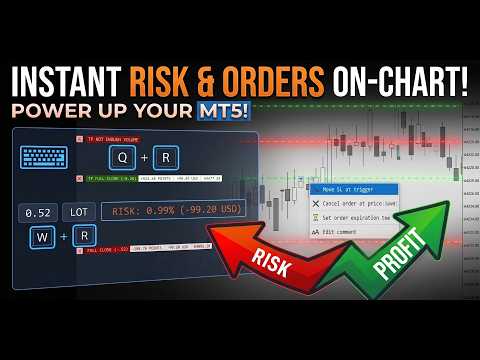
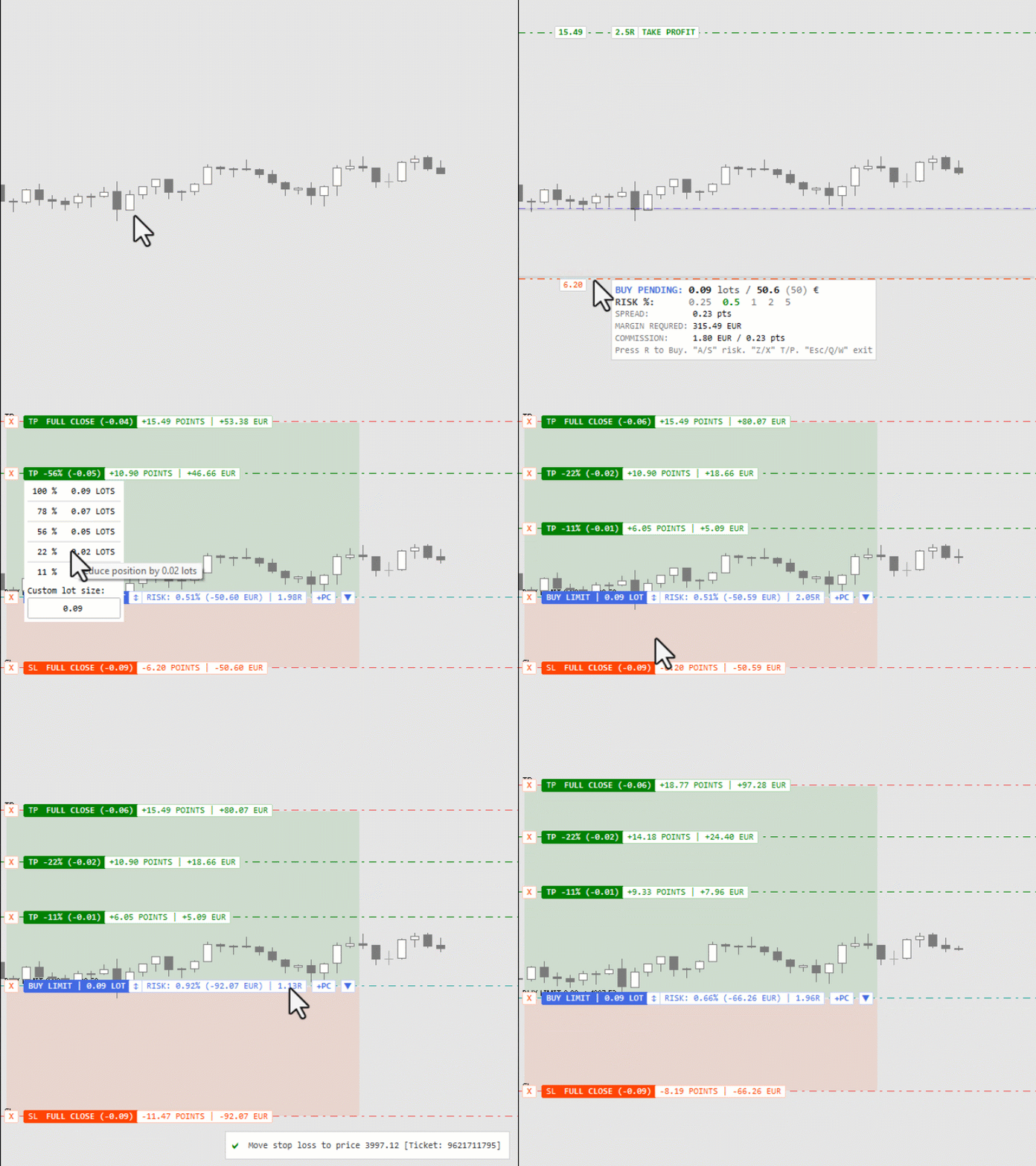
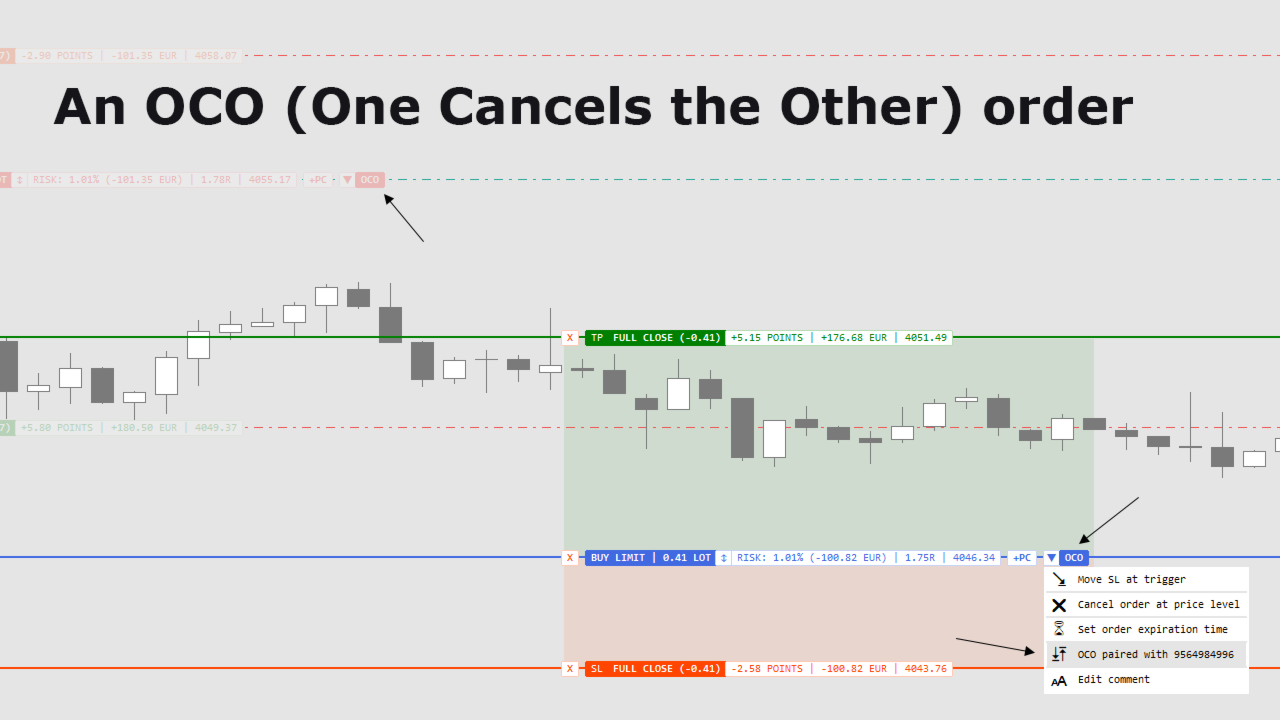
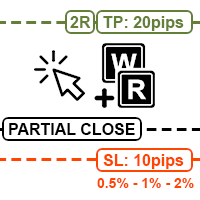
Position Size Tool is an on-chart trading tool that lets you manage trades entirely with your mouse and hotkeys — switch between preset risk percentages, place orders with instant position sizing, see live SL/TP distances and risk/reward, and close positions partially with a click.

Download Demo version Demo is limited to EURUSD pair on demo account on 1 hour timeframe.

Key Features:

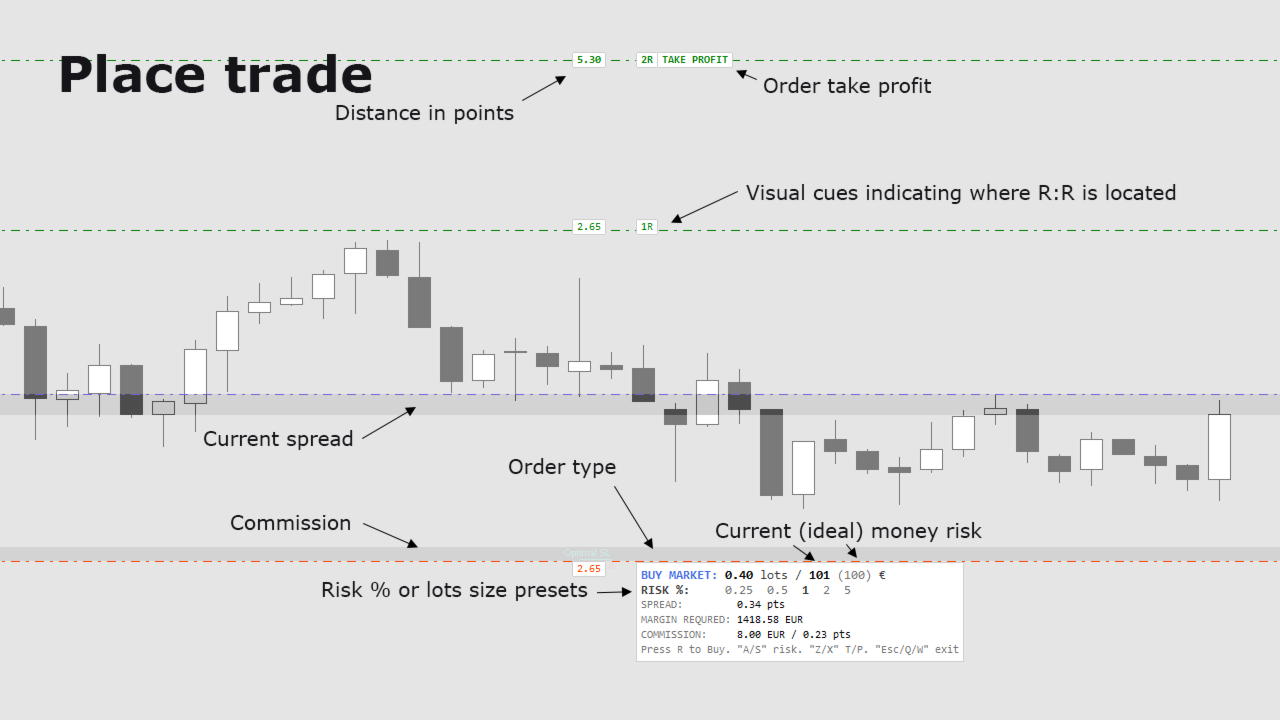
  • Market/pending orders by mouse & hotkeys with auto risk-based sizing.
  • Change risk % with A/S hotkeys.
  • Change auto take profit distance with Z/X hotkeys.
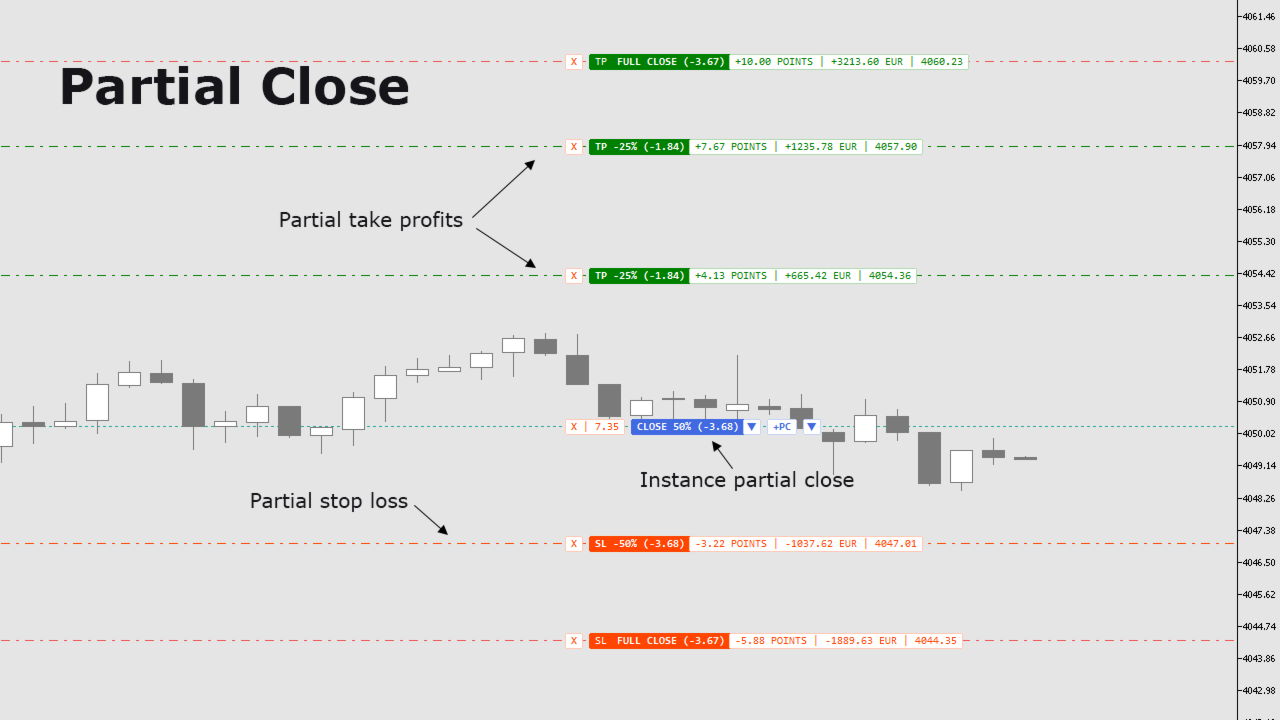
  • Partial close via on-chart buttons.
  • Auto place TP based on risk/reward ratio.
  • Show SL/TP distance, margin, spread.
  • Customizable interface — show only what you need.

FAQ:

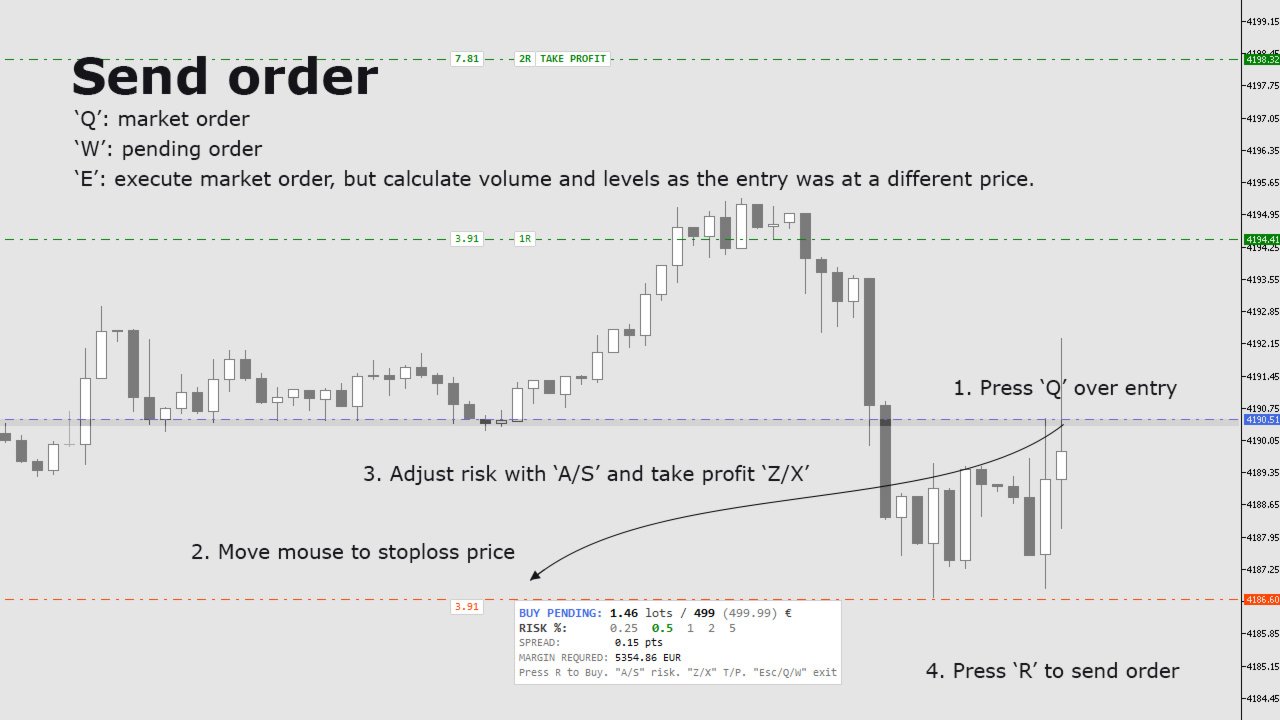
1. Market order

Press Qto enter market order mode.

Move your mouse to the desired Stop Loss level.

Use A / S to adjust risk percentage.

Press Rto send the order.

2. Pending order

Move your mouse to the desired entry price, then press W.

Next, move the mouse to the desired Stop Loss level.

Use A / S to adjust risk percentage.

Press Rto send the pending order.

The EA will automatically choose between limit and stop order types based on the position of the SL relative to the entry.

3. Partial close

For open positions, a partial close button appears on the chart.

Click it to close 50% of the position (by default).

Click the icon next to it to open a selector, where you can choose a different amount to close.

The selector is generated based on the number of steps you set in the settings.


Installation:

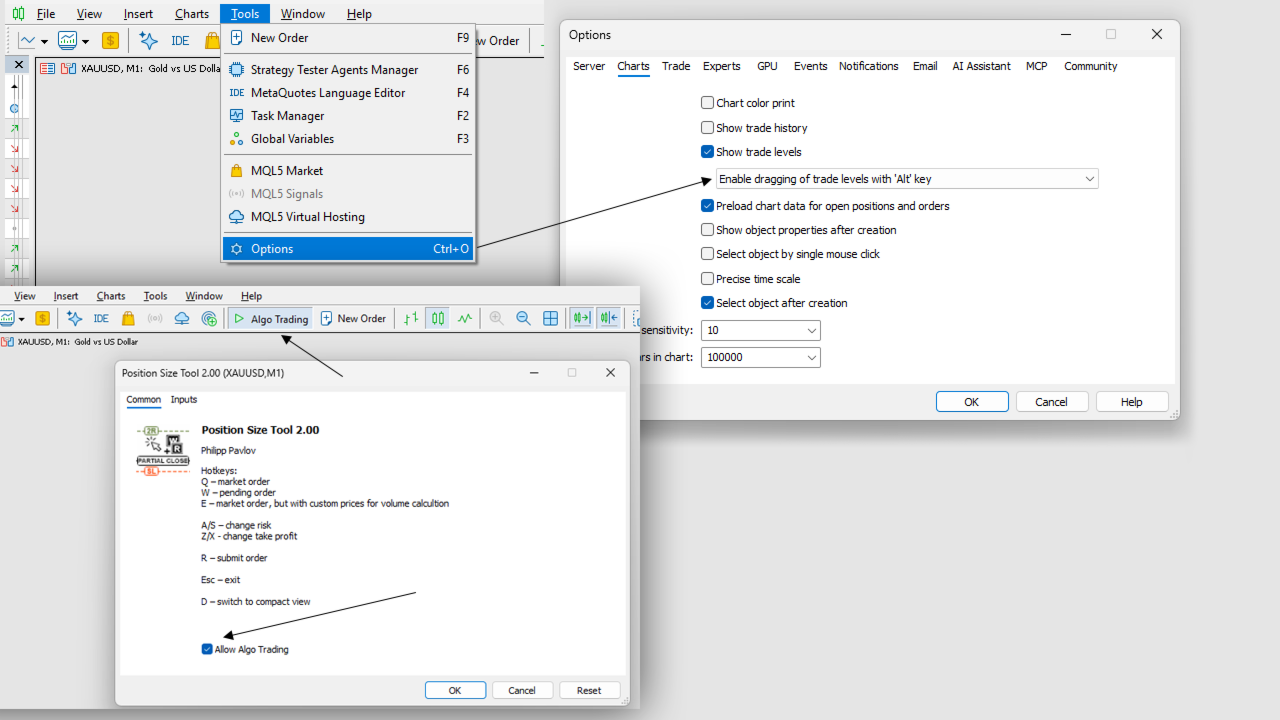
  1. Tools > Options > Expert Advisors. Allow algorithmic trading is enabled.
  2. Algo Trading button on top is enabled.
  3. In Properties of Position Size Tool > Common tab > Allow Algo Trading is enabled .

EA does not work with the Strategy Tester due to a limitation in MT5.


Değerlendirmeler 1
Tanapon Sanguanrat
542
Tanapon Sanguanrat 2025.10.21 02:00 
 

good ea good support

Önerilen ürünler
This indicator helps you control several pairs in a small workspace, therefore, it is not necessary to open several charts on the platform to do so. The indicator shows sequentially up to 6 different pairs, besides that each of these pairs has a button with which you can stop the indicator to observe the selected pair. Place the indicator on a chart to monitor several pairs and the rest of your space use it on the chart of the pair you wish to observe in detail.   MT4 version       Parameters Ob
Trade Dashboard simplifies how you open, manage, and control your trades, with built-in lot size calculation. It allows you to execute trades, manage risk, and control positions directly on the chart, with tools such as partial close, breakeven, and trailing stop. Designed to reduce manual work and help you stay focused on your trading decisions. A demo version is available for testing. Detailed explanations of features are provided within the MQL5 platform. Installation instructions are include
LotMaster AI – Akıllı Lot Hesaplama & Risk Kontrolü! Otomatik lot hesaplama ve sermaye koruması ile güvenli ve istikrarlı ticaret! LotMaster AI nedir? Bu uzman danışman (EA), hesap bakiyeniz ve belirlediğiniz risk yüzdesine göre işlem hacmini otomatik olarak hesaplar . Kaç lot açmanız gerektiğini tahmin etmeye son – LotMaster AI bunu sizin için yapar ve Stop Loss (SL) ve piyasa koşullarını dikkate alarak emirleri yönetir . Temel Özellikler: Otomatik lot hesaplama – bakiye ve belir
Description This is a Utility tool for MT5 which will make our chart analysis task quite more efficient and save large amount of time. As for chart analysis, some are watching out several symbol simultaneously with single timeframe and others are trading only one single pair with   multi timeframe analysis. For both, a common troublesome issue is “scroll chart to look back” or “draw chart objects” in multi charts at the same time.  Especially for those who are trading with multi timeframe soluti
Do not buy before seeing the Danko Trend Color product, as this panel is a way to view a summary of this indicator on various timeframes. The Danko DTC Panel utility allows you to look at the trend in up to 5 timeframes. When clicking on the timeframe texts, a new window will open with the indicator plotted on the screen so you can see the complete chart. The width of the panel, with the amount of candles you want to see, is customizable, see the images below. Ao clicar nos textos dos timeframe
Tek grafik. Tam kontrol. Her grafikteki nesneleri, renkleri ve ayarları ayrı ayrı yönetmek için zaman kaybetmeyi bırakın.       Grafik Senkronizasyon Yöneticisi ile   şunları yapabilirsiniz:       tüm MetaTrader grafiklerinizi senkronize edin, kopyalayın ve kontrol edin       anında—sadece bir panel ve birkaç kısayol kullanarak. Bir kez çizin, her yerde güncelleyin. Grafikleri tek bir tıklamayla açıp kapatın. Çalışma alanınızı temiz tutun.       sembol tabanlı nesne yönetimi   . Ve önemli ayrınt
SMT Trade Planner, MetaTrader grafigi uzerinde profesyonel bir risk hesaplayici ve islem yurutme panelidir. Risk ayarlariniza gore lot buyuklugunu hesaplar, grafikte suruklenebilir Giris, Stop Loss ve Take Profit cizgileri gosterir, yapilandiriabilir risk kurallarina gore islemi dogrular ve tek tikla islem yurutmenizi saglar.   Nasil calisir Trade Planner'i herhangi bir grafige ekleyin. Panel hesap bilgilerini ve hizli risk secim dugmelerini gosterir. Grafikte uc yatay cizgi belirir: Giris (mavi
OrderHelper script is super easy and trader friendly to use. It would boost your trading experience. Because it is designed to open one to multiple orders quickly with just one click. Besides using the OrderHelper script, traders can define various parameters for open orders such as the symbol, order type, lot size, stoploss, takeprofit and more. Basically, with this script traders can manage their open orders more efficiently and save their trading time. OrderHelper manages: Open the number of
Statistics Boom and Crash
Marcelo Jose Patino Vargas
SYSTEM DESCRIPTION Our MT5 EA uses an advanced statistical system to determine the optimal time to open sell positions on the BOOM 1000, BOOM 500, and BOOM 300 assets. Based on rigorous market data analysis, the EA identifies the moment when there is a 90% probability of a bearish candle, allowing our users to enter a sell position with maximum confidence in success. This data-driven approach is the key to achieving profitable and consistent trades in BOOM 1000, and our EA is designed to autom
One Click Breakeven Function: For multiple orders of the same currency but different order types (sell or buy), under the condition that the overall position is profitable, set the same stop-loss level or take-profit level. For example: there are currently 10 EURUSD orders, including 7 sell orders and 3 buy orders. When the overall position is profitable, if the overall take-profit for sell orders is set to 50 points: (1) When the total profit of the 7 sell orders is greater than the total loss
Overview AlphaForge Range Chart is a professional non-trading range-bar charting utility for MetaTrader 5. It generates live Range charts as MT5 custom symbols, helping traders analyze price movement through fixed-range bars instead of standard time-based candles. Unlike visual-only overlays, the generated Range chart behaves like a real MT5 custom-symbol chart. This means you can open it as a normal chart, apply templates, draw analysis objects, and add indicators directly to the Range chart fo
Session High Low Tracker MT5
AL MOOSAWI ABDULLAH JAFFER BAQER
Session High Low Tracker - Essential Multi-Session Price Analysis Tool Powerful Market Session Analysis for Serious Traders Price: $30 Product Overview Session High Low Tracker is an advanced MetaTrader utility that automatically identifies and displays the high and low price points across Asian, London, and New York trading sessions. This professional-grade tool helps traders recognize key market levels, identify potential breakouts, and develop precise session-based trading strategies. Key Fea
Attention All ICT Students! This indispensable tool is a must-have addition to your trading arsenal... Introducing the ICT PD Arrays Trader: Empower your trading with this innovative utility designed to enhance and simplify your ICT trading strategy and maximize your potential profits.  How does it work? It's simple yet highly effective. Begin by placing a rectangle on your trading chart and assigning it a name like 'ict' or any preferred identifier. This allows the system to accurately ident
Strategy Manager is a  Multi-Time-Frame & Multi-Currency  Dashboard for  Metatrader 4 and 5. Thanks to a free, external graphical user interface, build your own strategy by combining any indicators and loading them into the dashboard to see the result ! In addition, you can precisely  set-up your Auto-trading & Notifications and use indicators for Stop-Loss, partial profit or limit. Filter your automatic trading & notifications with forex calendar and more. Open and Manage your orders directly w
Tenha a boleta do ProfitChart no seu Metatrader! ........................ Agora é possível ter a boleta do profit no seu Metatrader. Envie ordens de compra e venda, acompanhe o mercado e simule estratégias em momentos de mobilidade, diretamente do seu Metatrader5. Gestão de riscos e otimização de lucros são dois princípios básicos de qualquer operação bem-sucedida. Nesse sentido, utilize as ferramentas de  STOPMOVEL, TRAILING STOP, STOPGAIN E ORDENS PARCIAIS DE SAÍDA.       Funcionalidades do
Indicator Summary The indicator dashboard displays values and trading actions, as well as provides a summary of trading actions based on 11 built-in indicators. Built-in Indicators: RSI (Relative Strength Index)   - A crossover from the overbought zone downwards is a sell signal. A crossover from the oversold zone upwards is a buy signal. When fluctuating in the zone between overbought and oversold, the signal is formed depending on the value's position relative to 50. Above 50 indicates a buy,
Timeless Charts
Samuel Manoel De Souza
5 (5)
Timeless Charts , saniye grafikleri / saniye zaman dilimleri, renko grafikleri / renko çubukları, küme grafikleri / footprint grafikleri ve popüler platformlarda bulunan gelişmiş araçlar dahil olmak üzere, özel grafikler / özel zaman dilimleri arayan profesyonel traderlar için tasarlanmış gelişmiş bir grafik çözümüdür. Geleneksel çevrimdışı grafikler veya basit özel göstergelerden farklı olarak, bu çözüm gerçek zaman damgası doğruluğuna (milisaniye düzeyine kadar) sahip tamamen özel çubuklar ol
Tim Trend
Oleksii Ferbei
Due to the fact that at each separate period of time, trading and exchange platforms from different parts of the planet are connected to the trading process, the Forex market operates around the clock. Depending on which continent trading activity takes place during a certain period, the entire daily routine is divided into several trading sessions. There are 4 main trading sessions: Pacific. European. American Asian This indicator allows you to see the session on the price chart. You can also
Ultimate PriceAction
Franck Henri Maglott
OCN PriceAction — The Smart Way to Trade Price Action By Océane Capital EARLY BIRD OFFER — Limited to the First 10 Buyers The first 10 traders who purchase OCN PriceAction will receive two exclusive bonuses, completely free: 1 Exclusive Setfile — a unique configuration not included in the standard package, developed specifically for this offer and never shared publicly 1 Private Training Session — a personalized walkthrough on how to use OCN PriceAction to pass and manage funded acco
Trade Control Panel Function Normal One Click Function Close All Close All Profit Close All Loss Close All Pending Order Close All Sell Close All Buy Advance One Click Function 1.  Close Partial Lot Sell by Percent It will help you partial close for all open position by desire percent you wanted. No longer partial close one by one for every open position Manual input for desire percent 2. Close Partial Lot Buy by Percent It will help you partial close for all open position by desire percent
Neuro Trader EA is an expert advisor developed using artificial intelligence, designed for analysis and automated trading in financial markets. The advisor focuses on utilizing a neural network, allowing for more flexible and precise responses to market changes. The algorithm analyzes market behavior using weight coefficients and dynamically adapts to changing conditions, making it particularly effective for short-term trading. Features of the Advisor: Neural Network for Decision-Making: The adv
Bneu AI Sentinel Pro
Marvinson Salavia Caballero
``` Bneu AI Sentinel — AI Risk Enforcement for MetaTrader 5 Sentinel is a risk management utility for MetaTrader 5 that monitors all trades on your account from any EA or manual trading. The utility enforces configurable limits through a 6-layer protection system, uses cloud-based analysis to detect trading behavior patterns, and includes a kill switch that closes all positions when limits are breached. What It Does Sentinel runs alongside all your EAs and manual trading. It monitors every
"Telegram Notification EA for MetaTrader 5 with ThreadID Mode" Description: Introducing our advanced Expert Advisor (EA) tailor-made for MetaTrader 5, delivering seamless notifications for trade openings and closures, along with comprehensive profit and drawdown tracking. Stay ahead of the market curve with timely updates, empowering you to make informed decisions and optimize your trading strategy effortlessly. Key Features: Instant Trade Notifications: Receive real-time updates directly from y
This is an utility for MetaTrader 5 designed to send notifications to a Telegram bot regarding trading activity on the terminal. The EA monitors changes in positions and orders, then sends structured messages to specified Telegram chats through the Telegram Bot API. It can optionally include chart screenshots when positions are opened. The EA uses the WebRequest function to communicate with the Telegram API. No additional servers or external services are required. Main Features Position Activity
The program is used to calculate the lot to be used given a certain amount of financial risk. It allows the creation of lines that will mark the entry and stop prices. From these two values ​​the lot is calculated and shown in a small panel. The program also allows choosing the risk-return ratio and creating a horizontal line marking the target. The system does not create orders. These must be created manually by the user.
Why choose Trading Pal EA: This is a EA utility that auto-manage your   positions ' Stop-Loss (SL) and Take-Profits (TP) dynamically. When opening a single   position , it is easy to set the SL and TP manually. But when dealing with multiple   positions , it can be very tedious or   overwhelming   to fill in so many SL and TP values consistently, especially in a short span of time, like in scalping. Over time and after many such trades, trading itself can become a chore. That is where this EA c
Pending Orders Grid Complete System opens any combination of Buy Stop, Sell Stop, Buy Limit and Sell Limit pending orders and closes all existing pending orders. You will be able to Drag-and-Drop the Script on the chart and it will pick up the start price for the first position in the grid from the "Drop" point. Usually it should be in the area of Support/Resistance lines. Input Parameters Before placing all pending orders, the input window is opened allowing you to modify all input parameters:
Introducing the "Auto Timed Close Operations", a useful utility for MetaTrader 5 traders! This utility has been developed to help traders of all levels automatically close their open positions at the exact moment they desire. With the "Auto Timed Close Operations", you gain the required control over your trades and can avoid unwanted surprises at the end of the day or at any other predefined time. We know how important it is to protect your profits and limit your losses, and that's exactly what
Trade Utility Pro is a bot utility designed to help you manage trades more easily, quickly, and accurately. This utility features a control panel interface and supports MetaTrader 5 exclusively. This utility does not link to any account information or external sources, ensuring safety. Main Features: Open Trade Support: Lot size calculation Fixed Lot: Custom input lot required Money Risk Lot: Automatically calculated based on stop loss and money risk Account % Risk Lot: Automatically calculated
FREE
Order Block Real
Arnold Byarufu
1 (1)
Detailed Explanation of the Order Block Indicator What is an Order Block? An Order Block refers to a specific price zone where institutional traders (e.g., banks, hedge funds) have placed a large number of buy or sell orders. These zones are critical because they often mark areas of significant market reversals, continuations, or breakouts. In simpler terms, it's a region on the chart where the "big players" have left their footprints. Traders use these zones to predict price behavior—whether th
Bu ürünün alıcıları ayrıca şunları da satın alıyor
Trade Assistant MT5
Evgeniy Kravchenko
4.43 (211)
It helps to calculate the risk per trade, the easy installation of a new order, order management with partial closing functions, trailing stop of 7 types and other useful functions. Additional materials and instructions Installation instructions - Application instructions - Trial version of the application for a demo account Line function -   shows on the chart the Opening line, Stop Loss, Take Profit. With this function it is easy to set a new order and see its additional characteristics bef
Trade Manager EA’ye hoş geldiniz! Ticaretin daha sezgisel, hassas ve verimli hale gelmesi için tasarlanmış nihai risk yönetim aracı ile tanışın. Bu sadece bir emir verme aracı değil; ticaret planlaması, pozisyon yönetimi ve risk kontrolü için kapsamlı bir çözüm. İster yeni başlayan bir yatırımcı olun, ister deneyimli bir trader ya da hızlı emir gerektiren bir scalper, Trade Manager EA ihtiyaçlarınıza uyum sağlar ve forex, endeksler, emtialar ve kripto paralar dahil tüm piyasalarda esneklik sunar
TradePanel MT5
Alfiya Fazylova
4.87 (154)
Trade Panel, çok işlevli bir ticaret asistanıdır. Uygulama, manuel ticaret için 50'den fazla ticaret fonksiyonu içerir ve çoğu ticaret görevini otomatikleştirmeyi mümkün kılar. Satın almadan önce demo hesapta demo sürümü test edebilirsiniz. Demo hesap için uygulamanın deneme sürümünü indirin: https://www.mql5.com/en/blogs/post/750865 . Talimatların tamamı buraya . Ticaret. Tek tıklamayla ticaret işlemleri yapmayı sağlar: Risk otomatik hesaplaması ile bekleyen emirleri ve pozisyonları açmak. Bird
Beta Sürümü Telegram to MT5 Signal Trader resmi alfa sürümüne neredeyse hazır. Bazı özellikler hâlâ geliştirilmekte olup küçük hatalarla karşılaşabilirsiniz. Sorun yaşarsanız lütfen bildirin, geri bildiriminiz yazılımın herkes için gelişmesine yardımcı olur. Telegram to MT5 Signal Trader , Telegram kanallarından veya gruplarından gelen işlem sinyallerini otomatik olarak MetaTrader 5 hesabınıza kopyalayan güçlü bir araçtır. Herkese açık ve özel kanalları destekler ve birden fazla sinyal sağlayıc
Farmed Hedge Yield Farming | All Markets (Manual - Hybrid - Semi/Automated EA) MULTI-ASSET SUPPORT Trade any asset available on your broker - Forex: Major, Minor, Exotic pairs - Crypto: BTC, ETH, XRP, SOL, BNB - Stocks: Apple, Tesla, Amazon, Google, etc. - Commodities: Gold, Silver, Oil, Gas - Indices: US30, NAS100, SPX500, DAX40 - Any CFD your broker offers VERIFIED TRADING RESULTS - Farmed Hedge Yield Axi Copy:  https://www.mql5.com/en/signals/2356376 - Farmed Hedge Yield Exn Copy:   https:/
Power Candles Strateji Tarayıcısı - Kendi Kendini Optimize Eden Çoklu Sembol Kurulum Bulucu Power Candles Strateji Tarayıcısı , Power Candles göstergesini çalıştıran aynı kendinden optimize edici motoru, Piyasa İzleyicinizdeki her sembol üzerinde yan yana çalıştırır. Tek bir panel, şu anda istatistiksel olarak hangi sembollerin işlem yapılabilir olduğunu, her birinde hangi stratejinin kazandığını, en uygun Stop Loss / Take Profit çiftini gösterir ve yeni bir sinyal geldiği anda size bildirim gön
Exp COPYLOT CLIENT for MT5
Vladislav Andruschenko
3.91 (33)
MetaTrader 5 için profesyonel işlem kopyalayıcı MetaTrader için hızlı, profesyonel ve güvenilir bir işlem kopyalayıcı . COPYLOT , MT4 ve MT5 terminalleri arasında Forex işlemlerini kopyalamanıza olanak tanır ve Hedge ile Netting hesaplarını destekler. COPYLOT MT5 sürümü şunları destekler: - MT5 Hedge → MT5 Hedge - MT5 Hedge → MT5 Netting - MT5 Netting → MT5 Hedge - MT5 Netting → MT5 Netting - MT4 → MT5 Hedge - MT4 → MT5 Netting MT4 sürümü Tam açıklama + DEMO + PDF Nasıl satın alınır Nasıl kurul
Copy Cat More Trade Copier MT5 (Kopyalayıcı Kedi MT5) , günümüzün ticaret zorluklarına yönelik tasarlanmış yerel bir ticaret kopyalayıcısı ve eksiksiz risk yönetimi ve yürütme çerçevesidir. Prop firması zorluklarından kişisel portföy yönetimine kadar, sağlam yürütme, sermaye koruması, esnek yapılandırma ve gelişmiş ticaret işleme kombinasyonu ile her duruma uyum sağlar. Kopyalayıcı hem Master (gönderici) hem de Slave (alıcı) modunda çalışır, piyasa ve bekleyen emirlerin, ticaret değişikliklerini
Telegram'dan MT5'e:   Nihai Sinyal Kopyalama Çözümü Telegram'dan MT5'e işlemlerinizi basitleştirin, DLL'lere ihtiyaç duymadan işlem sinyallerini doğrudan Telegram kanallarından ve sohbetlerinden MetaTrader 5 platformunuza kopyalayan modern araç. Bu güçlü çözüm hassas sinyal yürütme, kapsamlı özelleştirme seçenekleri sağlar, zamandan tasarruf sağlar ve verimliliğinizi artırır. [ Instructions and DEMO ] Temel Özellikler Doğrudan Telegram API Entegrasyonu Telefon numarası ve güvenli kod ile kimlik
Bir EA satın almadan önce, gerçekten dayanıklı mı yoksa sadece backtestte şanslı mı göründü, önce bunu kontrol edin. Çoğu robot güzel görünen bir backtest ile satılır. Yukarı giden bir eğri. İyi bir profit factor. Çok az şüphe. Yine de bu EA’lerin çoğu, piyasa o geçmişteki gibi hareket etmeyi bıraktığı anda dağılmaya başlar. Neden? Çünkü bir backtest yalnızca tek bir şeyi kanıtlar: o stratejinin fiyatın belirli bir yolunu izlediği durumda işe yaradığını. Başka yollarda da dayanacağını kanıtlamaz
The product will copy all telegram signal to MT5 ( which you are member) , also it can work as remote copier.  Easy to set up, copy order instant, can work with almost signal formats, image signal,  s upport to translate other language to English Work with all type of channel or group, even channel have "Restrict Saving Content", work with  multi channel, multi MT5 Work as remote copier: with signal have ticket number, it will copy exactly via ticket number. Support to backtest signal. How to s
Footprint Chart Pro — Professional OrderFlow EA for MetaTrader 5 Version 6.34 | Professional tool for real traders | Institutional-Grade Visualization DEMO USERS - PLEASE SELECT EVERY TICK / REAL TICK WHEN TESTING AND YOU HAVE DOWNLOADED HISTORICAL DATA. IF YOU SEE A WAITING SCREEN AND IT IS NOT DOWNLOADING, IT MEANS YOU HAVE LOW HISTORICAL DATA. TRY 1 MIN AND 5 MIN FIRST ON 1 DAY DATA. ONE DAY DATA SHOULD BE THE NEWEST AND MOST CURRENT DATE. PLEASE WAIT UNTIL THE MARKET HAS ROLLED OVER PERIOD.
Anchor: The EA Manager Run your full EA portfolio without conflicts, without stacked risk, and without watching every chart yourself. Anchor coordinates up to 64 Expert Advisors on a single account so only one trades at a time. Attach Anchor to any chart. Type your EA names and magic numbers in one line. Anchor handles the rest. Built for portfolios. Built for discipline. Built for prop firms. The Problem Running multiple EAs on the same account creates risk. Two gold EAs can open opposite posit
News filter, equity guard & session control for all your EAs — one tool, full protection Take a Break has evolved from a basic news filter into a comprehensive account protection solution . It pauses your other Expert Advisors during news events or based on custom filters. When trading resumes, it automatically restores your entire chart setup , including all EA settings. Why traders choose Take a Break One news filter for all your EAs — no more relying on individual built-in filters that may o
The core idea: using the user interface, you configure the parameters the chart must meet before entering a position (or positions), choose which entry models to use, and set the rules for when trading and planning should end. Lazy Trader  handles the rest: it  takes over all the routine chart watching and execution! full description  :: 3 key videos [1] ->  [2]   ->  [3] What can it do? - Understands Larry Williams market structure - Understands swing market structure by Michael Huddleston
Riskinizi otomatik olarak hesaplarken işlemlere hızlı bir şekilde girip çıkmanıza yardımcı olacak Ticaret Yöneticisi. Aşırı Ticaret, İntikam Ticareti ve Duygusal Ticaretten korunmanıza yardımcı olacak özellikler içerir. İşlemler otomatik olarak yönetilebilir ve hesap performans ölçümleri bir grafikte görselleştirilebilir. Bu özellikler, bu paneli tüm manuel yatırımcılar için ideal kılar ve MetaTrader 5 platformunun geliştirilmesine yardımcı olur. Çoklu Dil desteği. MT4 Sürümü  |  Kullanım Kılavu
MetaTrader 5 için Trading Panel — grafik ve klavyeden profesyonel tek tıkla işlem kontrolü Aktif traderlar için geliştirilmiş güçlü bir Trading Panel; işlemleri standart MetaTrader arayüzüne göre çok daha hızlı açmanıza, yönetmenize ve kapatmanıza yardımcı olur. Bu çözüm; pozisyonları, bekleyen emirleri, toplam kârı ve işlem yürütmesini tek bir profesyonel çalışma alanında kontrol etmek isteyen kullanıcılar için tasarlanmıştır. Bu sadece sıradan bir yardımcı araç değildir. MetaTrader 5 için ger
MT5 to Telegram Signal Provider , hesabınızı bir sinyal sağlayıcı haline getirerek belirtilen sinyalleri Telegram'ın sohbetine, kanalına veya grubuna göndermeyi sağlayan kullanımı kolay, tamamen özelleştirilebilir bir araçtır. Rakip ürünlerin çoğunun aksine, DLL içe aktarması yapmaz. [ Demo ] [ Kılavuz ] [ MT4 Versiyonu ] [ Discord Versiyonu ] [ Telegram Kanalı ]  New: [ Telegram To MT5 ] Kurulum Adım adım bir kullanıcı kılavuzu mevcuttur. Telegram API'si hakkında bilgi gerekmemektedir; ihtiyac
DrawDown Limiter
Haidar Lionel Haj Ali
5 (20)
Drawdown Limiter EA You are in the right place if you were searching for Drawdown control, Drawdown limiter, Balance protection, Equity Protection or Daily Drawdown Limit related to Prop Firm, FTMO, or Funded account trading, or if you want to protect your trading account. Have you suffered from controlling your drawdown when trading funded accounts? This EA is meant for you. Prop firms usually set a rule called “Trader Daily Drawdown”, and if it is not respected, you are disqualified.  I am an
YuClusters
Yury Kulikov
4.93 (43)
Attention: You can view the program operation in the free version  YuClusters DEMO .  YuClusters is a professional market analysis system. The trader has unique opportunities to analyze the flow of orders, trade volumes, price movements using various charts, profiles, indicators, and graphical objects. YuClusters operates on data based on Time&Sales or ticks information, depending on what is available in the quotes of a financial instrument. YuClusters allows you to build graphs by combining da
Local Trade Copier EA , bir MAM veya PAMM hesabına ihtiyaç duymadan, harici kaynaklardan ticaret sinyalleri yürütmesi veya aynı anda birkaç hesabı yönetmesi gereken bireysel tüccarlar veya hesap yöneticileri için bir çözümdür. 8 ana hesaptan sınırsız bağımlı hesaba kopyalar [ Kurulum Kılavuzu | Güncelleme Kılavuzu | Sorun Giderme | SSS | Tüm Ürünler ] %100 kendi kendine barındırılan Kurulumu ve kullanımı kolay Hiçbir yükleyici, yapılandırma dosyası, sunucu, bellek kanalı veya DLL kullanılmadı E
Grid Manual MT5
Alfiya Fazylova
4.9 (21)
Grid Manual, sipariş ızgarasıyla çalışmak için kullanılan bir ticaret yardımcı programıdır. Yardımcı program evrenseldir, esnek ayarlara ve sezgisel bir arayüze sahiptir. Sadece kayıpların ortalaması yönünde değil, aynı zamanda kazanç artışı yönünde de bir emir ızgarası ile çalışır. Tüccarın bir emir ızgarası oluşturmasına ve eşlik etmesine gerek yoktur, bu yardımcı programı yapacaktır. Emri açmanız yeterlidir ve Grid manual otomatik olarak ona bir emir ızgarası oluşturacak ve kapanana kadar ona
Trade Manager DashPlus
Henry Lyubomir Wallace
5 (13)
DashPlus , MetaTrader 5 platformunda işlem verimliliğinizi ve etkinliğinizi artırmak için tasarlanmış gelişmiş bir işlem yönetim aracıdır. Risk hesaplama, emir yönetimi, gelişmiş ızgara sistemleri, grafik tabanlı araçlar ve performans analitiği gibi kapsamlı bir özellik yelpazesi sunar. Temel Özellikler 1. Kurtarma Izgarası Olumsuz piyasa koşullarında işlemleri yönetmek için ortalama alma ve esnek bir ızgara sistemi uygular. İşlem kurtarma çabalarını optimize etmek için stratejik giriş ve çıkış
This EA Utility allows you to manage (with advanced filtering) unlimited open orders (manual or EA) with 16 trailing stop methods: fixed, percent, ATR Exit, Chandelier Exit, Moving Average, Candle High Low Exit, Bollinger Bands, Parabolic, Envelope, Fractal, Ichimoku Kijun-Sen, Alligator, Exit After X Minutes or Bars, RSI and Stochastic. The trailing stop can be either real or virtual, and you can exit fully or with a partial close percent on touch or bar close.  Moreover, you can add (override
Bu ürün, haber saatlerinde tüm uzman danışmanları ve manüel grafikleri filtreler, böylece manüel ticaret kurulumlarınızı veya diğer uzman danışmanlar tarafından girilen işlemleri yok edebilecek ani fiyat dalgalanmaları konusunda endişelenmenize gerek kalmaz. Bu ürün, herhangi bir haber yayınlanmadan önce açık pozisyonlarınızı ve bekleyen emirlerinizi yönetebilen tam bir sipariş yönetim sistemi ile birlikte gelir.   The News Filter'ı   satın aldığınızda, gelecekteki uzman danışmanlar için yerleşi
Telegram to MT5 Pro — Advanced Telegram Signal Copier with Auto-Fix, Multi-TP, Risk Control and Full Trade Management Telegram to MT5 Pro — Profesyonel Telegram Sinyal Kopyalayıcı Telegram to MT5 Pro, Telegram’dan gelen sinyalleri MetaTrader 5 hesabına otomatik olarak doğrudan uygulayan yüksek performanslı bir trade kopyalayıcıdır ve risk, işlem yürütme ve trade yönetimi üzerinde tam kontrol sağlar. Sistem iki bileşenden oluşur: • MetaTrader 5 içinde çalışan Expert Advisor (EA) • Telegram’a bağ
Custom Timeframe Manager Pro: MetaTrader 5'te Sınırsız Zaman Dilimleri Terminalin standart ayarları genellikle fiyat hareketinin önemli ayrıntılarını gizler. Analizi yalnızca klasik periyotlarla sınırlayan yatırımcı, trendin doğuş anlarını ve gerçek volatilite seviyelerini kaçırma riskiyle karşı karşıya kalır. Custom Timeframe Manager Pro , MetaTrader 5'in sınırlarını genişleten profesyonel bir yardımcı yazılımdır. Kesirli ve egzotik olanlar dahil olmak üzere her türlü özel periyodu oluşturun v
Ultimate Extractor - Professional Trading Analytics for MT5 *****this is the local HTML version of Ultimate Extractor. !!!!!it is not compatible with Cloud!!!! For the online version please reach out to me directly****** Ultimate Extractor transforms your MetaTrader 5 trading history into actionable insights with comprehensive analytics, interactive charts, and real-time performance tracking. What It Does Automatically analyzes your MT5 trading history across all Expert Advisors and generates
Prop Guardian Risk Manager MT5 – Daily and Overall Drawdown Protection for Prop Firm Traders Prop Guardian Risk Manager is a professional risk-control utility for MetaTrader 5, created for traders who operate under prop firm rules. It does not open trades and does not implement any trading strategy. Instead, it runs in the background, monitors your account risk and can automatically block trading or close exposure when your own limits are reached. Use it as a safety layer on top of your manual t
Entry In The Zone and SMC Multi Timeframe   is a real-time 2-in-1 market analysis tool that combines market structure analysis and a No Repaint BUY / SELL signal system into a single indicator, built on Smart Money Concepts (SMC) — a widely adopted framework used by professional traders to understand market structure. This indicator helps you see the market more clearly, make decisions based on structure rather than guesswork, and focus on high-probability zones where price is more likely to rea
Yazarın diğer ürünleri
Generates custom tick-based charts. Runs as a service. Key Features: Custom Tick Bars: Define the exact number of ticks per candle. Auto-Setup: Automatically creates the custom symbol in Market Watch and loads history. Session Control: Automatically closes the current bar at the end of the trading day. Real-Time: Updates seamlessly with live market data. Parameters: Source Symbol: Base asset (e.g., EURUSD). Required. Symbol suffix: Suffix for the new symbol (default: _TICK ). Ticks per bar: Tick
FREE
Objects Styler   is a utility that provides a   context-sensitive panel   for editing the properties of standard graphical objects directly on the chart. Its key feature is a powerful   template system   that allows users to save, manage, and instantly apply complex sets of styles to objects. Core Features Interface and Interaction Contextual Activation:   The panel is invoked by clicking (or   Shift   + clicking) a graphical object. It supports all standard objects and most of their properties.
FREE
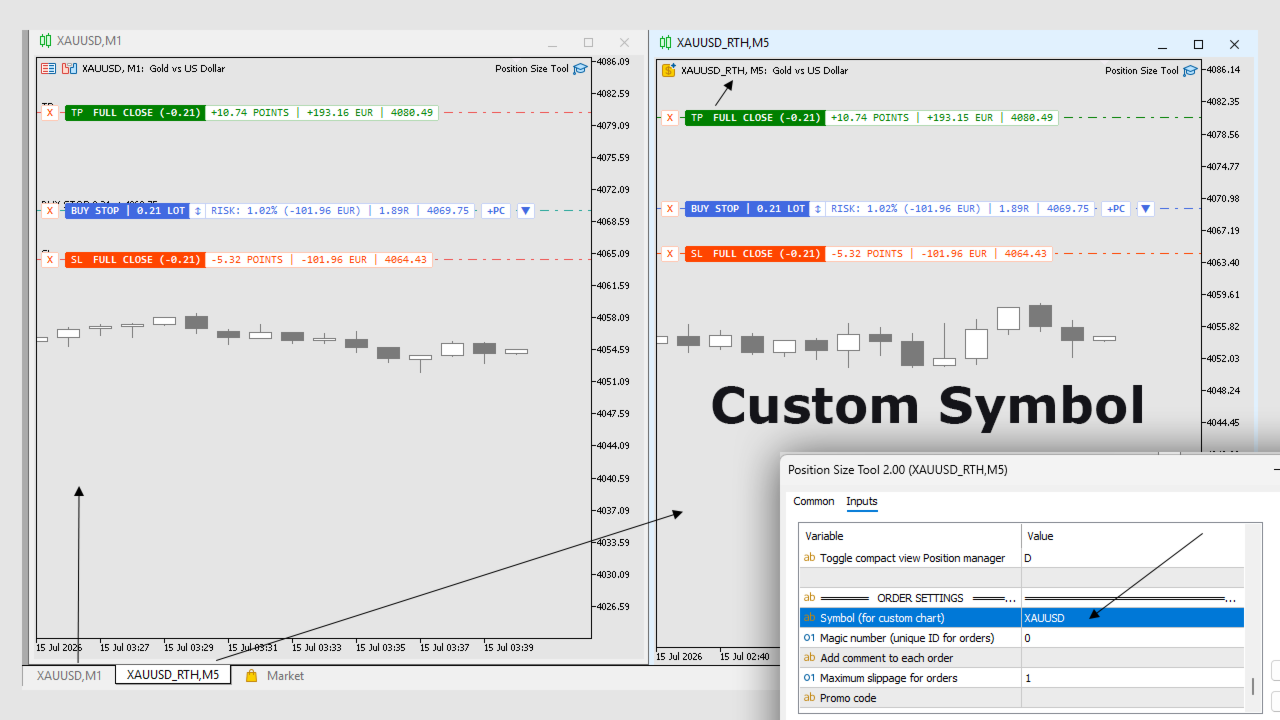
Yalnızca belirli işlem seanslarını görüntülemek için özel semboller oluşturan, gece verilerini (Globex) ve mesai saatleri dışındaki fiyat hareketlerini filtreleyen bir MT5 yardımcı programı. Regular Trading Hours (RTH) veya özel zaman dilimlerine kesinlikle dayalı grafikler oluşturmanıza olanak tanır. Özellikler: Servis olarak çalıştır:   Bir kez kurun ve unutun. Servisler MT5 ile otomatik olarak başlar ve arka planda çalışır. Kaynak grafiği açık tutmanıza veya gösterge eklemenize gerek yoktur.
FREE
Filtrele:
Tanapon Sanguanrat
542
Tanapon Sanguanrat 2025.10.21 02:00 
 

good ea good support

Değerlendirmeye yanıt