Order Selective Delete MT4

The Order Selective Delete is a multi-symbol multi-timeframe script used to delete simultaneously various pending orders. 

General Description 

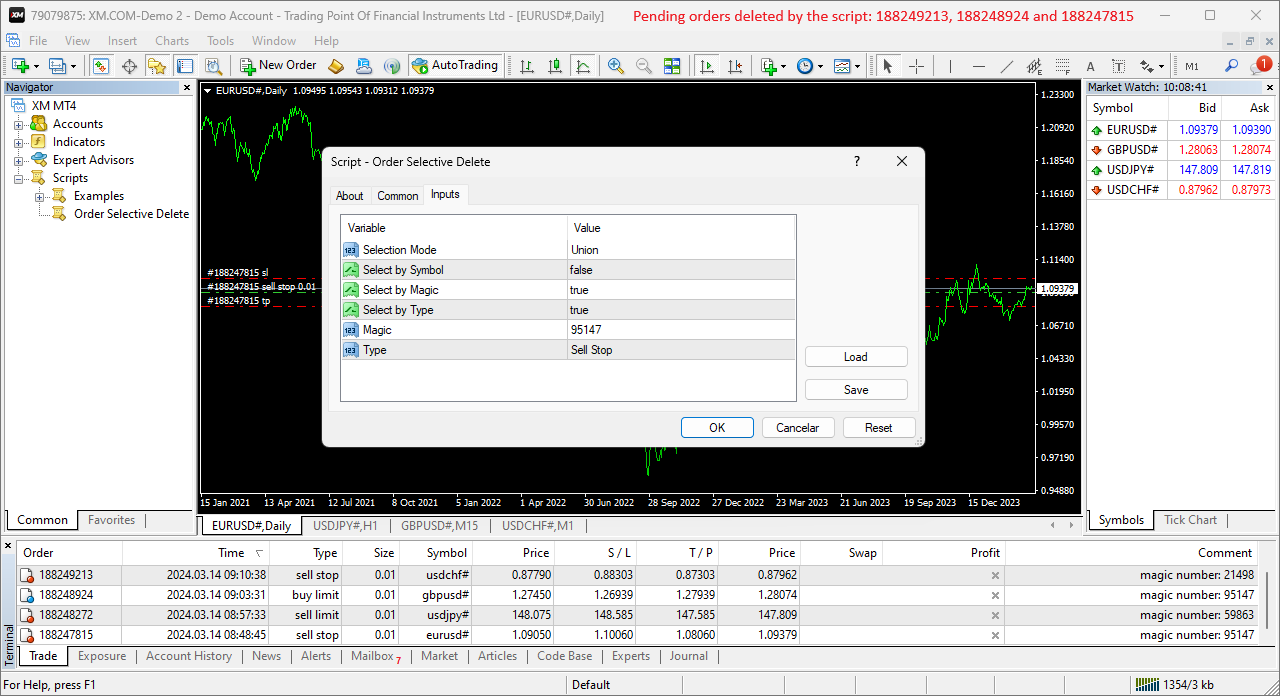
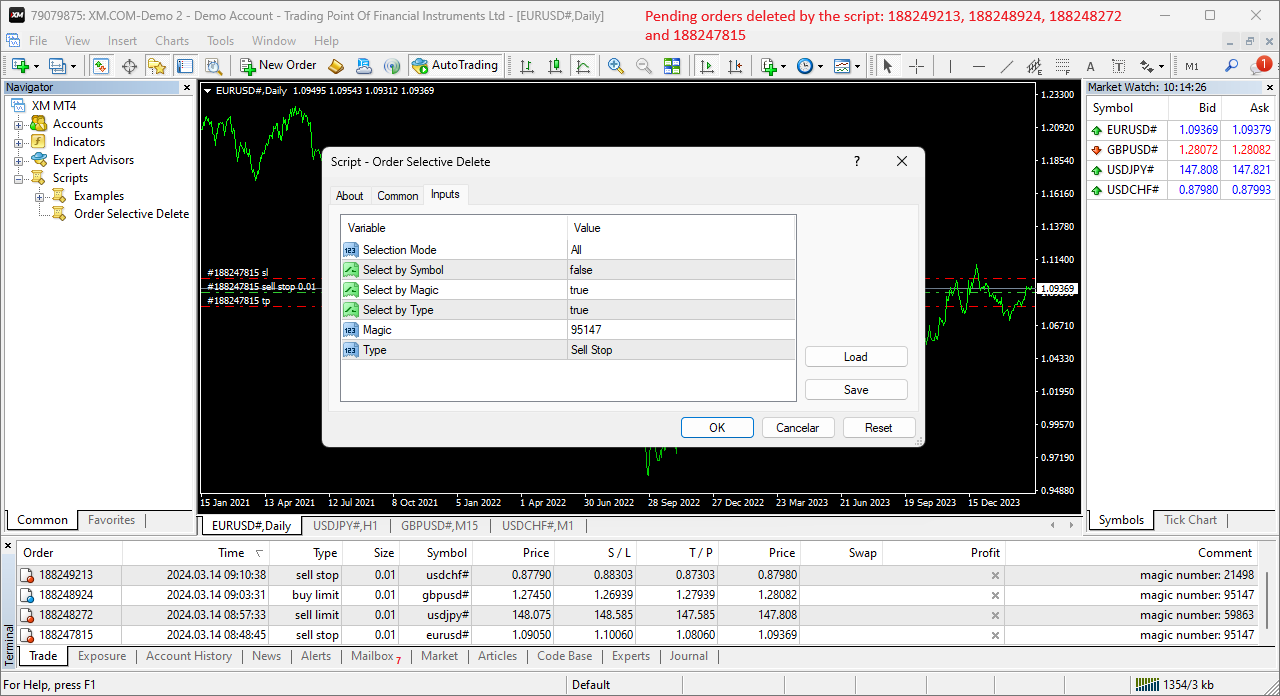
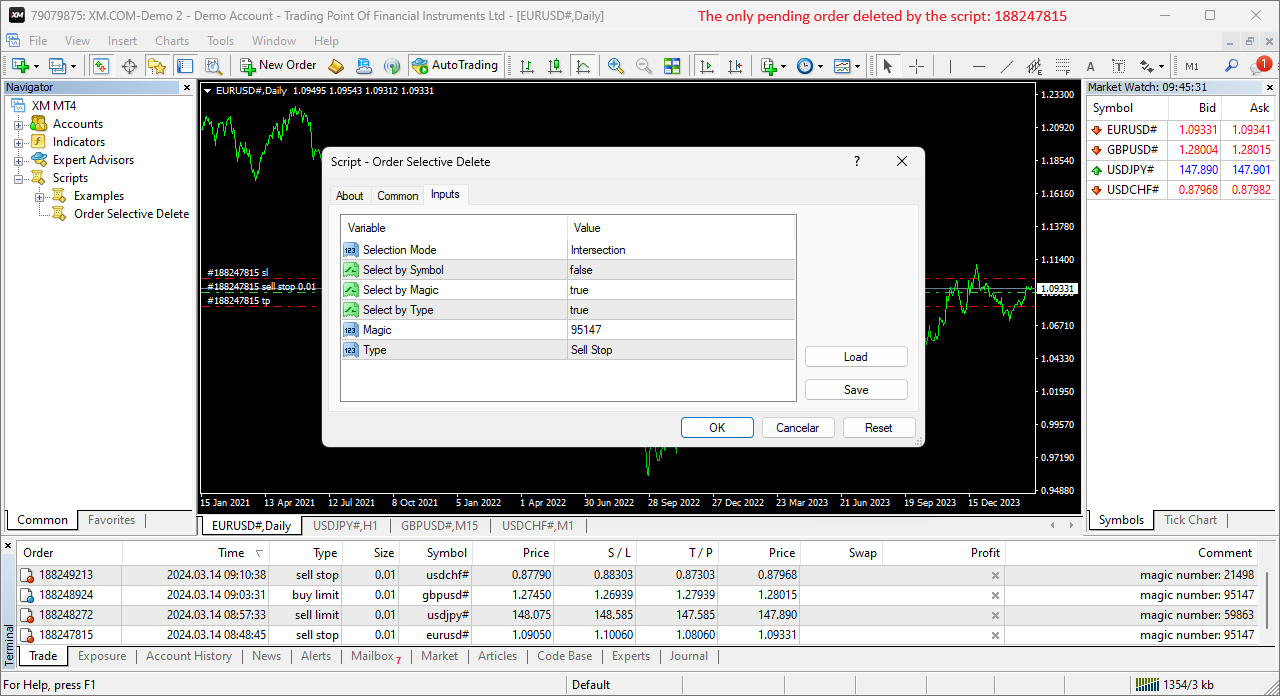
The Order Selective Delete possesses three operation modes (Intersection, Union and All) that control the way as three pending order features (symbol, magic number and type) are used. The modes, available through the Selection Mode input parameter, relate to the features, available through the “Select by Feature” and “Feature” input parameters, as follows: 

  • Intersection – contains only the pending orders whose features match all the features opted in the script. 
  • Union – contains all the pending orders whose features match at least a feature opted in the script. 
  • All – contains all the pending orders, regardless of any feature opted or not in the script. 

    The Intersection and Union operations in the script are similar to those in set theory, with the features selection and feature values representing the sets and set elements, respectively. 

    To use a given feature in the Intersection and Union modes, the respective “Select by Feature” needs to be activated, and the “Feature” needs to be selected with the intended value, except in the Select by Symbol case, whose value is always the chart’s symbol where the script is executed. 

    As an example of the script’s operation modes, consider four pending orders with different features and all the 3 modes with the same features setting (the type isn’t used): 


    Order 1 
    Order 2 
    Order 3 
    Order 4 
    Each mode 
    Symbol 
    AUDUSD 
    USDJPY 
    GBPUSD 
    USDJPY 
    USDJPY 
    Magic 
    14758 
    32978 
    67389 
    90336 
    32978 
    Type 
    Buy Limit 
    Buy Limit 
    Sell Stop 
    Sell Limit 
    --------------

    Each mode determines the following pending orders to delete: Intersection – order 2, Union – orders 2 and 4, and All – orders 1 to 4. 

    Input Parameters 

    • Selection Mode: Pending orders’ selection mode – Intersection/Union/All (see the General Description section above). 
    • Select by Symbol: Selection based on the pending order symbol. 
    • Select by Magic: Selection based on the pending order magic number. 
    • Select by Type: Selection based on the pending order type. 
    • Magic: Pending order magic number. 
    • Type: Pending order type. 

      Some of the available parameters accept values that lead to particular options. 

      • Select by Symbol, Select by Magic and Select by Type: The “true” value at just one of these parameters means that the Intersection and Union modes coincide. 
      • Magic: A null value means the pending orders placed manually or automatically with the 0-default value. 

        Displayed Information 

        The script possesses a few messages to inform the user about errors that might occur during its execution. The messages are shown through the Alert function (by a pop-up window), its content includes: 

        1. The warning that an input parameter has been incorrectly set. 
        2. The Trade Server Return Codes description. 
        3. The symbol’s quotes (immediately) before the trade request’s formation, followed by the symbol’s quotes (immediately) after the trade server’s decision (only relevant to the programmer). 
        4. The Runtime Errors description. 
        5. The standard function in the include file where the runtime error was detected (only relevant to the programmer). 

                Note: Some elements of the list are displayed simultaneously (in the same text line): 2 and 3; 4 and 5. 

                Conclusion 

                The Order Selective Delete is a helpful and efficient tool regarding the manual deletion of pending orders, especially when these reach a significant number, enabling a simple and intuitive selection of the orders to delete.

                Рекомендуем также
                this EA draws vertical lines on the chart, either consecutive or alternating lines, depending on the input settings. Since vertical lines often represent time events, timing is important in trading. StartTime = D'2025.03.12 23:00';  // Starting point (time and date) NumberOfLines = 10;                    // Total number of lines to draw IntervalCandles = 1;                   // Interval in candles (must be > 0) IntervalMinutes = 30;                  // Interval in minutes (0 to disable) Directi
                FREE
                Automated Timeframe cycling with Symbols centered.  Force every timeframe onto one clock window, so the story you see on Daily is the same story you are slicing on H4, H1, and M1.  Traders usually flip timeframes and lose the span. A Daily chart shows a few weeks, then M15 shows a few hours, and the eye treats them as different markets. TASSERACT locks the window to N bars of the highest enabled timeframe — default 10 Daily — and maps every lower timeframe to that same stretch. You stay inside o
                FREE
                EA Follower Version any Follow Copy Account  (Acc. Number)  need a open MT Terminal, download multiple times Step1:   Open Master MT5 Terminal    =  install master- Version   (on any Symbol just one Time) Step2:   Open Follower MT5 Terminal = install follower- Version  (on any Symbol just one Time) Step3:   all Trades from any Symbol or any Robot are copy now to follow- Terminal immediately for simple copy set on Chart and   Start   no optimization. This Robot is a Trade Copier for MT5 that auto
                FREE
                Indicator Test Report MT4
                Narayanan Mohanan Mohanan Krishnan
                Indicator Test Report для MetaTrader 4 — средство проверки перерисовки и тестер индикаторов MT4, которое показывает, как на самом деле ведет себя любой индикатор. Вы не можете заглянуть внутрь скомпилированного индикатора. Отчет о тестировании индикатора загружает любой индикатор — купленный, написанный или встроенный в MetaTrader — и отвечает на вопрос, на который не может ответить описание: перерисовывается ли он, сколько истории ему нужно и что на самом деле публикует? Он сообщает о поведении
                FREE
                This indicator help to mark the high and low of the session Asian,London,Newyork , with custom hour setting This indicator is set to count from minute candle so it will move with the current market and stop at the designated hour and create a accurate line for the day. below is the customization that you can adjust : Input Descriptions EnableAsian Enables or disables the display of Asian session high and low levels. EnableLondon Enables or disables the display of London session high and
                FREE
                Remaining Time MT4
                Dhokiyas Money Map Investment Consultants - FZCO
                Candle Remaining Time для MetaTrader 4 Больше никогда не пропускайте закрытие свечи. Торгуйте с идеальной точностью. Утилита точного таймера Candle Remaining Time для MT4 Candle Remaining Time — это легкая и точная утилита для MetaTrader 4, которая отображает точное оставшееся время текущей свечи прямо на графике в режиме реального времени. Инструмент создан для трейдеров, которые полагаются на подтверждение закрытия свечи. Независимо от того, торгуете ли вы скальпинг, внутридневные стратегии,
                FREE
                Update:ver1.53 (2023/08/16) ・概要と必要環境 手動発注もしくは他ツール等からの発注に対し、指値発注予約の複製を生成します。こちらは「発注操作の簡易化」に特化したものになります。発注判断となる分析は、資料を漁る、経験則を導く、他の分析ツールやEAを併用する等、利用者ご自身で頑張ってください。なお、ver1.28より、「決済後、自動で再発注する」機能が実装されました。(有償版でのみ有効化できます) ・導入と導入後の操作 導入そのものは簡単です。「自動売買可能なEA」として、適当なチャートにて動作させるだけです。(チャートの対象相場は問いません。このEAは、チャートを見ていません)。あとは、「このEAでのローカルコピー以外の発注」があれば、それに応じて「損失が出た場合に備えての追加取引の予約」という形で、指値発注が自動生成されます。 導入操作上の注意として、「本EAを、複数のチャートで動作」はできません。EAがチャート自体を見ておらず、注文状況だけを見ているため、複数のチャートで動かす意味もありません。また、ターミナルとEAの設定として「自動売買」を許可しない
                FREE
                The Saz_Timer indicator belongs to the Saz_Forex suite of professional indicators designed by Traders, for Traders. This indicator will show minutes and seconds of real time on the chart window. The indicator uses the OnTimer() event so it can update even while no ticks received on the chart. The text is shown toward the bottom right of the chart, encircled red in the screenshot. Inputs: Text Colour, allows selection of the colour for the text.
                FREE
                This indicator show the candle remaining time on the chart and/or in the corner of the window. It also display notificaton (popup and push) when a new candle is formed (optional). You configure the timer on candles and at chart corner. I don't need to explain the functions because are very simple. MT5 version:  https://www.mql5.com/pt/market/product/38470 Any doubt or suggestion to a new feature please comment. Enjoy!

                FREE
                PZ Trade Pad EA
                PZ TRADING SLU
                4.29 (31)
                Clos Утилита PZ Trade Pad EA позволяет торговать с помощью панели прямо на ценовом графике. Продукт имеет встроенное управление риском и может работать с уже открытыми сделками. Возможность совершать сделки прямо на ценовом графике Управление капиталом Возможность установки стоп-уровней Закрытие всех открытых сделок в один клик Удаление всех отложенных ордеров в один клик Частичное закрытие прибыльных сделок в один клик Без входных параметров. Применение Утилита проста в использовании. Выберите
                FREE
                A "simple design" trading panel, which is characterized by small byte size, low CPU usage, simple steps, and quick operation, 1 to 2 clicks to complete a functional operation, saving time and increasing efficiency . The panel is easy to use, and it is not complicated to set parameters, which is in line with traders' habits. At the same time, its compact- design, clear at a glance, and comprehensive functions are a powerful tool for manual trading! Key features of the panel:   Click "Bid Price"
                FREE
                DF Fib Trader Pro DF Fib Trader Pro — это автоматизированная торговая система, разработанная для MetaTrader 4. Она использует ценовые уровни Фибоначчи в сочетании с анализом тренда и структуры для определения точек входа и выхода. Советник поддерживает как длинные, так и короткие позиции и включает встроенные параметры управления рисками. Основные характеристики: • Использует логику коррекции и расширения Фибоначчи для построения точек входа, стоп-лосса и тейк-профита. • Настраиваемый размер л
                FREE
                NAS100 Auto Sl And TP
                Moustapha Boulouz
                5 (2)
                Представляем NAS100 Auto SL и TP Maker для MT4: Никогда больше не пропустите установку StopLoss и TakeProfit с нашим NAS100 Auto SL и TP Maker, незаменимым помощником для трейдеров, работающих на рынке Nasdaq 100 в MetaTrader 4. Этот инструмент предназначен для тех, кто ищет беспроблемное решение для автоматизации управления уровнями StopLoss и TakeProfit. Ключевые особенности: Эффективная автоматизация: Автоматически отслеживает сделки Nasdaq 100 без StopLoss и/или TakeProfit. Динамически регу
                FREE
                Format Charts MT4
                Vital H B Engenharia Ltda
                If you use several charts open at the same time, you know how boring it is to apply formats to each chart individually. This script can change all open charts using a single command. Parameters: 1 - Choose symbol to put on charts: apply the selected symbol to all charts. If "current", it does not change the symbol; 2 - Choose timeframe or leave empty: apply the selected timeframe to all charts. If "CURRENT", it does not change the timeframe; 3 - Apply template to the charts: If true, apply the t
                FREE
                Clock ET
                Andrew Tsujiguchi
                Простые часы восточного времени (ET) на вашем графике, автоматически синхронизированные с часами работы американского рынка. Обновление каждую секунду. Full description: ClockET — Лёгкий индикатор, отображающий текущую дату и время по восточному времени США (ET) прямо на графике, чтобы вы всегда точно знали, на каком этапе находится американская сессия — без ручных расчётов часовых поясов. Что отображается • Часы в реальном времени — День, месяц, дата и время по ET, обновление каждую секунду
                FREE
                Virtual Assistant MINI   VIRTUALL ASSISTANT = MAKE YOUR TP AND SL VIRTUAL!   Tool meant to control your stop loss and take profit by converting them to virtual SL/TP (with support for TRAILING) Convert all SL and TP to virtual so your exits on trades are hidden from your broker! Run this EA on any graph, choose 1MIN timeframe (VA is autosaving data only on new bar detected, so graph TF equals to VA autosave period) !!! When using virtual trade exits, stable connection is needed for order executi
                FREE
                Rainbow MT4 is a technical indicator based on Moving average with period 34 and very easy to use. When price crosses above MA and MA changes color to green, it’s a signal to buy. When price crosses below MA and MA changes color to red, it’s a signal to sell. The Expert advisor ( Rainbow EA MT4) based on Rainbow MT4 indicator, as you can see in the short video below is now available here .
                FREE
                The only drawdown guardian that stops your other EAs from digging you deeper. PropMarshal monitors your account equity in real time and instantly closes all positions the moment a drawdown or profit target threshold is breached. But it doesn't stop there — it closes every chart on your platform too, cutting off any other Expert Advisors before they can open new trades and compound the damage. The Problem   PropMarshal   Solves Most prop firm traders run multiple EAs across multiple charts. When
                FREE
                Утилита позволяет вручную тестировать ваши стратегии в тестере стратегий. Торговля в один клик на графике визуализации. Последняя версия утилиты предлагает трейдерам расширенные функции для ручного тестирования своих торговых стратегий. С помощью тестера стратегий вы теперь можете оценить эффективность своих торговых стратегий в смоделированной среде. Эта функция позволяет вам анализировать эффективность ваших торговых методов и совершенствовать их, чтобы улучшить свои торговые навыки. Более тог
                FREE
                ClearEdge Daily Candle MT4 New York-close daily candle on any timeframe, with candle countdown, live spread and volatility information. Overview  ClearEdge Daily Candle draws the current day's candle next to the live price on any chart timeframe. On the 1-minute, 5-minute, 15-minute, 1-hour or higher charts, you can see where the trading day opened, how far price has moved in both directions, and whether the day is currently bullish or bearish, without switching to the daily (D1) chart. Why
                EA Master Version any Follow Copy Account  (Acc. Number)  need a open MT Terminal, download multiple times Step1:   Open Master MT5 Terminal    =  install master- Version   (on any Symbol just one Time) Step2:   Open Follower MT5 Terminal = install follower- Version  (on any Symbol just one Time) Step3:   all Trades from any Symbol or any Robot are copy now to follow- Terminal immediately for simple copy set on Chart and   Start   no optimization. This Robot is a Trade Copier for MT5 that automa
                FREE
                Smart Ruler
                Serhii Shevchuk
                4.83 (6)
                This tool is designed to measure the distance between two points on a chart and much more. List of measured values:  Distance in points  Profit (with and without spread)  Time difference  Percentage price change  Slope angle  Number of bars (various variations)  Ratio of distance in points to the reference value Features:  Snap to OHLC prices  Automatic color profile setting based on chart background color  Various types of pointers to choose from  Display of values ​​of selected points on th
                FREE
                This indicator alerts you when/before new 1 or 5 minute bar candle formed. In other words,this indicator alerts you every 1/5 minutes. This indicator is especially useful for traders who trade when new bars formed. *This indicator don't work propery in strategy tester.Use this in live trading to check functionality. There is more powerful Pro version .In Pro version,you can choose more timeframe and so on. Input Parameters Alert_Or_Sound =Sound ----- Choose alert or sound or both to notify y
                FREE
                Free automatic fibonacci - это индикатор, который автоматически строит коррекции Фибоначчи, основываясь на количестве баров, выбранных в параметре BarsToScan. Линии Фибоначчи автоматически обновляются в реальном времени при появлении новых максимальных и минимальных значений среди выбранных баров. В настройках индикатора можно выбрать уровни, значения которых будут отображены. Также можно выбрать цвет уровней, что позволяет трейдеру прикреплять индикатор несколько раз с разными настройками и цве
                FREE
                Manual zig zag
                Andrey Koshcheev
                5 (7)
                Ручной Зиг-заг позволяет строить зиг-заг мышкой, для построения необходимо включить зиг-заг и щелкать левой кнопкой мышки. Файл необходимо разместить в папке  \MQL4\Indicators затем в терминале из списка индикаторов нанести его на график. Зигзаг можно строить так что бы этот зигзаг можно было видеть только на текущем таймфрейме или на всех таймах сразу. Можно менять цвет и толщину линии находясь на графике, не залезая в настройки. Можно быстро удалять каждую линию зигзага. Горячие клавиши
                FREE
                Smart Trade Monitor — Real-Time Position Tracking, P&L Analysis & Alert System   Real-Time Monitoring : Auto-tracks open/closed positions, displays yesterday’s & previous day’s P&L—no manual calculations!   Smart Alerts (Premium Only) : Instant push notifications + sound alerts for position changes—never miss a trading opportunity!   User-Friendly : One-click setup, key data displayed directly on charts for faster decisions.   Cross-Platform : Supports both MT4 & MT5, compatible with
                FREE
                Show Pips
                Roman Podpora
                4.27 (59)
                Данный информационный индикатор будет полезен тем, кто всегда хочет быть в курсе текущей ситуации на счете. Индикатор отображает такие данные, как прибыль в пунктах, процентах и валюте, а также спред по текущей паре и время до закрытия бара на текущем таймфрейме.  VERSION MT5 -  Больше полезных индикаторов Существует несколько вариантов расположения информационной строки на графике: Справа от цены (бегает за ценой); Как комментарий (в левом верхнем углу графика); В выбранном углу экрана. Так же
                FREE
                Phone Trade Assistant
                Krutik Piyushkumar Parekh
                Smart Lot-Size Calculator And Trade Assistant for Mobile Trading Overview: This is the tool every trader in the market must have no matter if you are scalper, swing traders, day trader, or long term trader. This On-The-Go trading tool will help you stay disciplined and also stay free from daily trade management chores, Most traders face common problems like   1. Calculation of proper lot-size of a position to take controlled risk  2. Managing every trade and trailing stop-loss if trades goes in
                FREE
                SX Theme Setter MT4
                Mojtaba Sarikhani
                5 (1)
                SX Theme Setter is intended for changing chart appearance in 2 modes: - Gradient background mode: In this mode, the indicator creates a gradient background for your chart. Colors, steps and gradient type can be selected by user. - Color theme: Color theme mode provides more than 50 built-in different color themes which can be selected from a list. Most of these themes are converted from official color themes of real trading platforms of the past and present. Try them out and see if they suit
                FREE
                TradePulseMonitor for MetaTrader 4 & 5 Overview: TradePulseMonitor   is a comprehensive, real-time dashboard indicator designed for MetaTrader 4 and MetaTrader 5. It provides traders with an at-a-glance overview of their account's financial health, risk exposure, position metrics, and historical performance. By consolidating critical data into a single, customizable on-chart dashboard, it eliminates the need to constantly check the Terminal window, allowing for faster and more informed trading
                FREE
                С этим продуктом покупают
                Local Trade Copier EA MT4
                Juvenille Emperor Limited
                4.96 (111)
                Local Trade Copier EA MT4 — это быстрый и гибкий копировщик сделок для копирования и управления сделками между несколькими счетами MetaTrader 4 на одном компьютере с Windows или Windows VPS. Он сочетает локальную синхронизацию сделок с настройками на стороне Receiver для управления размером лота, рисками, фильтрацией сделок, сопоставлением символов, управлением сделками и защитой счета. Настройте терминалы Transmitter и Receiver примерно за 1 минуту и копируйте ручные сделки или сделки, открыты
                Добро пожаловать в Trade Manager EA — лучший инструмент для управления рисками, предназначенный для упрощения, точности и эффективности торговли. Это не просто инструмент для размещения ордеров; это комплексное решение для удобного планирования торгов, управления позициями и усиленного контроля над рисками. Независимо от того, начинающий вы трейдер, опытный специалист или скальпер, нуждающийся в быстром исполнении, Trade Manager EA адаптируется к вашим потребностям и работает с любыми активами:
                Trade Indicator Assistant is a powerful MT4 utility designed to turn indicators into automated trading systems. Its main feature is the ability to automatically detect an indicator’s   BUY and SELL signal buffers , without requiring you to know the buffer numbers, search through indicator settings, or modify the indicator source code. Bonus Indicator: After purchasing Trade Indicator Assistant, contact me to receive Trade Signal Pro completely free as a bonus indicator. [Download Demo Version]
                Trade Assistant MT4
                Evgeniy Kravchenko
                4.43 (197)
                Помогает рассчитать риск на сделку, простая установка нового ордера с помощью линий, управление ордерами с функциями частичного закрытия, 7 типов трейлинг-стопа и другие полезные функции. Дополнительные материалы и инструкции Инструкция по установке   -   Инструкция к приложению   -   Пробная версия приложения для демо счета Функция Линии   - отображает на графике линию открытия, стоп-лосс, тейк-профит. С помощью этой функции легко установить новый ордер и увидеть его дополнительные характери
                Exp COPYLOT CLIENT for MT4
                Vladislav Andruschenko
                4.69 (65)
                Профессиональный копировщик сделок для MetaTrader 4 Быстрый, профессиональный и надежный копировщик сделок для MetaTrader 4 . COPYLOT позволяет копировать сделки Forex между терминалами MetaTrader 4 и MetaTrader 5 , обеспечивая гибкую синхронизацию для разных типов счетов и сценариев торговли. Версия COPYLOT MT4 поддерживает: MetaTrader 4 → MetaTrader 4 MetaTrader 5 Hedge → MetaTrader 4 MetaTrader 5 Netting → MetaTrader 4   Версия MT5 Полное описание + DEMO + PDF Как купить Как установить Как по
                Telegram to MT4 Multi-Channel Copier   автоматически копирует торговые сигналы из ваших Telegram-каналов прямо в MetaTrader 4. Без ботов, без браузерных расширений, без ручного копирования. Сигнал приходит в Telegram — и советник открывает сделку в вашем терминале за считанные секунды. А перед тем как копировать канал, встроенный бэктестер покажет, что этот канал сделал бы на вашем счёте. Продукт состоит из двух компонентов: приложения для Windows, которое слушает ваши Telegram-каналы, и этого с
                Take a Break
                Eric Emmrich
                5 (31)
                Take a Break pauses your Expert Advisors when trading is a bad idea: before news, after a daily loss, outside your trading hours, or when a rule you wrote yourself says so. When the pause is over, your EAs simply continue. Account protection for all your EAs in one tool: news filter, drawdown and equity protection, time filter and custom rules. One EA on one chart protects the whole account, the free indicator gives every chart its own rules on top. Free demo | What is new in 26.09 | Support Ass
                Trade Manager MT4 DaneTrades
                Levi Dane Benjamin
                4.09 (11)
                Trade Manager, который поможет вам быстро входить и выходить из сделок, автоматически рассчитывая риск. Включает функции, которые помогут предотвратить чрезмерную торговлю, торговлю из мести и эмоциональную торговлю. Сделками можно управлять автоматически, а показатели эффективности счета можно визуализировать в виде графика. Эти функции делают эту панель идеальной для всех трейдеров, занимающихся ручной торговлей, и помогают улучшить платформу MetaTrader 4. Многоязычная поддержка. Версия MT5  |
                Trade copier MT4
                Alfiya Fazylova
                4.61 (36)
                Trade Copier — это профессиональная утилита, предназначенная для копирования и синхронизации сделок между торговыми счетами. Копирование происходит от счета/терминала поставщика к счету/терминалу получателя, которые установлены на одном компьютере или vps. Перед покупкой вы можете протестировать демо-версию на демо-счете. Демо-версия здесь . Полная инструкция здесь . Основной функционал и преимущества: Русифицированный интерфейс, поддержка на русском языке. Поддерживает копирование МТ4 > МТ4, МТ
                KT Equity Protector MT4
                KEENBASE SOFTWARE SOLUTIONS
                3.75 (4)
                Один советник, который должен работать у каждого трейдера MetaTrader, но у большинства его нет. Большинство счетов сливаются не потому, что стратегия была неправильной. Они сливаются потому, что в плохой момент трейдер позволил убытку расти, начал усредняться, оставил сделки на выходные, отдал рынку прибыльную неделю или забыл о дневном лимите проп-фирмы из-за одного неудачного клика. KT Equity Protector - это автоматический защитник, который не даст этому случиться. Установите его на один графи
                Telegram to MT4 Coppy
                Sergey Batudayev
                4.09 (11)
                Telegram to MT4: Идеальное решение для копирования сигналов Упростите свою торговлю с Telegram to MT4 — современным инструментом, который копирует торговые сигналы прямо из каналов и чатов Telegram на вашу платформу MetaTrader 4, без необходимости использования DLL. Это мощное решение обеспечивает точное исполнение сигналов, широкие возможности настройки, экономит время и повышает вашу эффективность. [ Instructions and DEMO ] [ FAQ ] [ How atach logs properly ] [ Settings descrition ] Ключевые
                Partial Closure EA MT4
                Juvenille Emperor Limited
                5 (3)
                Partial Closure EA MT4 позволяет частично закрывать любую сделку на вашем счёте вручную, по выбранному проценту от объёма лота и/или по номеру тикета, либо автоматически — на указанных уровнях TP/SL, закрывая определённый процент от первоначального объёма лота на до 10 уровнях take profit и 10 уровнях stop loss. Он может управлять всеми или выбранными сделками на вашем счёте, указывая или исключая определённые magic-номера, комментарии или символы. Совет: Загрузите бесплатную демо-версию совет
                MT4 к Telegram Signal Provider - это простой в использовании и полностью настраиваемый инструмент, который позволяет отправлять сигналы в Telegram, превращая ваш аккаунт в поставщика сигналов. Формат сообщений полностью настраиваем! Однако для простого использования вы также можете выбрать предопределенный шаблон и включать или отключать определенные части сообщения. [ Демо ]  [ Руководство ] [ Версия для MT5 ] [ Версия для Discord ] [ Телеграм-канал ]  New: [ Telegram To MT5 ] Настройка Шаг за
                Индикатор силы валют для MetaTrader 4 Этот индикатор силы валют анализирует до 28 основных пар и выводит одно значение по каждой из 8 валют: USD, EUR, GBP, JPY, CHF, CAD, AUD и NZD. Вместо того чтобы открывать график за графиком, вы читаете одну панель на графике MetaTrader 4 и видите, какую валюту покупают, а какую продают. Что показывает панель Ранжированную шкалу силы для каждой из 8 валют с процентом Мультитаймфреймовую матрицу: три таймфрейма на валюту рядом, чтобы увидеть, согласны ли M15,
                TradePanel MT4
                Alfiya Fazylova
                4.84 (95)
                Trade Panel — это многофункциональный торговый помощник. Приложение содержит более 50 торговых функций для ручной торговли и позволяет автоматизировать большинство торговых операций. Инструкция к приложению: https://www.mql5.com/ru/blogs/post/756476 Пробная версия приложения для демо-счета: https://www.mql5.com/ru/blogs/post/750864 Как установить приложение: https://www.mql5.com/ru/blogs/post/750096 Как тестировать приложение в визуальном режиме: https://www.mql5.com/ru/blogs/post/770274 Как уст
                Версия MT4: https://www.mql5.com/ru/market/product/91169 Версия MT5: https://www.mql5.com/ru/market/product/110193 Сигнал в реальном времени: https://www.mql5.com/ru/signals/2345410 Представляем торгового советника-помощника «Smart Trader» — передовой инструмент, которому доверяют профессиональные трейдеры по всему миру благодаря его непревзойденной адаптивности и передовым стратегиям управления рисками. В основе «Smart Trader» лежит революционная система переключения управления рисками, тщат
                VirtualTradePad mt4 Extra
                Vladislav Andruschenko
                4.85 (61)
                Торговая Панель для торговли в 1 клик.  Работа с позициями и ордерами!  Торговля с  чарта  (график) или с  клавиатуры . С помощью нашей торговой панели Вы можете торговать   в один клик с графика   и совершать торговые операции в   30   раз быстрее стандартного управления в MetaTrader.  Автоматические расчеты параметров и функции, которые облегчают жизнь трейдеру и помогают трейдеру вести свою торговую деятельность в разы быстрее и удобнее. Графические подсказки и полная информация по торговым с
                Копир->Удобное и быстрое взаимодействие с интерфейсом, пользователи могут использовать его сразу       ->>>> Рекомендуется использовать на компьютерах Windows или VPS Windows Функции: Разнообразные и персонализированные настройки копирования сделок: 1. Различные режимы лота могут быть установлены для различных источников сигналов. 2. Различные источники сигналов могут быть установлены для прямого и обратного копирования сделок. 3. Сигналы могут быть установлены с комментариями. 4. Следует ли ка
                Скачать рабочую пробную версию Copy Cat More (Копи Кэт Мор) — копировщик сделок (Trade Copier) MT4 — это не просто локальный копировщик сделок; это полноценная система управления рисками и исполнения (risk management and execution framework), созданная для современных торговых задач. От челленджей проп-фирм (prop firm) до управления личным портфелем — он адаптируется к любой ситуации благодаря сочетанию надёжного исполнения, защиты капитала, гибкой настройки и продвинутой обработки сделок. Ко
                King Trade Copier MT4
                Mohammed Maher Al-sayed Mohammed Ahmed Saleh
                5 (1)
                King Trade Copier соединяет терминалы MetaTrader, запущенные на одном компьютере или VPS. Сделки, открытые на одном счёте, появляются на остальных. Файл содержит обе роли, поэтому одна и та же загрузка становится отправителем или получателем в зависимости от значения, которое вы зададите параметру Mode. На каждом графике панель показывает, отправляет этот терминал сигналы или принимает их, называет счёт на другой стороне, считает получателей, которые ответили, и показывает возраст последнего си
                Smart Copy Local MT4
                Kyra Nickaline Watson-gordon
                5 (7)
                Smart Copy is an Easy-to-Use EA that supports Multi Copying Metatrader4 and Metatrader5 and Local/Remote Copying. (Remote Version is coming soon) Free version is available on Smart Copy Local Free MT4 Specifications :     Real Time, Multi Terminal - Multi Account - MT4/MT5 trade copying     Copy from netting to hedge and hedge to netting is supported.     Fast and instant copy     All settings are input visually.     Easy modifying symbol names, prefix, suffix     Enable/Disable copying s
                Multi Copy
                Kaijun Wang
                5 (1)
                Копир->Удобное и быстрое взаимодействие с интерфейсом, пользователи могут использовать его сразу       ->>>> Рекомендуется использовать на компьютерах Windows или VPS Windows Основные функции: Нормальная скорость взаимодействия при копировании сделок составляет менее 0,5 с. Автоматически определять источники сигнала и отображать список учетных записей источников сигнала Автоматически сопоставлять символы, 95% наиболее часто используемых торговых символов на разных платформах (особые случаи, таки
                CloseIfProfitorLoss with Trailing
                Vladislav Andruschenko
                4.88 (32)
                Close If Profit or Loss with Trailing для MetaTrader 4 — автоматическое закрытие по общей прибыли или убытку Надёжная торговая утилита для MetaTrader 4, которая автоматически закрывает позиции, когда общая прибыль или общий убыток достигает заданного уровня. Советник контролирует открытые сделки, считает плавающий результат, может использовать трейлинг прибыли и помогает закрывать позиции быстрее, чем ручная реакция трейдера. MetaTrader 4 до сих пор активно используют ручные трейдеры, скальперы
                Trend Line Optimizer
                Evgenii Aksenov
                4.11 (19)
                Это автоматический оптимизатор параметров для индикатора   Trend Line PRO Легко и быстро вы подберете оптимальные параметры для вашего любимого индикатора Trend Line PRO.  Оптимизация занимает всего несколько секунд. Оптимизатор позволяет находит лучшие параметры для каждой пары и периода: Amplitude, TP1-TP3, StopLoss, а так же значения для Time Filter и HTF Filter на выбранном участке истории (Days)  Для оптимизации разных таймфреймов вам нужен разный диапазон истории: M5-M15 установите парам
                Риск менеджер Риск менеджер - упростит отслеживание просадки и оповестит при критическом достижении указанного риска, а также закроет ордера при достижении критического (указанного) уровня риска. При превышении указанной просадки, можно выбрать два варианта событий Все ордера закрываются и фиксируется убыток. Терминал также полностью закрывается Вместо фиксирования убытка открывается противоположный ордер - и происходит локирование. Ни один ордер не закрывается. Логику раскрытия локов можно п
                This product can be used to synchronize multiple Charts, and each Chart can be set to a different sync mode. With this product you can better view and manipulate charts: different time frames for a single Symbol, the same time frame for multiple Symbols... and more. PS: The link below is the FreeDemo product, you can use it on EURUSD/XUAUSD/USDCNH symbol: https://www.mql5.com/en/market/product/38557 Feature: Chart settings  can be synchronized, including : background, indentation, size, etc. M
                Trade Dashboard MT4
                Fatemeh Ameri
                4.96 (54)
                Trade Dashboard simplifies how you open, manage, and control your trades, with built-in lot size calculation. It allows you to execute trades, manage risk, and control positions directly on the chart, with tools such as partial close, breakeven, and trailing stop. Designed to reduce manual work and help you stay focused on your trading decisions. A demo version is available for testing. Detailed explanations of features are provided within the MQL5 platform. Installation instructions are include
                The product will copy all telegram signal to MT4   ( which you are member  ) , also it can work as remote copier.  Easy to set up, copy order instant, can work with almost signal formats, image signal, s upport to translate other language to English Work with all type of channel or group, even channel have "Restrict Saving Content", work with  multi channel, multi MT5 Work as remote copier: with signal have ticket number, it will copy exactly via ticket number. Support to backtest signal. How to
                Second and Custom Timeframe Charts Увидьте рынок между стандартными таймфреймами. Second and Custom Timeframe Charts — это профессиональная утилита для MetaTrader 4, созданная для трейдеров, которым недостаточно стандартных периодов графика. Она позволяет строить синтетические свечи на секундных, минутных и часовых пользовательских таймфреймах и анализировать рынок с той точностью, которую обычные графики MT4 не дают по умолчанию. Стандартные таймфреймы ограничивают обзор. M1, M5, M15, H1, H4 —
                Shepherd Safety EA
                AW Trading Software Limited
                4.92 (13)
                AW Shepherd Safety EA - советник для сопровождения открытых позиций. Первый ордер открывает трейдер с панели, дальше советник ведёт корзину сам: доливает ордера восстановления с фильтром тренда, закрывает сторону по TakeProfit, трейлингу или стопу и показывает уровни закрытия на графике. Покупки и продажи ведутся отдельно, обе стороны могут быть открыты одновременно. Ордер восстановления открывается не просто по шагу цены, а после разворота в сторону позиции по Parabolic SAR, двум MA или цвету с
                Другие продукты этого автора
                Pending Order Grid MT5
                Francisco Manuel Vicente Berardo
                The Pending Order Grid is a multi-symbol multi-timeframe script that enables multi-strategy implementation based on pending order grids.  General Description   The Pending Order Grid allows the performing of a user-defined strategy through the creation of pending order grids. The script places pending orders of a given type (Buy Limit, Sell Limit, Buy Stop, or Sell Stop) at equidistant price levels to form each grid. The beginning and finish of every grid are defined by the Start Price and Sto
                Tick Data Record MT5
                Francisco Manuel Vicente Berardo
                The Tick Data Record is a multi-symbol multi-timeframe Expert Advisor that records tick data for later graphical representation and analysis.  General Description  The Tick Data Record offers a(n) alternative/complement to the online/offline price charts displayed through the MT4/MT5 platform. The Expert Advisor permits to write and save the current/history values of Time, Bid, Ask, Spread, Last and Volume to a text file (“.txt”). The idea is to copy/open the obtained register to/in a spreadshe
                FREE
                Environment State Info Print MT4
                Francisco Manuel Vicente Berardo
                The Environment State Info Print is a script to display the constants that describe the current runtime environment of a MQL4 program.  General Description   The constants are divided into four groups in the Environment State section of the MQL4  documentation and each group is divided into enumerations/subgroups (with designations “ Market Info”, “Integer”, “Double” or “String”). The script displays constants in two ways: a single constant or all group constants. The constants are obtained by
                FREE
                Scientific Calculator MT4
                Francisco Manuel Vicente Berardo
                The Scientific Calculator is a script designed to compute science, engineering and mathematics expressions.   General Description   The expression to calculate must obey syntax rules and precedence order, being constituted by the following elements:   Integer and real numbers.   Mathematical operators for addition (+), subtraction (-), multiplication (*), division (/) and exponentiation (^).   Mathematical and trigonometric functions .   Curved parentheses (()) to define the precedence and co
                FREE
                Scientific Calculator MT5
                Francisco Manuel Vicente Berardo
                The Scientific Calculator is a script designed to compute science, engineering and mathematics expressions.  General Description   The expression to calculate must obey syntax rules and precedence order, being constituted by the following elements:   Integer and real numbers.  Mathematical operators for addition (+), subtraction (-), multiplication (*), division (/) and exponentiation (^).  Mathematical and trigonometric functions .  Curved parentheses (()) to define the precedence and contain
                FREE
                Position Selective Close MT5
                Francisco Manuel Vicente Berardo
                The Position Selective Close is a multi-symbol multi-timeframe script used to close simultaneously various positions.  General Description   The Position Selective Close   possesses   three operation modes (Intersection,   Union   and All) that control the way   as   four position features (symbol, magic number,   type   and profit) are used. The modes, available through the Selection Mode input parameter, relate to the features, available through the “Select by Feature” and “Feature” input pa
                FREE
                Order Selective Delete MT5
                Francisco Manuel Vicente Berardo
                The Order Selective Delete is a multi-symbol multi-timeframe script used to delete simultaneously various pending orders.  General Description   The Order Selective Delete   possesses   three operation modes (Intersection,   Union   and All) that control the way   as   three pending order features (symbol, magic   number   and type) are used. The modes, available through the Selection Mode input parameter, relate to the features, available through the “Select by Feature” and “Feature” input pa
                FREE
                Tick Data Record MT4
                Francisco Manuel Vicente Berardo
                The Tick Data Record is a multi-symbol multi-timeframe Expert Advisor that records tick data for later graphical representation and analysis.  General Description   The Tick Data Record offers a(n) alternative/complement to the online/offline price charts displayed through the MT4/MT5 platform. The Expert Advisor   permits   to write and save the current/history values of Time, Bid, Ask, Spread, Last and Volume to a text file (“.txt”). The idea is to copy/open the obtained register to/in a spr
                FREE
                Environment State Info Print MT5
                Francisco Manuel Vicente Berardo
                The Environment State Info Print is a script to display the constants that describe the current runtime environment of a MQL5 program.  General Description   The constants are divided into four groups in the   Environment State section of the MQL5 documentation and each group is divided into enumerations/subgroups (with designations  “Integer”, “Double” or “String”). The script displays constants in two ways: a single constant or all group constants. The constants are obtained by selecting the
                FREE
                Position Selective Close MT4
                Francisco Manuel Vicente Berardo
                The Position Selective Close is a multi-symbol multi-timeframe script used to close simultaneously various positions.  General Description   The Position Selective Close   possesses   three operation modes (Intersection,   Union   and All) that control the way   as   four position features (symbol, magic number,   type   and profit) are used. The modes, available through the Selection Mode input parameter, relate to the features, available through the “Select by Feature” and “Feature” input pa
                FREE
                Double Trailing Stop MT4
                Francisco Manuel Vicente Berardo
                The Double Trailing Stop is a multi-symbol multi-timeframe Expert Advisor that allows the Stop Loss and Take Profit trailing of positions.  General Description   The Double Trailing Stop’s purpose is to secure profit and minimize losses of the opened positions. The Expert Advisor places stop orders (Stop Loss or Take Profit) at the Trailing Stop distance from the market price when the symbol's quote reaches/overcomes the Trailing Start distance from the position’s opening price (a single-time
                Multiple Position Opening MT4
                Francisco Manuel Vicente Berardo
                The Multiple Position Opening is a multi-symbol multi-timeframe script used to open simultaneously various positions.  Risk Management   The volume used to open a position is chosen between a fixed and a variable lot size, available through the Volume and Free Margin % input parameters, respectively. If there isn't enough money in the account for the chosen volume, this is reduced to the highest possible value (corresponding to free margin). If this reduction leads to a correct volume (if the
                Pending Order Grid MT4
                Francisco Manuel Vicente Berardo
                The Pending Order Grid is a multi-symbol multi-timeframe script that enables multi-strategy implementation based on pending order grids.  General Description   The Pending Order Grid allows the performing of a user-defined strategy through the creation of pending order grids. The script places pending orders of a given type (Buy Limit, Sell Limit, Buy Stop, or Sell Stop) at equidistant price levels to form each grid. The beginning and finish of every grid are defined by the Start Price and Sto
                Pending Order Grid EA MT4
                Francisco Manuel Vicente Berardo
                The Pending Order Grid is a multi-symbol multi-timeframe Expert Advisor that enables multi-strategy implementation based on pending order grids.  General Description   The Pending Order Grid allows the performing of a user-defined strategy through the creation of pending order grids. The Expert Advisor places pending orders of a given type (Buy Limit, Sell Limit, Buy Stop, or Sell Stop) at equidistant price levels to form each grid. The user might set up different grids to exist simultaneously
                Double Trailing Stop MT5
                Francisco Manuel Vicente Berardo
                The Double Trailing Stop is a multi-symbol multi-timeframe Expert Advisor that allows the Stop Loss and Take Profit trailing of positions.  General Description   The Double Trailing Stop’s purpose is to secure profit and minimize losses of the opened positions. The Expert Advisor places stop orders (Stop Loss or Take Profit) at the Trailing Stop distance from the market price when the symbol's quote reaches/overcomes the Trailing Start distance from the position’s opening price (a single-time
                Multiple Position Opening MT5
                Francisco Manuel Vicente Berardo
                1 (1)
                The Multiple Position Opening is a multi-symbol multi-timeframe script used to open simultaneously various positions.  Risk Management   The volume used to open a position is chosen between a fixed and a variable lot size, available through the Volume and Free Margin % input parameters, respectively. If there isn't enough money in the account for the chosen volume, this is reduced to the highest possible value (corresponding to free margin). If this reduction leads to a correct volume (if the
                Pending Order Grid EA MT5
                Francisco Manuel Vicente Berardo
                The Pending Order Grid is a multi-symbol multi-timeframe Expert Advisor that enables multi-strategy implementation based on pending order grids.  General Description   The Pending Order Grid allows the performing of a user-defined strategy through the creation of pending order grids. The Expert Advisor places pending orders of a given type (Buy Limit, Sell Limit, Buy Stop, or Sell Stop) at equidistant price levels to form each grid. The user might set up different grids to exist simultaneously
                Фильтр:
                Нет отзывов
                Ответ на отзыв