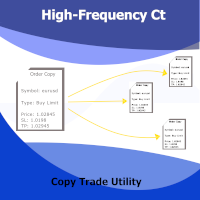
High Frequency Ct

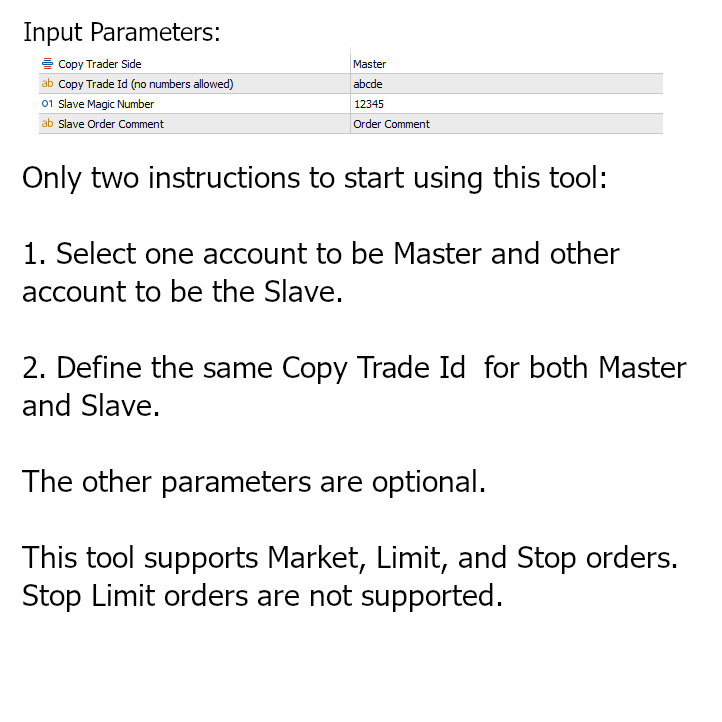
This utility copies Market orders, Limit orders, and Stop orders with a focus on high speed and easy setup. The utility works by setting up a Master and one or more Slaves. The setup is quite simple: you just need to define which account is the Master and which account is the Slave, and then set up the same Copy Trade Id for both.


For the Slave to recognize the Master's orders, the Copy Trade Id parameter must be the same. Do not use numbers or special characters when setting the Copy Trade Id parameter. Preferably, use only letters.


This utility copies the Stop Loss and Take Profit values, if they are set.
This utility does not work with Stop Limit orders and also does not copy the expiration of orders.


Warning: do not set up a Master and a Slave with the same Id in the same account. This will cause orders to be opened indefinitely. Slave Id and Master Id must be in separate accounts.
Although it is possible to set up more than one Slave for each Master, this product does not guarantee that all orders will be copied to all Slaves 100% of the time (it should work smoothly most of the time). Because as the utility is focused on high speed, sometimes a Slave has to delete the "Signal" of the Master so that the next executions are executed faster, and this can cause the failure to read the order of the other Slaves. This is a remote possibility, but one that is possible to happen.


Önerilen ürünler
Hybrid Assisted Trading Engine Manual Trading. Machine Discipline. The Hybrid Assisted Trading Engine is an institutional-grade manual trade management system designed to protect traders from emotional mistakes — without taking control away from them. You decide when to enter . The engine decides how the trade is managed . What It Does This system continuously monitors your manual trades and enforces professional-level trade management rules in real time: Smart Breakeven logic R-based trai
It is a utility that posts customized messages on Telegram based on account trading activity. Once the utility is on the chart, with each new position opened from the same chart symbol the utility is added, a customized message will be sent to the Telegram group defined in the input parameters. The utility will post to the Telegram group if a new position is opened and if it is the same symbol as the chart the utility is running on. If you are using an Expert Advisor for Buy and Sell and want to
Panel Trade Basic
Juan Pablo Sanchez Correa
Panel Trade Basic is a compact, functional panel for trading quickly from the chart. Execute BUY, SELL, and LIMIT orders, and close positions with a single click or keystroke. Control lot size, stop-loss, and take-profit instantly, without menus or complications. Floating and draggable panel. Market and pending orders. Hotkeys for trading. Real-time P&L and margin visualization. Ideal for manual traders who value speed and control. BUY key (C) SELL key (V) CLOSE ALL key (X) Delete Pending Key
Telegram Signal Sender MT5 ile forex sinyal paylaşım yeteneğinizi yükseltin; hem yeni başlayan hem de yerleşik sinyal sağlayıcıları için ideal olan, Telegram kanalınıza işlem sinyallerini gönderme sürecini otomatikleştiren ve basitleştiren güçlü bir araçtır. Forex Factory ve Reddit’in r/Forex gibi işlem topluluklarında büyük övgü almakta ve Investopedia ile MQL5 forumlarındaki tartışmalarda sinyal dağıtımındaki verimliliğiyle öne çıkmakta olup, kitlesini genişletmek isteyen traderlar arasında fa
Trade Control Panel Function Normal One Click Function Close All Close All Profit Close All Loss Close All Pending Order Close All Sell Close All Buy Advance One Click Function 1.  Close Partial Lot Sell by Percent It will help you partial close for all open position by desire percent you wanted. No longer partial close one by one for every open position Manual input for desire percent 2. Close Partial Lot Buy by Percent It will help you partial close for all open position by desire percent
# Higher-Lower Pending Bot - Advanced Multi-Pending Orders System ## Revolutionize Your Trading with Smart Pending Order Automation Welcome to the **Higher-Lower Pending Bot** - the most sophisticated pending order management system available on MQL5. Designed for traders who want to maximize opportunities while minimizing manual effort, this EA combines intelligent order placement with comprehensive profit tracking in one powerful package. ## What Makes Our Bot Unique? ### Smart D
Close All Pro MT5 – Fast PnL Control is a powerful trade manager MT5 utility that gives you total control over your trades. With a single click, you can close all MT5 orders, monitor real-time profit and loss, and manage your floating PnL directly from a clean on-chart panel. The tool is lightweight, responsive, and built to help traders save time, reduce emotional stress, and maintain focus. Whether you trade manually or through an EA, this MT5 profit panel provides the visibility and precisio
This Expert Advisor monitors all open positions across all symbols in MetaTrader 5. Whenever a Stop Loss (SL) or Take Profit (TP) is manually set or adjusted on any position, the EA automatically applies that value to all other open positions , regardless of symbol or order type (Buy/Sell). This ensures consistent and synchronized SL and TP levels across your account. Perfect for mobile trading via tablet or smartphone!
Сообщения в Telegram из MT5 о торговых событиях: Открытие/закрытие сделок; Выставление/удаление отложенных ордеров. Версия утилиты для MT4 здесь: https://mql5.com/8bjjy Настройки  Telegram: Создайте своего бота. Для этого напишите для пользователя  @BotFather команду  /newbot , и следуйте инструкциям. В результате вы получите Token бота, примерно такой:   1245680170:BBGuDFVkTYIPtjSaXMgQEhdfg7BOQ6rl8xI.  Узнайте свой ID в  Telegram, для этого напишите пользователю  @userinfobot любое сообщение.
Chart Connect
Eliel Do Rosario Batista
This EA does not perform trading operations.       It's a       auxiliary visual tool       for graphics synchronization. The “there are no trading operations” error in the validator is expected and intentional. CHARTCONNECT – Chart Synchronizer (Version 1.19) Connect all your charts to the same symbol with just one click. What is CHARTCONNECT? ChartConnect   is a lightweight and efficient tool designed to   automatically synchronize the ticker symbol   of all open charts in MetaTrader 5
Rosy Pro Panel MT5
Theresia Yovitha Herwanda
5 (1)
Download DEMO here  https://www.mql5.com/en/blogs/post/759772 An ultimate panel you've never seen before.  Compact and nice Trade panel with large Total P/L and it's percentage display. Groups for trades summary available: Ticket, Symbol, Type, Category, and Magic. Average price field helps you know your trading average price and direction. Set magic and comment of your trading in a very easy way. Group closing by symbol, type, category or magic - only by one click. Close All button for a quick
This program is a GUI for issuing orders that can be done more quickly. Faster TP SL setting This program is not an automated trading platform. Trading is risky, please manage your risk. We do not accept any responsibility. It should be tried with Demo before using it with Real. Normally, the setting sets the risk to 1:1 to shift manually or to enter the risk to x:1, where x can be entered and everything can move freely. Thank you to all customers who have purchased our products. We would like t
Binance Spot datalarını anlık olarak Metatrader 5 de görebilir ve üzerinde Metatraderın size sağlamış olduğu tüm özelliklerini kullanmanıza imkan sağlar. Binance Spot listelenen tüm sembollerin datasına ulaşabilirsiniz. Timezone ayarlamayı unutmayın. Binance it's 00:00 UTC. Kendi ülkenize göre düzeltmeniz gerekli Bedava olan Binance Spot Symbol List eklentisini yüklemeniz gerekmekte.  https://www.mql5.com/tr/market/product/83507 Yükleme yaptıktan sonra belirttiğiniz tarihten itibaren piyasa göz
Professional utility that automatically sends real-time trading signals, position updates, and custom alerts from MetaTrader 5 to any Telegram group, channel, or private chat. Supports multiple chat destinations, fully customizable message formats, and comprehensive event filtering. Perfect for signal providers, trading communities, and personal trade journals. The   MT5 to Telegram Signal Sender   is a sophisticated yet easy-to-use utility that bridges your MetaTrader 5 platform with Telegram m
Bu yardımcı program, mum manuel olarak yerleştirilen trend çizgisine dokunduğunda, sanki daha belirgin bir bekleyen emirmiş gibi emirleri açar.  Herhangi bir varlık üzerinde kullanılabilir, emri açtığında dokunduğu çizgiyi ortadan kaldırır ve Arrow'u oluşturur. Bu durumda, fiyat tersine çevirme işlemleri için kullanılır; yükseliş mumu alt çizgiye dokunduğunda bir satış emri açar ve düşüş mumu yukarıdan aşağıya çizgiye dokunduğunda bir satın alma emri açar.  Zararı durdurma ve kar almayı ayarla
FREE
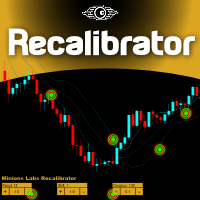
Once again, We Nailed It! Imagine a faster and smoother way to recalibrate ANY Indicator using just obvious and intuitive mouse clicks, realtime, real fast, real results on your chart just right after the Click... Instead of the boring "Open Settings dialog / Change one setting / Click OK / See what happens on Chart...",  then repeat this process endlessly until you kill yourself! Well... No More... Welcome to the Minions Labs Recalibrator tool! Now you can Study, Trial, Experiment and Play with
KopirMT5 Full
Alexandr Gavrilin
4.2 (10)
KopirMT5 (CopierMT5) - transaction copier for the MetaTrader 5 terminal, copies (synchronizes, duplicates) transactions from  hedge accounts  (copier, copy dealers).  Supports copying: MT5 <-> MT5, MT4 -> MT5 Hedge, MT5 Hedge -> MT4 Does not support copying MT5 Hedging < - > MT5 Netting, MT4 < - > MT5 Netting Support:  https://www.mql5.com/ru/messages/01c3f341a058d901 Why exactly our product? The copier has a high speed and is not dependent on ticks. Copy speed - less than 0.5 sec. Transaction
Limiter Drawdown EA – Automatic Account Protection for MetaTrader 5 Description Limiter Drawdown EA is a lightweight risk management tool for MetaTrader 5. It monitors your account drawdown in real time and will automatically close all open trades once the threshold you define is reached. This provides a reliable safeguard for any trading strategy. Main Functions Monitors equity versus balance continuously Closes all positions when your chosen drawdown percentage is reached Optionally removes
FREE
This EA help traders close their open positions at a specific MT5 server time before news or before ending of H4 timeframe of the morning New York session to protect their profit or prevent from unexpected loss. The default setting is 19:30 (HH:MM) and you can adjust as require to fit trading strategies. It very user friendly where contain only single input parameter to specify a time that position will be closed.  
Aurum Quant Engine Pro A disciplined execution model designed for decision clarity, trend alignment, and precise signal filtration. Trades are triggered only when price structure, directional context, and pattern strength align cohesively. Aurum Quant Engine Pro is the enhanced Version 2 of the original release Aurum Quant Engine now equipped with advanced filtering layers for improved trade quality, precision entries, and stronger overall performance. Support & Feedback If you have any qu
TradingX Hotkeys
Johannes Stephanus Lombard
Inputs Available Lotsizes Partial Close % You can change lotsizes as you require On an open chart click once to select chart to be able to use hotkeys on specific chart. All Pairs can be used with this expert We created this expert to be able to still trade C300 with a 0.06 Lotsize If you enter a 0.6 lot and close 0.90% you can trade with 0.06 Lot Keys to be used: B -Buy S -Sell C -Close Profitable D -Breakeven (Note if stoploss is set it won't break even) P -Partial close X -Close all
Take the manual stress out of risk management with AutoShield. This utility automatically applies Stop Loss and Take Profit levels to every trade you open, ensuring no position is ever left unprotected . Universal Protection: Automatically detects and updates both active positions and pending orders . Multi-Pair Compatibility: Choose to manage only the current chart or every open symbol on your account simultaneously . Clean Visual Interface: Features a customizable on-chart display showing your
Telegram Notify MT5 Telegram Notify MT5 is an utility tool to bridge your MetaTrader 5 activities to your Telegram chat/channel. It is useful for monitoring your MetaTrader 5 account by sending a notification to your particular Telegram chat/channel when someone/EA is placing trades, modifying order's TP/SL, closing trades and etc. This EA does not place any trade for your account. This EA also could be a convenient tool for monitoring other's EA trading activities or a tool for publishing your
Are you the type that likes to protect your trades by moving the stop loss to the entry point and also using trail stop? Cool! This EA will help you with that. What's more, it also partially closes the trade when the trail stop is activated. That's it! Beyond all this it shows the stop loss projection (which you can move)   and notify you when it is activated. EA can be used by configuring the default window or by using a custom window , which makes it easy to change settings. You can test
With this tool, you can easily and quickly close part of the trade. Click near the trade to display the closing panel. There are ten preset values for partial closing, but you can set your own values. You can also resize the panel according to Windows settings (125%, 150% ...) See the animation below for how it works. ********************************************************** Note: This tool does not work in the tester.
Bu danışman, tek bir tıklamayla birden fazla çiftte işlem yapmanıza olanak tanıyan bir kontrol panelidir. Tıklamak       açık       Bu düğme seçilen çift için bir emir açar. Tıklamak       kapalı       Bu buton seçilen çiftin emrini kapatır. Sipariş lotu kullanıcı tarafından girilen sayıdır. Pozitif sayılar alış emirlerine, negatif sayılar ise satış emirlerine karşılık gelir. Siparişin yalnızca bir kısmını değil tamamını kapatmak için   Kapat düğmesini   tıklayın. Nihai işlem bilet numarasına b
Overview Breakout Meter is a price action tool that identifies key breakout zones based on recent daily price activity. It highlights areas where momentum is likely to trigger, helping traders anticipate breakouts or reversals with minimal configuration. How It Works The EA analyzes a user-defined number of recent daily candles and marks high and low zones where price has shown strong reactions. It automatically updates levels with new data and removes outdated zones to keep charts clear. Users
EAs Manager
Abdeljalil El Kedmiri
5 (1)
The   Ultimate EAs Manager   is a professional risk management and trade assistance tool designed to monitor, control, and optimize all trading activities on your MT5 account. It acts as a   central command center   that oversees every trade - whether opened by other Expert Advisors or manually by you. How it's work with other EAs : Blog post  MT4 version:  https://www.mql5.com/en/market/product/167007 Only 10 copies will be sold at the early-bird price. After 10 copies, the price jumps directly
Jabidabi Session Indicator The Market Session Indicator is a powerful tool used by traders to identify and track different trading sessions within the forex and stock markets. It visually highlights key trading periods, such as the Asian, European, and North American sessions, directly on the trading chart. This indicator is especially useful for traders who follow ICT (Inner Circle Trader) strategies, which emphasize the significance of various market sessions for optimal trading opportunities.
Introducing the "Auto Timed Close Operations", a useful utility for MetaTrader 5 traders! This utility has been developed to help traders of all levels automatically close their open positions at the exact moment they desire. With the "Auto Timed Close Operations", you gain the required control over your trades and can avoid unwanted surprises at the end of the day or at any other predefined time. We know how important it is to protect your profits and limit your losses, and that's exactly what
Bu ürünün alıcıları ayrıca şunları da satın alıyor
Trade Assistant MT5
Evgeniy Kravchenko
4.42 (208)
It helps to calculate the risk per trade, the easy installation of a new order, order management with partial closing functions, trailing stop of 7 types and other useful functions. Additional materials and instructions Installation instructions - Application instructions - Trial version of the application for a demo account Line function -   shows on the chart the Opening line, Stop Loss, Take Profit. With this function it is easy to set a new order and see its additional characteristics bef
Trade Manager EA’ye hoş geldiniz! Ticaretin daha sezgisel, hassas ve verimli hale gelmesi için tasarlanmış nihai risk yönetim aracı ile tanışın. Bu sadece bir emir verme aracı değil; ticaret planlaması, pozisyon yönetimi ve risk kontrolü için kapsamlı bir çözüm. İster yeni başlayan bir yatırımcı olun, ister deneyimli bir trader ya da hızlı emir gerektiren bir scalper, Trade Manager EA ihtiyaçlarınıza uyum sağlar ve forex, endeksler, emtialar ve kripto paralar dahil tüm piyasalarda esneklik sunar
TradePanel MT5
Alfiya Fazylova
4.86 (148)
Ticaret Paneli çok işlevli bir ticaret asistanıdır. Uygulama, manuel ticaret için 50'den fazla ticaret işlevi içerir ve çoğu ticaret işlemini otomatikleştirmenize olanak tanır. Dikkat, uygulama strateji test cihazında çalışmıyor. Satın almadan önce demo sürümünü bir demo hesabında test edebilirsiniz. Demo sürümü burada . Talimatların tamamı buraya . Ticaret. Tek tıklamayla alım satım işlemlerini gerçekleştirmenizi sağlar: Otomatik risk hesaplaması ile bekleyen emir ve pozisyonları açın. Tek tıkl
Beta Sürümü Telegram to MT5 Signal Trader resmi alfa sürümüne neredeyse hazır. Bazı özellikler hâlâ geliştirilmekte olup küçük hatalarla karşılaşabilirsiniz. Sorun yaşarsanız lütfen bildirin, geri bildiriminiz yazılımın herkes için gelişmesine yardımcı olur. Telegram to MT5 Signal Trader , Telegram kanallarından veya gruplarından gelen işlem sinyallerini otomatik olarak MetaTrader 5 hesabınıza kopyalayan güçlü bir araçtır. Herkese açık ve özel kanalları destekler ve birden fazla sinyal sağlayıc
Farmed Hedge Yield Farming - Professional Pair Trading Dashboard (Manual - Hybrid - Semi/Automated EA) VERSION 3 - WILD HARVEST UPDATE Trading Approach: - Manual Trading: Primary focus - Auto Pilot: Optional supplementary feature - Full Automation: Not the main purpose Recommended Timeframe: H1-H4 DEMO VERSION Download the free demo to test functionality. Use Strategy Tester with Visual Mode to see how it works. VERSION 3 - NEW FEATURES Summary Dashboard (SRA Panel) - Quick pair selection w
Copy Cat More Trade Copier MT5 (Kopyalayıcı Kedi MT5) , günümüzün ticaret zorluklarına yönelik tasarlanmış yerel bir ticaret kopyalayıcısı ve eksiksiz risk yönetimi ve yürütme çerçevesidir. Prop firması zorluklarından kişisel portföy yönetimine kadar, sağlam yürütme, sermaye koruması, esnek yapılandırma ve gelişmiş ticaret işleme kombinasyonu ile her duruma uyum sağlar. Kopyalayıcı hem Master (gönderici) hem de Slave (alıcı) modunda çalışır, piyasa ve bekleyen emirlerin, ticaret değişikliklerini
Exp COPYLOT CLIENT for MT5
Vladislav Andruschenko
3.82 (34)
MT5 için ticari kopyalayıcı, МetaТrader 5 platformu için bir ticari kopyalayıcıdır   . arasındaki   forex işlemlerini kopyalar.       COPYLOT MT5 sürümü için   herhangi bir hesap   MT5   -   MT5, MT4   -   MT5 (veya COPYLOT MT4 sürümü için   MT4 -   MT4 MT5   -  MT4) Güvenilir fotokopi makinesi! MT4 sürümü Tam tanım   +DEMO +PDF Nasıl alınır Nasıl kurulur     Günlük Dosyaları nasıl alınır?     Nasıl Test Edilir ve Optimize Edilir     Expforex'in tüm ürünleri Ayrıca МТ4 terminali   (МТ4   -  
Ultimate Extractor - Professional Trading Analytics for MT5 *****this is the local HTML version of Ultimate Extractor. Check out Ultimate Extractor Cloud on mql5 for the Cloud version****** Ultimate Extractor transforms your MetaTrader 5 trading history into actionable insights with comprehensive analytics, interactive charts, and real-time performance tracking. What It Does Automatically analyzes your MT5 trading history across all Expert Advisors and generates detailed HTML reports with inte
Riskinizi otomatik olarak hesaplarken işlemlere hızlı bir şekilde girip çıkmanıza yardımcı olacak Ticaret Yöneticisi. Aşırı Ticaret, İntikam Ticareti ve Duygusal Ticaretten korunmanıza yardımcı olacak özellikler içerir. İşlemler otomatik olarak yönetilebilir ve hesap performans ölçümleri bir grafikte görselleştirilebilir. Bu özellikler, bu paneli tüm manuel yatırımcılar için ideal kılar ve MetaTrader 5 platformunun geliştirilmesine yardımcı olur. Çoklu Dil desteği. MT4 Sürümü  |  Kullanım Kılavu
MT5 to Telegram Signal Provider , hesabınızı bir sinyal sağlayıcı haline getirerek belirtilen sinyalleri Telegram'ın sohbetine, kanalına veya grubuna göndermeyi sağlayan kullanımı kolay, tamamen özelleştirilebilir bir araçtır. Rakip ürünlerin çoğunun aksine, DLL içe aktarması yapmaz. [ Demo ] [ Kılavuz ] [ MT4 Versiyonu ] [ Discord Versiyonu ] [ Telegram Kanalı ]  New: [ Telegram To MT5 ] Kurulum Adım adım bir kullanıcı kılavuzu mevcuttur. Telegram API'si hakkında bilgi gerekmemektedir; ihtiyac
Smart Stop Manager – Profesyonel hassasiyetle otomatik stop-loss yönetimi Genel Bakış Smart Stop Manager, Smart Stop ürün serisinin yürütme katmanıdır. Birden fazla açık pozisyonda yapılandırılmış, güvenilir ve tamamen otomatik stop-loss yönetimi isteyen trader’lar için tasarlanmıştır. Tüm açık işlemleri sürekli izler, Smart Stop piyasa yapısı mantığını kullanarak en uygun stop seviyesini hesaplar ve stopları net ve şeffaf kurallarla otomatik olarak günceller. İster tek bir varlıkla işlem yapı
Smart Stop Scanner – Gerçek piyasa yapısına dayalı çoklu varlık stop-loss analizi Genel Bakış Smart Stop Scanner, birden fazla piyasadaki stop-loss seviyelerini profesyonel bir şekilde takip etmek için tasarlanmıştır. Sistem, gerçek piyasa yapısına dayanan breakout’ları, daha yüksek zirveleri ve daha düşük dipleri otomatik olarak algılar ve en önemli stop bölgelerini tespit eder. Tüm bilgiler, yüksek çözünürlüklü ekranlarla uyumlu (DPI-aware) net ve düzenli bir panelde sunulur. Forex, Altın, E
Pulsar Terminal , Astralys LLC tescilli markası olan Pulsar Technologies ürünüdür. Pulsar Terminal, MetaTrader 5 için bir yardımcı eklentidir. MetaTrader 5 hesabınıza bir Expert Advisor aracılığıyla bağlanan bir eşlik eden uygulama içinde yürütme araçlarıyla birleştirilmiş görsel bir arayüzdür . Aracın yeteneklerini en üst düzeye çıkarmak ve standart MT5 panellerinden daha gelişmiş bir görsel arayüz ve iş akışı sunmak için eşlik eden bir uygulama kullanıyoruz. Pulsar Terminal bağımsız bir uygul
Trade Manager DashPlus
Henry Lyubomir Wallace
5 (13)
DashPlus , MetaTrader 5 platformunda işlem verimliliğinizi ve etkinliğinizi artırmak için tasarlanmış gelişmiş bir işlem yönetim aracıdır. Risk hesaplama, emir yönetimi, gelişmiş ızgara sistemleri, grafik tabanlı araçlar ve performans analitiği gibi kapsamlı bir özellik yelpazesi sunar. Temel Özellikler 1. Kurtarma Izgarası Olumsuz piyasa koşullarında işlemleri yönetmek için ortalama alma ve esnek bir ızgara sistemi uygular. İşlem kurtarma çabalarını optimize etmek için stratejik giriş ve çıkış
The product will copy all telegram signal to MT5 ( which you are member) , also it can work as remote copier.  Easy to set up, copy order instant, can work with almost signal formats, image signal,  s upport to translate other language to English Work with all type of channel or group, even channel have "Restrict Saving Content", work with  multi channel, multi MT5 Work as remote copier: with signal have ticket number, it will copy exactly via ticket number. Support to backtest signal. How to s
Telegram'dan MT5'e:   Nihai Sinyal Kopyalama Çözümü Telegram'dan MT5'e işlemlerinizi basitleştirin, DLL'lere ihtiyaç duymadan işlem sinyallerini doğrudan Telegram kanallarından ve sohbetlerinden MetaTrader 5 platformunuza kopyalayan modern araç. Bu güçlü çözüm hassas sinyal yürütme, kapsamlı özelleştirme seçenekleri sağlar, zamandan tasarruf sağlar ve verimliliğinizi artırır. [ Instructions and DEMO ] Temel Özellikler Doğrudan Telegram API Entegrasyonu Telefon numarası ve güvenli kod ile kimlik
Custom Alerts AIO: Tüm Piyasaları Takip Et — Hiçbir Kurulum Gerekmez Genel Bakış Custom Alerts AIO , hiçbir ek yapılandırma gerektirmeyen, kullanıma hazır bir piyasa izleme çözümüdür. Gerekli tüm göstergeler — FX Power, FX Volume, FX Dynamic, FX Levels, IX Power — iç yapısına gömülüdür. Grafik görüntülemesi olmadan çalışır, bu da onu sessiz ve verimli bir şekilde gerçek zamanlı alarm üretimi için mükemmel hale getirir. Brokerınızın sunduğu tüm varlık sınıflarını destekler: Forex, Metaller, End
Anchor: The EA Manager A coordination system for traders running multiple EAs. Anchor ensures only one EA can trade at a time, preventing conflicting positions and keeping your portfolio safer. Attach Anchor to any chart. Configure your EAs and their magic numbers. Anchor handles the rest. Built for portfolios. Built for discipline. Built for prop firms. The Problem Running multiple EAs on the same account creates risk. Two gold EAs can open opposite positions on the same candle. Three EA
YuClusters
Yury Kulikov
4.93 (43)
Attention: You can view the program operation in the free version  YuClusters DEMO .  YuClusters is a professional market analysis system. The trader has unique opportunities to analyze the flow of orders, trade volumes, price movements using various charts, profiles, indicators, and graphical objects. YuClusters operates on data based on Time&Sales or ticks information, depending on what is available in the quotes of a financial instrument. YuClusters allows you to build graphs by combining da
One tool to protect all your EAs — news filter, equity protection, time filter and more — free demo available Take a Break has evolved from a basic news filter into a comprehensive account protection solution. It pauses your other Expert Advisors during news events or based on custom filters. When trading resumes, it automatically restores your entire chart setup , including all EA settings. Typical use cases: One news filter for all your EAs. Pause trading during news or high volatility — and c
Bu ürün, haber saatlerinde tüm uzman danışmanları ve manüel grafikleri filtreler, böylece manüel ticaret kurulumlarınızı veya diğer uzman danışmanlar tarafından girilen işlemleri yok edebilecek ani fiyat dalgalanmaları konusunda endişelenmenize gerek kalmaz. Bu ürün, herhangi bir haber yayınlanmadan önce açık pozisyonlarınızı ve bekleyen emirlerinizi yönetebilen tam bir sipariş yönetim sistemi ile birlikte gelir.   The News Filter'ı   satın aldığınızda, gelecekteki uzman danışmanlar için yerleşi
Üye olduğunuz herhangi bir kanaldan (özel ve kısıtlı olanlar dahil) sinyalleri doğrudan MT5'inize kopyalayın.  Bu araç, kullanıcıyı göz önünde bulundurarak tasarlanmış olup işlemleri yönetmek ve izlemek için ihtiyacınız olan birçok özelliği sunar. Bu ürün, kullanıcı dostu ve görsel olarak çekici bir arayüzde sunulmaktadır. Ayarlarınızı özelleştirin ve ürünü dakikalar içinde kullanmaya başlayın! Kullanıcı Kılavuzu + Demo  | MT4 Sürümü | Discord Sürümü Demo denemek isterseniz lütfen kullanıcı kı
1 tıklama ile ticaret için Ticaret Paneli.   Pozisyonlar ve emirlerle çalışmak!   Grafikten veya klavyeden alım satım. Alım satım panelimizi kullanarak, grafikten tek bir tıklamayla alım satım yapabilir ve alım satım işlemlerini standart MetaTrader kontrolünden 30 kat daha hızlı gerçekleştirebilirsiniz. Bir tüccar için hayatı kolaylaştıran ve bir tüccarın ticaret faaliyetlerini çok daha hızlı ve daha rahat gerçekleştirmesine yardımcı olan parametrelerin ve işlevlerin otomatik hesaplamaları. Graf
Fotokopi->Kullanışlı ve hızlı arayüz etkileşimi, kullanıcılar hemen kullanabilir       ->>>> Windows bilgisayarlarda veya VPS Windows'ta kullanılması önerilir Özellikler: Çeşitlendirilmiş ve kişiselleştirilmiş kopyalama ticareti ayarları: 1. Farklı sinyal kaynakları için farklı lot modları ayarlanabilir 2. İleri ve geri kopyalama ticareti için farklı sinyal kaynakları ayarlanabilir 3. Sinyaller yorumlarla ayarlanabilir 4. Lotun sözleşme lotuna göre kalibre edilip edilmeyeceği Çeşitlendirilmiş v
Local Trade Copier EA , bir MAM veya PAMM hesabına ihtiyaç duymadan, harici kaynaklardan ticaret sinyalleri yürütmesi veya aynı anda birkaç hesabı yönetmesi gereken bireysel tüccarlar veya hesap yöneticileri için bir çözümdür. 8 ana hesaptan sınırsız bağımlı hesaba kopyalar [ Kurulum Kılavuzu | Güncelleme Kılavuzu | Sorun Giderme | SSS | Tüm Ürünler ] %100 kendi kendine barındırılan Kurulumu ve kullanımı kolay Hiçbir yükleyici, yapılandırma dosyası, sunucu, bellek kanalı veya DLL kullanılmadı E
Telegram Broadcast MT5
Volodymyr Hrybachov
3.67 (3)
The TELEGRAM BROADCAST utility helps you instantly publish your trade to the Telegram channel. If you have long wanted to create your own Telegram channel with FOREX signals, then this is what you need. TELEGRAM BROADCAST can send messages: Opening and closing deals; Placing and deleting pending orders; Modification of stop loss and take provision (last order); Stop loss and take prov triggered; Activation and deletion of a pending order: Sending trading reports; Sending a message for deposits
Auto Trade Copier is designed to copy trades to multiple MT4, MT5 and cTrader accounts/terminals with 100% accuracy. The provider and receiver accounts must be on the same PC/VPS. With this tool, you can copy trades to receiver accounts on the same PC/VPS. All trading actions will be copied from provider to receiver perfectly. This version can be used on MT5 accounts only. For MT4 accounts, you must use Auto Trade Copier (for MT4). Reference: - For MT4 receiver, please download Trade Receiver Fr
Attention: Demo version for review and testing can be downloaded here . It does not allow trading and can only be run on one chart. Active Lines - a powerful professional tool for operations with lines on charts. Active Lines provides a wide range of actions for events when the price crosses lines. For example: notify, open/modify/close a position, place/remove pending orders. With Active Lines you can assign several tasks to one line, for each of which you can set individual trigger conditions
The Expert Advisor is a comprehensive risk manager helping users to control their trading activities. With this tool being a safeguard you can easily configure various risk parameters. When any limit is exceeded, the risk manager can force close opened positions, close other EAs, and even close the terminal to prevent emotional trading that doesn't correspond to your trading strategy. Risk Manager Settings Account Protection Check min equity limit to close all (account currency) - check the min
Tick Charts
Vasily Kravtsov
4 (1)
**** New version - 1.66 **** Bug fixes, small improvements. A Tick Chart app. It lets you create real-time tick charts, based on number of ticks per candle. You can choose the amount of ticks per candle, and the amount of ticks to load. Supports showing trade history and trade levels.   When you add this EA to an instrument it automatically generates a custom symbol with the _Tick added to the name. The tick chart should open automatically. Make sure the timeframe of the tick chart is set to M
Yazarın diğer ürünleri
Turnaround Signalizer
Elidio Xavier Guimaraes
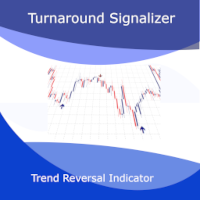
İşte Turnaround Signalizer: Trend Dönüşlerinde Rekabet Avantajınız. MetaTrader 4 platformu için geliştirilen bu trend dönüş göstergesi, piyasa dönüm noktalarını yüksek olasılıkla belirlemek isteyen yatırımcılar için sağlam bir araçtır. Tescilli algoritması, piyasa gürültüsünü filtreleyerek en önemli yön değişimlerini vurgulamak için fiyat davranışını sürekli olarak analiz eder. Tüm İşlem Stilleri İçin Çok Yönlülük     Scalping İçin Mükemmel: Turnaround Signalizer, scalping ve kısa vadeli işle
Weekday Statistics
Elidio Xavier Guimaraes
Weekday Stats Overview: A Price Analysis Indicator by weekday. A quantitative technical analysis indicator developed for statistical analysis of price variations, with data classified by weekday. This indicator processes candle data and displays statistical results based on user input parameters. The input parameters allow defining the type and frequency of the statistics to be calculated. This indicator provides a quantitative basis for identifying market patterns. Output Data: The indicator c
Month Statistics
Elidio Xavier Guimaraes
Month Stats Overview: A Price Analysis Indicator by month. A quantitative technical analysis indicator developed for statistical analysis of price variations, with data classified by calendar month. This indicator processes candle data and displays statistical results based on user input parameters. The input parameters allow defining the type and frequency of the statistics to be calculated. This indicator provides a quantitative basis for identifying market patterns. Output Data: The indicator
The CSV File Reader Utility executes commands received by text files of type "csv" (Comma Separated Values). This type of utility is ideal for those who process signals in other applications, and want to manage signals and positions based on text files . To read signal commands from the text file, the file must contain a header with column names and the column names must match the input parameter settings . The utility also has some extra functions, such as the possibility of filtering commands
Signals Executor for Telegram is a Utility that allows you to execute and manage positions from messages sent in Telegram Chats. Chat messages are processed to check for the existence of commands, and the command will be executed if its parameters are valid. You need the Telegram Bot Token and Chat Id to configure the input parameters. It is possible to restrict the sending of commands through the User Id, which must be configured in the input parameters. Valid Commands: Buy and Sell: Market or
It is a utility that posts customized messages on Telegram based on account trading activity. Once the utility is on the chart, with each new position opened from the same chart symbol the utility is added, a customized message will be sent to the Telegram group defined in the input parameters. The utility will post to the Telegram group if a new position is opened and if it is the same symbol as the chart the utility is running on. If you are using an Expert Advisor for Buy and Sell and want to
Dual Trend Analyzer
Elidio Xavier Guimaraes
The Dual Trend Analyzer: An MQL5 Tool for Statistical Correlation Analysis The Dual Trend Analyzer is a powerful MQL5 tool developed to analyze and visualize the statistical correlation between two distinct financial symbols (assets). This tool allows you to choose from three of the most widely recognized correlation methods: Pearson, Spearman, or Kendall-Tau . Identify Correlation Patterns with the Dual Trend Analyzer This indicator is designed to unveil the statistical correlation between two
Trend Pulse Insights
Elidio Xavier Guimaraes
Introducing Trend Pulse Insights: Your Intelligent Guide to Market Volatility Developed for traders seeking precision and clarity, Trend Pulse Insights offers an in-depth view of market dynamics, helping you identify opportunities and manage risks with confidence. How Trend Pulse Insights Works Our indicator uses algorithms to calculate volatility levels based on two recognized methods:     ATR (Average True Range): For measuring average volatility over a period.     Standard Deviation: To
Weekday Stats
Elidio Xavier Guimaraes
Weekday Stats Overview: A Price Analysis Indicator by weekday. A quantitative technical analysis indicator developed for statistical analysis of price variations, with data classified by weekday. This indicator processes candle data and displays statistical results based on user input parameters. The input parameters allow defining the type and frequency of the statistics to be calculated. This indicator provides a quantitative basis for identifying market patterns. Output Data: The indicator c
Month Stats
Elidio Xavier Guimaraes
Month Stats Overview: A Price Analysis Indicator by month. A quantitative technical analysis indicator developed for statistical analysis of price variations, with data classified by calendar month. This indicator processes candle data and displays statistical results based on user input parameters. The input parameters allow defining the type and frequency of the statistics to be calculated. This indicator provides a quantitative basis for identifying market patterns. Output Data: The indicator
Stats Summary
Elidio Xavier Guimaraes
Stats Summary ile Teknik Analizinizi Geliştirin. MetaTrader 5 (MT5) için geliştirilmiş olan Stats Summary , fiyat hareketlerinin ayrıntılı istatistiksel bir özetini sunan sağlam bir analiz aracıdır. Geleneksel göstergelerden farklı olarak, fiyatların dağılımını özelleştirilebilir bir örnekleme dönemi boyunca haritalamak için tanımlayıcı istatistikleri kullanır. Örnekleme boyutunu tanımlayarak, gösterge aşağıdaki değerleri hesaplar ve grafik üzerinde görüntüler: Minimum ve Maksimum (Min/Max): Se
Filtrele:
İnceleme yok
İncelemeye yanıt