Sergey Rashevskiy / Лента новостей
- Информация
|
13+ лет
опыт работы
|
3
продуктов
|
384
демо-версий
|
|
19
работ
|
0
сигналов
|
0
подписчиков
|
✔️ Martingale, Grid, Averaging or other dangerous techniques are not used
✔️ RSI Level Live Bar (once per candle) trade opening
✔️ RSI Level Closed Candle trade opening
✔️ RSI Level Crossing trade opening
✔️ Single or multiple orders per trading session
✔️ Net Asset Risk option, ideal for night scalping
✔️ Moving Average Trend Filter
✔️ SL, TP, BE and Trailing SL levels in Points and in Percentage of the Average Daily Range
✔️ Hard and Virtual Take Profit and Stop Loss levels
✔️ Basket TP, SL, BE and Trailing SL in % for all open positions combined
✔️ Optimized set files for many symbols
✔️ 100% automated Expert Advisor
✔️ MQL5 VPS compatible
🔥🔥🔥🔥🔥 RSI EA MT4/5© Backtests & New Set Files: https://www.mql5.com/en/blogs/post/745685
⭐️⭐️⭐️⭐️⭐️ RSI EA MT4©: https://www.mql5.com/en/market/product/45228
⭐️⭐️⭐️⭐️⭐️ RSI EA MT5©: https://www.mql5.com/en/market/product/67625
💎💎💎💎💎 Check out all my Expert Advisors, Indicators and Utilities: https://www.mql5.com/en/users/eleanna74/seller
11 October 2026
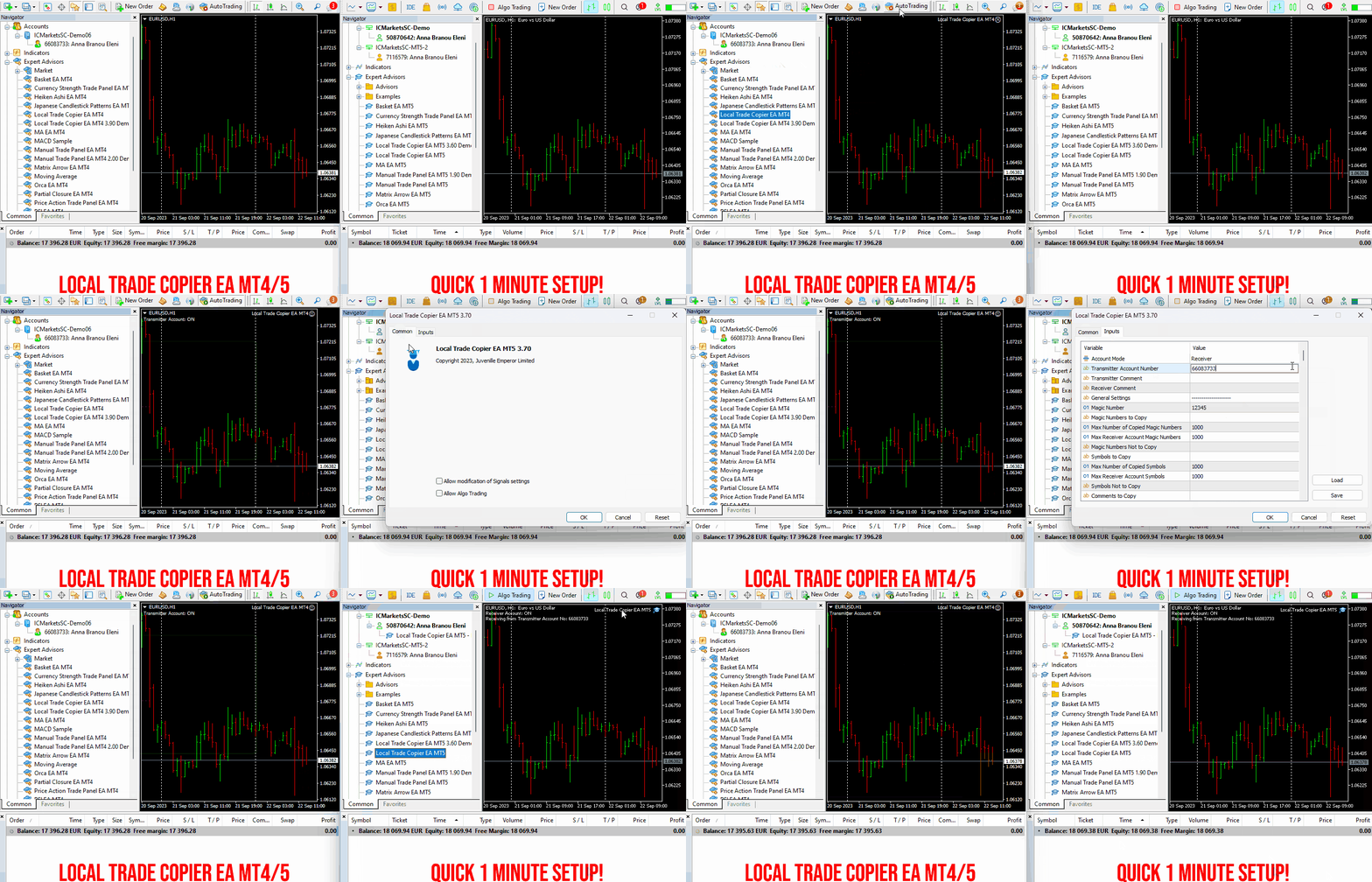
Set up your Transmitter and Receiver terminals in about 1 minute and copy manual or EA trades between accounts at the same or different brokers. Under suitable conditions, trade information can be synchronized between local MetaTrader terminals in under 0.5 seconds. Actual trade execution depends on broker latency, network conditions, computer/VPS performance and terminal workload.
Each Receiver account can use its own lot sizing, risk management, trade filtering, symbol mapping, trade management and account-protection settings. This allows the same trading activity to be synchronized across multiple accounts while each Receiver can be configured according to its own requirements.
✔️ Copying & Connectivity: Copy between multiple MT4/MT5 accounts* on the same Windows computer or VPS, across different brokers and real/demo accounts.
✔️ Lot Sizing & Risk Management: Choose from 18 lot size and risk options, with independent sizing and risk settings for each Receiver.
✔️ Trade Filtering & Copying Controls: Filter copied trades by symbol, magic number, comment, ticket, volume, direction, day and time.
✔️ Trade Management: Manage market and pending orders, TP/SL, partial closures, reopening, reverse copying, better-price conditions and trade splitting.
✔️ Account Protection: Control lot limits, risk, daily drawdown/profit, copying restrictions and emergency protection independently for each Receiver.
✔️ Broker Compatibility & Symbol Mapping: Copy between different brokers and configure suffixes and special symbol mappings when symbol names differ.
✔️ Notifications & Reliability: Use email/push notifications, persistent settings and MetaTrader logs for monitoring and troubleshooting.
✔️ 20 Activations: Each MT4/MT5 version includes 20 activations, allowing you to install and use it on multiple Windows computers or VPSs.
* MT4 → MT5 and MT5 → MT4 copying requires both LTC versions. Both terminals must run on the same Windows computer or Windows VPS.
🔥🔥🔥🔥🔥 Watch the Local Trade Copier EA MT4/5© Quick Setup Video: https://www.youtube.com/watch?v=zhc9s56QhlE
⭐️⭐️⭐️⭐️⭐️ Local Trade Copier EA MT4©: https://www.mql5.com/en/market/product/68950
⭐️⭐️⭐️⭐️⭐️ Local Trade Copier EA MT5©: https://www.mql5.com/en/market/product/68951
📥 Download the Local Trade Copier EA MT4© Free Demo: https://c.mql5.com/6/1030/Local_Trade_Copier_EA_MT4_4_60_Demo.ex4
📥 Download the Local Trade Copier EA MT5© Free Demo: https://c.mql5.com/6/1030/Local_Trade_Copier_EA_MT5_4_40_Demo.ex5
✅ Local Trade Copier EA MT4/5© Purchase, Installation & Quick Setup Guide: https://www.mql5.com/en/blogs/post/745683
✅ Local Trade Copier EA MT4/5© Detailed Inputs/Settings Guide: https://www.mql5.com/en/blogs/post/745681
✅ Local Trade Copier EA MT4/5© Troubleshooting Guide: https://www.mql5.com/en/blogs/post/746561
💎💎💎💎💎 View all my Expert Advisors, Indicators and Utilities: https://www.mql5.com/en/users/eleanna74/seller
11 October 2026
✔️ Extremely easy and straightforward interface
✔️ Works smoothly on any chart, account type, or broker
✔️ Automatic partial closure of managed trades at specified TP/SL levels, closing independent percentages of the initial lot size across up to 10 TP and 10 SL levels
✔️ Manual partial closure of all managed trades or any individual trade by ticket number, based on a percentage of the lot size
✔️ Option to move the stop loss to break even for the remaining portion of trades automatically partially closed as above
✔️ Option to move the stop loss to break even once a specified profit level (in points) is reached
✔️ Ability to exclude certain magic numbers, comments, or symbol trades from management
✔️ Compatible with MQL5 VPS
⭐️⭐️⭐️⭐️⭐️ Partial Closure EA MT4©: https://www.mql5.com/en/market/product/82356
⭐️⭐️⭐️⭐️⭐️ Partial Closure EA MT5©: https://www.mql5.com/en/market/product/82357
📥 Download the Partial Closure EA MT4© demo version in your demo account now: https://c.mql5.com/6/975/Partial_Closure_EA_MT4_1.30_Demo.ex4
📥 Download the Partial Closure EA MT5© demo version in your demo account now: https://c.mql5.com/6/975/Partial_Closure_EA_MT5_1.30_Demo.ex5
✅ Partial Closure EA MT4/5© installation & user guide: https://www.mql5.com/en/blogs/post/749385
💎💎💎💎💎 Check out all my Expert Advisors, Indicators and Utilities: https://www.mql5.com/en/users/eleanna74/seller
11 October 2026
Qubit Trade Manager Pro A simple trading panel for MetaTrader 5 that helps you open, manage and protect your trades. You choose how much you want to risk. The panel works out the right lot size for you. Then it helps you look after the trade until it closes. What it does: Works out your lot size from the money you want to risk Lets you drag your entry, stop loss and take profit lines on the chart, then place the trade with one click Moves your stop to breakeven, trails it as price moves, and
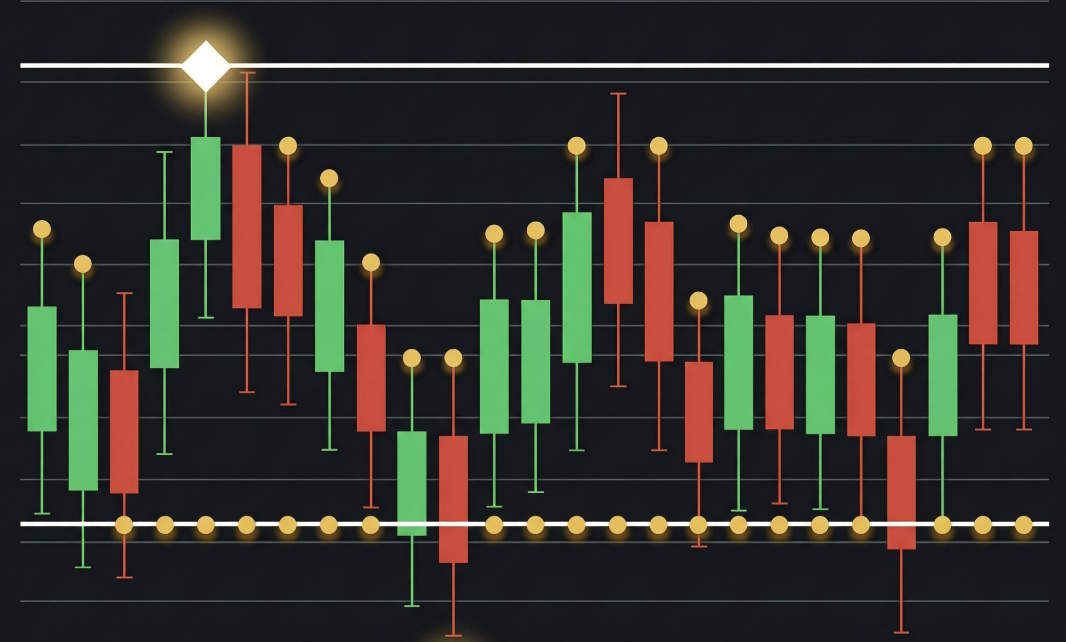
The high and low of a candlestick are the highest and lowest prices the instrument reached during the selected period. On the chart they form the tips of the upper and lower wicks: the body is built on the open and the close, while the wicks show how far the price travelled but could not stay.
An experienced trader reads the battle between buyers and sellers from the length of the wicks. A long upper wick means the rally met strong supply and the price fell back — often a sign of buyer weakness at resistance. A long lower wick says the opposite: sellers pushed the price down, but buyers bought it back and returned it to the top.
The highs and lows of individual candles form local extremes, and their sequence builds market structure: a series of higher highs and higher lows points to an uptrend, lower highs and lower lows to a downtrend. These same levels often become support and resistance zones, and the distance between the high and low measures volatility and helps calculate position size and stop loss.
Remember: the high and low are prices where the market travelled, not the result of the period. Decisions are made on the candle's close, while extremes serve as context and reference points for protective orders.
In my profile you will find a lot of useful educational information (don't forget to add me as a friend!) Profile: https://www.mql5.com/en/users/voldemar
Что такое максимум и минимум свечи?
Максимум и минимум свечи — это самая высокая и самая низкая цена, которых инструмент достиг за выбранный период. На графике они образуют кончики верхнего и нижнего фитилей: тело свечи строится на ценах открытия и закрытия, а тени показывают, докуда цена доходила, но не смогла там удержаться.
По длине фитилей опытный трейдер читает борьбу покупателей и продавцов. Длинный верхний фитиль означает, что рост встретил активное предложение и цена откатилась вниз — часто это сигнал слабости покупателей у уровня сопротивления. Длинный нижний фитиль говорит об обратном: продавцы продавили цену, но покупатели её выкупили и вернули наверх.
Максимум и минимум отдельных свечей формируют локальные экстремумы, из которых складывается рыночная структура: последовательность растущих максимумов и минимумов указывает на восходящий тренд, снижающихся — на нисходящий. Эти же уровни часто становятся зонами поддержки и сопротивления, а расстояние между максимумом и минимумом определяет волатильность и помогает правильно рассчитывать размер позиции и стоп-лосс.
Важно помнить: максимум и минимум — это цены, где рынок побывал, а не итог периода. Решение принимается по закрытию свечи, а экстремумы служат контекстом и ориентирами для расстановки защитных ордеров.
В моём профиле Вы найдете много полезной обучающей информации, (не забудь добавить в друзья) Профиль: https://www.mql5.com/ru/users/voldemar
When all indicators give a valid buy or sell signal, a corresponding arrow will be printed on the chart, at the opening of the next candle/bar indicating a strong uptrend/downtrend. The user can choose which indicators will use and can adjust the parameters of each indicator separately. Matrix Arrow Indicator MT4/5© gathers information only from the selected indicators and prints the arrow based only on their data. Matrix Arrow Indicator MT4/5© can also send terminal, push notification or email alerts for all new signals. Matrix Arrow Indicator MT4/5© is a super friendly & efficient solution whether you are a scalper, intraday or swing trader!
Matrix Arrow Indicator MT4/5© comes with a free add on, the Matrix Arrow Indicator Multi Timeframe Panel MT4/5© that offers the option to show the Matrix Arrow Indicator signals for 5 customizable timeframes of 16 modifiable symbols/instruments. It gives also the option to change the current chart it is attached onto, by clicking any one of the 16 modifiable symbol buttons. This will allow you to work much faster between different symbols and never miss a trading opportunity again.
✔️ 100% Non-Repainting indicator
✔️ 10 in 1 unique and extremely efficient Matrix and Arrow indicator
✔️ Works on all timeframes and all symbols/instruments
✔️ Super accurate entry Arrow signals that indicate a strong trend
✔️ Exit dot signals define neutral periods with no clear trend
✔️ Equally effective in trending and ranging markets
✔️ Each one indicator can be turned ON/OFF
✔️ Each and every parameter of all 10 indicators are fully adjustable
✔️ Matrix and Arrow colors are fully customizable
✔️ Free add on Panel with Matrix Arrow signals for 16 symbols and 5 timeframes
✔️ Terminal, Push Notification and Email Alerts available
✔️ Ideal for beginners but also a great asset for experienced traders
🔥🔥🔥🔥🔥 Matrix Arrow Indicator MT4/5© Demonstration Video: https://www.youtube.com/watch?v=-teba5v_90I
⭐️⭐️⭐️⭐️⭐️ Matrix Arrow Indicator MT4©: https://www.mql5.com/en/market/product/69726
⭐️⭐️⭐️⭐️⭐️ Matrix Arrow Indicator MT5©: https://www.mql5.com/en/market/product/69725
👉 Matrix Arrow Indicator MT4/5© Real Trading Examples: https://www.mql5.com/en/blogs/post/745715
✅ Matrix Arrow Indicator MT4/5© Installation Guide: https://www.mql5.com/en/blogs/post/745711
✅ Matrix Arrow Indicator MT4/5© Settings/Inputs: https://www.mql5.com/en/blogs/post/745707
💎💎💎💎💎 Check out all my Expert Advisors, Indicators and Utilities: https://www.mql5.com/en/users/eleanna74/seller
11 October 2026
For added protection, the EA includes advanced account safeguarding mechanisms. When a specified equity take profit or stop loss level or a maximum drawdown from the account's balance high is reached, the EA can automatically close all open trades, delete any pending orders, and shut down all charts, removing any Expert Advisors running on them. This feature helps protect your capital during unexpected market movements or when reaching your predefined account targets.
✔️ Does not use Martingale, Grid, Averaging, or other high-risk techniques
✔️ Allows exclusion of specific Magic Numbers, trade comments, or symbol trades from management
✔️ Basket Take Profit in % for all managed trades combined
✔️ Basket Stop Loss in % for all managed trades combined
✔️ Basket Break Even in % for all managed trades combined
✔️ Basket Trailing Stop Loss in % for all managed trades combined
✔️ Basket Take Profit in money for all managed trades combined
✔️ Basket Stop Loss in money for all managed trades combined
✔️ Basket Break Even in money for all managed trades combined
✔️ Basket Trailing Stop Loss in money for all managed trades combined
✔️ Basket Take Profit in average points for all managed trades combined
✔️ Basket Stop Loss in average points for all managed trades combined
✔️ Basket Break Even in average points for all managed trades combined
✔️ Basket Trailing Stop Loss in average points for all managed trades combined
✔️ Option to reset all Basket settings after each account balance update or after a Basket target is hit
✔️ Option to close all managed trades at break even after recovering from a drawdown
✔️ Option to close all managed trades at a specific time on a chosen day or daily
✔️ Account protection feature that closes all trades and charts when equity-based TP or SL is reached
✔️ Maximum drawdown % from balance high that closes all trades and charts/EAs if triggered
✔️ Optional on-chart panel to monitor profit/loss and close trades by type or all at once
✔️ Terminal, push notification, and email alerts when any Basket or protection condition is triggered
✔️ 100% automated Expert Advisor
✔️ Fully compatible with MQL5 VPS
⭐️⭐️⭐️⭐️⭐️ Basket EA EA MT4©: https://www.mql5.com/en/market/product/45192
⭐️⭐️⭐️⭐️⭐️ Basket EA EA MT5©: https://www.mql5.com/en/market/product/72782
📥 Download the Basket EA MT4© demo version in your demo account now: https://c.mql5.com/6/988/Basket_EA_MT4_2_20_Demo.ex4
📥 Download the Basket EA MT5© demo version in your demo account now: https://c.mql5.com/6/988/Basket_EA_MT5_2_00_Demo.ex5
✅ Basket EA MT4/5© detailed Settings/Inputs guide: https://www.mql5.com/en/blogs/post/746117
💎💎💎💎💎 Check out all my Expert Advisors and Utilities: https://www.mql5.com/en/users/eleanna74/seller
11 October 2026
Set up your Transmitter and Receiver terminals in about 1 minute and copy manual or EA trades between accounts at the same or different brokers. Under suitable conditions, trade information can be synchronized between local MetaTrader terminals in under 0.5 seconds. Actual trade execution depends on broker latency, network conditions, computer/VPS performance and terminal workload.
Each Receiver account can use its own lot sizing, risk management, trade filtering, symbol mapping, trade management and account-protection settings. This allows the same trading activity to be synchronized across multiple accounts while each Receiver can be configured according to its own requirements.
✔️ Copying & Connectivity: Copy between multiple MT4/MT5 accounts* on the same Windows computer or VPS, across different brokers and real/demo accounts.
✔️ Lot Sizing & Risk Management: Choose from 18 lot size and risk options, with independent sizing and risk settings for each Receiver.
✔️ Trade Filtering & Copying Controls: Filter copied trades by symbol, magic number, comment, ticket, volume, direction, day and time.
✔️ Trade Management: Manage market and pending orders, TP/SL, partial closures, reopening, reverse copying, better-price conditions and trade splitting.
✔️ Account Protection: Control lot limits, risk, daily drawdown/profit, copying restrictions and emergency protection independently for each Receiver.
✔️ Broker Compatibility & Symbol Mapping: Copy between different brokers and configure suffixes and special symbol mappings when symbol names differ.
✔️ Notifications & Reliability: Use email/push notifications, persistent settings and MetaTrader logs for monitoring and troubleshooting.
✔️ 20 Activations: Each MT4/MT5 version includes 20 activations, allowing you to install and use it on multiple Windows computers or VPSs.
* MT4 → MT5 and MT5 → MT4 copying requires both LTC versions. Both terminals must run on the same Windows computer or Windows VPS.
🔥🔥🔥🔥🔥 Watch the Local Trade Copier EA MT4/5© Quick Setup Video: https://www.youtube.com/watch?v=zhc9s56QhlE
⭐️⭐️⭐️⭐️⭐️ Local Trade Copier EA MT4©: https://www.mql5.com/en/market/product/68950
⭐️⭐️⭐️⭐️⭐️ Local Trade Copier EA MT5©: https://www.mql5.com/en/market/product/68951
📥 Download the Local Trade Copier EA MT4© Free Demo: https://c.mql5.com/6/1030/Local_Trade_Copier_EA_MT4_4_60_Demo.ex4
📥 Download the Local Trade Copier EA MT5© Free Demo: https://c.mql5.com/6/1030/Local_Trade_Copier_EA_MT5_4_40_Demo.ex5
✅ Local Trade Copier EA MT4/5© Purchase, Installation & Quick Setup Guide: https://www.mql5.com/en/blogs/post/745683
✅ Local Trade Copier EA MT4/5© Detailed Inputs/Settings Guide: https://www.mql5.com/en/blogs/post/745681
✅ Local Trade Copier EA MT4/5© Troubleshooting Guide: https://www.mql5.com/en/blogs/post/746561
💎💎💎💎💎 View all my Expert Advisors, Indicators and Utilities: https://www.mql5.com/en/users/eleanna74/seller
11 October 2026
.
Trend Master Pro — Entiende la dirección del mercado antes de buscar una entrada
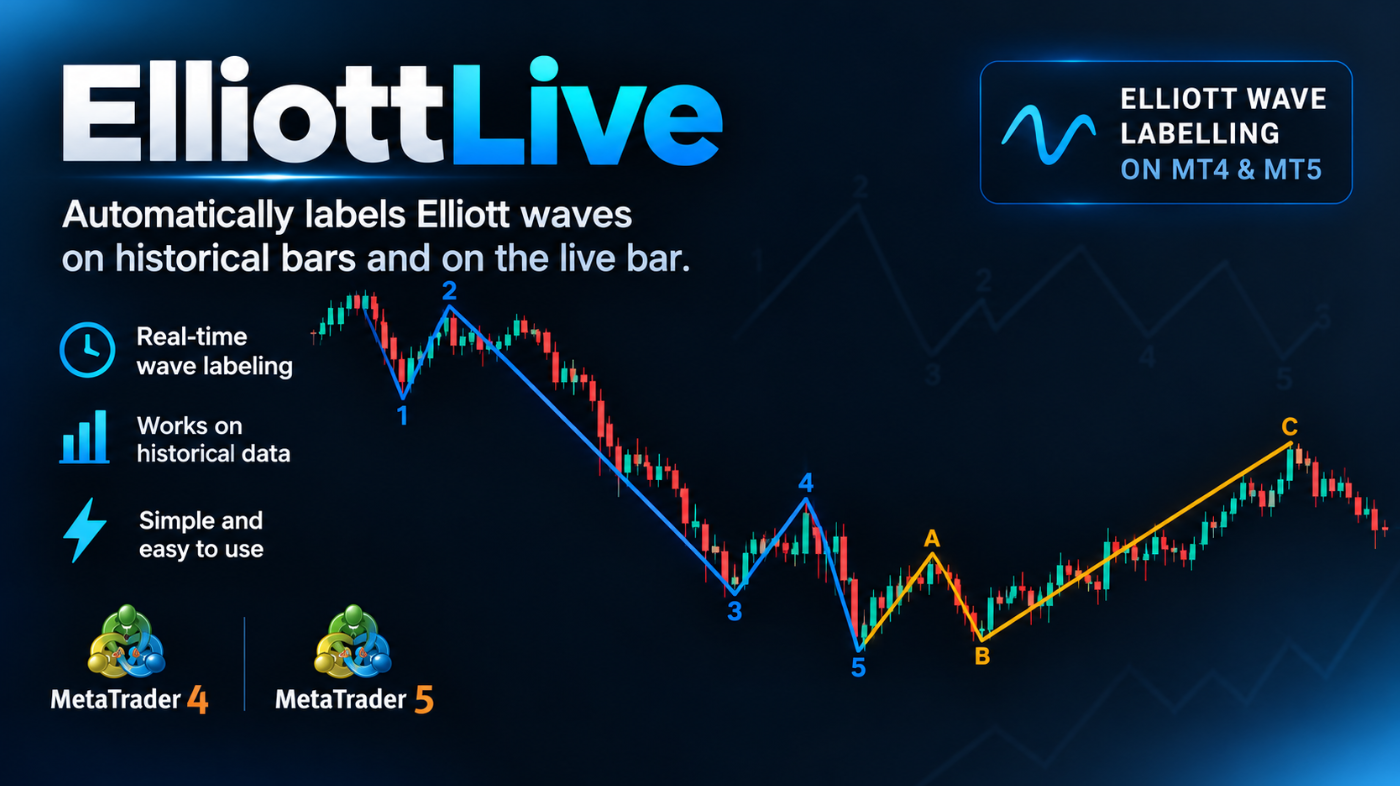
What sets it apart is that it also tracks the wave that is still forming. The live leg is drawn dotted with a “?” mark and updates as price moves, while Fibonacci target levels and an invalidation level are projected to the right of the current bar. Targets that price has already passed are hidden, so the chart stays clean. Optional alerts (popup, sound, push, email) notify you when a wave is confirmed or when a new wave starts forming. History never triggers alerts, only new events.
MT4-version: https://www.mql5.com/en/market/product/200613
MT5-version: https://www.mql5.com/ru/market/product/200604
Elliott Live — индикатор для MetaTrader 5, который автоматически размечает волны Эллиотта на истории и в реальном времени, на текущем баре. Завершённые волны рисуются сплошной линией, формирующаяся — пунктиром с вопросительным знаком (например, «3?»), и к ней сразу строятся уровни Фибоначчи и уровень отмены счёта. MT5-version: https://www.mql5.com/en/market/product/200604 Как это работает Сначала строятся свинги (ZigZag). Разворот засчитывается, когда цена откатывает от экстремума не
Elliott Live — индикатор для MetaTrader 5, который автоматически размечает волны Эллиотта на истории и в реальном времени, на текущем баре. Завершённые волны рисуются сплошной линией, формирующаяся — пунктиром с вопросительным знаком (например, «3?»), и к ней сразу строятся уровни Фибоначчи и уровень отмены счёта. MT4-version: https://www.mql5.com/en/market/product/200613 Как это работает Сначала строятся свинги (ZigZag). Разворот засчитывается, когда цена откатывает от экстремума не
The opening price is the price of the first trade in a selected period, and the closing price is the price of the last trade. In Japanese candlestick analysis, the open and the close form the body of the candle: if the close is above the open, the candle is bullish; if below, it is bearish, while the thin wicks above and below mark the high and low of the period. The opening price reflects the starting balance of power — often the result of overnight trading and a reaction to news — while the closing price fixes the outcome of the battle between buyers and sellers.
It is the closing price that is considered the main price of the period: moving averages, MACD, RSI and most other indicators are built on it, because the close is the "official" result rather than a random intraday spike. The daily opening level is also actively used in trading: while the price stays above it, buying pressure remains, and a break below often sets a bearish tone for the session. Experienced traders always look at the open and the close together, assessing who controlled the market and how confidently.
To learn how to read these signals, memorizing definitions is not enough — you need practice on real charts. Candlestick analysis is the foundation on which the whole further trading system is built, so move step by step: from a single candle to patterns, levels and strategies.
In my profile you will find a lot of useful educational information (don't forget to add me as a friend!) Profile: https://www.mql5.com/en/users/voldemar
Что такое цена открытия и цена закрытия?
Цена открытия — это цена первой сделки за выбранный период времени, цена закрытия — цена последней сделки. В японском свечном анализе открытие и закрытие образуют тело свечи: если закрытие оказалось выше открытия, свеча бычья, если ниже — медвежья, а тонкие фитили сверху и снизу показывают максимум и минимум периода. Цена открытия отражает стартовый баланс сил — нередко это результат ночных торгов и реакции на новости, тогда как цена закрытия фиксирует итог борьбы покупателей и продавцов.
Именно цена закрытия считается главной ценой периода: на ней строятся скользящие средние, MACD, RSI и большинство других индикаторов, потому что закрытие — это «официальный» результат, а не случайный внутридневный выброс. Уровень открытия дня тоже активно используется в торговле: пока цена выше него, давление покупателей сохраняется, пробой вниз часто задаёт медвежий тон на сессию. Опытные трейдеры всегда смотрят на открытие и закрытие в связке, оценивая, кто контролировал рынок и с какой уверенностью.
Чтобы научиться читать эти сигналы, недостаточно запомнить определения — нужна практика на реальных графиках. Больше учебных материалов в MAX — https://max.ru/channel_tradinggo, а короткие практические разборы и свежие наблюдения за рынком выходят в нашем Телеграм-канале: https://t.me/tgforexru. Свечной анализ — это фундамент, от которого строится вся дальнейшая торговая система, поэтому не пропускайте шаг за шагом: от одной свечи — к паттернам, уровням и стратегиям.
Trend Master Pro — Понимайте направление рынка перед поиском точки входа
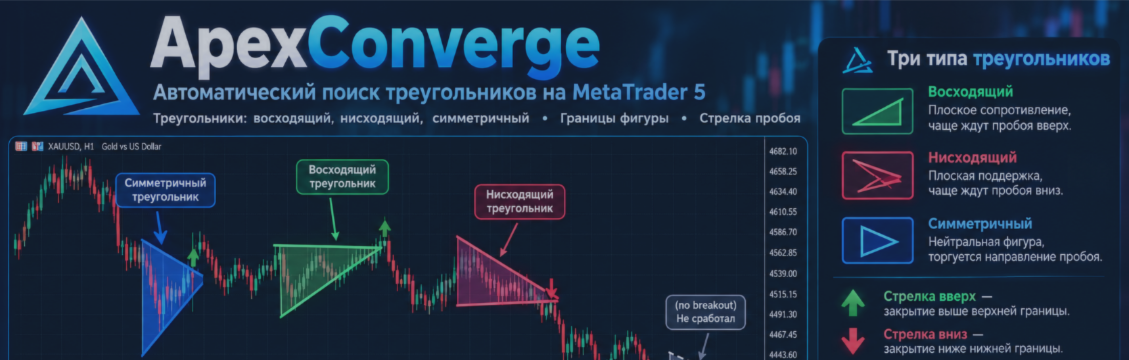
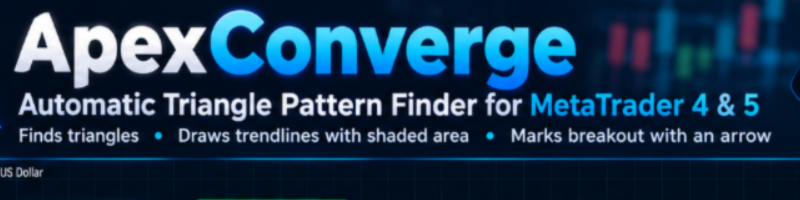
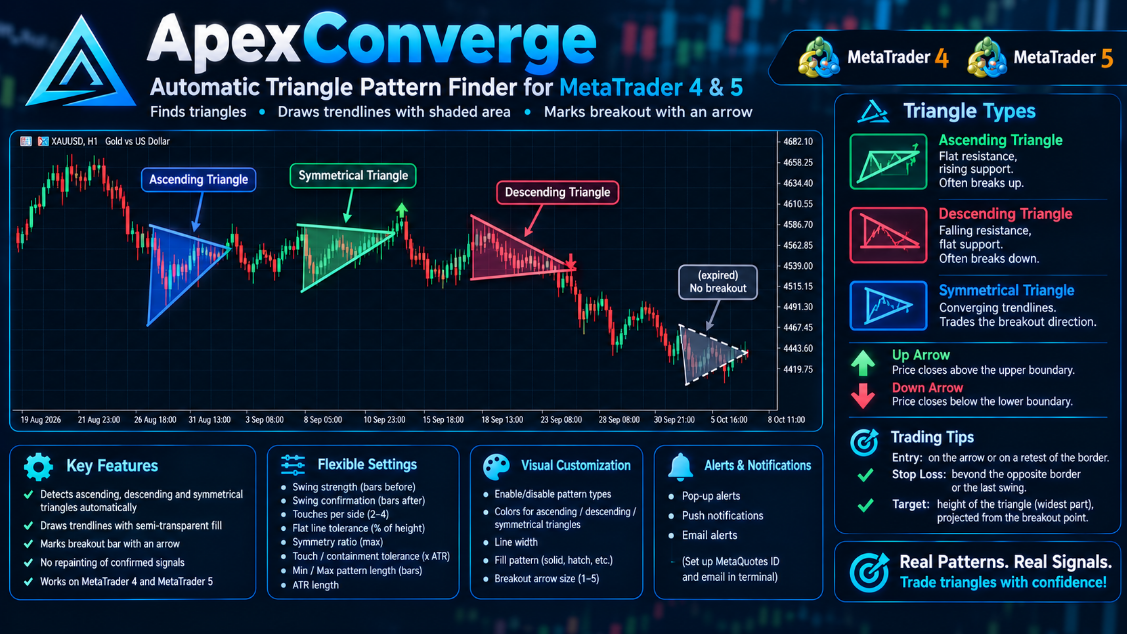
When price closes beyond a triangle’s boundary, the indicator plots a breakout arrow up or down and sends an alert: a pop-up, a push notification to your phone, or an email. Patterns that never broke out or ran out of time are marked separately. Everything is adjustable: swing sensitivity, tolerances, pattern length, which triangle types to show, colors and display style.
MT4-version: https://www.mql5.com/en/market/product/200443
MT5-version: https://www.mql5.com/en/market/product/200424
Subscribe to my channel on MQL5.com: https://www.mql5.com/en/channels/algotrader
And to my Telegram channel, where I post new releases and sometimes free Expert Advisors and indicators: https://t.me/algotrdr
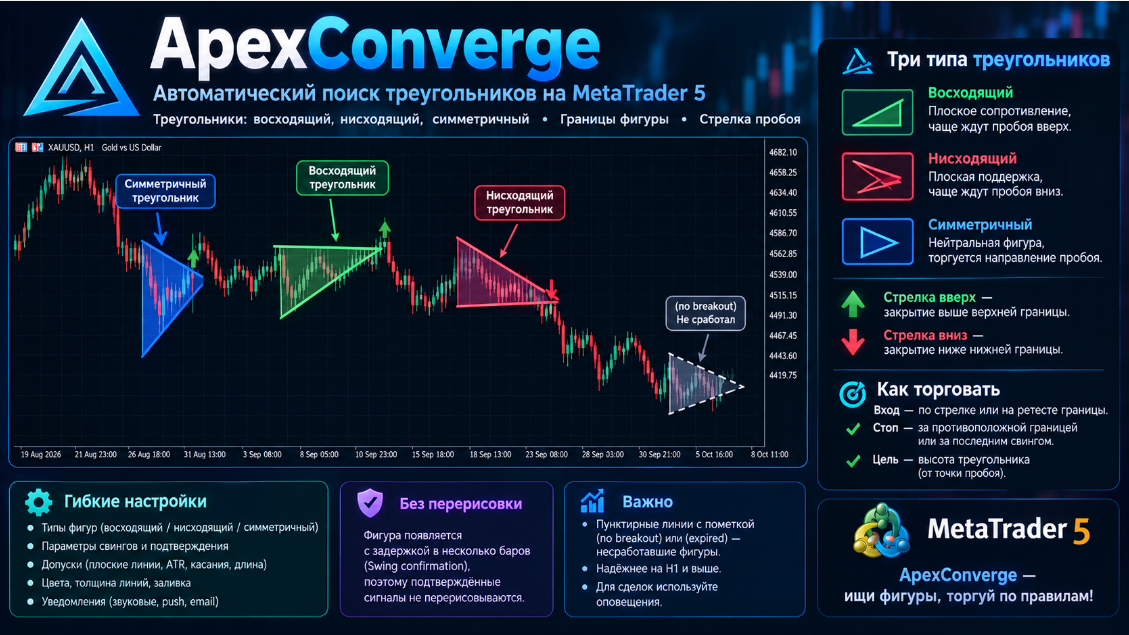
Когда цена закрывается за границей треугольника, индикатор ставит стрелку пробоя вверх или вниз и присылает уведомление: всплывающее окно, push на телефон или письмо. Паттерны, которые не получили пробоя или истекли по времени, помечаются отдельно. Все параметры настраиваются: чувствительность поиска вершин, допуски, длина паттерна, типы треугольников, цвета и стиль отображения.
MT4-version: https://www.mql5.com/en/market/product/200443
MT5-version: https://www.mql5.com/en/market/product/200424
Подписывайтесь на мой канал на MQL5.com: https://www.mql5.com/en/channels/algotrader
А также на Telegram-канал, где я выкладываю новинки и иногда бесплатные советники и индикаторы: https://t.me/algotrdr
ApexConverge — индикатор для MetaTrader 5, который автоматически находит фигуры «треугольник» (восходящий, нисходящий и симметричный), рисует их границы с полупрозрачной заливкой и отмечает стрелкой бар пробоя. MT5-version: https://www.mql5.com/en/market/product/200424 Как это работает Индикатор находит локальные максимумы и минимумы, проводит через них две линии тренда и проверяет форму: плоская верхняя и растущая нижняя граница — восходящий треугольник; падающая верхняя и плоская нижняя —