Sergey Rashevskiy / 新闻源
- 信息
|
13+ 年
经验
|
3
产品
|
384
演示版
|
|
19
工作
|
0
信号
|
0
订阅者
|
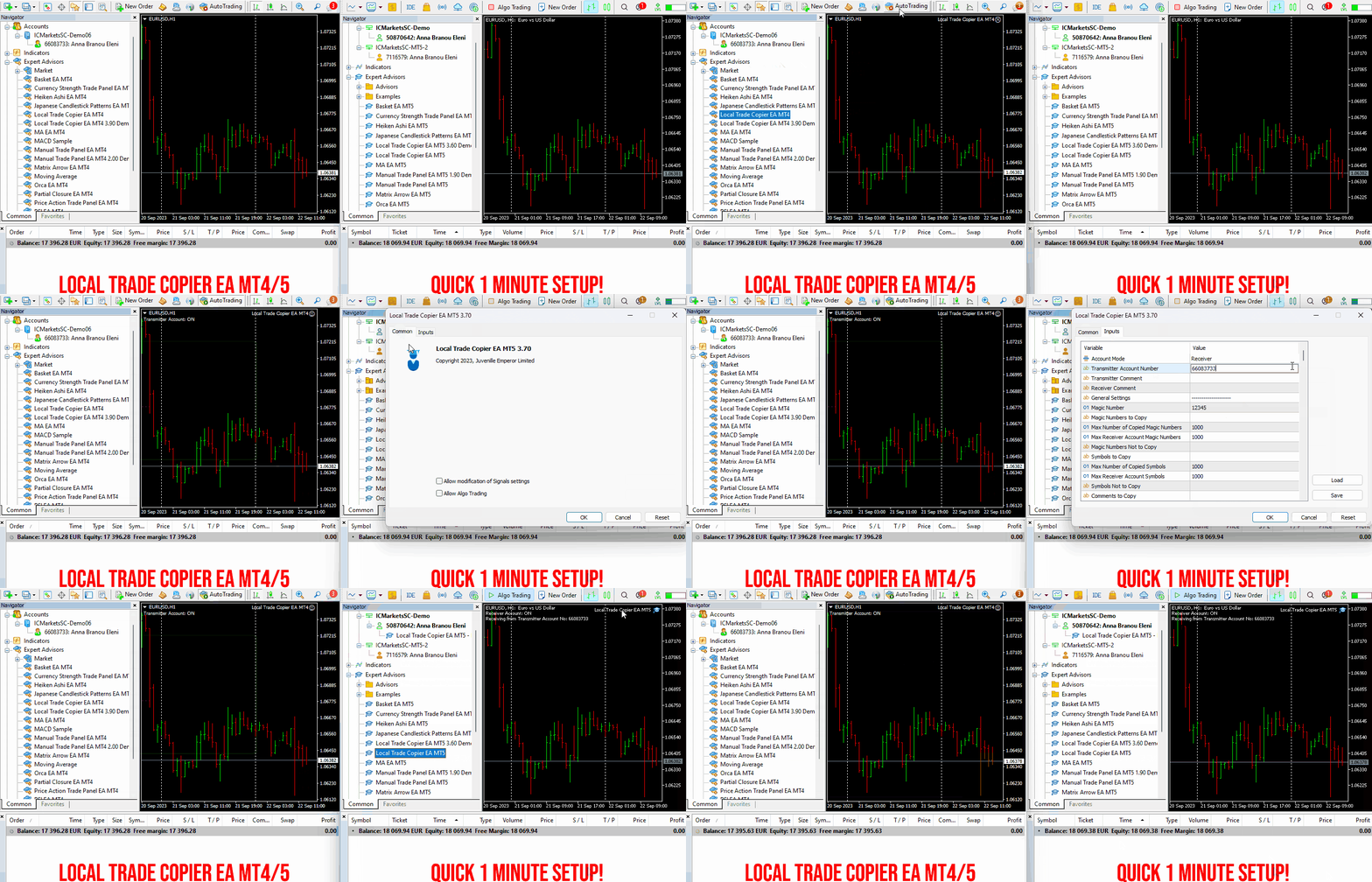
Set up your Transmitter and Receiver terminals in about 1 minute and copy manual or EA trades between accounts at the same or different brokers. Under suitable conditions, trade information can be synchronized between local MetaTrader terminals in under 0.5 seconds. Actual trade execution depends on broker latency, network conditions, computer/VPS performance and terminal workload.
Each Receiver account can use its own lot sizing, risk management, trade filtering, symbol mapping, trade management and account-protection settings. This allows the same trading activity to be synchronized across multiple accounts while each Receiver can be configured according to its own requirements.
✔️ Copying & Connectivity: Copy between multiple MT4/MT5 accounts* on the same Windows computer or VPS, across different brokers and real/demo accounts.
✔️ Lot Sizing & Risk Management: Choose from 18 lot size and risk options, with independent sizing and risk settings for each Receiver.
✔️ Trade Filtering & Copying Controls: Filter copied trades by symbol, magic number, comment, ticket, volume, direction, day and time.
✔️ Trade Management: Manage market and pending orders, TP/SL, partial closures, reopening, reverse copying, better-price conditions and trade splitting.
✔️ Account Protection: Control lot limits, risk, daily drawdown/profit, copying restrictions and emergency protection independently for each Receiver.
✔️ Broker Compatibility & Symbol Mapping: Copy between different brokers and configure suffixes and special symbol mappings when symbol names differ.
✔️ Notifications & Reliability: Use email/push notifications, persistent settings and MetaTrader logs for monitoring and troubleshooting.
✔️ 20 Activations: Each MT4/MT5 version includes 20 activations, allowing you to install and use it on multiple Windows computers or VPSs.
* MT4 → MT5 and MT5 → MT4 copying requires both LTC versions. Both terminals must run on the same Windows computer or Windows VPS.
🔥🔥🔥🔥🔥 Watch the Local Trade Copier EA MT4/5© Quick Setup Video: https://www.youtube.com/watch?v=zhc9s56QhlE
⭐️⭐️⭐️⭐️⭐️ Local Trade Copier EA MT4©: https://www.mql5.com/en/market/product/68950
⭐️⭐️⭐️⭐️⭐️ Local Trade Copier EA MT5©: https://www.mql5.com/en/market/product/68951
📥 Download the Local Trade Copier EA MT4© Free Demo: https://c.mql5.com/6/1030/Local_Trade_Copier_EA_MT4_4_60_Demo.ex4
📥 Download the Local Trade Copier EA MT5© Free Demo: https://c.mql5.com/6/1030/Local_Trade_Copier_EA_MT5_4_40_Demo.ex5
✅ Local Trade Copier EA MT4/5© Purchase, Installation & Quick Setup Guide: https://www.mql5.com/en/blogs/post/745683
✅ Local Trade Copier EA MT4/5© Detailed Inputs/Settings Guide: https://www.mql5.com/en/blogs/post/745681
✅ Local Trade Copier EA MT4/5© Troubleshooting Guide: https://www.mql5.com/en/blogs/post/746561
💎💎💎💎💎 View all my Expert Advisors, Indicators and Utilities: https://www.mql5.com/en/users/eleanna74/seller
12 October 2026
CURRENCY PULSE — METATRADER 货币强弱看板 【简介】 Currency Pulse 可以同时在多个周期上显示各货币的强弱:哪些货币当前领先,哪些落后。对于每一种所选货币,指标会相对于其余所有所选货币(各货币权重相等)构建一个强弱指数,并显示该指数在各周期一根K线内变化了多少个百分点。每一列中,货币按从最强(顶部)到最弱(底部)排列。看板直接显示在图表上,可以用鼠标拖动,也可以折叠成一行。 【工作原理】 每种货币都通过其与美元的交易品种(EURUSD、USDJPY 等)来估值。指标会根据经纪商的品种规格自动选择所需品种,因此名称中的前缀和后缀不会造成影响。如果某个品种不在“市场报价”中,会被自动添加,缺少的历史数据也会自动下载。 货币指数反映该货币相对于其余所选货币的平均表现,因此不依赖于某一个单独的货币对。 单元格中的数字是该列周期的一根K线内指数的百分比变化。 数字下方的横条表示该走势与同列其他货币相比的强度:横条越长,走势越强。蓝色表示上涨,橙色表示下跌。 左侧的数字是该货币的排名。
✔️ Extremely easy and straightforward interface
✔️ Works smoothly on any chart, account type, or broker
✔️ Automatic partial closure of managed trades at specified TP/SL levels, closing independent percentages of the initial lot size across up to 10 TP and 10 SL levels
✔️ Manual partial closure of all managed trades or any individual trade by ticket number, based on a percentage of the lot size
✔️ Option to move the stop loss to break even for the remaining portion of trades automatically partially closed as above
✔️ Option to move the stop loss to break even once a specified profit level (in points) is reached
✔️ Ability to exclude certain magic numbers, comments, or symbol trades from management
✔️ Compatible with MQL5 VPS
⭐️⭐️⭐️⭐️⭐️ Partial Closure EA MT4©: https://www.mql5.com/en/market/product/82356
⭐️⭐️⭐️⭐️⭐️ Partial Closure EA MT5©: https://www.mql5.com/en/market/product/82357
📥 Download the Partial Closure EA MT4© demo version in your demo account now: https://c.mql5.com/6/975/Partial_Closure_EA_MT4_1.30_Demo.ex4
📥 Download the Partial Closure EA MT5© demo version in your demo account now: https://c.mql5.com/6/975/Partial_Closure_EA_MT5_1.30_Demo.ex5
✅ Partial Closure EA MT4/5© installation & user guide: https://www.mql5.com/en/blogs/post/749385
💎💎💎💎💎 Check out all my Expert Advisors, Indicators and Utilities: https://www.mql5.com/en/users/eleanna74/seller
12 October 2026
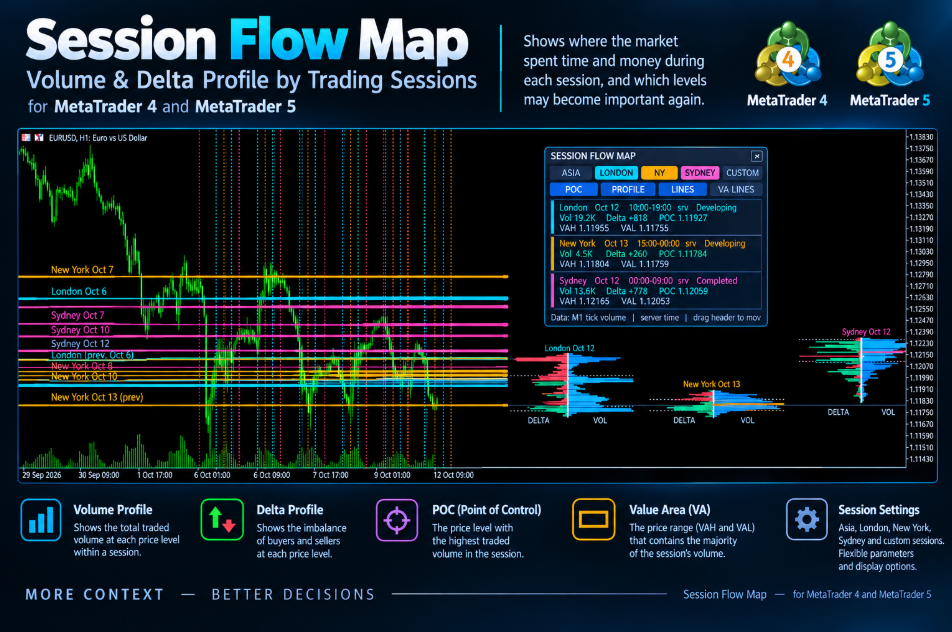
SessionFlowMap builds a volume profile and a delta profile (buy/sell imbalance) for the sessions of the forex day: Asia, London, New York, plus an optional Sydney and a custom session. For every session it finds the POC (Point of Control — the price with the highest traded volume) and the Value Area (VAH and VAL — the range that holds most of the volume) and projects these levels forward as horizontal lines. You can see at a glance where the market spent time and money in each session and which levels may matter again.
MT5-version: https://www.mql5.com/en/market/product/200942
MT4-version: https://www.mql5.com/en/market/product/200941
SessionFlowMap — 多时段成交量与Delta分布图(含POC关键位) SessionFlowMap 为外汇交易日的各个交易时段(亚洲、伦敦、纽约,另可选悉尼和自定义时段)生成成交量分布图和Delta分布图(买卖失衡)。对于每个时段,指标会找出 POC(控制点,即成交量最大的价格)和价值区域 Value Area(VAH 与 VAL,容纳大部分成交量的区间),并把这些水平位以水平线的形式向右延伸。你可以一眼看出市场在每个时段把时间和资金花在了哪里,以及哪些价位可能再次变得重要。 MT5-version: https://www.mql5.com/en/market/product/200942 工作原理 每个时段按各自的时间从 M1 历史数据中截取。亚洲、伦敦、纽约和悉尼的时间以 GMT 设置,并自动换算为经纪商服务器时间;自定义时段直接使用服务器时间。 时段的价格区间被划分为若干价格行(目标行数由你设置),成交量分配到各行。外汇没有集中式成交量,因此使用的是 Tick 成交量。 成交量分布图是每一行的总成交量;Delta
SessionFlowMap — 多时段成交量与Delta分布图(含POC关键位) SessionFlowMap 为外汇交易日的各个交易时段(亚洲、伦敦、纽约,另可选悉尼和自定义时段)生成成交量分布图和Delta分布图(买卖失衡)。对于每个时段,指标会找出 POC(控制点,即成交量最大的价格)和价值区域 Value Area(VAH 与 VAL,容纳大部分成交量的区间),并把这些水平位以水平线的形式向右延伸。你可以一眼看出市场在每个时段把时间和资金花在了哪里,以及哪些价位可能再次变得重要。 MT4-version: https://www.mql5.com/en/market/product/200941 工作原理 每个时段按各自的时间从 M1 历史数据中截取。亚洲、伦敦、纽约和悉尼的时间以 GMT 设置,并自动换算为经纪商服务器时间;自定义时段直接使用服务器时间。 时段的价格区间被划分为若干价格行(目标行数由你设置),成交量分配到各行。外汇没有集中式成交量,因此使用的是 Tick 成交量。 成交量分布图是每一行的总成交量;Delta
When all indicators give a valid buy or sell signal, a corresponding arrow will be printed on the chart, at the opening of the next candle/bar indicating a strong uptrend/downtrend. The user can choose which indicators will use and can adjust the parameters of each indicator separately. Matrix Arrow Indicator MT4/5© gathers information only from the selected indicators and prints the arrow based only on their data. Matrix Arrow Indicator MT4/5© can also send terminal, push notification or email alerts for all new signals. Matrix Arrow Indicator MT4/5© is a super friendly & efficient solution whether you are a scalper, intraday or swing trader!
Matrix Arrow Indicator MT4/5© comes with a free add on, the Matrix Arrow Indicator Multi Timeframe Panel MT4/5© that offers the option to show the Matrix Arrow Indicator signals for 5 customizable timeframes of 16 modifiable symbols/instruments. It gives also the option to change the current chart it is attached onto, by clicking any one of the 16 modifiable symbol buttons. This will allow you to work much faster between different symbols and never miss a trading opportunity again.
✔️ 100% Non-Repainting indicator
✔️ 10 in 1 unique and extremely efficient Matrix and Arrow indicator
✔️ Works on all timeframes and all symbols/instruments
✔️ Super accurate entry Arrow signals that indicate a strong trend
✔️ Exit dot signals define neutral periods with no clear trend
✔️ Equally effective in trending and ranging markets
✔️ Each one indicator can be turned ON/OFF
✔️ Each and every parameter of all 10 indicators are fully adjustable
✔️ Matrix and Arrow colors are fully customizable
✔️ Free add on Panel with Matrix Arrow signals for 16 symbols and 5 timeframes
✔️ Terminal, Push Notification and Email Alerts available
✔️ Ideal for beginners but also a great asset for experienced traders
🔥🔥🔥🔥🔥 Matrix Arrow Indicator MT4/5© Demonstration Video: https://www.youtube.com/watch?v=-teba5v_90I
⭐️⭐️⭐️⭐️⭐️ Matrix Arrow Indicator MT4©: https://www.mql5.com/en/market/product/69726
⭐️⭐️⭐️⭐️⭐️ Matrix Arrow Indicator MT5©: https://www.mql5.com/en/market/product/69725
👉 Matrix Arrow Indicator MT4/5© Real Trading Examples: https://www.mql5.com/en/blogs/post/745715
✅ Matrix Arrow Indicator MT4/5© Installation Guide: https://www.mql5.com/en/blogs/post/745711
✅ Matrix Arrow Indicator MT4/5© Settings/Inputs: https://www.mql5.com/en/blogs/post/745707
💎💎💎💎💎 Check out all my Expert Advisors, Indicators and Utilities: https://www.mql5.com/en/users/eleanna74/seller
12 October 2026
A timeframe is the time interval for which one candle is built on the chart. By choosing the H1 period, you get a candle that describes the price movement over one hour: the open at the start of the hour, the high and low within it, and the close at the end. The timeframe sets the scale of how you see the market: the smaller the period, the more detail and market noise, the larger the period, the smoother and more significant the picture.
MetaTrader 5 offers lower timeframes — M1, M5, M15, M30 — and higher ones — H1, H4, D1, W1, MN1. The principle of building a candle is the same for all of them; only the length of the period differs. Until the period ends, the last candle is still forming: its close is not yet fixed and can change, so signals based on a closed candle are considered more reliable.
The key idea for a beginner: different timeframes do not show different markets, but different scales of the same movement. An hour of price growth on the one-minute chart is dozens of candles with rises and pullbacks, on the fifteen-minute chart it is four candles, and on the hourly chart it is a single candle. The same trend can look like noise on a lower period and a clear direction on a higher one.
It also helps to remember the arithmetic of timeframes. One H1 candle contains sixty M1 candles or twelve M5 candles, one H4 candle includes four H1 candles, and a daily candle contains twenty-four hourly ones. When you look at a single daily candle, you are in fact seeing the result of a whole trading day, within which hundreds of smaller movements took place.
This leads to the practical approach of multi-timeframe analysis. Direction and key levels are assessed on the higher timeframe, while the precise entry point is sought on the lower one. The higher period always takes priority: a downward signal on M5 within a rising daily chart is more often a correction than a reversal.
The timeframe directly affects volatility and risk. The typical range of a candle grows with the period, so the stop loss and position size should be calculated on the very timeframe you are trading. Carrying levels over from another chart without recalculation is a typical beginner's mistake.
For those involved in automation, the same rule applies in MQL5: an Expert Advisor receives data from a specific timeframe, and its signals depend on it. The same logic behaves differently on M5 and on H4, and working correctly with the data of the chosen period is part of a trading algorithm's robustness.
In my profile you will find a lot of useful educational information (don't forget to add me as a friend!) Profile: https://www.mql5.com/en/users/voldemar
Что такое таймфрейм?
Таймфрейм — это временной интервал, за который строится одна свеча на графике. Выбрав период H1, вы получаете свечу, описывающую движение цены за час: цену открытия в начале часа, максимум и минимум внутри него и цену закрытия в конце. Именно таймфрейм задаёт масштаб восприятия рынка: чем меньше период, тем больше деталей и рыночного шума, чем больше период, тем более сглаженной и значимой выглядит картина.
В MetaTrader 5 есть младшие таймфреймы — M1, M5, M15, M30, и старшие — H1, H4, D1, W1, MN1. Принцип построения свечи у них одинаков, различается лишь длительность периода. Пока период не закончился, последняя свеча остаётся формирующейся: её закрытие ещё не зафиксировано и может измениться, поэтому сигналы по закрытой свече считаются более надёжными.
Ключевая мысль для начинающего: на разных таймфреймах видно не разные рынки, а разный масштаб одного и того же движения. Час роста цены на минутном графике — это десятки свечей с подъёмами и откатами, на пятнадцатиминутном — четыре свечи, а на часовом — одна. Один и тот же тренд может казаться шумом на младшем периоде и чётким направлением на старшем.
Полезно помнить и арифметику таймфреймов. Одна свеча H1 содержит шестьдесят свечей M1 или двенадцать свечей M5, одна свеча H4 включает четыре свечи H1, а дневная — двадцать четыре часовых. Когда вы смотрите на одну дневную свечу, вы фактически видите итог целого торгового дня, внутри которого происходили сотни более мелких движений.
Отсюда практический подход — мультитаймфреймовый анализ. Направление и ключевые уровни оценивают на старшем таймфрейме, а точную точку входа ищут на младшем. Старший период всегда имеет приоритет: сигнал вниз на M5 внутри растущего дневного графика чаще оказывается коррекцией, чем разворотом.
Таймфрейм напрямую влияет на волатильность и риск. Типичный размах свечи растёт вместе с периодом, поэтому стоп-лосс и объём позиции нужно рассчитывать именно на том таймфрейме, на котором ведётся торговля. Переносить уровни с другого графика без пересчёта — типичная ошибка новичка.
Для тех, кто занимается автоматизацией, это же правило работает в MQL5: советник получает данные конкретного таймфрейма, и от этого зависят его сигналы. Одна и та же логика на M5 и на H4 ведёт себя по-разному, а корректная работа с данными выбранного периода — часть устойчивости торгового алгоритма.
В моём профиле Вы найдете много полезной обучающей информации, (не забудь добавить в друзья) Профиль: https://www.mql5.com/ru/users/voldemar
✔️ The EA offers flexible trade execution, allowing either one trade per color change or multiple trades per trend.
✔️ Custom entry selection lets users open trades based on the 2nd to 10th Heiken Ashi candle.
✔️ Distance control helps prevent excessive trades at similar price levels.
✔️ A built-in Heiken Ashi trailing stop dynamically adjusts the stop-loss for better trend-following adaptability.
✔️ Advanced filters, including Moving Average and MACD, help reduce false signals.
✔️ ADR-based risk management calculates SL, TP, BE, and Trailing SL as a percentage of the Average Daily Range.
✔️ Basket TP and SL options enable efficient management of all open positions.
✔️ The EA avoids risky strategies such as Martingale and Grid, ensuring a safer trading approach for long-term success.
✔️ It is 100% compatible with MQL5 VPS, allowing smooth operation when running 24/7.
🔥🔥🔥🔥🔥 Heiken Ashi EA MT4/5© Backtests & New Optimized Set Files: https://www.mql5.com/en/blogs/post/745696
✅ How to Test the Heiken Ashi EA MT4/5©: https://www.mql5.com/en/blogs/post/750887
⭐️⭐️⭐️⭐️⭐️ Heiken Ashi EA MT4©: https://www.mql5.com/en/market/product/45283
⭐️⭐️⭐️⭐️⭐️ Heiken Ashi EA MT5©: https://www.mql5.com/en/market/product/64877
💎💎💎💎💎 Check out all my Expert Advisors, Indicators and Utilities: https://www.mql5.com/en/users/eleanna74/seller
12 October 2026
For added protection, the EA includes advanced account safeguarding mechanisms. When a specified equity take profit or stop loss level or a maximum drawdown from the account's balance high is reached, the EA can automatically close all open trades, delete any pending orders, and shut down all charts, removing any Expert Advisors running on them. This feature helps protect your capital during unexpected market movements or when reaching your predefined account targets.
✔️ Does not use Martingale, Grid, Averaging, or other high-risk techniques
✔️ Allows exclusion of specific Magic Numbers, trade comments, or symbol trades from management
✔️ Basket Take Profit in % for all managed trades combined
✔️ Basket Stop Loss in % for all managed trades combined
✔️ Basket Break Even in % for all managed trades combined
✔️ Basket Trailing Stop Loss in % for all managed trades combined
✔️ Basket Take Profit in money for all managed trades combined
✔️ Basket Stop Loss in money for all managed trades combined
✔️ Basket Break Even in money for all managed trades combined
✔️ Basket Trailing Stop Loss in money for all managed trades combined
✔️ Basket Take Profit in average points for all managed trades combined
✔️ Basket Stop Loss in average points for all managed trades combined
✔️ Basket Break Even in average points for all managed trades combined
✔️ Basket Trailing Stop Loss in average points for all managed trades combined
✔️ Option to reset all Basket settings after each account balance update or after a Basket target is hit
✔️ Option to close all managed trades at break even after recovering from a drawdown
✔️ Option to close all managed trades at a specific time on a chosen day or daily
✔️ Account protection feature that closes all trades and charts when equity-based TP or SL is reached
✔️ Maximum drawdown % from balance high that closes all trades and charts/EAs if triggered
✔️ Optional on-chart panel to monitor profit/loss and close trades by type or all at once
✔️ Terminal, push notification, and email alerts when any Basket or protection condition is triggered
✔️ 100% automated Expert Advisor
✔️ Fully compatible with MQL5 VPS
⭐️⭐️⭐️⭐️⭐️ Basket EA EA MT4©: https://www.mql5.com/en/market/product/45192
⭐️⭐️⭐️⭐️⭐️ Basket EA EA MT5©: https://www.mql5.com/en/market/product/72782
📥 Download the Basket EA MT4© demo version in your demo account now: https://c.mql5.com/6/988/Basket_EA_MT4_2_20_Demo.ex4
📥 Download the Basket EA MT5© demo version in your demo account now: https://c.mql5.com/6/988/Basket_EA_MT5_2_00_Demo.ex5
✅ Basket EA MT4/5© detailed Settings/Inputs guide: https://www.mql5.com/en/blogs/post/746117
💎💎💎💎💎 Check out all my Expert Advisors and Utilities: https://www.mql5.com/en/users/eleanna74/seller
12 October 2026
✔️ Martingale, Grid, Averaging or other dangerous techniques are not used
✔️ RSI Level Live Bar (once per candle) trade opening
✔️ RSI Level Closed Candle trade opening
✔️ RSI Level Crossing trade opening
✔️ Single or multiple orders per trading session
✔️ Net Asset Risk option, ideal for night scalping
✔️ Moving Average Trend Filter
✔️ SL, TP, BE and Trailing SL levels in Points and in Percentage of the Average Daily Range
✔️ Hard and Virtual Take Profit and Stop Loss levels
✔️ Basket TP, SL, BE and Trailing SL in % for all open positions combined
✔️ Optimized set files for many symbols
✔️ 100% automated Expert Advisor
✔️ MQL5 VPS compatible
🔥🔥🔥🔥🔥 RSI EA MT4/5© Backtests & New Set Files: https://www.mql5.com/en/blogs/post/745685
⭐️⭐️⭐️⭐️⭐️ RSI EA MT4©: https://www.mql5.com/en/market/product/45228
⭐️⭐️⭐️⭐️⭐️ RSI EA MT5©: https://www.mql5.com/en/market/product/67625
💎💎💎💎💎 Check out all my Expert Advisors, Indicators and Utilities: https://www.mql5.com/en/users/eleanna74/seller
11 October 2026
Set up your Transmitter and Receiver terminals in about 1 minute and copy manual or EA trades between accounts at the same or different brokers. Under suitable conditions, trade information can be synchronized between local MetaTrader terminals in under 0.5 seconds. Actual trade execution depends on broker latency, network conditions, computer/VPS performance and terminal workload.
Each Receiver account can use its own lot sizing, risk management, trade filtering, symbol mapping, trade management and account-protection settings. This allows the same trading activity to be synchronized across multiple accounts while each Receiver can be configured according to its own requirements.
✔️ Copying & Connectivity: Copy between multiple MT4/MT5 accounts* on the same Windows computer or VPS, across different brokers and real/demo accounts.
✔️ Lot Sizing & Risk Management: Choose from 18 lot size and risk options, with independent sizing and risk settings for each Receiver.
✔️ Trade Filtering & Copying Controls: Filter copied trades by symbol, magic number, comment, ticket, volume, direction, day and time.
✔️ Trade Management: Manage market and pending orders, TP/SL, partial closures, reopening, reverse copying, better-price conditions and trade splitting.
✔️ Account Protection: Control lot limits, risk, daily drawdown/profit, copying restrictions and emergency protection independently for each Receiver.
✔️ Broker Compatibility & Symbol Mapping: Copy between different brokers and configure suffixes and special symbol mappings when symbol names differ.
✔️ Notifications & Reliability: Use email/push notifications, persistent settings and MetaTrader logs for monitoring and troubleshooting.
✔️ 20 Activations: Each MT4/MT5 version includes 20 activations, allowing you to install and use it on multiple Windows computers or VPSs.
* MT4 → MT5 and MT5 → MT4 copying requires both LTC versions. Both terminals must run on the same Windows computer or Windows VPS.
🔥🔥🔥🔥🔥 Watch the Local Trade Copier EA MT4/5© Quick Setup Video: https://www.youtube.com/watch?v=zhc9s56QhlE
⭐️⭐️⭐️⭐️⭐️ Local Trade Copier EA MT4©: https://www.mql5.com/en/market/product/68950
⭐️⭐️⭐️⭐️⭐️ Local Trade Copier EA MT5©: https://www.mql5.com/en/market/product/68951
📥 Download the Local Trade Copier EA MT4© Free Demo: https://c.mql5.com/6/1030/Local_Trade_Copier_EA_MT4_4_60_Demo.ex4
📥 Download the Local Trade Copier EA MT5© Free Demo: https://c.mql5.com/6/1030/Local_Trade_Copier_EA_MT5_4_40_Demo.ex5
✅ Local Trade Copier EA MT4/5© Purchase, Installation & Quick Setup Guide: https://www.mql5.com/en/blogs/post/745683
✅ Local Trade Copier EA MT4/5© Detailed Inputs/Settings Guide: https://www.mql5.com/en/blogs/post/745681
✅ Local Trade Copier EA MT4/5© Troubleshooting Guide: https://www.mql5.com/en/blogs/post/746561
💎💎💎💎💎 View all my Expert Advisors, Indicators and Utilities: https://www.mql5.com/en/users/eleanna74/seller
11 October 2026
✔️ Extremely easy and straightforward interface
✔️ Works smoothly on any chart, account type, or broker
✔️ Automatic partial closure of managed trades at specified TP/SL levels, closing independent percentages of the initial lot size across up to 10 TP and 10 SL levels
✔️ Manual partial closure of all managed trades or any individual trade by ticket number, based on a percentage of the lot size
✔️ Option to move the stop loss to break even for the remaining portion of trades automatically partially closed as above
✔️ Option to move the stop loss to break even once a specified profit level (in points) is reached
✔️ Ability to exclude certain magic numbers, comments, or symbol trades from management
✔️ Compatible with MQL5 VPS
⭐️⭐️⭐️⭐️⭐️ Partial Closure EA MT4©: https://www.mql5.com/en/market/product/82356
⭐️⭐️⭐️⭐️⭐️ Partial Closure EA MT5©: https://www.mql5.com/en/market/product/82357
📥 Download the Partial Closure EA MT4© demo version in your demo account now: https://c.mql5.com/6/975/Partial_Closure_EA_MT4_1.30_Demo.ex4
📥 Download the Partial Closure EA MT5© demo version in your demo account now: https://c.mql5.com/6/975/Partial_Closure_EA_MT5_1.30_Demo.ex5
✅ Partial Closure EA MT4/5© installation & user guide: https://www.mql5.com/en/blogs/post/749385
💎💎💎💎💎 Check out all my Expert Advisors, Indicators and Utilities: https://www.mql5.com/en/users/eleanna74/seller
11 October 2026
Qubit Trade Manager Pro A simple trading panel for MetaTrader 5 that helps you open, manage and protect your trades. You choose how much you want to risk. The panel works out the right lot size for you. Then it helps you look after the trade until it closes. What it does: Works out your lot size from the money you want to risk Lets you drag your entry, stop loss and take profit lines on the chart, then place the trade with one click Moves your stop to breakeven, trails it as price moves, and
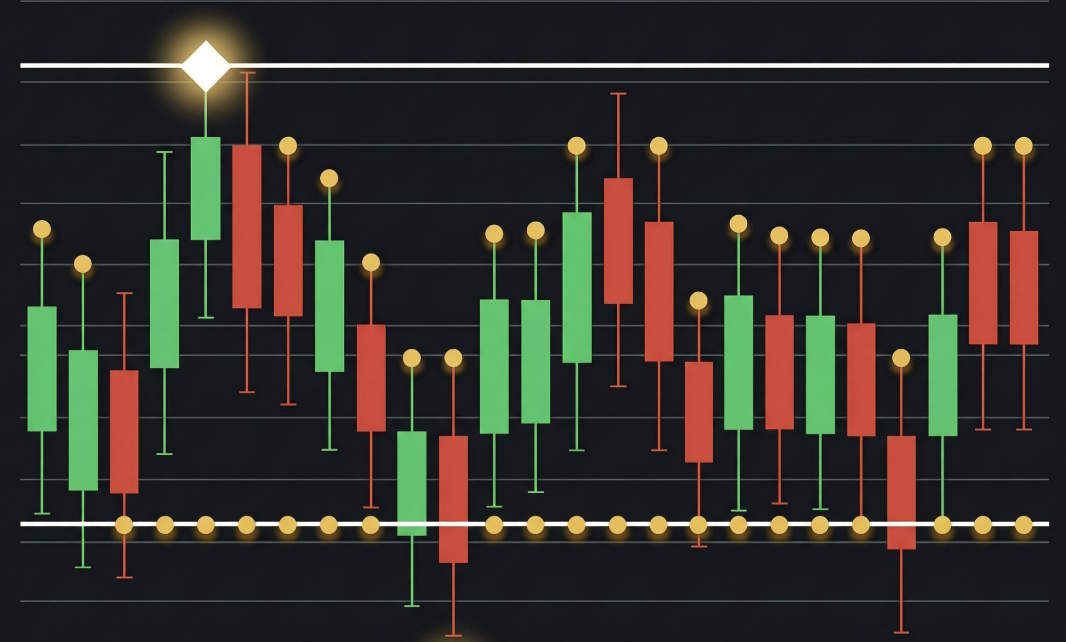
The high and low of a candlestick are the highest and lowest prices the instrument reached during the selected period. On the chart they form the tips of the upper and lower wicks: the body is built on the open and the close, while the wicks show how far the price travelled but could not stay.
An experienced trader reads the battle between buyers and sellers from the length of the wicks. A long upper wick means the rally met strong supply and the price fell back — often a sign of buyer weakness at resistance. A long lower wick says the opposite: sellers pushed the price down, but buyers bought it back and returned it to the top.
The highs and lows of individual candles form local extremes, and their sequence builds market structure: a series of higher highs and higher lows points to an uptrend, lower highs and lower lows to a downtrend. These same levels often become support and resistance zones, and the distance between the high and low measures volatility and helps calculate position size and stop loss.
Remember: the high and low are prices where the market travelled, not the result of the period. Decisions are made on the candle's close, while extremes serve as context and reference points for protective orders.
In my profile you will find a lot of useful educational information (don't forget to add me as a friend!) Profile: https://www.mql5.com/en/users/voldemar
Что такое максимум и минимум свечи?
Максимум и минимум свечи — это самая высокая и самая низкая цена, которых инструмент достиг за выбранный период. На графике они образуют кончики верхнего и нижнего фитилей: тело свечи строится на ценах открытия и закрытия, а тени показывают, докуда цена доходила, но не смогла там удержаться.
По длине фитилей опытный трейдер читает борьбу покупателей и продавцов. Длинный верхний фитиль означает, что рост встретил активное предложение и цена откатилась вниз — часто это сигнал слабости покупателей у уровня сопротивления. Длинный нижний фитиль говорит об обратном: продавцы продавили цену, но покупатели её выкупили и вернули наверх.
Максимум и минимум отдельных свечей формируют локальные экстремумы, из которых складывается рыночная структура: последовательность растущих максимумов и минимумов указывает на восходящий тренд, снижающихся — на нисходящий. Эти же уровни часто становятся зонами поддержки и сопротивления, а расстояние между максимумом и минимумом определяет волатильность и помогает правильно рассчитывать размер позиции и стоп-лосс.
Важно помнить: максимум и минимум — это цены, где рынок побывал, а не итог периода. Решение принимается по закрытию свечи, а экстремумы служат контекстом и ориентирами для расстановки защитных ордеров.
В моём профиле Вы найдете много полезной обучающей информации, (не забудь добавить в друзья) Профиль: https://www.mql5.com/ru/users/voldemar
When all indicators give a valid buy or sell signal, a corresponding arrow will be printed on the chart, at the opening of the next candle/bar indicating a strong uptrend/downtrend. The user can choose which indicators will use and can adjust the parameters of each indicator separately. Matrix Arrow Indicator MT4/5© gathers information only from the selected indicators and prints the arrow based only on their data. Matrix Arrow Indicator MT4/5© can also send terminal, push notification or email alerts for all new signals. Matrix Arrow Indicator MT4/5© is a super friendly & efficient solution whether you are a scalper, intraday or swing trader!
Matrix Arrow Indicator MT4/5© comes with a free add on, the Matrix Arrow Indicator Multi Timeframe Panel MT4/5© that offers the option to show the Matrix Arrow Indicator signals for 5 customizable timeframes of 16 modifiable symbols/instruments. It gives also the option to change the current chart it is attached onto, by clicking any one of the 16 modifiable symbol buttons. This will allow you to work much faster between different symbols and never miss a trading opportunity again.
✔️ 100% Non-Repainting indicator
✔️ 10 in 1 unique and extremely efficient Matrix and Arrow indicator
✔️ Works on all timeframes and all symbols/instruments
✔️ Super accurate entry Arrow signals that indicate a strong trend
✔️ Exit dot signals define neutral periods with no clear trend
✔️ Equally effective in trending and ranging markets
✔️ Each one indicator can be turned ON/OFF
✔️ Each and every parameter of all 10 indicators are fully adjustable
✔️ Matrix and Arrow colors are fully customizable
✔️ Free add on Panel with Matrix Arrow signals for 16 symbols and 5 timeframes
✔️ Terminal, Push Notification and Email Alerts available
✔️ Ideal for beginners but also a great asset for experienced traders
🔥🔥🔥🔥🔥 Matrix Arrow Indicator MT4/5© Demonstration Video: https://www.youtube.com/watch?v=-teba5v_90I
⭐️⭐️⭐️⭐️⭐️ Matrix Arrow Indicator MT4©: https://www.mql5.com/en/market/product/69726
⭐️⭐️⭐️⭐️⭐️ Matrix Arrow Indicator MT5©: https://www.mql5.com/en/market/product/69725
👉 Matrix Arrow Indicator MT4/5© Real Trading Examples: https://www.mql5.com/en/blogs/post/745715
✅ Matrix Arrow Indicator MT4/5© Installation Guide: https://www.mql5.com/en/blogs/post/745711
✅ Matrix Arrow Indicator MT4/5© Settings/Inputs: https://www.mql5.com/en/blogs/post/745707
💎💎💎💎💎 Check out all my Expert Advisors, Indicators and Utilities: https://www.mql5.com/en/users/eleanna74/seller
11 October 2026
For added protection, the EA includes advanced account safeguarding mechanisms. When a specified equity take profit or stop loss level or a maximum drawdown from the account's balance high is reached, the EA can automatically close all open trades, delete any pending orders, and shut down all charts, removing any Expert Advisors running on them. This feature helps protect your capital during unexpected market movements or when reaching your predefined account targets.
✔️ Does not use Martingale, Grid, Averaging, or other high-risk techniques
✔️ Allows exclusion of specific Magic Numbers, trade comments, or symbol trades from management
✔️ Basket Take Profit in % for all managed trades combined
✔️ Basket Stop Loss in % for all managed trades combined
✔️ Basket Break Even in % for all managed trades combined
✔️ Basket Trailing Stop Loss in % for all managed trades combined
✔️ Basket Take Profit in money for all managed trades combined
✔️ Basket Stop Loss in money for all managed trades combined
✔️ Basket Break Even in money for all managed trades combined
✔️ Basket Trailing Stop Loss in money for all managed trades combined
✔️ Basket Take Profit in average points for all managed trades combined
✔️ Basket Stop Loss in average points for all managed trades combined
✔️ Basket Break Even in average points for all managed trades combined
✔️ Basket Trailing Stop Loss in average points for all managed trades combined
✔️ Option to reset all Basket settings after each account balance update or after a Basket target is hit
✔️ Option to close all managed trades at break even after recovering from a drawdown
✔️ Option to close all managed trades at a specific time on a chosen day or daily
✔️ Account protection feature that closes all trades and charts when equity-based TP or SL is reached
✔️ Maximum drawdown % from balance high that closes all trades and charts/EAs if triggered
✔️ Optional on-chart panel to monitor profit/loss and close trades by type or all at once
✔️ Terminal, push notification, and email alerts when any Basket or protection condition is triggered
✔️ 100% automated Expert Advisor
✔️ Fully compatible with MQL5 VPS
⭐️⭐️⭐️⭐️⭐️ Basket EA EA MT4©: https://www.mql5.com/en/market/product/45192
⭐️⭐️⭐️⭐️⭐️ Basket EA EA MT5©: https://www.mql5.com/en/market/product/72782
📥 Download the Basket EA MT4© demo version in your demo account now: https://c.mql5.com/6/988/Basket_EA_MT4_2_20_Demo.ex4
📥 Download the Basket EA MT5© demo version in your demo account now: https://c.mql5.com/6/988/Basket_EA_MT5_2_00_Demo.ex5
✅ Basket EA MT4/5© detailed Settings/Inputs guide: https://www.mql5.com/en/blogs/post/746117
💎💎💎💎💎 Check out all my Expert Advisors and Utilities: https://www.mql5.com/en/users/eleanna74/seller
11 October 2026
Set up your Transmitter and Receiver terminals in about 1 minute and copy manual or EA trades between accounts at the same or different brokers. Under suitable conditions, trade information can be synchronized between local MetaTrader terminals in under 0.5 seconds. Actual trade execution depends on broker latency, network conditions, computer/VPS performance and terminal workload.
Each Receiver account can use its own lot sizing, risk management, trade filtering, symbol mapping, trade management and account-protection settings. This allows the same trading activity to be synchronized across multiple accounts while each Receiver can be configured according to its own requirements.
✔️ Copying & Connectivity: Copy between multiple MT4/MT5 accounts* on the same Windows computer or VPS, across different brokers and real/demo accounts.
✔️ Lot Sizing & Risk Management: Choose from 18 lot size and risk options, with independent sizing and risk settings for each Receiver.
✔️ Trade Filtering & Copying Controls: Filter copied trades by symbol, magic number, comment, ticket, volume, direction, day and time.
✔️ Trade Management: Manage market and pending orders, TP/SL, partial closures, reopening, reverse copying, better-price conditions and trade splitting.
✔️ Account Protection: Control lot limits, risk, daily drawdown/profit, copying restrictions and emergency protection independently for each Receiver.
✔️ Broker Compatibility & Symbol Mapping: Copy between different brokers and configure suffixes and special symbol mappings when symbol names differ.
✔️ Notifications & Reliability: Use email/push notifications, persistent settings and MetaTrader logs for monitoring and troubleshooting.
✔️ 20 Activations: Each MT4/MT5 version includes 20 activations, allowing you to install and use it on multiple Windows computers or VPSs.
* MT4 → MT5 and MT5 → MT4 copying requires both LTC versions. Both terminals must run on the same Windows computer or Windows VPS.
🔥🔥🔥🔥🔥 Watch the Local Trade Copier EA MT4/5© Quick Setup Video: https://www.youtube.com/watch?v=zhc9s56QhlE
⭐️⭐️⭐️⭐️⭐️ Local Trade Copier EA MT4©: https://www.mql5.com/en/market/product/68950
⭐️⭐️⭐️⭐️⭐️ Local Trade Copier EA MT5©: https://www.mql5.com/en/market/product/68951
📥 Download the Local Trade Copier EA MT4© Free Demo: https://c.mql5.com/6/1030/Local_Trade_Copier_EA_MT4_4_60_Demo.ex4
📥 Download the Local Trade Copier EA MT5© Free Demo: https://c.mql5.com/6/1030/Local_Trade_Copier_EA_MT5_4_40_Demo.ex5
✅ Local Trade Copier EA MT4/5© Purchase, Installation & Quick Setup Guide: https://www.mql5.com/en/blogs/post/745683
✅ Local Trade Copier EA MT4/5© Detailed Inputs/Settings Guide: https://www.mql5.com/en/blogs/post/745681
✅ Local Trade Copier EA MT4/5© Troubleshooting Guide: https://www.mql5.com/en/blogs/post/746561
💎💎💎💎💎 View all my Expert Advisors, Indicators and Utilities: https://www.mql5.com/en/users/eleanna74/seller
11 October 2026
.