Sergey Rashevskiy
Sergey Rashevskiy
4.8 (10)
  • 정보
13+ 년도
경험
3
제품
384
데모 버전
19
작업
0
거래 신호
0
구독자
Программист широкого профиля.
Vladimir Pastushak
Vladimir Pastushak
What Is a Timeframe?

A timeframe is the time interval for which one candle is built on the chart. By choosing the H1 period, you get a candle that describes the price movement over one hour: the open at the start of the hour, the high and low within it, and the close at the end. The timeframe sets the scale of how you see the market: the smaller the period, the more detail and market noise, the larger the period, the smoother and more significant the picture.

MetaTrader 5 offers lower timeframes — M1, M5, M15, M30 — and higher ones — H1, H4, D1, W1, MN1. The principle of building a candle is the same for all of them; only the length of the period differs. Until the period ends, the last candle is still forming: its close is not yet fixed and can change, so signals based on a closed candle are considered more reliable.

The key idea for a beginner: different timeframes do not show different markets, but different scales of the same movement. An hour of price growth on the one-minute chart is dozens of candles with rises and pullbacks, on the fifteen-minute chart it is four candles, and on the hourly chart it is a single candle. The same trend can look like noise on a lower period and a clear direction on a higher one.

It also helps to remember the arithmetic of timeframes. One H1 candle contains sixty M1 candles or twelve M5 candles, one H4 candle includes four H1 candles, and a daily candle contains twenty-four hourly ones. When you look at a single daily candle, you are in fact seeing the result of a whole trading day, within which hundreds of smaller movements took place.

This leads to the practical approach of multi-timeframe analysis. Direction and key levels are assessed on the higher timeframe, while the precise entry point is sought on the lower one. The higher period always takes priority: a downward signal on M5 within a rising daily chart is more often a correction than a reversal.

The timeframe directly affects volatility and risk. The typical range of a candle grows with the period, so the stop loss and position size should be calculated on the very timeframe you are trading. Carrying levels over from another chart without recalculation is a typical beginner's mistake.

For those involved in automation, the same rule applies in MQL5: an Expert Advisor receives data from a specific timeframe, and its signals depend on it. The same logic behaves differently on M5 and on H4, and working correctly with the data of the chosen period is part of a trading algorithm's robustness.

In my profile you will find a lot of useful educational information (don't forget to add me as a friend!) Profile: https://www.mql5.com/en/users/voldemar

Что такое таймфрейм?

Таймфрейм — это временной интервал, за который строится одна свеча на графике. Выбрав период H1, вы получаете свечу, описывающую движение цены за час: цену открытия в начале часа, максимум и минимум внутри него и цену закрытия в конце. Именно таймфрейм задаёт масштаб восприятия рынка: чем меньше период, тем больше деталей и рыночного шума, чем больше период, тем более сглаженной и значимой выглядит картина.

В MetaTrader 5 есть младшие таймфреймы — M1, M5, M15, M30, и старшие — H1, H4, D1, W1, MN1. Принцип построения свечи у них одинаков, различается лишь длительность периода. Пока период не закончился, последняя свеча остаётся формирующейся: её закрытие ещё не зафиксировано и может измениться, поэтому сигналы по закрытой свече считаются более надёжными.

Ключевая мысль для начинающего: на разных таймфреймах видно не разные рынки, а разный масштаб одного и того же движения. Час роста цены на минутном графике — это десятки свечей с подъёмами и откатами, на пятнадцатиминутном — четыре свечи, а на часовом — одна. Один и тот же тренд может казаться шумом на младшем периоде и чётким направлением на старшем.

Полезно помнить и арифметику таймфреймов. Одна свеча H1 содержит шестьдесят свечей M1 или двенадцать свечей M5, одна свеча H4 включает четыре свечи H1, а дневная — двадцать четыре часовых. Когда вы смотрите на одну дневную свечу, вы фактически видите итог целого торгового дня, внутри которого происходили сотни более мелких движений.

Отсюда практический подход — мультитаймфреймовый анализ. Направление и ключевые уровни оценивают на старшем таймфрейме, а точную точку входа ищут на младшем. Старший период всегда имеет приоритет: сигнал вниз на M5 внутри растущего дневного графика чаще оказывается коррекцией, чем разворотом.

Таймфрейм напрямую влияет на волатильность и риск. Типичный размах свечи растёт вместе с периодом, поэтому стоп-лосс и объём позиции нужно рассчитывать именно на том таймфрейме, на котором ведётся торговля. Переносить уровни с другого графика без пересчёта — типичная ошибка новичка.

Для тех, кто занимается автоматизацией, это же правило работает в MQL5: советник получает данные конкретного таймфрейма, и от этого зависят его сигналы. Одна и та же логика на M5 и на H4 ведёт себя по-разному, а корректная работа с данными выбранного периода — часть устойчивости торгового алгоритма.

В моём профиле Вы найдете много полезной обучающей информации, (не забудь добавить в друзья) Профиль: https://www.mql5.com/ru/users/voldemar
Hieu Tran Trung
Hieu Tran Trung MetaTrader 4 시그널 발표됨
INVESTOOL
가격: 31 USD, 성장: 0.00%
One Trade, one Stoploss
Eleni Anna Branou - Juvenille Emperor Limited
Eleni Anna Branou
Heiken Ashi EA MT4/5© is a fully automated trading system that takes Classic or Smoothed Heiken Ashi candles to the next level. It enters trades based on Heiken Ashi color changes, offering a highly customizable approach to fit different trading styles. The EA provides great flexibility, allowing you to select which Heiken Ashi candle (from the 2nd to the 10th) should trigger the first trade. Additionally, it includes a distance limitation feature to prevent excessive entries at similar price levels. A built-in Heiken Ashi trailing stop dynamically adjusts stop-loss levels based on past Heiken Ashi candles, helping to adapt to different market conditions. To improve trade quality, the EA includes Moving Average and MACD filters to reduce false signals. This EA comes with specialy optimized set files for many symbols/instruments.

✔️ The EA offers flexible trade execution, allowing either one trade per color change or multiple trades per trend.
✔️ Custom entry selection lets users open trades based on the 2nd to 10th Heiken Ashi candle.
✔️ Distance control helps prevent excessive trades at similar price levels.
✔️ A built-in Heiken Ashi trailing stop dynamically adjusts the stop-loss for better trend-following adaptability.
✔️ Advanced filters, including Moving Average and MACD, help reduce false signals.
✔️ ADR-based risk management calculates SL, TP, BE, and Trailing SL as a percentage of the Average Daily Range.
✔️ Basket TP and SL options enable efficient management of all open positions.
✔️ The EA avoids risky strategies such as Martingale and Grid, ensuring a safer trading approach for long-term success.
✔️ It is 100% compatible with MQL5 VPS, allowing smooth operation when running 24/7.

🔥🔥🔥🔥🔥 Heiken Ashi EA MT4/5© Backtests & New Optimized Set Files: https://www.mql5.com/en/blogs/post/745696

✅ How to Test the Heiken Ashi EA MT4/5©: https://www.mql5.com/en/blogs/post/750887

⭐️⭐️⭐️⭐️⭐️ Heiken Ashi EA MT4©: https://www.mql5.com/en/market/product/45283

⭐️⭐️⭐️⭐️⭐️ Heiken Ashi EA MT5©: https://www.mql5.com/en/market/product/64877

💎💎💎💎💎 Check out all my Expert Advisors, Indicators and Utilities: https://www.mql5.com/en/users/eleanna74/seller

12 October 2026
Eleni Anna Branou - Juvenille Emperor Limited
Eleni Anna Branou
Basket EA MT4/5© is a powerful profit-harvesting tool and a comprehensive account protection system, all combined into a simple and easy-to-use solution. Its core purpose is to give you complete control over your trading account’s overall profit and loss by managing all open positions at the basket level, rather than individually. The EA offers a full range of basket-level features, including take profit, stop loss, break even, and trailing stop loss. These can be configured as a percentage of your account balance, a fixed amount in your account’s currency, or a target in average points across all managed trades. This flexibility allows traders to tailor risk and profit strategies to their unique needs. Basket EA MT4/5© also supports intelligent trade filtering, allowing you to include or exclude specific trades from management based on their magic number, symbol, or comment. This ensures that only the trades you want managed by the EA are affected, while others are left untouched.

For added protection, the EA includes advanced account safeguarding mechanisms. When a specified equity take profit or stop loss level or a maximum drawdown from the account's balance high is reached, the EA can automatically close all open trades, delete any pending orders, and shut down all charts, removing any Expert Advisors running on them. This feature helps protect your capital during unexpected market movements or when reaching your predefined account targets.

✔️ Does not use Martingale, Grid, Averaging, or other high-risk techniques
✔️ Allows exclusion of specific Magic Numbers, trade comments, or symbol trades from management
✔️ Basket Take Profit in % for all managed trades combined
✔️ Basket Stop Loss in % for all managed trades combined
✔️ Basket Break Even in % for all managed trades combined
✔️ Basket Trailing Stop Loss in % for all managed trades combined
✔️ Basket Take Profit in money for all managed trades combined
✔️ Basket Stop Loss in money for all managed trades combined
✔️ Basket Break Even in money for all managed trades combined
✔️ Basket Trailing Stop Loss in money for all managed trades combined
✔️ Basket Take Profit in average points for all managed trades combined
✔️ Basket Stop Loss in average points for all managed trades combined
✔️ Basket Break Even in average points for all managed trades combined
✔️ Basket Trailing Stop Loss in average points for all managed trades combined
✔️ Option to reset all Basket settings after each account balance update or after a Basket target is hit
✔️ Option to close all managed trades at break even after recovering from a drawdown
✔️ Option to close all managed trades at a specific time on a chosen day or daily
✔️ Account protection feature that closes all trades and charts when equity-based TP or SL is reached
✔️ Maximum drawdown % from balance high that closes all trades and charts/EAs if triggered
✔️ Optional on-chart panel to monitor profit/loss and close trades by type or all at once
✔️ Terminal, push notification, and email alerts when any Basket or protection condition is triggered
✔️ 100% automated Expert Advisor
✔️ Fully compatible with MQL5 VPS

⭐️⭐️⭐️⭐️⭐️ Basket EA EA MT4©: https://www.mql5.com/en/market/product/45192

⭐️⭐️⭐️⭐️⭐️ Basket EA EA MT5©: https://www.mql5.com/en/market/product/72782

📥 Download the Basket EA MT4© demo version in your demo account now: https://c.mql5.com/6/988/Basket_EA_MT4_2_20_Demo.ex4

📥 Download the Basket EA MT5© demo version in your demo account now: https://c.mql5.com/6/988/Basket_EA_MT5_2_00_Demo.ex5

✅ Basket EA MT4/5© detailed Settings/Inputs guide: https://www.mql5.com/en/blogs/post/746117

💎💎💎💎💎 Check out all my Expert Advisors and Utilities: https://www.mql5.com/en/users/eleanna74/seller

12 October 2026
Eleni Anna Branou - Juvenille Emperor Limited
Eleni Anna Branou
RSI EA ΜΤ4/5© is a unique, fully automated Expert Advisor for trading the well known and extremely efficient Relative Strength Indicator, being able at the same time to control your trading account's profit and/or loss at a basket level, for all your open positions combined. RSI EA MT4/5© has 4 different strategies for trading the Relative Strength Indicator, open trades on RSI extremes on live bar, open trades on RSI extremes on closed candle and open trades on RSI level crossing. This last strategy is a unique approach of the Relative Strength Indicator, since its a trend following strategy and not a reversal one. A Moving Average filter is also available in order to skip opening trades that are not following the current trend. This EA comes with optimized set files for many symbols.

✔️ Martingale, Grid, Averaging or other dangerous techniques are not used
✔️ RSI Level Live Bar (once per candle) trade opening
✔️ RSI Level Closed Candle trade opening
✔️ RSI Level Crossing trade opening
✔️ Single or multiple orders per trading session
✔️ Net Asset Risk option, ideal for night scalping
✔️ Moving Average Trend Filter
✔️ SL, TP, BE and Trailing SL levels in Points and in Percentage of the Average Daily Range
✔️ Hard and Virtual Take Profit and Stop Loss levels
✔️ Basket TP, SL, BE and Trailing SL in % for all open positions combined
✔️ Optimized set files for many symbols
✔️ 100% automated Expert Advisor
✔️ MQL5 VPS compatible

🔥🔥🔥🔥🔥 RSI EA MT4/5© Backtests & New Set Files: https://www.mql5.com/en/blogs/post/745685

⭐️⭐️⭐️⭐️⭐️ RSI EA MT4©: https://www.mql5.com/en/market/product/45228

⭐️⭐️⭐️⭐️⭐️ RSI EA MT5©: https://www.mql5.com/en/market/product/67625

💎💎💎💎💎 Check out all my Expert Advisors, Indicators and Utilities: https://www.mql5.com/en/users/eleanna74/seller

11 October 2026
Tatiana Zyrianova
Tatiana Zyrianova
TREND MASTER PRO ENTENDA A DIREÇÃO DO MERCADO ANTES DE PROCURAR UMA ENTRADA O Trend Master Pro ajuda você a entender a direção do mercado, seu estado atual e o contexto de múltiplos timeframes, para que você possa tomar decisões mais fundamentadas ao avaliar um setup...
Eleni Anna Branou - Juvenille Emperor Limited
Eleni Anna Branou
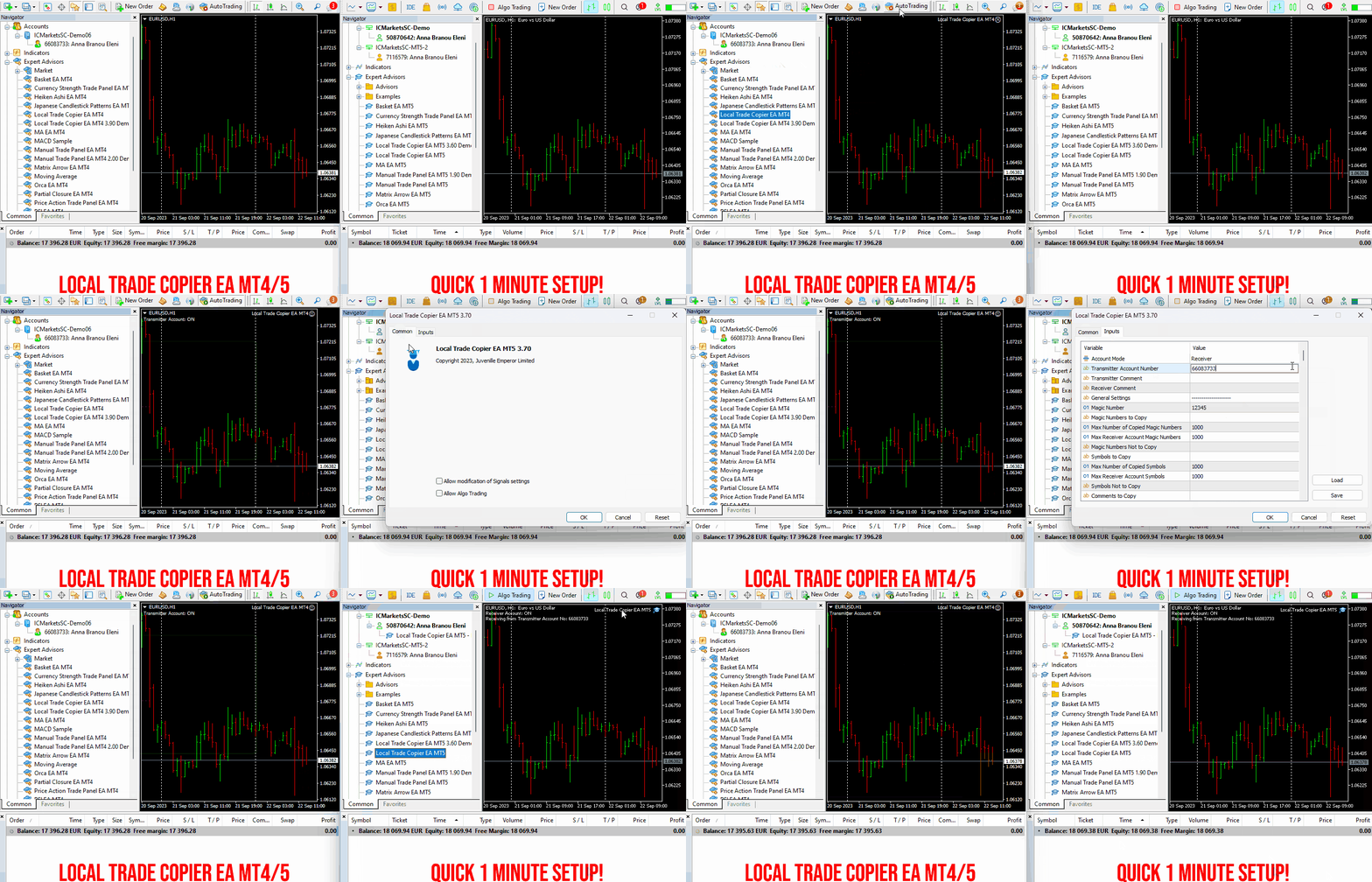
Local Trade Copier EA MT4/5© is a fast and flexible trade copier for copying and managing trades between multiple MetaTrader 4 and MetaTrader 5 accounts on the same Windows computer or Windows VPS.

Set up your Transmitter and Receiver terminals in about 1 minute and copy manual or EA trades between accounts at the same or different brokers. Under suitable conditions, trade information can be synchronized between local MetaTrader terminals in under 0.5 seconds. Actual trade execution depends on broker latency, network conditions, computer/VPS performance and terminal workload.

Each Receiver account can use its own lot sizing, risk management, trade filtering, symbol mapping, trade management and account-protection settings. This allows the same trading activity to be synchronized across multiple accounts while each Receiver can be configured according to its own requirements.

✔️ Copying & Connectivity: Copy between multiple MT4/MT5 accounts* on the same Windows computer or VPS, across different brokers and real/demo accounts.
✔️ Lot Sizing & Risk Management: Choose from 18 lot size and risk options, with independent sizing and risk settings for each Receiver.
✔️ Trade Filtering & Copying Controls: Filter copied trades by symbol, magic number, comment, ticket, volume, direction, day and time.
✔️ Trade Management: Manage market and pending orders, TP/SL, partial closures, reopening, reverse copying, better-price conditions and trade splitting.
✔️ Account Protection: Control lot limits, risk, daily drawdown/profit, copying restrictions and emergency protection independently for each Receiver.
✔️ Broker Compatibility & Symbol Mapping: Copy between different brokers and configure suffixes and special symbol mappings when symbol names differ.
✔️ Notifications & Reliability: Use email/push notifications, persistent settings and MetaTrader logs for monitoring and troubleshooting.
✔️ 20 Activations: Each MT4/MT5 version includes 20 activations, allowing you to install and use it on multiple Windows computers or VPSs.

* MT4 → MT5 and MT5 → MT4 copying requires both LTC versions. Both terminals must run on the same Windows computer or Windows VPS.

🔥🔥🔥🔥🔥 Watch the Local Trade Copier EA MT4/5© Quick Setup Video: https://www.youtube.com/watch?v=zhc9s56QhlE

⭐️⭐️⭐️⭐️⭐️ Local Trade Copier EA MT4©: https://www.mql5.com/en/market/product/68950

⭐️⭐️⭐️⭐️⭐️ Local Trade Copier EA MT5©: https://www.mql5.com/en/market/product/68951

📥 Download the Local Trade Copier EA MT4© Free Demo: https://c.mql5.com/6/1030/Local_Trade_Copier_EA_MT4_4_60_Demo.ex4

📥 Download the Local Trade Copier EA MT5© Free Demo: https://c.mql5.com/6/1030/Local_Trade_Copier_EA_MT5_4_40_Demo.ex5

✅ Local Trade Copier EA MT4/5© Purchase, Installation & Quick Setup Guide: https://www.mql5.com/en/blogs/post/745683

✅ Local Trade Copier EA MT4/5© Detailed Inputs/Settings Guide: https://www.mql5.com/en/blogs/post/745681

✅ Local Trade Copier EA MT4/5© Troubleshooting Guide: https://www.mql5.com/en/blogs/post/746561

💎💎💎💎💎 View all my Expert Advisors, Indicators and Utilities: https://www.mql5.com/en/users/eleanna74/seller

11 October 2026
Eleni Anna Branou - Juvenille Emperor Limited
Eleni Anna Branou
Partial Closure EA MT4/5© allows you to partially close any trade on your account, manually by a chosen percentage of the lot size and/or by trade ticket, or automatically at specified percentages of the TP/SL level, closing a percentage of the initial lot size across up to 10 take profit and 10 stop loss levels.. It can manage all or selected trades in your account by specifying or excluding certain magic numbers, comments, or symbols.

✔️ Extremely easy and straightforward interface
✔️ Works smoothly on any chart, account type, or broker
✔️ Automatic partial closure of managed trades at specified TP/SL levels, closing independent percentages of the initial lot size across up to 10 TP and 10 SL levels
✔️ Manual partial closure of all managed trades or any individual trade by ticket number, based on a percentage of the lot size
✔️ Option to move the stop loss to break even for the remaining portion of trades automatically partially closed as above
✔️ Option to move the stop loss to break even once a specified profit level (in points) is reached
✔️ Ability to exclude certain magic numbers, comments, or symbol trades from management
✔️ Compatible with MQL5 VPS

⭐️⭐️⭐️⭐️⭐️ Partial Closure EA MT4©: https://www.mql5.com/en/market/product/82356

⭐️⭐️⭐️⭐️⭐️ Partial Closure EA MT5©: https://www.mql5.com/en/market/product/82357

📥 Download the Partial Closure EA MT4© demo version in your demo account now: https://c.mql5.com/6/975/Partial_Closure_EA_MT4_1.30_Demo.ex4

📥 Download the Partial Closure EA MT5© demo version in your demo account now: https://c.mql5.com/6/975/Partial_Closure_EA_MT5_1.30_Demo.ex5

✅ Partial Closure EA MT4/5© installation & user guide: https://www.mql5.com/en/blogs/post/749385

💎💎💎💎💎 Check out all my Expert Advisors, Indicators and Utilities: https://www.mql5.com/en/users/eleanna74/seller

11 October 2026
Himanshu
Himanshu 출시돈 제품

Qubit Trade Manager Pro A simple trading panel for MetaTrader 5 that helps you open, manage and protect your trades. You choose how much you want to risk. The panel works out the right lot size for you. Then it helps you look after the trade until it closes. What it does: Works out your lot size from the money you want to risk Lets you drag your entry, stop loss and take profit lines on the chart, then place the trade with one click Moves your stop to breakeven, trails it as price moves, and

Vladimir Pastushak
Vladimir Pastushak
What Is the High and Low of a Candlestick?

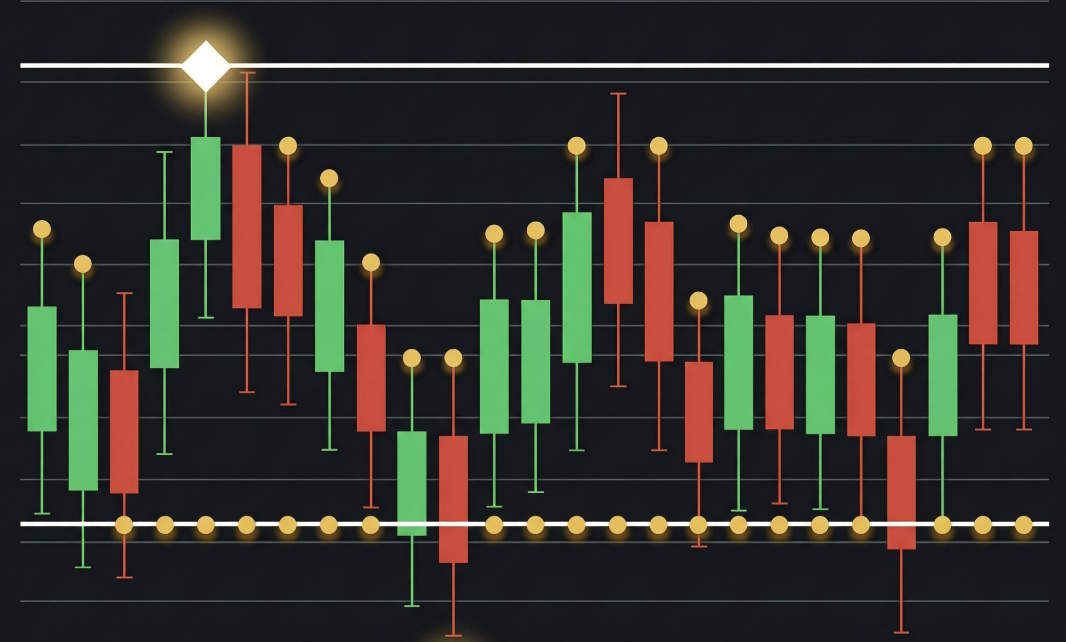
The high and low of a candlestick are the highest and lowest prices the instrument reached during the selected period. On the chart they form the tips of the upper and lower wicks: the body is built on the open and the close, while the wicks show how far the price travelled but could not stay.

An experienced trader reads the battle between buyers and sellers from the length of the wicks. A long upper wick means the rally met strong supply and the price fell back — often a sign of buyer weakness at resistance. A long lower wick says the opposite: sellers pushed the price down, but buyers bought it back and returned it to the top.

The highs and lows of individual candles form local extremes, and their sequence builds market structure: a series of higher highs and higher lows points to an uptrend, lower highs and lower lows to a downtrend. These same levels often become support and resistance zones, and the distance between the high and low measures volatility and helps calculate position size and stop loss.

Remember: the high and low are prices where the market travelled, not the result of the period. Decisions are made on the candle's close, while extremes serve as context and reference points for protective orders.

In my profile you will find a lot of useful educational information (don't forget to add me as a friend!) Profile: https://www.mql5.com/en/users/voldemar

Что такое максимум и минимум свечи?

Максимум и минимум свечи — это самая высокая и самая низкая цена, которых инструмент достиг за выбранный период. На графике они образуют кончики верхнего и нижнего фитилей: тело свечи строится на ценах открытия и закрытия, а тени показывают, докуда цена доходила, но не смогла там удержаться.

По длине фитилей опытный трейдер читает борьбу покупателей и продавцов. Длинный верхний фитиль означает, что рост встретил активное предложение и цена откатилась вниз — часто это сигнал слабости покупателей у уровня сопротивления. Длинный нижний фитиль говорит об обратном: продавцы продавили цену, но покупатели её выкупили и вернули наверх.

Максимум и минимум отдельных свечей формируют локальные экстремумы, из которых складывается рыночная структура: последовательность растущих максимумов и минимумов указывает на восходящий тренд, снижающихся — на нисходящий. Эти же уровни часто становятся зонами поддержки и сопротивления, а расстояние между максимумом и минимумом определяет волатильность и помогает правильно рассчитывать размер позиции и стоп-лосс.

Важно помнить: максимум и минимум — это цены, где рынок побывал, а не итог периода. Решение принимается по закрытию свечи, а экстремумы служат контекстом и ориентирами для расстановки защитных ордеров.

В моём профиле Вы найдете много полезной обучающей информации, (не забудь добавить в друзья) Профиль: https://www.mql5.com/ru/users/voldemar
Eleni Anna Branou - Juvenille Emperor Limited
Eleni Anna Branou
Matrix Arrow Indicator MT4/5© is a unique 10 in 1 trend following 100% non-repainting multi-timeframe indicator that can be used on all symbols/instruments: forex, commodities, cryptocurrencies, indices, stocks. Matrix Arrow Indicator MT4/5© will determine the current trend at its early stages, gathering information and data from up to 10 standard indicators, which are: Average Directional Movement Index (ADX), Commodity Channel Index (CCI), Classic Heiken Ashi candles, Moving Average, Moving Average Convergence Divergence (MACD), Relative Vigor Index (RVI), Relative Strength Index (RSI), Parabolic SAR, Stochastic Oscillator, Williams' Percent Range.

When all indicators give a valid buy or sell signal, a corresponding arrow will be printed on the chart, at the opening of the next candle/bar indicating a strong uptrend/downtrend. The user can choose which indicators will use and can adjust the parameters of each indicator separately. Matrix Arrow Indicator MT4/5© gathers information only from the selected indicators and prints the arrow based only on their data. Matrix Arrow Indicator MT4/5© can also send terminal, push notification or email alerts for all new signals. Matrix Arrow Indicator MT4/5© is a super friendly & efficient solution whether you are a scalper, intraday or swing trader!

Matrix Arrow Indicator MT4/5© comes with a free add on, the Matrix Arrow Indicator Multi Timeframe Panel MT4/5© that offers the option to show the Matrix Arrow Indicator signals for 5 customizable timeframes of 16 modifiable symbols/instruments. It gives also the option to change the current chart it is attached onto, by clicking any one of the 16 modifiable symbol buttons. This will allow you to work much faster between different symbols and never miss a trading opportunity again.

✔️ 100% Non-Repainting indicator
✔️ 10 in 1 unique and extremely efficient Matrix and Arrow indicator
✔️ Works on all timeframes and all symbols/instruments
✔️ Super accurate entry Arrow signals that indicate a strong trend
✔️ Exit dot signals define neutral periods with no clear trend
✔️ Equally effective in trending and ranging markets
✔️ Each one indicator can be turned ON/OFF
✔️ Each and every parameter of all 10 indicators are fully adjustable
✔️ Matrix and Arrow colors are fully customizable
✔️ Free add on Panel with Matrix Arrow signals for 16 symbols and 5 timeframes
✔️ Terminal, Push Notification and Email Alerts available
✔️ Ideal for beginners but also a great asset for experienced traders

🔥🔥🔥🔥🔥 Matrix Arrow Indicator MT4/5© Demonstration Video: https://www.youtube.com/watch?v=-teba5v_90I

⭐️⭐️⭐️⭐️⭐️ Matrix Arrow Indicator MT4©: https://www.mql5.com/en/market/product/69726

⭐️⭐️⭐️⭐️⭐️ Matrix Arrow Indicator MT5©: https://www.mql5.com/en/market/product/69725

👉 Matrix Arrow Indicator MT4/5© Real Trading Examples: https://www.mql5.com/en/blogs/post/745715

✅ Matrix Arrow Indicator MT4/5© Installation Guide: https://www.mql5.com/en/blogs/post/745711

✅ Matrix Arrow Indicator MT4/5© Settings/Inputs: https://www.mql5.com/en/blogs/post/745707

💎💎💎💎💎 Check out all my Expert Advisors, Indicators and Utilities: https://www.mql5.com/en/users/eleanna74/seller

11 October 2026
Eleni Anna Branou - Juvenille Emperor Limited
Eleni Anna Branou
Basket EA MT4/5© is a powerful profit-harvesting tool and a comprehensive account protection system, all combined into a simple and easy-to-use solution. Its core purpose is to give you complete control over your trading account’s overall profit and loss by managing all open positions at the basket level, rather than individually. The EA offers a full range of basket-level features, including take profit, stop loss, break even, and trailing stop loss. These can be configured as a percentage of your account balance, a fixed amount in your account’s currency, or a target in average points across all managed trades. This flexibility allows traders to tailor risk and profit strategies to their unique needs. Basket EA MT4/5© also supports intelligent trade filtering, allowing you to include or exclude specific trades from management based on their magic number, symbol, or comment. This ensures that only the trades you want managed by the EA are affected, while others are left untouched.

For added protection, the EA includes advanced account safeguarding mechanisms. When a specified equity take profit or stop loss level or a maximum drawdown from the account's balance high is reached, the EA can automatically close all open trades, delete any pending orders, and shut down all charts, removing any Expert Advisors running on them. This feature helps protect your capital during unexpected market movements or when reaching your predefined account targets.

✔️ Does not use Martingale, Grid, Averaging, or other high-risk techniques
✔️ Allows exclusion of specific Magic Numbers, trade comments, or symbol trades from management
✔️ Basket Take Profit in % for all managed trades combined
✔️ Basket Stop Loss in % for all managed trades combined
✔️ Basket Break Even in % for all managed trades combined
✔️ Basket Trailing Stop Loss in % for all managed trades combined
✔️ Basket Take Profit in money for all managed trades combined
✔️ Basket Stop Loss in money for all managed trades combined
✔️ Basket Break Even in money for all managed trades combined
✔️ Basket Trailing Stop Loss in money for all managed trades combined
✔️ Basket Take Profit in average points for all managed trades combined
✔️ Basket Stop Loss in average points for all managed trades combined
✔️ Basket Break Even in average points for all managed trades combined
✔️ Basket Trailing Stop Loss in average points for all managed trades combined
✔️ Option to reset all Basket settings after each account balance update or after a Basket target is hit
✔️ Option to close all managed trades at break even after recovering from a drawdown
✔️ Option to close all managed trades at a specific time on a chosen day or daily
✔️ Account protection feature that closes all trades and charts when equity-based TP or SL is reached
✔️ Maximum drawdown % from balance high that closes all trades and charts/EAs if triggered
✔️ Optional on-chart panel to monitor profit/loss and close trades by type or all at once
✔️ Terminal, push notification, and email alerts when any Basket or protection condition is triggered
✔️ 100% automated Expert Advisor
✔️ Fully compatible with MQL5 VPS

⭐️⭐️⭐️⭐️⭐️ Basket EA EA MT4©: https://www.mql5.com/en/market/product/45192

⭐️⭐️⭐️⭐️⭐️ Basket EA EA MT5©: https://www.mql5.com/en/market/product/72782

📥 Download the Basket EA MT4© demo version in your demo account now: https://c.mql5.com/6/988/Basket_EA_MT4_2_20_Demo.ex4

📥 Download the Basket EA MT5© demo version in your demo account now: https://c.mql5.com/6/988/Basket_EA_MT5_2_00_Demo.ex5

✅ Basket EA MT4/5© detailed Settings/Inputs guide: https://www.mql5.com/en/blogs/post/746117

💎💎💎💎💎 Check out all my Expert Advisors and Utilities: https://www.mql5.com/en/users/eleanna74/seller

11 October 2026
Eleni Anna Branou - Juvenille Emperor Limited
Eleni Anna Branou
Local Trade Copier EA MT4/5© is a fast and flexible trade copier for copying and managing trades between multiple MetaTrader 4 and MetaTrader 5 accounts on the same Windows computer or Windows VPS.

Set up your Transmitter and Receiver terminals in about 1 minute and copy manual or EA trades between accounts at the same or different brokers. Under suitable conditions, trade information can be synchronized between local MetaTrader terminals in under 0.5 seconds. Actual trade execution depends on broker latency, network conditions, computer/VPS performance and terminal workload.

Each Receiver account can use its own lot sizing, risk management, trade filtering, symbol mapping, trade management and account-protection settings. This allows the same trading activity to be synchronized across multiple accounts while each Receiver can be configured according to its own requirements.

✔️ Copying & Connectivity: Copy between multiple MT4/MT5 accounts* on the same Windows computer or VPS, across different brokers and real/demo accounts.
✔️ Lot Sizing & Risk Management: Choose from 18 lot size and risk options, with independent sizing and risk settings for each Receiver.
✔️ Trade Filtering & Copying Controls: Filter copied trades by symbol, magic number, comment, ticket, volume, direction, day and time.
✔️ Trade Management: Manage market and pending orders, TP/SL, partial closures, reopening, reverse copying, better-price conditions and trade splitting.
✔️ Account Protection: Control lot limits, risk, daily drawdown/profit, copying restrictions and emergency protection independently for each Receiver.
✔️ Broker Compatibility & Symbol Mapping: Copy between different brokers and configure suffixes and special symbol mappings when symbol names differ.
✔️ Notifications & Reliability: Use email/push notifications, persistent settings and MetaTrader logs for monitoring and troubleshooting.
✔️ 20 Activations: Each MT4/MT5 version includes 20 activations, allowing you to install and use it on multiple Windows computers or VPSs.

* MT4 → MT5 and MT5 → MT4 copying requires both LTC versions. Both terminals must run on the same Windows computer or Windows VPS.

🔥🔥🔥🔥🔥 Watch the Local Trade Copier EA MT4/5© Quick Setup Video: https://www.youtube.com/watch?v=zhc9s56QhlE

⭐️⭐️⭐️⭐️⭐️ Local Trade Copier EA MT4©: https://www.mql5.com/en/market/product/68950

⭐️⭐️⭐️⭐️⭐️ Local Trade Copier EA MT5©: https://www.mql5.com/en/market/product/68951

📥 Download the Local Trade Copier EA MT4© Free Demo: https://c.mql5.com/6/1030/Local_Trade_Copier_EA_MT4_4_60_Demo.ex4

📥 Download the Local Trade Copier EA MT5© Free Demo: https://c.mql5.com/6/1030/Local_Trade_Copier_EA_MT5_4_40_Demo.ex5

✅ Local Trade Copier EA MT4/5© Purchase, Installation & Quick Setup Guide: https://www.mql5.com/en/blogs/post/745683

✅ Local Trade Copier EA MT4/5© Detailed Inputs/Settings Guide: https://www.mql5.com/en/blogs/post/745681

✅ Local Trade Copier EA MT4/5© Troubleshooting Guide: https://www.mql5.com/en/blogs/post/746561

💎💎💎💎💎 View all my Expert Advisors, Indicators and Utilities: https://www.mql5.com/en/users/eleanna74/seller

11 October 2026
.
Tatiana Zyrianova
Tatiana Zyrianova
TREND MASTER PRO ENTIENDE LA DIRECCIÓN DEL MERCADO ANTES DE BUSCAR UNA ENTRADA Trend Master Pro te ayuda a comprender la dirección del mercado, su estado actual y el contexto de múltiples timeframes, para que puedas tomar decisiones más fundamentadas al evaluar un setup...
Evgeniy Zhdan
Evgeniy Zhdan
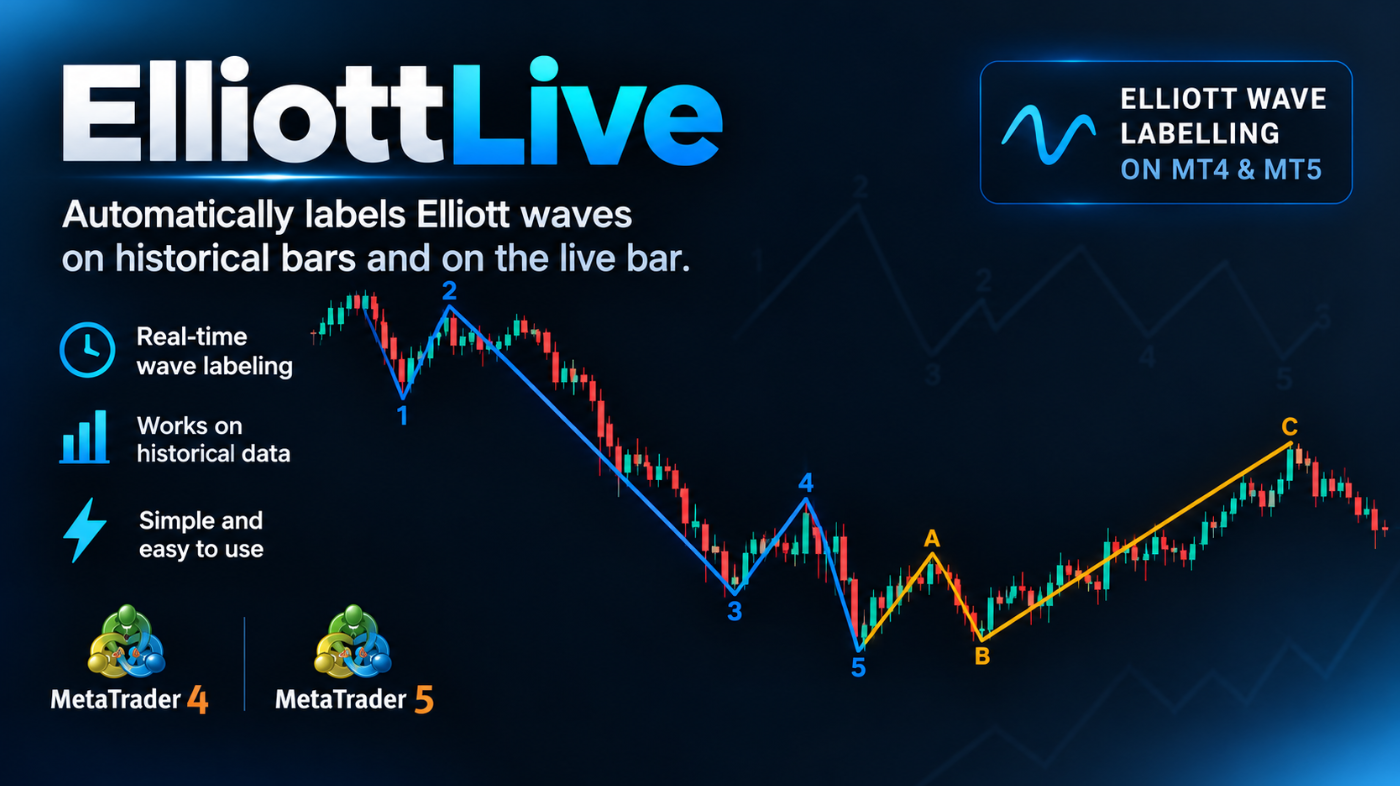
Elliott Live automatically labels Elliott Wave structures directly on your chart. It scans recent history with an ATR-based swing filter, finds impulse sequences (1-2-3-4-5) and A-B-C corrections that satisfy classic wave rules, and draws them with numbered or lettered labels. The rules are adjustable: wave 2 and 4 retracement limits, minimum wave 3 length, whether wave 4 may overlap wave 1, and whether truncated waves 5 and C are allowed. Sensitivity is controlled by the ATR multiplier, so the same logic works across symbols and timeframes.

What sets it apart is that it also tracks the wave that is still forming. The live leg is drawn dotted with a “?” mark and updates as price moves, while Fibonacci target levels and an invalidation level are projected to the right of the current bar. Targets that price has already passed are hidden, so the chart stays clean. Optional alerts (popup, sound, push, email) notify you when a wave is confirmed or when a new wave starts forming. History never triggers alerts, only new events.

MT4-version: https://www.mql5.com/en/market/product/200613

MT5-version: https://www.mql5.com/ru/market/product/200604
Evgeniy Zhdan
Evgeniy Zhdan 출시돈 제품

Elliott Live 는 MetaTrader 5용 인디케이터로, 과거 차트와 현재 봉 모두에서 엘리엇 파동을 자동으로 표시합니다. 완성된 파동은 실선으로, 형성 중인 파동은 점선과 물음표 라벨(예: "3?")로 그려지며, 피보나치 목표 구간과 무효화 레벨도 함께 표시됩니다. MT5-version:  https://www.mql5.com/en/market/product/200604 작동 방식 먼저 스윙(ZigZag)을 만듭니다. 가격이 극값에서 ATR × 배수 이상 되돌림하면 반전으로 인식합니다. 마지막 점은 현재의 극값으로, 아직 확정되지 않았으며 움직일 수 있습니다. 이 스윙 위에서 엘리엇 규칙에 따라 충격파 1-2-3-4-5를 찾습니다. 2파는 1파의 시작점을 넘지 않고, 3파는 가장 짧은 파동이 되지 않으며, 4파는 1파의 영역에 들어가지 않습니다. 충격파 다음에는 조정파 A-B-C를, 그다음에는 다음 충격파를 찾습니다. 최근 스윙이 패턴의 일부(예: 1-2)만

Evgeniy Zhdan
Evgeniy Zhdan 출시돈 제품

Elliott Live 는 MetaTrader 5용 인디케이터로, 과거 차트와 현재 봉 모두에서 엘리엇 파동을 자동으로 표시합니다. 완성된 파동은 실선으로, 형성 중인 파동은 점선과 물음표 라벨(예: "3?")로 그려지며, 피보나치 목표 구간과 무효화 레벨도 함께 표시됩니다. MT4-version:  https://www.mql5.com/en/market/product/200613 작동 방식 먼저 스윙(ZigZag)을 만듭니다. 가격이 극값에서 ATR × 배수 이상 되돌림하면 반전으로 인식합니다. 마지막 점은 현재의 극값으로, 아직 확정되지 않았으며 움직일 수 있습니다. 이 스윙 위에서 엘리엇 규칙에 따라 충격파 1-2-3-4-5를 찾습니다. 2파는 1파의 시작점을 넘지 않고, 3파는 가장 짧은 파동이 되지 않으며, 4파는 1파의 영역에 들어가지 않습니다. 충격파 다음에는 조정파 A-B-C를, 그다음에는 다음 충격파를 찾습니다. 최근 스윙이 패턴의 일부(예: 1-2)만

Evgeniy Zhdan
Evgeniy Zhdan
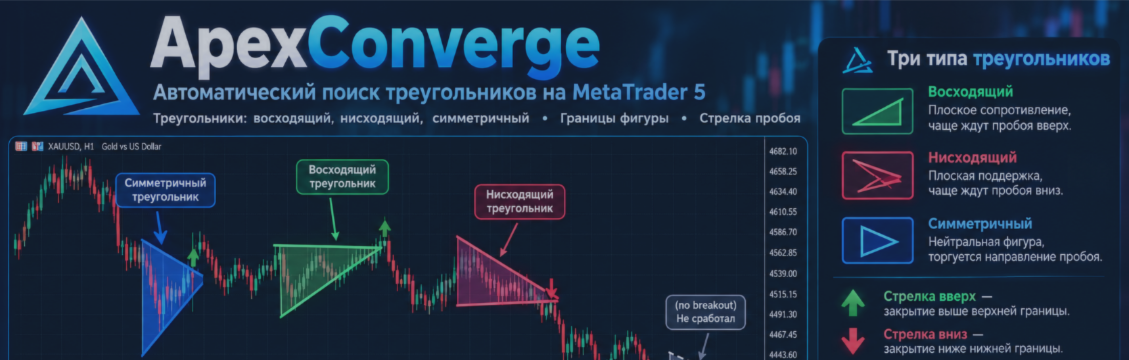
Apex Converge автоматически находит на графике фигуры «треугольник», рисует их и отмечает свечу, на которой цена совершает пробой. Индикатор работает на любом инструменте (акции, криптовалюты, форекс, индексы) и на любом таймфрейме. MT4-версия: https://www.mql5...
Evgeniy Zhdan
Evgeniy Zhdan
Apex Converge is a triangle pattern scanner for your charts. It detects triangle formations automatically, plots them directly on the chart, and highlights the exact candle where price breaks out. Works with any instrument (stocks, crypto, forex, indices) on any timeframe...
Vladimir Pastushak
Vladimir Pastushak
What Is Opening Price and Closing Price?

The opening price is the price of the first trade in a selected period, and the closing price is the price of the last trade. In Japanese candlestick analysis, the open and the close form the body of the candle: if the close is above the open, the candle is bullish; if below, it is bearish, while the thin wicks above and below mark the high and low of the period. The opening price reflects the starting balance of power — often the result of overnight trading and a reaction to news — while the closing price fixes the outcome of the battle between buyers and sellers.

It is the closing price that is considered the main price of the period: moving averages, MACD, RSI and most other indicators are built on it, because the close is the "official" result rather than a random intraday spike. The daily opening level is also actively used in trading: while the price stays above it, buying pressure remains, and a break below often sets a bearish tone for the session. Experienced traders always look at the open and the close together, assessing who controlled the market and how confidently.

To learn how to read these signals, memorizing definitions is not enough — you need practice on real charts. Candlestick analysis is the foundation on which the whole further trading system is built, so move step by step: from a single candle to patterns, levels and strategies.

In my profile you will find a lot of useful educational information (don't forget to add me as a friend!) Profile: https://www.mql5.com/en/users/voldemar


Что такое цена открытия и цена закрытия?

Цена открытия — это цена первой сделки за выбранный период времени, цена закрытия — цена последней сделки. В японском свечном анализе открытие и закрытие образуют тело свечи: если закрытие оказалось выше открытия, свеча бычья, если ниже — медвежья, а тонкие фитили сверху и снизу показывают максимум и минимум периода. Цена открытия отражает стартовый баланс сил — нередко это результат ночных торгов и реакции на новости, тогда как цена закрытия фиксирует итог борьбы покупателей и продавцов.

Именно цена закрытия считается главной ценой периода: на ней строятся скользящие средние, MACD, RSI и большинство других индикаторов, потому что закрытие — это «официальный» результат, а не случайный внутридневный выброс. Уровень открытия дня тоже активно используется в торговле: пока цена выше него, давление покупателей сохраняется, пробой вниз часто задаёт медвежий тон на сессию. Опытные трейдеры всегда смотрят на открытие и закрытие в связке, оценивая, кто контролировал рынок и с какой уверенностью.

Чтобы научиться читать эти сигналы, недостаточно запомнить определения — нужна практика на реальных графиках. Больше учебных материалов в MAX — https://max.ru/channel_tradinggo, а короткие практические разборы и свежие наблюдения за рынком выходят в нашем Телеграм-канале: https://t.me/tgforexru. Свечной анализ — это фундамент, от которого строится вся дальнейшая торговая система, поэтому не пропускайте шаг за шагом: от одной свечи — к паттернам, уровням и стратегиям.