Performance calculator for MT5

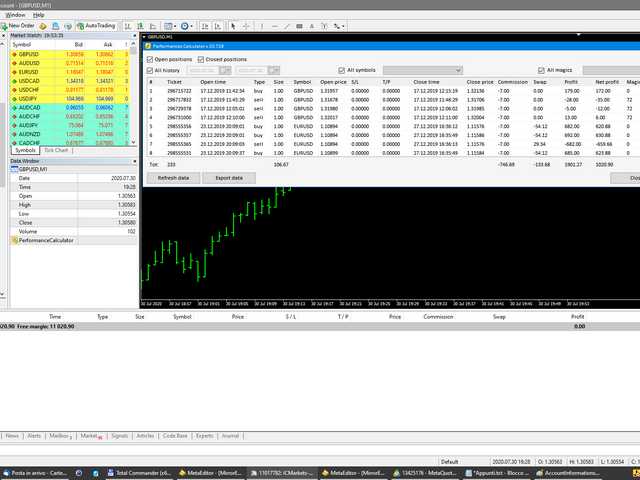
Utility for know the performance of your acoount.

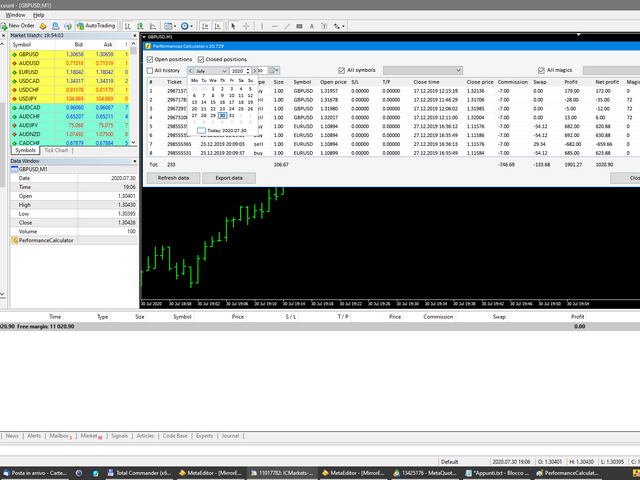
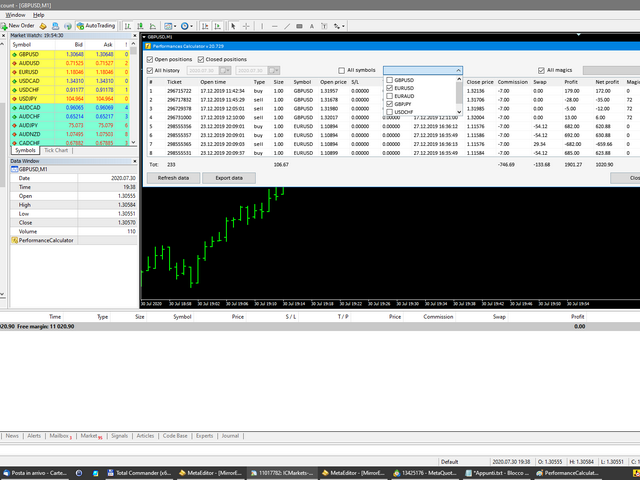
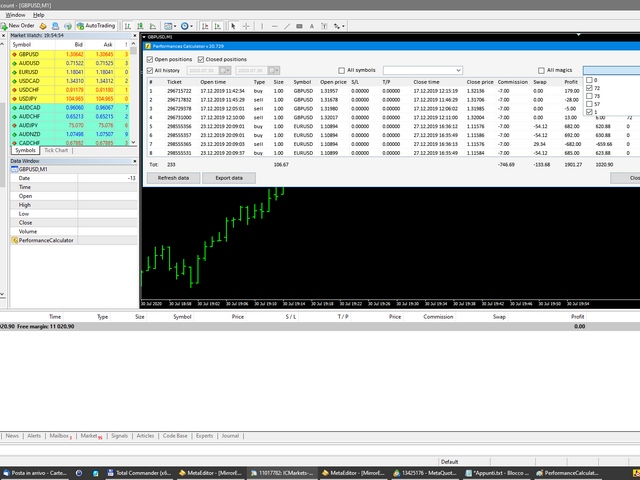
From dialog you can filter data in this modes:

- You can include or not include the open positions
- You can include or not the closed positions
- You can filter the data by date (from, to)
- You can filter the data by simbols (multi selection)
- You can filter the data by magic number (multi selection)

On bottom of table, are show the total of:

- Number of data
- Total size
- Total commissions paid
- Total swap paids
- Total profits
- Total net profits (profits - commissions - swap)

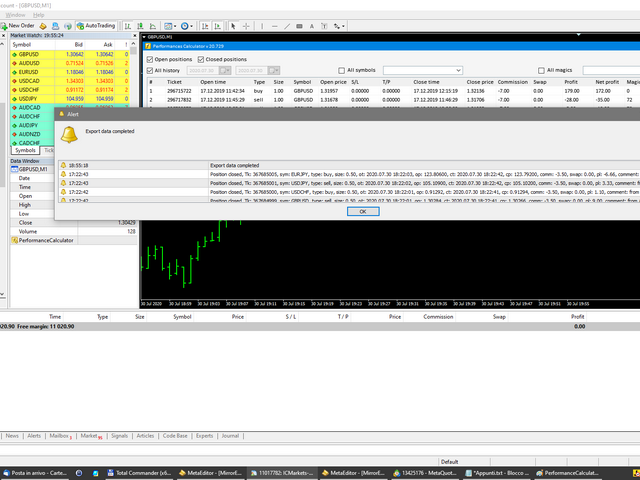
You can also export the data in Excel
Рекомендуем также
One Click Trader Utility MT5
AL MOOSAWI ABDULLAH JAFFER BAQER
One-Click Trader Utility for MT5 Professional Trading at Your Fingertips One-Click Trader Utility is a premium MT5 tool designed for active traders who need lightning-fast execution and real-time performance metrics. For just $30, transform your trading experience with institutional-grade technology previously available only to professional traders. Key Features Ultra-Fast Execution - Open and close positions with a single click, critical for scalpers and news traders Real-Time Market Metrics -
Partial
Pablo Filipe Soares De Almeida
Partial Close Manager – Инструмент для регулировки торгового объёма Этот инструмент позволяет выполнять частичное закрытие открытых сделок в MetaTrader 5. Функционал Частичное закрытие: Закрывайте часть открытых сделок одним действием. Расчёт объёма: Автоматически вычисляет объём для закрытия, без ручного ввода. Поддержка нескольких ордеров: Применяет частичное закрытие ко всем ордерам по тому же символу. Перемещаемая таблица: Нажмите и удерживайте заголовок, чтобы переместить таблицу по графику
Quick Trade Panel Pro

Nicolas Olivier Menetrey
Панель торговли в один клик с автоматическим управлением лотом и риском Quick Trade Panel Pro — это интуитивно понятная торговая панель, разработанная для трейдеров, которые хотят быстро исполнять ордера, сохраняя полный контроль над рисками. Основные функции Автоматический расчёт размера лота на основе процента от доступной маржи Настраиваемый Stop Loss в пунктах, автоматически применяемый к каждой сделке Размер лота фиксируется во время серии сделок для обеспечения постоянного размера позиции
Core function Intelligent transaction management one-click opening and closing operation, which supports user-defined lots to set multiple closing modes: all closing, closing by direction and closing by profit and loss status. Professional risk control, real-time risk monitoring and spread control to avoid high-cost trading environment. Visual control panel has an intuitive graphical interface, and all functions can be operated with one button to display position information, profit and loss sta
FREE
Kalifx Trade manager
Calvin Andile Mahlangu
KALI-FX Trade Manager – Advanced Exit & Risk Management Utility for MetaTrader 5 The KALI-FX Trade Manager is a compact utility designed to automate trade-exit and risk management with precision and consistency. It integrates breakeven control , trailing stop logic , partial closing , automatic SL/TP assignment , and   Equity Protection System — ensuring every position and the overall account are handled according to predefined safety parameters. This tool supports both manual and EA-initiated
Click Trading
Jawad Tauheed
5 (2)
One Click Trading – Auto TP SL Developer TraderLinkz Version 1.00 Category Utility What it does Adds missing TP and SL to your manual trades and pending orders Sets them once per ticket Lets you move TP and SL afterward Works on hedging and netting accounts Scans on every tick and reacts on trade events Why you want it You place faster entries You get consistent risk and exit targets You reduce fat finger errors You keep full manual control Quick start Attach the EA to any chart Keep TP and SL e
FREE
EA Smile 3 MT5
Luis Enrique Ricales
Работа с Buy stop и Sell stop отложенными ордерами. Канал из двух индикаторов iMA (Moving Average, MA). Входные параметры Take Profit   - тейк профит; Trailing Stop   - трейлинг; Trailing Step   - шаг трейлинга; Lots   - размер лота задается вручную (при этом ОБЯЗАТЕЛЬНОЕ УСЛОВИЕ: параметр   Risk   должен быть равен нулю!); Risk   - размер лота рассчитывается автоматически, в процентах риска на сделку (при этом ОБЯЗАТЕЛЬНОЕ УСЛОВИЕ: параметр "Lots" должен быть равен нулю!); Difference   - отсту
FREE
Lot by Risk MT5
Sergey Vasilev
4.93 (14)
Торговая панель Lot by Risk предназначена для торговли вручную . Это альтернативное средство для отправки ордеров. Первая особенность панели –   удобное выставление ордеров при помощи контрольных линий. Вторая особенность – расчёт объёма сделки по заданному риску при наличии линии stop loss . Контрольные линии выставляются при помощи горячих клавиш: take profit – по умолчанию клавиша T ; price – по умолчанию клавиша P ; stop loss – по умолчанию клавиша S ; Настроить клавиши можно самостоятельно
FREE
Trade assistant pro v8
Ahmed Mohammed Bakr Bakr
FREE FREE FREE Trade Assistant MT5 – Professional Trading & Risk Management Panel Trade Assistant MT5 is an advanced trading panel designed to help traders execute orders faster, safer, and more professionally . It simplifies manual trading by combining smart order management , precise risk control , and one-click execution , making it ideal for both beginners and advanced traders. This tool does not trade automatically . Instead, it empowers you with full control while applying professional-gra
FREE
EasyTradePad for MT5
Sergey Batudayev
5 (5)
EasyTradePad – торговая панель для MetaTrader 5 EasyTradePad — это инструмент для ручной и полуавтоматической торговли. Панель позволяет быстро управлять ордерами и позициями, а также рассчитывать параметры управления рисками в один клик. [Демо и Инструкция] Возможности панели: открытие и закрытие сделок с учётом заданного риска (% или в валюте депозита); установка SL и TP в пунктах, процентах или деньгах; расчет соотношения риска к прибыли; перенос стоп-лосса в безубыток; частичное закрытие п
TradeMngrMT5
Edgar Enrique Retontali
TradeManager 1.0   is an Expert Advisor for MetaTrader 4 y 5 that streamlines real-time trade management. Through a graphical control panel, you can send market and pending orders, move stop losses to breakeven, and automatically calculate position size based on your risk settings. Below is a comprehensive overview of its features and input parameters. Key Features Market Orders & Pending Orders BUY/SELL Buttons : Instantly open long or short positions at market. BUY STOP / SELL STOP / BUY LIMI
Important! Demo version will work only on EURGBP. One Click Trader  is a tool designed for MetaTrader 4 platform, which enables you to take your trading to the next level. It enables you to open, manage and close your trades in simple an efficient way by just one click of your mouse button. "-"   ,  "+"  change OCT window size  Up arrow minimizes the OCT panel Down arrow maximizes the OCT panel Right arrow displays the next panel with additional features Left arrow hides the panel with additiona
FREE
Manual Trading Assistant Pro 【Инструмент «выживания» для ручного трейдинга】 Случалось ли вам паниковать при расчете лота или установке TP/SL во время резких движений рынка? Эта утилита создана для ручных трейдеров, которые хотят сосредоточиться только на «Входе (Атака)» и доверить «Выход (Защита)» машине. 【Основные функции】 Встроенная диагностика настроек (Pips Check) Больше не нужно гадать, какой множитель выбрать: x1 или x100. Нажмите кнопку [Pips Check], и утилита автоматически проверит пр
Аналог   Виртуального   Stop Loss / Take Profit Возможности: автоматическое закрытие сделок по прибыли/убытку показывается количество сделок и общий профит по Инструменту Автоматическое закрытие сделок по прибыли/убытку (аналог виртуального StopLoss/TakeProfit): режим работы:  Off - Выключен; by Points - по прибыли/убытку в пунктах by Money - по прибыли/убытку в валюте депозита Типы сделок: Покупка и продажа Только покупка Только продажа Указываем условия закрытия по прибыли на сделку Указывае
Manual trading panel — opens one test trade for validation only. fRC Trade Assistant — Smart Manual Trading Panel fRC Trade Assistant is an intelligent trading panel designed for manual traders. It allows you to open positions with one click, calculate lot size based on your predefined risk, and automatically place Stop Loss (SL) and Take Profit (TP) levels. For example, if your balance is $1000 and you set a 1% risk , the panel automatically calculates the appropriate lot size. When the trad
Smart TP SL Manager Smart portfolio-level TP/SL management with intelligent position distribution Overview Smart TP SL Manager manages take profit and stop loss for your entire portfolio instead of individual trades. Set total TP/SL in USD and let the EA automatically handle all positions with precise, weighted calculations. Key Features Portfolio-level TP/SL in USDReal-time combined P/L monitoring Auto close all positions at target Weighted average SL/TP calculation Auto-update when new posit
FREE
TP SL Bot MT5
Ruslan Brezovskiy
5 (1)
TP SL Bot – утилита, которая автоматически устанавливает Stop Loss и Take Profit по вновь открытым ордерам различными способам по вашим указаниям. Также предусмотрена функция расчета объема, c которым нужно открыть сделку, чтобы получить желаемую сумму при указанном размере Stop Loss / Take Profit .   Есть несколько вариантов расчета размера и установки параметров: 1. Установки исходя из суммы, заданной пользователем в процентах от текущего остатка депозита 2. Установка исходя из введенной польз
Executor Trader Panel (Sta) - Standard Version   is a multi-functional trading tool designed for traders. The trading panel integrates over 30 individual functions and more than 10 combined functions, providing traders with a highly flexible operational approach. Main Features of the Executor: Instant Connection Status:   Immediately know if the connection with the broker is lost. Time Synchronization:   Instantly know the current local time and the time of the trading server. Universal Compati
A powerful and intuitive trade management tool designed for scalpers and intraday traders. Created to complement the Nampim Samba Scalper strategy , it allows traders to open, manage, and close positions quickly without leaving the chart.  Key Features: Customizable trading panel – choose position (left, right, center, top, bottom). One-click trading buttons – instantly open Buy/Sell trades with pre-set lot sizes. Close management – close last 1/2/3 trades or all Buy/Sell positions with one clic
FREE
Virgilio is a multifunction control panel consisting of several panels, each of which performs one of the most useful functions used by traders. Its aesthetic is unique, designed to blend into any working environment and offer a user experience that makes work even more enjoyable. Its operativity is simple and intuitive, developed with attention to details to be as userfriendly as possible. Its main panel displays all the basic account and chart data. The first panel offers the user the possib
Note:   All   inputs of this EA   are designed in Arabic for easier configuration and management Auto Smart Trade Manager EA Ar   automatically manages trades on MetaTrader 5. Sets   Stop Loss (SL)   and   Take Profit (TP) , supports   Trailing Stop   to secure profits, and includes   Equity Protection . Smart management for all trades or by Magic Number and symbol, with full control over slippage and risk. Trading involves high risk and you may lose part or all of your capital. Use this EA cau
FREE
Breakeven Bot
Gabriel Paul Ange Perrin
Optimize your trading management with Breakeven Bot, the essential tool for active traders managing multiple positions at once. No more wasting time manually adjusting your stops—one click is all it takes to secure your profits! Main Feature: ️ "BREAKEVEN" Button – Instantly set all profitable positions to breakeven and protect your gains quickly. ️ Customization Options: Set breakeven in pips or currency, depending on your preference. Choose whether breakeven should be at the entr
FREE
FXTrade Panel
Sakariya Bhaskar Nitinbhai
FXTrade Panel – умный и быстрый менеджер торговли MT5 FXTrade Panel — это продвинутый, но простой в использовании инструмент для торговли в MetaTrader 5, разработанный для повышения эффективности вашей торговли с помощью однонажатийного исполнения и управления сделками. Основные функции: • Обзор счёта: отображает номер счёта, кредитное плечо, баланс и текущий спред.   • Управление лотом: регулируемый размер лота с понятными кнопками «+» и «−».   • Управление риском: установка Stop Loss (SL),
FREE
When executing an order, whether through the Metatrader ticket on a computer or the Metatrader app on a mobile device, either manual or pending, Easy Trade will automatically set the take profit and stop loss levels, as well as a limit order with its respective take profit and stop loss levels. It follows the trading strategy for market open (US30, US100, US500), but it can be applied to any market asset.
Утилита для управления открытыми позициями с помощью виртуальных (невидимых для брокера) стопов. Виртуальный стоп лосс и виртуальный тейк профит можно свободно передвигать по графику. Если цена коснулась линии виртуального стопа (TP,  SL, TS) советник закроет все ордера одного направления на текущем графике.  Закрытие ордеров по виртуальному тейк профиту возможно только при наличии прибыли. С помощью встроенного симулятора торговли, вы можете, в тестере стратегий, увидеть как работает советник.
Risk Manager Pro MT5 Профессиональная система ЗАЩИТЫ счёта и КОНТРОЛЯ рисков Risk Manager Pro MT5 — это продвинутый Expert Advisor, созданный для АВТОМАТИЧЕСКОЙ ЗАЩИТЫ торгового счёта , ИСКЛЮЧЕНИЯ овертрейдинга и БЛОКИРОВКИ неконтролируемых убытков . УПРАВЛЯЙТЕ СВОИМ РИСКОМ , совместимо с ЛЮБОЙ стратегией, торговым роботом или ручной торговлей , и ОБЕСПЕЧЬТЕ ДИСЦИПЛИНУ, БЕЗОПАСНОСТЬ и СТАБИЛЬНОСТЬ в ежедневной торговле. ПРЕИМУЩЕСТВА ДЛЯ ТРЕЙДЕРА БЛОКИРУЕТ ТОРГОВЛЮ НА ДЕНЬ при достижении любого
Use for risk management and opening positions as per the user settings. The user is allowed to set the stop loss and take profits in pips. The user can also choose the risk percentage per trade that he/she wants to use while opening the trade. The volume of the trade that the user wants to sent shall be calculator according to the stoploss and the risk percentage that the user has selected.
EA Utility Tool: Risk Consistency Manager The Risk Consistency Manager EA is a simple yet powerful tool that automates risk management across multiple open positions. It dynamically adjusts stop-loss levels to distribute a predefined total risk value (e.g., $10,000) evenly among all active trades. Key Features: Dynamic Risk Distribution: Automatically allocates an equal share of risk to each position (e.g. with total risk capital of $10,000, its will be distribute each trade with $3,333.33 risk
FREE
Are you an MT5 trader who needs rapid, reliable risk management? ​Introducing this essential utility – a powerful, free Expert Advisor designed to instantly close all open positions on your MetaTrader 5 account with a single, dedicated action. This tool is a must-have for emergency market exits or quick, decisive profit-taking. ​ Why is this a FREE tool? ​I am a professional MQL developer actively focused on delivering   5-star solutions   and   securing custom MQL5 Freelance Jobs . This free ut
FREE
The free trade manager — simple but effective. Quickly open positions with preset take profit and stop loss levels. Set everything to breakeven or close all trades with one click. Get plenty of information on your chart about your account, trades, and profit/loss. It speaks for itself — that’s how simple this manager is to use. Check out our other EAs and our Telegram for more information! By traders, for traders!
FREE
С этим продуктом покупают
Trade Assistant MT5
Evgeniy Kravchenko
4.42 (208)
Помогает рассчитать риск на сделку, простая установка нового ордера с помощью линий, управление ордерами с функциями частичного закрытия, 7 типов трейлинг-стопа и другие полезные функции. Дополнительные материалы и инструкции Инструкция по установке - Инструкция к приложению - Пробная версия приложения для демо счета Функция Линии   - отображает на графике линию открытия, стоп-лосс, тейк-профит. С помощью этой функции легко установить новый ордер и увидеть его дополнительные характеристики пе
Добро пожаловать в Trade Manager EA — лучший инструмент для управления рисками, предназначенный для упрощения, точности и эффективности торговли. Это не просто инструмент для размещения ордеров; это комплексное решение для удобного планирования торгов, управления позициями и усиленного контроля над рисками. Независимо от того, начинающий вы трейдер, опытный специалист или скальпер, нуждающийся в быстром исполнении, Trade Manager EA адаптируется к вашим потребностям и работает с любыми активами:
Local Trade Copier EA MT5
Juvenille Emperor Limited
4.96 (127)
Опыт экстремально быстрого копирования сделок с помощью Local Trade Copier EA MT5 . Благодаря простой установке в течение 1 минуты этот копировщик сделок позволяет вам копировать сделки между несколькими терминалами MetaTrader на одном компьютере с Windows или на Windows VPS с крайне быстрыми скоростями копирования менее 0.5 секунды. Независимо от того, новичок вы или профессиональный трейдер, Local Trade Copier EA MT5 предлагает широкий спектр опций, чтобы настроить его под ваши конкретные по
TradePanel MT5
Alfiya Fazylova
4.86 (148)
Trade Panel — это многофункциональный торговый помощник. Приложение содержит более 50 торговых функций для ручной торговли и позволяет автоматизировать большинство торговых операций. Внимание приложение не работает в тестере стратегий. Перед покупкой вы можете протестировать демоверсию на демо-счете. Демоверсия здесь . Полная инструкция здесь . Торговля. Позволяет совершать торговые операции в один клик: Открыть отложенные ордера и позиции с автоматическим расчетом риска. Открыть несколько ордер
Бета-версия Telegram to MT5 Signal Trader почти готов к официальному альфа-релизу. Некоторые функции все еще находятся в разработке, и вы можете столкнуться с небольшими ошибками. Если вы заметите проблемы, пожалуйста, сообщите о них, ваша обратная связь помогает улучшать программное обеспечение для всех. Telegram to MT5 Signal Trader — мощный инструмент, который автоматически копирует торговые сигналы из каналов и групп Telegram прямо в ваш счёт MetaTrader 5 . Поддерживаются как публичные, так
Trade Dashboard MT5
Fatemeh Ameri
4.97 (117)
Tired of complex order placement and manual calculations? Trade Dashboard is your solution. With its user-friendly interface, placing orders becomes effortless, by a single click, you can open trades, set stop loss and take profit levels, manage trade lot size, and calculate risk to reward ratios, allowing you to only focus on your strategy. Say goodbye to manual calculations and streamline your trading experience with Trade Dashboard. Download  Demo Version  right now. You can find  Details of
Trade copier MT5
Alfiya Fazylova
4.62 (37)
Trade Copier — это профессиональная утилита, предназначенная для копирования и синхронизации сделок между торговыми счетами. Копирование происходит от счета/терминала поставщика к счету/терминалу получателя, которые установлены на одном компьютере или vps. Перед покупкой вы можете протестировать демо-версию на демо-счете. Демо-версия здесь . Полная инструкция здесь . Основной функционал и преимущества: Русифицированный интерфейс, поддержку на русском языке. Поддерживает копирование МТ5 > МТ5, МТ
Copy Cat More Trade Copier MT5 (Копи-Кот MT5) — это локальный торговый копировщик и полная система управления рисками и исполнения, разработанная для современных торговых задач. От испытаний проп-фирм до управления личным портфелем, он адаптируется к любой ситуации с сочетанием надежного исполнения, защиты капитала, гибкой настройки и продвинутой обработки сделок. Копировщик работает как в режиме Мастер (отправитель), так и в режиме Слейв (получатель), с синхронизацией в реальном времени рыночны
Telegram to MT5: Идеальное решение для копирования сигналов Упростите свою торговлю с Telegram to MT5 — современным инструментом, который копирует торговые сигналы прямо из каналов и чатов Telegram на вашу платформу MetaTrader 5, без необходимости использования DLL. Это мощное решение обеспечивает точное исполнение сигналов, широкие возможности настройки, экономит время и повышает вашу эффективность. [ Instructions and DEMO ] [ FAQ ] Ключевые возможности Прямая интеграция с Telegram API Аутенти
ApexGuard Suite — профессиональная панель контроля риска и дисциплины для MetaTrader 5 ApexGuard Suite — это комплексный инструмент для трейдеров, который помогает структурировать торговлю, контролировать риски и принимать более взвешенные решения прямо внутри терминала MetaTrader 5. Приложение не совершает сделки за вас — его задача дать полный контроль над состоянием счёта, рисками и торговым процессом в удобном визуальном формате. Интерфейс построен как единая панель с вкладками, где каждая о
PhantomBreak Radar — индикатор для MetaTrader 5, предназначенный для выявления ложных пробоев уровней (fake breakout) и рыночных ловушек. Инструмент помогает трейдерам находить моменты, когда цена прокалывает экстремум диапазона, но затем возвращается обратно — формируя потенциальную точку входа в противоположном направлении. Индикатор автоматически анализирует ценовой диапазон за выбранный период, отслеживает выход за его границы и фиксирует повторный вход цены внутрь диапазона. В таких ситуаци
Только сейчас вы можете приобрести  TradeOps Command Center с 10% скидкой всего за 630$. Акция действует до 01.04.2026 Для получение инструкции об использование утилиты обратитесь в личные сообщения! TradeOps Command Center — Профессиональный инструмент контроля риска и дисциплины в трейдинге TradeOps Command Center — это многофункциональная утилита для MetaTrader 5, разработанная для трейдеров, которые стремятся к системному и дисциплинированному подходу к торговле. Продукт объединяет в себе у
Trade Manager DashPlus
Henry Lyubomir Wallace
5 (13)
DashPlus – это продвинутое средство для управления торговлей, разработанное для повышения эффективности и результативности торговли на платформе MetaTrader 5. Оно предлагает широкий набор функций, включая расчет рисков, управление ордерами, продвинутые системы сеток, инструменты на основе графиков и аналитику производительности. Основные функции Восстановительная Сетка Внедряет систему усреднения и гибкую сетку для управления сделками в неблагоприятных рыночных условиях. Позволяет стратегически
Smart Stop Manager – автоматизированное управление стоп-лоссами с профессиональной точностью Обзор Smart Stop Manager — это исполнительный модуль линейки Smart Stop, созданный для трейдеров, которым требуется структурированное, надежное и полностью автоматизированное управление стоп-лоссами по нескольким открытым позициям одновременно. Панель непрерывно отслеживает активные сделки, рассчитывает оптимальный уровень стоп-лосса на основе рыночной структуры Smart Stop и автоматически обновляет сто
Exp COPYLOT CLIENT for MT5
Vladislav Andruschenko
3.82 (34)
Trade copier for MT5 - копировщик позиций/СДЕЛОК/ордеров для МetaТrader 5  из МТ4/МТ5) Для копирования на терминал MetaTrader 5 между терминалами МТ5 - МТ5, МТ4 - МТ5  для версии COPYLOT MT5 ( или МТ4 - МТ4 МТ5 - МТ4 для версии COPYLOT MT4). Версия МT4 Полное описание +DEMO +PDF Как купить Как установить    Как получить файлы журналов   Как тестировать и оптимизировать    Все продукты от Expforex Вы также можете копировать сделки в терминал МТ4 (МТ4 - МТ4, МТ5 - МТ4):    COPYLOT CLIENT for M
Smart Stop Scanner – многоактивный интеллектуальный сканер стоп-лоссов Общее описание Smart Stop Scanner предоставляет профессиональный контроль стоп-лоссов на любом рынке. Он анализирует рыночную структуру, определяет значимые пробои и формирует ключевые защитные уровни по Forex, Золоту, Индексам, Металлам, Криптовалютам и другим инструментам. Все данные отображаются в одном чистом, информативном и DPI-адаптивном панели для максимальной ясности и скорости принятия решений. Как определяется с
HINN MAGIC ENTRY - лучший инструмент для входа и менеджмента позиций! Выставляет ордера через выбор уровня на графике! полное описание    ::    demo-версия    ::   60-sec-video-description Основные функции: - Рыночные, лимитные и отложенные ордера -  Автоматический подсчет лоттажа  -  Автоматический учет спреда и комиссий -  Неограниченное количество промежуточных тейков для позиций - Перевод в безубыток и трейл стоп-лосса и тейк-профита - Уровни инвалидаций - Интуитивно понятный,  адаптивный,
Ultimate Extractor - Professional Trading Analytics for MT5 *****this is the local HTML version of Ultimate Extractor. Check out Ultimate Extractor Cloud on mql5 for the Cloud version****** Ultimate Extractor transforms your MetaTrader 5 trading history into actionable insights with comprehensive analytics, interactive charts, and real-time performance tracking. What It Does Automatically analyzes your MT5 trading history across all Expert Advisors and generates detailed HTML reports with inte
MT5 to Telegram Signal Provider — это простой в использовании полностью настраиваемый инструмент, который позволяет отправлять определённые сигналы в чат, канал или группу Telegram, превращая вашу учётную запись в провайдера сигналов . В отличие от большинства конкурирующих продуктов, он не использует импорт DLL. [ Демо ]   [ Руководство ] [ Версия MT4 ] [ Версия для Discord ] [ Канал в Telegram ]  New: [ Telegram To MT5 ] Настройка Доступно пошаговое руководство пользователя . Никаких знаний A
The product will copy all telegram signal to MT5 ( which you are member) , also it can work as remote copier.  Easy to set up, copy order instant, can work with almost signal formats, image signal,  s upport to translate other language to English Work with all type of channel or group, even channel have "Restrict Saving Content", work with  multi channel, multi MT5 Work as remote copier: with signal have ticket number, it will copy exactly via ticket number. Support to backtest signal. How to s
Seconds Chart MT5
Boris Sedov
4.59 (17)
Seconds Chart — уникальный инструмент для создания секундных графиков в MetaTrader 5 . С помощью Seconds Chart вы можете построить график с таймфреймом, заданным в секундах, получая идеальную гибкость и точность анализа, недоступную на стандартных минутных или часовых графиках. Например, таймфрейм S15 обозначает график со свечами продолжительностью 15 секунд. Вы можете использовать любые индикаторы и советники с поддержкой пользовательских символов. Работать с ними так же удобно, как и на станда
Risk Manager for MT5
Sergey Batudayev
4.35 (17)
Советник Риск Менеджер для МТ5, очень важная и по моему мнению необходимая программа для каждого трейдера. С помощью данного советника вы сможете контролировать  риск на вашем торговом счету. Контроль риска и прибыли может осуществляться как в  денежном $ эквиваленте так и в % процентном. Для работы советника просто прикрепите его на график валютной пары и выставите значения допустимого риска в валюте депозита или в % от текущего баланса.   [ Инструкция с описанием настроек ] Функции советника
Farmed Hedge Yield Farming - Professional Pair Trading Dashboard (Manual - Hybrid - Semi/Automated EA) VERSION 3 - WILD HARVEST UPDATE Trading Approach: - Manual Trading: Primary focus - Auto Pilot: Optional supplementary feature - Full Automation: Not the main purpose Recommended Timeframe: H1-H4 DEMO VERSION Download the free demo to test functionality. Use Strategy Tester with Visual Mode to see how it works. VERSION 3 - NEW FEATURES Summary Dashboard (SRA Panel) - Quick pair selection w
Grid Manual MT5
Alfiya Fazylova
4.9 (20)
Grid Manual — это торговая панель для работы с сеточными стратегиями. Утилита универсальная, имеет гибкие настройки и понятный интерфейс. Работает с сеткой ордеров не только в сторону усреднения убытков, но и в сторону наращивания прибыли. Трейдеру не нужно создавать и сопровождать сетку ордеров, это сделает утилита. Достаточно открыть ордер и Grid manual автоматически создаст ему сетку ордеров и будет сопровождать его до самого закрытия. Полная инструкция и демо-версия здесь . Основные особенно
Это визуальная торговая панель, которая помогает вам легко размещать сделки и управлять ими, избегая человеческих ошибок и повышая вашу торговую активность. Он сочетает в себе простой в использовании визуальный интерфейс с надежным подходом к управлению рисками и положением [ Руководство по установке | Руководство по обновлению | Устранение неполадок | FAQ | Все продукты ] Удивительно простой в использовании Торгуйте легко с графика Торгуйте с точным управлением рисками, без проблем Сохранение
Anchor: The EA Manager A coordination system for traders running multiple EAs. Anchor ensures only one EA can trade at a time, preventing conflicting positions and keeping your portfolio safer. Attach Anchor to any chart. Configure your EAs and their magic numbers. Anchor handles the rest. Built for portfolios. Built for discipline. Built for prop firms. The Problem Running multiple EAs on the same account creates risk. Two gold EAs can open opposite positions on the same candle. Three EA
Equity Protect Pro: Ваш эксперт по комплексной защите счетов для спокойной торговли Если вы ищете такие функции, как защита счета, защита капитала, защита портфеля, защита мультистратегий, защита прибыли, сбор прибыли, безопасность торговли, программы контроля рисков, автоматический контроль рисков, автоматическая ликвидация, условная ликвидация, запланированная ликвидация, динамическая ликвидация, скользящий стоп-лосс, закрытие в один клик, ликвидация в один клик и восстановление в один клик,
Торговая панель для торговли в один клик.  Работа с позициями и ордерами!  Торговля с  графика  или  клавиатуры  . Используя нашу торговую панель, вы можете торговать в один клик с графика и совершать торговые операции в 30 раз быстрее, чем стандартное управление MetaTrader. Автоматические расчеты параметров и функций, которые облегчают жизнь трейдеру и помогают трейдеру вести торговую деятельность намного быстрее и удобнее. Графические подсказки и полная информация о торговых сделках на графике
Советник Auto Trade Copier предназначен для копирования сделок на нескольких счетах/терминалах MetaTrader 4/MetaTrader 5 со 100% точностью. С помощью этого инструмента вы можете выступать как в роли поставщика (источник), так и получателя (назначение). Все торговые действия будут скопированы от поставщика к получателю без задержки. Ссылки: Если копирование производится через Интернет, посмотрите продукт Trade Copier Pro MT5 по ссылке: https://www.mql5.com/ru/market/product/5531 Если копирование
Инструкция по установке:    Нажмите здесь! Анализ нескольких экспертных советников одновременно. Сравните результаты работы советников по «магическому числу». Отслеживание прибыльности и просадок Фильтрация результатов по диапазону дат Кривая визуальной привлекательности и подробные метрики Готов к использованию менее чем за минуту. EA Portfolio Analyzer EA Portfolio Analyzer — это   профессиональный аналитический инструмент   , предназначенный для мониторинга   текущей эффективности работы нес
Другие продукты этого автора
Script to create arrows and lines   on chart   of history positions traded on account for the symbol where you launch the application. From inputs you can select: - Magic number (default is -1; -1 = all magics number) - "From" date and time (default is 1970.01.01 00:00; all positions) - "To" date and time (default is 1970.01.01 00:00; all positions) - Color for buy open positions (arrows and lines between open and close) - Color for buy closing positions (arrows) - Color for sell open positions
FREE
Script to create arrows and lines on chart of history positions traded on account for the symbol where you launch the application. From inputs you can select: - Magic number (default is -1; -1 = all magics number) - "From" date and time (default is 1970.01.01 00:00; all positions) - "To" date and time (default is 1970.01.01 00:00; all positions) - Color for buy open positions (arrows and lines between open and close) - Color for buy closing positions (arrows) - Color for sell open positions (arr
FREE
The new version of  MirrorSoftware 2021  has been completely rewriten and optimized.  This version requires to be loaded only on a single chart because  it can detect all actions on every symbol and not only the actions of symbol where it is loaded. Even the  graphics and the configuration mode  have been completely redesigned. The MirrorSoftware is composed of two components (all components are required to work):  MirrorController  (free indicator): This component must be loaded into the MASTER
FREE
Utility for know all informations and settings of account where the platform is connected The informations that you can know are for example: - The difference from server time and time of your PC - The limit orders that you can place at market - The credit that you have - The stopout mode of your broker - The exact name of company of your broker and other informations
FREE
This indicator is an utility for have always under control, how much time is left at the end of the bar setted. The utility show on the lower right of the chart, the countdown to the end. When the remaining seconds is = to the seconds set in the input, the color of remaining seconds on chart, change color and play a warning sound to warn you that the bar is about the end. When the remaining seconds is < to the seconds set in the input, the utility play a beep to warn you that the bar is in co
FREE
Utility for show on charts the visual informations about: - a vertical line at start of each bar of selected timeframe - a vertical line at start of each day - a vertical line at start of each week - vertical lines at start / end of trading sessions selected - bid / ask prices, spread, money value for each point (of 1 standard lot) and last tick time recived" You can enable / disable each information and set the color for each line
FREE
Script to load on chart the orders, starting from "Signal history report" downloaded from MQL5. If you found a good signal on "Signals" section of this site and you want to see the history orders on chart, you can do it, following this steps: - Download the csv file of history orders - Copy file in the common folder - Launch the script and set the input that are: - Report type (MT4 or MT5) - File name - Delimiter (default is ;) - Name of symbol to load (if symbol on file is for example EURUSDi,
FREE
Utility for know all informations and settings of terminal where the utility is loaded. The informations that you can know are for example: - The path of folder where the terminal start - The path of   folder where the terminal store the indicators, experts advisors etc - The path of   common folder - The permission to use DLL, to automated trading etc - The permission to send email, FTP or notifications to smartphone and many other informations
FREE
Mirror controller
Eugenio Bravetti
2 (1)
The new version of  MirrorSoftware 2021  has been completely rewriten and optimized.  This version requires to be loaded only on a single chart because  it can detect all actions on every symbol and not only the actions of symbol where it is loaded. Even the  graphics and the configuration mode  have been completely redesigned. The MirrorSoftware is composed of two components (all components are required to work):  MirrorController  (free indicator): This component must be loaded into the MASTER
FREE
This indicator is an utility for have always under control, how much time is left at the end of the bar setted. The utility show on the lower right of the chart, the countdown to the end. When the remaining seconds is = to the seconds set in the input, the color of remaining seconds on chart, change color and play a warning sound to warn you that the bar is about the end. When the remaining seconds is < to the seconds set in the input, the utility play a beep to warn you that the bar is in co
FREE
Script to calculate equity and balance at a specific date and time.  This script makes up for a lack of MetaTrader account history, that does not show how the balance and equity changes in time. Balance calculation includes closed orders only. Equity calculation includes orders closed before and orders that are still open at the specified time. Example: date and time set to 2020/07/06 00:00. If I had a Buy 1 lot EURUSD position opened at price 1.12470 on the 2020/07/02, the program would ca
FREE
Utility for know all informations and settings of terminal where the utility is loaded. The informations that you can know are for example: - The path of folder where the terminal start - The   path of     folder where the terminal store the indicators, experts advisors etc - The   path of     common folder - The permission to use DLL, to automated trading etc - The permission to send email, FTP or notifications to smartphone and many other informations
FREE
Utility for know all informations and settings of all symbols available on your broker The informations that you can know are for example: - Spread - Digits - Tick value - Size step - Size minimum - Size maximum - Swap buy and sell - Margin required (for 1 standard lot) - Rollover day - Execution mode and many other informations You can filter the symbols by group or you can also choose to see the informations only of symbols available on market watch.
FREE
Utility for know all informations and settings of account where the platform is connected The informations that you can know are for example: - The difference from server time and time of your PC - The limit orders that you can place at market - The credit that you have - The stopout mode of your broker - The exact name of company of your broker and other informations
FREE
Script to calculate equity and balance at a specific date and time.  This script makes up for a lack of MetaTrader account history, that does not show how the balance and equity changes in time. Balance calculation includes closed orders only. Equity calculation includes orders closed before and orders that are still open at the specified time. Example: date and time set to 2020/07/06 00:00. If I had a Buy 1 lot EURUSD position opened at price 1.12470 on the 2020/07/02, the program would ca
FREE
Script to load on chart the orders, starting from "Signal history report" downloaded from MQL5. If you found a good signal on "Signals" section of this site and you want to see the history orders on chart, you can do it, following this steps: - Download the csv file of history orders - Copy file in the common folder - Launch the script and set the input that are: - Report type (MT4 or MT5) - File name - Delimiter (default is ;) - Name of symbol to load (if symbol on file is for example EURUSDi,
FREE
Utility for know all informations and settings of all symbols available on your broker The informations that you can know are for example: - Spread - Digits - Tick value - Size step - Size minimum - Size maximum - Swap buy and sell - Margin required (for 1 standard lot) - Rollover day - Execution mode and many other informations You can filter the symbols by group or you can also choose to see the informations only of symbols available on market watch.
FREE
Utility for show on charts the visual informations about: - a vertical line at start of each bar of selected timeframe - a vertical line at start of each day - a vertical line at start of each week - vertical lines at start / end of trading sessions selected - bid / ask prices, spread, money value for each point (of 1 standard lot) and last tick time recived" You can enable / disable each information and set the color for each line
FREE
MirrorEA
Eugenio Bravetti
The new version of  MirrorSoftware 2021  has been completely rewriten and optimized.  This version requires to be loaded only on a single chart because  it can detect all actions on every symbol and not only the actions of symbol where it is loaded. Even the  graphics and the configuration mode  have been completely redesigned. The MirrorSoftware is composed of two components (all components are required to work):  MirrorController  (free indicator): This component must be loaded into the MASTER
Utility for know the performance of your acoount. From dialog you can filter data in this modes: - You can include or not include the open positions - You can include or not the closed positions - You can filter the data by date (from, to) - You can filter the data by simbols (multi selection) - You can filter the data by magic number (multi selection) On bottom of table, are show the total of: - Number of data - Total size - Total commissions paid - Total swap paids - Total profits - Total net
The new version of  MirrorSoftware 2021  has been completely rewriten and optimized.  This version requires to be loaded only on a single chart because  it can detect all actions on every symbol and not only the actions of symbol where it is loaded. Even the  graphics and the configuration mode  have been completely redesigned. The MirrorSoftware is composed of two components (all components are required to work):  MirrorController  (free indicator): This component must be loaded into the MASTER
Фильтр:
Нет отзывов
Ответ на отзыв