TradeMngrMT5

TradeManager 1.0 is an Expert Advisor for MetaTrader 4 y 5 that streamlines real-time trade management. Through a graphical control panel, you can send market and pending orders, move stop losses to breakeven, and automatically calculate position size based on your risk settings. Below is a comprehensive overview of its features and input parameters.


Key Features

  1. Market Orders & Pending Orders

    • BUY/SELL Buttons: Instantly open long or short positions at market.

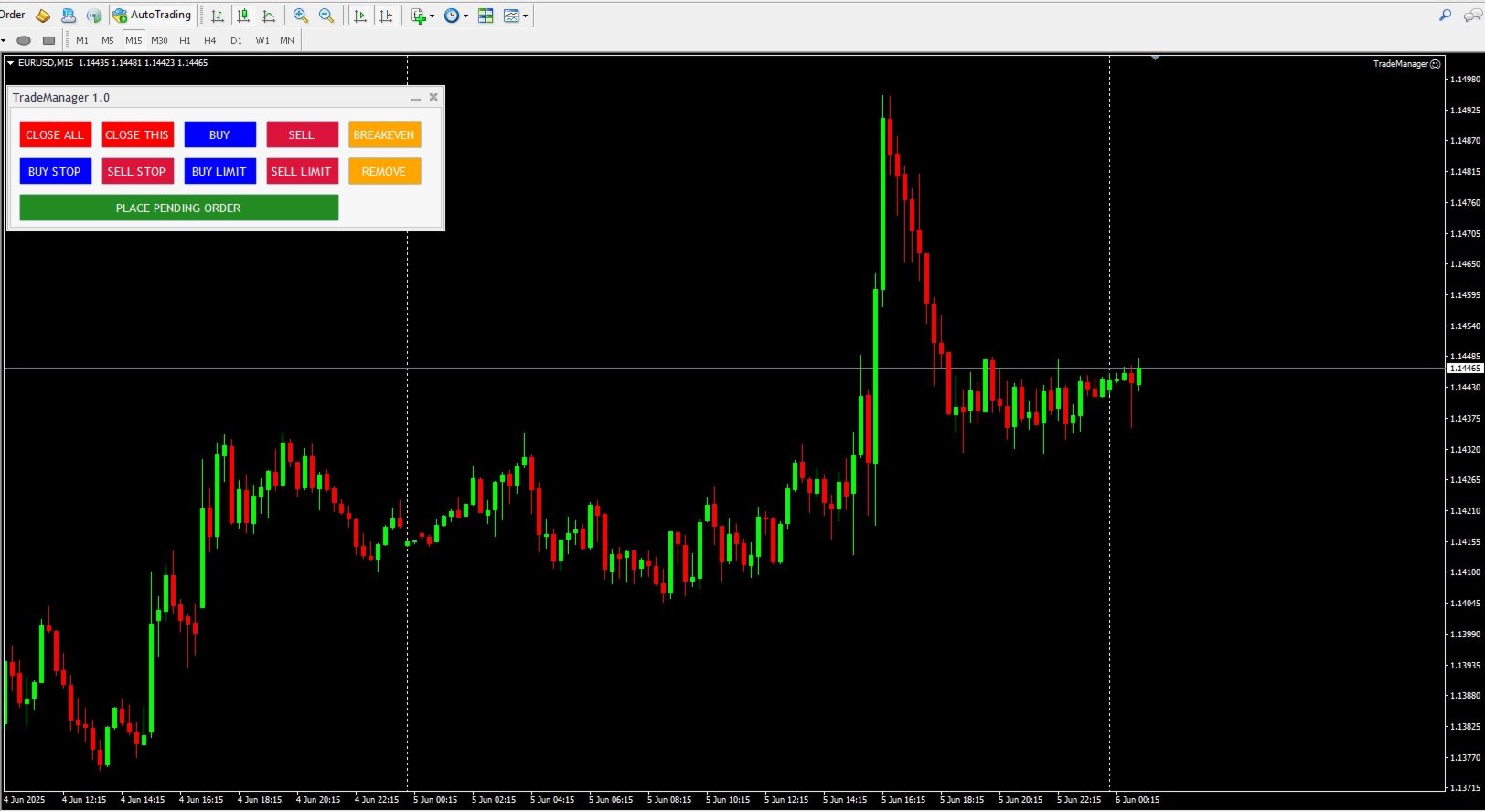
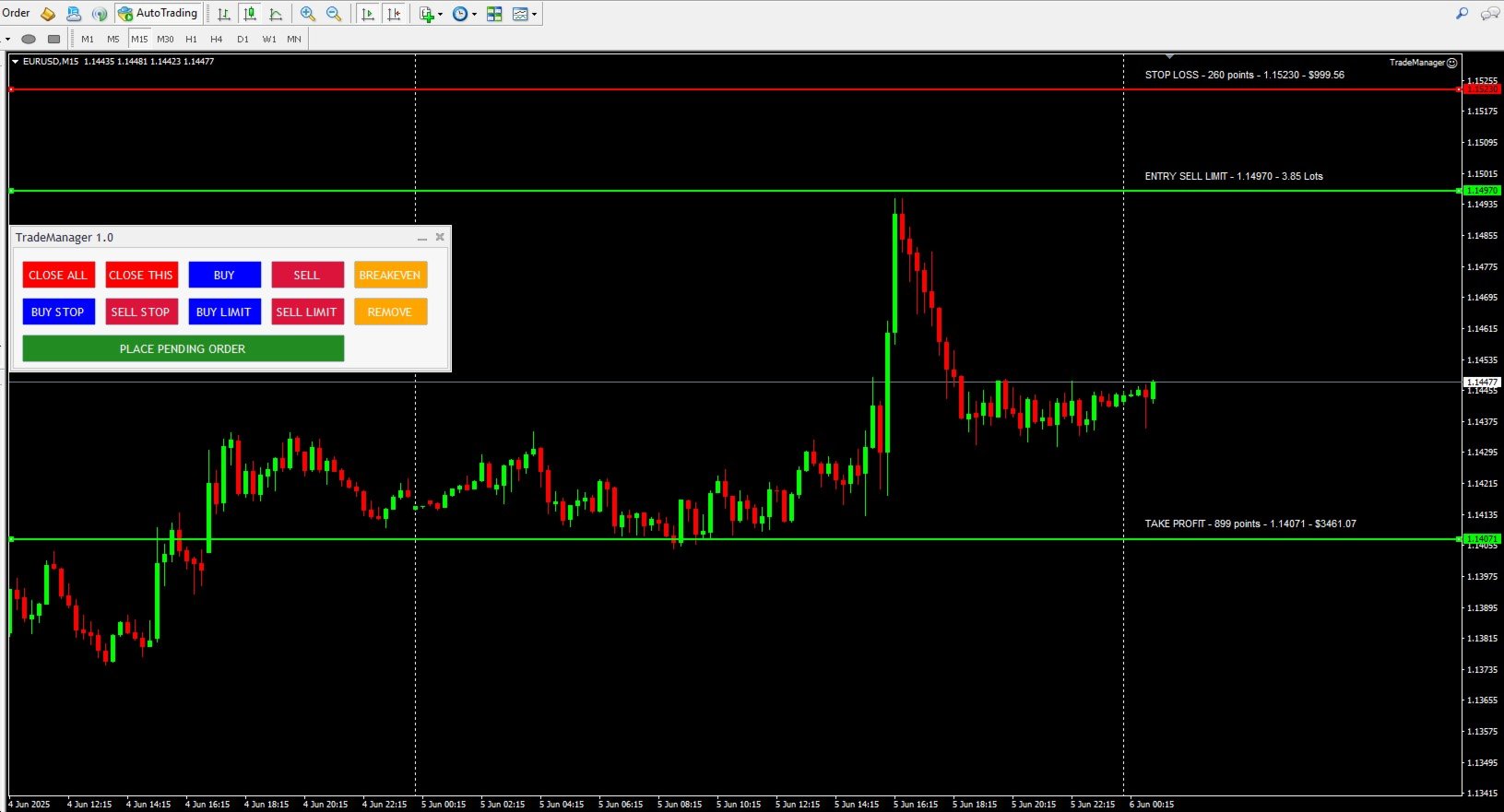
    • BUY STOP / SELL STOP / BUY LIMIT / SELL LIMIT Buttons: Draw interactive horizontal lines on the chart for entry, stop loss, and take profit. Adjust visually, then confirm with “PLACE PENDING ORDER” to submit the pending order.

  2. Risk Management and Auto Lot Sizing

    • RiskType: Choose how the lot size is determined:

      • Lots: Use a fixed lot size ( FixedLots ).

      • Percentage: Calculate lot size as a percentage of account equity or a base amount.

    • AmountForCalculation: Select the base used for risk calculations:

      • CurrentBalance (live account balance)

      • BaseAmount (a fixed value entered in TotalAmountInMoney )

    • RiskPercent: When RiskType=Percentage , specify the percentage of the account to risk per trade (e.g., 1.0 for 1 %).

    • RiskReward: Defines the Risk:Reward ratio. For example, if RiskReward=3.0 and SL is 50 pips, TP will be 150 pips.

    • CalculateAdjustedLotSize: Computes the optimal lot size to risk the specified amount (fixed or percentage), respecting the broker’s minimum/maximum volume rules.

  3. Configurable Stop Loss and Take Profit

    • StopLoss (in points): If > 0, the EA calculates the SL price as EntryPrice ± StopLoss * _Point .

    • When both StopLoss > 0 and RiskReward > 0 , the TP is computed as EntryPrice ± (StopLoss × RiskReward) × _Point .

    • The EA automatically enforces minimum distance requirements ( SYMBOL_TRADE_STOPS_LEVEL and SYMBOL_TRADE_FREEZE_LEVEL ) before sending any order to satisfy broker constraints.

  4. “BREAKEVEN” Button

    • Clicking “BREAKEVEN” loops through all open positions for the current symbol with the specified MagicNumber , then moves each SL to OpenPrice ± 1 pip (depending on BUY or SELL), provided the trade is in profit and meets the broker’s minimum distance.

  5. Quick-Close Buttons

    • CLOSE THIS: Closes all open positions for the current chart’s symbol (filtered by MagicNumber ).

    • CLOSE ALL: Closes all open positions on all symbols (filtered by MagicNumber or closes everything if MagicNumber=0 ).

    • CloseDeletePendingOrders: When set to true , both “CLOSE THIS” and “CLOSE ALL” also delete any pending orders that share the same MagicNumber .

  6. Adjustable Magic Number

    • MagicNumber: Uniquely identifies orders and positions belonging to this EA. Allows running multiple instances of TradeManager on different charts or symbols without interference.

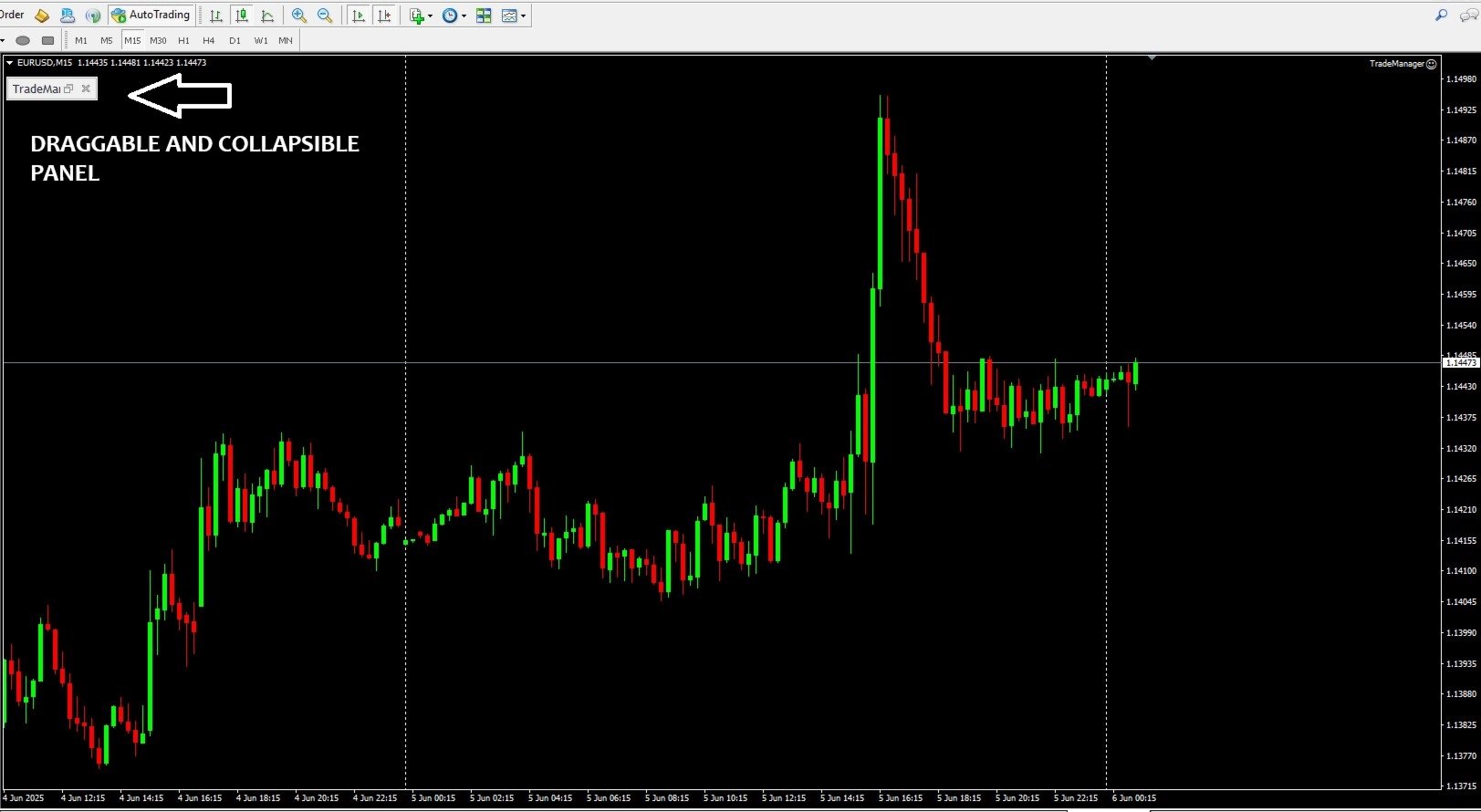
  7. Intuitive Graphical Interface

    • A pop-up panel titled “TradeManager 1.0” appears on the chart with color-coded buttons (red for closes, blue for market orders, fuchsia/blue for pending orders, yellow for breakeven).

    • Pending order setup objects (horizontal lines and labels) are drawn live on the chart; simply drag to adjust prices before confirming the order.


Variable Description Example Value
RiskType    Lot sizing method. Lots = fixed lot; Percentage = percentage of account. Percentage
AmountForCalculation    Base for risk calculation. CurrentBalance = real-time account balance; BaseAmount = fixed amount ( TotalAmountInMoney ). BaseAmount
TotalAmountInMoney    The fixed base amount (in account currency) used for risk calculations when AmountForCalculation=BaseAmount . 100000.0
FixedLots    Fixed lot size (if RiskType=Lots ). 0.05
StopLoss    Stop loss in points for automatic SL and TP calculation (0 = disabled). 200
CloseDeletePendingOrders    If true , the close-buttons will also delete any pending orders; if false , they close only active positions. true
MagicNumber    Unique identifier to tag orders/positions created by this EA. 777665
RiskPercent    Percentage of the account to risk per trade when RiskType=Percentage (1.0 = 1 %). 1.0
RiskReward    Risk:Reward ratio. E.g. 3.0 to target a 1:3 reward. 3.0
PendingOrderOffsetPoints    Initial distance (in points) from the current price for placing BUY/SELL STOP/LIMIT orders. 200


How to Get Started

  1. Installation & Attaching

    • Copy the compiled file TradeManager.ex4  into ...\MQL5\Experts\ .

    • In MetaTrader 5, drag “TradeManager 1.0” onto a chart or right-click → “Expert Advisors” → “Add to Chart”.

  2. Configure Inputs

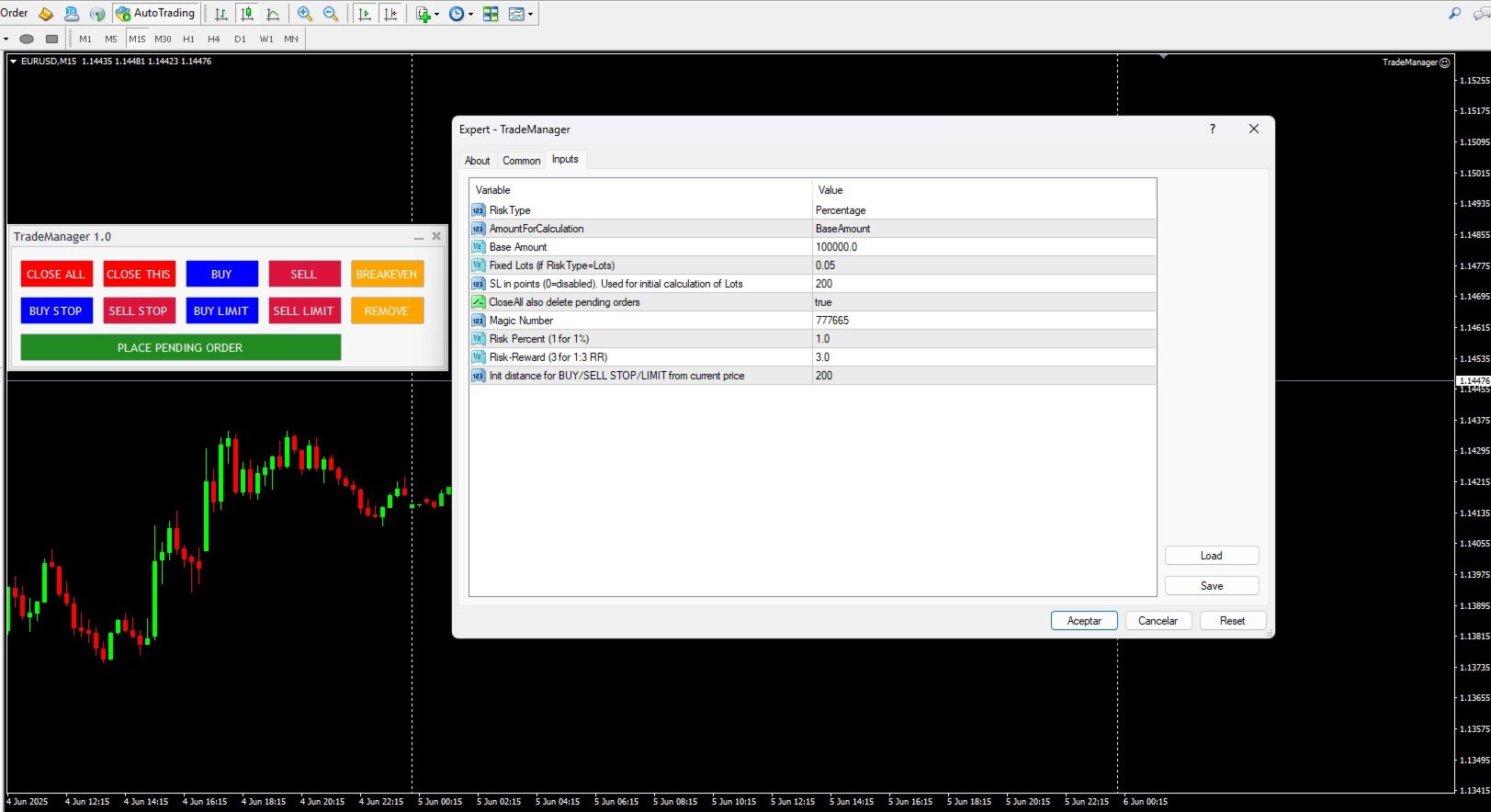
    • In the Inputs tab of the Properties window, set:

      • RiskType (Lots or Percentage) depending on whether you want fixed lots or percentage-based sizing.

      • AmountForCalculation to choose between using live equity or a fixed base amount ( TotalAmountInMoney ).

      • Adjust RiskPercent , RiskReward , StopLoss , FixedLots , and MagicNumber as needed.

  3. Use the Control Panel

    • BUY/SELL: Open immediate market orders with SL and TP calculated per your settings.

    • BUY STOP / SELL STOP / BUY LIMIT / SELL LIMIT: Initiate pending order setup, drag the lines on the chart to your desired price levels, and then click “PLACE PENDING ORDER” to send the order.

    • BREAKEVEN: Move the SL of all open positions on this symbol to breakeven (+1 pip) once they are in profit.

    • CLOSE THIS: Close all open positions for the current symbol and (optionally) delete pending orders if CloseDeletePendingOrders=true .

    • CLOSE ALL: Close all open positions on all symbols and (optionally) delete all pending orders.


Benefits of TradeManager 1.0

  • Speed & Precision: Open or close trades with a single click—no need to manually type orders.

  • Integrated Risk Management: Auto-compute position size based on your capital and specified risk.

  • Visual & Interactive: Configure pending orders by dragging lines directly on the chart, viewing SL, TP, and risk information in real time.

  • Multi-Instance Friendly: Use different MagicNumber values to run independent instances of TradeManager on multiple charts or symbols.

  • Broker-Compliant: Automatically respects minimum stop and freeze-level requirements, avoiding order rejections.

Рекомендуем также
This tool will perform Trailing stop loss and Break even management for orders. Helps you limit or reduce the time spend watching orders on the screen, especially when you need to go to sleep. Just add this EA to 1 chart, you can manage all pairs. You can filter orders by comment, magic number, symbol and order ticket number. When Breakeven it can add shift/offset pips (to cover the commission...). You can try in strategy tester before purchase. The EA will add Buy and Sell alternately, so you
Equity Shield Pro 1.1 NEW VERSION  Equity Shield Pro 1.1 is a powerful utility EA designed to safeguard your trading account by actively monitoring and enforcing equity protection and profit management rules. Whether you’re trading personal accounts or working through proprietary firm challenges, this EA ensures strict adherence to risk and profit targets, enabling you to maintain discipline and consistency. Fully compatible with all challenge types, Equity Shield Pro 1.1 is specifically craft
This is a common, simple and easy to use but effective tool to manage trading risks for all traders. It also help trader places stop loss and take profit levels at the same time the order is filled. How to set the expert advisor's parameters to support your trading style? Lots size. Fixed lots size - For traders who prefered to trade with fixed lots size, they can input the lots size in 'User lots' menu in the expert advisor's properties. The input value should be from the 'Minimum Volume' to th
Quick Trade Panel Pro
Nicolas Olivier Menetrey
Панель торговли в один клик с автоматическим управлением лотом и риском Quick Trade Panel Pro — это интуитивно понятная торговая панель, разработанная для трейдеров, которые хотят быстро исполнять ордера, сохраняя полный контроль над рисками. Основные функции Автоматический расчёт размера лота на основе процента от доступной маржи Настраиваемый Stop Loss в пунктах, автоматически применяемый к каждой сделке Размер лота фиксируется во время серии сделок для обеспечения постоянного размера позиции
FREE
You can change the time period of the chart at the touch of a button. You can also change multiple charts at the touch of a button. You can also change multiple charts at the touch of a button,   saving you the trouble of changing time periods. We are live-streaming the actual operation of the system. Please check for yourself if it is usable. Please check it out for yourself. https://www.youtube.com/@ganesha_forex We do not guarantee your investment results. Investments should be made at you
SLTPSetter
Raphael Djangmah Osro Agbo
SLTPSetter - StopLoss Take Profit Setter HOW DOES IT WORK? Risk and account management is a very critical aspect of trading. Before entering a position, you must be fully aware how much you will be willing to loss both in percentage and value. This is where SLTPSetter gets you covered.  All you need to do is attach the indicator on the chart and PRESS BUY OR SELL automatically, all parameters needed for placing the trades will be provided at the top left corner of the screen. Feel free to adjust
SwiftEdge Scalper Профессиональный EA для тик-скальпинга с полным ручным контролем Скальпинг требует мгновенных решений, точного управления рисками и безупречного исполнения ордеров. Управление расчётами безубытка, трейлинг-стопами и несколькими позициями одновременно с наблюдением за ценой — сложная задача без правильных инструментов. SwiftEdge Scalper — ваш профессиональный торговый помощник, созданный для активных скальперов и дейтрейдеров. Исполняйте сделки одним кликом или горячей клавишей,
MANAGING YOUR FOREX TRADING LIKE A PROFESSIONAL WITH   POSITION SIZE   CALCULATOR Position Size Calculator – an MT5 indicator, is a user-friendly tool that allows you to determine your required forex trading size for each trade based on how much you want to risk and available capital in your forex trading account. Load the calculator onto your chart and simply draglines to show your stop loss and take profit level. The calculator will automatically calculate the trade size instantly. This indica
Trade Manager DaneTrades
Levi Dane Benjamin
4.36 (28)
Trade Manager, который поможет вам быстро входить и выходить из сделок, автоматически рассчитывая риск. Включает функции, которые помогут предотвратить чрезмерную торговлю, торговлю из мести и эмоциональную торговлю. Сделками можно управлять автоматически, а показатели эффективности счета можно визуализировать в виде графика. Эти функции делают эту панель идеальной для всех трейдеров, занимающихся ручной торговлей, и помогают улучшить платформу MetaTrader 5. Многоязычная поддержка. Версия для МТ
Smart TP SL Manager Smart portfolio-level TP/SL management with intelligent position distribution Overview Smart TP SL Manager manages take profit and stop loss for your entire portfolio instead of individual trades. Set total TP/SL in USD and let the EA automatically handle all positions with precise, weighted calculations. Key Features Portfolio-level TP/SL in USDReal-time combined P/L monitoring Auto close all positions at target Weighted average SL/TP calculation Auto-update when new posit
FREE
OCN Trade Manager — Advanced Trade Manager for MT5 The only MT5 trade manager with built-in daily risk control — profit target, drawdown protection, and automatic daily reset. Trading requires precision. A missed Break Even, an unmanaged trailing stop, or a single bad day without drawdown control can quickly erase weeks of consistent gains. OCN Trade Manage  was built to solve this — combining professional trade management with a daily risk engine that most trade managers simply do not offer.
Менеджер символов или Сеточный менеджер, разработан для группировки ордеров в одну позицию (по символу и по направлению). Эта утилита будет полезна сеточникам и мультивалютникам, тем у кого может быть открыто множество ордеров по нескольким парам. Вы сможете видеть общее количество лотов, общую прибыль, и устанавливать виртуальные стоплосс и тейкпрфит. Для установки реального ТП (или СЛ) необходимо сначала задать виртуальное значение, а затем ввести в этой ячейке команду: "set". Если вы хотите
Click Trading
Jawad Tauheed
5 (2)
One Click Trading – Auto TP SL Developer TraderLinkz Version 1.00 Category Utility What it does Adds missing TP and SL to your manual trades and pending orders Sets them once per ticket Lets you move TP and SL afterward Works on hedging and netting accounts Scans on every tick and reacts on trade events Why you want it You place faster entries You get consistent risk and exit targets You reduce fat finger errors You keep full manual control Quick start Attach the EA to any chart Keep TP and SL e
FREE
Trade Assistant 38 in 1
Makarii Gubaydullin
4.91 (23)
Многофункциональная утилита: калькулятор лота, сеточные ордера, индикатор Price Action, менеджер ордеров, рассчёт R/R, и многое другое Демо-веpсия  |   Инструкция  |   Версия для MT4 Утилита не работает в тестере стратегий: вы можете скачать демо-версию ЗДЕСЬ , чтобы протестировать продукт перед покупкой. Напишите мне  если есть вопросы / идеи по улучшению / в случае найденного бага Упроситите и сделайте вашу торговлю быстрее, при этом расширяя стандартные возможности терминала. 1. Открытие но
Lot Size Calculator Advanced – Позиционный калькулятор с учетом просадки баланса Этот калькулятор размера лота основан на выбранном проценте риска и расстоянии до стоп-лосса. Он также имеет новую функцию с дополнительной суммой риска на каждую сделку. Этот подход помогает плавно управлять просадкой, распределяя увеличение риска со временем, а не удваивая его немедленно. Это обеспечивает лучший контроль и более безопасное управление рисками. Инструмент разработан для торговли на рынках Форекс, ме
Lot calculator tool MT5
Ernestas Kvedaras
3.67 (3)
More stable MetaTrader 4 version is available here:  Lot Calculator Tool . This tool helps you to automatically calculate and manage risk, conveniently place orders visually, schedule orders, trail stops, move them to break-even and more. Features Place market or pending orders using draggable lines Schedule orders Calculate and limit risk using various methods See current spread See time till next candle Set custom order comments Trail stops Move stops to break-even See order profit/loss in p
TP SL Bot MT5
Ruslan Brezovskiy
5 (1)
TP SL Bot – утилита, которая автоматически устанавливает Stop Loss и Take Profit по вновь открытым ордерам различными способам по вашим указаниям. Также предусмотрена функция расчета объема, c которым нужно открыть сделку, чтобы получить желаемую сумму при указанном размере Stop Loss / Take Profit .   Есть несколько вариантов расчета размера и установки параметров: 1. Установки исходя из суммы, заданной пользователем в процентах от текущего остатка депозита 2. Установка исходя из введенной польз
Quick Close Panel
Boaz Nyagaka Moses
5 (1)
'Quick Close Panel' is an easy to use interface for managing orders. It has a button for closing all winning trades on the current chart, a button for closing all losing trades and another button for closing   all running trades (Losing and Winning)   on the current chart. It is very responsive and quick to execute operations due to the effective time complexity of the algorithm used in the  program.  Vist this link to download demo:  https://www.mql5.com/en/market/product/62901?source=Site+Mark
Automatic TP and SL
Dushshantha Rajkumar Jayaraman
TradeGuard    by Chart Walker TradeGuard is a MT5 Expert Advisor (EA) designed to enhance your trading experience by automating key aspects of trade management. This EA excels in efficiently managing Take Profit (TP) and Stop Loss (SL) levels, offering a seamless and intelligent approach to trailing stops. One of TradeGuard's standout features is its Smart Trailing Stop, which dynamically adjusts the trailing distance based on market conditions. This adaptive approach helps maximize profits dur

This EA is there to take your trade closing stress away. Quickly close as many trades as you have opened at the click of a button, INCLUDING PENDING ORDERS. This works on the MT5 platform whether it be currencies, Indices, stocks or Deriv synthetic indices. I have saved it under utilities as it is a utility, however, to install this, you have to save the file in you "EA" folder. That is; Go to "File", then "Open Data Folder", "MQL5" and then "Experts". Paste this file there. Restart MT5 and you'
Trading Utility for Forex Currency Pairs Only not for Gold  Functions Auto Lot Calculation based on Risk Auto stoploss  Auto TakeProfit Breakeven Auto Close Half % Close in percentage with respect to the PIPs Pending Orders BuyLimit Sell Limit with distances BuyStop Sell Stop    with distances Trading Informations Risk in percentage For Multiple trades Combine Takeprofit and Combine Stoplosses
Nebula Trading Manager
Sina Mohammadamin Shahriari Moghadam
This expert advisor named   TradeManager   provides a manual trading management panel in MetaTrader 5 that allows precise control over open positions. It is designed for traders who want dynamic management of Stop Loss (SL), Take Profit (TP), Break Even (BE), and Partial Close functionality. Key Features: Dynamic Trade Management : Manually set or drag-and-drop SL, TP, and BE levels. Supports partial closing at different profit levels (1:1, 1:1.5, 1:2). Automated Drawing : Automatically draw
Trading panel for manual trading. Has a fairly wide functionality. Allows you to automatically calculate the order size, open both market and pending orders. It has a wide range of options for closing orders, it is possible to partially close orders, close orders after reaching a certain profit or loss, separately close profitable and unprofitable, buy and sell, as well as pending orders. The panel also contains a simple implementation of a grid of pending orders, reverse and lock functions, tr
OneClick Trade Panel v1.0 — MT5 Expert Advisor Professional On-Chart Trading Panel with Built-in Risk Calculator What Is It? Group support:  https://www.mql5.com/en/channels/vuongphamtrading OneClick Trade Panel is an all-in-one trading panel that sits directly on your MT5 chart. It replaces the default MT5 one-click window with a full-featured interface combining: order execution, automatic lot calculation, visual SL/TP planning, position monitoring, and batch close operations. Built for speed.

One Click Trader Utility MT5
AL MOOSAWI ABDULLAH JAFFER BAQER
One-Click Trader Utility for MT5 Professional Trading at Your Fingertips One-Click Trader Utility is a premium MT5 tool designed for active traders who need lightning-fast execution and real-time performance metrics. For just $30, transform your trading experience with institutional-grade technology previously available only to professional traders. Key Features Ultra-Fast Execution - Open and close positions with a single click, critical for scalpers and news traders Real-Time Market Metrics -
Auto SL TP MT5
KEENBASE SOFTWARE SOLUTIONS
5 (2)
KT Auto SL TP автоматически устанавливает стоп-лосс и тейк-профит, как только обнаруживает вручную размещенные ордера на графике. Он может легко устанавливать стоп-лосс и тейк-профит для рыночных, лимитных и стоп-ордеров одновременно. Особенности Может устанавливать стоп-лосс и тейк-профит для всех активных символов с одного графика. Оснащен трейлинг-стопом с шагами.  Беспрепятственно работает с рыночными и отложенными ордерами. Отображает информационный текст на графике. Входные параметры Тек
**Forex Trade Manager Pro MT5** **Trade Manager MT5** — это многофункциональная утилита для управления торговлей в MetaTrader 5, которая предоставляет вам полный контроль над каждым аспектом вашей позиции: от момента планирования сделки до её закрытия. Она создана для трейдеров, которые серьезно относятся к риску, — от новичков, вырабатывающих дисциплину, до профессионалов-скальперов, которым нужно мгновенное исполнение по множеству позиций. Инструмент прикрепляется к любому графику и отображ
Golden Gestion TP SL No Limit MT5
Matthias Hubert Patrick Snidaro
Auto SL/TP Manager EA – Gestion Automatique Intelligente Auto SL/TP Manager EA est un Expert Advisor conçu pour automatiser la gestion des commandes avec une efficacité maximale et une grande discrétion. Il gère automatiquement : Le Stop Loss (SL) et le Take Profit (TP) Le Profit Lock (verrouillage progressif des bénéfices) Le Trailing Stop avec plusieurs méthodes avancées L' affichage masqué du SL et du TP pour plus de discrétion (non visible par le courtisan) C'est l'outil idéal pour les
RiskCopilot
Carlos Adrian Feged Zapata
RiskCopilot Utility - Descripciones Multiidioma РУССКИЙ RiskCopilot Utility - Ваш Интеллектуальный Торговый Помощник "Видьте Свой Риск. Овладейте Торговлей." RiskCopilot Utility - это комплексное решение для управления рисками и расчета размера позиций в MetaTrader 5. Этот всеобъемлющий торговый помощник предоставляет вычисления в реальном времени, продвинутые инструменты оценки рисков и профессиональную торговую аналитику, не контролируя ваши торговые решения. Идеально подходит как для но
EA Risk Manager is a professional risk‑management Expert Advisor designed to protect your trading account and enforce disciplined money management. The EA does not open trades by itself – it only monitors and manages all existing positions (manual and automated) on the account. It is especially useful for traders who want to: Hard‑limit daily / weekly / monthly losses and profits. Restrict lot size and the number of open trades. Trade a basket of G7‑related Forex pairs using one centralized
С этим продуктом покупают
Trade Assistant MT5
Evgeniy Kravchenko
4.42 (207)
Помогает рассчитать риск на сделку, простая установка нового ордера с помощью линий, управление ордерами с функциями частичного закрытия, 7 типов трейлинг-стопа и другие полезные функции. Дополнительные материалы и инструкции Инструкция по установке - Инструкция к приложению - Пробная версия приложения для демо счета Функция Линии   - отображает на графике линию открытия, стоп-лосс, тейк-профит. С помощью этой функции легко установить новый ордер и увидеть его дополнительные характеристики пе
Добро пожаловать в Trade Manager EA — лучший инструмент для управления рисками, предназначенный для упрощения, точности и эффективности торговли. Это не просто инструмент для размещения ордеров; это комплексное решение для удобного планирования торгов, управления позициями и усиленного контроля над рисками. Независимо от того, начинающий вы трейдер, опытный специалист или скальпер, нуждающийся в быстром исполнении, Trade Manager EA адаптируется к вашим потребностям и работает с любыми активами:
Local Trade Copier EA MT5
Juvenille Emperor Limited
4.96 (132)
Опыт экстремально быстрого копирования сделок с помощью Local Trade Copier EA MT5 . Благодаря простой установке в течение 1 минуты этот копировщик сделок позволяет вам копировать сделки между несколькими терминалами MetaTrader на одном компьютере с Windows или на Windows VPS с крайне быстрыми скоростями копирования менее 0.5 секунды. Независимо от того, новичок вы или профессиональный трейдер, Local Trade Copier EA MT5 предлагает широкий спектр опций, чтобы настроить его под ваши конкретные по
TradePanel MT5
Alfiya Fazylova
4.87 (149)
Trade Panel — это многофункциональный торговый помощник. Приложение содержит более 50 торговых функций для ручной торговли и позволяет автоматизировать большинство торговых операций. Перед покупкой вы можете протестировать демоверсию на демо-счете. Скачать пробную версию приложения для демонстрационного аккаунта: https://www.mql5.com/ru/blogs/post/750864 . Полная инструкция здесь . Торговля. Позволяет совершать торговые операции в один клик: Открыть отложенные ордера и позиции с автоматическим р
Бета-версия Telegram to MT5 Signal Trader почти готов к официальному альфа-релизу. Некоторые функции все еще находятся в разработке, и вы можете столкнуться с небольшими ошибками. Если вы заметите проблемы, пожалуйста, сообщите о них, ваша обратная связь помогает улучшать программное обеспечение для всех. Telegram to MT5 Signal Trader — мощный инструмент, который автоматически копирует торговые сигналы из каналов и групп Telegram прямо в ваш счёт MetaTrader 5 . Поддерживаются как публичные, так
Суть: используя юзер-интерфейс вы настраиваете параметры, которым должен соответствовать график до входа в позицию(позиции), настраиваете какие входные модели использовать, настраиваете правила по которым надо завершать торговлю и планирование. А всю рутину по наблюдению за графиком и исполнению  Lazy Trader  берет на себя. полное описание  :: 3 ключевых видео [1] -> [2] -> [3] Что он умеет? - Понимает структуру рынка по Ларри Вильямсу - Понимает Swing-структуру рынка по Майклу Хадлстону (ICT
Trade Dashboard MT5
Fatemeh Ameri
4.94 (119)
Tired of complex order placement and manual calculations? Trade Dashboard is your solution. With its user-friendly interface, placing orders becomes effortless, by a single click, you can open trades, set stop loss and take profit levels, manage trade lot size, and calculate risk to reward ratios, allowing you to only focus on your strategy. Say goodbye to manual calculations and streamline your trading experience with Trade Dashboard. Download  Demo Version  right now. You can find  Details of
Exp COPYLOT CLIENT for MT5
Vladislav Andruschenko
3.82 (34)
Trade copier for MT5 - копировщик позиций/СДЕЛОК/ордеров для МetaТrader 5  из МТ4/МТ5) Для копирования на терминал MetaTrader 5 между терминалами МТ5 - МТ5, МТ4 - МТ5  для версии COPYLOT MT5 ( или МТ4 - МТ4 МТ5 - МТ4 для версии COPYLOT MT4). Версия МT4 Полное описание +DEMO +PDF Как купить Как установить    Как получить файлы журналов   Как тестировать и оптимизировать    Все продукты от Expforex Вы также можете копировать сделки в терминал МТ4 (МТ4 - МТ4, МТ5 - МТ4):    COPYLOT CLIENT for M
MT5 to Telegram Signal Provider — это простой в использовании полностью настраиваемый инструмент, который позволяет отправлять определённые сигналы в чат, канал или группу Telegram, превращая вашу учётную запись в провайдера сигналов . В отличие от большинства конкурирующих продуктов, он не использует импорт DLL. [ Демо ]   [ Руководство ] [ Версия MT4 ] [ Версия для Discord ] [ Канал в Telegram ]  New: [ Telegram To MT5 ] Настройка Доступно пошаговое руководство пользователя . Никаких знаний A
VERIFIED TRADING RESULTS - Farmed Hedge Yield Axi Copy:  https://www.mql5.com/en/signals/2356376 - Farmed Hedge Yield Exn Copy:   https://www.mql5.com/en/signals/2356404 - Farmed Hedge Yield V Copy:  https://www.mql5.com/en/signals/2357156 Contact me via private message to receive the User Manual and Setup. * Thai Lauguage Support Available Farmed Hedge Yield Farming - Professional Pair Trading Dashboard (Manual - Hybrid - Semi/Automated EA) VERSION 3 - WILD HARVEST UPDATE Trading Approac
Timeless Charts
Samuel Manoel De Souza
5 (3)
Timeless Charts is an advanced charting solution designed for professional traders seeking for custom charts / custom timeframes , including seconds charts / seconds timeframe, renko charts / renko bars, cluster charts / footprint charts and advanced tools present in most of the popular platforms. Unlike traditional offline charts or simplistic custom indicators, this solution constructs fully custom bars with true timestamp accuracy , down to miliseconds, allowing for a powerful and precise tr
Copy Cat More Trade Copier MT5 (Копи-Кот MT5) — это локальный торговый копировщик и полная система управления рисками и исполнения, разработанная для современных торговых задач. От испытаний проп-фирм до управления личным портфелем, он адаптируется к любой ситуации с сочетанием надежного исполнения, защиты капитала, гибкой настройки и продвинутой обработки сделок. Копировщик работает как в режиме Мастер (отправитель), так и в режиме Слейв (получатель), с синхронизацией в реальном времени рыночны
The product will copy all telegram signal to MT5 ( which you are member) , also it can work as remote copier.  Easy to set up, copy order instant, can work with almost signal formats, image signal,  s upport to translate other language to English Work with all type of channel or group, even channel have "Restrict Saving Content", work with  multi channel, multi MT5 Work as remote copier: with signal have ticket number, it will copy exactly via ticket number. Support to backtest signal. How to s
HINN MAGIC ENTRY - лучший инструмент для входа и менеджмента позиций! Выставляет ордера через выбор уровня на графике! полное описание    ::    demo-версия    ::   60-sec-video-description Основные функции: - Рыночные, лимитные и отложенные ордера -  Автоматический подсчет лоттажа  -  Автоматический учет спреда и комиссий -  Неограниченное количество промежуточных тейков для позиций - Перевод в безубыток и трейл стоп-лосса и тейк-профита - Уровни инвалидаций - Интуитивно понятный,  адаптивный,
Торговая панель для торговли в один клик.  Работа с позициями и ордерами!  Торговля с  графика  или  клавиатуры  . Используя нашу торговую панель, вы можете торговать в один клик с графика и совершать торговые операции в 30 раз быстрее, чем стандартное управление MetaTrader. Автоматические расчеты параметров и функций, которые облегчают жизнь трейдеру и помогают трейдеру вести торговую деятельность намного быстрее и удобнее. Графические подсказки и полная информация о торговых сделках на графике
Equity Protect Pro: Ваш эксперт по комплексной защите счетов для спокойной торговли Если вы ищете такие функции, как защита счета, защита капитала, защита портфеля, защита мультистратегий, защита прибыли, сбор прибыли, безопасность торговли, программы контроля рисков, автоматический контроль рисков, автоматическая ликвидация, условная ликвидация, запланированная ликвидация, динамическая ликвидация, скользящий стоп-лосс, закрытие в один клик, ликвидация в один клик и восстановление в один клик,
Telegram To MT5 Receiver
Levi Dane Benjamin
4.31 (16)
Копируйте сигналы из любого канала, участником которого вы являетесь (в том числе частного и ограниченного), прямо на свой MT5. Этот инструмент был разработан с учетом потребностей пользователей и предлагает множество функций, необходимых для управления и мониторинга сделок. Этот продукт представлен в простом в использовании и визуально привлекательном графическом интерфейсе. Настройте свои параметры и начните использовать продукт в течение нескольких минут! Руководство пользователя + Демо  |
Advanced Dashboard Ultra
Mirel Daniel Gheonu
5 (1)
Stats Dashboard & Journal ULTRA для MT5 Полный командный центр трейдинга: Аналитика, Автоматизация и Анализ Новостей. Stats Dashboard ULTRA — это высшая эволюция инструмента аналитики Pro. Он превращает MetaTrader 5 в профессиональную торговую станцию, сочетая анализ эффективности институционального уровня с автоматической защитой от новостей и продвинутыми психологическими метриками. Разработано для ручных трейдеров и управляющих портфелями EA, которым нужен полный контроль. НОВОЕ В ВЕРСИИ ULTR
Footprint Chart Pro — Professional OrderFlow EA for MetaTrader 5 Version 6.34 | Professional tool for real traders | Institutional-Grade Visualization DEMO USERS - PLEASE SELECT EVERY TICK / REAL TICK WHEN TESTING AND YOU HAVE DOWNLOADED HISTORICAL DATA. IF YOU SEE A WAITING SCREEN AND IT IS NOT DOWNLOADING, IT MEANS YOU HAVE LOW HISTORICAL DATA. TRY 1 MIN AND 5 MIN FIRST ON 1 DAY DATA. ONE DAY DATA SHOULD BE THE NEWEST AND MOST CURRENT DATE. PLEASE WAIT UNTIL THE MARKET HAS ROLLED OVER PERIOD.
The News Filter MT5
Leolouiski Gan
4.75 (20)
Этот продукт фильтрует всех экспертных советников и ручные графики во время новостей, так что вам не нужно беспокоиться о внезапных скачках цены, которые могут разрушить ваши ручные торговые настройки или сделки, введенные другими экспертными советниками. Этот продукт также поставляется с полной системой управления ордерами, которая может обрабатывать ваши открытые позиции и ордера на ожидание перед выпуском новостей. После покупки   The News Filter   вам больше не придется полагаться на встроен
Entry In The Zone with SMC Multi Timeframe is a real-time market analysis tool developed based on Smart Money Concepts (SMC). It is designed to analyze market structure, price direction, reversal points, and key zones across multiple timeframes in a systematic way. The system displays Points of Interest (POI) and real-time No Repaint signals, with instant alerts when price reaches key zones or when signals occur within those zones. It functions as both an Indicator and a Signal System (2-in-1),
Тихая ошибка в Market, которая стоит вам денег (и которую не видят даже многие разработчики) Красивый бэктест может стоить вам сотни или даже тысячи долларов. Большинство трейдеров теряют деньги ещё до открытия своей первой реальной позиции: они теряют их в тот момент, когда покупают советник, ориентируясь только на зелёную кривую. Будем справедливы: большинство разработчиков в Market не пытаются намеренно вас обмануть. Они месяцами программируют систему, видят идеальную кривую прибыли в тесте
ManHedger MT5
Peter Mueller
4.83 (6)
THIS EA IS A SEMI-AUTO EA, IT NEEDS USER INPUT. Manual & Test Version Please TEST this product before BUYING  and watch my video about it. The price of the ManHedger will increase to 250$ after 20 copies sold. Contact me for user support or bug reports or if you want the MT4 version! MT4 Version  I do not guarantee any profits or financial success using this EA. With this Expert Advisor, you can: Implement your own Zone Recovery strategy to capitalize on trending markets. Create Grid trading s
Trade Manager DashPlus
Henry Lyubomir Wallace
5 (13)
DashPlus – это продвинутое средство для управления торговлей, разработанное для повышения эффективности и результативности торговли на платформе MetaTrader 5. Оно предлагает широкий набор функций, включая расчет рисков, управление ордерами, продвинутые системы сеток, инструменты на основе графиков и аналитику производительности. Основные функции Восстановительная Сетка Внедряет систему усреднения и гибкую сетку для управления сделками в неблагоприятных рыночных условиях. Позволяет стратегически
Риск-менеджер позволяет контролировать свою торговую активность и защищать от убытков. Настройки теперь организованы в логические группы, что упрощает конфигурацию различных параметров риска. При превышении любого лимита риск-менеджер может принудительно закрыть открытые позиции, остановить работу других советников и даже полностью закрыть терминал, чтобы предотвратить эмоциональную торговлю, не соответствующую вашей торговой стратегии. Настройки Risk Manager Защита Счета Check min equity limit
Ultimate Extractor - Professional Trading Analytics for MT5 *****this is the local HTML version of Ultimate Extractor. For the online version please reach out to me directly****** Ultimate Extractor transforms your MetaTrader 5 trading history into actionable insights with comprehensive analytics, interactive charts, and real-time performance tracking. What It Does Automatically analyzes your MT5 trading history across all Expert Advisors and generates detailed HTML reports with interactive vi
Anchor Trade Manager
Kalinskie Gilliam
5 (1)
Anchor: The EA Manager A coordination system for traders running multiple EAs. Anchor ensures only one EA can trade at a time, preventing conflicting positions and keeping your portfolio safer. Attach Anchor to any chart. Configure your EAs and their magic numbers. Anchor handles the rest. Built for portfolios. Built for discipline. Built for prop firms. The Problem Running multiple EAs on the same account creates risk. Two gold EAs can open opposite positions on the same candle. Three EA
Pulsar Terminal — продукт компании Pulsar Technologies, торговая марка Astralys LLC . Pulsar Terminal — это утилита-дополнение для MetaTrader 5. Это визуальный интерфейс в сочетании с инструментами исполнения в сопутствующем приложении подключённом к вашему счёту MetaTrader 5 через Expert Advisor . Мы используем сопутствующее приложение для максимального расширения возможностей инструмента и предоставления более продвинутого визуального интерфейса и рабочего процесса, чем стандартные панели MT5
YuClusters
Yury Kulikov
4.93 (43)
Внимание: Ознакомиться с работой программы можно с помощью бесплатной версии  YuClusters DEMO . YuClusters это профессиональная система анализа рынка. Для трейдера открываются уникальные возможности анализа потока ордеров, объемов торговли, движения цены используя различные графики, профили, индикаторы, графические объекты. YuClusters оперирует данными на основе ленты сделок или тиковой информации, в зависимости от того, что доступно в котировках финансового инструмента.  YuClusters позволяет с
Ордерная форма, Торговая панель, Управление риском, Ручная торговля, Трейлинг-стоп, Управление ордерами, Быстрое исполнение — JoOrderTrade Pro — панель исполнения для MetaTrader 5 Краткое описание JoOrderTrade Pro — графическая ордерная форма и панель исполнения для ручного управления ордерами в MetaTrader 5. Упрощает выставление рыночных и отложенных ордеров, настройку Stop Loss/Take Profit и предоставляет инструменты управления риском (Trailing Stop, Breakeven, система SP), а также настраивае
Другие продукты этого автора
Pivot MultiScanner
Edgar Enrique Retontali
5 (1)
Multi-Asset Forex Scanner This indicator allows you to scan multiple assets at once, sending you configurable alerts when any asset touches daily pivot levels 1, 2 or 3. The original code was just modified to send alerts to MT4 Desktop, MT4 Mobile or Email. (Credits for the original code go to Carlos Oliveira) In order to receive mobile or Email alerts you must configure Notifications and Email sections in the MT4 platform. In addition to pivots, this indicator also shows ATR, Volume, RSI,
FREE
WhipGold AI
Edgar Enrique Retontali
WhipGold AI - Expert Advisor Tthe famous gold trading expert, now available in Market MQL5!!! . This is one of the best EA for scalping in XAUUSD (Gold)  Characteristics - This strategy works very well on Gold (You can do your own tests on other pairs but we recommend use it on XAUUSD) - It's very stable in trends or ranging , this is one of the weaknesses of almost all robots. If they work well in trends they are weak in range times;  or if they work well in range they are weak in trend tim
TradeMngr
Edgar Enrique Retontali
TradeManager 1.0 is an Expert Advisor for MetaTrader 4 y 5 that streamlines real-time trade management. Through a graphical control panel, you can send market and pending orders, move stop losses to breakeven, and automatically calculate position size based on your risk settings. Below is a comprehensive overview of its features and input parameters. Key Features Market Orders & Pending Orders BUY/SELL Buttons : Instantly open long or short positions at market. BUY STOP / SELL STOP / BUY LIMIT
Фильтр:
Нет отзывов
Ответ на отзыв