Performance calculator for MT5

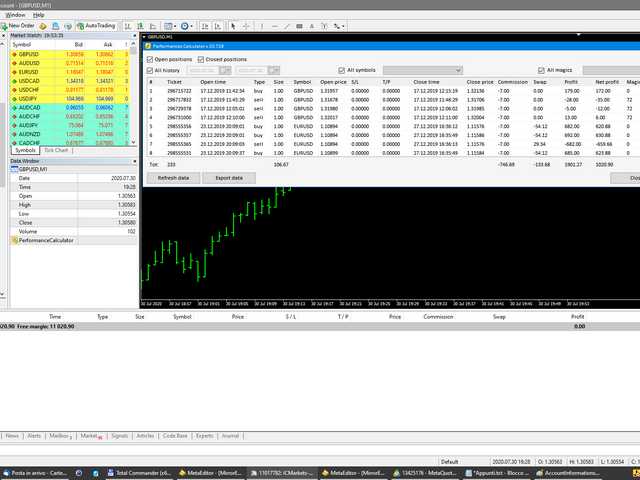
Utility for know the performance of your acoount.

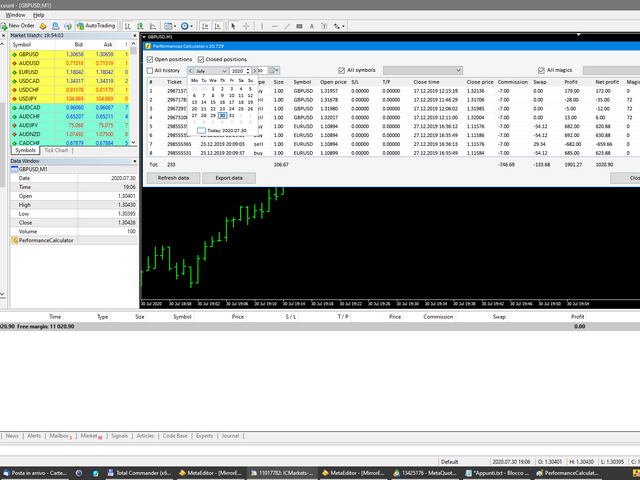
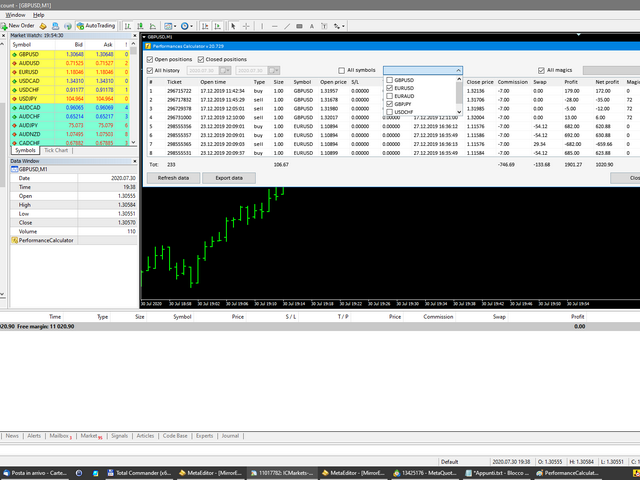
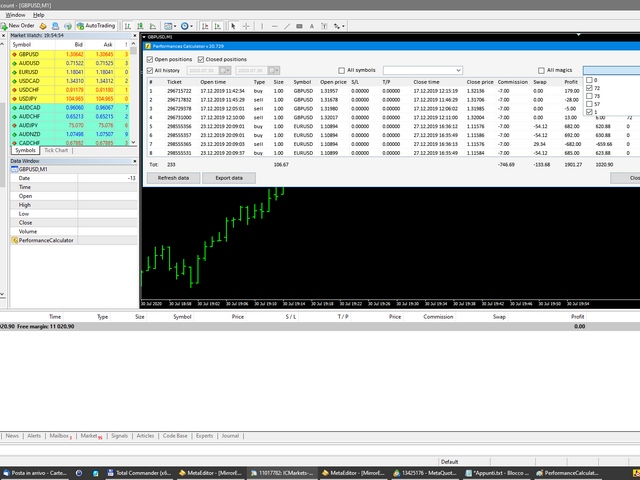
From dialog you can filter data in this modes:

- You can include or not include the open positions
- You can include or not the closed positions
- You can filter the data by date (from, to)
- You can filter the data by simbols (multi selection)
- You can filter the data by magic number (multi selection)

On bottom of table, are show the total of:

- Number of data
- Total size
- Total commissions paid
- Total swap paids
- Total profits
- Total net profits (profits - commissions - swap)

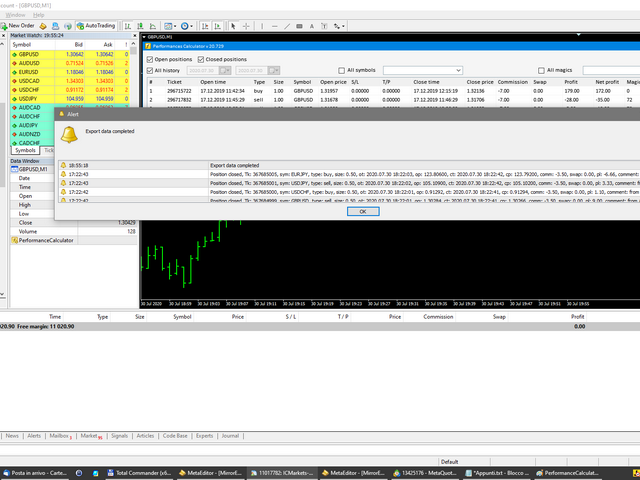
You can also export the data in Excel
Önerilen ürünler
One Click Trader Utility MT5
AL MOOSAWI ABDULLAH JAFFER BAQER
One-Click Trader Utility for MT5 Professional Trading at Your Fingertips One-Click Trader Utility is a premium MT5 tool designed for active traders who need lightning-fast execution and real-time performance metrics. For just $30, transform your trading experience with institutional-grade technology previously available only to professional traders. Key Features Ultra-Fast Execution - Open and close positions with a single click, critical for scalpers and news traders Real-Time Market Metrics -
Partial
Pablo Filipe Soares De Almeida
Partial Close Manager – İşlem Hacmi Ayarlama Aracı Bu araç, MetaTrader 5’te açık işlemlerde kısmi kapatma yapmanızı sağlar. Özellikler Kısmi Kapatma: Açık işlemlerin bir kısmını tek işlemle kapatın. Hacim Hesaplama: Kapatılacak hacmi otomatik hesaplar, manuel giriş gerekmez. Çoklu Emir Desteği: Aynı semboldeki tüm açık emirlerde kısmi kapatma uygular. Taşınabilir Tablo: Başlığı tıklayıp basılı tutarak tabloyu grafikte istediğiniz yere taşıyın.

Core function Intelligent transaction management one-click opening and closing operation, which supports user-defined lots to set multiple closing modes: all closing, closing by direction and closing by profit and loss status. Professional risk control, real-time risk monitoring and spread control to avoid high-cost trading environment. Visual control panel has an intuitive graphical interface, and all functions can be operated with one button to display position information, profit and loss sta
FREE
KALI-FX Trade Manager – Advanced Exit & Risk Management Utility for MetaTrader 5 The KALI-FX Trade Manager is a compact utility designed to automate trade-exit and risk management with precision and consistency. It integrates breakeven control , trailing stop logic , partial closing , automatic SL/TP assignment , and   Equity Protection System — ensuring every position and the overall account are handled according to predefined safety parameters. This tool supports both manual and EA-initiated
One Click Trading – Auto TP SL Developer TraderLinkz Version 1.00 Category Utility What it does Adds missing TP and SL to your manual trades and pending orders Sets them once per ticket Lets you move TP and SL afterward Works on hedging and netting accounts Scans on every tick and reacts on trade events Why you want it You place faster entries You get consistent risk and exit targets You reduce fat finger errors You keep full manual control Quick start Attach the EA to any chart Keep TP and SL e
FREE
Working with pending orders Buy Stop and Sell Stop. A channel of two indicators iMA (Moving Average, MA). Input parameters Take Profit   - Take Profit; Trailing Stop   - trailing; Trailing Step   - trailing step; Lots   - lot size is set manually (a NECESSARY CONDITION:   Risk   must be equal to zero!); Risk   - lot size is calculated automatically, in risk percents per trade (a NECESSARY CONDITION: "Lots" must be equal to zero!); Difference   - offsets from the channel borders; Expert Every Ti
FREE
Lot by Risk MT5
Sergey Vasilev
4.93 (14)
Lot by Risk ticaret paneli elle işlem yapmak üzere tasarlanmıştır. Bu, emir göndermek için alternatif bir araçtır. Panelin ilk özelliği, kontrol hatlarını kullanarak siparişlerin uygun bir şekilde düzenlenmesidir. İkinci özellik, stop loss hattı mevcut olduğunda belirli bir risk için işlem hacminin hesaplanmasıdır. Kontrol hatları kısayol tuşları kullanılarak ayarlanır: kar al - varsayılan olarak T tuşu; price - varsayılan olarak P tuşu; kaybı durdur - varsayılan olarak S tuşu; Tuşları ticar
FREE
FREE FREE FREE Trade Assistant MT5 – Professional Trading & Risk Management Panel Trade Assistant MT5 is an advanced trading panel designed to help traders execute orders faster, safer, and more professionally . It simplifies manual trading by combining smart order management , precise risk control , and one-click execution , making it ideal for both beginners and advanced traders. This tool does not trade automatically . Instead, it empowers you with full control while applying professional-gra
FREE
TradeMngrMT5
Edgar Enrique Retontali
TradeManager 1.0   is an Expert Advisor for MetaTrader 4 y 5 that streamlines real-time trade management. Through a graphical control panel, you can send market and pending orders, move stop losses to breakeven, and automatically calculate position size based on your risk settings. Below is a comprehensive overview of its features and input parameters. Key Features Market Orders & Pending Orders BUY/SELL Buttons : Instantly open long or short positions at market. BUY STOP / SELL STOP / BUY LIMI
Important! Demo version will work only on EURGBP. One Click Trader  is a tool designed for MetaTrader 4 platform, which enables you to take your trading to the next level. It enables you to open, manage and close your trades in simple an efficient way by just one click of your mouse button. "-"   ,  "+"  change OCT window size  Up arrow minimizes the OCT panel Down arrow maximizes the OCT panel Right arrow displays the next panel with additional features Left arrow hides the panel with additiona
FREE
Manual Trading Assistant Pro 【Manuel Yatırımcılar İçin Nihai "Hayatta Kalma" Aracı】 Hızlı piyasa hareketleri sırasında lot hesaplamaları veya TP/SL ayarlarıyla hiç zorlandınız mı? Bu araç, %100 "Giriş (Saldırı)" üzerine odaklanmak ve "Çıkış (Savunma)" işini makineye bırakmak isteyen yatırımcılar için tasarlanmıştır. 【V3.82'de Yeni: Tanı Özelliği】 Dahili Ayar Tanısı (Pips Check) Yanlış ayarlar konusunda endişelenmeyin. [Pips Check] düğmesi, çarpan ayarlarınızın aracı kurumunuzun formatına (JPY
️ Not: Bu EA manuel işlem panelidir. MQL5 Market doğrulamasında sadece bir test işlemi otomatik açar. Normal kullanımda tüm işlemler manuel yapılır. fRC Trade Assistant — Akıllı Manuel İşlem Paneli fRC Trade Assistant , manuel işlem yapanlar için geliştirilmiş, tek tıkla pozisyon açma, risk bazlı lot hesaplama ve otomatik SL/TP yerleştirme özelliklerine sahip akıllı bir işlem panelidir. Örneğin 1000$ bakiyeniz var ve %1 risk belirlediniz. Panel otomatik olarak lotu hesaplar; işlem açıldığınd
EasyTradePad – MetaTrader 5 için Ticaret Paneli EasyTradePad   , manuel ve yarı otomatik ticaret için bir araçtır. Panel, emirlerin ve pozisyonların hızlı bir şekilde yönetilmesini ve tek tıklamayla risk yönetimi hesaplamalarının yapılmasını sağlar. Panel Özellikleri: Önceden tanımlanmış risk (% veya mevduat para birimi) ile işlemleri açın ve kapatın SL ve TP'yi puan, yüzde veya parasal değerler olarak ayarlayın Risk-ödül oranını otomatik olarak hesaplayın Zarar durdurmayı breakeven'a taşıyın K
TP SL Bot MT5
Ruslan Brezovskiy
5 (1)
TP SL Bot - Yeni açılan emirlere, belirtilen talimatlarınıza göre otomatik olarak Stop Loss ve Take Profit ayarlayan bir araçtır. Ayrıca, istenen Stop Loss/Take Profit boyutunda istenen miktarı elde etmek için işlem açmak için gereken hacmi hesaplama özelliği de bulunmaktadır. Boyut ve parametre ayarlamaları için birkaç seçenek vardır: 1. Mevcut hesap bakiyesinin yüzdesi olarak kullanıcı tarafından belirtilen miktarlara göre ayarlama yapma. 2. Kullanıcı tarafından belirtilen Stop Loss veya Take
Executor Trader Panel (Sta) - Standard Version   is a multi-functional trading tool designed for traders. The trading panel integrates over 30 individual functions and more than 10 combined functions, providing traders with a highly flexible operational approach. Main Features of the Executor: Instant Connection Status:   Immediately know if the connection with the broker is lost. Time Synchronization:   Instantly know the current local time and the time of the trading server. Universal Compati
A powerful and intuitive trade management tool designed for scalpers and intraday traders. Created to complement the Nampim Samba Scalper strategy , it allows traders to open, manage, and close positions quickly without leaving the chart.  Key Features: Customizable trading panel – choose position (left, right, center, top, bottom). One-click trading buttons – instantly open Buy/Sell trades with pre-set lot sizes. Close management – close last 1/2/3 trades or all Buy/Sell positions with one clic
FREE
Virgilio is a multifunction control panel consisting of several panels, each of which performs one of the most useful functions used by traders. Its aesthetic is unique, designed to blend into any working environment and offer a user experience that makes work even more enjoyable. Its operativity is simple and intuitive, developed with attention to details to be as userfriendly as possible. Its main panel displays all the basic account and chart data. The first panel offers the user the possib
Note:   All   inputs of this EA   are designed in Arabic for easier configuration and management Auto Smart Trade Manager EA Ar   automatically manages trades on MetaTrader 5. Sets   Stop Loss (SL)   and   Take Profit (TP) , supports   Trailing Stop   to secure profits, and includes   Equity Protection . Smart management for all trades or by Magic Number and symbol, with full control over slippage and risk. Trading involves high risk and you may lose part or all of your capital. Use this EA cau
FREE
Breakeven Bot
Gabriel Paul Ange Perrin
Optimize your trading management with Breakeven Bot, the essential tool for active traders managing multiple positions at once. No more wasting time manually adjusting your stops—one click is all it takes to secure your profits! Main Feature: ️ "BREAKEVEN" Button – Instantly set all profitable positions to breakeven and protect your gains quickly. ️ Customization Options: Set breakeven in pips or currency, depending on your preference. Choose whether breakeven should be at the entr
FREE
FXTrade Panel
Sakariya Bhaskar Nitinbhai
FXTrade Panel – Akıllı ve Hızlı MT5 İşlem Yöneticisi FXTrade Panel, MetaTrader 5 için tek tıklamayla işlem yürütme ve yönetimi ile alım satım verimliliğinizi artırmak için tasarlanmış gelişmiş ama kullanımı kolay bir işlem aracıdır. Ana Özellikler: • Hesap Genel Bakış: hesap numarası, kaldıraç, bakiye ve mevcut spread’i gösterir.   • Lot Boyutu Kontrolü: sezgisel artı/eksi düğmelerle ayarlanabilir lot boyutu.   • Risk Yönetimi: pip cinsinden Stop Loss (SL), Take Profit (TP1, TP2) ve Trailing
FREE
When executing an order, whether through the Metatrader ticket on a computer or the Metatrader app on a mobile device, either manual or pending, Easy Trade will automatically set the take profit and stop loss levels, as well as a limit order with its respective take profit and stop loss levels. It follows the trading strategy for market open (US30, US100, US500), but it can be applied to any market asset.
A utility for managing open positions using virtual (invisible to the broker) stops. Virtual stop loss and virtual take profit can be freely moved around the chart. If the price touches the virtual stop line (TP, SL, TS), the EA will close all orders of the same direction on the current chart. Closing orders by virtual take profit is possible only if there is a profit. With the help of the built-in trading simulator, you can, in the strategy tester, see how the adviser works. Parameters Block
Use for risk management and opening positions as per the user settings. The user is allowed to set the stop loss and take profits in pips. The user can also choose the risk percentage per trade that he/she wants to use while opening the trade. The volume of the trade that the user wants to sent shall be calculator according to the stoploss and the risk percentage that the user has selected.
EA Utility Tool: Risk Consistency Manager The Risk Consistency Manager EA is a simple yet powerful tool that automates risk management across multiple open positions. It dynamically adjusts stop-loss levels to distribute a predefined total risk value (e.g., $10,000) evenly among all active trades. Key Features: Dynamic Risk Distribution: Automatically allocates an equal share of risk to each position (e.g. with total risk capital of $10,000, its will be distribute each trade with $3,333.33 risk
FREE
MAFX Trading Manager
Mark Anthony Noblefranca Nazarrea
5 (1)
MAFX Trading Manager MetaTrader 5 için profesyonel manuel işlem yönetim paneli Ürün Genel Bakışı MAFX Trading Manager, MetaTrader 5 için geliştirilmiş profesyonel bir manuel işlem yönetim panelidir. Traderların işlemleri daha verimli şekilde açıp yönetmelerine yardımcı olur. Hızlı emir yürütme ve temel işlem yönetim araçlarını kompakt ve kullanıcı dostu bir arayüzde sunar. Bu ürün, otomatik stratejilere veya işlem sinyallerine bağlı kalmadan, işlemlerini daha fazla kontrol, hız ve tutarlılıkla y
FREE
Are you an MT5 trader who needs rapid, reliable risk management? ​Introducing this essential utility – a powerful, free Expert Advisor designed to instantly close all open positions on your MetaTrader 5 account with a single, dedicated action. This tool is a must-have for emergency market exits or quick, decisive profit-taking. ​ Why is this a FREE tool? ​I am a professional MQL developer actively focused on delivering   5-star solutions   and   securing custom MQL5 Freelance Jobs . This free ut
FREE
The free trade manager — simple but effective. Quickly open positions with preset take profit and stop loss levels. Set everything to breakeven or close all trades with one click. Get plenty of information on your chart about your account, trades, and profit/loss. It speaks for itself — that’s how simple this manager is to use. Check out our other EAs and our Telegram for more information! By traders, for traders!
FREE
TP & SL Calculator Indicator for MT5 The Take Profit & Stop Loss Calculator Indicator is an effective risk and capital management tool designed for MetaTrader 5. It helps traders easily determine and set take profit (TP) and stop loss (SL) levels directly on the chart. This indicator improves trading efficiency through its dedicated control panel, which includes: Creating and managing TP and SL levels for both Buy and Sell positions Calculating trade volume in lots Displaying the Risk-to-Reward
FREE
When executing an order, whether through the Metatrader ticket on a computer or the Metatrader app on a mobile device, either manual or pending, Easy Trade will automatically set the take profit and stop loss levels, as well as a limit order with its respective take profit and stop loss levels. It follows the trading strategy for market open (US30, US100, US500), but it can be applied to any market asset.
FREE
Close Manager
ELITE FOREX TRADERS LLC
One-Click Trade Manager for MetaTrader 5 The Close Manager Buttons EA is a powerful utility designed to give you full control of your open positions and pending orders with just one click. Forget about manually closing trades one by one during fast market moves—this EA does it instantly, safely, and efficiently. Key Features Close All Trades – instantly close every open position Close Only Buy Trades – exit only BUY positions while keeping SELL trades running Close Only Sell Trades – exit only
FREE
Bu ürünün alıcıları ayrıca şunları da satın alıyor
Trade Assistant MT5
Evgeniy Kravchenko
4.41 (206)
It helps to calculate the risk per trade, the easy installation of a new order, order management with partial closing functions, trailing stop of 7 types and other useful functions. Additional materials and instructions Installation instructions - Application instructions - Trial version of the application for a demo account Line function -   shows on the chart the Opening line, Stop Loss, Take Profit. With this function it is easy to set a new order and see its additional characteristics bef
Trade Manager EA’ye hoş geldiniz! Ticaretin daha sezgisel, hassas ve verimli hale gelmesi için tasarlanmış nihai risk yönetim aracı ile tanışın. Bu sadece bir emir verme aracı değil; ticaret planlaması, pozisyon yönetimi ve risk kontrolü için kapsamlı bir çözüm. İster yeni başlayan bir yatırımcı olun, ister deneyimli bir trader ya da hızlı emir gerektiren bir scalper, Trade Manager EA ihtiyaçlarınıza uyum sağlar ve forex, endeksler, emtialar ve kripto paralar dahil tüm piyasalarda esneklik sunar
Local Trade Copier EA MT5
Juvenille Emperor Limited
4.96 (122)
Local Trade Copier EA MT5   ile olağanüstü hızlı işlem kopyalama deneyimi yaşayın. Kolay 1 dakikalık kurulumuyla bu işlem kopyalayıcısı, aynı Windows bilgisayarda veya Windows VPS'te birden fazla MetaTrader terminali arasında işlemleri kopyalamanıza olanak tanır ve 0.5 saniyenin altındaki şimşek hızında kopyalama hızları sunar. Başlangıç seviyesinde veya profesyonel bir tüccar olsanız da,   Local Trade Copier EA MT5 , spesifik ihtiyaçlarınıza göre özelleştirmek için geniş bir seçenek yelpazesi s
TradePanel MT5
Alfiya Fazylova
4.86 (148)
Ticaret Paneli çok işlevli bir ticaret asistanıdır. Uygulama, manuel ticaret için 50'den fazla ticaret işlevi içerir ve çoğu ticaret işlemini otomatikleştirmenize olanak tanır. Dikkat, uygulama strateji test cihazında çalışmıyor. Satın almadan önce demo sürümünü bir demo hesabında test edebilirsiniz. Demo sürümü burada . Talimatların tamamı buraya . Ticaret. Tek tıklamayla alım satım işlemlerini gerçekleştirmenizi sağlar: Otomatik risk hesaplaması ile bekleyen emir ve pozisyonları açın. Tek tıkl
Beta Sürümü Telegram to MT5 Signal Trader resmi alfa sürümüne neredeyse hazır. Bazı özellikler hâlâ geliştirilmekte olup küçük hatalarla karşılaşabilirsiniz. Sorun yaşarsanız lütfen bildirin, geri bildiriminiz yazılımın herkes için gelişmesine yardımcı olur. Fiyat 20 satıştan sonra artacaktır. Kalan $90 kopya: 2/20 . Telegram to MT5 Signal Trader , Telegram kanallarından veya gruplarından gelen işlem sinyallerini otomatik olarak MetaTrader 5 hesabınıza kopyalayan güçlü bir araçtır. Herkese açı
Tired of complex order placement and manual calculations? Trade Dashboard is your solution. With its user-friendly interface, placing orders becomes effortless, by a single click, you can open trades, set stop loss and take profit levels, manage trade lot size, and calculate risk to reward ratios, allowing you to only focus on your strategy. Say goodbye to manual calculations and streamline your trading experience with Trade Dashboard. Download  Demo Version  right now. You can find  Details of
Copy Cat More Trade Copier MT5 (Kopyalayıcı Kedi MT5) , günümüzün ticaret zorluklarına yönelik tasarlanmış yerel bir ticaret kopyalayıcısı ve eksiksiz risk yönetimi ve yürütme çerçevesidir. Prop firması zorluklarından kişisel portföy yönetimine kadar, sağlam yürütme, sermaye koruması, esnek yapılandırma ve gelişmiş ticaret işleme kombinasyonu ile her duruma uyum sağlar. Kopyalayıcı hem Master (gönderici) hem de Slave (alıcı) modunda çalışır, piyasa ve bekleyen emirlerin, ticaret değişikliklerini
Trade copier MT5
Alfiya Fazylova
4.61 (36)
Trade Copier, ticaret hesapları arasındaki işlemleri kopyalamak ve senkronize etmek için tasarlanmış profesyonel bir yardımcı programdır. Kopyalama, tedarikçinin hesabından/terminalinden alıcının aynı bilgisayarda veya vps'de kurulu olan hesabına/terminaline gerçekleşir. Satın almadan önce demo sürümünü bir demo hesabında test edebilirsiniz. Demo versiyonu burada . Tüm talimatlar burada . Ana işlevler ve avantajlar: Emirlerin kopyalanmasını destekler: МТ5> МТ5, МТ4> МТ5, МТ5> МТ4. Emirlerin kopy
Ultimate Extractor - Professional Trading Analytics for MT5 *****this is the local HTML version of Ultimate Extractor. Check out Ultimate Extractor Cloud on mql5 for the Cloud version****** Ultimate Extractor transforms your MetaTrader 5 trading history into actionable insights with comprehensive analytics, interactive charts, and real-time performance tracking. What It Does Automatically analyzes your MT5 trading history across all Expert Advisors and generates detailed HTML reports with inte
Riskinizi otomatik olarak hesaplarken işlemlere hızlı bir şekilde girip çıkmanıza yardımcı olacak Ticaret Yöneticisi. Aşırı Ticaret, İntikam Ticareti ve Duygusal Ticaretten korunmanıza yardımcı olacak özellikler içerir. İşlemler otomatik olarak yönetilebilir ve hesap performans ölçümleri bir grafikte görselleştirilebilir. Bu özellikler, bu paneli tüm manuel yatırımcılar için ideal kılar ve MetaTrader 5 platformunun geliştirilmesine yardımcı olur. Çoklu Dil desteği. MT4 Sürümü  |  Kullanım Kılavu
Exp COPYLOT CLIENT for MT5
Vladislav Andruschenko
3.82 (34)
MT5 için ticari kopyalayıcı, МetaТrader 5 platformu için bir ticari kopyalayıcıdır   . arasındaki   forex işlemlerini kopyalar.       COPYLOT MT5 sürümü için   herhangi bir hesap   MT5   -   MT5, MT4   -   MT5 (veya COPYLOT MT4 sürümü için   MT4 -   MT4 MT5   -  MT4) Güvenilir fotokopi makinesi! MT4 sürümü Tam tanım   +DEMO +PDF Nasıl alınır Nasıl kurulur     Günlük Dosyaları nasıl alınır?     Nasıl Test Edilir ve Optimize Edilir     Expforex'in tüm ürünleri Ayrıca МТ4 terminali   (МТ4   -  
Smart Stop Scanner – Gerçek piyasa yapısına dayalı çoklu varlık stop-loss analizi Genel Bakış Smart Stop Scanner, birden fazla piyasadaki stop-loss seviyelerini profesyonel bir şekilde takip etmek için tasarlanmıştır. Sistem, gerçek piyasa yapısına dayanan breakout’ları, daha yüksek zirveleri ve daha düşük dipleri otomatik olarak algılar ve en önemli stop bölgelerini tespit eder. Tüm bilgiler, yüksek çözünürlüklü ekranlarla uyumlu (DPI-aware) net ve düzenli bir panelde sunulur. Forex, Altın, E
Telegram'dan MT5'e:   Nihai Sinyal Kopyalama Çözümü Telegram'dan MT5'e işlemlerinizi basitleştirin, DLL'lere ihtiyaç duymadan işlem sinyallerini doğrudan Telegram kanallarından ve sohbetlerinden MetaTrader 5 platformunuza kopyalayan modern araç. Bu güçlü çözüm hassas sinyal yürütme, kapsamlı özelleştirme seçenekleri sağlar, zamandan tasarruf sağlar ve verimliliğinizi artırır. [ Instructions and DEMO ] Temel Özellikler Doğrudan Telegram API Entegrasyonu Telefon numarası ve güvenli kod ile kimlik
The product will copy all telegram signal to MT5 ( which you are member) , also it can work as remote copier.  Easy to set up, copy order instant, can work with almost signal formats, image signal,  s upport to translate other language to English Work with all type of channel or group, even channel have "Restrict Saving Content", work with  multi channel, multi MT5 Work as remote copier: with signal have ticket number, it will copy exactly via ticket number. Support to backtest signal. How to s
HINN MAGIC ENTRY – the ultimate tool for entry and position management! Place orders by selecting a level directly on the chart! full description Key features: - Market, limit, and pending orders - Automatic lot size calculation - Automatic spread and commission accounting - Unlimited partitial take-profits  - Breakeven and trailing stop-loss and take-profit  functions - Invalidation leves - Intuitive, adaptive, and customizable interface - Works with any assets and account types Really feels
YuClusters
Yury Kulikov
4.93 (43)
Attention: You can view the program operation in the free version  YuClusters DEMO .  YuClusters is a professional market analysis system. The trader has unique opportunities to analyze the flow of orders, trade volumes, price movements using various charts, profiles, indicators, and graphical objects. YuClusters operates on data based on Time&Sales or ticks information, depending on what is available in the quotes of a financial instrument. YuClusters allows you to build graphs by combining da
MT5 to Telegram Signal Provider , hesabınızı bir sinyal sağlayıcı haline getirerek belirtilen sinyalleri Telegram'ın sohbetine, kanalına veya grubuna göndermeyi sağlayan kullanımı kolay, tamamen özelleştirilebilir bir araçtır. Rakip ürünlerin çoğunun aksine, DLL içe aktarması yapmaz. [ Demo ] [ Kılavuz ] [ MT4 Versiyonu ] [ Discord Versiyonu ] [ Telegram Kanalı ]  New: [ Telegram To MT5 ] Kurulum Adım adım bir kullanıcı kılavuzu mevcuttur. Telegram API'si hakkında bilgi gerekmemektedir; ihtiyac
Smart Stop Manager – Profesyonel hassasiyetle otomatik stop-loss yönetimi Genel Bakış Smart Stop Manager, Smart Stop ürün serisinin yürütme katmanıdır. Birden fazla açık pozisyonda yapılandırılmış, güvenilir ve tamamen otomatik stop-loss yönetimi isteyen trader’lar için tasarlanmıştır. Tüm açık işlemleri sürekli izler, Smart Stop piyasa yapısı mantığını kullanarak en uygun stop seviyesini hesaplar ve stopları net ve şeffaf kurallarla otomatik olarak günceller. İster tek bir varlıkla işlem yapı
Mentfx Mmanage mt5
Anton Jere Calmes
4.25 (8)
The added video will showcase all functionality, effectiveness, and uses of the trade manager. Drag and Drop Trade Manager. Draw your entry and have the tool calculate the rest. Advanced targeting and close portions of a trade directly available in tool (manage trades while you sleep). Market order or limit order on either side with factored spread. Just draw the entry, the tool does the rest. Hotkey setup to make it simple. Draw where you want to enter, and the stop loss, the tool calculates al
Easy Trade – Akıllı, Basit ve Güçlü İşlem Yönetimi Easy Trade, riski kontrol altında tutmak ve işlemleri sorunsuz gerçekleştirmek isteyen MetaTrader kullanıcıları için hepsi bir arada işlem yönetim çözümüdür. Gerçek kullanıcı geri bildirimleriyle sıfırdan tasarlanan Easy Trade, işlemleri birden fazla sembolde yürütmeyi, izlemeyi ve yönetmeyi kolaylaştırır – iş akışınızı karmaşıklaştırmadan. İster manuel olarak scalping yapın ister küçük bir işlem portföyü yönetin, Easy Trade dikkatinizi olması
Grid Manual MT5
Alfiya Fazylova
4.9 (20)
Grid Manual, sipariş ızgarasıyla çalışmak için kullanılan bir ticaret yardımcı programıdır. Yardımcı program evrenseldir, esnek ayarlara ve sezgisel bir arayüze sahiptir. Sadece kayıpların ortalaması yönünde değil, aynı zamanda kazanç artışı yönünde de bir emir ızgarası ile çalışır. Tüccarın bir emir ızgarası oluşturmasına ve eşlik etmesine gerek yoktur, bu yardımcı programı yapacaktır. Emri açmanız yeterlidir ve Grid manual otomatik olarak ona bir emir ızgarası oluşturacak ve kapanana kadar ona
EASY Insight AIO – Akıllı ve zahmetsiz yatırım için hepsi bir arada çözüm Genel Bakış Tüm piyasayı — Forex, Altın, Kripto, Endeksler ve hatta Hisseler — saniyeler içinde, manuel grafik incelemesi, gösterge kurulumu ya da karmaşık ayarlar olmadan analiz edebildiğinizi hayal edin. EASY Insight AIO , yapay zekâ destekli yatırım için nihai, kullanıma hazır dışa aktarma aracınızdır. Tüm piyasanın kapsamlı bir anlık görüntüsünü tek bir temiz CSV dosyasında sunar; bu dosya ChatGPT, Claude, Gemini, Pe
Seconds Chart — MetaTrader 5 için saniye bazlı grafikler oluşturmanıza olanak sağlayan eşsiz bir araçtır. Seconds Chart sayesinde saniye cinsinden zaman dilimleriyle grafik oluşturabilir, standart dakika veya saatlik grafiklerde mümkün olmayan esneklik ve analiz hassasiyetine ulaşabilirsiniz. Örneğin, S15 zaman dilimi 15 saniyelik mum çubuklarını ifade eder. Desteklenen özel sembollerle herhangi bir gösterge ve danışman kullanabilirsiniz. Onlarla çalışmak, standart grafiklerde işlem yapmak kadar
Üye olduğunuz herhangi bir kanaldan (özel ve kısıtlı olanlar dahil) sinyalleri doğrudan MT5'inize kopyalayın.  Bu araç, kullanıcıyı göz önünde bulundurarak tasarlanmış olup işlemleri yönetmek ve izlemek için ihtiyacınız olan birçok özelliği sunar. Bu ürün, kullanıcı dostu ve görsel olarak çekici bir arayüzde sunulmaktadır. Ayarlarınızı özelleştirin ve ürünü dakikalar içinde kullanmaya başlayın! Kullanıcı Kılavuzu + Demo  | MT4 Sürümü | Discord Sürümü Demo denemek isterseniz lütfen kullanıcı kı
Advanced trading tool: One click smart orders that execute under your conditions Developed by trader for trading community:  position size calculator (lot size), open position after price action, strategy builder, set and forget trading, mobile notifications Risk Management -  Risk percentage position size calculator, gain percentage, target risk reward ratio, spread and commissions are included in calculations 7 Advanced order types  - Set and forget trading with price action automation (OCO,
Lazy Trader is your personal risk management assistant that independently finds the best market entries, manages positions, and helps you extract maximum profit from every trading idea! It monitors charts from M1 to W1 , finds optimal entry points based on your parameters, and manages trades without your involvement: - Got an idea on the daily chart? No need to wait for lower timeframes to form a signal — Lazy Trader will check everything and open all necessary positions while you live your lif
Cerberus Equity Watcher
Samuel Bandi Roccatello
5 (3)
Cerberus the Equity Watcher , hesap öz sermayenizi sürekli olarak izleyen ve hatalı EA'ların veya isteğe bağlı bir tüccarsanız duygusal davranışınızın neden olduğu büyük düşüşlerden kaçınan bir risk yönetimi aracıdır. Hatalar içerebilecek veya beklenmedik piyasa koşullarında iyi performans göstermeyebilecek EA'lara güvenen sistematik tüccarlar için son derece yararlıdır. Cerberus, bir minimum öz sermaye değeri ve (isteğe bağlı olarak) bir maksimum değer belirlemenize izin verir, bunlardan herhan
Telegram2MT5 Signal Copier — Telegram sinyallerinizi doğrudan MetaTrader 5’te otomatikleştirin Telegram2MT5 Signal Copier ile Telegram’da aldığınız her sinyal, MetaTrader 5 hesabınızda anında ve otomatik olarak yürütülür. Hızlı, güvenilir ve tamamen özelleştirilebilir. Windows Bridge APP dosyasını ve kılavuzu indirin Köprü (bridge) dosyası, Yerel Web Paneli’ni MT5 EA’ye bağlamak için gereklidir  Windows 10 & Windows 11 — 64 bit — ve 2016’dan itibaren Windows Server ile uyumlu Ana Özellikler Tam
1 tıklama ile ticaret için Ticaret Paneli.   Pozisyonlar ve emirlerle çalışmak!   Grafikten veya klavyeden alım satım. Alım satım panelimizi kullanarak, grafikten tek bir tıklamayla alım satım yapabilir ve alım satım işlemlerini standart MetaTrader kontrolünden 30 kat daha hızlı gerçekleştirebilirsiniz. Bir tüccar için hayatı kolaylaştıran ve bir tüccarın ticaret faaliyetlerini çok daha hızlı ve daha rahat gerçekleştirmesine yardımcı olan parametrelerin ve işlevlerin otomatik hesaplamaları. Graf
Auto Trade Copier is designed to copy trades to multiple MT4, MT5 and cTrader accounts/terminals with 100% accuracy. The provider and receiver accounts must be on the same PC/VPS. With this tool, you can copy trades to receiver accounts on the same PC/VPS. All trading actions will be copied from provider to receiver perfectly. This version can be used on MT5 accounts only. For MT4 accounts, you must use Auto Trade Copier (for MT4). Reference: - For MT4 receiver, please download Trade Receiver Fr
Yazarın diğer ürünleri
Script to create arrows and lines on chart of history positions traded on account for the symbol where you launch the application. From inputs you can select: - Magic number (default is -1; -1 = all magics number) - "From" date and time (default is 1970.01.01 00:00; all positions) - "To" date and time (default is 1970.01.01 00:00; all positions) - Color for buy open positions (arrows and lines between open and close) - Color for buy closing positions (arrows) - Color for sell open positions (arr
FREE
The new version of  MirrorSoftware 2021  has been completely rewriten and optimized.  This version requires to be loaded only on a single chart because  it can detect all actions on every symbol and not only the actions of symbol where it is loaded. Even the  graphics and the configuration mode  have been completely redesigned. The MirrorSoftware is composed of two components (all components are required to work):  MirrorController  (free indicator): This component must be loaded into the MASTER
FREE
Script to create arrows and lines   on chart   of history positions traded on account for the symbol where you launch the application. From inputs you can select: - Magic number (default is -1; -1 = all magics number) - "From" date and time (default is 1970.01.01 00:00; all positions) - "To" date and time (default is 1970.01.01 00:00; all positions) - Color for buy open positions (arrows and lines between open and close) - Color for buy closing positions (arrows) - Color for sell open positions
FREE
Utility for show on charts the visual informations about: - a vertical line at start of each bar of selected timeframe - a vertical line at start of each day - a vertical line at start of each week - vertical lines at start / end of trading sessions selected - bid / ask prices, spread, money value for each point (of 1 standard lot) and last tick time recived" You can enable / disable each information and set the color for each line
FREE
This indicator is an utility for have always under control, how much time is left at the end of the bar setted. The utility show on the lower right of the chart, the countdown to the end. When the remaining seconds is = to the seconds set in the input, the color of remaining seconds on chart, change color and play a warning sound to warn you that the bar is about the end. When the remaining seconds is < to the seconds set in the input, the utility play a beep to warn you that the bar is in co
FREE
This indicator is an utility for have always under control, how much time is left at the end of the bar setted. The utility show on the lower right of the chart, the countdown to the end. When the remaining seconds is = to the seconds set in the input, the color of remaining seconds on chart, change color and play a warning sound to warn you that the bar is about the end. When the remaining seconds is < to the seconds set in the input, the utility play a beep to warn you that the bar is in co
FREE
Script to load on chart the orders, starting from "Signal history report" downloaded from MQL5. If you found a good signal on "Signals" section of this site and you want to see the history orders on chart, you can do it, following this steps: - Download the csv file of history orders - Copy file in the common folder - Launch the script and set the input that are: - Report type (MT4 or MT5) - File name - Delimiter (default is ;) - Name of symbol to load (if symbol on file is for example EURUSDi,
FREE
Utility for know all informations and settings of account where the platform is connected The informations that you can know are for example: - The difference from server time and time of your PC - The limit orders that you can place at market - The credit that you have - The stopout mode of your broker - The exact name of company of your broker and other informations
FREE
Utility for show on charts the visual informations about: - a vertical line at start of each bar of selected timeframe - a vertical line at start of each day - a vertical line at start of each week - vertical lines at start / end of trading sessions selected - bid / ask prices, spread, money value for each point (of 1 standard lot) and last tick time recived" You can enable / disable each information and set the color for each line
FREE
Utility for know all informations and settings of terminal where the utility is loaded. The informations that you can know are for example: - The path of folder where the terminal start - The path of   folder where the terminal store the indicators, experts advisors etc - The path of   common folder - The permission to use DLL, to automated trading etc - The permission to send email, FTP or notifications to smartphone and many other informations
FREE
Script to load on chart the orders, starting from "Signal history report" downloaded from MQL5. If you found a good signal on "Signals" section of this site and you want to see the history orders on chart, you can do it, following this steps: - Download the csv file of history orders - Copy file in the common folder - Launch the script and set the input that are: - Report type (MT4 or MT5) - File name - Delimiter (default is ;) - Name of symbol to load (if symbol on file is for example EURUSDi,
FREE
The new version of  MirrorSoftware 2021  has been completely rewriten and optimized.  This version requires to be loaded only on a single chart because  it can detect all actions on every symbol and not only the actions of symbol where it is loaded. Even the  graphics and the configuration mode  have been completely redesigned. The MirrorSoftware is composed of two components (all components are required to work):  MirrorController  (free indicator): This component must be loaded into the MASTER
FREE
Script to calculate equity and balance at a specific date and time.  This script makes up for a lack of MetaTrader account history, that does not show how the balance and equity changes in time. Balance calculation includes closed orders only. Equity calculation includes orders closed before and orders that are still open at the specified time. Example: date and time set to 2020/07/06 00:00. If I had a Buy 1 lot EURUSD position opened at price 1.12470 on the 2020/07/02, the program would ca
FREE
Utility for know all informations and settings of terminal where the utility is loaded. The informations that you can know are for example: - The path of folder where the terminal start - The   path of     folder where the terminal store the indicators, experts advisors etc - The   path of     common folder - The permission to use DLL, to automated trading etc - The permission to send email, FTP or notifications to smartphone and many other informations
FREE
Utility for know all informations and settings of all symbols available on your broker The informations that you can know are for example: - Spread - Digits - Tick value - Size step - Size minimum - Size maximum - Swap buy and sell - Margin required (for 1 standard lot) - Rollover day - Execution mode and many other informations You can filter the symbols by group or you can also choose to see the informations only of symbols available on market watch.
FREE
Utility for know all informations and settings of account where the platform is connected The informations that you can know are for example: - The difference from server time and time of your PC - The limit orders that you can place at market - The credit that you have - The stopout mode of your broker - The exact name of company of your broker and other informations
FREE
Script to calculate equity and balance at a specific date and time.  This script makes up for a lack of MetaTrader account history, that does not show how the balance and equity changes in time. Balance calculation includes closed orders only. Equity calculation includes orders closed before and orders that are still open at the specified time. Example: date and time set to 2020/07/06 00:00. If I had a Buy 1 lot EURUSD position opened at price 1.12470 on the 2020/07/02, the program would ca
FREE
Utility for know all informations and settings of all symbols available on your broker The informations that you can know are for example: - Spread - Digits - Tick value - Size step - Size minimum - Size maximum - Swap buy and sell - Margin required (for 1 standard lot) - Rollover day - Execution mode and many other informations You can filter the symbols by group or you can also choose to see the informations only of symbols available on market watch.
FREE
The new version of  MirrorSoftware 2021  has been completely rewriten and optimized.  This version requires to be loaded only on a single chart because  it can detect all actions on every symbol and not only the actions of symbol where it is loaded. Even the  graphics and the configuration mode  have been completely redesigned. The MirrorSoftware is composed of two components (all components are required to work):  MirrorController  (free indicator): This component must be loaded into the MASTER
Utility for know the performance of your acoount. From dialog you can filter data in this modes: - You can include or not include the open positions - You can include or not the closed positions - You can filter the data by date (from, to) - You can filter the data by simbols (multi selection) - You can filter the data by magic number (multi selection) On bottom of table, are show the total of: - Number of data - Total size - Total commissions paid - Total swap paids - Total profits - Total net
The new version of  MirrorSoftware 2021  has been completely rewriten and optimized.  This version requires to be loaded only on a single chart because  it can detect all actions on every symbol and not only the actions of symbol where it is loaded. Even the  graphics and the configuration mode  have been completely redesigned. The MirrorSoftware is composed of two components (all components are required to work):  MirrorController  (free indicator): This component must be loaded into the MASTER
Filtrele:
İnceleme yok
İncelemeye yanıt