Pulse Trade Indicator
- Индикаторы
-
MYB2B INC.
 MYB2B INC.
Smarter Tools. Sharper Trading Skills. - Версия: 1.4
- Обновлено: 23 октября 2026
Pulse Trade Indicator
Intelligent Trading. Disciplined Management.
See How Quickly Pulse Trade Detects Qualifying Opportunities.
Pulse Trade Indicator is a free MetaTrader 5 visual showcase of our proprietary signal-detection framework. Its primary purpose is to show the algorithm's detection timing on the chart: when it recognizes a qualifying setup, which direction it identifies, and what reference price it marks. This is a way to observe how promptly a setup is identified once the required conditions are confirmed, rather than a promise of a faster trading result.
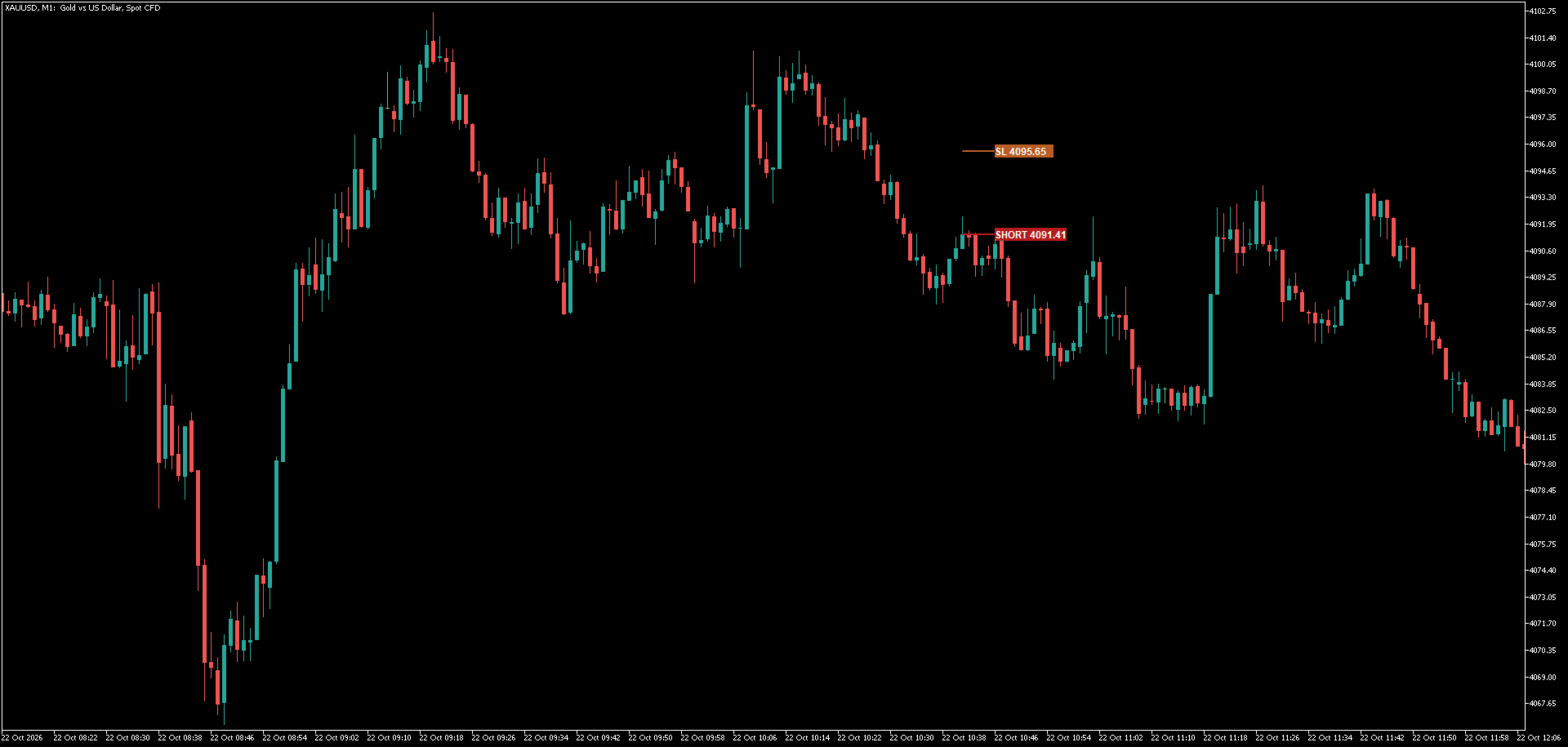
Instead of exposing complicated strategy settings, the indicator presents a clean view of the algorithm's signals on supported M1 charts. Each signal is confirmed from a completed candle and displayed as LONG <price> or SHORT <price>, together with a short horizontal entry-price line. Version 1.4 also marks the initial stop-loss reference as a distinct copper SL <price> label and horizontal line.
Watch the Detection Process on Your Chart
- Observe signal timing: See where the algorithm marks an opportunity after its candle-close conditions are satisfied.
- See direction and reference price: A single, readable LONG or SHORT label makes each detected setup easy to locate.
- See the initial SL reference: Each valid LONG or SHORT signal includes the original strategy stop level in copper. The reference does not trail, move, or represent a broker-placed order.
- Explore historical detections: Scroll through older chart periods to inspect signals where sufficient historical data is available.
- Keep the focus on the algorithm: No distracting dashboards, simulated trade outcomes, take-profit targets, dynamic trailing-stop drawings, or extra technical overlays.
- Know when a chart is unsupported: Clear guidance is provided for unsupported symbols or timeframes.
Proprietary Research, Built-In Profiles
Pulse Trade's signal framework has been developed using instrument-specific research and optimization. For each supported instrument, the indicator uses a built-in, research-selected configuration rather than asking users to choose or fine-tune strategy parameters.
Our research defines the configuration. The indicator lets you observe the resulting detections.
Supported MetaTrader 5 Charts
- XAUUSD (Gold) — M1
- US30.cash (Dow Jones) — M1
- US100.cash (Nasdaq 100) — M1
The indicator is intended for these researched symbol/timeframe combinations. Broker symbol naming, market data, session timing, and available chart history can differ, so displayed signals may vary between installations. Other combinations are not supported.
Research and Signal Verification
Pulse Trade Indicator uses our proprietary signal framework and has undergone focused historical signal validation on its supported instruments. Tests have compared displayed signal direction, timing, and reference prices with the underlying calculations.
This validation checks whether the indicator represents the intended signal logic; it is not proof of superior detection speed, future accuracy, or profitability.
What the Indicator Does — and Does Not — Show
This free indicator is a visual demonstration of opportunity detection, not a complete trading system or an Expert Advisor.
It does not open, close, or modify orders; calculate lots; manage stop-loss, take-profit, or breakeven; or display broker fills and performance results. The displayed SL is a static initial strategy reference from the signal calculation, not a live broker stop, and it does not reflect later break-even or profit-protection changes. Entry and SL labels are reference levels, not confirmed execution prices or trade instructions. A detected setup does not necessarily result in a trade by the separate Pulse Trade EA.
Timing note: Markers represent confirmed, closed-candle calculations. They should not be interpreted as intrabar predictions or a guaranteed reaction time.
Getting Started
- Install the free Pulse Trade Indicator in MetaTrader 5.
- Open XAUUSD, US30.cash, or US100.cash on the M1 timeframe.
- Attach the indicator and allow the required chart history to load.
- Watch confirmed LONG/SHORT labels together with their copper SL reference labels, and scroll back to review historical detections.
For product support, use the MQL5 product comments or messaging system.
Signals are informational illustrations of the algorithm's qualifying setups, not personalized trade recommendations or broker-confirmed executions. No trading outcome is guaranteed.