PFX Trade Manager

Trade manually, manage automatically. Break even, trailing stops, partial closes and an equity guard - all from one clean panel. Free - no DLL, no internet, no subscription.

A ton of work has gone into this to make it the best I can make it, and it is free - not a trial, not a lite version - and it always will be. I am still developing it, so expect regular updates. Spotted a bug, or want something added? Reach out in the Comments and I will get it done.

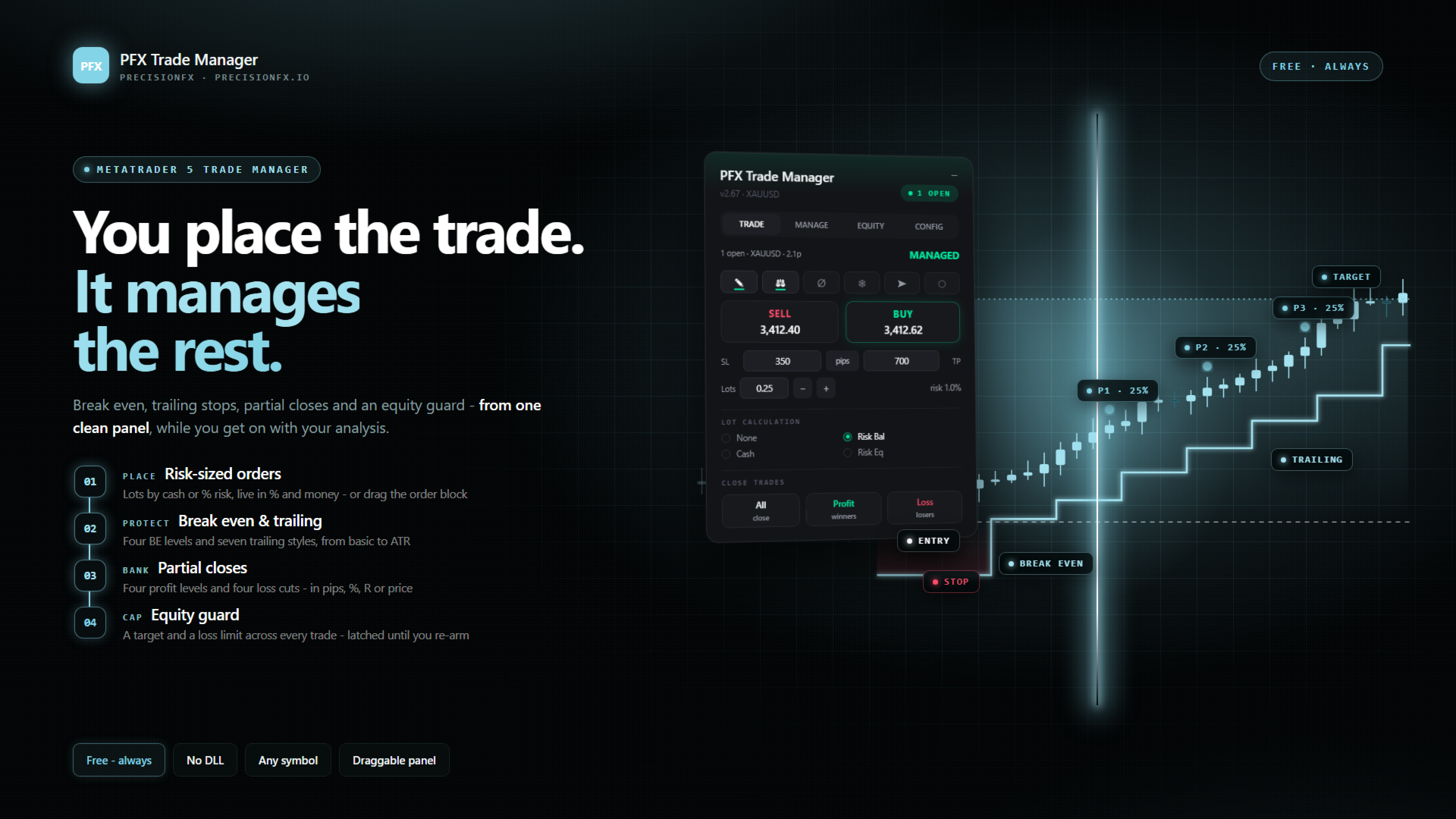
You place the trade. PFX Trade Manager looks after it: it moves your stop to break even, trails it, banks profit in stages and can close everything at a profit target or loss limit - while you get on with your analysis.

PLACE TRADES FAST
  • Buy / Sell at market with live prices, stop and target in price or pips
  • Lot size by fixed lots, cash risk, % of balance or % of equity - with the risk shown live in % and money, red when it is over your limit
  • Drag an order block on the chart: entry, stop and target lines you move into place, market or pending, with an R:R lock
  • Pending orders that trail price, pullback entries, OCO pairs, and hotkeys (Shift + a letter)

MANAGE EVERY TRADE
  • Break even - plain, plus four levels that lock more profit as the trade runs
  • Trailing stop - basic, four levels, swing high/low, moving average, Parabolic SAR, ATR, or follow the partials up
  • Four partial profits and four partial loss cuts, in lots or %
  • Distances in pips, % of the target, multiples of the first stop (R), or an exact price
  • Give naked trades a stop and target automatically - including trades placed from your phone
  • Virtual (hidden) stop and target the broker never sees
  • Settings for all trades, or pick a trade and give it its own - then push the current settings onto every open trade in one click

EQUITY GUARD
A profit target and a loss limit across all your tracked trades - in money, % or an equity level. When one is reached it closes everything (and your pending orders if you want), keeps trying until it is flat, and stays latched until you re-arm it.

A CLEAN PANEL
  • Four tabs - Trade, Manage, Equity, Config - in the same design as the rest of the PFX range
  • Drag it anywhere by its header - it remembers where you left it
  • Live P&L, open trades and spread at a glance; Close All asks once when several trades are open
  • Each managed trade drawn on the chart with its stop, target and levels - click one to manage it
  • Alerts for opens, closes, pending orders placed, activated and deleted - pop-up, push or email

GOOD TO KNOW
  • Works on any symbol and timeframe. One Trade Manager per chart.
  • Virtual stops only protect while MetaTrader is running with the EA attached.
  • It manages your manual trades by default - set the magic filter to manage an EA's trades too.

MORE FREE TOOLS FROM ME
  • PFX Equity Shield - an account-wide guardian for prop-firm rules.
  • PFX Trade Copier - copy trades between MT5 terminals on the same PC.
  • PFX SLM + PFX SLM EA - structure and liquidity: change of character, fair value gap, return, close.
  • PFX Journal - your MT5 trades journal themselves: win rate, R, P&L calendar and prop-firm rules online. Never trades.
  • PFX Executor - turns TradingView alerts into MT5 orders through the free PrecisionFX relay, with risk guards.
  • PFX Workspace - every terminal, account and chart on one dashboard. Never touches a trade.

I am a disabled veteran and a retail trader. I build the tools I could not afford when I started, and I give them away. If one earns its place and you fancy sending a coffee back, there is a link on precisionfx.io. It unlocks nothing - the tool is the same either way.
Рекомендуем также
Trade management panel for MetaTrader 5. It lets you place orders and manage open positions from a panel on the chart, without opening separate order windows. It works on any symbol and timeframe, on hedging and netting accounts. Layout and display The panel has two layouts. Single shows all controls in one view. Tabs splits the controls into separate tabs for a smaller footprint. You can hide the panel to see the chart behind it and restore it when needed. The panel scales with the screen res
FREE
FiT Panel Pro
Thonglak Janyakorn
Overview FiT Panel Pro is a professional-grade trade management panel designed for MetaTrader 5 traders who demand speed, precision, and full control over their trades. Built with a modern dark-theme UI, it combines one-click execution with advanced risk management, visual SL/TP drag lines, automatic Fibonacci-based levels, and comprehensive order management — all in a single, compact panel. Whether you are a scalper, day trader, or swing trader, FiT Panel Pro gives you the edge you need to exec
FREE
TradeMasterPanel — One-Click Manual Trading Panel for MT5 TradeMasterPanel is a professional one-click trading assistant for MetaTrader 5, designed to help traders execute, manage, and protect positions directly from the chart. All settings can be adjusted on-chart and are automatically saved for each trading symbol, eliminating the need to reopen the Inputs dialog or reattach the EA. The interface is fully scalable and DPI-aware for modern high-resolution displays. 1. Market Order Entry Open B
FREE
Trade Panel Pro is a powerful and easy-to-use trading utility designed for traders who need fast execution, accurate position sizing, and complete risk management directly from the chart. Whether you scalp on the 1-minute chart or swing trade on the 4H, Trade Panel Pro gives you the tools to manage trades with confidence and precision — all in one clean interface. Price will double after 5 purchases. Grab this offer Key Features Fast Trade Execution Open Buy/Sell positions instantly from the pan
FREE
Supports displaying up to 4 trading sessions with fully adjustable start and end times. Each session can be customized individually with unique colors and visual styles. Users can choose between drawing rectangles or filling areas, while the indicator clearly displays each session’s price range for better market insight. Free to use until the end of 2025. The paid version will be available starting from 2026.
FREE
Dynamic Candle Timer
Channaphat Yamuangmorn
Overview The Dynamic Candle Timer is a lightweight and efficient utility designed for MetaTrader 5. Unlike traditional candle timers that remain static in the corner of the chart, this indicator dynamically attaches to the current Bid price line. This allows traders to monitor the remaining candle time directly at the point of action, enhancing focus during fast-paced market movements. It is highly suitable for day traders and scalpers operating on XAUUSD, Forex, Crypto, or Indices. Key Feature
FREE
Easy and simple tool which close all trades in defined point of time. It can also close all open trades when opened positions reach defined target profit or stop loss. For all pairs, indexes etc. Works with all instruments. All types of orders. All charts. Users inputs: - close time (hour,min,sec) - take profit (in users currency) - stop loss (in users currency) Save & Load settings option. Fast, simple and reliable. Check out other tools provided by our team!
FREE
[Win Panel] Simple Entry and Close Positions Introducing WinPanel , an order management tool designed to enhance and simplify your trading experience.  WinPanel features a clean and intuitive interface, allowing you to close orders instantly with ease. It supports flexible position management, enabling you to close losing positions, profitable positions, or all open positions with a single click. In addition, WinPanel displays the total number of open positions, current profit, and the overall p
FREE
Place trades in one click with the lot size calculated from your risk. How it works Type your risk percent, stop loss in points and take profit as a multiple of the stop. The panel shows the lot size and the money at risk before you click. BUY and SELL open the order with SL and TP already attached. Management buttons move stops to break-even, close half or close all positions on the chart symbol. Key features Risk based lot size from balance, tick value and stop distance SL and TP attached to e
FREE
This tool is designed to visualize the position and trades history and its information, such as the entry and exit points, sizes of the trades, Reward to risk ratio, Risk percent, Profit, Target and stop-loss on the chart. it makes showing trades on the chart more informative and easier to use. it's a strategic tool that enhances your trading experience on MT5 platforms. By providing a clear visual representation of your trades and customizable settings, it empowers traders to make informed deci
FREE
TITAN Prop Guard – Prop Firm Risk Protection for MT5 TITAN Prop Guard is a risk management utility for MetaTrader 5. It helps traders stay within the daily and maximum loss limits of their prop firm. Attach it to one chart and it monitors the account equity continuously. When the configured loss threshold is reached, it closes open positions and pending orders and activates a trading lock until the next daily reset. During the lock, any new trade opened manually or by another Expert Advisor is c
FREE
Time to Close Candle
German David Nino Cifuentes
TimeToClose The "TimeToClose" indicator is an essential tool for traders who need to monitor the remaining time before a candle closes. This indicator displays the remaining time directly on the BID line, providing a clear and precise reference during real-time trading. Key Features: Displays the remaining time for the current candle to close. Direct integration on the BID line for better visualization. Simple and user-friendly configuration. Ideal for all types of traders, from beginners to pro
FREE
Phone Trade Manager
Krutik Piyushkumar Parekh
Smart Lot-Size Calculator And Trade Assistant for Mobile Trading Overview: This is the tool every trader in the market must have no matter if you are scalper, swing traders, day trader, or long term trader. This On-The-Go trading tool will help you stay disciplined and also stay free from daily trade management chores, Most traders face common problems like   1. Calculation of proper lot-size of a position to take controlled risk  2. Managing every trade and trailing stop-loss if trades goes in
FREE
Ручное управление позициями часто приводит к упущенным выходам, эмоциональным ошибкам и незащищенным позициям. Trade Manager Lite — это надежная торговая утилита для MetaTrader 5, предназначенная для автоматизации управления сделками: Stop Loss, Take Profit, безубыток (Break-Even), трейлинг-стоп (Trailing Stop) и частичное закрытие объема (Partial Close). Открываете ли вы сделки вручную на компьютере, через мобильный терминал MT5 или с помощью сторонних индикаторов — Trade Manager Lite мгновенно
FREE
Total Closed Trades – MT5 Indicator The Total Closed Trades indicator for MetaTrader 5 provides a quick, visual overview of your trading performance by displaying a simple and intuitive 3-value breakdown : Total Trades – The total number of closed trades. Winning Trades – Number of profitable trades. Losing Trades – Number of losing trades. Instead of digging through reports, traders can instantly monitor their historical performance with a compact and elegant pie chart-style widget. Key
FREE
This utility automates Take Profit (TP) and Stop Loss (SL) levels for your trades, calculated in Money (Example : if you type 10, it means 10USD) . It ensures consistent risk management for all your positions. Crucial Note for Manual Traders: If you intend to use this utility on trades opened manually (without an Expert Advisor), you must change the 'Magic Number' setting to 0 (zero) . This allows the utility to correctly identify and manage your manual orders.
FREE
TradeLens Lite - Risk Calculator for MT5 The free version of TradeLens: a simple position size calculator on your chart. It never opens, modifies or closes trades. - Type your risk in % of the balance in the panel. - Press BUY setup or SELL setup: draggable stop loss (red) and take profit (green) lines appear, the initial stop based on the ATR. - Drag the lines: lot size, risk in money, reward in money and R:R update in real time, calculated with your broker's contract values. - Panel in the t
FREE
Haunted Risk Calculator is a visual risk management panel for MT5 that calculates the correct lot size in real time based on your account balance, risk percentage, and stop-loss distance. HOW IT WORKS Set your risk percentage or dollar amount, drag the SL and TP lines to your desired levels on the chart, and the panel instantly shows the calculated lot size, risk in dollars, reward-to-risk ratio, and expected profit. Execute with one click or a keyboard shortcut. FEATURES Draggable panel — grab
FREE
SmartRisk Trade Tool — One-Click Risk-Based Trade Panel SmartRisk Trade Tool is a manual trading panel for MetaTrader 5 built around position sizing and risk control rather than signal generation. It does not analyze the market or suggest trade direction — it exists so that every order sent from the chart already has a calculated lot size, stop loss, and take profit consistent with a risk value the trader chooses, removing the manual arithmetic that normally happens between deciding to trade and
FREE
This is an EA designed to support manual trading. It can accurately calculate risk, automatically enter trades, set stop loss, and perform trailing stop loss using buttons on the chart. There are many features for risk calculation, setting stop loss, and trailing stop loss to suit various trading styles. It can also automatically manage prop firms by closing trades when reaching the target profit level or maximum daily loss. Additionally, it can perform manual backtesting using the strategy test
FREE
MultiTradeNews
Leeank Andres Fernandez Molano
Этот скрипт предназначен для трейдеров, которым необходимо быстро открывать сделки по нескольким валютным парам во время важных экономических новостей, когда каждая секунда имеет значение. С помощью этого инструмента вы можете заранее выбрать валютные пары и задать индивидуальный объем для каждой из них. Когда выходит важная новость, такая как данные по занятости вне сельского хозяйства (NFP) или индексы деловой активности (PMI), скрипт позволяет мгновенно выполнить все сделки, не тратя время на
FREE
ZyloFx Position Size Calculator MT5 is a free risk management utility designed to calculate the appropriate lot size before opening a trade. The tool calculates position size based on your selected risk, account balance or equity, and Stop Loss distance. It also displays useful information directly on the chart. Explore all available ZyloFx Trading Tools: https://www.mql5.com/en/users/rosamartinez2825/seller Main Features Automatic lot size calculation. Percentage or fixed-money risk mode. Balan
FREE
ATC Alert Manager позволяет устанавливать ценовые оповещения прямо на графике и управлять ими из одной небольшой панели. Каждое оповещение отображается как линия на графике, которую можно перетащить на новую цену. Оповещение срабатывает один раз, в момент, когда цена пересекает ваш уровень, с всплывающим оповещением, звуком и опциональным push-уведомлением на ваш телефон. Цена, которая уже прошла уровень, не запускает его, поэтому вы никогда не получаете повторных оповещений на каждом тике. Эт
FREE
Drag the stop loss line to your level and the panel works out the lot size for the risk you set, from your broker's own contract size. FEATURES Entry, stop loss and take profit lines you drag. Lot size normalised to the broker's minimum, maximum and step. Risk as a percentage of balance or equity, fixed cash, or fixed lot. Live risk to reward ratio. HOW TO USE IT 1. Attach it to a chart and drag the three lines. 2. Set the risk basis and value in the inputs. 3. Read the lot size from the panel.
FREE
Advanced Dashboard Pro
Mirel Daniel Gheonu
5 (17)
Stats Dashboard & Journal Pro для MT5 - Инструмент торговой аналитики Анализ эффективности в реальном времени и профессиональный журнал для MetaTrader 5 Stats Dashboard Pro — это комплексный аналитический инструмент, разработанный для трейдеров MetaTrader 5, которым необходим детальный анализ эффективности, данные для принятия решений и профессиональная система ведения журнала для освоения торговой дисциплины. КЛЮЧЕВЫЕ ФУНКЦИИ Интерфейс аналитики с несколькими видами 6 интерактивных вкладок: На
FREE
Trading Dashboard Pro MT5 Trading Dashboard Pro MT5 — это панель управления и мониторинга торговли для MetaTrader 5. Панель предоставляет обзор торговой активности, статистики счёта и открытых позиций в режиме реального времени в удобном и организованном интерфейсе. Продукт предназначен для трейдеров, которые хотят контролировать свои счета и управлять сделками из одного окна, не переключаясь между несколькими вкладками терминала. Основные возможности Обзор счёта в режиме реального времени Панел
FREE
GRInvest Breakeven Manager is an MT5 trade-management Expert Advisor designed to manage existing open positions after entry. Its purpose is to automate breakeven protection, staged partial closes, trailing stops and position management while still giving the trader full manual control over individual trades. The EA does not need to open trades itself . It can manage manual trades and trades opened by other Expert Advisors according to the selected symbol, direction and magic-number filters. The
FREE
Monitor Your EAs and Manual Trading From One MT5 Dashboard One account. Multiple strategies. One clear overview. Quantum Magic Monitor is a professional MT5 trading dashboard designed to help traders monitor multiple Expert Advisors and manual trading activity separately and in one place . Instead of analysing a mixed account history, Quantum Magic Monitor lets you organise trading activity by Magic Number / EA group and monitor the performance of different strategies independently. WHY QUANTUM
FREE
Risk Manager – Account Protection Tool Risk Manager is an Expert Advisor for MetaTrader 5 designed to protect your trading account by applying automatic risk management rules. This tool does not open trades . It continuously monitors your account and enforces predefined limits to help prevent excessive losses and maintain disciplined trading. Risk Manager works in the background and can manage positions opened by manual trading or other Expert Advisors. It is particularly useful for: • Manual tr
FREE
Know the Candle Close Time
Benbyaanda Silvere Henri Sedric Kabore
This indicator allows to know the remaining time before the closing of the candle. It works on every timeframe. It is very usefull when your trading strategy depend of the close or the open of a specific candle. So use it like you want. Don't forget to leave a comment or a request for a EA or an indicator. Also spread it to your friends and don't hesitate to visit my profile to see others tools.
FREE
С этим продуктом покупают
Trade Assistant MT5
Evgeniy Kravchenko
4.43 (216)
Помогает рассчитать риск на сделку, простая установка нового ордера с помощью линий, управление ордерами с функциями частичного закрытия, 7 типов трейлинг-стопа и другие полезные функции. Дополнительные материалы и инструкции Инструкция по установке - Инструкция к приложению Функция Линии   - отображает на графике линию открытия, стоп-лосс, тейк-профит. С помощью этой функции легко установить новый ордер и увидеть его дополнительные характеристики перед открытием. Управление риском   -   функ
Добро пожаловать в Trade Manager EA — лучший инструмент для управления рисками, предназначенный для упрощения, точности и эффективности торговли. Это не просто инструмент для размещения ордеров; это комплексное решение для удобного планирования торгов, управления позициями и усиленного контроля над рисками. Независимо от того, начинающий вы трейдер, опытный специалист или скальпер, нуждающийся в быстром исполнении, Trade Manager EA адаптируется к вашим потребностям и работает с любыми активами:
Farmed Hedge Yield Farming | All Markets (Manual - Hybrid - Semi/Automated EA) VERIFIED TRADING RESULTS - Farmed Hedge Yield Axi Copy:  https://www.mql5.com/en/signals/2356376 - Farmed Hedge Yield Exn Copy:   https://www.mql5.com/en/signals/2356404 - Farmed Hedge Yield V Copy:  https://www.mql5.com/en/signals/2357156 IMPORTANT NOTICE: FarmedHedge is a MANUAL-FOCUSED TRADING UTILITY ,not a fully automated EA. Results shown on this Signal include manual trades and overall strategic management.
Telegram to MT5 Multi-Channel Copier   автоматически копирует торговые сигналы из ваших Telegram- и Discord -каналов прямо в MetaTrader 5. Без ботов, без браузерных расширений, без ручного копирования. Сигнал приходит в Telegram или Discord — и советник открывает сделку в вашем терминале за считанные секунды. А перед тем как копировать канал, встроенный бэктестер покажет, что этот канал сделал бы на вашем счёте. Продукт состоит из двух компонентов: приложения для Windows, которое слушает ваши Te
Local Trade Copier EA MT5
Juvenille Emperor Limited
4.94 (150)
Local Trade Copier EA MT5 — это быстрый и гибкий копировщик сделок для копирования и управления сделками между несколькими счетами MetaTrader 5 на одном компьютере с Windows или Windows VPS. Он сочетает локальную синхронизацию сделок с настройками на стороне Receiver для управления размером лота, рисками, фильтрацией сделок, сопоставлением символов, управлением сделками и защитой счета. Настройте терминалы Transmitter и Receiver примерно за 1 минуту и копируйте ручные сделки или сделки, открыты
TradePanel MT5
Alfiya Fazylova
4.88 (173)
Trade Panel — это многофункциональный торговый помощник. Приложение содержит более 50 торговых функций для ручной торговли и позволяет автоматизировать большинство торговых операций. Инструкция к приложению: https://www.mql5.com/ru/blogs/post/756476 Пробная версия приложения для демо-счета: https://www.mql5.com/ru/blogs/post/750864 Как установить приложение: https://www.mql5.com/ru/blogs/post/750096 Как тестировать приложение в визуальном режиме: https://www.mql5.com/ru/blogs/post/770274 Как уст
Копируйте сигналы из Telegram по своим торговым правилам Telegram to MT5 Signal Trader автоматически копирует текстовые торговые сигналы из открытых и закрытых каналов и групп Telegram в MetaTrader 5. Управляйте несколькими поставщиками сигналов и счетами MT5 из одного приложения для компьютера, задавая индивидуальные параметры риска и торговли для каждого поставщика . Для копирования не нужны бот Telegram и настройка API. Просто войдите в свой аккаунт Telegram по номеру телефона или QR-коду и в
EA Overfitter
Stephen J Martret
5 (4)
Бэктест выглядит отлично. Но будет ли советник зарабатывать завтра, через неделю, через месяц? EA Overfitter прогоняет вашего советника по 100 историям цены, которых он никогда не видел. Одна оценка показывает, реально ли преимущество. Бэктест показывает, что советник сделал на одной истории цены — на той, которая случайно произошла. Из него невозможно понять, какая часть результата была заслугой стратегии, а какая — конкретного пути цены. EA Overfitter отвечает на этот вопрос. Он строит до 10
Strategy Ledger Pro
Abdullah Uygar Tuna
5 (15)
Теперь доступно на русском языке. Strategy Ledger Pro — панель анализа счёта для MetaTrader 5, работающая только на чтение. Она разделяет результаты счёта по советникам, стратегиям, символам и magic-номерам, чтобы было видно, что на самом деле вносит каждый из них. Панель доступна на 11 языках: English, Français, Deutsch, Español, Italiano, Português, Русский, Türkçe, 中文, 日本語 и 한국어. Перед загрузкой демоверсии. Маркет запускает демоверсию любого платного продукта только в тестере стратегий. Эта
Exp COPYLOT CLIENT for MT5
Vladislav Andruschenko
3.97 (35)
Профессиональный копировщик сделок для MetaTrader 5 Быстрый, профессиональный и надежный копировщик сделок для MetaTrader . COPYLOT позволяет копировать сделки Forex между терминалами MT4 и MT5 с поддержкой счетов Hedge и Netting . Версия COPYLOT для MT5 поддерживает: - MT5 Hedge → MT5 Hedge - MT5 Hedge → MT5 Netting - MT5 Netting → MT5 Hedge - MT5 Netting → MT5 Netting - MT4 → MT5 Hedge - MT4 → MT5 Netting Версия MT4 Полное описание + DEMO + PDF Как купить Как установить Как получить файлы жур
The product will copy all telegram signal to MT5 ( which you are member) , also it can work as remote copier.  Easy to set up, copy order instant, can work with almost signal formats, image signal,  s upport to translate other language to English Work with all type of channel or group, even channel have "Restrict Saving Content", work with  multi channel, multi MT5 Work as remote copier: with signal have ticket number, it will copy exactly via ticket number. Support to backtest signal. How to s
News Trade EA MT5
Konstantin Kulikov
4.55 (11)
Представляю полезного робота, которым пользуюсь сам уже несколько лет. Может использоваться как в полуавтоматическом, так и в полностью автоматическом режиме. >>> Chat <<< Программа содержит гибкие настройки торговли на новостях экономического календаря. В тестере стратегий проверить нельзя. Только реальная работа. Скачайте последний архив настроек: https://www.mql5.com/en/blogs/post/747929 Мониторинг сигналов: https://www.mql5.com/ru/signals/author/test-standart При создании своих собственных
================================================================================ POC BREAKOUT - V20.72. Full Professional Grade Toolkit ================================================================================ POC Breakout is a full MetaTrader 5 trading dashboard for discretionary traders who want breakout signals, Point of Control (POC) context, volume profiles, order flow, market structure, news, alerts, and advanced trade planning in one professional workspace. Attached directly to you
Следующее обновление — версия 2.52 уже скоро! [НОВОЕ] Приготовьтесь к 4 новым важным функциям, призванным улучшить ваш анализ рынка и торговый процесс. Мы выводим анализ рынка на новый уровень с помощью 4 новых функций, разработанных с учётом ваших потребностей в трейдинге. Представляем: 1. TRADE OVERVIEW DASHBOARD 2. CONFLUENCE AT ZONE 3. STRONG & WEAK HIGH/LOW 4. OTE 1. TRADE OVERVIEW DASHBOARD Панель, которая помогает легче понимать общую картину рынка, предоставляя рекомендации для поддержк
EA Auditor
Stephen J Martret
5 (7)
EA Auditor is an independent analysis tool for traders evaluating Expert Advisors and trading signals on MetaTrader 5. It audits backtest reports, reviews posted developer signals, and cross-verifies the two against each other to help traders assess strategies before committing capital. The MQL5 market offers a wide range of Expert Advisors from many developers, with varying approaches, quality, and transparency. EA Auditor provides a consistent, data-driven framework for reviewing them, answer
Telegram To MT5 Ultra
Mirel Daniel Gheonu
5 (5)
Telegram To MT5 — копировщик сигналов Превратите торговые сигналы из ваших Telegram-каналов в реальные ордера MT5 — автоматически, на любом количестве счетов, с полным контролем над риском и правилами. Telegram To MT5 связывает VIP / сигнальные каналы, на которые вы уже подписаны в Telegram, с вашим терминалом MetaTrader 5. Бесплатное приложение-компаньон для ПК читает сообщения (даже из каналов, которые не допускают ботов), а этот советник исполняет их на вашем счёте — применяя ваши настройки р
Telegram to MT5 Coppy
Sergey Batudayev
5 (10)
Telegram to MT5: Идеальное решение для копирования сигналов Упростите свою торговлю с Telegram to MT5 — современным инструментом, который копирует торговые сигналы прямо из каналов и чатов Telegram на вашу платформу MetaTrader 5, без необходимости использования DLL. Это мощное решение обеспечивает точное исполнение сигналов, широкие возможности настройки, экономит время и повышает вашу эффективность. [ Instructions and DEMO ] [ FAQ ] [ How atach logs properly ] [ Settings descrition ] Ключевые
AW Shepherd Safety MT5
AW Trading Software Limited
5 (5)
AW Shepherd Safety EA - советник для сопровождения открытых позиций. Первый ордер открывает трейдер с панели, дальше советник ведёт корзину сам: доливает ордера восстановления с фильтром тренда, закрывает сторону по TakeProfit, трейлингу или стопу и показывает уровни закрытия на графике. Покупки и продажи ведутся отдельно, обе стороны могут быть открыты одновременно. Ордер восстановления открывается не просто по шагу цены, а после разворота в сторону позиции по Parabolic SAR, двум MA или цвету с
HINN MAGIC ENTRY - лучший инструмент для входа и менеджмента позиций! ПРОСТО. БЫСТРО. ИНТУИТИВНО. МАКСИМАЛЬНО АВТОМАТИЗИРОВАНО. Выставляет ордера через выбор уровня на графике! полное описание    ::    demo-версия    ::   60-sec-video-description Основные функции: - Рыночные, лимитные и отложенные ордера -  Автоматический подсчет лоттажа  -  Автоматический учет спреда и комиссий -  Неограниченное количество промежуточных тейков для позиций - Перевод в безубыток и трейл стоп-лосса и тейк-проф
News Filter EA
Rashed Samir
5 (2)
News Filter EA: Advanced Algo Trading Assistant News Filter EA is an advanced algo trading assistant designed to enhance your trading experience. By using the News Filter EA , you can integrate a Forex economic news filter into your existing expert advisor, even if you do not have access to its source code. In addition to the news filter, you can also specify trading days and hours for your expert. The News Filter EA also includes risk management  and equity protection features. MT4 Version Ma
MT5 to Telegram Signal Provider — это простой в использовании полностью настраиваемый инструмент, который позволяет отправлять определённые сигналы в чат, канал или группу Telegram, превращая вашу учётную запись в провайдера сигналов . В отличие от большинства конкурирующих продуктов, он не использует импорт DLL. [ Демо ]   [ Руководство ] [ Версия MT4 ] [ Версия для Discord ] [ Канал в Telegram ]  New: [ Telegram To MT5 ] Настройка Доступно пошаговое руководство пользователя . Никаких знаний A
RETAILBERG FOOTPRINT CHART PRO — Order-Flow Workspace for MetaTrader 5 Version 7.00  |  Professional System  |  31 tools  |  One chart A full 150-page illustrated User Manual is included. Please read the full manual to understand this feature packed footprint chart elements and ui. https://www.mql5.com/en/blogs/post/777982 DEMO / STRATEGY TESTER — PLEASE READ FIRST
Timeless Charts
Samuel Manoel De Souza
5 (9)
Timeless Charts is an all-in-one trading utility for professional traders. It combines custom chart types such as Seconds Charts and Renko with advanced order flow analysis using Footprints , Clusters , Volume Profiles , VWAP studies, and anchored analysis tools for deeper market insight. Trading and position management are handled directly from the chart through an integrated trade management panel , while Market Replay and Virtual Accounts provide environments for practicing trading skills and
VirtualTradePad PRO SE MT5 — профессиональный торговый центр управления для MetaTrader 5 VirtualTradePad PRO SE — это премиальная торговая панель и рабочая среда управления сделками на графике для MetaTrader 5 . Она создана для трейдеров, которым нужны более быстрое исполнение, более понятный контроль позиций, структурированное управление сделками, визуальное планирование уровней и профессиональный рабочий процесс прямо с графика. Это не просто панель BUY / SELL. PRO SE объединяет ручную торговл
Trader Evolution
Siarhei Vashchylka
5 (7)
"Trader Evolution" - Утилита, предназначенная для трейдеров, которые используют в своей работе волновой и технический анализ. Одна вкладка утилиты способна управлять капиталом и открывать ордера, а другая - помогать в построении волн Эллиотта, уровней поддержки и сопротивления, а также линий тренда. Инструкция/Мануал ( Обязательно читайте перед приобретением ) | Версия для МТ4 Преимущества 1. Торговля в несколько кликов. В панели доступны немедленные и отложенные ордера 2. Управление капиталом
Trade copier MT5
Alfiya Fazylova
4.61 (57)
Trade Copier — это профессиональная утилита, предназначенная для копирования и синхронизации сделок между торговыми счетами. Копирование происходит от счета/терминала поставщика к счету/терминалу получателя, которые установлены на одном компьютере или vps. Перед покупкой вы можете протестировать демо-версию на демо-счете. Демо-версия здесь . Полная инструкция здесь . Основной функционал и преимущества: Русифицированный интерфейс, поддержка на русском языке. Поддерживает копирование МТ5 > МТ5, МТ
AW Trade Manager
AW Trading Software Limited
AW Trade Manager - торговая панель для MetaTrader 5 с инструментом риск/прибыль на графике. Сделка планируется линиями Entry, Stop Loss и Take Profit, которые тянут мышью: плашки показывают цену, расстояние и деньги, зоны показывают прибыль и убыток, а объём считается от риска. Перед отправкой окно подтверждения показывает сделку целиком: риск, маржу и правила позиции. Инструкция и описание -> ЗДЕСЬ / Бесплатное LIVE-демо -> ЗДЕСЬ Для ведения позиции после входа в панели есть безубыток, трейлинг
Торговая панель для MetaTrader 5 — профессиональная торговля в один клик с графика и клавиатуры Мощная торговая панель для активного ручного трейдинга, которая позволяет открывать, сопровождать и закрывать сделки значительно быстрее и удобнее, чем стандартными средствами MetaTrader. Панель создана для тех, кто хочет получить полный контроль над позициями, ордерами, прибылью и торговыми сценариями в одном рабочем пространстве. Это не просто вспомогательная утилита. Это полноценный торговый интер
Торговый ассистент на графике и панель управления рисками Полнофункциональная утилита на графике с многорежимными SL и TP (ATR, R:R, пункты, валюта счета), живой аналитикой и экономическим календарем Ergotick Trade Manager — это профессиональная торговая панель «все в одном», разработанная для дискреционных трейдеров, участников проп-челленджей и скальперов. Она сочетает в себе мгновенный автоматический расчет размера лота, многорежимную настройку Stop Loss и Take Profit, продвинутое управление
RS Trade Copier - сверхбыстрый локальный копировщик сделок с полноценным графическим интерфейсом. Хватит вбивать номера счетов вручную. Никаких 200+ непонятных параметров в настройках. Надёжный и гибкий инструмент для копирования торговых операций между несколькими терминалами MT5 и MT4. Подходит как опытным трейдерам и сигнал-сервисам, так и частным инвесторам. Позволяет синхронизировать торговлю от одного или нескольких источников к одному или нескольким приёмникам с высокой точностью и минима
Другие продукты этого автора
This indicator has a matching Expert Advisor - PFX SLM EA . Same engine, same rules, same trades. Two ways to use them together: backtest the EA to find the best settings for your symbol, then trade those settings by hand with the indicator - or let the EA loose and have it trade them for you. FREE - AND IT ALWAYS WILL BE A ton of work has gone into these tools to make them the best I can make them, and they are free. Not a trial, not a lite version - free, and it always will be. I am still d
FREE
PFX Trade Copier
Daniel Freeman
5 (1)
Copy trades between MetaTrader 5 terminals on the same computer. Free, and no DLL, no internet connection, no subscription. One EA does both jobs. Attach it as a TRANSMITTER on the account you trade, and as a RECEIVER on every account that should follow. SETUP - four steps Attach to any one chart on the account you copy FROM. Set Mode = Transmitter. Attach to any one chart on each account that should follow. Set Mode = Receiver. Give every terminal the SAME Channel ID. That is the only thing tha
FREE
This EA has a matching indicator - PFX SLM . Same engine, same rules, same trades. Two ways to use them together: backtest the EA to find the best settings, then trade them by hand with the indicator - or let the EA loose and have it trade them for you. Either way, put the indicator on the chart and you see every decision. FREE - AND IT ALWAYS WILL BE A ton of work has gone into these tools to make them the best I can make them, and they are free. Not a trial, not a lite version - free, and i
FREE
A hard stop your discipline can't argue with. Free - no DLL, no internet, no subscription. A ton of work has gone into this to make it the best I can make it, and it is free - not a trial, not a lite version - and it always will be. I am still developing it, so expect regular updates. Spotted a bug, or want something added? Reach out in the Comments and I will get it done. PFX Equity Shield watches your whole account - every symbol, every EA, every manual trade - against the limits you set. T
FREE
Your TradingView alerts, executed in MetaTrader 5. Free - no DLL, no subscription. HOW SIGNALS REACH IT This EA does not generate signals. It takes alerts TradingView has already sent and turns them into orders. Point your TradingView alert at the PrecisionFX relay and this EA collects from it. Nothing to install beyond the EA itself, nothing to keep running on your PC, and the webhook address never changes. About five minutes to set up. If the relay is briefly unavailable your signals are not l
FREE
NOTE : The walkthrough GIFs on this page were recorded on an earlier build, so they show the old plain-text status instead of the new PFX status panel. Updated GIFs showing the new panel are on my list for the next update. Everything else works exactly as shown. STOP COPYING TRADES INTO SPREADSHEETS. FOREVER. Every serious trader knows a journal is what separates guessing from improving. And almost nobody keeps one - because typing trades into a spreadsheet after a long session is the last thin
FREE
There are plenty of updates coming, so bear with me as I continue building and refining it. I’ve got big plans for this one! Your whole trading setup on ONE screen. Every terminal. Every broker. Every prop account. Every chart. See it all, name it all, and run it all from one dashboard. Free - no DLL, no internet, no subscription. If you are like me and trade across multiple terminals, multiple brokers and prop firms, with multiple charts on every terminal - this one is for you. You know the
FREE
Фильтр:
Нет отзывов
Ответ на отзыв