PFX Trade Manager

Trade manually, manage automatically. Break even, trailing stops, partial closes and an equity guard - all from one clean panel. Free - no DLL, no internet, no subscription.

A ton of work has gone into this to make it the best I can make it, and it is free - not a trial, not a lite version - and it always will be. I am still developing it, so expect regular updates. Spotted a bug, or want something added? Reach out in the Comments and I will get it done.

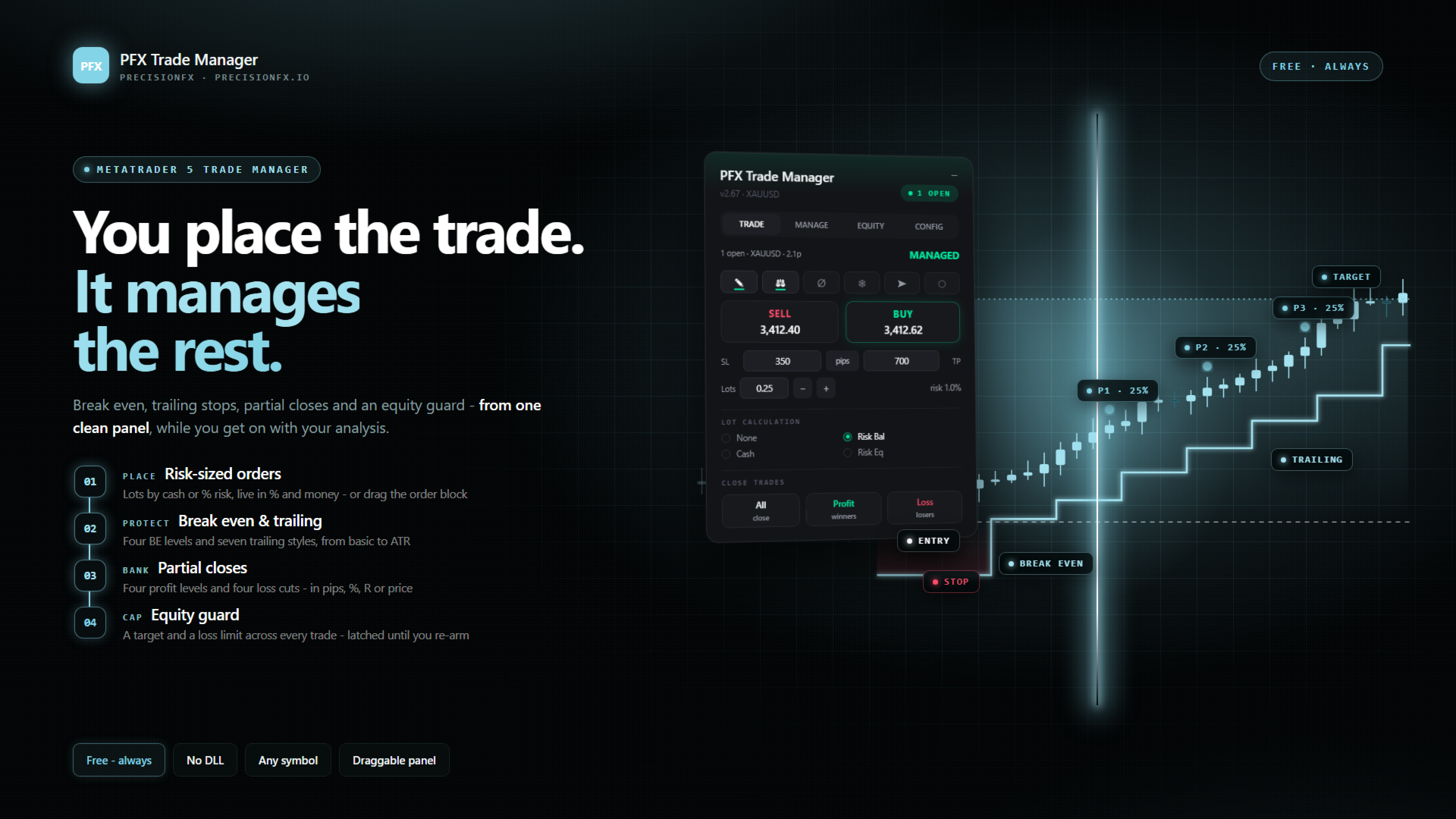
You place the trade. PFX Trade Manager looks after it: it moves your stop to break even, trails it, banks profit in stages and can close everything at a profit target or loss limit - while you get on with your analysis.

PLACE TRADES FAST
  • Buy / Sell at market with live prices, stop and target in price or pips
  • Lot size by fixed lots, cash risk, % of balance or % of equity - with the risk shown live in % and money, red when it is over your limit
  • Drag an order block on the chart: entry, stop and target lines you move into place, market or pending, with an R:R lock
  • Pending orders that trail price, pullback entries, OCO pairs, and hotkeys (Shift + a letter)

MANAGE EVERY TRADE
  • Break even - plain, plus four levels that lock more profit as the trade runs
  • Trailing stop - basic, four levels, swing high/low, moving average, Parabolic SAR, ATR, or follow the partials up
  • Four partial profits and four partial loss cuts, in lots or %
  • Distances in pips, % of the target, multiples of the first stop (R), or an exact price
  • Give naked trades a stop and target automatically - including trades placed from your phone
  • Virtual (hidden) stop and target the broker never sees
  • Settings for all trades, or pick a trade and give it its own - then push the current settings onto every open trade in one click

EQUITY GUARD
A profit target and a loss limit across all your tracked trades - in money, % or an equity level. When one is reached it closes everything (and your pending orders if you want), keeps trying until it is flat, and stays latched until you re-arm it.

A CLEAN PANEL
  • Four tabs - Trade, Manage, Equity, Config - in the same design as the rest of the PFX range
  • Drag it anywhere by its header - it remembers where you left it
  • Live P&L, open trades and spread at a glance; Close All asks once when several trades are open
  • Each managed trade drawn on the chart with its stop, target and levels - click one to manage it
  • Alerts for opens, closes, pending orders placed, activated and deleted - pop-up, push or email

GOOD TO KNOW
  • Works on any symbol and timeframe. One Trade Manager per chart.
  • Virtual stops only protect while MetaTrader is running with the EA attached.
  • It manages your manual trades by default - set the magic filter to manage an EA's trades too.

MORE FREE TOOLS FROM ME
  • PFX Equity Shield - an account-wide guardian for prop-firm rules.
  • PFX Trade Copier - copy trades between MT5 terminals on the same PC.
  • PFX SLM + PFX SLM EA - structure and liquidity: change of character, fair value gap, return, close.
  • PFX Journal - your MT5 trades journal themselves: win rate, R, P&L calendar and prop-firm rules online. Never trades.
  • PFX Executor - turns TradingView alerts into MT5 orders through the free PrecisionFX relay, with risk guards.
  • PFX Workspace - every terminal, account and chart on one dashboard. Never touches a trade.

I am a disabled veteran and a retail trader. I build the tools I could not afford when I started, and I give them away. If one earns its place and you fancy sending a coffee back, there is a link on precisionfx.io. It unlocks nothing - the tool is the same either way.
Produits recommandés
Trade management panel for MetaTrader 5. It lets you place orders and manage open positions from a panel on the chart, without opening separate order windows. It works on any symbol and timeframe, on hedging and netting accounts. Layout and display The panel has two layouts. Single shows all controls in one view. Tabs splits the controls into separate tabs for a smaller footprint. You can hide the panel to see the chart behind it and restore it when needed. The panel scales with the screen res
FREE
FiT Panel Pro
Thonglak Janyakorn
Overview FiT Panel Pro is a professional-grade trade management panel designed for MetaTrader 5 traders who demand speed, precision, and full control over their trades. Built with a modern dark-theme UI, it combines one-click execution with advanced risk management, visual SL/TP drag lines, automatic Fibonacci-based levels, and comprehensive order management — all in a single, compact panel. Whether you are a scalper, day trader, or swing trader, FiT Panel Pro gives you the edge you need to exec
FREE
TradeMasterPanel — One-Click Manual Trading Panel for MT5 TradeMasterPanel is a professional one-click trading assistant for MetaTrader 5, designed to help traders execute, manage, and protect positions directly from the chart. All settings can be adjusted on-chart and are automatically saved for each trading symbol, eliminating the need to reopen the Inputs dialog or reattach the EA. The interface is fully scalable and DPI-aware for modern high-resolution displays. 1. Market Order Entry Open B
FREE
Trade Panel Pro MT5
Elvis Wangai Muriithi
Trade Panel Pro is a powerful and easy-to-use trading utility designed for traders who need fast execution, accurate position sizing, and complete risk management directly from the chart. Whether you scalp on the 1-minute chart or swing trade on the 4H, Trade Panel Pro gives you the tools to manage trades with confidence and precision — all in one clean interface. Price will double after 5 purchases. Grab this offer Key Features Fast Trade Execution Open Buy/Sell positions instantly from the pan
FREE
Supports displaying up to 4 trading sessions with fully adjustable start and end times. Each session can be customized individually with unique colors and visual styles. Users can choose between drawing rectangles or filling areas, while the indicator clearly displays each session’s price range for better market insight. Free to use until the end of 2025. The paid version will be available starting from 2026.
FREE
Dynamic Candle Timer
Channaphat Yamuangmorn
Overview The Dynamic Candle Timer is a lightweight and efficient utility designed for MetaTrader 5. Unlike traditional candle timers that remain static in the corner of the chart, this indicator dynamically attaches to the current Bid price line. This allows traders to monitor the remaining candle time directly at the point of action, enhancing focus during fast-paced market movements. It is highly suitable for day traders and scalpers operating on XAUUSD, Forex, Crypto, or Indices. Key Feature
FREE
Easy and simple tool which close all trades in defined point of time. It can also close all open trades when opened positions reach defined target profit or stop loss. For all pairs, indexes etc. Works with all instruments. All types of orders. All charts. Users inputs: - close time (hour,min,sec) - take profit (in users currency) - stop loss (in users currency) Save & Load settings option. Fast, simple and reliable. Check out other tools provided by our team!
FREE
Win Panel
Imam Nasrudin
[Win Panel] Simple Entry and Close Positions Introducing WinPanel , an order management tool designed to enhance and simplify your trading experience.  WinPanel features a clean and intuitive interface, allowing you to close orders instantly with ease. It supports flexible position management, enabling you to close losing positions, profitable positions, or all open positions with a single click. In addition, WinPanel displays the total number of open positions, current profit, and the overall p
FREE
Place trades in one click with the lot size calculated from your risk. How it works Type your risk percent, stop loss in points and take profit as a multiple of the stop. The panel shows the lot size and the money at risk before you click. BUY and SELL open the order with SL and TP already attached. Management buttons move stops to break-even, close half or close all positions on the chart symbol. Key features Risk based lot size from balance, tick value and stop distance SL and TP attached to e
FREE
TradeViz Tri
Ebdallh Aljlwaxh
This tool is designed to visualize the position and trades history and its information, such as the entry and exit points, sizes of the trades, Reward to risk ratio, Risk percent, Profit, Target and stop-loss on the chart. it makes showing trades on the chart more informative and easier to use. it's a strategic tool that enhances your trading experience on MT5 platforms. By providing a clear visual representation of your trades and customizable settings, it empowers traders to make informed deci
FREE
TITAN Prop Guard – Prop Firm Risk Protection for MT5 TITAN Prop Guard is a risk management utility for MetaTrader 5. It helps traders stay within the daily and maximum loss limits of their prop firm. Attach it to one chart and it monitors the account equity continuously. When the configured loss threshold is reached, it closes open positions and pending orders and activates a trading lock until the next daily reset. During the lock, any new trade opened manually or by another Expert Advisor is c
FREE
Time to Close Candle
German David Nino Cifuentes
TimeToClose The "TimeToClose" indicator is an essential tool for traders who need to monitor the remaining time before a candle closes. This indicator displays the remaining time directly on the BID line, providing a clear and precise reference during real-time trading. Key Features: Displays the remaining time for the current candle to close. Direct integration on the BID line for better visualization. Simple and user-friendly configuration. Ideal for all types of traders, from beginners to pro
FREE
Phone Trade Manager
Krutik Piyushkumar Parekh
Smart Lot-Size Calculator And Trade Assistant for Mobile Trading Overview: This is the tool every trader in the market must have no matter if you are scalper, swing traders, day trader, or long term trader. This On-The-Go trading tool will help you stay disciplined and also stay free from daily trade management chores, Most traders face common problems like   1. Calculation of proper lot-size of a position to take controlled risk  2. Managing every trade and trailing stop-loss if trades goes in
FREE
La gestion manuelle des positions entraîne fréquemment des sorties tardives, des hésitations psychologiques et des positions ouvertes sans protection adéquate. Trade Manager Lite est un utilitaire performant pour MetaTrader 5 conçu pour automatiser les tâches essentielles de gestion du risque : Stop Loss, Take Profit, Break-Even (seuil de rentabilité), Trailing Stop (stop suiveur) et Clôture Partielle (Partial Close). Que vous ouvriez vos ordres manuellement sur votre ordinateur, via l'applicati
FREE
Total Closed Trades – MT5 Indicator The Total Closed Trades indicator for MetaTrader 5 provides a quick, visual overview of your trading performance by displaying a simple and intuitive 3-value breakdown : Total Trades – The total number of closed trades. Winning Trades – Number of profitable trades. Losing Trades – Number of losing trades. Instead of digging through reports, traders can instantly monitor their historical performance with a compact and elegant pie chart-style widget. Key
FREE
This utility automates Take Profit (TP) and Stop Loss (SL) levels for your trades, calculated in Money (Example : if you type 10, it means 10USD) . It ensures consistent risk management for all your positions. Crucial Note for Manual Traders: If you intend to use this utility on trades opened manually (without an Expert Advisor), you must change the 'Magic Number' setting to 0 (zero) . This allows the utility to correctly identify and manage your manual orders.
FREE
TradeLens Lite - Risk Calculator for MT5 The free version of TradeLens: a simple position size calculator on your chart. It never opens, modifies or closes trades. - Type your risk in % of the balance in the panel. - Press BUY setup or SELL setup: draggable stop loss (red) and take profit (green) lines appear, the initial stop based on the ATR. - Drag the lines: lot size, risk in money, reward in money and R:R update in real time, calculated with your broker's contract values. - Panel in the t
FREE
Haunted Risk Calculator is a visual risk management panel for MT5 that calculates the correct lot size in real time based on your account balance, risk percentage, and stop-loss distance. HOW IT WORKS Set your risk percentage or dollar amount, drag the SL and TP lines to your desired levels on the chart, and the panel instantly shows the calculated lot size, risk in dollars, reward-to-risk ratio, and expected profit. Execute with one click or a keyboard shortcut. FEATURES Draggable panel — grab
FREE
SmartRisk Trade Tool — One-Click Risk-Based Trade Panel SmartRisk Trade Tool is a manual trading panel for MetaTrader 5 built around position sizing and risk control rather than signal generation. It does not analyze the market or suggest trade direction — it exists so that every order sent from the chart already has a calculated lot size, stop loss, and take profit consistent with a risk value the trader chooses, removing the manual arithmetic that normally happens between deciding to trade and
FREE
This is an EA designed to support manual trading. It can accurately calculate risk, automatically enter trades, set stop loss, and perform trailing stop loss using buttons on the chart. There are many features for risk calculation, setting stop loss, and trailing stop loss to suit various trading styles. It can also automatically manage prop firms by closing trades when reaching the target profit level or maximum daily loss. Additionally, it can perform manual backtesting using the strategy test
FREE
MultiTradeNews
Leeank Andres Fernandez Molano
This script is designed for traders who need to quickly place trades across multiple currency pairs during critical news releases, where every second counts. With this tool, you can pre-select your desired currency pairs and assign independent volumes for each one. When a major news event hits, such as Non-Farm Payroll (NFP) or PMI data releases, the script allows you to execute all your trades instantly without the need to open each pair manually. Key Features: Customizable Pairs : Choose from
FREE
ZyloFx Position Size Calculator MT5 is a free risk management utility designed to calculate the appropriate lot size before opening a trade. The tool calculates position size based on your selected risk, account balance or equity, and Stop Loss distance. It also displays useful information directly on the chart. Explore all available ZyloFx Trading Tools: https://www.mql5.com/en/users/rosamartinez2825/seller Main Features Automatic lot size calculation. Percentage or fixed-money risk mode. Balan
FREE
ATC Alert Manager vous permet de définir des alarmes de prix directement sur le graphique et de les gérer depuis un petit panneau. Chaque alarme est affichée comme une ligne sur le graphique que vous pouvez faire glisser vers un nouveau prix. Une alarme se déclenche une fois, au moment où le prix croise votre niveau, avec une alerte popup, un son et une notification push optionnelle sur votre téléphone. Un prix déjà au-delà du niveau ne la déclenche pas, donc vous ne recevez jamais d'alertes ré
FREE
Drag the stop loss line to your level and the panel works out the lot size for the risk you set, from your broker's own contract size. FEATURES Entry, stop loss and take profit lines you drag. Lot size normalised to the broker's minimum, maximum and step. Risk as a percentage of balance or equity, fixed cash, or fixed lot. Live risk to reward ratio. HOW TO USE IT 1. Attach it to a chart and drag the three lines. 2. Set the risk basis and value in the inputs. 3. Read the lot size from the panel.
FREE
Advanced Dashboard Pro
Mirel Daniel Gheonu
5 (17)
Stats Dashboard & Journal Pro pour MT5 - Outil d'Analyse de Trading Analyse de Performance en Temps Réel & Journal Professionnel pour MetaTrader 5 Stats Dashboard Pro est un outil d'analyse complet conçu pour les traders MetaTrader 5 qui ont besoin d'aperçus détaillés sur leurs performances, d'une analyse basée sur les données et d'un système de journalisation professionnel pour maîtriser leur discipline de trading. CARACTÉRISTIQUES CLÉS Interface d'Analyse Multi-Vues 6 Onglets Interactifs : Co
FREE
Trading Dashboard Pro MT5 Trading Dashboard Pro MT5 est un panneau de surveillance et de gestion des opérations conçu pour MetaTrader 5. Le panneau offre une vue d'ensemble en temps réel de l'activité du compte, des statistiques de trading et des positions ouvertes dans une interface claire et organisée. Il est conçu pour les traders qui souhaitent surveiller leurs comptes et gérer leurs positions à partir d'un seul panneau, sans avoir à passer d'une fenêtre du terminal à une autre. Fonctionnali
FREE
GRInvest Breakeven Manager is an MT5 trade-management Expert Advisor designed to manage existing open positions after entry. Its purpose is to automate breakeven protection, staged partial closes, trailing stops and position management while still giving the trader full manual control over individual trades. The EA does not need to open trades itself . It can manage manual trades and trades opened by other Expert Advisors according to the selected symbol, direction and magic-number filters. The
FREE
Monitor Your EAs and Manual Trading From One MT5 Dashboard One account. Multiple strategies. One clear overview. Quantum Magic Monitor is a professional MT5 trading dashboard designed to help traders monitor multiple Expert Advisors and manual trading activity separately and in one place . Instead of analysing a mixed account history, Quantum Magic Monitor lets you organise trading activity by Magic Number / EA group and monitor the performance of different strategies independently. WHY QUANTUM
FREE
Risk Manager – Account Protection Tool Risk Manager is an Expert Advisor for MetaTrader 5 designed to protect your trading account by applying automatic risk management rules. This tool does not open trades . It continuously monitors your account and enforces predefined limits to help prevent excessive losses and maintain disciplined trading. Risk Manager works in the background and can manage positions opened by manual trading or other Expert Advisors. It is particularly useful for: • Manual tr
FREE
Know the Candle Close Time
Benbyaanda Silvere Henri Sedric Kabore
This indicator allows to know the remaining time before the closing of the candle. It works on every timeframe. It is very usefull when your trading strategy depend of the close or the open of a specific candle. So use it like you want. Don't forget to leave a comment or a request for a EA or an indicator. Also spread it to your friends and don't hesitate to visit my profile to see others tools.
FREE
Les acheteurs de ce produit ont également acheté
Trade Assistant MT5
Evgeniy Kravchenko
4.43 (216)
It helps to calculate the risk per trade, the easy installation of a new order, order management with partial closing functions, trailing stop of 7 types and other useful functions. Additional materials and instructions Installation instructions - Application instructions Line function -   shows on the chart the Opening line, Stop Loss, Take Profit. With this function it is easy to set a new order and see its additional characteristics before opening.   Risk management  - The risk calculation
Bienvenue sur Trade Manager EA, l’outil ultime de gestion des risques conçu pour rendre le trading plus intuitif, précis et efficace. Ce n’est pas seulement un outil d’exécution d’ordres ; c’est une solution complète pour la planification des trades, la gestion des positions et le contrôle des risques. Que vous soyez débutant, trader expérimenté ou scalpeur ayant besoin d’une exécution rapide, Trade Manager EA s’adapte à vos besoins, offrant une flexibilité sur tous les marchés, des devises et i
Farmed Hedge Yield Farming | All Markets (Manual - Hybrid - Semi/Automated EA) VERIFIED TRADING RESULTS - Farmed Hedge Yield Axi Copy:  https://www.mql5.com/en/signals/2356376 - Farmed Hedge Yield Exn Copy:   https://www.mql5.com/en/signals/2356404 - Farmed Hedge Yield V Copy:  https://www.mql5.com/en/signals/2357156 IMPORTANT NOTICE: FarmedHedge is a MANUAL-FOCUSED TRADING UTILITY ,not a fully automated EA. Results shown on this Signal include manual trades and overall strategic management.
Telegram to MT5 Multi-Channel Copier   copie automatiquement les signaux de trading de vos canaux Telegram et Discord directement vers MetaTrader 5. Pas de bots, pas d'extensions de navigateur, pas de copie manuelle. Un signal arrive sur Telegram ou Discord et l'EA ouvre le trade dans votre terminal en quelques secondes. Et avant de copier un canal, le backtester intégré vous montre ce que ce canal aurait fait sur votre compte. Le produit comprend deux composants : une application Windows qui éc
Local Trade Copier EA MT5
Juvenille Emperor Limited
4.94 (150)
Local Trade Copier EA MT5 est un copieur de trades rapide et flexible permettant de copier et de gérer des trades entre plusieurs comptes MetaTrader 5 sur le même ordinateur Windows ou Windows VPS. Il combine la synchronisation locale des trades avec des contrôles côté Receiver pour la taille des lots, la gestion du risque, le filtrage des trades, le mappage des symboles, la gestion des trades et la protection du compte. Configurez vos terminaux Transmitter et Receiver en environ 1 minute et co
TradePanel MT5
Alfiya Fazylova
4.88 (173)
Trade Panel est un assistant commercial multifonction. L'application contient plus de 50 fonctions de trading pour le trading manuel et permet d'automatiser la plupart des tâches commerciales. Instructions d'utilisation : https://www.mql5.com/fr/blogs/post/762589 Version d'essai de l'application pour un compte démo : https://www.mql5.com/fr/blogs/post/762644 Comment installer l'application : https://www.mql5.com/fr/blogs/post/762645 Comment tester l'application en mode visuel : https://www.mql5.
Copiez les signaux Telegram avec vos propres règles de trading Telegram to MT5 Signal Trader copie automatiquement les signaux de trading au format texte provenant de canaux et de groupes Telegram publics et privés vers MetaTrader 5. Gérez plusieurs fournisseurs et comptes MT5 depuis une seule application de bureau, avec des paramètres de risque et de trading propres à chaque fournisseur . Aucun bot Telegram ni configuration d'API n'est nécessaire pour copier les signaux. Connectez-vous simpleme
EA Overfitter
Stephen J Martret
5 (4)
That backtest looks great. But will it still be making money tomorrow, next week, next month? EA Overfitter re-runs your EA on 100 price histories it has never seen. One score tells you if the edge is real. A backtest tells you what an EA did on one price history — the one that happened to occur. What you cannot tell from it is how much of that result was the strategy and how much was the particular path. EA Overfitter answers that. It builds up to 100 synthetic price histories your EA has n
Strategy Ledger Pro
Abdullah Uygar Tuna
5 (15)
Désormais disponible en français. Strategy Ledger Pro est un panneau d'analyse de compte en lecture seule pour MetaTrader 5. Il sépare les résultats du compte par Expert Advisor, stratégie, symbole et numéro magic, pour que vous voyiez ce que chacun apporte réellement. Le panneau est disponible en 11 langues : English, Français, Deutsch, Español, Italiano, Português, Русский, Türkçe, 中文, 日本語 et 한국어. Avant de télécharger la démo. Le Market exécute la démo de tout produit payant uniquement dans l
Exp COPYLOT CLIENT for MT5
Vladislav Andruschenko
3.97 (35)
Copieur professionnel de trades pour MetaTrader 5 Un copieur de trades rapide, professionnel et fiable pour MetaTrader . COPYLOT permet de copier des trades Forex entre les terminaux MT4 et MT5 avec prise en charge des comptes Hedge et Netting . La version MT5 de COPYLOT prend en charge : - MT5 Hedge → MT5 Hedge - MT5 Hedge → MT5 Netting - MT5 Netting → MT5 Hedge - MT5 Netting → MT5 Netting - MT4 → MT5 Hedge - MT4 → MT5 Netting Version MT4 Description complète + DEMO + PDF Comment acheter Comme
The product will copy all telegram signal to MT5 ( which you are member) , also it can work as remote copier.  Easy to set up, copy order instant, can work with almost signal formats, image signal,  s upport to translate other language to English Work with all type of channel or group, even channel have "Restrict Saving Content", work with  multi channel, multi MT5 Work as remote copier: with signal have ticket number, it will copy exactly via ticket number. Support to backtest signal. How to s
News Trade EA MT5
Konstantin Kulikov
4.55 (11)
Je voudrais vous présenter un robot efficace que j'utilise depuis plusieurs années. Il peut être utilisé en mode semi-automatique, comme en mode totalement automatique. >>> Chat <<< Le programme comporte des paramètres souples pour le commerce sur les nouvelles du calendrier économique. Il est impossible de le vérifier dans le testeur des stratégies. Ce qu’il faut, c’est le travail réel. Téléchargez la dernière archive des paramètres : https://www.mql5.com/en/blogs/post/747929 Surveillance des
================================================================================ POC BREAKOUT - V20.72. Full Professional Grade Toolkit ================================================================================ POC Breakout is a full MetaTrader 5 trading dashboard for discretionary traders who want breakout signals, Point of Control (POC) context, volume profiles, order flow, market structure, news, alerts, and advanced trade planning in one professional workspace. Attached directly to you
Prochaine mise à jour — Version 2.52 bientôt disponible ! [NOUVEAU] Préparez-vous à découvrir 4 nouvelles fonctionnalités majeures conçues pour améliorer votre analyse du marché et votre flux de travail de trading Nous faisons passer l’analyse du marché au niveau supérieur avec 4 nouvelles fonctionnalités conçues pour répondre à vos besoins en trading. Découvrez : 1. TRADE OVERVIEW DASHBOARD 2. CONFLUENCE AT ZONE 3. STRONG & WEAK HIGH/LOW 4. OTE 1. TRADE OVERVIEW DASHBOARD Un tableau de bord qu
EA Auditor
Stephen J Martret
5 (7)
EA Auditor is an independent analysis tool for traders evaluating Expert Advisors and trading signals on MetaTrader 5. It audits backtest reports, reviews posted developer signals, and cross-verifies the two against each other to help traders assess strategies before committing capital. The MQL5 market offers a wide range of Expert Advisors from many developers, with varying approaches, quality, and transparency. EA Auditor provides a consistent, data-driven framework for reviewing them, answer
Telegram To MT5 Ultra
Mirel Daniel Gheonu
5 (5)
Telegram To MT5 — Copieur de signaux Transformez les appels de trading de vos canaux Telegram en véritables ordres MT5 — automatiquement, sur autant de comptes que vous le souhaitez, avec le risque et les règles entièrement sous votre contrôle. Telegram To MT5 relie les canaux VIP / de signaux que vous suivez déjà sur Telegram à votre terminal MetaTrader 5. Une application de bureau compagnon gratuite lit les messages (même des canaux qui bloquent les bots), et cet Expert Advisor les exécute sur
Telegram to MT5 Coppy
Sergey Batudayev
5 (10)
Télégramme vers MT5 :   la solution ultime pour copier des signaux Simplifiez votre trading avec Telegram vers MT5, l'outil moderne qui copie les signaux de trading directement des canaux et chats Telegram vers votre plateforme MetaTrader 5, sans DLL. Cette solution puissante garantit une exécution précise des signaux, de nombreuses options de personnalisation, un gain de temps et une efficacité accrue. [ Instructions and DEMO ] Caractéristiques principales Intégration directe de l'API Telegram
AW Shepherd Safety MT5
AW Trading Software Limited
5 (5)
AW Shepherd Safety EA est un Expert Advisor qui accompagne les positions ouvertes. Le trader ouvre le premier ordre depuis le panneau, puis l'EA gère lui-même le panier : il ajoute des ordres de récupération filtrés par la tendance, clôture le côté par TakeProfit, trailing ou stop et affiche les niveaux de clôture sur le graphique. Les achats et les ventes sont gérés séparément, les deux côtés peuvent être ouverts simultanément. Un ordre de récupération ne s'ouvre pas simplement au pas de prix,
HINN MagicEntry Extra
ALGOFLOW OÜ
4.74 (19)
HINN MAGIC ENTRY – the ultimate tool for entry and position management! SIMPLE. FASTEST. INTUITIVE. MAX AUTOMATED. Place orders by selecting a level directly on the chart! full description   ::  demo-version  :: 60-sec-video-description Key features: - Market, limit, and pending orders - Automatic lot size calculation - Automatic spread and commission accounting - Unlimited partitial take-profits  - Breakeven and trailing stop-loss and take-profit  functions - Invalidation leves - Intuitive, a
News Filter EA
Rashed Samir
5 (2)
News Filter EA: Advanced Algo Trading Assistant News Filter EA is an advanced algo trading assistant designed to enhance your trading experience. By using the News Filter EA , you can integrate a Forex economic news filter into your existing expert advisor, even if you do not have access to its source code. In addition to the news filter, you can also specify trading days and hours for your expert. The News Filter EA also includes risk management  and equity protection features. MT4 Version Ma
MT5 to Telegram Signal Provider est un utilitaire facile à utiliser et entièrement personnalisable qui permet l'envoi de signaux spécifiés vers un chat, un canal ou un groupe Telegram, transformant ainsi votre compte en fournisseur de signaux. Contrairement à la plupart des produits concurrents, il n'utilise pas d'importations DLL. [ Démonstration ] [ Manuel ] [ Version MT4 ] [ Version Discord ] [ Canal Telegram ]  New: [ Telegram To MT5 ] Configuration Un guide utilisateur étape par étape est
RETAILBERG FOOTPRINT CHART PRO — Order-Flow Workspace for MetaTrader 5 Version 7.00  |  Professional System  |  31 tools  |  One chart A full 150-page illustrated User Manual is included. Please read the full manual to understand this feature packed footprint chart elements and ui. https://www.mql5.com/en/blogs/post/777982 DEMO / STRATEGY TESTER — PLEASE READ FIRST
Timeless Charts
Samuel Manoel De Souza
5 (9)
Timeless Charts est un utilitaire de trading tout-en-un destiné aux traders professionnels. Il combine des types de graphiques personnalisés tels que les graphiques en secondes et Renko avec une analyse avancée du flux d’ordre s utilisant Footprints , Clusters , Profils de Volume , études VWAP et outils d’analyse ancrés pour une compréhension plus approfondie du marché. Le trading et la gestion des positions sont effectués directement depuis le graphique via un panneau intégré de gestion des ord
VirtualTradePad PRO SE MT5 — centre de contrôle de trading professionnel pour MetaTrader 5 VirtualTradePad PRO SE est un panneau de trading premium basé sur le graphique et un espace de gestion des trades pour MetaTrader 5 . Il est conçu pour les traders qui souhaitent une exécution plus rapide, un contrôle plus clair des positions, une gestion structurée des trades, une planification visuelle des niveaux et un flux de travail professionnel directement depuis le graphique. Ce n’est pas seulement
Trader Evolution
Siarhei Vashchylka
5 (7)
" Trader Evolution " - A utility designed for traders who use wave and technical analysis in their work. One tab of the utility is capable of money management and opening orders, and the other can help in making Elliott wave and technical analysis. Manual (Be sure to read before purchasing) | Version for MT4 Advantages 1. Trading in a few clicks. Immediate and pending orders are available in the panel 2. Money management. The program automatically selects the appropriate lot size 3. Simplifies
Trade copier MT5
Alfiya Fazylova
4.61 (57)
Trade Copier est un utilitaire professionnel conçu pour copier et synchroniser les commandesentre les comptes de trading. Les commandes sont copiées du compte/terminal du fournisseur vers le compte/terminal du destinataire, qui sont installés sur le même ordinateur ou vps. Avant d'acheter, vous pouvez tester la version démo sur un compte démo. Version démo ici . Instructions complètes ici . Principales fonctionnalités et avantages: Prend en charge la copie des commandes MT5> MT5, MT4> MT5, MT5>
AW Trade Manager
AW Trading Software Limited
AW Trade Manager est un panneau de trading pour MetaTrader 5 doté d'un outil risque/rendement sur le graphique. Le trade se planifie avec les lignes Entry, Stop Loss et Take Profit que l'on déplace à la souris : les étiquettes affichent le prix, la distance et le montant en argent, les zones montrent le gain et la perte, et le volume se calcule à partir du risque. Avant l'envoi, la fenêtre de confirmation présente le trade dans son ensemble avec le risque, la marge et les règles de la position.
Panneau de trading pour MetaTrader 5 — contrôle professionnel du trading en un clic depuis le graphique et le clavier Un panneau de trading avancé conçu pour les traders actifs, afin d’ouvrir, gérer et clôturer des positions bien plus rapidement qu’avec l’interface standard de MetaTrader. Cette solution s’adresse à ceux qui veulent contrôler positions, ordres en attente, profit global et exécution depuis un seul espace de travail professionnel. Il ne s’agit pas d’un simple utilitaire. C’est un
Assistant de trading sur graphique et panneau de gestion des risques Outil complet sur graphique avec Stop Loss (SL) & Take Profit (TP) multi-mode (ATR, R:R, points, devise du compte), analyses en temps réel et calendrier économique Ergotick Trade Manager est un panneau de trading professionnel tout-en-un conçu pour les traders discrétionnaires, les candidats aux challenges de prop firms et les scalpeurs. Il regroupe le calcul automatique et instantané de la taille des lots, des configurations m
RS Trade Copier - le copieur de trades local ultra-rapide avec une véritable interface graphique. Arrêtez de saisir les numéros de compte manuellement. Fini les listes interminables de 200+ paramètres dans l'onglet Inputs. Un outil fiable et flexible pour copier les opérations de trading entre plusieurs terminaux MT5 et MT4. Il convient aux traders expérimentés, aux services de signaux ainsi qu'aux investisseurs privés. Il permet la synchronisation du trading d'un ou plusieurs Providers vers un
Plus de l'auteur
This indicator has a matching Expert Advisor - PFX SLM EA . Same engine, same rules, same trades. Two ways to use them together: backtest the EA to find the best settings for your symbol, then trade those settings by hand with the indicator - or let the EA loose and have it trade them for you. FREE - AND IT ALWAYS WILL BE A ton of work has gone into these tools to make them the best I can make them, and they are free. Not a trial, not a lite version - free, and it always will be. I am still d
FREE
PFX Trade Copier
Daniel Freeman
5 (1)
Copy trades between MetaTrader 5 terminals on the same computer. Free, and no DLL, no internet connection, no subscription. One EA does both jobs. Attach it as a TRANSMITTER on the account you trade, and as a RECEIVER on every account that should follow. SETUP - four steps Attach to any one chart on the account you copy FROM. Set Mode = Transmitter. Attach to any one chart on each account that should follow. Set Mode = Receiver. Give every terminal the SAME Channel ID. That is the only thing tha
FREE
This EA has a matching indicator - PFX SLM . Same engine, same rules, same trades. Two ways to use them together: backtest the EA to find the best settings, then trade them by hand with the indicator - or let the EA loose and have it trade them for you. Either way, put the indicator on the chart and you see every decision. FREE - AND IT ALWAYS WILL BE A ton of work has gone into these tools to make them the best I can make them, and they are free. Not a trial, not a lite version - free, and i
FREE
A hard stop your discipline can't argue with. Free - no DLL, no internet, no subscription. A ton of work has gone into this to make it the best I can make it, and it is free - not a trial, not a lite version - and it always will be. I am still developing it, so expect regular updates. Spotted a bug, or want something added? Reach out in the Comments and I will get it done. PFX Equity Shield watches your whole account - every symbol, every EA, every manual trade - against the limits you set. T
FREE
Your TradingView alerts, executed in MetaTrader 5. Free - no DLL, no subscription. HOW SIGNALS REACH IT This EA does not generate signals. It takes alerts TradingView has already sent and turns them into orders. Point your TradingView alert at the PrecisionFX relay and this EA collects from it. Nothing to install beyond the EA itself, nothing to keep running on your PC, and the webhook address never changes. About five minutes to set up. If the relay is briefly unavailable your signals are not l
FREE
PFX Journal
Daniel Freeman
NOTE : The walkthrough GIFs on this page were recorded on an earlier build, so they show the old plain-text status instead of the new PFX status panel. Updated GIFs showing the new panel are on my list for the next update. Everything else works exactly as shown. STOP COPYING TRADES INTO SPREADSHEETS. FOREVER. Every serious trader knows a journal is what separates guessing from improving. And almost nobody keeps one - because typing trades into a spreadsheet after a long session is the last thin
FREE
There are plenty of updates coming, so bear with me as I continue building and refining it. I’ve got big plans for this one! Your whole trading setup on ONE screen. Every terminal. Every broker. Every prop account. Every chart. See it all, name it all, and run it all from one dashboard. Free - no DLL, no internet, no subscription. If you are like me and trade across multiple terminals, multiple brokers and prop firms, with multiple charts on every terminal - this one is for you. You know the
FREE
Filtrer:
Aucun avis
Répondre à l'avis