AegisGrid
- Эксперты
- Версия: 1.5
- Обновлено: 28 октября 2026
- Активации: 5

🛡️ AegisGrid — Advanced Gold Trading EA
Smart Grid Management • Dynamic Risk Controls • Automated Trading
AegisGrid is an advanced Expert Advisor designed primarily for Gold (XAUUSD). It combines dynamic grid trading, automated position management, hedge recovery tools, and configurable risk controls in one integrated trading system.
With flexible trading parameters, automated lot sizing, market filters, session controls, Telegram notifications, and a real-time dashboard, AegisGrid gives traders greater control over their automated Gold trading strategy.
⭐ KEY FEATURES
📊 1. Dynamic Grid Trading
-
Automated Buy and Sell grid trading.
-
ATR-based dynamic grid spacing.
-
Alternative fixed-point grid spacing.
-
Configurable spacing multipliers for different order levels.
-
Maximum grid orders per side.
-
Optional martingale lot progression with customizable multipliers.
🧠 2. Advanced Position Management
-
Pair Close System: Closes selected positions when configured profit and drawdown conditions are met.
-
Hedge Mode: Opens opposite-direction hedge positions when the configured entry conditions are satisfied.
-
Hedge Recovery: Manages hedge orders and targets a configurable combined profit before closing the hedge positions and an older losing position.
-
Defensive Mode: Adjusts grid spacing and lot progression when specified market conditions are detected.
-
DD Grid Pause: Can pause additional grid entries when the configured drawdown threshold is reached.
These systems provide configurable position management, but they cannot eliminate the risk of substantial losses.
📈 3. Flexible Lot Management
-
Fixed lot sizing.
-
Automatic lot scaling based on account balance.
-
Configurable martingale multipliers.
-
Maximum lot per order.
-
Separate lot and grid settings for the main grid and hedge system.
Adjust the lot settings according to your account size, leverage, broker conditions, and risk tolerance.
🔍 4. Market Filters
AegisGrid provides optional filters to customize trading behavior:
-
ADX Filter: Filters initial entries according to configured market-strength conditions.
-
ADX Grid Stop: Can stop additional grid entries when ADX exceeds the configured level.
-
Choppiness Index Filter: Helps identify ranging market conditions before opening the first order.
-
ATR-Based Grid Spacing: Adjusts grid distances according to market volatility.
Each filter can be configured independently where supported by the EA.
🕒 5. Trading Session Control
-
Configurable trading schedules for individual days.
-
Preset Asian, London, New York, and London–New York overlap sessions.
-
Customizable start and end times.
-
Configurable UTC offset to match your preferred time zone.
Control when the EA is permitted to initiate trading according to your preferred schedule.
📰 6. Optional Economic News Filter
-
Pause new trading activity around scheduled economic news.
-
Configure the minutes before and after news events.
-
Filter high-impact news.
-
Optionally include medium-impact news.
The News Filter requires an internet connection and the appropriate MT5 WebRequest permission.
📱 7. Telegram Notifications
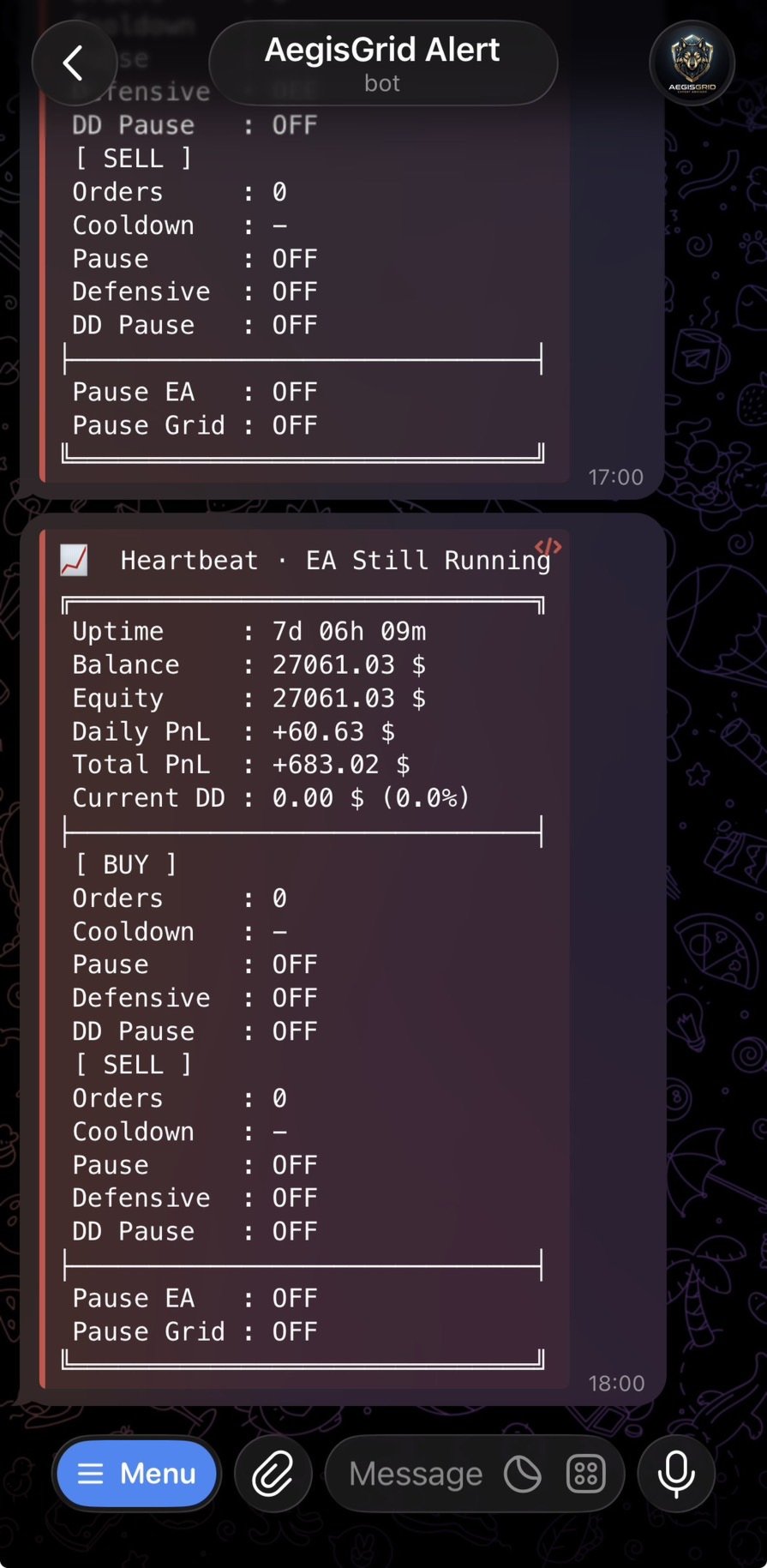
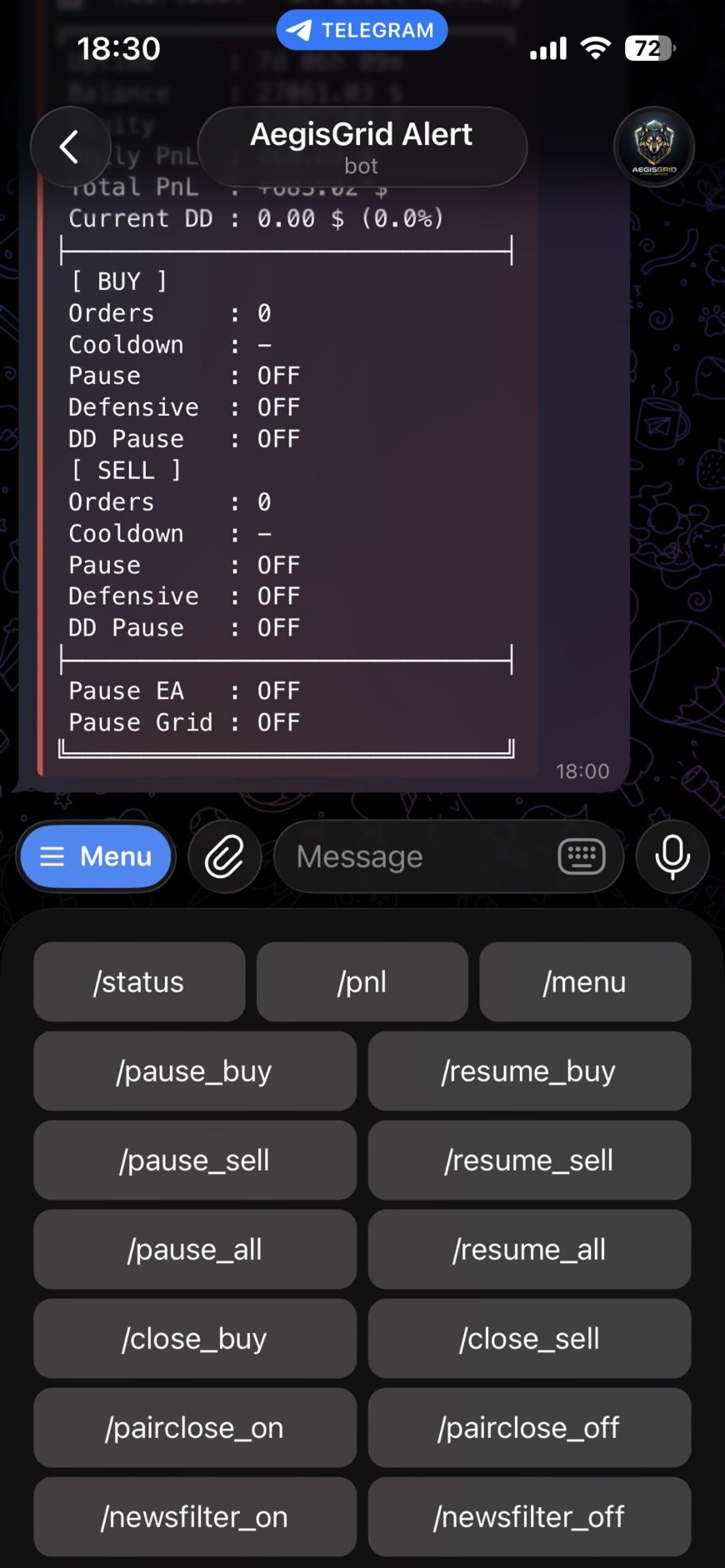
Receive optional notifications for important EA events, including:
-
EA startup.
-
Initial and grid order activity.
-
Basket take-profit and stop-loss events.
-
Pair Close and Hedge Mode activity.
-
Drawdown threshold alerts.
-
News Filter status.
-
Daily profit summaries.
-
Order-count milestones.
-
Defensive Mode and DD Grid Pause events.
Telegram integration requires a valid bot token, chat ID, and the appropriate WebRequest permission.
🖥️ 8. Real-Time Trading Dashboard
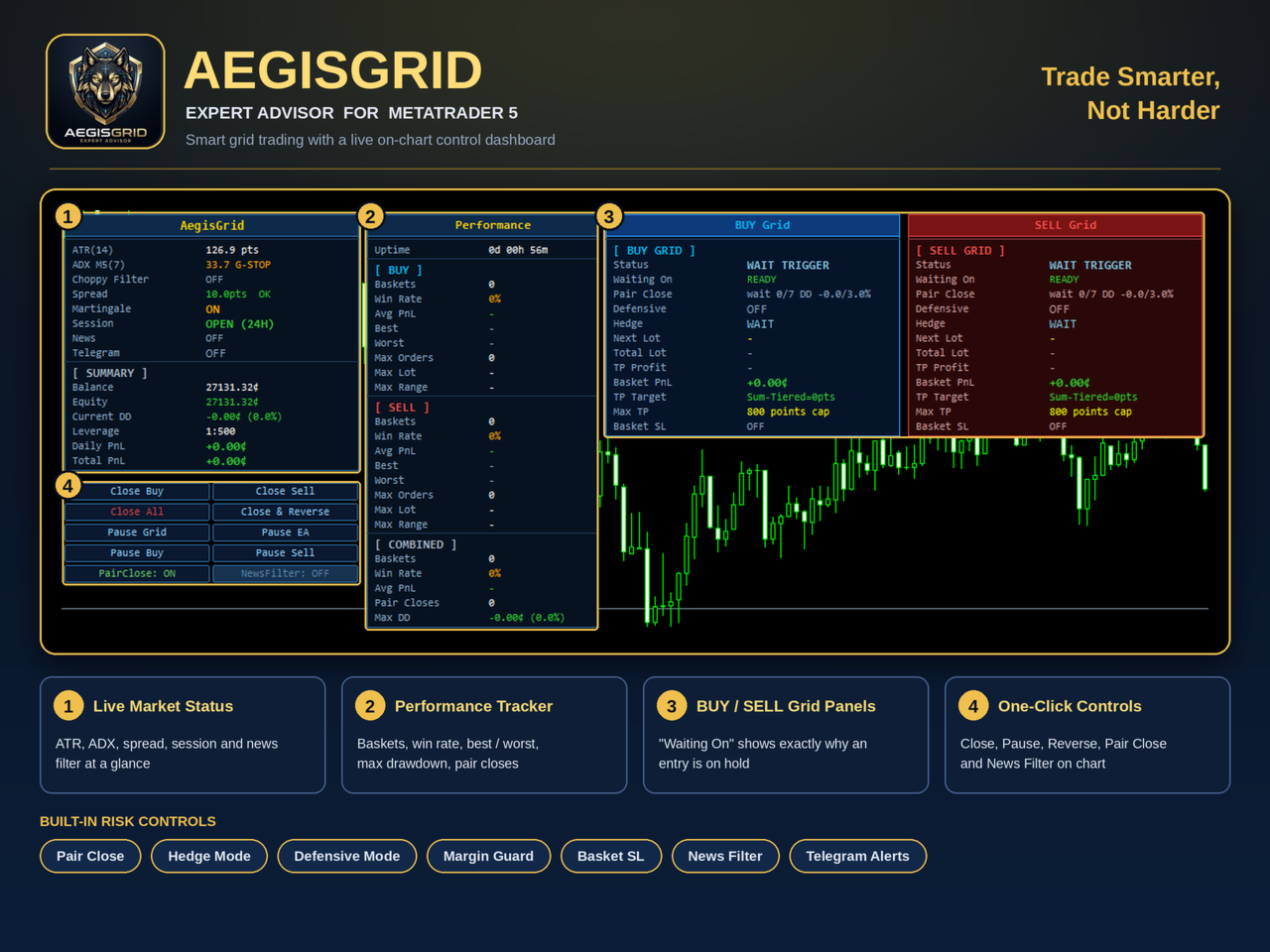
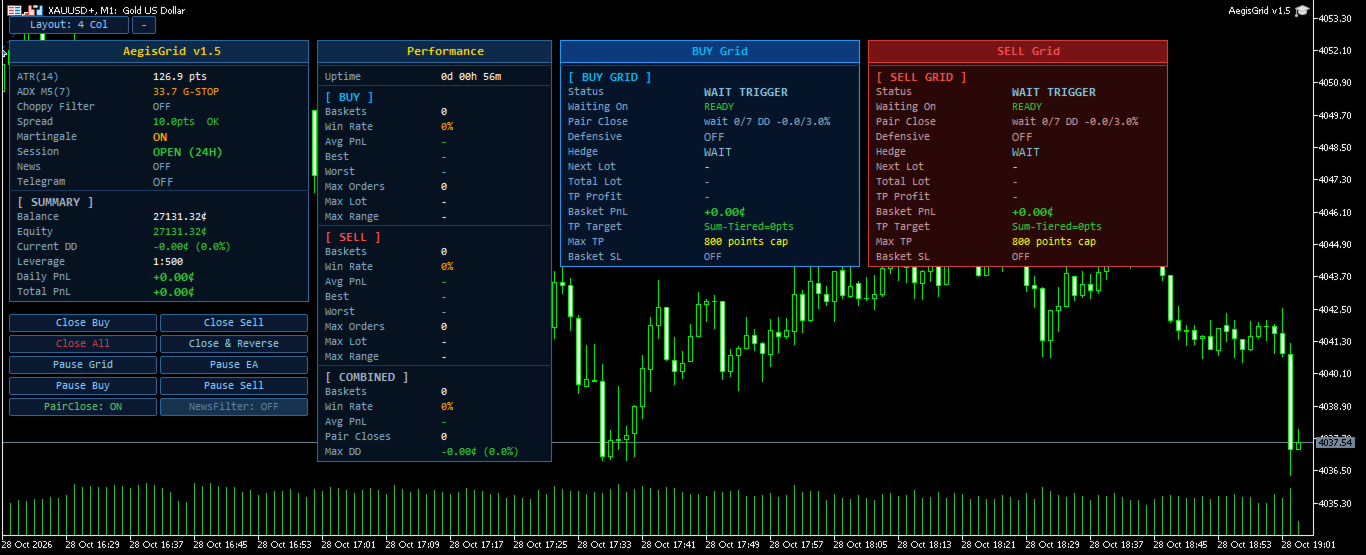
Monitor your trading activity directly on the chart with an integrated dashboard.
The dashboard provides an overview of trading information, position management, and EA status, helping you monitor your strategy without constantly checking individual orders.
⚙️ 9. Configurable Trading Engine
AegisGrid offers extensive input settings for grid spacing, position sizing, hedge management, market filters, trading schedules, spread filtering, and notifications.
The default ATR calculation timeframe is M1 and can be changed independently of the chart timeframe. This allows the EA to use the selected ATR timeframe for grid-spacing calculations.
For the intended strategy, XAUUSD on M1 is the primary configuration to evaluate.
🎯 RECOMMENDED SETUP
The following configuration is recommended as a starting point:
-
Platform: MetaTrader 5
-
Instrument: Gold (XAUUSD or a compatible broker symbol)
-
Timeframe: M1
-
Account Type: Hedging
-
Initial Lot: 0.01
-
Suggested Capital: $50,000 in a standard account or 50,000 cents in a cent account (equivalent to $500)
-
Recommended Leverage: 1:1000 or higher
These are suggested starting conditions, not guarantees of profitability or account safety. Actual requirements depend on your broker, contract specifications, leverage, margin requirements, and trading settings.
Always test the EA on a demo account before using real funds.
📌 IMPORTANT: SPREAD CONFIGURATION
Different brokers offer different spreads on Gold. Spread conditions may also change according to market volatility, liquidity, and trading sessions.
AegisGrid includes a configurable Spread Filter.
-
UseSpreadFilter: Enables or disables the Spread Filter.
-
MaxSpreadPoints: Sets the maximum permitted spread in points.
How to configure the spread
-
Check the typical XAUUSD spread offered by your broker.
-
Open the EA input settings.
-
Enable or disable the Spread Filter according to your strategy.
-
Set MaxSpreadPoints to a suitable value for your broker's actual spread and quote format.
Important: A spread limit that is too low may prevent new trades. A limit that is too high may allow entries when trading costs are unfavorable.
The appropriate setting can differ between brokers because symbol specifications and pricing conditions are not always identical. Verify the spread in points on your own trading account rather than copying another broker's settings blindly.
🔐 WHITELIST / WEBREQUEST CONFIGURATION
Some AegisGrid features require permission to connect to external services through MetaTrader 5.
How to whitelist the required URLs
-
Open MetaTrader 5.
-
Select Tools → Options → Expert Advisors.
-
Enable Allow WebRequest for listed URL.
-
Add the relevant URLs below.
News Filter
Required when using the News Filter.
Telegram Notifications
Required when using Telegram integration.
Important notes
-
Add only the URLs for the features you intend to use.
-
If the News Filter is disabled, its URL is not required.
-
If Telegram integration is disabled, its URL is not required.
-
Ensure your internet connection is available and your external-service settings are correct.
-
Reinitialize the EA if necessary after changing permissions.
-
MT5 WebRequest is not supported in the Strategy Tester. Test external-service features on a demo account on a live chart.
If the required URL is not whitelisted, the corresponding external-service feature may not work correctly.
🎯 WHO IS AEGISGRID FOR?
AegisGrid may suit traders who:
-
Prefer automated Gold trading.
-
Want configurable grid and hedging systems.
-
Need flexible position and basket management.
-
Want optional market filters and trading schedules.
-
Prefer monitoring trading activity through an on-chart dashboard.
-
Understand the risks associated with grid and martingale strategies.
⚠️ RISK DISCLAIMER
AegisGrid does not guarantee profits or prevent losses.
Grid trading and martingale-based position sizing can accumulate substantial exposure during prolonged adverse market movements. This may result in significant floating losses, margin calls, or account liquidation.
Hedging, Pair Close, Defensive Mode, and DD Grid Pause are trading-management mechanisms, not guarantees against drawdown.
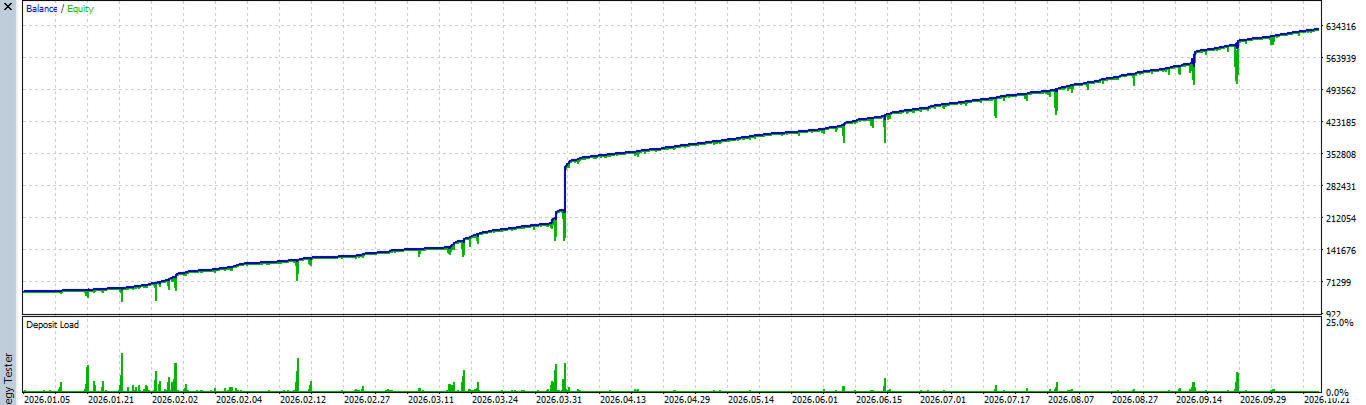
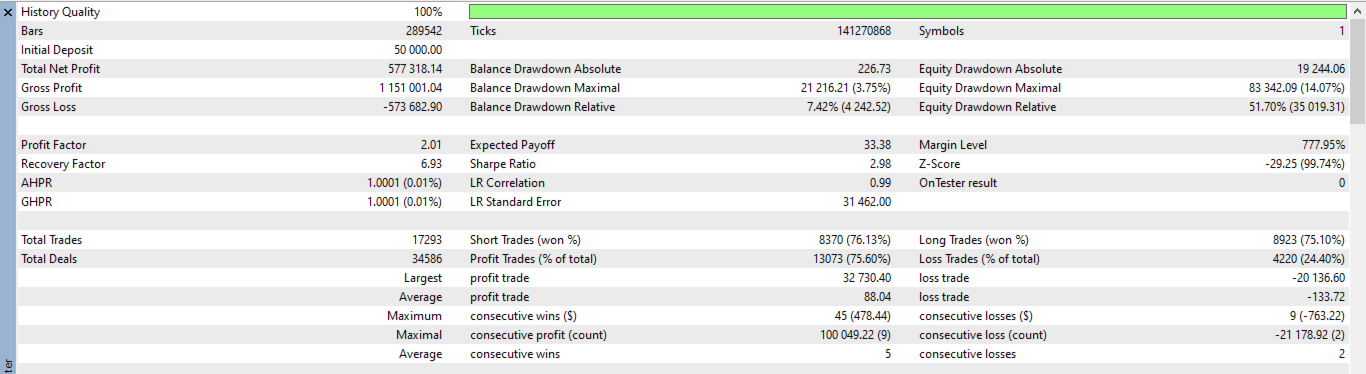
Past backtest results do not guarantee future performance. Actual results may vary due to spreads, commissions, slippage, execution conditions, leverage, and market behavior.
Always conduct your own testing using the Strategy Tester and a demo account. Choose settings appropriate for your account balance and risk tolerance. Never trade with money you cannot afford to lose.
AegisGrid — Structured Grid Trading. Flexible Controls. Automated Management.