QM gold pattern
- Эксперты
- Версия: 1.0
- Активации: 5

QM Gold Pattern EA
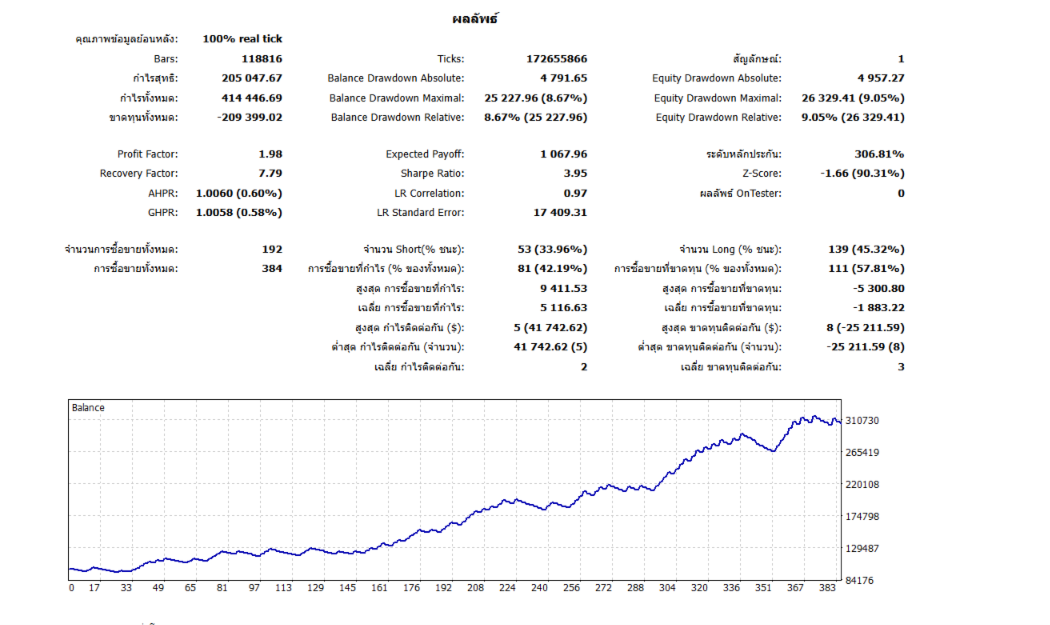
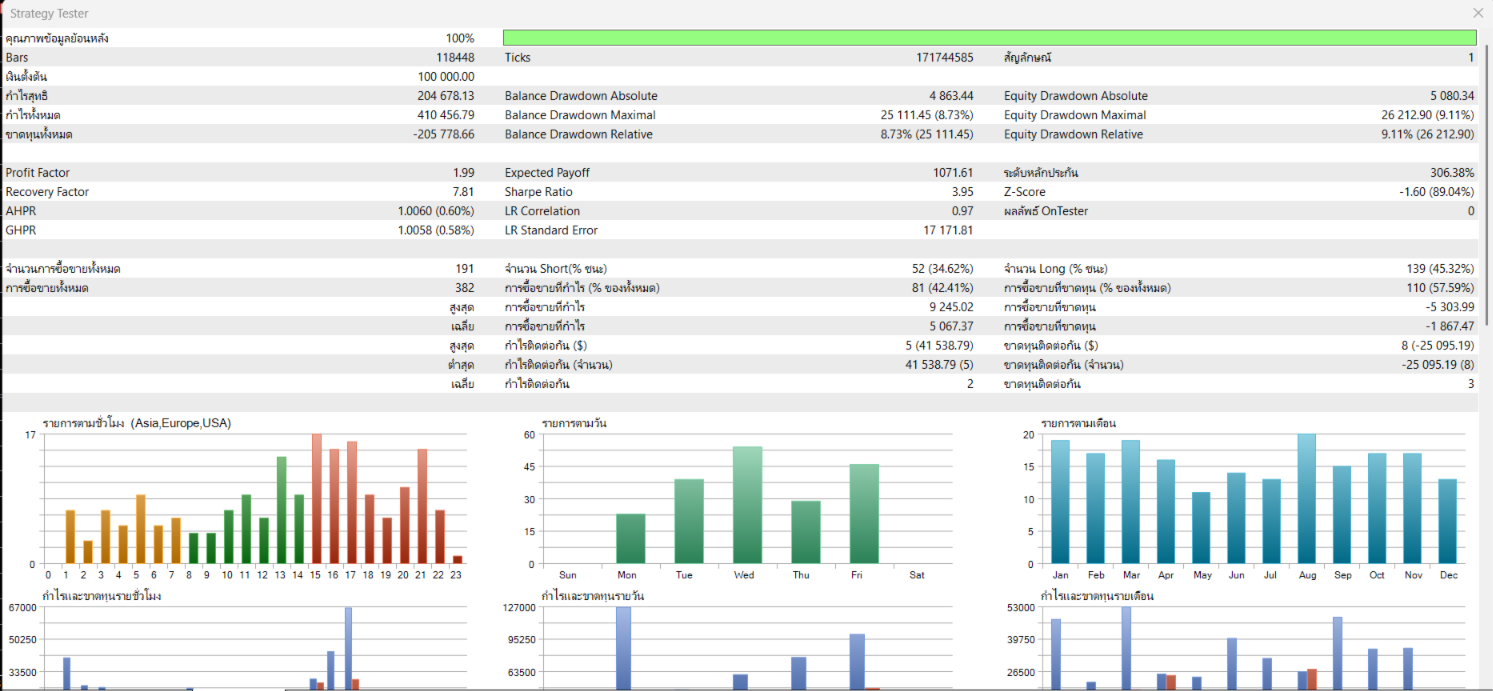
Backtest results from 01/10/2021 to 01/10/2026
🔥 QM GOLD – QM HYBRID PRO EA V1.0 🔥
MT5 Expert Advisor trading based on the Quasimodo (QM) patternAn EA for MetaTrader 5 that automatically identifies QM patterns. It waits for the price to pull back to the zone before entering a trade. Every order includes a Stop Loss (SL), and lot sizes are automatically calculated based on risk.
━━━━━━━━━━━━━━━━━━
⭐ Why choose this EA?
━━━━━━━━━━━━━━━━━━
✅ Not Martingale, Not Grid
No lot doubling or averaging down; opens only one order at a time.
✅ Non-Repainting QM
Uses only confirmed swings; signals do not change retroactively.
✅ Dual-Timeframe Trend Filtering
Trades in the direction of the D1 and H4 EMAs.
✅ Automatic Lot Calculation
Set risk as a percentage per trade (default: 1%).
✅ Highly Customizable
3 entry types / 3 SL modes / 4 TP modes.
✅ Automatic Stop on Loss Limit
Daily limit 3% / Total limit 10% (adjustable; can be enabled/disabled).
━━━━━━━━━━━━━━━━━━
📊 How the EA Enters Trades
━━━━━━━━━━━━━━━━━━
BUY Side (Default)
1️⃣ Identify Bullish QM: Low → High (Neckline) → New Low (lower than the previous one) → Price closes above the Neckline.
2️⃣ Check Trend: Price is above D1 and H4 EMAs.
3️⃣ Wait for price to pull back to the Neckline zone.
4️⃣ Candlestick touches the zone and closes back above it → Enter BUY.
SELL side operates in the reverse manner.
━━━━━━━━━━━━━━━━━━
🛡️ Account Protection System ━━━━━━━━━━━━━━━━━━
- Daily Loss Stop: 3%
Closes EA orders and halts trading until the start of the new day (Broker time).
- Total Loss Stop: 10%
Closes EA orders and halts operations until the user manually lifts the suspension via "Reset Protection."
- Limits can be set as a percentage or a specific monetary amount.
- Retains the "halted" status even after restarting MT5.
- Deposits and withdrawals are not counted as trading losses.
━━━━━━━━━━━━━━━━━━
⚙️ Default Settings
━━━━━━━━━━━━━━━━━━
Timeframe : M15
Entry Zone : Neckline
Entry Method : Rejection
Trend Filter : EMA (D1) + EMA (H4)
Risk per Trade: 1%
Daily Loss : 3%
Total Loss : 10%
━━━━━━━━━━━━━━━━━━
🚀 How to Use
━━━━━━━━━━━━━━━━━━
1️⃣ Place the EA file in the `MQL5 > Experts` folder, then restart MT5.
2️⃣ Open the desired chart and timeframe, then drag the EA onto the chart.
3️⃣ Enable the "Algo Trading" button.
4️⃣ Adjust the Risk % and loss limits as desired, or use the default settings.
5️⃣ Let the EA run; using a VPS is recommended for continuous operation.
📌 The EA draws QM patterns, zones, and Entry/SL/TP lines on the chart, displaying the status in the corner of the screen.
📌 If capital is low and the broker's minimum lot size exceeds the set risk, the EA will skip that trade.
📌 Loss limits are calculated based on the entire account; using one account per EA is recommended.
━━━━━━━━━━━━━━━━━━
⚠️ IMPORTANT
━━━━━━━━━━━━━━━━━━
This product is automated trading software; there is no guarantee of profit.
The loss-stop system is a risk management tool, not a broker guarantee. In markets with significant price gaps (slippage), actual losses may exceed the set limits. It is recommended to test on a demo account before using real money. Investing involves risk.