Gold Orchestra
- Эксперты
-
Mark Carmona
 I’m Mark Carmona, an Automation Engineer and the founder of MarkQuant. I develop Expert Advisors for MetaTrader 5, with a focus on automated Gold (XAUUSD) trading.
 - Версия: 1.865
- Обновлено: 7 сентября 2026
- Активации: 10
Gold Orchestra is a multi-strategy XAUUSD Expert Advisor for automated Gold trading on MetaTrader 5.
Designed for XAUUSD M15, Gold Orchestra combines independent breakout, trend, reversal, session and momentum strategies inside one EA. It does not use martingale, grid recovery or lot multiplication after a loss. Every new trade is submitted with an initial broker-side Stop Loss.
Official Gold Orchestra resources
Launch price: USD 199. The price will increase to USD 299 after the 10th completed purchase and to the final price of USD 499 after the 30th completed purchase. The current price displayed by MQL5 Market at checkout is the applicable price.
View the official MQL5 live signal
Download the recommended set files and complete user guide
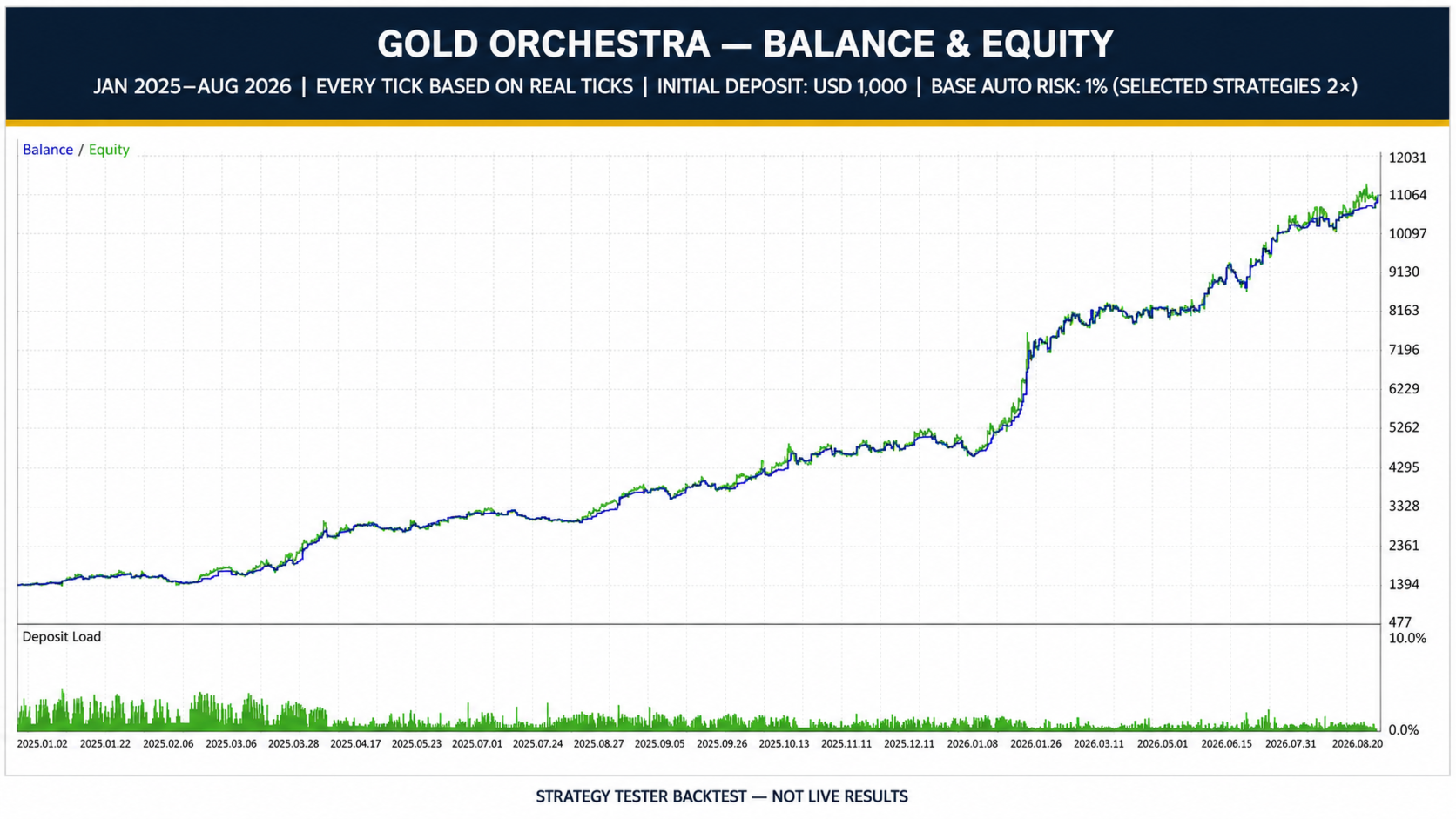
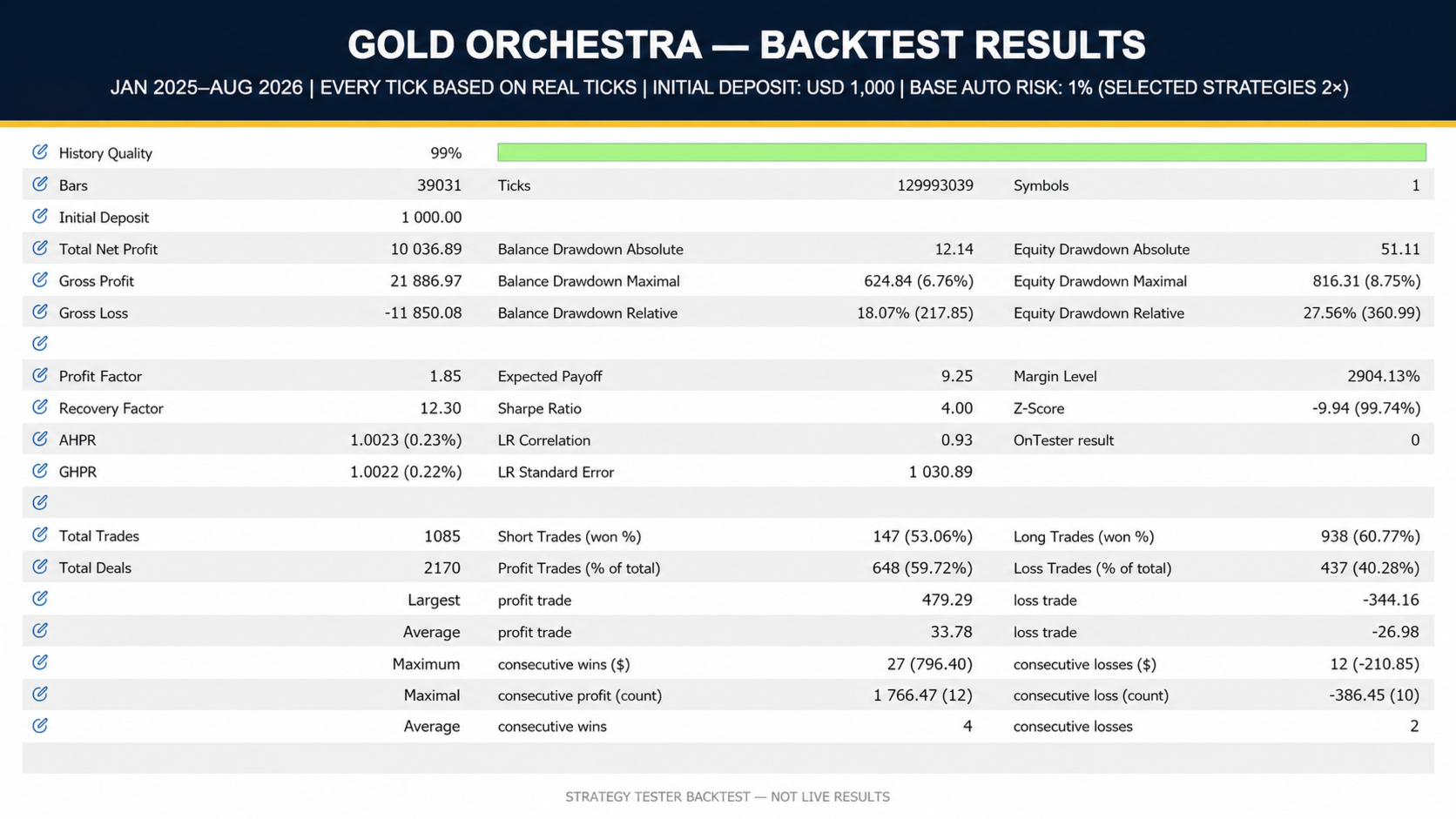
Recommended starting profile: AutoRisk 1%, a hedging account and a balance of USD 1,000 or more. Test the supplied configuration on a broker-matched demo account before considering real-money use.
Key capabilities
- Multiple XAUUSD trading strategies coordinated inside one MetaTrader 5 Expert Advisor.
- Manual lot, balance-scaled lot and stop-distance percentage-risk sizing.
- Automatic detection of common Gold-symbol prefixes and suffixes.
- Automatic broker GMT and daylight-saving alignment for session logic.
- Initial Stop Loss, trailing protection, time exits and strategy-specific exits.
- Broker-aware checks for spread, margin, volume steps, stop levels and server responses.
Multi-strategy XAUUSD portfolio
Gold Orchestra reduces dependence on a single entry concept by monitoring several independently triggered strategy families. The portfolio includes London-session logic, early-session carry, H4 breakout, U.S. impulse, afternoon continuation, H1 structure breakout, multi-horizon structural pulse, daily RSI pullback, negative-transition and weekly exhaustion logic.
Some modules follow momentum or price expansion, while others look for pullbacks, reversals or changes in market state. The strategies do not need to agree before trading. Each module evaluates its own completed-bar and session conditions, so active periods, quiet periods, overlapping positions and losing streaks are all possible.
Position sizing and risk
Automatic Risk calculates volume from current account balance, the selected risk percentage, broker contract data and the initial Stop Loss distance. The recommended AutoRisk 1% profile targets 1% for ordinary strategies and 2% for Morning Reversal, H4 Breakout and Afternoon Carry. As the balance rises or falls, the next calculated volume can also increase or decrease, subject to the broker's minimum lot, maximum lot, volume step and available margin.
The percentage is planned risk for each accepted trade at its initial Stop Loss; it is not a maximum drawdown limit. Independent strategies can overlap on a hedging account, so combined portfolio exposure can exceed the percentage shown in the set-file name. If calculated volume is below the broker minimum, the enabled 0.01-lot fallback can create actual risk above the requested percentage.
Manual Lot is available for users who prefer predetermined base volumes. The supplied selective manual profile uses 0.01 lot as its base volume and 0.02 lot for Morning Reversal, H4 Breakout and Afternoon Carry. A fixed lot is not a fixed percentage risk because monetary exposure changes with Stop Loss distance and broker contract specifications.
Recommended configuration
- Platform: MetaTrader 5.
- Instrument: XAUUSD or the broker's detected Gold symbol.
- Chart timeframe: M15.
- Recommended account mode: hedging.
- Recommended profile: AutoRisk 1%.
- Alternative profile: selective manual lot.
- Recommended starting balance: USD 1,000 or more.
- Environment: stable connection, competitive XAUUSD trading costs and algorithmic trading enabled.
A hedging account is recommended because independently owned strategy positions can remain open simultaneously. On a netting account, Gold Orchestra serializes same-symbol exposure to prevent strategy positions from being merged into an ambiguously owned net position. This protection can reduce trade frequency.
Gold Orchestra is not locked to one broker. It is designed for compatible MetaTrader 5 brokers through automatic Gold-symbol detection and GMT alignment. Results can still differ because brokers use different price feeds, spreads, commissions, swaps, contract sizes, stop levels, liquidity and execution. A VPS close to the broker is recommended for continuous operation.
Execution safeguards
The execution layer validates quote readiness, spread, estimated margin, broker volume rules, stop and freeze distances and server return codes. Runtime safeguards include managed-order ownership, pending-order reconciliation, missing-stop protection, bounded trade-error handling and restart-state recovery. If required market data is unavailable, existing trades remain managed while affected new entries are deferred.
Gold Orchestra does not require a DLL, WebRequest, external custom indicator or external signal for execution. The EA does not include an economic-news filter.
Quick start
- Install Gold Orchestra from MQL5 Market.
- Open the broker's XAUUSD or Gold chart on M15.
- Attach one EA instance and load the recommended AutoRisk 1% set file.
- Enable algorithmic trading.
- Confirm the detected symbol, broker time and initialization messages in the Experts and Journal tabs.
- Run broker-matched backtests and a demo test before considering real-money trading.
Testing and realistic expectations
Use the MQL5 Market demo and Strategy Tester to evaluate Gold Orchestra on your own broker. For the closest available simulation, use XAUUSD M15, the supplied set file and Every tick based on real ticks. Record the test period, deposit, leverage, spread, commission, swap and contract specification so results can be compared correctly.
Backtests and the public live signal are provided for transparency, not as promises of future performance. Live results can differ because of slippage, latency, liquidity, gaps, rejected operations, connection interruptions and broker-specific conditions.
Updates and support
Gold Orchestra will be maintained through MQL5 Market. Future versions may improve robustness, execution safety, broker compatibility and strategy logic as testing and market conditions evolve. Updates cannot guarantee profitability or prevent losses.
The current set files and PDF instructions are available in the linked Gold Orchestra user-guide blog. Support is provided through the MQL5 product comments and private messages. When requesting help, include your broker, Gold symbol, account mode, timeframe, set file and relevant Experts or Journal messages.
Risk disclosure
Gold Orchestra is an automated trading system, not a get-rich-quick scheme. XAUUSD is volatile, and losing trades, losing streaks, flat periods and drawdowns are normal parts of trading. A Stop Loss defines planned risk but cannot guarantee the execution price or prevent losses. Historical tests and live results do not guarantee future performance. Test on demo first and never trade money you cannot afford to lose.