Trend Alignment Scanner Pro

Trend Alignment Scanner Pro

The Ultimate Volatility Direction Score Dashboard for MetaTrader 5

Are you tired of flipping through dozens of charts just to find a single valid setup? Meet Trend Alignment Scanner Pro, an institutional-grade multi-symbol, multi-timeframe dashboard engineered to detect high-probability market imbalances in real-time.

Powered by our proprietary Volatility Direction Score (VDS) Engine, this scanner filters out market noise and ranks the most explosive, trend-aligned assets directly at the top of your chart.

🚀 Why Trend Alignment Scanner Pro?

Unlike basic dashboards that only look at simple moving averages, this scanner evaluates market state using a three-dimensional mathematical approach: Trend Strength, Volatility Expansion, and Relative Momentum across 3 critical timeframes (H1, H4, and D1).

1. Proprietary VDS Engine (Max Score: ±100)

The scanner runs a background algorithm on every selected symbol, calculating a unified score based on:

  • Trend Component (ADX): Evaluates structural direction and trend strength (Up to 40 Points).

  • Volatility Component (ATR Ratio): Compares current volatility against historical means to detect breakout expansions (Up to 40 Points).

  • Momentum Component (RSI): Measures immediate velocity to ensure you don’t enter a exhausted market (Up to 20 Points).

2. Dynamic Auto-Ranking & Sorting

The dashboard automatically rearranges itself in real-time. Aset dengan momentum paling kuat dan searah (fully aligned) secara otomatis naik ke baris paling atas, memastikan fokus Anda selalu tertuju pada instrumen yang sedang bergerak aktif.

3. Premium UX & Multi-Screen Ready

  • HiDPI / 4K Scaling Support: Automatically detects your terminal’s screen DPI. Perfect for high-res monitors and multi-screen setups—no overlapping text or broken layouts.

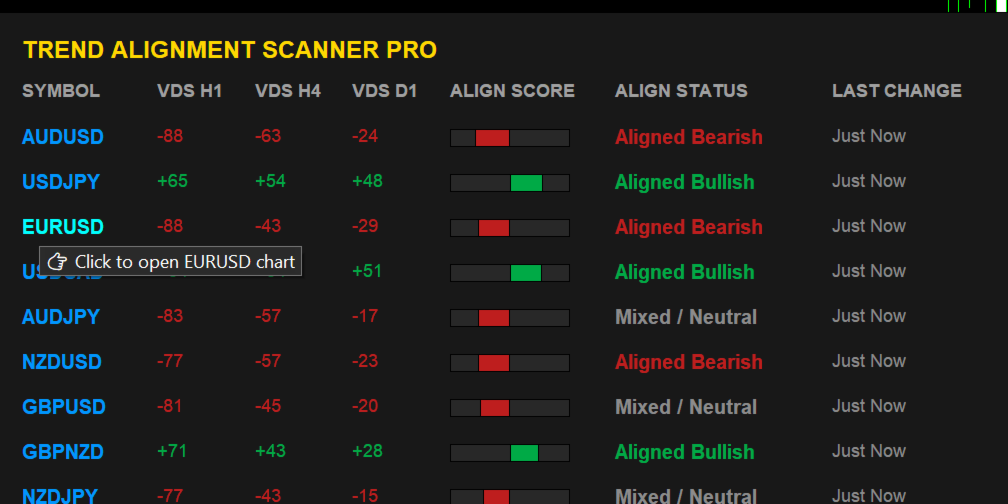
  • Interactive Controls: Hover over a symbol to see actionable tooltips, and Single-Click any symbol row to instantly open its specific chart in a new window.

4. Intelligent Triple-Alert Framework with Session Cooldown

Never miss a major market shift again. Receive alerts via MT5 Terminal Pop-up, Mobile Push Notifications, and direct Telegram Bot messages.

💡 Smart Cooldown Feature: Choose between traditional minute-based cooldowns or Session-Based Cooldowns (Asia/London/NY). This unique feature completely eliminates alert fatigue during tight consolidation phases or low-liquidity sessions.

🛠️ Technical Optimization & Stability

  • Asynchronous History Loader: Built-in ForceLoadHistory safely syncs data with your broker's server in the background. Say goodbye to terminal freezing, memory leaks, or blank dashboards.

  • Zero-Lag Engine: Highly optimized memory allocation handles up to 40 complex symbols simultaneously without putting a strain on your CPU or VPS.

🎛️ Key Input Parameters

  • Scanner Period: Custom lookback period for the mathematical engine (Default: 200).

  • Max Symbols: Safety ceiling to protect your system's memory.

  • Alert Cooldown Mode: Switch between Minute Cooldown or Market Session Cooldown.

  • Telegram Bot Credentials: Easy integration using your HTTP API Bot Token and Chat ID.

  • Interface Customization: Adjust X and Y offsets to perfectly align the dashboard with your existing chart templates or One-Click trading panels.

📌 Trading Recommendations

  1. Fully Bullish (+70 to +100): Look for buying opportunities on lower timeframe pullbacks.

  2. Fully Bearish (-70 to -100): Look for shorting opportunities on lower timeframe bounces.

  3. TF Conflict (Chop): Avoid trading. The asset is currently in a range-bound or rotational market state.

🎁 Limited Introductory Offer

We believe in providing institutional value at a retail price. Trend Alignment Scanner Pro is currently available at a discounted introductory price. The price will increase significantly upon our next major feature update.

Download the free trial version now to test its lightning-fast performance!


USER MANUAL & SETUP GUIDE

Enable WebRequest (Mandatory for Telegram Alerts)

Because this indicator sends real-time HTTP requests to the Telegram API, you must grant MT5 permission to communicate with external servers:

  1. In MT5, go to Tools -> Options (or press Ctrl + O ).

  2. Click on the Expert Advisors tab.

  3. Check the box: "Allow WebRequest for listed URL:"

  4. Double-click the green plus sign + and add this exact URL:

    [https://api.telegram.org]

  5. Click OK.


🚨 Pre-Configuring Your Market Watch (CRITICAL)

The scanning engine reads structural data directly from your terminal's active cache. Please strictly follow this rule:

  • Populate First: You must add all your desired trading assets into your MT5 Market Watch window before dragging the indicator onto the chart. If an asset is not visible in Market Watch, the scanner cannot see or process it.

  • Modifying Assets Later: If you add new pairs or remove existing ones from your Market Watch panel later on, the engine requires a fresh initialization. You must re-attach the indicator to the chart (or simply switch timeframes back and forth) to force the scanner to reload your updated asset list.


⚙️ Core Input Parameters Reference

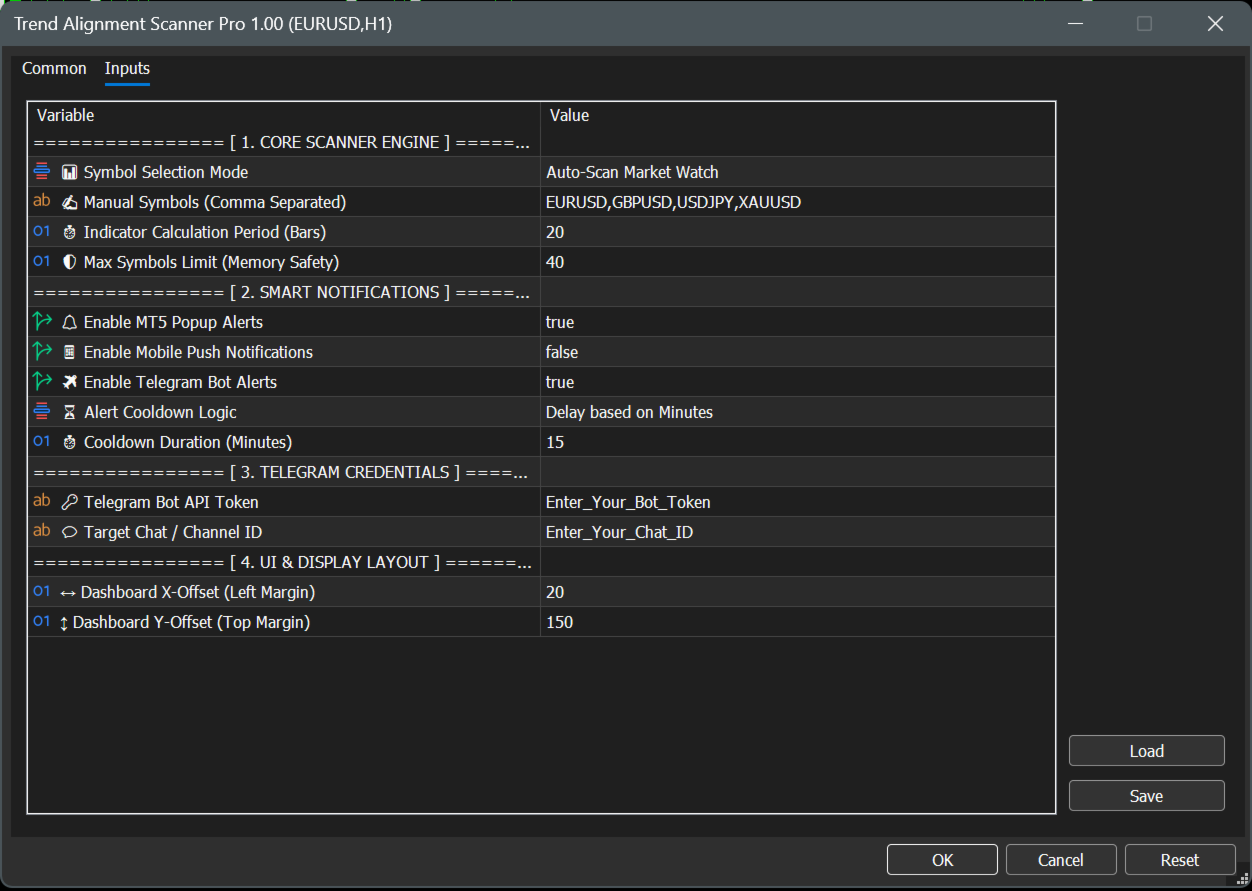
================ [ 1. CORE SCANNER ENGINE ] ================

  • 📊 Symbol Selection Mode

    • Auto-Scan Market Watch : Automatically scans all financial assets currently active and visible inside your MT5 Market Watch window. (Recommended for dynamic setups).

    • Use Manual List Below : Tells the engine to look only at the custom symbols typed in the parameter below.

  • ✍️ Manual Symbols (Comma Separated)

    • Your custom asset text field (Default: EURUSD,GBPUSD,USDJPY,XAUUSD ). Note: Ensure names exactly match your broker's specific naming convention (e.g., XAUUSD.ecn or XAUUSD+).

  • ⏱️ Indicator Calculation Period (Bars)

    • The mathematical lookback window for the underlying ADX, ATR, and RSI calculations. Safely defaulted to 20 bars for highly responsive, lag-free day-trading signal generation.

  • 🛡️ Max Symbols Limit (Memory Safety)

    • Safety ceiling filter (Default: 40 ). Limits the maximum number of concurrent assets being processed to protect your terminal's CPU and memory from overloading on low-spec VPS servers.

================ [ 2. SMART NOTIFICATIONS ] ================

  • 🔔 Enable MT5 Popup Alerts

    • Toggles standard desktop terminal audio alerts and visual pop-up dialog boxes on or off (Default: true ).

  • 📱 Enable Mobile Push Notifications

    • When set to true , sends instant trade signals directly to your iOS or Android MetaTrader mobile app (Requires your personal MetaQuotes ID configured in MT5 options).

  • ✈️ Enable Telegram Bot Alerts

    • Connects the scanning engine directly to your automated Telegram channel or private chat (Default: true ).

  • ⏳ Alert Cooldown Logic

    • Delay based on Minutes : Uses a traditional timeline lockout defined by the parameter below.

    • Based on Market Session : Locks further alerts for that specific asset until the market transitions into the next global trading session (Asia, London, or New York) to eliminate choppy market noise.

  • ⏱️ Cooldown Duration (Minutes)

    • Sets the exact duration lock (Default: 15 minutes) when Delay based on Minutes is selected.

================ [ 3. TELEGRAM CREDENTIALS ] ================

  • 🔑 Telegram Bot API Token

    • The secure HTTP API token obtained from Telegram's @BotFather used to authorize and authenticating your custom bot.

  • 💬 Target Chat / Channel ID

    • The unique target identification number of your personal private chat window or public/private Telegram channel destination.

================ [ 4. UI & DISPLAY LAYOUT ] ================

  • ↔️ Dashboard X-Offset (Left Margin)

    • Sets the exact horizontal starting pixel coordinates from the left border of your chart screen (Default: 20 ).

  • ↕️ Dashboard Y-Offset (Top Margin)

    • Sets the exact vertical starting pixel coordinates. Defaulted to 150 to guarantee the graphical user interface completely clears the built-in MetaTrader One-Click Trading terminal buttons.

🤖 3. Step-by-Step Telegram Bot Integration

To receive automated market alerts directly onto your phone or channel, follow these steps:

  1. Create a Bot: Open Telegram, search for @BotFather , and send the command /newbot . Follow the prompts to name your bot and copy the HTTP API Token provided.

  2. Paste Token: Paste this token into the exact 🔑 Telegram Bot API Token input field.

  3. Get Your Chat ID: Search for @userinfobot on Telegram and send any message. It will immediately reply with your unique Id.

  4. Paste Chat ID: Paste this number into the exact 💬 Target Chat / Channel ID field.

  5. Note: If sending to a Telegram Group/Channel, add your bot to the group as an Administrator and use the group’s Chat ID instead (usually starts with a minus sign, e.g., -100xxxxxxxxx ).

📊 4. Understanding the User Interface

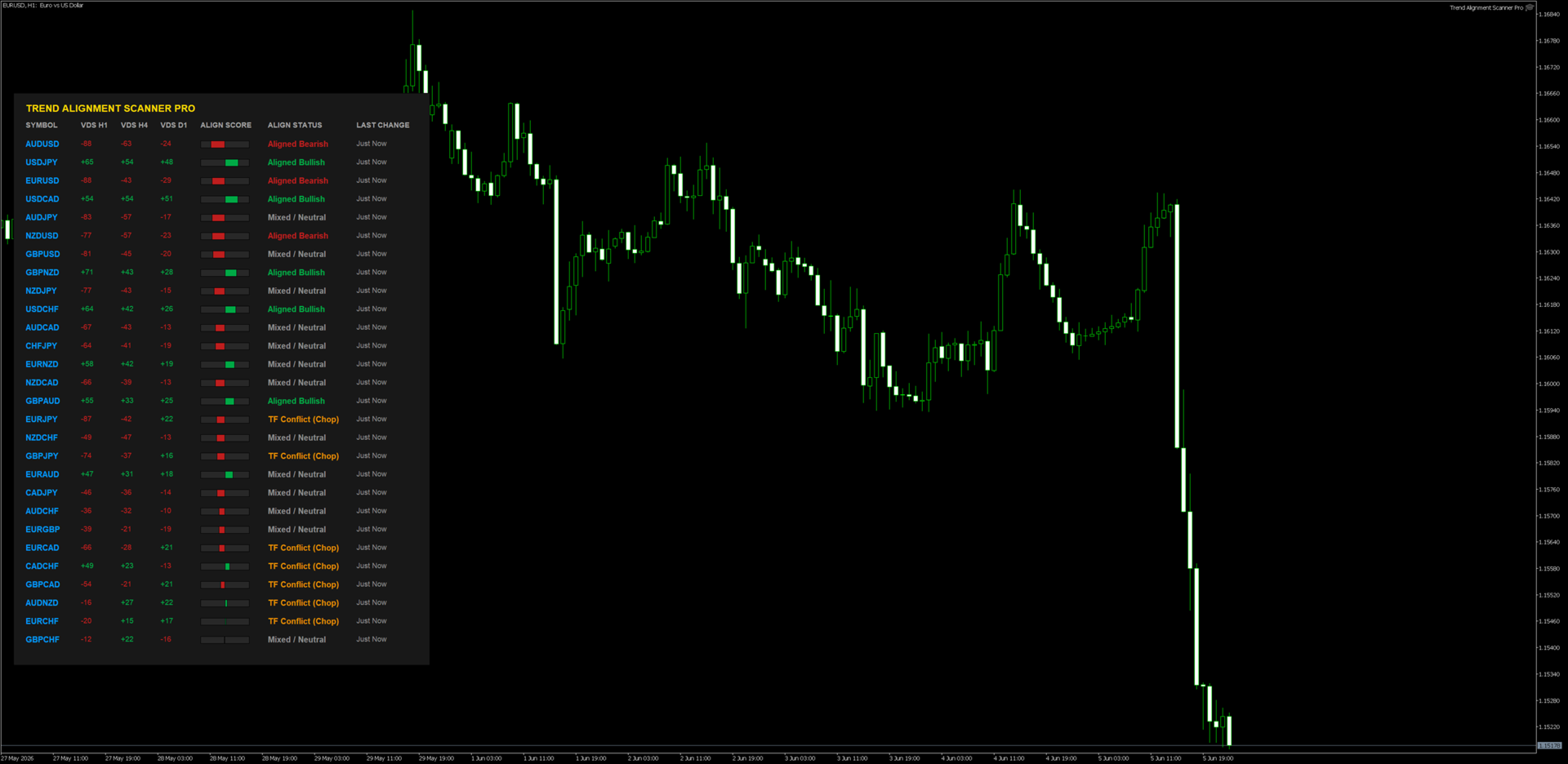
When you drag the indicator onto a clean chart window, you will see a beautifully rendered HUD (Heads-Up Display) with the following components:

  • VDS (Volatility Direction Score): Displays individual scores for H1, H4, and D1 timeframes ranging from -100 to +100.

  • Align Score (The Visual Gauge): A real-time graphic indicator representing the composite average of all three timeframes combined.

  • Dynamic Sorting: The scanner shifts rows instantaneously. The pairs with the highest absolute market momentum always float to the top automatically.

  • Interactive Controls: * Hover Feature: Moving your mouse over any symbol changes its color and displays an analytical tooltip.

    • Single-Click Chart Open: Click directly on any symbol name, and a brand-new chart window for that asset will seamlessly load instantly.

📈 5. Professional Trading Workflows

Strategy A: The Institutional Confluence (Trend Following)

  • Condition: Look for assets flagged as "Fully Bullish" (Score +70 to +100) or "Fully Bearish" (Score -70 to -100).

  • Execution: 1. Identify a "Fully Bullish" asset on the dashboard. 2. Click the symbol to open its chart. 3. Drop down to a lower execution timeframe (e.g., M5 or M15). 4. Only take long positions on structural demand zones or moving average pullbacks.

  • Why it works: You are trading with the combined structural wind of H1, H4, and D1 market participants behind you.

Strategy B: The Conflict Avoidance Filter (Chop Filter)

  • Condition: Dashboard displays "TF Conflict (Chop)".

  • Execution: Do not open any active positions on this asset. Keep away from grid or breakout strategies on pairs marked with this status.

  • Why it works: This state means timeframes are actively fighting each other (e.g., H1 is crashing while D1 is strongly bullish). The asset is highly likely to range or whip-saw retail accounts.

❓ Troubleshooting FAQ

  • Q: Why does it say "Syncing..." or "Syncing History..."?

    • A: This is a built-in safety protocol. It means the indicator is forcing your MT5 terminal to pull historic price data from your broker's database. It will automatically resolve and render the dashboard within a few seconds.

  • Q: I enabled Telegram Alerts but I am not receiving messages.

    • A: Double check Step 2 of this manual. 99% of failed Telegram integrations occur because the user forgot to add https://api.telegram.org to the MT5 WebRequest allowed list.

  • Q: I updated my Market Watch but the dashboard layout didn't change.

    • A: MT5 indicators do not dynamically listen to core layout modifications. Simply delete the indicator and put it back on the chart, or cycle the chart timeframe once to push an unconditional structural reload.


⚠️ RISK DISCLAIMER & LEGAL NOTICE

High-Risk Investment Warning

Trading foreign exchange (Forex), Contracts for Difference (CFDs), commodities, and cryptocurrencies on margin carries a high level of risk and may not be suitable for all investors. The high degree of leverage can work against you as well as for you. Before deciding to trade or utilize any automated scanning software, you should carefully consider your investment objectives, level of experience, and risk appetite. The possibility exists that you could sustain a loss of some or all of your initial investment; therefore, you should not invest money that you cannot afford to lose.

No Financial or Investment Advice

Trend Alignment Scanner Pro is an analytical, mathematical software tool designed solely for informational and educational purposes. The developer does not provide financial, investment, tax, or legal advice. All data, visualization scores (VDS), and alerts generated by this software are generic market metrics and should not be construed as an explicit buy/sell recommendation or a guarantee of market direction. Any trading decisions you make are entirely at your own risk.

Hypothetical and Past Performance Disclaimer

Past performance results are not necessarily indicative of future performance. Hypothetical or simulated performance results have certain inherent limitations. Unlike an actual performance record, simulated results do not represent actual trading. Also, since the trades have not actually been executed, the results may have under- or over-compensated for the impact, if any, of certain market factors, such as lack of liquidity or broker slippage. No representation is being made that any accou nt will or is likely to achieve profits or losses similar to those shown

Limitation of Liability

Under no circumstances shall the developer or any associated parties be held liable to any user, purchaser, or third party for any direct, indirect, incidental, consequential, special, or exemplary damages, including but not limited to trading losses, loss of profits, system downtime, or data corruption arising out of the use or inability to use this software, even if advised of the possibility of such damages. By downloading and utilizing this product, you explicitly acknowledge and agree to these terms.
Produits recommandés
Atlas Trade Desk
Bernhard Wurzlbauer
Atlas Trade Desk MT5 Atlas Trade Desk MT5 est un panneau de trading visuel, un gestionnaire de risque et un calculateur de lots pour les traders manuels sur MetaTrader 5. Planifiez des ordres au marché et des ordres en attente directement sur le graphique, calculez la taille de position selon le risque choisi, ajustez Entry, Stop Loss et Take Profit visuellement, puis gérez vos positions ouvertes depuis un tableau de bord clair. L’outil est conçu pour les traders discrétionnaires qui souhaitent
Product Name MT5 Gold & Silver Multi-Language Trading Panel V17.00 Introduction This is a professional trading panel designed specifically for manual gold and silver traders. It supports five languages: English, Chinese, Spanish, Arabic, and German. The panel automatically detects gold and silver symbols, so users do not need to enter symbol codes manually. It is compatible with most brokers worldwide, including standard accounts, zero spread accounts, and raw spread accounts. Users only need t
​Notification Spy Protector is a MetaTrader 5 Expert Advisor (Utility) that monitors your trading activity and sends real-time alerts to your mobile device (via MT5 Push) and/or Telegram. Equipped with a solid and reliable Account Protector, this utility is fully compatible and highly recommended for Prop Firm trading to safeguard your accounts from violating drawdown limits. It also provides advanced transaction filters and a clean on-chart dashboard. Never miss a trade. Protect your account f
Trillion Pips Pro MT5
Sivaramakrishnan Natarajan
TRILLION PIPS ELITE PRO INDICATOR Advanced Wave-Based Auto Trend System Built with 12+ Years of Real Market Experience, this is not just an indicator — it is a complete market intelligence system designed to help traders identify key levels, understand auto trend direction, and read market movement with confidence. UNIQUE POWER OF THIS INDICATOR Proprietary Strategy – Only from Trillion Pips Advanced Wave-Based Market Structure Engine Auto Trend Detection System Built-in Trend Decider Log
This Order Risk Control Panel is designed with the core concept of "Simple, Efficient and Accurate Risk Control". Tailor-made for all types of traders, whether they are beginners or experienced professionals, it allows for quick mastery and realization of refined risk management in every trade. The panel deeply integrates risk control logic into the entire order placement process, fundamentally addressing the pain points of "cumbersome risk control settings and delayed operations" in traditiona
COPYLATOR – MT5 Trade Copier Key Highlights Multi-Sender / Multi-Receiver Trade Replication – supports one-to-many, many-to-one, and many-to-many configurations, with complete real-time copying of market orders, pending orders, SL, and TP. Advanced drawdown protection – closing, blocking, pending-order deletion, manual and automatic reset mechanisms. Automatic symbol mapping – finds correct symbols, alerts if missing, allows manual override. Hedging & Netting support – auto-detected, no manual s
Just Copier MT5
Agung Imaduddin
4.75 (4)
"Just copier" is designed to copy trading without any complicated settings. The copy can be done in one PC. One EA can be set as master (provider) or slave (receiver). The receiver lot can be set to multiple providers lots. Please also check this product at fxina.hostingerapp.com.  Any type of copy is available. MT4 -> MT5 MT4 -> MT4 MT5 -> MT5 MT5 -> MT4 If you want to copy MT4 -> MT5 or MT5 -> MT4, please purchase "Just copier" for MT4 and "Just copier" for MT5 separately. Just Copier can copy
Blogs MQL5 : https://www.mql5.com/en/blogs/post/761446 Version MT4 : https://www.mql5.com/en/market/product/136790 Version MT5 : https://www.mql5.com/en/market/product/136791 Time Wizard est un assistant de trading professionnel conçu pour les traders exigeants qui recherchent rapidité, timing et contrôle de l’exécution sur un tableau de bord intuitif. Ce conseiller expert est conçu pour le trading événementiel, l’exécution programmée et la gestion semi-automatique rapide des ordres. Il vou
- Download historical rates via `CopyRates()` for many symbols and timeframes. - Works with Market Watch symbols or explicit symbol list. - Optional CSV export into the terminal `Files` folder (per symbol/timeframe). - Configurable retries, pause and exponential backoff. - Verbose logging and progress comments for convenience. ## Usage 1. Copy `AutoHistoryDownloader_mq5.mq5` into `MQL5/Scripts` or open in MetaEditor. 2. Attach / run the script from the Navigator (Scripts). 3. Configure inputs:
FREE
Welcome to Smart Algo Trade Panel Manager MT5 - the ultimate   risk management tool designed to make trading more effective based on user needs.  It is a comprehensive solution for seamless trade planning, position management, and enhanced control over risk. It does not matter weather you a beginner or an advanced trader, or a scalper needing rapid executions, SmartAlgo Trade Panel  adapts to your needs offering flexibility across all markets of your choice. You can put SL, Lot and TP of choice
MT5 History Checker Can you trust the historical data behind your MT5 backtest? MT5 History Checker is a diagnostic utility designed to identify missing periods and coverage problems in the historical data supplied by your MetaTrader 5 broker. Select the symbol and date range you want to examine and run the checker. The utility analyses the available history and provides a clear PASS, WARNING or FAIL result. What it checks Historical tick-hour coverage M1 historical-data coverage Missing periods
FREE
Phantom Correlation Shield Institutional Over-Exposure & Correlation Guard for MetaTrader 5 Are you running multiple EAs or trading multiple currency pairs at the same time? Then you are almost certainly over-exposed- without knowing it. When you Buy EUR/USD and Buy GBP/USD at the same time, you are essentially doubling your risk on the same trade — because these two pairs move together with a correlation above 0.85. If one trade loses, the other will lose too. Your account takes double the d
Powerful trend indicator provided with all necessary for trade and it is very easy to use. Everyone has probably come across indicators or Expert Advisors that contain numerous input parameters that are difficult to understand. But here, input parameters are simple and it is no need to configure anything — neural network will do all for you. Difference from a classic version The real-time multi time frame panel is added, so you can check a trend for other timeframes without switching the schedu
Aegis Gold Dashboard
Ayman Ishaq Jundi Tawadros
Aegis Gold Dashboard is a free, lightweight visual indicator created to help traders monitor key market conditions in a clean and professional way. This indicator is designed as a visual companion to automated or discretionary trading systems and does not execute any trades. Features: • Informational signal overview (non-executable) • ATR-based volatility display • Market session open / closed status • Real-time spread monitoring • Last closed trade overview • Simple market condition tips De
FREE
Strong Liquidity Zones A professional non-repainting liquidity mapping indicator that detects and scores high-probability imbalance zones and stop-pool zones on the chart. The indicator identifies two core types of liquidity areas: • Imbalance Zones – price gaps (similar to Fair Value Gaps) that act as magnets • Stop-Pool Zones – areas around confirmed swing highs/lows where stop orders typically cluster Each zone receives a dynamic 0–10 score based on volume pressure, zone size, number of tests
FREE
Сообщения в Telegram из MT5 о торговых событиях: Открытие/закрытие сделок; Выставление/удаление отложенных ордеров. Версия утилиты для MT4 здесь: https://mql5.com/8bjjy Настройки  Telegram: Создайте своего бота. Для этого напишите для пользователя  @BotFather команду  /newbot , и следуйте инструкциям. В результате вы получите Token бота, примерно такой:   1245680170:BBGuDFVkTYIPtjSaXMgQEhdfg7BOQ6rl8xI.  Узнайте свой ID в  Telegram, для этого напишите пользователю  @userinfobot любое сообщение.
Bienvenue sur l’indicateur EPo-CreW Forex Super ORB-H4 ! Ce guide vous apprendra à utiliser cet outil puissant afin d’identifier des opportunités de trading à forte probabilité, basées sur la première plage d’ouverture de 4 heures du marché. Que vous soyez débutant ou trader expérimenté, ce système vous aidera à trader avec plus de confiance et de régularité. CECI EST UN PRODUIT DE DÉMONSTRATION. IL EXPIRERA 30 JOURS APRÈS LA DATE D’INSTALLATION. Version complète disponible ici : https://www.mql
FREE
Overview : The Advanced News Trading Panel is a versatile tool designed for traders who rely on news-based trading strategies. This Expert Advisor (EA) provides an intuitive graphical interface that allows users to quickly set up pending orders and manage risk with ease. With the ability to automatically place Buy/Sell Stop orders based on your pre-set stop order distance from the bid/ask price, stop-loss and take-profit levels, the EA allows for precision trading during high-volatility news eve
Prenez le contrôle de votre routine de trading sans effort avec le Trades Time Manager révolutionnaire. Cet outil puissant automatise l'exécution des ordres à des moments précis, transformant votre approche de trading. Créez des listes de tâches personnalisées pour diverses actions commerciales, de l'achat à la définition des commandes, le tout sans intervention manuelle. Guide d'installation et d'entrées de Trades Time Manager Si vous souhaitez recevoir des notifications sur l'EA, ajoutez notre
"Support or Resistance Alert Broken" is a simple and very intuitive tool that allows you to create or eliminate horizontal and trend supports and / or resistances with a simple click. When the support or resistance line is broken by the closing price at the end of the current candle, the "Support or Resistance Alert Broken" tool will send an alert with sound, as well as a notification to the MT4 or MT5 mobile application. This tool can send alerts from multiple pairs at the same time. Utility
CopyTrader Pro FAST MT5 — FREE Real-Time Trade Copier | MT4 ↔ MT5 Cross-Platform | 20ms Latency CopyTrader Pro FAST is a professional trade copier Expert Advisor that copies trades between MetaTrader terminals in real time using a high-speed file-based communication system. No VPS, no network setup, no DLL — just attach and copy. FREE VERSION : Copies up to 1 trade at a time. Upgrade to the full version, Copy Trader Pro FAST MT5 , for unlimited copying. Key Features 20ms refresh rate — in
FREE
Telegram to mt5 pro
Janet Abu Khalil
4 (4)
Telegram to MT5 Pro — Advanced Telegram Signal Copier with Auto-Fix, Multi-TP, Risk Control and Full Trade Management Telegram to MT5 Pro — Copieur de signaux Telegram professionnel Telegram to MT5 Pro est un copieur de trading haute performance qui exécute automatiquement les signaux de Telegram directement dans votre compte MetaTrader 5, avec un contrôle total du risque, de l’exécution et de la gestion des trades. Le système se compose de deux composants : • L’Expert Advisor (EA) exécuté dans
Smart FVG Stats
- Md Rashidul Hasan
5 (1)
The  Smart FVG Statistics Indicator  is a powerful MetaTrader 5 tool designed to automatically identify, track, and analyze Fair Value Gaps (FVGs) on your charts. Love it? Hate it? Let me know in a review! Feature requests and ideas for new tools are highly appreciated. :) Try "The AUDCAD Trader": https://www.mql5.com/en/market/product/151841 Key Features Advanced  Fair Value Gap  Detection Automatic Identification : Automatically scans for both bullish and bearish FVGs across specified histo
FREE
EA Health Monitor
Allan Aparece Ninal
EA Health Monitor is a free indicator for MetaTrader 5 that shows how each Expert Advisor on your account is doing. It groups the account history by magic number. Every EA gets its own row. Manual trades have a row of their own, and a total sits at the bottom. It only reads the account history and open positions. It never opens, changes or closes a trade. Standalone: Everything is built in. You do not need to buy or install any other product named on this page. Quick start Attach EA Health Monit
FREE
Global Session Map turns one MetaTrader 5 chart into a clear session workspace. It shows which major trading sessions are active in broker time, when the next transition occurs, and where session overlaps appear. The panel is designed for discretionary traders who need reliable time context without entry signals or profit claims. Session windows and display preferences are configurable and remain available after chart or terminal restarts. Main functions • Sydney, Tokyo, London and New York s
FREE
AlgoDevMT5 Trade Manager Pro AlgoDevMT5 Trade Manager Pro is a professional trade management and risk control utility for MetaTrader 5. Designed for discretionary traders and funded account traders, this utility helps traders plan trades visually, calculate position size instantly, and manage risk with precision. Trade Manager Pro does not generate trading signals, open trades automatically, or provide investment advice. It is a trader-assistance utility designed to improve consistency and risk
OB FVG Trade Copier: Unified Master & Slave EA Version: 2.00 Type: Trade Copier / Risk Management Utility Compatibility: MetaTrader 4 & MetaTrader 5 (Cross-compatible codebase) Overview The OB FVG Trade Copier is a professional-grade, unified trade copying system designed to mirror trades between Master and Slave accounts seamlessly. Built with a unified architecture, a single EA file serves as both the sender (Master) and receiver (Slave) simply by toggling the EA Mode in the settings. It uti
FREE
Risk Guardian — Ultimate Equity & Drawdown Protection Protect your capital. Stay disciplined. Trade smarter. Risk Guardian is a powerful utility that helps traders automatically control daily risk and secure profits based on equity. Designed for MetaTrader 5, it’s lightweight, efficient, and extremely easy to use. Key Features: Daily Drawdown Limit (% based) Absolute Equity Target (e.g., stop trading after reaching 110,200 USD) Auto-close All Positions, Orders & Charts Visual Dashboard on C
Martingale panel MT5
Mohammadbagher Ramezan Akbari
In this article, we would like to introduce the trade panel product with the Martingale panel. This panel is made in such a way that it can meet the needs of traders to a great extent. This trade panel actually consists of two trade panels at the same time, with the first one you can take positions with certain profit and loss limits, and with the second one, you can have positions with profit limits but without loss limits. When positions lose, a new position will be added based on the settings
Trade2Telegram
Strifor (Mauritius) Ltd
5 (12)
Trade2Telegram — un plugin pour les notifications de trades automatiques de MetaTrader vers Telegram. Cet outil est conçu pour les traders gérant des capitaux, animant des chaînes de signaux ou dirigeant des communautés éducatives. Le plugin copie toutes les opérations de trading depuis le terminal et les publie dans un chat, groupe ou canal Telegram sélectionné. Les messages sont envoyés automatiquement lorsque des positions sont ouvertes ou fermées, lorsque les niveaux de stop-loss ou take-pro
FREE
Les acheteurs de ce produit ont également acheté
Trade Assistant MT5
Evgeniy Kravchenko
4.43 (216)
It helps to calculate the risk per trade, the easy installation of a new order, order management with partial closing functions, trailing stop of 7 types and other useful functions. Additional materials and instructions Installation instructions - Application instructions Line function -   shows on the chart the Opening line, Stop Loss, Take Profit. With this function it is easy to set a new order and see its additional characteristics before opening.   Risk management  - The risk calculation
Bienvenue sur Trade Manager EA, l’outil ultime de gestion des risques conçu pour rendre le trading plus intuitif, précis et efficace. Ce n’est pas seulement un outil d’exécution d’ordres ; c’est une solution complète pour la planification des trades, la gestion des positions et le contrôle des risques. Que vous soyez débutant, trader expérimenté ou scalpeur ayant besoin d’une exécution rapide, Trade Manager EA s’adapte à vos besoins, offrant une flexibilité sur tous les marchés, des devises et i
Telegram to MT5 Multi-Channel Copier   copie automatiquement les signaux de trading de vos canaux Telegram et Discord directement vers MetaTrader 5. Pas de bots, pas d'extensions de navigateur, pas de copie manuelle. Un signal arrive sur Telegram ou Discord et l'EA ouvre le trade dans votre terminal en quelques secondes. Et avant de copier un canal, le backtester intégré vous montre ce que ce canal aurait fait sur votre compte. Le produit comprend deux composants : une application Windows qui éc
Farmed Hedge Yield Farming | All Markets (Manual - Hybrid - Semi/Automated EA) VERIFIED TRADING RESULTS - Farmed Hedge Yield Axi Copy:  https://www.mql5.com/en/signals/2356376 - Farmed Hedge Yield Exn Copy:   https://www.mql5.com/en/signals/2356404 - Farmed Hedge Yield V Copy:  https://www.mql5.com/en/signals/2357156 IMPORTANT NOTICE: FarmedHedge is a MANUAL-FOCUSED TRADING UTILITY ,not a fully automated EA. Results shown on this Signal include manual trades and overall strategic management.
Copiez les signaux Telegram avec vos propres règles de trading Telegram to MT5 Signal Trader copie automatiquement les signaux de trading au format texte provenant de canaux et de groupes Telegram publics et privés vers MetaTrader 5. Gérez plusieurs fournisseurs et comptes MT5 depuis une seule application de bureau, avec des paramètres de risque et de trading propres à chaque fournisseur . Aucun bot Telegram ni configuration d'API n'est nécessaire pour copier les signaux. Connectez-vous simpleme
TradePanel MT5
Alfiya Fazylova
4.88 (170)
Trade Panel est un assistant commercial multifonction. L'application contient plus de 50 fonctions de trading pour le trading manuel et permet d'automatiser la plupart des tâches commerciales. Instructions d'utilisation : https://www.mql5.com/fr/blogs/post/762589 Version d'essai de l'application pour un compte démo : https://www.mql5.com/fr/blogs/post/762644 Comment installer l'application : https://www.mql5.com/fr/blogs/post/762645 Comment tester l'application en mode visuel : https://www.mql5.
================================================================================ POC BREAKOUT - V20.72. Full Professional Grade Toolkit ================================================================================ POC Breakout is a full MetaTrader 5 trading dashboard for discretionary traders who want breakout signals, Point of Control (POC) context, volume profiles, order flow, market structure, news, alerts, and advanced trade planning in one professional workspace. Attached directly to you
News Trade EA MT5
Konstantin Kulikov
4.55 (11)
Je voudrais vous présenter un robot efficace que j'utilise depuis plusieurs années. Il peut être utilisé en mode semi-automatique, comme en mode totalement automatique. >>> Chat <<< Le programme comporte des paramètres souples pour le commerce sur les nouvelles du calendrier économique. Il est impossible de le vérifier dans le testeur des stratégies. Ce qu’il faut, c’est le travail réel. Il faut ajouter à la liste des URL autorisées, dans les paramètres du terminal, un site d'actualités. Cliqu
Master Your Trading Discipline   Stop losing your hard-earned gains to overtrading and emotional decisions. The Discipline Tool is your ultimate trading assistant, ensuring strict risk management in real-time. Key Protection Features: Advanced Drawdown Defense : Automatically halts trading if your daily drawdown exceeds a preset threshold (percentage or dollar amount). Real-Time Equity Lock : Safeguard profits by referencing peak equity, ensuring drawdown stays within control. Hard Profit Target
Dealer Panel
Mian Rameez Ali
Dealer's Panel No signal decides anything here — a hand does. One click, and the panel calculates what's underneath: lot size from risk, target from a 30-step balance ladder that remembers exactly how far an account has climbed. Toggle between market and pending without touching an input field. Set a stop, and the take-profit can write itself — a fixed share of the balance, translated into price with no arithmetic left for the trader to get wrong. One trade live at a time; it won't let a seco
Entry In The Zone with SMC Multi Timeframe is a real-time market analysis tool based on Smart Money Concepts (SMC), designed to analyze market structure, price direction, and key trading zones. It supports both Single-Timeframe and Multi-Timeframe Analysis, providing a clearer view of overall market structure across multiple timeframes, with real-time BUY / SELL signals designed with a strict focus on No-Repaint principles.   The signals are designed to help filter unclear setups and evaluate tr
The product will copy all telegram signal to MT5 ( which you are member) , also it can work as remote copier.  Easy to set up, copy order instant, can work with almost signal formats, image signal,  s upport to translate other language to English Work with all type of channel or group, even channel have "Restrict Saving Content", work with  multi channel, multi MT5 Work as remote copier: with signal have ticket number, it will copy exactly via ticket number. Support to backtest signal. How to s
EasyInsight AIO MT5
Alain Verleyen
4.92 (12)
EASY Insight AIO – La solution tout-en-un pour un trading intelligent et sans effort Présentation Imaginez pouvoir analyser l’ensemble du marché — Forex, Or, Crypto, Indices et même Actions — en quelques secondes, sans aucune analyse manuelle de graphiques, sans installation complexe ni configuration d’indicateurs. EASY Insight AIO est votre outil d’exportation ultime, prêt à l’emploi, pour un trading alimenté par l’IA. Il fournit une vue d’ensemble du marché dans un fichier CSV propre — prêt
MT5 to Telegram Signal Provider est un utilitaire facile à utiliser et entièrement personnalisable qui permet l'envoi de signaux spécifiés vers un chat, un canal ou un groupe Telegram, transformant ainsi votre compte en fournisseur de signaux. Contrairement à la plupart des produits concurrents, il n'utilise pas d'importations DLL. [ Démonstration ] [ Manuel ] [ Version MT4 ] [ Version Discord ] [ Canal Telegram ]  New: [ Telegram To MT5 ] Configuration Un guide utilisateur étape par étape est
Power Candles Strategy Scanner - Outil de recherche de configurations multi-symboles à optimisation automatique Le Power Candles Strategy Scanner utilise le même moteur d'auto-optimisation que celui qui alimente l'indicateur Power Candles, pour chaque symbole de votre Market Watch, en parallèle. Un panneau vous indique quels symboles sont statistiquement négociables à l'instant, quelle stratégie est la plus performante pour chacun, la paire Stop Loss / Take Profit optimale, et vous alerte dès qu
The Patch
Mian Rameez Ali
The Patch It never opens a trade. It walks behind the ones that did. Every open position, every pending order — checked twice a second for the one thing that's easy to forget: a stop, a target. Found bare, it doesn't ask. It writes the missing number in, measured in points from wherever the position began, and moves on to the next. No strategy, no opinion on direction. Just the quiet assumption that nothing should ever sit on the market unprotected — not because someone decided it shouldn't,
Grid Manual MT5
Alfiya Fazylova
4.73 (22)
Grid Manual est un panneau de trading permettant de travailler avec une grille d'ordres. L'utilitaire est universel, possède des paramètres flexibles et une interface intuitive. Il fonctionne avec une grille d'ordres non seulement dans le sens des pertes, mais aussi dans le sens de l'augmentation des profits. Le commerçant n'a pas besoin de créer et de maintenir une grille d'ordres, l'utilitaire le fera. Il suffit d'ouvrir une ordre et "Grid Manual" créera automatiquement une grille de ordres po
Signal Trading View to MT5 Pro
Mirel Daniel Gheonu
4.5 (2)
Signal TradingView to MT5 Pro Automator Exécution professionnelle instantanée entre TradingView et MetaTrader 5 Automatisez votre stratégie de trading avec le pont de communication le plus robuste entre les alertes TradingView et l'exécution réelle sur MT5. Conçu pour les traders qui exigent vitesse, flexibilité et une gestion des risques impeccable, cet Expert Advisor transforme tout message d'alerte en un ordre au marché ou à cours limité précis. POINTS FORTS ET AVANTAGES Moteur d'analyse univ
Anchor Trade Manager
Kalinskie Gilliam
5 (9)
Your EAs cannot see each other, but Anchor can. Anchor gives you one place to coordinate your EAs, manage risk, and decide when trading is allowed. It works alongside the trading bots you already use without any changes to them. The Problem One EA opens a trade. Then another starts trading. The next thing you know, you wake up to multiple grids built across your account. Each EA may be doing exactly what it was designed to do, but together they can place far more risk on your account than you in
The News Filter MT5
Leolouiski Gan
4.79 (24)
Ce produit filtre tous les conseillers experts et les graphiques manuels pendant les heures de publication des actualités, de sorte que vous n'avez pas à vous soucier des pics de prix soudains qui pourraient détruire vos configurations de trading manuelles ou les transactions entrées par d'autres conseillers experts. Ce produit est également livré avec un système de gestion des ordres complet qui peut gérer vos positions ouvertes et vos ordres en attente avant la publication de toute actualité.
Floor Watch
Syed Tauqeer Hussain Shah
Floor Watch One number, watched every thirty seconds: how far equity has fallen since the day began — or since its highest point, if it's told to trail the peak instead of the open. Cross the line and it doesn't argue. Every open position closes, every pending order vanishes, and anything that slips through afterward gets shut the moment it appears. Not asked. Removed. The floor holds until the clock turns 5 AM Pakistan time — then, and only then, does the day start over. One rule. No except
RETAILBERG FOOTPRINT CHART PRO — Order-Flow Workspace for MetaTrader 5 Version 7.00  |  Professional System  |  31 tools  |  One chart A full 150-page illustrated User Manual is included. Please read the full manual to understand this feature packed footprint chart elements and ui. https://www.mql5.com/en/blogs/post/777982 DEMO / STRATEGY TESTER — PLEASE READ FIRST
Un seul achat. Tous mes indicateurs MT4 et MT5, disponibles aujourd’hui et publiés à l’avenir, sans frais supplémentaires. Contactez-moi après l’achat pour connaître la procédure de réception. Il est prévu d’augmenter le prix de 50$ toutes les 10 ventes, jusqu’à 999$. Le prix du Market au moment du paiement fait foi. Gardez l’indicateur auquel vous faites confiance. Automatisez les tâches qui l’entourent. Votre signal. Vos règles. Votre exécution. Vous utilisez déjà un indicateur MT5 fiable, ma
Prop Guardian Risk Manager MT5 – Drawdown, Risk & Hedge Protection for Prop Firm and Managed Accounts Prop Guardian Risk Manager is a professional risk-control utility for MetaTrader 5, designed for prop firm traders, money managers and anyone who wants strict account-level risk protection. It does not generate trading signals, strategy entries or trading decisions. Instead, it runs in the background, monitors your account risk and can automatically block new exposure, close managed positions or
Astro Trade MT5
Indra Maulana
5 (8)
25% discount on the release of the tool: only for the next 3 buyers Send a message to receive a demo version. AstroTrade Trading Assistant AstroTrade is a comprehensive multi-functional trading utility developed for the MetaTrader 5 platform. It integrates essential tools for trade execution, risk management, and technical monitoring into a single unified interface. The application is designed to assist traders in managing their daily operations through a visual and structured environment. Vi
Trade Indicator Assistant   is a powerful MT5 utility designed to turn indicators into automated trading systems. Its main feature is the ability to automatically detect an indicator’s   BUY and SELL signal buffers , without requiring you to know the buffer numbers, search through indicator settings, or modify the indicator source code. Bonus Indicator:   After purchasing Trade Indicator Assistant, contact me to receive   Trade Signal Pro   completely free as a bonus indicator. [Download Demo V
Trader Evolution
Siarhei Vashchylka
5 (7)
" Trader Evolution " - A utility designed for traders who use wave and technical analysis in their work. One tab of the utility is capable of money management and opening orders, and the other can help in making Elliott wave and technical analysis. Manual (Be sure to read before purchasing) | Version for MT4 Advantages 1. Trading in a few clicks. Immediate and pending orders are available in the panel 2. Money management. The program automatically selects the appropriate lot size 3. Simplifies
EA Overfitter
Stephen J Martret
5 (1)
That backtest looks great. But will it still be making money tomorrow, next week, next month? EA Overfitter re-runs your EA on 100 price histories it has never seen. One score tells you if the edge is real. A backtest tells you what an EA did on one price history — the one that happened to occur. What you cannot tell from it is how much of that result was the strategy and how much was the particular path. EA Overfitter answers that. It builds up to 100 synthetic price histories your EA has n
Trade Manager DaneTrades
Levi Dane Benjamin
4.13 (31)
Trade Manager pour vous aider à entrer et sortir rapidement des transactions tout en calculant automatiquement votre risque. Y compris des fonctionnalités pour vous aider à éviter le sur-trading, le trading de vengeance et le trading émotionnel. Les transactions peuvent être gérées automatiquement et les mesures de performances du compte peuvent être visualisées dans un graphique. Ces fonctionnalités rendent ce panneau idéal pour tous les traders manuels et contribuent à améliorer la plateforme
VirtualTradePad PRO SE MT5 — centre de contrôle de trading professionnel pour MetaTrader 5 VirtualTradePad PRO SE est un panneau de trading premium basé sur le graphique et un espace de gestion des trades pour MetaTrader 5 . Il est conçu pour les traders qui souhaitent une exécution plus rapide, un contrôle plus clair des positions, une gestion structurée des trades, une planification visuelle des niveaux et un flux de travail professionnel directement depuis le graphique. Ce n’est pas seulement
Plus de l'auteur
Universal Asset Meter (MT5) Universal Asset Meter  is a next-generation, high-performance matrix engine designed to decode real-time currency and asset strength directly on your Metatrader 5 platform. Unlike traditional currency meters that are restricted to fixed major pairs, this commercial-grade tool provides a fully customizable, cross-asset analytics dashboard built for professional traders. Engineered with asynchronous processing and advanced data encapsulation, it scans the entire market
FREE
Trend Alignment Scanner Lite The Essential Volatility Direction Tool for MetaTrader 5 Looking for a reliable way to gauge market direction without cluttering your charts? Trend Alignment Scanner Lite delivers our core, powerful mathematical engine to your terminal for free. This version is designed for retail day-traders who want to experience the accuracy of our Volatility Direction Score (VDS) on major pairs before scaling up to institutional-grade multi-asset scanning. Pro vs. Lite Compari
FREE
Filtrer:
Aucun avis
Répondre à l'avis