Trend Alignment Scanner Pro
- Utilitários
- Versão: 1.1
- Atualizado: 6 junho 2026
- Ativações: 5

The Ultimate Volatility Direction Score Dashboard for MetaTrader 5
Are you tired of flipping through dozens of charts just to find a single valid setup? Meet Trend Alignment Scanner Pro, an institutional-grade multi-symbol, multi-timeframe dashboard engineered to detect high-probability market imbalances in real-time.
Powered by our proprietary Volatility Direction Score (VDS) Engine, this scanner filters out market noise and ranks the most explosive, trend-aligned assets directly at the top of your chart.
🚀 Why Trend Alignment Scanner Pro?
Unlike basic dashboards that only look at simple moving averages, this scanner evaluates market state using a three-dimensional mathematical approach: Trend Strength, Volatility Expansion, and Relative Momentum across 3 critical timeframes (H1, H4, and D1).
1. Proprietary VDS Engine (Max Score: ±100)
The scanner runs a background algorithm on every selected symbol, calculating a unified score based on:
-
Trend Component (ADX): Evaluates structural direction and trend strength (Up to 40 Points).
-
Volatility Component (ATR Ratio): Compares current volatility against historical means to detect breakout expansions (Up to 40 Points).
-
Momentum Component (RSI): Measures immediate velocity to ensure you don’t enter a exhausted market (Up to 20 Points).
2. Dynamic Auto-Ranking & Sorting
The dashboard automatically rearranges itself in real-time. Aset dengan momentum paling kuat dan searah (fully aligned) secara otomatis naik ke baris paling atas, memastikan fokus Anda selalu tertuju pada instrumen yang sedang bergerak aktif.
3. Premium UX & Multi-Screen Ready
-
HiDPI / 4K Scaling Support: Automatically detects your terminal’s screen DPI. Perfect for high-res monitors and multi-screen setups—no overlapping text or broken layouts.
-
Interactive Controls: Hover over a symbol to see actionable tooltips, and Single-Click any symbol row to instantly open its specific chart in a new window.
4. Intelligent Triple-Alert Framework with Session Cooldown
Never miss a major market shift again. Receive alerts via MT5 Terminal Pop-up, Mobile Push Notifications, and direct Telegram Bot messages.
💡 Smart Cooldown Feature: Choose between traditional minute-based cooldowns or Session-Based Cooldowns (Asia/London/NY). This unique feature completely eliminates alert fatigue during tight consolidation phases or low-liquidity sessions.
🛠️ Technical Optimization & Stability
-
Asynchronous History Loader: Built-in ForceLoadHistory safely syncs data with your broker's server in the background. Say goodbye to terminal freezing, memory leaks, or blank dashboards.
-
Zero-Lag Engine: Highly optimized memory allocation handles up to 40 complex symbols simultaneously without putting a strain on your CPU or VPS.
🎛️ Key Input Parameters
-
Scanner Period: Custom lookback period for the mathematical engine (Default: 200).
-
Max Symbols: Safety ceiling to protect your system's memory.
-
Alert Cooldown Mode: Switch between Minute Cooldown or Market Session Cooldown.
-
Telegram Bot Credentials: Easy integration using your HTTP API Bot Token and Chat ID.
-
Interface Customization: Adjust X and Y offsets to perfectly align the dashboard with your existing chart templates or One-Click trading panels.
📌 Trading Recommendations
-
Fully Bullish (+70 to +100): Look for buying opportunities on lower timeframe pullbacks.
-
Fully Bearish (-70 to -100): Look for shorting opportunities on lower timeframe bounces.
-
TF Conflict (Chop): Avoid trading. The asset is currently in a range-bound or rotational market state.
🎁 Limited Introductory Offer
We believe in providing institutional value at a retail price. Trend Alignment Scanner Pro is currently available at a discounted introductory price. The price will increase significantly upon our next major feature update.
Download the free trial version now to test its lightning-fast performance!
USER MANUAL & SETUP GUIDE
Enable WebRequest (Mandatory for Telegram Alerts)
Because this indicator sends real-time HTTP requests to the Telegram API, you must grant MT5 permission to communicate with external servers:
-
In MT5, go to Tools -> Options (or press Ctrl + O ).
-
Click on the Expert Advisors tab.
-
Check the box: "Allow WebRequest for listed URL:"
-
Double-click the green plus sign + and add this exact URL:
-
Click OK.
🚨 Pre-Configuring Your Market Watch (CRITICAL)
The scanning engine reads structural data directly from your terminal's active cache. Please strictly follow this rule:
-
Populate First: You must add all your desired trading assets into your MT5 Market Watch window before dragging the indicator onto the chart. If an asset is not visible in Market Watch, the scanner cannot see or process it.
-
Modifying Assets Later: If you add new pairs or remove existing ones from your Market Watch panel later on, the engine requires a fresh initialization. You must re-attach the indicator to the chart (or simply switch timeframes back and forth) to force the scanner to reload your updated asset list.
⚙️ Core Input Parameters Reference
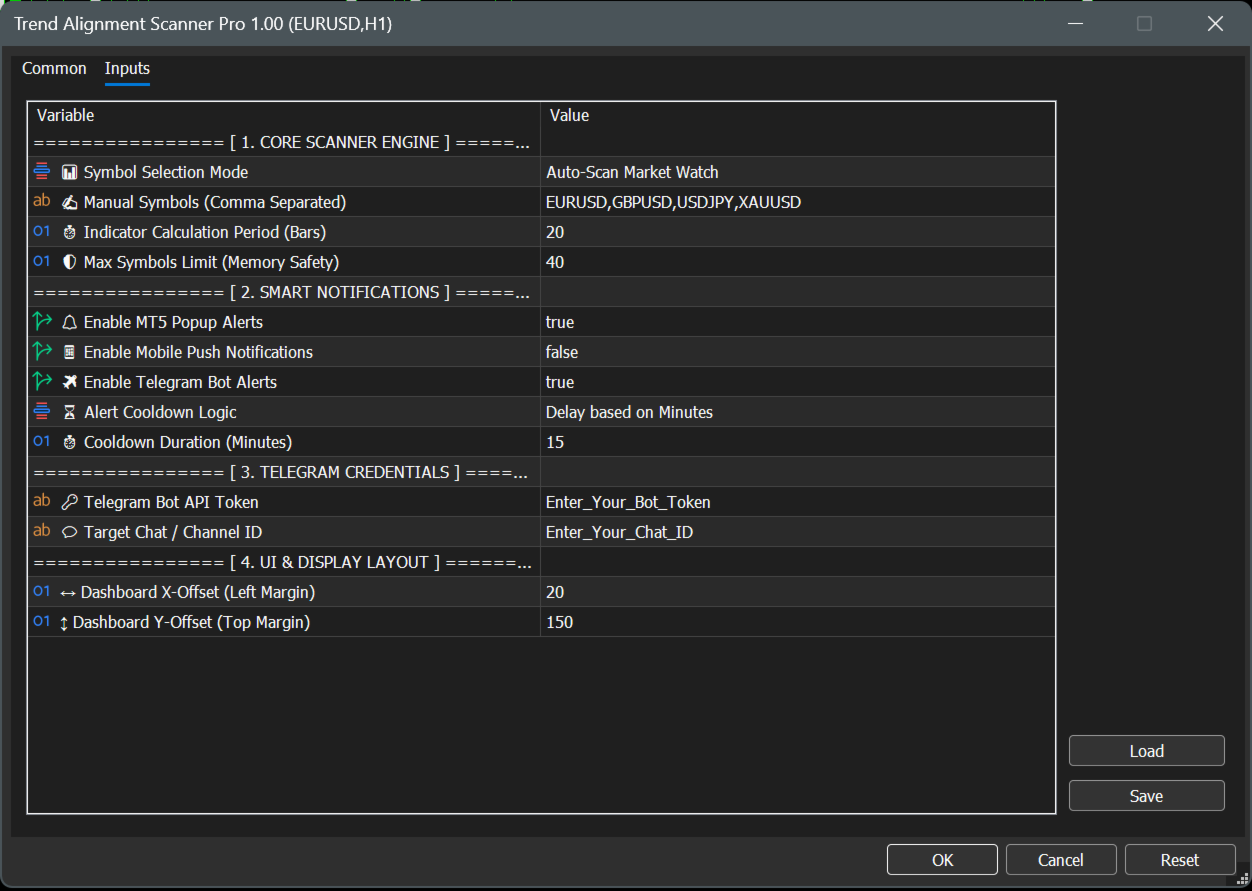
================ [ 1. CORE SCANNER ENGINE ] ================
-
📊 Symbol Selection Mode
-
Auto-Scan Market Watch : Automatically scans all financial assets currently active and visible inside your MT5 Market Watch window. (Recommended for dynamic setups).
-
Use Manual List Below : Tells the engine to look only at the custom symbols typed in the parameter below.
-
-
✍️ Manual Symbols (Comma Separated)
-
Your custom asset text field (Default: EURUSD,GBPUSD,USDJPY,XAUUSD ). Note: Ensure names exactly match your broker's specific naming convention (e.g., XAUUSD.ecn or XAUUSD+).
-
-
⏱️ Indicator Calculation Period (Bars)
-
The mathematical lookback window for the underlying ADX, ATR, and RSI calculations. Safely defaulted to 20 bars for highly responsive, lag-free day-trading signal generation.
-
-
🛡️ Max Symbols Limit (Memory Safety)
-
Safety ceiling filter (Default: 40 ). Limits the maximum number of concurrent assets being processed to protect your terminal's CPU and memory from overloading on low-spec VPS servers.
-
================ [ 2. SMART NOTIFICATIONS ] ================
-
🔔 Enable MT5 Popup Alerts
-
Toggles standard desktop terminal audio alerts and visual pop-up dialog boxes on or off (Default: true ).
-
-
📱 Enable Mobile Push Notifications
-
When set to true , sends instant trade signals directly to your iOS or Android MetaTrader mobile app (Requires your personal MetaQuotes ID configured in MT5 options).
-
-
✈️ Enable Telegram Bot Alerts
-
Connects the scanning engine directly to your automated Telegram channel or private chat (Default: true ).
-
-
⏳ Alert Cooldown Logic
-
Delay based on Minutes : Uses a traditional timeline lockout defined by the parameter below.
-
Based on Market Session : Locks further alerts for that specific asset until the market transitions into the next global trading session (Asia, London, or New York) to eliminate choppy market noise.
-
-
⏱️ Cooldown Duration (Minutes)
-
Sets the exact duration lock (Default: 15 minutes) when Delay based on Minutes is selected.
-
================ [ 3. TELEGRAM CREDENTIALS ] ================
-
🔑 Telegram Bot API Token
-
The secure HTTP API token obtained from Telegram's @BotFather used to authorize and authenticating your custom bot.
-
-
💬 Target Chat / Channel ID
-
The unique target identification number of your personal private chat window or public/private Telegram channel destination.
-
================ [ 4. UI & DISPLAY LAYOUT ] ================
-
↔️ Dashboard X-Offset (Left Margin)
-
Sets the exact horizontal starting pixel coordinates from the left border of your chart screen (Default: 20 ).
-
-
↕️ Dashboard Y-Offset (Top Margin)
-
Sets the exact vertical starting pixel coordinates. Defaulted to 150 to guarantee the graphical user interface completely clears the built-in MetaTrader One-Click Trading terminal buttons.
-
🤖 3. Step-by-Step Telegram Bot Integration
To receive automated market alerts directly onto your phone or channel, follow these steps:
-
Create a Bot: Open Telegram, search for @BotFather , and send the command /newbot . Follow the prompts to name your bot and copy the HTTP API Token provided.
-
Paste Token: Paste this token into the exact 🔑 Telegram Bot API Token input field.
-
Get Your Chat ID: Search for @userinfobot on Telegram and send any message. It will immediately reply with your unique Id.
-
Paste Chat ID: Paste this number into the exact 💬 Target Chat / Channel ID field.
-
Note: If sending to a Telegram Group/Channel, add your bot to the group as an Administrator and use the group’s Chat ID instead (usually starts with a minus sign, e.g., -100xxxxxxxxx ).
📊 4. Understanding the User Interface
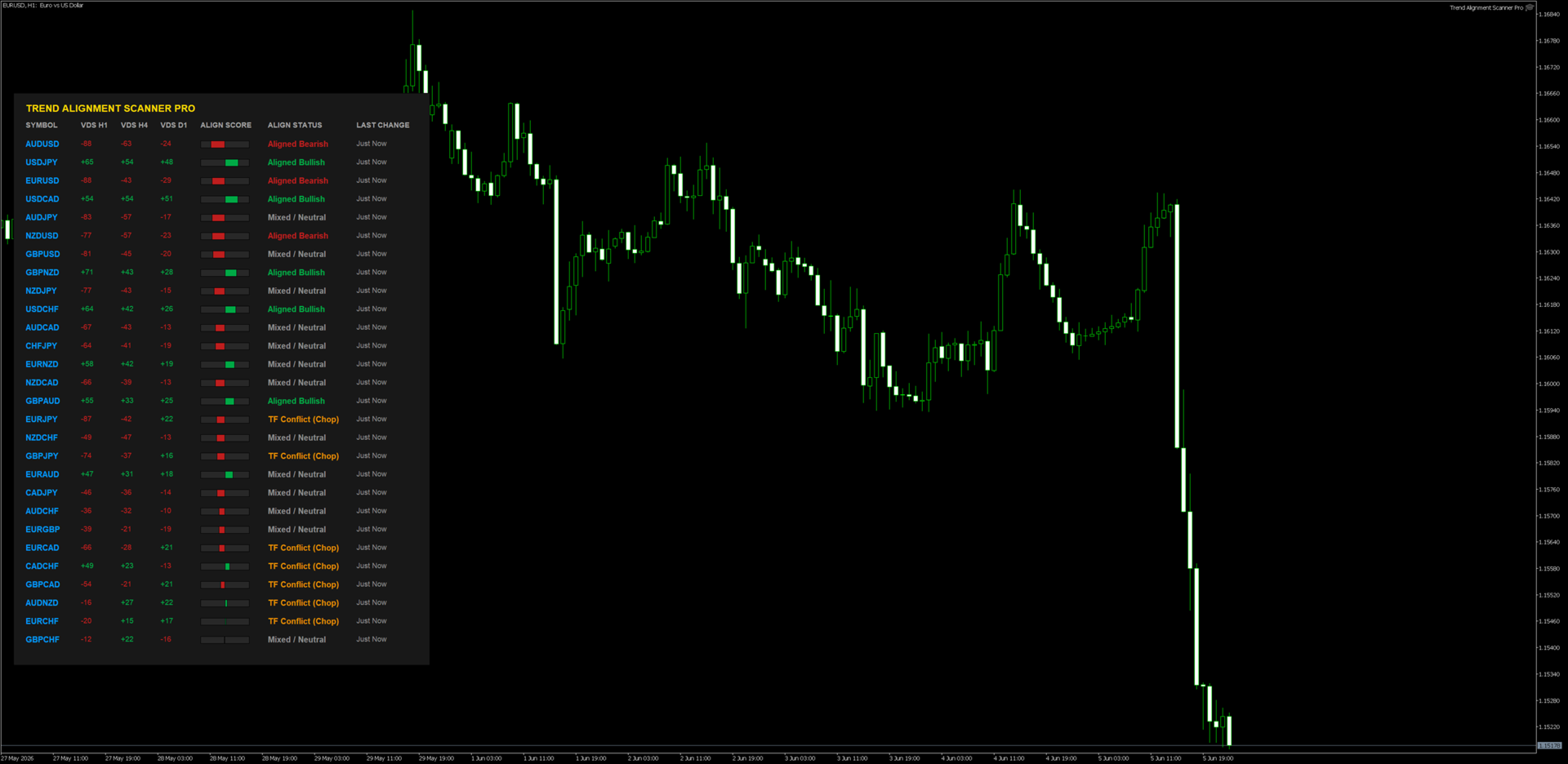
When you drag the indicator onto a clean chart window, you will see a beautifully rendered HUD (Heads-Up Display) with the following components:
-
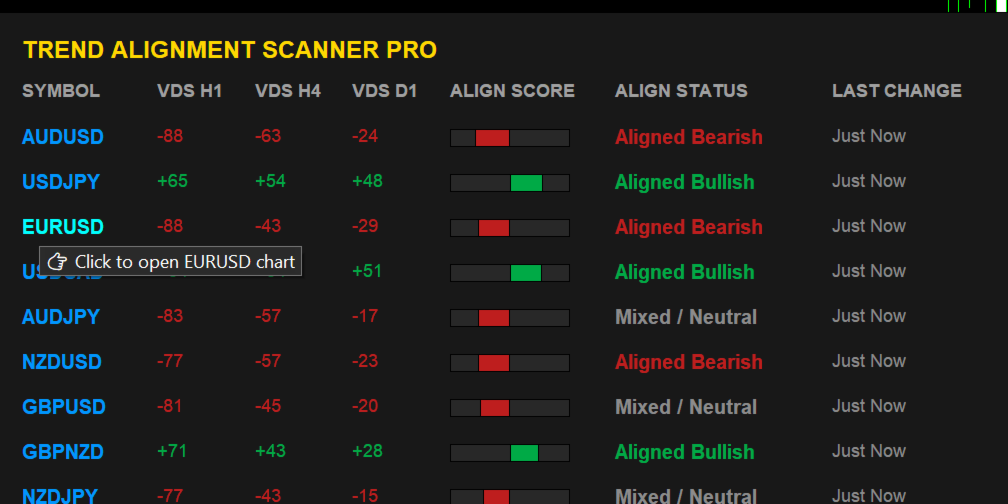
VDS (Volatility Direction Score): Displays individual scores for H1, H4, and D1 timeframes ranging from -100 to +100.
-
Align Score (The Visual Gauge): A real-time graphic indicator representing the composite average of all three timeframes combined.
-
Dynamic Sorting: The scanner shifts rows instantaneously. The pairs with the highest absolute market momentum always float to the top automatically.
-
Interactive Controls: * Hover Feature: Moving your mouse over any symbol changes its color and displays an analytical tooltip.
-
Single-Click Chart Open: Click directly on any symbol name, and a brand-new chart window for that asset will seamlessly load instantly.
-
📈 5. Professional Trading Workflows
Strategy A: The Institutional Confluence (Trend Following)
-
Condition: Look for assets flagged as "Fully Bullish" (Score +70 to +100) or "Fully Bearish" (Score -70 to -100).
-
Execution: 1. Identify a "Fully Bullish" asset on the dashboard. 2. Click the symbol to open its chart. 3. Drop down to a lower execution timeframe (e.g., M5 or M15). 4. Only take long positions on structural demand zones or moving average pullbacks.
-
Why it works: You are trading with the combined structural wind of H1, H4, and D1 market participants behind you.
Strategy B: The Conflict Avoidance Filter (Chop Filter)
-
Condition: Dashboard displays "TF Conflict (Chop)".
-
Execution: Do not open any active positions on this asset. Keep away from grid or breakout strategies on pairs marked with this status.
-
Why it works: This state means timeframes are actively fighting each other (e.g., H1 is crashing while D1 is strongly bullish). The asset is highly likely to range or whip-saw retail accounts.
❓ Troubleshooting FAQ
-
Q: Why does it say "Syncing..." or "Syncing History..."?
-
A: This is a built-in safety protocol. It means the indicator is forcing your MT5 terminal to pull historic price data from your broker's database. It will automatically resolve and render the dashboard within a few seconds.
-
-
Q: I enabled Telegram Alerts but I am not receiving messages.
-
A: Double check Step 2 of this manual. 99% of failed Telegram integrations occur because the user forgot to add https://api.telegram.org to the MT5 WebRequest allowed list.
-
Q: I updated my Market Watch but the dashboard layout didn't change.
-
A: MT5 indicators do not dynamically listen to core layout modifications. Simply delete the indicator and put it back on the chart, or cycle the chart timeframe once to push an unconditional structural reload.
-
⚠️ RISK DISCLAIMER & LEGAL NOTICE
High-Risk Investment Warning
Trading foreign exchange (Forex), Contracts for Difference (CFDs), commodities, and cryptocurrencies on margin carries a high level of risk and may not be suitable for all investors. The high degree of leverage can work against you as well as for you. Before deciding to trade or utilize any automated scanning software, you should carefully consider your investment objectives, level of experience, and risk appetite. The possibility exists that you could sustain a loss of some or all of your initial investment; therefore, you should not invest money that you cannot afford to lose.
No Financial or Investment Advice
Trend Alignment Scanner Pro is an analytical, mathematical software tool designed solely for informational and educational purposes. The developer does not provide financial, investment, tax, or legal advice. All data, visualization scores (VDS), and alerts generated by this software are generic market metrics and should not be construed as an explicit buy/sell recommendation or a guarantee of market direction. Any trading decisions you make are entirely at your own risk.
Hypothetical and Past Performance Disclaimer
Past performance results are not necessarily indicative of future performance. Hypothetical or simulated performance results have certain inherent limitations. Unlike an actual performance record, simulated results do not represent actual trading. Also, since the trades have not actually been executed, the results may have under- or over-compensated for the impact, if any, of certain market factors, such as lack of liquidity or broker slippage. No representation is being made that any accou nt will or is likely to achieve profits or losses similar to those shown
Limitation of Liability
Under no circumstances shall the developer or any associated parties be held liable to any user, purchaser, or third party for any direct, indirect, incidental, consequential, special, or exemplary damages, including but not limited to trading losses, loss of profits, system downtime, or data corruption arising out of the use or inability to use this software, even if advised of the possibility of such damages. By downloading and utilizing this product, you explicitly acknowledge and agree to these terms.