Central Pivot Range Plus
- Индикаторы
- Версия: 2.0
- Активации: 5

CPR Pivot Range Plus Framework v2.0 — Профессиональный индикатор опорных точек (Pivot Points) и Центрального диапазона пивотов (CPR) для нескольких таймфреймов
ОПИСАНИЕ
CPR Pivot Framework v2.0 — это институциональный торговый инструмент профессионального уровня, который объединяет шесть методов расчета опорных точек с аналитикой Центрального диапазона пивотов (CPR), определением слияний (конфлюэнции) на нескольких таймфреймах, а теперь и с интеллектуальными стрелочными сигналами на вход и выход из рынка.
В отличие от базовых индикаторов Pivot, которые чертят плоские статические линии, данный фреймворк генерирует исторические уровни с учетом торговых сессий, что точно отражает прошлую структуру рынка. Версия Central Pivot Range Plus представляет визуальные стрелочные сигналы, которые показывают точный момент для открытия и закрытия сделок, делая инструмент пригодным как для дискреционной (ручной) торговли, так и для автоматических торговых роботов (Expert Advisors).
Фреймворк разработан для поиска ответов на шесть критически важных вопросов трейдинга в режиме реального времени:
-
Какова текущая структура рынка?
-
Где находятся лучшие зоны для входа?
-
Где именно мне войти в сделку? ← НОВОЕ
-
Где мне выйти из сделки? ← НОВОЕ
-
Насколько силен сигнал?
-
Где необходимо управлять рисками?
Каждый сигнал содержит оценку слияния (confluence score), полученную на основе совпадения уровней с нескольких таймфреймов, что дает трейдерам количественную оценку уверенности для каждого сетапа. Стрелочные сигналы обеспечивают мгновенные, готовые к исполнению торговые решения.
ЧТО НОВОГО В ВЕРСИИ CPR Pivot Range Plus
Сигналы на вход (Режим AUTO)
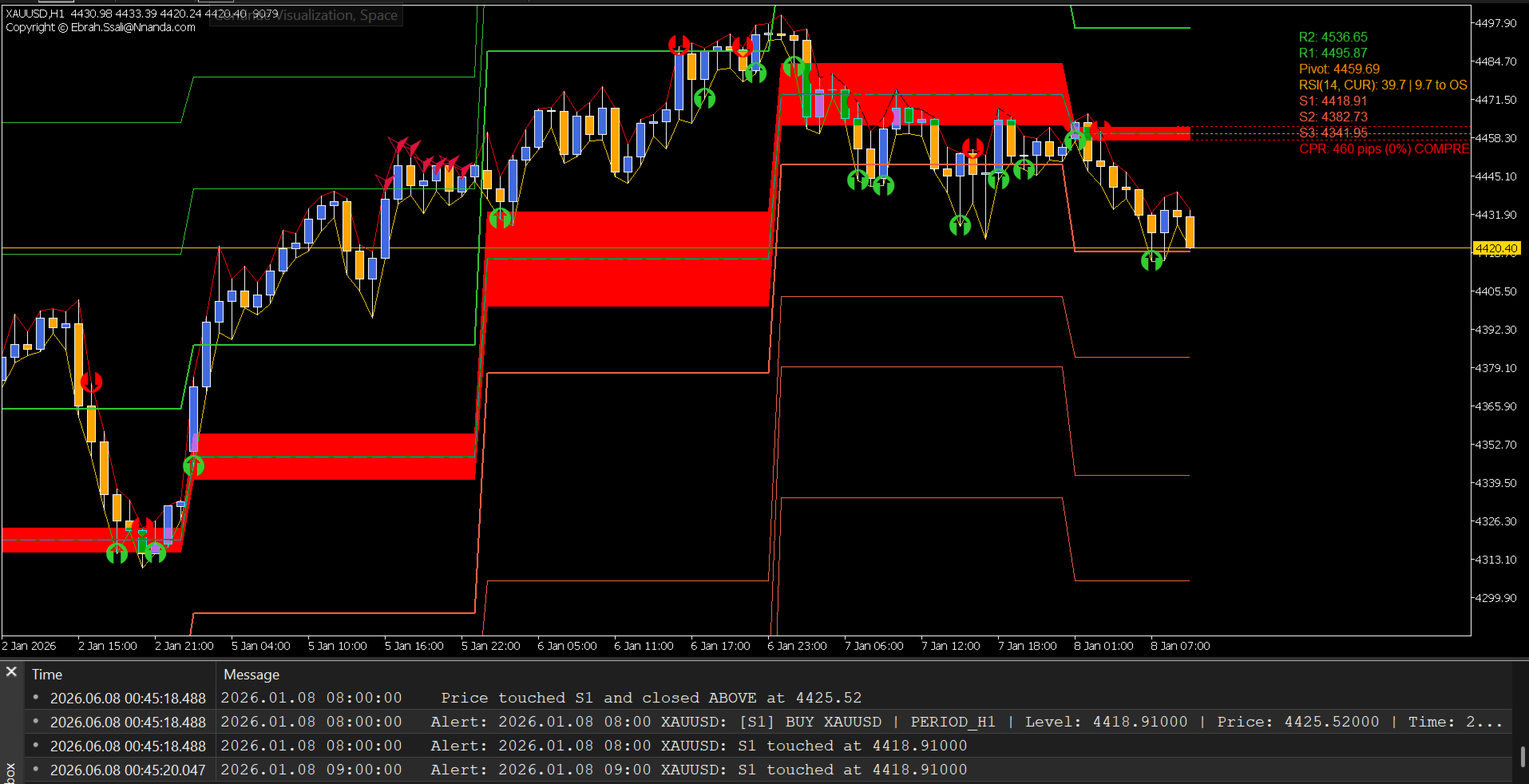
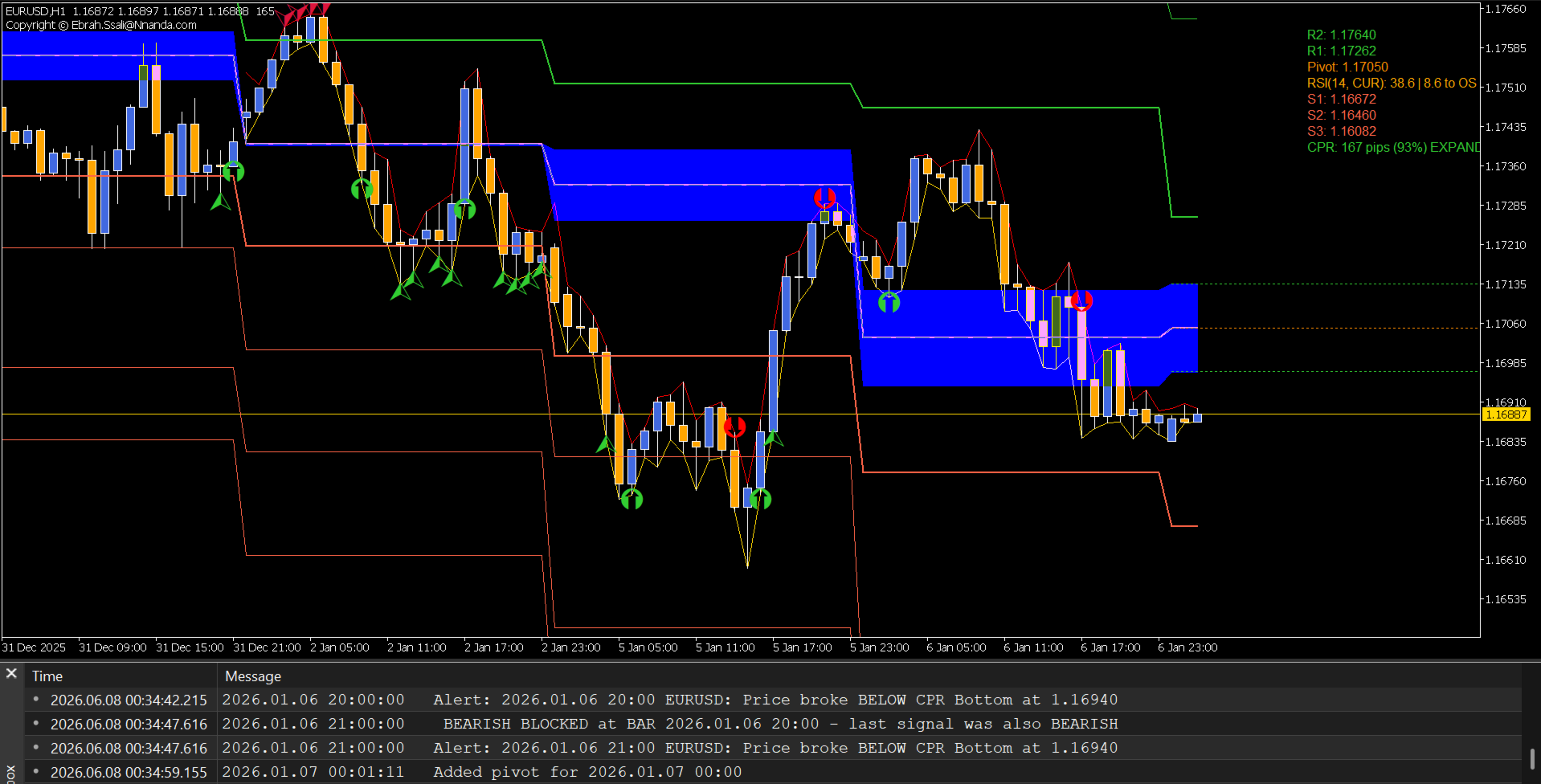
Теперь индикатор отображает ЗЕЛЕНЫЕ СТРЕЛКИ НА ПОКУПКУ (BUY) и КРАСНЫЕ СТРЕЛКИ НА ПРОДАЖУ (SELL) прямо на вашем графике, когда цена подтверждает пробой или разворот на ключевых уровнях.
Как работает режим AUTO:
-
Цена должна КОСНУТЬСЯ (TOUCH) уровня внутри бара.
-
Цена должна ЗАКРЫТЬСЯ ВЫШЕ (CLOSE ABOVE) уровня = стрелка BUY.
-
Цена должна ЗАКРЫТЬСЯ НИЖЕ (CLOSE BELOW) уровня = стрелка SELL.
-
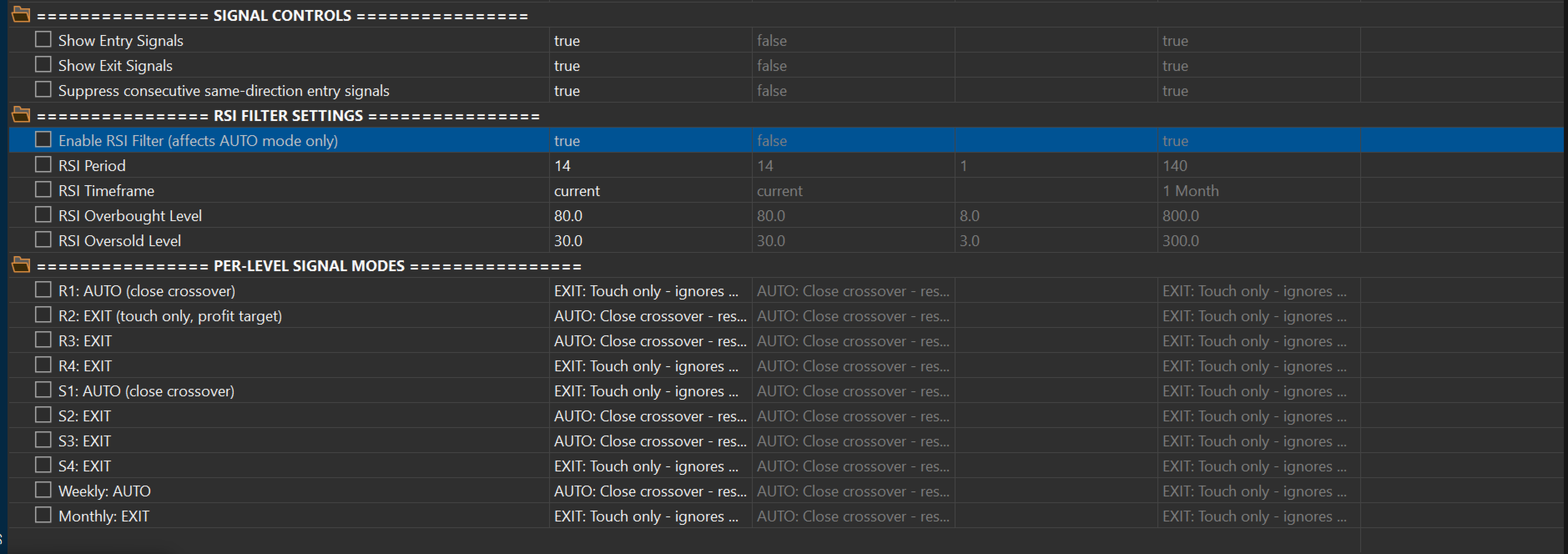
Фильтр RSI блокирует входы в зонах перекупленности/перепроданности.
Режим AUTO работает на всех уровнях (ПОЛНОСТЬЮ НАСТРАИВАЕМЫЙ)
-
Пример — Агрессивный торговый сетап:
-
R1 = AUTO (вход в шорт на уровне сопротивления)
-
R2 = AUTO (доливка/сетка в шорт на более высоком сопротивлении)
-
S1 = AUTO (вход в лонг на уровне поддержки)
-
S2 = AUTO (доливка/сетка в лонг на более низкой поддержке)
-
Более высокие уровни = EXIT (фиксация прибыли)
-
-
Пример — Консервативный торговый сетап:
-
R1 = EXIT (фиксация прибыли на первом сопротивлении)
-
S1 = EXIT (фиксация прибыли на первой поддержке)
-
R2 = EXIT (дополнительная цель по прибыли)
-
S2 = EXIT (дополнительная цель по прибыли)
-
Каждый уровень можно настроить независимо в зависимости от вашего аппетита к риску и стиля торговли.
Сигналы на выход (Режим EXIT)
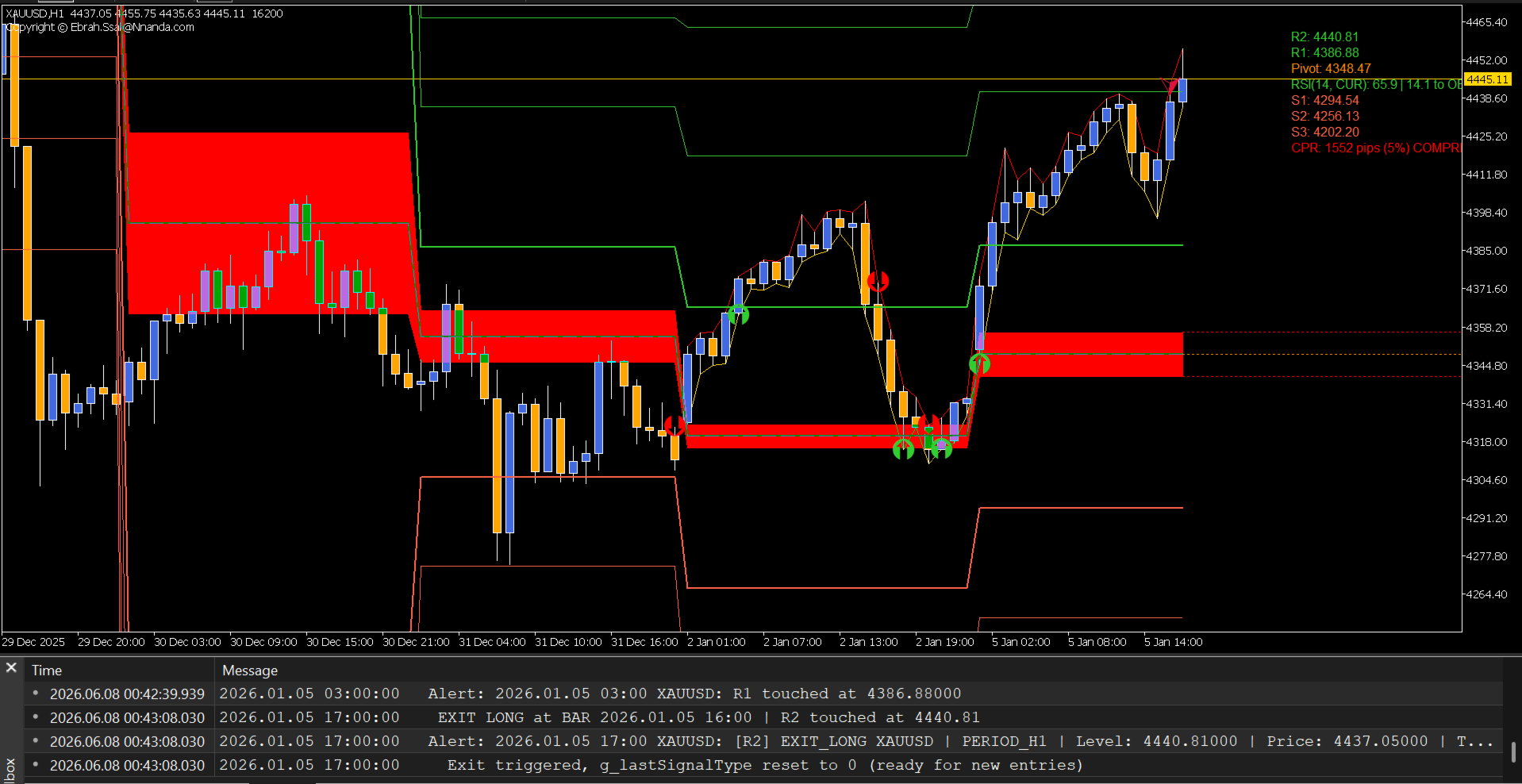
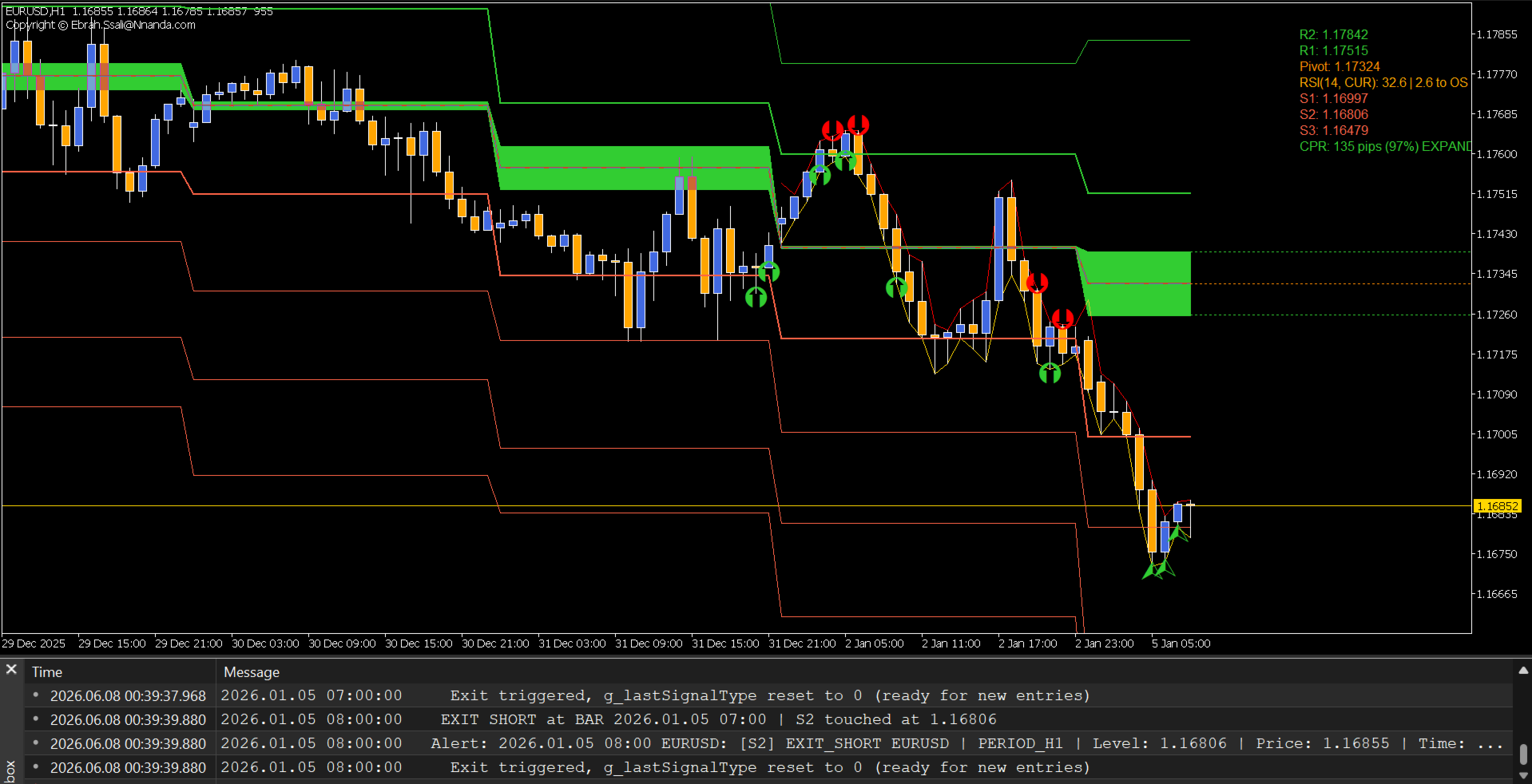
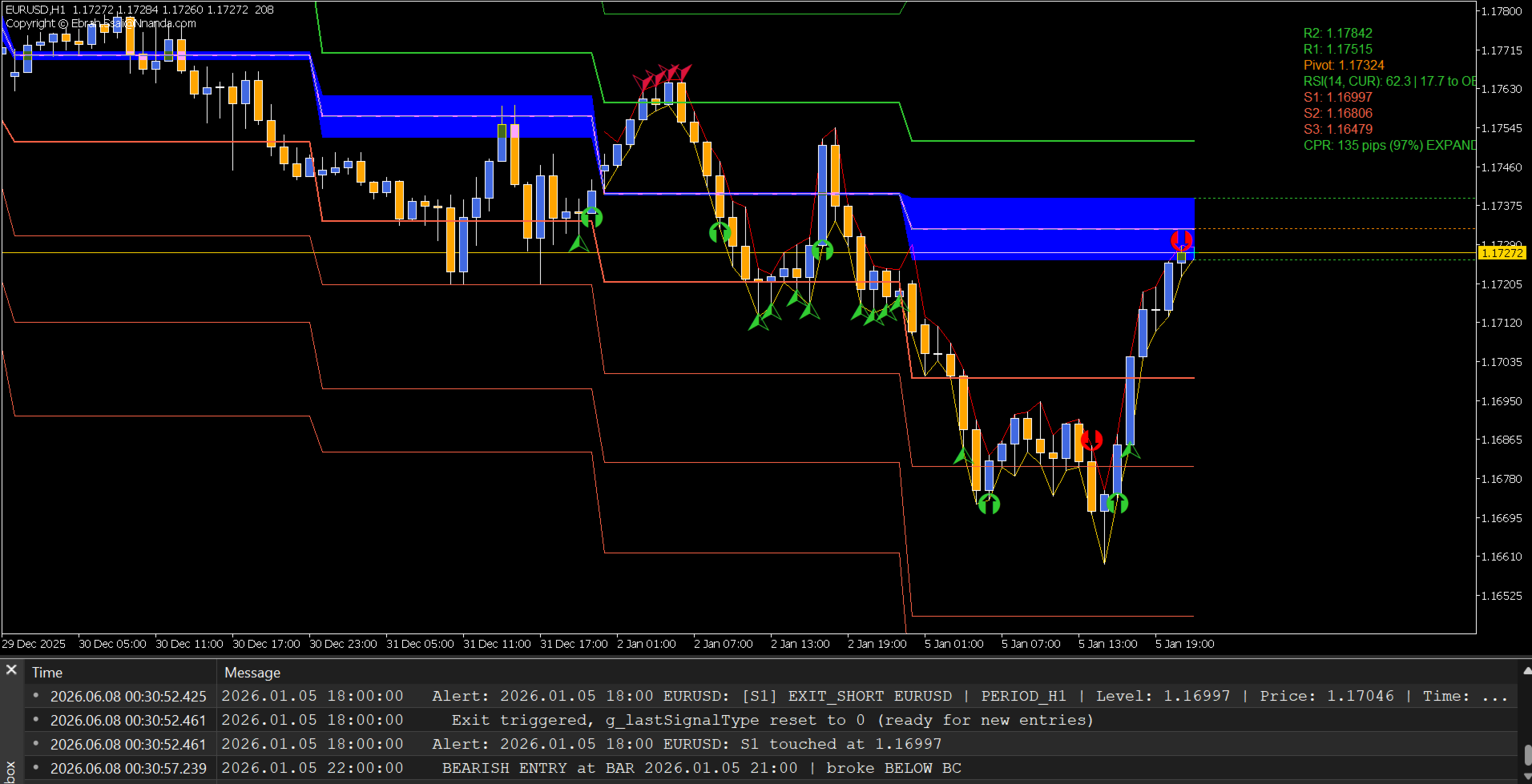
Индикатор теперь отображает КРАСНЫЕ СТРЕЛКИ ВЫХОДА (для длинных позиций) и ЗЕЛЕНЫЕ СТРЕЛКИ ВЫХОДА (для коротких позиций), когда цена касается зон фиксации прибыли.
Как работает режим EXIT:
-
Цена КАСАЕТСЯ любого уровня, установленного в режим EXIT.
-
Мгновенно генерируется стрелка сигнала выхода.
-
Игнорирует фильтр RSI (фиксация прибыли разрешена всегда).
-
Сбрасывает фильтр входа для разрешения новых сделок.
Где работает режим EXIT:
-
ЛЮБОЙ уровень сопротивления (R1, R2, R3, R4) = Выход из Лонга (Exit Long)
-
ЛЮБОЙ уровень поддержки (S1, S2, S3, S4, Monthly) = Выход из Шорта (Exit Short)
Сценарий использования — Несколько целей по прибыли (доступно после покупки и по запросу).
Система приоритетов (Наивысший приоритет у PIVOT/CPR)
Фреймворк использует четкую иерархию сигналов:
| Приоритет | Тип сигнала | Описание |
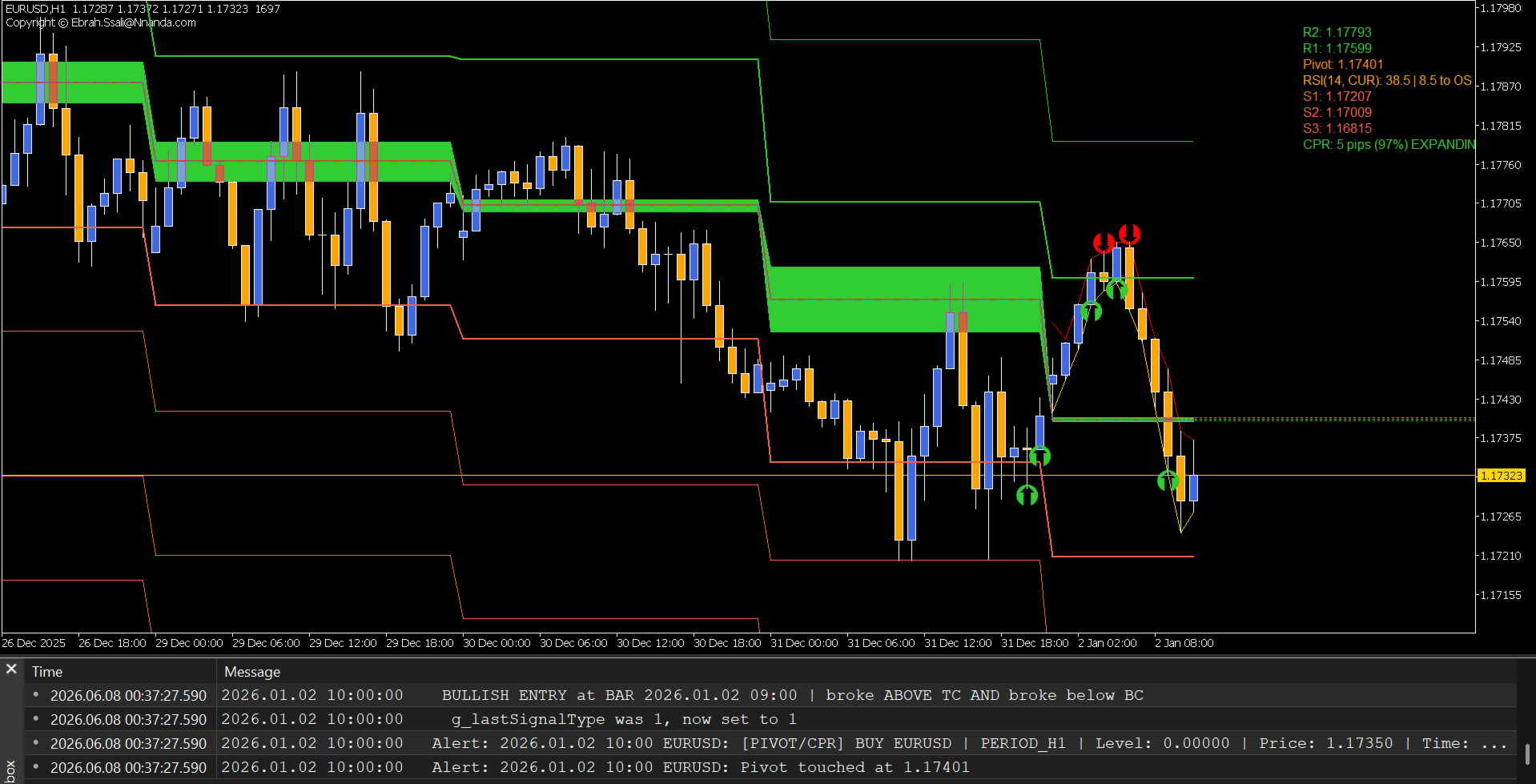
| НАИВЫСШИЙ | PIVOT/CPR | Пробои TC/BC на основе касания (институциональные уровни) |
| НОРМАЛЬНЫЙ | Режим AUTO | Входы, подтвержденные закрытием бара на настроенных уровнях |
| ВЫХОД | Режим EXIT | Фиксация прибыли на основе касания на настроенных уровнях |
Сигналы PIVOT/CPR будут ПЕРЕЗАПИСЫВАТЬ сигналы AUTO на одном и том же баре, гарантируя, что наиболее значимые рыночные события всегда будут видны.
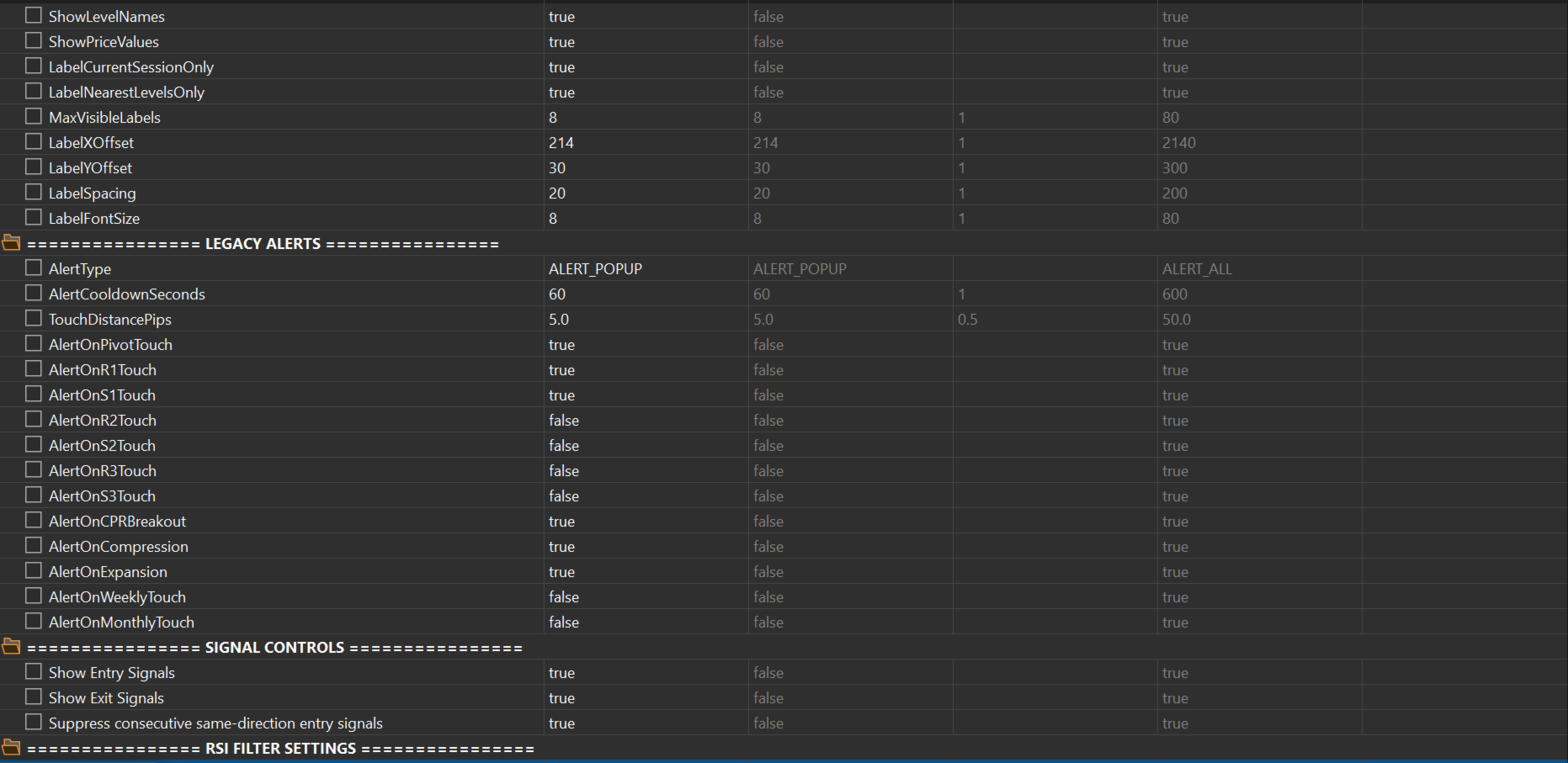
Подавление дублирующих сигналов (ограничивает избыточную торговлю при автоматизации)
| Настройка | Эффект | Лучше всего подходит для |
| ON (По умолчанию) | Блокирует последовательные сигналы в одном направлении | Трендовая торговля, свинг-трейдинг |
| OFF | Отображается каждый сигнал | Скальпинг, анализ |
-
Пример с включенным подавлением (ON):
-
BUY на S1 → Стрелка
-
BUY на S1 → ЗАБЛОКИРОВАНО (дубликат)
-
SELL на R1 → Стрелка (смена направления сбрасывает фильтр)
-
BUY на S1 → Стрелка (снова разрешено)
-
УМНАЯ БЛОКИРОВКА ФИЛЬТРОМ RSI
Фильтр RSI предотвращает вход в сделки, когда рынок слишком растянут:
| Условие | Действие |
| RSI ≥ 80 (Перекупленность) | Стрелки BUY БЛОКИРУЮТСЯ (не покупаем на пиках) |
| RSI ≤ 30 (Перепроданность) | Стрелки SELL БЛОКИРУЮТСЯ (не продаем на дне) |
| RSI между 30 и 80 | Разрешены все стрелки |
Информационная панель RSI «Светофор» (Traffic Light)
-
ЗЕЛЕНЫЙ: Безопасная зона (≤50% до порогового значения)
-
ОРАНЖЕВЫЙ: Зона внимания (50-90% до порогового значения)
-
КРАСНЫЙ: Экстремальная зона (≥90% до порогового значения)
СВОДКА КЛЮЧЕВЫХ ФУНКЦИЙ
| Функция | Описание |
| Стрелка BUY (Буфер 25) | ЗЕЛЕНАЯ стрелка ВВЕРХ, когда режим AUTO инициирует бычий вход |
| Стрелка SELL (Буфер 26) | КРАСНАЯ стрелка ВНИЗ, когда режим AUTO инициирует медвежий вход |
| Exit Long (Буфер 27) | КРАСНАЯ ТОЧКА при касании уровня сопротивления в режиме EXIT |
| Exit Short (Буфер 28) | ЗЕЛЕНАЯ ТОЧКА при касании уровня поддержки в режиме EXIT |
| Шесть методов Pivot | Classic, Woodie, Fibonacci, Camarilla, DeMark и CPR |
| Расчеты с учетом сессий | Закрытие Нью-Йорка (NY Close), Лондон, Токио, время брокера или пользовательские сессии |
| Кэш исторических пивотов | Каждый исторический бар сохраняет свои собственные значения уровней |
| Аналитика сжатия CPR | Коэффициент ширины, процентильный рейтинг, адаптивное окрашивание |
| Слияние нескольких таймфреймов | Автоматическое определение совпадения Дневных + Недельных + Месячных уровней |
| Алеproperty в реальном времени | Оповещения о касании, пробое, сжатии и расширении |
| Динамические метки | Автоматически группируемые метки у правого края с настраиваемым расположением |
| Режимы визуализации CPR | Стандартный, Тепловая карта (Heatmap), Градиент и Контур |
| Проекция вперед | Проецирует зоны CPR на будущие свечи |
| Архитектура для советников (EA-Ready) | Выделенные буферы для автоматизации и торговых роботов |
| Фильтр RSI | Блокирует сигналы BUY в перекупленности и сигналы SELL в перепроданности |
| Подавление дубликатов | Предотвращает спам последовательными сигналами в одном направлении |
НА КАКИЕ ВОПРОСЫ ОТВЕЧАЕТ ЭТОТ ИНДИКАТОР
| Торговый вопрос | Как индикатор отвечает на него |
| Структура рынка | Дневные, Недельные и Месячные пивоты определяют контекст тренда |
| Где войти? | Стрелки BUY/SELL на настроенных уровнях AUTO ← НОВОЕ |
| Где выйти? | Точки выхода на настроенных уровнях EXIT ← НОВОЕ |
| Сила сигнала | Оценка слияния (confluence) определяет качество сетапа |
| Параметры риска | Сжатие CPR предупреждает о росте волатильности |
| Немедленное действие | Стрелки в реальном времени дают мгновенные подсказки для исполнения сделок |
| Размещение Stop Loss | Следующий уровень поддержки/сопротивления служит естественной защитой |
| Цель по прибыли (Take Profit) | Противоположные уровни пивотов или уровни режима EXIT определяют цели |
-
СИГНАЛЬНЫЕ БУФЕРЫ ДЛЯ АВТОМАТИЗАЦИИ В СОВЕТНИКАХ (EA) (доступно после покупки и по запросу)
-
ТОРГОВЫЕ СТРАТЕГИИ С ИСПОЛЬЗОВАНИЕМ СТРЕЛОК AUTO/EXIT (3 стратегии доступны после покупки и по запросу)
-
Технические характеристики (доступно после покупки и по запросу)
ПРОФЕССИОНАЛЬНОЕ ТОРГОВОЕ ПРИМЕНЕНИЕ
Этот фреймворк разработан для трейдеров, которым необходимы:
-
Визуальные сигналы входа на ключевых уровнях поддержки/сопротивления.
-
Визуальные сигналы выхода в зонах целевой прибыли.
-
Анализ структуры рынка институционального уровня.
-
Слияние уровней pivot с нескольких таймфреймов.
-
Определение сжатия волатильности.
-
Точное построение карты поддержки/сопротивления.
-
Автоматизация сигналов, готовая к использованию в советниках (EA).
-
Надежное тестирование на исторических данных (бэктестинг).
Стрелки точно говорят вам, что делать:
-
▲ ЗЕЛЕНАЯ ВВЕРХ = ПОКУПАТЬ (BUY) на этом уровне
-
▼ КРАСНАЯ ВНИЗ = ПРОДАВАТЬ (SELL) на этом уровне
-
● КРАСНАЯ ТОЧКА = Выйти из ЛОНГ-позиции
-
● ЗЕЛЕНАЯ ТОЧКА = Выйти из ШОРТ-позиции
ТАК ЖЕ ПРОСТО В ИСПОЛЬЗОВАНИИ И НАСТРОЙКЕ
Быстрый старт (5 минут)
-
Установите индикатор на график H1.
-
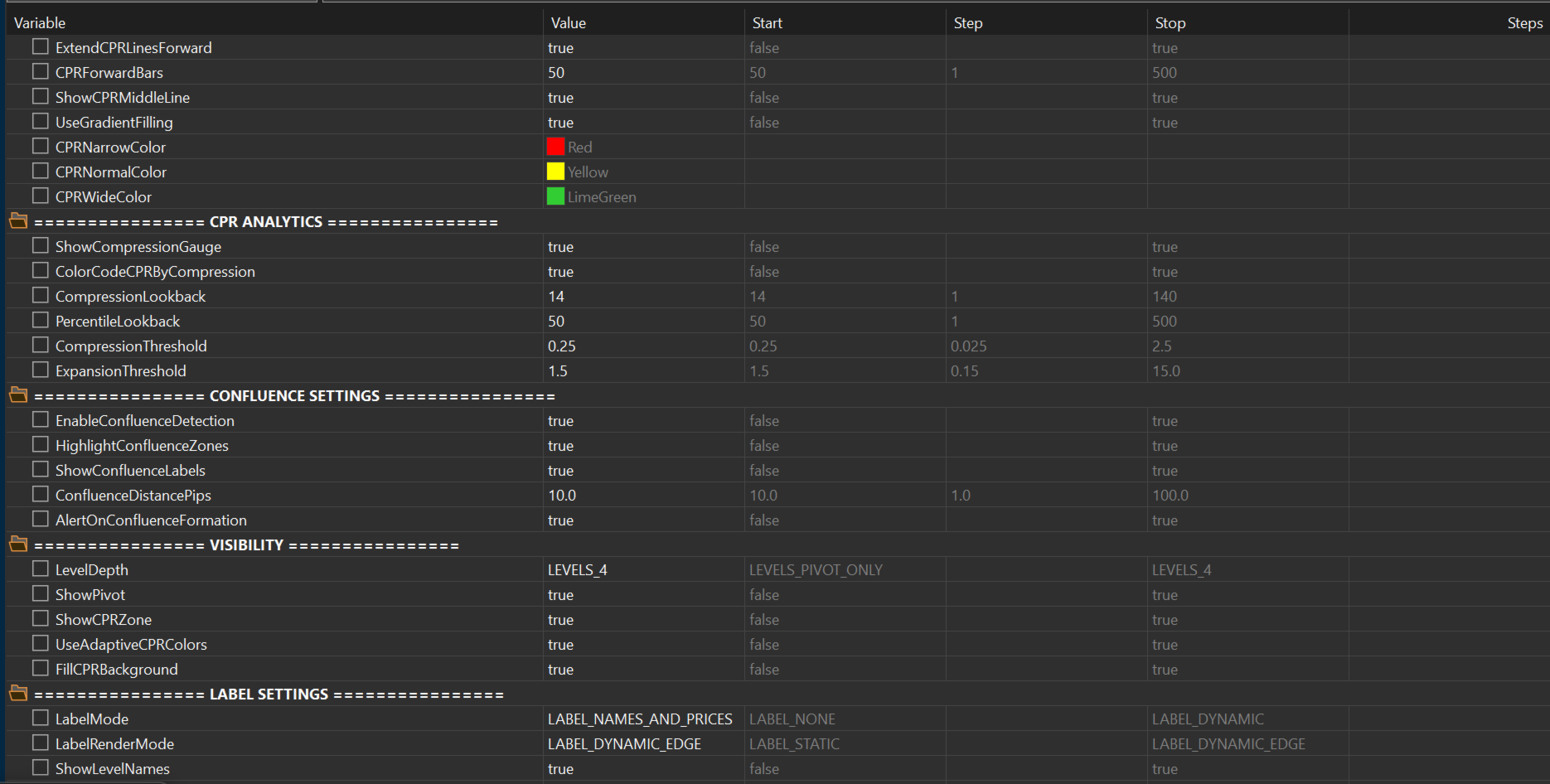
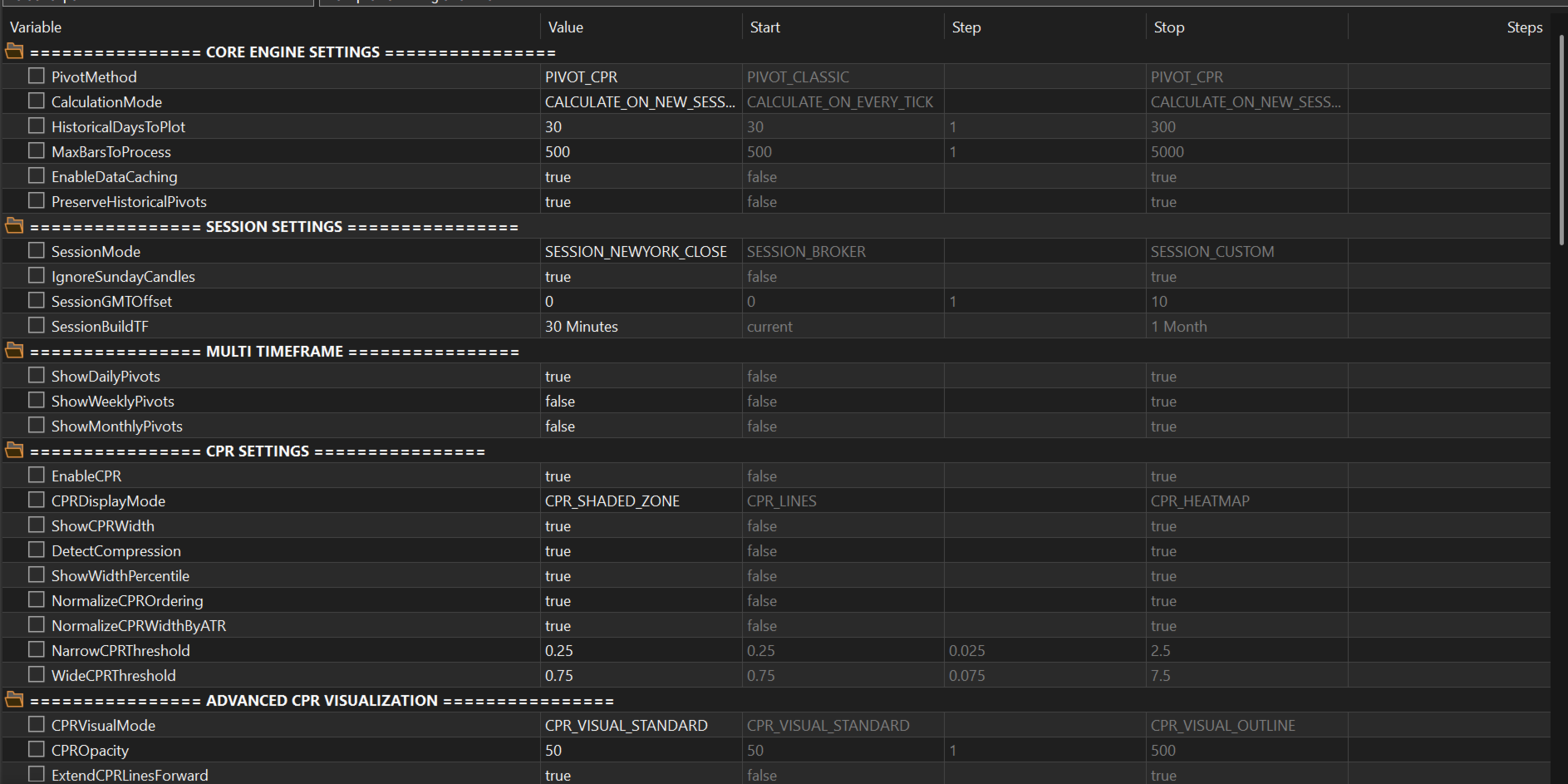
Выберите PivotMethod = PIVOT_CPR .
-
Установите LevelDepth = LEVELS_2 .
-
Выберите стратегию:
-
Агрессивная: Установите R1/R2/S1/S2 = AUTO .
-
Консервативная: Установите R1/S1 = EXIT .
-
-
Включите фильтр RSI, если это необходимо.
-
Следите за ЗЕЛЕНЫМИ/КРАСНЫМИ стрелками (или настройте цвета по вкусу).
Большинству трейдеров нужно настроить только эти параметры:
| Входной параметр (Input) | Рекомендуемая настройка |
| PivotMethod | PIVOT_CPR |
| SessionMode | SESSION_NEWYORK_CLOSE |
| LevelDepth | LEVELS_2 |
| SigModeR1 | AUTO или EXIT (на ваш выбор) |
| SigModeS1 | AUTO или EXIT (на ваш выбор) |
| AlertType | ALERT_POPUP или ALERT_ALL |
КЛЮЧЕВЫЕ СЛОВА (KEYWORDS)
pivot points, CPR, central pivot range, support resistance, market structure, multi-timeframe, confluence detection, compression analysis, volatility indicator, entry signals, exit signals, buy arrows, sell arrows, profit taking, MT5 indicator, trading system, trade entries, trade exits, stop loss placement, take profit levels, automated trading, EA friendly, forex indicator, institutional trading, professional trader tool, daily pivots, weekly pivots, monthly pivots, classical pivots, woodie pivots, fibonacci pivots, camarilla pivots, demark pivots, visual trading signals, arrow signals, entry confirmation, exit confirmation, разворотные точки, уровни поддержки и сопротивления, структура рынка, стрелочные сигналы, торговая система.
ПОДДЕРЖКА
Контакты: ebrah.ssali@Nnanda.com
Central Pivot Range Plus превращает аналитический фреймворк CPR Pivot из просто отличного инструмента анализа в активную торговую систему, которая точно указывает вам время входа и выхода из сделок.