RR Ratio Box Indie Pro MT5
- Индикаторы
-
Opengates Success International
 I am a financial trading software programmer with vast experience. I create expert advisor, indicator, scripts, utility ea and sell my products with good ratings. I am also a forex trader, trainer, account manager and consultant. I am the coordinator of Opengates Forex Academy. Search Youtube for
 - Версия: 1.0
- Активации: 20
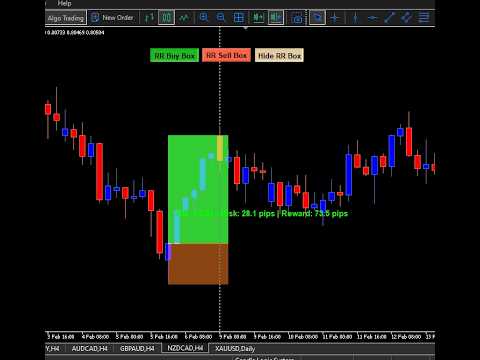
This simple Risk/Reward indicator is created for the traders to make them have the feelings and experience as if they are on the TradingView platform. I tried as much as possible to make it near the experience and somehow, it paid off and still in the mode of making it work like it or even better.
To understand how it works well, the trader should watch the YouTube video posted in the Screenshot section.
I went farther to make it super simple and smooth to use by adding some features that make it stay on your chart window and then you can click on the button relevant to the trade (Buy or Sell) you intend to use it for.
The features:
1. 3 Buttons on the chart that can be moved by the User through changing some numbers in the external; parameters.
a. RR Buy Box button: To apply a Buy trade risk and reward boxes on the chart.
b. RR Sell Box button: To apply a Sell trade risk and reward boxes on the chart.
c. Hide RR Box button: As the name implies, it is to hide any of the buttons when they are not needed, yet they are still on the chart for easy reach at a click of a button.
2. Up above the reward box when applying on the buy trade, you will see these information:
a. RR - 1 : 2 (Default setting, it changes as you extend up and down) - This is set at Ratio SL (One) to TP (Two), that times two of the stoploss as you profit target.
b. Risk: 10.0 pips: This is the amount of your SL pips amount.
c. Reward: 20.0 pips: This is the amount of your profit target pips (TP).
All of these settings change as you adjust to your trade's data.
3. You are at liberty to change the color of any of the features as you prefer it from the external parameters.
How it works:
1. To apply any of these buttons on the chart as related to the trade you have opened, you must first of all click on the button once, take for instance, you had opened a buy trade and wants to apply RR Buy Box, click on it once and after the click, it will not appear immediately at that first click, this is to give you the freedom of locating the exact location you want to place the RR Buy Box, click on that spot and that second click will place the box at the spot, but make sure to click above the price line on the chart in the instance of placing an RR Buy Box.
You can extend each of the two boxes - risk and reward, as you want both up and down to match your risk and target level. You can also move it to anywhere on the chart. When you drag or extend one box, the other box automatically align with the one you dragged. To deselect the boxes, right-click on any of the boxes, and select the option "Unselect all" among all the options and the boxes will stay and become unmovable wherever you place them.
When you don't need it anymore, just click on the "Hide RR Box" button, the RR box will disappear temporarily until you click on any of the RR Box buttons again when you need them. This is to keep the chart clean and spacious.
When you are applying the RR Sell Box also, you do the same thing as before, but you must click below the price line on the chart to apply RR Sell Box otherwise, it will not appear or be applied. Same on case of RR Buy Box.
In a nutshell, do the second clicking on the chart above the price line to apply RR Buy Box and below the price line on the chart to apply RR Sell Box. You cannot apply the two together, you must click on "Hide RR Box" button first to hide one RR box before applying another.
You can play with it as you like to understand how to use it more, it doesn't affect your trade or trading account. It is just a Utility indicator to make trading enjoyable, easier and removes anxiety.
I wish you the best of favor as you use it.
Cheers and thanks for your interest in our products.
For more enquiries, contact me by searching for @Opengates or @Opengates2 on the Telegram and pay attention to my picture as it is on my profile on this website to avoid impersonator. Thanks.