Boleta Pro V3

4.5
1. Overview

Boleta Pro V3 is a manual trading panel for MetaTrader 5, built to speed up and organize the discretionary trader's routine: opening, managing and closing trades directly from the chart, with automatic lot sizing by risk, discipline safeguards (daily loss lock, daily trade limit, spread filter) and keyboard/mouse shortcuts to reduce dependence on repeated clicking. The tool never places trades on its own - every entry starts from a user action (button, shortcut or chart click).

This manual describes how the tool works and how to configure it. Trading financial markets involves risk of capital loss; no feature or setting in the panel guarantees profit.

2. Installation and First Steps
  1. Copy the file into the MQL5/Experts folder of your MetaTrader 5 terminal (or install it from the Market, if purchased there).
  2. Refresh the Expert Advisors list in the terminal's Navigator.
  3. Drag Boleta Pro V3 onto the chart of the desired symbol.
  4. On the "Common" tab of the properties window, enable "Allow Algo Trading".
  5. Review the input parameters (Section 4) for your broker, symbol and strategy before the first trade - especially the Magic Number, the TP/SL unit and the risk limits.
  6. Click OK. The panel appears at the configured position (default: top-left corner).
3. Panel Layout
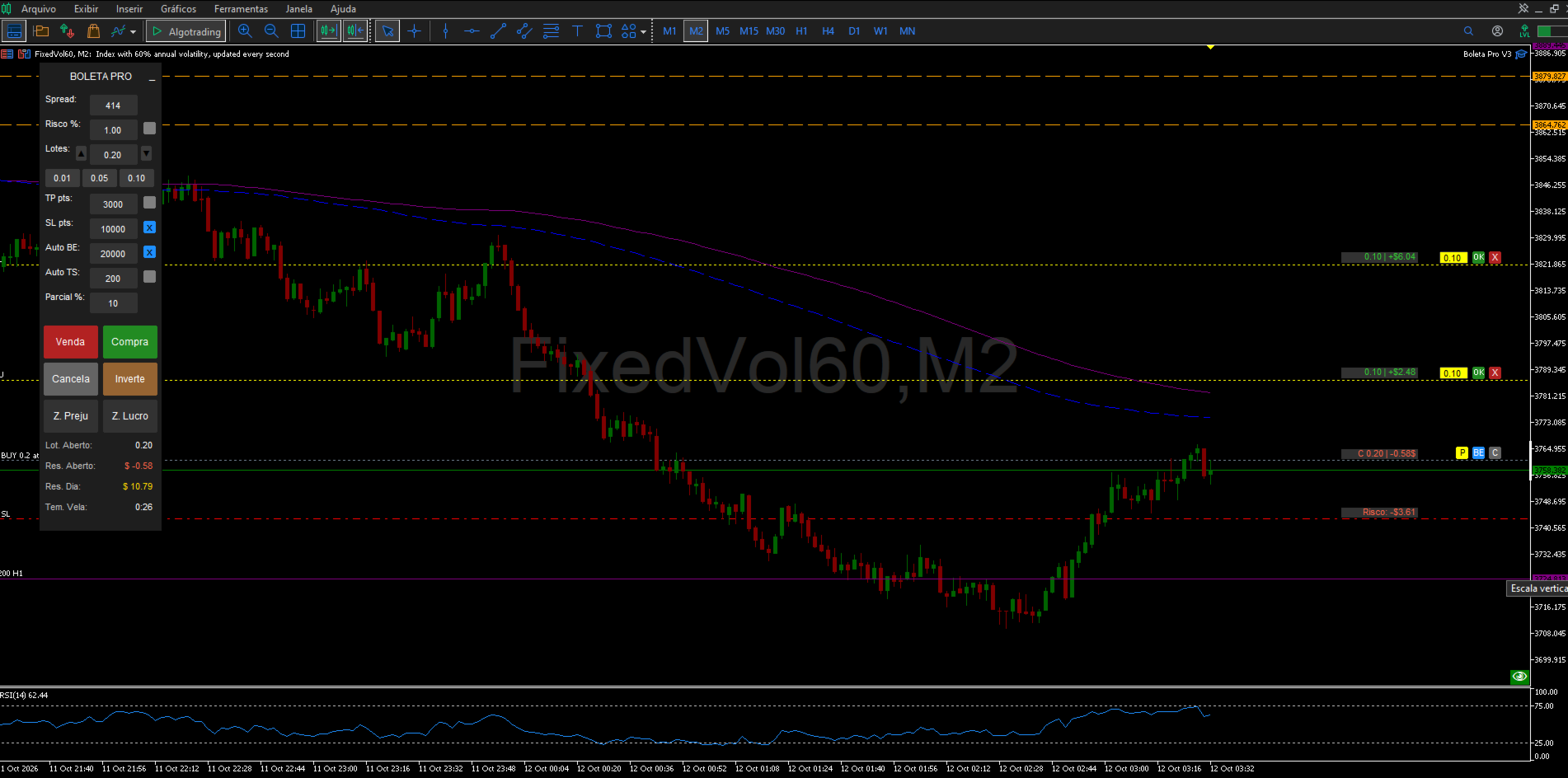
Field Function
Spread Shows the symbol's current spread, in points.
Risk % (box + checkbox) When the checkbox is on, lot size is calculated automatically from the risk percentage of equity and the Stop Loss distance.
Lots (box + -/+ buttons + shortcuts) Manual lot size, used when risk-based sizing is off. The shortcut buttons apply InpLotShortcut1/2/3.
TP (box + checkbox) Take Profit, in points or $, per InpTPSLMode.
SL (box + checkbox) Stop Loss, same unit as TP.
BE (box + checkbox) Distance, in points, that triggers automatic Breakeven.
TS (box + checkbox) Distance, in points, of the automatic Trailing Stop.
Partial % (box) Percentage used by the manual partial close (keyboard shortcut and on-chart "P" button). Accepts whole numbers only, 0 to 100, no decimal point.
Buy / Sell Open a market position, or a pending order when triggered by a mouse click away from the current price (see Section 6).
Cancel Cancels all pending orders on the symbol opened by the panel.
Reverse Closes the current position and opens a new one in the opposite direction, with the same lot size.
C. Loss / C. Profit Close all positions on the symbol that are, respectively, in loss or in profit.
Footer Open Lot size, Open P/L (floating), Daily Result (closed + floating, real-time) and the current bar's timer.
4. Input Parameters Account and Language
Parameter Default Description
InpAccountType Personal Account type.
InpLanguage Portuguese Language of the panel labels (PT, EN or ES). The "Boleta Pro V3" name stays fixed in any language.
General Settings
Parameter Default Description
InpMagicNum 123456 Magic number used to identify the panel's trades.
InPrefix BT_ Prefix for the chart objects created by the panel.
InpResetOnRemove Off If on, clears the saved settings when the panel is removed from the chart.
InpShowLineValueBoxes On Shows the value boxes on the Lot/Profit, Risk, Target and Partial lines. Turn off to lighten the panel when running many open orders.
Panel Size & Position
Parameter Default Description
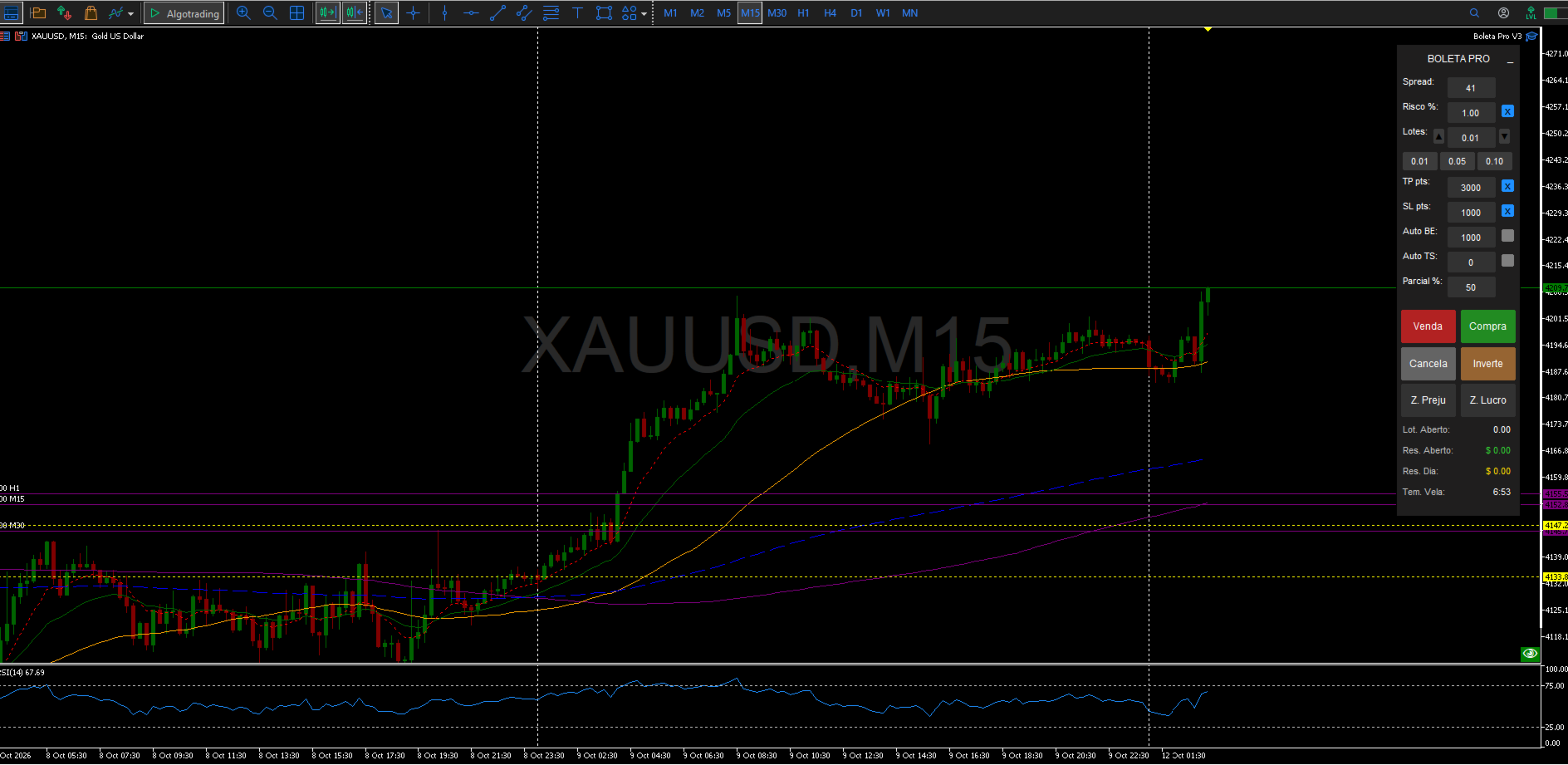
InpX / InpY 50 / 20 Panel position, in pixels from the top-left corner.
InpWidth / InpHeight 150 / 710 Panel width and height, in pixels.
InpBtnPosition Sell left, Buy right Layout of the Buy/Sell buttons.
Chart Center Display
Parameter Default Description
InpShowInfo On Shows the symbol name and time in the chart's center.
InpFontSize 70 Center text size.
InpColorInfo Dark gray Center text color.
Risk Management
Parameter Default Description
InpTPSLMode Points Unit used for TP/SL/BE/TS: Points or $.
InpEnableMaxOrders / InpMaxOrders Off / 5 Optional limit on simultaneous orders and positions.
InpEnableMaxDailyTrades / InpMaxDailyTrades Off / 10 Optional limit on the number of trades (entries) per day.
InpEnableDailyLoss / InpDailyLossLimit Off / $100.00 Daily loss lock: closes everything and blocks new entries once the value is reached.
InpEnableSpreadFilter / InpMaxSpreadPoints Off / 50 pts Blocks new entries while the symbol's spread is above the limit.
InpDefaultRisk 0.01 Default risk per trade (percentage of balance) when automatic lot sizing is on.
InpDefaultLot 0.01 Default lot size when automatic risk sizing is off.
InpDefaultTP / InpDefaultSL 3000 / 1000 Default Take Profit and Stop Loss (points or $, per InpTPSLMode).
InpDefaultBE / InpDefaultTS 1000 / 200 Default distance for automatic Breakeven and Trailing Stop (points).
InpBEProfit 0 Breakeven offset, in points above the entry price.
Lot Shortcuts
Parameter Default
InpLotShortcut1 / 2 / 3 0.01 / 0.05 / 0.10
Manual Partial Close
Parameter Default Description
InpDefaultPartialPct 50 Default percentage shown in the "Partial %" box (whole number, 0-100).
Pending Partial Close (SHIFT+P)
Parameter Default Description
InpPartialPriority Oldest first Which position closes first when more than one is open.
InpPPARLineColor / Style / Width Yellow, dotted, 1 Appearance of the trigger line on the chart.
InpPPAREditBG / EditTxt Yellow / Black Colors of the pending partial's editable volume box.
InpPPARBtnClose Red Color of the "X" button that cancels the pending partial.

Keyboard Shortcuts: see the full table in Section 5.

Visual Customization: the remaining parameter groups (Panel Colors, Element & Value-Box Colors, Panel Text & Row Colors, Mouse Preview Line Colors & Styles, Ghost-Order Simulator Line Colors & Styles, On-Chart Dynamic Button Colors) control only the panel's appearance - background, button, text, checkbox and SL/TP/entry-line colors - and never change how the tool behaves. All of them have self-explanatory names (e.g. InpColorBuy, InpColorSell) and can be adjusted freely from the panel's properties window.

5. Keyboard Shortcuts
Key (default) Parameter Action
B InpKeyBuy Buy at market
S InpKeySell Sell at market
C InpKeyCancel Cancels all pending orders on the symbol
I InpKeyInvert Reverses the current position
L InpKeyZLucro Closes all positions in profit
P InpKeyZPrej Closes all positions in loss
M InpKeyMin Minimizes/restores the panel
E InpKeyBE Applies manual breakeven to all eligible positions
A InpKeyPartial Partially closes (using the "Partial %" box) all eligible positions
SHIFT + P Fixed Creates a pending partial-close line on the chart
Up arrow or Page Up Fixed Simulates a Buy order (Ghost Order)
Down arrow or Page Down Fixed Simulates a Sell order (Ghost Order)

Keys B, S, C, I, L, P, M, E and A are configurable under the "Keyboard Shortcuts" input group. The mouse shortcuts (SHIFT/CTRL) and the SHIFT+P / arrow / Page Up / Page Down shortcuts are fixed.

6. Mouse Shortcuts & Actions
  • Moving the mouse over the chart (outside the panel) while holding SHIFT: draws a Buy preview line at the cursor's price.
  • Holding CTRL: draws a Sell preview line.
  • Clicking outside the panel while holding SHIFT: executes a Buy at the clicked price - at market if it matches the current price, or as a pending order (Buy Limit/Buy Stop) if the click is above or below the market price.
  • Holding CTRL while clicking: same logic for Sell (market, Sell Limit or Sell Stop).
  • SHIFT + CTRL held together: no action is taken - a safeguard against accidentally opening a Buy and a Sell at once.
7. On-Chart Dynamic Buttons

Appear next to every position or order opened by the panel:

Button Action
C Closes the position (or cancels the matching pending order).
BE Applies breakeven to that specific position.
P Partially closes that position, using the percentage set in the "Partial %" box.
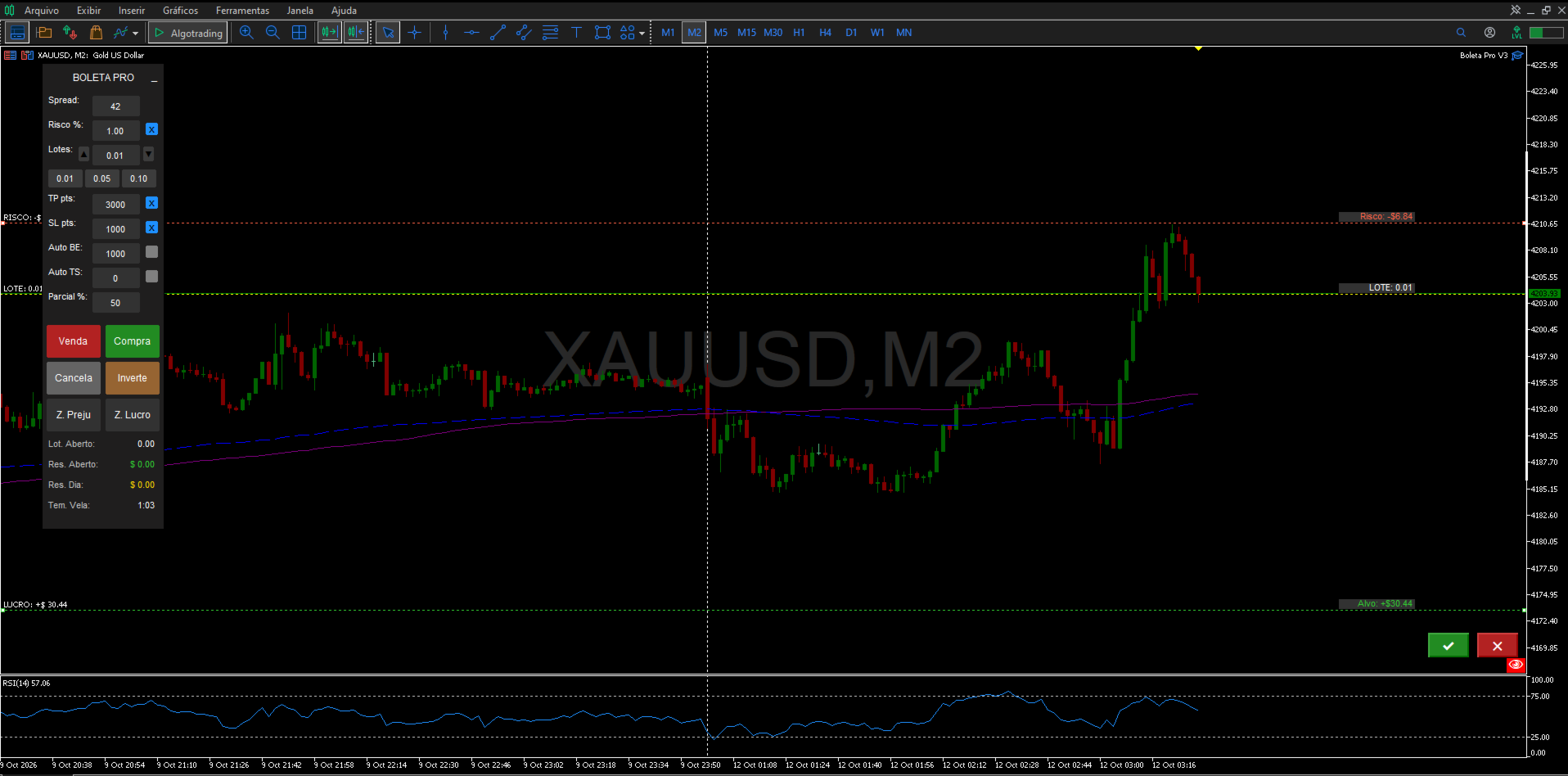
8. Ghost Order Simulator
  1. Press the up arrow or Page Up to simulate a Buy; the down arrow or Page Down to simulate a Sell.
  2. Entry, SL and TP lines appear on the chart and can be dragged with the mouse to adjust the values before confirming.
  3. Click the green button to confirm and send the order, or the red button to cancel the simulation.
  4. If "Risk %" is on, the ghost order's lot size recalculates automatically as the SL distance is adjusted.
9. Partial Close (Immediate and Pending)

Immediate: set the percentage in the "Partial %" box (0 to 100, whole number) and use the keyboard shortcut (default: A) or the on-chart "P" button next to the position.

Pending (SHIFT+P): creates a line on the chart with an editable volume box. Drag the line to the desired trigger price - once the price is reached, the partial close executes automatically. Use the OK button to enable/pause the rule and the X to delete it. Which position closes first (oldest or newest) is set by the InpPartialPriority parameter.

10. Risk Management & Safety Features
  • Automatic risk-based lot sizing: turn on the "Risk %" checkbox so lot size is calculated from the equity percentage and the Stop Loss distance.
  • Simultaneous order/position limit (optional): blocks new entries once the configured maximum is reached.
  • Daily trade limit (optional): blocks new entries after the maximum number of trades opened that day is reached.
  • Maximum spread filter (optional): blocks new entries while the spread is above the configured limit.
  • Daily loss lock (optional): once the limit is reached, automatically closes every position and order on the symbol and blocks new entries; includes a redundant check and a retry with a sound alert if the first close attempt fails.
  • Accidental double-click guard: prevents a simultaneous Buy and Sell from firing when SHIFT+CTRL are held together.

These safeguards act only on new entries and on the daily lock's own close-everything action - they never block manually closing a position, modifying stops, breakeven or trailing stop on positions already open.

11. Support

For questions, suggestions and support, please use the product's comments or the mql5.com messaging system.


Отзывы 16
Doni Henrique Simões
31
Doni Henrique Simões 2026.09.24 03:54 

Ferramenta excelente ótimos recursos e bem prático de usar top demais super recomendo

Reinaldo Aparecido Da Silva Junior
126
Reinaldo Aparecido Da Silva Junior 2026.07.15 11:57 

Boleta show!

Dkvm18
103
Dkvm18 2026.07.14 10:47 

boleta top!!!

Рекомендуем также
Risk Calculator Veqrix
Jose Luis Heredia Padilla
Risk Calculator Veqrix  Risk Calculator Veqrix is a risk calculation, visual trade planning, and manual order execution tool for MetaTrader 5. The EA automatically calculates the trade volume using the configured risk, entry price, and distance to the Stop Loss. It also displays the planned trade directly on the chart and distributes the total volume across up to three Take Profit targets. This tool does not generate trading signals . The user selects the direction, configures the levels, and
FREE
Core function Intelligent transaction management one-click opening and closing operation, which supports user-defined lots to set multiple closing modes: all closing, closing by direction and closing by profit and loss status. Professional risk control, real-time risk monitoring and spread control to avoid high-cost trading environment. Visual control panel has an intuitive graphical interface, and all functions can be operated with one button to display position information, profit and loss sta
FREE
Quick Trade Panel Pro
Nicolas Olivier Menetrey
5 (1)
Панель торговли в один клик с автоматическим управлением лотом и риском Quick Trade Panel Pro — это интуитивно понятная торговая панель, разработанная для трейдеров, которые хотят быстро исполнять ордера, сохраняя полный контроль над рисками. Основные функции Автоматический расчёт размера лота на основе процента от доступной маржи Настраиваемый Stop Loss в пунктах, автоматически применяемый к каждой сделке Размер лота фиксируется во время серии сделок для обеспечения постоянного размера позиции
FREE
Представляем NAS100 Auto SL и TP Maker для MT5: Никогда больше не пропустите установку StopLoss и TakeProfit с нашим NAS100 Auto SL и TP Maker, незаменимым помощником для трейдеров, работающих на рынке Nasdaq 100 в MetaTrader 5. Этот инструмент предназначен для тех, кто ищет беспроблемное решение для автоматизации управления уровнями StopLoss и TakeProfit. Ключевые особенности: Эффективная автоматизация: Автоматически отслеживает сделки Nasdaq 100 без StopLoss и/или TakeProfit. Динамически ре
FREE
PositionMap Pro — Account Overview Panel for MT5 A real-time panel that groups all open positions by symbol and shows Buy lots, Sell lots and net profit/loss directly on your chart — the whole account at a glance. Instead of counting lots symbol by symbol in the Terminal tab, PositionMap Pro groups everything automatically. You instantly see how much exposure you have on each symbol, split by direction. Panel example Symbol Buy Lot Sell Lot Net P/L EURUSD 0.50 — +12.30 XAUUSD — 1.00 −45.00 GBPUS
FREE
NHS Risk Manager PRO NHS Risk Manager PRO is a professional trade-management and risk-control Expert Advisor for MetaTrader 5, built around one core idea: protect the account first, execute with precision second . At its center is a dedicated prop-firm compliance framework that tracks the rules that actually get funded accounts disqualified — daily drawdown, total drawdown, profit targets, and minimum trading days — and enforces them automatically instead of relying on the trader to remember the
Click Trading
Jawad Tauheed
5 (2)
One Click Trading – Auto TP SL Developer TraderLinkz Version 1.00 Category Utility What it does Adds missing TP and SL to your manual trades and pending orders Sets them once per ticket Lets you move TP and SL afterward Works on hedging and netting accounts Scans on every tick and reacts on trade events Why you want it You place faster entries You get consistent risk and exit targets You reduce fat finger errors You keep full manual control Quick start Attach the EA to any chart Keep TP and SL e
FREE
EasyTrade Pro - Панель для Ручной Торговли MT5 Торгуйте быстрее, проще и эффективнее с EasyTrade Pro. EasyTrade Pro — это лёгкая и удобная панель для ручной торговли, созданная для трейдеров, которым нужны быстрые сделки и вся важная рыночная информация прямо на графике. Никаких сложных настроек. Никаких лишних индикаторов. Только инструменты, которые действительно нужны каждый день. Возможности Быстрое открытие BUY и SELL Кнопка закрытия всех позиций Настраиваемые Stop Loss и Take Profit
FREE
ATR Stop Loss Manager— Smarter Risk Awareness for Forex Traders Confident trading begins with clear risk management. The ATR Stop Loss Expert is a powerful utility tool that automatically adjusts your stop-loss levels using ATR (Average True Range) — a proven volatility measure — so your trades are protected by logic, not guesswork. What This Tool Does This EA monitors your open trades and sets a stop-loss based on recent market volatility, calculated from the ATR indicator. It doesn’t place t
FREE
Imagine flying a real aircraft without ever stepping into a flight simulator. That's what trading is like. You have to simulate your strategy before you can take it to a live market. It is good if you can simulate things speedily before even stepping into any live market, or before coming up with an automated system.  People don't have all day to stare at a higher timeframe chart until the entry signal finally arrives. That's why I built this so that you can simulate your strategy with speed. Th

FREE
NS Financas Automatic Clear All Chart Indicators Script Automatically remove all indicators from your chart offered for free by NS Financas! Don't waste any more time deleting the indicators one by one. With this script it is possible in one click to remove all indicators from the screen to adjust your new strategy while still using the settings of your graph, in addition to the possibility of configuring keyboard shortcuts for quick access to the script. Take the opportunity to visit our cha
FREE
ConsistencyGuard
Vanessa Cristina Ribeiro Dos Anjos
Version 7.04 Крупное обновление, направленное на усиление дисциплины внутридневной торговли и защиту торгового счета. • Режим Post-Session Review с настраиваемым временем от 0 до 60 минут. • После завершения разрешенного количества сделок трейдер может оставить MetaTrader 5 открытым для анализа графиков, создания скриншотов и заполнения торгового журнала. • Попытка открыть новую сделку после достижения дневного лимита активирует защиту Emergency Close. • Emergency Close закрывает открытые позици
FREE
Это простая и очень эффективная утилита для закрытия ордеров одним кликом. Необходима если на вашем балансе имеется достаточно большое кол-во открытых ордеров, закрытие которых в ручном режиме может занять достаточно времени и привести к дополнительной потере денег на счете. Утилита состоит из внешней панели с двумя кнопками Close by Filter и Close ALL, которую удобно перемещать по графику Вы можете настраивать утилиту Close ALL таким образом, чтобы ордера закрывались при достижении указанного п
Protect your funded accounts and personal capital with military-grade precision. This utility continuously monitors your floating equity against your daily starting balance. The moment your custom drawdown threshold is breached, it instantly liquidates all open positions, deletes pending orders, and completely unloads from the chart. Stop revenge trading and never fail a prop firm evaluation due to a margin breach again.
FREE
Main Features: Trading Panel: Quick on-chart buttons for Buy, Sell, Close Profit, and Close All. Risk Management: Built-in Auto Lot calculation based on your specified risk percentage. Visual Tools: Automatically draws Supply/Demand zones and Fibonacci levels on the current chart. Market Data: Displays real-time ATR (Volatility) and RSI values directly on the panel. Optional Auto Mode: A basic automated trading function using EMA crossover and ATR volatility filter. Parameters to Note: RiskPerce
FREE
OpenAllSymbolsSafe.mq5 — Умный скрипт для MetaTrader 5 Назначение: Автоматически открывает графики всех символов из Обзора рынка с применением шаблона default.tpl на текущем таймфрейме (TF) , предварительно закрывая все открытые графики (кроме текущего). Идеален для быстрого анализа множества инструментов без рутинных действий! Особенности: Автоматизация: Экономит время — открытие десятков графиков в один клик. Безопасность: Аккуратно закрывает лишние графики, сохраняя текущий акти
FREE
DynamicTrader 1
Markus Christer Ekengren
Smart Trade Manager EA – Simple, Visual, and Risk-Based Trading Take control of your trades with ease! This free Expert Advisor is designed for traders who want a fast, intuitive, and risk-based way to manage entries directly from the chart. Risk-Based Position Sizing – Just set your preferred % risk in the EA settings, and lot size is calculated automatically. One-Click Trading – Place trades instantly with two simple buttons: BUY or SELL . Interactive SL & TP Lines – Drag and drop stop-
FREE
When executing an order, whether through the Metatrader ticket on a computer or the Metatrader app on a mobile device, either manual or pending, Easy Trade will automatically set the take profit and stop loss levels, as well as a limit order with its respective take profit and stop loss levels. It follows the trading strategy for market open (US30, US100, US500), but it can be applied to any market asset.
FREE
Pattern Recognition EA - From Learn to Earn. The market repeats itself. This EA finds every past repeat of the current candle sequence - and lets history vote the direction. ONE SHAPE. EVERY REPEAT IN HISTORY VOTES. The last N candles on your signal timeframe form a shape. The EA scans the history you choose - a fixed number of bars or everything your broker provides - for the SAME shape, and checks what happened next, every single time. Only when enough repeats exist AND a clear majority of t
The only EA for TRADING PSYCHOLOGY:Discipline, Mindset Training & Risk Control  Checklist-Enforced Trading (No trades allowed until  strategy checklist is met)  1-Click Revenge Trade Blocker (Auto-freezes account after losses)  Overtrading Circuit Breaker (Hard daily trade limits enforced)  Neuroplasticity Training (Rewires retail habits into institutional discipline)  Institutional Risk Protocols (Auto SL/TP, position sizing, daily loss cutoffs)  Prop Firm  and account Safeguard (Preve
This indicator is especially for the binary trading. Time frame is 1 minutes and exp time 5 or 3 minutes only. You must be use martingale 3 step. So you must put lots size is 10 % at most. You should use Mt2 trading platform to connect with my indicator to get more signal without human working. This indicator wining rate is over 80% but you may get 100% of profit by using martingale 3 step. You should use MT2 Trading Platform to connect meta trader platform and binary platform . You can get mt2
FREE
Apex Point is a trend-following indicator for MetaTrader 5, transforming complex market data into signals for traders. It displays blue dots for uptrends, red dots for downtrends, and yellow crosses at potential reversals, helping users identify momentum shifts quickly. Key features include a confirmation system requiring multiple bars (default: 3) to validate changes, reducing false signals; dynamic ATR-based offsets for adaptive trailing, with instant ratcheting in the trend direction and smo
FREE
Этот бесплатный индикатор помогает оптимизировать технический анализ в MetaTrader 5 с помощью удобных и наглядных инструментов рисования. Основные функции: Построение прямоугольников для выделения зон интереса. Лёгкое нанесение линий тренда. Отметка структур, таких как BOS и Market Structure (MS). Настройка цветов и стилей в соответствии с вашими предпочтениями. Идеально подходит для трейдеров, использующих Price Action или анализ рыночной структуры, сохраняя графики аккуратными и легко читаемым
FREE
Automatic Trade Protection EA For MT5 Overview Trade Equity Guardian is a lightweight, always-on Expert Advisor that continuously monitors all open positions on your account and automatically closes any trade that breaches your predefined risk thresholds. It acts as a safety net — protecting your account from oversized positions, runaway losses, or locking in profits when targets are hit. Attach it to any chart and let it run in the background. It works alongside your other EAs and manual trades
FREE
Are you an MT5 trader who needs rapid, reliable risk management? ​Introducing this essential utility – a powerful, free Expert Advisor designed to instantly close all open positions on your MetaTrader 5 account with a single, dedicated action. This tool is a must-have for emergency market exits or quick, decisive profit-taking. ​ Why is this a FREE tool? ​I am a professional MQL developer actively focused on delivering   5-star solutions   and   securing custom MQL5 Freelance Jobs . This free ut
FREE
Short description Position sizing and margin calculator for MetaTrader 5 with separate BUY and SELL calculations. Full description QRM Risk Calculator is a position sizing and margin calculation utility for MetaTrader 5. It calculates BUY and SELL volume separately according to the selected percentage risk, stop-loss distance, account data, symbol specifications, and current Bid and Ask prices. The calculator displays the estimated monetary loss at the stop loss, theoretical reward at the take p
FREE
Bundle Risk Manager Pro EA "Risk Manager Pro EA is an all-in-one trading utility that combines advanced risk management tools, ensuring full control over your trading account while protecting your capital and complying with trading regulations. By bundling Limit Positions , Concurrent Risk Capital , and the newly added Limit Profit , this EA is the ultimate solution for disciplined trading and achieving evaluation goals. Key Features: 1. Limit Positions : Enforces a maximum number of open posi
FREE
Chart Pro Classic Dark v1.00 Chart Pro Classic Dark is a professional MT5 chart styling and customization tool designed to give your charts a clean, modern, and professional dark appearance. Key Features Dark Black Background — Applies a clean black background to the chart. ️ Candlestick Chart — Automatically configures the chart to use candlesticks. Bullish Candles — Green/Lime bullish candles. Bearish Candles — White bearish candles. Grid Removal — Hides the chart grid for a clean
FREE
ZumikoFX Trading Stats - Professional Account Dashboard Overview ZumikoFX Trading Stats is a comprehensive, real-time account monitoring dashboard designed for serious traders who need complete visibility of their trading performance. This indicator displays all crucial trading statistics in an elegant, easy-to-read panel positioned in the top-right corner of your chart. Key Features Complete Account Monitoring Balance & Equity - Real-time account status with current balance and equity includ
FREE
С этим продуктом покупают
Trade Assistant MT5
Evgeniy Kravchenko
4.43 (216)
Помогает рассчитать риск на сделку, простая установка нового ордера с помощью линий, управление ордерами с функциями частичного закрытия, 7 типов трейлинг-стопа и другие полезные функции. Дополнительные материалы и инструкции Инструкция по установке - Инструкция к приложению Функция Линии   - отображает на графике линию открытия, стоп-лосс, тейк-профит. С помощью этой функции легко установить новый ордер и увидеть его дополнительные характеристики перед открытием. Управление риском   -   функ
Добро пожаловать в Trade Manager EA — лучший инструмент для управления рисками, предназначенный для упрощения, точности и эффективности торговли. Это не просто инструмент для размещения ордеров; это комплексное решение для удобного планирования торгов, управления позициями и усиленного контроля над рисками. Независимо от того, начинающий вы трейдер, опытный специалист или скальпер, нуждающийся в быстром исполнении, Trade Manager EA адаптируется к вашим потребностям и работает с любыми активами:
Local Trade Copier EA MT5
Juvenille Emperor Limited
4.94 (149)
Local Trade Copier EA MT5 — это быстрый и гибкий копировщик сделок для копирования и управления сделками между несколькими счетами MetaTrader 5 на одном компьютере с Windows или Windows VPS. Он сочетает локальную синхронизацию сделок с настройками на стороне Receiver для управления размером лота, рисками, фильтрацией сделок, сопоставлением символов, управлением сделками и защитой счета. Настройте терминалы Transmitter и Receiver примерно за 1 минуту и копируйте ручные сделки или сделки, открыты
Telegram to MT5 Multi-Channel Copier   автоматически копирует торговые сигналы из ваших Telegram- и Discord -каналов прямо в MetaTrader 5. Без ботов, без браузерных расширений, без ручного копирования. Сигнал приходит в Telegram или Discord — и советник открывает сделку в вашем терминале за считанные секунды. А перед тем как копировать канал, встроенный бэктестер покажет, что этот канал сделал бы на вашем счёте. Продукт состоит из двух компонентов: приложения для Windows, которое слушает ваши Te
Farmed Hedge Yield Farming | All Markets (Manual - Hybrid - Semi/Automated EA) VERIFIED TRADING RESULTS - Farmed Hedge Yield Axi Copy:  https://www.mql5.com/en/signals/2356376 - Farmed Hedge Yield Exn Copy:   https://www.mql5.com/en/signals/2356404 - Farmed Hedge Yield V Copy:  https://www.mql5.com/en/signals/2357156 IMPORTANT NOTICE: FarmedHedge is a MANUAL-FOCUSED TRADING UTILITY ,not a fully automated EA. Results shown on this Signal include manual trades and overall strategic management.
Копируйте сигналы из Telegram по своим торговым правилам Telegram to MT5 Signal Trader автоматически копирует текстовые торговые сигналы из открытых и закрытых каналов и групп Telegram в MetaTrader 5. Управляйте несколькими поставщиками сигналов и счетами MT5 из одного приложения для компьютера, задавая индивидуальные параметры риска и торговли для каждого поставщика . Для копирования не нужны бот Telegram и настройка API. Просто войдите в свой аккаунт Telegram по номеру телефона или QR-коду и в
News Trade EA MT5
Konstantin Kulikov
4.55 (11)
Представляю полезного робота, которым пользуюсь сам уже несколько лет. Может использоваться как в полуавтоматическом, так и в полностью автоматическом режиме. >>> Chat <<< Программа содержит гибкие настройки торговли на новостях экономического календаря. В тестере стратегий проверить нельзя. Только реальная работа. В настройках терминала необходимо добавить новостной сайт в список разрешенных URL. Кликните Сервис > Настройки > Советники. Поставьте галочку в "Разрешить WebRequest для следующих U
================================================================================ POC BREAKOUT - V20.72. Full Professional Grade Toolkit ================================================================================ POC Breakout is a full MetaTrader 5 trading dashboard for discretionary traders who want breakout signals, Point of Control (POC) context, volume profiles, order flow, market structure, news, alerts, and advanced trade planning in one professional workspace. Attached directly to you
TradePanel MT5
Alfiya Fazylova
4.88 (170)
Trade Panel — это многофункциональный торговый помощник. Приложение содержит более 50 торговых функций для ручной торговли и позволяет автоматизировать большинство торговых операций. Инструкция к приложению: https://www.mql5.com/ru/blogs/post/756476 Пробная версия приложения для демо-счета: https://www.mql5.com/ru/blogs/post/750864 Как установить приложение: https://www.mql5.com/ru/blogs/post/750096 Как тестировать приложение в визуальном режиме: https://www.mql5.com/ru/blogs/post/770274 Как уст
Strategy Ledger Pro
Abdullah Uygar Tuna
5 (13)
Теперь доступно на русском языке. Strategy Ledger Pro — панель анализа счёта для MetaTrader 5, работающая только на чтение. Она разделяет результаты счёта по советникам, стратегиям, символам и magic-номерам, чтобы было видно, что на самом деле вносит каждый из них. Панель доступна на 11 языках: English, Français, Deutsch, Español, Italiano, Português, Русский, Türkçe, 中文, 日本語 и 한국어. Перед загрузкой демоверсии. Маркет запускает демоверсию любого платного продукта только в тестере стратегий. Эта
Dealer's Panel No signal decides anything here — a hand does. One click, and the panel calculates what's underneath: lot size from risk, target from a 30-step balance ladder that remembers exactly how far an account has climbed. Toggle between market and pending without touching an input field. Set a stop, and the take-profit can write itself — a fixed share of the balance, translated into price with no arithmetic left for the trader to get wrong. One trade live at a time; it won't let a seco
Exp COPYLOT CLIENT for MT5
Vladislav Andruschenko
3.97 (35)
Профессиональный копировщик сделок для MetaTrader 5 Быстрый, профессиональный и надежный копировщик сделок для MetaTrader . COPYLOT позволяет копировать сделки Forex между терминалами MT4 и MT5 с поддержкой счетов Hedge и Netting . Версия COPYLOT для MT5 поддерживает: - MT5 Hedge → MT5 Hedge - MT5 Hedge → MT5 Netting - MT5 Netting → MT5 Hedge - MT5 Netting → MT5 Netting - MT4 → MT5 Hedge - MT4 → MT5 Netting Версия MT4 Полное описание + DEMO + PDF Как купить Как установить Как получить файлы жур
Следующее обновление — версия 2.52 уже скоро! [НОВОЕ] Приготовьтесь к 4 новым важным функциям, призванным улучшить ваш анализ рынка и торговый процесс. Мы выводим анализ рынка на новый уровень с помощью 4 новых функций, разработанных с учётом ваших потребностей в трейдинге. Представляем: 1. TRADE OVERVIEW DASHBOARD 2. CONFLUENCE AT ZONE 3. STRONG & WEAK HIGH/LOW 4. OTE 1. TRADE OVERVIEW DASHBOARD Панель, которая помогает легче понимать общую картину рынка, предоставляя рекомендации для поддержк
RETAILBERG FOOTPRINT CHART PRO — Order-Flow Workspace for MetaTrader 5 Version 7.00  |  Professional System  |  31 tools  |  One chart A full 150-page illustrated User Manual is included. Please read the full manual to understand this feature packed footprint chart elements and ui. https://www.mql5.com/en/blogs/post/777982 DEMO / STRATEGY TESTER — PLEASE READ FIRST
The product will copy all telegram signal to MT5 ( which you are member) , also it can work as remote copier.  Easy to set up, copy order instant, can work with almost signal formats, image signal,  s upport to translate other language to English Work with all type of channel or group, even channel have "Restrict Saving Content", work with  multi channel, multi MT5 Work as remote copier: with signal have ticket number, it will copy exactly via ticket number. Support to backtest signal. How to s
Trade copier MT5
Alfiya Fazylova
4.61 (57)
Trade Copier — это профессиональная утилита, предназначенная для копирования и синхронизации сделок между торговыми счетами. Копирование происходит от счета/терминала поставщика к счету/терминалу получателя, которые установлены на одном компьютере или vps. Перед покупкой вы можете протестировать демо-версию на демо-счете. Демо-версия здесь . Полная инструкция здесь . Основной функционал и преимущества: Русифицированный интерфейс, поддержка на русском языке. Поддерживает копирование МТ5 > МТ5, МТ
HINN MAGIC ENTRY - лучший инструмент для входа и менеджмента позиций! ПРОСТО. БЫСТРО. ИНТУИТИВНО. МАКСИМАЛЬНО АВТОМАТИЗИРОВАНО. Выставляет ордера через выбор уровня на графике! полное описание    ::    demo-версия    ::   60-sec-video-description Основные функции: - Рыночные, лимитные и отложенные ордера -  Автоматический подсчет лоттажа  -  Автоматический учет спреда и комиссий -  Неограниченное количество промежуточных тейков для позиций - Перевод в безубыток и трейл стоп-лосса и тейк-проф
EasyInsight AIO MT5
Alain Verleyen
4.92 (12)
EASY Insight AIO – Всё-в-одном для умного и простого трейдинга Обзор Представьте, что вы можете просканировать весь рынок — Форекс, золото, криптовалюты, индексы и даже акции — всего за несколько секунд, без ручного просмотра графиков, сложной установки или настройки индикаторов. EASY Insight AIO — это ваш идеальный инструмент экспорта для трейдинга с поддержкой искусственного интеллекта. Он предоставляет полный снимок рынка в одном аккуратном CSV-файле — готовом к мгновенному анализу в ChatGP
Telegram To MT5 Ultra
Mirel Daniel Gheonu
5 (5)
Telegram To MT5 — копировщик сигналов Превратите торговые сигналы из ваших Telegram-каналов в реальные ордера MT5 — автоматически, на любом количестве счетов, с полным контролем над риском и правилами. Telegram To MT5 связывает VIP / сигнальные каналы, на которые вы уже подписаны в Telegram, с вашим терминалом MetaTrader 5. Бесплатное приложение-компаньон для ПК читает сообщения (даже из каналов, которые не допускают ботов), а этот советник исполняет их на вашем счёте — применяя ваши настройки р
MT5 to Telegram Signal Provider — это простой в использовании полностью настраиваемый инструмент, который позволяет отправлять определённые сигналы в чат, канал или группу Telegram, превращая вашу учётную запись в провайдера сигналов . В отличие от большинства конкурирующих продуктов, он не использует импорт DLL. [ Демо ]   [ Руководство ] [ Версия MT4 ] [ Версия для Discord ] [ Канал в Telegram ]  New: [ Telegram To MT5 ] Настройка Доступно пошаговое руководство пользователя . Никаких знаний A
The Patch
Mian Rameez Ali
The Patch It never opens a trade. It walks behind the ones that did. Every open position, every pending order — checked twice a second for the one thing that's easy to forget: a stop, a target. Found bare, it doesn't ask. It writes the missing number in, measured in points from wherever the position began, and moves on to the next. No strategy, no opinion on direction. Just the quiet assumption that nothing should ever sit on the market unprotected — not because someone decided it shouldn't,
Grid Manual MT5
Alfiya Fazylova
4.73 (22)
Grid Manual — это торговая панель для работы с сеточными стратегиями. Утилита универсальная, имеет гибкие настройки и понятный интерфейс. Работает с сеткой ордеров не только в сторону усреднения убытков, но и в сторону наращивания прибыли. Трейдеру не нужно создавать и сопровождать сетку ордеров, это сделает утилита. Достаточно открыть ордер и Grid manual автоматически создаст ему сетку ордеров и будет сопровождать его до самого закрытия. Полная инструкция и демо-версия здесь . Основные особенно
Signal TradingView to MT5 Pro Automator Мгновенное профессиональное исполнение между TradingView и MetaTrader 5 Автоматизируйте свою торговую стратегию с помощью самого надежного моста связи между алертами TradingView и реальным исполнением в MT5. Разработанный для трейдеров, которым требуются скорость, гибкость и безупречное управление рисками, этот советник (Expert Advisor) превращает любое сообщение с алертом в точный рыночный или лимитный ордер. ПРЕИМУЩЕСТВА И СИЛЬНЫЕ СТОРОНЫ Универсальный д
Power Candles Strategy Scanner — самооптимизирующийся инструмент для поиска настроек по нескольким инструментам Power Candles Strategy Scanner использует тот же самооптимизирующийся движок, что и индикатор Power Candles — для всех символов в вашем Market Watch, одновременно. На одной панели отображается информация о том, какие символы в данный момент являются статистически торгуемыми, какая стратегия выигрывает на каждом из них, оптимальная пара Stop Loss / Take Profit, а также отправляется увед
Prop Guardian Risk Manager MT5 – Drawdown, Risk & Hedge Protection for Prop Firm and Managed Accounts Prop Guardian Risk Manager is a professional risk-control utility for MetaTrader 5, designed for prop firm traders, money managers and anyone who wants strict account-level risk protection. It does not generate trading signals, strategy entries or trading decisions. Instead, it runs in the background, monitors your account risk and can automatically block new exposure, close managed positions or
Anchor Trade Manager
Kalinskie Gilliam
5 (9)
Your EAs cannot see each other, but Anchor can. Anchor gives you one place to coordinate your EAs, manage risk, and decide when trading is allowed. It works alongside the trading bots you already use without any changes to them. The Problem One EA opens a trade. Then another starts trading. The next thing you know, you wake up to multiple grids built across your account. Each EA may be doing exactly what it was designed to do, but together they can place far more risk on your account than you in
VirtualTradePad PRO SE MT5 — профессиональный торговый центр управления для MetaTrader 5 VirtualTradePad PRO SE — это премиальная торговая панель и рабочая среда управления сделками на графике для MetaTrader 5 . Она создана для трейдеров, которым нужны более быстрое исполнение, более понятный контроль позиций, структурированное управление сделками, визуальное планирование уровней и профессиональный рабочий процесс прямо с графика. Это не просто панель BUY / SELL. PRO SE объединяет ручную торговл
The News Filter MT5
Leolouiski Gan
4.79 (24)
Этот продукт фильтрует всех экспертных советников и ручные графики во время новостей, так что вам не нужно беспокоиться о внезапных скачках цены, которые могут разрушить ваши ручные торговые настройки или сделки, введенные другими экспертными советниками. Этот продукт также поставляется с полной системой управления ордерами, которая может обрабатывать ваши открытые позиции и ордера на ожидание перед выпуском новостей. После покупки   The News Filter   вам больше не придется полагаться на встроен
Trader Evolution
Siarhei Vashchylka
5 (7)
"Trader Evolution" - Утилита, предназначенная для трейдеров, которые используют в своей работе волновой и технический анализ. Одна вкладка утилиты способна управлять капиталом и открывать ордера, а другая - помогать в построении волн Эллиотта, уровней поддержки и сопротивления, а также линий тренда. Инструкция/Мануал ( Обязательно читайте перед приобретением ) | Версия для МТ4 Преимущества 1. Торговля в несколько кликов. В панели доступны немедленные и отложенные ордера 2. Управление капиталом
Floor Watch
Syed Tauqeer Hussain Shah
Floor Watch One number, watched every thirty seconds: how far equity has fallen since the day began — or since its highest point, if it's told to trail the peak instead of the open. Cross the line and it doesn't argue. Every open position closes, every pending order vanishes, and anything that slips through afterward gets shut the moment it appears. Not asked. Removed. The floor holds until the clock turns 5 AM Pakistan time — then, and only then, does the day start over. One rule. No except
Другие продукты этого автора
Olho Na Tela
Jose Romulo Ferreira Leite
English Description Title: Chart Cleaner (Eye Tool) Subtitle: Clean your charts instantly with 1 click while preserving your technical analysis. Inspired by TradingView's eye tool. Description: Have you ever wanted to look at clean price action without cluttering your chart with trendlines, support/resistance levels, and Fibonacci studies? Deleting and redrawing everything takes too much time. Chart Cleaner (Eye Tool) is designed to solve this exact problem. Featuring a minimalist design—a small
FREE
Фильтр:
HUDSON Albuquerque
18
HUDSON Albuquerque 2026.10.25 21:28 

Пользователь не оставил комментарий к оценке

Jose Romulo Ferreira Leite
1344
Ответ разработчика Jose Romulo Ferreira Leite 2026.10.25 22:24
Olá, Hudson! Muito obrigado pelo feedback incrível e pelo reconhecimento do nosso trabalho. Ficamos extremamente felizes em saber que a Boleta Pro está atendendo às suas expectativas e ajudando nas suas operações. Se precisar de qualquer suporte no futuro, é só nos chamar, e desejamos excelentes resultados para você!
Doni Henrique Simões
31
Doni Henrique Simões 2026.09.24 03:54 

Ferramenta excelente ótimos recursos e bem prático de usar top demais super recomendo

Jose Romulo Ferreira Leite
1344
Ответ разработчика Jose Romulo Ferreira Leite 2026.09.24 10:04
Fala, Doni Henrique! Agradeço demais o comentário e a recomendação. O objetivo da Boleta Pro é exatamente esse: entregar praticidade e recursos eficientes para a sua rotina no mercado. Tamo junto e ótimos resultados para você!
Wesley Silva Oliveira
108
Wesley Silva Oliveira 2026.09.12 23:42 

It doesn't work correctly. Some functions no command.

Jose Romulo Ferreira Leite
1344
Ответ разработчика Jose Romulo Ferreira Leite 2026.09.14 21:30
"Hello, Wesley! Thank you for your feedback. I apologize for the inconvenience. Please check if the 'Algo Trading' button is enabled in your MT5 toolbar. Also, if you are using a Prop Shop account, make sure EA trading is allowed.
Could you send us a screenshot or detail which specific buttons failed so we can check it immediately? We're here to help!"
Lourivalgs
14
Lourivalgs 2026.08.05 16:02 

Boa tarde meu amigo! Gostei muito dessa boleta! Não sei o que acontece com a minha máquina, mas baixei e instalei essa boleta essa semana e ainda não tive o prazer de vela em ação. Ela está ficando travada no meu MT5. Funciona alguns segundo e trava. O MTS continua funcionando, mas o boleta dica travada. Quando entro nas configurações e volto ela funciona alguns sengundos, novamente, e trava. Alguém da comunidade pode me ajudar? Gostaria muito de usar essa boleta que é tudo de bom!

Jose Romulo Ferreira Leite
1344
Ответ разработчика Jose Romulo Ferreira Leite 2026.09.08 23:29
​Boa tarde, Lourivalgs! Que bom que gostou da Boleta Pro!
​Esse tipo de travamento em que o painel trava mas o MetaTrader continua funcionando geralmente ocorre porque a plataforma está muito pesada, com excesso de dados acumulados no cache, históricos antigos ou muitos gráficos abertos ao mesmo tempo. Acontece que, ao abrir as propriedades e dar OK, você força o indicador a reiniciar o seu ciclo de atualização.
​Para resolver isso de vez (caso mais alguém passe pelo mesmo problema), a solução mais prática e definitiva é:
​Faça uma limpeza nos históricos e dados desnecessários do seu MT5.
​Caso persista, faça uma instalação limpa de uma nova versão atualizada da plataforma no seu computador.
​Geralmente, limpando os excessos ou reinstalando o MetaTrader, a boleta volta a rodar lisa e sem nenhum engasgo em tempo real!
Reinaldo Aparecido Da Silva Junior
126
Reinaldo Aparecido Da Silva Junior 2026.07.15 11:57 

Boleta show!

Jose Romulo Ferreira Leite
1344
Ответ разработчика Jose Romulo Ferreira Leite 2026.07.15 12:11
Valeu meu amigo...
Dkvm18
103
Dkvm18 2026.07.14 10:47 

boleta top!!!

Jose Romulo Ferreira Leite
1344
Ответ разработчика Jose Romulo Ferreira Leite 2026.07.14 23:53
obrigado!!!
Rodrigo Prz
80
Rodrigo Prz 2026.06.30 13:41 

Boleta excelente! Função Break Even funciona perfeitamente! (otimo pra scalper no XauUsd) Boleta extremamente leve, nao trava o MT5, da pra abirr varias posições ao mesmo tempo. Ja tive 4 boletas (incluindo pagas) e essa de longe a melhor. Como sugestão pra uma versao paga, ter possibilidade de ao menos 3 lotes pre definidos direto no layout da boleta, e escolher a posição (poder ficar a direita do grafico). Recomendo a todos essa boleta! Muito obrigado!!!

Jose Romulo Ferreira Leite
1344
Ответ разработчика Jose Romulo Ferreira Leite 2026.09.24 12:05
​Valeu demais pelo feedback e pela recomendação, Rodrigo! Que ótimo saber que a boleta está atendendo com máxima leveza e precisão no XAUUSD. Automação feita sobre os lotes pré-definidos e a posição da boleta no gráfico! Conte comigo e excelentes resultados! 🔥
510501
14
510501 2026.05.19 22:32 

Qual a bolera pro que tem opção de colocar o gráfico do Renko? esta boleta V3 tem opção , se tem não estou conseguindo...

Jose Romulo Ferreira Leite
1344
Ответ разработчика Jose Romulo Ferreira Leite 2026.06.24 14:12
"Boa noite, amigo! Ainda não tive a oportunidade de trabalhar com Renko, mas vou pesquisar para ver o que consigo fazer para atender o seu pedido. Valeu pelo apoio!"
neemesis
14
neemesis 2026.04.28 02:33 

Boleta atualmente mais completa que tem, ela deixa o metatrader no mesmo nivel de aplicativo profissional de bolsa , consegue apregoar ordem pelo grafico (segura (shitf) compra, segura (ctrl) venda) , alem de de mudar timeframe e ativo, muito bom e ainda e gratuito, agradeço muito ao programador, cara fera de mais, consegui ganhar campeonato de trading com esse app, recomendo a todos.

Jose Romulo Ferreira Leite
1344
Ответ разработчика Jose Romulo Ferreira Leite 2026.09.24 12:01
​Olá, Neemesis! Muito obrigado pelo comentário tão detalhado e pelas palavras. Saber que os recursos de envio direto pelo gráfico e a praticidade da ferramenta estão fazendo a diferença — e inclusive te ajudaram a ganhar um campeonato — é a melhor recompensa pelo trabalho. Agradeço imensamente a recomendação e sigo à disposição. Ótimos negócios! 💪
Edmilson Felipe Prado Dos Santos
230
Edmilson Felipe Prado Dos Santos 2026.04.24 16:43 

Пользователь не оставил комментарий к оценке

Jose Romulo Ferreira Leite
1344
Ответ разработчика Jose Romulo Ferreira Leite 2026.04.25 14:05
Valeu meu amigo 👍🏻
lhwaiteman
14
lhwaiteman 2026.04.02 11:26 

Пользователь не оставил комментарий к оценке

Jose Romulo Ferreira Leite
1344
Ответ разработчика Jose Romulo Ferreira Leite 2026.09.24 12:03
Muito obrigado pelo apoio a ferramenta!
Guilherme Monteiro
16
Guilherme Monteiro 2026.03.23 00:10 

Пользователь не оставил комментарий к оценке

Jose Romulo Ferreira Leite
1344
Ответ разработчика Jose Romulo Ferreira Leite 2026.03.23 03:23
Muito obrigado amigo....
[Удален] 2026.03.13 16:02 

Пользователь не оставил комментарий к оценке

Jose Romulo Ferreira Leite
1344
Ответ разработчика Jose Romulo Ferreira Leite 2026.03.13 16:12
valeu muito obrigado !!!
Matheuskalau
14
Matheuskalau 2026.03.11 18:11 

Пользователь не оставил комментарий к оценке

Jose Romulo Ferreira Leite
1344
Ответ разработчика Jose Romulo Ferreira Leite 2026.09.24 18:26
​Valeu demais pelo feedback, Matheus! É gratificante saber que o produto está agregando ao seu dia a dia na plataforma. Bons negócios e excelentes operações! 🔥
Lauro Araujo
38
Lauro Araujo 2026.03.11 12:20 

Пользователь не оставил комментарий к оценке

Jose Romulo Ferreira Leite
1344
Ответ разработчика Jose Romulo Ferreira Leite 2026.03.13 16:12
Muito obrigado !!!
thi_marques
15
thi_marques 2026.03.11 11:21 

Пользователь не оставил комментарий к оценке

Jose Romulo Ferreira Leite
1344
Ответ разработчика Jose Romulo Ferreira Leite 2026.09.24 18:25
​Fala, Thiago! Agradeço demais o feedback. É muito gratificante saber que o produto está atendendo bem. Conte comigo no que precisar e ótimos resultados para você! 💪
Ответ на отзыв