1. Overview
Boleta Pro V3 is a manual trading panel for MetaTrader 5, built to speed up and organize the discretionary trader's routine: opening, managing and closing trades directly from the chart, with automatic lot sizing by risk, discipline safeguards (daily loss lock, daily trade limit, spread filter) and keyboard/mouse shortcuts to reduce dependence on repeated clicking. The tool never places trades on its own - every entry starts from a user action (button, shortcut or chart click).
This manual describes how the tool works and how to configure it. Trading financial markets involves risk of capital loss; no feature or setting in the panel guarantees profit.
2. Installation and First Steps
- Copy the file into the MQL5/Experts folder of your MetaTrader 5 terminal (or install it from the Market, if purchased there).
- Refresh the Expert Advisors list in the terminal's Navigator.
- Drag Boleta Pro V3 onto the chart of the desired symbol.
- On the "Common" tab of the properties window, enable "Allow Algo Trading".
- Review the input parameters (Section 4) for your broker, symbol and strategy before the first trade - especially the Magic Number, the TP/SL unit and the risk limits.
- Click OK. The panel appears at the configured position (default: top-left corner).
3. Panel Layout
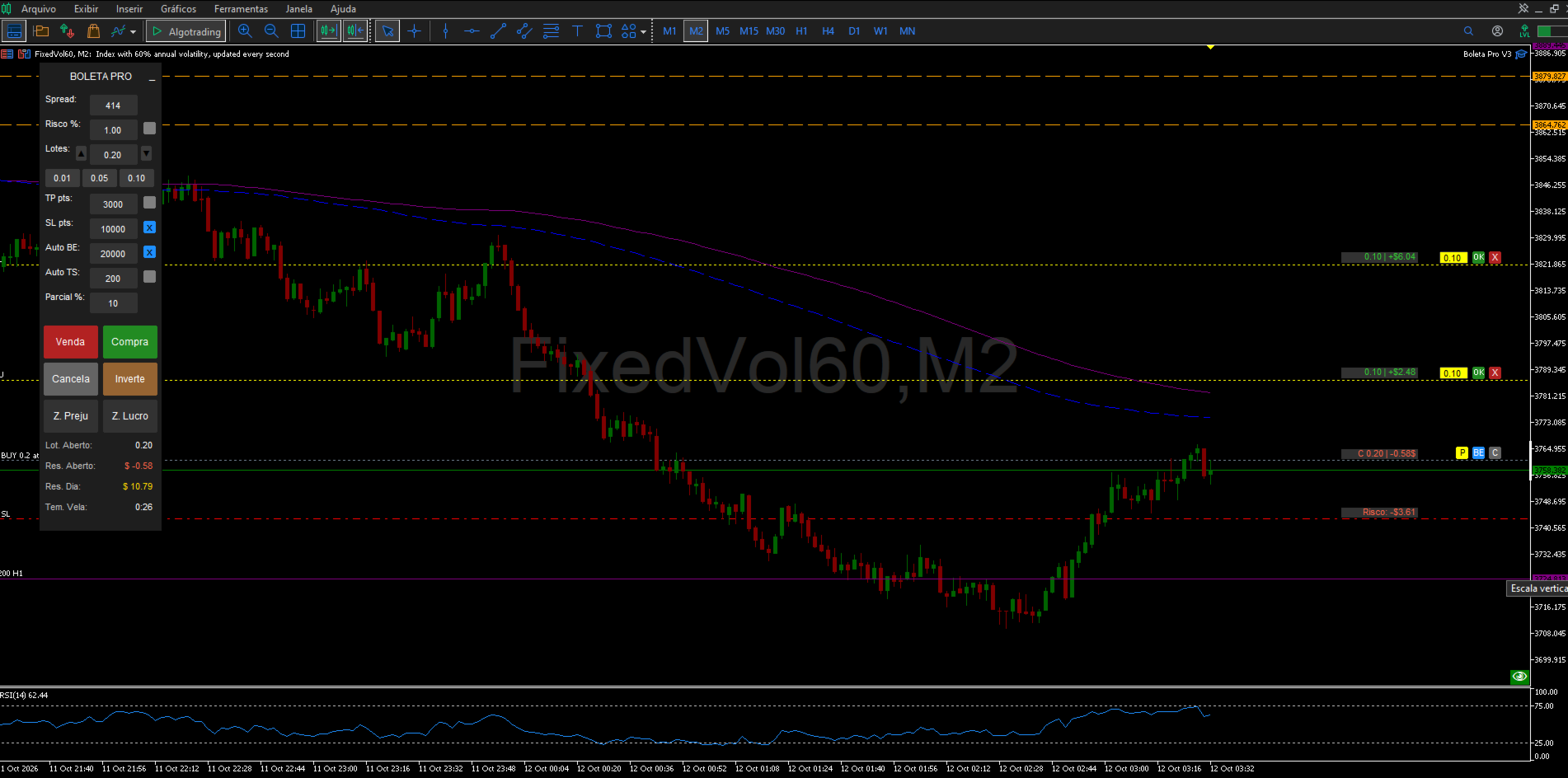
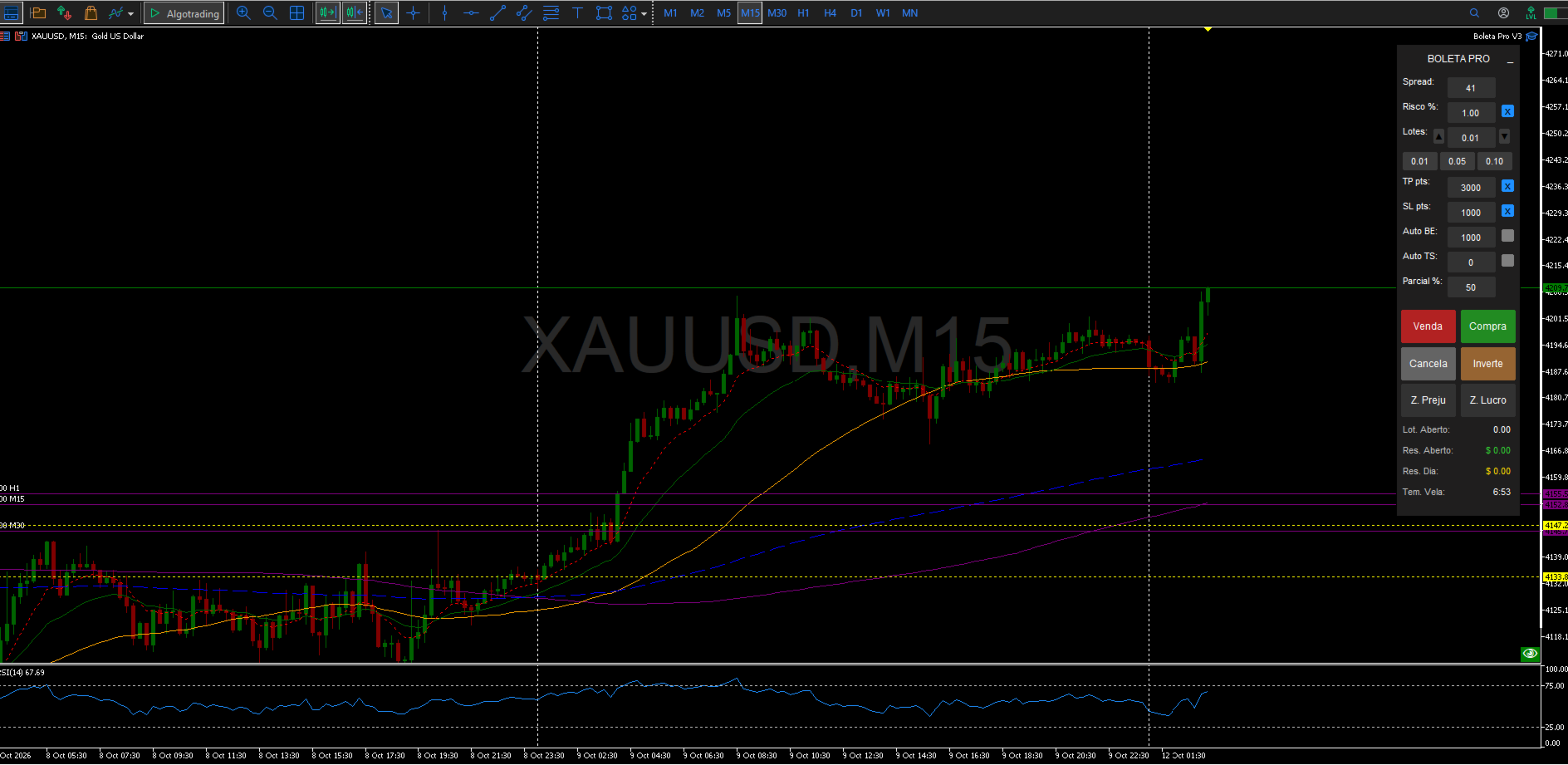
| Field | Function |
| Spread | Shows the symbol's current spread, in points. |
| Risk % (box + checkbox) | When the checkbox is on, lot size is calculated automatically from the risk percentage of equity and the Stop Loss distance. |
| Lots (box + -/+ buttons + shortcuts) | Manual lot size, used when risk-based sizing is off. The shortcut buttons apply InpLotShortcut1/2/3. |
| TP (box + checkbox) | Take Profit, in points or $, per InpTPSLMode. |
| SL (box + checkbox) | Stop Loss, same unit as TP. |
| BE (box + checkbox) | Distance, in points, that triggers automatic Breakeven. |
| TS (box + checkbox) | Distance, in points, of the automatic Trailing Stop. |
| Partial % (box) | Percentage used by the manual partial close (keyboard shortcut and on-chart "P" button). Accepts whole numbers only, 0 to 100, no decimal point. |
| Buy / Sell | Open a market position, or a pending order when triggered by a mouse click away from the current price (see Section 6). |
| Cancel | Cancels all pending orders on the symbol opened by the panel. |
| Reverse | Closes the current position and opens a new one in the opposite direction, with the same lot size. |
| C. Loss / C. Profit | Close all positions on the symbol that are, respectively, in loss or in profit. |
| Footer | Open Lot size, Open P/L (floating), Daily Result (closed + floating, real-time) and the current bar's timer. |
4. Input Parameters Account and Language
| Parameter | Default | Description |
| InpAccountType | Personal | Account type. |
| InpLanguage | Portuguese | Language of the panel labels (PT, EN or ES). The "Boleta Pro V3" name stays fixed in any language. |
General Settings
| Parameter | Default | Description |
| InpMagicNum | 123456 | Magic number used to identify the panel's trades. |
| InPrefix | BT_ | Prefix for the chart objects created by the panel. |
| InpResetOnRemove | Off | If on, clears the saved settings when the panel is removed from the chart. |
| InpShowLineValueBoxes | On | Shows the value boxes on the Lot/Profit, Risk, Target and Partial lines. Turn off to lighten the panel when running many open orders. |
Panel Size & Position
| Parameter | Default | Description |
| InpX / InpY | 50 / 20 | Panel position, in pixels from the top-left corner. |
| InpWidth / InpHeight | 150 / 710 | Panel width and height, in pixels. |
| InpBtnPosition | Sell left, Buy right | Layout of the Buy/Sell buttons. |
Chart Center Display
| Parameter | Default | Description |
| InpShowInfo | On | Shows the symbol name and time in the chart's center. |
| InpFontSize | 70 | Center text size. |
| InpColorInfo | Dark gray | Center text color. |
Risk Management
| Parameter | Default | Description |
| InpTPSLMode | Points | Unit used for TP/SL/BE/TS: Points or $. |
| InpEnableMaxOrders / InpMaxOrders | Off / 5 | Optional limit on simultaneous orders and positions. |
| InpEnableMaxDailyTrades / InpMaxDailyTrades | Off / 10 | Optional limit on the number of trades (entries) per day. |
| InpEnableDailyLoss / InpDailyLossLimit | Off / $100.00 | Daily loss lock: closes everything and blocks new entries once the value is reached. |
| InpEnableSpreadFilter / InpMaxSpreadPoints | Off / 50 pts | Blocks new entries while the symbol's spread is above the limit. |
| InpDefaultRisk | 0.01 | Default risk per trade (percentage of balance) when automatic lot sizing is on. |
| InpDefaultLot | 0.01 | Default lot size when automatic risk sizing is off. |
| InpDefaultTP / InpDefaultSL | 3000 / 1000 | Default Take Profit and Stop Loss (points or $, per InpTPSLMode). |
| InpDefaultBE / InpDefaultTS | 1000 / 200 | Default distance for automatic Breakeven and Trailing Stop (points). |
| InpBEProfit | 0 | Breakeven offset, in points above the entry price. |
Lot Shortcuts
| Parameter | Default |
| InpLotShortcut1 / 2 / 3 | 0.01 / 0.05 / 0.10 |
Manual Partial Close
| Parameter | Default | Description |
| InpDefaultPartialPct | 50 | Default percentage shown in the "Partial %" box (whole number, 0-100). |
Pending Partial Close (SHIFT+P)
| Parameter | Default | Description |
| InpPartialPriority | Oldest first | Which position closes first when more than one is open. |
| InpPPARLineColor / Style / Width | Yellow, dotted, 1 | Appearance of the trigger line on the chart. |
| InpPPAREditBG / EditTxt | Yellow / Black | Colors of the pending partial's editable volume box. |
| InpPPARBtnClose | Red | Color of the "X" button that cancels the pending partial. |
Keyboard Shortcuts: see the full table in Section 5.
Visual Customization: the remaining parameter groups (Panel Colors, Element & Value-Box Colors, Panel Text & Row Colors, Mouse Preview Line Colors & Styles, Ghost-Order Simulator Line Colors & Styles, On-Chart Dynamic Button Colors) control only the panel's appearance - background, button, text, checkbox and SL/TP/entry-line colors - and never change how the tool behaves. All of them have self-explanatory names (e.g. InpColorBuy, InpColorSell) and can be adjusted freely from the panel's properties window.
5. Keyboard Shortcuts
| Key (default) | Parameter | Action |
| B | InpKeyBuy | Buy at market |
| S | InpKeySell | Sell at market |
| C | InpKeyCancel | Cancels all pending orders on the symbol |
| I | InpKeyInvert | Reverses the current position |
| L | InpKeyZLucro | Closes all positions in profit |
| P | InpKeyZPrej | Closes all positions in loss |
| M | InpKeyMin | Minimizes/restores the panel |
| E | InpKeyBE | Applies manual breakeven to all eligible positions |
| A | InpKeyPartial | Partially closes (using the "Partial %" box) all eligible positions |
| SHIFT + P | Fixed | Creates a pending partial-close line on the chart |
| Up arrow or Page Up | Fixed | Simulates a Buy order (Ghost Order) |
| Down arrow or Page Down | Fixed | Simulates a Sell order (Ghost Order) |
Keys B, S, C, I, L, P, M, E and A are configurable under the "Keyboard Shortcuts" input group. The mouse shortcuts (SHIFT/CTRL) and the SHIFT+P / arrow / Page Up / Page Down shortcuts are fixed.
6. Mouse Shortcuts & Actions
- Moving the mouse over the chart (outside the panel) while holding SHIFT: draws a Buy preview line at the cursor's price.
- Holding CTRL: draws a Sell preview line.
- Clicking outside the panel while holding SHIFT: executes a Buy at the clicked price - at market if it matches the current price, or as a pending order (Buy Limit/Buy Stop) if the click is above or below the market price.
- Holding CTRL while clicking: same logic for Sell (market, Sell Limit or Sell Stop).
- SHIFT + CTRL held together: no action is taken - a safeguard against accidentally opening a Buy and a Sell at once.
7. On-Chart Dynamic Buttons
Appear next to every position or order opened by the panel:
| Button | Action |
| C | Closes the position (or cancels the matching pending order). |
| BE | Applies breakeven to that specific position. |
| P | Partially closes that position, using the percentage set in the "Partial %" box. |
8. Ghost Order Simulator
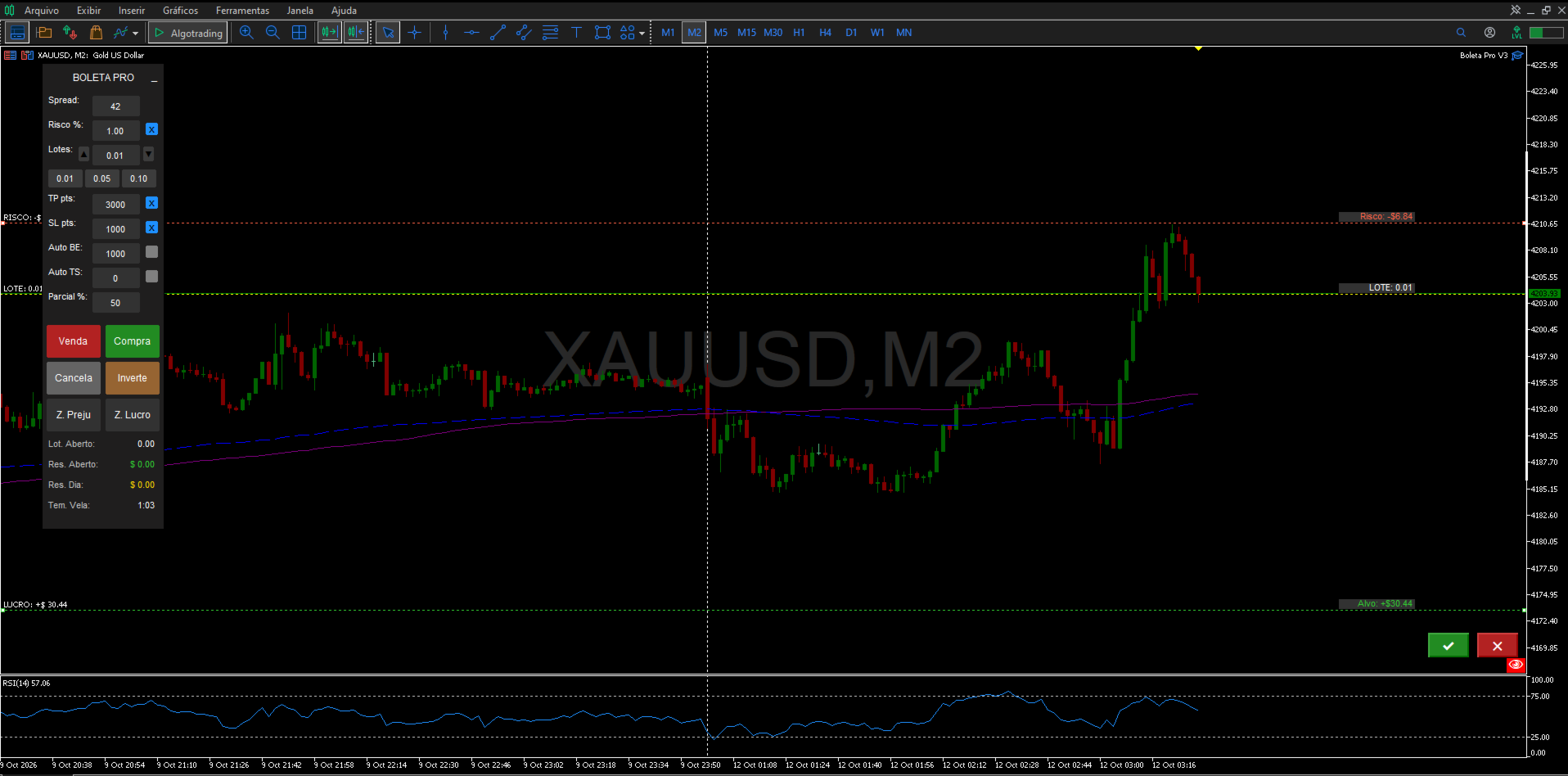
- Press the up arrow or Page Up to simulate a Buy; the down arrow or Page Down to simulate a Sell.
- Entry, SL and TP lines appear on the chart and can be dragged with the mouse to adjust the values before confirming.
- Click the green button to confirm and send the order, or the red button to cancel the simulation.
- If "Risk %" is on, the ghost order's lot size recalculates automatically as the SL distance is adjusted.
9. Partial Close (Immediate and Pending)
Immediate: set the percentage in the "Partial %" box (0 to 100, whole number) and use the keyboard shortcut (default: A) or the on-chart "P" button next to the position.
Pending (SHIFT+P): creates a line on the chart with an editable volume box. Drag the line to the desired trigger price - once the price is reached, the partial close executes automatically. Use the OK button to enable/pause the rule and the X to delete it. Which position closes first (oldest or newest) is set by the InpPartialPriority parameter.
10. Risk Management & Safety Features
- Automatic risk-based lot sizing: turn on the "Risk %" checkbox so lot size is calculated from the equity percentage and the Stop Loss distance.
- Simultaneous order/position limit (optional): blocks new entries once the configured maximum is reached.
- Daily trade limit (optional): blocks new entries after the maximum number of trades opened that day is reached.
- Maximum spread filter (optional): blocks new entries while the spread is above the configured limit.
- Daily loss lock (optional): once the limit is reached, automatically closes every position and order on the symbol and blocks new entries; includes a redundant check and a retry with a sound alert if the first close attempt fails.
- Accidental double-click guard: prevents a simultaneous Buy and Sell from firing when SHIFT+CTRL are held together.
These safeguards act only on new entries and on the daily lock's own close-everything action - they never block manually closing a position, modifying stops, breakeven or trailing stop on positions already open.
11. Support
For questions, suggestions and support, please use the product's comments or the mql5.com messaging system.













































Ferramenta excelente ótimos recursos e bem prático de usar top demais super recomendo