Boleta Pro V3

4.5
1. Overview

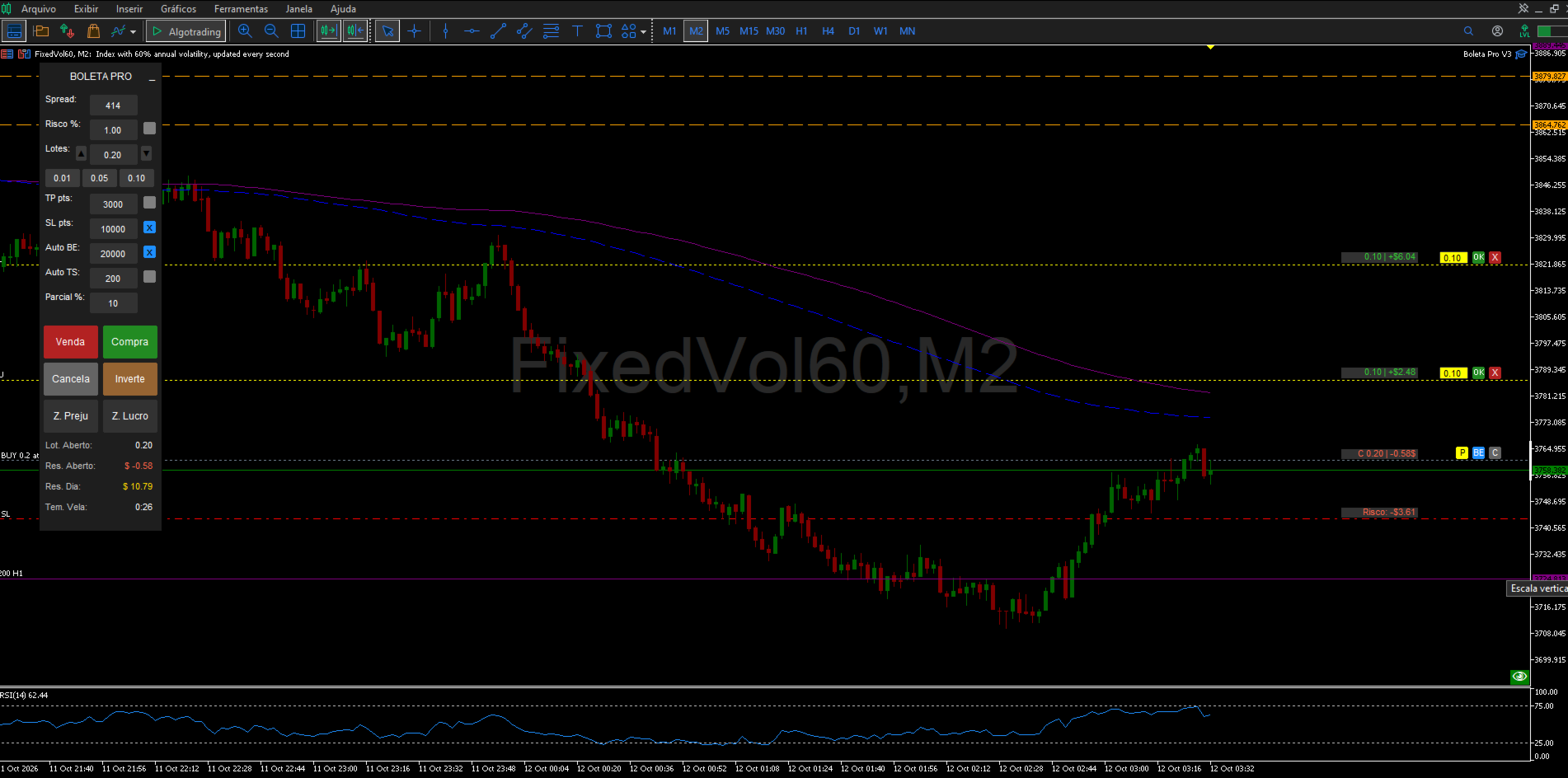
Boleta Pro V3 is a manual trading panel for MetaTrader 5, built to speed up and organize the discretionary trader's routine: opening, managing and closing trades directly from the chart, with automatic lot sizing by risk, discipline safeguards (daily loss lock, daily trade limit, spread filter) and keyboard/mouse shortcuts to reduce dependence on repeated clicking. The tool never places trades on its own - every entry starts from a user action (button, shortcut or chart click).

This manual describes how the tool works and how to configure it. Trading financial markets involves risk of capital loss; no feature or setting in the panel guarantees profit.

2. Installation and First Steps
  1. Copy the file into the MQL5/Experts folder of your MetaTrader 5 terminal (or install it from the Market, if purchased there).
  2. Refresh the Expert Advisors list in the terminal's Navigator.
  3. Drag Boleta Pro V3 onto the chart of the desired symbol.
  4. On the "Common" tab of the properties window, enable "Allow Algo Trading".
  5. Review the input parameters (Section 4) for your broker, symbol and strategy before the first trade - especially the Magic Number, the TP/SL unit and the risk limits.
  6. Click OK. The panel appears at the configured position (default: top-left corner).
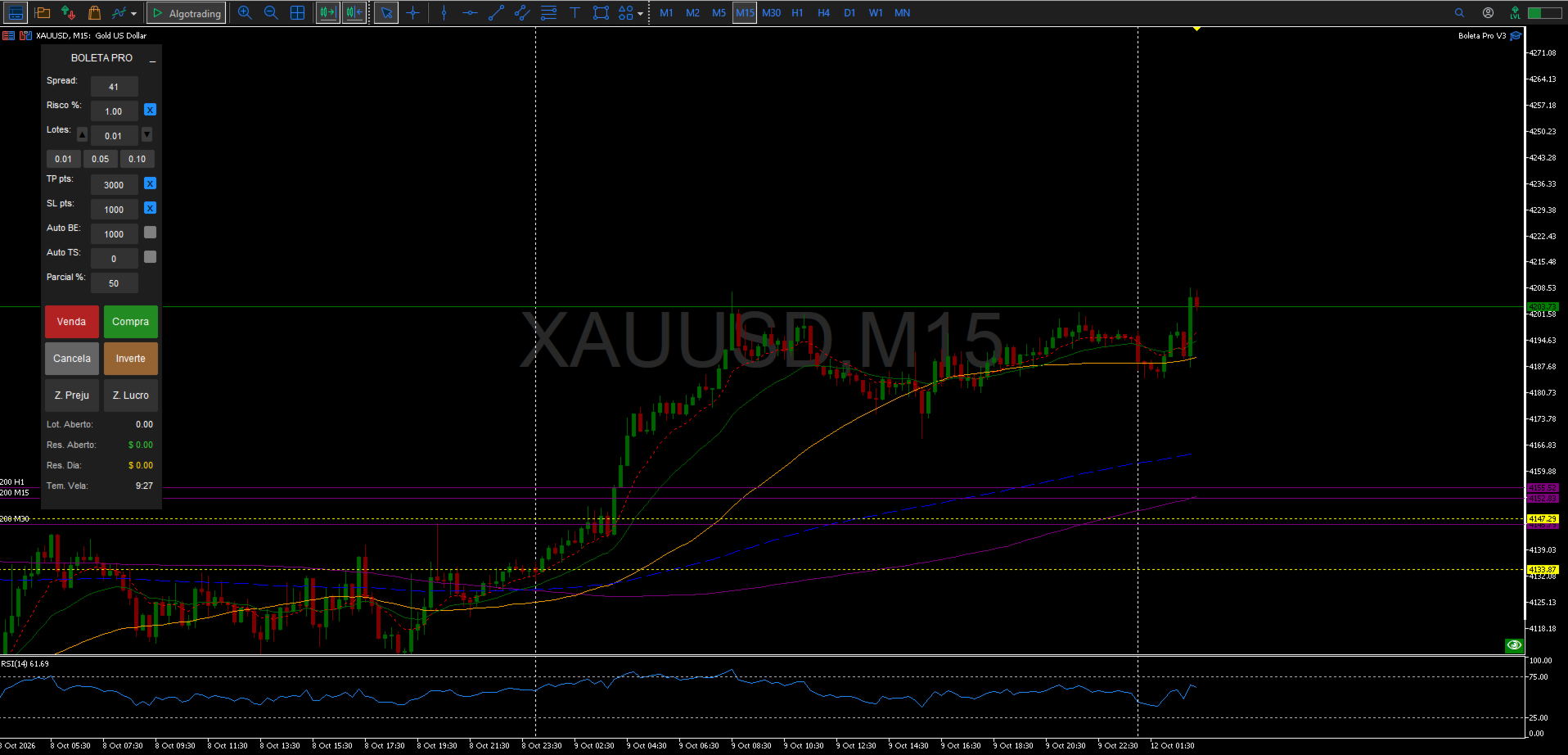
3. Panel Layout
Field Function
Spread Shows the symbol's current spread, in points.
Risk % (box + checkbox) When the checkbox is on, lot size is calculated automatically from the risk percentage of equity and the Stop Loss distance.
Lots (box + -/+ buttons + shortcuts) Manual lot size, used when risk-based sizing is off. The shortcut buttons apply InpLotShortcut1/2/3.
TP (box + checkbox) Take Profit, in points or $, per InpTPSLMode.
SL (box + checkbox) Stop Loss, same unit as TP.
BE (box + checkbox) Distance, in points, that triggers automatic Breakeven.
TS (box + checkbox) Distance, in points, of the automatic Trailing Stop.
Partial % (box) Percentage used by the manual partial close (keyboard shortcut and on-chart "P" button). Accepts whole numbers only, 0 to 100, no decimal point.
Buy / Sell Open a market position, or a pending order when triggered by a mouse click away from the current price (see Section 6).
Cancel Cancels all pending orders on the symbol opened by the panel.
Reverse Closes the current position and opens a new one in the opposite direction, with the same lot size.
C. Loss / C. Profit Close all positions on the symbol that are, respectively, in loss or in profit.
Footer Open Lot size, Open P/L (floating), Daily Result (closed + floating, real-time) and the current bar's timer.
4. Input Parameters Account and Language
Parameter Default Description
InpAccountType Personal Account type.
InpLanguage Portuguese Language of the panel labels (PT, EN or ES). The "Boleta Pro V3" name stays fixed in any language.
General Settings
Parameter Default Description
InpMagicNum 123456 Magic number used to identify the panel's trades.
InPrefix BT_ Prefix for the chart objects created by the panel.
InpResetOnRemove Off If on, clears the saved settings when the panel is removed from the chart.
InpShowLineValueBoxes On Shows the value boxes on the Lot/Profit, Risk, Target and Partial lines. Turn off to lighten the panel when running many open orders.
Panel Size & Position
Parameter Default Description
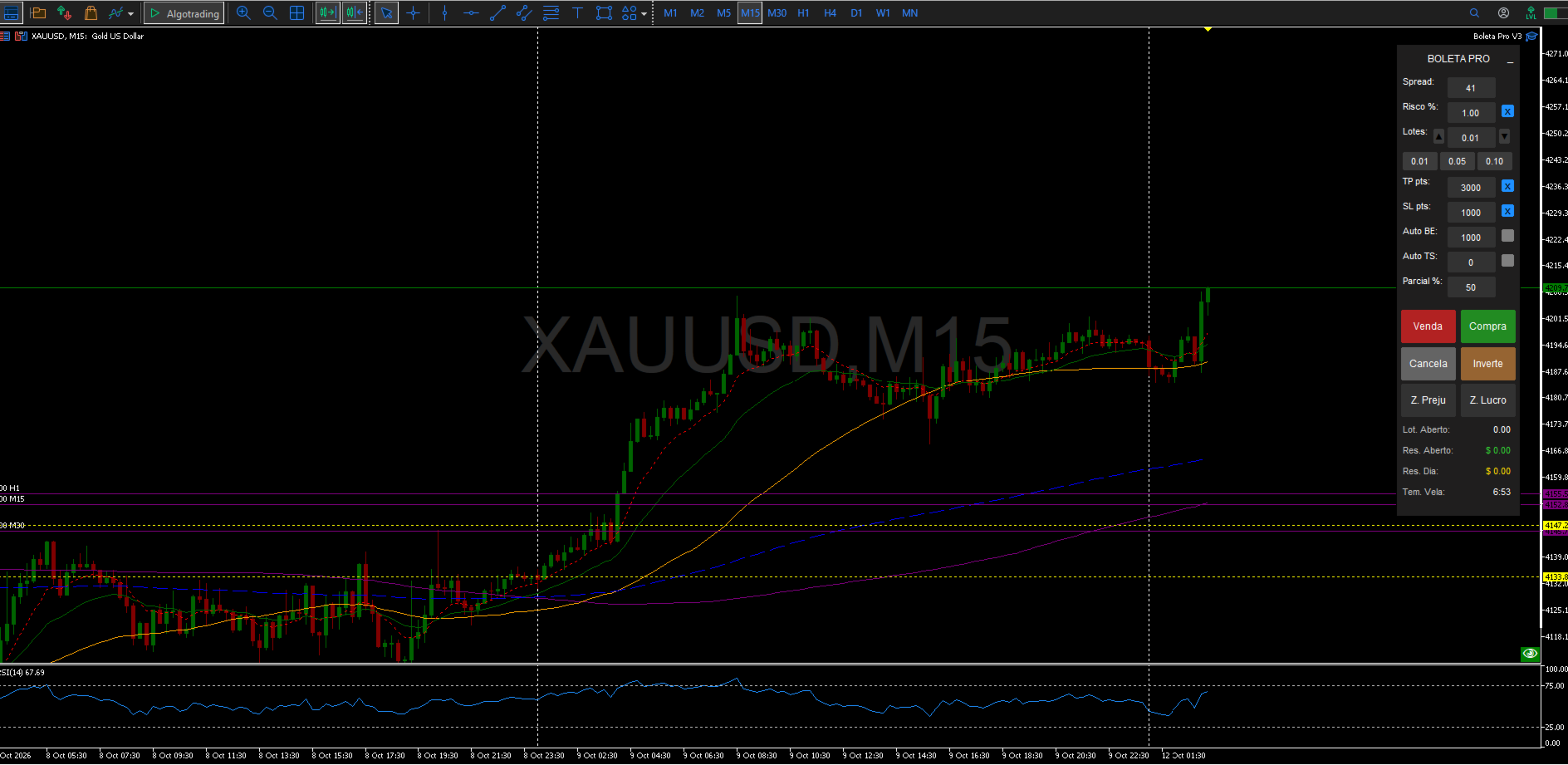
InpX / InpY 50 / 20 Panel position, in pixels from the top-left corner.
InpWidth / InpHeight 150 / 710 Panel width and height, in pixels.
InpBtnPosition Sell left, Buy right Layout of the Buy/Sell buttons.
Chart Center Display
Parameter Default Description
InpShowInfo On Shows the symbol name and time in the chart's center.
InpFontSize 70 Center text size.
InpColorInfo Dark gray Center text color.
Risk Management
Parameter Default Description
InpTPSLMode Points Unit used for TP/SL/BE/TS: Points or $.
InpEnableMaxOrders / InpMaxOrders Off / 5 Optional limit on simultaneous orders and positions.
InpEnableMaxDailyTrades / InpMaxDailyTrades Off / 10 Optional limit on the number of trades (entries) per day.
InpEnableDailyLoss / InpDailyLossLimit Off / $100.00 Daily loss lock: closes everything and blocks new entries once the value is reached.
InpEnableSpreadFilter / InpMaxSpreadPoints Off / 50 pts Blocks new entries while the symbol's spread is above the limit.
InpDefaultRisk 0.01 Default risk per trade (percentage of balance) when automatic lot sizing is on.
InpDefaultLot 0.01 Default lot size when automatic risk sizing is off.
InpDefaultTP / InpDefaultSL 3000 / 1000 Default Take Profit and Stop Loss (points or $, per InpTPSLMode).
InpDefaultBE / InpDefaultTS 1000 / 200 Default distance for automatic Breakeven and Trailing Stop (points).
InpBEProfit 0 Breakeven offset, in points above the entry price.
Lot Shortcuts
Parameter Default
InpLotShortcut1 / 2 / 3 0.01 / 0.05 / 0.10
Manual Partial Close
Parameter Default Description
InpDefaultPartialPct 50 Default percentage shown in the "Partial %" box (whole number, 0-100).
Pending Partial Close (SHIFT+P)
Parameter Default Description
InpPartialPriority Oldest first Which position closes first when more than one is open.
InpPPARLineColor / Style / Width Yellow, dotted, 1 Appearance of the trigger line on the chart.
InpPPAREditBG / EditTxt Yellow / Black Colors of the pending partial's editable volume box.
InpPPARBtnClose Red Color of the "X" button that cancels the pending partial.

Keyboard Shortcuts: see the full table in Section 5.

Visual Customization: the remaining parameter groups (Panel Colors, Element & Value-Box Colors, Panel Text & Row Colors, Mouse Preview Line Colors & Styles, Ghost-Order Simulator Line Colors & Styles, On-Chart Dynamic Button Colors) control only the panel's appearance - background, button, text, checkbox and SL/TP/entry-line colors - and never change how the tool behaves. All of them have self-explanatory names (e.g. InpColorBuy, InpColorSell) and can be adjusted freely from the panel's properties window.

5. Keyboard Shortcuts
Key (default) Parameter Action
B InpKeyBuy Buy at market
S InpKeySell Sell at market
C InpKeyCancel Cancels all pending orders on the symbol
I InpKeyInvert Reverses the current position
L InpKeyZLucro Closes all positions in profit
P InpKeyZPrej Closes all positions in loss
M InpKeyMin Minimizes/restores the panel
E InpKeyBE Applies manual breakeven to all eligible positions
A InpKeyPartial Partially closes (using the "Partial %" box) all eligible positions
SHIFT + P Fixed Creates a pending partial-close line on the chart
Up arrow or Page Up Fixed Simulates a Buy order (Ghost Order)
Down arrow or Page Down Fixed Simulates a Sell order (Ghost Order)

Keys B, S, C, I, L, P, M, E and A are configurable under the "Keyboard Shortcuts" input group. The mouse shortcuts (SHIFT/CTRL) and the SHIFT+P / arrow / Page Up / Page Down shortcuts are fixed.

6. Mouse Shortcuts & Actions
  • Moving the mouse over the chart (outside the panel) while holding SHIFT: draws a Buy preview line at the cursor's price.
  • Holding CTRL: draws a Sell preview line.
  • Clicking outside the panel while holding SHIFT: executes a Buy at the clicked price - at market if it matches the current price, or as a pending order (Buy Limit/Buy Stop) if the click is above or below the market price.
  • Holding CTRL while clicking: same logic for Sell (market, Sell Limit or Sell Stop).
  • SHIFT + CTRL held together: no action is taken - a safeguard against accidentally opening a Buy and a Sell at once.
7. On-Chart Dynamic Buttons

Appear next to every position or order opened by the panel:

Button Action
C Closes the position (or cancels the matching pending order).
BE Applies breakeven to that specific position.
P Partially closes that position, using the percentage set in the "Partial %" box.
8. Ghost Order Simulator
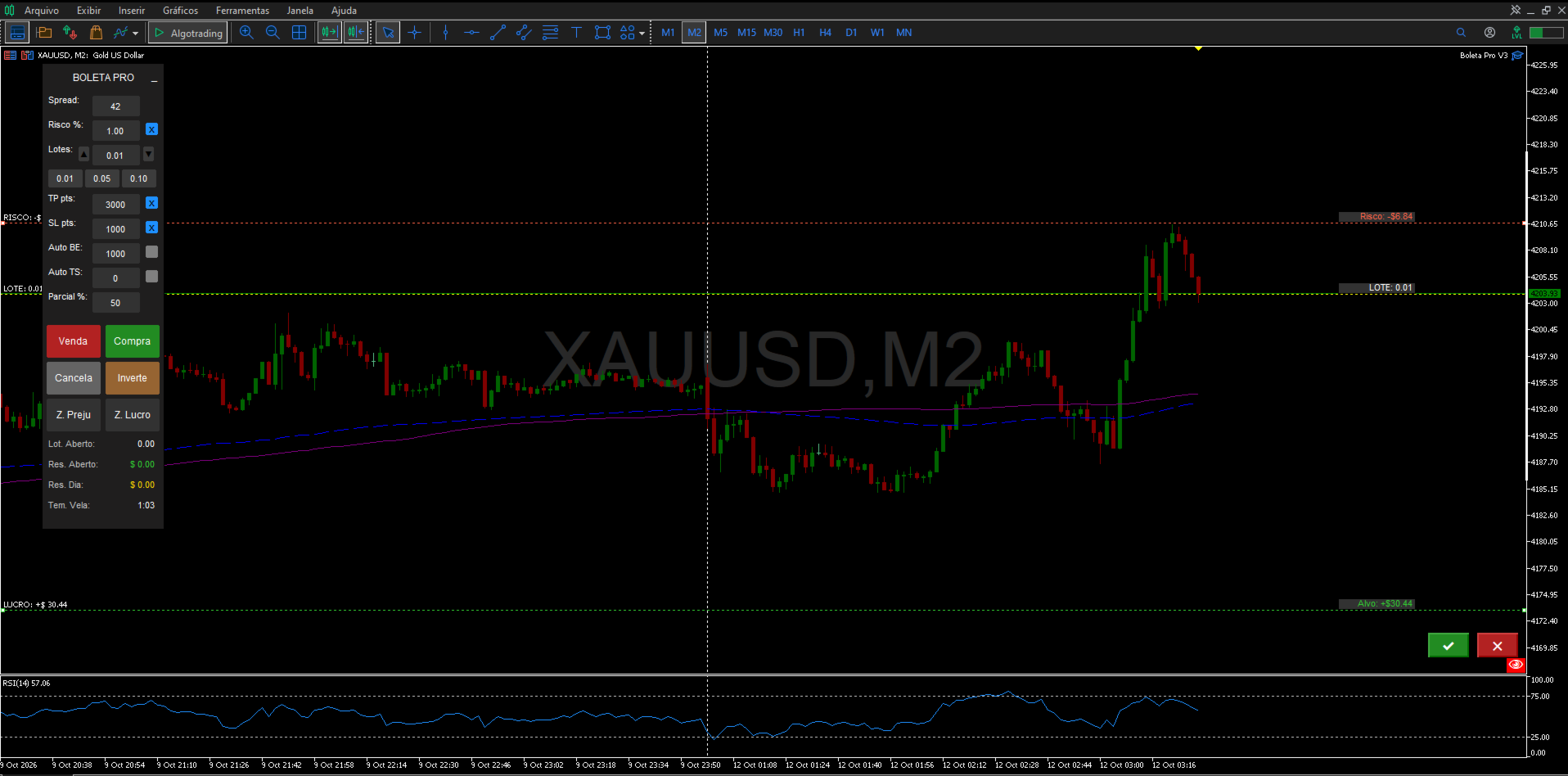
  1. Press the up arrow or Page Up to simulate a Buy; the down arrow or Page Down to simulate a Sell.
  2. Entry, SL and TP lines appear on the chart and can be dragged with the mouse to adjust the values before confirming.
  3. Click the green button to confirm and send the order, or the red button to cancel the simulation.
  4. If "Risk %" is on, the ghost order's lot size recalculates automatically as the SL distance is adjusted.
9. Partial Close (Immediate and Pending)

Immediate: set the percentage in the "Partial %" box (0 to 100, whole number) and use the keyboard shortcut (default: A) or the on-chart "P" button next to the position.

Pending (SHIFT+P): creates a line on the chart with an editable volume box. Drag the line to the desired trigger price - once the price is reached, the partial close executes automatically. Use the OK button to enable/pause the rule and the X to delete it. Which position closes first (oldest or newest) is set by the InpPartialPriority parameter.

10. Risk Management & Safety Features
  • Automatic risk-based lot sizing: turn on the "Risk %" checkbox so lot size is calculated from the equity percentage and the Stop Loss distance.
  • Simultaneous order/position limit (optional): blocks new entries once the configured maximum is reached.
  • Daily trade limit (optional): blocks new entries after the maximum number of trades opened that day is reached.
  • Maximum spread filter (optional): blocks new entries while the spread is above the configured limit.
  • Daily loss lock (optional): once the limit is reached, automatically closes every position and order on the symbol and blocks new entries; includes a redundant check and a retry with a sound alert if the first close attempt fails.
  • Accidental double-click guard: prevents a simultaneous Buy and Sell from firing when SHIFT+CTRL are held together.

These safeguards act only on new entries and on the daily lock's own close-everything action - they never block manually closing a position, modifying stops, breakeven or trailing stop on positions already open.

11. Support

For questions, suggestions and support, please use the product's comments or the mql5.com messaging system.


Değerlendirmeler 17
Doni Henrique Simões
31
Doni Henrique Simões 2026.09.24 03:54 

Ferramenta excelente ótimos recursos e bem prático de usar top demais super recomendo

Reinaldo Aparecido Da Silva Junior
126
Reinaldo Aparecido Da Silva Junior 2026.07.15 11:57 

Boleta show!

Dkvm18
103
Dkvm18 2026.07.14 10:47 

boleta top!!!

Önerilen ürünler
Short description Position sizing and margin calculator for MetaTrader 5 with separate BUY and SELL calculations. Full description QRM Risk Calculator is a position sizing and margin calculation utility for MetaTrader 5. It calculates BUY and SELL volume separately according to the selected percentage risk, stop-loss distance, account data, symbol specifications, and current Bid and Ask prices. The calculator displays the estimated monetary loss at the stop loss, theoretical reward at the take p
FREE
Why use it See at a glance how much room is left before your own daily loss and max loss limits. Know the equity level that would reach each loss limit, before it happens. Get an on-screen note when a limit reaches the warning levels you choose. It is an indicator with no trading functions: it never opens, modifies or closes a position. What it shows Balance, equity and today's result (closed trades since the day reset plus open positions). For the account history: number of trades, win rate, pr
FREE
When executing an order, whether through the Metatrader ticket on a computer or the Metatrader app on a mobile device, either manual or pending, Easy Trade will automatically set the take profit and stop loss levels, as well as a limit order with its respective take profit and stop loss levels. It follows the trading strategy for market open (US30, US100, US500), but it can be applied to any market asset.
FREE
ATC Alert Manager, fiyat alarmlarını doğrudan grafikte ayarlamanıza ve bunları küçük bir panelden yönetmenize olanak tanır. Her alarm, grafikte yeni bir fiyata sürükleyebileceğiniz bir çizgi olarak gösterilir. Bir alarm, fiyat seviyenizi geçtiği anda bir kez tetiklenir; açılır pencere uyarısı, ses ve telefonunuza isteğe bağlı push bildirimi ile birlikte. Zaten seviyeyi geçmiş olan fiyat onu tetiklemez, böylece her tick'te tekrarlanan uyarılar almazsınız. Bu araç aynı zamanda pozisyon aracı, iş
FREE
Trade assistant pro v8
Ahmed Mohammed Bakr Bakr
2 (1)
FREE FREE FREE Trade Assistant MT5 – Professional Trading & Risk Management Panel Trade Assistant MT5 is an advanced trading panel designed to help traders execute orders faster, safer, and more professionally . It simplifies manual trading by combining smart order management , precise risk control , and one-click execution , making it ideal for both beginners and advanced traders. This tool does not trade automatically . Instead, it empowers you with full control while applying professional-gra
FREE
Haunted Risk Calculator is a visual risk management panel for MT5 that calculates the correct lot size in real time based on your account balance, risk percentage, and stop-loss distance. HOW IT WORKS Set your risk percentage or dollar amount, drag the SL and TP lines to your desired levels on the chart, and the panel instantly shows the calculated lot size, risk in dollars, reward-to-risk ratio, and expected profit. Execute with one click or a keyboard shortcut. FEATURES Draggable panel — grab
FREE
Bu yardımcı program EA, istenen kar değerine ulaştığında veya kazancı durdurma etkinleştirildiğinde herhangi bir alım veya satım emrini kapatır. Manuel olarak veya diğer robotlar tarafından açılan siparişleri kapatır.  Hızlı fiyat hareketlerinde kazancın korunması veya garanti altına alınmasında oldukça etkilidir. MT5'te mevcut olan herhangi bir dönemde ve herhangi bir varlıkta çalışır. İzleyen Başlangıç: Örnek, eğer fiyat 70 pip lehte hareket ederse, kazancı durdurmayı etkinleştirir.  Traling
FREE
Prop Trade Manager Starter Panel is a free one-click order panel for MetaTrader 5. You choose how much to risk and how far the stop loss is, and it calculates the lot size for you. Press Buy or Sell and the order goes out with stop loss and take profit already set. It works on any symbol: forex, gold, indices and crypto. WHAT IT DOES - Order panel on the chart with Buy and Sell buttons. - Lot size calculated from your risk % (of the balance) and your stop loss distance in points, using the tick
FREE
NINJA MT5 DOCTOR GENEL BAKIŞ NINJA MT5 Doctor; terminalin, hesabın, açık grafiklerin, seçilen geçmiş verilerin ve mevcut ana grafikteki sembolün tek seferlik tanılama anlık görüntüsünü oluşturan, ücretsiz ve salt okunur bir MT5 yardımcı programıdır. Expert Advisor biçiminde bir yardımcı programdır; işlem yapan bir EA veya gösterge değildir. Panel ve giriş parametresi adları İngilizcedir. NELERİ KONTROL EDER Broker sunucusu bağlantısını, terminalin ve hesabın işlem izinlerini, Doctor'ın kendi izn
FREE
Core function Intelligent transaction management one-click opening and closing operation, which supports user-defined lots to set multiple closing modes: all closing, closing by direction and closing by profit and loss status. Professional risk control, real-time risk monitoring and spread control to avoid high-cost trading environment. Visual control panel has an intuitive graphical interface, and all functions can be operated with one button to display position information, profit and loss sta
FREE
PropSizer
Timon-pascal Krueger
PropSizer is a free lot calculator on the chart: drag an entry line and a stop line, and one text line shows the broker normalised lot size for your risk, the money on the line and the stop distance. A session candle counter and a news line come with it. Setup takes a minute: attach it to the chart you want to trade, set your risk per trade once, and drag the two lines. It never places an order. Try it first It is free. Attach it to any chart, drag the lines, read the number. In the strategy te
FREE
Click Trading
Jawad Tauheed
5 (2)
One Click Trading – Auto TP SL Developer TraderLinkz Version 1.00 Category Utility What it does Adds missing TP and SL to your manual trades and pending orders Sets them once per ticket Lets you move TP and SL afterward Works on hedging and netting accounts Scans on every tick and reacts on trade events Why you want it You place faster entries You get consistent risk and exit targets You reduce fat finger errors You keep full manual control Quick start Attach the EA to any chart Keep TP and SL e
FREE
Smart Lot-Size Calculator And Trade Assistant for Mobile Trading Overview: This is the tool every trader in the market must have no matter if you are scalper, swing traders, day trader, or long term trader. This On-The-Go trading tool will help you stay disciplined and also stay free from daily trade management chores, Most traders face common problems like   1. Calculation of proper lot-size of a position to take controlled risk  2. Managing every trade and trailing stop-loss if trades goes in
FREE
Position Size Tool – Smart Risk Management & Trade Execution Panel The Position Size Tool is a powerful and intuitive MT5 panel that simplifies your trading by combining position sizing , risk calculation , risk/reward visualization , and order placement —all in one place. ️ Clean & Functional Interface The tool features a compact, real-time panel with the following: Balance & Equity display Live Price tracking Customizable Risk % input Auto-calculated Lot Size based on SL and Risk Input for S
FREE
CC CopyCopy
Luiz Eduardo Teodoro De Carvalho
*** Free Version: Maximum Lot 0.10 *** CopyCopy: Smart Replication Manager for MT5 CopyCopy is the ultimate tool for those who want to replicate trades with complete autonomy. Many signals and EAs operate with minimum lots (0.01) that do not match your account size or your growth strategy. With CopyCopy, you turn this limitation into an opportunity, taking full control over volume and risk. The difference? You don't have to copy "all or nothing." You decide exactly where the orders come from.
FREE
Place trades in one click with the lot size calculated from your risk. How it works Type your risk percent, stop loss in points and take profit as a multiple of the stop. The panel shows the lot size and the money at risk before you click. BUY and SELL open the order with SL and TP already attached. Management buttons move stops to break-even, close half or close all positions on the chart symbol. Key features Risk based lot size from balance, tick value and stop distance SL and TP attached to e
FREE
Bu küçük araç, grafik üzerinde basit bir çizgi sürükleyerek risk yönetiminizi tanımlamanıza yardımcı olur. Hesap yüzdesi veya sabit para tutarı üzerinden hesaplanan gerçek lot büyüklüğünü doğrudan satırda gösterir. Tek yapmanız gereken klavyenizdeki "t" tuşuna basarak hattı aktif hale getirmek ve hattı stoploss noktanıza sürüklemek. Bu kadar. Ayarlarda çizgi ve metnin rengini ve genişliğini, ayrıca metinden satıra kadar olan boşluğu ve sağı tanımlayabilir ve riski hesap yüzdesi veya sabit para
FREE
MT5 için NAS100 Auto SL ve TP Maker ile tanışın: MetaTrader 5'te Nasdaq 100 piyasasında gezinen yatırımcılar için vazgeçilmez bir yardımcı olan NAS100 Auto SL ve TP Maker ile StopLoss ve TakeProfit ayarlarını bir daha asla kaçırmayın. Bu araç, StopLoss ve TakeProfit seviyelerinin yönetimini otomatikleştirmek için sorunsuz bir çözüm arayanlar için tasarlanmıştır. Temel Özellikler: Zahmetsiz Otomasyon: StopLoss ve/veya TakeProfit olmadan Nasdaq 100 işlemlerini otomatik olarak izler. Kullanıcı ta
FREE
Account Info EA It is a tool that presents on the graph all the positions of the account, and specific information concerning the positions, but also the account. It enables the user to have an image of his account at a glance. Use like any expert advisor. You can't attach it in the same chart with other expert advisor. It does not have the ability to open or manage positions. You can attach it on any chart and any timeframe.
FREE
Overview FiT Panel Pro is a professional-grade trade management panel designed for MetaTrader 5 traders who demand speed, precision, and full control over their trades. Built with a modern dark-theme UI, it combines one-click execution with advanced risk management, visual SL/TP drag lines, automatic Fibonacci-based levels, and comprehensive order management — all in a single, compact panel. Whether you are a scalper, day trader, or swing trader, FiT Panel Pro gives you the edge you need to exec
FREE
MGD Prop Risk Guard MT5 Professional Account Risk Monitoring for MetaTrader 5 — FREE MGD Prop Risk Guard MT5 is a free account risk monitoring utility designed to help traders stay informed about their daily loss limits, maximum drawdown, and available risk. Whether you trade manually, use Expert Advisors, or participate in proprietary trading firm challenges, MGD Prop Risk Guard provides a clear, real-time overview of your account's risk exposure. Monitor your trading risk directly from your MT
FREE
VR Renk Seviyeleri, trend çizgisi, dikdörtgen ve metin gibi unsurları kullanarak teknik analiz uygulayanlar için kullanışlı bir araçtır. Grafiğe doğrudan metin eklemek ve ekran görüntüsü almak mümkündür. Ayarlar, set dosyaları, demo versiyonları, talimatlar, problem çözme, adresinden edinilebilir. [Blog] İncelemeleri şu adresten okuyabilir veya yazabilirsiniz: [bağlantı] Sürümü [MetaTrader 4] Göstergeyle çalışma tek tıklamayla gerçekleştirilir. Bunu yapmak için, çizginin bulunduğu düğmeye tıkl
FREE
Easy and simple tool which close all trades in defined point of time. It can also close all open trades when opened positions reach defined target profit or stop loss. For all pairs, indexes etc. Works with all instruments. All types of orders. All charts. Users inputs: - close time (hour,min,sec) - take profit (in users currency) - stop loss (in users currency) Save & Load settings option. Fast, simple and reliable. Check out other tools provided by our team!
FREE
================================================================ MATRIX CONDITION MONITOR Live Trade Condition Panel for MetaTrader 5 Fully Automatic -- Works with ALL Matrix EAs ================================================================ NEVER MISS A TRADE SETUP AGAIN Matrix Condition Monitor is a free utility that attaches to any chart and automatically checks all 10 trade conditions in real time -- showing you exactly why a trade will or will not open, and alerting you the moment ever
FREE
Eagle Assistant Trade Manager MetaTrader 5 için kompakt işlem yönetim paneli: riske göre lot, düzenlenebilir alanlı emir çizgileri, maksimum spread ayarlı hızlı Buy/Sell, kısmi kapanışlar, 7 trailing türü, başabaş, OCO, gizli SL/TP, sanal emirler ve Time Manager. Eagle Assistant - Trade Manager , MetaTrader 5'te manuel işlem için kompakt bir paneldir. Lotu riskinize göre hesaplar, emri doğrudan grafik üzerinde çizip yazmanızı sağlar ve pozisyonlarınızı sizin yerinize yönetir: kısmi kapanışla
FREE
https://youtu.be/KHhg88fXWTk?si=ZoVtpc-wpfTVImSL 5-Minute Trading Strategy | Quick & Effective for Beginners Welcome to our trading channel- the deepak trading In this video, we'll be exploring a simple 5-minute trading strategy that can help you capture quick market movements and make profitable trades. Whether you're a beginner or an experienced trader, this strategy is designed to give you clear entry and exit points using technical indicators like EMA, RSI, and Stochastic Oscillator.
FREE
ClearEdge Daily Candle New York-close daily candle on any timeframe, with candle countdown, live spread and volatility information. Overview  ClearEdge Daily Candle draws the current day's candle next to the live price on any chart timeframe. On the 1-minute, 5-minute, 15-minute, 1-hour or higher charts, you can see where the trading day opened, how far price has moved in both directions, and whether the day is currently bullish or bearish, without switching to the daily (D1) chart. Why bro
Bonus when buying an indicator or an advisor from my list. Write to me in private messages to receive a bonus. Manual Assistant MT5 is a professional manual trading tool that will make your trading fast and comfortable. It is equipped with all the necessary functions that will allow you to open, maintain and close orders and positions with one click. It has a simple and intuitive interface and is suitable for both professionals and beginners. The panel allows you to place buy and sell orders w
FREE
Hi you, I need your help! Be my Patron, let's make it possible! https://www.patreon.com/joaopeuko https://github.com/Joaopeuko/Mql5-Python-Integration Channel: English version - Versão Inglês: https://www.mql5.com/en/channels/Mql5_Python_Integration_EN Portuguese version - Versão Português: https://www.mql5.com/en/channels/Mql5_Python_Integration_PT Paid version with 38 indicator: https://www.mql5.com/en/market/product/58056 I believe that development in PYTHON is easier and simpler
FREE
Spread Candle Clock is a clock that displays the remaining time of the current candle along with the spread in real time directly on the chart. Features: Real-time candle countdown. Live spread (SP) display. Adjustable size. Customizable colors. Configurable position in all four corners. Compatible with all symbols and timeframes. Includes a button to minimize to a small panel.
FREE
Bu ürünün alıcıları ayrıca şunları da satın alıyor
Trade Assistant MT5
Evgeniy Kravchenko
4.43 (216)
It helps to calculate the risk per trade, the easy installation of a new order, order management with partial closing functions, trailing stop of 7 types and other useful functions. Additional materials and instructions Installation instructions - Application instructions Line function -   shows on the chart the Opening line, Stop Loss, Take Profit. With this function it is easy to set a new order and see its additional characteristics before opening.   Risk management  - The risk calculation
Trade Manager EA’ye hoş geldiniz! Ticaretin daha sezgisel, hassas ve verimli hale gelmesi için tasarlanmış nihai risk yönetim aracı ile tanışın. Bu sadece bir emir verme aracı değil; ticaret planlaması, pozisyon yönetimi ve risk kontrolü için kapsamlı bir çözüm. İster yeni başlayan bir yatırımcı olun, ister deneyimli bir trader ya da hızlı emir gerektiren bir scalper, Trade Manager EA ihtiyaçlarınıza uyum sağlar ve forex, endeksler, emtialar ve kripto paralar dahil tüm piyasalarda esneklik sunar
Telegram to MT5 Multi-Channel Copier   , Telegram ve Discord kanallarınızdaki alım-satım sinyallerini doğrudan MetaTrader 5'e otomatik kopyalar. Bot yok, tarayıcı uzantısı yok, elle kopyalama yok. Sinyal Telegram'a veya Discord'a düşer ve EA birkaç saniye içinde terminalinizde işlemi açar. Ve bir kanalı kopyalamadan önce, yerleşik backtester o kanalın hesabınızda ne yapmış olacağını gösterir. Ürün iki bileşenden oluşur: Telegram kanallarınızı dinleyen bir Windows uygulaması ve sinyalleri MT5 ter
Local Trade Copier EA MT5
Juvenille Emperor Limited
4.94 (149)
Local Trade Copier EA MT5, aynı Windows bilgisayarı veya Windows VPS üzerinde çalışan birden fazla MetaTrader 5 hesabı arasında işlemleri kopyalamak ve yönetmek için hızlı ve esnek bir işlem kopyalayıcıdır. Yerel işlem senkronizasyonunu, Receiver tarafında lot büyüklüğü, risk yönetimi, işlem filtreleme, sembol eşleştirme, işlem yönetimi ve hesap koruması kontrolleriyle birleştirir. Transmitter ve Receiver terminallerinizi yaklaşık 1 dakika içinde ayarlayın ve aynı veya farklı brokerlardaki hesa
Farmed Hedge Yield Farming | All Markets (Manual - Hybrid - Semi/Automated EA) VERIFIED TRADING RESULTS - Farmed Hedge Yield Axi Copy:  https://www.mql5.com/en/signals/2356376 - Farmed Hedge Yield Exn Copy:   https://www.mql5.com/en/signals/2356404 - Farmed Hedge Yield V Copy:  https://www.mql5.com/en/signals/2357156 IMPORTANT NOTICE: FarmedHedge is a MANUAL-FOCUSED TRADING UTILITY ,not a fully automated EA. Results shown on this Signal include manual trades and overall strategic management.
Telegram sinyallerini kendi işlem kurallarınızla kopyalayın Telegram to MT5 Signal Trader , herkese açık ve özel Telegram kanallarındaki ve gruplarındaki metin tabanlı işlem sinyallerini otomatik olarak MetaTrader 5'e kopyalar. Tek bir masaüstü uygulamasından birden fazla sinyal sağlayıcısını ve MT5 hesabını yönetin; her sağlayıcı için ayrı risk ve işlem ayarları belirleyin. Sinyal kopyalamak için Telegram botu veya API kurulumu gerekmez. Kendi Telegram hesabınızla telefon numarası veya QR kod k
Strategy Ledger Pro
Abdullah Uygar Tuna
5 (14)
Şimdi Türkçe dil desteği ile. Strategy Ledger Pro , MetaTrader 5 için salt okunur bir hesap analiz panelidir. Hesap sonuçlarını Uzman Danışman (EA), strateji, sembol ve magic numaraya göre ayırır; böylece her birinin gerçekte ne kattığını görürsünüz. Panel 11 dilde kullanılabilir: English, Français, Deutsch, Español, Italiano, Português, Русский, Türkçe, 中文, 日本語 ve 한국어. Demoyu indirmeden önce. Market, her ücretli ürünün demosunu yalnızca Strateji Test Cihazında çalıştırır. Bu panel kendi hesabı
TradePanel MT5
Alfiya Fazylova
4.88 (170)
Trade Panel, çok işlevli bir ticaret asistanıdır. Uygulama, manuel ticaret için 50'den fazla ticaret fonksiyonu içerir ve çoğu ticaret görevini otomatikleştirmeyi mümkün kılar. Uygulama talimatları: https://www.mql5.com/en/blogs/post/756482 Demo hesabı için uygulamanın deneme sürümü: https://www.mql5.com/en/blogs/post/750865 Uygulamayı nasıl kurulur: https://www.mql5.com/en/blogs/post/756239 Uygulamayı görsel modda nasıl test edilir: https://www.mql5.com/en/blogs/post/770277 Uygulamayı VPS MetaT
================================================================================ POC BREAKOUT - V20.72. Full Professional Grade Toolkit ================================================================================ POC Breakout is a full MetaTrader 5 trading dashboard for discretionary traders who want breakout signals, Point of Control (POC) context, volume profiles, order flow, market structure, news, alerts, and advanced trade planning in one professional workspace. Attached directly to you
MT5 to Telegram Signal Provider , hesabınızı bir sinyal sağlayıcı haline getirerek belirtilen sinyalleri Telegram'ın sohbetine, kanalına veya grubuna göndermeyi sağlayan kullanımı kolay, tamamen özelleştirilebilir bir araçtır. Rakip ürünlerin çoğunun aksine, DLL içe aktarması yapmaz. [ Demo ] [ Kılavuz ] [ MT4 Versiyonu ] [ Discord Versiyonu ] [ Telegram Kanalı ]  New: [ Telegram To MT5 ] Kurulum Adım adım bir kullanıcı kılavuzu mevcuttur. Telegram API'si hakkında bilgi gerekmemektedir; ihtiyac
VirtualTradePad PRO SE MT5 — MetaTrader 5 için profesyonel işlem kontrol merkezi VirtualTradePad PRO SE , MetaTrader 5 için grafik tabanlı premium bir işlem paneli ve trade yönetim çalışma alanıdır. Daha hızlı emir yürütme, daha net pozisyon kontrolü, yapılandırılmış trade yönetimi, görsel seviye planlama ve doğrudan grafik üzerinden profesyonel bir çalışma akışı isteyen traderlar için tasarlanmıştır. Bu yalnızca basit bir BUY / SELL paneli değildir. PRO SE; manuel işlem, bekleyen emirler, pozis
Trade copier MT5
Alfiya Fazylova
4.61 (57)
Trade Copier, ticaret hesapları arasındaki işlemleri kopyalamak ve senkronize etmek için tasarlanmış profesyonel bir yardımcı programdır. Kopyalama, tedarikçinin hesabından/terminalinden alıcının aynı bilgisayarda veya vps'de kurulu olan hesabına/terminaline gerçekleşir. Satın almadan önce demo sürümünü bir demo hesabında test edebilirsiniz. Demo versiyonu burada . Tüm talimatlar burada . Ana işlevler ve avantajlar: Emirlerin kopyalanmasını destekler: МТ5> МТ5, МТ4> МТ5, МТ5> МТ4. Emirlerin kopy
Exp COPYLOT CLIENT for MT5
Vladislav Andruschenko
3.97 (35)
MetaTrader 5 için profesyonel işlem kopyalayıcı MetaTrader için hızlı, profesyonel ve güvenilir bir işlem kopyalayıcı . COPYLOT , MT4 ve MT5 terminalleri arasında Forex işlemlerini kopyalamanıza olanak tanır ve Hedge ile Netting hesaplarını destekler. COPYLOT MT5 sürümü şunları destekler: - MT5 Hedge → MT5 Hedge - MT5 Hedge → MT5 Netting - MT5 Netting → MT5 Hedge - MT5 Netting → MT5 Netting - MT4 → MT5 Hedge - MT4 → MT5 Netting MT4 sürümü Tam açıklama + DEMO + PDF Nasıl satın alınır Nasıl kurul
News Trade EA MT5
Konstantin Kulikov
4.55 (11)
Birkaç yıldır kullandığım çok yararlı bir robotu tanıtıyorum. Hem yarı otomatik hem de tam otomatik modlarda kullanılabilir. >>> Chat <<< Program, ekonomik takvim haberlerinde esnek ticaret ayarlarını içeriyor. Stratejiler test cihazında kontrol edilemez. Sadece gerçek bir iş. Terminal ayarlarında, haberler sitesini izin verilen URL'ler listesine eklemeniz gerekir. Servisler > Araçlar > Danışmanlar'a tıklayın. "Aşağıdaki URL'ler için WebRequest'e İzin Ver:" kutucuğunu işaretle. Aşağıdakini ekl
The Patch It never opens a trade. It walks behind the ones that did. Every open position, every pending order — checked twice a second for the one thing that's easy to forget: a stop, a target. Found bare, it doesn't ask. It writes the missing number in, measured in points from wherever the position began, and moves on to the next. No strategy, no opinion on direction. Just the quiet assumption that nothing should ever sit on the market unprotected — not because someone decided it shouldn't,
Telegram To MT5 — Sinyal Kopyalayıcı Telegram kanallarınızdaki işlem çağrılarını gerçek MT5 emirlerine dönüştürün — otomatik olarak, istediğiniz kadar hesapta ve risk ile kurallar tamamen sizin kontrolünüzde. Telegram To MT5, Telegram'da zaten takip ettiğiniz VIP / sinyal kanallarını MetaTrader 5 terminalinize bağlar. Ücretsiz bir eşlik eden masaüstü uygulaması mesajları okur (botlara izin vermeyen kanallardan bile), ve bu Expert Advisor bunları hesabınızda yürütür — kendi risk ayarlarınızı, sem
Sonraki Güncelleme — Sürüm 2.52 Çok Yakında! [YENİ] Piyasa Analizinizi ve İşlem Sürecinizi Geliştirmek İçin Tasarlanmış 4 Büyük Yeni Özelliğe Hazır Olun İşlem ihtiyaçlarınızı karşılamak üzere tasarlanmış 4 yeni özellikle piyasa analizini bir üst seviyeye taşıyoruz. İşte yeni özellikler: TRADE OVERVIEW DASHBOARD CONFLUENCE AT ZONE STRONG & WEAK HIGH/LOW OTE 1. TRADE OVERVIEW DASHBOARD Piyasanın genel görünümünü daha kolay anlamanıza yardımcı olan, işlem kararlarınızı desteklemek için rehberlik s
Your EAs cannot see each other, but Anchor can. Anchor gives you one place to coordinate your EAs, manage risk, and decide when trading is allowed. It works alongside the trading bots you already use without any changes to them. The Problem One EA opens a trade. Then another starts trading. The next thing you know, you wake up to multiple grids built across your account. Each EA may be doing exactly what it was designed to do, but together they can place far more risk on your account than you in

Trader Evolution
Siarhei Vashchylka
5 (7)
" Trader Evolution " - A utility designed for traders who use wave and technical analysis in their work. One tab of the utility is capable of money management and opening orders, and the other can help in making Elliott wave and technical analysis. Manual (Be sure to read before purchasing) | Version for MT4 Advantages 1. Trading in a few clicks. Immediate and pending orders are available in the panel 2. Money management. The program automatically selects the appropriate lot size 3. Simplifies
Grid Manual MT5
Alfiya Fazylova
4.73 (22)
Grid Manual, sipariş ızgarasıyla çalışmak için kullanılan bir ticaret yardımcı programıdır. Yardımcı program evrenseldir, esnek ayarlara ve sezgisel bir arayüze sahiptir. Sadece kayıpların ortalaması yönünde değil, aynı zamanda kazanç artışı yönünde de bir emir ızgarası ile çalışır. Tüccarın bir emir ızgarası oluşturmasına ve eşlik etmesine gerek yoktur, bu yardımcı programı yapacaktır. Emri açmanız yeterlidir ve Grid manual otomatik olarak ona bir emir ızgarası oluşturacak ve kapanana kadar ona
HINN MAGIC ENTRY – the ultimate tool for entry and position management! SIMPLE. FASTEST. INTUITIVE. MAX AUTOMATED. Place orders by selecting a level directly on the chart! full description   ::  demo-version  :: 60-sec-video-description Key features: - Market, limit, and pending orders - Automatic lot size calculation - Automatic spread and commission accounting - Unlimited partitial take-profits  - Breakeven and trailing stop-loss and take-profit  functions - Invalidation leves - Intuitive, a
The product will copy all telegram signal to MT5 ( which you are member) , also it can work as remote copier.  Easy to set up, copy order instant, can work with almost signal formats, image signal,  s upport to translate other language to English Work with all type of channel or group, even channel have "Restrict Saving Content", work with  multi channel, multi MT5 Work as remote copier: with signal have ticket number, it will copy exactly via ticket number. Support to backtest signal. How to s
RETAILBERG FOOTPRINT CHART PRO — Order-Flow Workspace for MetaTrader 5 Version 7.00  |  Professional System  |  31 tools  |  One chart A full 150-page illustrated User Manual is included. Please read the full manual to understand this feature packed footprint chart elements and ui. https://www.mql5.com/en/blogs/post/777982 DEMO / STRATEGY TESTER — PLEASE READ FIRST
Timeless Charts
Samuel Manoel De Souza
5 (9)
Timeless Charts, profesyonel yatırımcılar için hepsi bir arada bir trading aracıdır. Saniye Grafikleri ve Renko gibi özel grafik türlerini, Footprints , Clusters , Hacim Profilleri , VWAP çalışmaları ve gelişmiş piyasa analizi sağlayan sabitlenmiş analiz araçlarıyla gelişmiş emir akışı analiziyle birleştirir. İşlem ve pozisyon yönetimi, entegre işlem yönetim paneli aracılığıyla doğrudan grafik üzerinden gerçekleştirilirken, Market Replay ve Sanal Hesaplar trading becerileri ve stratejileri üzeri
Floor Watch
Syed Tauqeer Hussain Shah
Floor Watch One number, watched every thirty seconds: how far equity has fallen since the day began — or since its highest point, if it's told to trail the peak instead of the open. Cross the line and it doesn't argue. Every open position closes, every pending order vanishes, and anything that slips through afterward gets shut the moment it appears. Not asked. Removed. The floor holds until the clock turns 5 AM Pakistan time — then, and only then, does the day start over. One rule. No except
RS Trade Copier - gerçek grafik arayüze sahip, ultra hızlı yerel işlem kopyalayıcı. Hesap numaralarını elle girmeyi bırakın. Artık 200'den fazla anlaşılmaz giriş parametresiyle uğraşmak yok. Birden fazla MT5 ve MT4 terminali arasında işlem operasyonlarını kopyalamak için güvenilir ve esnek bir araçtır. Hem profesyonel yatırımcılar, sinyal hizmetleri hem de bireysel yatırımcılar için uygundur. Bir veya birden fazla Sağlayıcıdan bir veya birden fazla Alıcıya ticareti senkronize eder ve bunu yüksek
Seconds Chart - MetaTrader 5 için saniye bazlı grafikler oluşturmanıza olanak sağlayan eşsiz bir araçtır. Seconds Chart sayesinde saniye cinsinden zaman dilimleriyle grafik oluşturabilir, standart dakika veya saatlik grafiklerde mümkün olmayan esneklik ve analiz hassasiyetine ulaşabilirsiniz. Örneğin, S15 zaman dilimi 15 saniyelik mum çubuklarını ifade eder. Desteklenen özel sembollerle herhangi bir gösterge ve danışman kullanabilirsiniz. Onlarla çalışmak, standart grafiklerde işlem yapmak kadar
Power Candles Strateji Tarayıcısı - Kendi Kendini Optimize Eden Çoklu Sembol Kurulum Bulucu Power Candles Strateji Tarayıcısı , Power Candles göstergesini çalıştıran aynı kendinden optimize edici motoru, Piyasa İzleyicinizdeki her sembol üzerinde yan yana çalıştırır. Tek bir panel, şu anda istatistiksel olarak hangi sembollerin işlem yapılabilir olduğunu, her birinde hangi stratejinin kazandığını, en uygun Stop Loss / Take Profit çiftini gösterir ve yeni bir sinyal geldiği anda size bildirim gön
EA Auditor
Stephen J Martret
5 (6)
EA Auditor is an independent analysis tool for traders evaluating Expert Advisors and trading signals on MetaTrader 5. It audits backtest reports, reviews posted developer signals, and cross-verifies the two against each other to help traders assess strategies before committing capital. The MQL5 market offers a wide range of Expert Advisors from many developers, with varying approaches, quality, and transparency. EA Auditor provides a consistent, data-driven framework for reviewing them, answer
25% discount on the release of the tool: only for the next 3 buyers Send a message to receive a demo version. AstroTrade Trading Assistant AstroTrade is a comprehensive multi-functional trading utility developed for the MetaTrader 5 platform. It integrates essential tools for trade execution, risk management, and technical monitoring into a single unified interface. The application is designed to assist traders in managing their daily operations through a visual and structured environment. Vi

Yazarın diğer ürünleri
Olho Na Tela
Jose Romulo Ferreira Leite
English Description Title: Chart Cleaner (Eye Tool) Subtitle: Clean your charts instantly with 1 click while preserving your technical analysis. Inspired by TradingView's eye tool. Description: Have you ever wanted to look at clean price action without cluttering your chart with trendlines, support/resistance levels, and Fibonacci studies? Deleting and redrawing everything takes too much time. Chart Cleaner (Eye Tool) is designed to solve this exact problem. Featuring a minimalist design—a small
FREE
Filtrele:
Wagner Bonelli
24
Wagner Bonelli 2026.10.31 10:48 

Kullanıcı değerlendirmeye herhangi bir yorum bırakmadı

Jose Romulo Ferreira Leite
1374
Geliştiriciden yanıt Jose Romulo Ferreira Leite 2026.11.01 00:30
Olá, Wagner! Que excelente notícia. Desejo ótimos testes e que a Boleta Pro V3 ajude a alavancar seus resultados nas operações. Se surgir qualquer dúvida durante o uso ou precisar de ajuda com alguma configuração, fique à vontade para chamar. Sucesso nas negociações!
HUDSON Albuquerque
18
HUDSON Albuquerque 2026.10.25 21:28 

Kullanıcı değerlendirmeye herhangi bir yorum bırakmadı

Jose Romulo Ferreira Leite
1374
Geliştiriciden yanıt Jose Romulo Ferreira Leite 2026.10.25 22:24
Olá, Hudson! Muito obrigado pelo feedback incrível e pelo reconhecimento do nosso trabalho. Ficamos extremamente felizes em saber que a Boleta Pro está atendendo às suas expectativas e ajudando nas suas operações. Se precisar de qualquer suporte no futuro, é só nos chamar, e desejamos excelentes resultados para você!
Doni Henrique Simões
31
Doni Henrique Simões 2026.09.24 03:54 

Ferramenta excelente ótimos recursos e bem prático de usar top demais super recomendo

Jose Romulo Ferreira Leite
1374
Geliştiriciden yanıt Jose Romulo Ferreira Leite 2026.09.24 10:04
Fala, Doni Henrique! Agradeço demais o comentário e a recomendação. O objetivo da Boleta Pro é exatamente esse: entregar praticidade e recursos eficientes para a sua rotina no mercado. Tamo junto e ótimos resultados para você!
Wesley Silva Oliveira
108
Wesley Silva Oliveira 2026.09.12 23:42 

It doesn't work correctly. Some functions no command.

Jose Romulo Ferreira Leite
1374
Geliştiriciden yanıt Jose Romulo Ferreira Leite 2026.09.14 21:30
"Hello, Wesley! Thank you for your feedback. I apologize for the inconvenience. Please check if the 'Algo Trading' button is enabled in your MT5 toolbar. Also, if you are using a Prop Shop account, make sure EA trading is allowed.
Could you send us a screenshot or detail which specific buttons failed so we can check it immediately? We're here to help!"
Lourivalgs
14
Lourivalgs 2026.08.05 16:02 

Boa tarde meu amigo! Gostei muito dessa boleta! Não sei o que acontece com a minha máquina, mas baixei e instalei essa boleta essa semana e ainda não tive o prazer de vela em ação. Ela está ficando travada no meu MT5. Funciona alguns segundo e trava. O MTS continua funcionando, mas o boleta dica travada. Quando entro nas configurações e volto ela funciona alguns sengundos, novamente, e trava. Alguém da comunidade pode me ajudar? Gostaria muito de usar essa boleta que é tudo de bom!

Jose Romulo Ferreira Leite
1374
Geliştiriciden yanıt Jose Romulo Ferreira Leite 2026.09.08 23:29
​Boa tarde, Lourivalgs! Que bom que gostou da Boleta Pro!
​Esse tipo de travamento em que o painel trava mas o MetaTrader continua funcionando geralmente ocorre porque a plataforma está muito pesada, com excesso de dados acumulados no cache, históricos antigos ou muitos gráficos abertos ao mesmo tempo. Acontece que, ao abrir as propriedades e dar OK, você força o indicador a reiniciar o seu ciclo de atualização.
​Para resolver isso de vez (caso mais alguém passe pelo mesmo problema), a solução mais prática e definitiva é:
​Faça uma limpeza nos históricos e dados desnecessários do seu MT5.
​Caso persista, faça uma instalação limpa de uma nova versão atualizada da plataforma no seu computador.
​Geralmente, limpando os excessos ou reinstalando o MetaTrader, a boleta volta a rodar lisa e sem nenhum engasgo em tempo real!
Reinaldo Aparecido Da Silva Junior
126
Reinaldo Aparecido Da Silva Junior 2026.07.15 11:57 

Boleta show!

Jose Romulo Ferreira Leite
1374
Geliştiriciden yanıt Jose Romulo Ferreira Leite 2026.07.15 12:11
Valeu meu amigo...
Dkvm18
103
Dkvm18 2026.07.14 10:47 

boleta top!!!

Jose Romulo Ferreira Leite
1374
Geliştiriciden yanıt Jose Romulo Ferreira Leite 2026.07.14 23:53
obrigado!!!
Rodrigo Prz
80
Rodrigo Prz 2026.06.30 13:41 

Boleta excelente! Função Break Even funciona perfeitamente! (otimo pra scalper no XauUsd) Boleta extremamente leve, nao trava o MT5, da pra abirr varias posições ao mesmo tempo. Ja tive 4 boletas (incluindo pagas) e essa de longe a melhor. Como sugestão pra uma versao paga, ter possibilidade de ao menos 3 lotes pre definidos direto no layout da boleta, e escolher a posição (poder ficar a direita do grafico). Recomendo a todos essa boleta! Muito obrigado!!!

Jose Romulo Ferreira Leite
1374
Geliştiriciden yanıt Jose Romulo Ferreira Leite 2026.09.24 12:05
​Valeu demais pelo feedback e pela recomendação, Rodrigo! Que ótimo saber que a boleta está atendendo com máxima leveza e precisão no XAUUSD. Automação feita sobre os lotes pré-definidos e a posição da boleta no gráfico! Conte comigo e excelentes resultados! 🔥
510501
14
510501 2026.05.19 22:32 

Qual a bolera pro que tem opção de colocar o gráfico do Renko? esta boleta V3 tem opção , se tem não estou conseguindo...

Jose Romulo Ferreira Leite
1374
Geliştiriciden yanıt Jose Romulo Ferreira Leite 2026.06.24 14:12
"Boa noite, amigo! Ainda não tive a oportunidade de trabalhar com Renko, mas vou pesquisar para ver o que consigo fazer para atender o seu pedido. Valeu pelo apoio!"
neemesis
14
neemesis 2026.04.28 02:33 

Boleta atualmente mais completa que tem, ela deixa o metatrader no mesmo nivel de aplicativo profissional de bolsa , consegue apregoar ordem pelo grafico (segura (shitf) compra, segura (ctrl) venda) , alem de de mudar timeframe e ativo, muito bom e ainda e gratuito, agradeço muito ao programador, cara fera de mais, consegui ganhar campeonato de trading com esse app, recomendo a todos.

Jose Romulo Ferreira Leite
1374
Geliştiriciden yanıt Jose Romulo Ferreira Leite 2026.09.24 12:01
​Olá, Neemesis! Muito obrigado pelo comentário tão detalhado e pelas palavras. Saber que os recursos de envio direto pelo gráfico e a praticidade da ferramenta estão fazendo a diferença — e inclusive te ajudaram a ganhar um campeonato — é a melhor recompensa pelo trabalho. Agradeço imensamente a recomendação e sigo à disposição. Ótimos negócios! 💪
Edmilson Felipe Prado Dos Santos
230
Edmilson Felipe Prado Dos Santos 2026.04.24 16:43 

Kullanıcı değerlendirmeye herhangi bir yorum bırakmadı

Jose Romulo Ferreira Leite
1374
Geliştiriciden yanıt Jose Romulo Ferreira Leite 2026.04.25 14:05
Valeu meu amigo 👍🏻
lhwaiteman
14
lhwaiteman 2026.04.02 11:26 

Kullanıcı değerlendirmeye herhangi bir yorum bırakmadı

Jose Romulo Ferreira Leite
1374
Geliştiriciden yanıt Jose Romulo Ferreira Leite 2026.09.24 12:03
Muito obrigado pelo apoio a ferramenta!
Guilherme Monteiro
16
Guilherme Monteiro 2026.03.23 00:10 

Kullanıcı değerlendirmeye herhangi bir yorum bırakmadı

Jose Romulo Ferreira Leite
1374
Geliştiriciden yanıt Jose Romulo Ferreira Leite 2026.03.23 03:23
Muito obrigado amigo....
[Silindi] 2026.03.13 16:02 

Kullanıcı değerlendirmeye herhangi bir yorum bırakmadı

Jose Romulo Ferreira Leite
1374
Geliştiriciden yanıt Jose Romulo Ferreira Leite 2026.03.13 16:12
valeu muito obrigado !!!
Matheuskalau
14
Matheuskalau 2026.03.11 18:11 

Kullanıcı değerlendirmeye herhangi bir yorum bırakmadı

Jose Romulo Ferreira Leite
1374
Geliştiriciden yanıt Jose Romulo Ferreira Leite 2026.09.24 18:26
​Valeu demais pelo feedback, Matheus! É gratificante saber que o produto está agregando ao seu dia a dia na plataforma. Bons negócios e excelentes operações! 🔥
Lauro Araujo
38
Lauro Araujo 2026.03.11 12:20 

Kullanıcı değerlendirmeye herhangi bir yorum bırakmadı

Jose Romulo Ferreira Leite
1374
Geliştiriciden yanıt Jose Romulo Ferreira Leite 2026.03.13 16:12
Muito obrigado !!!
thi_marques
15
thi_marques 2026.03.11 11:21 

Kullanıcı değerlendirmeye herhangi bir yorum bırakmadı

Jose Romulo Ferreira Leite
1374
Geliştiriciden yanıt Jose Romulo Ferreira Leite 2026.09.24 18:25
​Fala, Thiago! Agradeço demais o feedback. É muito gratificante saber que o produto está atendendo bem. Conte comigo no que precisar e ótimos resultados para você! 💪
Değerlendirmeye yanıt