

News Filtering with MetaTrader 5 Economic Calendar and CSV Fallback
 2 845
2 845
 0
0

Introduction
Handling economic news in MQL5 is typically managed in one of two ways: ignoring news events entirely or applying fixed trading restrictions. While a manual time filter might cover a scheduled release like Non-Farm Payrolls, it fails to address unscheduled volatility, emergency central bank meetings, or unexpected data revisions. This approach leaves the Expert Advisor vulnerable to the spread expansion and slippage that occur outside of predefined windows. Consequently, the strategy's live performance often suffers from execution issues that were not present during the initial backtest.
This article presents a news filter module developed using only built-in calendar functions. The module pauses trading before high-impact events, resumes automatically after a configurable post-release delay, and provides a secondary function that reduces position size rather than blocking entirely on days with multiple scheduled events. A companion logging script generates a CSV-based news calendar that the filter can read in the Strategy Tester, where the live calendar API is unavailable.
Section 1: The MetaTrader 5 Calendar API
1.1 What Is Available and Where It Comes From
MetaQuotes provides a real-time, built-in economic calendar for MetaTrader 5. It covers scheduled economic events across more than 60 countries, including major central bank announcements, employment reports, inflation data, GDP releases, purchasing managers' index (PMI) releases, and trade balance figures. The data updates in real time as events are scheduled, revised, or released.
From MQL5 code, six functions provide access to this data. Table 1 below summarizes them with their return types and primary use cases. In practice, the module uses CalendarEventByCountry() to retrieve events for a country code. It then uses CalendarValueHistoryByEvent() to load scheduled timestamps. This logic is used both for the live API and for the companion logging script.
| Function | Returns | Use Case |
|---|---|---|
| CalendarCountries() | Country array | Get all countries whose economic events are in the calendar |
| CalendarEventByCountry() | Event array | Get all scheduled events for a specific country code |
| CalendarEventById() | Single event | Retrieve the full definition of one event by its unique ID |
| CalendarValueById() | Single value | Get the most recent release value for a specific event |
| CalendarValueHistoryByEvent() | Value array | Get all historical values for one event across a date range |
| CalendarValueLast() | Value array | Get new events since a given change ID — ideal for live polling |
Table 1 — The six MQL5 calendar API functions available in MetaTrader 5 build 2265 and later. All six are free, require no external connection beyond the standard MetaTrader 5 server, and work on any demo or live account. None work in the Strategy Tester because the tester has no server connection during historical replay.
The functions work through two main data structures:
- MqlCalendarEvent: Describes a scheduled event type — its name, country, currency, importance level, and unique ID.
- MqlCalendarValue: Describes one specific instance of that event — the timestamp, the forecast value, the previous value, and the actual value once released.
A single MqlCalendarEvent might have dozens of MqlCalendarValue records associated with it, one for each historical release.
1.2 The MqlCalendarEvent Structure
Understanding what fields are available in MqlCalendarEvent is important for building a useful filter. The most critical fields for news filtering are importance, country_code, event_currency, and type. The importance field takes one of three values corresponding to low, medium, and high impact. This is what the filter uses to decide whether to pause trading or not.
//+------------------------------------------------------------------+
//| MqlCalendarEvent key fields used by the news filter              |
//+------------------------------------------------------------------+
struct MqlCalendarEvent
  {
   ulong                         id;
   ENUM_CALENDAR_EVENT_TYPE      type;          // Event type
   ENUM_CALENDAR_EVENT_SECTOR    sector;        // Event sector
   ENUM_CALENDAR_EVENT_FREQUENCY frequency;     // Event frequency
   ENUM_CALENDAR_EVENT_TIMEMODE  time_mode;     // Event time mode
   ulong                         country_id;    // Country ID
   ENUM_CALENDAR_EVENT_UNIT      unit;          // Event unit
   ENUM_CALENDAR_EVENT_IMPORTANCE importance;   // Event importance
   ENUM_CALENDAR_EVENT_MULTIPLIER multiplier;   // Event multiplier
   uint                          digits;        // Event digits
   string                        country_code;  // Country code
   string                        name;          // Event name
   string                        event_code;    // Event code
   string                        event_currency;// Event currency
   string                        event_source;  // Event source
   string                        event_url;     // Event URL
  };
1.3 Impact Levels and What They Mean
The importance field is the primary gate in any news filter. Table 2 maps the three MQL5 importance constants to their integer values, the types of events that typically carry each level, and the recommended filter action for each. Most news filtering strategies focus exclusively on high-impact events, which represent a small fraction of all scheduled releases but account for the majority of intraday volatility spikes.
| Impact Level | MQL5 Constant | Integer | Typical Events | Filter Action |
|---|---|---|---|---|
| Low | CALENDAR_IMPORTANCE_LOW | 1 | Minor surveys, secondary indices | Ignore — no trading pause required |
| Medium | CALENDAR_IMPORTANCE_MODERATE | 2 | CPI, PPI, retail sales, PMI | Optional pause — reduce position size if preferred |
| High | CALENDAR_IMPORTANCE_HIGH | 3 | NFP, FOMC, central bank rates, GDP | Pause entries 30 min before and 30 min after |
Table 2 — The three calendar importance levels with their MQL5 constants, typical event types, and suggested filter actions. The NewsFilter.mqh built in this article defaults to filtering on CALENDAR_IMPORTANCE_HIGH only, with an optional parameter to also block medium-impact events.
Note: MetaQuotes assigns importance based on their assessment of each event's typical market impact. This classification can occasionally differ from what traders might expect. Some regional central bank decisions are marked medium when they may have high impact on specific pairs. The filter allows manual override of the minimum importance threshold through an input parameter, so traders can set it to CALENDAR_IMPORTANCE_MODERATE for conservative operation or HIGH for minimal interruption.
Section 2: Mapping Symbols to Relevant Currencies
2.1 The Symbol-to-Country Mapping
The calendar API organizes events by country code, not by trading symbol. To know which events are relevant to EURUSD, the filter needs to check events for both the EU (affecting EUR) and the US (affecting USD). For USDJPY, it monitors the US and Japan. For XAUUSD, the US is the primary country to monitor because gold is priced in USD and most major gold-moving events are US data releases, though a global risk-off event affecting multiple currencies can also move gold sharply.
Table 3 below shows the mapping for the most common instruments. For symbols not in this table, the mapping can be derived by extracting the first three characters of the symbol string as the base currency and the last three as the quote currency, then looking up the corresponding country codes. The helper function GetCurrenciesForSymbol() in NewsFilter.mqh handles this automatically for standard forex pairs.
| Symbol | Base Currency | Quote Currency | Country Codes to Monitor |
|---|---|---|---|
| EURUSD | EUR | USD | EU, DE, FR — plus US |
| GBPUSD | GBP | USD | GB — plus US |
| USDJPY | USD | JPY | US — plus JP |
| AUDUSD | AUD | USD | AU — plus US |
| USDCAD | USD | CAD | US — plus CA |
| XAUUSD | XAU (Gold) | USD | US primary; also EU/JP for risk-off context |
| GER40 / DAX | EUR (index) | N/A | DE, EU — ECB, German CPI, Ifo Business Climate |
| US30 / DJIA | USD (index) | N/A | US only — FOMC, NFP, GDP, ISM |
Table 3 — Symbol-to-country mapping for common instruments. For standard forex pairs, the base and quote currencies determine which country events to monitor. For indices and metals, use the primary denominating currency's country plus any major risk-sentiment economies relevant to the instrument's price drivers.
The currency extraction approach handles most standard pairs correctly but has edge cases for exotic pairs, CFDs on single stocks, and instruments with non-standard symbol names (broker-specific suffixes like .a, .c, .m appended to symbols). The filter includes a manual currency override input so the trader can specify the currencies to monitor directly when the automatic extraction does not produce the correct result.
2.2 CalendarEvents() and Country Codes
CalendarEventByCountry() takes a country code string and fills an array of MqlCalendarEvent structures with all events associated with that country. The country code format matches ISO 3166-1 alpha-2 codes: "US" for the United States, "EU" for the European Union, "GB" for the United Kingdom, "JP" for Japan, "AU" for Australia, and so on. The full list of available country codes can be retrieved with CalendarCountries() and inspected in the terminal's Journal tab during development.
//+------------------------------------------------------------------+
//| Example: Retrieve all high-impact USD events                     |
//+------------------------------------------------------------------+
MqlCalendarEvent events[];
int count = CalendarEventByCountry("US", events);

PrintFormat("Found %d events for country code US", count);

for(int i = 0; i < count; i++)
  {
   if(events[i].importance == CALENDAR_IMPORTANCE_HIGH)
     {
      PrintFormat("High-impact: [%I64u] %s (%s)",
                  events[i].id,
                  events[i].name,
                  events[i].event_currency);
     }
  }
//+------------------------------------------------------------------+
This pattern — retrieve all events for a country, then filter by importance — is the foundation of the live polling loop inside the news filter. The event IDs retrieved this way are passed to CalendarValueHistoryByEvent() to pull the scheduled timestamps for each upcoming release and populate the internal cache.
Section 3: Building NewsFilter.mqh
3.1 Architecture of the Filter
NewsFilter.mqh exposes three functions to the calling EA:
- IsNewsWindow(): Returns true if the current time falls within the pre-event pause window for any relevant high-impact event.
- IsPostNewsWindow(): Returns true if the current time falls within the post-release volatility window after a recent event.
- IsHighImpactNewsToday(): Returns true if any high-impact event affecting the traded currencies is scheduled at any point during the current trading day.
The calling EA uses these three functions as gates in its OnTick() logic.
Internally, the filter maintains a cached list of upcoming relevant events stored in a fixed-size array of 3,000 slots (NF_MAX_EVENTS). In live mode, this cache refreshes automatically at the start of each new hour by calling NF_LoadEvents(), which uses CalendarEventByCountry() to retrieve all events for the relevant country codes and CalendarValueHistoryByEvent() to pull their timestamps. The window checks in IsNewsWindow() then compare TimeCurrent() against that cached list. IsPostNewsWindow() recalculates the most recent past event time on every call by scanning the cache. It does not rely on a value set only at initialization or during the last hourly refresh. This keeps the post-event window accurate as time advances. It works both in live trading between hourly refreshes and during full backtest replays.
In the Strategy Tester, the cache is populated once at initialization from a CSV file generated by the companion NewsEventLogger script. The NF_LoadCsv() function includes four automated health checks that print diagnostic warnings if the CSV coverage does not match the backtest date range — covering cases such as a full capacity breach, a file that starts after the backtest begins, or a file that ends before the backtest starts.
3.2 The Complete NewsFilter.mqh
//+------------------------------------------------------------------+
//|                                                   NewsFilter.mqh |
//+------------------------------------------------------------------+
#property strict

//--- Input parameters
input int      InpPreEventMins     = 30;
input int      InpPostEventMins    = 30;
input bool     InpFilterHigh       = true;
input bool     InpFilterMedium     = false;
input string   InpManualCurrencies = "";
input bool     InpUseCsvFallback   = false;
input string   InpCsvFileName      = "NewsCalendarLog_EURUSD.csv";

//--- Internal cache
#define NF_MAX_EVENTS 3000

datetime g_nfEventTimes[NF_MAX_EVENTS];
int      g_nfEventCount   = 0;
datetime g_nfLastRefresh  = 0;
datetime g_nfLastRelease  = 0;
bool     g_nfHighToday    = false;
bool     g_nfCsvLoaded    = false;

//+------------------------------------------------------------------+
//| Helper: Get Currencies                                           |
//+------------------------------------------------------------------+
void NF_GetCurrencies(string &cur1, string &cur2)
  {
   if(StringLen(InpManualCurrencies) >= 3)
     {
      string parts[];
      StringSplit(InpManualCurrencies, ',', parts);
      cur1 = (ArraySize(parts) > 0) ? parts[0] : "";
      cur2 = (ArraySize(parts) > 1) ? parts[1] : "";
      StringTrimLeft(cur1);
      StringTrimRight(cur1);
      StringTrimLeft(cur2);
      StringTrimRight(cur2);
      return;
     }

   string sym = _Symbol;
   int dotPos = StringFind(sym, ".");
   if(dotPos > 0)
      sym = StringSubstr(sym, 0, dotPos);
   int usPos = StringFind(sym, "_");
   if(usPos > 0)
      sym = StringSubstr(sym, 0, usPos);

   if(StringLen(sym) == 6)
     {
      cur1 = StringSubstr(sym, 0, 3);
      cur2 = StringSubstr(sym, 3, 3);
     }
   else
     {
      cur1 = "USD";
      cur2 = "";
     }
  }

//+------------------------------------------------------------------+
//| Helper: Country Codes                                            |
//+------------------------------------------------------------------+
string NF_CountryForCurrency(string currency)
  {
   StringToUpper(currency);
   if(currency == "USD")
      return("US");
   if(currency == "EUR")
      return("EU");
   if(currency == "GBP")
      return("GB");
   if(currency == "JPY")
      return("JP");
   if(currency == "AUD")
      return("AU");
   if(currency == "CAD")
      return("CA");
   if(currency == "CHF")
      return("CH");
   if(currency == "NZD")
      return("NZ");
   return("");
  }

//+------------------------------------------------------------------+
//| Load from Live API                                               |
//+------------------------------------------------------------------+
void NF_LoadEvents()
  {
   g_nfEventCount  = 0;
   g_nfLastRelease = 0;
   g_nfHighToday   = false;
   datetime now    = TimeCurrent();
   datetime window = now + 86400;
   int tzOffset    = (int)(TimeCurrent() - TimeGMT());

   string cur1, cur2;
   NF_GetCurrencies(cur1, cur2);
   string countries[2];
   countries[0] = NF_CountryForCurrency(cur1);
   countries[1] = NF_CountryForCurrency(cur2);

   for(int c = 0; c < 2; c++)
     {
      if(StringLen(countries[c]) == 0)
         continue;
      MqlCalendarEvent events[];
      int evCount = CalendarEventByCountry(countries[c], events);
      if(evCount <= 0)
         continue;

      for(int i = 0; i < evCount; i++)
        {
         bool isHigh = (events[i].importance == CALENDAR_IMPORTANCE_HIGH);
         bool isMed  = (events[i].importance == CALENDAR_IMPORTANCE_MODERATE);
         if(!isHigh && !(InpFilterMedium && isMed))
            continue;

         MqlCalendarValue values[];
         int valCount = CalendarValueHistoryByEvent(events[i].id, values, now - 86400, window);
         if(valCount <= 0)
            continue;

         for(int v = 0; v < valCount; v++)
           {
            datetime evTime = values[v].time + tzOffset;
            if(evTime > now && evTime <= window)
              {
               if(g_nfEventCount < NF_MAX_EVENTS)
                 {
                  g_nfEventTimes[g_nfEventCount] = evTime;
                  g_nfEventCount++;
                  if(isHigh)
                     g_nfHighToday = true;
                 }
              }
            if(evTime <= now && evTime > g_nfLastRelease)
               g_nfLastRelease = evTime;
           }
        }
     }
   g_nfLastRefresh = now;
   PrintFormat("NewsFilter: Live API refreshed. %d events loaded.", g_nfEventCount);
  }

//+------------------------------------------------------------------+
//| Load from CSV                                                    |
//+------------------------------------------------------------------+
void NF_LoadCsv(string fileName)
  {
   if(g_nfCsvLoaded)
      return;

   g_nfEventCount = 0;
   g_nfHighToday  = false;
   g_nfLastRelease = 0;

   int handle = FileOpen(fileName, FILE_READ | FILE_CSV | FILE_ANSI | FILE_COMMON, ',');
   if(handle == INVALID_HANDLE)
      handle = FileOpen(fileName, FILE_READ | FILE_CSV | FILE_ANSI | FILE_COMMON, ';');

   if(handle == INVALID_HANDLE)
     {
      PrintFormat("NewsFilter ERROR: Could not open file %s", fileName);
      return;
     }

   string cur1, cur2;
   NF_GetCurrencies(cur1, cur2);
   StringToUpper(cur1);
   StringToUpper(cur2);

//--- Skip 2 header lines
   for(int i = 0; i < 2; i++)
     {
      while(!FileIsLineEnding(handle) && !FileIsEnding(handle))
         FileReadString(handle);
     }

   int loadedCount = 0;
   bool arrayFullWarning = false;

   while(!FileIsEnding(handle))
     {
      string dtStr  = FileReadString(handle);
      string name   = FileReadString(handle);
      string impact = FileReadString(handle);
      string curr   = FileReadString(handle);

      while(!FileIsLineEnding(handle) && !FileIsEnding(handle))
         FileReadString(handle);

      if(dtStr == "" || dtStr == NULL)
         continue;

      StringTrimLeft(curr);
      StringTrimRight(curr);
      StringToUpper(curr);
      if(curr != cur1 && curr != cur2)
         continue;

      StringTrimLeft(impact);
      StringTrimRight(impact);
      StringToUpper(impact);
      if(!(impact == "HIGH" || (InpFilterMedium && impact == "MEDIUM")))
         continue;

      string cleanDate = dtStr;
      StringReplace(cleanDate, ".", "-");
      datetime evTime = StringToTime(cleanDate);

      if(evTime == 0)
         continue;

      //--- Check for array capacity
      if(g_nfEventCount < NF_MAX_EVENTS)
        {
         g_nfEventTimes[g_nfEventCount] = evTime;
         g_nfEventCount++;
         if(impact == "HIGH")
            g_nfHighToday = true;
         loadedCount++;
        }
      else
        {
         arrayFullWarning = true;
        }
     }
   FileClose(handle);
   g_nfCsvLoaded = true;

//--- MQL5 BACKTEST HEALTH CHECKS
   if(MQLInfoInteger(MQL_TESTER))
     {
      datetime testStart = TimeCurrent();

      if(g_nfEventCount > 0)
        {
         datetime firstEvent = g_nfEventTimes[0];
         datetime lastEvent  = g_nfEventTimes[g_nfEventCount - 1];

         //--- 1. Start Date Gap check
         if(testStart > 0 && firstEvent > testStart)
           {
            PrintFormat("NewsFilter WARNING: Backtest starts at %s, but CSV begins at %s.",
                        TimeToString(testStart), TimeToString(firstEvent));
           }

         //--- 2. Complete Mismatch Check (CSV is entirely too old)
         if(testStart > 0 && lastEvent < testStart)
           {
            PrintFormat("NewsFilter CRITICAL ERROR: CSV ended on %s, before backtest started on %s!",
                        TimeToString(lastEvent), TimeToString(testStart));
           }

         //--- 3. Early Finish / End Date Notice
         PrintFormat("NewsFilter INFO: CSV coverage spans from %s to %s.",
                     TimeToString(firstEvent), TimeToString(lastEvent));
         PrintFormat("NewsFilter NOTICE: If your backtest runs past %s, news filtering will stop working.",
                     TimeToString(lastEvent));
        }
      else
        {
         Print("NewsFilter WARNING: No matching events found in CSV.");
        }
     }

   PrintFormat("NewsFilter: SUCCESS! Loaded %d events from %s.", g_nfEventCount, fileName);
  }

//+------------------------------------------------------------------+
//| Initialization (Universal Priority Strategy)                     |
//+------------------------------------------------------------------+
void NewsFilterInit(bool forceCsv = false)
  {
   string targetFile = "";

//--- 1. Priority: Exact User Input
   if(InpCsvFileName != "" && FileIsExist(InpCsvFileName, FILE_COMMON))
      targetFile = InpCsvFileName;

//--- 2. Priority: Standard Script Format
   else
      if(FileIsExist("NewsCalendarLog_" + _Symbol + ".csv", FILE_COMMON))
         targetFile = "NewsCalendarLog_" + _Symbol + ".csv";

      //--- 3. Priority: Pattern Match (Auto-detect files with date stamps)
      else
        {
         string searchPattern = "NewsCalendarLog_" + _Symbol + "_*.csv";
         long searchHandle;
         string foundFile;

         searchHandle = FileFindFirst(searchPattern, foundFile, FILE_COMMON);
         if(searchHandle != INVALID_HANDLE)
           {
            targetFile = foundFile;
            FileFindClose(searchHandle);
            PrintFormat("NewsFilter: Auto-detected date-stamped file: %s", targetFile);
           }
        }

//--- Execution Logic
   if((bool)MQLInfoInteger(MQL_TESTER) || forceCsv || InpUseCsvFallback)
     {
      if(targetFile != "")
        {
         if(!g_nfCsvLoaded)
            NF_LoadCsv(targetFile);
        }
      else
        {
         Print("NewsFilter ERROR: No matching CSV found! Please provide the full filename in inputs.");
        }
     }
   else
     {
      NF_LoadEvents();
     }
  }

//+------------------------------------------------------------------+
//| Pre-News Window Check                                            |
//+------------------------------------------------------------------+
bool IsNewsWindow()
  {
   datetime now = TimeCurrent();
   if(!(bool)MQLInfoInteger(MQL_TESTER) && !InpUseCsvFallback)
     {
      if(now - g_nfLastRefresh >= 3600)
         NF_LoadEvents();
     }
   long preSec = (long)InpPreEventMins * 60;
   for(int i = 0; i < g_nfEventCount; i++)
     {
      long diff = (long)g_nfEventTimes[i] - (long)now;
      if(diff >= 0 && diff <= preSec)
         return(true);
     }
   return(false);
  }

//+------------------------------------------------------------------+
//| Post-News Window Check                                           |
//+------------------------------------------------------------------+
bool IsPostNewsWindow()
  {
   datetime now = TimeCurrent();
   g_nfLastRelease = 0;

   for(int i = 0; i < g_nfEventCount; i++)
     {
      if(g_nfEventTimes[i] <= now)
        {
         if(g_nfEventTimes[i] > g_nfLastRelease)
            g_nfLastRelease = g_nfEventTimes[i];
        }
     }

   if(g_nfLastRelease == 0)
      return(false);

   long elapsed = (long)now - (long)g_nfLastRelease;
   return(elapsed >= 0 && elapsed <= (long)InpPostEventMins * 60);
  }

//+------------------------------------------------------------------+
//| High Impact Checker                                              |
//+------------------------------------------------------------------+
bool IsHighImpactNewsToday()
  {
   return(g_nfHighToday);
  }
//+------------------------------------------------------------------+
Section 4: Integration and Live Testing
4.1 Wiring the Filter Into an EA
Adding the news filter to any existing EA requires four additions: one #include at the top, one NewsFilterInit() call in OnInit(), and two conditional checks at the top of OnTick(). The IsNewsWindow() and IsPostNewsWindow() calls sit before any entry logic and return early when a news window is active. Nothing about the entry logic itself changes.
NewsFilterInit() accepts an optional boolean parameter, forceCsv. When set to true it overrides the live API path and forces the CSV loader regardless of whether MQL_TESTER is detected. The recommended pattern in OnInit() is to read the MQL_TESTER flag explicitly and pass it to the call, so the same OnInit() works identically in live mode and in the Strategy Tester without any code change between runs.
//+------------------------------------------------------------------+
//|                                     Integration: NewsFilter Link |
//+------------------------------------------------------------------+
#include <NewsFilter.mqh>

//+------------------------------------------------------------------+
//| Expert initialization function                                   |
//+------------------------------------------------------------------+
int OnInit()
  {
   bool isTesting = (bool)MQLInfoInteger(MQL_TESTER);

//--- Initialize filter based on environment
   NewsFilterInit(isTesting);

   return(INIT_SUCCEEDED);
  }

//+------------------------------------------------------------------+
//| Expert tick function                                             |
//+------------------------------------------------------------------+
void OnTick()
  {
//--- 1. News filter gates: check before entry logic
   if(IsNewsWindow())
     {
      Comment("NewsFilter: Pre-event window active — entries paused.");
      return;
     }

   if(IsPostNewsWindow())
     {
      Comment("NewsFilter: Post-release window active — entries paused.");
      return;
     }

//--- 2. Risk Management: Handle high-impact news days
   double lots = InpBaseLots;
   if(IsHighImpactNewsToday())
     {
      lots = NormalizeDouble(InpBaseLots * 0.5, 2);
     }

//--- 3. Reset dashboard and proceed
   Comment("");

//--- Your existing entry logic runs here
  }
The IsHighImpactNewsToday() usage at the bottom of the example is optional. Some traders prefer to trade at full size and simply pause around specific event windows, while others prefer to reduce exposure on any day with a scheduled high-impact release regardless of whether the filter is actively blocking. The function supports both approaches and adds no overhead beyond the initial cache check.
4.2 The Strategy Tester Limitation
The calendar API functions — CalendarEventByCountry(), CalendarValueHistoryByEvent(), CalendarValueLast() — all require a live connection to the MetaQuotes server to operate. During a Strategy Tester run, no such connection exists. The tester replays historical bar and tick data in isolation, so any call to these functions inside the tester returns zero results.
NewsFilterInit() detects whether it is running in the tester by checking MQLInfoInteger(MQL_TESTER). When the tester flag is true — or when forceCsv is passed as true — the function routes to the CSV loader instead of the live API. It uses a three-priority file search to locate the correct file automatically:
- Priority 1 — If the InpCsvFileName input contains a valid filename and that file exists in the MetaTrader 5 common files folder, it is used directly. This is the right choice when you want to specify an exact file by name.
- Priority 2 — If a file named NewsCalendarLog_ followed by the current symbol and .csv exists (for example, NewsCalendarLog_EURUSD.csv), it is used. This is the standard output name produced when the logger script is run without date stamps.
- Priority 3 — If neither of the above matches, the filter searches for any file matching the pattern NewsCalendarLog_ followed by the symbol and a wildcard date stamp (for example, NewsCalendarLog_EURUSD_20230101_20240101.csv). If a matching file is found it is used automatically and its name is printed to the Experts log.
If none of the three searches succeeds, an error is printed and no events are loaded, meaning the filter will not block any trades during the backtest.
After loading, NF_LoadCsv() runs four health checks and prints diagnostics. It warns if the CSV exceeds NF_MAX_EVENTS, if the file starts too late, and it prints first/last timestamps. It also raises a critical error if the CSV ends before the backtest start date (no filtering will occur).
Important: Live API only works on connected accounts. The MetaTrader 5 calendar API functions require that the terminal be connected to a broker server — either a live or demo account. They do not work when the terminal is offline or when running a detached historical backtest without a server connection. Always test the filter on a connected demo account before deploying live, and verify with Print() calls that CalendarEventByCountry() is returning non-zero counts for the expected country codes.
4.3 The News Filter Demo EA
NewsFilterDemo.mq5 is a self-contained Expert Advisor that demonstrates every integration pattern described in this article against a working trading strategy. It uses a simple dual EMA crossover (fast period 20, slow period 50) as the entry signal so the filter's effect is isolated and clearly visible in backtest output. The EA is not intended as a production strategy; its purpose is to give you a complete, runnable example you can inspect, modify, and use to verify that the filter is behaving correctly before you wire it into your own EA.
The EA adds one element not present in the minimal wiring example from Section 4.1: a live chart dashboard. A coloured text label in the upper-left corner of the chart updates on every tick to show the current filter state. When no news window is active the label reads "NEWS FILTER: ACTIVE" in green. When the pre-event window is open it switches to "NEWS BLOCK: PRE-EVENT BLOCK ACTIVE" in red. During the post-event window it shows "NEWS BLOCK: POST-EVENT BLOCK ACTIVE" in orange-red. If InpNewsFilterEnabled is set to false the label shows "NEWS FILTER: DISABLED" in grey. This makes it straightforward to monitor the filter's behavior in real time on a demo chart.
When running in the Strategy Tester, the EA prints a structured summary in OnDeinit() showing the total number of signals detected by the crossover, how many were blocked by the pre-event window, how many were blocked by the post-event window, and how many trades were actually opened. This summary is the fastest way to confirm the filter is working: if the block counts are both zero, the CSV was either not found or does not cover the backtest period.
//+------------------------------------------------------------------+
//|                                           NewsFilterDemo.mq5     |
//|                                Optimized with Live Dashboard     |
//+------------------------------------------------------------------+
#property strict
#property description "News Filter Demo — Smart Logs and Dashboard"

#include <Trade\Trade.mqh>
#include "NewsFilter.mqh"

//--- INPUTS
input group "=== News Filter Options ==="
input bool     InpNewsFilterEnabled  = true;  // Enable News Filter
input bool     InpReduceSizeOnNews   = true;  // Reduce Lot on News Days
input double   InpNewsDayLotFactor   = 0.5;   // Risk Reduction Factor

input group "=== MA Strategy ==="
input int      InpFastPeriod         = 20;    // EMA Fast Period
input int      InpSlowPeriod         = 50;    // EMA Slow Period
input double   InpBaseLotSize        = 0.1;   // Base Lot Size
input int      InpStopLossPips       = 30;    // Stop Loss (Pips)
input int      InpTakeProfitPips     = 60;    // Take Profit (Pips)

//--- GLOBALS
CTrade      g_Trade;
int         g_FastHandle     = INVALID_HANDLE;
int         g_SlowHandle     = INVALID_HANDLE;
datetime    g_LastBarTime    = 0;

//--- Summary Counters
int         g_TotalSignals   = 0;
int         g_PreEventBlocks = 0;
int         g_PostEventBlocks = 0;
int         g_TradesTotal    = 0;

//+------------------------------------------------------------------+
//| Expert initialization function                                   |
//+------------------------------------------------------------------+
int OnInit()
  {
   g_FastHandle = iMA(_Symbol, PERIOD_CURRENT, InpFastPeriod, 0, MODE_EMA, PRICE_CLOSE);
   g_SlowHandle = iMA(_Symbol, PERIOD_CURRENT, InpSlowPeriod, 0, MODE_EMA, PRICE_CLOSE);

   if(g_FastHandle == INVALID_HANDLE || g_SlowHandle == INVALID_HANDLE)
      return(INIT_FAILED);

   g_Trade.SetExpertMagicNumber(20240801);
   g_Trade.SetDeviationInPoints(20);

//--- Initialize news filter based on environment
   if(InpNewsFilterEnabled)
     {
      bool isTesting = (bool)MQLInfoInteger(MQL_TESTER);
      NewsFilterInit(isTesting);
     }

//--- Create Dashboard Label
   ObjectCreate(0, "NewsStatus", OBJ_LABEL, 0, 0, 0);
   ObjectSetInteger(0, "NewsStatus", OBJPROP_CORNER, CORNER_LEFT_UPPER);
   ObjectSetInteger(0, "NewsStatus", OBJPROP_XDISTANCE, 20);
   ObjectSetInteger(0, "NewsStatus", OBJPROP_YDISTANCE, 20);
   ObjectSetString(0, "NewsStatus", OBJPROP_FONT, "Arial Bold");
   ObjectSetInteger(0, "NewsStatus", OBJPROP_FONTSIZE, 12);

   return(INIT_SUCCEEDED);
  }

//+------------------------------------------------------------------+
//| Expert deinitialization function                                 |
//+------------------------------------------------------------------+
void OnDeinit(const int reason)
  {
//--- Print backtest summary for analysis
   if(MQLInfoInteger(MQL_TESTER))
     {
      Print("=== News Filter Backtest Summary ===");
      PrintFormat("Total Signals Detected: %d", g_TotalSignals);
      PrintFormat("Blocked by Pre-News Window: %d", g_PreEventBlocks);
      PrintFormat("Blocked by Post-News Window: %d", g_PostEventBlocks);
      PrintFormat("Trades Opened: %d", g_TradesTotal);
      Print("====================================");
     }

   ObjectDelete(0, "NewsStatus");
  }

//+------------------------------------------------------------------+
//| Expert tick function                                             |
//+------------------------------------------------------------------+
void OnTick()
  {
   string statusText  = "NEWS FILTER: ACTIVE";
   color  statusColor = clrLimeGreen;

//--- 1. Update Dashboard State
   if(InpNewsFilterEnabled)
     {
      if(IsNewsWindow())
        {
         statusText  = "NEWS BLOCK: PRE-EVENT BLOCK ACTIVE";
         statusColor = clrRed;
        }
      else
         if(IsPostNewsWindow())
           {
            statusText  = "NEWS BLOCK: POST-EVENT BLOCK ACTIVE";
            statusColor = clrOrangeRed;
           }
     }
   else
     {
      statusText  = "NEWS FILTER: DISABLED";
      statusColor = clrGray;
     }

   ObjectSetString(0, "NewsStatus", OBJPROP_TEXT, statusText);
   ObjectSetInteger(0, "NewsStatus", OBJPROP_COLOR, statusColor);

//--- 2. Strategy Logic
   if(Bars(_Symbol, PERIOD_CURRENT) < InpSlowPeriod)
      return;

   datetime barTime = iTime(_Symbol, PERIOD_CURRENT, 0);
   if(barTime == g_LastBarTime)
      return;
   g_LastBarTime = barTime;

   double fast[2], slow[2];
   if(CopyBuffer(g_FastHandle, 0, 1, 2, fast) < 2)
      return;
   if(CopyBuffer(g_SlowHandle, 0, 1, 2, slow) < 2)
      return;

   bool bullCross = (fast[1] <= slow[1] && fast[0] > slow[0]);
   bool bearCross = (fast[1] >= slow[1] && fast[0] < slow[0]);

   if(!bullCross && !bearCross)
      return;
   if(PositionSelect(_Symbol))
      return;

   g_TotalSignals++;

//--- 3. Blocking Logic
   if(InpNewsFilterEnabled)
     {
      if(IsNewsWindow())
        {
         g_PreEventBlocks++;
         return;
        }
      if(IsPostNewsWindow())
        {
         g_PostEventBlocks++;
         return;
        }
     }

//--- 4. Risk Reduction Calculation
   double lotSize = InpBaseLotSize;
   if(InpNewsFilterEnabled && InpReduceSizeOnNews && IsHighImpactNewsToday())
     {
      lotSize = NormalizeDouble(InpBaseLotSize * InpNewsDayLotFactor, 2);
     }

//--- 5. Trade Execution
   double point   = SymbolInfoDouble(_Symbol, SYMBOL_POINT);
   int    digits  = (int)SymbolInfoInteger(_Symbol, SYMBOL_DIGITS);
   double pipSize = (digits == 5 || digits == 3) ? point * 10.0 : point;

   if(bullCross)
     {
      double ask = SymbolInfoDouble(_Symbol, SYMBOL_ASK);
      double sl  = ask - InpStopLossPips * pipSize;
      double tp  = ask + InpTakeProfitPips * pipSize;

      if(g_Trade.Buy(lotSize, _Symbol, ask, sl, tp))
         g_TradesTotal++;
     }
   else
      if(bearCross)
        {
         double bid = SymbolInfoDouble(_Symbol, SYMBOL_BID);
         double sl  = bid + InpStopLossPips * pipSize;
         double tp  = bid - InpTakeProfitPips * pipSize;

         if(g_Trade.Sell(lotSize, _Symbol, bid, sl, tp))
            g_TradesTotal++;
        }
  }
//+------------------------------------------------------------------+
4.4 Verifying the News Filter Demo EA in the Strategy Tester
This section walks through a complete end-to-end verification run using NewsFilterDemo.mq5. Follow each step in order. By the end you will be able to confirm from the Experts log alone that the filter loaded correctly, detected events, and blocked trades at the right times.
Step 1 — Generate the CSV file
On a live or demo terminal (not in the Strategy Tester), attach NewsEventLogger.mq5 to any chart and run it as a script. Use the following recommended inputs for a EURUSD verification run:
- InpStartDate: D'2023.01.01'
- InpEndDate: D'2024.12.31'
- InpCurrencies: leave blank (the script will auto-detect USD and EUR from the chart symbol)
- InpLogPrefix: NewsCalendarLog (default)
- InpLogMedium: false
The script generates a date-stamped file in your MetaTrader 5 common files folder, for example NewsCalendarLog_EURUSD_20230101_20241231.csv. Confirm it was created by checking the Experts tab — you should see a line similar to "NewsLogger SUCCESS: 412 events written." Open the file in a spreadsheet to spot-check that dates, currency codes, and impact levels look correct.
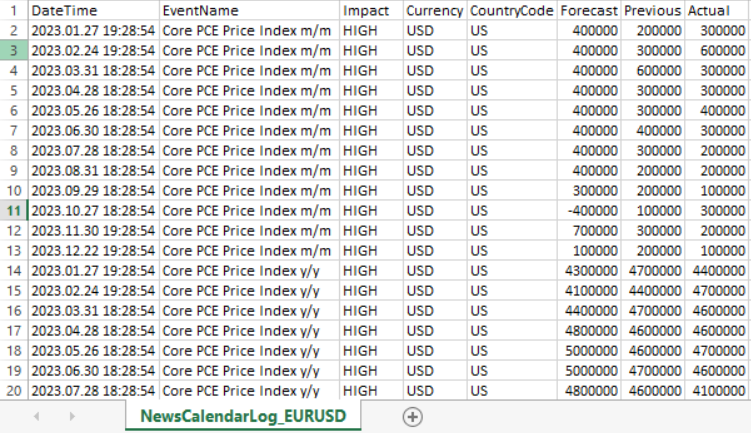
Fig. 1: A sample of the NewsCalendarLog_EURUSD CSV file used as a historical data fallback for backtesting.
Step 2 — Configure the EA inputs
Open the Strategy Tester and loadNewsFilterDemo.mq5. In the Inputs tab, set the following:
- InpNewsFilterEnabled: true
- InpReduceSizeOnNews: true
- InpFilterHigh: true
- InpFilterMedium: true
- InpUseCsvFallback: false — leave this at false; the EA passes isTesting=true to NewsFilterInit() automatically when running in the tester, so the CSV path is taken regardless of this input
- InpCsvFileName: leave blank to use auto-detection, or enter the exact filename from Step 1 if you want to pin it
Step 3 — Configure the Strategy Tester
- Symbol: EURUSD (or whichever symbol matches your CSV)
- Timeframe: H1
- Date range: 2023.01.01 to 2024.12.31 (must be covered by the CSV)
- Modelling: Open Prices Only is sufficient for verification; use Every Tick for a full quality test
- Spread: Current spread or a fixed value such as 15
Step 4 — Run and read the Experts log
Click Start. When the backtest completes, open the Journal tab in the Strategy Tester. Look for the following lines in order:
First, the file detection output. You should see either "NewsFilter: Auto-detected date-stamped file: NewsCalendarLog_EURUSD_20230101_20241231.csv" (Priority 3 match) or a Priority 1 or 2 match message if you named the file accordingly.
Second, the health check output. You should see "NewsFilter INFO: Coverage from 2023.01.02 to 2024.12.27" (or similar dates matching your CSV). If you see any CRITICAL WARNING lines, address them before drawing conclusions from the backtest. A warning that the CSV ends before the backtest start date means no trades will be blocked by news.
Third, the load confirmation: "NewsFilter: SUCCESS! Loaded 412 events from NewsCalendarLog_EURUSD_20230101_20241231.csv" (the event count will match what the logger reported in Step 1).
Step 5 — Read the OnDeinit summary
At the very end of the Journal output, after the backtest completes, the EA prints its summary block:
| News Filter Summary |
|---|
| Total Signals Detected: 82 |
| Blocked by Pre-News Window: 4 |
| Blocked by Post-News Window: 2 |
| Trades Opened: 76 |
The exact numbers will vary depending on your date range and market conditions. What matters for verification is that the pre-event and post-event block counts are both greater than zero. If either is zero and you had a multi-year backtest covering high-impact USD and EUR events, the filter is not connecting to the CSV data correctly — go back and check the health check messages in Step 4.

Fig. 2: A strategy tester log showing a News Filter Backtest Summary, which details the number of signals detected versus those blocked by pre-news and post-news windows.
Step 6 — Cross-check a specific block
To verify that blocking happened at the right calendar times, export the full trade list from the backtest result (right-click the Trades tab and save as CSV). Then open your NewsCalendarLog CSV alongside it. Pick any high-impact event date — for example the NFP release on 2023.02.03 at 13:30 UTC. Confirm that no trades were opened between 13:00 and 14:00 UTC on that date (30 minutes either side). If trades appear inside that window, verify that the event's currency (USD or EUR) matches the pair you tested and that the timestamp in the CSV matches the expected release time.
Step 7 — Compare with a baseline run
Run the backtest a second time with InpNewsFilterEnabled set to false. The OnDeinit summary will show the same Total Signals Detected count but zero blocks and a higher Trades Opened count. Comparing the two equity curves in the Graph tab shows the net effect of the filter on this strategy and date range.
4.5 Verifying the Filter in Live Mode
Attach any EA with the news filter to a demo chart during a normal trading week. Add a Print() call immediately inside the IsNewsWindow() return block — something like Print("Blocked: pre-event window") — and check the Experts tab around a known upcoming event. About 30 minutes before the scheduled time, the log should start printing the block message. It should stop printing after the 30-minute post-event window expires.
Cross-reference the block times against the economic calendar shown in MetaTrader 5's own calendar view (available from the top menu under View). If the filter fires at the right time relative to a scheduled high-impact event for the currencies you are monitoring, the API is working correctly. If no blocks appear around events you expected to be filtered, check that the country codes from NF_CountryForCurrency() match the actual country code used in the calendar for that currency.

Fig. 3: EURUSD chart demonstrating the live dashboard. The green status label confirms the filter is active and monitoring high-impact news in real-time without manual setup.
Section 5: The News Event Logger and Tester Fallback
5.1 Why the CSV Fallback Matters
Backtesting a news-aware EA is essential for evaluating whether the filter improves performance, but the live calendar API makes it impossible to do this directly. Without the fallback, backtests of EAs using NewsFilter.mqh would simply ignore all news events — the filter would never fire, and the backtest would not reflect the live EA's behavior around major releases.
Run NewsEventLogger on a live or demo terminal for the target period and save the timestamps to CSV. Use that CSV as the news source during backtests. The NewsEventLogger generates date-stamped filenames automatically — for example, NewsCalendarLog_EURUSD_20230101_20241231.csv — so files for different date ranges do not overwrite each other and can coexist in the common files folder. The filter's three-priority file search (described in Section 4.2) locates the correct file automatically based on the current symbol, so in most cases no manual filename configuration is needed in the EA inputs.
The filter reads the CSV and applies the same pre-event and post-event window logic it would use with the live API. The backtest then correctly pauses entries around the events that actually occurred during that historical period.
5.2 The NewsEventLogger Script//+------------------------------------------------------------------+ //| NewsEventLogger.mq5 | //+------------------------------------------------------------------+ #property strict #property script_show_inputs //--- INPUTS input group "=== Date Range Settings ===" input datetime InpStartDate = D'2023.01.01'; // Start Date input datetime InpEndDate = D'2024.01.01'; // End Date input group "=== Filter & File Options ===" input string InpCurrencies = ""; // Manual Currencies (Auto if empty) input string InpLogPrefix = "NewsCalendarLog"; input bool InpLogMedium = false; // Log medium-impact events //+------------------------------------------------------------------+ //| Script program start function | //+------------------------------------------------------------------+ void OnStart() { //--- 1. Currency Detection string targetCurrencies = InpCurrencies; if(StringLen(targetCurrencies) == 0) { string base = SymbolInfoString(_Symbol, SYMBOL_CURRENCY_BASE); string profit = SymbolInfoString(_Symbol, SYMBOL_CURRENCY_PROFIT); targetCurrencies = base + "," + profit; } //--- 2. Generate Date-Stamped Filename string startStr = TimeToString(InpStartDate, TIME_DATE); string endStr = TimeToString(InpEndDate, TIME_DATE); StringReplace(startStr, ".", ""); StringReplace(endStr, ".", ""); string filename = InpLogPrefix + "_" + _Symbol + "_" + startStr + "_" + endStr + ".csv"; //--- 3. File Creation int fileHandle = FileOpen(filename, FILE_WRITE | FILE_CSV | FILE_ANSI | FILE_COMMON, ','); if(fileHandle == INVALID_HANDLE) { Print("NewsLogger ERROR: Cannot create file: ", GetLastError()); return; } //--- Write CSV headers FileWrite(fileHandle, "sep=,"); FileWrite(fileHandle, "DateTime", "EventName", "Impact", "Currency", "CountryCode", "Forecast", "Previous", "Actual"); string currencies[]; int numCurrencies = StringSplit(targetCurrencies, ',', currencies); string codes[][2] = { {"USD", "US"}, {"EUR", "EU"}, {"GBP", "GB"}, {"JPY", "JP"}, {"AUD", "AU"}, {"CAD", "CA"}, {"CHF", "CH"}, {"NZD", "NZ"}, {"XAU", "US"}, {"XAG", "US"}, {"BTC", "US"} }; int totalWritten = 0; int tzOffset = (int)(TimeCurrent() - TimeGMT()); //--- Process news data per currency for(int ci = 0; ci < numCurrencies; ci++) { string currency = currencies[ci]; StringTrimLeft(currency); StringTrimRight(currency); StringToUpper(currency); string countryCode = ""; for(int m = 0; m < ArrayRange(codes, 0); m++) { if(codes[m][0] == currency) { countryCode = codes[m][1]; break; } } if(StringLen(countryCode) == 0) continue; MqlCalendarEvent events[]; int evCount = CalendarEventByCountry(countryCode, events); //--- Iterate through events for(int i = 0; i < evCount; i++) { bool isHigh = (events[i].importance == CALENDAR_IMPORTANCE_HIGH); bool isMed = (events[i].importance == CALENDAR_IMPORTANCE_MODERATE); if(!isHigh && !(InpLogMedium && isMed)) continue; MqlCalendarValue values[]; int vCount = CalendarValueHistoryByEvent(events[i].id, values, InpStartDate, InpEndDate); //--- Log specific values for the date range for(int v = 0; v < vCount; v++) { datetime adjustedTime = values[v].time + tzOffset; FileWrite(fileHandle, TimeToString(adjustedTime, TIME_DATE | TIME_SECONDS), events[i].name, (isHigh ? "HIGH" : "MEDIUM"), currency, countryCode, (values[v].forecast_value == DBL_MAX) ? "" : DoubleToString(values[v].forecast_value, 2), (values[v].prev_value == DBL_MAX) ? "" : DoubleToString(values[v].prev_value, 2), (values[v].actual_value == DBL_MAX) ? "" : DoubleToString(values[v].actual_value, 2)); totalWritten++; } } } //--- Close file and report status FileClose(fileHandle); PrintFormat("NewsLogger SUCCESS: %d events written.", totalWritten); PrintFormat("Filename: %s", filename); } //+------------------------------------------------------------------+
Run this script once per backtest period. For a two-year backtest of EURUSD, set InpStartDate to the first date of the backtest and InpEndDate to the last. Leave InpCurrencies blank — the script will auto-detect USD and EUR from the chart symbol. The script pulls all high-impact events for those currencies from the MetaQuotes calendar across the requested date range, applies a timezone offset so that timestamps match the broker's server time, and writes them to a date-stamped CSV file in the MetaTrader 5 common files folder. The entire process takes a few seconds.
Once the CSV exists, the EA requires no additional configuration. NewsFilterInit() will locate the file automatically via Priority 3 pattern matching (Section 4.2) based on the current symbol name. If you prefer to be explicit, enter the exact filename in the InpCsvFileName input. The filter loads the CSV during OnInit() and applies the same 30-minute pre-event and 30-minute post-event windows around each logged event. The backtest will correctly pause entries around actual historical releases for the covered period.
Section 6: Practical Considerations
6.1 Tentative and Floating Event Times
Some calendar events have a time_mode of CALENDAR_TIMEMODE_TENTATIVE, meaning the release time is approximate and could shift by an hour or more from the scheduled time. Central bank press conferences and speech events are common examples. The filter handles this conservatively: when the event's actual release time differs from the originally scheduled time, the cache refresh that happens at the next full hour will update the event timestamp. In the meantime, the pre-event window is applied to the originally scheduled time, which may result in a slightly early or late block depending on the direction of the revision.
The default pre-event window of 30 minutes and post-event window of 30 minutes in the filter are set conservatively to handle timing uncertainty and to allow sufficient time for spreads to normalize after the release. For high-stakes events like FOMC announcements and major central bank press conferences, these defaults provide a solid buffer. If the resulting trade frequency reduction is too large for your strategy, InpPreEventMins can be narrowed to 20 or 15 minutes.
For events with historically large but short-lived reactions — such as NFP or a surprise rate decision — extending InpPostEventMins beyond 30 gives the market additional time to absorb the news before new entries are attempted.
6.2 Events With 'Date Only' Timing
A small number of calendar events have a time_mode of CALENDAR_TIMEMODE_RELEASED, meaning the exact release time is not known in advance — only the calendar date. Budget announcements, some central bank minutes releases, and certain government reports fall into this category. For these events, the timestamp recorded in MqlCalendarValue will typically be midnight of the release date.
When the filter loads one of these events, the pre-event window will fire around midnight on the release date and the post-event window will clear shortly after. This is not ideal — the event might actually release at any time during that day. The practical approach is to treat date-only events as full-day caution periods and use IsHighImpactNewsToday() rather than IsNewsWindow() for them: reduce position size for the entire trading session on that date rather than applying a short time window around an uncertain timestamp.
6.3 Calendar Data Coverage Limits
CalendarValueHistoryByEvent() can retrieve historical event data going back several years for most major economies. However, coverage depth varies by event. Very recent additions to the calendar may have shorter history, and some country-specific events may have gaps in their historical record. When running NewsEventLogger for a long backtest period, check the total event count printed in the Experts log against what you would expect from a manual review of the period. If the count seems low, run the script for a shorter date range and concatenate the results.
MetaQuotes Calendar vs. Forex Factory: The MetaQuotes economic calendar covers the same set of high-impact events as Forex Factory and DailyFX for all major economies. It is broadly equivalent in coverage for the purposes of news filtering. The advantage over manually scraping those websites is that the MetaTrader 5 calendar is accessible from MQL5 code without any web request, has no rate limits, and is maintained by MetaQuotes as part of the platform. The disadvantage is that very minor regional events and some country-specific secondary indicators may not be included if MetaQuotes has not added them to the feed.
6.4 Combining With Other Filters
The news filter works independently of any other filter in the EA. The IsNewsWindow() and IsPostNewsWindow() checks sit at the top of OnTick() and return early, so they fire before any other logic runs. They can be combined with session time filters, spread guards, daily trade limits, or any other gating mechanism without any interaction between them.
For EAs that already use a session filter (such as the SessionClock.mqh from Article 1), the recommended pattern is to check the session filter first, then the spread guard, then the news filter. Session and spread checks are cheaper computationally since they do not involve array iteration over cached events. This ordering ensures the fastest possible OnTick() execution in the common case where all gates pass.
Conclusion
The MetaTrader 5 economic calendar has been available to MQL5 programmers for several years and remains one of the least-used features in the platform. The six calendar functions give every MetaTrader 5 user free access to the same news schedule that manual traders consult on Forex Factory and DailyFX — but accessible directly in code, without web scraping, API keys, or subscriptions.
The filter built in this article uses that data to solve a problem that affects every continuously-running EA: entries that fire during major news releases see worse execution, wider spreads, and higher slippage than entries taken under normal conditions. The impact is often invisible in a standard backtest because the tester applies fixed or typical spreads regardless of the time of day. The filter makes it visible by comparing filtered and unfiltered performance on the specific trades that fall around scheduled events.
The CSV fallback mechanism ensures the filter works correctly in the Strategy Tester without requiring any modifications to the core logic. The same NewsFilter.mqh file handles both live and backtest environments transparently — the EA does not need to know which mode it is in. One call to NewsFilterInit() in OnInit() handles the routing, and the two gate functions behave identically regardless of whether they are reading from the live calendar or the logged CSV.
Programs used in this article
| # | Name | Type | Description |
|---|---|---|---|
| 1 | NewsFilter.mqh | Include File | The core include file containing all filtering logic, live API integration, and automated CSV health checks. It automatically toggles between live and tester modes to manage news-based trade restrictions. |
| 2 | NewsEventLogger.mq5 | Script | A companion script that generates date-stamped CSV files from the MetaTrader 5 Calendar for backtesting. It saves these files to the Common folder, ensuring the filter has historical data during strategy simulations. |
| 3 | NewsFilterDemo.mq5 | Demo EA | A sample EMA crossover EA that demonstrates the integration. It features a real-time dashboard for live trading and a detailed trade-block summary in the Journal for backtest verification. |
Warning: All rights to these materials are reserved by MetaQuotes Ltd. Copying or reprinting of these materials in whole or in part is prohibited.
This article was written by a user of the site and reflects their personal views. MetaQuotes Ltd is not responsible for the accuracy of the information presented, nor for any consequences resulting from the use of the solutions, strategies or recommendations described.

 Integrating AI into 3 Smart Money Concepts (SMC): OB, BOS, and FVG
 Building the Market Structure Sentinel Indicator in MQL5
 Building a Dynamic STF Liquidity Sweep Indicator in MQL5
 How to Detect and Normalize Chart Objects in MQL5 (Part 1): Building a Chart Object Detection Engine

- Free trading apps
- Over 8,000 signals for copying
- Economic news for exploring financial markets
You agree to website policy and terms of use