MT5 To Interactivebrokers Copier

5

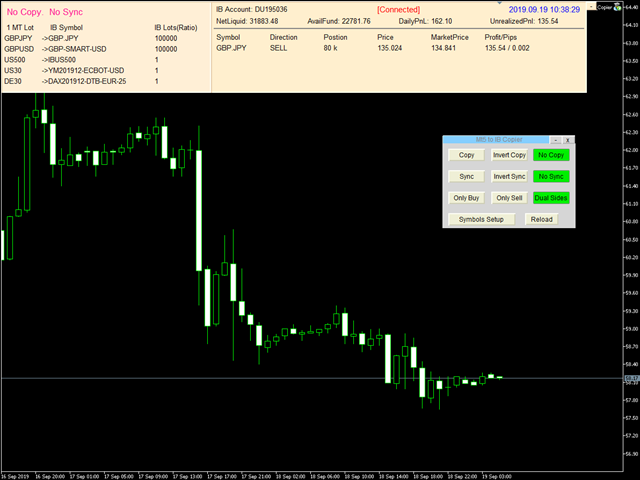
Mt5 To InterativeBrokers Copier allows you to copy deals from MT5 account to Interactive Brokers. With this, you can run your EA strategy on a MT5 Demo/Real Account, then copy all the deals to Interactive Brokers account real time.

Features:

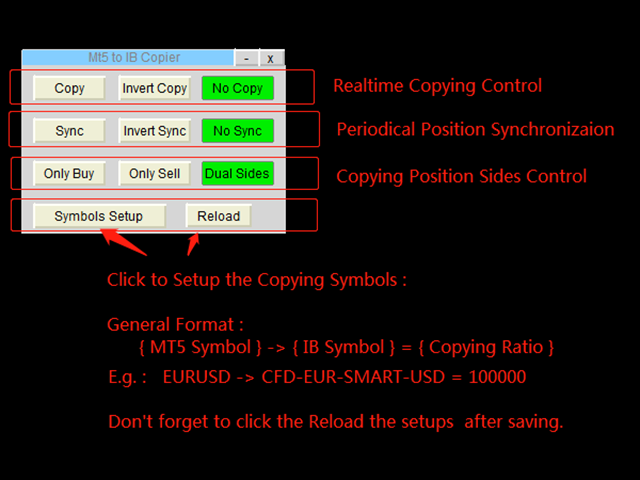
1. Copy or Invert-Copy deals Realtime from MT5 to IB Account.
2. Synchronizing positions of both accounts periodicaly, in case any missing copying.
3. You can choose only Buy position or Sell position.

Symbols Setup:

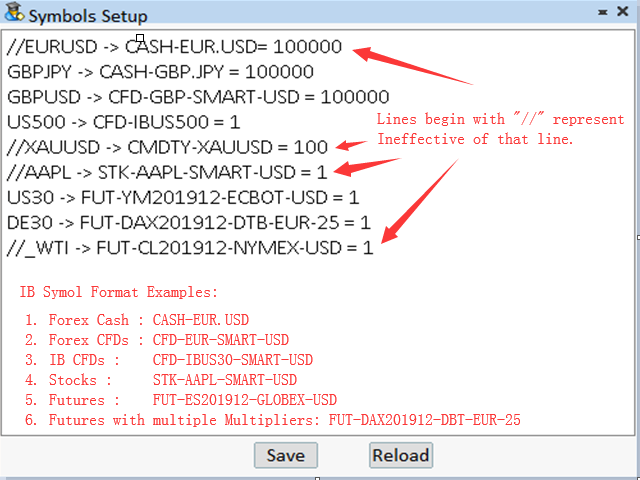
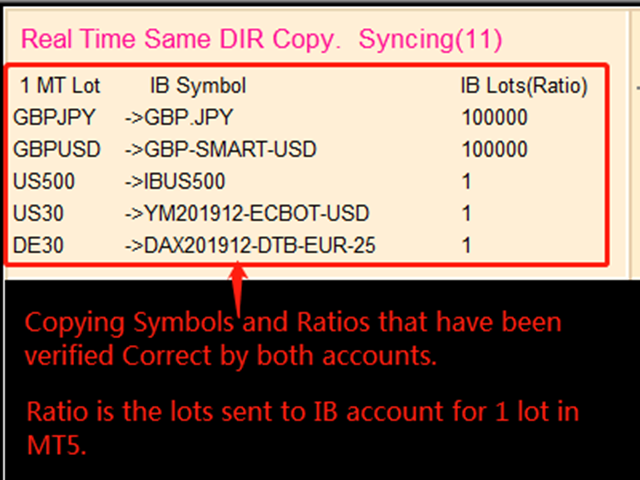
General Format:  {MT Symbol} -> {IB Symbol} = {Copying Ratio}

while IB Symbols should be formated as below: 

  1. Spot Forex: CASH - [Local Symbol], e.g. CASH - EUR.USD
  2. CFDs:          CFD - [Symbol] - [Exchange] - [Currency],  e.g.  CFD-GBP-SMART-USD,   CFD-IBUS30-SMART-USD
  3. Stocks:        STK - [Symbol] - [Exchange] - [Currency],  e.g.  STK-AAPL-SMART-USD
  4. Futures:      FUT - [Symbol][YearMonth] - [Exchange] - [Currency] - [Multiplier], while [Multiplier] is only used for symbols that have multiple Contract Multiplier.
    e.g.  FUT-MES201912-CME-USD,   FUT-DAX201912-EUREX-EUR-25

Besides, Copying Ratio is the lots sent to IB account for 1 lot of MT5 account
In the symbols setup editor, lines begin with "//" represent ineffective of that line.

Configuration

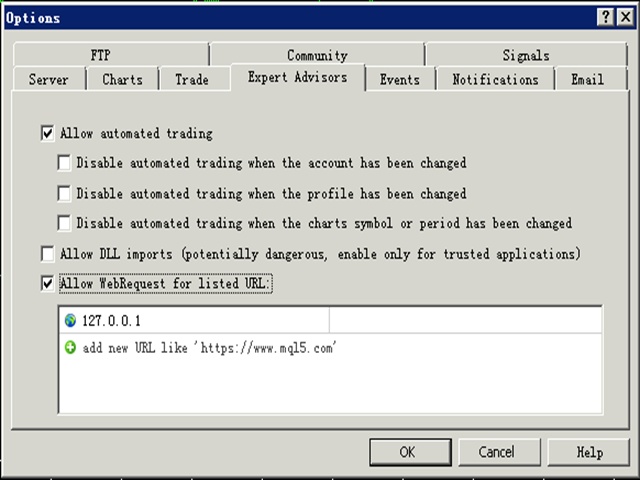
1. MT5 : Put the TWS Socket IP Address(Defaut: 127.0.0.1) to the allowed URLs in "Tools->Options->Expert Advisors". 

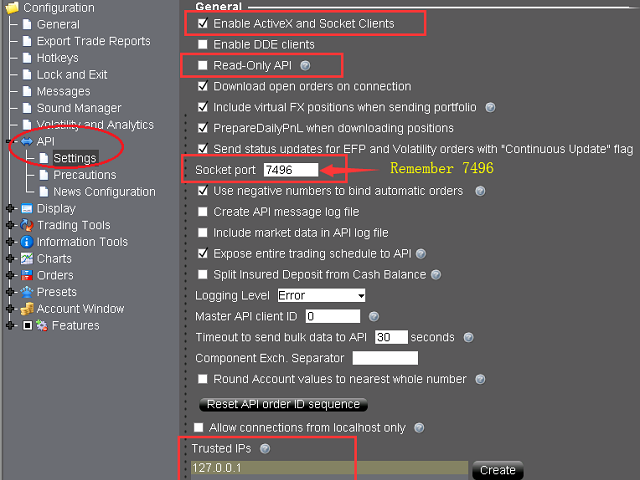
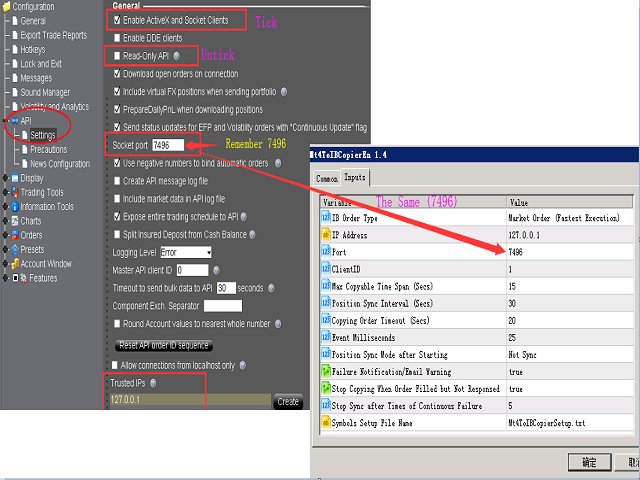
2. IB TWS : API should be enable in TWS. Open “Global Configuration” in file menu, find “API” -> “Setting”, Tick “Enable ActiveX and Socket Clients” and untick “Read-Only API”. Optionally, it is sugguested you add “127.0.0.1″  to “Trusted IPs” box, tha can avoid manually confirmation very time when connected via API.

Parameters

Parameter Explaination
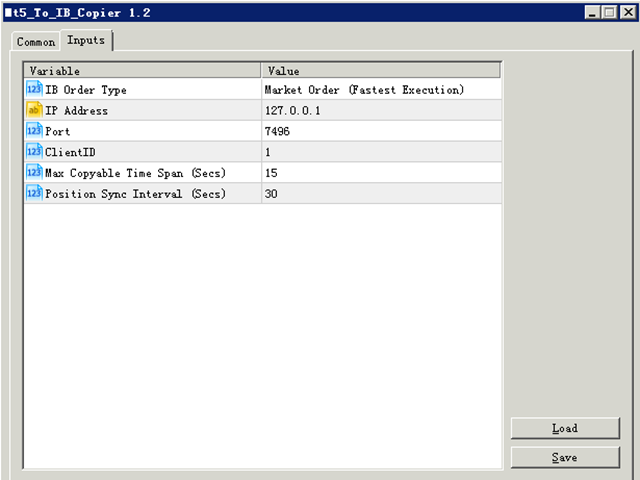
IB Order Type Order type of the order placed to Interacive Brokers(IB).
IP Address TWS  API services started IP address. “127.0.0.1″ should be filled if TWS run in local computer.
Port Socket port of TWS API. You can find in TWS at “Global Configuration” -> “API” -> “Setting”.
ClientID Client connection unique id. It can be any Integer.
Max Copyable Time Span(Secs) If trade copying failed, program will repeatedly try to copy until this time span slip. Default: 15 seconds
Position Sync Interval (Secs) Periodical time for both account to synchronize. Default: 30 seconds.
Copying Order Timeout (Secs) Time out seconds for sending orders to IB account
Event Milliseconds Periodical timer to process the program. It is used to set parameter of MT4 functoin "EventSetMillisecondTimer".
Please refer to https://www.mql5.com/en/docs/eventfunctions/eventsetmillisecondtimer
Position Sync Mode after Starting Set the sync feature whether to use last setting or not open when the bridge tool start.
Failure Notification/Email Warning Set to send specific Email Address or MT5 Notification when copying failure occurred.
Users can use setup the email address at the menu "Tools -> Option ->Email", and notifications at "Tools -> Options -> Notification".
Besides, users can set the trades SMS Alerts through Account management(from IBKR website).
Stop Copying When Order Filled but Not Responsed When an order filled but not responsed to client normally, it is probably abnormal for some connections.
Copying can be set stop in order to avoid repeated copying. Users should restart the bridge and TWS/IBGateway if this occurred. 

Besides, a global variable of MT4 named "IBTwsFilledAbnormal" will be set to "1" if this error occurrs.
Stop Sync after Times of Continuous Failure When sync sent, IB position should be changed afterwards. If continous sync-failure (may caused by internet problem, market closed, lack of liquidity, ect..) more than 5 (by defaut) times, Sync will can set to stop.
Symbols Setup File Name Users can set the bridge with different symbol mapping file if needed, such as copying to different to IB account simultanously.
Font Size  Change the font size if the controls in the chart screen can not be shown properly.


More information please download the MT5 To Interactivebrokers Copier User Manual.

Comentários 2
hunterdawe
20
hunterdawe 2022.09.10 10:24 
 

Very good utility. Ver. 1.61 is very useful. I also recommend this utility to other traders. Thank you for this utility.

Produtos recomendados
Comprehensive on chart trade panel with the unique ability to be controllable from mobile as well. Plus has a library of downloadable configuration, e.g. exit rules, extra panel buttons, pending order setup and more. Please see our product video. Works with all symbols not just currency pairs. Features On chart panel plus controllable from free app for Windows, iPhone and Android Built-in script engine with library of downloadable configuration, e.g. add 'Close All Trades in Profit' button, exit
This Expert Advisor monitors all open positions across all symbols in MetaTrader 5. Whenever a Stop Loss (SL) or Take Profit (TP) is manually set or adjusted on any position, the EA automatically applies that value to all other open positions , regardless of symbol or order type (Buy/Sell). This ensures consistent and synchronized SL and TP levels across your account. Perfect for mobile trading via tablet or smartphone!
Time saving and fast execution Whether you’re traveling or sleeping, always know that Telegram To MT5 performs the trades for you. In other words, Our   Telegram MT5 Signal Trader  will analyze the trading signals you receive on your selected Telegram channels and execute them to your Telegram to MT5 account. Reduce The Risk Telegram To Mt5   defines the whole experience of copying signals from   Telegram signal copier to MT5 platforms. Users not only can follow all instructions from the signal
️ EquityShield is your automated risk management guardian for MetaTrader 5. If you've ever exceeded your daily loss limit, struggled to enforce your own trading rules during volatile markets, or wanted to automatically lock in profits when you hit your targets, EquityShield is built for you. This is not a trading strategy - it's a safety system that watches your account 24/7, automatically closes positions when your risk limits are breached, and helps you maintain consistent trading discipline
Overview Breakout Meter is a price action tool that identifies key breakout zones based on recent daily price activity. It highlights areas where momentum is likely to trigger, helping traders anticipate breakouts or reversals with minimal configuration. How It Works The EA analyzes a user-defined number of recent daily candles and marks high and low zones where price has shown strong reactions. It automatically updates levels with new data and removes outdated zones to keep charts clear. Users
Telegram ChartSnap MT5 is an utility tool to bridge your MetaTrader 5 activities to your Telegram chat/group/channel. It will screen shot your MetaTrader 5 chart and send it to your dedicated Telegram chat/group/channel through a Telegram bot. The whole process will keep repeating based on a time cycle that predetermined by the user. It is a convenient tool for those who like to get access to their favorite system/dashboard that only available at MetaTrader Desktop. Beside that, trader can easi
TradingX Hotkeys
Johannes Stephanus Lombard
Inputs Available Lotsizes Partial Close % You can change lotsizes as you require On an open chart click once to select chart to be able to use hotkeys on specific chart. All Pairs can be used with this expert We created this expert to be able to still trade C300 with a 0.06 Lotsize If you enter a 0.6 lot and close 0.90% you can trade with 0.06 Lot Keys to be used: B -Buy S -Sell C -Close Profitable D -Breakeven (Note if stoploss is set it won't break even) P -Partial close X -Close all
This QuickClose help you to close all orders having profit immediately with only ONE CLICK, its work is very fast. You can choose which symbol you want or close all symbols so it will helpful for you in your trading to manage trading faster. This EA can quick close all Buy and Sell Orders by a selected symbol or total, And delete all pending orders. This SymbolButton is designed for closing orders. There is available Manual and Automatic closing functions. Automatic closing function will close t
One Click Trader  is a tool designed for MetaTrader 4 platform, which enables you to take your trading to the next level. It enables you to open, manage and close your trades in simple an efficient way by just one click of your mouse button. "-"   ,  "+"  change OCT window size  Up arrow minimizes the OCT panel Down arrow maximizes the OCT panel Right arrow displays the next panel with additional features Left arrow hides the panel with additional features Red  SELL  button enables you to open s
Human opens. Robot manages. Most traders lose money not because they enter badly, but because of what happens after the click. The stop moved too late. The partial nobody took. The position left open over the weekend. The trade that was up 80 pips and closed at break-even because you were asleep. LABPro GOLD does not try to replace your judgement. It is a Trade Manager , not a signal generator. You decide when to enter — from your PC, from MT5 Mobile, from any platform connected to your account
Flow – Hotkey Tool for Discretionary Traders Take full control of MT5 with your keyboard and mouse. Flow is a powerful hotkey-based assistant designed specifically for discretionary traders who want to place orders, draw tools, and operate charts with speed and precision. No more right-click menus or wasting time. Just trade. Key Features Order Execution Place pending Buy/Sell orders (limit or stop) instantly with just a mouse click. Stop Loss and Take Profit lines are automatically attac
EAs Manager
Abdeljalil El Kedmiri
5 (2)
Are you running multiple EAs on the same MT5 account? Let one powerful Manager control them all. EAs Manager Pro V2 is a professional EA management, risk-control, and trade-assistance tool that acts as a central command center for your entire MT5 account. It automatically detects your EAs using their Magic Numbers , monitors EA and manual trades , and gives you complete visibility and control from one simple dashboard. What makes V2 powerful? EA & Manual Trade Support – Manage automated and manu
EA SB8 Panel Trade
Juan Manuel Bernal Martin
SB-8 – Manual Trading Panel with Fixed Risk & TradingView-Style Visualization for MT5 SB-8 is an advanced manual trading panel for MetaTrader 5 , designed to execute trades visually, quickly and without calculations . It is especially built for traders coming from TradingView , who often find MT5 confusing when it comes to risk management and trade visualization. With SB-8, you don’t calculate lot size, percentages or risk . You simply move the Stop Loss line , and the panel handles everything a
Общие сведения Данная торговая панель предназначена для быстрой и удобной торговли в один клик. Создавался продукт для частичной автоматизации своей личной ручной торговли  https://www.mql5.com/ru/signals/1040299?source=Site+Profile+Seller Советник имеет ряд возможностей, а именно: Открытие BUY или SELL ордеров. SL выставляется ниже (выше)  минимальной (максимальной) цены, задаваемых в параметрах количества свечей. Размер TP рассчитывается в соотношении от размера SL (по умолчанию 0.618). Выстав
Este consultor é um painel de negociação de um clique para vários pares. Dar um click       ABRIR       Botão para abrir pedidos para pares selecionados. Dar um click       APROXIMAR       Botão para fechar pedidos dos pares selecionados. O lote do pedido é o número inserido pelo usuário. Um número positivo corresponde a uma ordem de compra, um número negativo corresponde a uma ordem de venda. Clique no botão   FECHAR   para fechar o pedido inteiro em vez de um fechamento parcial. A ação de fec
OneClick EA
Ching-hsiang Chen
OneClickEA Controller is a chart management utility designed to work with the OneClickEA Windows Manager. The controller receives local commands from the Windows manager and performs scheduled EA template changes in MetaTrader 5. It also reports the connected trading account, broker server, chart symbol, timeframe and controller status. Main functions Detects the connected MetaTrader 5 account Generates a controller ID based on the broker and trading account Receives local schedule commands from
The Comeback Kid Manger is half EA and half trade manager. It's capable of keeping the trader profitable on complete auto-pilot. You can also use the onscreen buttons to intervene with the EA to achieve a creative manual/algo collaboration. It's also capable of recovering losing trades by managing them into a small profit or break even. The user has a lot of control on how and when they would like to increase profit on good trades and recovery bad or losing trades.  Highlights  Includes one of
PropGuard Pro — Prop Firm Drawdown Protector & Risk Manager for MetaTrader 5 Automatically protect your funded account from drawdown breaches. Real-time daily drawdown & max drawdown monitoring with auto-close — built for FTMO, 5ers, and all prop firm traders. 15 Activations | Prop Firm Presets | Drawdown Limiter | Equity Guard | Risk Control Panel --- Protect Your Funded Account with One Click PropGuard Pro is a professional drawdown protection and risk management EA designed specifi
DGem Trade Manager Panel
Damien Jean Michel Gremillet
Trade Manager Panel ## Short description  Manage your manual trades with one click: automatic break-even, trailing stop, two-level partial close and risk-based lot sizing — all from a single on-chart panel. --- ## Full description Trade Manager Panel is an on-chart utility that takes care of your open trades so you can focus on the market instead of the order ticket. Drop it on any chart and it manages every position on that symbol automatically, while an interactive panel lets you size new
Blue GAIA MT5
Duc Anh Le
5 (1)
| Seamless portfolio of trading systems in your palm - Powered by ONNX Neural network | Built by a grid trader >> for grid traders.  This is MT5 version, click  here  for  Blue GAIA MT4  (settings and logics are same in both versions)     Real monitoring signal  --> Cosmic 2 | GAIA Intro Blue GAIA EA   (' GAIA ') - is the latest edition of BlueAlgos family, uniting all the best algos and features under one-roof. Its is the true 4xMulti Systems: +------------------------------------------------
Ultimate Risk Manager
Florian Leonhard Schaal
Ultimate Risk Manager – Professional Trading Assistant (EA) The all-in-one risk management tool trusted by serious traders. Take full control of your trades with automatic position sizing based on your chosen risk percentage (default 1%), dynamic ADR-based initial Stop-Loss, and intelligent trailing stop that can use either fixed points or a percentage of the Average Daily Range (ADR). Key features: One-click BUY/SELL buttons with instant market execution, the Risk Manager calculates the right
Hola Traders. By popular demand from my fellow traders, I am excited to announce the release of my newly developed tool for placing pending order grids. Many of you have already benefited from this tool, and several have requested a version for MT5. Now, it is available for everyone! This automatic grid trading placement tool is convenient, easy to use, and fast. It also includes quick action buttons for closing profits, losses, and pending orders. No matter how many pending orders you have, jus
Wolseley Panel MT5 FREE
Walter Wolseley Pessoa Batista De Lima
PAINEL WOLSELEY - BASIC - - Caso tenha interesse em tratar diretamente comigo, entre em contato pelo instagram @walter_robos  ou whatsapp (92) 98117-3937 Visualize seu histórico de negociações de forma estruturada e detalhada, com taxas de acertos e lucro separados por dia, semana, mês e total, além de detalhes sobre o ativo, horário do servidor e posições/ordens em andamento. Este painel foi criado visando o uso em contas do tipo HEDGE, porém pode ser utilizado em contas do tipo NETTING sem nen
EA PERFORMANCE TERMINAL — everything on one screen. Every robot on your account, what each one is doing to your balance, and the months that got you here, drawn over your chart instead of buried in a report. A balance is an average, and averages hide things. One robot can quietly cover another's losses for months while the equity curve still looks calm. This reads your closed trades and splits that single number back apart, by Magic Number. A free edition is available, and it runs on a live char
Эксперт собирает данные из биржевого стакана, суммируя отложенные ордера на покупку или продажу. Далее, по сумме ордеров определяется общее направление, куда смотрят участники рынка. Если суммарные покупки/продажи превышают определенный коэффициент, то производится сигнал. Настройки: Timer=5 // указывается как часто обновлять данные по рынку в секундах. Чаще чем раз в 10 секунд ставить не рекомендуется. X-size =700 // размер окна по оси Х. Y-size=650// размер окна по оси Y. Only "Market Watch"?=
The Expert Advisor will send notifications via Discord when orders are opened/modified/closed on your MetaTrader 5 account. - Send message and screenshot to Discord group/channel.  - Easy to customize message.  - Support custom message for all languages - Support full Emoji.  Parameters - Discord url Webhook - create webhook on your Discord channel. - Magic number filter - default all, or input magic number to notify with comma, like: 111,222,333. - Symbol filter - default all, or input symbol
Sobre o Robô PowerTrend Institutional EA é um robô de negociação automática baseado em lógica institucional, combinando tendência, volatilidade, padrões de candlestick e volume. Compatível com contas hedge e netting, opera com qualquer ativo (Forex, metais, índices) e se adapta dinamicamente aos parâmetros do símbolo — evitando erros como volume inválido, stop incorreto ou saldo insuficiente. Além disso, possui mecanismo de fallback que garante operação mínima durante testes automáticos, val
The Utilitarian Platform is designed to quickly open a position with established orders, as well as the ability to automatically hedge or shift an order to close a position when losses are stopped. Automatic Increase of a profit taking order when hedging a position. It is possible to enable the automatic increase of the corridor when hedging a position. There is a built-in panel for placing orders to open positions. The order size, step tracking are established in paras.
MT5 to Telegram: Professional Signal Provider Bridge Take your MetaTrader 5 trading to the next level. MT5 to Telegram is a high-performance utility designed specifically for traders who want to broadcast their market execution to Telegram Channels, Groups, or Private Chats instantly. Whether you are scaling a Signal Service business or simply want to track your own trades remotely on your mobile device, this tool provides the most reliable and professional-looking bridge for the MT5 platform.
# Universal Smart Manual Trade Manager MT5 v1.00 ## What the EA does Universal Smart Manual Trade Manager MT5 is a protective and management Expert Advisor for manually opened trades. It does not open new entries by itself. It only adopts already open positions that pass the selected filters, and can add missing SL/TP, manage break-even, profit lock, ATR trailing, send Telegram notifications, and display status information on the chart. The default setup is intentionally safe: the EA manages
Os compradores deste produto também adquirem
Farmed Hedge Yield Farming | All Markets (Manual - Hybrid - Semi/Automated EA) MULTI-ASSET SUPPORT Trade any asset available on your broker - Forex: Major, Minor, Exotic pairs - Crypto: BTC, ETH, XRP, SOL, BNB - Stocks: Apple, Tesla, Amazon, Google, etc. - Commodities: Gold, Silver, Oil, Gas - Indices: US30, NAS100, SPX500, DAX40 - Any CFD your broker offers VERIFIED TRADING RESULTS - Farmed Hedge Yield Axi Copy:  https://www.mql5.com/en/signals/2356376 - Farmed Hedge Yield Exn Copy:   https:/
Unlimited Trade Copier Pro MT5 is a tool to copy trade remotely to multiple MT4, MT5 and cTrader accounts at different computers/locations over internet. This is an ideal solution for you if you are a signal provider and want to copy your trades to other receivers globally on your own rules. One provider can copy trades to multiple receivers and one receiver can get trade from multiple providers as well. The provider can even set the subscription expiry for each receiver, so that receiver will n
HINN Lazy Trader
ALGOFLOW OÜ
5 (1)
LIMITED SUMMER SALE -40% ! ONLY $470 insead of $790!  Maximum real discount! ONLY UNTIL 08/22 The core idea: using the user interface, you configure the parameters the chart must meet before entering a position (or positions), choose which entry models to use, and set the rules for when trading and planning should end. Lazy Trader  handles the rest: it  takes over all the routine chart watching and execution! full description  :: 3 key videos [1] ->  [2]   ->  [3] What can it do? - Understand
Quant AI Agents
Ho Tuan Thang
5 (1)
Quant AI Agents are independent trading Expert Advisors. Instead of trading using a fixed strategy like other conventional EAs, Quant AI Agents   is a   multi-agent AI trading framework   that turns natural-language strategy prompts into live.  WANT THE SAME RESULTS AS MY LIVE SIGNAL?   Use the exact same brokers I do:   IC MARKETS , IC TRADING   .  Unlike the centralized stock market, Forex has no single, unified price feed.  Every broker sources liquidity from different providers, creating un
YuClusters
Yury Kulikov
4.93 (43)
Atenção: A versão demo para revisão e teste está aqui . YuClusters é um sistema profissional de análise de mercado. O trader tem oportunidades únicas para analisar o fluxo de pedidos, volumes de negociação, movimentos de preços usando vários gráficos, perfis, indicadores e objetos gráficos. O YuClusters opera com base em dados de Tempos e Negócios ou informações de ticks, dependendo do que está disponível nas cotações de um instrumento financeiro. O YuClusters permite que você crie gráficos com
AI Agent Supervisor is NOT an Expert Advisor. AI Agent Supervisor   is a   multi-agent AI risk & portfolio supervisor   that watches every EA on your account and intervenes in real time.  WANT AN AI PORTFOLIO MANAGER WATCHING YOUR FLEET 24/7?   Run your fleet on the same brokers I do:   IC MARKETS , IC TRADING   .  Unlike the centralized stock market, Forex has no single, unified price feed.  Every broker sources liquidity from different providers, creating unique data streams. The Supervisor r
Hedge Trimmer EA
Michael Sipho Bhiya
Hedge Trimmer & Roll-Over EA Managing a hedged position means carrying two opposing trades simultaneously. Over time, the losing side grows while the profitable side offsets it. The standard problem is that closing the loser costs money you may not have sitting in cash — it has to come from somewhere. Hedge Trimmer EA solves this by using the floating profit on your winning trades as the funding source to progressively close down the losing side. It identifies which trades are in profit, uses a
QCML Assistant
Maxime Turcotte-lafreniere
QCML Assistant MT5 Your Trading. Our Assistant. Your Edge. Looking for a tool that completely transforms your experience on MetaTrader 5? QCML Assistant is the all-in-one solution built by traders, for traders. Just one tool installed on your chart, and you get access to an ultra-complete, ultra-fast, and ultra-simple trading platform. No more hours wasted setting up your workspace. No more complicated trade entries. With QCML Assistant, everything becomes simple, smooth, and efficient right fro
MT5 Trading Deck
Manuel Michiels
5 (2)
One button. One trade. MT5 Trading Deck is a hotkey trading panel for MetaTrader 5 that turns the platform into a keyboard-driven execution cockpit. Stop loss, take profit and lot size are pre-calculated for every key; the moment you press, a market order is live on the broker. A complete technical user manual is attached in the product Comments section. It documents every input parameter, the full hotkey map, the recommended Stream Deck XL layout, and the advanced workflows for Pre-Limit orders
Discord Signal Notifications — это мощный инструмент для трейдеров, проповодов и управляющих счетами, который автоматически отправляет все ваши торговые события в канал или чат Discord. Главное преимущество — Глобальный мониторинг. Вам не нужно устанавливать советник на каждый график. Достаточно запустить одну копию утилиты на одном любом окне, и она будет отслеживать действия по всем инструментам и всем счетам в вашем терминале одновременно. Основные возможности Глобальный мониторинг счёта Ути
Gamma Edge Pro MT5 — GexBot Classic API Integration Gamma Edge Pro   brings institutional-grade   Gamma Exposure (GEX) data   directly onto your MetaTrader 5 chart — the same data used by professional options traders to anticipate price magnets, hedging flows, and dealer positioning. Powered by the   GexBot Classic API , this indicator automatically maps options market data from US-listed instruments onto any   MT5 CFD instrument   — Forex pairs, Gold, indices, and more — with intelligent price
# If you have any other requirements or are interested in collaboration, please contact  dev.quantech.london@gmail.com . Flash Trade (FT) Most friendly manual trading tool. Easy operation to secure your funds. Features of FT Click the chart to trade fast FT supports market orders and pending orders Click twice to complete the order and set SL and TP Click trice to complete the pending order and set SL and TP Automatically set the stop-loss amount of each order to a fixed percentage of the bala
Introduction Our system is more than just a tool—it’s your personal guide in the dynamic trading landscape. Expertly developed and optimized using advanced strategies, this groundbreaking predictor gives traders a powerful edge. It’s not just about the features; it’s about a trading journey that stands out from the crowd. Get ready for an enhanced trading experience like never before! What It Does Next Candle Prediction: Imagine gaining insights into the market’s next move before it happens. Our
Check EA performance  https://www.mql5.com/en/signals/2376164?source=Site +Profile+Seller Spot vs Future Arbitrage EA for MT5 Spot vs Future Arbitrage EA is an automated Expert Advisor designed for MetaTrader 5 that operates using price differences between Gold spot and Gold futures instruments. The strategy opens positions on both instruments simultaneously to take advantage of temporary differences between spot and futures prices. Requirements The trading account must provide both Gold spot
Reward Multiplier is a semi-automatic trade manager based on pyramid trading that opens additional orders with the running profit of your trades to maximize return exponentially without increasing the risk. Unlike other similar EAs, this tool shows potential profit/loss and reward to risk ratio before even entering the first trade! Download Demo here  (starting lot is fixed at 0.01) Contact me to get a 7 days trial version of the product with full functionality. Guide + tips here MT4 version  
ENGLISH VERSION tg @eeevleee TICK CHART SERVICE - Professional Tick Ch
Trading Chaos Expert
Gennadiy Stanilevych
5 (11)
Não existe software igual no mundo e que represente um "console" universal de negociação informando sinais para operar, entrada automatizada do mercado, configurando o Stop Loss e o Take Profit, assim como o Trailling Profit para diversas negociações em apenas uma janela aberta. O controle intuitivo do Expert Advisor em "três cliques" garante um uso abrangente de todas as suas funções em diferentes computadores, incluindo tablets. Interagindo com indicadores de sinal adicionais que marcam o gráf
News Trader Pro is a unique robot that allows you to trade the news by your predefined strategy. It loads every piece of news from several popular Forex websites. You can choose any news and preset the strategy to trade it, and then News Trader Pro will trade that news by selected strategy automatically when the news comes. News release gives opportunity to have pips since the price usually has big move at that time. Now, with this tool, trading news becomes easier, more flexible and more exciti
If you wish to draw Support and Resistance lines, view: daily market opening, classical pivot levels, Fibonacci pivot levels, trend lines, Fibonacci levels, the remaining time to candle closing, and current spread. If you seek to place your orders with the exact lot that meets your desired stop loss risk. If you wish to do all this and more with just one click, then this is the perfect tool to use. This tool will allow you to feel more relaxed when deciding to open orders, as well as predicting
The new version of  MirrorSoftware 2021  has been completely rewriten and optimized.  This version requires to be loaded only on a single chart because  it can detect all actions on every symbol and not only the actions of symbol where it is loaded. Even the  graphics and the configuration mode  have been completely redesigned. The MirrorSoftware is composed of two components (all components are required to work):  MirrorController  (free indicator): This component must be loaded into the MASTER
ClusterSecond
Rafil Nurmukhametov
4.78 (32)
The utility allows you to build different types of graphs: Seconds chart from 1 second to 86400 seconds Tick chart from 1 tick and above The volume chart Delta chart Renko chart Range chart Demo version of the utility https://www.mql5.com/ru/channels/clustersecond Built-in indicators for volumetric analysis: daily market profile and market profile of the selected timeframe, Cluster Search Imbalance VWAP Dynamic POC, VAH, VAL the profile depth of the market vertical volume with various display op
The script displays info about the share's corporate reports and dividends. The data is downloaded from   investing.com : Report date Profit per share (EPS) Revenue Market capitalization Amount of dividends Date of payment of dividends Dividend income The product cannot be tested in the tester (since it is not possible to receive data from the Internet). Before launching:  Add 2   URL   https://ru.investing.com/earnings-calendar/Service/getCalendarFilteredData  and   https://ru.investing.com/di
Telegram Notify MT5 Telegram Notify MT5 is an utility tool to bridge your MetaTrader 5 activities to your Telegram chat/channel. It is useful for monitoring your MetaTrader 5 account by sending a notification to your particular Telegram chat/channel when someone/EA is placing trades, modifying order's TP/SL, closing trades and etc. This EA does not place any trade for your account. This EA also could be a convenient tool for monitoring other's EA trading activities or a tool for publishing your
The  Easy Strategy Builder (ESB)  is a " Do It Yourself " solution that allows you to create a wide range of the automated trading strategies without any line of codes. This is the world’s easiest method to automate your strategies that can be used in STP, ECN and FIFO brokers. No drag and drop is needed. Just by set conditions of your trading strategy and change settings on desired values and let it work in your account. ESB has hundreds of modules to define unlimited possibilities of strategi
Quick operation, quick purchase, sale, empty operation. Provide three buttons: Buy, Sell, empty. Buy: Quickly place more orders after clicking, default 1 hand, profit point and stop-loss point are 110 points, after successful order can be manually modified. Sell: Quickly place an empty order after clicking, default 1 hand, profit point and stop-loss point are 110 points, can be manually modified after the order is successful. Empty: Quickly clear all orders, including purchase and s
1. Record the price data for each Tick transaction. Data file contents: "Tick time", "ASK price", "BID price", "SPREAD SPREAD", "Tick quoted quantity". 2. Meanwhile, generate a quotation data file with a 1-minute period. Content of 1min data file: "ASK time", "ASK OPEN price", "ASK HIGH price", "ASK LOW price", "ASK CLOSE price", "BID time", "BID OPEN price", "BID HIGH price", "BID LOW price", "BID CLOSE price", "Tick quoted quantity". 3. Save all quotation data in one file every day, which is c
Mt5BridgeBinary
Leandro Sanchez Marino
Automatizei as suas estratégias comerciais para o uso do binário em MT5 e com o nosso Mt5BridgeBinary enviei as ordens à sua conta Binária e inclino-me: comece a fazer funcionar este caminho do fácil! Os aconselhadores peritos são fáceis formar, otimizar e realizar testes de robustez; também no teste podemos projetar a sua rentabilidade de longo prazo, por isso criamos Mt5BridgeBinary para unir as suas estratégias melhores ao Binário. Características: - Pode usar tantas estratégias como desej
AnaliTick
Aleksandr Prozorov
AnaliTIck is a financial instrument analysis and testing program based on the Metatrader5 platform. The object of analysis is the sequence of changes in the prices of Bid and Ask - ticks. The program may be useful to developers of scalping advisers and strategies, those who work on the news. When the program is loaded, an array of ticks for the financial instrument, on the chart of which the program is installed, is filled for the current period. The analyzed period is 4 trading days. On this pe
FiboPlusWaves MT5
Sergey Malysh
5 (1)
Uma série de produtos sob marca FiboPlusWave Um sistema comercial pronto baseado nas  ondas de Elliott e níveis de Fibonacci . Simples e de fácil acesso. Exibição de marcação das ondas de Elliott (opção geral ou alternativa) em um gráfico. Construção dos níveis horizontais, linhas de apoio e resistência, canal. Sobreposição dos níveis de Fibonacci para as ondas 1, 3, 5, A Sistema de alerta (no ecrã, E-Mail, Push notificações).    Particularidade s : sem se aprofundar na teoria das ondas de Ellio
Xrade EA
Yao Maxime Kayi
Xrade EA is an expert advisor as technical indicator. For short period trade it's the best for next previsions of the trend of the market. +--------------------------------------------------------------------------------------- Very Important Our robot(data anylizer) does'nt take a trade procedure. If using only our robot you must take positions by yoursels +--------------------------------------------------------------------------------------- The technical indiator provide for a given sma
Mais do autor
Features   With MT5 to Interactive Brokers(IB) Trader, you can: 1. Load chart data from IB to MT5, and Analyze with all standard or customer Indicators. 2. Place Orders to IB Account Directly in MT5. 3. Make your Own EAs upon IB Securities by only making minus changes of the trading function. Usage 1) Installation Copy the "Mt5ToIBTraderEn.ex4" and sample files to [MT5 Data Folder]->MQL5->Experts.  2)  MT5 Settings Add the IP Address to the MT5 Allowed URLs in 'Tools->Options->Expert Adviso
Filtro:
hunterdawe
20
hunterdawe 2022.09.10 10:24 
 

Very good utility. Ver. 1.61 is very useful. I also recommend this utility to other traders. Thank you for this utility.

Shaoping Kuang
885
Resposta do desenvolvedor Shaoping Kuang 2022.09.11 13:01
Thank you very much for your comments.
[Excluído] 2022.05.12 22:55 
 

O usuário não deixou nenhum comentário para sua avaliação

Shaoping Kuang
885
Resposta do desenvolvedor Shaoping Kuang 2022.05.26 04:41
Sorry! I did not login this account these days for some reasons. I will fix this problem as soon as possible.
Responder ao comentário