Overtrading Stopper MT5

  • Utilitários
  • Kosuke Noguchi
    Kosuke Noguchi
    I'm an independent MT5 developer based in Japan. My products are built around clear, testable logic and
    conservative risk control rather than promising high win rates or unrealistic returns.
    Current products:
  • Versão: 1.103
Overtrading Stopper MT5

1. Overview

Overtrading Stopper MT5 is a MetaTrader 5 utility EA that helps discretionary traders follow their own trading rules.

You can set rules in advance, such as: how many times you may trade today, how many consecutive losses should make you stop, how many minutes to pause after a loss, and how to avoid entering several trades in rapid succession.

When a configured limit or condition is reached, the EA displays the reason for the protection state on the chart. Depending on your settings, it can close new positions or delete pending orders.

This tool is not a signal-generating EA. It does not make trading decisions. It is designed to make it easier to apply the risk-management and trading-discipline rules you decide in advance.

2. Who It Is For

Overtrading Stopper MT5 is for discretionary traders who want to:

  • Keep a planned daily trade cap.
  • Avoid rapid re-entry after a loss or a losing streak.
  • Control entry intervals for scalping or short-term trading.
  • Separate manual and EA trading with Magic Number scope.
  • Apply rules per symbol or across all symbols.
  • Keep the day's protection state after reattaching the EA or restarting MT5.
  • Review rule activation in a CSV log.

It supports rule-based trading discipline instead of emotion-driven decisions.

3. What It Can and Cannot Do

What It Can Do

  • Monitor trade count, losing streaks, entry gaps, and post-loss cooldowns.
  • Show the protection reason on the chart and, when enabled, close new monitored positions or delete monitored pending orders.
  • Monitor manual trades, all trades, or a specified Magic Number; monitor the current chart symbol or all symbols.
  • Save and restore the lock state and active cooldown after EA reattachment or MT5 restart.
  • Record important events in a CSV log.

Limits and Requirements

  • It does not generate signals or guarantee profit, win rate, or loss avoidance.
  • It cannot reject a manual order before placement; it detects the order afterward and performs enabled actions.
  • Closing or deletion can be affected by connectivity, broker conditions, and trading hours.
  • Keep MT5 or a VPS running and enable Algo Trading while using protection actions.

Confirm suitability on a demo account before purchase or live use.

4. Main Features

Daily Trade Limit

The EA counts new entries in the monitored scope and enters the protection state when the specified limit is reached.

Set a limit that fits your trading rules, such as "up to five trades per day" or "three trades during the London session." The daily reset time is set in your broker's server time.

Losing Streak Limit

The EA enters the protection state when consecutive losing closed trades in the monitored scope reach the specified number.

For example, set the limit to 3 when you want to review your trading for the day after three consecutive losses.

Minimum Entry Gap

The EA enters the protection state when consecutive entries are made closer together than the specified interval.

This is useful if you tend to repeat orders in a short time. For example, with a setting of 10 minutes, the EA detects a new monitored entry made less than 10 minutes after the previous monitored entry.

Loss Cooldown

After a losing trade closes, the EA keeps the protection state active for the specified time.

The chart panel shows the remaining cooldown time. For example, a setting of 30 minutes applies the configured protection actions for 30 minutes after a losing trade closes. Set it to 0 to disable this feature.

Selectable Protection Actions

You can choose each action to apply after the protection state starts:

  • Close new positions.
  • Delete new pending orders.
  • Also delete pending orders that already existed before protection started.

These settings let you choose between stronger protection and preserving your existing trade plan as much as possible.

Monitoring Scope

Choose whether to monitor only the current chart symbol or all symbols.

You can also use the Magic Number condition to monitor manual trades only, all trades, or trades from a specific EA only.

Status Panel and CSV Event Log

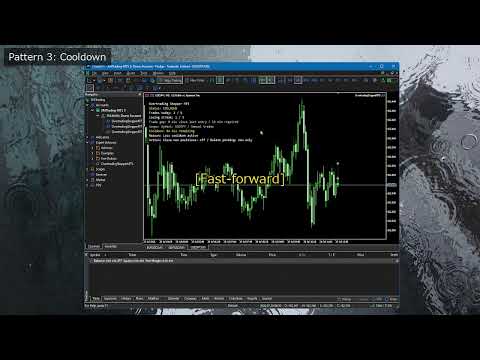
The on-chart status panel shows the current status, entry count, losing streak, cooldown, monitoring scope, protection reason, and enabled protection actions.

The CSV event log records important events. Use it to confirm why protection was triggered, what action was taken, and whether settings should be reviewed.

Protection-State Persistence

The current day's lock state and any active post-loss cooldown are saved.

If you remove and reattach the EA or restart MT5, the saved protection state is restored when the account, monitoring scope, and Magic Number settings are the same. The day's state is cleared at the daily reset time.

5. What Happens When Protection Is Active

The protection state becomes active when any of the following conditions is met:

  • The daily trade limit is reached.
  • The losing streak limit is reached.
  • Consecutive entries closer than the minimum entry gap are detected.
  • A post-loss cooldown is active.

The chart panel displays the reason when protection is active.

The subsequent behavior is determined by the Protection Actions settings.

Close new positions after protection starts

When enabled, the EA closes monitored positions opened after protection starts.

Positions that were already open before protection started are not closed by this setting alone.

Delete new pending orders after protection starts

When enabled, the EA deletes monitored pending orders created after protection starts.

Use this when you want to preserve pending orders already included in an existing trading plan but delete only pending orders newly placed after the lock.

Also delete existing pending orders

When enabled, the EA also deletes monitored pending orders that existed before protection started.

This provides stronger protection, but it also makes previously placed limit and stop orders eligible for deletion. Enable it only after understanding this effect.

6. Initial Settings Example

Start with conservative settings that minimize effects on existing positions and pending orders.

Daily trade limit: 5 (Maximum number of monitored entries allowed before the daily reset.)
Losing streak limit: 3 (Protection starts when this number of losing closed trades occurs consecutively.)
Minimum entry gap: 10 minutes (Detects consecutive entries made closer together than this interval.)
Loss cooldown: 30 minutes (Time to keep protection active after a losing trade closes.)
Close new positions: false (Closes monitored positions opened after protection starts.)
Delete new pending orders: true (Deletes monitored pending orders created after protection starts.)
Delete existing pending orders: false (Also deletes monitored pending orders that existed before protection started.)
Symbols to monitor: Current chart (Monitors only the symbol of the chart where the EA is attached.)
Magic scope: 0 (Magic Number scope: 0 monitors manual trades.)
Daily reset hour: 0 (Hour to reset the day's state in broker server time.)

These settings manage manual trading with a five-trade limit, a three-loss streak limit, a 10-minute entry gap, and a 30-minute post-loss pause. Existing open positions are kept, while new pending orders are deleted after protection starts. Confirm the behavior on a demo account before live use.

7. How to Use It

1. Check Before Use

First test the EA on a demo account, not on your live trading account.

Keep MT5 or a VPS running and enable Algo Trading on the toolbar while using EA protection actions. When Algo Trading is disabled, the EA cannot close positions or delete pending orders.

Also decide in advance which trades to monitor.

  • To monitor manual trades only, set Magic scope to 0.
  • To monitor all trades, set Magic scope to -1.
  • To monitor only a specific EA, set that EA's Magic Number.

2. Attach the EA to a Chart

  1. Open a chart in MT5. When using Current chart, open the chart of the symbol you want to monitor.
  2. Drag and drop Overtrading Stopper MT5 from the Navigator onto the chart.
  3. On the Common tab, enable "Allow Algo Trading."
  4. Set the required values on the Inputs tab.
  5. Confirm that the EA icon appears in the chart's upper-right corner and that the status panel appears on the chart.

To monitor all symbols, attach the EA to any one chart and set Symbols to monitor to All symbols.

3. Set Your Trading Rules

First, set your rules under Discipline Limits.

  1. Enter the maximum number of monitored entries per day in Daily trade limit.
  2. Enter the number of consecutive losses after which you want to stop in Losing streak limit.
  3. Enter, in minutes, the interval you want to require between consecutive entries in Minimum entry gap.
  4. Enter, in minutes, how long you want to pause after a losing trade in Loss cooldown. Set 0 when you do not want to use it.
  5. Enter the time to reset daily counts and protection state in Daily reset hour, based on broker server time.

Start with the example in section 6. After you understand the behavior, change the values to match your own rules.

4. Choose Protection Actions

Under Protection Actions, choose what the EA should do after protection starts.

  • Set Close new positions after protection starts to false if you want to keep positions that are already open.
  • Set Delete new pending orders after protection starts to true if you want to delete pending orders added after protection starts.
  • Set Also delete existing pending orders to true only if you also want to delete pending orders that existed before protection started.

For first use, the following conservative settings are recommended: Close new positions after protection starts = false, Delete new pending orders after protection starts = true, and Also delete existing pending orders = false.

5. Check the Monitoring Scope

Symbols to monitor and Magic scope are important settings because they determine which trades protection actions can affect.

  • With Symbols to monitor set to Current chart, only the symbol of the chart where the EA is attached is monitored.
  • With Symbols to monitor set to All symbols, trades on all symbols matching the monitored Magic Number are included.
  • With Magic scope set to 0, ordinary manual orders are monitored.
  • With Magic scope set to -1, all trades, including manual and EA orders, are monitored.
  • With a positive number in Magic scope, only EA orders with that Magic Number are monitored.

Especially when using All symbols or Magic scope = -1, verify on a demo account that unintended trades are not included.

6. Check the Status Panel

When the EA is attached, a status panel appears on the chart. Check at least the following:

  • Whether the current status is OK or protection is active.
  • The symbol scope and Magic Number scope being monitored.
  • Today's entry count and losing streak.
  • The remaining time when a loss cooldown is active.
  • The reason protection started.
  • Whether closing new positions and deleting pending orders are enabled.

If the text is too small or too large, adjust Status panel text size. To hide the panel, set Show status panel on chart to false.

7. Verify Protection on a Demo Account

Before live use, verify at least the following on a demo account:

  1. Open a small monitored trade and confirm that the entry count appears on the panel.
  2. Create conditions that trigger Daily trade limit or Minimum entry gap, and confirm that the status changes to the protection state.
  3. When using Loss cooldown, close a monitored trade at a loss and confirm the cooldown starts and its remaining time is displayed.
  4. When Delete new pending orders after protection starts is enabled, create a monitored pending order after protection starts and confirm that it is deleted.
  5. When using Close new positions after protection starts, always confirm its behavior on a monitored new position in a demo account.
  6. Remove and reattach the EA and confirm that the protection state or cooldown is restored.

When changing settings, check the monitoring scope and protection actions shown on the chart panel again.

8. Check the CSV Log

When Write CSV event log is set to true, the event log is saved in the following file inside the MT5 data folder:

MQL5\Files\OvertradingStopperMT5_log.csv

After demo testing, check this CSV for records such as LOCK, COOLDOWN_START, COOLDOWN_END, RESET, STATE_RESTORED, position closes, and pending-order deletions.

9. Daily Use

Before trading, check the chart panel for the monitored scope, today's trade count, and enabled protection actions. The saved state is restored after reattachment or restart, but resets at the configured daily reset time.

8. Parameter Details

Discipline Limits

  • Daily trade limit: maximum monitored entries in one daily reset period.
  • Losing streak limit: consecutive monitored losing closed trades that activate protection.
  • Minimum entry gap (minutes): entries closer than this interval activate protection.
  • Loss cooldown (minutes, 0 = off): protection time after a losing trade closes; 0 disables it.

Protection Actions

  • Close new positions after protection starts: closes monitored positions opened after protection starts, not already-open positions.
  • Delete new pending orders after protection starts: deletes monitored pending orders created after protection starts.
  • Also delete existing pending orders: also deletes monitored pending orders that existed before protection started.
  • Symbols to monitor: Current chart or All symbols.
  • Magic scope (-1 all, 0 manual, >0 EA): all eligible trades, manual trades, or one EA Magic Number.
  • Daily reset hour (server time): broker-server hour that resets daily count, losing streak, and lock state.

Display and Event Log

  • Write CSV event log: records initialization, locks, resets, cooldowns, closes, and pending-order deletions.
  • Show status panel on chart: shows the monitoring and protection state.
  • Status panel text size: adjusts panel font size.

9. Usage Examples

Example 1: Limit Daily Manual Trades

Use these settings when your rule is "up to five trades per day."

Daily trade limit: 5 Losing streak limit: 0 or a value you do not use Minimum entry gap: 0 or a value you do not use Loss cooldown: 0 Symbols to monitor: Current chart Magic scope: 0

This is suitable when you mainly want to manage trade count. Choose what happens after protection starts under Protection Actions.

Example 2: Pause for 30 Minutes After Three Consecutive Losses

Use these settings when you want to avoid trading immediately after a losing streak and make time to review the market and your decisions.

Losing streak limit: 3 Loss cooldown: 30 minutes Close new positions: false Delete new pending orders: true Delete existing pending orders: false Magic scope: 0

This is a conservative setting that deletes only pending orders added after protection starts.

Example 3: Reduce Rapid-Fire Entries

Use these settings when you want to avoid emotional consecutive entries during scalping or other short-term trading.

Minimum entry gap: 10 minutes Loss cooldown: 15 minutes Magic scope: 0

When consecutive entries less than 10 minutes apart are detected, protection becomes active and a 15-minute cooldown begins.

Example 4: Monitor Only a Specific EA

Use these settings when you use several EAs and want to impose trading limits only on the EA with a specific Magic Number.

Symbols to monitor: All symbols Magic scope: 12345 Daily trade limit: 10

In this case, only trades with Magic Number 12345 are monitored. Manual trades and EA trades with other Magic Numbers are excluded.

10. State Persistence, Daily Reset, and CSV Log

The EA saves the day's lock state and active cooldown end time. It restores them after EA reattachment, an MT5 restart, or a chart reopen when the account, scope, and Magic Number settings match.

Daily trade count, losing streak, and lock state reset at the broker server time set in Daily reset hour.

With CSV logging enabled, this file records initialization, restoration, resets, protection activation, cooldown start/end, position closes, pending-order deletions, and deletion failures:

MQL5\Files\OvertradingStopperMT5_log.csv

Use the log for setting review, demo confirmation, or support requests.

11. Notes and Operating Requirements

  • Always confirm behavior on a demo account before first use.
  • Keep MT5 or a VPS running while using EA protection actions.
  • Enable Algo Trading in MT5.
  • A connection loss, broker trading halt, or symbol trading conditions may prevent a position close or pending-order deletion from completing immediately.
  • Manual orders are detected after placement. This is not a feature that locks the order window before an order is sent.
  • Confirm the symbol and Magic Number scope before enabling Close new positions or pending-order deletion.
  • When Also delete existing pending orders is enabled, monitored pending orders placed before protection started are also eligible for deletion.
  • The daily reset time uses broker server time and can differ from your PC's local time.
  • Perform sufficient demo testing for your actual trading environment, account type, and symbol specifications.

12. Support and Updates

For questions, feature clarifications, or problem reports, contact us through MQL5 product comments or MQL5 messages. Include MT5 build, broker and account type, symbol, settings, issue time, relevant Experts/Journal messages, CSV rows, and steps to reproduce.

Future updates are distributed through MQL5 Market. Back up current settings or logs before updating if needed.

13. Free Demo Version: What It Can and Cannot Do

The free demo runs only in the MT5 Strategy Tester.

  • Review and change the input parameters.
  • Use visual mode to view the on-chart status panel.

The demo does not run on a normal chart. Live-chart monitoring, protection actions for manual or pending orders, and state restoration after EA reattachment or an MT5 restart should be confirmed with the full Market version on a demo account first.
Produtos recomendados
LT Donchian Channel
Thiago Duarte
4.86 (7)
Donchian Channel (ou canal de Donchian) é um indicador criado por  Richard Donchian. Ele é  formado tomando a máxima mais alta e a mais baixa mais baixa do último período especificado em velas. A área entre alta e baixa é o canal para o período escolhido. Sua configuração é simples. É possível ter a média entre a linha superior e inferior além de alertas quando o preço atinge um dos lados. Se tiver alguma dúvida ou encontrar alguma falha, me contate. Faça bom uso!
FREE
Friend of the trend : Seu Rastreador de Tendências Domine o mercado com o Friend of the trend , o indicador que simplifica a análise de tendências e te ajuda a identificar os melhores momentos para comprar, vender ou esperar. Com um design intuitivo e visualmente impactante, o Trend Analisa os movimentos de preço e entregar sinais através de um histograma colorido: Barras Verdes : Sinalizam uma tendência de alta, indicando oportunidades de compra. Barras Vermelhas : Alertam para uma tendência de
FREE
This indicator is especially for the binary trading. Time frame is 1 minutes and exp time 5 or 3 minutes only. You must be use martingale 3 step. So you must put lots size is 10 % at most. You should use Mt2 trading platform to connect with my indicator to get more signal without human working. This indicator wining rate is over 80% but you may get 100% of profit by using martingale 3 step. You should use MT2 Trading Platform to connect meta trader platform and binary platform . You can get mt2
FREE
Free automatic Fibonacci is an indicator that automatically plots a Fibonacci retracement based on the number of bars you select on the BarsToScan setting in the indicator. The Fibonacci is automatically updated in real time as new highest and lowest values appears amongst the selected bars. You can select which level values to be displayed in the indicator settings. You can also select the color of the levels thus enabling the trader to be able to attach the indicator several times with differe
FREE
High Low Open Close
Alexandre Borela
4.98 (45)
Se você gosta deste projeto, deixe uma revisão de 5 estrelas. Este indicador desenha os preços abertos, altos, baixos e finais para o especificado período e pode ser ajustado para um fuso horário específico. Estes são níveis importantes olhados por muitos institucional e profissional comerciantes e pode ser útil para você saber os lugares onde eles podem ser mais activa. Os períodos disponíveis são: Dia anterior. Semana anterior. Mês anterior. Quarto anterior. Ano anterior. Ou: Dia atual. Seman
FREE
GDS Renko Pip ST Chart - Pip-Based Renko Chart Indicator for MetaTrader 5 GDS Renko Pip ST Chart is a pip-based Renko chart indicator for MetaTrader 5. It helps traders build and study cleaner Renko price movement using a practical fixed pip or point-based brick structure. This tool is designed as a Renko chart foundation for manual analysis. It does not predict the market, does not generate buy or sell signals and does not decide whether a trade should be opened. Renko EDGE EA Golden Delta | A
FREE
MACD Enhanced
Nikita Berdnikov
4 (4)
Introducing the MACD  Enhanced – an advanced MACD (Moving Average Convergence Divergence) indicator that provides traders with extended capabilities for trend and momentum analysis in financial markets. The indicator uses the difference between the fast and slow exponential moving averages to determine momentum, direction, and strength of the trend, creating clear visual signals for potential entry and exit points. Attention! To achieve the best results, it is recommended to adapt the indicator
FREE
Stamina HUD
Michele Todesco
STAMINA HUD – Advanced Market & Trend Dashboard (MT5) STAMINA HUD   is a professional   market information panel   designed for traders who want   clarity, speed, and control   directly on the chart. It provides a   clean heads-up display (HUD)   with essential market data and   multi-timeframe trend direction , without cluttering the chart or generating trading signals. What STAMINA HUD Shows   Current Price   Spread (in real pips)   Today High–Low range (pips)   Average D


FREE
IMPORTANT NOTE: This is a professional Trade Management Utility and on-chart assistant. It is NOT an automated trading robot. It does not open trades on its own. The UltraFast Trade Manager MT5 is the ultimate execution and risk-management suite designed to give you absolute control over your manual and algorithmic trades. When managing multiple positions, calculating complex net break-even points, or constantly monitoring the economic calendar, hesitation can lead to costly mistakes. This utili
FREE
Show Pips for MT5
Roman Podpora
4.5 (32)
Este indicador de informação será útil para quem quer estar sempre atento à situação atual da conta. VERSION MT 4 -   More useful indicators O indicador exibe dados como lucro em pontos, porcentagem e moeda, bem como o spread do par atual e o tempo até o fechamento da barra no período atual. Existem várias opções para colocar a linha de informação no gráfico: À direita do preço (corre atrás do preço); Como comentário (no canto superior esquerdo do gráfico); No canto selecionado da tela. Também é
FREE
Donchian Breakout And Rsi
Mattia Impicciatore
4.5 (2)
Descrição geral Este indicador é uma versão aprimorada do Canal Donchian clássico, enriquecida com funções práticas para o trading real. Além das três linhas padrão (máxima, mínima e linha do meio), o sistema detecta breakouts e os mostra visualmente com setas no gráfico, exibindo apenas a linha oposta à direção da tendência atual para uma leitura mais limpa. O indicador inclui: Sinais visuais : setas coloridas nos breakouts Notificações automáticas : alerta pop-up, push e e-mail Filtro RSI : pa
FREE
Reversal Composite Candles
MetaQuotes Ltd.
3.69 (16)
A ideia do sistema é a identificação de padrões de reversão utilizando o cálculo de candles compostos. Os padrões de reversão são semelhantes aos padrões "Martelo" e o " Homem Enforcado " da análise candlestick Japonesa, porém ele usa candles compostos em vez de uma única barra e não precisa do pequeno corpo numa composição para confirmar a reversão. Os parâmetros de entrada: Range - número máximo de barras, utilizada no cálculo de composição dos candles compostos . Minimum - tamanho mínimo dos
FREE
Rainbow MT5
Jamal El Alama
4 (1)
Description : Rainbow MT5 is a technical indicator based on Moving Average with period 34 and very easy to use. When price crosses above MA and MA changes color to green, then this is a signal to buy. When price crosses below MA and MA changes color to red, then this is a signal to sell. The Expert advisor ( Rainbow EA MT5 ) based on Rainbow MT5 indicator is now available here . MT4 version is available here .
FREE
GOM Trade Manager
Wannapach Chinnaprapa
GOM Trade Manager helps you execute trades the way you want it. Works on all instruments Forex, Commodities, & Crypto. It helps you with lot calculations, spread addition and balance calculations so you can just focus on actual trading. For full automatic planned management, stackable triggers and spread widening protection >> check out GOM Trade Manager Pro . ------------------------------------------NOTABLE FEATURES------------------------------------------ You set everything based on bid
FREE
Calmer chart context, kept practical Northstar Flow Candles MT5 is a chart-window indicator that presents Heikin Ashi candles with a five-state trend context. It is designed for traders who want a quieter view of price while keeping the native chart available as an optional reference. Visual-only indicator: Northstar Flow Candles MT5 does not place trades and does not send popup, push, or email notifications. What appears on the chart Five candle states: strong bullish, bullish, balanced, bearis
FREE
ZumikoFx Trading Stats
Michal Piotr Kochanski
ZumikoFX Trading Stats - Professional Account Dashboard Overview ZumikoFX Trading Stats is a comprehensive, real-time account monitoring dashboard designed for serious traders who need complete visibility of their trading performance. This indicator displays all crucial trading statistics in an elegant, easy-to-read panel positioned in the top-right corner of your chart. Key Features Complete Account Monitoring Balance & Equity - Real-time account status with current balance and equity includ
FREE
Smart Trendline Detector Smart Trendline Detector is an automatic multi-timeframe trendline analysis indicator for MetaTrader 5 that detects and ranks rising support and falling resistance structures using market swing points. Instead of filling the chart with every possible trendline, the indicator evaluates qualifying structures and displays only a controlled number of the strongest candidates according to configurable ranking criteria. The result is a cleaner chart with relevant trendline str
FREE
Follow The Line MT5
Oliver Gideon Amofa Appiah
4.6 (35)
This indicator obeys the popular maxim that: "THE TREND IS YOUR FRIEND" It paints a GREEN line for BUY and also paints a RED line for SELL. (you can change the colors). It gives alarms and alerts of all kinds. IT DOES NOT REPAINT and can be used for all currency pairs and timeframes. Yes, as easy and simple as that. Even a newbie can use it to make great and reliable trades. NB: For best results, get my other premium indicators for more powerful and reliable signals. Get them here: https://www.m
FREE
Indicator measures strength of each currency in your list. Main idea: It simply iterates through all combinations of pairs and adds difference between open and close in percent. Parameters: List of currencies - what currencies will be calculated (maximum is 8) Calculation type - from which data will be strength calculated Calculation data input - used as input related to calculation type Symbol suffix - used in case of suffix on symbols, e.g: when your symbols look like EURUSDm, EURUSDmicro etc
FREE
Core function Intelligent transaction management one-click opening and closing operation, which supports user-defined lots to set multiple closing modes: all closing, closing by direction and closing by profit and loss status. Professional risk control, real-time risk monitoring and spread control to avoid high-cost trading environment. Visual control panel has an intuitive graphical interface, and all functions can be operated with one button to display position information, profit and loss sta
FREE
XAU VWAP Mean Reversion H4 Expert Advisor for MetaTrader 5 — Gold / XAUUSD focus Version: 1.00 What it is XAU VWAP Mean Reversion H4 is an Expert Advisor for gold on the H4 chart. Intraday VWAP mean-reversion style participation on gold H4. Built for structured automated participation — not grid , not martingale . Evaluate on your broker and risk profile before any live use. This product is a technical system . Exact thresholds and entry equations remain internal product design and are not publ
FREE
# DAILY SUPPORT AND RESISTANCE LEVELS - SEO OPTIMIZED DESCRIPTION ## SHORT DESCRIPTION (160 characters max) ``` Free pivot points indicator with daily support resistance levels for MT5. Perfect for intraday forex day trading and scalping strategies. ``` **Character count:** 159 **Keywords included:** pivot points, support, resistance, MT5, forex, day trading, scalping, free --- ## FULL DESCRIPTION (HTML Formatted for MQL5) ### Main Title **Daily Support and Resistance Levels - Free Pivot
FREE
Indicador TriYep v1.02 – Más del 70% de señales precisas Indicador TriYep v1.02 – Más del 70% de señales precisas Presentación El indicador TriYep v1.02 se creó con un único propósito: ofrecer señales totalmente fiables. Esta versión gratuita está calibrada y optimizada específicamente para el par USD/JPY en el marco temporal M15 , donde su lógica alcanza su máximo rendimiento. Mientras que otros indicadores inundan tu gráfico con señales falsas y te hacen perder operación tras operación, hemos
FREE
GDS Renko Pip ST - Fixed Brick Renko Chart Tool for MetaTrader 5 GDS Renko Pip ST is a Renko chart tool for MetaTrader 5 designed for traders who want to build and study fixed brick Renko movement using a practical pip or point-based setup. The purpose of this tool is simple: create a cleaner Renko structure so the trader can observe direction, brick runs, pullbacks, support and resistance behavior without normal candle noise. This is not a signal indicator and it does not predict the market. It
FREE
The Horizontal Ray Tool is a lightweight, professional charting utility designed to streamline support and resistance mapping on MetaTrader 5. It brings rapid, one-click horizontal level placement directly to your live chart, eliminating the workspace clutter associated with infinite horizontal lines or manually drawn trendlines. Key Features: Interactive On-Screen Button: Spawns a clean, responsive "DRAW RAY" button docked directly on your chart canvas. A single click drops an independent hor
FREE
Click Trading
Jawad Tauheed
5 (2)
One Click Trading – Auto TP SL Developer TraderLinkz Version 1.00 Category Utility What it does Adds missing TP and SL to your manual trades and pending orders Sets them once per ticket Lets you move TP and SL afterward Works on hedging and netting accounts Scans on every tick and reacts on trade events Why you want it You place faster entries You get consistent risk and exit targets You reduce fat finger errors You keep full manual control Quick start Attach the EA to any chart Keep TP and SL e
FREE
Important Lines
Terence Gronowski
4.88 (24)
This indicator displays Pivot-Lines, preday high and low, preday close and the minimum and maximum of the previous hour. You just have to put this single indicator to the chart to have all these important lines, no need to setup many single indicators. Why certain lines are important Preday high and low : These are watched by traders who trade in a daily chart. Very often, if price climbs over or falls under a preday low/high there is an acceleration in buying/selling. It is a breakout out of a
FREE
Are you tired of drawing trendlines every time you're analyzing charts? Or perhaps you would like more consistency in your technical analysis. Then this is for you. This indicator will draw trend lines automatically when dropped on a chart. How it works Works similar to standard deviation channel found on mt4 and mt5. It has 2 parameters: 1. Starting Bar 2. Number of bars for calculation The   starting bar   is the bar which drawing of the trend lines will begin, while the   number of bars for c
FREE
VolumeBasedColorsBars
Henrique Magalhaes Lopes
VolumeBasedColorsBars — Free Powerful Volume Analysis for All Traders Unlock the hidden story behind every price bar! VolumeBasedColorsBars is a professional-grade, 100% FREE indicator that colorizes your chart candles based on real, adaptive volume analysis. Instantly spot surges in market activity, identify exhaustion, and catch the moves that matter. This indicator gives you:    • Dynamic color-coded bars for instant volume context    • Adaptive thresholds based on historical, session-awar
FREE
Introduction Welcome to the world of Forex trading, where every tick of the market can be influenced by news events. Introducing our expert advisor for MetaTrader, your ultimate tool for navigating the complexities of news trading. This innovative advisor is specifically designed to automate your trading strategy during key macroeconomic releases, ensuring you never miss an opportunity.  When important indicators are announced, volatility often spikes, creating potential for profit. Our expert
FREE
Os compradores deste produto também adquirem
Trade Assistant MT5
Evgeniy Kravchenko
4.41 (216)
Ajuda a calcular o risco por comércio, a fácil instalação de uma nova encomenda, gestão de encomendas com funções de fecho parcial, trailing stop de 7 tipos e outras funções úteis. Materiais e instruções adicionais Instruções de instalação   -   Instruções para a aplicação   -   Versão de teste da aplicação para uma conta de demonstração Função de linha Mostra no gráfico a linha de Abertura, Stop Loss, Take Profit. Com esta função é fácil definir uma nova ordem e ver as suas características ad
Bem-vindo ao Trade Manager EA—uma ferramenta de gestão de risco criada para tornar o trading mais intuitivo, preciso e eficiente. Não é apenas uma ferramenta para executar ordens, mas uma solução abrangente para planejamento de operações, gerenciamento de posições e controle de risco. Seja você um iniciante, trader avançado ou scalper que precisa de execução rápida, o Trade Manager EA adapta-se às suas necessidades, oferecendo flexibilidade em todos os mercados, desde forex e índices até commodi
================================================================================ POC BREAKOUT - V20.72. Full Professional Grade Toolkit ================================================================================ POC Breakout is a full MetaTrader 5 trading dashboard for discretionary traders who want breakout signals, Point of Control (POC) context, volume profiles, order flow, market structure, news, alerts, and advanced trade planning in one professional workspace. Attached directly to you
TradePanel MT5
Alfiya Fazylova
4.88 (167)
Trade Panel é um assistente de negociação multifuncional. O aplicativo contém mais de 50 funções de negociação para trading manual e permite automatizar a maioria das tarefas de negociação. Instruções para o aplicativo + vídeo-instruções: https://www.mql5.com/pt/blogs/post/762435 Versão de teste do aplicativo para conta demo: https://www.mql5.com/pt/blogs/post/762547 Como instalar o aplicativo: https://www.mql5.com/pt/blogs/post/762548 Como testar o aplicativo no modo visual: https://www.mql5.co
Local Trade Copier EA MT5
Juvenille Emperor Limited
4.94 (148)
Experimente uma cópia de negociação excepcionalmente rápida com o Local Trade Copier EA MT5 . Com sua fácil configuração de 1 minuto, este copiador de negociações permite que você copie negociações entre vários terminais MetaTrader no mesmo computador Windows ou em um Windows VPS com velocidades de cópia ultra rápidas de menos de 0.5 segundos. Seja você um trader iniciante ou profissional, o   Local Trade Copier EA MT5   oferece uma ampla gama de opções para personalizá-lo de acordo com suas ne
Versão Beta O Telegram to MT5 Signal Trader está quase no lançamento oficial da versão alfa. Alguns recursos ainda estão em desenvolvimento e você pode encontrar pequenos erros. Se tiver problemas, por favor reporte, seu feedback ajuda a melhorar o software para todos. Telegram to MT5 Signal Trader é uma ferramenta poderosa que copia automaticamente sinais de trading de canais ou grupos do Telegram diretamente para sua conta MetaTrader 5 . Suporta canais públicos e privados do Telegram, e você
O   Telegram to MT5 Multi-Channel Copier   copia automaticamente os sinais de trading dos seus canais de Telegram diretamente para o MetaTrader 5. Sem bots, sem extensões de navegador, sem copiar à mão. O sinal chega ao Telegram e o EA abre a operação no seu terminal em poucos segundos. O produto inclui dois componentes: um aplicativo de Windows que escuta os seus canais de Telegram, e este Expert Advisor que executa os sinais no seu terminal MT5. Também há uma versão para MT4 disponível   aqui
Astro Trade MT5
Indra Maulana
5 (4)
25% discount on the release of the tool: only for the next 3 buyers Send a message to receive a demo version. AstroTrade Trading Assistant AstroTrade is a comprehensive multi-functional trading utility developed for the MetaTrader 5 platform. It integrates essential tools for trade execution, risk management, and technical monitoring into a single unified interface. The application is designed to assist traders in managing their daily operations through a visual and structured environment. Vi
Telegram To MT5 Ultra
Mirel Daniel Gheonu
5 (4)
Telegram To MT5 — Copiador de sinais Transforme as chamadas de trading dos seus canais do Telegram em ordens reais no MT5 — automaticamente, em quantas contas quiser, com o risco e as regras totalmente sob o seu controlo. O Telegram To MT5 liga os canais VIP / de sinais que já segue no Telegram ao seu terminal MetaTrader 5. Um aplicativo de desktop complementar gratuito lê as mensagens (mesmo de canais que bloqueiam bots), e este Expert Advisor executa-as na sua conta — aplicando as suas própria
Exp COPYLOT CLIENT for MT5
Vladislav Andruschenko
3.97 (35)
Copiador profissional de operações para MetaTrader 5 Um copiador de operações rápido, profissional e confiável para MetaTrader . COPYLOT permite copiar operações de Forex entre terminais MT4 e MT5 com suporte para contas Hedge e Netting . A versão MT5 do COPYLOT oferece suporte a: - MT5 Hedge → MT5 Hedge - MT5 Hedge → MT5 Netting - MT5 Netting → MT5 Hedge - MT5 Netting → MT5 Netting - MT4 → MT5 Hedge - MT4 → MT5 Netting Versão MT4 Descrição completa + DEMO + PDF Como comprar Como instalar Como
Anchor Trade Manager
Kalinskie Gilliam
5 (8)
Anchor: The EA Manager Your EAs manage their own trades. Anchor manages the account around them. Anchor gives you one place to control your EAs, manage risk and decide when trading is allowed. Any EA, any vendor, any broker or symbol. No source-code changes required. The Problem Most EAs only know what they are doing. They cannot see when another EA is already trading, when several EAs open and are stacking risk or when the account has reached your loss limit. Even using just one EA, it may not
HINN MagicEntry Extra
ALGOFLOW OÜ
4.72 (18)
HINN MAGIC ENTRY – the ultimate tool for entry and position management! SIMPLE. FASTEST. INTUITIVE. MAX AUTOMATED. Place orders by selecting a level directly on the chart! full description   ::  demo-version  :: 60-sec-video-description Key features: - Market, limit, and pending orders - Automatic lot size calculation - Automatic spread and commission accounting - Unlimited partitial take-profits  - Breakeven and trailing stop-loss and take-profit  functions - Invalidation leves - Intuitive, a
Trade Dashboard MT5
Fatemeh Ameri
4.95 (132)
Trade Dashboard simplifies how you open, manage, and control your trades, with built-in lot size calculation. It allows you to execute trades, manage risk, and control positions directly on the chart, with tools such as partial close, breakeven, and trailing stop. Designed to reduce manual work and help you stay focused on your trading decisions. A demo version is available for testing. Detailed explanations of features are provided within the MQL5 platform. Installation instructions are include
Trade copier MT5
Alfiya Fazylova
4.58 (53)
Trade Copier é um utilitário profissional projetado para copiar e sincronizar negociações entre contas de negociação. A cópia ocorre da conta / terminal do fornecedor para a conta / terminal do destinatário, instalada no mesmo computador ou vps. PROMOÇÃO - Se você já adquiriu o "Trade copier MT5", pode receber o "Trade copier MT4" gratuitamente (para cópia MT4 > MT5 e MT4 < MT5). Para obter informações mais detalhadas sobre os termos, por favor, entre em contato conosco através de mensagens priv
Ultimate Extractor
Clifton Creath
5 (8)
Ultimate Extractor - Professional Trading Analytics for MT5 *****this is the local HTML version of Ultimate Extractor. !!!!!it is not compatible with Cloud!!!! For the online version please reach out to me directly****** Ultimate EA manager also now available when you use cloud pro and above for free!! Ultimate Extractor transforms your MetaTrader 5 trading history into actionable insights with comprehensive analytics, interactive charts, and real-time performance tracking. What It Does Automa
Signal TradingView to MT5 Pro Automator Execução profissional instantânea entre TradingView e MetaTrader 5 Automatize a sua estratégia de trading com a ponte de comunicação mais robusta entre os alertas do TradingView e a execução real no MT5. Concebido para traders que exigem velocidade, flexibilidade e uma gestão de risco impecável, este Expert Advisor transforma qualquer mensagem de alerta numa ordem de mercado ou de limite precisa. PONTOS FORTES E VANTAGENS Motor de Parsing Universal (Propri
The product will copy all telegram signal to MT5 ( which you are member) , also it can work as remote copier.  Easy to set up, copy order instant, can work with almost signal formats, image signal,  s upport to translate other language to English Work with all type of channel or group, even channel have "Restrict Saving Content", work with  multi channel, multi MT5 Work as remote copier: with signal have ticket number, it will copy exactly via ticket number. Support to backtest signal. How to s
Trade Copier Ultimate
Janitha Sandaruwan Amaradasa Wickramasingha Arachchilage
5 (5)
Trade Copier Ultimate - Telegram to MT5 Signal Copier Trade Copier Ultimate automatically copies Telegram trading signals into MetaTrader 5. The EA can read signal messages, detect the symbol, order type, entry price, Stop Loss, Take Profit levels and selected update commands, then execute or manage the trade in MT5 using your lot and risk settings. It is more than a basic Telegram to MT5 copier. TCU also supports Bot API and user-account Bridge workflows, Discord signal routing, local MT5 to MT
Power Candles Strategy Scanner - Localizador de configurações multissímbolo com auto-otimização O Power Candles Strategy Scanner utiliza o mesmo motor de auto-otimização que alimenta o indicador Power Candles — em todos os símbolos da sua lista de observação, lado a lado. Um painel indica-lhe quais os símbolos que são estatisticamente negociáveis neste momento, qual a estratégia vencedora para cada um, o par ideal de Stop Loss / Take Profit, e avisa-o assim que um novo sinal é emitido. Esta ferr
Farmed Hedge Yield Farming | All Markets (Manual - Hybrid - Semi/Automated EA) VERIFIED TRADING RESULTS - Farmed Hedge Yield Axi Copy:  https://www.mql5.com/en/signals/2356376 - Farmed Hedge Yield Exn Copy:   https://www.mql5.com/en/signals/2356404 - Farmed Hedge Yield V Copy:  https://www.mql5.com/en/signals/2357156 * Before purchasing, please feel free to send me a message if you have any questions about the product or setup. ** After purchase,  Contact me via private message to receive t
Seconds Chart MT5
Boris Sedov
4.61 (18)
Seconds Chart - uma ferramenta exclusiva para criar gráficos de segundos no MetaTrader 5 . Com o Seconds Chart , você pode criar gráficos com períodos definidos em segundos, proporcionando flexibilidade e precisão ideais para análise, indisponíveis em gráficos padrão de minutos ou horas. Por exemplo, o período S15 indica um gráfico com velas de 15 segundos. Você pode usar qualquer indicador ou Expert Advisor com suporte a símbolos personalizados. Trabalhar com eles é tão conveniente quanto negoc
Envie-me uma mensagem após a compra para receber o kit completo do manual + teste de 3 dias da API da OpenAI para testar os recursos de IA + Outro presente bônus O preço atual é um desconto limitado para a atualização de relançamento de agosto — garanta sua edição agora antes que o preço aumente. Próximo preço: $340 Isso é completamente diferente de qualquer painel de trading que você já experimentou ou viu no mercado. É um dos painéis de trading com tecnologia de IA mais inovadores disponíveis
Timeless Charts
Samuel Manoel De Souza
5 (8)
Timeless Charts é um utilitário de trading tudo-em-um para traders profissionais. Ele combina tipos de gráficos personalizados, como Gráficos por Segundos e Renko , com análise avançada de fluxo de ordens utilizando Footprints , Clusters , Perfis de Volume , estudos VWAP e ferramentas de análise ancorada para uma visão mais profunda do mercado. O gerenciamento de ordens e posições é realizado diretamente no gráfico por meio de um painel integrado de gerenciamento de operações , enquanto o Market
Premium Trade Manager - O Painel de Operações com um Coach Integrado Premium Trade Manager coloca um coach de trading dentro do seu gráfico, com um motor de execução completo por baixo. Configure a operação da forma que sempre faz e deixe o Max, seu coach de trading com IA, ler exatamente esse setup em relação à sua conta ao vivo e dar um veredicto direto antes de confirmar: se o stop é disciplinado, se o risco faz sentido, se há um evento de alto impacto a minutos de distância, se você está pró
The Ultimate TradingView to MT5 Bridge Automation Pare com o trading manual e problemas de latência. TradingView to MT5 Copier PRO é a ponte mais rápida e confiável para executar seus alertas do TradingView diretamente no MetaTrader 5. Quer você use indicadores personalizados, scripts do Strategy Tester ou desenhos manuais, este EA (Expert Advisor) executa suas negociações instantaneamente usando tecnologia WebSocket de Alta Velocidade . Diferente de copiadores simples, esta versão PRO inclui Ar
Painel de Trading para MetaTrader 5 — controle profissional de trading em um clique a partir do gráfico e do teclado Um painel de trading avançado para traders ativos, criado para abrir, gerenciar e fechar operações muito mais rápido do que com a interface padrão do MetaTrader. Esta solução foi desenvolvida para quem deseja controlar posições, ordens pendentes, lucro total e execução em um único espaço de trabalho profissional. Não se trata apenas de mais um utilitário. É um verdadeiro cockpit
Quant AI Agents
Ho Tuan Thang
5 (1)
Quant AI Agents are independent trading Expert Advisors. Instead of trading using a fixed strategy like other conventional EAs, Quant AI Agents   is a   multi-agent AI trading framework   that turns natural-language strategy prompts into live.  WANT THE SAME RESULTS AS MY LIVE SIGNAL?   Use the exact same brokers I do:   IC MARKETS , IC TRADING   .  Unlike the centralized stock market, Forex has no single, unified price feed.  Every broker sources liquidity from different providers, creating un
Baixar demo funcional Copy Cat More (Gato Copião) — Copiador de Trades (Trade Copier) MT5 é um copiador local de trades e um completo framework de gerenciamento de risco e execução, projetado para os desafios de trading de hoje. De desafios de prop firm ao gerenciamento de portfólio pessoal, ele se adapta a cada situação com uma combinação de execução robusta, proteção de capital, configuração flexível e manuseio avançado de trades. O copiador funciona em ambos os modos — Mestre (Master, emiss
Footprint Chart Pro — Professional OrderFlow EA for MetaTrader 5 Version 6.34 | Professional tool for real traders | Institutional-Grade Visualization DEMO USERS - PLEASE SELECT EVERY TICK / REAL TICK WHEN TESTING AND YOU HAVE DOWNLOADED HISTORICAL DATA. IF YOU SEE A WAITING SCREEN AND IT IS NOT DOWNLOADING, IT MEANS YOU HAVE LOW HISTORICAL DATA. TRY 1 MIN AND 5 MIN FIRST ON 1 DAY DATA. ONE DAY DATA SHOULD BE THE NEWEST AND MOST CURRENT DATE. PLEASE WAIT UNTIL THE MARKET HAS ROLLED OVER PERIOD.
News Filter EA
Rashed Samir
5 (1)
News Filter EA: Advanced Algo Trading Assistant News Filter EA is an advanced algo trading assistant designed to enhance your trading experience. By using the News Filter EA , you can integrate a Forex economic news filter into your existing expert advisor, even if you do not have access to its source code. In addition to the news filter, you can also specify trading days and hours for your expert. The News Filter EA also includes risk management  and equity protection features. MT4 Version Ma
Mais do autor
Tokyo-Gold-Breakout-EA Gold-only Tokyo/Asia range breakout Expert Advisor for MetaTrader 5. Tokyo-Gold-Breakout-EA is a low-frequency, selective trading robot designed specifically for GOLD / XAUUSD. It waits for the Tokyo/Asia session range to complete, then looks for confirmed upside breakout opportunities on M15. This EA is built for traders who prefer fewer, more selective setups with defined risk management. It is not designed to trade every day and it is not a high-frequency scalping robot
FREE
Filtro:
Sem comentários
Responder ao comentário