Overtrading Stopper MT5

Overtrading Stopper MT5

1. Overview

Overtrading Stopper MT5 is a MetaTrader 5 utility EA that helps discretionary traders follow their own trading rules.

You can set rules in advance, such as: how many times you may trade today, how many consecutive losses should make you stop, how many minutes to pause after a loss, and how to avoid entering several trades in rapid succession.

When a configured limit or condition is reached, the EA displays the reason for the protection state on the chart. Depending on your settings, it can close new positions or delete pending orders.

This tool is not a signal-generating EA. It does not make trading decisions. It is designed to make it easier to apply the risk-management and trading-discipline rules you decide in advance.

2. Who It Is For

Overtrading Stopper MT5 is for discretionary traders who want to:

  • Keep a planned daily trade cap.
  • Avoid rapid re-entry after a loss or a losing streak.
  • Control entry intervals for scalping or short-term trading.
  • Separate manual and EA trading with Magic Number scope.
  • Apply rules per symbol or across all symbols.
  • Keep the day's protection state after reattaching the EA or restarting MT5.
  • Review rule activation in a CSV log.

It supports rule-based trading discipline instead of emotion-driven decisions.

3. What It Can and Cannot Do

What It Can Do

  • Monitor trade count, losing streaks, entry gaps, and post-loss cooldowns.
  • Show the protection reason on the chart and, when enabled, close new monitored positions or delete monitored pending orders.
  • Monitor manual trades, all trades, or a specified Magic Number; monitor the current chart symbol or all symbols.
  • Save and restore the lock state and active cooldown after EA reattachment or MT5 restart.
  • Record important events in a CSV log.

Limits and Requirements

  • It does not generate signals or guarantee profit, win rate, or loss avoidance.
  • It cannot reject a manual order before placement; it detects the order afterward and performs enabled actions.
  • Closing or deletion can be affected by connectivity, broker conditions, and trading hours.
  • Keep MT5 or a VPS running and enable Algo Trading while using protection actions.

Confirm suitability on a demo account before purchase or live use.

4. Main Features

Daily Trade Limit

The EA counts new entries in the monitored scope and enters the protection state when the specified limit is reached.

Set a limit that fits your trading rules, such as "up to five trades per day" or "three trades during the London session." The daily reset time is set in your broker's server time.

Losing Streak Limit

The EA enters the protection state when consecutive losing closed trades in the monitored scope reach the specified number.

For example, set the limit to 3 when you want to review your trading for the day after three consecutive losses.

Minimum Entry Gap

The EA enters the protection state when consecutive entries are made closer together than the specified interval.

This is useful if you tend to repeat orders in a short time. For example, with a setting of 10 minutes, the EA detects a new monitored entry made less than 10 minutes after the previous monitored entry.

Loss Cooldown

After a losing trade closes, the EA keeps the protection state active for the specified time.

The chart panel shows the remaining cooldown time. For example, a setting of 30 minutes applies the configured protection actions for 30 minutes after a losing trade closes. Set it to 0 to disable this feature.

Selectable Protection Actions

You can choose each action to apply after the protection state starts:

  • Close new positions.
  • Delete new pending orders.
  • Also delete pending orders that already existed before protection started.

These settings let you choose between stronger protection and preserving your existing trade plan as much as possible.

Monitoring Scope

Choose whether to monitor only the current chart symbol or all symbols.

You can also use the Magic Number condition to monitor manual trades only, all trades, or trades from a specific EA only.

Status Panel and CSV Event Log

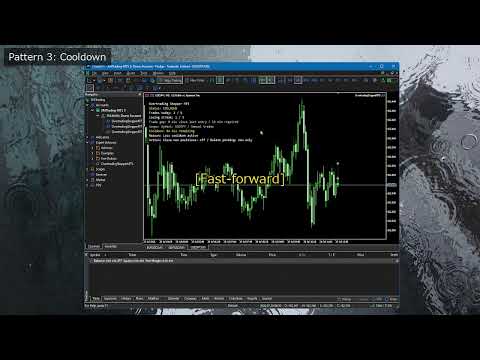
The on-chart status panel shows the current status, entry count, losing streak, cooldown, monitoring scope, protection reason, and enabled protection actions.

The CSV event log records important events. Use it to confirm why protection was triggered, what action was taken, and whether settings should be reviewed.

Protection-State Persistence

The current day's lock state and any active post-loss cooldown are saved.

If you remove and reattach the EA or restart MT5, the saved protection state is restored when the account, monitoring scope, and Magic Number settings are the same. The day's state is cleared at the daily reset time.

5. What Happens When Protection Is Active

The protection state becomes active when any of the following conditions is met:

  • The daily trade limit is reached.
  • The losing streak limit is reached.
  • Consecutive entries closer than the minimum entry gap are detected.
  • A post-loss cooldown is active.

The chart panel displays the reason when protection is active.

The subsequent behavior is determined by the Protection Actions settings.

Close new positions after protection starts

When enabled, the EA closes monitored positions opened after protection starts.

Positions that were already open before protection started are not closed by this setting alone.

Delete new pending orders after protection starts

When enabled, the EA deletes monitored pending orders created after protection starts.

Use this when you want to preserve pending orders already included in an existing trading plan but delete only pending orders newly placed after the lock.

Also delete existing pending orders

When enabled, the EA also deletes monitored pending orders that existed before protection started.

This provides stronger protection, but it also makes previously placed limit and stop orders eligible for deletion. Enable it only after understanding this effect.

6. Initial Settings Example

Start with conservative settings that minimize effects on existing positions and pending orders.

Daily trade limit: 5 (Maximum number of monitored entries allowed before the daily reset.)
Losing streak limit: 3 (Protection starts when this number of losing closed trades occurs consecutively.)
Minimum entry gap: 10 minutes (Detects consecutive entries made closer together than this interval.)
Loss cooldown: 30 minutes (Time to keep protection active after a losing trade closes.)
Close new positions: false (Closes monitored positions opened after protection starts.)
Delete new pending orders: true (Deletes monitored pending orders created after protection starts.)
Delete existing pending orders: false (Also deletes monitored pending orders that existed before protection started.)
Symbols to monitor: Current chart (Monitors only the symbol of the chart where the EA is attached.)
Magic scope: 0 (Magic Number scope: 0 monitors manual trades.)
Daily reset hour: 0 (Hour to reset the day's state in broker server time.)

These settings manage manual trading with a five-trade limit, a three-loss streak limit, a 10-minute entry gap, and a 30-minute post-loss pause. Existing open positions are kept, while new pending orders are deleted after protection starts. Confirm the behavior on a demo account before live use.

7. How to Use It

1. Check Before Use

First test the EA on a demo account, not on your live trading account.

Keep MT5 or a VPS running and enable Algo Trading on the toolbar while using EA protection actions. When Algo Trading is disabled, the EA cannot close positions or delete pending orders.

Also decide in advance which trades to monitor.

  • To monitor manual trades only, set Magic scope to 0.
  • To monitor all trades, set Magic scope to -1.
  • To monitor only a specific EA, set that EA's Magic Number.

2. Attach the EA to a Chart

  1. Open a chart in MT5. When using Current chart, open the chart of the symbol you want to monitor.
  2. Drag and drop Overtrading Stopper MT5 from the Navigator onto the chart.
  3. On the Common tab, enable "Allow Algo Trading."
  4. Set the required values on the Inputs tab.
  5. Confirm that the EA icon appears in the chart's upper-right corner and that the status panel appears on the chart.

To monitor all symbols, attach the EA to any one chart and set Symbols to monitor to All symbols.

3. Set Your Trading Rules

First, set your rules under Discipline Limits.

  1. Enter the maximum number of monitored entries per day in Daily trade limit.
  2. Enter the number of consecutive losses after which you want to stop in Losing streak limit.
  3. Enter, in minutes, the interval you want to require between consecutive entries in Minimum entry gap.
  4. Enter, in minutes, how long you want to pause after a losing trade in Loss cooldown. Set 0 when you do not want to use it.
  5. Enter the time to reset daily counts and protection state in Daily reset hour, based on broker server time.

Start with the example in section 6. After you understand the behavior, change the values to match your own rules.

4. Choose Protection Actions

Under Protection Actions, choose what the EA should do after protection starts.

  • Set Close new positions after protection starts to false if you want to keep positions that are already open.
  • Set Delete new pending orders after protection starts to true if you want to delete pending orders added after protection starts.
  • Set Also delete existing pending orders to true only if you also want to delete pending orders that existed before protection started.

For first use, the following conservative settings are recommended: Close new positions after protection starts = false, Delete new pending orders after protection starts = true, and Also delete existing pending orders = false.

5. Check the Monitoring Scope

Symbols to monitor and Magic scope are important settings because they determine which trades protection actions can affect.

  • With Symbols to monitor set to Current chart, only the symbol of the chart where the EA is attached is monitored.
  • With Symbols to monitor set to All symbols, trades on all symbols matching the monitored Magic Number are included.
  • With Magic scope set to 0, ordinary manual orders are monitored.
  • With Magic scope set to -1, all trades, including manual and EA orders, are monitored.
  • With a positive number in Magic scope, only EA orders with that Magic Number are monitored.

Especially when using All symbols or Magic scope = -1, verify on a demo account that unintended trades are not included.

6. Check the Status Panel

When the EA is attached, a status panel appears on the chart. Check at least the following:

  • Whether the current status is OK or protection is active.
  • The symbol scope and Magic Number scope being monitored.
  • Today's entry count and losing streak.
  • The remaining time when a loss cooldown is active.
  • The reason protection started.
  • Whether closing new positions and deleting pending orders are enabled.

If the text is too small or too large, adjust Status panel text size. To hide the panel, set Show status panel on chart to false.

7. Verify Protection on a Demo Account

Before live use, verify at least the following on a demo account:

  1. Open a small monitored trade and confirm that the entry count appears on the panel.
  2. Create conditions that trigger Daily trade limit or Minimum entry gap, and confirm that the status changes to the protection state.
  3. When using Loss cooldown, close a monitored trade at a loss and confirm the cooldown starts and its remaining time is displayed.
  4. When Delete new pending orders after protection starts is enabled, create a monitored pending order after protection starts and confirm that it is deleted.
  5. When using Close new positions after protection starts, always confirm its behavior on a monitored new position in a demo account.
  6. Remove and reattach the EA and confirm that the protection state or cooldown is restored.

When changing settings, check the monitoring scope and protection actions shown on the chart panel again.

8. Check the CSV Log

When Write CSV event log is set to true, the event log is saved in the following file inside the MT5 data folder:

MQL5\Files\OvertradingStopperMT5_log.csv

After demo testing, check this CSV for records such as LOCK, COOLDOWN_START, COOLDOWN_END, RESET, STATE_RESTORED, position closes, and pending-order deletions.

9. Daily Use

Before trading, check the chart panel for the monitored scope, today's trade count, and enabled protection actions. The saved state is restored after reattachment or restart, but resets at the configured daily reset time.

8. Parameter Details

Discipline Limits

  • Daily trade limit: maximum monitored entries in one daily reset period.
  • Losing streak limit: consecutive monitored losing closed trades that activate protection.
  • Minimum entry gap (minutes): entries closer than this interval activate protection.
  • Loss cooldown (minutes, 0 = off): protection time after a losing trade closes; 0 disables it.

Protection Actions

  • Close new positions after protection starts: closes monitored positions opened after protection starts, not already-open positions.
  • Delete new pending orders after protection starts: deletes monitored pending orders created after protection starts.
  • Also delete existing pending orders: also deletes monitored pending orders that existed before protection started.
  • Symbols to monitor: Current chart or All symbols.
  • Magic scope (-1 all, 0 manual, >0 EA): all eligible trades, manual trades, or one EA Magic Number.
  • Daily reset hour (server time): broker-server hour that resets daily count, losing streak, and lock state.

Display and Event Log

  • Write CSV event log: records initialization, locks, resets, cooldowns, closes, and pending-order deletions.
  • Show status panel on chart: shows the monitoring and protection state.
  • Status panel text size: adjusts panel font size.

9. Usage Examples

Example 1: Limit Daily Manual Trades

Use these settings when your rule is "up to five trades per day."

Daily trade limit: 5 Losing streak limit: 0 or a value you do not use Minimum entry gap: 0 or a value you do not use Loss cooldown: 0 Symbols to monitor: Current chart Magic scope: 0

This is suitable when you mainly want to manage trade count. Choose what happens after protection starts under Protection Actions.

Example 2: Pause for 30 Minutes After Three Consecutive Losses

Use these settings when you want to avoid trading immediately after a losing streak and make time to review the market and your decisions.

Losing streak limit: 3 Loss cooldown: 30 minutes Close new positions: false Delete new pending orders: true Delete existing pending orders: false Magic scope: 0

This is a conservative setting that deletes only pending orders added after protection starts.

Example 3: Reduce Rapid-Fire Entries

Use these settings when you want to avoid emotional consecutive entries during scalping or other short-term trading.

Minimum entry gap: 10 minutes Loss cooldown: 15 minutes Magic scope: 0

When consecutive entries less than 10 minutes apart are detected, protection becomes active and a 15-minute cooldown begins.

Example 4: Monitor Only a Specific EA

Use these settings when you use several EAs and want to impose trading limits only on the EA with a specific Magic Number.

Symbols to monitor: All symbols Magic scope: 12345 Daily trade limit: 10

In this case, only trades with Magic Number 12345 are monitored. Manual trades and EA trades with other Magic Numbers are excluded.

10. State Persistence, Daily Reset, and CSV Log

The EA saves the day's lock state and active cooldown end time. It restores them after EA reattachment, an MT5 restart, or a chart reopen when the account, scope, and Magic Number settings match.

Daily trade count, losing streak, and lock state reset at the broker server time set in Daily reset hour.

With CSV logging enabled, this file records initialization, restoration, resets, protection activation, cooldown start/end, position closes, pending-order deletions, and deletion failures:

MQL5\Files\OvertradingStopperMT5_log.csv

Use the log for setting review, demo confirmation, or support requests.

11. Notes and Operating Requirements

  • Always confirm behavior on a demo account before first use.
  • Keep MT5 or a VPS running while using EA protection actions.
  • Enable Algo Trading in MT5.
  • A connection loss, broker trading halt, or symbol trading conditions may prevent a position close or pending-order deletion from completing immediately.
  • Manual orders are detected after placement. This is not a feature that locks the order window before an order is sent.
  • Confirm the symbol and Magic Number scope before enabling Close new positions or pending-order deletion.
  • When Also delete existing pending orders is enabled, monitored pending orders placed before protection started are also eligible for deletion.
  • The daily reset time uses broker server time and can differ from your PC's local time.
  • Perform sufficient demo testing for your actual trading environment, account type, and symbol specifications.

12. Support and Updates

For questions, feature clarifications, or problem reports, contact us through MQL5 product comments or MQL5 messages. Include MT5 build, broker and account type, symbol, settings, issue time, relevant Experts/Journal messages, CSV rows, and steps to reproduce.

Future updates are distributed through MQL5 Market. Back up current settings or logs before updating if needed.

13. Free Demo Version: What It Can and Cannot Do

The free demo runs only in the MT5 Strategy Tester.

  • Review and change the input parameters.
  • Use visual mode to view the on-chart status panel.

The demo does not run on a normal chart. Live-chart monitoring, protection actions for manual or pending orders, and state restoration after EA reattachment or an MT5 restart should be confirmed with the full Market version on a demo account first.
Önerilen ürünler
LT Donchian Channel
Thiago Duarte
4.86 (7)
Donchian Channel is an indicator created by Richard Donchian. It is formed by taking the highest high and the lowest low of the last specified period in candles. The area between high and low is the channel for the chosen period. Its configuration is simple. It is possible to have the average between the upper and lower lines, plus you have alerts when price hits one side. If you have any questions or find any bugs, please contact me. Enjoy!
FREE
Friend of the Trend: Your Trend Tracker Master the market with Friend of the Trend , the indicator that simplifies trend analysis and helps you identify the best moments to buy, sell, or wait. With an intuitive and visually striking design, Friend of the Trend analyzes price movements and delivers signals through a colorful histogram: Green Bars : Signal an uptrend, indicating buying opportunities. Red Bars : Alert to a downtrend, suggesting potential selling points. Orange Bars : Represent cons
FREE
This indicator is especially for the binary trading. Time frame is 1 minutes and exp time 5 or 3 minutes only. You must be use martingale 3 step. So you must put lots size is 10 % at most. You should use Mt2 trading platform to connect with my indicator to get more signal without human working. This indicator wining rate is over 80% but you may get 100% of profit by using martingale 3 step. You should use MT2 Trading Platform to connect meta trader platform and binary platform . You can get mt2
FREE
Free automatic Fibonacci is an indicator that automatically plots a Fibonacci retracement based on the number of bars you select on the BarsToScan setting in the indicator. The Fibonacci is automatically updated in real time as new highest and lowest values appears amongst the selected bars. You can select which level values to be displayed in the indicator settings. You can also select the color of the levels thus enabling the trader to be able to attach the indicator several times with differe
FREE
High Low Open Close
Alexandre Borela
4.98 (45)
Bu projeyi seviyorsanız, 5 yıldız incelemesi bırakın. Bu gösterge açık, yüksek, düşük ve belirtilen fiyatlar için çizer Dönem ve belirli bir zaman bölgesi için ayarlanabilir. Bunlar birçok kurumsal ve profesyonel tarafından görünen önemli seviyelerdir. tüccarlar ve daha fazla olabileceği yerleri bilmeniz için yararlı olabilir Aktif. Mevcut dönemler şunlardır: Önceki gün. Önceki Hafta. Önceki Ay. Previous Quarter. Önceki yıl. Veya: Mevcut gün. Hafta. Şimdi Ay. Şimdiki Mahallesi. Bugün yıl.
FREE
GDS Renko Pip ST Chart - Pip-Based Renko Chart Indicator for MetaTrader 5 GDS Renko Pip ST Chart is a pip-based Renko chart indicator for MetaTrader 5. It helps traders build and study cleaner Renko price movement using a practical fixed pip or point-based brick structure. This tool is designed as a Renko chart foundation for manual analysis. It does not predict the market, does not generate buy or sell signals and does not decide whether a trade should be opened. Renko EDGE EA Golden Delta | A
FREE
MACD Enhanced
Nikita Berdnikov
4 (4)
Introducing the MACD  Enhanced – an advanced MACD (Moving Average Convergence Divergence) indicator that provides traders with extended capabilities for trend and momentum analysis in financial markets. The indicator uses the difference between the fast and slow exponential moving averages to determine momentum, direction, and strength of the trend, creating clear visual signals for potential entry and exit points. Attention! To achieve the best results, it is recommended to adapt the indicator
FREE
Stamina HUD
Michele Todesco
STAMINA HUD – Advanced Market & Trend Dashboard (MT5) STAMINA HUD   is a professional   market information panel   designed for traders who want   clarity, speed, and control   directly on the chart. It provides a   clean heads-up display (HUD)   with essential market data and   multi-timeframe trend direction , without cluttering the chart or generating trading signals. What STAMINA HUD Shows   Current Price   Spread (in real pips)   Today High–Low range (pips)   Average D


FREE
IMPORTANT NOTE: This is a professional Trade Management Utility and on-chart assistant. It is NOT an automated trading robot. It does not open trades on its own. The UltraFast Trade Manager MT5 is the ultimate execution and risk-management suite designed to give you absolute control over your manual and algorithmic trades. When managing multiple positions, calculating complex net break-even points, or constantly monitoring the economic calendar, hesitation can lead to costly mistakes. This utili
FREE
Show Pips for MT5
Roman Podpora
4.5 (32)
Bu bilgi göstergesi her zaman hesaptaki güncel durumdan haberdar olmak isteyenler için faydalı olacaktır. VERSION MT 4 -   More useful indicators Gösterge, puan cinsinden kâr, yüzde ve para birimi gibi verilerin yanı sıra mevcut çiftin spreadini ve mevcut zaman diliminde çubuğun kapanmasına kadar geçen süreyi görüntüler. Bilgi satırını grafiğe yerleştirmek için birkaç seçenek vardır: Fiyatın sağında (fiyatın arkasında); Yorum olarak (grafiğin sol üst köşesinde); Ekranın seçilen köşesinde. Bilgi
FREE
Donchian Breakout And Rsi
Mattia Impicciatore
4.5 (2)
Genel Açıklama Bu gösterge, klasik Donchian Kanalı ’nın geliştirilmiş bir versiyonudur ve gerçek işlem için pratik işlevlerle zenginleştirilmiştir. Standart üç çizgiye (üst, alt ve orta çizgi) ek olarak sistem breakout (fiyat kırılımı) noktalarını tespit eder ve bunları grafikte oklarla görsel olarak gösterir. Ayrıca grafiği sadeleştirmek için mevcut trend yönünün tersindeki çizgi yalnızca görüntülenir. Gösterge şunları içerir: Görsel sinyaller : Kırılım sırasında renkli oklar Otomatik bildiriml
FREE
Reversal Composite Candles
MetaQuotes Ltd.
3.69 (16)
The idea of the system is to indentify the reversal patterns using the calculation of the composite candle. The reversal patterns is similar to the "Hammer" and "Hanging Man" patterns in Japanese candlestick analysis. But it uses the composite candle instead the single candle and doesn't need the small body of the composite candle to confirm the reversal. Input parameters: Range - maximal number of bars, used in the calculation of the composite candle. Minimum - minimal size of the composite can
FREE
Rainbow MT5
Jamal El Alama
4 (1)
Description : Rainbow MT5 is a technical indicator based on Moving Average with period 34 and very easy to use. When price crosses above MA and MA changes color to green, then this is a signal to buy. When price crosses below MA and MA changes color to red, then this is a signal to sell. The Expert advisor ( Rainbow EA MT5 ) based on Rainbow MT5 indicator is now available here . MT4 version is available here .
FREE
GOM Trade Manager helps you execute trades the way you want it. Works on all instruments Forex, Commodities, & Crypto. It helps you with lot calculations, spread addition and balance calculations so you can just focus on actual trading. For full automatic planned management, stackable triggers and spread widening protection >> check out GOM Trade Manager Pro . ------------------------------------------NOTABLE FEATURES------------------------------------------ You set everything based on bid
FREE
Calmer chart context, kept practical Northstar Flow Candles MT5 is a chart-window indicator that presents Heikin Ashi candles with a five-state trend context. It is designed for traders who want a quieter view of price while keeping the native chart available as an optional reference. Visual-only indicator: Northstar Flow Candles MT5 does not place trades and does not send popup, push, or email notifications. What appears on the chart Five candle states: strong bullish, bullish, balanced, bearis
FREE
ZumikoFx Trading Stats
Michal Piotr Kochanski
ZumikoFX Trading Stats - Professional Account Dashboard Overview ZumikoFX Trading Stats is a comprehensive, real-time account monitoring dashboard designed for serious traders who need complete visibility of their trading performance. This indicator displays all crucial trading statistics in an elegant, easy-to-read panel positioned in the top-right corner of your chart. Key Features Complete Account Monitoring Balance & Equity - Real-time account status with current balance and equity includ
FREE
Smart Trendline Detector Smart Trendline Detector is an automatic multi-timeframe trendline analysis indicator for MetaTrader 5 that detects and ranks rising support and falling resistance structures using market swing points. Instead of filling the chart with every possible trendline, the indicator evaluates qualifying structures and displays only a controlled number of the strongest candidates according to configurable ranking criteria. The result is a cleaner chart with relevant trendline str
FREE
Follow The Line MT5
Oliver Gideon Amofa Appiah
4.6 (35)
This indicator obeys the popular maxim that: "THE TREND IS YOUR FRIEND" It paints a GREEN line for BUY and also paints a RED line for SELL. (you can change the colors). It gives alarms and alerts of all kinds. IT DOES NOT REPAINT and can be used for all currency pairs and timeframes. Yes, as easy and simple as that. Even a newbie can use it to make great and reliable trades. NB: For best results, get my other premium indicators for more powerful and reliable signals. Get them here: https://www.m
FREE
Indicator measures strength of each currency in your list. Main idea: It simply iterates through all combinations of pairs and adds difference between open and close in percent. Parameters: List of currencies - what currencies will be calculated (maximum is 8) Calculation type - from which data will be strength calculated Calculation data input - used as input related to calculation type Symbol suffix - used in case of suffix on symbols, e.g: when your symbols look like EURUSDm, EURUSDmicro etc
FREE
Core function Intelligent transaction management one-click opening and closing operation, which supports user-defined lots to set multiple closing modes: all closing, closing by direction and closing by profit and loss status. Professional risk control, real-time risk monitoring and spread control to avoid high-cost trading environment. Visual control panel has an intuitive graphical interface, and all functions can be operated with one button to display position information, profit and loss sta
FREE
XAU VWAP Mean Reversion H4 Expert Advisor for MetaTrader 5 — Gold / XAUUSD focus Version: 1.00 What it is XAU VWAP Mean Reversion H4 is an Expert Advisor for gold on the H4 chart. Intraday VWAP mean-reversion style participation on gold H4. Built for structured automated participation — not grid , not martingale . Evaluate on your broker and risk profile before any live use. This product is a technical system . Exact thresholds and entry equations remain internal product design and are not publ
FREE
Daily Support and Resistance Levels 는 클래식 피벗 포인트 방식으로 일중 거래 핵심 가격 레벨을 자동 계산/표시하는 전문 지표입니다. 주요 기능: 피벗 포인트(PP) 자동 계산 3개의 저항 레벨(R1, R2, R3) 3개의 지지 레벨(S1, S2, S3) 전일 고가/저가 표시 실시간 정보 패널 상승/하락 바이어스 표시 최근 레벨까지 거리 표시 색상/표시 완전 사용자 설정 매일 자동 업데이트 모든 타임프레임 지원 계산 방식: 전일 고가/저가/종가 기반 클래식 피벗 포인트. 트레이딩 활용: 지지/저항 반등 매매 돌파 전략 레인지 거래 방향성 판단 목표가 설정 사용 방법: 차트에 인디케이터 적용 레벨 자동 생성 가격 > PP = 상승 바이어스 가격 < PP = 하락 바이어스 S1-S3 = 지지 구간 R1-R3 = 저항 구간 설정 옵션: 피벗/지지/저항 색상 라인 굵기/스타일 가격 라벨 표시/숨기기 정보 패널 ON/OFF 패널 위치/폰트 크기 전일 고가/저가 표
FREE
Indicador TriYep v1.02 – Más del 70% de señales precisas Indicador TriYep v1.02 – Más del 70% de señales precisas Presentación El indicador TriYep v1.02 se creó con un único propósito: ofrecer señales totalmente fiables. Esta versión gratuita está calibrada y optimizada específicamente para el par USD/JPY en el marco temporal M15 , donde su lógica alcanza su máximo rendimiento. Mientras que otros indicadores inundan tu gráfico con señales falsas y te hacen perder operación tras operación, hemos
FREE
GDS Renko Pip ST - Fixed Brick Renko Chart Tool for MetaTrader 5 GDS Renko Pip ST is a Renko chart tool for MetaTrader 5 designed for traders who want to build and study fixed brick Renko movement using a practical pip or point-based setup. The purpose of this tool is simple: create a cleaner Renko structure so the trader can observe direction, brick runs, pullbacks, support and resistance behavior without normal candle noise. This is not a signal indicator and it does not predict the market. It
FREE
The Horizontal Ray Tool is a lightweight, professional charting utility designed to streamline support and resistance mapping on MetaTrader 5. It brings rapid, one-click horizontal level placement directly to your live chart, eliminating the workspace clutter associated with infinite horizontal lines or manually drawn trendlines. Key Features: Interactive On-Screen Button: Spawns a clean, responsive "DRAW RAY" button docked directly on your chart canvas. A single click drops an independent hor
FREE
Click Trading
Jawad Tauheed
5 (2)
One Click Trading – Auto TP SL Developer TraderLinkz Version 1.00 Category Utility What it does Adds missing TP and SL to your manual trades and pending orders Sets them once per ticket Lets you move TP and SL afterward Works on hedging and netting accounts Scans on every tick and reacts on trade events Why you want it You place faster entries You get consistent risk and exit targets You reduce fat finger errors You keep full manual control Quick start Attach the EA to any chart Keep TP and SL e
FREE
Important Lines
Terence Gronowski
4.88 (24)
This indicator displays Pivot-Lines, preday high and low, preday close and the minimum and maximum of the previous hour. You just have to put this single indicator to the chart to have all these important lines, no need to setup many single indicators. Why certain lines are important Preday high and low : These are watched by traders who trade in a daily chart. Very often, if price climbs over or falls under a preday low/high there is an acceleration in buying/selling. It is a breakout out of a
FREE
Are you tired of drawing trendlines every time you're analyzing charts? Or perhaps you would like more consistency in your technical analysis. Then this is for you. This indicator will draw trend lines automatically when dropped on a chart. How it works Works similar to standard deviation channel found on mt4 and mt5. It has 2 parameters: 1. Starting Bar 2. Number of bars for calculation The   starting bar   is the bar which drawing of the trend lines will begin, while the   number of bars for c
FREE
VolumeBasedColorsBars
Henrique Magalhaes Lopes
VolumeBasedColorsBars — Free Powerful Volume Analysis for All Traders Unlock the hidden story behind every price bar! VolumeBasedColorsBars is a professional-grade, 100% FREE indicator that colorizes your chart candles based on real, adaptive volume analysis. Instantly spot surges in market activity, identify exhaustion, and catch the moves that matter. This indicator gives you:    • Dynamic color-coded bars for instant volume context    • Adaptive thresholds based on historical, session-awar
FREE
Introduction Welcome to the world of Forex trading, where every tick of the market can be influenced by news events. Introducing our expert advisor for MetaTrader, your ultimate tool for navigating the complexities of news trading. This innovative advisor is specifically designed to automate your trading strategy during key macroeconomic releases, ensuring you never miss an opportunity.  When important indicators are announced, volatility often spikes, creating potential for profit. Our expert
FREE
Bu ürünün alıcıları ayrıca şunları da satın alıyor
Trade Assistant MT5
Evgeniy Kravchenko
4.41 (216)
It helps to calculate the risk per trade, the easy installation of a new order, order management with partial closing functions, trailing stop of 7 types and other useful functions. Additional materials and instructions Installation instructions - Application instructions - Trial version of the application for a demo account Line function -   shows on the chart the Opening line, Stop Loss, Take Profit. With this function it is easy to set a new order and see its additional characteristics bef
Trade Manager EA’ye hoş geldiniz! Ticaretin daha sezgisel, hassas ve verimli hale gelmesi için tasarlanmış nihai risk yönetim aracı ile tanışın. Bu sadece bir emir verme aracı değil; ticaret planlaması, pozisyon yönetimi ve risk kontrolü için kapsamlı bir çözüm. İster yeni başlayan bir yatırımcı olun, ister deneyimli bir trader ya da hızlı emir gerektiren bir scalper, Trade Manager EA ihtiyaçlarınıza uyum sağlar ve forex, endeksler, emtialar ve kripto paralar dahil tüm piyasalarda esneklik sunar
================================================================================ POC BREAKOUT - V20.72. Full Professional Grade Toolkit ================================================================================ POC Breakout is a full MetaTrader 5 trading dashboard for discretionary traders who want breakout signals, Point of Control (POC) context, volume profiles, order flow, market structure, news, alerts, and advanced trade planning in one professional workspace. Attached directly to you
TradePanel MT5
Alfiya Fazylova
4.88 (167)
Trade Panel, çok işlevli bir ticaret asistanıdır. Uygulama, manuel ticaret için 50'den fazla ticaret fonksiyonu içerir ve çoğu ticaret görevini otomatikleştirmeyi mümkün kılar. Uygulama talimatları + video talimatları: https://www.mql5.com/en/blogs/post/756482 Demo hesabı için uygulamanın deneme sürümü: https://www.mql5.com/en/blogs/post/750865 Uygulamayı nasıl kurulur: https://www.mql5.com/en/blogs/post/756239 Uygulamayı görsel modda nasıl test edilir: https://www.mql5.com/en/blogs/post/770277
Local Trade Copier EA MT5
Juvenille Emperor Limited
4.94 (148)
Local Trade Copier EA MT5   ile olağanüstü hızlı işlem kopyalama deneyimi yaşayın. Kolay 1 dakikalık kurulumuyla bu işlem kopyalayıcısı, aynı Windows bilgisayarda veya Windows VPS'te birden fazla MetaTrader terminali arasında işlemleri kopyalamanıza olanak tanır ve 0.5 saniyenin altındaki şimşek hızında kopyalama hızları sunar. Başlangıç seviyesinde veya profesyonel bir tüccar olsanız da,   Local Trade Copier EA MT5 , spesifik ihtiyaçlarınıza göre özelleştirmek için geniş bir seçenek yelpazesi s
Beta Sürümü Telegram to MT5 Signal Trader resmi alfa sürümüne neredeyse hazır. Bazı özellikler hâlâ geliştirilmekte olup küçük hatalarla karşılaşabilirsiniz. Sorun yaşarsanız lütfen bildirin, geri bildiriminiz yazılımın herkes için gelişmesine yardımcı olur. Telegram to MT5 Signal Trader , Telegram kanallarından veya gruplarından gelen işlem sinyallerini otomatik olarak MetaTrader 5 hesabınıza kopyalayan güçlü bir araçtır. Herkese açık ve özel kanalları destekler ve birden fazla sinyal sağlayıc
Telegram to MT5 Multi-Channel Copier , Telegram kanallarınızdaki alım-satım sinyallerini doğrudan MetaTrader 5'e otomatik kopyalar. Bot yok, tarayıcı uzantısı yok, elle kopyalama yok. Sinyal Telegram'a düşer ve EA birkaç saniye içinde terminalinizde işlemi açar. Ürün iki bileşenden oluşur: Telegram kanallarınızı dinleyen bir Windows uygulaması ve sinyalleri MT5 terminalinizde yürüten bu Expert Advisor. MT4 sürümü de mevcuttur   buradan . Kurulum kılavuzu ve uygulama indirme:   https://www.mql5.c
25% discount on the release of the tool: only for the next 3 buyers Send a message to receive a demo version. AstroTrade Trading Assistant AstroTrade is a comprehensive multi-functional trading utility developed for the MetaTrader 5 platform. It integrates essential tools for trade execution, risk management, and technical monitoring into a single unified interface. The application is designed to assist traders in managing their daily operations through a visual and structured environment. Vi
Telegram To MT5 — Sinyal Kopyalayıcı Telegram kanallarınızdaki işlem çağrılarını gerçek MT5 emirlerine dönüştürün — otomatik olarak, istediğiniz kadar hesapta ve risk ile kurallar tamamen sizin kontrolünüzde. Telegram To MT5, Telegram'da zaten takip ettiğiniz VIP / sinyal kanallarını MetaTrader 5 terminalinize bağlar. Ücretsiz bir eşlik eden masaüstü uygulaması mesajları okur (botlara izin vermeyen kanallardan bile), ve bu Expert Advisor bunları hesabınızda yürütür — kendi risk ayarlarınızı, sem
Premium Trade Manager - İçine Koç Yerleştirilmiş İşlem Paneli Premium Trade Manager , grafiğinizin içine bir trading koçu yerleştirir; altında tam bir yürütme motoru çalışır. İşlemi her zamanki gibi kurun, ardından yapay zeka trading koçunuz Max, o kurulumu tam olarak okusun ve canlı hesabınıza göre taahhüt etmeden önce size net bir değerlendirme sunsun: stop disiplinli bir yaklaşıma uyuyor mu, risk büyüklüğü makul mü, yüksek etkili bir haber dakikalar sonra mı geliyor, prop firm limitinize yakl
Exp COPYLOT CLIENT for MT5
Vladislav Andruschenko
3.97 (35)
MetaTrader 5 için profesyonel işlem kopyalayıcı MetaTrader için hızlı, profesyonel ve güvenilir bir işlem kopyalayıcı . COPYLOT , MT4 ve MT5 terminalleri arasında Forex işlemlerini kopyalamanıza olanak tanır ve Hedge ile Netting hesaplarını destekler. COPYLOT MT5 sürümü şunları destekler: - MT5 Hedge → MT5 Hedge - MT5 Hedge → MT5 Netting - MT5 Netting → MT5 Hedge - MT5 Netting → MT5 Netting - MT4 → MT5 Hedge - MT4 → MT5 Netting MT4 sürümü Tam açıklama + DEMO + PDF Nasıl satın alınır Nasıl kurul
HINN MAGIC ENTRY – the ultimate tool for entry and position management! SIMPLE. FASTEST. INTUITIVE. MAX AUTOMATED. Place orders by selecting a level directly on the chart! full description   ::  demo-version  :: 60-sec-video-description Key features: - Market, limit, and pending orders - Automatic lot size calculation - Automatic spread and commission accounting - Unlimited partitial take-profits  - Breakeven and trailing stop-loss and take-profit  functions - Invalidation leves - Intuitive, a
Trade Dashboard simplifies how you open, manage, and control your trades, with built-in lot size calculation. It allows you to execute trades, manage risk, and control positions directly on the chart, with tools such as partial close, breakeven, and trailing stop. Designed to reduce manual work and help you stay focused on your trading decisions. A demo version is available for testing. Detailed explanations of features are provided within the MQL5 platform. Installation instructions are include
Anchor: The EA Manager Your EAs cannot see each other, but Anchor can. Anchor gives you one place to coordinate your EAs, manage risk, and decide when trading is allowed. It works alongside the trading bots you already use without any changes to them. The Problem One EA opens a trade. Then another starts trading. The next thing you know, you wake up to multiple grids built across your account. Each EA may be doing exactly what it was designed to do, but together they can place far more risk on y
Trade copier MT5
Alfiya Fazylova
4.59 (54)
Trade Copier, ticaret hesapları arasındaki işlemleri kopyalamak ve senkronize etmek için tasarlanmış profesyonel bir yardımcı programdır. Kopyalama, tedarikçinin hesabından/terminalinden alıcının aynı bilgisayarda veya vps'de kurulu olan hesabına/terminaline gerçekleşir. KAMPANYA - Eğer zaten "Trade copier MT5" aldıysanız, "Trade copier MT4"ü ücretsiz olarak alabilirsiniz (MT4 > MT5 ve MT4 < MT5 kopyalamalar için). Koşullar hakkında daha fazla bilgi almak için lütfen bizimle özel mesaj yoluyla i
Ultimate Extractor - Professional Trading Analytics for MT5 *****this is the local HTML version of Ultimate Extractor. !!!!!it is not compatible with Cloud!!!! For the online version please reach out to me directly****** Ultimate EA manager also now available when you use cloud pro and above for free!! Ultimate Extractor transforms your MetaTrader 5 trading history into actionable insights with comprehensive analytics, interactive charts, and real-time performance tracking. What It Does Automa
Signal TradingView to MT5 Pro Automator TradingView ve MetaTrader 5 arasında anında profesyonel uygulama TradingView alarmları ile MT5'teki gerçek uygulama arasındaki en güçlü iletişim köprüsüyle ticaret stratejinizi otomatikleştirin. Hız, esneklik ve kusursuz risk yönetimi talep eden yatırımcılar için tasarlanan bu Uzman Danışman (Expert Advisor), herhangi bir alarm mesajını hassas bir piyasa (market) veya limit emrine dönüştürür. GÜÇLÜ YÖNLER VE AVANTAJLAR Evrensel Ayrıştırma Motoru (Tescilli)
Satın aldıktan sonra bana mesaj göndererek tam kullanım kılavuzu paketini + AI özelliklerini test etmek için 3 günlük OpenAI API denemesini + bir başka bonus hediyeyi alabilirsiniz Mevcut fiyat, Ağustos Yeniden Lansman Güncellemesi için sınırlı süreli indirimli fiyattır — fiyat artmadan önce sürümünüzü şimdi güvence altına alın. Sonraki fiyat: $340 Bu, piyasada şimdiye kadar denediğiniz veya gördüğünüz tüm trading panellerinden tamamen farklıdır. Şu anda perakende piyasasında bulunan en yenilik
Hızlı. Doğru. Yenilikçi. Teknoloji Odaklı. Devrim niteliğindeki X2 Copy MT5 ile anlık işlem kopyalamayı keşfedin. Sadece 10 saniyelik basit bir kurulumla, tek bir bilgisayar veya Windows VPS üzerindeki MetaTrader terminalleri arasında işlemleri benzeri görülmemiş bir hızla senkronize eden güçlü bir araca sahip olacaksınız. İster birden fazla hesap yönetiyor, ister sinyalleri takip ediyor, isterseniz stratejinizi ölçeklendiriyor olun, X2 Copy MT5 eşsiz hassasiyet ve kontrolle iş akışınıza uyum sa
Timeless Charts
Samuel Manoel De Souza
5 (8)
Timeless Charts, profesyonel yatırımcılar için hepsi bir arada bir trading aracıdır. Saniye Grafikleri ve Renko gibi özel grafik türlerini, Footprints , Clusters , Hacim Profilleri , VWAP çalışmaları ve gelişmiş piyasa analizi sağlayan sabitlenmiş analiz araçlarıyla gelişmiş emir akışı analiziyle birleştirir. İşlem ve pozisyon yönetimi, entegre işlem yönetim paneli aracılığıyla doğrudan grafik üzerinden gerçekleştirilirken, Market Replay ve Sanal Hesaplar trading becerileri ve stratejileri üzeri
News Filter EA: Advanced Algo Trading Assistant News Filter EA is an advanced algo trading assistant designed to enhance your trading experience. By using the News Filter EA , you can integrate a Forex economic news filter into your existing expert advisor, even if you do not have access to its source code. In addition to the news filter, you can also specify trading days and hours for your expert. The News Filter EA also includes risk management  and equity protection features. MT4 Version Ma
Farmed Hedge Yield Farming | All Markets (Manual - Hybrid - Semi/Automated EA) VERIFIED TRADING RESULTS - Farmed Hedge Yield Axi Copy:  https://www.mql5.com/en/signals/2356376 - Farmed Hedge Yield Exn Copy:   https://www.mql5.com/en/signals/2356404 - Farmed Hedge Yield V Copy:  https://www.mql5.com/en/signals/2357156 * Before purchasing, please feel free to send me a message if you have any questions about the product or setup. ** After purchase,  Contact me via private message to receive t
The product will copy all telegram signal to MT5 ( which you are member) , also it can work as remote copier.  Easy to set up, copy order instant, can work with almost signal formats, image signal,  s upport to translate other language to English Work with all type of channel or group, even channel have "Restrict Saving Content", work with  multi channel, multi MT5 Work as remote copier: with signal have ticket number, it will copy exactly via ticket number. Support to backtest signal. How to s
YuClusters
Yury Kulikov
4.93 (43)
Attention: You can view the program operation in the free version  YuClusters DEMO .  YuClusters is a professional market analysis system. The trader has unique opportunities to analyze the flow of orders, trade volumes, price movements using various charts, profiles, indicators, and graphical objects. YuClusters operates on data based on Time&Sales or ticks information, depending on what is available in the quotes of a financial instrument. YuClusters allows you to build graphs by combining da
Power Candles Strateji Tarayıcısı - Kendi Kendini Optimize Eden Çoklu Sembol Kurulum Bulucu Power Candles Strateji Tarayıcısı , Power Candles göstergesini çalıştıran aynı kendinden optimize edici motoru, Piyasa İzleyicinizdeki her sembol üzerinde yan yana çalıştırır. Tek bir panel, şu anda istatistiksel olarak hangi sembollerin işlem yapılabilir olduğunu, her birinde hangi stratejinin kazandığını, en uygun Stop Loss / Take Profit çiftini gösterir ve yeni bir sinyal geldiği anda size bildirim gön
MT5 to Telegram Signal Provider , hesabınızı bir sinyal sağlayıcı haline getirerek belirtilen sinyalleri Telegram'ın sohbetine, kanalına veya grubuna göndermeyi sağlayan kullanımı kolay, tamamen özelleştirilebilir bir araçtır. Rakip ürünlerin çoğunun aksine, DLL içe aktarması yapmaz. [ Demo ] [ Kılavuz ] [ MT4 Versiyonu ] [ Discord Versiyonu ] [ Telegram Kanalı ]  New: [ Telegram To MT5 ] Kurulum Adım adım bir kullanıcı kılavuzu mevcuttur. Telegram API'si hakkında bilgi gerekmemektedir; ihtiyac
That backtest looks great. But will it still be making money tomorrow, next week, next month? EA Overfitter re-runs your EA on 100 price histories it has never seen. One score tells you if the edge is real. Launch price of $99 for the next 24 hours only then price will increase to $149 A backtest tells you what an EA did on one price history — the one that happened to occur. What you cannot tell from it is how much of that result was the strategy and how much was the particular path. EA Over
Quant AI Agents are independent trading Expert Advisors. Instead of trading using a fixed strategy like other conventional EAs, Quant AI Agents   is a   multi-agent AI trading framework   that turns natural-language strategy prompts into live.  WANT THE SAME RESULTS AS MY LIVE SIGNAL?   Use the exact same brokers I do:   IC MARKETS , IC TRADING   .  Unlike the centralized stock market, Forex has no single, unified price feed.  Every broker sources liquidity from different providers, creating un
Trade Copier Ultimate
Janitha Sandaruwan Amaradasa Wickramasingha Arachchilage
5 (5)
Trade Copier Ultimate - Telegram to MT5 Signal Copier Trade Copier Ultimate automatically copies Telegram trading signals into MetaTrader 5. The EA can read signal messages, detect the symbol, order type, entry price, Stop Loss, Take Profit levels and selected update commands, then execute or manage the trade in MT5 using your lot and risk settings. It is more than a basic Telegram to MT5 copier. TCU also supports Bot API and user-account Bridge workflows, Discord signal routing, local MT5 to MT
Çalışan Demo İndir Copy Cat More (Taklitçi Kedi) — İşlem Kopyalayıcı (Trade Copier) MT5 , yerel bir işlem kopyalayıcı ve bugünün ticaret zorlukları için tasarlanmış eksiksiz bir risk yönetimi ve yürütme çerçevesidir. Prop firm challenge'larından kişisel portföy yönetimine kadar, sağlam yürütme, sermaye koruması, esnek yapılandırma ve gelişmiş işlem yönetimi karışımıyla her duruma uyum sağlar. Kopyalayıcı hem Master (Master, gönderen) hem de Slave (Slave, alıcı) modlarında çalışır; piyasa ve be
Yazarın diğer ürünleri
Tokyo-Gold-Breakout-EA Gold-only Tokyo/Asia range breakout Expert Advisor for MetaTrader 5. Tokyo-Gold-Breakout-EA is a low-frequency, selective trading robot designed specifically for GOLD / XAUUSD. It waits for the Tokyo/Asia session range to complete, then looks for confirmed upside breakout opportunities on M15. This EA is built for traders who prefer fewer, more selective setups with defined risk management. It is not designed to trade every day and it is not a high-frequency scalping robot
FREE
Filtrele:
Değerlendirme yok
Değerlendirmeye yanıt