DRF Trading Manager EA
- Experts
- Donaldson Rassolim Filho
- Versão: 3.25
- Atualizado: 20 abril 2026
⚠️ Read This First: It's About Protection
This Expert Advisor is not an automated strategy that opens trades for you while you sleep. It’s a strict risk management assistant. It forces you to stick to your rules, protects your capital, and manages the trades you (or your other bots) open.
Take a few minutes to read how to set your limits correctly. You can drop it onto any chart or timeframe you are actively trading. To make sure your account is protected 24/5, I highly recommend running this EA on a VPS.
Why I Built This (Total Transparency)
Let's be clear. I built this tool to manage my own daily trading on XAUUSD, but it works on any pair. What you are downloading here is the exact same file I use on my live account.
There is no "premium" version with hidden features, no time limits, and no fees. I'm making it free because I want to help other traders stop blowing their accounts due to a lack of discipline. The goal is consistency and capital protection. Let's walk through how to set it up.
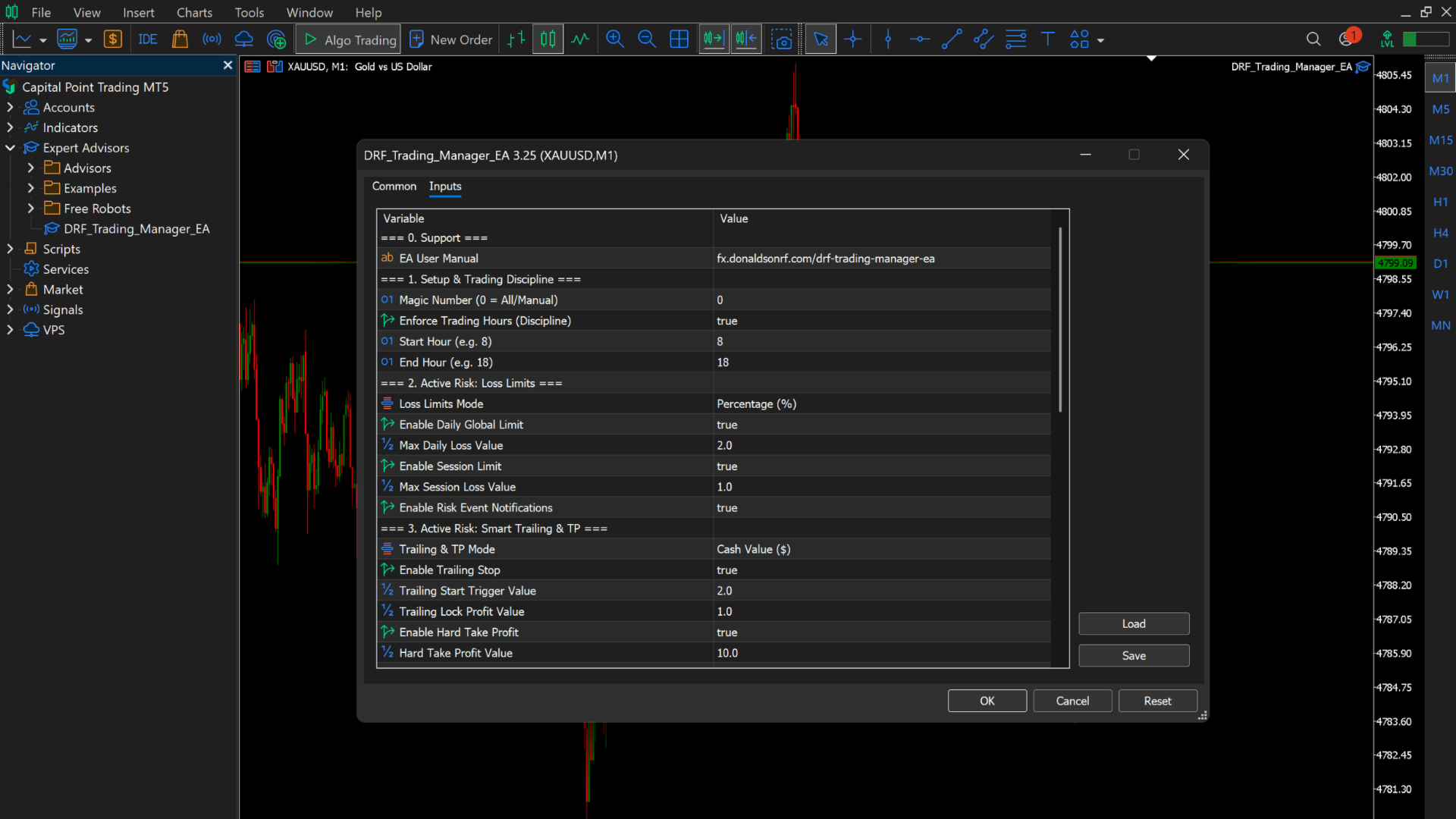
Group 0: Help & Support
Just one simple setting here.
InpURL_Manual: A quick link back to this manual in case you need to double-check a setting later on.
Group 1: Setup & Trading Hours
This section stops you from overtrading and holding bad positions into dead market hours.
InpMagic (Magic Number): If you run other EAs, they each need their own ID. But here is the trick: if you leave the DRF Trading Manager's Magic Number at 0, it becomes the global boss. It will protect and manage any open trade on that chart, whether you clicked "buy" manually or another bot did it.
InpEnableTradingHours: Turn this on to force yourself to trade only within a specific window.
InpTradeStartHour & InpTradeEndHour: Set your working shift. If the clock hits your End Hour, the EA steps in and flattens all your positions. No more carrying risky trades overnight or into low-liquidity sessions.
Group 2: Hard Risk Limits (The Account Saver)
This is the most important part of the EA. It cuts you off when you're having a bad day.
InpLossMode: Choose how to calculate your limits: a flat cash value in dollars (LIMIT_CASH) or a percentage of your balance (LIMIT_PERCENT).
InpEnableDailyLimit & InpMaxDailyLoss: Set your daily pain limit. If you set this to 2%, the EA watches your equity. If you hit that -2% drawdown at any point, it closes everything immediately. Your trading day is forced to end, saving the rest of your account from emotional revenge trading.
InpEnableSessionLimit & InpMaxSessionLoss: A lifesaver for prop firm traders. This limits how much a single active, floating session can go against you, preventing one terrible trade from blowing your whole daily limit at once.
InpNotifRisk: Sends an alert to your phone and MT5 terminal the moment you hit a limit.
Group 3: Smart Trailing & Take Profit
Stop watching winning trades turn into losing ones.
InpTrailingMode: Choose cash value or percentage for your profit limits.
InpEnableTrailing: Turns on the profit trailing engine.
InpTrailingStart & InpTrailingLock: Here is how it works: say you set Start to $20 and Lock to $10. As soon as your trade floats $20 in profit, the EA wakes up and locks in $10. If the market keeps running in your favor, your protection follows it. If it reverses, it stops you out in profit. Cut the losers fast, let the winners run safely.
InpEnableHardTarget & InpTargetProfit: Your daily goal. Set it to $100, and the moment your floating profit hits that number, the EA closes all trades and secures the bag.
Group 4: Spread Monitor
Don't enter the market when conditions are terrible.
InpMaxSpread: The maximum spread you are willing to tolerate (in points).
InpSpreadDelaySecs & InpSpreadInterval: Spreads can spike for a split second. The "Delay" ensures the spread is actually high for a few seconds before annoying you with an alert. The "Interval" dictates how often you want to be reminded about it.
InpNotifSpread: Toggles the spread warnings on or off.
Group 5: News Filter
Stop getting caught off-guard by high-impact economic news.
InpNewsFilter: Choose if you only care about High Impact news, or both High and Medium.
InpNewsLeadMins: Give yourself a heads-up. If set to 30, the EA will ping you exactly half an hour before the news drops, giving you time to tighten stops or exit trades.
InpNotifNews: Turns the news alerts on.
Group 6: Market Close Warning
InpCloseAlert1: Set how many minutes before the daily or weekend market close you want to be warned. Great for giving yourself time to close positions before the broker's rollover gap.
InpNotifMarketClose: Toggles this reminder on or off.
Group 7: Exhaustion Monitor
InpExhaustInterval: The EA keeps an eye on the RSI and Bollinger Bands. If price breaks out of the bands while the RSI is extremely overbought or oversold, it flags a potential reversal. This setting controls how often it alerts you about these setups.
InpNotifExhaust: Sends these setup alerts straight to your phone.
Group 8: Reports & Reminders
Keep your head in the game without staring at the chart all day.
InpDailyReportInterval: Sends a text to your phone summarizing your day: orders taken, wins, losses, win rate, and total closed PnL.
InpSessionReminderInterval: If you are holding open trades, the EA will periodically ping you with your current floating risk and daily net balance. It helps keep you grounded.
InpNotifReport: Master switch for these reports.
Group 9: Dashboard Setup
InpDashColor: Just a visual setting so you can match the EA's on-screen panel to your preferred chart colors.
Group 10: Support & Contact
I put a lot of time into making this code clean, fast, and extremely reliable for the community.
If this EA saves your account from a bad day, helps you lock in great profits, and you feel like buying me a coffee, you can use the PayPal email in InpSupport1. It is absolutely never required, but always highly appreciated to keep the updates coming!
Also, I am a developer. If you have questions about the settings, want to add a custom indicator to this code, or want to build a completely new EA from scratch based on your own strategy, shoot me an email at the address in InpSupport2. Let's chat.
Thank you for using the DRF Trading Manager. If this tool helps you trade smarter and keeps your capital safe, please take a moment to leave a review and a comment on the MQL5 Market. Your feedback is exactly what pushes this project up the rankings so it can reach more people—especially new traders who desperately need to protect their accounts right at the start of their journey. Trade safe!