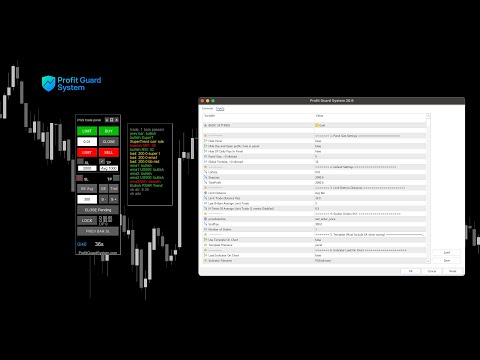
Trade Panel MT5 by PGS

PGS Trade Panel – Professional Trade Management Tool for MT5

Take full control of your trading with structured execution, real-time feedback, and customizable automation, all directly on your chart.

Profit Guard System Trade Panel is an advanced on-chart trading tool designed to give you discipline, clarity, and precision in every trade.

It supports manual, semi-automated, and automated workflows with multiple strategies that can be enabled, customized, or disabled at any time.

Automatic Take Profit features are currently active for testing and can be fully adjusted or turned off from the settings.

1. Trading Panel (Execution & Management)

  • One-click Buy, Sell, and pending order execution
  • Visual Stop Loss and Take Profit placement
  • Break Even and trailing stop management
  • Scale-in orders and position management tools
  • Real-time PNL tracking and trade control
  • Lock (hedge) and risk management features

2. Settings & Auto Assistance (Strategy Control)

  • Multiple strategies and conditions (fully customizable)
  • Enable/disable automation at any time
  • Adjustable pip values, filters, and logic rules
  • Session filters and market condition filters
  • Risk management and trade limits
  • Auto Take Profit (active for testing – fully adjustable or removable)

3. Message Panel (Real-Time Feedback)

  • Live display of active rules and filters
  • Market condition and trend status
  • Entry and exit logic in real time
  • Trade management and TP/SL activity
  • Clear on-chart guidance without opening settings

Free Companion Indicator – PGS Indicator

  • Download the PGS Indicator for free from the MQL5 Market
  • Sync it directly with the Trade Panel
  • Enable synchronization from Section 6 in the panel settings
  • Automatically reflects panel logic and market conditions on the chart
  • Helps visualize strategies, filters, and trade behavior in real time

Recommended Usage

  • Start with default settings
  • Test on demo before going live
  • Customize based on your instrument and strategy

#tags: Trade Panel, Trading Panel, Trade Manager, Trading Assistant, Trade Assistant, Manual Trading, Manual Tester, Manual Backtest, Quick Tool, Trade Utility, Order Management, Position Management, Risk Management, Lot Size Calculator, Break Even, Trailing Stop, Smart Trailing Stop, Partial Close, Close All, Hedge, Lock, Equity Protection, Max Loss, Take Profit, Stop Loss, Hidden Stop Loss, Hidden Take Profit, Virtual SL, Virtual TP, Virtual Pending Order, Virtual Trade Pad, Close Profit, Total Profit, Close if Profit or Loss, Auto Stop Loss, Auto Take Profit, Bulk SL, Bulk TP, Trailing Profit, Risk-to-Reward Ratio, Risk Reward Tool, Scalping, Scalper, Grid Strategy, Fast Trading, Trade Basket Management, Overtrading, History Stat, Visualization Tools, Simplified Trading, Precise Position Sizing, Universal Stop Loss, Universal Take Profit, Alert Notifications, Trade Notification, Screenshot, Forex Helper, Forex Tool, Trader Assistant, Market Session, News Filter, Economic Calendar, Training Virtual Trade, Self Test, Task Scheduler, Trade Timer, Panel Size, Order Grid, CLP, Breakeven, Risk-Free Options, Equity Guard, PGS Panel, PGS Trade Panel, Profit Guard System, MT5 Tool, MT5 Panel, MT5 Trade Manager

Produtos recomendados
This tool can help you close all open orders with one click, just click "Close all". If you only want to close profitable orders, click the "Close profitable" button. After clicking, all floating orders will be closed; If you only want to close the orders with floating losses, click the "Close losable" button. After clicking, all orders with floating losses will be closed. This tool has been tested for a year. The one-click position closing function is very complete, the position closing is time
Basket trading /Basket  SL TP  Automatic SL TP Calculation   This utility will calculate SL and TP based on 2 input parameters  PerUnitTP -This means what is per .01 TP like 1 $ per .01 Lot. SLToTP_Ratio-This what is ration SL to TP if this parameter is 3 that means if TP is 1 $ then SL will be 2$ (per .01 Lot) so if total portfolio summing to .05 lot that that means TP will be automatically become 5 $ and SL become 10 $. This is very good utility when you want set SL TP for many open trade
Horizontal Line Trade Assistant EA  Semi-Automated Trading Assistant      IMPORTANT :     On the main/purchased program a user can click on the Horizontal line and change it to Buy or Sell, and drag by double clicking on it. Please keep in mind that this option is not available on demo version, due to some restrictions/limitations of Strategy Tester, some Object related operations are not available in the  Strategy Tester. But, it will not prevent you from Testing, please drop an Object to chart
Scalper Pad PRO — One-Click Trade Management Panel for MetaTrader 5 ScalperPad PRO is a trade execution and management panel for MetaTrader 5. It is designed for active manual traders who need to open, adjust, and close trades quickly without using the standard MT5 order dialogs. The panel does not generate trade signals and does not run automated strategies. All trade entries are initiated manually by the user. Platform: MetaTrader 5 (build 2755 or l
FREE
Close All Pro MT5 – Fast PnL Control is a powerful trade manager MT5 utility that gives you total control over your trades. With a single click, you can close all MT5 orders, monitor real-time profit and loss, and manage your floating PnL directly from a clean on-chart panel. The tool is lightweight, responsive, and built to help traders save time, reduce emotional stress, and maintain focus. Whether you trade manually or through an EA, this MT5 profit panel provides the visibility and precisio
Close Partial Orders
Marco Aurelio Santos Costa
De forma simples e prática, você pode gerenciar melhor suas operações escolhendo a quantidade de lotes que deseja fechar diretamente a mercado. Essa funcionalidade permite reduzir sua exposição ao risco e realizar vendas parciais, ajudando a proteger lucros e equilibrar sua posição com mais controle. De forma simples com apenas um botão escolha a quantidade de lotes. Escolha qual ordem você deseja fechar. E pronto, diminuiu o seu risco!
Pare de permitir que as corretoras cacem o seu Stop Loss! Você está cansado de ver o preço atingir o seu Stop Loss exatamente na ponta da sombra e, em seguida, reverter imediatamente a seu favor? Isso geralmente é causado pelo ruído do mercado ou pela chamada "Caça aos Stops" (Stop Hunting). TrailGuardian é um gerenciador de operações profissional "Stealth" (invisível) projetado para proteger seus lucros sem revelar seus níveis de saída ao mercado. Ele cria uma linha de stop-loss virtual inte
Orders Executor
Claudio Aguiar De Aragao
Apresentando       Orders Executor , seu companheiro de negociação poderoso e eficiente, projetado para executar ordens diretamente de um arquivo texto especificado pelo usuário. Esta ferramenta de negociação inovadora agiliza o seu processo de negociação, fornecendo uma solução conveniente e automatizada para executar negociações com precisão e velocidade. Características principais   : **Integração de arquivo de texto:** Orders Executor       foi projetado para ler e interpretar facilmente
The script shows statistics of trades for the specified period. For example, if you want to know the details of trades of the ATC2010 Winner ( bobsley ): Login with his account using the investor (read-only) password (MetaTrader5); Open the chart of his trading symbol (EURUSD); Run this script on the chart; Specify 2010.10.1 in "date from", and the diagram will be shown.
Instructions for Using Reverse Copier EA Attach EA to Charts Open MetaTrader and attach the EA to any chart on both accounts (master & slave). Make sure AutoTrading is enabled. Master Account (Signal Sender) Set Mode = Master in EA settings. This account will send trade signals. Slave Account (Signal Receiver) Set Mode = Slave in EA settings. This account will receive trades in reverse (opposite direction). Lot Multiplier In Slave EA settings, set Multiplier to control lot size. Example: 1.0
Stop and Take EA
Luis Enrique Ricales
3.67 (3)
The Expert Advisor is only designed for manual trading. The EA sets stop loss and take profit for positions and pending orders on the current symbol. It also has trailing stop and breakeven functions. Input Parameters Stop loss   - stop loss value; Take profit   - take profit value; Close all if profit reached the x percent of balance or   - close all positions once the total profit reaches x percent of balance; close all if profit reached the x profit amount in currency   - close all positions
FREE
Price Trap Zone
Mohamed Amr Mohamed Osama Abdelwahab
Price Trap Zone — Monte seu plano de trading e vá viver sua vida O Price Trap Zone permite colocar até 4 "armadilhas" no gráfico — retângulos que representam um intervalo de TEMPO (largura) e um intervalo de PREÇO (altura). Arme a armadilha, escolha o que deve acontecer quando o preço entrar nela, e vá cuidar da sua vida. A ferramenta vigia o mercado por você e executa seu plano no momento em que o preço pisa na armadilha. POR QUE TEMPO + PREÇO, E NÃO APENAS UMA LINHA? Um alerta de preço ou o
Session panel
Timo Mario Hoffmann
Session Panel for MT5 Session Panel is a free MT5 indicator that gives you a fast and convenient live overview of the major trading sessions directly from the chart. Monitor Tokyo, London, and New York session times, see which session is currently active, track countdowns to the next session, and view session overlap information in one compact dashboard. Built for traders who want better market timing, clearer session awareness, and a cleaner chart workflow in live market conditions. Session Pan
FREE
Position Prime
Mariana Cordeiro Neves Fernandes
Baixe a versão Demo gratuita agora mesmo e teste toda a gestão de risco dentro do seu Testador de Estratégias antes de comprar! O Position Prime é um assistente de execução visual e um gerenciador de risco de nível institucional para o MetaTrader 5. Desenvolvido para traders que exigem agilidade e precisão, ele elimina a necessidade de cálculos manuais de lote e transforma o seu gráfico em uma verdadeira mesa de operações. Planeje, execute e proteja os seus trades em frações de segundo. ️ G
Shortcuts MT5 Hotkeys Scalping
Pablo Filipe Soares De Almeida
5 (2)
https://www.mql5.com/en/blogs/post/768319 Comandos de Tecla i - Painel de Controle do EA. E - Assistente de Trading. G - Painel de Desempenho B - Comprar. S - Vender. 1-2-3 - Comprar (lotes personalizáveis) 4-5-6 - Vender (lotes personalizáveis) L - Buy Limit. M - Sell Limit. U - Buy Stop. N - Sell Stop. Q - Remover Stop Loss. W - Remover Take Profit C - Fecha todas as posições abertas. X - Fecha uma posição específica. Z - Cancela todas as ordens pendentes. T - Trailing stop. P - Parcial. K -
Auto Stop Loss All Trades MT5
Prafull Manohar Nikam
4 (1)
This utility automatically places Stop Loss and Take Profit levels on newly opened positions. The Stop Loss and Take Profit values are specified in pips. The utility can also move Stop Loss to Break Even and trail the Stop Loss after a specified profit level is reached. Input Parameters SL and Trailing SL Stop Loss value in pips. If trailing is enabled, the same value is used as the trailing Stop Loss distance. Trailing Steps Distance in pips required before the Stop Loss is updated again while
Atlas Risk Radar MT5 Atlas Risk Radar MT5   is a professional risk dashboard and account protection utility for MetaTrader 5. It monitors open positions and pending orders directly on the chart and helps you see where risk is building up before it becomes a problem. Atlas Risk Radar is not a trading robot and not a signal indicator. It is a visual risk management tool for Forex traders, CFD traders, prop firm traders, scalpers, day traders, swing traders and portfolio traders who want a clear ov
Spread and Swap monitor
Gennadiy Stanilevych
5 (1)
O indicador tem o objetivo de determinar o tamanho do spread e swap, a distância para configurar ordens pendentes, stop loss permitido com o preço atual e o risco por 1 ponto na moeda de depósito. O indicador informa ao trader sobre possíveis despesas e os lucros adicionais relacionados com a transferência de uma posição para a próxima sessão de negociação do instrumento financeiro. Ele também informa sobre o tamanho do spread, a distância das ordens pendentes, stop loss e o trailing stop a part
ATX Loss Guard Shield — Account-Wide Risk Circuit Breaker OVERVIEW ATX Loss Guard Shield does not trade. It does not predict the market, and it generates no signals. It watches your entire MetaTrader 5 account — every symbol, every magic number, your manual trades and any EA you run alongside it — and enforces the loss limits you define, automatically and without hesitation. This is a discipline enforcer, not a profit strategy. If you have ever blown past a daily loss limit because you "just
Virtual TP SL TS
Andrei Sviatlichny
Torne seus níveis Take Profit, Stop Loss e Trailing Stop invisíveis para o corretor! Opção principal: STEALTH MODE Virtual Trailing Stop Virtual Take Profit Ponto de equilíbrio virtual Virtual Stop Loss Vida útil dos pedidos virtuais AVISO: O Expert Advisor não faz pedidos sozinho. Você mesmo deve abrir os pedidos (inclusive por meio do painel de Especialistas) ou usar um Especialista terceirizado em outro gráfico do mesmo par de moedas. Especifique o número mágico "-1" nas configurações do Espe
Telegram Sender — MetaTrader to Telegram Trade Alerts Telegram Sender   is a powerful MetaTrader utility that instantly sends trading alerts from your MT4/MT5 platform directly to Telegram. Stay connected to the market anywhere, anytime, without constantly watching your charts. Designed for traders who value speed, automation, and convenience, Telegram Sender delivers real-time notifications for signals, order activity, and market events straight to your phone or Telegram group. Key Features In
Este consultor é um painel de negociação de um clique para vários pares. Dar um click       ABRIR       Botão para abrir pedidos para pares selecionados. Dar um click       APROXIMAR       Botão para fechar pedidos dos pares selecionados. O lote do pedido é o número inserido pelo usuário. Um número positivo corresponde a uma ordem de compra, um número negativo corresponde a uma ordem de venda. Clique no botão   FECHAR   para fechar o pedido inteiro em vez de um fechamento parcial. A ação de fec
Superior Telegram Signals Multi-Platform Trade Copier & Notification System   Available for MetaTrader 4 and MetaTrader 5 Superior Telegram Signals   is a utility that connects a trading terminal to the Telegram application. It is designed to send automated trade notifications, chart screenshots, and account status updates to a specified Telegram chat, channel, or group. Use Cases This tool can be used by: Signal Providers:   To automate the broadcasting of trade signals, modifications, and clos
The script creates account summary report in a separate window. The report can be created for all deals and on deals for selected financial instruments. It is possible to specify a time interval of calculation and save report to htm-file. The script creates account summary report in a separate window. The report can be created for all deals and for deals of the selected financial instruments. It is possible to specify a time interval of calculation and save report to htm-file. Input parameters
How the Chart Cleaner Script Works The Chart Cleaner is a one-click tool designed to instantly wipe your chart clean. When you drag and drop the script onto a chart, it scans for and removes all visual objects—including trend lines, horizontal lines, text labels, shapes, and any other drawings you have placed. The result is a completely clean, uncluttered chart, giving you a fresh workspace for your analysis. It's the fastest way to reset your chart to its default state.
This script is an Intelligence Gathering Utility designed to give you full control over your data exports from MetaTrader 5. It allows you to synchronize up to three different symbols into a single file with precise timestamping. 1. Setting the Data Range (Range) You can define exactly which historical period you want to capture: Date Mode : If Last N bars (0 = use date range above) is set to 0 , the script will export all data between your chosen start and end dates. Bar Mode : By entering a nu
This utility provides the ability to use hot keys in manual trading instantly responding to the current market situation. You can assign hot keys to open/close positions by their type, open/close all positions on the current chart and remove all orders on the current chart. You can also assign hot keys for five predefined trade volumes and switch between them if necessary with no need to change the volume manually from time to time. It is also possible to set the auto calculation of a trade volu
ASTANA SMART CLOSE MANAGER MT5 MQL5 Product Description     Short Description Astana Smart Close Manager MT5 is a professional trading utility for MetaTrader 5 designed for fast, convenient and controlled position closing. The utility helps traders manage open positions by symbol, direction, profit, loss, Magic Number and selected instrument list.   Main Purpose The tool is designed for manual traders, scalpers, intraday traders and Expert Advisor users who need to close specific positions quic
Trade Panel Osw MT5
William Oswaldo Mayorga Urduy
PAINEL COMERCIAL OSW METATRADE 5 Este painel irá auxiliá-lo na colocação de ordens de mercado, permitindo visualizar o custo de cada operação, de acordo com a moeda estabelecida na conta. MANUAL DE FUNÇÕES: 1) Selecione um STOPLOSS, com os botões ou por escrito (você pode ativar ou desativar a opção de colocá-lo). 2) Selecione um TAKEPROFIT, com os botões ou por escrito (você pode ativar ou desativar a opção de colocá-lo). 3) Selecione um VOLUME, com os botões ou por escrito. 4) Selecione
Telegram Messenger Signal
Rene Thristan Ferreira Da Silva
Monitor de Operações em Tempo Real + Integração com Telegram (MT5) Transforme sua conta MetaTrader 5 em um sistema automatizado de monitoramento e envio de operações diretamente para o Telegram. Este Expert Advisor NÃO abre operações. Ele funciona exclusivamente como um monitor inteligente, detectando automaticamente qualquer nova operação aberta na conta e enviando os dados em tempo real para um grupo ou canal no Telegram. ️ O QUE O SISTEMA FAZ • Detecta automaticamente qualquer operação ab
Os compradores deste produto também adquirem
Trade Assistant MT5
Evgeniy Kravchenko
4.43 (214)
Ajuda a calcular o risco por comércio, a fácil instalação de uma nova encomenda, gestão de encomendas com funções de fecho parcial, trailing stop de 7 tipos e outras funções úteis. Materiais e instruções adicionais Instruções de instalação   -   Instruções para a aplicação   -   Versão de teste da aplicação para uma conta de demonstração Função de linha Mostra no gráfico a linha de Abertura, Stop Loss, Take Profit. Com esta função é fácil definir uma nova ordem e ver as suas características ad
Bem-vindo ao Trade Manager EA—uma ferramenta de gestão de risco criada para tornar o trading mais intuitivo, preciso e eficiente. Não é apenas uma ferramenta para executar ordens, mas uma solução abrangente para planejamento de operações, gerenciamento de posições e controle de risco. Seja você um iniciante, trader avançado ou scalper que precisa de execução rápida, o Trade Manager EA adapta-se às suas necessidades, oferecendo flexibilidade em todos os mercados, desde forex e índices até commodi
Local Trade Copier EA MT5
Juvenille Emperor Limited
4.96 (142)
Experimente uma cópia de negociação excepcionalmente rápida com o Local Trade Copier EA MT5 . Com sua fácil configuração de 1 minuto, este copiador de negociações permite que você copie negociações entre vários terminais MetaTrader no mesmo computador Windows ou em um Windows VPS com velocidades de cópia ultra rápidas de menos de 0.5 segundos. Seja você um trader iniciante ou profissional, o   Local Trade Copier EA MT5   oferece uma ampla gama de opções para personalizá-lo de acordo com suas ne
TradePanel MT5
Alfiya Fazylova
4.88 (162)
Trade Panel é um assistente de negociação multifuncional. O aplicativo contém mais de 50 funções de negociação para trading manual e permite automatizar a maioria das tarefas de negociação. Antes da compra, você pode testar a versão de demonstração em uma conta demo. Baixe a versão experimental do aplicativo para uma conta de demonstração: https://www.mql5.com/pt/blogs/post/762547 . Instruções completas aqui . Comércio. Permite realizar operações de negociação com um clique: Abrir ordens pendent
Versão Beta O Telegram to MT5 Signal Trader está quase no lançamento oficial da versão alfa. Alguns recursos ainda estão em desenvolvimento e você pode encontrar pequenos erros. Se tiver problemas, por favor reporte, seu feedback ajuda a melhorar o software para todos. Telegram to MT5 Signal Trader é uma ferramenta poderosa que copia automaticamente sinais de trading de canais ou grupos do Telegram diretamente para sua conta MetaTrader 5 . Suporta canais públicos e privados do Telegram, e você
================================================================================ POC BREAKOUT - V20.72. Full Professional Grade Toolkit ================================================================================ POC Breakout is a full MetaTrader 5 trading dashboard for discretionary traders who want breakout signals, Point of Control (POC) context, volume profiles, order flow, market structure, news, alerts, and advanced trade planning in one professional workspace. Attached directly to you
Farmed Hedge Yield Farming | All Markets (Manual - Hybrid - Semi/Automated EA) MULTI-ASSET SUPPORT Trade any asset available on your broker - Forex: Major, Minor, Exotic pairs - Crypto: BTC, ETH, XRP, SOL, BNB - Stocks: Apple, Tesla, Amazon, Google, etc. - Commodities: Gold, Silver, Oil, Gas - Indices: US30, NAS100, SPX500, DAX40 - Any CFD your broker offers VERIFIED TRADING RESULTS - Farmed Hedge Yield Axi Copy:  https://www.mql5.com/en/signals/2356376 - Farmed Hedge Yield Exn Copy:   https:/
Exp COPYLOT CLIENT for MT5
Vladislav Andruschenko
3.97 (35)
Copiador profissional de operações para MetaTrader 5 Um copiador de operações rápido, profissional e confiável para MetaTrader . COPYLOT permite copiar operações de Forex entre terminais MT4 e MT5 com suporte para contas Hedge e Netting . A versão MT5 do COPYLOT oferece suporte a: - MT5 Hedge → MT5 Hedge - MT5 Hedge → MT5 Netting - MT5 Netting → MT5 Hedge - MT5 Netting → MT5 Netting - MT4 → MT5 Hedge - MT4 → MT5 Netting Versão MT4 Descrição completa + DEMO + PDF Como comprar Como instalar Como
Power Candles Strategy Scanner - Localizador de configurações multissímbolo com auto-otimização O Power Candles Strategy Scanner utiliza o mesmo motor de auto-otimização que alimenta o indicador Power Candles — em todos os símbolos da sua lista de observação, lado a lado. Um painel indica-lhe quais os símbolos que são estatisticamente negociáveis neste momento, qual a estratégia vencedora para cada um, o par ideal de Stop Loss / Take Profit, e avisa-o assim que um novo sinal é emitido. Esta ferr
Anchor Trade Manager
Kalinskie Gilliam
5 (5)
Anchor: The EA Manager Run your full EA portfolio without conflicts, without stacked risk, and without watching every chart yourself. Anchor coordinates up to 64 Expert Advisors on a single account, including daily loss protection built for prop firm rules. Attach Anchor to any chart. Type your EA names and magic numbers in one line. Click OK. Anchor begins coordinating immediately. Built for portfolios. Built for prop firms. Built for discipline. The Problem Running multiple EAs on the same acc
Trade copier MT5
Alfiya Fazylova
4.59 (49)
Trade Copier é um utilitário profissional projetado para copiar e sincronizar negociações entre contas de negociação. A cópia ocorre da conta / terminal do fornecedor para a conta / terminal do destinatário, instalada no mesmo computador ou vps. PROMOÇÃO - Se você já adquiriu o "Trade copier MT5", pode receber o "Trade copier MT4" gratuitamente (para cópia MT4 > MT5 e MT4 < MT5). Para obter informações mais detalhadas sobre os termos, por favor, entre em contato conosco através de mensagens priv
YuClusters
Yury Kulikov
4.93 (43)
Atenção: A versão demo para revisão e teste está aqui . YuClusters é um sistema profissional de análise de mercado. O trader tem oportunidades únicas para analisar o fluxo de pedidos, volumes de negociação, movimentos de preços usando vários gráficos, perfis, indicadores e objetos gráficos. O YuClusters opera com base em dados de Tempos e Negócios ou informações de ticks, dependendo do que está disponível nas cotações de um instrumento financeiro. O YuClusters permite que você crie gráficos com
Footprint Chart Pro — Professional OrderFlow EA for MetaTrader 5 Version 6.34 | Professional tool for real traders | Institutional-Grade Visualization DEMO USERS - PLEASE SELECT EVERY TICK / REAL TICK WHEN TESTING AND YOU HAVE DOWNLOADED HISTORICAL DATA. IF YOU SEE A WAITING SCREEN AND IT IS NOT DOWNLOADING, IT MEANS YOU HAVE LOW HISTORICAL DATA. TRY 1 MIN AND 5 MIN FIRST ON 1 DAY DATA. ONE DAY DATA SHOULD BE THE NEWEST AND MOST CURRENT DATE. PLEASE WAIT UNTIL THE MARKET HAS ROLLED OVER PERIOD.
Telegram to MT5 Multi-Channel Copier copia automaticamente sinais de trading dos seus canais do Telegram diretamente para o MetaTrader 5. Sem bots, sem extensões de navegador, sem copiar manualmente. Você recebe um sinal no Telegram e o EA abre a operação no seu terminal em poucos segundos. O produto inclui dois componentes: um aplicativo do Windows que escuta seus canais do Telegram, e este Expert Advisor que executa os sinais no seu terminal MT5. Também está disponível uma versão para MT4. Gui
Welcome to ENTRY IN THE ZONE WITH SMC MULTI TIMEFRAME Entry In The Zone with  SMC Multi Timeframe  is a professional trading indicator built on Smart Money Concepts (SMC), combining market structure analysis with a No Repaint BUY / SELL signal system in a single indicator. It helps traders understand market structure more clearly, identify key price zones, and focus on higher-quality trading opportunities. By combining Multi-Timeframe Analysis, Points of Interest (POIs), and real-time signals, t
The product will copy all telegram signal to MT5 ( which you are member) , also it can work as remote copier.  Easy to set up, copy order instant, can work with almost signal formats, image signal,  s upport to translate other language to English Work with all type of channel or group, even channel have "Restrict Saving Content", work with  multi channel, multi MT5 Work as remote copier: with signal have ticket number, it will copy exactly via ticket number. Support to backtest signal. How to s
Trade Manager DaneTrades
Levi Dane Benjamin
4.28 (29)
Trade Manager para ajudá-lo a entrar e sair rapidamente de negociações enquanto calcula automaticamente seu risco. Incluindo recursos para ajudar a evitar negociações excessivas, negociações de vingança e negociações emocionais. As negociações podem ser gerenciadas automaticamente e as métricas de desempenho da conta podem ser visualizadas em um gráfico. Esses recursos tornam este painel ideal para todos os traders manuais e ajudam a aprimorar a plataforma MetaTrader 5. Suporte multilíngue. Vers
Painel de Trading para MetaTrader 5 — controle profissional de trading em um clique a partir do gráfico e do teclado Um painel de trading avançado para traders ativos, criado para abrir, gerenciar e fechar operações muito mais rápido do que com a interface padrão do MetaTrader. Esta solução foi desenvolvida para quem deseja controlar posições, ordens pendentes, lucro total e execução em um único espaço de trabalho profissional. Não se trata apenas de mais um utilitário. É um verdadeiro cockpit
EA Auditor
Stephen J Martret
5 (4)
EA Auditor is an independent analysis tool for traders evaluating Expert Advisors and trading signals on MetaTrader 5. It audits backtest reports, reviews posted developer signals, and cross-verifies the two against each other to help traders assess strategies before committing capital. The MQL5 market offers a wide range of Expert Advisors from many developers, with varying approaches, quality, and transparency. EA Auditor provides a consistent, data-driven framework for reviewing them, answer
Seconds Chart MT5
Boris Sedov
4.61 (18)
Seconds Chart - uma ferramenta exclusiva para criar gráficos de segundos no MetaTrader 5 . Com o Seconds Chart , você pode criar gráficos com períodos definidos em segundos, proporcionando flexibilidade e precisão ideais para análise, indisponíveis em gráficos padrão de minutos ou horas. Por exemplo, o período S15 indica um gráfico com velas de 15 segundos. Você pode usar qualquer indicador ou Expert Advisor com suporte a símbolos personalizados. Trabalhar com eles é tão conveniente quanto negoc
Trade Dashboard MT5
Fatemeh Ameri
4.95 (131)
Trade Dashboard simplifies how you open, manage, and control your trades, with built-in lot size calculation. It allows you to execute trades, manage risk, and control positions directly on the chart, with tools such as partial close, breakeven, and trailing stop. Designed to reduce manual work and help you stay focused on your trading decisions. A demo version is available for testing. Detailed explanations of features are provided within the MQL5 platform. Installation instructions are include
FUTURES ORDERFLOW FOOTPRINT CHART Professional OrderFlow EA for MetaTrader 5 Version 1.01| Professional tool for real traders | Institutional-Grade Visualization STRATEGY TESTER USERS - PLEASE SELECT EVERY REAL TICK WHEN TESTING AND YOU HAVE DOWNLOADED HISTORICAL DATA. IF YOU SEE A WAITING SCREEN AND IT IS NOT DOWNLOADING, IT MEANS YOU HAVE LOW HISTORICAL DATA. TRY 1 MIN AND 5 MIN FIRST ON 1 DAY DATA. ONE DAY DATA SHOULD BE THE NEWEST AND MOST CURRENT DATE. PLEASE WAIT UNTIL THE MARKET HAS ROL
HINN Lazy Trader
ALGOFLOW OÜ
5 (1)
LIMITED SUMMER SALE -40% ! ONLY $470 insead of $790!  Maximum real discount! ONLY UNTIL 08/22 The core idea: using the user interface, you configure the parameters the chart must meet before entering a position (or positions), choose which entry models to use, and set the rules for when trading and planning should end. Lazy Trader  handles the rest: it  takes over all the routine chart watching and execution! full description  :: 3 key videos [1] ->  [2]   ->  [3] What can it do? - Understand
Quant AI Agents
Ho Tuan Thang
5 (1)
Quant AI Agents are independent trading Expert Advisors. Instead of trading using a fixed strategy like other conventional EAs, Quant AI Agents   is a   multi-agent AI trading framework   that turns natural-language strategy prompts into live.  WANT THE SAME RESULTS AS MY LIVE SIGNAL?   Use the exact same brokers I do:   IC MARKETS , IC TRADING   .  Unlike the centralized stock market, Forex has no single, unified price feed.  Every broker sources liquidity from different providers, creating un
Timeless Charts
Samuel Manoel De Souza
5 (7)
Timeless Charts é um utilitário de trading tudo-em-um para traders profissionais. Ele combina tipos de gráficos personalizados, como Gráficos por Segundos e Renko , com análise avançada de fluxo de ordens utilizando Footprints , Clusters , Perfis de Volume , estudos VWAP e ferramentas de análise ancorada para uma visão mais profunda do mercado. O gerenciamento de ordens e posições é realizado diretamente no gráfico por meio de um painel integrado de gerenciamento de operações , enquanto o Market
EasyInsight AIO MT5
Alain Verleyen
4.92 (12)
EASY Insight AIO – A solução tudo-em-um para trading inteligente e sem esforço Visão geral Imagine analisar todo o mercado — Forex, Ouro, Cripto, Índices e até Ações — em segundos, sem precisar examinar gráficos manualmente, instalar indicadores ou lidar com configurações complicadas. EASY Insight AIO é sua ferramenta definitiva de exportação para trading com IA, pronta para usar. Ela oferece um panorama completo do mercado em um único arquivo CSV limpo — pronto para análise imediata no ChatGP
The News Filter MT5
Leolouiski Gan
4.78 (23)
Este produto filtra todos os consultores especializados e gráficos manuais durante o horário das notícias, para que você não precise se preocupar com picos de preços repentinos que possam destruir suas configurações de negociação manuais ou negociações realizadas por outros consultores especializados. Este produto também vem com um sistema de gerenciamento de pedidos completo que pode lidar com suas posições abertas e ordens pendentes antes do lançamento de qualquer notícia. Depois de comprar o
Trader Evolution
Siarhei Vashchylka
5 (7)
" Trader Evolution " - A utility designed for traders who use wave and technical analysis in their work. One tab of the utility is capable of money management and opening orders, and the other can help in making Elliott wave and technical analysis. Manual (Be sure to read before purchasing) | Version for MT4 Advantages 1. Trading in a few clicks. Immediate and pending orders are available in the panel 2. Money management. The program automatically selects the appropriate lot size 3. Simplifies
EA Performance Tracker
Russell Leeon Tan
5 (3)
EA Performance Tracker (AESTracker) A clean, modern dashboard that shows exactly how your trades and EAs are performing — right on your chart. It reads your full account history automatically and breaks down the numbers by magic number / strategy. Display only — it does not place any trades. What it shows - Account header: live Balance, Equity, and Open (floating) P/L - Profit summary: gross profit, net profit, and the exact commission & swap deducted - Key stats: win rate, profit factor, exp
Premium Trade Manager - O Painel de Operações com um Coach Integrado Premium Trade Manager coloca um coach de trading dentro do seu gráfico, com um motor de execução completo por baixo. Configure a operação da forma que sempre faz e deixe o Max, seu coach de trading com IA, ler exatamente esse setup em relação à sua conta ao vivo e dar um veredicto direto antes de confirmar: se o stop é disciplinado, se o risco faz sentido, se há um evento de alto impacto a minutos de distância, se você está pró
Mais do autor
PGSindicator
Giancarlo Giuseppi Bejar
PGSindicator for MetaTrader 5 Free Companion Indicator for Profit Guard System Trade Panel.  ***  The attached video is the " PGS Trade  Panel Tutorial Part 1 "  ***  (4m video) Adjust >>> **** EMA1 N-Pips Separation from EMA2 This setting defines the minimum distance required between EMA1 and EMA2 before a trend condition is considered valid. The default value is 100.0 pips for NASDAQ 100, 1 minute CHART . Depending on how your broker calculates pip values, you may adjust this to 20.0 or 10.0
FREE
Filtro:
Sem comentários
Responder ao comentário