Trade Panel MT5 by PGS
- Utilità
- Giancarlo Giuseppi Bejar
- Versione: 21.3
- Aggiornato: 27 gennaio 2026
- Attivazioni: 10
PGS Trade Panel – Trade Management Tool for MetaTrader 5
Profit Guard System Trade Panel is a professional trade management and execution tool for MetaTrader 5, built to help traders operate with structure, discipline, and clarity.
It delivers a complete on-chart workflow with fast manual execution, rule-based automation, real-time feedback, and advanced trade management tools. Designed for precision, control, and consistency without relying on predictions or unrealistic expectations.
The Profit Guard System website launches in March 2026 with additional indicators, strategy back-testing tools, and educational content.
The current introductory price of $59 remains available until March 2026, after which the regular price will be $149.
You can contact me at any time through the MQL5 Market chat or via our current website for questions, support, and updates.
_______________________________________________________________
*** Adjust Pip Values According to Your Broker Format (EMAs Separation and All Pip-Based Rules)
This setting defines the minimum distance required between EMA1 and EMA2 before a trend condition is considered valid.
The default value is 100.0 pips, optimized for NASDAQ 100 (NAS100) on the 1-minute chart.
Depending on how your broker calculates pip values, you may need to adjust this value by either adding or removing a decimal (for example, changing 100.0 to 10.0 or 20.0 ) so that the real price distance matches the intended logic.
The same adjustment principle applies to all pip-based values in the PGS Trade Panel, including any parameters labeled as:
“Min. Pips for…”, distance filters, volatility thresholds, separation rules, and pip-based conditions.
All default pip values are calibrated for NASDAQ 100 on the 1-minute timeframe.
When using other instruments or brokers with different price formats, pip values should be reviewed and adapted accordingly.
The default value is 100.0 pips, optimized for NASDAQ 100 (NAS100) on the 1-minute chart.
“Min. Pips for…”, distance filters, volatility thresholds, separation rules, and pip-based conditions.
When using other instruments or brokers with different price formats, pip values should be reviewed and adapted accordingly.
_______________________________________________________________
Default Strategy Configuration (Optimized for NASDAQ 1-Minute Chart - One of Many Available Strategies)
The default configuration is optimized for NASDAQ 100 (NAS100 / US100) on the 1-minute chart and includes:
-
Dual EMA crossover for short-term scalping trend detection
-
Automatic chop market identification filter
-
Entry logic based on trend direction at previous bar close for manual entries (Buy/Sell buttons)
-
ATR volatility filter to avoid low-volatility conditions
-
New York session filter (09:30 – 14:00 NY time)
-
Automatic exit logic based on four independent scenarios:
-
Auto Take Profit based on market conditions (equivalent to 15–20–30 NQ futures points)
-
Auto adjustable hard Take Profit based on volatility
-
Auto virtual previous-bar Stop Loss with trailing for profitable trades
-
Auto exit when trend direction changes
This default setup provides a structured, rule-based trading framework for short-term index trading. Each default feature can be disabled on the settings window.
_______________________________________________________________
Recommended Usage
We recommend:
-
Testing the default configuration on NASDAQ 100 (NAS100)
-
Using the 1-minute chart
-
Trading on a demo account first
-
Becoming familiar with the default logic
-
Then customizing the settings for your preferred instrument and strategy
_______________________________________________________________
Free Companion Indicator — PGSindicator
The Profit Guard System Trade Panel includes a free companion indicator named PGSindicator.
You can download PGSindicator for free from the MQL5 Market and install it in the same Experts (Advisors) folderwhere your PGS Trade Panel EA is located.
When both are installed together, the Trade Panel can automatically load the indicator on the chart and adjust its settings based on the panel configuration.
The indicator provides a visual interpretation of the default strategy logic, allowing you to clearly see trend direction, filters, and trading conditions directly on the chart.

This integration helps traders better understand how the panel logic interacts with market structure and price action in real time.
_______________________________________________________________
Platform & Workflow
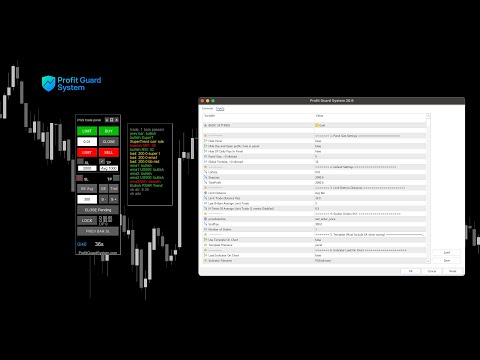
The PGS Trade Panel works directly on the MT5 chart and includes:
-
One-click Buy, Sell, Buy Limit, and Sell Limit execution
-
Visual Stop Loss and Take Profit placement using chart arrows
-
Break Even and Break Even Average management
-
Trailing Stop automation
-
Scale-In limit orders for drawdown or profit expansion
-
Lock (hedge) protection to freeze PNL
-
Previous Bar Stop Loss trailing
-
Pending order management
-
Real-time PNL tracking and discipline tools
-
Trades-per-day control
-
Integrated floating Message Panel for live system feedback
The Message Panel displays:
-
Active rules, filters, and indicators
-
Market condition status
-
Entry and exit logic
-
Trend correlation status
-
Exit and Take Profit triggers
This allows traders to understand what the system is doing in real time, without opening the settings window.
Customization & Automation
The PGS Trade Panel includes a powerful Settings Window with more than 50 configurable features, including:
-
Rules and conditions
-
Indicator filters
-
Risk controls
-
Trade management logic
-
Session filters
-
Automation options
Traders can use the panel for:
-
Fully manual trading with rule assistance
-
Semi-automated trading
-
Automated trade execution based on defined conditions
The system adapts to different trading styles, instruments, and timeframes.
_______________________________________________________________