Trade Panel MT5 by PGS

PGS Trade Panel – Professional Trade Management Tool for MT5

Take full control of your trading with structured execution, real-time feedback, and customizable automation, all directly on your chart.

Profit Guard System Trade Panel is an advanced on-chart trading tool designed to give you discipline, clarity, and precision in every trade.

It supports manual, semi-automated, and automated workflows with multiple strategies that can be enabled, customized, or disabled at any time.

Automatic Take Profit features are currently active for testing and can be fully adjusted or turned off from the settings.

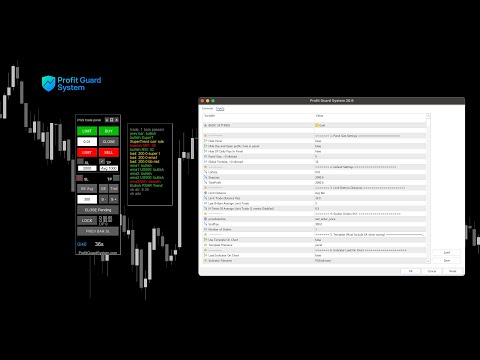
1. Trading Panel (Execution & Management)

  • One-click Buy, Sell, and pending order execution
  • Visual Stop Loss and Take Profit placement
  • Break Even and trailing stop management
  • Scale-in orders and position management tools
  • Real-time PNL tracking and trade control
  • Lock (hedge) and risk management features

2. Settings & Auto Assistance (Strategy Control)

  • Multiple strategies and conditions (fully customizable)
  • Enable/disable automation at any time
  • Adjustable pip values, filters, and logic rules
  • Session filters and market condition filters
  • Risk management and trade limits
  • Auto Take Profit (active for testing – fully adjustable or removable)

3. Message Panel (Real-Time Feedback)

  • Live display of active rules and filters
  • Market condition and trend status
  • Entry and exit logic in real time
  • Trade management and TP/SL activity
  • Clear on-chart guidance without opening settings

Free Companion Indicator – PGS Indicator

  • Download the PGS Indicator for free from the MQL5 Market
  • Sync it directly with the Trade Panel
  • Enable synchronization from Section 6 in the panel settings
  • Automatically reflects panel logic and market conditions on the chart
  • Helps visualize strategies, filters, and trade behavior in real time

Recommended Usage

  • Start with default settings
  • Test on demo before going live
  • Customize based on your instrument and strategy

#tags: Trade Panel, Trading Panel, Trade Manager, Trading Assistant, Trade Assistant, Manual Trading, Manual Tester, Manual Backtest, Quick Tool, Trade Utility, Order Management, Position Management, Risk Management, Lot Size Calculator, Break Even, Trailing Stop, Smart Trailing Stop, Partial Close, Close All, Hedge, Lock, Equity Protection, Max Loss, Take Profit, Stop Loss, Hidden Stop Loss, Hidden Take Profit, Virtual SL, Virtual TP, Virtual Pending Order, Virtual Trade Pad, Close Profit, Total Profit, Close if Profit or Loss, Auto Stop Loss, Auto Take Profit, Bulk SL, Bulk TP, Trailing Profit, Risk-to-Reward Ratio, Risk Reward Tool, Scalping, Scalper, Grid Strategy, Fast Trading, Trade Basket Management, Overtrading, History Stat, Visualization Tools, Simplified Trading, Precise Position Sizing, Universal Stop Loss, Universal Take Profit, Alert Notifications, Trade Notification, Screenshot, Forex Helper, Forex Tool, Trader Assistant, Market Session, News Filter, Economic Calendar, Training Virtual Trade, Self Test, Task Scheduler, Trade Timer, Panel Size, Order Grid, CLP, Breakeven, Risk-Free Options, Equity Guard, PGS Panel, PGS Trade Panel, Profit Guard System, MT5 Tool, MT5 Panel, MT5 Trade Manager

Önerilen ürünler
This tool can help you close all open orders with one click, just click "Close all". If you only want to close profitable orders, click the "Close profitable" button. After clicking, all floating orders will be closed; If you only want to close the orders with floating losses, click the "Close losable" button. After clicking, all orders with floating losses will be closed. This tool has been tested for a year. The one-click position closing function is very complete, the position closing is time
Basket trading /Basket  SL TP  Automatic SL TP Calculation   This utility will calculate SL and TP based on 2 input parameters  PerUnitTP -This means what is per .01 TP like 1 $ per .01 Lot. SLToTP_Ratio-This what is ration SL to TP if this parameter is 3 that means if TP is 1 $ then SL will be 2$ (per .01 Lot) so if total portfolio summing to .05 lot that that means TP will be automatically become 5 $ and SL become 10 $. This is very good utility when you want set SL TP for many open trade
Horizontal Line Trade Assistant EA  Semi-Automated Trading Assistant      IMPORTANT :     On the main/purchased program a user can click on the Horizontal line and change it to Buy or Sell, and drag by double clicking on it. Please keep in mind that this option is not available on demo version, due to some restrictions/limitations of Strategy Tester, some Object related operations are not available in the  Strategy Tester. But, it will not prevent you from Testing, please drop an Object to chart
Scalper Pad PRO — One-Click Trade Management Panel for MetaTrader 5 ScalperPad PRO is a trade execution and management panel for MetaTrader 5. It is designed for active manual traders who need to open, adjust, and close trades quickly without using the standard MT5 order dialogs. The panel does not generate trade signals and does not run automated strategies. All trade entries are initiated manually by the user. Platform: MetaTrader 5 (build 2755 or l
FREE
Close All Pro MT5 – Fast PnL Control is a powerful trade manager MT5 utility that gives you total control over your trades. With a single click, you can close all MT5 orders, monitor real-time profit and loss, and manage your floating PnL directly from a clean on-chart panel. The tool is lightweight, responsive, and built to help traders save time, reduce emotional stress, and maintain focus. Whether you trade manually or through an EA, this MT5 profit panel provides the visibility and precisio
In a simple and practical way, you can better manage your trades by choosing the number of lots you want to close directly at market. This feature helps reduce your risk exposure and make partial sales, protecting profits and balancing your position with more control. With just one button, simply choose the number of lots. Select the order you want to close. Done, your risk is reduced!
Aracı Kurumların Stop Seviyelerinizi Avlamasına Son Verin! Fiyatın tam stop noktanıza iğne atıp, ardından hemen sizin yönünüze döndüğü oldu mu? Bu durum genellikle piyasa gürültüsünden veya "Stop Hunting" (Stop Avcılığı) denilen durumdan kaynaklanır. TrailGuardian , çıkış seviyelerinizi piyasaya ifşa etmeden kârınızı korumak için tasarlanmış profesyonel bir "Gizli" (Stealth) İşlem Yöneticisidir. Aracı kurum sunucusuna herhangi bir stop emri göndermez; bunun yerine terminalinizde sanal bir sto
Orders Executor
Claudio Aguiar De Aragao
Introducing Orders Executor , your powerful and efficient trading companion designed to seamlessly execute orders directly from a user-specified text file . This innovative trading tool streamlines your trading process, providing a convenient and automated solution for executing trades with precision and speed. Key Features : **Text File Integration:**     Orders Executor is designed to effortlessly read and interpret orders from a plain text file, eliminating the need for manual input. Simpl
The script shows statistics of trades for the specified period. For example, if you want to know the details of trades of the ATC2010 Winner ( bobsley ): Login with his account using the investor (read-only) password (MetaTrader5); Open the chart of his trading symbol (EURUSD); Run this script on the chart; Specify 2010.10.1 in "date from", and the diagram will be shown.
Instructions for Using Reverse Copier EA Attach EA to Charts Open MetaTrader and attach the EA to any chart on both accounts (master & slave). Make sure AutoTrading is enabled. Master Account (Signal Sender) Set Mode = Master in EA settings. This account will send trade signals. Slave Account (Signal Receiver) Set Mode = Slave in EA settings. This account will receive trades in reverse (opposite direction). Lot Multiplier In Slave EA settings, set Multiplier to control lot size. Example: 1.0
Stop and Take EA
Luis Enrique Ricales
3.67 (3)
The Expert Advisor is only designed for manual trading. The EA sets stop loss and take profit for positions and pending orders on the current symbol. It also has trailing stop and breakeven functions. Input Parameters Stop loss   - stop loss value; Take profit   - take profit value; Close all if profit reached the x percent of balance or   - close all positions once the total profit reaches x percent of balance; close all if profit reached the x profit amount in currency   - close all positions
FREE
Price Trap Zone
Mohamed Amr Mohamed Osama Abdelwahab
Price Trap Zone — Ticaret planınızı kurun ve uzaklaşın Price Trap Zone, grafiğe en fazla 4 "tuzak" yerleştirmenizi sağlar — belirli bir ZAMAN aralığını (genişlik) ve FİYAT aralığını (yükseklik) temsil eden dikdörtgenler. Tuzağı kurun, fiyat içine girdiğinde ne olacağını seçin ve hayatınıza devam edin. Araç piyasayı sizin için izler ve fiyat tuzağa bastığı anda planınızı uygular. NEDEN SADECE BİR ÇİZGİ DEĞİL DE ZAMAN + FİYAT? Fiyat alarmı veya bekleyen emir yalnızca fiyatı bilir. Tuzak hem fiy
Session Panel for MT5 Session Panel is a free MT5 indicator that gives you a fast and convenient live overview of the major trading sessions directly from the chart. Monitor Tokyo, London, and New York session times, see which session is currently active, track countdowns to the next session, and view session overlap information in one compact dashboard. Built for traders who want better market timing, clearer session awareness, and a cleaner chart workflow in live market conditions. Session Pan
FREE
Position Prime
Mariana Cordeiro Neves Fernandes
Şimdi ücretsiz demo sürümünü indirin ve satın almadan önce Strateji Test Cihazınızdaki tüm risk yönetimi özelliklerini test edin! Position Prime , MetaTrader 5 için kurumsal düzeyde görsel bir işlem asistanı ve risk yöneticisidir. Hız ve hassasiyet arayan yatırımcılar için tasarlanmış olup, manuel lot hesaplama ihtiyacını ortadan kaldırır ve grafiğinizi gerçek bir işlem masasına dönüştürür. Saniyeler içinde işlemlerinizi planlayın, uygulayın ve koruyun. ️ Risk Yönetimi ve Otomatik Lot Hesapl
Shortcuts MT5 Hotkeys Scalping
Pablo Filipe Soares De Almeida
5 (2)
https://www.mql5.com/en/blogs/post/768319 Klavye Komutları i - EA Kontrol Paneli. E - Trade Asistanı. G - Performans Paneli B - Al. S - Sat. 1-2-3 - Al (özelleştirilebilir lotlar) 4-5-6 - Sat (özelleştirilebilir lotlar) L - Buy Limit. M - Sell Limit. U - Buy Stop. N - Sell Stop. Q - Stop Loss’u Kaldır. W - Take Profit’i Kaldır. C - Tüm açık pozisyonları kapatır. X - Belirli bir pozisyonu kapatır. Z - Tüm bekleyen emirleri iptal eder. T - Trailing stop. P - Kısmi kapama. K - Breakeven. O - Pozi
This utility automatically places Stop Loss and Take Profit levels on newly opened positions. The Stop Loss and Take Profit values are specified in pips. The utility can also move Stop Loss to Break Even and trail the Stop Loss after a specified profit level is reached. Input Parameters SL and Trailing SL Stop Loss value in pips. If trailing is enabled, the same value is used as the trailing Stop Loss distance. Trailing Steps Distance in pips required before the Stop Loss is updated again while
Atlas Risk Radar MT5 Atlas Risk Radar MT5   is a professional risk dashboard and account protection utility for MetaTrader 5. It monitors open positions and pending orders directly on the chart and helps you see where risk is building up before it becomes a problem. Atlas Risk Radar is not a trading robot and not a signal indicator. It is a visual risk management tool for Forex traders, CFD traders, prop firm traders, scalpers, day traders, swing traders and portfolio traders who want a clear ov
The indicator is intended for determining the spread and swap size, the distance for setting stop orders and stop losses from the current price allowed and the risk per 1 point in the deposit currency. The indicator informs a trader about possible additional expenses and profits connected with transferring a position to the next trade session of the financial instrument. It also informs about the spread size and the distance of pending orders, stop loss and trailing from the current price. In ad
Make your Take Profit, Stop Loss, and Trailing Stop levels invisible to the broker! Main option: STEALTH MODE Virtual Trailing Stop Virtual Take Profit Virtual Breakeven Virtual Stop Loss Virtual Orders Lifetime WARNING: The Expert Advisor does not place orders by itself. You must open orders yourself (including through the Expert panel) or use a third-party Expert on another chart of the same currency pair. Please specify the Magic number "-1" in the Expert settings for the Expert to process th
Telegram Sender — MetaTrader to Telegram Trade Alerts Telegram Sender   is a powerful MetaTrader utility that instantly sends trading alerts from your MT4/MT5 platform directly to Telegram. Stay connected to the market anywhere, anytime, without constantly watching your charts. Designed for traders who value speed, automation, and convenience, Telegram Sender delivers real-time notifications for signals, order activity, and market events straight to your phone or Telegram group. Key Features In
Bu danışman, tek bir tıklamayla birden fazla çiftte işlem yapmanıza olanak tanıyan bir kontrol panelidir. Tıklamak       açık       Bu düğme seçilen çift için bir emir açar. Tıklamak       kapalı       Bu buton seçilen çiftin emrini kapatır. Sipariş lotu kullanıcı tarafından girilen sayıdır. Pozitif sayılar alış emirlerine, negatif sayılar ise satış emirlerine karşılık gelir. Siparişin yalnızca bir kısmını değil tamamını kapatmak için   Kapat düğmesini   tıklayın. Nihai işlem bilet numarasına b
Superior Telegram Signals Multi-Platform Trade Copier & Notification System   Available for MetaTrader 4 and MetaTrader 5 Superior Telegram Signals   is a utility that connects a trading terminal to the Telegram application. It is designed to send automated trade notifications, chart screenshots, and account status updates to a specified Telegram chat, channel, or group. Use Cases This tool can be used by: Signal Providers:   To automate the broadcasting of trade signals, modifications, and clos
The script creates account summary report in a separate window. The report can be created for all deals and on deals for selected financial instruments. It is possible to specify a time interval of calculation and save report to htm-file. The script creates account summary report in a separate window. The report can be created for all deals and for deals of the selected financial instruments. It is possible to specify a time interval of calculation and save report to htm-file. Input parameters
How the Chart Cleaner Script Works The Chart Cleaner is a one-click tool designed to instantly wipe your chart clean. When you drag and drop the script onto a chart, it scans for and removes all visual objects—including trend lines, horizontal lines, text labels, shapes, and any other drawings you have placed. The result is a completely clean, uncluttered chart, giving you a fresh workspace for your analysis. It's the fastest way to reset your chart to its default state.
This script is an Intelligence Gathering Utility designed to give you full control over your data exports from MetaTrader 5. It allows you to synchronize up to three different symbols into a single file with precise timestamping. 1. Setting the Data Range (Range) You can define exactly which historical period you want to capture: Date Mode : If Last N bars (0 = use date range above) is set to 0 , the script will export all data between your chosen start and end dates. Bar Mode : By entering a nu
This utility provides the ability to use hot keys in manual trading instantly responding to the current market situation. You can assign hot keys to open/close positions by their type, open/close all positions on the current chart and remove all orders on the current chart. You can also assign hot keys for five predefined trade volumes and switch between them if necessary with no need to change the volume manually from time to time. It is also possible to set the auto calculation of a trade volu
ASTANA SMART CLOSE MANAGER MT5 MQL5 Product Description     Short Description Astana Smart Close Manager MT5 is a professional trading utility for MetaTrader 5 designed for fast, convenient and controlled position closing. The utility helps traders manage open positions by symbol, direction, profit, loss, Magic Number and selected instrument list.   Main Purpose The tool is designed for manual traders, scalpers, intraday traders and Expert Advisor users who need to close specific positions quic
Trade Panel Osw MT5
William Oswaldo Mayorga Urduy
TİCARET PANELİ OSW METATRADE 5 Bu panel, hesapta oluşturulan para birimine göre her bir işlemin maliyetini görüntülemenize olanak tanıyan piyasa emirleri vermenize yardımcı olacaktır. İŞLEV KILAVUZU: 1) Butonları ile veya yazılı olarak bir DURDURMA seçin (Koyma seçeneğini aktif veya pasif hale getirebilirsiniz). 2) Butonları ile veya yazılı olarak bir TAKEPROFIT seçin (Koyma seçeneğini aktif veya pasif hale getirebilirsiniz). 3) veya düğmeleri yazılı olarak bir VOLUME seçin. 4) "Piyasaya
Telegram Messenger Signal
Rene Thristan Ferreira Da Silva
Monitor de Operações em Tempo Real + Integração com Telegram (MT5) Transforme sua conta MetaTrader 5 em um sistema automatizado de monitoramento e envio de operações diretamente para o Telegram. Este Expert Advisor NÃO abre operações. Ele funciona exclusivamente como um monitor inteligente, detectando automaticamente qualquer nova operação aberta na conta e enviando os dados em tempo real para um grupo ou canal no Telegram. ️ O QUE O SISTEMA FAZ • Detecta automaticamente qualquer operação ab
Equity X è una utility che chiude tutte le posizioni ed eventuali ordini pendenti ad un importo prestabilito, è possibile fissare il bilancio del tuo conto quando il netto e uguale o superiore oppure uguale inferiore all'importo desiderato Ha integrato un sistema per la notifica mobile instantanea che genera il messaggio ad operazione avvenuta Uno strumento che permette di ottimizzare al massimo il rendimento del tuo investimento, è possibile utilizzarlo anche come gestore virtuale di take prof
Bu ürünün alıcıları ayrıca şunları da satın alıyor
Trade Assistant MT5
Evgeniy Kravchenko
4.43 (214)
It helps to calculate the risk per trade, the easy installation of a new order, order management with partial closing functions, trailing stop of 7 types and other useful functions. Additional materials and instructions Installation instructions - Application instructions - Trial version of the application for a demo account Line function -   shows on the chart the Opening line, Stop Loss, Take Profit. With this function it is easy to set a new order and see its additional characteristics bef
Trade Manager EA’ye hoş geldiniz! Ticaretin daha sezgisel, hassas ve verimli hale gelmesi için tasarlanmış nihai risk yönetim aracı ile tanışın. Bu sadece bir emir verme aracı değil; ticaret planlaması, pozisyon yönetimi ve risk kontrolü için kapsamlı bir çözüm. İster yeni başlayan bir yatırımcı olun, ister deneyimli bir trader ya da hızlı emir gerektiren bir scalper, Trade Manager EA ihtiyaçlarınıza uyum sağlar ve forex, endeksler, emtialar ve kripto paralar dahil tüm piyasalarda esneklik sunar
Local Trade Copier EA MT5
Juvenille Emperor Limited
4.96 (142)
Local Trade Copier EA MT5   ile olağanüstü hızlı işlem kopyalama deneyimi yaşayın. Kolay 1 dakikalık kurulumuyla bu işlem kopyalayıcısı, aynı Windows bilgisayarda veya Windows VPS'te birden fazla MetaTrader terminali arasında işlemleri kopyalamanıza olanak tanır ve 0.5 saniyenin altındaki şimşek hızında kopyalama hızları sunar. Başlangıç seviyesinde veya profesyonel bir tüccar olsanız da,   Local Trade Copier EA MT5 , spesifik ihtiyaçlarınıza göre özelleştirmek için geniş bir seçenek yelpazesi s
TradePanel MT5
Alfiya Fazylova
4.88 (161)
Trade Panel, çok işlevli bir ticaret asistanıdır. Uygulama, manuel ticaret için 50'den fazla ticaret fonksiyonu içerir ve çoğu ticaret görevini otomatikleştirmeyi mümkün kılar. Satın almadan önce demo hesapta demo sürümü test edebilirsiniz. Demo hesap için uygulamanın deneme sürümünü indirin: https://www.mql5.com/en/blogs/post/750865 . Talimatların tamamı buraya . Ticaret. Tek tıklamayla ticaret işlemleri yapmayı sağlar: Risk otomatik hesaplaması ile bekleyen emirleri ve pozisyonları açmak. Bird
Beta Sürümü Telegram to MT5 Signal Trader resmi alfa sürümüne neredeyse hazır. Bazı özellikler hâlâ geliştirilmekte olup küçük hatalarla karşılaşabilirsiniz. Sorun yaşarsanız lütfen bildirin, geri bildiriminiz yazılımın herkes için gelişmesine yardımcı olur. Telegram to MT5 Signal Trader , Telegram kanallarından veya gruplarından gelen işlem sinyallerini otomatik olarak MetaTrader 5 hesabınıza kopyalayan güçlü bir araçtır. Herkese açık ve özel kanalları destekler ve birden fazla sinyal sağlayıc
Power Candles Strateji Tarayıcısı - Kendi Kendini Optimize Eden Çoklu Sembol Kurulum Bulucu Power Candles Strateji Tarayıcısı , Power Candles göstergesini çalıştıran aynı kendinden optimize edici motoru, Piyasa İzleyicinizdeki her sembol üzerinde yan yana çalıştırır. Tek bir panel, şu anda istatistiksel olarak hangi sembollerin işlem yapılabilir olduğunu, her birinde hangi stratejinin kazandığını, en uygun Stop Loss / Take Profit çiftini gösterir ve yeni bir sinyal geldiği anda size bildirim gön
Exp COPYLOT CLIENT for MT5
Vladislav Andruschenko
3.94 (34)
MetaTrader 5 için profesyonel işlem kopyalayıcı MetaTrader için hızlı, profesyonel ve güvenilir bir işlem kopyalayıcı . COPYLOT , MT4 ve MT5 terminalleri arasında Forex işlemlerini kopyalamanıza olanak tanır ve Hedge ile Netting hesaplarını destekler. COPYLOT MT5 sürümü şunları destekler: - MT5 Hedge → MT5 Hedge - MT5 Hedge → MT5 Netting - MT5 Netting → MT5 Hedge - MT5 Netting → MT5 Netting - MT4 → MT5 Hedge - MT4 → MT5 Netting MT4 sürümü Tam açıklama + DEMO + PDF Nasıl satın alınır Nasıl kurul
Farmed Hedge Yield Farming | All Markets (Manual - Hybrid - Semi/Automated EA) MULTI-ASSET SUPPORT Trade any asset available on your broker - Forex: Major, Minor, Exotic pairs - Crypto: BTC, ETH, XRP, SOL, BNB - Stocks: Apple, Tesla, Amazon, Google, etc. - Commodities: Gold, Silver, Oil, Gas - Indices: US30, NAS100, SPX500, DAX40 - Any CFD your broker offers VERIFIED TRADING RESULTS - Farmed Hedge Yield Axi Copy:  https://www.mql5.com/en/signals/2356376 - Farmed Hedge Yield Exn Copy:   https:/
Anchor: The EA Manager Run your full EA portfolio without conflicts, without stacked risk, and without watching every chart yourself. Anchor coordinates up to 64 Expert Advisors on a single account, including daily loss protection built for prop firm rules. Attach Anchor to any chart. Type your EA names and magic numbers in one line. Click OK. Anchor begins coordinating immediately. Built for portfolios. Built for prop firms. Built for discipline. The Problem Running multiple EAs on the same acc
Telegram to MT5 Multi-Channel Copier , Telegram kanallarınızdaki trading sinyallerini otomatik olarak doğrudan MetaTrader 5'e kopyalar. Bot yok, tarayıcı uzantısı yok, manuel kopyalama yok. Telegram'da bir sinyal alırsınız ve EA birkaç saniye içinde terminalinizde işlem açar. Ürün iki bileşen içerir: Telegram kanallarınızı dinleyen bir Windows uygulaması ve sinyalleri MT5 terminalinizde yürüten bu Expert Advisor. Bir MT4 sürümü de mevcuttur. Kurulum kılavuzu ve uygulama indirme: https://www.mql5
Trade copier MT5
Alfiya Fazylova
4.59 (49)
Trade Copier, ticaret hesapları arasındaki işlemleri kopyalamak ve senkronize etmek için tasarlanmış profesyonel bir yardımcı programdır. Kopyalama, tedarikçinin hesabından/terminalinden alıcının aynı bilgisayarda veya vps'de kurulu olan hesabına/terminaline gerçekleşir. KAMPANYA - Eğer zaten "Trade copier MT5" aldıysanız, "Trade copier MT4"ü ücretsiz olarak alabilirsiniz (MT4 > MT5 ve MT4 < MT5 kopyalamalar için). Koşullar hakkında daha fazla bilgi almak için lütfen bizimle özel mesaj yoluyla i
LIMITED SUMMER SALE -40% ! ONLY $470 insead of $790!  Maximum real discount! The core idea: using the user interface, you configure the parameters the chart must meet before entering a position (or positions), choose which entry models to use, and set the rules for when trading and planning should end. Lazy Trader  handles the rest: it  takes over all the routine chart watching and execution! full description  :: 3 key videos [1] ->  [2]   ->  [3] What can it do? - Understands Larry Williams
The product will copy all telegram signal to MT5 ( which you are member) , also it can work as remote copier.  Easy to set up, copy order instant, can work with almost signal formats, image signal,  s upport to translate other language to English Work with all type of channel or group, even channel have "Restrict Saving Content", work with  multi channel, multi MT5 Work as remote copier: with signal have ticket number, it will copy exactly via ticket number. Support to backtest signal. How to s
Quant AI Agents are independent trading Expert Advisors. Instead of trading using a fixed strategy like other conventional EAs, Quant AI Agents   is a   multi-agent AI trading framework   that turns natural-language strategy prompts into live.  WANT THE SAME RESULTS AS MY LIVE SIGNAL?   Use the exact same brokers I do:   IC MARKETS , IC TRADING   .  Unlike the centralized stock market, Forex has no single, unified price feed.  Every broker sources liquidity from different providers, creating un
EA Auditor
Stephen J Martret
5 (4)
EA Auditor is an independent analysis tool for traders evaluating Expert Advisors and trading signals on MetaTrader 5. It audits backtest reports, reviews posted developer signals, and cross-verifies the two against each other to help traders assess strategies before committing capital. The MQL5 market offers a wide range of Expert Advisors from many developers, with varying approaches, quality, and transparency. EA Auditor provides a consistent, data-driven framework for reviewing them, answer
Trade Dashboard simplifies how you open, manage, and control your trades, with built-in lot size calculation. It allows you to execute trades, manage risk, and control positions directly on the chart, with tools such as partial close, breakeven, and trailing stop. Designed to reduce manual work and help you stay focused on your trading decisions. A demo version is available for testing. Detailed explanations of features are provided within the MQL5 platform. Installation instructions are include
Riskinizi otomatik olarak hesaplarken işlemlere hızlı bir şekilde girip çıkmanıza yardımcı olacak Ticaret Yöneticisi. Aşırı Ticaret, İntikam Ticareti ve Duygusal Ticaretten korunmanıza yardımcı olacak özellikler içerir. İşlemler otomatik olarak yönetilebilir ve hesap performans ölçümleri bir grafikte görselleştirilebilir. Bu özellikler, bu paneli tüm manuel yatırımcılar için ideal kılar ve MetaTrader 5 platformunun geliştirilmesine yardımcı olur. Çoklu Dil desteği. MT4 Sürümü  |  Kullanım Kılavu
EASY Insight AIO – Akıllı ve zahmetsiz yatırım için hepsi bir arada çözüm Genel Bakış Tüm piyasayı — Forex, Altın, Kripto, Endeksler ve hatta Hisseler — saniyeler içinde, manuel grafik incelemesi, gösterge kurulumu ya da karmaşık ayarlar olmadan analiz edebildiğinizi hayal edin. EASY Insight AIO , yapay zekâ destekli yatırım için nihai, kullanıma hazır dışa aktarma aracınızdır. Tüm piyasanın kapsamlı bir anlık görüntüsünü tek bir temiz CSV dosyasında sunar; bu dosya ChatGPT, Claude, Gemini, Pe
Premium Trade Manager - İçine Koç Yerleştirilmiş İşlem Paneli Premium Trade Manager , grafiğinizin içine bir trading koçu yerleştirir; altında tam bir yürütme motoru çalışır. İşlemi her zamanki gibi kurun, ardından yapay zeka trading koçunuz Max, o kurulumu tam olarak okusun ve canlı hesabınıza göre taahhüt etmeden önce size net bir değerlendirme sunsun: stop disiplinli bir yaklaşıma uyuyor mu, risk büyüklüğü makul mü, yüksek etkili bir haber dakikalar sonra mı geliyor, prop firm limitinize yakl
Seconds Chart - MetaTrader 5 için saniye bazlı grafikler oluşturmanıza olanak sağlayan eşsiz bir araçtır. Seconds Chart sayesinde saniye cinsinden zaman dilimleriyle grafik oluşturabilir, standart dakika veya saatlik grafiklerde mümkün olmayan esneklik ve analiz hassasiyetine ulaşabilirsiniz. Örneğin, S15 zaman dilimi 15 saniyelik mum çubuklarını ifade eder. Desteklenen özel sembollerle herhangi bir gösterge ve danışman kullanabilirsiniz. Onlarla çalışmak, standart grafiklerde işlem yapmak kadar
Timeless Charts
Samuel Manoel De Souza
5 (7)
Timeless Charts, profesyonel yatırımcılar için hepsi bir arada bir trading aracıdır. Saniye Grafikleri ve Renko gibi özel grafik türlerini, Footprints , Clusters , Hacim Profilleri , VWAP çalışmaları ve gelişmiş piyasa analizi sağlayan sabitlenmiş analiz araçlarıyla gelişmiş emir akışı analiziyle birleştirir. İşlem ve pozisyon yönetimi, entegre işlem yönetim paneli aracılığıyla doğrudan grafik üzerinden gerçekleştirilirken, Market Replay ve Sanal Hesaplar trading becerileri ve stratejileri üzeri
================================================================================ POC BREAKOUT - V20.72. Full Professional Grade Toolkit ================================================================================ POC Breakout is a full MetaTrader 5 trading dashboard for discretionary traders who want breakout signals, Point of Control (POC) context, volume profiles, order flow, market structure, news, alerts, and advanced trade planning in one professional workspace. Attached directly to you
Footprint Chart Pro — Professional OrderFlow EA for MetaTrader 5 Version 6.34 | Professional tool for real traders | Institutional-Grade Visualization DEMO USERS - PLEASE SELECT EVERY TICK / REAL TICK WHEN TESTING AND YOU HAVE DOWNLOADED HISTORICAL DATA. IF YOU SEE A WAITING SCREEN AND IT IS NOT DOWNLOADING, IT MEANS YOU HAVE LOW HISTORICAL DATA. TRY 1 MIN AND 5 MIN FIRST ON 1 DAY DATA. ONE DAY DATA SHOULD BE THE NEWEST AND MOST CURRENT DATE. PLEASE WAIT UNTIL THE MARKET HAS ROLLED OVER PERIOD.
DrawDown Limiter
Haidar Lionel Haj Ali
5 (20)
Drawdown Limiter EA You are in the right place if you were searching for Drawdown control, Drawdown limiter, Balance protection, Equity Protection or Daily Drawdown Limit related to Prop Firm, FTMO, or Funded account trading, or if you want to protect your trading account. Have you suffered from controlling your drawdown when trading funded accounts? This EA is meant for you. Prop firms usually set a rule called “Trader Daily Drawdown”, and if it is not respected, you are disqualified.  I am an
The Ultimate TradingView to MT5 Bridge Automation Manuel işlemleri ve gecikme sorunlarını durdurun. TradingView to MT5 Copier PRO , TradingView alarmlarınızı doğrudan MetaTrader 5 üzerinde yürütmek için en hızlı ve en güvenilir köprüdür (bridge). İster özel göstergeler, ister Strateji Test Komut Dosyaları veya manuel çizimler kullanın, bu Uzman Danışman (EA), Yüksek Hızlı WebSocket teknolojisini kullanarak işlemlerinizi anında gerçekleştirir. Basit kopyalayıcıların aksine, bu PRO sürüm Arena Sta
EA Pause Manager
David Enrique Barrera Moncayo
4.33 (6)
EA Pause Manager — Your Smart Risk Guard & Scheduler (MT5) What It Does Stops conflicting trades before they happen , based on active market positions and, optionally, pending orders. Pauses or resumes your EAs automatically based on: A simple leader rule : the first EA to trade becomes the leader and blocks the rest. A time schedule you define — now configurable per EA. For example, you can run one EA during the day session and another EA overnight. Optionally cleans up after simultaneous openi
Bu ürün, haber saatlerinde tüm uzman danışmanları ve manüel grafikleri filtreler, böylece manüel ticaret kurulumlarınızı veya diğer uzman danışmanlar tarafından girilen işlemleri yok edebilecek ani fiyat dalgalanmaları konusunda endişelenmenize gerek kalmaz. Bu ürün, herhangi bir haber yayınlanmadan önce açık pozisyonlarınızı ve bekleyen emirlerinizi yönetebilen tam bir sipariş yönetim sistemi ile birlikte gelir.   The News Filter'ı   satın aldığınızda, gelecekteki uzman danışmanlar için yerleşi
Signal TradingView to MT5 Pro Automator TradingView ve MetaTrader 5 arasında anında profesyonel uygulama TradingView alarmları ile MT5'teki gerçek uygulama arasındaki en güçlü iletişim köprüsüyle ticaret stratejinizi otomatikleştirin. Hız, esneklik ve kusursuz risk yönetimi talep eden yatırımcılar için tasarlanan bu Uzman Danışman (Expert Advisor), herhangi bir alarm mesajını hassas bir piyasa (market) veya limit emrine dönüştürür. GÜÇLÜ YÖNLER VE AVANTAJLAR Evrensel Ayrıştırma Motoru (Tescilli)
YuClusters
Yury Kulikov
4.93 (43)
Attention: You can view the program operation in the free version  YuClusters DEMO .  YuClusters is a professional market analysis system. The trader has unique opportunities to analyze the flow of orders, trade volumes, price movements using various charts, profiles, indicators, and graphical objects. YuClusters operates on data based on Time&Sales or ticks information, depending on what is available in the quotes of a financial instrument. YuClusters allows you to build graphs by combining da
Crypto Charting for MT5 – MetaTrader 5 için Kripto Para Grafikleri Genel Bakış Crypto Charting for MT5, WebSocket üzerinden gerçek zamanlı OHLC verisi sağlar. Birçok borsa desteklenir ve MT5 içinde otomatik veri senkronizasyonu yapılır. Özellikler WebSocket ile canlı veri akışı Otomatik geçmiş veri güncellemesi Bağlantı kesintilerinde planlı senkronizasyon Tüm MT5 zaman dilimleriyle uyumlu Tam OHLCV veri yapısı Strateji testine destek Otomatik yeniden bağlanma Desteklenen Borsalar Binance, Byb
Yazarın diğer ürünleri
PGSindicator
Giancarlo Giuseppi Bejar
PGSindicator for MetaTrader 5 Free Companion Indicator for Profit Guard System Trade Panel.  ***  The attached video is the " PGS Trade  Panel Tutorial Part 1 "  ***  (4m video) Adjust >>> **** EMA1 N-Pips Separation from EMA2 This setting defines the minimum distance required between EMA1 and EMA2 before a trend condition is considered valid. The default value is 100.0 pips for NASDAQ 100, 1 minute CHART . Depending on how your broker calculates pip values, you may adjust this to 20.0 or 10.0
FREE
Filtrele:
Değerlendirme yok
Değerlendirmeye yanıt