Extra Martingale MT5

  • Is your trade at a loss?
  • Does not matter !
  • You can use this Extra martingale tool.

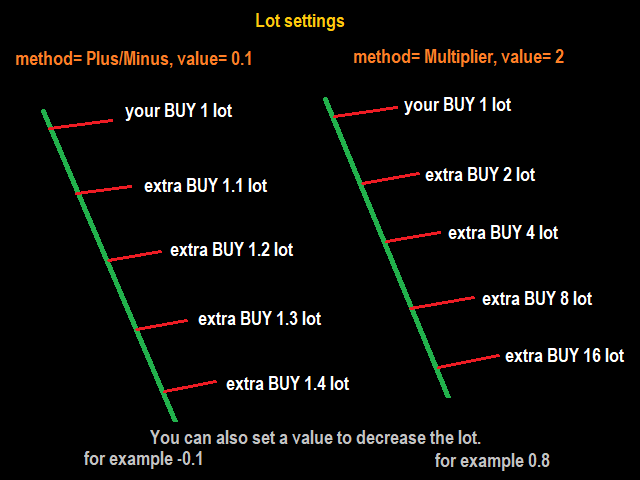
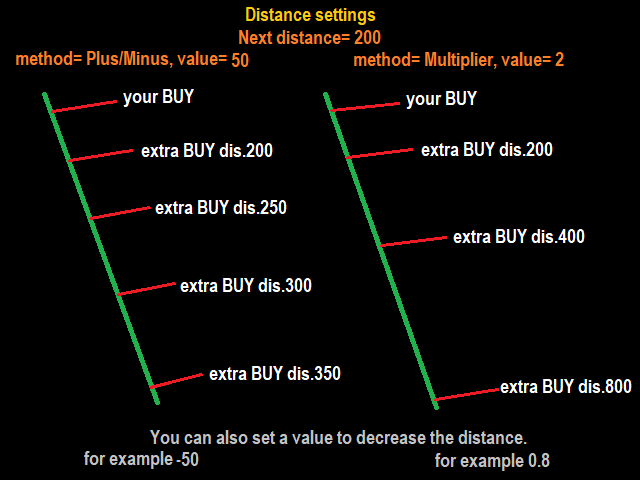
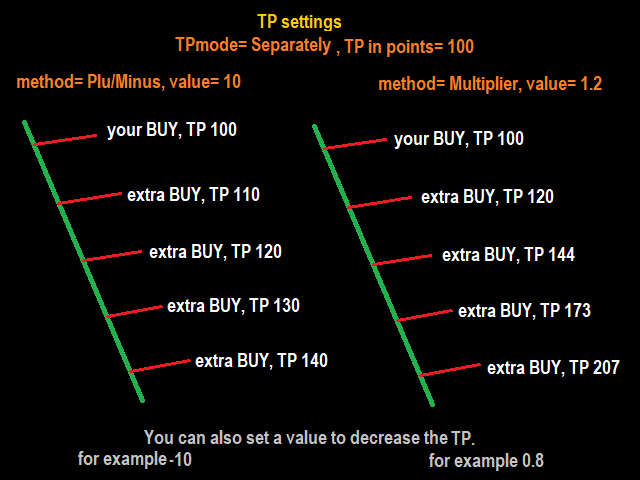
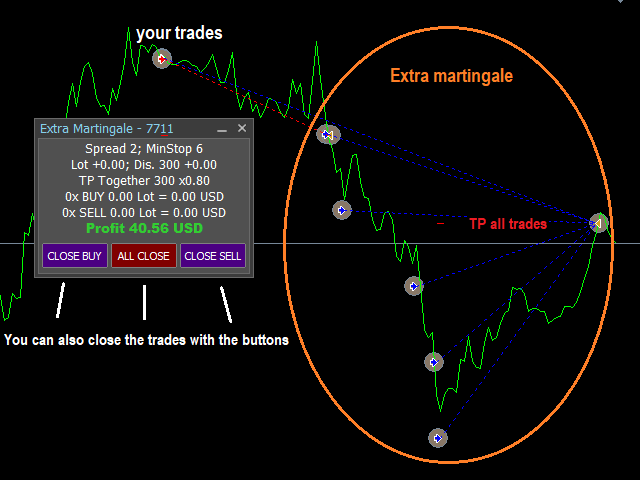
 In the set loss of your trade or your EA's trade, this tool will open another trade at a better price. It can also open multiple trades at different distances and with different lot sizes. Each trade will be assigned a TakeProfit.

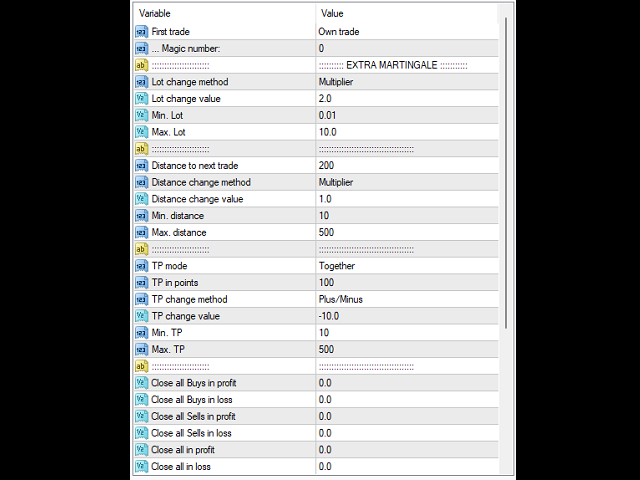
This tool has a lot of settings. You can set variable lot sizes, variable trade distances, variable TakeProfit sizes, maximum total profit or loss in money.

You can also close trades in bulk using the built-in buttons.

Look at the pictures to better understand how it works.

Try it also in the strategy tester. Only in the strategy tester, the first test trades will be opened to see how it works with different settings and in different situations.

The built-in buttons do not work in the strategy tester!

Install this tool as an Expert Advisor.

추천 제품
Telegram Broadcast MT5
Volodymyr Hrybachov
3.67 (3)
TELEGRAM BROADCAST 유틸리티를 사용하면 거래를 Telegram 채널에 즉시 게시할 수 있습니다. FOREX 신호로 자신의 Telegram 채널을 오랫동안 만들고 싶었다면 이것이 필요한 것입니다. TELEGRAM BROADCAST는 다음과 같은 메시지를 보낼 수 있습니다. 거래 개시 및 종료 대기 중인 주문의 배치 및 삭제 손절매 수정 및 준비금(라스트 오더) 손실을 막고 증명을 발동합니다. 보류 중인 주문의 활성화 및 삭제: 거래 보고서 보내기 입금 및 출금에 대한 메시지 보내기 인출 또는 이익이 N 값에 도달하면 메시지를 보냅니다. 계정 모니터링 - N분마다 통계를 보냅니다. 각 메시지에 자신의 텍스트를 추가하고 몇 분 안에 지연을 게시할 수 있습니다. 모든 메시지는 유연합니다. 유틸리티는 하나의 차트에만 설치되지만 모든 기호에서 메시지를 보냅니다. 설정에서 기호를 숨길 수 있습니다. 유틸리티 구성: 서비스 -> 설정 -> 전문가 자문 -> 다음 URL에
BossFXTradePanelEA (MT5)  [First 10 copies sold at 50 USD price will increase to 99USD] BossFXTradePanelEA is a fully interactive trade management panel designed for MetaTrader 5, providing traders with an easy-to-use, one-click interface to execute and manage trades. This EA simplifies trade execution , risk management, and position control by combining market orders, stop loss, take profit, trailing stops, and breakeven functionalities into a single, intuitive panel.  Key features include: On
One Click Breakeven Function: For multiple orders of the same currency but different order types (sell or buy), under the condition that the overall position is profitable, set the same stop-loss level or take-profit level. For example: there are currently 10 EURUSD orders, including 7 sell orders and 3 buy orders. When the overall position is profitable, if the overall take-profit for sell orders is set to 50 points: (1) When the total profit of the 7 sell orders is greater than the total loss
Complete Pending Orders Grid System opens any combinations of Buy Stop, Sell Stop, Buy Limit and Sell Limit pending orders and closes all existing pending orders. You just need to drop this script on the chart of a desired currency pair. Before placing all pending orders, the input window is opened allowing you to modify all input parameters: DeleteAllPendings – if 'true', then all pending orders (for current currency) are deleted. BuyStop – if 'true', Buy Stop order is opened. SellStop – if 'tr
거래원 여러분 안녕하세요!저는 당신의 거래 조수입니다.더 이상 말하지 말고, 내가 너에게 나의 특기를 알려줄게. 1.나는 당신의 창고를 관리하는 데 능숙하다, 당신이 어느 쪽에서 주문하든, 나는 가장 먼저 당신을 도와 합리적인 손실 방지선과 이동 손실 방지선을 추가할 수 있습니다. 2.나는 너를 도와 상승과 하락을 회피하고 원칙을 지키지 못하는 인간성의 약점을 근원적으로 근절할 수 있다. 3. 귀하가 참고할 수 있도록 최적 지점에서 귀하의 모바일 MT5 클라이언트에 알림 메시지를 보냅니다. 물론 귀하는 모바일 장치 내의 MetaTrader 5 APP의 MetaQuotes ID를 MetaTrader 5 클라이언트 --> 옵션 --> 알림 --> MetaQuotes ID의 편집 상자에 등록하고 알림 지점 확인을 눌러야 합니다. 4. 정책 테스트에서 수동 시뮬레이션 디스크 연습을 잘 지원합니다. 5. 저에게 연락하면 추가 AI 보조 클라이언트 슈퍼 보조 프로그램을 얻을 수 있습니다. 참
이 유틸리티는 양초가 수동으로 배치한 추세선에 닿을 때 마치 더 명확한 지정가 주문인 것처럼 주문을 개시합니다.  모든 자산에 사용할 수 있습니다. 주문을 열면 터치한 라인이 제거되고 화살표가 생성됩니다. 이 경우 가격 반전 작업에 사용되며 강세 양초가 상향식 선에 닿으면 매도 주문을 열고 약세 양초가 하향식 선에 닿으면 매수 주문을 엽니다.  손절매 및 이익실현을 조정할 수 있습니다. 이 유틸리티는 매우 유용합니다. 주문을 열고 화면에서 나가도록 프로그래밍할 수 있으며, 가격이 수평과 같은 상승 및 하강 지지선과 저항선에 도달할 때 차트 패턴에 매우 기능적입니다. 그리고 수직. 최신 업데이트에서는 여러 줄을 배치할 수 있습니다. 매우 중요: Meta trader 5에는 주문이 마감되고 선을 그릴 때 이 선이 로봇의 논리와 혼동되어 원치 않는 주문을 열 수 있는 거래 내역이 있습니다. 이 문제를 해결하려면 거래 내역이 표시되지 않도록 비활성화하세요. 인쇄물에서 확인하세요. 차
FREE
Entry TP and SL Time Trader Manager Expert for MetaTrader 5 The Entry TP and SL Time Trader Manager is a robust semi-automated trading tool for MetaTrader 5, designed to simplify trade setup, manage exit strategies, and execute orders with precise timing. This expert advisor enables traders to optimize their trading plans by setting key parameters such as entry levels, trade size, and scheduled execution times, ensuring a more efficient trading experience.   Specification Table – Entry TP and SL
트레이딩 패널, 원클릭 거래, 위험 관리, 수동 거래, 손절매, 익절매, 트레일링 스탑, 주문 관리 JoOrderTrade Pro – MetaTrader 5 용 고급 트레이딩 패널 매우 중요한 안내 도구가 정상 작동하려면 MetaTrader 5 설정에서 "Algo Trading" 옵션을 반드시 활성화해야 합니다. 이 활성화가 없으면 패널은 작동하지 않습니다. 중요: 기능의 목적을 완전히 이해하지 않은 상태에서는 “OA” 기능을 활성화하지 마십시오. OA(자동 주문) 기능은 트레일링 스탑 과 함께 작동합니다. 트레일링 스탑이 활성화되고 손절가가 포지션에 유리한 방향으로 이동하면, 시스템은 트레일링 스탑 가격에 원래 포지션과 반대 방향의 주문 을 자동으로 배치합니다. 운용 예시: 매수 포지션 에서 트레일링 스탑 이 가격이 유리한 방향으로 2달러 이동한 후 활성화되도록 설정된 경우, 해당 가격에 도달하면 손절가가 조정되고 동시에 해당 가격에 자동 매도 주문 이 실행됩니다. “
Click Sent Order
Supanat Wiboonpanit
This program is a GUI for issuing orders that can be done more quickly. Faster TP SL setting This program is not an automated trading platform. Trading is risky, please manage your risk. We do not accept any responsibility. It should be tried with Demo before using it with Real. Normally, the setting sets the risk to 1:1 to shift manually or to enter the risk to x:1, where x can be entered and everything can move freely. Thank you to all customers who have purchased our products. We would like t
Hello, boys and girls! Script allows you either to quickly save opened charts and then close all charts opened by visual tester mode or just faster close all charts. Feel free to take a look at video manual about how to use this script on my YouTube channel. Also, feel free to join my telegram channel , where time to time I publish some exclusive stuffs. Feel free to leave feedback and thoughts how to improve this script - I'd highly appreciate that. All the best.
Dom Book HeatMAP Lightning Trading Panel Professional-Grade Microstructure Lightning Trading Panel · User Manual Important notice: Before placing an order, please contact me first, and I will provide you with professional answers and services Major update explanation: On January 10, 2016, automatic trading EA and control panel were added. For detailed parameter configuration, please refer to the latter half of this article. Important Note: 1、As this is a heatmap, footprint map, and DOM tradin
This Expert Advisor monitors all open positions across all symbols in MetaTrader 5. Whenever a Stop Loss (SL) or Take Profit (TP) is manually set or adjusted on any position, the EA automatically applies that value to all other open positions , regardless of symbol or order type (Buy/Sell). This ensures consistent and synchronized SL and TP levels across your account. Perfect for mobile trading via tablet or smartphone!
The utility is designed to display on the chart the margin zones built on the basis of margin requirements for futures of the Chicago Mercantile exchange (CME). These margin zones are good levels of resistance and support, as seen in the screenshots. How to use To trade on margin zones, use the following rules: buy after the day has closed above one of the zones to the next zone; sell after the day has closed below one of the zones to the next zone; after opening a sell trade, place limit sell
Overview The Expert Advisor sends notifications to a mobile phone, via e-mail or plays a sound in case any changes are detected on the trading account: opening/closing positions, changing order or position parameters, balance or leverage. Also, the Expert Advisor can inform that Equity on the trading account has dropped below a specified value or Free Margin is small compared to Margin. The Expert Advisor does not trade, it only monitors your account. Launching the Expert Advisor You should all
The script allows you to quickly control positions from the keyboard.: Arrow ↑ → Open BUY Arrow → Open a SELL Arrow → → Close ALL positions Key functions: Automatic closing of opposing positions When a BUY is opened, all SALES are closed, and vice versa. Positions in the same direction remain intact (they can be accumulated). Flexible settings: LotSize. Take Profit in points (TP_Points). Stop Loss is disabled (but can be added if necessary). Safety: Checking the connection to the market. Sup
Strategy Manager is a  Multi-Time-Frame & Multi-Currency  Dashboard for  Metatrader 4 and 5. Thanks to a free, external graphical user interface, build your own strategy by combining any indicators and loading them into the dashboard to see the result ! In addition, you can precisely  set-up your Auto-trading & Notifications and use indicators for Stop-Loss, partial profit or limit. Filter your automatic trading & notifications with forex calendar and more. Open and Manage your orders directly w
하나의 차트. 완벽한 통제. 각 차트의 개체, 색상 및 설정을 개별적으로 관리하는 데 시간을 낭비하지 마세요.       차트 동기화 관리자를   사용하면       모든 MetaTrader 차트를 동기화, 복사 및 제어하세요       단 하나의 패널과 몇 가지 단축키를 사용하여 즉시 작업할 수 있습니다. 한 번 그리면 어디서나 업데이트할 수 있습니다. 한 번의 클릭으로 차트를 열고 닫으세요. 작업 공간을 깔끔하게 유지하세요.       심볼 기반 객체 관리   . 중요한 세부 정보를 놓치지 마세요.       스프레드 디스플레이, 카운트다운 타이머, 캔들 마감 알림. 시간을 절약하고, 오류를 줄이고, 더욱 현명하게 거래하세요. Chart Sync Manager   설치 및 입력 가이드 EA에 대한 알림을 받으려면 URL을 추가하세요(   http://www.betasoft.dev   ) MT4/MT5 터미널(스크린샷 참조). MT4 버전   https://www.mql5.c
Multi Strategy Dashboard EA MT5
Kevin Beltran Keena
5 (1)
Multi instrument and multi time frame EA, with the best indicators.  The MSD EA can be used for automated and manual trading. Click on the '?' button on the dashboard to obtain information about the various elements of the MSD EA. Uses ATR Take Profits, ATR Stop Losses and ATR Trailing Stops. Comes with an FX Currency Strength meter and a Market Sessions indicator. Has the option to place Trade Lines (Buy, Sell, Close, Alarm). When the price reaches the trendline, the EA will perform the approp
Why choose Trading Pal EA: This is a EA utility that auto-manage your   positions ' Stop-Loss (SL) and Take-Profits (TP) dynamically. When opening a single   position , it is easy to set the SL and TP manually. But when dealing with multiple   positions , it can be very tedious or   overwhelming   to fill in so many SL and TP values consistently, especially in a short span of time, like in scalping. Over time and after many such trades, trading itself can become a chore. That is where this EA c
ChallengeBot
Maksim Kononenko
Tested on pair EURUSD Prop Firm Challenge Features This is the core highlight of this Expert Advisor. It ensures strict adherence to proprietary trading firm rules: Daily Loss Limit:   The bot monitors all closed trades for the current day and compares the real-time Equity with the starting daily balance. If the drawdown exceeds the   DAILY_LOSS_LIMIT , the bot immediately closes all positions, deletes pending orders, and halts trading to protect the account. Pass Criteria (Profit Target):   Onc
FREE
이 어드바이저는 한 번의 클릭으로 여러 쌍을 거래할 수 있는 대시보드입니다. 딸깍 하는 소리       열려 있는       선택한 쌍에 대한 주문을 여는 버튼입니다. 딸깍 하는 소리       닫다       선택한 쌍의 주문을 마감하는 버튼입니다. 주문 로트는 사용자가 입력한 번호입니다. 양수는 매수 주문에 해당하고, 음수는 매도 주문에 해당합니다. 일부 주문이 아닌 전체 주문을 종료하려면   닫기 버튼을   클릭하세요. 최종 조치는 티켓 번호에 따라 달라지지 않습니다. 매직 입력을 0으로 설정하면 어드바이저가 수동 주문 마감을 동시에 도와줍니다. 다른 Advisor의 매직으로 Entry Magic을 구성함으로써 Advisor는 다른 Advisor가 개설한 주문을 동시에 마감할 수 있습니다. 삼각형 울타리       단 한 번의 클릭으로. 거래 기호는 사용자 정의 가능합니다. 시장 관찰에서 가져오거나 사용자가 입력합니다. 반: Magic – 조언자의 매직 넘버입니다. MaxLo
Afribold Cybernetic Affluence
Itumeleng Mohlouwa Kgotso Tladi
AfriBold Cybernetic Affluence  Your Key to Autonated Trading In the dynamic world of financial markets, navigating the intricate patterns and making informed decisions can be a daunting task. Even seasoned traders face challenges in consistently outperforming the market. This is where the AfriBold Cybernetic Affluence emerges as a powerful tool, designed to automate your trading strategies. Harnessing the Power of AI The AfriBold Cybernetic Wealth Expert Advisor is a cutting-edge trading tool
News Hedging Pro  is a unique robot that allows you to trade during the most critical news announcement periods by your predefined strategy. You can preset the strategy to trade, and then it will trade that news automatically when the news comes. News release gives opportunity to have pips since the price usually has big move at that time. Now with this tool, trading news become easier, more flexible and more exciting than ever. No waiting, no confusing anymore. Product Links Fully  Description
UTralVirtualMT5
Viktor Shpakovskiy
오픈 포지션 및 보류 중인 주문을 관리하기 위한 유틸리티. 내장형 트레일링 스톱에는 5가지 모드와 7가지 도구가 있습니다. 차트에서 자유롭게 이동할 수 있는 가상 손절매와 가상 이익실현이 있습니다. 내장된 거래 시뮬레이터의 도움으로 전략 테스터에서 EA가 어떻게 작동하는지 확인할 수 있습니다. 에 대한 자세한 가이드 유트랄비르투알트 5 에서 찾을 수 있습니다 코멘트 섹션. MT5 테스터에서 차트에 따른 가상 SL 및 TP 라인의 수동 이동이 작동하지 않습니다! 장점: 5가지 후행 정지 모드: 가상, 일반, 전체, 비율 및 모바일 손절매; 7가지 옵션: 점별, 극단 막대별, 프랙탈별, 체적별, MA별, Parabolic SAR 및 ATR별; 가상 TP 및 SL - 그래프에 따라 수동으로 자유롭게 이동합니다. 손절매 추가 및 모든 오픈 포지션에 이익실현; 손절매 설정: 포인트, 프랙탈, ATR 표시기, 일일 고가/저가; 차트에서 열린 모든 주문에 대한 후행 정지; 후행 정지를 시작하는
EA Nation
Joseph Anthony Aya-ay Yutig
Expert Advisors의 전략은 Facebook 그룹 EA Nation에서 나왔습니다. 그룹에는 40,000명이 넘는 회원이 있습니다. 모든 새 양초에 대해 헤지 거래를 열고 포지션이 거래에서 손실을 보는 쪽에 있을 때 그리드를 엽니다. 평균 그리드 = N                     = 현재 막대 앞의 6개 막대의 합/N 기간 = 새로운 막대가 나타날 때 새로운 헤지 거래를 엽니다. 자동 로트 = 1 로트는 $10,000 로트 크기가 0.01임을 의미합니다. NO MORE HEDGE = 한 쪽이 N 거래에 도달하면 TP가 될 때까지 헤지 거래를 열지 않습니다. CLOSING STRATEGY = TP 1은 거래 반대편의 그리드 크기입니다.                                = TP 2-6 = 백분율 매개변수:  - 평균 그리드  - AG 기간 확산 필터  - 최대 스프레드  - 기간 자산 관리  -
Trading panel for fast and convenient trading. The panel allows you to quickly open and close orders. Separate closing of orders for Sell and Buy positions. It is also possible to close all orders completely. The trading panel displays information about profit, total volume and number of orders for Sell and Buy positions. Sometimes some positions may not be closed due to market volatility. In this case, click close the position again.
MultiChart Pro
Pablo Filipe Soares De Almeida
MultiChart Pro – MetaTrader 5용 차트 관리 전문가 도구 MultiChart Pro는 MetaTrader 5 플랫폼에서 여러 차트를 자동으로 열고 설정할 수 있는 전문가용 어드바이저(EA)입니다. 이 도구는 트레이더가 다양한 시간 프레임에서 시장을 효율적으로 분석할 수 있도록 설계되었으며, 매번 수동으로 차트를 여는 번거로움을 제거합니다. 이 EA는 최대 네 개의 차트를 자동으로 설정할 수 있습니다. 예를 들어, D1, M1, M15 차트와 함께 10초 오프라인 차트를 생성할 수 있으며, 현재 활성 차트(M5 등)도 함께 구성합니다. 모든 차트는 사용자가 지정한 템플릿으로 자동 구성되어, 동일한 스타일과 지표 구성을 유지합니다. 주요 기능: 자동 차트 생성: EA 실행 시 여러 시간대 차트를 자동으로 엽니다. 템플릿 자동 적용: 사용자가 지정한 템플릿을 각 차트에 적용하고, 파일 존재 여부를 자동 확인합니다. 시간 프레임 선택: 입력 매개변수를 통해 손쉽게 원하
Closes a losing position. Due to the previous continuous, profitable series. SymbolsWork: Currency instruments (pairs) for the EA to work with. There may be variations when setting a pair. If set simply as EURUSD , GBPUSD: or AUDUSD:ALL , the EA opens both buy and sell orders. If a specific order type is set after a colon USDJPY:BUY , then the EA opens only buy orders and in case of eurjpy:sell , it performs only sell orders. The pairs are separated by commas. For example, the following entry "E
Overview Breakout Meter is a price action tool that identifies key breakout zones based on recent daily price activity. It highlights areas where momentum is likely to trigger, helping traders anticipate breakouts or reversals with minimal configuration. How It Works The EA analyzes a user-defined number of recent daily candles and marks high and low zones where price has shown strong reactions. It automatically updates levels with new data and removes outdated zones to keep charts clear. Users
Nesco
Gennady Sergienko
4.17 (29)
안녕하세요   NESCO   입니다. - 저는 전자동 로봇 전문가이며 독립적으로 시장을 분석하고 거래 결정을 내립니다. 내 기능 중 일부는   GPT-4_COPILOT을   사용하여 작성되었으며   MQL5_CLOUD_NETWORK   에 의해 최적화되었습니다. 나는 전 세계의 금융 이벤트를 받아볼 수 있는 나만의 서버를 가지고 있습니다. 저는 귀하의 개입 없이 연중무휴 24시간 일할 수 있으며 주의가 필요한 경우 전화 메시지로 알려드릴 수 있습니다. 나의 주요 특징은 데이터 흐름 분석 방법론으로, 이를 통해 수십 가지 전략을 동시에 거래할 수 있습니다. 그러나 지금까지 6가지 전략이 준비되어 있습니다. PILOT_R: 거래 시간 1:30-18:30; 기호: EURUSD M5; 최소 입금액: 150 USD; STENVALL _: 거래 시간 1:30-18:30; 기호: EURUSD M5; 최소 입금액: 100 USD; NIGHT_POUND   : 거래 시간 1:30-5:
이 제품의 구매자들이 또한 구매함
Trade Assistant MT5
Evgeniy Kravchenko
4.41 (205)
거래당 위험 계산, 라인을 사용한 손쉬운 신규 주문, 부분 청산 기능을 통한 주문 관리, 7가지 유형의 트레일링 스탑 및 기타 유용한 기능을 제공합니다. 추가 자료 및 지침 설치 지침   -   애플리케이션 지침   -   데모 계정용 애플리케이션 평가판 라인 기능       - 차트에 개시선, 손절매, 차익실현을 표시합니다. 이 기능을 사용하면 새로운 주문을 쉽게 하고 개봉 전에 추가 특성을 볼 수 있습니다. 위기 관리       -       위험 계산 기능은 설정된 위험과 손절매 주문의 크기를 고려하여 새 주문의 볼륨을 계산합니다. 이를 통해 손절매 크기를 설정하고 동시에 설정된 위험을 존중할 수 있습니다. 로트 계산 버튼 - 위험 계산을 활성화/비활성화합니다. 필요한 위험 값은 위험 필드에 0에서 100 사이의 백분율 또는 예금 통화로 설정됩니다. 설정 탭에서 위험 계산 옵션을 선택합니다. $ 통화, % 잔액, % 지분, % 자유 마진, % 사용자 정의, % AB 이전
Trade Manager EA에 오신 것을 환영합니다. 이 도구는 거래를 보다 직관적이고 정확하며 효율적으로 만들기 위해 설계된 궁극적인 리스크 관리 도구 입니다. 단순한 주문 실행 도구가 아닌, 원활한 거래 계획, 포지션 관리 및 리스크 제어를 위한 종합 솔루션입니다. 초보자부터 고급 트레이더, 빠른 실행이 필요한 스캘퍼에 이르기까지 Trade Manager EA는 외환, 지수, 상품, 암호화폐 등 다양한 시장에서 유연성을 제공합니다. Trade Manager EA를 사용하면 복잡한 계산은 이제 과거의 일이 됩니다. 시장을 분석하고 진입, 손절 및 익절 수준을 차트의 수평선으로 표시한 후 리스크를 설정하면, Trade Manager가 이상적인 포지션 크기를 즉시 계산하고 SL 및 TP 값을 실시간으로 표시합니다. 모든 거래가 간편하게 관리됩니다. 주요 기능: 포지션 크기 계산기 : 정의된 리스크에 따라 거래 크기를 즉시 결정합니다. 간단한 거래 계획 : 진입, 손절, 익절을 위한
TradePanel MT5
Alfiya Fazylova
4.86 (148)
Trade Panel은 다기능 거래 보조원입니다. 이 애플리케이션에는 수동 거래를 위한 50개 이상의 거래 기능이 포함되어 있으며 대부분의 거래 작업을 자동화할 수 있습니다. 전략 테스터에서는 애플리케이션이 작동하지 않습니다. 구매하기 전에 데모 계정에서 데모 버전을 테스트할 수 있습니다. 데모 버전 여기 . 전체 지침 여기 . 거래. 한 번의 클릭으로 거래 작업을 수행할 수 있습니다: 자동 위험 계산을 통해 지정가 주문 및 포지션을 엽니다. 한 번의 클릭으로 여러 주문과 포지션을 열 수 있습니다. 주문 그리드를 엽니다. 그룹별 대기 주문 및 포지션을 마감합니다. 포지션 반전(매수 청산 후 매도 개시 또는 매도 청산 후 매수 개시). 포지션 고정(매수 포지션과 매도 포지션의 양을 동일하게 하는 추가 포지션 개설). 한 번의 클릭으로 모든 포지션을 부분 청산합니다. 모든 포지션의 이익실현과 손절매를 동일한 가격 수준으로 설정합니다. 모든 포지션에 대한 손절매를 해당 포지션의 손익 분기
베타 출시 Telegram to MT5 Signal Trader 는 곧 공식 알파 버전을 출시할 예정입니다. 일부 기능은 아직 개발 중이며, 작은 버그가 발생할 수 있습니다. 문제가 있으면 꼭 보고해 주세요. 여러분의 피드백은 소프트웨어 개선에 도움이 됩니다. 가격은 20건 판매 후 인상됩니다. 남은 $90 카피: 2/20 . Telegram to MT5 Signal Trader 는 Telegram 채널 또는 그룹의 거래 신호를 자동으로 MetaTrader 5 계정으로 복사하는 강력한 도구입니다. 공개 및 비공개 채널을 모두 지원하며, 여러 신호 제공자를 여러 MT5 계정에 연결할 수 있습니다. 소프트웨어는 빠르고 안정적으로 동작하며, 복사된 거래를 완벽히 제어할 수 있습니다. 인터페이스는 깔끔하며 대시보드와 차트가 시각적으로 구성되어 있고, 직관적인 네비게이션이 가능합니다. 여러 Signal Account를 관리하고, 공급자별 설정을 세밀하게 조정하며, 모든 동작을 실시간으로
Ultimate Extractor
Clifton Creath
5 (9)
Ultimate Extractor - Professional Trading Analytics for MT5 *****this is the local HTML version of Ultimate Extractor. Check out Ultimate Extractor Cloud on mql5 for the Cloud version****** Ultimate Extractor transforms your MetaTrader 5 trading history into actionable insights with comprehensive analytics, interactive charts, and real-time performance tracking. What It Does Automatically analyzes your MT5 trading history across all Expert Advisors and generates detailed HTML reports with inte
Telegram To MT5 Receiver
Levi Dane Benjamin
4.53 (15)
가입한 모든 채널에서 (개인 및 제한된 채널 포함) 시그널을 바로 MT5로 복사합니다.   이 도구는 사용자를 고려하여 설계되었으며 거래를 관리하고 모니터하는 데 필요한 많은 기능을 제공합니다. 이 제품은 사용하기 쉽고 시각적으로 매력적인 그래픽 인터페이스로 제공됩니다. 설정을 사용자 정의하고 제품을 몇 분 안에 사용할 수 있습니다! 사용자 가이드 + 데모  | MT4 버전 | 디스코드 버전 데모를 시도하려면 사용자 가이드로 이동하십시오. Telegram To MT5 수신기는 전략 테스터에서 작동하지 않습니다! Telegram To MT5 특징 여러 채널에서 동시에 신호를 복사합니다. 개인 및 제한된 채널에서 신호를 복사합니다. Bot 토큰이나 채팅 ID가 필요하지 않습니다.   (원하는 경우에는 사용할 수 있습니다) 위험 % 또는 고정된 로트로 거래합니다. 특정 심볼을 제외합니다. 모든 신호를 복사할지 또는 복사할 신호를 사용자 정의할지 선택할 수 있습니다. 모든 신호를 인
The product will copy all telegram signal to MT5 ( which you are member) , also it can work as remote copier.  Easy to set up, copy order instant, can work with almost signal formats, image signal,  s upport to translate other language to English Work with all type of channel or group, even channel have "Restrict Saving Content", work with  multi channel, multi MT5 Work as remote copier: with signal have ticket number, it will copy exactly via ticket number. Support to backtest signal. How to s
Crypto Charting
Rajesh Kumar Nait
5 (5)
Crypto Charting for MT5 – MetaTrader 5용 암호화폐 차트 통합 도구 개요 Crypto Charting for MT5는 WebSocket을 통해 실시간 OHLC 차트 데이터를 제공합니다. 여러 거래소를 지원하며 MT5에서 자동으로 데이터가 동기화됩니다. 기능 WebSocket을 통한 실시간 차트 자동 역사 데이터 업데이트 네트워크 중단 시 예약된 동기화 모든 MT5 타임프레임 지원 OHLCV 데이터 지원 전략 테스터 지원 자동 재연결 기능 지원 거래소 Binance, Bybit, OKX, KuCoin, MEXC, Gate.io, Bitget, XT.com 추가 정보 Crypto Ticks 라는 별도 제품에서 틱 데이터와 오더북 정보를 제공합니다. 참고 사항 DLL 미사용, VPS 환경에 적합합니다. Strategy Tester에서는 WebRequest 기능이 작동하지 않습니다. 데모가 필요하신 경우 MQL5의 개인 메시지를 통해 문의하십시오. Full
ManHedger MT5
Peter Mueller
4.8 (5)
THIS EA IS A SEMI-AUTO EA, IT NEEDS USER INPUT. Manual & Test Version Please DON'T BUY this product before TESTING  and watching my video about it. The price of the ManHedger will increase to 250$ after 20 copies sold. Contact me for user support or bug reports or if you want the MT4 version! MT4 Version  I do not guarantee any profits or financial success using this EA. With this Expert Advisor, you can: Implement your own Zone Recovery strategy to capitalize on trending markets. Create Grid
EasyInsight AIO MT5
Alain Verleyen
4.91 (11)
EASY Insight AIO – 스마트하고 손쉬운 트레이딩을 위한 올인원 솔루션 개요 외환, 금, 암호화폐, 지수, 심지어 주식까지 — 전 시장을 몇 초 만에, 수동 차트 확인이나 복잡한 설치, 인디케이터 설정 없이 스캔할 수 있다고 상상해 보세요. EASY Insight AIO 는 AI 기반 트레이딩을 위한 궁극의 플러그 앤 플레이(Plug & Play) 데이터 내보내기 도구입니다. 단 하나의 깔끔한 CSV 파일로 전체 시장 스냅샷을 제공하며, ChatGPT, Claude, Gemini, Perplexity 등 다양한 AI 플랫폼에서 즉시 분석할 수 있습니다. 창 전환, 복잡함, 차트 오버레이는 더 이상 필요 없습니다. 자동으로 내보내지는 순수하고 구조화된 데이터 인사이트만으로, 반복적인 차트 감시 대신 데이터 기반의 스마트한 의사결정에 집중할 수 있습니다. 왜 EASY Insight AIO인가요? 진정한 올인원 • 별도의 설정, 인디케이터 설치, 차트 오버레이가 필요 없습
HINN Lazy Trader
ALGOFLOW OÜ
5 (2)
Lazy Trader is your personal risk management assistant that independently finds the best market entries, manages positions, and helps you extract maximum profit from every trading idea! It monitors charts from M1 to W1 , finds optimal entry points based on your parameters, and manages trades without your involvement: - Got an idea on the daily chart? No need to wait for lower timeframes to form a signal — Lazy Trader will check everything and open all necessary positions while you live your lif
YuClusters
Yury Kulikov
4.93 (43)
Attention: You can view the program operation in the free version  YuClusters DEMO .  YuClusters is a professional market analysis system. The trader has unique opportunities to analyze the flow of orders, trade volumes, price movements using various charts, profiles, indicators, and graphical objects. YuClusters operates on data based on Time&Sales or ticks information, depending on what is available in the quotes of a financial instrument. YuClusters allows you to build graphs by combining da
LAUNCH PROMOTION - 50% OFF! Regular Price: $599 Launch Price: $299 (Limited Time!) FarmHedge Yield Farming - Professional Pair Trading Dashboard (Manual - Hybrid - Fully Automated EA) FarmHedge is a powerful statistical arbitrage Expert Advisor designed for pair trading. It analyzes correlations between currency pairs and identifies mean-reversion opportunities using Farm Index analysis. VERIFIED TRADING RESULTS Farmed Hedge Yield O: https://www.mql5.com/en/signals/2354372 Farme
Everything for chart Technical Analysis indicator MT5 in one tool Draw your supply demand zone with rectangle and support resistance with trendline and get alerts to mobile phone or email alert -  Risk reward indicator mt5 Video tutorials, manuals, DEMO download   here .   Find contacts on my   profile . 1.   Extended rectangles and trendlines Object will be extended to the right edge of the chart when price will draw new candles on chart. This is rectangle extender or trendline extender. 2. Pri
Trade Manager DashPlus
Henry Lyubomir Wallace
5 (12)
DashPlus 는 MetaTrader 5 플랫폼에서 거래 효율성과 효과를 향상시키기 위해 설계된 고급 거래 관리 도구입니다. 리스크 계산, 주문 관리, 고급 그리드 시스템, 차트 기반 도구 및 성과 분석 등 포괄적인 기능을 제공합니다. 주요 기능 1. 리커버리 그리드 불리한 시장 상황에서 거래를 관리하기 위한 평균화 및 유연한 그리드 시스템을 구현합니다. 거래 회복을 최적화할 수 있도록 전략적인 진입 및 종료 포인트를 제공합니다. 2. 스택 그리드 강한 시장 움직임 동안 포지션을 추가하여 유리한 거래에서 잠재적 수익을 극대화하도록 설계되었습니다. 유리한 시장 트렌드에서 승률을 높이며 거래를 확장할 수 있도록 합니다. 3. 손익(P&L) 라인 차트에서 잠재적인 수익 및 손실 시나리오를 시각적으로 표현합니다. 설정을 조정하고 P&L 라인을 드래그하여 실행 전에 다양한 거래 결과를 평가할 수 있습니다. 4. 바스켓 모드 동일한 심볼에 여러 포지션을 단일 집계 포지션으로 결합하여 관리합니
Mt5 To InterativeBrokers Copier allows you to copy deals from MT5 account to Interactive Brokers. With this, you can run your EA strategy on a MT5 Demo/Real Account, then copy all the deals to Interactive Brokers account real time. Features: 1. Copy or Invert-Copy deals Realtime from MT5 to IB Account. 2. Synchronizing positions of both accounts periodicaly, in case any missing copying. 3. You can choose only Buy position or Sell position. Symbols Setup: General Format:  {MT Symbol} -> {IB S
Comprehensive on chart trade panel with the unique ability to be controllable from mobile as well. Plus has a library of downloadable configuration, e.g. exit rules, extra panel buttons, pending order setup and more. Please see our product video. Works with all symbols not just currency pairs. Features On chart panel plus controllable from free app for Windows, iPhone and Android Built-in script engine with library of downloadable configuration, e.g. add 'Close All Trades in Profit' button, exit
Bots Builder Pro MT5
Andrey Barinov
4.17 (6)
This is exactly what the name says. Visual strategy builder . One of a kind. Turn your trading strategies and ideas into Expert Advisors without writing single line of code. Generate mql source code files with a few clicks and get your fully functional Expert Advisors, which are ready for live execution, strategy tester and cloud optimization. There are very few options for those who have no programming skills and can not create their trading solutions in the MQL language. Now, with Bots Builde
Unlimited Trade Copier Pro MT5 is a tool to copy trade remotely to multiple MT4, MT5 and cTrader accounts at different computers/locations over internet. This is an ideal solution for you if you are a signal provider and want to copy your trades to other receivers globally on your own rules. One provider can copy trades to multiple receivers and one receiver can get trade from multiple providers as well. The provider can even set the subscription expiry for each receiver, so that receiver will n
Trade Assistant 38 in 1
Makarii Gubaydullin
4.91 (22)
다기능 도구: 로트 계산기, 그리드 주문, R/R 비율, 트레이드 관리자, 수급 구역, 가격 행동 등 데모 버전   |   사용자 설명서 트레이드 어시스턴트   는 전략 테스터에서 작동하지 않습니다 :   여기에서 데모 버전을 다운로드  하여 유틸리티 를 테스트하세요. 질문/개선 아이디어/버그 발견 시 연락주세요 MT4 버전이 필요하시면 여기 에서 이용 가능합니다 거래   프로세스 를 간소화, 가속화, 자동화하세요. 이   대시보드 로 표준 터미널 기능을 확장합니다. 트레이딩 패널은  모든 거래 상품에서 작동: 외환, 주식, 지수, 암호화폐 등. 1. 새 거래 개시 : 로트 / 위험 / RR 계산 : 수동 거래를 위한 위험 관리 로트 계산기 (위험 크기 기반 거래량 계산) 위험 계산기 (로트 크기 기반 위험 금액) 위험 대비 보상   비율 그리드 주문:  + 동적 간격 옵션, 로트 분할 옵션 주문 활성화 트리거, + 매수 스톱리밋 / 매도 스톱리밋 가상 SL, 가상 TP (숨김
Custom Alerts AIO: 다중 시장을 동시에 모니터링 – 설정 없이 즉시 사용 가능 개요 Custom Alerts AIO 는 복잡한 설정 없이 즉시 사용할 수 있는 통합 시장 모니터링 도구입니다. FX Power, FX Volume, FX Dynamic, FX Levels, IX Power 등 필요한 모든 지표가 내장되어 있어 별도의 설치나 구성 없이 알림 기능을 바로 사용할 수 있습니다. 차트 그래픽 없이 작동하며, Forex, 금속, 지수, 암호화폐 등 주요 자산군을 모두 지원합니다. 주식(Symbols)은 별도로 입력하여 추가할 수 있으나, MetaTrader에서는 일반적으로 제한적으로만 사용됩니다. 1. 왜 Custom Alerts AIO를 선택해야 하나요? 추가 라이선스가 필요 없습니다 • 모든 Stein Investments 지표가 내장되어 있어 별도 구매가 필요 없습니다. • 즉시 알림 기능을 시작할 수 있어 빠르고 간편합니다. 모든 시장을 하나의 도구로
EmoGuardian
Samuel Bandi Roccatello
5 (5)
EmoGuardian을 사용하여 거래 계정에 고급 위험 한도를 부과하여 과잉 거래, FOMO 및 강박적인 행동을 피하십시오. 포지션에 손절매  를 자동으로 추가하고, EA 손실을 관리하고, EA를 자동으로 로드/언로드합니다.  포지션당, 거래당, 시간 범위별, 일별로 위험을 제한합니다. 위험 관리 옵션은 거래자가 계정을 날려버리게 만드는 감정과 강박적인 행동을 구체적으로 다루기 위해 개발되었습니다. 주의: 이것은 유틸리티이므로 전략 테스터에서는 작동하지 않습니다. EmoGuardian은 Netting 계정에서 작동하지 않습니다(대부분의 거래 계정은 헤징 계정임). 매뉴얼 및 데모 버전 주의: 이것은 유틸리티이므로 전략 테스터에서는 작동하지 않습니다. EmoGuardian은 Netting 계정에서 작동하지 않습니다(대부분의 거래 계정은 헤징 계정임). 독특한 기능:  계좌 잔액의 백분율 또는 핍 단위로 포지션에 손절매를 자동으로 추가합니다.  위험 한도에 도달하면 EA를 종료하
Strategy Builder offers an incredible amount of functionality. It combines a trade panel with configurable automation (covert indicators into an EA), real-time statistics (profit & draw down) plus automatic optimization of SL, TP/exit, trading hours, indicator inputs. Multiple indicators can be combined into an single alert/trade signal and can include custom indicators, even if just have ex4 file or purchased from Market. The system is easily configured via a CONFIG button and associated pop-u
Crypto Ticks and Depth
Rajesh Kumar Nait
5 (1)
MetaTrader 5용 Crypto Ticks – 실시간 암호화폐 틱 데이터 및 오더북 통합 개요 Crypto Ticks는 주요 암호화폐 거래소의 실시간 틱 데이터와 오더북 깊이를 MetaTrader 5에 직접 스트리밍합니다. 스캘핑, 알고리즘 트레이딩, 전략 테스트를 위한 정밀 데이터를 원하는 트레이더를 위해 설계되었습니다. 지원 거래소 Binance: 스팟 (차트창에 오더북 표시) 및 선물 (다중 종목 오더북 지원) KuCoin: 스팟 및 선물 (차트 오더북 지원) Bybit: 선물 및 역방향 선물 XT.com: 스팟 및 선물 주요 기능 WebSocket을 통한 실시간 틱 스트리밍 Binance 스트림 지원: @trade, @ticker, @bookTicker, @aggTrade API를 통한 완전한 OHLCV 히스토리 업데이트 오더북 시각화 (최고 매수/매도 + 레벨) 자동 재연결로 안정성 유지 정확한 캔들 차트를 위한 예약 데이터 교체 MT5 재시작 시 자동 히스토리 업데
Click and Go Trade Manager: The Ultimate MT5 Execution Suite Precision Execution. Professional Performance Tracking. Total Control. In the world of   Smart Money Concepts (SMC) , ICT, and high-frequency scalping,   precision is your only edge.   Most traders lose not because their analysis is wrong, but because their execution is slow and their psychology is undisciplined. The Hard Truth:   If you are still manually calculating lot sizes or dragging lines while the price moves against you,   you
Advanced trading tool: One click smart orders that execute under your conditions Developed by trader for trading community:  position size calculator (lot size), open position after price action, strategy builder, set and forget trading, mobile notifications Risk Management -  Risk percentage position size calculator, gain percentage, target risk reward ratio, spread and commissions are included in calculations 7 Advanced order types  - Set and forget trading with price action automation (OCO,
MT5용 Dynamic Fibonacci Grid Dashboard 최신 버전을 소개합니다. 많은 새로운 기능이 추가된 이번 대시보드는 거래 경험을 완전히 변화시키며, 시장과 가격 움직임을 완전히 새로운 관점에서 볼 수 있게 합니다. 여러 시간대와 여러 심볼을 동시에 분석하여 새로운 가능성을 발견하세요. 수동 거래와 포지션 관리에 친화적인 사용자 인터페이스와 미리 정의된 자동 전략을 적용할 수 있는 확장된 기능을 제공합니다. 또한 DFG는 이제 전략 테스터(Strategy Tester)에서 트레이딩 시뮬레이터로 완벽하게 작동하며, 과거 데이터를 사용하여 다양한 거래 조건을 재현할 수 있습니다. 시각 모드에서 수동 거래를 연습하고, 고속 모드에서 자동 전략을 테스트할 수 있습니다. 주요 기능 • Dynamic Fibonacci Bands 개념을 기반으로 한 다중 시간대 및 다중 심볼 고급 기술 분석 실시간 시장 모니터링 대시보드를 통해 탁월한 효율성을 경험할 수 있습니다. M1,
Remote Trade Copier is an advanced tool designed for efficiently copying trades between accounts in both local and remote modes. It allows for lightning-fast order replication from a master account to a slave account. In local mode, trades are copied instantly, while in remote mode, the copying process takes less than 1 second. MT4 Version (Only Local) MT5 Version (Only Local) MT4 Full Version (Local & Remote) Local mode refers to both MetaTrader platforms being installed on the same system,
Mentfx Mmanage mt5
Anton Jere Calmes
4.25 (8)
The added video will showcase all functionality, effectiveness, and uses of the trade manager. Drag and Drop Trade Manager. Draw your entry and have the tool calculate the rest. Advanced targeting and close portions of a trade directly available in tool (manage trades while you sleep). Market order or limit order on either side with factored spread. Just draw the entry, the tool does the rest. Hotkey setup to make it simple. Draw where you want to enter, and the stop loss, the tool calculates al
A ready-made multitimeframe trading system based on automatic plotting and tracking of Fibonacci levels for buying and selling any symbol. Advantages Determines the trend direction based on a complex of 14 indicators ( Cx ), extremums of ZigZag ( Z ), RSI ( R ), Impulse ( I ) Displaying the values of 14 indicators comprising the trend direction ( Cx ) Plotting horizontal levels, support and resistance lines, channels View the plotting option of Fibonacci levels on any timeframe, with the abilit
제작자의 제품 더 보기
This tool monitors WilliamsPR indicators on all time frames in the selected markets. Displays a table with signals to open a BUY trade (green) or SELL trade (red). You can set the conditions for the signal. You can easily add or delete market names / symbols. If the conditions for opening a trade on multiple time frames are met, you can be notified by e-mail or phone message (according to the settings in MT5 menu Tools - Options…) You can also set the conditions for sending notifications. The li
ZORRO 3 in 1
Vladimir Pokora
This robot combines three ways of trading and for all uses the same successful money management. All three ways of trading can be used simultaneously or separately. Auto search and trading SR levels and their breakout. News trading - at a specified time placed pending orders for BUY and SELL. Manual opening trades using buttons in the chart. For these your trades will use the same money management as for automated trading. Is recommended ECN broker with minimal spread and with minimal slip and
Golem
Vladimir Pokora
This robot searches for important support and resistance on the market, and trades breakouts of these levels. It uses hidden pending orders and tight TrailingStop. The default setting is for EURUSD H1. This EA can also be used in other markets and time frames. For safer trading, it includes protection against large slippage and high spread. No hedge, no martingale, no grid or any other type of dangerous practices. Stop loss is set for every order. Use True ECN broker with a low spread and a low
Objects Copier MT4
Vladimir Pokora
5 (1)
This utility copies graphic objects from the MASTER chart to the SLAVE chart. Install it as an indicator. The version for MT5 is here: https://www.mql5.com/en/market/product/61935 It can work in the following modes: Master CHART to Slave CHART in one MT4 or MT5 Master MT4 to Slave MT4 (one or more) Master MT4 to Slave MT5 (one or more) Master MT5 to Slave MT5 (one or more) Master MT5 to Slave MT4 (one or more) You can use multiple Master-Slave groups by setting the ID parameter . You can copy al
Multi Stochastic
Vladimir Pokora
This tool monitors Stochastic indicators on all time frames in the selected markets. Displays a table with signals to open a BUY trade (green) or SELL trade (red). You can set the conditions for the signal. You can easily add or delete market names / symbols. If the conditions for opening a trade on multiple time frames are met, you can be notified by e-mail or phone message (according to the settings in MT4 menu Tools - Options…) You can also set the conditions for sending notifications. The li
Multi MACD
Vladimir Pokora
This tool monitors MACD indicators on all time frames in the selected markets. Displays a table with signals to open a BUY trade (green) or SELL trade (red). You can set the conditions for the signal. You can easily add or delete market names / symbols. If the conditions for opening a trade on multiple time frames are met, you can be notified by e-mail or phone message (according to the settings in MT4 menu Tools - Options…) You can also set the conditions for sending notifications. The list of
MultiRSI
Vladimir Pokora
This tool monitors RSI indicators on all time frames in the selected markets. Displays a table with signals to open a BUY trade (green) or SELL trade (red). You can set the conditions for the signal. You can easily add or delete market names / symbols. If the conditions for opening a trade on multiple time frames are met, you can be notified by e-mail or phone message (according to the settings in MT4 menu Tools - Options…) You can also set the conditions for sending notifications. The list of s
Multi CCI
Vladimir Pokora
This tool monitors CCI indicators on all time frames in the selected markets. Displays a table with signals to open a BUY trade (green) or SELL trade (red). You can set the conditions for the signal. You can easily add or delete market names / symbols. If the conditions for opening a trade on multiple time frames are met, you can be notified by e-mail or phone message (according to the settings in MT4 menu Tools - Options…) You can also set the conditions for sending notifications. The list of s
Multi WilliamsPR
Vladimir Pokora
This tool monitors WilliamsPR indicators on all time frames in the selected markets. Displays a table with signals to open a BUY trade (green) or SELL trade (red). You can set the conditions for the signal. You can easily add or delete market names / symbols. If the conditions for opening a trade on multiple time frames are met, you can be notified by e-mail or phone message (according to the settings in MT4 menu Tools - Options…) You can also set the conditions for sending notifications. The li
Trend Trader MT4
Vladimir Pokora
This EA trades according to your trendline. It can trade in several modes: will open only one trade and then be stopped trades only in the direction of the trendline opens more trades after each touch with the trendline trades in both directions it can place a pending order or open a market order MT5 version: https://www.mql5.com/en/market/product/74901 See the screenshots below for a better understanding of its features. This can draw a test trendline when running a test in the strategy teste
Turbogen
Vladimir Pokora
This is a fully automatic forex robot optimized for EURUSD M30. It can trade on both sides at the same time. It uses a dynamic grid and a sophisticated martingale system. It has separate money management for first trade and for martingale trades. This system is not slip sensitive and will work well for all brokers. Settings Start and end of trading Trading TimeFrame Use RSI filter RSI settings ::::::: Money management Lots – starting lot Autolot balance – automatic calculation of the initial lot
ClosePart
Vladimir Pokora
With this tool, you can easily and quickly close part of the trade . Click near the trade to display the closing panel. There are ten preset values for partial closing, but you can set your own values. You can also resize the panel according to Windows settings (125%, 150% ...) See the animation below for how it works. ********************************************************** Note: This tool does not work in the tester.
Timeron
Vladimir Pokora
This EA trades the breakout of a range created for a set period of time. It can also trade in the opposite direction, a bounce from the upper or lower limit of the range. You can set the input parameters in points or in percentages of the range size.   The EA can only open the first trade, or even the second opposite trade or many other opposite trades until the expiration time. You can also set a lot increase after a losing trade.   This EA also has a built-in trend filter using the Moving Ave
TrendTunnel
Vladimir Pokora
This indicator draws a trend line and a trend tunnel on the chart. You can choose several calculation methods, alerts, notifications, and other settings. It can also draw trendlines from another TimeFrame. You can also use this indicator for your ExpertAdvisor. The current values of the lines are stored in the memory buffer from where the EA can load them. You can trade the price bounce from the upper and lower lines .   Settings TimeFrame – trend timeframe Description – show description of line

Extra Martingale
Vladimir Pokora
5 (1)
Is your trade at a loss? Does not matter ! You can use this Extra martingale tool.  In the set loss of your trade or your EA's trade , this tool will open another trade at a better price. It can also open multiple trades at different distances and with different lot sizes. Each trade will be assigned a TakeProfit. This tool has a lot of settings. You can set variable lot sizes, variable trade distances, variable TakeProfit sizes, maximum total profit or loss in money. You can also close trades
SuperOrders
Vladimir Pokora
You can place an unlimited number of invisible pending orders using this tool. Orders will be filled under the following conditions: Spread is not greater than the set Max. spread Slippage is not greater than the set Max. slippage The set trading time was not exceeded The expiration time was not reached TRADING button is not switched to PAUSE   If these conditions are not met, the order will be cancelled. You can also set up a Test Zone with an Off line for each order. The order will be cancel
Traderon
Vladimir Pokora
This robot uses an algorithm, that monitors and evaluates the situation in the market, its speed and power. At the appropriate time, it places pending orders on the market, and then moves them to better prices. It uses a money management with tight StopLoss and other functions. The default setting is for EURUSD M5, but it will have good results on other markets and other time frames. A fast ECN broker with minimal fees and precise quotations in points is recommended. Settings StartTrading - st
MultiSAR
Vladimir Pokora
This tool monitors Parabolic SAR indicators on all time frames in the selected markets. Displays a table with signals to open a BUY trade (green) or SELL trade (red). You can easily add or delete market names / symbols. If the conditions for opening a trade on multiple time frames are met, you can be notified by e-mail or phone message (according to the settings in MT4 menu Tools - Options…) You can also set the conditions for sending notifications. The list of symbols/ markets you have entered
This is a fully automatic trading robot. It is designed for trading major currency pairs. It looks for various trading opportunities such as support and resistance, swings, gaps and others. As a filter for opening a trade, it uses various indicators and back analysis of trend on daily and monthly charts. It has been tested in MetaTrader 5 on real data with 100% accuracy for the last ten years. MT5 version here .   The default setting is for TF M30 and is the same for all major currency pairs. It
Golderon MT4
Vladimir Pokora
Golderon EA – A Specialized Algorithmic Trading System for Gold (XAU/USD) MT5 version here Introducing Golderon EA , a fully automated trading system (Expert Advisor) meticulously engineered for trading gold (XAU/USD). This expert system is the result of extensive research, advanced algorithmic modeling, and precise optimization based on over ten years of real historical market data. Golderon EA implements an intradaily swing trading strategy , optimized for M15, M30, and H1 timeframes , ident
This utility copies graphic objects from the MASTER chart to the SLAVE chart. Install it as an indicator. The version for MT4 is here: https://www.mql5.com/en/market/product/61937 It can work in the following modes: Master CHART to Slave CHART in one MT4 or MT5 Master MT4 to Slave MT4 (one or more) Master MT4 to Slave MT5 (one or more) Master MT5 to Slave MT5 (one or more) Master MT5 to Slave MT4 (one or more) You can use multiple Master-Slave groups by setting the ID parameter . You can copy al
This tool monitors Stochastic indicators on all time frames in the selected markets. Displays a table with signals to open a BUY trade (green) or SELL trade (red). You can set the conditions for the signal. You can easily add or delete market names / symbols. If the conditions for opening a trade on multiple time frames are met, you can be notified by e-mail or phone message (according to the settings in MT5 menu Tools - Options…) You can also set the conditions for sending notifications. The li
Multi MACD MT5
Vladimir Pokora
This tool monitors MACD indicators on all time frames in the selected markets. Displays a table with signals to open a BUY trade (green) or SELL trade (red). You can set the conditions for the signal. You can easily add or delete market names / symbols. If the conditions for opening a trade on multiple time frames are met, you can be notified by e-mail or phone message (according to the settings in MT5 menu Tools - Options…) You can also set the conditions for sending notifications. The list of
Multi RSI MT5
Vladimir Pokora
This tool monitors RSI indicators on all time frames in the selected markets. Displays a table with signals to open a BUY trade (green) or SELL trade (red). You can set the conditions for the signal. You can easily add or delete market names / symbols. If the conditions for opening a trade on multiple time frames are met, you can be notified by e-mail or phone message (according to the settings in MT5 menu Tools - Options…) You can also set the conditions for sending notifications. The list of s
Multi CCI MT5
Vladimir Pokora
This tool monitors CCI indicators on all time frames in the selected markets. Displays a table with signals to open a BUY trade (green) or SELL trade (red). You can set the conditions for the signal. You can easily add or delete market names / symbols. If the conditions for opening a trade on multiple time frames are met, you can be notified by e-mail or phone message (according to the settings in MT5 menu Tools - Options…) You can also set the conditions for sending notifications. The list of s
Trend Trader MT5
Vladimir Pokora
This EA trades according to your trendline. It can trade in several modes: will open only one trade and then be stopped trades only in the direction of the trendline opens more trades after each touch with the trendline trades in both directions it can place a pending order or open a market order See the screenshots below for a better understanding of its features. Unfortunately, it is not possible to draw your own trend line in the MT5 strategy tester. This EA will draw its own trendline for t
With this tool, you can easily and quickly close part of the trade. Click near the trade to display the closing panel. There are ten preset values for partial closing, but you can set your own values. You can also resize the panel according to Windows settings (125%, 150% ...) See the animation below for how it works. ********************************************************** Note: This tool does not work in the tester.
TrendTunnel MT5
Vladimir Pokora
This indicator draws a trend line and a trend tunnel on the chart. You can choose several calculation methods, alerts, notifications, and other settings. It can also draw trendlines from another TimeFrame. You can also use this indicator for your ExpertAdvisor. The current values of the lines are stored in the memory buffer from where the EA can load them. You can trade the price bounce from the upper and lower lines .   Settings TimeFrame – trend timeframe Description – show description of line


Multi SAR MT5
Vladimir Pokora
5 (1)
This tool monitors Parabolic SAR indicators on all time frames in the selected markets. Displays a table with signals to open a BUY trade (green) or SELL trade (red). You can easily add or delete market names / symbols. If the conditions for opening a trade on multiple time frames are met, you can be notified by e-mail or phone message (according to the settings in MT5 menu Tools - Options…) You can also set the conditions for sending notifications. The list of symbols/ markets you have entered
FX TradingBot
Vladimir Pokora
This is a fully automatic trading robot. It is designed for trading major currency pairs. It looks for various trading opportunities such as support and resistance, swings, gaps and others. As a filter for opening a trade, it uses various indicators and back analysis of trend on daily and monthly charts. It has been tested in MetaTrader 5 on real data with 100% accuracy for the last ten years. MT4 version here .   The default setting is for TF M30 and is the same for all major currency pairs. It
필터:
리뷰 없음
리뷰 답변