Extra Martingale MT5

  • Is your trade at a loss?
  • Does not matter !
  • You can use this Extra martingale tool.

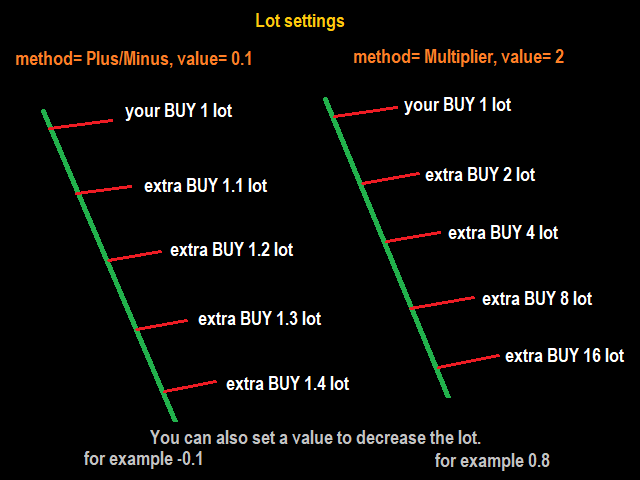
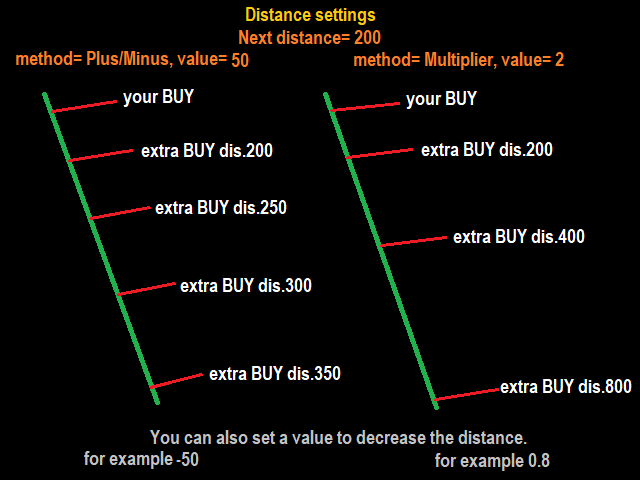
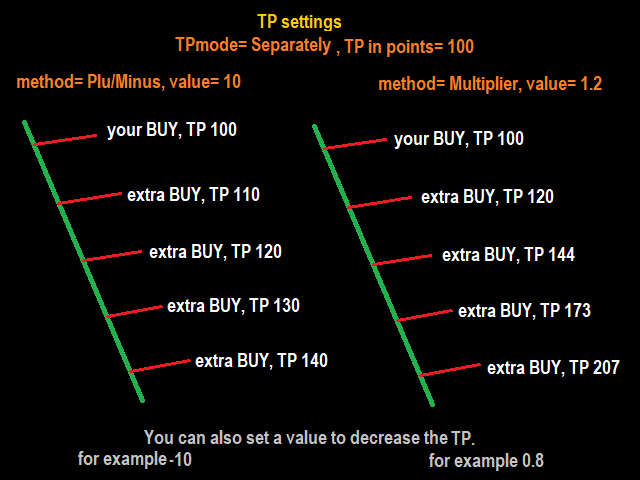
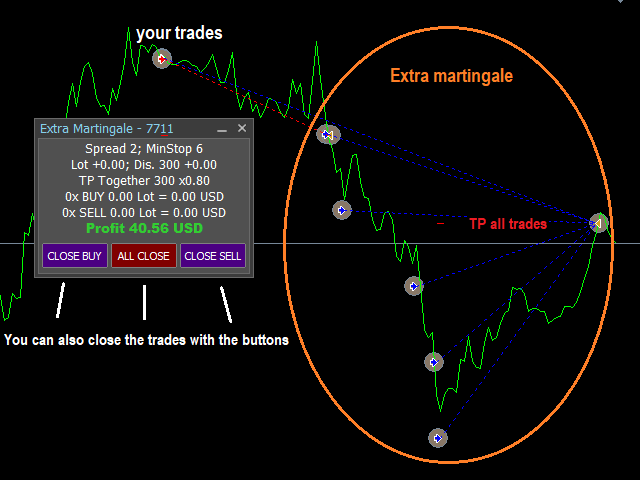
 In the set loss of your trade or your EA's trade, this tool will open another trade at a better price. It can also open multiple trades at different distances and with different lot sizes. Each trade will be assigned a TakeProfit.

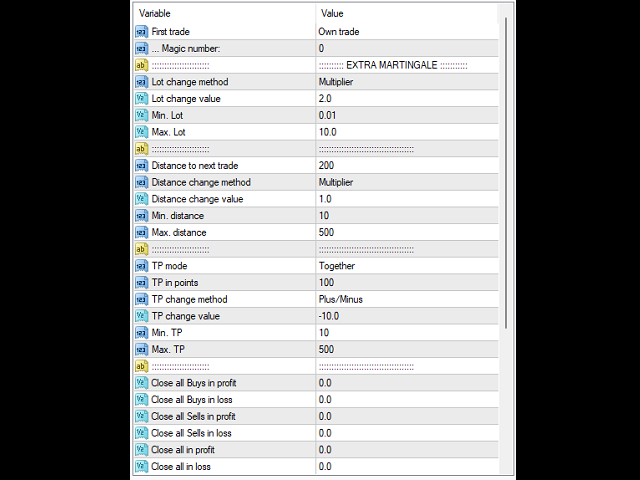
This tool has a lot of settings. You can set variable lot sizes, variable trade distances, variable TakeProfit sizes, maximum total profit or loss in money.

You can also close trades in bulk using the built-in buttons.

Look at the pictures to better understand how it works.

Try it also in the strategy tester. Only in the strategy tester, the first test trades will be opened to see how it works with different settings and in different situations.

The built-in buttons do not work in the strategy tester!

Install this tool as an Expert Advisor.

Produits recommandés
Telegram Broadcast MT5
Volodymyr Hrybachov
3.67 (3)
The TELEGRAM BROADCAST utility helps you instantly publish your trade to the Telegram channel. If you have long wanted to create your own Telegram channel with FOREX signals, then this is what you need. TELEGRAM BROADCAST can send messages: Opening and closing deals; Placing and deleting pending orders; Modification of stop loss and take provision (last order); Stop loss and take prov triggered; Activation and deletion of a pending order: Sending trading reports; Sending a message for deposits
BossFXTradePanelEA (MT5)  [First 10 copies sold at 50 USD price will increase to 99USD] BossFXTradePanelEA is a fully interactive trade management panel designed for MetaTrader 5, providing traders with an easy-to-use, one-click interface to execute and manage trades. This EA simplifies trade execution , risk management, and position control by combining market orders, stop loss, take profit, trailing stops, and breakeven functionalities into a single, intuitive panel.  Key features include: On
One Click Breakeven Function: For multiple orders of the same currency but different order types (sell or buy), under the condition that the overall position is profitable, set the same stop-loss level or take-profit level. For example: there are currently 10 EURUSD orders, including 7 sell orders and 3 buy orders. When the overall position is profitable, if the overall take-profit for sell orders is set to 50 points: (1) When the total profit of the 7 sell orders is greater than the total loss
Complete Pending Orders Grid System opens any combinations of Buy Stop, Sell Stop, Buy Limit and Sell Limit pending orders and closes all existing pending orders. You just need to drop this script on the chart of a desired currency pair. Before placing all pending orders, the input window is opened allowing you to modify all input parameters: DeleteAllPendings – if 'true', then all pending orders (for current currency) are deleted. BuyStop – if 'true', Buy Stop order is opened. SellStop – if 'tr
SMT Trade Planner est un calculateur de risque professionnel et un panneau d'execution d'ordres directement sur le graphique MetaTrader. Il calcule la taille du lot, affiche des lignes visuelles d'entree, Stop Loss et Take Profit deplacables sur le graphique, valide le trade contre des regles de risque configurables et permet l'execution en un clic.   Fonctionnement Attachez le Trade Planner a n'importe quel graphique. Le panneau affiche les informations du compte et des boutons de selection rap
Cet utilitaire ouvre les ordres lorsque la bougie touche la ligne de tendance placée manuellement, comme s'il s'agissait d'un ordre en attente plus articulé.  Il peut être utilisé sur n'importe quel actif, lorsqu'il ouvre la commande, il élimine la ligne qu'il a touchée et crée une flèche. Dans ce cas, il est utilisé pour les opérations de retournement de prix, il ouvre un ordre de vente lorsque la bougie haussière touche la ligne bottom-up et ouvre un ordre d'achat lorsque la bougie baissière
FREE
FlowAxis
Aysar Alafif
5 (1)
Product Overview   FlowAxis is a semi-automated Expert Advisor for Meta Trader 5 designed for traders who rely on manual trendline analysis and want precise, rule-based trade execution.   Instead of guessing market direction, the trader defines the trend visually, and FlowAxis executes trades automatically when price interacts with predefined trendlines. This approach       combines human market analysis with disciplined, rule-based execution. Important – Please Read Before Use   FlowAxis EA
Ticks Charting
Mativenga Geoffrey Mativenga
Tick Copier EA — Description & Usage Guide Instead of seeing the market like everybody else using time based charts, instead view the market using ticks like an x-ray. This Expert Advisor (EA) for MetaTrader 5 copies live ticks from the chart it is attached to and sends them to a custom symbol you already created (for example EURUSD TICKS ). Each time a new market tick arrives:  EA reads the current tick data from the source symbol. It copies the tick values: time bid price ask price last price
**Bneu Prop Firm Challenge Manager Pro** is a trading utility for MetaTrader 5 designed to assist traders participating in proprietary trading firm evaluation challenges. The utility monitors account metrics, tracks challenge progress, and provides protection features to help maintain compliance with challenge rules. **Main Features** **Prop Firm Presets** - Pre-configured rule sets for common proprietary trading firms - FTMO preset with corresponding rule parameters - MyForexFunds (MFF) pres
Click Sent Order
Supanat Wiboonpanit
This program is a GUI for issuing orders that can be done more quickly. Faster TP SL setting This program is not an automated trading platform. Trading is risky, please manage your risk. We do not accept any responsibility. It should be tried with Demo before using it with Real. Normally, the setting sets the risk to 1:1 to shift manually or to enter the risk to x:1, where x can be entered and everything can move freely. Thank you to all customers who have purchased our products. We would like t
Auto Trailing Stop bot
Marc Henning Hruschka
Auto Trailing Stop EA for MT5 Auto Trailing Stop EA is an Expert Advisor for MetaTrader 5 that automatically manages trailing stop loss for open trades on the current chart symbol. It is intended for traders who open positions manually and want a simple tool to lock in profits without adjusting stop loss by hand. The EA starts trailing only after the trade reaches the profit distance defined in the inputs. After that, the stop loss is moved step by step as price continues in a favorable directio
Bonjour les Traders! Je suis votre assistant commercial. Pas beaucoup de mots, laissez - moi vous parler de ma spécialité: 1. Je suis bon dans la gestion de vos positions, peu importe à quelle extrémité vous passez une commande, je peux vous aider à ajouter une ligne de stop raisonnable et à déplacer le stop loss en premier. 2. Je peux vous aider à éviter la hausse et la baisse, à éradiquer les faiblesses humaines qui ne tiennent pas leurs principes à la racine. 3. Je vais vous envoyer un messa
Smart Charts
Fyodor Korotkov
Hello, boys and girls! Script allows you either to quickly save opened charts and then close all charts opened by visual tester mode or just faster close all charts. Feel free to take a look at video manual about how to use this script on my YouTube channel. Also, feel free to join my telegram channel , where time to time I publish some exclusive stuffs. Feel free to leave feedback and thoughts how to improve this script - I'd highly appreciate that. All the best.
Synchronizer
PATRICK PAARSCH
This Expert Advisor monitors all open positions across all symbols in MetaTrader 5. Whenever a Stop Loss (SL) or Take Profit (TP) is manually set or adjusted on any position, the EA automatically applies that value to all other open positions , regardless of symbol or order type (Buy/Sell). This ensures consistent and synchronized SL and TP levels across your account. Perfect for mobile trading via tablet or smartphone!
The utility is designed to display on the chart the margin zones built on the basis of margin requirements for futures of the Chicago Mercantile exchange (CME). These margin zones are good levels of resistance and support, as seen in the screenshots. How to use To trade on margin zones, use the following rules: buy after the day has closed above one of the zones to the next zone; sell after the day has closed below one of the zones to the next zone; after opening a sell trade, place limit sell
Overview The Expert Advisor sends notifications to a mobile phone, via e-mail or plays a sound in case any changes are detected on the trading account: opening/closing positions, changing order or position parameters, balance or leverage. Also, the Expert Advisor can inform that Equity on the trading account has dropped below a specified value or Free Margin is small compared to Margin. The Expert Advisor does not trade, it only monitors your account. Launching the Expert Advisor You should all
The script allows you to quickly control positions from the keyboard.: Arrow ↑ → Open BUY Arrow → Open a SELL Arrow → → Close ALL positions Key functions: Automatic closing of opposing positions When a BUY is opened, all SALES are closed, and vice versa. Positions in the same direction remain intact (they can be accumulated). Flexible settings: LotSize. Take Profit in points (TP_Points). Stop Loss is disabled (but can be added if necessary). Safety: Checking the connection to the market. Sup
Strategy Manager is a  Multi-Time-Frame & Multi-Currency  Dashboard for  Metatrader 4 and 5. Thanks to a free, external graphical user interface, build your own strategy by combining any indicators and loading them into the dashboard to see the result ! In addition, you can precisely  set-up your Auto-trading & Notifications and use indicators for Stop-Loss, partial profit or limit. Filter your automatic trading & notifications with forex calendar and more. Open and Manage your orders directly w
Un seul graphique. Un contrôle total. Ne perdez plus de temps à gérer les objets, les couleurs et les paramètres de chaque graphique séparément.       Gestionnaire de synchronisation de graphiques   , vous pouvez       synchronisez, copiez et contrôlez tous vos graphiques MetaTrader       instantanément, en utilisant un seul panneau et quelques raccourcis. Dessinez une fois, actualisez partout. Ouvrez et fermez vos graphiques d'un simple clic. Gardez votre espace de travail propre grâce à      
Multi Strategy Dashboard EA MT5
Kevin Beltran Keena
5 (1)
Multi instrument and multi time frame EA, with the best indicators.  The MSD EA can be used for automated and manual trading. Click on the '?' button on the dashboard to obtain information about the various elements of the MSD EA. Uses ATR Take Profits, ATR Stop Losses and ATR Trailing Stops. Comes with an FX Currency Strength meter and a Market Sessions indicator. Has the option to place Trade Lines (Buy, Sell, Close, Alarm). When the price reaches the trendline, the EA will perform the approp
Trading Pal MT5
Tan Bao Shen Chen
Why choose Trading Pal EA: This is a EA utility that auto-manage your   positions ' Stop-Loss (SL) and Take-Profits (TP) dynamically. When opening a single   position , it is easy to set the SL and TP manually. But when dealing with multiple   positions , it can be very tedious or   overwhelming   to fill in so many SL and TP values consistently, especially in a short span of time, like in scalping. Over time and after many such trades, trading itself can become a chore. That is where this EA c
GoldDow2
Kyōhei Shirahama
Advanced R-Based Risk Management Breakout EA with SMA200 Trend Filter This Expert Advisor integrates Dow Theory breakout logic with ATR-based R-multiple risk management. The entire trade lifecycle — from position sizing to exit — is volatility-adjusted and systematically controlled. Key Features 1. Dow Theory Breakout Logic Breakout of recent swing highs/lows Multi-timeframe structure confirmation Automatic swing detection 2. SMA200 Trend Filter Buy only above SMA200 Sell only below SMA200 Stric
Ce conseiller est un tableau de bord qui vous permet de trader plusieurs paires en un seul clic. Cliquez sur       ouvrir       Ce bouton ouvre une commande pour la paire sélectionnée. Cliquez sur       fermer       Ce bouton ferme la commande pour la paire sélectionnée. Le lot de commande est le numéro saisi par l'utilisateur. Les nombres positifs correspondent aux ordres d’achat, tandis que les nombres négatifs correspondent aux ordres de vente. Cliquez sur   le bouton Fermer   pour fermer la
Afribold Cybernetic Affluence
Itumeleng Mohlouwa Kgotso Tladi
AfriBold Cybernetic Affluence  Your Key to Autonated Trading In the dynamic world of financial markets, navigating the intricate patterns and making informed decisions can be a daunting task. Even seasoned traders face challenges in consistently outperforming the market. This is where the AfriBold Cybernetic Affluence emerges as a powerful tool, designed to automate your trading strategies. Harnessing the Power of AI The AfriBold Cybernetic Wealth Expert Advisor is a cutting-edge trading tool
News Hedging Pro  is a unique robot that allows you to trade during the most critical news announcement periods by your predefined strategy. You can preset the strategy to trade, and then it will trade that news automatically when the news comes. News release gives opportunity to have pips since the price usually has big move at that time. Now with this tool, trading news become easier, more flexible and more exciting than ever. No waiting, no confusing anymore. Product Links Fully  Description
UTralVirtualMT5
Viktor Shpakovskiy
Utilitaire de gestion des positions ouvertes et des commandes en attente. Le trailing stop intégré a cinq modes et sept outils. Il existe un stop loss virtuel et un take profit virtuel, qui peuvent être librement déplacés sur le graphique. À l'aide du simulateur de trading intégré, vous pouvez vérifier le fonctionnement de l'EA dans le testeur de stratégie. Un guide détaillé de UTralVirtualMT5 peut être trouvé dans la section "Commentaires". Dans le testeur MT5, le mouvement manuel des lignes vi
EA Nation
Joseph Anthony Aya-ay Yutig
The Expert Advisors' strategy came from a Facebook Group EA Nation. The group has over 40k members. It opens a hedge trade for every new candle and opens grid when the position is on the losing side of the trade.  Average Grid = N                     = the sum of 6 bars before the current bar/ N Timeframe = it opens a new hedge trade when a new bar appears Auto Lot = 1 Lot means in $10,000 Lot Size will be 0.01 NO MORE HEDGE = When one side reaches to N trades, it won't open a hedge trade un
Triplesniper
Ryan Milano Partosa
Triplesniper for MT5 is a professional  price-action trading system built for traders who value accuracy, transparency, and real market behavior.  Unlike systems that rely on custom or synthetic data, Triplesniper operates entirely on real broker price data, ensuring that every signal reflects true market conditions. The strategy(Multi Condition)  is based on pure price action, focusing on market structure, momentum, and key price levels not lagging indicators and Unlike single-indicator system
Trading panel for fast and convenient trading. The panel allows you to quickly open and close orders. Separate closing of orders for Sell and Buy positions. It is also possible to close all orders completely. The trading panel displays information about profit, total volume and number of orders for Sell and Buy positions. Sometimes some positions may not be closed due to market volatility. In this case, click close the position again.
MultiChart Pro
Pablo Filipe Soares De Almeida
MultiChart Pro – Outil de gestion de graphiques pour MetaTrader 5 Cet Expert Advisor (EA) automatise l’ouverture et la configuration des graphiques dans MetaTrader 5. Il prend en charge jusqu’à quatre graphiques avec des périodes et des modèles spécifiques, y compris les graphiques hors ligne. Fonctionnalités Ouverture de graphiques : Ouvre jusqu’à trois graphiques supplémentaires (par ex. D1, M1, M15) et un graphique hors ligne (par ex. 10 secondes), tout en configurant le graphique actuel (par
Les acheteurs de ce produit ont également acheté
Trade Assistant MT5
Evgeniy Kravchenko
4.42 (207)
It helps to calculate the risk per trade, the easy installation of a new order, order management with partial closing functions, trailing stop of 7 types and other useful functions. Additional materials and instructions Installation instructions - Application instructions - Trial version of the application for a demo account Line function -   shows on the chart the Opening line, Stop Loss, Take Profit. With this function it is easy to set a new order and see its additional characteristics bef
Bienvenue sur Trade Manager EA, l’outil ultime de gestion des risques conçu pour rendre le trading plus intuitif, précis et efficace. Ce n’est pas seulement un outil d’exécution d’ordres ; c’est une solution complète pour la planification des trades, la gestion des positions et le contrôle des risques. Que vous soyez débutant, trader expérimenté ou scalpeur ayant besoin d’une exécution rapide, Trade Manager EA s’adapte à vos besoins, offrant une flexibilité sur tous les marchés, des devises et i
VERIFIED TRADING RESULTS - Farmed Hedge Yield Axi Copy:  https://www.mql5.com/en/signals/2356376 - Farmed Hedge Yield Exn Copy:   https://www.mql5.com/en/signals/2356404 - Farmed Hedge Yield V Copy:  https://www.mql5.com/en/signals/2357156 Contact me via private message to receive the User Manual and Setup Video. * Thai Lauguage Support Available Farmed Hedge Yield Farming - Professional Pair Trading Dashboard (Manual - Hybrid - Semi/Automated EA) VERSION 3 - WILD HARVEST UPDATE Trading A
Footprint Chart Pro — Professional OrderFlow EA for MetaTrader 5 Version 6.34 | Professional tool for real traders | Institutional-Grade Visualization DEMO USERS - PLEASE SELECT EVERY TICK / REAL TICK WHEN TESTING AND YOU HAVE DOWNLOADED HISTORICAL DATA. IF YOU SEE A WAITING SCREEN AND IT IS NOT DOWNLOADING, IT MEANS YOU HAVE LOW HISTORICAL DATA. TRY 1 MIN AND 5 MIN FIRST ON 1 DAY DATA. ONE DAY DATA SHOULD BE THE NEWEST AND MOST CURRENT DATE. PLEASE WAIT UNTIL THE MARKET HAS ROLLED OVER PERIOD.
AntiOverfit PRO MT5
Enrique Enguix
5 (3)
AntiOverfit PRO : la vérité dérangeante sur les backtests Avant d’acheter cet EA, arrêtez-vous un instant. Vous venez de trouver un système qui promet 250 % par an. Le backtest a l’air spectaculaire. Le vendeur vous demande 399 dollars, ou peut-être 1 999. Sur le papier, tout semble tenir debout. Mais il y a un problème : ce backtest ne prouve pas ce que vous pensez qu’il prouve. Un historique, à lui seul, ne prouve pas grand-chose. La seule chose qu’il confirme, c’est que cette logique a fonct
Ultimate Extractor
Clifton Creath
5 (9)
Ultimate Extractor - Professional Trading Analytics for MT5 *****this is the local HTML version of Ultimate Extractor. For the online version please reach out to me directly****** Ultimate Extractor transforms your MetaTrader 5 trading history into actionable insights with comprehensive analytics, interactive charts, and real-time performance tracking. What It Does Automatically analyzes your MT5 trading history across all Expert Advisors and generates detailed HTML reports with interactive vi
HINN Lazy Trader
ALGOFLOW OÜ
5 (2)
The core idea: using the user interface, you configure the parameters the chart must meet before entering a position (or positions), choose which entry models to use, and set the rules for when trading and planning should end. Lazy Trader  handles the rest: it  takes over all the routine chart watching and execution! full description  :: 3 key videos [1] ->  [2]   ->  [3] What can it do? - Understands Larry Williams market structure - Understands swing market structure by Michael Huddleston
Crystal Trade Manager – Advanced MT5 Risk and Trade Control Utility Overview Crystal Trade Manager (CTM) is a professional MetaTrader 5 utility designed for risk management, trade automation, and instant execution control. It provides traders with an integrated system for protecting equity, managing daily drawdowns, controlling lot sizes, and applying automation features such as automatic SL/TP, break-even, and trailing stop. The tool is suitable for manual traders, prop-firm challenge particip
Telegram To MT5 Receiver
Levi Dane Benjamin
4.31 (16)
Copiez les signaux de n'importe quel canal dont vous êtes membre (y compris les canaux privés et restreints) directement sur votre MT5.  Cet outil a été conçu en pensant à l'utilisateur et offre de nombreuses fonctionnalités nécessaires pour gérer et surveiller les trades. Ce produit est présenté dans une interface graphique conviviale et attrayante. Personnalisez vos paramètres et commencez à utiliser le produit en quelques minutes ! Guide de l'utilisateur + Démo  | Version MT4 | Version Disc
The product will copy all telegram signal to MT5 ( which you are member) , also it can work as remote copier.  Easy to set up, copy order instant, can work with almost signal formats, image signal,  s upport to translate other language to English Work with all type of channel or group, even channel have "Restrict Saving Content", work with  multi channel, multi MT5 Work as remote copier: with signal have ticket number, it will copy exactly via ticket number. Support to backtest signal. How to s
EA Auditor
Stephen J Martret
EA AUDITOR - VERIFY EA'S BEFORE YOU BUY The Only Independent EA & Signal Verification Tool for MetaTrader 5 MAKE SMARTER EA PURCHASES. EVERY TIME. The MQL5 market is home to some genuinely outstanding Expert Advisors built by talented developers — strategies that can transform your trading. But it can also include EAs with history readers coded in to produce fake backtest results, curve-fitted strategies, manipulated signals, and EAs falsely marketed as "AI-powered" or "machine learning" when th
Le Local Trade Copier EA est une solution pour les commerçants individuels ou les gestionnaires de compte qui ont besoin d'exécuter des signaux commerciaux à partir de sources externes ou qui ont besoin de gérer plusieurs comptes en même temps, sans avoir besoin d'un compte MAM ou PAMM. Il copie jusqu'à 8 comptes maîtres vers un nombre illimité de comptes esclaves [ Guide d'installation | Guide de mise à jour | Dépannage | FAQ | Tous les produits ] 100% auto-hébergé Facile à installer et à util
YuClusters
Yury Kulikov
4.93 (43)
Attention: You can view the program operation in the free version  YuClusters DEMO .  YuClusters is a professional market analysis system. The trader has unique opportunities to analyze the flow of orders, trade volumes, price movements using various charts, profiles, indicators, and graphical objects. YuClusters operates on data based on Time&Sales or ticks information, depending on what is available in the quotes of a financial instrument. YuClusters allows you to build graphs by combining da
EmoGuardian
Samuel Bandi Roccatello
5 (6)
Évitez le surtrading, le FOMO et les comportements compulsifs, en imposant des limites de risque avancées à votre compte de trading à l'aide d'EmoGuardian. Ajoutez automatiquement   des Stop Loss aux positions, gérez les pertes d'EA, chargez/déchargez automatiquement les EA. Limitez le risque par position, par tradedd, par Time Range, par jour. Les options de gestion des risques ont été développées pour lutter spécifiquement contre les comportements compulsifs qui conduisent les traders à faire
ManHedger MT5
Peter Mueller
4.83 (6)
THIS EA IS A SEMI-AUTO EA, IT NEEDS USER INPUT. Manual & Test Version Please TEST this product before BUYING  and watch my video about it. The price of the ManHedger will increase to 250$ after 20 copies sold. Contact me for user support or bug reports or if you want the MT4 version! MT4 Version  I do not guarantee any profits or financial success using this EA. With this Expert Advisor, you can: Implement your own Zone Recovery strategy to capitalize on trending markets. Create Grid trading s
EasyInsight AIO MT5
Alain Verleyen
4.92 (12)
EASY Insight AIO – La solution tout-en-un pour un trading intelligent et sans effort Présentation Imaginez pouvoir analyser l’ensemble du marché — Forex, Or, Crypto, Indices et même Actions — en quelques secondes, sans aucune analyse manuelle de graphiques, sans installation complexe ni configuration d’indicateurs. EASY Insight AIO est votre outil d’exportation ultime, prêt à l’emploi, pour un trading alimenté par l’IA. Il fournit une vue d’ensemble du marché dans un fichier CSV propre — prêt
MT5-StreamDeck offers the possibility to use a certain number of pre-programmed Hot-keys with a clearly defined role. So by the push of a button you can open a trade with a pre-defined lot size, stoploss and take profit. Close all your trades, close the ones in profit, or in loss, set Break-even or set a trailing stop. All this with a Hot key button. See the feature list for all the actions that can take place at the push of a button. Ideal for Quick Scalping or day trading with set risk managem
Trend Cue Basket Manager
Mohammadreza Faghanimakrani
Trend Cue is a basket-management utility for MetaTrader 5 hedging accounts. You open the first trade. You choose the direction, the timing, and the lot size. Trend Cue then manages the basket that forms around that decision — setting take-profit levels based on real market volatility, optionally building a grid of additional entries, tracking your average price, and protecting your account with drawdown limits that act on the entire basket rather than on individual positions. It works on any ins
Crypto Charting
Rajesh Kumar Nait
5 (5)
Crypto Charting for MT5 – Intégration des graphiques cryptos dans MetaTrader 5 Présentation Crypto Charting for MT5 fournit des graphiques OHLC en temps réel via WebSocket. Il prend en charge plusieurs plateformes d’échange avec une synchronisation automatique dans MT5. Fonctionnalités Données en temps réel via WebSocket Mise à jour automatique des données historiques Synchronisation programmée après perte de connexion Compatibilité avec tous les intervalles de temps MT5 Données OHLCV complètes
Trade Manager DashPlus
Henry Lyubomir Wallace
5 (13)
DashPlus est un outil de gestion de trading avancé conçu pour améliorer l'efficacité et la performance de vos transactions sur la plateforme MetaTrader 5. Il offre un ensemble complet de fonctionnalités, incluant le calcul des risques, la gestion des ordres, des systèmes de grilles avancés, des outils basés sur les graphiques et des analyses de performance. Fonctionnalités principales 1. Grille de récupération Implémente un système de grille flexible et de moyenne pour gérer les transactions dan
Comprehensive on chart trade panel with the unique ability to be controllable from mobile as well. Plus has a library of downloadable configuration, e.g. exit rules, extra panel buttons, pending order setup and more. Please see our product video. Works with all symbols not just currency pairs. Features On chart panel plus controllable from free app for Windows, iPhone and Android Built-in script engine with library of downloadable configuration, e.g. add 'Close All Trades in Profit' button, exit
Pulsar Terminal est un produit de Pulsar Technologies, une marque d' Astralys LLC . Pulsar Terminal est un utilitaire complémentaire pour MetaTrader 5. C'est une interface visuelle combinée à des outils d'exécution dans une application compagnon connectée à votre compte MetaTrader 5 via un Expert Advisor . Nous utilisons une application compagnon pour maximiser les capacités de l'outil et fournir une interface visuelle et un flux de travail plus avancés que les panneaux MT5 standard. Pulsar Ter
The product will copy all  Discord  signal   to MT5   ( which you are member  ) , also it can work as remote copier.  Easy to set up. Work with almost signal formats, support to translate other language to English Work with multi channel, multi MT5. Work with Image signal. Copy order instant, auto detect symbol. Work as remote copier: with signal have ticket number, it will copy exactly via ticket number. How to setup and guide: Let read all details about setup and download Discord To MetaTrader
AlgoRadar
Stephen J Martret
5 (3)
ALGORADAR - REAL-TIME TRADE ANALYTICS The Most Powerful On-Chart Performance Analyzer for MetaTrader 5 ONE CHART. EVERY EA. EVERY ACCOUNT. MT4 & MT5 COMBINED. The ONLY analyzer that displays all your EAs across multiple accounts, brokers, and VPS -- including both MT4 AND MT5 -- on a single live MT5 chart. Your complete trading empire, visible at a glance.
Prop Guardian Risk Manager MT5 – Daily and Overall Drawdown Protection for Prop Firm Traders Prop Guardian Risk Manager is a professional risk-control utility for MetaTrader 5, created for traders who operate under prop firm rules. It does not open trades and does not implement any trading strategy. Instead, it runs in the background, monitors your account risk and can automatically block trading or close exposure when your own limits are reached. Use it as a safety layer on top of your manual t
TradeMirror est un outil de copie d'ordres localisé, spécialement conçu pour les plateformes MT4/MT5, qui synchronise les opérations de trading en temps réel. Avantages du produit En se basant sur les normes élevées des logiciels financiers en matière de sécurité, de stabilité et de protection de la vie privée, nous avons procédé à des optimisations en profondeur sur trois dimensions principales : Une interface graphique simple et intuitive, permettant une utilisation sans aucune barrière Des mé
Neowave Chart Plotter
Bahador Baradari
5 (1)
This Expert Advisor is applicable to plot wave charts as per the NeoWave  method (Neely Extension of Wave Theory).  NeoWave is a scientific, objective and revolutionary style of Elliott Wave Theory that was invented by Glenn Neely in 1990 in the “Mastering Elliott Wave” book. To start analyzing with this method, we need a particular chart called the Wave Chart or Cash Data chart . This is the first step for a good wave analysis. To draw this chart, Highs and Lows should be plotted in the order t
Patrex pro
Chioma Obunadike
5 (1)
Patrex Pro: Maximize Your Trading Potential Patrex Pro is an advanced trading bot designed to help traders optimize their trading strategies and maximize their potential returns. With its cutting-edge technology and user-friendly interface, Patrex Pro is the ultimate tool for traders seeking to elevate their trading game. Get MT4 Version Key Features: 1. Position Hedging: Patrex Pro allows users to hedge their positions based on their individual risk tolerance and market analysis. 2. Advanced R
MT5 Professional Copy Trading System (Édition MT5) Le MT5 Professional Copy Trading System est un système de copie de trades LOCAL de niveau industriel, conçu pour les traders professionnels, les fournisseurs de signaux et la gestion multi-comptes de style institutionnel. Contrairement aux outils de copie retail ou basés sur le cloud, cette solution repose sur une architecture LOCAL optimisée pour l’exécution de plusieurs terminaux dans le même environnement Windows. Architecture LOCAL industri
Custom Alerts AIO : Surveillez tous les marchés à la fois — sans aucune configuration Présentation Custom Alerts AIO est une solution de surveillance du marché prête à l’emploi, sans configuration nécessaire. Tous les indicateurs requis — FX Power, FX Volume, FX Dynamic, FX Levels, IX Power — sont directement intégrés. Aucun graphique n’est affiché, ce qui rend cet outil idéal pour la génération d’alertes en temps réel. Il prend en charge toutes les classes d’actifs proposées par votre courtie
Plus de l'auteur
Golderon MT4
Vladimir Pokora
Golderon EA – A Specialized Algorithmic Trading System for Gold (XAU/USD) MT5 version here Introducing Golderon EA , a fully automated trading system (Expert Advisor) meticulously engineered for trading gold (XAU/USD). This expert system is the result of extensive research, advanced algorithmic modeling, and precise optimization based on over ten years of real historical market data. Golderon EA implements an intradaily swing trading strategy , optimized for M15, M30, and H1 timeframes , ident
ZORRO 3 in 1
Vladimir Pokora
This robot combines three ways of trading and for all uses the same successful money management. All three ways of trading can be used simultaneously or separately. Auto search and trading SR levels and their breakout. News trading - at a specified time placed pending orders for BUY and SELL. Manual opening trades using buttons in the chart. For these your trades will use the same money management as for automated trading. Is recommended ECN broker with minimal spread and with minimal slip and
Golem
Vladimir Pokora
This robot searches for important support and resistance on the market, and trades breakouts of these levels. It uses hidden pending orders and tight TrailingStop. The default setting is for EURUSD H1. This EA can also be used in other markets and time frames. For safer trading, it includes protection against large slippage and high spread. No hedge, no martingale, no grid or any other type of dangerous practices. Stop loss is set for every order. Use True ECN broker with a low spread and a low
Objects Copier MT4
Vladimir Pokora
5 (1)
This utility copies graphic objects from the MASTER chart to the SLAVE chart. Install it as an indicator. The version for MT5 is here: https://www.mql5.com/en/market/product/61935 It can work in the following modes: Master CHART to Slave CHART in one MT4 or MT5 Master MT4 to Slave MT4 (one or more) Master MT4 to Slave MT5 (one or more) Master MT5 to Slave MT5 (one or more) Master MT5 to Slave MT4 (one or more) You can use multiple Master-Slave groups by setting the ID parameter . You can copy al
This tool monitors Stochastic indicators on all time frames in the selected markets. Displays a table with signals to open a BUY trade (green) or SELL trade (red). You can set the conditions for the signal. You can easily add or delete market names / symbols. If the conditions for opening a trade on multiple time frames are met, you can be notified by e-mail or phone message (according to the settings in MT4 menu Tools - Options…) You can also set the conditions for sending notifications. The li
Multi MACD
Vladimir Pokora
This tool monitors MACD indicators on all time frames in the selected markets. Displays a table with signals to open a BUY trade (green) or SELL trade (red). You can set the conditions for the signal. You can easily add or delete market names / symbols. If the conditions for opening a trade on multiple time frames are met, you can be notified by e-mail or phone message (according to the settings in MT4 menu Tools - Options…) You can also set the conditions for sending notifications. The list of
MultiRSI
Vladimir Pokora
This tool monitors RSI indicators on all time frames in the selected markets. Displays a table with signals to open a BUY trade (green) or SELL trade (red). You can set the conditions for the signal. You can easily add or delete market names / symbols. If the conditions for opening a trade on multiple time frames are met, you can be notified by e-mail or phone message (according to the settings in MT4 menu Tools - Options…) You can also set the conditions for sending notifications. The list of s
Multi CCI
Vladimir Pokora
This tool monitors CCI indicators on all time frames in the selected markets. Displays a table with signals to open a BUY trade (green) or SELL trade (red). You can set the conditions for the signal. You can easily add or delete market names / symbols. If the conditions for opening a trade on multiple time frames are met, you can be notified by e-mail or phone message (according to the settings in MT4 menu Tools - Options…) You can also set the conditions for sending notifications. The list of s
This tool monitors WilliamsPR indicators on all time frames in the selected markets. Displays a table with signals to open a BUY trade (green) or SELL trade (red). You can set the conditions for the signal. You can easily add or delete market names / symbols. If the conditions for opening a trade on multiple time frames are met, you can be notified by e-mail or phone message (according to the settings in MT4 menu Tools - Options…) You can also set the conditions for sending notifications. The li
Trend Trader MT4
Vladimir Pokora
This EA trades according to your trendline. It can trade in several modes: will open only one trade and then be stopped trades only in the direction of the trendline opens more trades after each touch with the trendline trades in both directions it can place a pending order or open a market order MT5 version: https://www.mql5.com/en/market/product/74901 See the screenshots below for a better understanding of its features. This can draw a test trendline when running a test in the strategy teste
Turbogen
Vladimir Pokora
This is a fully automatic forex robot optimized for EURUSD M30. It can trade on both sides at the same time. It uses a dynamic grid and a sophisticated martingale system. It has separate money management for first trade and for martingale trades. This system is not slip sensitive and will work well for all brokers. Settings Start and end of trading Trading TimeFrame Use RSI filter RSI settings ::::::: Money management Lots – starting lot Autolot balance – automatic calculation of the initial lot
ClosePart
Vladimir Pokora
With this tool, you can easily and quickly close part of the trade . Click near the trade to display the closing panel. There are ten preset values for partial closing, but you can set your own values. You can also resize the panel according to Windows settings (125%, 150% ...) See the animation below for how it works. ********************************************************** Note: This tool does not work in the tester.
Timeron
Vladimir Pokora
This EA trades the breakout of a range created for a set period of time. It can also trade in the opposite direction, a bounce from the upper or lower limit of the range. You can set the input parameters in points or in percentages of the range size.   The EA can only open the first trade, or even the second opposite trade or many other opposite trades until the expiration time. You can also set a lot increase after a losing trade.   This EA also has a built-in trend filter using the Moving Ave
TrendTunnel
Vladimir Pokora
This indicator draws a trend line and a trend tunnel on the chart. You can choose several calculation methods, alerts, notifications, and other settings. It can also draw trendlines from another TimeFrame. You can also use this indicator for your ExpertAdvisor. The current values of the lines are stored in the memory buffer from where the EA can load them. You can trade the price bounce from the upper and lower lines .   Settings TimeFrame – trend timeframe Description – show description of line
Extra Martingale
Vladimir Pokora
5 (1)
Is your trade at a loss? Does not matter ! You can use this Extra martingale tool.  In the set loss of your trade or your EA's trade , this tool will open another trade at a better price. It can also open multiple trades at different distances and with different lot sizes. Each trade will be assigned a TakeProfit. This tool has a lot of settings. You can set variable lot sizes, variable trade distances, variable TakeProfit sizes, maximum total profit or loss in money. You can also close trades
SuperOrders
Vladimir Pokora
You can place an unlimited number of invisible pending orders using this tool. Orders will be filled under the following conditions: Spread is not greater than the set Max. spread Slippage is not greater than the set Max. slippage The set trading time was not exceeded The expiration time was not reached TRADING button is not switched to PAUSE   If these conditions are not met, the order will be cancelled. You can also set up a Test Zone with an Off line for each order. The order will be cancel
Traderon
Vladimir Pokora
This robot uses an algorithm, that monitors and evaluates the situation in the market, its speed and power. At the appropriate time, it places pending orders on the market, and then moves them to better prices. It uses a money management with tight StopLoss and other functions. The default setting is for EURUSD M5, but it will have good results on other markets and other time frames. A fast ECN broker with minimal fees and precise quotations in points is recommended. Settings StartTrading - st
MultiSAR
Vladimir Pokora
This tool monitors Parabolic SAR indicators on all time frames in the selected markets. Displays a table with signals to open a BUY trade (green) or SELL trade (red). You can easily add or delete market names / symbols. If the conditions for opening a trade on multiple time frames are met, you can be notified by e-mail or phone message (according to the settings in MT4 menu Tools - Options…) You can also set the conditions for sending notifications. The list of symbols/ markets you have entered
This is a fully automatic trading robot. It is designed for trading major currency pairs. It looks for various trading opportunities such as support and resistance, swings, gaps and others. As a filter for opening a trade, it uses various indicators and back analysis of trend on daily and monthly charts. It has been tested in MetaTrader 5 on real data with 100% accuracy for the last ten years. MT5 version here .   The default setting is for TF M30 and is the same for all major currency pairs. It
Trade Copier This tool copies trades between MT4 or MT5 platforms running on the same computer. For example: MT4 --> MT4 & MT4 & MT4 etc. MT4 --> MT5 & MT5 & MT5 etc. MT4 --> MT4 & MT5 & MT4 & MT5 etc. Also download the version for   MT5 Parameters ID - is not required. If you want to use multiple MASTERs on one PC or on one MT4, each MASTER must have a different ID (alphanumeric). Then SLAVE must have the same ID as the MASTER. Mode MASTER - for a provider account; in this mode, the tool trans
This utility copies graphic objects from the MASTER chart to the SLAVE chart. Install it as an indicator. The version for MT4 is here: https://www.mql5.com/en/market/product/61937 It can work in the following modes: Master CHART to Slave CHART in one MT4 or MT5 Master MT4 to Slave MT4 (one or more) Master MT4 to Slave MT5 (one or more) Master MT5 to Slave MT5 (one or more) Master MT5 to Slave MT4 (one or more) You can use multiple Master-Slave groups by setting the ID parameter . You can copy al
This tool monitors Stochastic indicators on all time frames in the selected markets. Displays a table with signals to open a BUY trade (green) or SELL trade (red). You can set the conditions for the signal. You can easily add or delete market names / symbols. If the conditions for opening a trade on multiple time frames are met, you can be notified by e-mail or phone message (according to the settings in MT5 menu Tools - Options…) You can also set the conditions for sending notifications. The li
This tool monitors MACD indicators on all time frames in the selected markets. Displays a table with signals to open a BUY trade (green) or SELL trade (red). You can set the conditions for the signal. You can easily add or delete market names / symbols. If the conditions for opening a trade on multiple time frames are met, you can be notified by e-mail or phone message (according to the settings in MT5 menu Tools - Options…) You can also set the conditions for sending notifications. The list of
This tool monitors RSI indicators on all time frames in the selected markets. Displays a table with signals to open a BUY trade (green) or SELL trade (red). You can set the conditions for the signal. You can easily add or delete market names / symbols. If the conditions for opening a trade on multiple time frames are met, you can be notified by e-mail or phone message (according to the settings in MT5 menu Tools - Options…) You can also set the conditions for sending notifications. The list of s
This tool monitors CCI indicators on all time frames in the selected markets. Displays a table with signals to open a BUY trade (green) or SELL trade (red). You can set the conditions for the signal. You can easily add or delete market names / symbols. If the conditions for opening a trade on multiple time frames are met, you can be notified by e-mail or phone message (according to the settings in MT5 menu Tools - Options…) You can also set the conditions for sending notifications. The list of s
This tool monitors WilliamsPR indicators on all time frames in the selected markets. Displays a table with signals to open a BUY trade (green) or SELL trade (red). You can set the conditions for the signal. You can easily add or delete market names / symbols. If the conditions for opening a trade on multiple time frames are met, you can be notified by e-mail or phone message (according to the settings in MT5 menu Tools - Options…) You can also set the conditions for sending notifications. The li
Trend Trader MT5
Vladimir Pokora
This EA trades according to your trendline. It can trade in several modes: will open only one trade and then be stopped trades only in the direction of the trendline opens more trades after each touch with the trendline trades in both directions it can place a pending order or open a market order See the screenshots below for a better understanding of its features. Unfortunately, it is not possible to draw your own trend line in the MT5 strategy tester. This EA will draw its own trendline for t
With this tool, you can easily and quickly close part of the trade. Click near the trade to display the closing panel. There are ten preset values for partial closing, but you can set your own values. You can also resize the panel according to Windows settings (125%, 150% ...) See the animation below for how it works. ********************************************************** Note: This tool does not work in the tester.
This indicator draws a trend line and a trend tunnel on the chart. You can choose several calculation methods, alerts, notifications, and other settings. It can also draw trendlines from another TimeFrame. You can also use this indicator for your ExpertAdvisor. The current values of the lines are stored in the memory buffer from where the EA can load them. You can trade the price bounce from the upper and lower lines .   Settings TimeFrame – trend timeframe Description – show description of line
Multi SAR MT5
Vladimir Pokora
5 (1)
This tool monitors Parabolic SAR indicators on all time frames in the selected markets. Displays a table with signals to open a BUY trade (green) or SELL trade (red). You can easily add or delete market names / symbols. If the conditions for opening a trade on multiple time frames are met, you can be notified by e-mail or phone message (according to the settings in MT5 menu Tools - Options…) You can also set the conditions for sending notifications. The list of symbols/ markets you have entered
Filtrer:
Aucun avis
Répondre à l'avis