Renko Studio MT5

  • 유틸리티
  • Ranjeet Kumar
    Ranjeet Kumar
    Data & AI Engineer | Algorithmic Trader | MQL4/MQL5 Developer | Python & Machine Learning Enthusiast
    I am a passionate technology professional with 11+ years of experience in Data Engineering and Artificial Intelligence, along with 6+ years of experience in Algorithmic Trading and Financial Markets.
  • 버전: 1.50
  • 활성화: 10
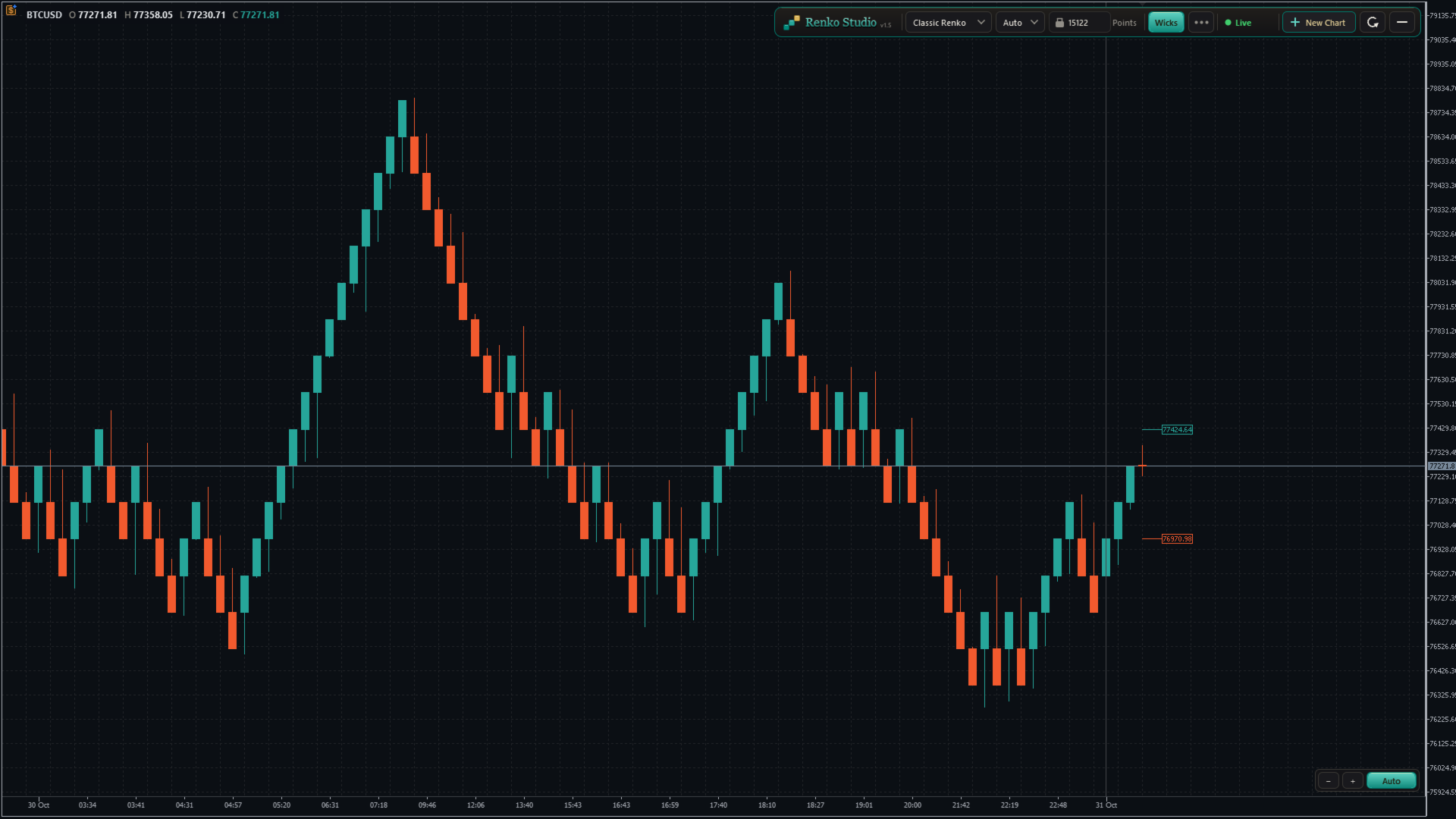
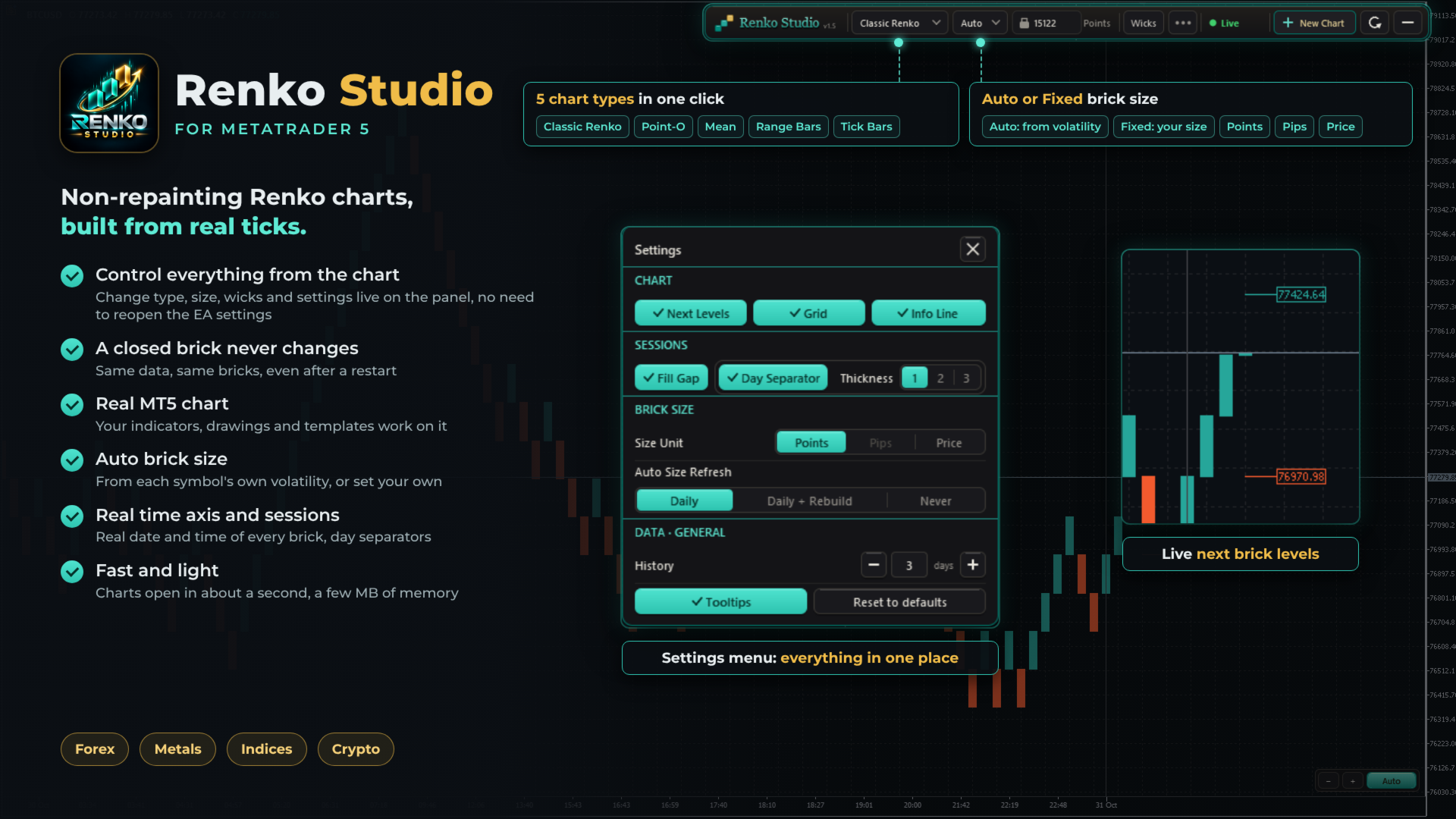
Fast, non-repainting Renko charts for MetaTrader 5: Classic, Point-O, Mean, Range Bars and Tick Bars.
A closed brick never changes. The Renko chart is a real MT5 chart, so your indicators and drawings work on it. Auto brick size, live next-brick levels, and charts ready in seconds.

Overview

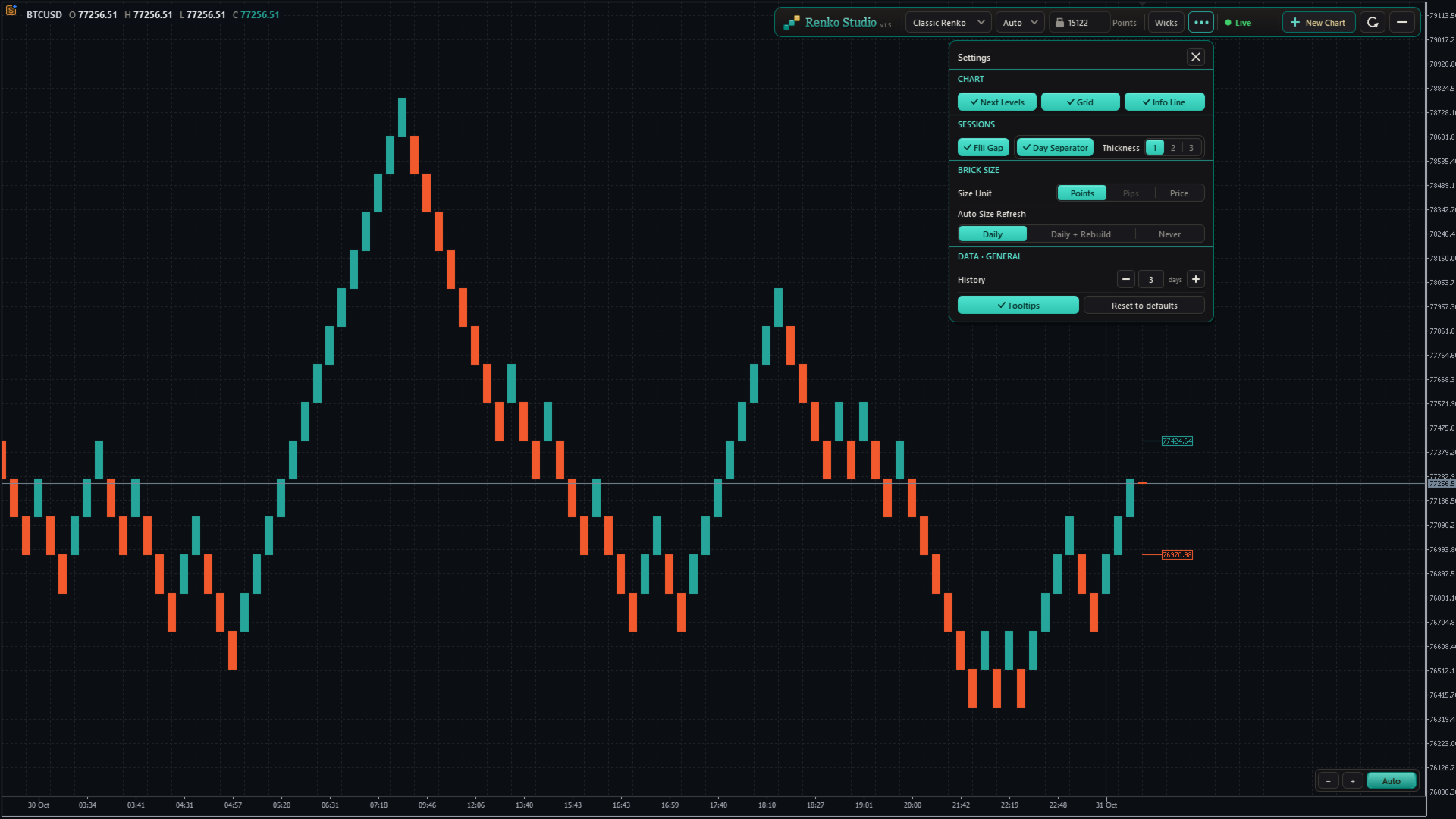
Renko Studio turns any MT5 symbol into clean, fast Renko charts built from your broker's real tick data. The Renko chart is a real MT5 chart, so your indicators, drawings and templates work on it, and everything is controlled from a modern panel on the chart.

1. Non-Repainting

  • A closed brick never changes. Not when you refresh, not after a restart, not when you reopen the terminal.
  • Built from real ticks. Every brick comes from your broker's tick data, not from M1 candles.
  • Same data, same bricks. The same ticks always produce exactly the same chart.
  • Your changes, your choice. The chart is only rebuilt when you change a setting yourself, such as the chart type or brick size.

2. Fast and Optimized

  • Opens in about a second. The chart window appears almost immediately; 3 days of history are ready in a few seconds.
  • Very light on memory. After loading, the EA uses only a few MB.
  • Smooth live updates. Bricks, the live bar and labels update without flicker.
  • Light on your terminal. Several Renko charts can run together with low CPU use.

3. Five Chart Types

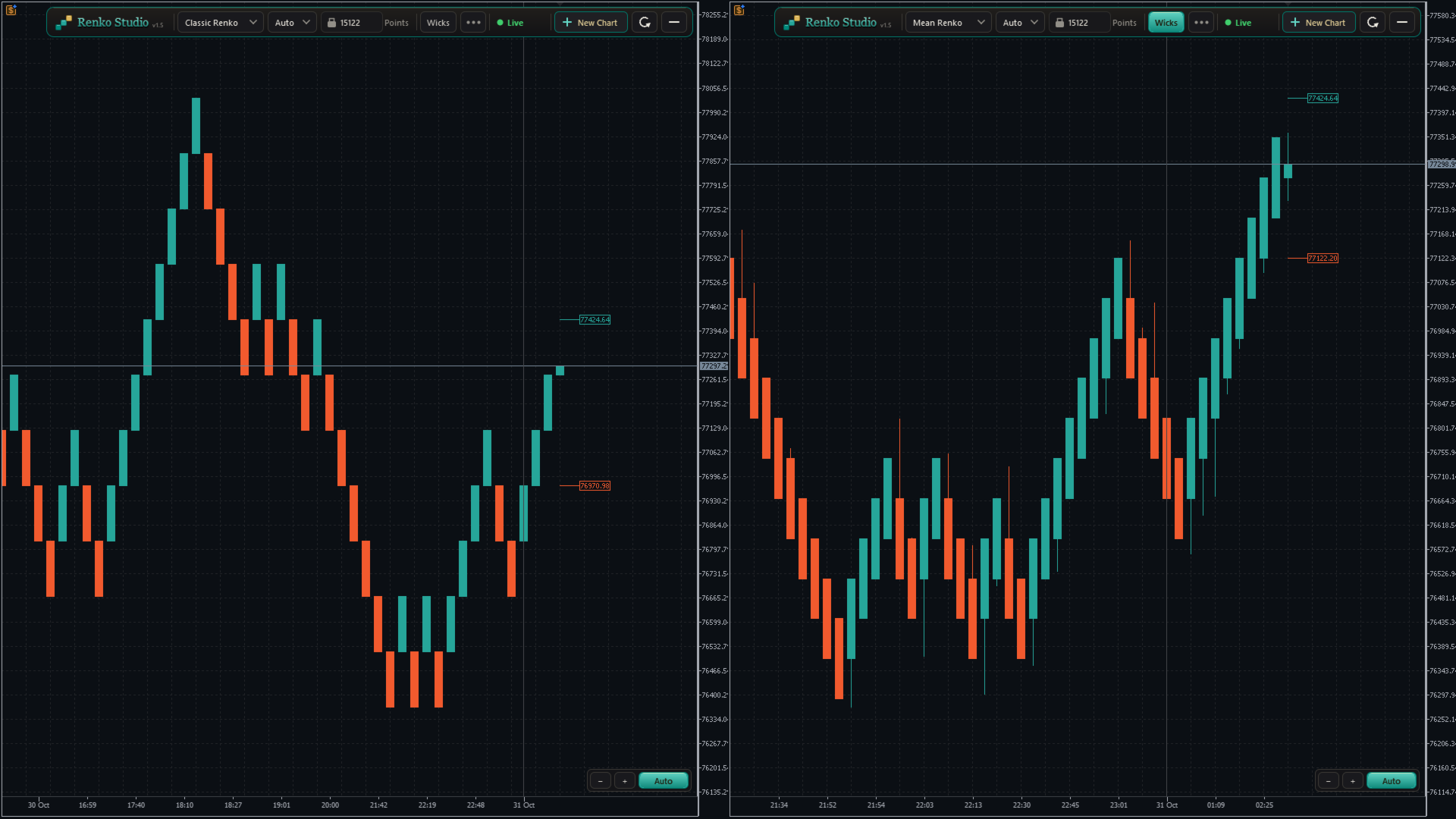
  • Classic Renko: a new brick forms when price moves one brick size in the trend direction; a reversal needs two brick sizes. The standard Renko view.
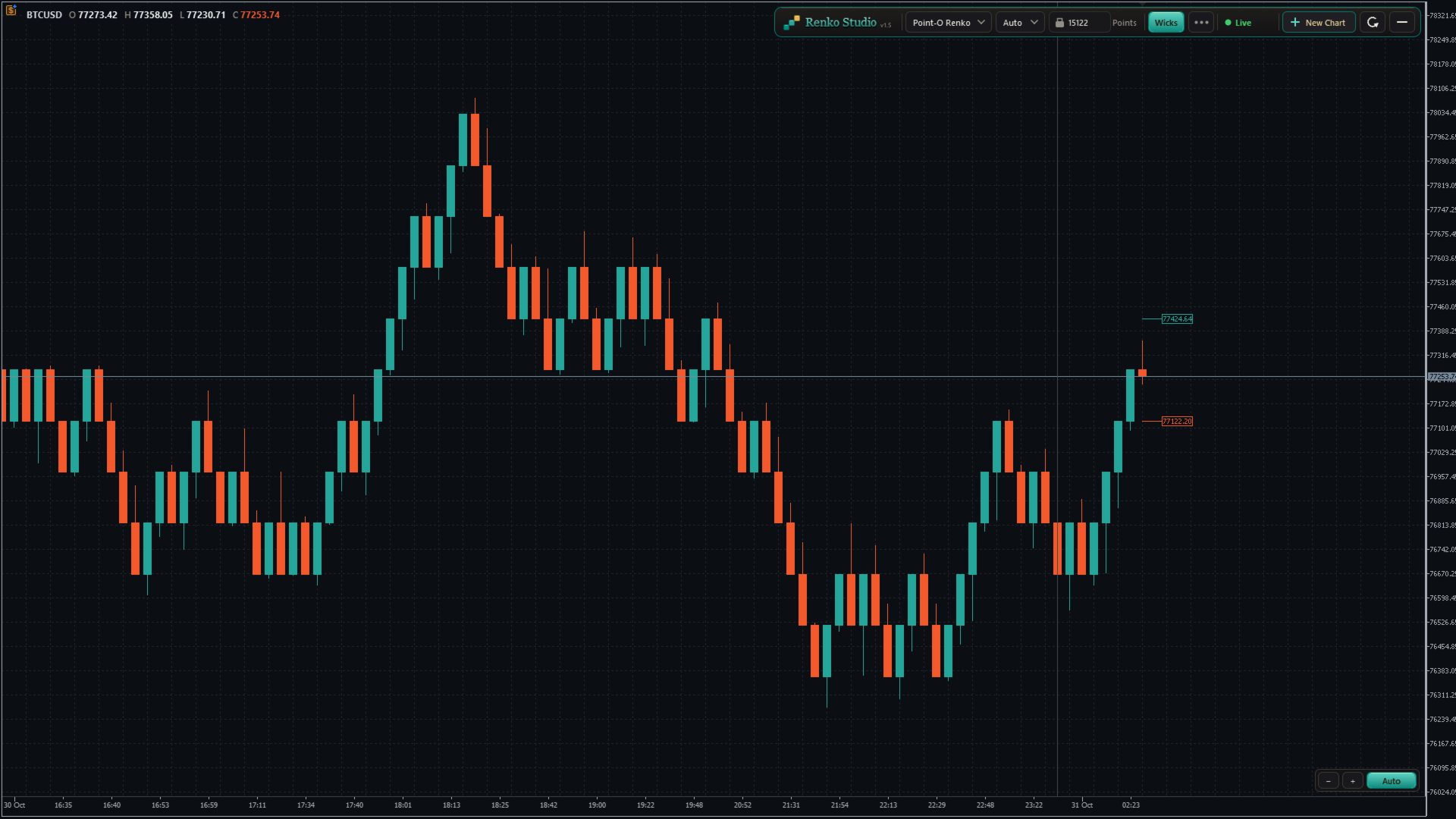
  • Point-O Renko: reverses after a one-brick move, so it reacts faster to turns.
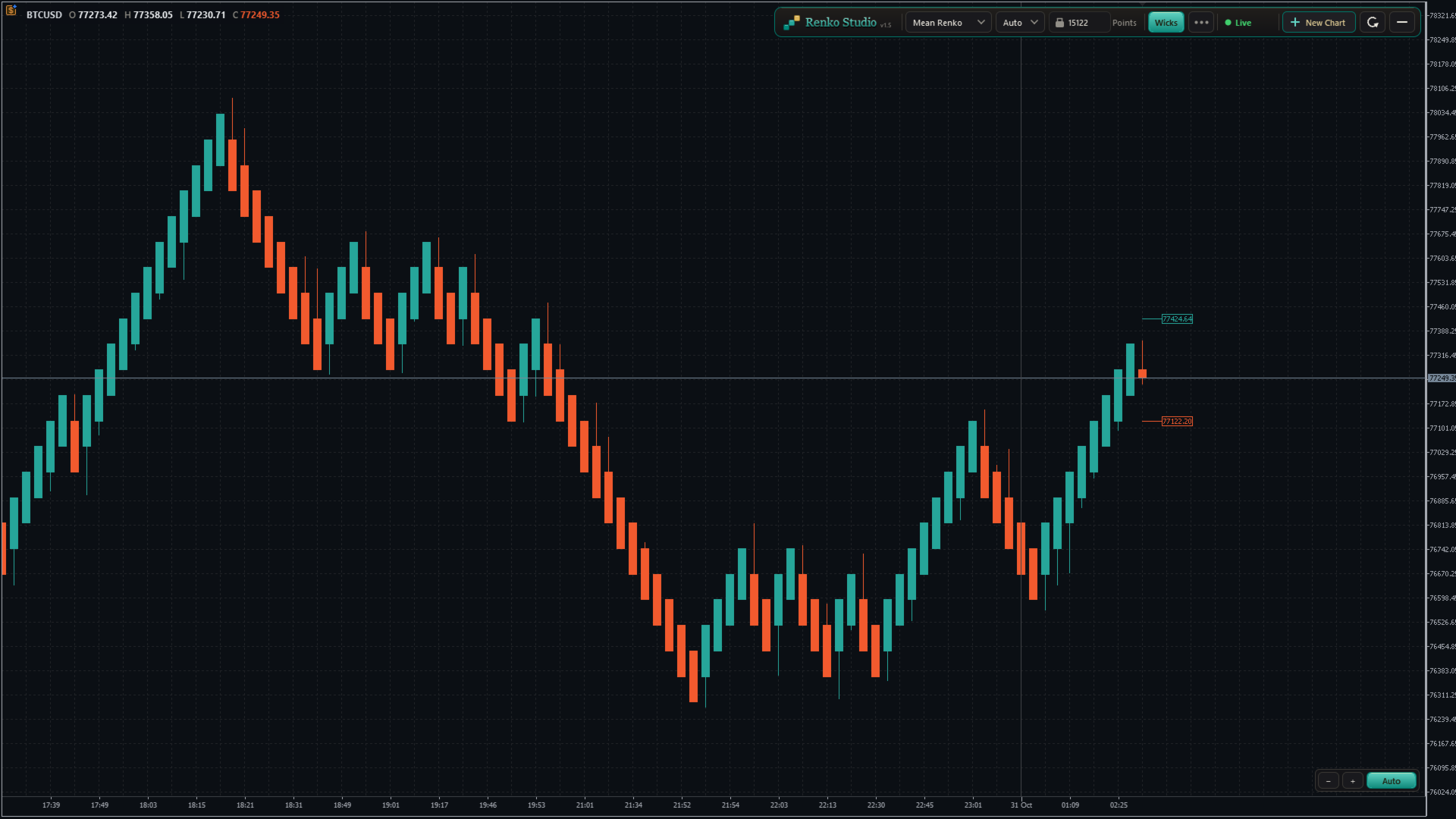
  • Mean Renko: each new brick starts from the middle of the previous one, giving a smoother trend view.
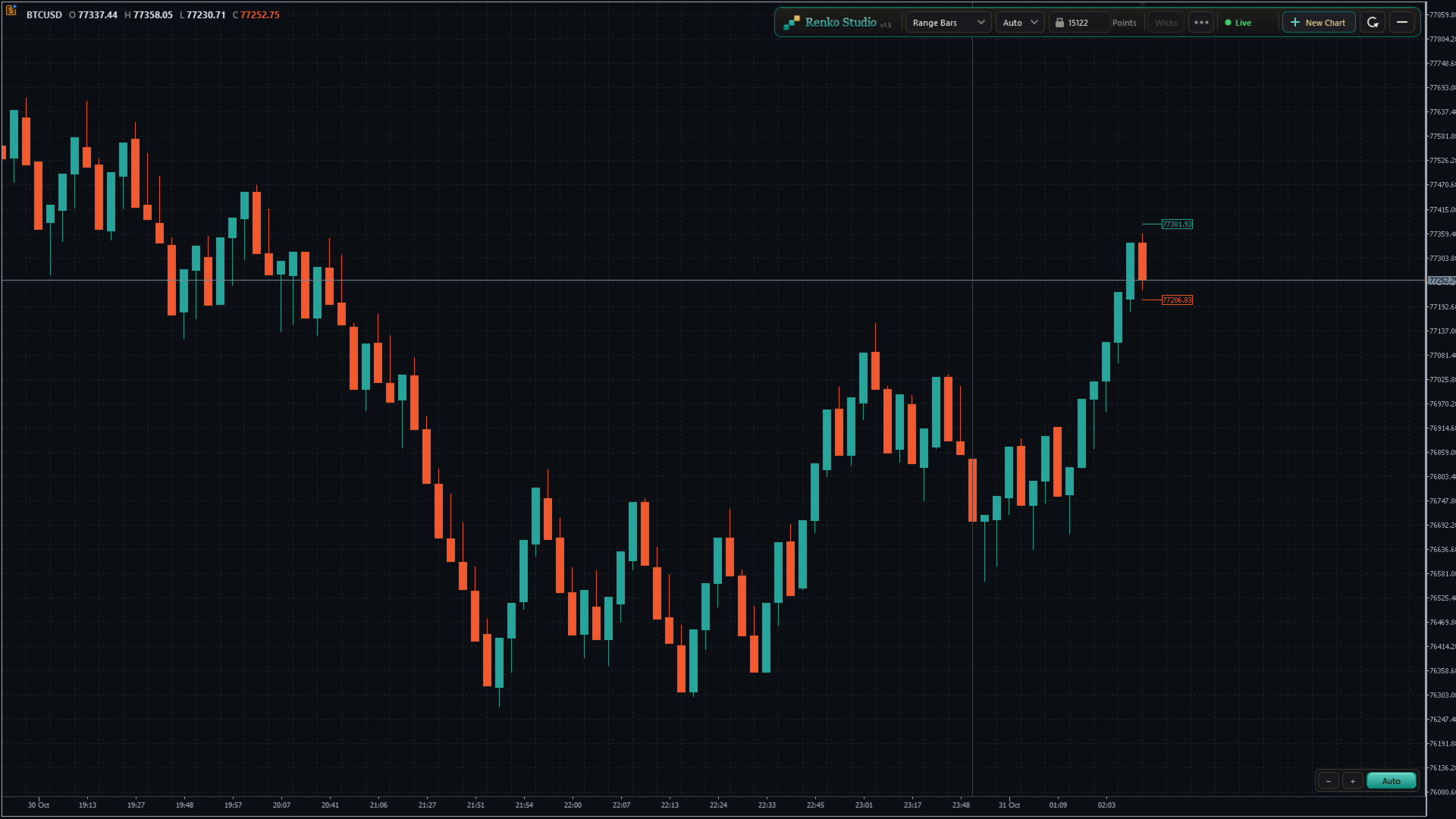
  • Range Bars: each bar closes when its high–low range reaches the set size, with real open, high, low and close.
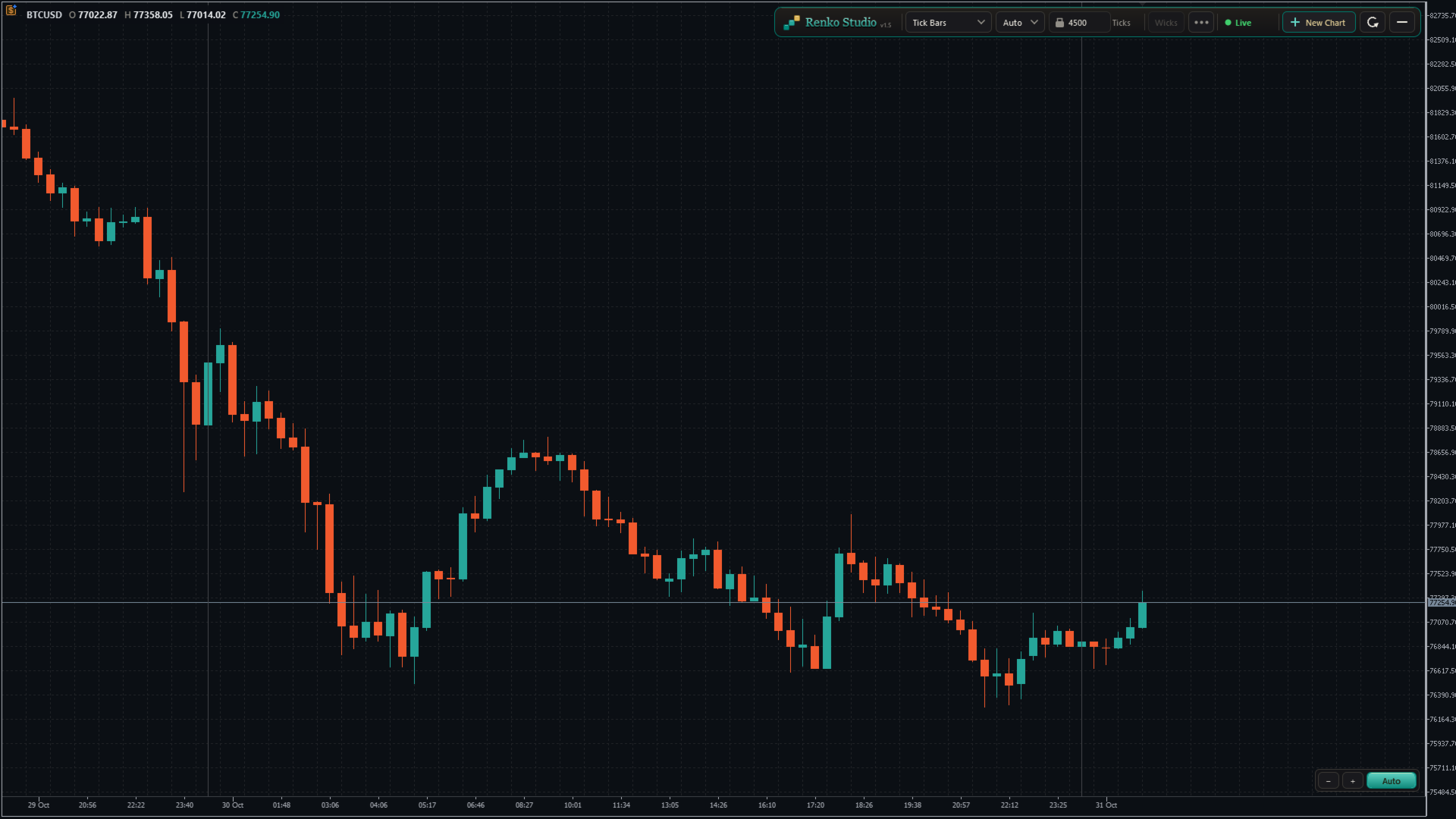
  • Tick Bars: each bar closes after a set number of ticks, showing market activity.
  • Switch in one click. Choose the type from the panel; the same chart window rebuilds in place.

4. Brick Size

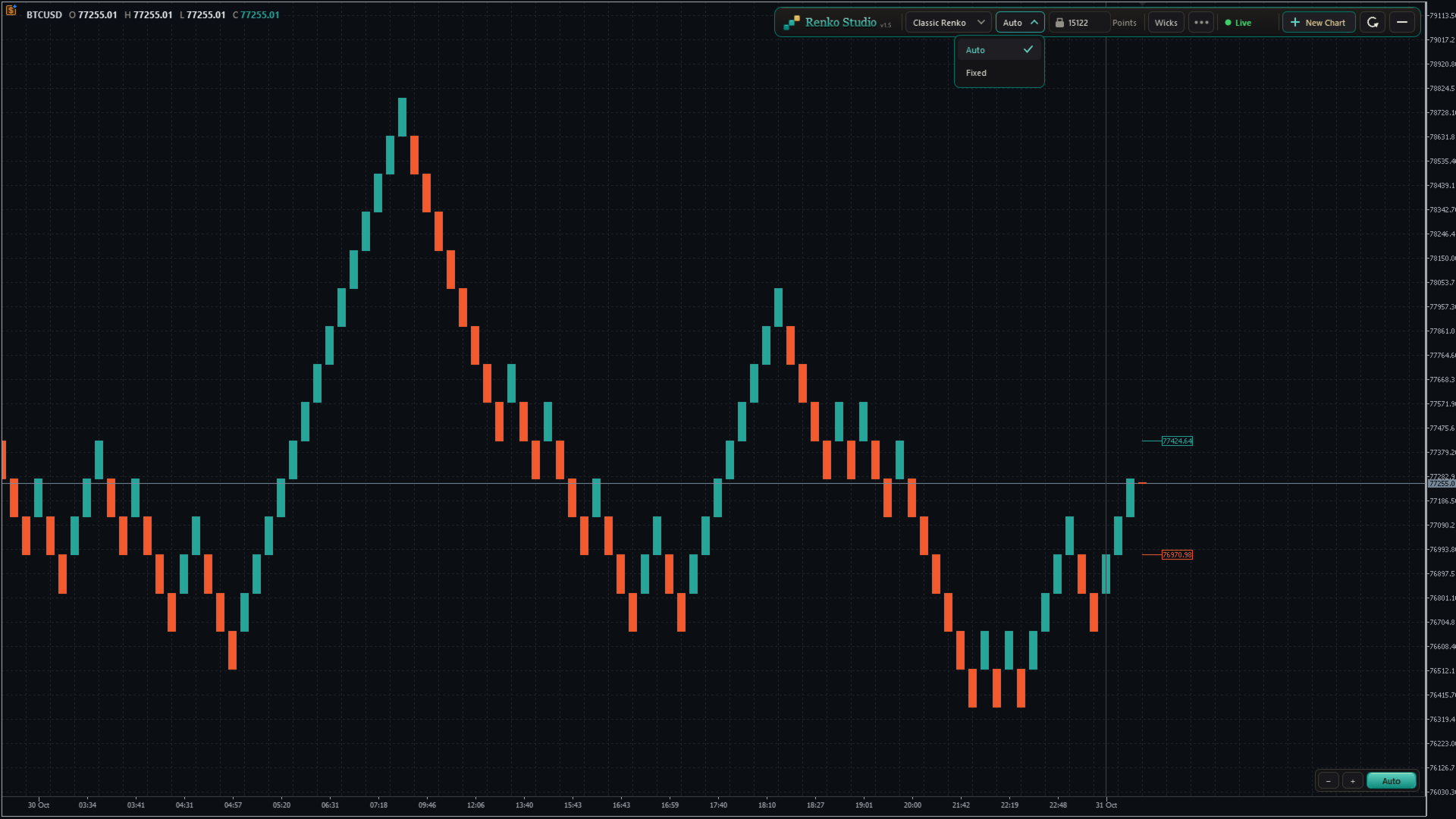
  • Auto size: calculated from the symbol's own daily volatility during its trading sessions. One Auto size per symbol, the same on every chart type.
  • Fixed size: type any brick size you like.
  • Size unit: show and enter the size in Points, Pips (forex pairs) or Price. Works correctly on 2-, 3-, 4- and 5-digit brokers.
  • Auto Size Refresh:
    • Daily: a new size at the start of each trading session; past bricks stay unchanged.
    • Daily + Rebuild: a new size at the start of each session, and the whole chart is rebuilt with it.
    • Never: keeps the size calculated when the chart was created.

5. Live View

  • Next Brick Levels: two labels show exactly where the next up brick and the next down brick will close.
  • Live bar: the forming brick is drawn clearly as price moves, with matching colours.
  • Live price line: follows the forming brick in real time.
  • Wicks: show or hide brick wicks with one click (Range and Tick bars always show real wicks).

6. Real Time Axis and Sessions

  • Real time axis: shows the real date and time of every brick, evenly spaced and easy to read.
  • Day separator: a clear line at the start of each trading day, with adjustable thickness.
  • Fill Session Gap: choose whether a price gap between sessions is filled with bricks or left as a visible gap.
  • Info line: shows the symbol and the open, high, low and close of the brick under your mouse.

7. Chart Control

Auto mode (default)

  • The chart keeps the latest bricks and the live bar centred between the panel and the time axis.
  • Bricks always look comfortable on screen: never too tall, never too flat.
  • Scroll back and forward in time freely; the vertical position adjusts by itself, smoothly.
  • The price scale can be stretched only within safe limits, so bricks never hide behind the panel or the time axis.

Manual mode

  • Click the Auto/Manual button to switch. The mode changes only when you click it.
  • Drag the chart freely in any direction: back, forward, up and down.
  • Stretch or shrink the price scale as much as you like.
  • If the live bar leaves the screen and you don't touch the chart for about 10 seconds, it glides back into view. Your zoom and scale stay as you set them.
  • Click Auto at any time to return to the centred view.

Zoom

  • Use the − and + buttons at the bottom-right corner to zoom out and in.
  • Or drag on the time axis to shrink or stretch the chart.
  • The zoom and Auto/Manual controls stay in the same place at every window size.

Refresh

  • One click resets the view: Auto mode, default zoom, latest bricks centred and space on the right for the next brick levels.
  • Refresh only resets the view. It never changes or reloads your bricks.

8. Control Panel and Settings Menu

Panel

  • Chart type, Auto/Fixed size, brick size with its unit, Wicks, the settings menu, status, New Chart and Refresh, in one compact toolbar.
  • No inputs to configure: attach the EA, click OK, and your chart is ready.

Settings menu

  • Next Brick Levels, Grid, Info Line, Day Separator and its thickness, Fill Session Gap, Size Unit, Auto Size Refresh, History, Tooltips and Reset to defaults, grouped in clear sections.
  • Tooltips: clear hover help for every control, which you can switch off.
  • Reset to defaults: brings every setting back to its default in one click.

History

  • Choose how many trading days to load: type the number or use − and +.
  • "3 days" means today plus the last 3 complete trading sessions. Weekends and holidays without data are not counted.
  • The chart reloads once with the new history, in the same window, keeping all your settings.
  • A per-symbol limit keeps loading fast. Above the recommended value, a note shows the expected first-load time; once loaded, the chart runs at full speed.

Status

  • A live status indicator (Live, Loading, Market closed and more) with a short explanation on hover.

9. Multiple Charts and Restore

New Chart

  • Click + New Chart on the panel to open another Renko chart of the same symbol.
  • Each chart has its own type, brick size and settings, for example Classic Renko on one and Range Bars on another.
  • New charts open with your last-used settings.
  • Charts are named XAUUSD_RS01, XAUUSD_RS02 and so on, numbered separately for each symbol.

Clean-up and restore

  • Closing a Renko chart removes its symbol and data automatically.
  • After restarting MT5, every chart comes back with the same settings and catches up with the latest prices.

10. Compatibility

  • Indicators, drawings and templates work on the Renko chart like on any MT5 chart.
  • Any symbol: forex, metals, indices and more, including broker suffixes such as .m or .pro.
  • Any broker digits: 2-, 3-, 4- and 5-digit symbols are handled correctly.

How to Use

  1. Open an M1 chart of your symbol (for example XAUUSD).
  2. Attach Renko Studio and click OK.
  3. A Renko chart opens with Classic Renko and Auto size. Change anything from the panel or the settings menu.

Important Notes

  • Removing the EA from the source chart closes its Renko charts.
  • Expert Advisors attached to a Renko chart do not receive ticks in this version, so they cannot run or trade from it. Indicators work normally.
  • The Renko time axis shows the real time. MT5's status bar and Data Window show an internal date.
  • Available history depends on your broker's tick data.
추천 제품
Professional Renko Chart MT5 Professional Renko Chart MT5는 MetaTrader 5용 깔끔한 렌코 차트 지표로, 별도의 지표 창에 렌코 브릭을 표시하도록 설계되었습니다. 또한 선택적으로 메인 가격 차트 위에 렌코 박스를 직접 시각화할 수 있습니다. 이 지표는 MetaTrader 5 안에서 익숙한 렌코 차트 스타일을 사용하고 싶은 트레이더를 위해 제작되었습니다. TradingView와 같은 인기 있는 최신 차트 플랫폼에서 제공되는 렌코 차트 시각화와 유사한 방식으로, 일반적인 시간 기반 캔들을 렌코 브릭으로 변환하고 그 결과를 단순하고 명확하며 실용적인 형식으로 표시합니다. 여러 개의 일반 차트 캔들이 하나의 렌코 브릭을 만들 수 있습니다. Professional Renko Chart MT5는 메인 가격 차트 위에 렌코 박스를 표시할 수도 있으며, 각 렌코 브릭을 형성하는 데 사용된 일반 캔들의 개수도 보여줄 수 있습니다. 이 지표는 Exp
Gino Renko
Stephane, Andr Valette
1 (1)
Another renko-based indicator. It returns different usable values ​​for an EA, and is directly displayed on the main chart. Its setting is very simple: The size of the renko The number of bars taken into account The falling color The color on the rise Returned values: Buffer 0 : Value of the middle Buffer 1 : Value of the Top Buffer 2 : Value of the Bottom Buffer 3 : Direction of renko (0.0 for top ; 1.0 for bottom) Buffer 4 : Ratio of the renko, for example, if it is twice, 3 times, ro more of
Advanced CRT Indicator MT5 — Candle Range Theory Tool Advanced CRT Indicator MT5 is a professional analysis tool that automates Candle Range Theory. It identifies consolidation ranges, breakout levels, Fair Value Gaps (FVG), and profit targets, with a real-time dashboard and alerts. Overview - Multi-timeframe candle range detection   - Automatic breakout levels with buffer settings   - Fair Value Gap identification and tracking   - Up to three customizable target levels (Risk:Reward ratios)  
Renko Perfection Indicator You will receive lifetime free upgrades and updates from us. You will also receive support via comments. 소개 및 개요 Renko Perfection Indicator는 시장의 노이즈를 필터링하고 가격 변동에만 집중하도록 설계된 MetaTrader 5 (MT5)용 지표입니다. 시간에 의존하는 기존 캔들스틱 차트와 달리, 이 지표는 가격이 사전 정의된 수치만큼 이동할 때만 렌코(Renko) 브릭을 생성합니다. 이를 통해 시장 구조와 추세 방향을 명확하게 파악할 수 있습니다. 외환(Forex), 금, 지수, 주식 및 암호화폐 거래에 적합합니다. 주요 기능 (Key Features) 세 가지 브릭 크기 모드 (Triple Box Size Modes): PIPS Mode: 고정 핍 값 (외환에 적합). ATR Mode: 변동성에 따른 동적 크기 계산 (지수/주식
FREE
This SMT (Smart Money Technique) divergence indicator identifies discrepancies in price movement between two different trading symbols, helping traders detect potential market reversals. This tool compares the price action of two correlated assets, such as two currency pairs or indices, to spot divergences where one asset's price moves in the opposite direction of the other. For example, while one symbol may be making higher highs, the other might be making lower highs, signaling a divergence. T
FREE
DAILY OH/OL SDEV QUANT MODEL - STATISTICAL TRADING WITH PRECISION RISK MANAGEMENT TRADE WITH MATHEMATICAL CERTAINTY - KNOW YOUR EXACT STOP-LOSS AND TAKE-PROFIT BEFORE YOU ENTER This indicator analyzes 5,000+ days of price history to give you: Exact entry levels (sigma bands locked at daily open) Exact stop-loss distance (from M
The ATR Indicator Based on Heiken Ashi is a unique volatility analysis tool that combines the Average True Range (ATR) with Heiken Ashi candlestick calculations to provide a smoother and more reliable measure of market volatility. Unlike the traditional ATR, which uses standard candlesticks, this indicator applies the Heiken Ashi formula to filter out market noise and deliver a clearer volatility signal. Key Features: • ATR Calculation Based on Heiken Ashi Candlesticks – Offers a more stable v
FREE
Precision Instant
Jerson Daryl Herrera Arroyo
FREE TRY P.I.P.S FREE FOR 10 DAYS PRUEBA P.I.P.S GRATIS POR 10 DIAS EN: Download now and get a free 10-day trial license . Full features, demo account, no credit card needed. ES: Descarga ahora y obtén una licencia de prueba gratis por 10 días . Todas las funciones, cuenta demo, sin tarjeta de crédito. 10 DAYS 10 DIAS DEMO ONLY SOLO DEMO FULL ACCESS ACCESO COMPLETO NO CARD SIN TARJETA SEND A MESSAGE TO REQUEST YOUR FREE TRIAL ENVIA UN MENSAJE PARA SOLICITAR TU PRUEBA GRATIS P.I
Renko Chart
Marcin Konieczny
3.56 (9)
This indicator allows to display Renko charts in the indicator window. Renko charts show only price movements that are bigger than the specified box size. It helps to eliminate noise and allows to focus on main trends. Time is not a factor here. Only price movements are taken into account. That's why Renko chart is not synchronized with the main chart it is attached to. Indicator works in two modes: CLOSE - only close prices are taken into account while building the chart HIGH_LOW - only high/l
FREE
See exactly how close your account is to your prop firm's daily-loss and max-drawdown floors - live, on the chart, with the real rule math of each firm. Most traders track their daily limit with mental math, and the daily-loss breach is the most common way evaluations end. Breach Radar draws the actual floors: - Daily-loss bar: the exact floor level, the dollar distance remaining, and the percent of today's budget already used - Max-drawdown bar: static or trailing (including trailing that loc
FREE
MACD + ADX Confluence Indicator (Short English description)Purpose Highlights strong trending candles where MACD and ADX give a confluence signal. Colors candles and places arrows only when both conditions are met.Main logic & signalsBullish signal (blue candle + blue ↑ arrow) MACD main line > 0 and ADX > selected level Bearish signal (red candle + red ↓ arrow) MACD main line < 0 **and** ADX > selected level Neutral candles When confluence is absent → candles keep default chart colors (no overl
Day Direction Scanner
Efren Hernandez Partida
5 (3)
FREE
Smart SuperTrend Scalping Signals Pro is a MetaTrader 5 indicator designed for traders who want a clean visual trend-following system directly on the chart. Instead of displaying the traditional SuperTrend as a line, the indicator colors the actual price candles based on the current market condition. Green candles indicate bullish SuperTrend conditions, red candles indicate bearish SuperTrend conditions, and gray candles indicate sideways or weak-trend conditions. The indicator also includes a s
O Alpha B3 Renko Trader  é um robô especialista para negociação no Bovespa B3  (miniíndice e minidólar) que une a análise de candlesticks do gráfico Renko (calculado internamente, sem imagens gráficas) com a estratégia Alpha B3 . O robô permite configurar, para os sinais de entrada, o tamanho do brick do gráfico Renko, bem como um número de candlesticks para análise. Além disso, você deve configurar os stops fixos, em pontos. O robô permite também a configuração de funções, tais como número de c
Renko Riper Pro for MetaTrader 5 Please Set First LIVE/DEMO USAGE: To run this EA on a live chart (Real or Demo account), you MUST set the input parameter Real_Testing = true . (Real testing ke liye 'Real_Testing' ko True karna zaroori hai). If this is left as false , the EA runs in a restricted dummy mode meant ONLY for MQL5 Market automatic validation and will not execute its actual trading logic! Advanced Renko-based Automated Trading System for MT5 Renko Riper Pro is a highly configurable au
Renko Price Action ATR은 선택한 기간의 ATR로 각 벽돌의 크기를 계산하여 렌코 차트를 만듭니다. 렌코 차트는 작은 가격 움직임을 걸러내므로 추세, 지지와 저항, 고점과 저점의 다이버전스를 더 쉽게 볼 수 있습니다. 작동 모든 종목에서 작동합니다. 렌코 차트는 실시간으로 업데이트됩니다. 설정 ATR Calculation Timeframe: ATR과 벽돌 크기 계산에 사용하는 타임프레임. ATR Calculation Averaging Period: ATR 평균 기간 수. Percentage of ATR Size: 벽돌 크기로 사용할 계산된 ATR의 비율(%). 벽돌 크기가 ATR을 따르기 때문에, 수동으로 설정하지 않아도 차트가 각 종목의 변동성에 맞춰 조정됩니다. 문의 사항이 있으시면 다이렉트 메시지를 보내 주세요: https://www.mql5.com/en/users/robsjunqueira/
Renko Classic Pro 1. Advanced Median Renko (Mean Renko) Architecture Cuts Out False Breakouts & Noise: Unlike conventional time-based candlestick charts that show chop during low-volume sessions, Renko builds bricks solely on price movement. Faster Reversal Signals: Standard Renko requires price to travel two full boxes to trigger a reversal, causing delayed entries. The 50% Median Open logic calculates the next open from the midpoint of the prior brick, getting you into trend changes twice as f
This utility EA will display simple renko, hence the name essential renko. The renko will be shown in a new tab and using custom symbol. Please do note (especially for those who new to Renko), that Renko does not follow timeline as it will follow price movement. That's why it has a lot of potential where you can attach any EA that you want and use any custom indicator in this new custom symbol for renko. Always use M1 timeframe. Most of the time you don't need to change anything. But if you d
FREE
Apex Precision
Laureano Echandi Salas
Apex Precision is a Forex Expert Advisor for MetaTrader 5. It combines six machine learning modules with technical analysis for multi-symbol trading. The system uses dynamic clustering with synchronization between chart instances to manage correlations, mean-variance portfolio optimization for capital allocation, and a configurable ensemble that combines several predictive models. The system has 15 groups of input parameters. It can operate from conservative to more active settings, and it can c
The Expert Advisor is used to create Renko chart, realtime updates, easy for technical analysis. Backtest your strategy with all indicators with Renko chart in MetaTrader 5. Parameters Box Size : input the number of box size. Show Wicks : if true , draw a candle with high/low. History Start: input the date to creat first candle. Maximum Bars: limit number of bars on renko chart How to use Attach the Expert Advisor to a chart (timeframe M1), for which you want to create a renko. Input box size a
Haven Stop Loss Hunter
Maksim Tarutin
4.5 (6)
Haven Stop Loss Hunter 2.0 - 유동성 분석의 새로운 관점 대규모 업데이트 — Haven Stop Loss Hunter 2.0 을 만나보세요! 이 도구는 유동성 영역 및 가짜 돌파(Sweeps)를 분석하기 위한 전문적인 도구로, 더욱 유연하고 기능적으로 개선되었습니다 [1]. 이번 버전에서는 다중 시간 프레임(MTF) 분석과 고급 알림 시스템을 구현하여 차트를 번거롭게 수시로 전환하지 않고도 스마트 머니 개념(SMC)에 기반한 기관 자금의 흐름을 효율적으로 추적할 수 있도록 설계되었습니다 [1]. 저의 다른 제품 보기 - > 여기 클릭 . 유동성 스윕(Liquidity Sweep)은 기관 등 대형 시장 참여자가 개인 트레이더들의 손절매(Stop-Loss) 물량을 노리는 움직임을 의미합니다. 버전 2.0을 사용하면 이러한 주요 가격 행동을 현재 작업 중인 차트뿐만 아니라 상위 시간 프레임(H1, H4, D1)에서도 동시에 관찰할 수 있어, 현재 시장 상황을 보다 깊
FREE
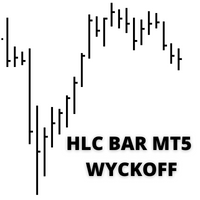
HLC bar MT5 Wyckoff
Eduardo Da Costa Custodio Santos
MT5에 대한 표시기 "HLC_bar_MT5 Wyckoff"는 거래 시 분석을 용이하게 하기 위해 생성되었습니다. HLC Bar는 Richard Wyckoff가 사용했으며 현재 "VSA" 작업에서 널리 사용됩니다. Wyckoff는 High, Low 및 Close를 사용하면 그래프가 훨씬 더 명확하고 분석하기 쉽다는 것을 발견했습니다. 표시기 "HLC_bar_MT5 Wyckoff"는 다음을 허용합니다. # 막대 너비를 변경합니다. # 막대를 같은 색으로 둡니다. # 그리고 같은 가격으로 열리고 닫힌 바를 강조 표시합니다. 색상과 너비는 설정에서 쉽게 수정할 수 있습니다. 지표를 사용하려면 차트로 끌어다 놓기만 하면 됩니다. Wyckoff는 볼륨과 함께 사용할 때 HLC 차트를 막대 그래프라고 불렀습니다.
MAD Bands (Moving Average Deviation Bands) MAD Bands are intended to be used when you want to visually check the behavior of price volatility in relation to a moving average. MAD_Bands (MQL5 version) parameter description This document explains the MT4 parameter input screen for each setting item (input parameter). Group: Main (basic settings) Period Default   :         20 Explanation   : The number of candlesticks used to calculate the moving average (Mid) and band width. The larger the value
FREE
This MT5 indicator provides real-time updates of classic Renko charts. Renko charts focus on price movement, filtering out noise and highlighting trends. What are Renko candles? Renko charts display price movement using "bricks" of equal size, ignoring time. A new brick is drawn only when the price moves by a specified amount. They help visualize trends by removing time-based noise. Parameters - BrickSizePoints  (20): Renko brick size in points - HistoryDepthSec  (3600): Historical data to ini
FREE
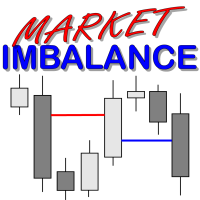
Market Imbalance MT5
Scott Edward Merritt
What Is Market Imbalance? Market Imbalance, also known as "IPA" or Improper Price Action, is when price moves so quick in one direction with no orders on the other side of the market to mitigate the price movement. We all know Big Banks, or "Smart Money", can move the market by placing huge orders which in turn can move price significantly. They can do this because Big Banks are the  top 10 Forex traders in the world . But unfortunately, the Big Banks cannot leave these orders in drawdown and mu
Swing Failure Hunter
Shingidzano Lesetedi
SFP Hunter — Swing Failure Pattern SFP Hunter is a MetaTrader 5 indicator that automatically detects Swing Failure Patterns (SFP) on any symbol and timeframe. The indicator identifies single-candle stop-hunt reversals where price wicks beyond a prior swing high or low and closes back inside on the same candle, signalling a potential reversal from that level. How the Pattern Works A Swing Failure Pattern occurs when price briefly breaches a prior swing high or swing low — triggering the stop orde
Mario Order Blocks
Sandeep Kumar Tiwary
Mario Order Block Indicator Overview The Professional Order Block Indicator is an advanced technical analysis tool that automatically identifies and displays institutional order blocks on your chart. Based on smart money concepts, this indicator helps traders identify high-probability support and resistance zones where institutional traders have placed significant orders. Key FeaturesAutomatic Order Block Detection Identifies bullish and bearish order blocks based on pivot point analysis Uses so
ED Precision Reversal Pro
Egbert Gerhald Janse Van Rensburg
Designed for Gain & Pain Markets ED Precision Reversal Pro has been designed with Gain and Pain markets as a key focus. These markets can produce strong directional movements, rapid price extensions and sudden reversals. The indicator is designed to monitor overextended market conditions and identify potential reversal areas where its configured BUY or SELL conditions are met. It can be used on: Gain Markets Pain Markets XAUUSD (Gold) Forex pairs Indices Other MetaTrader 5 instruments Gain & Pai
Trade Protection PRO – Professional Trade Manager & Protection Tool A powerful yet easy-to-use Trade Protection Expert Advisor that automatically manages your positions with advanced risk protection features. Key Features: Automatic Breakeven with customizable offset Up to 5 Partial Take Profit levels with individual percentages Modern real-time Dashboard showing all important information Clear visual horizontal lines on chart (BE trigger, entry line, and all TP levels) Two volume modes: % of In
Catch the Spikes. Trade the Ticks. Master the Market. Welcome to ATHENA (Crash & PainX Edition) by DC Trading — the ultimate MetaTrader 5 technical analysis indicator built specifically for synthetic index traders targeting Crash and PainX markets. Whether you specialize in catching high-probability downward spikes or executing disciplined tick scalping strategies on the M1 timeframe, Athena gives you clear, real-time visual confirmation to trade with maximum confidence. WHY TRADERS CHOOSE AT
이 제품의 구매자들이 또한 구매함
Trade Assistant MT5
Evgeniy Kravchenko
4.43 (216)
거래당 위험 계산, 라인을 사용한 손쉬운 신규 주문, 부분 청산 기능을 통한 주문 관리, 7가지 유형의 트레일링 스탑 및 기타 유용한 기능을 제공합니다. 추가 자료 및 지침 설치 지침   -   애플리케이션 지침   라인 기능       - 차트에 개시선, 손절매, 차익실현을 표시합니다. 이 기능을 사용하면 새로운 주문을 쉽게 하고 개봉 전에 추가 특성을 볼 수 있습니다. 위기 관리       -       위험 계산 기능은 설정된 위험과 손절매 주문의 크기를 고려하여 새 주문의 볼륨을 계산합니다. 이를 통해 손절매 크기를 설정하고 동시에 설정된 위험을 존중할 수 있습니다. 로트 계산 버튼 - 위험 계산을 활성화/비활성화합니다. 필요한 위험 값은 위험 필드에 0에서 100 사이의 백분율 또는 예금 통화로 설정됩니다. 설정 탭에서 위험 계산 옵션을 선택합니다. $ 통화, % 잔액, % 지분, % 자유 마진, % 사용자 정의, % AB 이전 일, % AB 이전 주, % AB 이전
Trade Manager EA에 오신 것을 환영합니다. 이 도구는 거래를 보다 직관적이고 정확하며 효율적으로 만들기 위해 설계된 궁극적인 리스크 관리 도구 입니다. 단순한 주문 실행 도구가 아닌, 원활한 거래 계획, 포지션 관리 및 리스크 제어를 위한 종합 솔루션입니다. 초보자부터 고급 트레이더, 빠른 실행이 필요한 스캘퍼에 이르기까지 Trade Manager EA는 외환, 지수, 상품, 암호화폐 등 다양한 시장에서 유연성을 제공합니다. Trade Manager EA를 사용하면 복잡한 계산은 이제 과거의 일이 됩니다. 시장을 분석하고 진입, 손절 및 익절 수준을 차트의 수평선으로 표시한 후 리스크를 설정하면, Trade Manager가 이상적인 포지션 크기를 즉시 계산하고 SL 및 TP 값을 실시간으로 표시합니다. 모든 거래가 간편하게 관리됩니다. 주요 기능: 포지션 크기 계산기 : 정의된 리스크에 따라 거래 크기를 즉시 결정합니다. 간단한 거래 계획 : 진입, 손절, 익절을 위한
Farmed Hedge Yield Farming | All Markets (Manual - Hybrid - Semi/Automated EA) VERIFIED TRADING RESULTS - Farmed Hedge Yield Axi Copy:  https://www.mql5.com/en/signals/2356376 - Farmed Hedge Yield Exn Copy:   https://www.mql5.com/en/signals/2356404 - Farmed Hedge Yield V Copy:  https://www.mql5.com/en/signals/2357156 IMPORTANT NOTICE: FarmedHedge is a MANUAL-FOCUSED TRADING UTILITY ,not a fully automated EA. Results shown on this Signal include manual trades and overall strategic management.
Telegram to MT5 Multi-Channel Copier   는 Telegram 및 Discord 채널의 트레이딩 시그널을 MetaTrader 5로 자동 복사합니다. 봇도, 브라우저 확장도, 수동 복사도 필요 없습니다. Telegram이나 Discord에 시그널이 도착하면 EA가 몇 초 안에 터미널에서 주문을 실행합니다. 그리고 채널을 복사하기 전에, 내장 백테스터가 그 채널이 내 계좌에서 어떤 결과를 냈을지 보여줍니다. 제품은 두 가지 구성 요소로 이루어집니다: Telegram 채널을 수신하는 Windows 애플리케이션과, MT5 터미널에서 시그널을 실행하는 본 EA입니다. MT4 버전도 제공됩니다   여기 . 설정 가이드와 앱 다운로드:   https://www.mql5.com/en/blogs/post/768988 텔레그램 시그널 채널을 백테스트하는 방법 을 확인하세요. 현재 가격은 향후 인상될 예정입니다. 작동 방식 앱은 여러분 자신의 Telegram 계정으로 연결되므
내 거래 규칙에 맞춰 Telegram 신호 복사 Telegram to MT5 Signal Trader 는 공개 및 비공개 Telegram 채널과 그룹의 텍스트 기반 거래 신호를 MetaTrader 5로 자동 복사합니다. 하나의 데스크톱 앱에서 여러 신호 제공자와 MT5 계좌를 관리하고, 제공자마다 위험 관리 및 거래 설정을 개별적으로 지정 할 수 있습니다. 신호 복사에는 Telegram 봇이나 API 설정이 필요하지 않습니다. 전화번호 또는 QR 코드로 본인의 Telegram 계정에 로그인한 후, 이미 가입한 채널이나 그룹을 선택하면 됩니다. 봇을 만들거나 Telegram API 토큰, API ID 또는 API 해시를 입력할 필요가 없습니다. 포지션 크기를 선택하고, 여러 익절 목표에 청산 물량을 배분하며, 손익분기점 이동과 트레일링 스톱을 자동화하세요. 제공자의 신호를 따르면서도 실제 거래 방식은 직접 설정할 수 있습니다. 이 제품은 MT5 Expert Advisor와 필수 Win
TradePanel MT5
Alfiya Fazylova
4.88 (170)
Trade Panel은 다기능 거래 도우미입니다. 이 애플리케이션에는 50개 이상의 수동 거래 기능이 포함되어 있으며 대부분의 거래 작업을 자동화할 수 있습니다. 앱 사용 설명서: https://www.mql5.com/en/blogs/post/756482 데모 계정용 앱 체험판: https://www.mql5.com/en/blogs/post/750865 앱 설치 방법: https://www.mql5.com/en/blogs/post/756239 시각 모드에서 앱 테스트 방법: https://www.mql5.com/en/blogs/post/770277 VPS MetaTrader에 앱 설치 방법: https://www.mql5.com/en/blogs/post/770190 거래. 한 번의 클릭으로 거래를 수행할 수 있습니다: 리스크 자동 계산과 함께 예약 주문 및 포지션 열기. 한 번의 클릭으로 여러 주문 및 포지션 열기. 주문 그리드 열기. 예약 주문 및 포지션을 그룹별로 닫기. 포지션
================================================================================ POC BREAKOUT - V20.72. Full Professional Grade Toolkit ================================================================================ POC Breakout is a full MetaTrader 5 trading dashboard for discretionary traders who want breakout signals, Point of Control (POC) context, volume profiles, order flow, market structure, news, alerts, and advanced trade planning in one professional workspace. Attached directly to you
MT5 to Telegram Signal Provider 는 사용하기 쉽고 완전히 커스터마이즈 가능한 유틸리티로, 특정 신호를 Telegram의 채팅, 채널 또는 그룹으로 전송하고, 귀하의 계정을 신호 제공자 로 만듭니다. 경쟁 제품과 달리 DLL 임포트를 사용하지 않습니다. [ 데모 ] [ 매뉴얼 ] [ MT4 버전 ] [ 디스코드 버전 ] [ 텔레그램 채널 ]  New: [ Telegram To MT5 ] 설정 단계별 사용자 가이드 가 제공됩니다. 텔레그램 API에 대한 지식은 필요하지 않습니다; 개발자가 제공하는 모든 것이 필요합니다. 주요 특징 구독자에게 보낸 주문 상세 정보를 커스터마이즈할 수 있습니다. 예를 들어, 브론즈, 실버, 골드와 같은 계층 구독 모델을 만들 수 있습니다. 골드 구독에서는 모든 신호를 받습니다. id, 심볼, 또는 코멘트로 주문을 필터링할 수 있습니다. 주문이 실행된 차트의 스크린샷이 포함됩니다 보낸 스크린샷에 닫힌 주문을 그려 추가 검증을 합니다
VirtualTradePad PRO SE MT5 — MetaTrader 5용 전문 트레이딩 컨트롤 센터 VirtualTradePad PRO SE 는 MetaTrader 5 용 프리미엄 차트 기반 트레이딩 패널이자 거래 관리 워크스페이스입니다. 더 빠른 주문 실행, 더 명확한 포지션 관리, 구조화된 거래 관리, 시각적인 레벨 계획, 그리고 차트에서 직접 작업하는 전문적인 워크플로를 원하는 트레이더를 위해 설계되었습니다. 이 제품은 단순한 BUY / SELL 패널이 아닙니다. PRO SE는 수동 트레이딩, 예약 주문, 포지션 관리, 부분 청산, 바스켓 손익 관리, 평균가 레벨, ATM 규칙, 신호 모니터링, 실시간 시장 정보, 전략 테스터 (Strategy Tester) 워크플로, VPS 중심 운용을 하나의 연결된 인터페이스로 통합합니다. MT4 버전 | 전체 설명 및 스크린샷 | 구입 방법 | 설치 방법 | 로그 파일을 얻는 방법 | 테스트 및 최적화 방법 | Expforex의 모든
REVDEN AI Desk: REVDEN의 시장 컨텍스트 위에서, 당신만의 AI와 나누는 하나의 대화로 트레이딩을 운영하세요 하나의 대화로 트레이딩을 운영한다고 상상해 보세요. REVDEN AI Desk 는 이를 MetaTrader 5로 가져옵니다. 당신만의 AI에게 시장을 어떻게 읽는지 물으면, AI는 당신이 거래하는 종목에 대한 REVDEN의 전체 컨텍스트, 즉 각 종목의 상태와 리스크 현황, 예정된 발표를 바탕으로 답합니다. AI의 제안은 진입, 스톱, 타겟, 리스크를 갖추고 도착하며, 맞는 제안을 당신이 승인합니다. 규칙도 같은 방식으로 바뀝니다. 무엇을 바꿀지 적으면 AI가 새 룰북의 초안을 작성하고, 받아들일지 버릴지는 당신이 정합니다. 대화를 둘러싸고 시장 전체가 하나의 화면에 펼쳐집니다. 데스크와 설정 가이드를 확인하세요. 모든 화면, 모든 설정, 그리고 당신만의 AI와 함께하는 첫 단계: stein.investments/products/revden-ai-desk 당신
News Trade EA MT5
Konstantin Kulikov
4.55 (11)
제가 몇 년 동안 사용하고 있는 유용한 로봇을 소개드립니다. 반자동뿐만 아니라 자동 모드로도 사용할 수 있습니다. >>> Chat <<< 본 프로그램에는 경제 캘린더의 뉴스별로 유연한 거래 설정이 포함되어 있습니다. 전략 테스터에서 확인할 수 없습니다. 진짜 작업뿐입니다. 최신 설정 아카이브 다운로드: https://www.mql5.com/en/blogs/post/747929 신호 모니터링: https://www.mql5.com/en/signals/author/test-standart 이 전문가를 위해 고유 설정 세트를 만들 때 블로그의 모든 매개변수에 대한 설명을 참조하십시오: https://www.mql5.com/en/blogs/post/748545 . 기본 설정 설명 작업은 한 차트에서 GBP(GBPUSD, EURGBP, GBPJPY, GBPCAD, GBPAUD, GBPCHF)와 쌍으로 이루어집니다. GBP는 가장 변동성이 큰 통화로서 거래 수행 시 거래를 성공적으로
RETAILBERG FOOTPRINT CHART PRO — Order-Flow Workspace for MetaTrader 5 Version 7.00  |  Professional System  |  31 tools  |  One chart A full 150-page illustrated User Manual is included. Please read the full manual to understand this feature packed footprint chart elements and ui. https://www.mql5.com/en/blogs/post/777982 DEMO / STRATEGY TESTER — PLEASE READ FIRST
The Patch
Mian Rameez Ali
The Patch It never opens a trade. It walks behind the ones that did. Every open position, every pending order — checked twice a second for the one thing that's easy to forget: a stop, a target. Found bare, it doesn't ask. It writes the missing number in, measured in points from wherever the position began, and moves on to the next. No strategy, no opinion on direction. Just the quiet assumption that nothing should ever sit on the market unprotected — not because someone decided it shouldn't,
다음 업데이트 — 버전 2.52 곧 출시! [신규] 시장 분석 및 트레이딩 워크플로를 향상시키기 위해 설계된 4가지 주요 신규 기능을 기대해 주세요. 트레이딩 요구 사항을 충족하도록 설계된 4가지 새로운 기능으로 시장 분석을 한 단계 더 발전시킵니다. 다음 기능을 소개합니다: 1. TRADE OVERVIEW DASHBOARD 2. CONFLUENCE AT ZONE 3. STRONG & WEAK HIGH/LOW 4. OTE 1. TRADE OVERVIEW DASHBOARD 시장 전체 상황을 더 쉽게 파악할 수 있도록 도와주는 대시보드입니다. 트레이딩 의사결정을 지원하는 가이드를 제공하며, 하나의 화면에서 시장을 분석하고 체계적으로 트레이딩을 계획할 수 있도록 도와줍니다. 멀티 타임프레임 시장 개요 (Multi-Timeframe Market Overview) 시장 방향과 가격 구조를 더욱 명확하게 파악 시장 상황을 빠르게 확인 체계적인 시장 분석 및 진입 계획을 위한 가이드 2. CO
Grid Manual MT5
Alfiya Fazylova
4.73 (22)
"Grid Manual"은 주문 그리드 작업을 위한 거래 패널입니다. 이 유틸리티는 보편적이며 유연한 설정과 직관적인 인터페이스를 제공합니다. 그것은 손실을 평균화하는 방향뿐만 아니라 이익을 증가시키는 방향으로 주문 그리드와 함께 작동합니다. 거래자는 주문 그리드를 만들고 유지할 필요가 없으며 유틸리티에서 수행합니다. 거래자가 주문을 시작하는 것으로 충분하며 "Grid Manual"는 자동으로 그를 위한 주문 그리드를 생성하고 거래가 마감될 때까지 그와 동행할 것입니다. 전체 설명 및 데모 버전 여기 . 유틸리티의 주요 기능: 모바일 터미널을 포함하여 어떤 방식으로든 열린 주문과 함께 작동합니다. "제한" 및 "중지"의 두 가지 유형의 그리드와 함께 작동합니다. 고정 및 동적(ATR 표시기 기반)의 두 가지 유형의 그리드 간격 계산과 함께 작동합니다. 오픈 오더 그리드의 설정을 변경할 수 있습니다. 차트에서 각 주문 그리드의 손익분기점 수준을 표시합니다. 각 주문 그리드에 대한 이익
Anchor Trade Manager
Kalinskie Gilliam
5 (8)
Your EAs cannot see each other, but Anchor can. Anchor gives you one place to coordinate your EAs, manage risk, and decide when trading is allowed. It works alongside the trading bots you already use without any changes to them. The Problem One EA opens a trade. Then another starts trading. The next thing you know, you wake up to multiple grids built across your account. Each EA may be doing exactly what it was designed to do, but together they can place far more risk on your account than you in
EA Portfolio Control & Cloud Monitoring for MetaTrader 5 Your EAs manage trades. KONTROL_01 manages your EAs. A control system for traders running multiple Expert Advisors on the same account. Coordinate EA activity, manage trading risks and monitor your setup remotely. A detailed User Manual is available via DM after purchase. IN PRACTICE Multiple EAs. No coordination. Your EAs trade independently, unaware of each other's activity. KONTROL_01 coordinates them, limits simultaneous activity a
The product will copy all telegram signal to MT5 ( which you are member) , also it can work as remote copier.  Easy to set up, copy order instant, can work with almost signal formats, image signal,  s upport to translate other language to English Work with all type of channel or group, even channel have "Restrict Saving Content", work with  multi channel, multi MT5 Work as remote copier: with signal have ticket number, it will copy exactly via ticket number. Support to backtest signal. How to s
Astro Trade MT5
Indra Maulana
5 (8)
25% discount on the release of the tool: only for the next 3 buyers Send a message to receive a demo version. AstroTrade Trading Assistant AstroTrade is a comprehensive multi-functional trading utility developed for the MetaTrader 5 platform. It integrates essential tools for trade execution, risk management, and technical monitoring into a single unified interface. The application is designed to assist traders in managing their daily operations through a visual and structured environment. Vi
Floor Watch
Syed Tauqeer Hussain Shah
Floor Watch One number, watched every thirty seconds: how far equity has fallen since the day began — or since its highest point, if it's told to trail the peak instead of the open. Cross the line and it doesn't argue. Every open position closes, every pending order vanishes, and anything that slips through afterward gets shut the moment it appears. Not asked. Removed. The floor holds until the clock turns 5 AM Pakistan time — then, and only then, does the day start over. One rule. No except
파워 캔들 전략 스캐너 - 자체 최적화 다중 종목 설정 찾기 도구 파워 캔들 전략 스캐너는 마켓 워치에 등록된 모든 종목에 대해 파워 캔들 지표와 동일한 자체 최적화 엔진을 동시에 실행합니다. 하나의 패널에서 현재 통계적으로 거래 가능한 종목, 각 종목별 최적의 전략, 최적의 손절매/익절 조합을 알려주며, 새로운 신호가 발생하면 즉시 알림을 전송합니다. 이 도구는 Stein Investments 에코시스템의 일부입니다. 18개 이상의 도구와 함께 당신의 1대1 AI 트레이딩 멘토 Max.  항상 대기 중, 모든 인디케이터를 깊이 있게 이해, 무언가를 차근차근 생각해보고 싶은 순간에 도움을 줍니다.  https://stein.investments 에서 만나보세요 완벽한 시장 모니터링. 종목당 3,000건 이상의 자동 최적화. 2가지 알림 유형. 한 번의 클릭으로 차트를 전환하고 바로 거래하세요. 이 도구가 필요한 이유 대부분의 다중 종목 스캐너는 가격 변동만 보여줍니다. 티커별
Trader Evolution
Siarhei Vashchylka
5 (7)
" Trader Evolution " - A utility designed for traders who use wave and technical analysis in their work. One tab of the utility is capable of money management and opening orders, and the other can help in making Elliott wave and technical analysis. Manual (Be sure to read before purchasing) | Version for MT4 Advantages 1. Trading in a few clicks. Immediate and pending orders are available in the panel 2. Money management. The program automatically selects the appropriate lot size 3. Simplifies
MT5 Professional Copy Trading System (MT5 버전) MT5 Professional Copy Trading System은 산업급 초고속 LOCAL 트레이드 코피어 로, 전문 트레이더, 시그널 제공자, 기관 수준의 멀티 계정 운용을 위해 설계되었습니다. 일반적인 클라우드 기반 또는 리테일용 복사 도구와 달리, 본 시스템은 동일한 Windows 환경에서 여러 터미널을 실행하는 것을 전제로 한 LOCAL 아키텍처를 기반으로 구축되었습니다. 산업급 LOCAL 아키텍처 LOCAL 설계를 통해 동일한 PC 또는 동일한 Windows VPS 인스턴스에서 실행되는 터미널 간 통신이 최소 지연과 높은 안정성으로 이루어집니다. 불필요한 네트워크 의존성을 줄임으로써 더 빠른 동기화, 정확한 실행, Master와 Receiver 계정 간 높은 일관성을 제공합니다. 이는 전문 거래 환경과 24/7 무인 운용에 적합합니다. Master / Slave / Self-Copier +
Trade Manager DaneTrades
Levi Dane Benjamin
4.13 (31)
거래 관리자는 위험을 자동으로 계산하는 동시에 거래를 빠르게 시작하고 종료하는 데 도움을 줍니다. 과잉 거래, 복수 거래 및 감정 거래를 방지하는 데 도움이 되는 기능이 포함되어 있습니다. 거래를 자동으로 관리할 수 있으며 계정 성과 지표를 그래프로 시각화할 수 있습니다. 이러한 기능은 이 패널을 모든 수동 거래자에게 이상적으로 만들고 MetaTrader 5 플랫폼을 향상시키는 데 도움이 됩니다. 다중 언어 지원. MT4 버전  |  사용자 가이드 + 데모 트레이드 매니저는 전략 테스터에서 작동하지 않습니다. 데모를 보려면 사용자 가이드로 이동하세요. 위기 관리 % 또는 $를 기준으로 위험 자동 조정 고정 로트 크기 또는 거래량과 핍을 기반으로 한 자동 로트 크기 계산을 사용하는 옵션 RR, Pips 또는 Price를 사용한 손익분기점 손실 설정 추적 중지 손실 설정 목표 달성 시 모든 거래를 자동으로 마감하는 최대 일일 손실률(%)입니다. 과도한 손실로부터 계정을 보호하고 과도한
Trade Manager DashPlus
Henry Lyubomir Wallace
4.85 (13)
DashPlus 는 MetaTrader 5 플랫폼에서 거래 효율성과 효과를 향상시키기 위해 설계된 고급 거래 관리 도구입니다. 리스크 계산, 주문 관리, 고급 그리드 시스템, 차트 기반 도구 및 성과 분석 등 포괄적인 기능을 제공합니다. 주요 기능 1. 리커버리 그리드 불리한 시장 상황에서 거래를 관리하기 위한 평균화 및 유연한 그리드 시스템을 구현합니다. 거래 회복을 최적화할 수 있도록 전략적인 진입 및 종료 포인트를 제공합니다. 2. 스택 그리드 강한 시장 움직임 동안 포지션을 추가하여 유리한 거래에서 잠재적 수익을 극대화하도록 설계되었습니다. 유리한 시장 트렌드에서 승률을 높이며 거래를 확장할 수 있도록 합니다. 3. 손익(P&L) 라인 차트에서 잠재적인 수익 및 손실 시나리오를 시각적으로 표현합니다. 설정을 조정하고 P&L 라인을 드래그하여 실행 전에 다양한 거래 결과를 평가할 수 있습니다. 4. 바스켓 모드 동일한 심볼에 여러 포지션을 단일 집계 포지션으로 결합하여 관리합니
EA Auditor
Stephen J Martret
5 (6)
EA Auditor is an independent analysis tool for traders evaluating Expert Advisors and trading signals on MetaTrader 5. It audits backtest reports, reviews posted developer signals, and cross-verifies the two against each other to help traders assess strategies before committing capital. The MQL5 market offers a wide range of Expert Advisors from many developers, with varying approaches, quality, and transparency. EA Auditor provides a consistent, data-driven framework for reviewing them, answer
YuClusters
Yury Kulikov
4.93 (43)
Attention: You can view the program operation in the free version  YuClusters DEMO .  YuClusters is a professional market analysis system. The trader has unique opportunities to analyze the flow of orders, trade volumes, price movements using various charts, profiles, indicators, and graphical objects. YuClusters operates on data based on Time&Sales or ticks information, depending on what is available in the quotes of a financial instrument. YuClusters allows you to build graphs by combining da
DrawDown Limiter
Haidar Lionel Haj Ali
5 (23)
DrawDown Limiter v5.0 — 고급 계좌 보호 컨트롤러 DrawDown Limiter v5.0은 거래 계좌를 모니터링하고 설정된 리스크, 수익, 뉴스, 일정, 롤오버 또는 포지션 수 제한에 도달했을 때 자동으로 대응하도록 설계된 클라이언트 측 계좌 보호 컨트롤러입니다. 하나의 전용 차트에서 수동 거래, 자동화 전략, 여러 Expert Advisor, 대기 주문 및 오픈 포지션 을 모니터링할 수 있습니다. 전체 계좌를 보호하거나 Magic Number를 사용하여 특정 EA 또는 여러 EA 그룹만 모니터링하도록 설정할 수도 있습니다. DrawDown Limiter의 목적은 단순히 드로다운을 표시하는 것이 아닙니다. 설정한 거래 규칙을 적극적으로 적용 하고 보호 조건이 활성화되어 있는 동안 해당 규칙을 계속 시행하는 것이 목적입니다. DrawDown Limiter v5.0은 단순히 얼마나 손실이 발생하고 있는지만 모니터링하는 것이 아니라, 전략이 언제 계속 거래할 수 있는지,
Master Your Trading Discipline   Stop losing your hard-earned gains to overtrading and emotional decisions. The Discipline Tool is your ultimate trading assistant, ensuring strict risk management in real-time. Key Protection Features: Advanced Drawdown Defense : Automatically halts trading if your daily drawdown exceeds a preset threshold (percentage or dollar amount). Real-Time Equity Lock : Safeguard profits by referencing peak equity, ensuring drawdown stays within control. Hard Profit Target
Dealer's Panel No signal decides anything here — a hand does. One click, and the panel calculates what's underneath: lot size from risk, target from a 30-step balance ladder that remembers exactly how far an account has climbed. Toggle between market and pending without touching an input field. Set a stop, and the take-profit can write itself — a fixed share of the balance, translated into price with no arithmetic left for the trader to get wrong. One trade live at a time; it won't let a seco
필터:
리뷰 없음
리뷰 답변