Renko Studio MT5

  • Utilitários
  • Ranjeet Kumar
    Ranjeet Kumar
    Data & AI Engineer | Algorithmic Trader | MQL4/MQL5 Developer | Python & Machine Learning Enthusiast
    I am a passionate technology professional with 11+ years of experience in Data Engineering and Artificial Intelligence, along with 6+ years of experience in Algorithmic Trading and Financial Markets.
  • Versão: 1.50
  • Ativações: 10
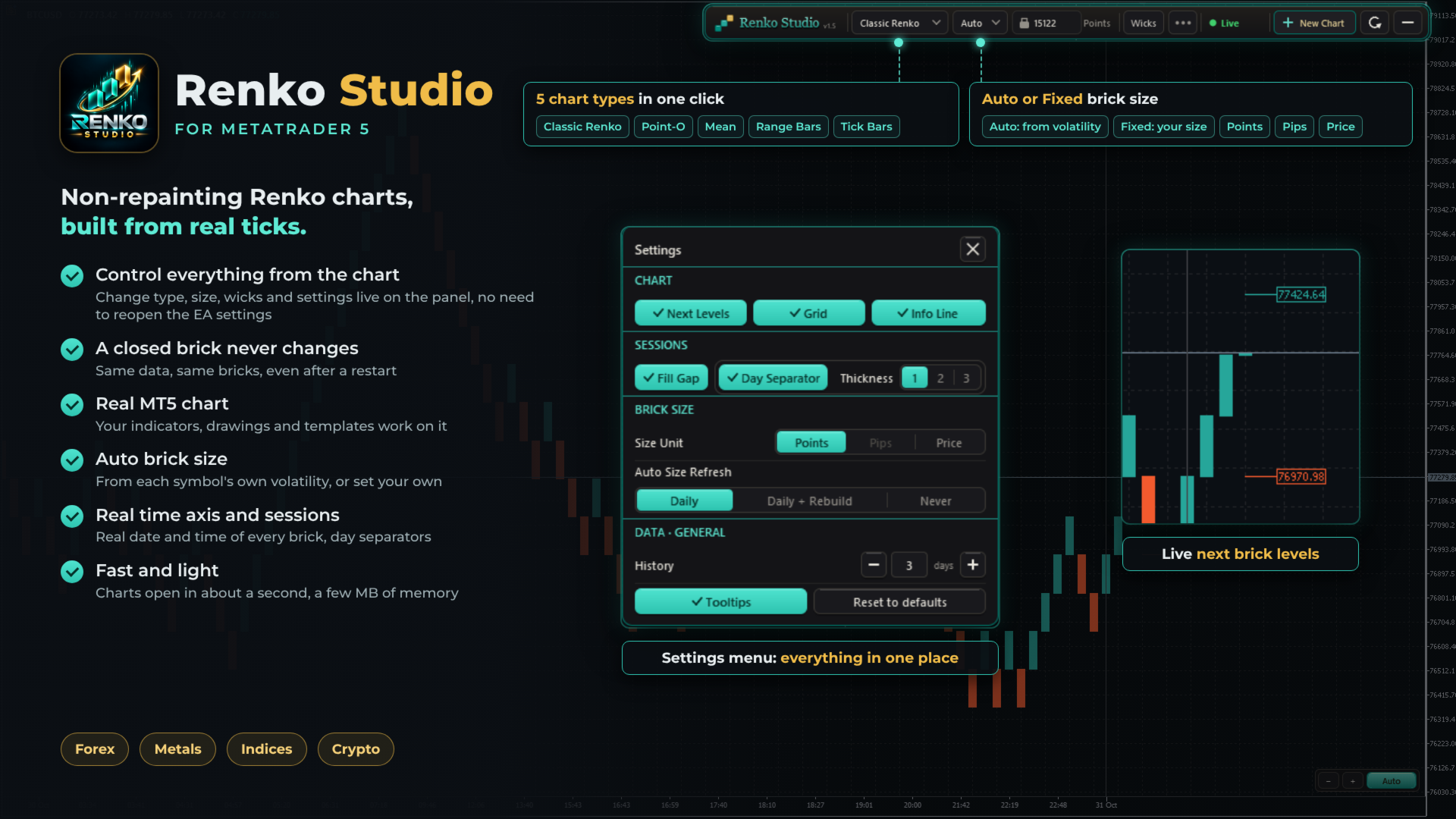
Fast, non-repainting Renko charts for MetaTrader 5: Classic, Point-O, Mean, Range Bars and Tick Bars.
A closed brick never changes. The Renko chart is a real MT5 chart, so your indicators and drawings work on it. Auto brick size, live next-brick levels, and charts ready in seconds.

Overview

Renko Studio turns any MT5 symbol into clean, fast Renko charts built from your broker's real tick data. The Renko chart is a real MT5 chart, so your indicators, drawings and templates work on it, and everything is controlled from a modern panel on the chart.

1. Non-Repainting

  • A closed brick never changes. Not when you refresh, not after a restart, not when you reopen the terminal.
  • Built from real ticks. Every brick comes from your broker's tick data, not from M1 candles.
  • Same data, same bricks. The same ticks always produce exactly the same chart.
  • Your changes, your choice. The chart is only rebuilt when you change a setting yourself, such as the chart type or brick size.

2. Fast and Optimized

  • Opens in about a second. The chart window appears almost immediately; 3 days of history are ready in a few seconds.
  • Very light on memory. After loading, the EA uses only a few MB.
  • Smooth live updates. Bricks, the live bar and labels update without flicker.
  • Light on your terminal. Several Renko charts can run together with low CPU use.

3. Five Chart Types

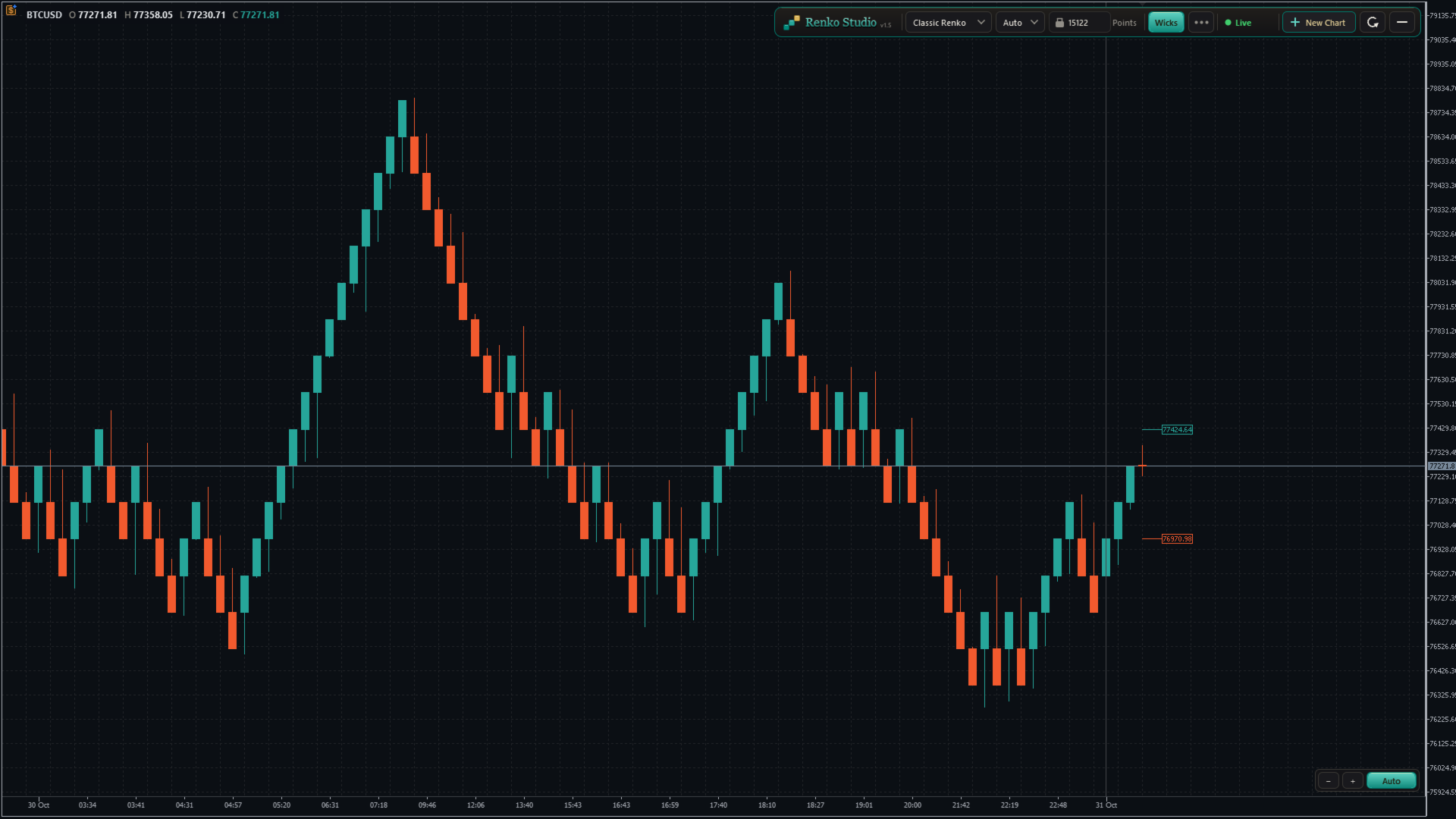
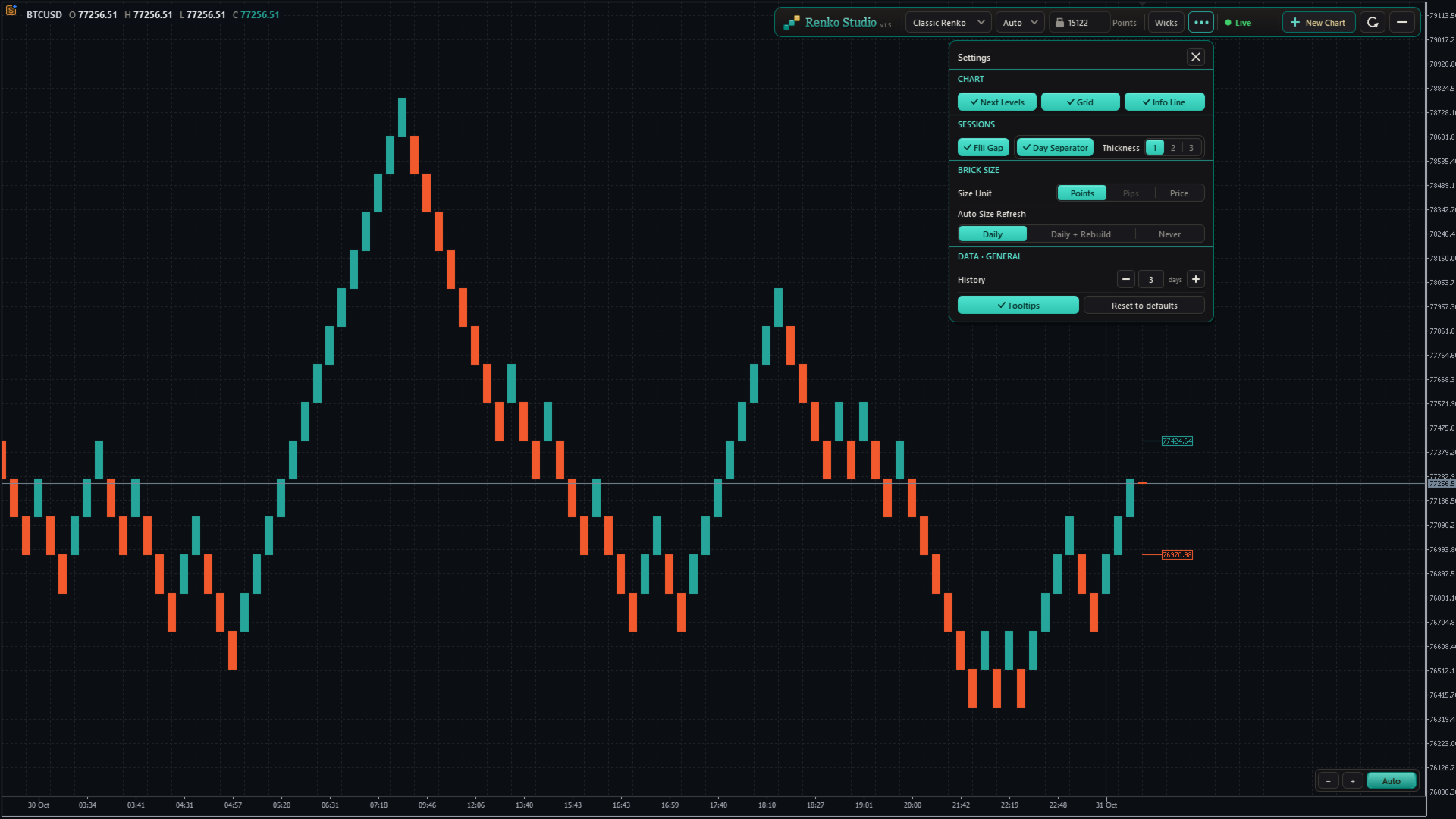
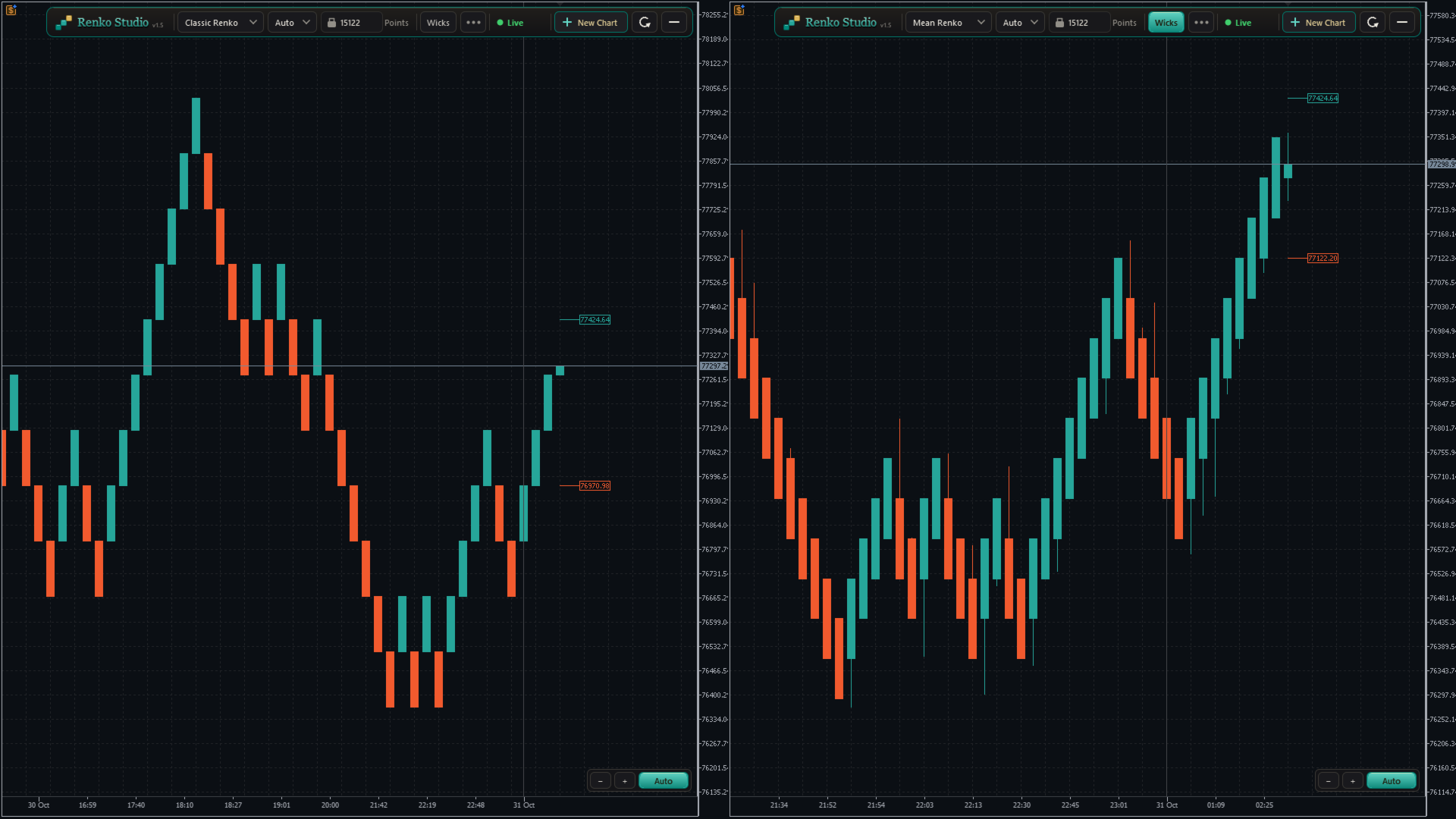
  • Classic Renko: a new brick forms when price moves one brick size in the trend direction; a reversal needs two brick sizes. The standard Renko view.
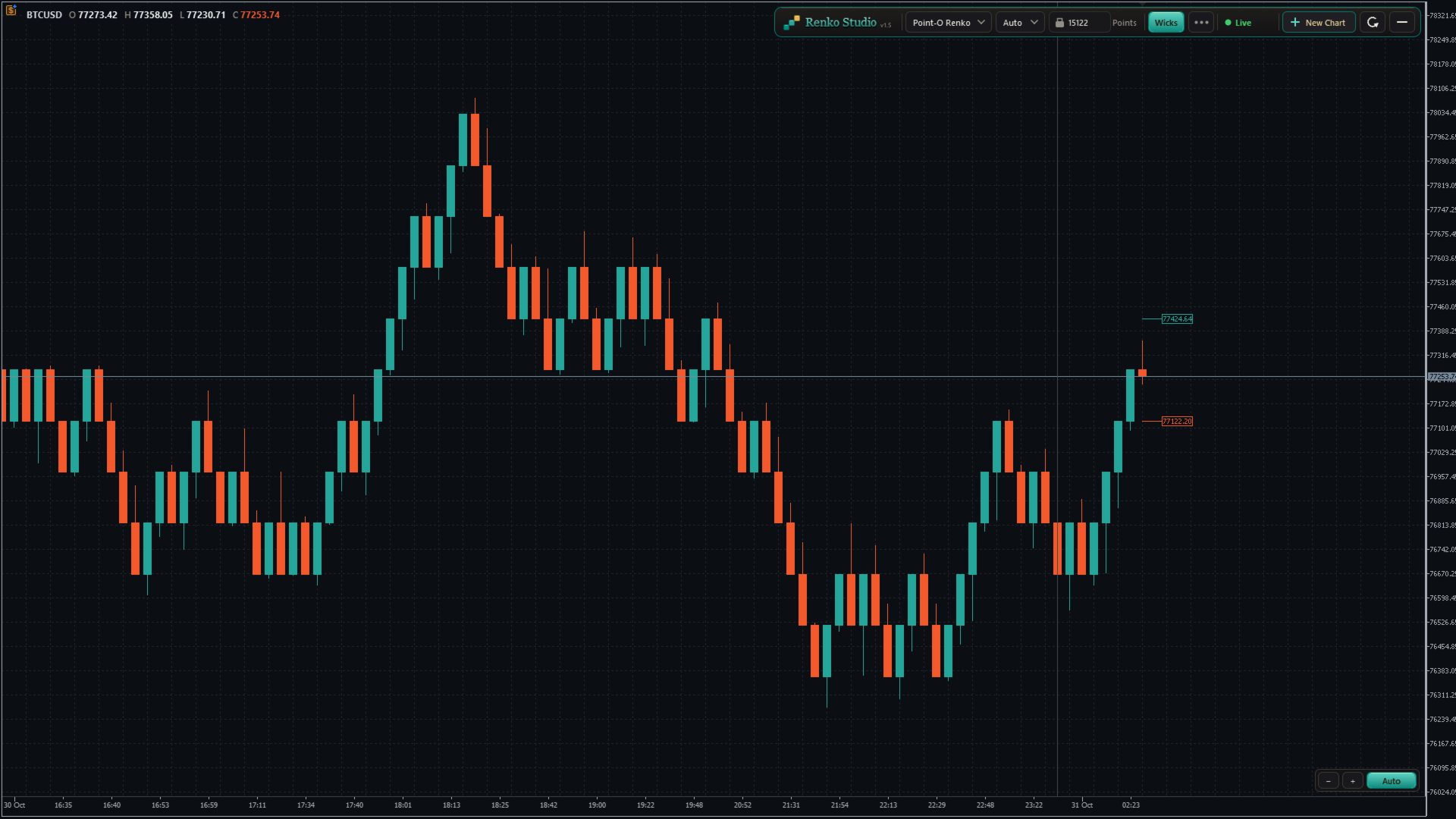
  • Point-O Renko: reverses after a one-brick move, so it reacts faster to turns.
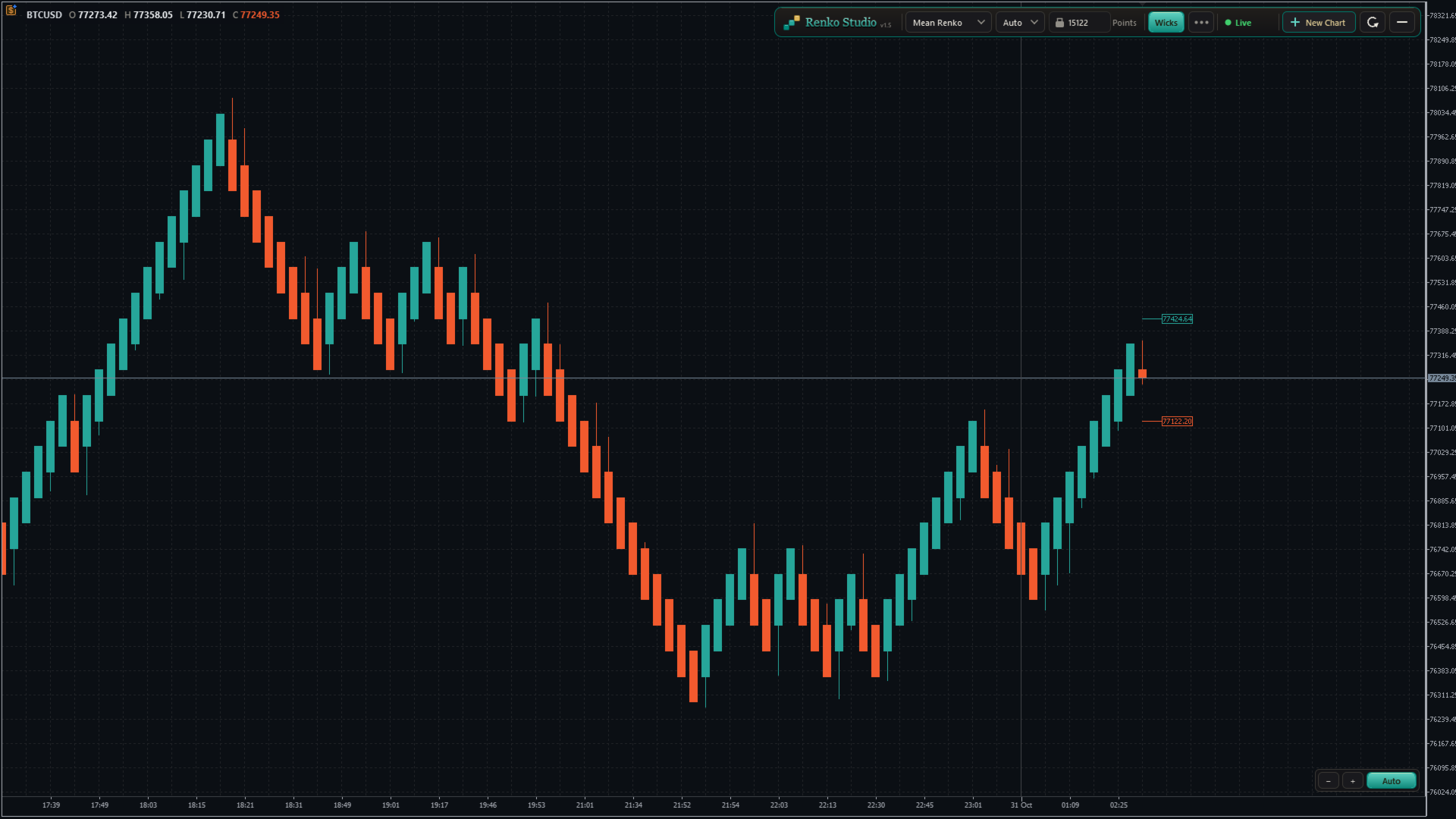
  • Mean Renko: each new brick starts from the middle of the previous one, giving a smoother trend view.
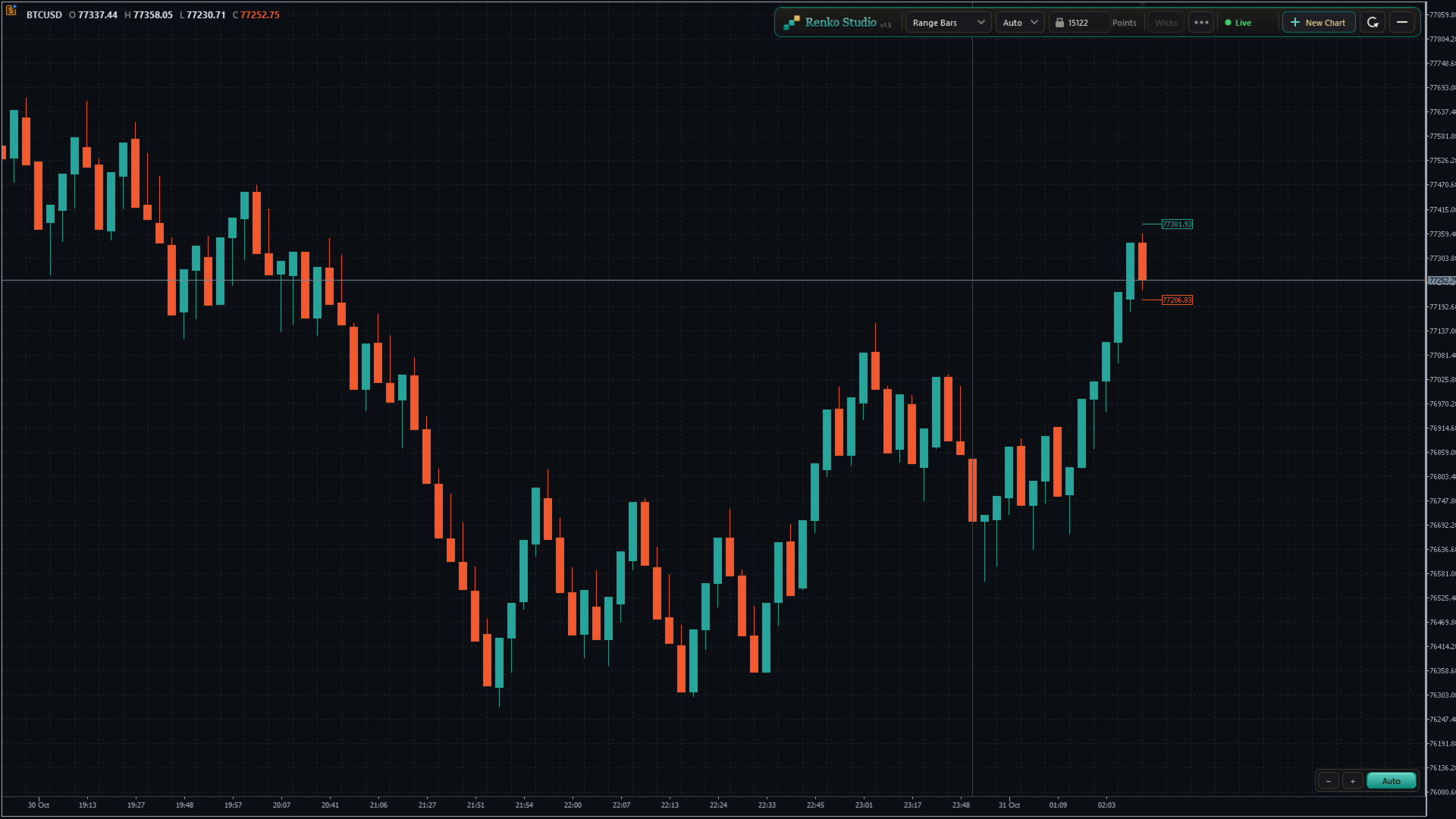
  • Range Bars: each bar closes when its high–low range reaches the set size, with real open, high, low and close.
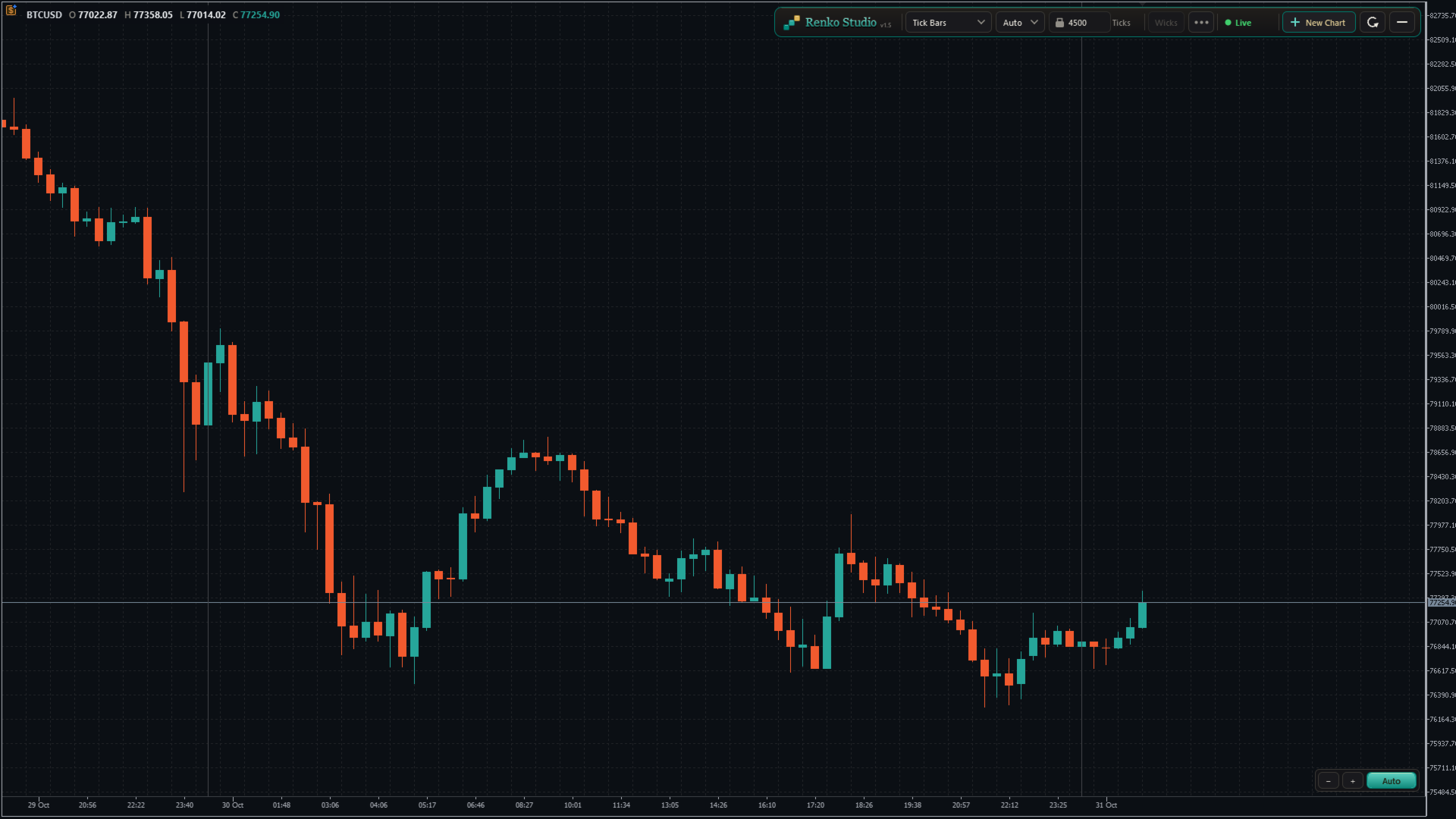
  • Tick Bars: each bar closes after a set number of ticks, showing market activity.
  • Switch in one click. Choose the type from the panel; the same chart window rebuilds in place.

4. Brick Size

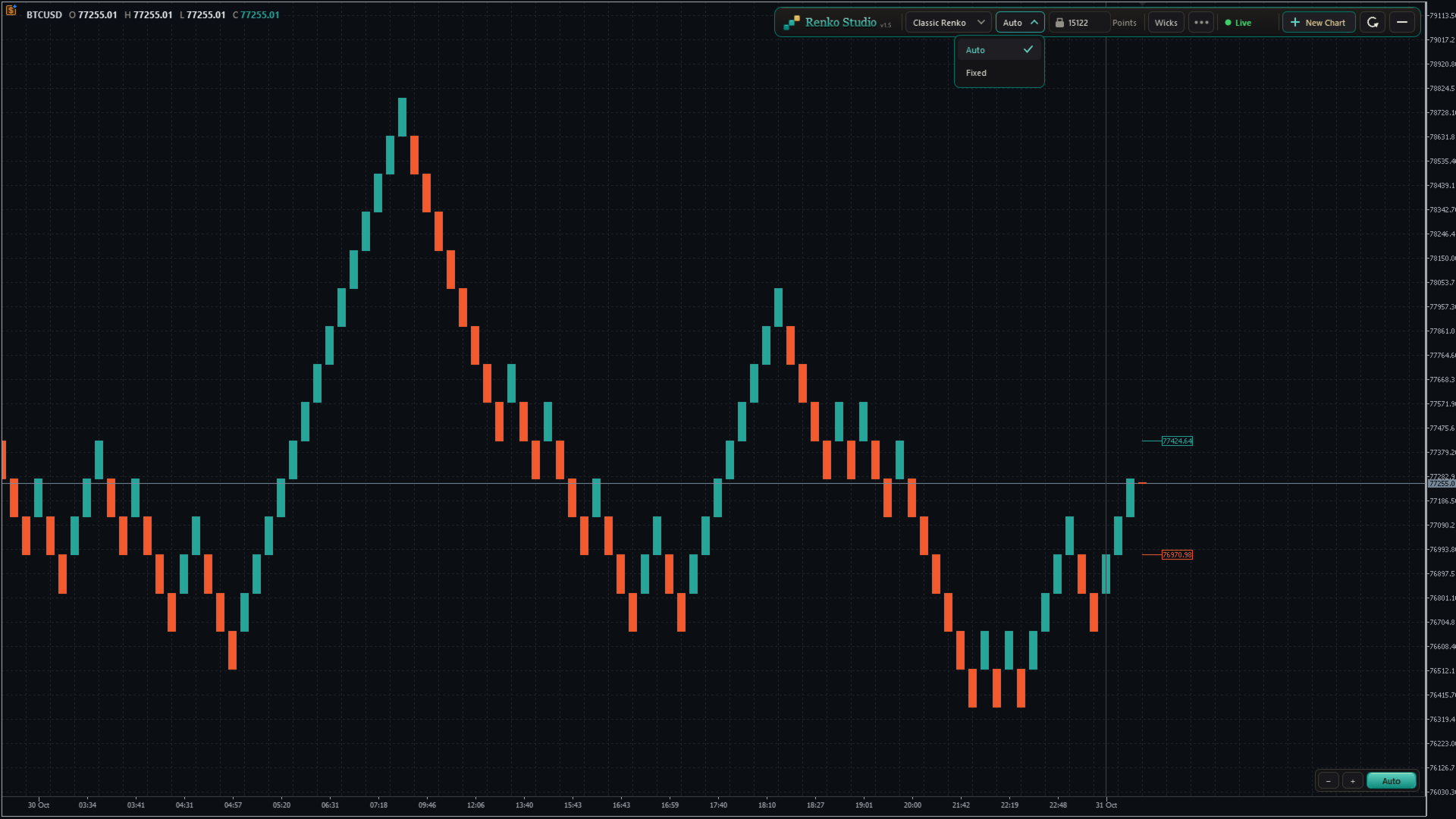
  • Auto size: calculated from the symbol's own daily volatility during its trading sessions. One Auto size per symbol, the same on every chart type.
  • Fixed size: type any brick size you like.
  • Size unit: show and enter the size in Points, Pips (forex pairs) or Price. Works correctly on 2-, 3-, 4- and 5-digit brokers.
  • Auto Size Refresh:
    • Daily: a new size at the start of each trading session; past bricks stay unchanged.
    • Daily + Rebuild: a new size at the start of each session, and the whole chart is rebuilt with it.
    • Never: keeps the size calculated when the chart was created.

5. Live View

  • Next Brick Levels: two labels show exactly where the next up brick and the next down brick will close.
  • Live bar: the forming brick is drawn clearly as price moves, with matching colours.
  • Live price line: follows the forming brick in real time.
  • Wicks: show or hide brick wicks with one click (Range and Tick bars always show real wicks).

6. Real Time Axis and Sessions

  • Real time axis: shows the real date and time of every brick, evenly spaced and easy to read.
  • Day separator: a clear line at the start of each trading day, with adjustable thickness.
  • Fill Session Gap: choose whether a price gap between sessions is filled with bricks or left as a visible gap.
  • Info line: shows the symbol and the open, high, low and close of the brick under your mouse.

7. Chart Control

Auto mode (default)

  • The chart keeps the latest bricks and the live bar centred between the panel and the time axis.
  • Bricks always look comfortable on screen: never too tall, never too flat.
  • Scroll back and forward in time freely; the vertical position adjusts by itself, smoothly.
  • The price scale can be stretched only within safe limits, so bricks never hide behind the panel or the time axis.

Manual mode

  • Click the Auto/Manual button to switch. The mode changes only when you click it.
  • Drag the chart freely in any direction: back, forward, up and down.
  • Stretch or shrink the price scale as much as you like.
  • If the live bar leaves the screen and you don't touch the chart for about 10 seconds, it glides back into view. Your zoom and scale stay as you set them.
  • Click Auto at any time to return to the centred view.

Zoom

  • Use the − and + buttons at the bottom-right corner to zoom out and in.
  • Or drag on the time axis to shrink or stretch the chart.
  • The zoom and Auto/Manual controls stay in the same place at every window size.

Refresh

  • One click resets the view: Auto mode, default zoom, latest bricks centred and space on the right for the next brick levels.
  • Refresh only resets the view. It never changes or reloads your bricks.

8. Control Panel and Settings Menu

Panel

  • Chart type, Auto/Fixed size, brick size with its unit, Wicks, the settings menu, status, New Chart and Refresh, in one compact toolbar.
  • No inputs to configure: attach the EA, click OK, and your chart is ready.

Settings menu

  • Next Brick Levels, Grid, Info Line, Day Separator and its thickness, Fill Session Gap, Size Unit, Auto Size Refresh, History, Tooltips and Reset to defaults, grouped in clear sections.
  • Tooltips: clear hover help for every control, which you can switch off.
  • Reset to defaults: brings every setting back to its default in one click.

History

  • Choose how many trading days to load: type the number or use − and +.
  • "3 days" means today plus the last 3 complete trading sessions. Weekends and holidays without data are not counted.
  • The chart reloads once with the new history, in the same window, keeping all your settings.
  • A per-symbol limit keeps loading fast. Above the recommended value, a note shows the expected first-load time; once loaded, the chart runs at full speed.

Status

  • A live status indicator (Live, Loading, Market closed and more) with a short explanation on hover.

9. Multiple Charts and Restore

New Chart

  • Click + New Chart on the panel to open another Renko chart of the same symbol.
  • Each chart has its own type, brick size and settings, for example Classic Renko on one and Range Bars on another.
  • New charts open with your last-used settings.
  • Charts are named XAUUSD_RS01, XAUUSD_RS02 and so on, numbered separately for each symbol.

Clean-up and restore

  • Closing a Renko chart removes its symbol and data automatically.
  • After restarting MT5, every chart comes back with the same settings and catches up with the latest prices.

10. Compatibility

  • Indicators, drawings and templates work on the Renko chart like on any MT5 chart.
  • Any symbol: forex, metals, indices and more, including broker suffixes such as .m or .pro.
  • Any broker digits: 2-, 3-, 4- and 5-digit symbols are handled correctly.

How to Use

  1. Open an M1 chart of your symbol (for example XAUUSD).
  2. Attach Renko Studio and click OK.
  3. A Renko chart opens with Classic Renko and Auto size. Change anything from the panel or the settings menu.

Important Notes

  • Removing the EA from the source chart closes its Renko charts.
  • Expert Advisors attached to a Renko chart do not receive ticks in this version, so they cannot run or trade from it. Indicators work normally.
  • The Renko time axis shows the real time. MT5's status bar and Data Window show an internal date.
  • Available history depends on your broker's tick data.
Produtos recomendados
Gráfico Renko Profissional MT5 Gráfico Renko Profissional MT5 é um indicador limpo de gráfico Renko para MetaTrader 5, desenvolvido para exibir blocos Renko em uma janela separada do indicador, com visualização opcional de caixas Renko diretamente no gráfico principal de preços. O indicador foi criado para traders que desejam ter dentro do MetaTrader 5 um estilo familiar de gráfico Renko, semelhante à visualização Renko disponível em plataformas modernas de gráficos, como o TradingView. Ele conv
Gino Renko
Stephane, Andr Valette
1 (1)
Another renko-based indicator. It returns different usable values ​​for an EA, and is directly displayed on the main chart. Its setting is very simple: The size of the renko The number of bars taken into account The falling color The color on the rise Returned values: Buffer 0 : Value of the middle Buffer 1 : Value of the Top Buffer 2 : Value of the Bottom Buffer 3 : Direction of renko (0.0 for top ; 1.0 for bottom) Buffer 4 : Ratio of the renko, for example, if it is twice, 3 times, ro more of
Advanced CRT Indicator MT5 — Candle Range Theory Tool Advanced CRT Indicator MT5 is a professional analysis tool that automates Candle Range Theory. It identifies consolidation ranges, breakout levels, Fair Value Gaps (FVG), and profit targets, with a real-time dashboard and alerts. Overview - Multi-timeframe candle range detection   - Automatic breakout levels with buffer settings   - Fair Value Gap identification and tracking   - Up to three customizable target levels (Risk:Reward ratios)  
Renko Perfection Indicator You will receive lifetime free upgrades and updates from us. You will also receive support via comments. Introdução e Visão Geral O Renko Perfection Indicator é um indicador para MetaTrader 5 (MT5) projetado para filtrar o ruído do mercado e focar puramente no movimento do preço. Ao contrário dos gráficos tradicionais, ele constrói blocos Renko apenas quando o preço se move uma quantidade predefinida, ignorando o tempo. Isso fornece uma visão mais clara da estrutura do
FREE
This SMT (Smart Money Technique) divergence indicator identifies discrepancies in price movement between two different trading symbols, helping traders detect potential market reversals. This tool compares the price action of two correlated assets, such as two currency pairs or indices, to spot divergences where one asset's price moves in the opposite direction of the other. For example, while one symbol may be making higher highs, the other might be making lower highs, signaling a divergence. T
FREE
DAILY OH/OL SDEV QUANT MODEL - STATISTICAL TRADING WITH PRECISION RISK MANAGEMENT TRADE WITH MATHEMATICAL CERTAINTY - KNOW YOUR EXACT STOP-LOSS AND TAKE-PROFIT BEFORE YOU ENTER This indicator analyzes 5,000+ days of price history to give you: Exact entry levels (sigma bands locked at daily open) Exact stop-loss distance (from M
O   Indicador ATR Baseado em Heiken Ashi   é uma ferramenta única de análise de volatilidade que combina o   Average True Range (ATR)   com os cálculos das   velas Heiken Ashi , proporcionando uma medição mais estável e confiável da volatilidade do mercado. Ao contrário do ATR tradicional, que usa velas padrão, este indicador aplica a fórmula Heiken Ashi para filtrar o ruído do mercado e fornecer sinais mais claros. Principais recursos: •   Cálculo do ATR baseado em Heiken Ashi   – oferece uma
FREE
Precision Instant
Jerson Daryl Herrera Arroyo
FREE TRY P.I.P.S FREE FOR 10 DAYS PRUEBA P.I.P.S GRATIS POR 10 DIAS EN: Download now and get a free 10-day trial license . Full features, demo account, no credit card needed. ES: Descarga ahora y obtén una licencia de prueba gratis por 10 días . Todas las funciones, cuenta demo, sin tarjeta de crédito. 10 DAYS 10 DIAS DEMO ONLY SOLO DEMO FULL ACCESS ACCESO COMPLETO NO CARD SIN TARJETA SEND A MESSAGE TO REQUEST YOUR FREE TRIAL ENVIA UN MENSAJE PARA SOLICITAR TU PRUEBA GRATIS P.I
Renko Chart
Marcin Konieczny
3.56 (9)
This indicator allows to display Renko charts in the indicator window. Renko charts show only price movements that are bigger than the specified box size. It helps to eliminate noise and allows to focus on main trends. Time is not a factor here. Only price movements are taken into account. That's why Renko chart is not synchronized with the main chart it is attached to. Indicator works in two modes: CLOSE - only close prices are taken into account while building the chart HIGH_LOW - only high/l
FREE
See exactly how close your account is to your prop firm's daily-loss and max-drawdown floors - live, on the chart, with the real rule math of each firm. Most traders track their daily limit with mental math, and the daily-loss breach is the most common way evaluations end. Breach Radar draws the actual floors: - Daily-loss bar: the exact floor level, the dollar distance remaining, and the percent of today's budget already used - Max-drawdown bar: static or trailing (including trailing that loc
FREE
MACD + ADX Confluence Indicator (Short English description)Purpose Highlights strong trending candles where MACD and ADX give a confluence signal. Colors candles and places arrows only when both conditions are met.Main logic & signalsBullish signal (blue candle + blue ↑ arrow) MACD main line > 0 and ADX > selected level Bearish signal (red candle + red ↓ arrow) MACD main line < 0 **and** ADX > selected level Neutral candles When confluence is absent → candles keep default chart colors (no overl
Day Direction Scanner
Efren Hernandez Partida
5 (3)
O Day Direction Scanner é um indicador que utiliza a direção do candlestick atual nos períodos de 1 dia, 4 horas, 1 hora, 15 minutos e 5 minutos para determinar a direção do mercado. Quando todos os candlesticks convergem em uma única direção, o indicador indica se o dia é de alta ou baixa, ou se não há uma direção clara. É útil para obter facilmente uma ideia da direção do mercado ao longo do dia. Características: - Funciona com todos os pares de moedas, índices e commodities. - Facilita a
FREE
Smart SuperTrend Scalping Signals Pro is a MetaTrader 5 indicator designed for traders who want a clean visual trend-following system directly on the chart. Instead of displaying the traditional SuperTrend as a line, the indicator colors the actual price candles based on the current market condition. Green candles indicate bullish SuperTrend conditions, red candles indicate bearish SuperTrend conditions, and gray candles indicate sideways or weak-trend conditions. The indicator also includes a s
O Alpha B3 Renko Trader  é um robô especialista para negociação no Bovespa B3  (miniíndice e minidólar) que une a análise de candlesticks do gráfico Renko (calculado internamente, sem imagens gráficas) com a estratégia Alpha B3 . O robô permite configurar, para os sinais de entrada, o tamanho do brick do gráfico Renko, bem como um número de candlesticks para análise. Além disso, você deve configurar os stops fixos, em pontos. O robô permite também a configuração de funções, tais como número de c
Renko Riper Pro for MetaTrader 5 Please Set First LIVE/DEMO USAGE: To run this EA on a live chart (Real or Demo account), you MUST set the input parameter Real_Testing = true . (Real testing ke liye 'Real_Testing' ko True karna zaroori hai). If this is left as false , the EA runs in a restricted dummy mode meant ONLY for MQL5 Market automatic validation and will not execute its actual trading logic! Advanced Renko-based Automated Trading System for MT5 Renko Riper Pro is a highly configurable au
Renko Price Action ATR constrói um gráfico Renko em que o tamanho de cada tijolo é calculado a partir do ATR do período que você selecionar. Os gráficos Renko filtram pequenos movimentos de preço, de modo que tendências, suportes e resistências, e divergências em topos e fundos ficam mais fáceis de ver. Funcionamento Funciona com qualquer ativo. O gráfico Renko é atualizado em tempo real. Configurações ATR Calculation Timeframe: tempo gráfico usado para calcular o ATR e o tamanho do tijolo. ATR
Renko Classic Pro 1. Advanced Median Renko (Mean Renko) Architecture Cuts Out False Breakouts & Noise: Unlike conventional time-based candlestick charts that show chop during low-volume sessions, Renko builds bricks solely on price movement. Faster Reversal Signals: Standard Renko requires price to travel two full boxes to trigger a reversal, causing delayed entries. The 50% Median Open logic calculates the next open from the midpoint of the prior brick, getting you into trend changes twice as f
This utility EA will display simple renko, hence the name essential renko. The renko will be shown in a new tab and using custom symbol. Please do note (especially for those who new to Renko), that Renko does not follow timeline as it will follow price movement. That's why it has a lot of potential where you can attach any EA that you want and use any custom indicator in this new custom symbol for renko. Always use M1 timeframe. Most of the time you don't need to change anything. But if you d
FREE
Apex Precision
Laureano Echandi Salas
Apex Precision is a Forex Expert Advisor for MetaTrader 5. It combines six machine learning modules with technical analysis for multi-symbol trading. The system uses dynamic clustering with synchronization between chart instances to manage correlations, mean-variance portfolio optimization for capital allocation, and a configurable ensemble that combines several predictive models. The system has 15 groups of input parameters. It can operate from conservative to more active settings, and it can c
The Expert Advisor is used to create Renko chart, realtime updates, easy for technical analysis. Backtest your strategy with all indicators with Renko chart in MetaTrader 5. Parameters Box Size : input the number of box size. Show Wicks : if true , draw a candle with high/low. History Start: input the date to creat first candle. Maximum Bars: limit number of bars on renko chart How to use Attach the Expert Advisor to a chart (timeframe M1), for which you want to create a renko. Input box size a
Haven Stop Loss Hunter
Maksim Tarutin
4.5 (6)
Haven Stop Loss Hunter 2.0 - Uma nova dimensão na análise de liquidez Apresentamos a grande atualização: Haven Stop Loss Hunter 2.0 ! Esta é uma ferramenta profissional para trabalhar com zonas de liquidez e rompimentos falsos (Sweeps), agora mais flexível e funcional [1]. Nesta versão, implementamos uma análise de múltiplos períodos gráficos (MTF) e um sistema avançado de alertas para que você possa acompanhar as manipulações das instituições financeiras sob o conceito de Smart Money sem a nece
FREE
HLC bar MT5 Wyckoff
Eduardo Da Costa Custodio Santos
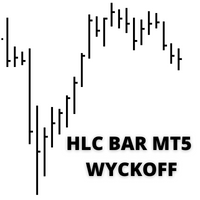
O indicador "HLC_bar_MT5 Wyckoff" para MT5 foi criado para facilitar a análise na hora da negociação. A Barra HLC foi utilizada por Richard Wyckoff e atualmente muito utilizada nas operações de "VSA". Wyckoff descobriu que a utilização da Máxima, mínima e fechamento deixava o gráfico muito mais limpo e fácil de ser analisado. O Indicador "HLC_bar_MT5 Wyckoff" permite: # Alterar a largura da barra; # Deixar a barra da mesma cor; # E destacar a barra que abriu e fechou no mesmo preço. As c
MAD Bands (Moving Average Deviation Bands) MAD Bands are intended to be used when you want to visually check the behavior of price volatility in relation to a moving average. MAD_Bands (MQL5 version) parameter description This document explains the MT4 parameter input screen for each setting item (input parameter). Group: Main (basic settings) Period Default   :         20 Explanation   : The number of candlesticks used to calculate the moving average (Mid) and band width. The larger the value
FREE
This MT5 indicator provides real-time updates of classic Renko charts. Renko charts focus on price movement, filtering out noise and highlighting trends. What are Renko candles? Renko charts display price movement using "bricks" of equal size, ignoring time. A new brick is drawn only when the price moves by a specified amount. They help visualize trends by removing time-based noise. Parameters - BrickSizePoints  (20): Renko brick size in points - HistoryDepthSec  (3600): Historical data to ini
FREE
Market Imbalance MT5
Scott Edward Merritt
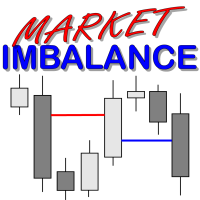
What Is Market Imbalance? Market Imbalance, also known as "IPA" or Improper Price Action, is when price moves so quick in one direction with no orders on the other side of the market to mitigate the price movement. We all know Big Banks, or "Smart Money", can move the market by placing huge orders which in turn can move price significantly. They can do this because Big Banks are the  top 10 Forex traders in the world . But unfortunately, the Big Banks cannot leave these orders in drawdown and mu
Swing Failure Hunter
Shingidzano Lesetedi
SFP Hunter — Swing Failure Pattern SFP Hunter is a MetaTrader 5 indicator that automatically detects Swing Failure Patterns (SFP) on any symbol and timeframe. The indicator identifies single-candle stop-hunt reversals where price wicks beyond a prior swing high or low and closes back inside on the same candle, signalling a potential reversal from that level. How the Pattern Works A Swing Failure Pattern occurs when price briefly breaches a prior swing high or swing low — triggering the stop orde
Mario Order Blocks
Sandeep Kumar Tiwary
Mario Order Block Indicator Overview The Professional Order Block Indicator is an advanced technical analysis tool that automatically identifies and displays institutional order blocks on your chart. Based on smart money concepts, this indicator helps traders identify high-probability support and resistance zones where institutional traders have placed significant orders. Key FeaturesAutomatic Order Block Detection Identifies bullish and bearish order blocks based on pivot point analysis Uses so
ED Precision Reversal Pro
Egbert Gerhald Janse Van Rensburg
Designed for Gain & Pain Markets ED Precision Reversal Pro has been designed with Gain and Pain markets as a key focus. These markets can produce strong directional movements, rapid price extensions and sudden reversals. The indicator is designed to monitor overextended market conditions and identify potential reversal areas where its configured BUY or SELL conditions are met. It can be used on: Gain Markets Pain Markets XAUUSD (Gold) Forex pairs Indices Other MetaTrader 5 instruments Gain & Pai
Trade Protection PRO – Professional Trade Manager & Protection Tool A powerful yet easy-to-use Trade Protection Expert Advisor that automatically manages your positions with advanced risk protection features. Key Features: Automatic Breakeven with customizable offset Up to 5 Partial Take Profit levels with individual percentages Modern real-time Dashboard showing all important information Clear visual horizontal lines on chart (BE trigger, entry line, and all TP levels) Two volume modes: % of In
Catch the Spikes. Trade the Ticks. Master the Market. Welcome to ATHENA (Crash & PainX Edition) by DC Trading — the ultimate MetaTrader 5 technical analysis indicator built specifically for synthetic index traders targeting Crash and PainX markets. Whether you specialize in catching high-probability downward spikes or executing disciplined tick scalping strategies on the M1 timeframe, Athena gives you clear, real-time visual confirmation to trade with maximum confidence. WHY TRADERS CHOOSE AT
Os compradores deste produto também adquirem
Trade Assistant MT5
Evgeniy Kravchenko
4.43 (216)
Ajuda a calcular o risco por comércio, a fácil instalação de uma nova encomenda, gestão de encomendas com funções de fecho parcial, trailing stop de 7 tipos e outras funções úteis. Materiais e instruções adicionais Instruções de instalação   -   Instruções para a aplicação   Função de linha Mostra no gráfico a linha de Abertura, Stop Loss, Take Profit. Com esta função é fácil definir uma nova ordem e ver as suas características adicionais antes da abertura.   Gestão de risco A função de cálcul
Bem-vindo ao Trade Manager EA—uma ferramenta de gestão de risco criada para tornar o trading mais intuitivo, preciso e eficiente. Não é apenas uma ferramenta para executar ordens, mas uma solução abrangente para planejamento de operações, gerenciamento de posições e controle de risco. Seja você um iniciante, trader avançado ou scalper que precisa de execução rápida, o Trade Manager EA adapta-se às suas necessidades, oferecendo flexibilidade em todos os mercados, desde forex e índices até commodi
Farmed Hedge Yield Farming | All Markets (Manual - Hybrid - Semi/Automated EA) VERIFIED TRADING RESULTS - Farmed Hedge Yield Axi Copy:  https://www.mql5.com/en/signals/2356376 - Farmed Hedge Yield Exn Copy:   https://www.mql5.com/en/signals/2356404 - Farmed Hedge Yield V Copy:  https://www.mql5.com/en/signals/2357156 IMPORTANT NOTICE: FarmedHedge is a MANUAL-FOCUSED TRADING UTILITY ,not a fully automated EA. Results shown on this Signal include manual trades and overall strategic management.
O Telegram to MT5 Multi-Channel Copier copia automaticamente os sinais de trading dos seus canais de Telegram e Discord diretamente para o MetaTrader 5. Sem bots, sem extensões de navegador, sem copiar à mão. O sinal chega ao Telegram ou ao Discord e o EA abre a operação no seu terminal em poucos segundos. E antes de copiar um canal, o backtester integrado mostra o que esse canal teria feito na sua conta. O produto inclui dois componentes: um aplicativo de Windows que escuta os seus canais de Te
Copie sinais do Telegram com suas próprias regras de negociação Telegram to MT5 Signal Trader copia automaticamente sinais de negociação em texto de canais e grupos públicos e privados do Telegram para o MetaTrader 5. Gerencie vários provedores e contas MT5 em um único aplicativo para desktop, com configurações individuais de risco e de negociação para cada provedor . Você não precisa de um bot do Telegram nem configurar uma API para copiar sinais. Basta entrar com sua própria conta do Telegram
TradePanel MT5
Alfiya Fazylova
4.88 (170)
Trade Panel é um assistente de negociação multifuncional. O aplicativo contém mais de 50 funções de negociação para trading manual e permite automatizar a maioria das tarefas de negociação. Instruções para o aplicativo: https://www.mql5.com/pt/blogs/post/762435 Versão de teste do aplicativo para conta demo: https://www.mql5.com/pt/blogs/post/762547 Como instalar o aplicativo: https://www.mql5.com/pt/blogs/post/762548 Como testar o aplicativo no modo visual: https://www.mql5.com/pt/blogs/post/770
================================================================================ POC BREAKOUT - V20.72. Full Professional Grade Toolkit ================================================================================ POC Breakout is a full MetaTrader 5 trading dashboard for discretionary traders who want breakout signals, Point of Control (POC) context, volume profiles, order flow, market structure, news, alerts, and advanced trade planning in one professional workspace. Attached directly to you
MT5 to Telegram Signal Provider é uma utilidade fácil de usar e totalmente personalizável que permite o envio de sinais especificados para o chat, canal ou grupo do Telegram, tornando sua conta um fornecedor de sinais . Ao contrário da maioria dos produtos concorrentes, ele não usa importações de DLL. [ Demonstração ] [ Manual ] [ Versão MT4 ] [ Versão Discord ] [ Canal do Telegram ]  New: [ Telegram To MT5 ] Configuração Um guia do usuário passo a passo está disponível. Não é necessário conhec
VirtualTradePad PRO SE MT5 — centro profissional de controle de trading para MetaTrader 5 VirtualTradePad PRO SE é um painel de trading premium baseado no gráfico e um ambiente de gerenciamento de operações para MetaTrader 5 . Ele foi desenvolvido para traders que desejam execução mais rápida, controle de posições mais claro, gerenciamento de trades estruturado, planejamento visual de níveis e um fluxo de trabalho profissional diretamente no gráfico. Não é apenas um painel de COMPRA / VENDA. O P
REVDEN AI Desk: Conduza Seu Trading a Partir de Uma Conversa com Sua Própria IA, sobre o Contexto de Mercado do REVDEN Imagine conduzir seu trading a partir de uma única conversa. O REVDEN AI Desk traz isso para o MetaTrader 5: você pergunta à sua própria IA como ela lê o mercado, e ela responde a partir do contexto completo do REVDEN sobre os símbolos que você opera, com o estado de cada um, o quadro de risco e as divulgações que vêm pela frente. As propostas dela chegam com entrada, stop, alvo
News Trade EA MT5
Konstantin Kulikov
4.55 (11)
Apresento um robô útil que eu mesmo uso há vários anos. Pode ser usado nos modos semiautomático e totalmente automático. >>> Chat <<< O programa contém configurações flexíveis para negociação nas notícias do calendário econômico. Não pode ser verificado no testador de estratégia. Somente trabalho real. Descarregue o ficheiro mais recente de definições: https://www.mql5.com/en/blogs/post/747929 Monitorização de sinais: https://www.mql5.com/en/signals/author/test-standart Ao criar suas próprias
RETAILBERG FOOTPRINT CHART PRO — Order-Flow Workspace for MetaTrader 5 Version 7.00  |  Professional System  |  31 tools  |  One chart A full 150-page illustrated User Manual is included. Please read the full manual to understand this feature packed footprint chart elements and ui. https://www.mql5.com/en/blogs/post/777982 DEMO / STRATEGY TESTER — PLEASE READ FIRST
The Patch
Mian Rameez Ali
The Patch It never opens a trade. It walks behind the ones that did. Every open position, every pending order — checked twice a second for the one thing that's easy to forget: a stop, a target. Found bare, it doesn't ask. It writes the missing number in, measured in points from wherever the position began, and moves on to the next. No strategy, no opinion on direction. Just the quiet assumption that nothing should ever sit on the market unprotected — not because someone decided it shouldn't,
Próxima Atualização — Versão 2.52 em Breve! [NOVO] Prepare-se para 4 Grandes Novos Recursos Projetados para Aprimorar sua Análise de Mercado e seu Fluxo de Trabalho de Trading Estamos levando a análise de mercado a um novo nível com 4 novos recursos desenvolvidos para atender às suas necessidades de trading. Apresentamos: 1. TRADE OVERVIEW DASHBOARD 2. CONFLUENCE AT ZONE 3. STRONG & WEAK HIGH/LOW 4. OTE 1. TRADE OVERVIEW DASHBOARD Um painel que ajuda você a compreender mais facilmente o panoram
Grid Manual MT5
Alfiya Fazylova
4.73 (22)
"Grid Manual" é um painel comercial para trabalhar com uma grade de ordens. O utilitário é universal, possui configurações flexíveis e uma interface intuitiva. Ele trabalha com uma grade de ordens não apenas na direção da média das perdas, mas também na direção do aumento dos lucros. O trader não precisa criar e manter uma grade de ordens, tudo será feito pelo ""Grid Manual". Basta abrir um orden e o "Grid manual" criará automaticamente uma grade de ordens para ele e trabalhará com ele até que s
Anchor Trade Manager
Kalinskie Gilliam
5 (8)
Your EAs cannot see each other, but Anchor can. Anchor gives you one place to coordinate your EAs, manage risk, and decide when trading is allowed. It works alongside the trading bots you already use without any changes to them. The Problem One EA opens a trade. Then another starts trading. The next thing you know, you wake up to multiple grids built across your account. Each EA may be doing exactly what it was designed to do, but together they can place far more risk on your account than you in
EA Portfolio Control & Cloud Monitoring for MetaTrader 5 Your EAs manage trades. KONTROL_01 manages your EAs. A control system for traders running multiple Expert Advisors on the same account. Coordinate EA activity, manage trading risks and monitor your setup remotely. A detailed User Manual is available via DM after purchase. IN PRACTICE Multiple EAs. No coordination. Your EAs trade independently, unaware of each other's activity. KONTROL_01 coordinates them, limits simultaneous activity a
The product will copy all telegram signal to MT5 ( which you are member) , also it can work as remote copier.  Easy to set up, copy order instant, can work with almost signal formats, image signal,  s upport to translate other language to English Work with all type of channel or group, even channel have "Restrict Saving Content", work with  multi channel, multi MT5 Work as remote copier: with signal have ticket number, it will copy exactly via ticket number. Support to backtest signal. How to s
Astro Trade MT5
Indra Maulana
5 (8)
25% discount on the release of the tool: only for the next 3 buyers Send a message to receive a demo version. AstroTrade Trading Assistant AstroTrade is a comprehensive multi-functional trading utility developed for the MetaTrader 5 platform. It integrates essential tools for trade execution, risk management, and technical monitoring into a single unified interface. The application is designed to assist traders in managing their daily operations through a visual and structured environment. Vi
Floor Watch
Syed Tauqeer Hussain Shah
Floor Watch One number, watched every thirty seconds: how far equity has fallen since the day began — or since its highest point, if it's told to trail the peak instead of the open. Cross the line and it doesn't argue. Every open position closes, every pending order vanishes, and anything that slips through afterward gets shut the moment it appears. Not asked. Removed. The floor holds until the clock turns 5 AM Pakistan time — then, and only then, does the day start over. One rule. No except
Power Candles Strategy Scanner - Localizador de configurações multissímbolo com auto-otimização O Power Candles Strategy Scanner utiliza o mesmo motor de auto-otimização que alimenta o indicador Power Candles — em todos os símbolos da sua lista de observação, lado a lado. Um painel indica-lhe quais os símbolos que são estatisticamente negociáveis neste momento, qual a estratégia vencedora para cada um, o par ideal de Stop Loss / Take Profit, e avisa-o assim que um novo sinal é emitido. Esta ferr
Trader Evolution
Siarhei Vashchylka
5 (7)
" Trader Evolution " - A utility designed for traders who use wave and technical analysis in their work. One tab of the utility is capable of money management and opening orders, and the other can help in making Elliott wave and technical analysis. Manual (Be sure to read before purchasing) | Version for MT4 Advantages 1. Trading in a few clicks. Immediate and pending orders are available in the panel 2. Money management. The program automatically selects the appropriate lot size 3. Simplifies
MT5 Professional Copy Trading System (Edição MT5) O MT5 Professional Copy Trading System é um copiador de operações LOCAL de nível industrial e ultra rápido, projetado para traders profissionais, provedores de sinais e gestão multi-conta de estilo institucional. Diferentemente das soluções de cópia retail ou baseadas em nuvem, este sistema é construído sobre uma arquitetura LOCAL otimizada para ambientes onde múltiplos terminais operam no mesmo sistema Windows. Arquitetura LOCAL industrial O d
Trade Manager DaneTrades
Levi Dane Benjamin
4.13 (31)
Trade Manager para ajudá-lo a entrar e sair rapidamente de negociações enquanto calcula automaticamente seu risco. Incluindo recursos para ajudar a evitar negociações excessivas, negociações de vingança e negociações emocionais. As negociações podem ser gerenciadas automaticamente e as métricas de desempenho da conta podem ser visualizadas em um gráfico. Esses recursos tornam este painel ideal para todos os traders manuais e ajudam a aprimorar a plataforma MetaTrader 5. Suporte multilíngue. Vers
Trade Manager DashPlus
Henry Lyubomir Wallace
4.85 (13)
DashPlus é uma ferramenta avançada de gerenciamento de operações projetada para melhorar a eficiência e a eficácia das suas transações na plataforma MetaTrader 5. Ela oferece um conjunto completo de funcionalidades, incluindo cálculo de risco, gestão de ordens, sistemas de grade avançados, ferramentas baseadas em gráficos e análise de desempenho. Principais Funcionalidades 1. Grade de Recuperação Implementa um sistema de grade flexível e de média para gerenciar operações em condições adversas de
EA Auditor
Stephen J Martret
5 (6)
EA Auditor is an independent analysis tool for traders evaluating Expert Advisors and trading signals on MetaTrader 5. It audits backtest reports, reviews posted developer signals, and cross-verifies the two against each other to help traders assess strategies before committing capital. The MQL5 market offers a wide range of Expert Advisors from many developers, with varying approaches, quality, and transparency. EA Auditor provides a consistent, data-driven framework for reviewing them, answer
YuClusters
Yury Kulikov
4.93 (43)
Atenção: A versão demo para revisão e teste está aqui . YuClusters é um sistema profissional de análise de mercado. O trader tem oportunidades únicas para analisar o fluxo de pedidos, volumes de negociação, movimentos de preços usando vários gráficos, perfis, indicadores e objetos gráficos. O YuClusters opera com base em dados de Tempos e Negócios ou informações de ticks, dependendo do que está disponível nas cotações de um instrumento financeiro. O YuClusters permite que você crie gráficos com
DrawDown Limiter
Haidar Lionel Haj Ali
5 (23)
DrawDown Limiter v5.0 — Controlador Avançado de Proteção de Conta O DrawDown Limiter v5.0 é um controlador de proteção de conta executado no lado do cliente, desenvolvido para monitorar sua conta de trading e reagir automaticamente quando os limites configurados de risco, lucro, notícias, horário, rollover ou número de posições forem atingidos. Ele pode monitorar operações manuais, estratégias automatizadas, vários Expert Advisors, ordens pendentes e posições abertas a partir de um único gráfico
Master Your Trading Discipline   Stop losing your hard-earned gains to overtrading and emotional decisions. The Discipline Tool is your ultimate trading assistant, ensuring strict risk management in real-time. Key Protection Features: Advanced Drawdown Defense : Automatically halts trading if your daily drawdown exceeds a preset threshold (percentage or dollar amount). Real-Time Equity Lock : Safeguard profits by referencing peak equity, ensuring drawdown stays within control. Hard Profit Target
Dealer's Panel No signal decides anything here — a hand does. One click, and the panel calculates what's underneath: lot size from risk, target from a 30-step balance ladder that remembers exactly how far an account has climbed. Toggle between market and pending without touching an input field. Set a stop, and the take-profit can write itself — a fixed share of the balance, translated into price with no arithmetic left for the trader to get wrong. One trade live at a time; it won't let a seco
Filtro:
Sem comentários
Responder ao comentário