Copilot Trader AI

5

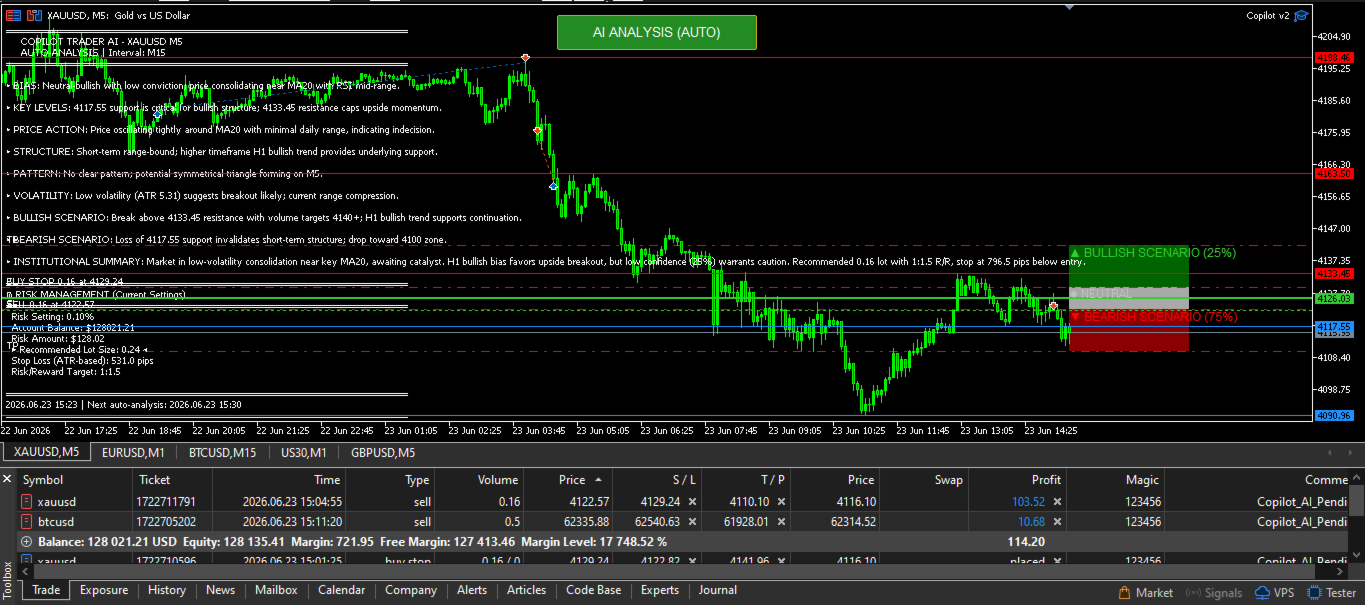
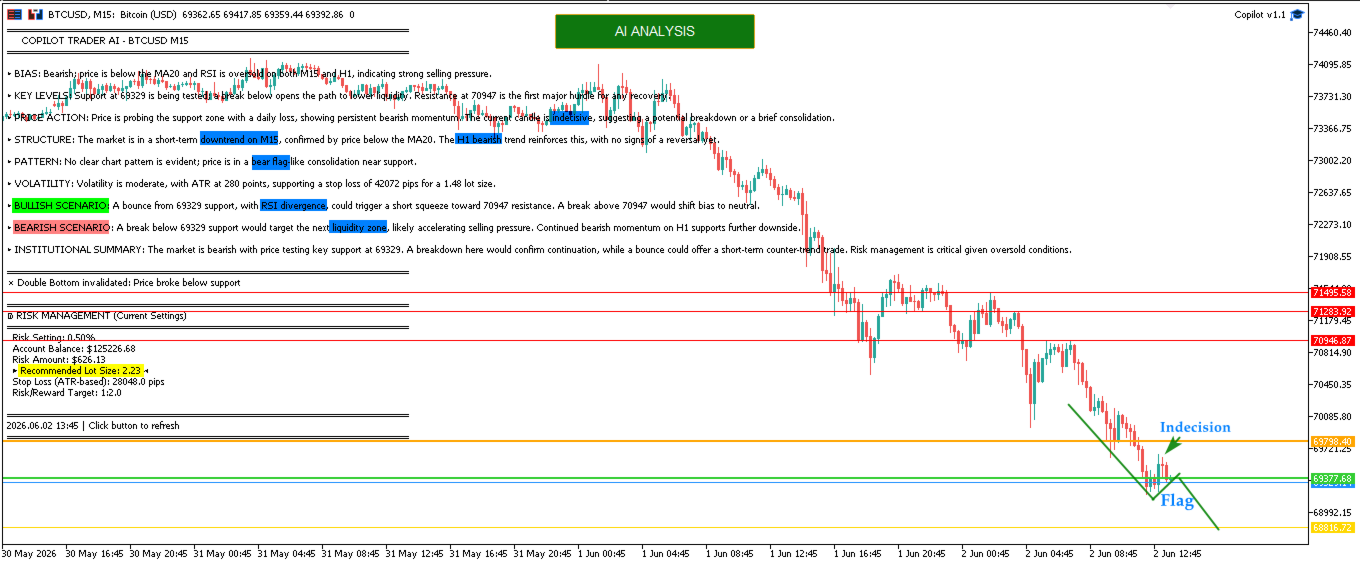
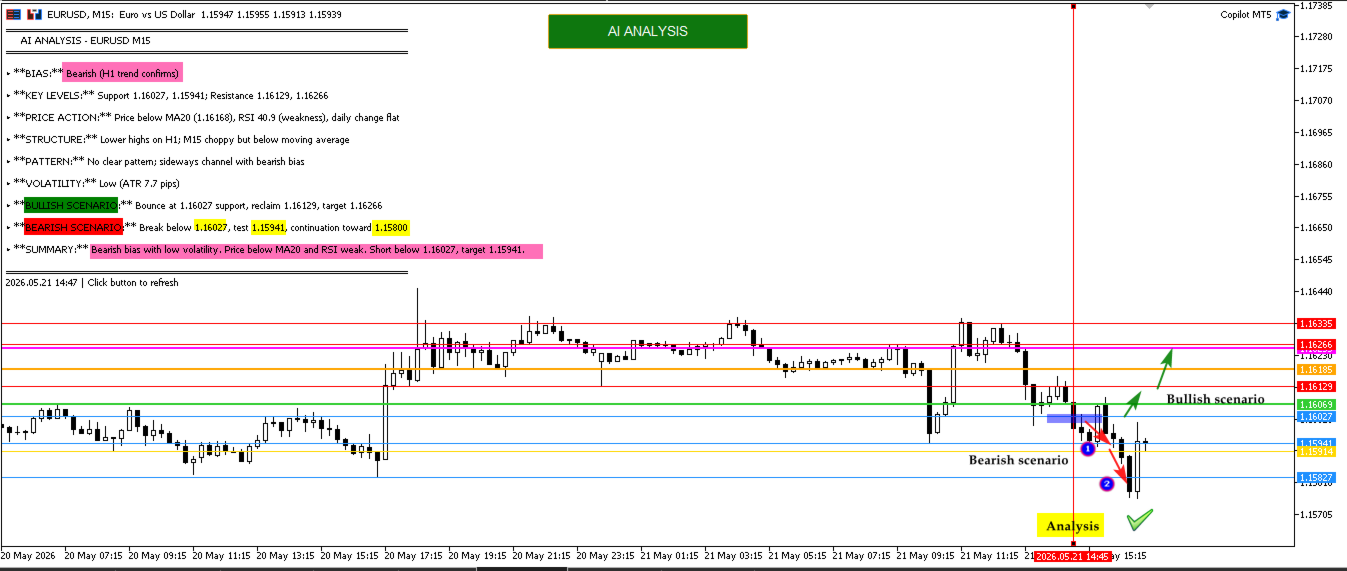
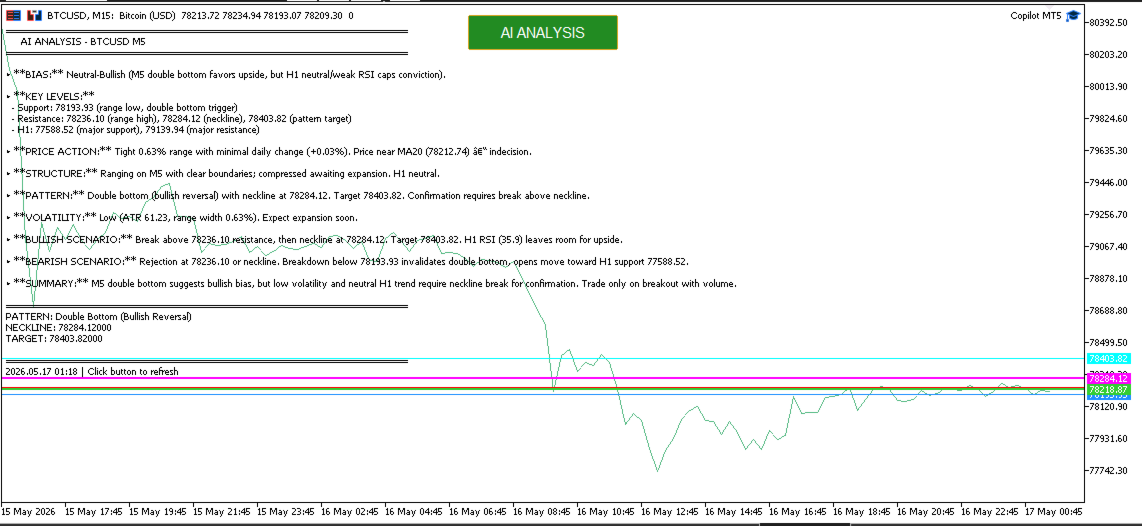
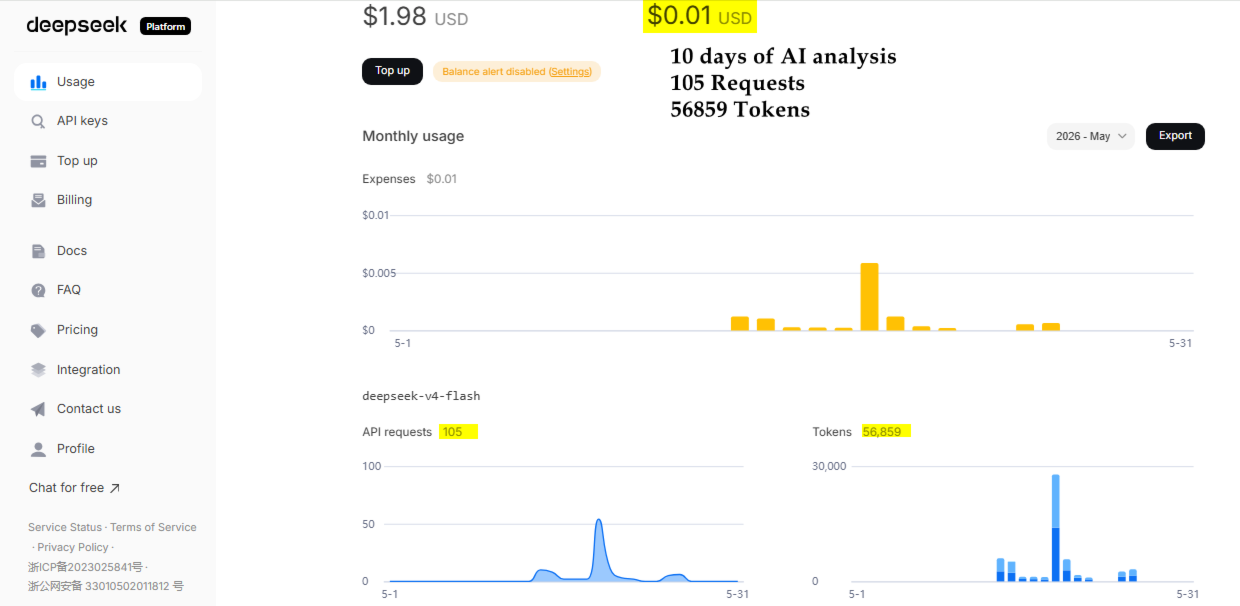
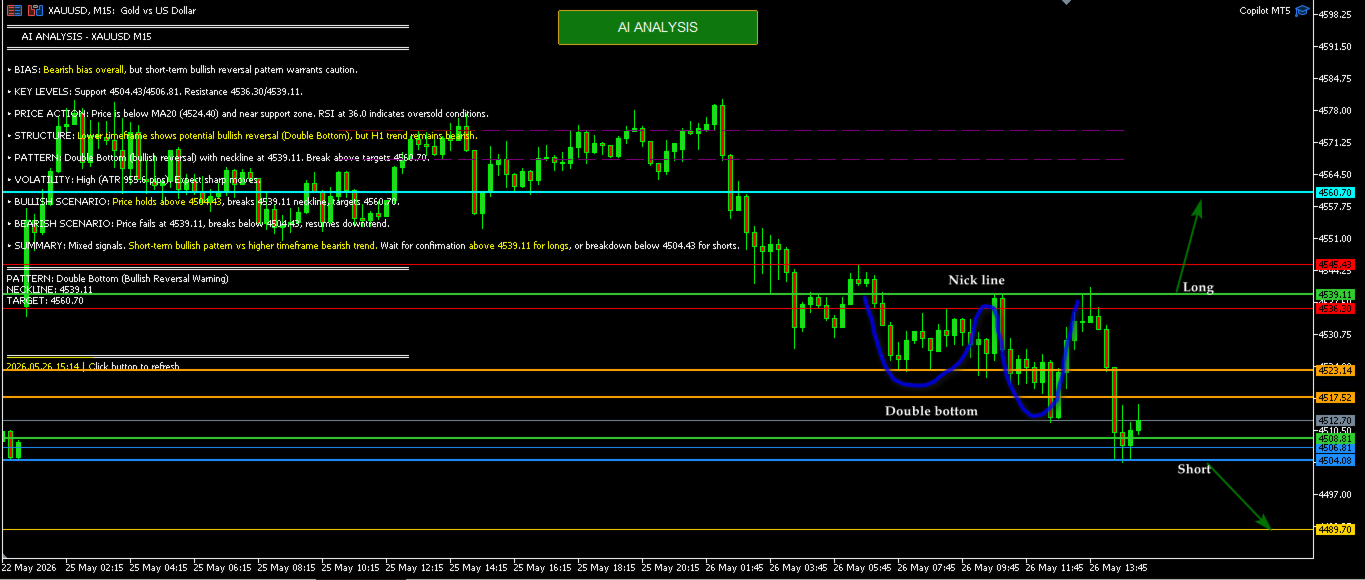
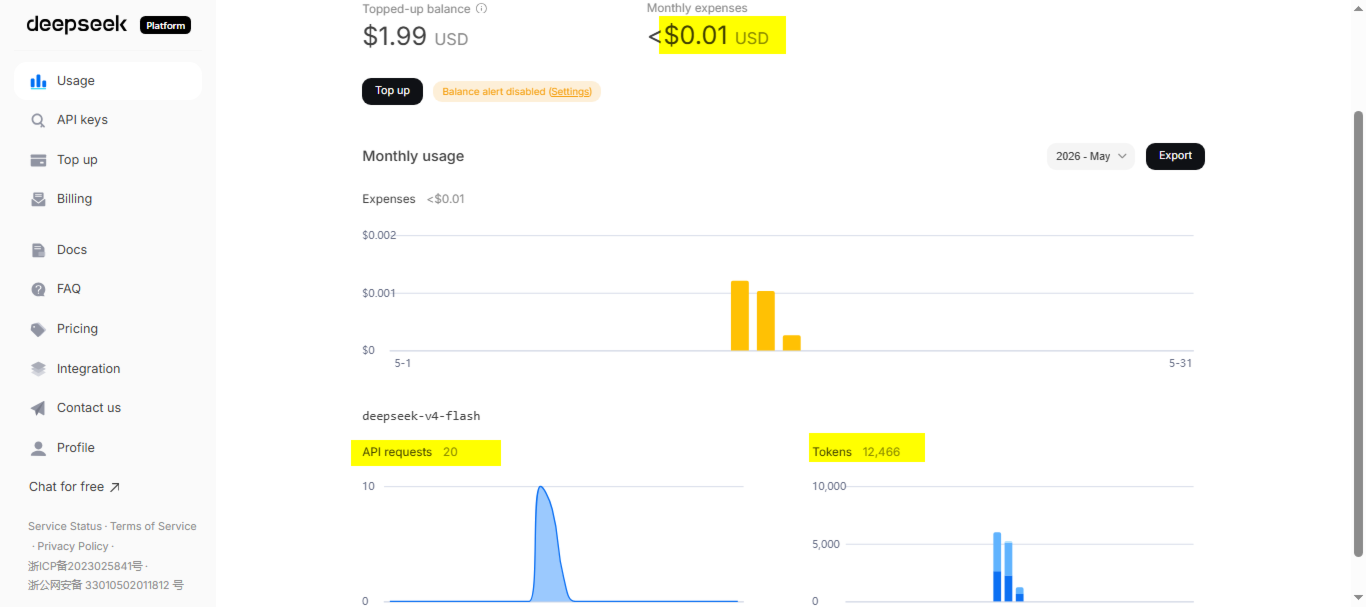
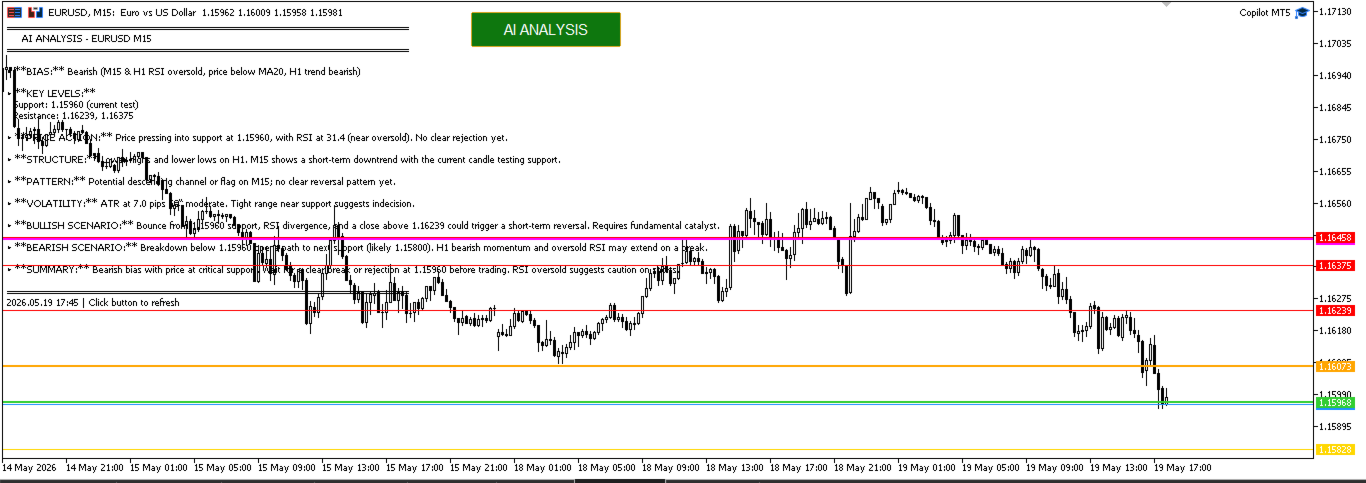
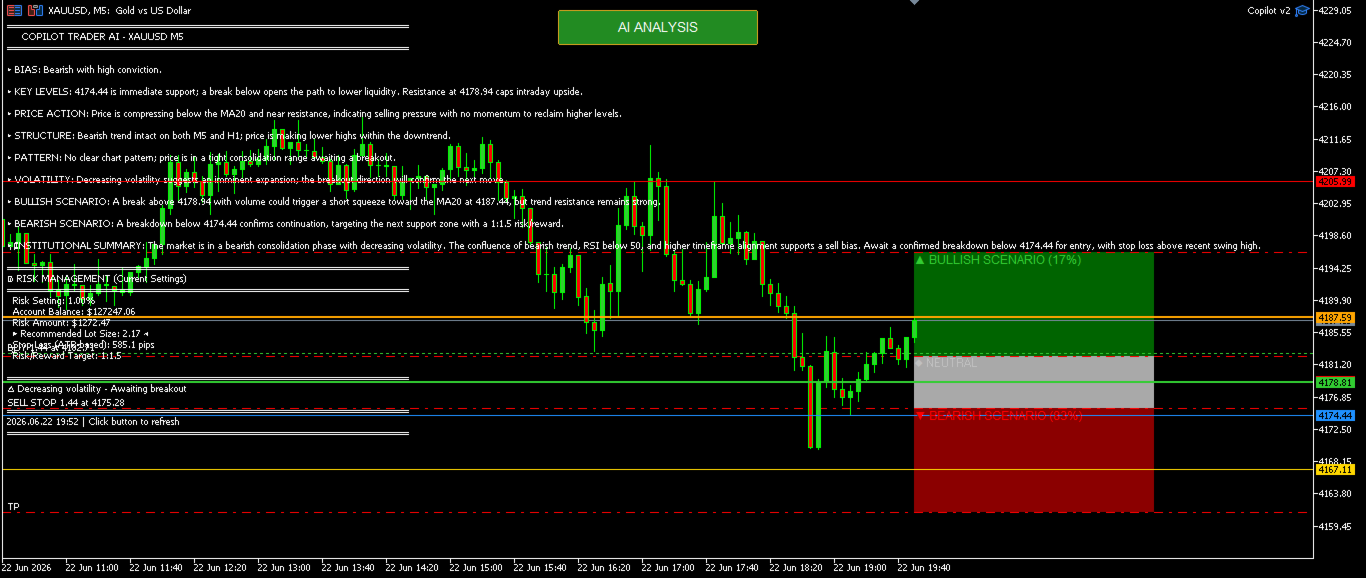
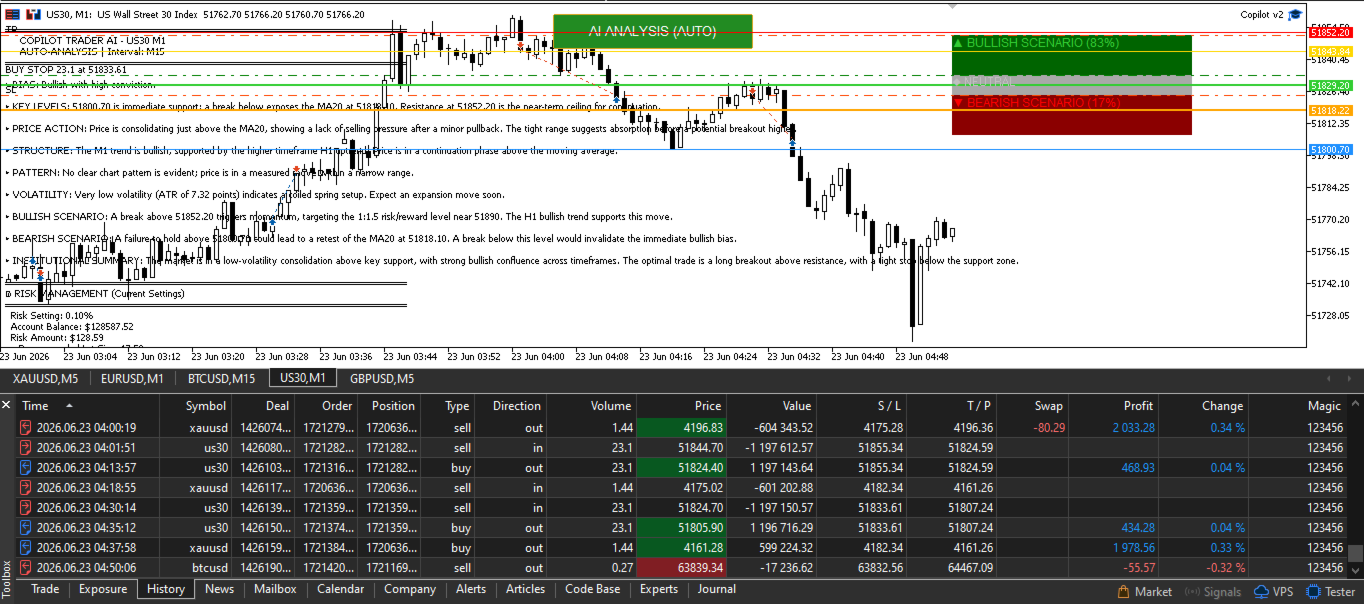
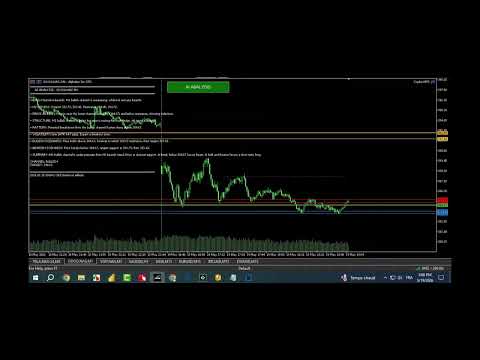
Copilot Trader AI is a revolutionary EA that brings the power of DeepSeek AI directly into your MT5 charts. With just one click and an API key costing less than $0.0005 per analysis, you get professional-grade market analysis, pattern detection, and trade levels drawn automatically on your chart.

In the Comments section, you will find market analysis, trading scenarios, and results from live opportunities...

Update to version 2.1 :
Auto-Trading is now enabled
Enable Auto-Analysis and select the analysis period (Use Time Filter to restrict analysis during Low lequidity sessions)
Set your risk per trade or Fixed Lot, Daily DD
The EA now automatically analyzes the market and places pending orders in bullish and bearish zones.

1. One-Click Analysis

  • Single button on your chart - no complex setup

  • Works on ANY symbol: Forex, Gold, Crypto, Stocks, Indices, CFDs

  • Real-time analysis of last N bars (configurable: 50-500 bars)

  • Save hours of manual analysis
  • Automated AI Market Scanning : EA continuously monitors the market at your chosen interval (M1 to W1)

2. Professional Market Analysis

The AI provides a complete trading report including:

  • BIAS - Clear directional view (Bullish/Bearish/Neutral)

  • KEY LEVELS - Support & Resistance with precise prices

  • PRICE ACTION - Momentum, rejection zones, absorption areas

  • STRUCTURE - Higher highs/lows analysis with timeframe validation

  • CHART PATTERNS - Double tops/bottoms, Head & Shoulders, Triangles with NECKLINE prices and TARGETS

  • VOLATILITY - ATR-based volatility assessment

  • BULLISH & BEARISH SCENARIOS - Complete trade plans with Entry, SL, TP levels

3. Smart Pattern Detection

Unlike basic indicators, Copilot Trader uses price action logic to detect:

  • Double Bottom/Top - With confirmation bars, neckline price, and profit target

  • Head & Shoulders - Both regular and inverse, with validation rules

  • Triangles - Compression/expansion detection

  • Channels - Ascending/descending channel identification

4. Timeframe-Aware Analysis

The EA understands the difference between M5 and H1 analysis:

  • Validates if "ranging" makes sense for your timeframe

  • Calculates expected range percentages per timeframe

  • Provides quality assessment: NORMAL / COMPRESSED / EXPANSIVE

  • Suggests when to use higher timeframe for context

 GETTING STARTED - 3 SIMPLE STEPS

Step 1: Get Your API Key 

  1. Go to platform.deepseek.com

  2. Sign up (free)

  3. Navigate to API Keys

  4. Click "Create API Key"

  5. Copy your key (starts with  sk- )

Step 2: Configure MT5 

  1. Tools → Options → Expert Advisors

  2. Check "Allow WebRequest for listed URLs"

  3. Add:  https://api.deepseek.com

  4. Click OK

Step 3: Start Trading 

  1. Drag EA onto your chart

  2. Paste API key in properties

  3. Click "AI ANALYSIS" button

  4. Start trading with AI-powered analysis!

리뷰 2
lida19801
478
lida19801 2026.06.03 12:35 
 

I am surprised by accuracy of ai analysis. It is often spot on accurate. More over every analysis is very cheap only few cents. I am using deepseek-v4-flash model

Sven Markus Weller
4414
Sven Markus Weller 2026.05.20 09:58 
 

I like the concept behind this tool. Setup was quick and straight. Clear trading suggestions.

추천 제품
Close All Pro MT5 – Fast PnL Control is a powerful trade manager MT5 utility that gives you total control over your trades. With a single click, you can close all MT5 orders, monitor real-time profit and loss, and manage your floating PnL directly from a clean on-chart panel. The tool is lightweight, responsive, and built to help traders save time, reduce emotional stress, and maintain focus. Whether you trade manually or through an EA, this MT5 profit panel provides the visibility and precisio
Telegram to mt5 pro
Janet Abu Khalil
4 (4)
Telegram to MT5 Pro — Advanced Telegram Signal Copier with Auto-Fix, Multi-TP, Risk Control and Full Trade Management Telegram to MT5 Pro — 전문 텔레그램 신호 복사기 Telegram to MT5 Pro는 텔레그램 신호를 MetaTrader 5 계정으로 자동으로 직접 실행하는 고성능 트레이드 복사기로, 리스크, 실행, 트레이드 관리에 대한 완전한 제어를 제공합니다. 이 시스템은 두 가지 구성 요소로 이루어져 있습니다: • MetaTrader 5 내부에서 실행되는 Expert Advisor (EA) • 텔레그램에 연결되어 신호를 로컬로 EA에 전송하는 데스크톱 브리지 애플리케이션 두 구성 요소는 동일한 컴퓨터에서 실행되어야 합니다. MQL5 플랫폼 제한으로 인해 EA는 텔레그램에 직접 연결할 수 없습니다. 브리지는 텔레그램을 처리하고 EA는 거래를 실행합니다. 지원 및 설치
Tick Chart Constant Volume Generator
Trade The Volume Waves Single Member P.C.
1. Overview   The Tick Chart Toolset is a pair of tightly coupled MQL5 files that generate and control professional Constant Volume charts inside MetaTrader 5 as custom symbols. Unlike time-based charts, each bar closes only when a target volume threshold is reached, giving you a noise-filtered, activity-proportional view of the market. Free "Tick Chart Monitor Indicator" to control the generator EA:  https://www.mql5.com/en/market/product/17104   Component Type Role Tick_Chart_Generator_AI_MT5
Tick Volume Chart - MetaTrader 5 에서 틱 거래량 기반 차트를 생성하는 독보적인 도구입니다. Tick Volume Chart 를 사용하면 시간이 아닌 지정된 틱 수에 따라 각 캔들이 형성되는 차트를 구축할 수 있습니다. 이를 통해 표준 시간 차트에서는 얻을 수 없는 완벽한 시장 활동 분석 정밀도를 확보할 수 있습니다. 사용자 지정 심볼을 지원하는 모든 지표와 Expert Advisor를 사용할 수 있습니다. 생성된 차트는 표준 차트와 마찬가지로 편리하게 작업할 수 있습니다. 기존 도구와 달리 Tick Volume Chart 는 시간 간격이 아닌 실제 거래 강도에 기반하여 시장을 분석할 수 있게 해줍니다. Tick Volume Chart의 장점 각 바에 고정된 틱 거래량 을 가진 차트를 지원합니다. 내장된 틱 데이터베이스 덕분에 과거 데이터를 즉시 로드 합니다. 데이터가 실시간으로 업데이트되며, 일반 차트와 지연 없이 동기화 됩니다. 한 번에 여러 개의 틱 거
MQL5 블로그: https://www.mql5.com/en/blogs/post/761446 MT4 버전: https://www.mql5.com/en/market/product/136790 MT5 버전: https://www.mql5.com/en/market/product/136791 Time Wizard는 속도, 타이밍, 실행 제어 기능을 하나의 깔끔한 대시보드에서 필요로 하는 트레이더를 위해 설계된 전문 트레이딩 어시스턴트입니다. 이 Expert Advisor는 이벤트 기반 트레이딩, 예약 실행, 빠른 반자동 주문 관리 기능을 제공합니다. 주문을 미리 준비하고, 정확한 실행 시간을 지정하고, 계층형 대기 주문을 설정하고, 손절매 및 이익 실현으로 위험을 관리하고, 차트의 간편한 인터페이스에서 모든 것을 모니터링할 수 있습니다. 경제 이벤트, 개장 시간, 돌파 시점 또는 사용자 지정 일정 등 어떤 시점을 기준으로 거래하든 Time Wizard는 체계적이고 규율 있는 실행을
OB FVG Trade Copier: Unified Master & Slave EA Version: 2.00 Type: Trade Copier / Risk Management Utility Compatibility: MetaTrader 4 & MetaTrader 5 (Cross-compatible codebase) Overview The OB FVG Trade Copier is a professional-grade, unified trade copying system designed to mirror trades between Master and Slave accounts seamlessly. Built with a unified architecture, a single EA file serves as both the sender (Master) and receiver (Slave) simply by toggling the EA Mode in the settings. It uti
FREE
SmartTrade EA is a manual trading panel that docks on the chart. It brings order entry, position management, risk limits, statistics, the economic calendar and price alerts into one interface, so you can open, protect and close a trade without leaving the chart or opening a dialog. It is a tool, not a strategy. It does not place trades on its own and does not generate signals. Every entry is yours. What it handles is the work after the click: moving stops, closing in parts, and keeping you ins
Trend Wave Analyzer Overview The Trend Wave Analyzer is a specialized MQL5 tool designed for MetaTrader 5 that identifies,analyzes,and visualizes price trend cycles in financial markets.It detects complete up/down/sideways price movements by identifying key turning points(peaks and troughs)in price action,providing traders with valuable insights into market behavior patterns. #Key Features -Multi-symbol Analysis:Analyze multiple trading instruments simultaneously -Trend Identification:Auto
Scalp Pro Trade Panel
Heiko Manfred Priebusch
5 (2)
ScalpPro Trade Panel – MT5용 최고의 수동 스칼핑 트레이딩 콕핏 ScalpPro 는 번개같이 빠른 시장 체결 속도와 마찰 없는 거래가 필요한 데이 트레이더와 스칼퍼를 위해 특별히 설계되었습니다. 느린 주문 창을 열거나, 핍(pip)을 수동으로 계산하거나, 빠른 시장 움직임을 놓치는 일은 이제 잊으십시오. ScalpPro는 MetaTrader 차트를 직관적인 트레이딩 콕핏으로 바꾸어 주며, 원클릭 정밀도로 포지션을 진입, 관리, 청산할 수 있게 해줍니다. 즉시 진입 및 유연한 제어 실시간 매수/매도 원클릭 거래: 실시간 체결 가격을 표시하는 크고 굵은 BUY 및 SELL 버튼으로 즉시 시장 진입이 가능합니다. 간편한 매개변수 조정: 랏 사이즈(Lot Size), 손절매(Stop Loss), 이익실현(Take Profit), 트레일링 스탑을 몇 초 만에 변경하세요. 키보드로 값을 직접 입력하거나 빠른 + / - 버튼을 사용할 수 있습니다. 자유롭게 이동 가능한 패널:
FREE
"Quick Copier" is designed to copy trading without any complicated settings. It copies master orders faster than "Just Copier" (https://www.mql5.com/en/market/product/20920). Please also check this product at fxina.hostingerapp.com.  The copy can be done in one PC. One EA can be set as master (provider) or slave (receiver). The receiver lot can be set to multiple providers lots. Any type of copy is available. MT4 -> MT5 MT4 -> MT4 MT5 -> MT5 MT5 -> MT4 If you want to copy MT4 -> MT5 or MT5 -> MT
UMNi-NEWS **MT5 Economic Calendar & News Alert System** UMNi-NEWS monitors the economic calendar and alerts you before, during, and after high-impact news events. It keeps you aware of scheduled risks throughout the trading day — so you can adjust exposure before events hit. KEY FEATURES • Daily news briefing on startup and at each new trading day • Two-stage pre-event warnings (30m and 5m by default) • Live news alert at event time with elevated spread warning • Post-
Bastion is a monitor-and-close-only risk manager for prop-firm traders. It watches your account against your firm's daily-loss and maximum-drawdown limits in real time and force-closes your open positions BEFORE you cross a line. It never opens a trade of its own, so it stays fully within the tools allowed by FTMO, FundedNext, The5ers, FTUK and FXIFY. Why traders fail challenges A large share of failed evaluations end on a single daily-loss breach: a moment of inattention, a news spike, one tra
Just Copier MT5
Agung Imaduddin
4.75 (4)
"Just copier" is designed to copy trading without any complicated settings. The copy can be done in one PC. One EA can be set as master (provider) or slave (receiver). The receiver lot can be set to multiple providers lots. Please also check this product at fxina.hostingerapp.com.  Any type of copy is available. MT4 -> MT5 MT4 -> MT4 MT5 -> MT5 MT5 -> MT4 If you want to copy MT4 -> MT5 or MT5 -> MT4, please purchase "Just copier" for MT4 and "Just copier" for MT5 separately. Just Copier can copy
SmartRAL
Jemy Yeferson Dimu Ludji
SmartRAL (Smart Risk Auto-Lot EA) SmartRAL: The Ultimate Risk & Lot Management Expert Advisor (EA) SmartRAL is an essential tool for traders who demand precise risk management and automated position sizing in MetaTrader 5. Stop guessing your lot size and let the algorithm handle the calculations. This EA allows you to trade with confidence by guaranteeing your risk exposure on every single trade, while offering absolute flexibility in setting your Stop Loss (SL). Key Features & Benefits Guarante
Ping
Vagif Shabanov
Ping: 안정적인 거래를 위한 필수 도구 인터넷 제공업체와 VPS는 안정적인 연결을 약속하지만, 과연 이들을 신뢰할 수 있을까요? 1밀리초가 중요한 세계에서 느리거나 불안정한 연결은 수익 손실이나 손실로 이어질 수 있습니다. Ping 스크립트는 다음을 가능하게 합니다. 정보에 입각한 결정: 다양한 VPS 서버와 브로커의 속도를 시각적으로 비교하여, 전략에 가장 빠르고 안정적인 연결을 선택할 수 있습니다. 위험 제거: 주문 실행 속도가 결과에 직접적인 영향을 미치는 스캘퍼 및 고빈도 트레이더에게 특히 유용합니다. 문제 식별: 인터넷이나 VPS가 언제 문제를 일으키는지 신속하게 감지하고, 거래에 영향을 미치기 전에 대응할 수 있습니다. 타협 없는 작업: 저희 스크립트는 다른 전문가 고문과 충돌하지 않고 모든 차트 및 시간 프레임에서 작동합니다. 최대한 편리하고 눈에 띄지 않도록 설계되었습니다. Ping 스크립트는 MetaTrader 5 터미널을 위해 특별히 개발된, 개인용 연결 속도
Overview Partial Trailing Stop EA is an advanced trade management Expert Advisor for MetaTrader 5 that automatically locks in profits by performing partial position closures when price retraces from its maximum favorable movement (peak profit level) . Unlike a traditional trailing stop that closes the entire position, this EA allows you to scale out gradually. When the market moves in your favor, the EA continuously tracks the highest (for Buy trades) or lowest (for Sell trades) price reached. I
Equity Guard Pro: Prop & Trade Manager Professional Risk Management Suite: Auto SL/TP, Daily Drawdown Protection, RRR-Based Trailing, Multi-Stage Partial Closing, and more. MT4 Version:  https://www.mql5.com/en/market/product/163893 Product Overview: Equity Guard Pro is an all-in-one utility designed for professional traders and Prop Firm challengers. It transforms MetaTrader into a high-precision trading workstation by automating risk management and trade execution. Whether you need to pass a
SolarTrade Suite Financial Robot: LaunchPad Market Expert - 거래를 시작하도록 설계되었습니다! 이 거래 로봇은 특별하고 혁신적이며 고급 알고리즘을 사용하여 가치를 계산합니다. 금융 시장의 세계에서 여러분의 조수입니다. SolarTrade Suite 시리즈의 지표 세트를 사용하여 이 로봇을 시작할 순간을 더 잘 선택하세요. 설명 하단에서 SolarTrade Suite 시리즈의 다른 제품을 확인하세요. 투자와 금융 시장의 세계를 자신 있게 탐색하고 싶으신가요? SolarTrade Suite Financial Robot: LaunchPad Market Expert는 정보에 입각한 투자 결정을 내리고 수익을 늘리는 데 도움이 되도록 만들어진 혁신적인 소프트웨어입니다. SolarTrade Suite Financial Robot: LaunchPad Market Expert의 장점: - 정확한 계산: 로봇은 고급 알고리즘과 분석 방법을 사
Symbol Information The   Symbol Info   indicator provides an intuitive panel on the chart that displays essential information about the current trading symbol. This includes basic trading data, instrument properties, and trading rules, all designed to give traders a clear view of the market conditions and product specifications. Key Features: Symbol Name and Description: The indicator displays the name and a detailed description of the current trading symbol, helping users identify the instrume
Lot calculator tool MT5
Ernestas Kvedaras
3.67 (3)
More stable MetaTrader 4 version is available here:  Lot Calculator Tool . This tool helps you to automatically calculate and manage risk, conveniently place orders visually, schedule orders, trail stops, move them to break-even and more. Features Place market or pending orders using draggable lines Schedule orders Calculate and limit risk using various methods See current spread See time till next candle Set custom order comments Trail stops Move stops to break-even See order profit/loss in p
Click Trading
Jawad Tauheed
5 (2)
One Click Trading – Auto TP SL Developer TraderLinkz Version 1.00 Category Utility What it does Adds missing TP and SL to your manual trades and pending orders Sets them once per ticket Lets you move TP and SL afterward Works on hedging and netting accounts Scans on every tick and reacts on trade events Why you want it You place faster entries You get consistent risk and exit targets You reduce fat finger errors You keep full manual control Quick start Attach the EA to any chart Keep TP and SL e
FREE
# TradeRoad Risk Panel Advanced TradeRoad Risk Panel Advanced is a MetaTrader 5 utility panel designed to help traders prepare and monitor their risk before and during a trading session. It does not open trades automatically, does not provide trading signals, and does not promise results. Its purpose is simple: make risk, drawdown and trading discipline easier to read directly on your MT5 chart. ## Main features - Position size / lot calculation based on planned risk - Risk amount and risk
금융 시장에서 보다 효율적이고 수익성 있게 운영할 수 있는 방법을 찾고 계십니까?   귀하의 거래 접근 방식을 바꿀 솔루션을 제시해 드리겠습니다. 혁신적인 MQL5 트레이딩 봇을 통해 단순한 자동화를 뛰어넘는 도구를 제공합니다. 실시간으로 적응하고 최적화하여 운영을 한 단계 더 발전시키는 지능형 시스템을 제공합니다.   어떻게   작동하나요?   모든 것을 완벽하게 제어하면서 투자 규모를 자동으로 계산할 수 있다고 상상해 보세요.       귀하의 운영에 대해. 그러나 이것이 바로 우리 솔루션이 눈에 띄는 부분입니다. 차트에 손절매를 상징하는 빨간색 선을 그리는 기능 덕분에 우리 봇은 이 참조를 기반으로 로트 크기를 동적으로 다시 계산합니다. 즉, 지속적인 수동 개입 없이도 비교할 수 없는 정확성으로 위험 관리 전략을 세밀하게 조정할 수 있습니다. 우리 봇을 사용하면 거래를 자동화할 수 있을 뿐만 아니라 시장 변화에 즉각적이고 정확하게 적응하는 능력을 향상시킬 수 있습니다. 더
Manual Trade Panel PRO for MT5 Product name **Manual Trade Panel PRO for MT5** Short description Advanced manual trading panel for MetaTrader 5 with BUY/SELL and BUY LIMIT/SELL LIMIT execution, balance-based lot sizing, automatic SL/TP, Break Even, trailing stop, partial close, candle timer, and open position pips counter. Full sales description **Manual Trade Panel PRO for MT5** is an advanced Expert Advisor designed for manual and semi-automatic trading in MetaTrader 5. The EA creates a c
Equity X MT5
Alessandro Grossi
Equity X è una utility che chiude tutte le posizioni ed eventuali ordini pendenti ad un importo prestabilito, è possibile fissare il bilancio del tuo conto quando il netto e uguale o superiore oppure uguale inferiore all'importo desiderato Ha integrato un sistema per la notifica mobile instantanea che genera il messaggio ad operazione avvenuta Uno strumento che permette di ottimizzare al massimo il rendimento del tuo investimento, è possibile utilizzarlo anche come gestore virtuale di take prof
Atlas Trade Desk
Bernhard Wurzlbauer
Atlas Trade Desk MT5 Atlas Trade Desk MT5 is a visual trade panel, risk manager and lot calculator for manual MetaTrader 5 traders. Plan market and pending orders directly on the chart, calculate position size from your selected risk, adjust Entry, Stop Loss and Take Profit visually, and manage open positions from one clean dashboard. The tool is built for discretionary traders who want faster order preparation, clearer risk control and safer position management without switching between multipl
Seconds Candle Trader Pro Short description Manual seconds-candle chart and trade panel for MetaTrader 5 with S1-S30 candles, hotkeys, breakeven, zoom, and dark/light themes. Overview Seconds Candle Trader Pro is a manual trading utility for MetaTrader 5. It draws custom seconds candles directly on the chart using broker tick data and adds a compact panel for discretionary order management. The product supports S1, S2, S3, S4, S5, S6, S10, S12, S15, S20, and S30 candle views. It is designed
Demo version T Position Size Calculator   doesn't work in the strategy tester. The Strategy Tester does not support the processing of ChartEvent. It does not support most of the panel's functionality. Contact me for any questions or ideas for improvement or in case of a bug found. Control and manage your trading like a professional trader with T Position Size Calculator. T Position Size Calculator – an MT5 Expert Adviser, is a user-friendly custom tools (Dialog Panel and Three Lines, Order Line
Tick Exporter
Georgios Baizanis
The EA allows you to extract the tick data history from the Mt5 terminal of your broker for any symbol. Extraction is done on the common folder. Open the data folder from your Mt5 terminal, go back one tree and then look for the common folder. Parameters fields (default values can change and all fields are imputable): 1. Symbol: leave blank if extraction is for the current chart symbol 2.Date 3. Time 4. Seconds before the time stamp under field 2, the  tick data  extraction to start 5. Second
Expert TP SL v04 - Professional Trading Assistant with AI Motivation System Advanced manual trading tool with automatic risk management, overtrading protection, and intelligent psychological support for disciplined trading. PRODUCT OVERVIEW Expert TP SL v04 is a comprehensive trading assistant designed for manual traders who want to maintain emotional discipline while automating risk calculations. This isn't just another order placement tool - it's a complete trading psychology system that pr
이 제품의 구매자들이 또한 구매함
Trade Assistant MT5
Evgeniy Kravchenko
4.43 (216)
거래당 위험 계산, 라인을 사용한 손쉬운 신규 주문, 부분 청산 기능을 통한 주문 관리, 7가지 유형의 트레일링 스탑 및 기타 유용한 기능을 제공합니다. 추가 자료 및 지침 설치 지침   -   애플리케이션 지침   -   데모 계정용 애플리케이션 평가판 라인 기능       - 차트에 개시선, 손절매, 차익실현을 표시합니다. 이 기능을 사용하면 새로운 주문을 쉽게 하고 개봉 전에 추가 특성을 볼 수 있습니다. 위기 관리       -       위험 계산 기능은 설정된 위험과 손절매 주문의 크기를 고려하여 새 주문의 볼륨을 계산합니다. 이를 통해 손절매 크기를 설정하고 동시에 설정된 위험을 존중할 수 있습니다. 로트 계산 버튼 - 위험 계산을 활성화/비활성화합니다. 필요한 위험 값은 위험 필드에 0에서 100 사이의 백분율 또는 예금 통화로 설정됩니다. 설정 탭에서 위험 계산 옵션을 선택합니다. $ 통화, % 잔액, % 지분, % 자유 마진, % 사용자 정의, % AB 이전
Trade Manager EA에 오신 것을 환영합니다. 이 도구는 거래를 보다 직관적이고 정확하며 효율적으로 만들기 위해 설계된 궁극적인 리스크 관리 도구 입니다. 단순한 주문 실행 도구가 아닌, 원활한 거래 계획, 포지션 관리 및 리스크 제어를 위한 종합 솔루션입니다. 초보자부터 고급 트레이더, 빠른 실행이 필요한 스캘퍼에 이르기까지 Trade Manager EA는 외환, 지수, 상품, 암호화폐 등 다양한 시장에서 유연성을 제공합니다. Trade Manager EA를 사용하면 복잡한 계산은 이제 과거의 일이 됩니다. 시장을 분석하고 진입, 손절 및 익절 수준을 차트의 수평선으로 표시한 후 리스크를 설정하면, Trade Manager가 이상적인 포지션 크기를 즉시 계산하고 SL 및 TP 값을 실시간으로 표시합니다. 모든 거래가 간편하게 관리됩니다. 주요 기능: 포지션 크기 계산기 : 정의된 리스크에 따라 거래 크기를 즉시 결정합니다. 간단한 거래 계획 : 진입, 손절, 익절을 위한
================================================================================ POC BREAKOUT - V20.72. Full Professional Grade Toolkit ================================================================================ POC Breakout is a full MetaTrader 5 trading dashboard for discretionary traders who want breakout signals, Point of Control (POC) context, volume profiles, order flow, market structure, news, alerts, and advanced trade planning in one professional workspace. Attached directly to you
Telegram to MT5 Multi-Channel Copier   는 Telegram 채널의 트레이딩 시그널을 MetaTrader 5로 자동 복사합니다. 봇도, 브라우저 확장도, 수동 복사도 필요 없습니다. Telegram에 시그널이 도착하면 EA가 몇 초 안에 터미널에서 주문을 실행합니다. 그리고 채널을 복사하기 전에, 내장 백테스터가 그 채널이 내 계좌에서 어떤 결과를 냈을지 보여줍니다. 제품은 두 가지 구성 요소로 이루어집니다: Telegram 채널을 수신하는 Windows 애플리케이션과, MT5 터미널에서 시그널을 실행하는 본 EA입니다. MT4 버전도 제공됩니다   여기 . 설정 가이드와 앱 다운로드:   https://www.mql5.com/en/blogs/post/768988 텔레그램 시그널 채널을 백테스트하는 방법 을 확인하세요. 현재 가격은 향후 인상될 예정입니다. 작동 방식 앱은 여러분 자신의 Telegram 계정으로 연결되므로, 팔로우하는 모든 채널, 그룹,
TradePanel MT5
Alfiya Fazylova
4.88 (170)
Trade Panel은 다기능 거래 도우미입니다. 이 애플리케이션에는 50개 이상의 수동 거래 기능이 포함되어 있으며 대부분의 거래 작업을 자동화할 수 있습니다. 앱 사용 설명서: https://www.mql5.com/en/blogs/post/756482 데모 계정용 앱 체험판: https://www.mql5.com/en/blogs/post/750865 앱 설치 방법: https://www.mql5.com/en/blogs/post/756239 시각 모드에서 앱 테스트 방법: https://www.mql5.com/en/blogs/post/770277 VPS MetaTrader에 앱 설치 방법: https://www.mql5.com/en/blogs/post/770190 거래. 한 번의 클릭으로 거래를 수행할 수 있습니다: 리스크 자동 계산과 함께 예약 주문 및 포지션 열기. 한 번의 클릭으로 여러 주문 및 포지션 열기. 주문 그리드 열기. 예약 주문 및 포지션을 그룹별로 닫기. 포지션
내 거래 규칙에 맞춰 Telegram 신호 복사 Telegram to MT5 Signal Trader 는 공개 및 비공개 Telegram 채널과 그룹의 텍스트 기반 거래 신호를 MetaTrader 5로 자동 복사합니다. 하나의 데스크톱 앱에서 여러 신호 제공자와 MT5 계좌를 관리하고, 제공자마다 위험 관리 및 거래 설정을 개별적으로 지정 할 수 있습니다. 신호 복사에는 Telegram 봇이나 API 설정이 필요하지 않습니다. 전화번호 또는 QR 코드로 본인의 Telegram 계정에 로그인한 후, 이미 가입한 채널이나 그룹을 선택하면 됩니다. 봇을 만들거나 Telegram API 토큰, API ID 또는 API 해시를 입력할 필요가 없습니다. 포지션 크기를 선택하고, 여러 익절 목표에 청산 물량을 배분하며, 손익분기점 이동과 트레일링 스톱을 자동화하세요. 제공자의 신호를 따르면서도 실제 거래 방식은 직접 설정할 수 있습니다. 이 제품은 MT5 Expert Advisor와 필수 Win
Footprint Chart Pro — Professional OrderFlow EA for MetaTrader 5 Version 6.34 | Professional tool for real traders | Institutional-Grade Visualization DEMO USERS - PLEASE SELECT EVERY TICK / REAL TICK WHEN TESTING AND YOU HAVE DOWNLOADED HISTORICAL DATA. IF YOU SEE A WAITING SCREEN AND IT IS NOT DOWNLOADING, IT MEANS YOU HAVE LOW HISTORICAL DATA. TRY 1 MIN AND 5 MIN FIRST ON 1 DAY DATA. ONE DAY DATA SHOULD BE THE NEWEST AND MOST CURRENT DATE. PLEASE WAIT UNTIL THE MARKET HAS ROLLED OVER PERIOD.
Exp COPYLOT CLIENT for MT5
Vladislav Andruschenko
3.97 (35)
MetaTrader 5용 전문 트레이드 복사기 MetaTrader 용 빠르고 전문적이며 신뢰할 수 있는 트레이드 복사기 입니다. COPYLOT 은 MT4와 MT5 터미널 간의 Forex 거래 복사를 지원하며, Hedge 및 Netting 계좌를 모두 지원합니다. COPYLOT MT5 버전 지원 구성: - MT5 Hedge → MT5 Hedge - MT5 Hedge → MT5 Netting - MT5 Netting → MT5 Hedge - MT5 Netting → MT5 Netting - MT4 → MT5 Hedge - MT4 → MT5 Netting MT4 버전 전체 설명 + DEMO + PDF 구매 방법 설치 방법 로그 파일 확인 방법 테스트 및 최적화 방법 Expforex의 모든 제품 MT4 터미널로도 거래를 복사할 수 있습니다(MT4 → MT4, MT5 → MT4): COPYLOT CLIENT for MT4 COPYLOT은 2개, 3개, 심지어 10개의 터미널과 동시에 작동할
Farmed Hedge Yield Farming | All Markets (Manual - Hybrid - Semi/Automated EA) VERIFIED TRADING RESULTS - Farmed Hedge Yield Axi Copy:  https://www.mql5.com/en/signals/2356376 - Farmed Hedge Yield Exn Copy:   https://www.mql5.com/en/signals/2356404 - Farmed Hedge Yield V Copy:  https://www.mql5.com/en/signals/2357156 IMPORTANT NOTICE: FarmedHedge is a MANUAL-FOCUSED TRADING UTILITY ,not a fully automated EA. Results shown on this Signal include manual trades and overall strategic management.
Grid Manual MT5
Alfiya Fazylova
4.73 (22)
"Grid Manual"은 주문 그리드 작업을 위한 거래 패널입니다. 이 유틸리티는 보편적이며 유연한 설정과 직관적인 인터페이스를 제공합니다. 그것은 손실을 평균화하는 방향뿐만 아니라 이익을 증가시키는 방향으로 주문 그리드와 함께 작동합니다. 거래자는 주문 그리드를 만들고 유지할 필요가 없으며 유틸리티에서 수행합니다. 거래자가 주문을 시작하는 것으로 충분하며 "Grid Manual"는 자동으로 그를 위한 주문 그리드를 생성하고 거래가 마감될 때까지 그와 동행할 것입니다. 전체 설명 및 데모 버전 여기 . 유틸리티의 주요 기능: 모바일 터미널을 포함하여 어떤 방식으로든 열린 주문과 함께 작동합니다. "제한" 및 "중지"의 두 가지 유형의 그리드와 함께 작동합니다. 고정 및 동적(ATR 표시기 기반)의 두 가지 유형의 그리드 간격 계산과 함께 작동합니다. 오픈 오더 그리드의 설정을 변경할 수 있습니다. 차트에서 각 주문 그리드의 손익분기점 수준을 표시합니다. 각 주문 그리드에 대한 이익
파워 캔들 전략 스캐너 - 자체 최적화 다중 종목 설정 찾기 도구 파워 캔들 전략 스캐너는 마켓 워치에 등록된 모든 종목에 대해 파워 캔들 지표와 동일한 자체 최적화 엔진을 동시에 실행합니다. 하나의 패널에서 현재 통계적으로 거래 가능한 종목, 각 종목별 최적의 전략, 최적의 손절매/익절 조합을 알려주며, 새로운 신호가 발생하면 즉시 알림을 전송합니다. 이 도구는 Stein Investments 에코시스템의 일부입니다. 18개 이상의 도구와 함께 당신의 1대1 AI 트레이딩 멘토 Max.  항상 대기 중, 모든 인디케이터를 깊이 있게 이해, 무언가를 차근차근 생각해보고 싶은 순간에 도움을 줍니다.  https://stein.investments 에서 만나보세요 완벽한 시장 모니터링. 종목당 3,000건 이상의 자동 최적화. 2가지 알림 유형. 한 번의 클릭으로 차트를 전환하고 바로 거래하세요. 이 도구가 필요한 이유 대부분의 다중 종목 스캐너는 가격 변동만 보여줍니다. 티커별
HINN MagicEntry Extra
ALGOFLOW OÜ
4.74 (19)
HINN MAGIC ENTRY – the ultimate tool for entry and position management! SIMPLE. FASTEST. INTUITIVE. MAX AUTOMATED. Place orders by selecting a level directly on the chart! full description   ::  demo-version  :: 60-sec-video-description Key features: - Market, limit, and pending orders - Automatic lot size calculation - Automatic spread and commission accounting - Unlimited partitial take-profits  - Breakeven and trailing stop-loss and take-profit  functions - Invalidation leves - Intuitive, a

MT5 to Telegram Signal Provider 는 사용하기 쉽고 완전히 커스터마이즈 가능한 유틸리티로, 특정 신호를 Telegram의 채팅, 채널 또는 그룹으로 전송하고, 귀하의 계정을 신호 제공자 로 만듭니다. 경쟁 제품과 달리 DLL 임포트를 사용하지 않습니다. [ 데모 ] [ 매뉴얼 ] [ MT4 버전 ] [ 디스코드 버전 ] [ 텔레그램 채널 ]  New: [ Telegram To MT5 ] 설정 단계별 사용자 가이드 가 제공됩니다. 텔레그램 API에 대한 지식은 필요하지 않습니다; 개발자가 제공하는 모든 것이 필요합니다. 주요 특징 구독자에게 보낸 주문 상세 정보를 커스터마이즈할 수 있습니다. 예를 들어, 브론즈, 실버, 골드와 같은 계층 구독 모델을 만들 수 있습니다. 골드 구독에서는 모든 신호를 받습니다. id, 심볼, 또는 코멘트로 주문을 필터링할 수 있습니다. 주문이 실행된 차트의 스크린샷이 포함됩니다 보낸 스크린샷에 닫힌 주문을 그려 추가 검증을 합니다
Anchor Trade Manager
Kalinskie Gilliam
5 (9)
Your EAs cannot see each other, but Anchor can. Anchor gives you one place to coordinate your EAs, manage risk, and decide when trading is allowed. It works alongside the trading bots you already use without any changes to them. The Problem One EA opens a trade. Then another starts trading. The next thing you know, you wake up to multiple grids built across your account. Each EA may be doing exactly what it was designed to do, but together they can place far more risk on your account than you in
Copy your MT5 trades to Interactive Brokers You keep using MT5. Every order you open or close is sent to your IB account. In real time. No coding. No changes to your strategy or EA. Try it first Rent 1 month: $30. Test on a live or paper account. What it does Real-time copying: same direction, reverse, or one side only. Map any MT5 symbol to any IB symbol. Set a lot ratio for each. Forex, Futures, Stocks, CFDs, Metals and Crypto. Position sync: both accounts checked, any difference fixed. Optio
Signal TradingView to MT5 Pro Automator TradingView와 MetaTrader 5 간의 즉각적인 전문 실행 TradingView 알림과 MT5의 실제 실행을 연결하는 가장 강력한 커뮤니케이션 브리지로 거래 전략을 자동화하세요. 속도, 유연성 및 완벽한 위험 관리를 요구하는 트레이더를 위해 설계된 이 Expert Advisor는 모든 알림 메시지를 정확한 시장가 또는 지정가 주문으로 변환합니다. 강점 및 이점 범용 파싱 엔진(독점 기술): 모든 알림 형식에서 데이터를 자동으로 인식하고 추출할 수 있는 고급 기술입니다. 단일하고 엄격한 형식에 얽매일 필요가 없습니다. 시스템은 심볼, 액션, 가격, SL 및 TP를 자동으로 이해합니다. 실시간 실행: 지연 시간을 최소화하도록 최적화된 1초 미만의 초고속 폴링 기술. 신호 수신 후 몇 밀리초 내에 주문 실행이 이루어집니다. 기관 수준의 위험 관리: 다음 기준에 따른 자동적이고 정확한 로트(Lot) 크기 계
The News Filter MT5
Leolouiski Gan
4.78 (23)
이 제품은 뉴스 시간 동안 모든 전문가 어드바이저 및 수동 차트를 필터링하여 수동 거래 설정이나 다른 전문가 어드바이저가 입력한 거래가 파괴될 수 있는 급격한 가격 상승으로부터 걱정하지 않아도 됩니다. 이 제품은 또한 뉴스 발표 전에 열린 포지션과 대기 주문을 처리할 수 있는 완전한 주문 관리 시스템이 함께 제공됩니다.   The News Filter  를 구매하면 더 이상 내장 뉴스 필터에 의존할 필요가 없으며 이제부터 모든 전문가 어드바이저를 여기서 필터링할 수 있습니다. 뉴스 선택 뉴스 소스는 Forex Factory의 경제 캘린더에서 얻어집니다. USD, EUR, GBP, JPY, AUD, CAD, CHF, NZD 및 CNY와 같은 어떤 통화 기준으로 선택할 수 있습니다. Non-Farm (NFP), FOMC, CPI 등과 같은 키워드 식별을 기준으로 선택할 수도 있습니다. 저, 중, 고 영향을 가지는 뉴스를 필터링할 수 있도록 선택할 수 있습니다. 차트와 관련된 뉴스만 선
Trade Copier Ultimate
Janitha Sandaruwan Amaradasa Wickramasingha Arachchilage
5 (5)
Trade Copier Ultimate - Telegram to MT5 Signal Copier Trade Copier Ultimate automatically copies Telegram trading signals into MetaTrader 5. The EA can read signal messages, detect the symbol, order type, entry price, Stop Loss, Take Profit levels and selected update commands, then execute or manage the trade in MT5 using your lot and risk settings. It is more than a basic Telegram to MT5 copier. TCU also supports Bot API and user-account Bridge workflows, Discord signal routing, local MT5 to MT
Welcome to ENTRY IN THE ZONE AND SMC MULTI TIMEFRAME  SPECIAL BENEFIT / FOR OUR MQL5 CUSTOMERS FREE ACCESS TO THE NEW TOOL  — COMING SOON — Learn more on our official website  : https://www.fableedge.net Entry In The Zone and SMC Multi Timeframe is a real-time market analysis tool based on Smart Money Concepts (SMC), designed to analyze market structure, price direction, and key trading zones. It supports both Single-Timeframe Analysis and Multi-Timeframe Analysis, providing a clearer view of th
신뢰하는 인디케이터를 그대로 사용하세요. 그 주변의 거래 과정을 자동화하세요. 믿고 사용하는 MT5 인디케이터가 있어도 차트를 지켜보고, 신호를 기다리고, 랏을 계산하고, 주문을 넣고, 모든 포지션을 직접 관리해야 하나요? Stratiora Signal Engine MT5는 이 과정을 연결하기 위해 만들어졌습니다. 호환되는 Buy 및 Sell 버퍼 신호를 진입, 거래량 계산, Stop Loss, Take Profit, 필터, 포지션 관리, 계좌 보호까지 포함한 자동화된 흐름으로 바꿀 수 있습니다. 인디케이터나 거래 아이디어를 바꿀 때마다 새 EA를 의뢰하는 대신, 하나의 유연한 엔진으로 각 신호를 어떻게 거래할지 직접 정할 수 있습니다. 내 신호. 내 규칙. 내 실행 방식. 출시 기념 혜택 현재 가격: USD 199.  Stratiora Signal Engine MT5를 구매하면 인디케이터 10개를 무료로 받습니다. 가격은 구매 10건마다 USD 50씩 인상하여 USD 999에 도
Premium Trade Manager - 코치가 내장된 트레이딩 패널 Premium Trade Manager 는 차트 안에 트레이딩 코치를 심어놓은 도구입니다. 주문을 확정하기 전에, AI 트레이딩 코치 Max가 설정된 거래를 직접 읽고 명확한 판단을 내려줍니다. 스톱이 규율 있는 접근 방식에 맞는지, 리스크 크기가 합리적인지, 고영향 뉴스 이벤트가 몇 분 후에 있는지, 프롭 펌 한도에 근접했는지. 그 아래에는 완전한 실행 엔진이 있습니다. 원클릭 리스크 기반 진입, 차트에서 드래그로 세우고 거래가 진행되는 동안에도 계속 움직일 수 있는 플랜, 최대 4단계 분할 익절, 7가지 트레일링 방식, 실시간 프롭 펌 컴플라이언스, 뉴스 가드, 그리고 자체 비용을 평가하는 스프레드까지. 결정은 당신이 내립니다. Max가 두 번째 시선으로 확인합니다. 패널이 그 이후의 모든 것을 처리합니다. 구매 전에 직접 체험해 보세요. 브라우저에서 라이브 패널을 직접 클릭해볼 수 있습니다. 구매 전에 실제
YuClusters
Yury Kulikov
4.93 (43)
Attention: You can view the program operation in the free version  YuClusters DEMO .  YuClusters is a professional market analysis system. The trader has unique opportunities to analyze the flow of orders, trade volumes, price movements using various charts, profiles, indicators, and graphical objects. YuClusters operates on data based on Time&Sales or ticks information, depending on what is available in the quotes of a financial instrument. YuClusters allows you to build graphs by combining da
EA Overfitter
Stephen J Martret
5 (1)
That backtest looks great. But will it still be making money tomorrow, next week, next month? EA Overfitter re-runs your EA on 100 price histories it has never seen. One score tells you if the edge is real. A backtest tells you what an EA did on one price history — the one that happened to occur. What you cannot tell from it is how much of that result was the strategy and how much was the particular path. EA Overfitter answers that. It builds up to 100 synthetic price histories your EA has n
Trade Indicator Assistant   is a powerful MT5 utility designed to turn indicators into automated trading systems. Its main feature is the ability to automatically detect an indicator’s   BUY and SELL signal buffers , without requiring you to know the buffer numbers, search through indicator settings, or modify the indicator source code. Bonus Indicator:   After purchasing Trade Indicator Assistant, contact me to receive   Trade Signal Pro   completely free as a bonus indicator. [Download Demo V
Quant Panel
Kevin Craig E Gittins
QUANT PANEL Independent per-algo analytics, protected MT5 history and professional PDF reporting Quant Panel is built for traders who run several Expert Advisors or strategies on one MT5 account and need to know how each algo is actually performing. Instead of treating the terminal as one combined portfolio, Quant Panel groups closed positions by EA comment or magic number and calculates every strategy independently. It gives you one clear dashboard for comparing algos, finding weak systems and
Trade Dashboard MT5
Fatemeh Ameri
4.94 (135)
Trade Dashboard simplifies how you open, manage, and control your trades, with built-in lot size calculation. It allows you to execute trades, manage risk, and control positions directly on the chart, with tools such as partial close, breakeven, and trailing stop. Designed to reduce manual work and help you stay focused on your trading decisions. A demo version is available for testing. Detailed explanations of features are provided within the MQL5 platform. Installation instructions are include
MetaTrader 5용 트레이딩 패널 — 차트와 키보드에서 실행하는 프로페셔널 원클릭 트레이딩 활동적인 트레이더를 위해 설계된 고급 Trading Panel로, MetaTrader 기본 인터페이스보다 훨씬 빠르고 직관적으로 포지션과 주문을 열고, 관리하고, 종료할 수 있습니다. 이 패널은 포지션 관리, 대기 주문 제어, 총수익 관리, 체결 속도를 하나의 전문적인 작업 공간에 통합하고 싶은 트레이더를 위한 솔루션입니다. 이것은 단순한 보조 유틸리티가 아닙니다. MetaTrader 5를 위한 진정한 trading cockpit입니다. 차트에서 직접 거래하고, 키보드로 빠르게 명령을 실행하며, 자동 계산과 시각적 가이드를 통해 수동 트레이딩을 더 빠르고, 더 명확하고, 더 편리하게 만들어 줍니다.  이 패널을 사용하면 차트에서 단 한 번의 클릭으로 거래를 실행할 수 있으며, 표준 MetaTrader 컨트롤보다 최대 30배 빠르게 거래 작업을 수행할 수 있습니다. 새로운 프리미엄 버전
Smart Stop Scanner – 실제 시장 구조 기반의 멀티자산 스톱로스 분석 시스템 개요 Smart Stop Scanner는 여러 시장에서 스톱로스 구조를 전문적으로 모니터링하기 위해 설계된 강력한 도구입니다. 실제 시장 구조, 핵심 브레이크아웃, 가격 행동 로직을 기반으로 가장 의미 있는 스톱 영역을 자동으로 감지하며, 고해상도(DPI 지원)의 깔끔하고 일관된 패널에 모든 정보를 표시합니다. 포렉스(FOREX), 금, 지수, 금속, 암호화폐 등 다양한 자산군을 지원합니다. 스톱 레벨 계산 방식 이 시스템은 기존의 인디케이터 공식을 사용하지 않습니다. 대신 브레이크아웃, 더 높은 고점, 더 낮은 저점 과 같은 실제 시장 구조 이벤트를 분석합니다. 스톱 레벨은 이러한 구조적 지점에서 직접 생성되므로 시장의 실제 움직임과 자연스럽게 일치하며, 더 신뢰도 높은 스톱 시스템을 제공합니다. 주요 기능 • 고정밀 멀티자산 호환성 포렉스, 금속, 금, 지수, 암호화폐 등 다양한
Binance Quotes Updater
Andrey Khatimlianskii
5 (1)
This service is designed to stream online cryptocurrency quotes   from the Binance exchange to your MetaTrader 5 terminal. You will find it perfectly suitable if you want to see the quotes of cryptocurrencies in real time — in the Market watch window and on the MetaTrader 5 charts. After running the service, you will have fully featured and automatically updated  cryptocurrency charts in your MetaTrader 5. You can apply templates, color schemes, technical indicators and any non-trading tools to
DrawDown Limiter
Haidar Lionel Haj Ali
5 (23)
DrawDown Limiter v5.0 — 고급 계좌 보호 컨트롤러 DrawDown Limiter v5.0은 거래 계좌를 모니터링하고 설정된 리스크, 수익, 뉴스, 일정, 롤오버 또는 포지션 수 제한에 도달했을 때 자동으로 대응하도록 설계된 클라이언트 측 계좌 보호 컨트롤러입니다. 하나의 전용 차트에서 수동 거래, 자동화 전략, 여러 Expert Advisor, 대기 주문 및 오픈 포지션 을 모니터링할 수 있습니다. 전체 계좌를 보호하거나 Magic Number를 사용하여 특정 EA 또는 여러 EA 그룹만 모니터링하도록 설정할 수도 있습니다. DrawDown Limiter의 목적은 단순히 드로다운을 표시하는 것이 아닙니다. 설정한 거래 규칙을 적극적으로 적용 하고 보호 조건이 활성화되어 있는 동안 해당 규칙을 계속 시행하는 것이 목적입니다. DrawDown Limiter v5.0은 단순히 얼마나 손실이 발생하고 있는지만 모니터링하는 것이 아니라, 전략이 언제 계속 거래할 수 있는지,
제작자의 제품 더 보기
Apex Striker MT4
Abdeljalil El Kedmiri
Apex Striker   is a sophisticated EA that automates Fibonacci breakout trading on   Gold ,  Forex and any Market . Whether you're a beginner looking for a "plug-and-play" solution or an advanced trader who wants full auto or manual control, this EA adapts to your trading style. XAUUSD-M15 Set File :   Download  (Optimized for Gold only) You can run the EA on 10 different VPS/Computers with each purchase. Purchase includes all future updates. MT5 version :  https://www.mql5.com/en/market/product/
Send Orders At Time
Abdeljalil El Kedmiri
5 (1)
This new time-based strategy   enable you to schedule precise buy/sell orders at any predefined time , allowing you to execute trades based on timing rather than technical analysis.  The system automatically can determines the order type (buy or sell) based on technical confirmations provided by RSI and moving averages. You have the freedom to adjust and customize all parameters related to Buy and Sell criteria, as well as enable or disable technical filters . Link to MT4 version :  https://www.
FREE
TradeVisualizer
Abdeljalil El Kedmiri
Trade Visualizer 지표는 거래 데이터를 시각화하여 MT5 차트에 전체 거래 내역을 직접 표시합니다. 자신의 성과를 분석하거나 MQL5 시그널 트레이더를 연구할 때, 이 도구는 원시 데이터를 직관적인 시각 자료로 변환합니다. 각 거래는 진입/청산 화살표, 연결선, 가격·수익·거래량·핍 수치 등의 정보로 표시됩니다. 참고: 인디케이터를 다운로드하셨다면 이메일 주소와 함께 메시지를 보내주시면 Trade Visualizer Template 무료 사본을 보내드립니다. 특징: • 최신 ProTrading Analytics Excel Template v1.7 과 완벽히 통합. • 여러 트레이더/전략을 동일 심볼에서 비교 가능. • 매수·매도 색상, 선 스타일, 화살표 크기 완전 사용자 정의. • GMT 기준 자동 시간대 조정. • 다양한 브로커 심볼 접미사 지원. • 전략 논리, 진입/청산 타이밍 분석에 이상적.
FREE
EAs Manager
Abdeljalil El Kedmiri
5 (2)
Are you running multiple EAs on the same MT5 account and losing sleep over stacked risk? EAs Manager Pro is the central risk-control layer for your entire MT5 account. Attach it to one chart, and it automatically detects every EA you're running by  Magic Number — no source code changes, no per-EA setup. It then monitors every  position, automated or manual, and enforces the risk rules you set across your whole account, not just one strategy at a time. Built for traders running scalpers, breakout
Quant Levels
Abdeljalil El Kedmiri
5 (1)
Quant Levels Indicator   is a premium component of the   Quantitative Trading Analysis Toolkit , designed to transform subjective trading into data-driven decision making. This advanced tool provides institutional-grade support and resistance analysis directly on your MT5 charts. " Please support our work by leaving a review ". As a thank-you gift , we’ll share a special template that helps you display signal trade history directly on your chart. Free indicator to visualize any MT5/MT4 signals i
FREE
MT5 Execution Optimizer : Test Befor You Trade  "Stop guessing why your trades fail. Measure your environment, diagnose the bottleneck, and verify your improvements." Most traders blame their strategy when they lose money to slippage, requotes, or delayed fills. But often, the real culprit is a poor execution environment (bad VPS, slow broker, or high jitter). MT5 Execution Optimizer is a professional diagnostic utility that transforms your MT5 terminal into a car-style diagnostic tool for your
FREE
The   Missed Opportunity Analyzer   is a professional historical analysis tool that identifies and visualizes high probability trading opportunities you   missed   in the past. Unlike predictive indicators, it provides 100% non-repainting hindsight analysis to help you study price behavior, refine your strategy, and improve your trading discipline. Core Concept The indicator scans historical data to find confirmed price swings where: Price moved to your target (TP)   before   hitting your sto
FREE
Send Orders At Time MT4
Abdeljalil El Kedmiri
This new   time-based strategy   enable you to schedule precise buy/sell orders at any predefined time , allowing you to execute trades based on timing rather than technical analysis.  The system automatically can determines the order type (buy or sell) based on technical confirmations provided by RSI and moving averages. You have the freedom to adjust and customize all parameters related to Buy and Sell criteria, as well as enable or disable technical filters . Link to MT5 version :  https://ww
FREE
Range Breakout MT4
Abdeljalil El Kedmiri
5 (3)
The Range Breakout X2 is following a scalping breakout strategy. This expert will identify the daily 4 key levels of support and resistance and will open Long and short trades on these levels.Profits can be secured with the adjustable trailing stop... Note : Please be advised that due to the current market conditions (volatile market), we recommend activating the second levels (15H) and deactivating the first levels (11H). This is an optimized range breakout strategy with a simple and full cust
Strategy Master MT4
Abdeljalil El Kedmiri
Strategy Master   is a 5-in-1 EA, offering a choice of 5 distinct strategies within a single expert advisor. You can activate one to five strategies simultaneously and customize your trading by enabling or disabling filters to validate entries. These five strategies encompass a range of approaches, including three technical strategies (Moving Average, Bollinger Bands, and Ichimoku), a renowned price action strategy (Breakout), and a time-based strategy (SendOrder at Time). We understand that mar
Trendline Breakouts MT4
Abdeljalil El Kedmiri
Trendline Breakouts   is a semi-automatic expert advisor, which means you only need to draw the support and resistance lines, and then let the expert advisor handle the trading for you. You can use this expert for every market and time frame. Backtesting is not available because this is a semi-automatic EA. You draw the trendlines and let the expert trade for you. This expert enables you to automatically trade breakouts of both horizontal support and resistance and trendlines, unlike the traditi
Quick Funding in Prop Trading Firms
Abdeljalil El Kedmiri
4.85 (27)
This EA is designed to pass challenges of prop firms (proprietary trading firm) that allow use of High and Low Frequency trading strategies. A Gift i ncluded in this expert    :   Range Breakout strategy  that identify daily support and resistance levels and initiating both Long and Short trades automaticly at these key points. We use special HFT strategy that detect large movements and employ stop loss to protect your equity. It has build-in equity protector which will stop the EA once the pro
Grid Strategy
Abdeljalil El Kedmiri
Exclusive deal: 70% discount for a limited period. Super Grid Strategy EA   is a versatile and powerful grid trading tool, perfect for both Forex and CFD traders. It places up to 20 pending orders (10 stop and 10 limit) at your preferred time, with customizable distances and spacing between orders for maximum flexibility. Key features include: Fixed Grid :  Orders are placed at a fixed distance from the price and between each order, and this parameter can be adjusted based on market conditions.
Hedge Manual Trades
Abdeljalil El Kedmiri
This Expert Advisor is designed to help traders manage their positions automatically. It can hedge manual trades when a specified (loss or win) threshold is reached, reducing risk. The EA also allows traders to close buy or sell trades individually based on profit or loss, and it can close all trades when a certain total profit or loss is achieved. With customizable settings for trade management, this EA helps traders automate their strategies and improve efficiency. The EA opens trades using th
Unlock the full potential of your trading strategy with this  all-in-one  solution:  Trade History Exporter  +  Pro Excel Trading Dashboard . Whether you're trading manually or using Expert Advisors (EAs), this powerful tool allows you to analyze, optimize, and improve your performance with professional-grade metrics and interactive dashboards. With the Pro Excel Dashboard, you can deeply analyze your trade history—manual or algorithmic—and even evaluate any EA’s performance using backtest resu
Trade Visualizer
Abdeljalil El Kedmiri
While developing an MT4 EA designed to manage multiple EAs and manual trades simultaneously, I encountered a fundamental limitation in MetaTrader 4's trade visualization, the platform offers no built-in way to view trade history directly on the chart. Every time I needed to verify if my management EA was working correctly, I found myself manually dragging individual trades from the Account History tab onto the chart, a tedious and inefficient process that made debugging and monitoring nearly imp
EAs Manager MT4
Abdeljalil El Kedmiri
Are you running multiple EAs on the same MT5 account? Let one powerful Manager control them all. EAs Manager Pro V2   is a professional   EA management, risk-control, and trade-assistance tool   that acts as a central command center for your entire MT5 account. It automatically detects your EAs using their   Magic Numbers , monitors   EA and manual trades , and gives you complete visibility and control from one simple dashboard. What makes V2 powerful? EA & Manual Trade Support   – Manage automa
BridgeX Copier MT4
Abdeljalil El Kedmiri
BridgeX Copier   is the latest addition to the   BridgeX trading tools ecosystem , connecting   MT4 and MT5 accounts   for powerful multi-account trade execution and flexible risk management. The BridgeX ecosystem now supports multiple trading directions: TradingView → MT4/MT5   — Execute TradingView trades directly on your MT4/MT5 accounts. MT5 → TradingView   — Mirror MT5 trading activity to TradingView. MT4/MT5 → MT4/MT5   — Copy trades between accounts across both platforms with   unlimited
Range Breakout X2
Abdeljalil El Kedmiri
4 (3)
The Range Breakout X2 is following a scalping breakout strategy. This expert will identify the daily 4 key levels of support and resistance and will open Long and short trades on these levels.Profits can be secured with the adjustable trailing stop... Note : Please be advised that due to the current market conditions (volatile market), we recommend activating the second levels (15H) and deactivating the first levels (11H). This is an optimized range breakout strategy with a simple and full cust
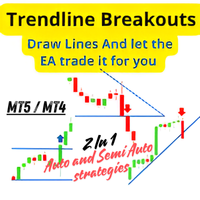
Trendline Breakouts
Abdeljalil El Kedmiri
5 (1)
Trendline Breakouts is a semi-automatic expert advisor, which means you only need to draw the support and resistance lines, and then let the expert advisor handle the trading for you. You can use this expert for every market and time frame. Backtesting is not available because this is a semi-automatic EA. You draw the trendlines and let the expert trade for you. This expert enables you to automatically trade breakouts of both horizontal support and resistance and trendlines, unlike the tradition
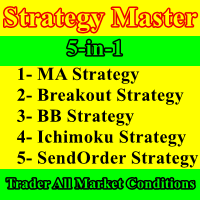
Strategy Master
Abdeljalil El Kedmiri
Strategy Master is a 5-in-1 EA, offering a choice of 5 distinct strategies within a single expert advisor. You can activate one to five strategies simultaneously and customize your trading by enabling or disabling filters to validate entries. These five strategies encompass a range of approaches, including three technical strategies (Moving Average, Bollinger Bands, and Ichimoku), a renowned price action strategy (Breakout), and a time-based strategy (SendOrder at Time). The link for MT4 version
Super Grid Strategy
Abdeljalil El Kedmiri
Exclusive deal: 70% discount for a limited period. Super Grid Strategy EA is a versatile and powerful grid trading tool, perfect for both Forex and CFD traders. It places up to 20 pending orders (10 stop and 10 limit) at your preferred time, with customizable distances and spacing between orders for maximum flexibility. Key features include: Fixed Grid :  Orders are placed at a fixed distance from the price and between each order, and this parameter can be adjusted based on market conditions. D
Dynamic Fibo Scalper
Abdeljalil El Kedmiri
Dynamic Fibo Scalper is an automated trading tool that uses Dynamic Fibonacci levels to find trading opportunities. You can set up to 5 custom levels in the EA’s inputs, and it will monitor the price movement. When the price crosses any of your chosen levels, the EA will automatically enter a buy or sell trade. 30% OFF for 24 Hours. This EA is perfect for traders who want a simple and effective strategy based on Fibonacci analysis. It’s fully customizable , easy to use, and works on any market
Trading Keyboard
Abdeljalil El Kedmiri
Trading Keyboard (FastTrade Hotkeys) EA is an advanced tool designed for traders who want to execute trades quickly and efficiently using their keyboard. It allows users to place, modify, and close orders with customizable hotkeys, making trading as fast and intuitive as possible. Whether you're a scalper, day trader, or swing trader, this EA enhances your trading experience by reducing manual clicks and improving reaction time. Key Features: Hotkey-Based Trading – Execute trades, modify posit
Pro Trading Analytics
Abdeljalil El Kedmiri
5 (3)
“출시 가격: $55 (2개 한정!). 다음 가격: $75. 최종 가격: $149.” 제품을 구매하셨다면 이메일 주소를 보내주세요. Excel ProTrading Analytics 템플릿 를 무료로 보내드립니다. 이 올인원 솔루션으로 트레이딩 전략의 전체 가능성을 열어보세요: 거래 내역 내보내기 + 전문가용 Excel 대시보드 . 수동 트레이드든 EA(trading robot)이든, 이 강력한 도구는 전문가 수준의 지표와 대시보드를 사용해 성과를 분석하고 최적화할 수 있게 해줍니다. Pro Excel Dashboard는 수동 또는 알고리즘 거래 내역을 깊이 있게 분석하며, 백테스트 결과를 사용해 EA의 퍼포먼스도 평가할 수 있습니다. 주요 지표를 기반으로 한 성과 평가와 상세 인사이트를 즉시 제공합니다. 또한 전체적인 트레이딩 일관성을 평가할 수 있습니다 — 이는 Prop Firm 챌린지 통과 및 자금 계정 유지에 매우 중요합니다. 포함 항목: Trade History Export
Quantitative Trading Analysis
Abdeljalil El Kedmiri
5 (1)
당신의 트레이딩을 ‘감’이 아닌 ‘데이터 기반 의사결정’으로 전환하세요. 이제 전문 금융기관이 사용하는 정량 분석의 힘을 모든 진지한 트레이더가 이용할 수 있습니다. “트레이딩에서 측정할 수 있는 것만이 개선될 수 있습니다. 중요한 것을 측정하기 시작하세요.” 이 도구는 저작권으로 보호된 완전한 정량 분석 툴킷으로, 시장 행동, 변동성, 유동성, 그리고 거래 기회를 깊이 이해하고자 하는 트레이더를 위해 설계되었습니다. 이 Excel 스프레드시트(VBA 자동화 포함)는 MT5(또는 모든 OHLCV 데이터 소스)와 완벽하게 연동되며, 몇 번의 클릭만으로 원시 데이터를 실행 가능한 트레이딩 인사이트로 변환합니다. 이 툴킷은 투자은행이 신입 애널리스트에게 가르치는 정량적 접근 방식을 구현한 것입니다. 이는 전문 트레이딩 교육의 첫 단계로, 추측이 아닌 데이터를 통해 시장 행동과 리스크를 이해하도록 돕습니다. 모든 향후 업데이트가 포함되어 있으며, 한 번의 구매로 최대 10대의 컴퓨터 또는
Prop Firm Simulator
Abdeljalil El Kedmiri
실제 자금을 위험하기 전에 Prop Firm 도전을 숙달하세요!   당사의 고급 시뮬레이터는 진정한 Prop Firm 거래 환경을 재현하여 자신 있게 연습, 전략 수립 및 도전 통과를 돕습니다. 당사 시뮬레이터를 사용하면 데모 또는 실계좌를 사용하여 모든 Prop Firm 도전을 시뮬레이션하고, 수동 거래 전략과 EA를 통한 자동화 거래를 모두 지원하며, 맞춤형 기간에 대한 개인화된 도전을 생성하고 일관된 수익성에 필요한 훈율을 개발하기 위해 자신에게 도전할 수 있습니다. FTMO 10k 및 100K 도전 세트파일:   모든 주요 Prop Firm에 대한 세트파일 및 전용 지원 이용 가능 - 문의만 하세요! 선착순 10명 구매자에게 30% 할인. 주요 기능 실시간 도전 모니터링 실시간 통계 대시보드 - 잔고, 자본, P&L, 드로다운 실시간 추적 전문 지표 - 종결 P&L 대 미결 P&L, 승률, 거래 분석 수동/자동거래 지원: 수동 거래 전략 및 Expert Advisors를
Volume Profile Trading System
Abdeljalil El Kedmiri
5 (1)
Volume Profile Trading System is NOT just another volume indicator. It's a   complete trading ecosystem   that combines professional volume profile visualization with an intelligent automated trading strategy.  While other indicators show you   WHERE   volume is concentrated, Volume Profile Trading System  shows you   WHERE ,   WHEN , and   HOW   to trade it! displaying real volume distribution by price instead of time. It helps traders identify fair value zones, institutional activity, and high
Apex Striker
Abdeljalil El Kedmiri
5 (1)
Apex Striker is a sophisticated EA that automates Fibonacci breakout trading on   Gold ,  Forex and any Market . Whether you're a beginner looking for a "plug-and-play" solution or an advanced trader who wants full auto or manual control, this EA adapts to your trading style. XAUUSD-M15 Set File : Download  (Optimized for Gold only) Current Conditions (April) : Ask for setfile  (Anti and Mini Breakouts activated) MT4 version available (Ask a Free activation after purchase) You can run the EA on
BridgeX MT5 to TV
Abdeljalil El Kedmiri
BridgeX Mirror instantly streams your MT5 trades directly to TradingView . Get live pop-up alerts for opens, closes, and pending orders. Includes a premium analytics dashboard with Win Rate, Profit Factor, and PnL tracking. You execute trades on MetaTrader 5 manually or by EAs, but you analyze charts on TradingView. Constantly switching screens to see if your MT5 EA or manual trades have opened is inefficient and slows down your workflow. Download the extension from chrome web stor 3 Days - Fre
필터:
lida19801
478
lida19801 2026.06.03 12:35 
 

I am surprised by accuracy of ai analysis. It is often spot on accurate. More over every analysis is very cheap only few cents. I am using deepseek-v4-flash model

Abdeljalil El Kedmiri
4450
개발자의 답변 Abdeljalil El Kedmiri 2026.06.03 14:19
Thank you for your honest review and for the valuable suggestions . The analysis is incredibly cheap if i didnt say practically free, while still providing clear and reliable bullish and bearish scenarios.
Sven Markus Weller
4414
Sven Markus Weller 2026.05.20 09:58 
 

I like the concept behind this tool. Setup was quick and straight. Clear trading suggestions.

Abdeljalil El Kedmiri
4450
개발자의 답변 Abdeljalil El Kedmiri 2026.05.20 15:02
Thank you for your feedback! Glad the setup was smooth and you're finding the trading suggestions clear. Happy trading!
리뷰 답변