Grid Scalper MA MT5 EA

4.35

Grid Scalper MA MT5 EA

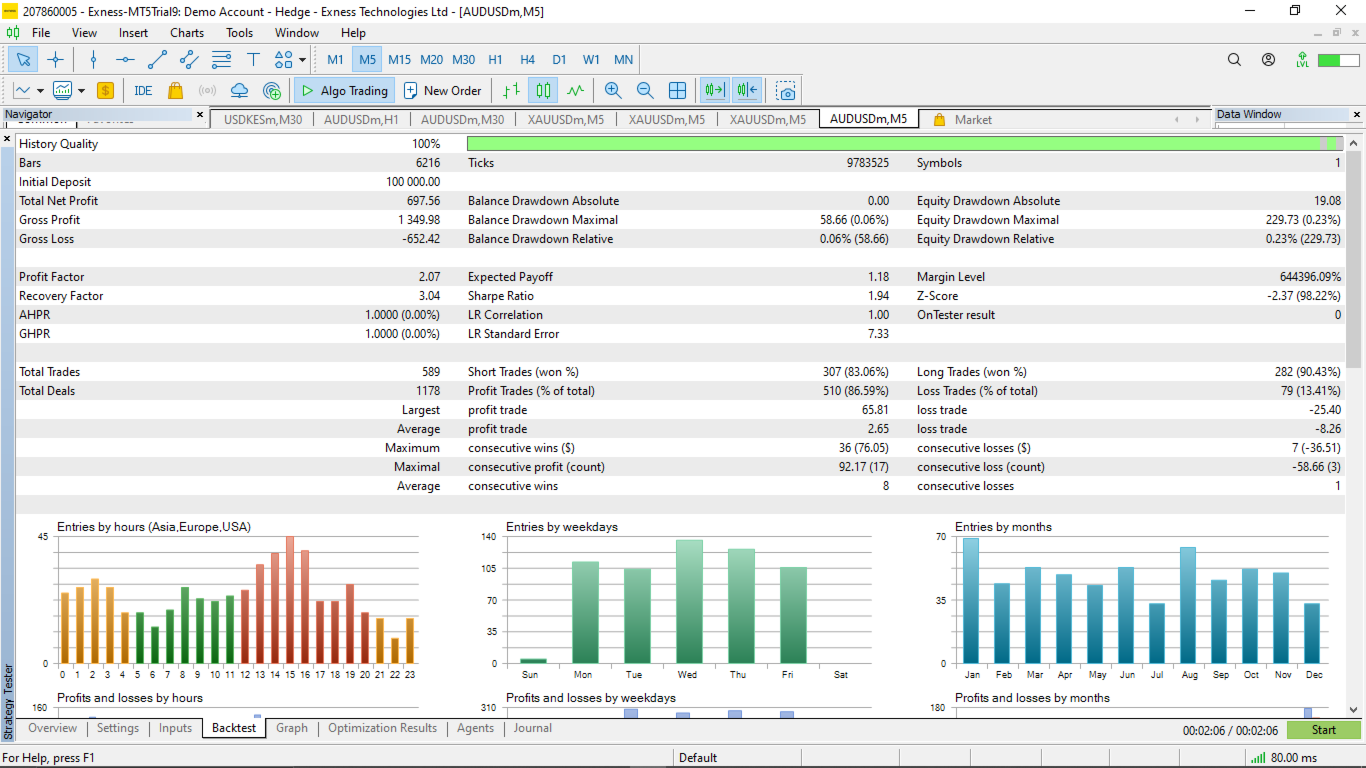
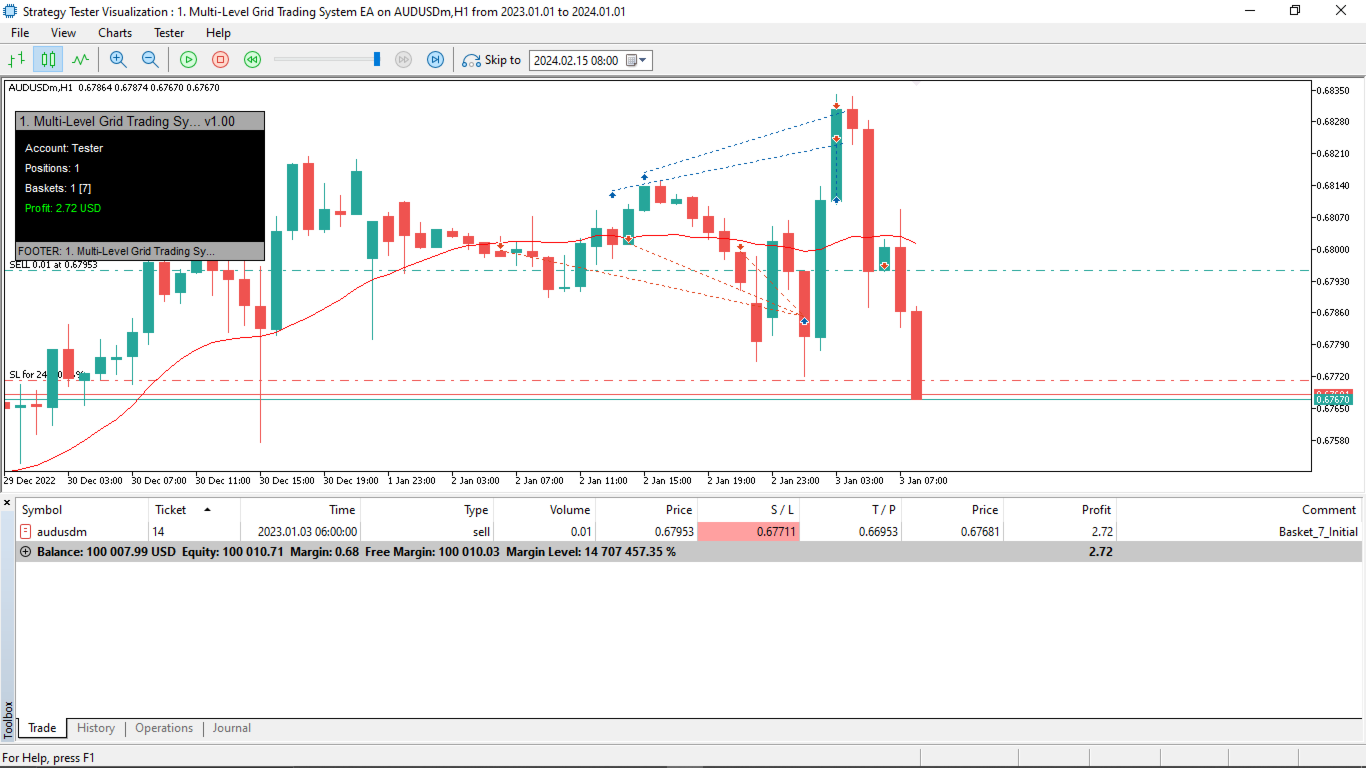
Grid Scalper MT5 EA is a MetaTrader 5 expert advisor built around a dynamic grid trading engine with two selectable signal strategies — Price vs MA (price crossing a single moving average) and BOS (Break of Structure, trading confirmed swing high/low breakouts). When price moves against an open basket, the EA layers in additional grid trades at defined intervals, targeting recovery via a volume-weighted breakeven close.

Note:

The EA is developed under Aussie (AUDUSD) currency pair and thus the default settings make sense there for a 5 digits (e.g. 0.78912) chart version. We urge you to carry out your own backtesting and optimization on any pair or timeframe to find the best fitting settings of your own.

Grid Scalper MA MT5 EA public channel: CLICK HERE.

It has been updated with a vast extended control parameters and new logics and thus highly recommended to take a keen look at the inputs, and understand what each input controls. Be sure to read the inputs description section for some insight on the upgrades, as they impact the system significantly.

At its core, Grid Scalper MT5 EA supports two signal strategies selectable via the Signal Strategy input: Price vs MA, where a close price crossing the Moving Average (set via MA Period) triggers a new basket, and BOS (Break of Structure), where a close breaking above a confirmed swing high fires a buy and breaking below a swing low fires a sell. Each signal initiates a fresh basket with its own unique magic number offset. The basket expands as price moves against the initial position, adding grid trades at defined Grid Size Points intervals. Lot sizing per grid trade is controlled by the Grid Lot Mode — either multiplier-based (progressive scaling) or recovery-based (mathematically sized to recover the basket at a defined target distance).

Risk management tools include optional per-trade Stop Loss, trailing stops exclusively for the first trade in each basket (activating after a minimum profit threshold), and breakeven-based closure for multi-trade baskets. Cap the maximum trades per basket, choose what happens when the cap is hit (hold or close all), and cap the total number of simultaneous active baskets. The Smart Grid mode adds structural intelligence — if a confirmed trend forms against an open basket, grid additions pause (cooldown) and resume only after a CHoCH (Change of Character) confirms structural reversal. A Daily Drawdown protection system monitors equity against start-of-day balance and halts trading for the session if the limit is breached. A Trading Time Filter restricts new basket signals to a defined server-time window. The Geometry Filter prevents clustering by blocking new entries too close to an existing same-direction position.

The real-time dashboard displays account info, active positions, basket details with floating P&L per basket, strategy in use, and daily drawdown status — available in minimized or maximized view, dark or light theme. Baskets persist across restarts via global variables for full continuity.


Key Features:

  • Two signal strategies: Price vs MA crossover and BOS (Break of Structure swing breakout).
  • Grid trading with adjustable spacing, two lot progression modes (multiplier or recovery-based), and per-basket trade caps.
  • Smart Grid mode with automatic CHoCH cooldown — pauses grid on adverse structure, resumes on confirmed reversal.
  • Daily Drawdown protection — closes losing trades and halts new entries when equity loss limit is hit.
  • Trailing stop for initial positions and breakeven closure for multi-trade baskets, plus optional per-trade Stop Loss.
  • Geometry Filter preventing clustered same-direction entries within a defined price range.
  • Trading Time Filter restricting new signals to a defined server-time window.
  • Real-time dashboard with per-basket P&L, strategy display, and dark/light theme support.
  • Animated on-chart notification bar for trade events, rejections, and system alerts.
  • Basket persistence via global variables — full state restoration after restarts or disconnections.
  • Built-in checks for volume, margin, stop/freeze levels, and symbol limits ensuring reliable execution.


Inputs Description

The inputs are grouped into "EA GENERAL SETTINGS" and "MA Indicator Settings" for easy navigation in the MT5 EA properties window. Each input is designed for flexibility, with defaults that suit moderate strategies. Always optimize based on your symbol, timeframe, and risk tolerance. Below is a detailed breakdown to help you understand and configure them clearly.

EA GENERAL SETTINGS

Signal Strategy (enum: Price vs MA or BOS, default: Price vs MA): Selects the signal generation strategy the EA uses to open new baskets. "Price vs MA" fires a buy when price closes above the MA after being below it, and a sell when price closes below after being above — a single moving average price crossover. "BOS" (Break of Structure) fires a buy when price closes above a detected swing high, and a sell when price closes below a detected swing low — a structural breakout approach. Each strategy is fully self-contained; switching between them requires no other setting changes.

Lot Size Mode (enum: Static Lot Size or Dynamic Lot, default: Static Lot Size): Controls how the initial lot for each basket is calculated. "Static Lot Size" uses the fixed value in "Lot size (Static Mode)" for every basket entry regardless of account size. "Dynamic Lot" calculates the lot based on "Risk % of Equity" and the current grid size, scaling automatically as equity grows or shrinks.

Lot size (Static Mode) (double, default: 0.01): The fixed opening volume for the first trade in every basket when Lot Size Mode is set to Static Lot Size. Subsequent grid trades in the same basket scale this up according to the Grid Lot Mode. The EA validates and normalizes this against the symbol's minimum, maximum, and step volume constraints.

Risk % of Equity (Dynamic Mode) (double, default: 1.0): Active only when Lot Size Mode is Dynamic Lot. The percentage of current account equity to risk per basket entry, using the grid size as the risk distance. For example, 1.0 means the EA sizes the initial lot so that one full grid movement equals 1% of equity. Recalculated fresh for each new basket.

Grid Lot Mode (enum: Multiplier-Based Grid Lots or Recovery-Based Grid Lots, default: Multiplier-Based Grid Lots): Determines how lot sizes are calculated for each additional grid trade added to a basket. "Multiplier-Based Grid Lots" scales each new grid trade by the Multiplier — a classic martingale-style progression. "Recovery-Based Grid Lots" calculates the exact lot needed so that when price reaches a defined recovery target (based on Recovery % of Grid Size plus Extra Profit Points), the entire basket becomes profitable, regardless of the number of open trades.

Multiplier (Multiplier Mode) (double, default: 1.5): Active when Grid Lot Mode is Multiplier-Based Grid Lots. The factor by which each successive grid trade's lot is multiplied relative to the previous trade. Values above 1.0 increase exposure with each grid level (martingale-like); 1.0 keeps all grid lots equal to the initial size.

Recovery % of Grid Size (Recovery Mode) (int, default: 30): Active when Grid Lot Mode is Recovery-Based Grid Lots. Defines the recovery target distance as a percentage of the grid size. For example, 30 means the recovery target sits 30% of one grid spacing beyond the latest grid entry, plus the Extra Profit Points buffer.

Extra Profit Points (Recovery Mode) (int, default: 100): Active when Grid Lot Mode is Recovery-Based Grid Lots. An additional profit buffer in points added on top of the recovery distance. Ensures the basket closes with a small profit margin rather than exactly at breakeven.

Magic Number (long, default: 1234567): A base identifier for all trades managed by this EA instance. Each basket receives a unique offset derived from this base (base + basketId × 10000), ensuring all positions are correctly owned and isolated. Change this if running multiple EA instances on the same symbol to prevent cross-identification.

Take profit points (int, default: 11000): The profit target in points for the initial trade of each basket. If price reaches this level before any grid trades are added, the single position closes at this target. Once grid trades are added, the basket TP is dynamically recalculated to breakeven plus Breakeven Points for all positions.

Grid size points (int, default: 11000): The distance in points from the current entry price at which a new grid trade is added if price moves against the basket. Smaller values create denser grids with more frequent additions; larger values space grid levels further apart and suit trending or wider-ranging markets.

Breakeven Points (int, default: 50): The profit buffer in points beyond the basket's volume-weighted average entry price (breakeven) that triggers closure of all positions in the basket. Once price moves this many points past breakeven in the basket's favour, all trades close together. Smaller values close faster with less profit; larger values hold longer for bigger returns but risk reversal.

Stop Loss Mode (enum: No SL Mode or SL Mode, default: No SL Mode): Controls whether individual trades receive a stop loss. "No SL Mode" places trades without a stop loss, allowing the grid to recover freely but exposing the account to unlimited drawdown on a single trade. "SL Mode" applies a fixed stop loss in points from each trade's entry price using the value in "Stop loss points if SL Mode enabled."

Stop loss points if SL Mode enabled (int, default: 11000): Active only when Stop Loss Mode is SL Mode. The distance in points below each buy entry (or above each sell entry) where the stop loss is placed. The EA validates this against the broker's stop and freeze levels and adjusts if necessary.

Basket Trades Cap (enum: No Maximum Cap or Maximum Cap, default: No Maximum Cap): Controls whether a limit is placed on how many trades can exist inside a single basket. "No Maximum Cap" allows the grid to keep adding trades indefinitely as price moves against the basket. "Maximum Cap" enforces the limit set in "Max Trades per Basket if cap enabled."

Max Trades per Basket if cap enabled (int, default: 11): Active when Basket Trades Cap is Maximum Cap. The maximum total number of positions (initial trade plus all grid trades) allowed in one basket before the cap action is triggered.

Action when trades cap reached (enum: Hold or Close all trades, default: Hold): Active when Basket Trades Cap is Maximum Cap. "Hold" stops adding new grid trades once the cap is reached but keeps existing positions open to recover naturally. "Close all trades" immediately closes every position in the basket the moment the cap is hit, cutting the loss outright.

Baskets Cap Mode (enum: No Baskets Cap or Baskets Cap, default: No Baskets Cap): Controls the maximum number of simultaneous baskets the EA can have open at one time. "No Baskets Cap" allows unlimited concurrent baskets. "Baskets Cap" enforces the limit in "Maximum Baskets/Trade Positions if cap enabled" and ignores new signals once that number is reached.

Maximum Baskets/Trade Positions if cap enabled (int, default: 3): Active when Baskets Cap Mode is Baskets Cap. The maximum number of active baskets allowed simultaneously. New entry signals are skipped until an existing basket closes and frees a slot.

Use Trailing Stop for first position (bool, default: true): When enabled, the EA applies a trailing stop loss to the initial trade of each basket only — not to subsequent grid trades. The trail activates once the position reaches "Minimum Profit points to activate trailing" and then follows price at the distance set in "Trailing Stop points."

Trailing Stop points (int, default: 30): The distance in points at which the stop loss trails behind the current price once trailing is active on the initial position. For a buy, the SL sits this many points below current bid; for a sell, above current ask. Checked and adjusted against broker stop levels.

Minimum Profit points to activate trailing (int, default: 100): The minimum unrealized profit in points a basket's initial trade must reach before the trailing stop activates. Prevents the trail from engaging prematurely on minor price moves.

Trade Direction (enum: Both buys and sells, Buys only, Sells only, default: Both buys and sells): Restricts which direction the EA trades. "Both buys and sells" allows signals in either direction. "Buys only" ignores all sell signals. "Sells only" ignores all buy signals. Useful for applying a directional bias or complying with broker hedging restrictions.

Geometry Filter Mode (enum: No Geometry Filter or Apply Geometry Filter, default: Apply Geometry Filter): Controls whether the EA checks existing open positions before allowing a new basket entry in the same direction. "Apply Geometry Filter" rejects a new signal if an existing same-direction position is already open within the range set by "Geometry Range % of Grid Size," preventing clusters of entries at nearly identical price levels. "No Geometry Filter" disables this check entirely.

Geometry Range % of Grid Size (int, default: 50): Active when Geometry Filter Mode is Apply Geometry Filter. Defines the exclusion zone around existing same-direction positions as a percentage of the grid size. A value of 50 means no new same-direction entry is allowed within half a grid spacing of an existing same-direction position.


DAILY DRAWDOWN SETTINGS

Daily Drawdown Mode (enum: Disabled or Enabled, default: Disabled): Enables or disables the daily drawdown protection system. When Enabled, the EA monitors the current session's equity loss relative to the start-of-day balance. If the drawdown limit is breached, losing positions are closed immediately and all new trading is halted for the remainder of that day.

Daily Drawdown % of Balance (double, default: 10.0): Active when Daily Drawdown Mode is Enabled. The maximum allowable equity drawdown as a percentage of the start-of-day account balance. When equity drops this percentage below the opening balance, the protection triggers — losing trades are closed, profitable ones are locked in via trailing stop, and no new baskets open until the next calendar day.


SMART GRID SETTINGS

Grid Mode (enum: Normal Grid or Smart Grid, default: Normal Grid): Selects the grid management behaviour. "Normal Grid" adds trades at every grid level as price moves against the basket with no restrictions. "Smart Grid" activates the CHoCH (Change of Character) cooldown system — if a confirmed structural trend forms against an open basket, the grid pauses adding trades (cooldown) until the structure breaks back in the basket's favour (CHoCH confirmed), at which point the grid resumes automatically.

Swing Point Lookback Bars (each side) (int, default: 5): The number of bars to the left and right of a candidate pivot bar used to confirm a swing high or swing low. A bar is classified as a swing high only if its high is strictly greater than all bars within this lookback on both sides. Higher values identify fewer, more significant structural points; lower values detect more frequent, smaller pivots. Used by both Smart Grid CHoCH detection and the BOS signal strategy.

CHoCH Bullish Color (color, default: Blue): The line and label color for bullish CHoCH drawings — displayed when a basket in sell cooldown detects a structural break upward, indicating the downtrend has ended and the grid is resuming.

CHoCH Bearish Color (color, default: Red): The line and label color for bearish CHoCH drawings — displayed when a basket in buy cooldown detects a structural break downward, indicating the uptrend has ended and the grid is resuming.

CHoCH Label Font Size (int, default: 10): The base font size for CHoCH and BOS break level labels on the chart. Automatically scaled relative to the current chart zoom level so labels remain readable at any scale.

CHoCH Line Width (int, default: 2): The base line width for CHoCH arrowed lines and BOS break level lines. Automatically scaled with chart zoom — thinner at small scales, capped at this value at full scale.

Swing High Marker Color (color, default: Orange): The color used for swing high markers (HH and LH labels) drawn on the chart when swing points are detected. Also used as the highlight color for Higher Low markers on swing lows.

Swing Low Marker Color (color, default: DodgerBlue): The color used for swing low markers (LL and HL labels) drawn on the chart. Also used as the highlight color for Lower High markers on swing highs.


MA INDICATOR SETTINGS

MA Period (MA Strategy only) (int, default: 21): The lookback period for the Simple Moving Average applied to closing prices. Only relevant when Signal Strategy is set to Price vs MA. The EA triggers a buy basket when the previous bar's close crosses above this MA, and a sell basket when it crosses below. Shorter periods generate more signals and are more sensitive to noise; longer periods filter for stronger trends but react more slowly.


DASHBOARD SETTINGS

Show Dashboard (enum: None, Minimized, Maximized, default: Maximized): Controls the on-chart information panel. "None" hides it entirely. "Minimized" shows a compact single-column summary of strategy, account name, open positions, active baskets, floating profit, and daily drawdown if enabled. "Maximized" expands to full sections covering account info, EA stats including active strategy and symbol, daily drawdown status if enabled, and a per-basket breakdown.

Dashboard Persistence (enum: Show only when active trades or Always show dashboard, default: Always show dashboard): "Show only when active trades" hides the dashboard when there are no open positions and shows it as soon as a basket becomes active. "Always show dashboard" keeps it visible at all times regardless of trade state.

Dashboard Theme (enum: Dark Theme or Light Theme, default: Dark Theme): Sets the color scheme of the dashboard. "Dark Theme" uses a black background with light text, suited for dark chart environments. "Light Theme" uses a white background with dark text, suited for light or white chart backgrounds.

Dashboard X Position (pixels from left) (int, default: 10): The horizontal pixel offset of the dashboard from the left edge of the chart window. Adjust to avoid overlap with price action or other indicators.

Dashboard Y Position (pixels from top) (int, default: 30): The vertical pixel offset of the dashboard from the top edge of the chart window. Adjust to position it below the toolbar or out of the way of price.

Footer Text (string, default: "Username [Your Name. e.g. Allan - Forex Algo-Trader]"): Custom text displayed centered in the dashboard footer bar. Replace with your name, username, or any identifier you want shown on the chart.


VISUALIZATION SETTINGS

Visualize Signals (bool, default: true): When enabled, the EA draws directional arrows on the chart at the bar where each new basket signal fires — below the bar for buys, above for sells. Both Price vs MA and BOS strategies draw arrows when this is on.

Buy Arrow Code (string, default: "p"): The character code within the Wingdings 3 font used to draw buy signal arrows. "p" renders as an upward arrow. Change to any valid Wingdings character code to customize the buy marker symbol.

Sell Arrow Code (string, default: "q"): The character code within the Wingdings 3 font used to draw sell signal arrows. "q" renders as a downward arrow. Change to any valid Wingdings character code to customize the sell marker symbol.

Font for Arrows (string, default: "Wingdings 3"): The font family applied to signal arrow markers. Should be a Wingdings variant to ensure the arrow codes render as intended symbols rather than text characters.

Buy Arrow Color (color, default: Green): The color of buy signal arrow markers drawn on the chart.

Sell Arrow Color (color, default: Red): The color of sell signal arrow markers drawn on the chart.

Arrow Offset Points (double, default: 10): The vertical distance in points between the bar's low (for buys) or high (for sells) and where the arrow is placed. Larger values push arrows further from the candle for cleaner visibility; smaller values place them tighter to the bar.


LOGGING SETTINGS

Print Prefix (string, default: "-> "): A custom text prefix prepended to every message the EA writes to the MT5 Journal tab. Useful for filtering EA-specific messages when multiple EAs or scripts are running simultaneously. Set to an empty string to disable the prefix.

Show Print Statements in Journal (bool, default: true): Controls whether the EA writes any messages to the MT5 Journal tab at all. Setting this to false suppresses all EA log output entirely, which can slightly improve performance during intensive backtesting or optimization runs with large datasets.


NOTIFICATION SETTINGS

Show Notification Bar (enum: Show Notification Bar or Hide Notification Bar, default: Show Notification Bar): Controls whether animated on-chart notification panels appear for EA events such as new basket entries, grid additions, CHoCH detections, geometry rejections, and daily drawdown alerts. "Hide Notification Bar" suppresses all notification panels while leaving Journal logging unaffected.

Notification Bar Theme (enum: Dark Theme or Light Theme, default: Dark Theme): Sets the color scheme of the notification panels. "Dark Theme" uses a near-black background with light-colored text. "Light Theme" uses a light grey background with dark text. Text colors automatically adapt to remain readable on whichever background is selected.

Notification Duration (seconds) (double, default: 5.0): How long each notification panel remains visible on the chart before its progress bar depletes and it disappears. Multiple notifications stack vertically and each counts down independently.


TRADING TIME FILTER SETTINGS

Use Trading Time Filter (bool, default: false): When enabled, the EA only opens new baskets during the defined server-time window between Start Hour/Minute and End Hour/Minute. Grid additions to existing baskets, trailing stops, breakeven closes, and daily drawdown protection continue to operate outside trading hours — only new basket signals are blocked.

Start Hour (0-23, Server Time) (int, default: 8): The hour at which the trading window opens, in 24-hour server time. Active only when Use Trading Time Filter is enabled.

Start Minute (0-59) (int, default: 0): The minute component of the trading window start time. Combined with Start Hour to define the exact start of the allowed trading period.

End Hour (0-23, Server Time) (int, default: 20): The hour at which the trading window closes, in 24-hour server time. Active only when Use Trading Time Filter is enabled. Wrap-around windows (e.g., 22:00 to 06:00) are supported — if Start Hour is later than End Hour the filter treats it as an overnight window.

End Minute (0-59) (int, default: 0): The minute component of the trading window end time. Combined with End Hour to define the exact end of the allowed trading period.


Disclaimer:

Grid Scalper MA MT5 EA utilizes a GRID trading approach, which can offer significant profit potential but also carries substantial risks. By opening multiple positions at set intervals, the EA may increase exposure during unfavorable market conditions, such as strong trends or high volatility. While it includes protective features like trailing stops, breakeven closure, optional SL, and caps, these do not eliminate the risk of loss, particularly with aggressive settings (e.g., high multipliers, no caps) or insufficient capital. Users are urged to carefully backtest and optimize all inputs on a demo account before risking real funds. Past performance is not a reliable indicator of future results. Trading involves risk, and losses can exceed your initial investment. Proceed with caution, understanding the grid strategy’s implications, and note that past performance does not guarantee future performance. Best luck.

리뷰 73
Jose Howard
55
Jose Howard 2026.03.28 17:26 
 

Powerful grid EA with smart cooldown and solid risk tools. Tons of settings—best if you understand grid trading. Not for beginners.

Leo Lay
18
Leo Lay 2026.03.27 22:35 
 

This EA is amazing i have been using this few versions ago and as long as you get the settings you desire, it works great! Back test first and get to know it! Once you get it right its awesome but not leave and go EA, but i wouldnt do it with any EAs. This is amazing mate thank you for sharing.

chuakai9
39
chuakai9 2026.03.16 09:16 
 

I tested it with XAU and it works really great! I got 10-20% everyday but some order I have to manually close if I think that order go to a wrong way. If you have any trade setup for XAU, please share.

추천 제품
PZ Goldfinch Scalper EA MT5
PZ TRADING SLU
3.31 (52)
This is the latest iteration of my famous scalper, Goldfinch EA, published for the first time almost a decade ago. It scalps the market on sudden volatility expansions that take place in short periods of time: it assumes and tries to capitalize of inertia in price movement after a sudden price acceleration. This new version has been simplified to allow the trader use the optimization feature of the tester easily to find the best trading parameters. [ Installation Guide | Update Guide | Troublesh
FREE
SimpleTrade by Gioeste
Giovanni Scelzi
4 (3)
Discover the power of automated trading with **SimpleTradeGioeste**, an Expert Advisor (EA) designed to optimize your trading operations in the Forex market. This innovative EA combines advanced trading strategies with proven technical indicators, offering an unparalleled trading experience. video backtest :  https://youtu.be/OPqqIbu8d3k?si=xkMX6vwOdfmfsE-A ****Strengths**** - **Multi-Indicator Strategy**: SimpleTradeGioeste employs an integrated approach that combines four main technical ind
FREE
Golden Mind EA
Leszek Aleksander Mroczek
FREE FOR LIMITED TIME Golden Mind EA – Adaptive Grid Trading for GOLD Description Golden Mind EA is a fully automated Expert Advisor for MetaTrader 5 that utilizes a dynamic BUY-only grid strategy, designed exclusively for GOLD (XAU/USD) trading. What sets this EA apart from traditional grid trading systems is its intelligent pair-based position closure logic. Instead of relying on fixed take-profit levels, Golden Mind EA calculates the profit difference between pairs of trades and closes them
FREE
PZ MA Crossover EA MT5
PZ TRADING SLU
4.17 (42)
이 EA는 이동 평균 크로스오버를 사용하여 거래합니다. 완전히 사용자 정의 가능한 설정, 유연한 위치 관리 설정, 사용자 정의 가능한 거래 세션, 마틴게일 및 역 마틴게일 모드와 같은 많은 유용한 기능을 제공합니다. [ 설치 가이드 | 업데이트 가이드 | 문제 해결 | 자주하는 질문 | 모든 제품 ] 사용 및 감독 용이 완전히 사용자 정의 가능한 이동 평균 설정 그것은 두 가지 다른 거래 행동을 구현합니다 맞춤형 손익분기점, SL, TP 및 후행 정지 ECN/비 ECN 중개인을 위한 작업 2-3-4-5 자리 기호에 대해 작동 거래는 NFA/FIFO를 준수할 수 있습니다. 거래는 반대 신호에서 마감될 수 있습니다. 마틴게일 및 역 마틴게일 기능을 구현합니다. 주중 및 시간별로 거래 필터링 내장된 자금 관리 EA는 네 가지 다른 동작을 구현합니다. 일반: 강세 크로스오버에서 매수하고 약세 크로스오버에서 매도 역: 강세 크로스오버에서 매도하고 약세 크로스오버에서 매수 매수만: 강세 크로스
FREE
Long Waiting
Aleksandr Davydov
Expert description Algorithm optimized for Nasdaq trading The Expert Advisor is based on the constant maintenance of long positions with daily profit taking, if there is any, and temporary interruption of work during the implementation of prolonged corrections The Expert Advisor's trading principle is based on the historical volatility of the traded asset. The values of the Correction Size (InpMaxMinusForMarginCallShort) and Maximum Fall (InpMaxMinusForMarginCallLong) are set manually. Recomm
FREE
Budget Golden Scalper M1 — Trial Edition Built for traders who are tired of hype and ready for transparency Let’s be honest. If you have explored automated trading before, you have probably seen systems that looked perfect in backtests but behaved very differently in live markets. Many traders today are understandably cautious — and rightly so. Budget Golden Scalper M1 was created with this reality in mind. This is not marketed as a “holy grail” or a get-rich-quick robot. Instead, it is a str
FREE
Use this expert advisor whose strategy is essentially based on the Relative Strength Index (RSI) indicator as well as a personal touch. Other free expert advisors are available in my personal space as well as signals, do not hesitate to visit and leave a comment, it will make me happy and will make me want to offer content. Expert advisors currently available: LVL Creator LVL Creator Pro LVL Bollinger Bands   Trading is not a magic solution, so before using this expert on a live account, carry
FREE
Reversal Composite Candles
MetaQuotes Ltd.
3.67 (15)
The idea of the system is to indentify the reversal patterns using the calculation of the composite candle. The reversal patterns is similar to the "Hammer" and "Hanging Man" patterns in Japanese candlestick analysis. But it uses the composite candle instead the single candle and doesn't need the small body of the composite candle to confirm the reversal. Input parameters: Range - maximal number of bars, used in the calculation of the composite candle. Minimum - minimal size of the composite can
FREE
Brent Trend Bot
Maksim Kononenko
4.47 (15)
The Brent Trend Bot special feature is simple basic tools and logic of operation. There are no many strategies and dozens of settings, like other EAs, it works according to one algorithm. The operating principle is a trend-following strategy with an attempt to get the maximum profitability adjusted for risk. Therefore, it can be recommended for beginners. Its strong point is the principle of closing transactions. Its goal is not to chase profits, but to minimize the number of unprofitable trans
FREE
Gap Catcher
Mikita Kurnevich
5 (4)
Read more about my products Gap Cather - is a fully automated trading algorithm based on the GAP (price gap) trading strategy. This phenomenon does not occur often, but on some currency pairs, such as AUDNZD, it happens more often than others. The strategy is based on the GAP pullback pattern. Recommendations:  AUDNZD  TF M1  leverage 1:100 or higher  minimum deposit 10 USD Parameters:  MinDistancePoints - minimum height of GAP  PercentProfit - percentage of profit relative to GAP level
FREE
Golden Square X
Huynh Tan Linh N
4 (9)
This is my latest Free version for Gold. With optimized parameters and user-friendly features, this version is likely very easy to use and highly effective. You can customize TP and SL parameters as you wish, but the default settings should work well for you without the need for further adjustments.  This version is designed for the M5. This version does not require a large capital investment; only $100-$200 is sufficient for Golden Square X to run and generate profits for you. Based on backtest
FREE
King Experts V2
Craig Alden Matteo
King_Expert EA - Professional Trading System Overview King_Expert EA is a sophisticated automated trading system for MetaTrader 5 that combines trend-following strategies with intelligent risk management. The EA uses a multi-layered approach to identify high-probability trading opportunities while incorporating advanced features like grid averaging and dynamic position management. Core Trading Strategy Primary Signal Generation EMA Crossover System : Uses dual Exponential Moving Averages (21/50
FREE
Macd Rsi Expert
Lakshya Pandey
5 (1)
MACD RSI Optimized EA is a free, fully automated trading robot designed to capture trends using a classic combination of indicators. By merging the trend-following capabilities of the MACD (Moving Average Convergence Divergence) with the momentum filtering of the RSI (Relative Strength Index), this EA aims to filter out market noise and enter trades with higher probability. This version has been specifically optimized for the month of October on the M15 (15-minute) timeframe and performs best on
FREE
GA Classic RSI mt5
Osama Echchakery
RSI   EA is a   fully automated   Forex trading strategy based on the MACD indicator, one of the most popular and widely used trend-following methods in technical analysis. This expert advisor automatically opens and manages buy and sell trades using RSI to capture market momentum while removing emotional decision-making. Premium advanced   version with   +40 filter!   :   Click Here Or search "RSI ProLab mt5" on the market
FREE
30-DAY FULLY FUNCTIONAL TRIAL – EXPERIENCE THE POWER OF BITBOT V6 ULTIMATE GRID & NEURAL MODEL BRAIN! Bitbot V6 Ultimate Grid is the most advanced and flexible grid trading system for MetaTrader 5, now enhanced with our AI-driven Neural Model Brain for truly adaptive and intelligent trading decisions. Whether you’re a professional algorithmic trader or an ambitious newcomer, Bitbot V6 gives you the performance, safety and transparency you need to scale your results to the next level. Key Featur
FREE
News Scalper EA is an Expert Advisor for trading EURUSD - GBPUSD - XAUUSD pairs, positioning your positions during the news. Developed by an experienced trader with over 17 years of trading experience. News Scalper EA uses a news calendar from MQL5 and trades according to them. With sophisticated strategy and risk management, the EA protects your positions from larger losses! News Scalper EA lets you close the SL after the set time (1 minute, planned) when the position is in minus, which proves
FREE
Morning Range Breakout (Free Version) Morning Range Breakout (Free Version) is a straightforward trading advisor that implements a breakout strategy based on the morning range. It identifies the high and low within a specified time interval (e.g., 08:00–10:00 UTC) and opens a trade on a breakout upward or downward. The free version includes core functionality without restrictions. All parameters and messages are in English, per MQL5 Market requirements. Key Features Detects morning range based
FREE
EA16 Taka Grid
Nhat Tien Duong
TAKA Grid EA (EA16): The Sideway King & Prop Firm Shield Are you tired of EAs that get destroyed by choppy, ranging markets? Meet TAKA Grid EA , the ultimate mean-reversion system designed specifically for the AUDNZD cross pair on the M15 timeframe. It doesn't rely on explosive breakouts; it dominates the sideways chop with mathematical precision.   ENTER YOUR KEY HERE:   [  EA16_99999D_TANINCODER_595559587987 ] -- MANDATORY: ALLOW WEBREQUEST TO ACTIVATE THE BOT To verify your License
FREE
GridWeaverFX
Watcharapon Sangkaew
4 (1)
Introducing GridWeaverFX  - A Grid/Martingale EA for XAUUSD | Free Download! Hello, fellow traders of the MQL5 community! I am excited to share an Expert Advisor (EA) that I have developed and refined, and I'm making it available for everyone to use and build upon. It's called GridWeaverFX , and most importantly, it is completely FREE! This EA was designed to manage volatile market conditions using a well-known strategy, but with enhanced and clear safety features. It is particularly suited fo
FREE
Welcome to the future of algorithmic trading. The Nascore Scalper EA is a precision-engineered, AI-inspired scalping robot built exclusively for trading NAS100 (US Tech 100 Index) . It analyzes smart money footprints, breakout zones, and high-timeframe bias to capture high-probability scalping entries. Key Features: Optimized for NAS100 (US100) – Fast-moving Nasdaq-based index trading Smart Money Concepts – Integrates structure, breakout logic, and bias Minimal Margin Usage – Ideal for traders
FREE
Go Long Advanced
Phantom Trading Inc.
4.78 (9)
Go Long EA는 다중 기술적 확인을 통한 체계적인 일일 거래 원칙을 기반으로 한 고급 장중 거래 전략을 구현합니다. 많은 트레이더들이 복잡한 알고리즘을 찾는 반면, 이 EA는 단순하지만 효과적인 개념과 정교한 위험 관리 및 다중 기술적 필터를 결합합니다. EA는 매일 특정 시간에 포지션을 열지만, 시장 조건이 여러 기술적 지표와 일치할 때만 실행됩니다. 이러한 체계적인 접근 방식은 수익을 잠식할 수 있는 야간 보유 비용을 피하면서 장중 움직임을 포착하는 데 도움이 됩니다. EA는 사전 설정된 시간에 자동으로 포지션을 종료하므로, 야간 노출을 피하고자 하는 트레이더에게 완벽합니다. 이 EA를 특별하게 만드는 것은 적응형 위험 관리 시스템입니다. 포지션 크기는 여러 요인을 기반으로 자동 조정됩니다: - 기본 자금 및 위험 비율 설정 - 기술적 지표 조건 (이동평균선, RSI, MACD 등) - 조건이 특히 유리할 때 포지션 크기를 증가시키는 특별 승수 EA는 활성화/비활성화
FREE
EA Infinity Grid Trader – Moving Averages Edition is a complete and versatile Expert Advisor designed for Forex and Exchange markets. It combines high-precision grid trading strategies with moving average analysis and a powerful institutional risk management layer. Ideal for traders looking to automate their operations with total control over exposure , daily targets, intelligent quantitative filters, and a fully customizable on-chart panel. Key Features Flexible Grid Trading: Choose between
FREE
UsdJpy RangeBot Pro
Kwaku Appenteng Wiredu
UsdJpy RangeBot Pro – Expert Advisor for Breakout Trading UsdJpy RangeBot Pro is a breakout-based Expert Advisor developed for the USDJPY pair. It identifies trading opportunities during the early hours of the London session by analyzing a defined range and executing pending orders above or below it. The EA applies fixed logic, clear visual elements, and built-in risk controls. This tool is designed for disciplined breakout trading without the use of breakeven, martingale, or grid systems.
FREE
WaveTraderMA
ANTON KOMISSARENKO
F ully automated trading system based on the Moving Averages indicator. It supports three classic trading signals and uses a flexible position management system. It is suitable for various trading instruments and adapts to any market conditions. Key features Three entry signals for flexible strategy customization Three types of entry orders: Market order Pending market stop Limit market order Trading time configuration – up to six time intervals Closing orders after a specified number of bars F
FREE
PZ Fractal Trader EA MT5
PZ TRADING SLU
3.25 (4)
This EA trades untested fractals using pending orders. It offers many trading behaviors and flexible position management settings, plus many useful features like customizable trading sessions and a martingale mode. [ Installation Guide | Update Guide | Troubleshooting | FAQ | All Products ] Easy to use and supervise It implements 4 different trading behaviors Customizable break-even, SL, TP and trailing-stop Works for ECN/Non-ECN brokers Works for 2-3-4-5 digit symbols Trading can be NFA/FIFO C
FREE
DeM Expert
Nikolaos Pantzos
DeM_Expert   is structured based on a specific technical analysis indicator ( DeMarker ). It has many parameters so that each user can find the appropriate settings that suit their investment profile. It can work on 28 different pairs, one pair per chart. The default parameter settings are indicative, I recommend that each user experiment to find their own settings.
FREE
Neuro Edge
Agus Wahyu Pratomo
5 (4)
Please give review to support development of this Expert Advisor NeuroEdge EA is an advanced trend-following scalper designed to adapt dynamically to market behavior. Built with precision algorithms and smart averaging logic, it maintains minimal drawdown while capturing high-probability setups in trending conditions. NeuroEdge continuously analyzes market flow to ensure optimal entries and exits — giving traders the edge they need in volatile markets. ️ Core Features: Adaptive Trend Detection
FREE
Babel Assistant
Iurii Bazhanov
4.33 (9)
Babel assistant 1     The MT5 netting “Babel_assistant_1” robot uses the ZigZag indicator to generate Fibonacci levels on M1, M5, M15, H1, H4, D1, W1  periods of the charts , calculates the strength of trends for buying and selling. It opens a position with "Lot for open a position" if the specified trend level 4.925 is exceeded. Then Babel places pending orders at the some Fibonacci levels and places specified Stop Loss , Take Profit. The screen displays current results of work on the position
FREE
A neural network Expert Advisor based on two moving averages with the training mode. Train the Expert Advisor on selected examples and make a profit in real life. The EA can work on any instrument and in any timeframe. Trading Algorithm of the EA Two moving averages are analyzed by the neural network core, which produces commands to buy or sell. the values of two moving averages, fast (FMA) and slow (SMA), are provided to the first layer, at the second layer it calculates two neurons responsibl
FREE
이 제품의 구매자들이 또한 구매함
Quantum Queen MT5
Bogdan Ion Puscasu
4.97 (513)
안녕하세요, 트레이더 여러분! 저는 퀀텀 생태계의 핵심이자 MQL5 역사상 가장 높은 평점과 베스트셀러를 기록한   퀀텀 퀸   입니다. 20개월 이상의 실거래 실적을 바탕으로 XAUUSD의 명실상부한 퀸으로 자리매김했습니다. 제 전문 분야는? 금이에요. 제 임무는? 일관되고 정확하며 지능적인 거래 결과를 반복적으로 제공하는 것입니다. IMPORTANT! After the purchase please send me a private message to receive the installation manual and the setup instructions. 할인된   가격입니다.   10개 구매 시마다 가격이 50달러씩 인상됩니다. 최종 가격은 1999달러입니다. 라이브 시그널 IC 시장:   여기를 클릭하세요 Live Signal VT 시장:   여기를 클릭하세요 Quantum Queen mql5 공개 채널:   여기를 클릭하세요 ***Quantum Queen MT5
Gold House MT5
Chen Jia Qi
5 (30)
Gold House — Gold Swing Breakout Trading System Launch Promotion — Limited to 100 Copies Version 2.0 has been released with significant improvements. A price adjustment is expected soon. Early access is recommended. 93   copies sold — only 7 remaining. Lock in the lowest price before it's gone. Live signal: https://www.mql5.com/en/signals/2359124 Stay updated — join our MQL5 channel for product updates and trading tips. After opening the link, click the "Subscribe" button at the top of the page
Quantum King EA
Bogdan Ion Puscasu
4.97 (159)
Quantum King EA - 모든 트레이더를 위해 개선된 지능형 파워 IMPORTANT! After the purchase please send me a private message to receive the installation manual and the setup instructions. 특별 출시 가격 라이브 신호:       여기를 클릭하세요 MT4 버전 :   여기를 클릭하세요 퀀텀 킹 채널:       여기를 클릭하세요 ***Quantum King MT5를 구매하시면 Quantum StarMan을 무료로 받으실 수 있습니다!*** 자세한 내용은 개별적으로 문의하세요! 정확하고 규율 있게 거래를 진행하세요. Quantum King EA는   구조화된 그리드의 강점과 적응형 마팅게일의 지능을 하나의 완벽한 시스템으로 통합합니다. M5에서 AUDCAD를 위해 설계되었으며, 꾸준하고 통제된 성장을 원하는 초보자와 전문가 모두를 위해 구축되었습니다. Q
Quantum Valkyrie
Bogdan Ion Puscasu
4.86 (129)
퀀텀 발키리 - 정밀함. 규율. 실행력 할인된       가격.   10회 구매할 때마다 가격이 50달러씩 인상됩니다. 라이브 시그널:   여기를 클릭하세요   퀀텀 발키리 MQL5 공개 채널:   여기를 클릭하세요 ***퀀텀 발키리 MT5를 구매하시면 퀀텀 엠퍼러 또는 퀀텀 바론을 무료로 받으실 수 있습니다!*** 자세한 내용은 개인 메시지로 문의하세요! IMPORTANT! After the purchase please send me a private message to receive the installation manual and the setup instructions.      안녕하세요, 거래자 여러분. 저는   퀀텀 발키리   입니다. XAUUSD에 대해 정확성, 규율, 그리고 통제된 실행력을 바탕으로 접근하도록 설계되었습니다. 수개월 동안 제 아키텍처는 물밑에서 다듬어졌습니다. 변동성이 심한 시장 상황에서 테스트를 거쳤고, 예측 불가능한 금 가격 변동
TwisterPro Scalper
Jorge Luiz Guimaraes De Araujo Dias
5 (21)
적은 거래. 더 나은 거래. 일관성이 최우선. • 실시간 신호 모드 1 Twister Pro EA는 XAUUSD(골드) M15 타임프레임 전용으로 개발된 고정밀 스캘핑 Expert Advisor입니다. 거래 횟수는 적지만 — 거래할 때는 반드시 이유가 있습니다. 모든 진입은 단 하나의 주문이 실행되기 전에 5개의 독립적인 검증 단계를 거치며, 기본 SET에서 극도로 높은 승률을 실현합니다. 두 가지 모드: Mode 1 (권장) — 매우 높은 정확도, 주당 적은 거래 횟수. 자본 보존과 규율 있는 트레이딩을 위해 설계. Mode 2 — 더 높은 거래 빈도, 약간 낮은 정확도. 더 많은 시장 참여를 선호하는 트레이더를 위한 옵션. 사양: 심볼: XAUUSD | 타임프레임: M15 최소 입금액: $100 | 권장 입금액: $250 RAW SPREAD 계좌 필수 VPS 사용 강력 권장 그리드 없음. 모든 거래에 명확한 테이크 프로핏과 스톱 로스가 설정되어 있습니다! 추천 브로커: E
Akali
Yahia Mohamed Hassan Mohamed
4.3 (53)
LIVE SIGNAL: 실시간 실적을 보려면 여기를 클릭하세요 중요: 가이드를 먼저 읽어주세요 이 EA를 사용하기 전에 설정 가이드를 읽고 브로커 요구 사항, 전략 모드 및 스마트 접근 방식을 이해하는 것이 중요합니다. 공식 Akali EA 가이드를 읽으려면 여기를 클릭하세요 개요 Akali EA는 골드(XAUUSD)를 위해 특별히 설계된 고정밀 스캘핑 전문가 고문(Expert Advisor)입니다. 변동성이 높은 기간 동안 즉시 수익을 확보하기 위해 매우 타이트한 트레일링 스톱 알고리즘을 활용합니다. 이 시스템은 정확성을 위해 구축되었으며, 급격한 시장 움직임을 활용하고 시장이 되돌리기 전에 수익을 확정하여 높은 승률을 목표로 합니다. 설정 요구 사항 심볼: XAUUSD (골드) 시간 프레임: M1 (1분) 계정 유형: Raw ECN / 낮은 스프레드는 필수입니다. 추천 브로커: 가이드 참조 참고: 이 EA는 타이트한 트레일링 스톱에 의존합니다. 높은 스프레드 계정은 성과에 부정적
Full Throttle DMX
Stanislav Tomilov
5 (6)
풀 스로틀 DMX - 진정한 전략,  진정한 결과   Full Throttle DMX는 EURUSD, AUDUSD, NZDUSD, EURGBP, AUDNZD 통화쌍을 대상으로 하는 다중 통화 거래 전문가 어드바이저(EA)입니다. 이 시스템은 잘 알려진 기술 지표와 검증된 시장 논리를 활용하는 고전적인 거래 방식을 기반으로 구축되었습니다. EA에는 각각 다른 시장 상황과 기회를 포착하도록 설계된 10개의 독립적인 전략이 포함되어 있습니다. 많은 최신 자동화 시스템과 달리 Full Throttle DMX는 그리드, 평균화, 마틴게일 또는 기타 공격적인 자본 회수 방법과 같은 위험한 자본 관리 기법을 사용하지 않습니다. 이 시스템은 오랜 시간 동안 검증된 체계적이고 보수적인 거래 철학을 따릅니다. EA는 H1 시간 프레임에서 작동하는 일중 거래 시스템을 사용하며, 경제에 큰 영향을 미치는 이벤트 발생 시 거래를 피하기 위한 뉴스 필터가 내장되어 있습니다. 5개의 통화쌍에 걸쳐 거래를 분산
Goldwave EA MT5
Shengzu Zhong
4.72 (32)
실거래 계좌  LIVE SIGNAL (IC MARKETS):  https://www.mql5.com/en/signals/2339082 본 EA는 MQL5에 표시된 검증된 실거래 신호와 완전히 동일한 트레이딩 로직 및 실행 규칙을 사용합니다.권장되고 최적화된 설정을 사용하고, 신뢰할 수 있는 ECN / RAW 스프레드 브로커 (예: IC Markets 또는 EC Markets) 에서 운용할 경우, 본 EA의 실거래 동작은 해당 라이브 신호의 거래 구조 및 실행 특성과 매우 밀접하게 일치하도록 설계되어 있습니다.다만 브로커 조건, 스프레드, 체결 품질 및 VPS 환경의 차이로 인해 개별 결과는 달라질 수 있음을 유의하시기 바랍니다. 본 EA는 한정 수량으로 판매됩니다. 현재 남아 있는 라이선스는 2개이며, 가격은 USD 799입니다.구매 후 사용자 매뉴얼과 권장 설정을 받기 위해 개인 메시지로 연락해 주시기 바랍니다. 과도한 그리드 전략을 사용하지 않으며, 위험한 마틴게일을 사용하지
The Gold Reaper MT5
Profalgo Limited
4.51 (90)
소품 회사 준비 완료!   (   세트파일 다운로드   ) WARNING : 현재 가격으로 몇 장 남지 않았습니다! 최종 가격: 990$ 1EA를 무료로 받으세요(2개의 거래 계정에 대해) -> 구매 후 저에게 연락하세요 Ultimate Combo Deal   ->   click here JOIN PUBLIC GROUP:   Click here Live Signal 골드 리퍼에 오신 것을 환영합니다! 매우 성공적인 Goldtrade Pro를 기반으로 구축된 이 EA는 동시에 여러 기간에 걸쳐 실행되도록 설계되었으며 거래 빈도를 매우 보수적인 것부터 극단적인 변동까지 설정할 수 있는 옵션이 있습니다. EA는 여러 확인 알고리즘을 사용하여 최적의 진입 가격을 찾고 내부적으로 여러 전략을 실행하여 거래 위험을 분산시킵니다. 모든 거래에는 손절매와 이익 실현이 있지만, 위험을 최소화하고 각 거래의 잠재력을 극대화하기 위해 후행 손절매와 후행 이익 이익도 사용합니다. 이 시스템은 매우
Agera
Anton Kondratev
4.86 (7)
AGERA는   금 시장의 취약점을 식별하기 위한 완전 자동화되고 다면적인 오픈형 EA입니다! Not        Grid       , Not        Martingale    ,    Not      "   AI"         , Not      "   Neural Network" ,    Not      "   Machine Learning"    ,     Not     "ChatGPT"   ,     Not       Unrealistically Perfect Backtests  AGERA    Community :       www.mql5.com/en/messages/01e0964ee3a9dc01 Vantage Real :    https://www.mql5.com/en/signals/2363787 Tickmill Real :     https://www.mql5.com/en/signals/2361808 Default       Settings for One Сha
Ultimate Breakout System
Profalgo Limited
5 (30)
중요한   : 이 패키지는 매우 제한된 수량에 대해서만 현재 가격으로 판매됩니다.    가격이 매우 빠르게 1499달러까지 올라갈 것입니다    100개 이상의 전략이 포함되어 있으며   , 더 많은 전략이 추가될 예정입니다! 보너스   : 999달러 이상 구매 시 --> 다른 EA   5 개 를 무료로 선택하세요! 모든 설정 파일 완벽한 설정 및 최적화 가이드 비디오 가이드 라이브 신호 리뷰(제3자) 최고의 브레이크아웃 시스템에 오신 것을 환영합니다! 8년에 걸쳐 꼼꼼하게 개발한 정교하고 독점적인 전문가 자문(EA)인 Ultimate Breakout System을 소개하게 되어 기쁩니다. 이 시스템은 호평을 받은 Gold Reaper EA를 포함하여 MQL5 시장에서 가장 성능이 뛰어난 여러 EA의 기반이 되었습니다. 7개월 이상 1위를 차지한 Goldtrade Pro, Goldbot One, Indicement, Daytrade Pro도 마찬가지였습니다. Ultimate
Chiroptera
Rob Josephus Maria Janssen
5 (8)
Prop Firm Ready! Chiroptera is a multi-currency, single trade Expert Advisor that operates in the quiet hours of the night. It uses single-placed trades with tactically placed Take Profits and Stop Losses, that are continuously adjusted to maximize gains and minimize losses. It keeps track of past and upcoming news reports to ensure impacts are minimized and carefully measures real-time volatility to prevent impacts due to unpredictable geo-political disturbances caused by Tweets and other ad-ho
AI Gold Scalp Pro
Ho Tuan Thang
4.9 (10)
저의 실시간 신호와 같은 결과를 원하십니까?   제가 사용하는 것과 정확히 동일한 브로커를 사용하세요:   IC MARKETS  &  I C TRADING .  중앙 집중식 주식 시장과 달리 외환에는 단일하고 통합된 가격 피드가 없습니다.  모든 브로커는 다른 공급자로부터 유동성을 확보하여 고유한 데이터 스트림을 생성합니다. 다른 브로커는 60-80%에 해당하는 거래 성능만 달성할 수 있습니다. 라이브 시그널 MQL5의 외환 EA 트레이딩 채널:  저의 MQL5 채널에 가입하여 제 최신 소식을 업데이트하세요.  MQL5에 있는 14,000명 이상의 회원 커뮤니티 . $499에 10개 중 3개 남았습니다! 그 이후에는 가격이 $599로 인상됩니다. EA는 구매한 모든 고객의 권리를 보장하기 위해 한정 수량으로 판매됩니다. AI Gold Scalp Pro를 만나보세요: 손실을 교훈으로 바꾸는 자가 학습 스캘퍼.  대부분의 스캘핑 EA는 실수를 숨깁니다. AI Gold Scalp
AI Gold Trading MT5
Ho Tuan Thang
4.61 (33)
제 라이브 시그널과 동일한 결과를 원하시나요?   제가 사용하는 것과 동일한 브로커를 사용하십시오:   IC MARKETS  &  I C TRADING .  중앙 집중식 주식 시장과 달리 외환 시장(Forex)은 단일화된 통합 가격 피드가 없습니다.  모든 브로커는 각기 다른 공급업체로부터 유동성을 공급받으므로 고유한 데이터 스트림이 생성됩니다. 타사 브로커를 사용할 경우 거래 성과는 60~80% 수준에 그칠 수 있습니다.     LIVE SIGNAL IC MARKETS:  https://www.mql5.com/en/signals/2344271       MQL5 Forex EA Trading 채널:  제 MQL5 채널에 가입하여 최신 뉴스를 확인하세요.  15,000명 이상의 멤버가 활동 중인 MQL5 커뮤니티 . 499달러 특가, 선착순 10개 중 단 3개 남았습니다! 그 이후에는 가격이 599달러로 인상됩니다. 본 EA는 구매하신 모든 고객의 권익을 보장하기 위해 한정 수량
Syna
William Brandon Autry
5 (24)
Syna 5 – 지속적 인텔리전스. 진정한 기억. 유니버설 트레이딩 인텔리전스. 대부분의 AI 도구는 한 번 답하고 모든 것을 잊습니다. 당신을 반복적으로 제로에서 다시 시작하게 만듭니다. Syna 5는 다릅니다. 모든 대화, 분석한 모든 트레이드, 왜 진입했는지, 왜 관망했는지, 그리고 시장이 이후 어떻게 반응했는지를 기억합니다. 매 세션의 완전한 컨텍스트. 매 트레이드마다 축적되는 인텔리전스. 이것은 마케팅을 위해 AI 기능을 덧붙인 또 하나의 EA가 아닙니다. 이것은 인텔리전스가 리셋을 멈추고 축적을 시작할 때 트레이딩이 어떤 모습인지를 보여줍니다. 우리는 2024년 말 Mean Machine으로 이 변화를 시작했습니다. 실제 최첨단 AI를 라이브 리테일 트레이딩에 도입한 최초의 시스템 중 하나입니다. Syna 5는 다음 도약입니다. 기존 EA는 정적입니다. 고정된 로직을 따르다가 시장이 변하면 뒤처집니다. Syna 5는 시간이 지남에 따라 누적 인텔리전스를 구축합니다. 실제
Nano Machine
William Brandon Autry
5 (7)
Nano Machine GPT Version 2 (Generation 2) – 지속적 풀백 인텔리전스 우리는 2024년 말 Mean Machine으로 이 변화를 시작했습니다. 실제 최첨단 AI를 라이브 리테일 외환 트레이딩에 도입한 최초의 시스템 중 하나입니다. Nano Machine GPT Version 2는 그 라인의 다음 진화입니다. 대부분의 AI 도구는 한 번 답하고 모든 것을 잊습니다. Nano Machine GPT Version 2는 잊지 않습니다. 분석한 모든 풀백 셋업, 실행한 모든 진입, 거부한 모든 신호, 각 결정 뒤의 논리, 시장의 반응, 그리고 각 Machine Symmetry 바스켓의 실제 성과를 기억합니다. 매 세션의 완전한 컨텍스트. 시간이 지남에 따라 축적되는 집중된 인텔리전스. 이것은 마케팅을 위해 AI를 덧붙인 또 하나의 EA가 아닙니다. 이것은 풀백 트레이딩을 위해 구축된 지속적 전문 인텔리전스입니다. 기존 EA는 고정된 규칙 안에 갇혀 있습니다.
PrizmaL Gravity
Vladimir Lekhovitser
실시간 거래 신호 거래 활동의 공개 실시간 모니터링: https://www.mql5.com/ko/signals/2364406 공식 정보 판매자 프로필 공식 채널 사용자 매뉴얼 설정 안내 및 사용 지침: 사용자 매뉴얼 열기 PrizmaL Gravity는 구조화된 단순 스캘핑 환경에서 신경망 학습을 통해 개발된 차세대 자동매매 시스템입니다. 이 시스템은 2020년부터 현재까지의 시장 데이터를 기반으로 학습되어 다양한 변동성과 시장 흐름에 적응할 수 있도록 설계되었습니다. 최근 업데이트 이후, 전략은 매수와 매도 거래를 모두 완전히 통합하였습니다. 시스템은 특정 방향에 치우치지 않고 모델 조건에 따라 양방향을 모두 활용합니다. PrizmaL Gravity는 지속적인 시장 노출이 아닌 선택적 참여 방식을 따릅니다. 현재는 전체 거래 주간(5일) 동안 운영되며 내부 필터링 로직을 유지하면서 더 다양한 시장 상황에 대응합니다. 시장 조건이 맞을 경우, 짧은 시간 내에 여
Gold Trade Pro MT5
Profalgo Limited
4.28 (36)
프로모션 시작! 449$에 얼마 남지 않았습니다! 다음 가격: 599$ 최종 가격: 999$ 1EA를 무료로 받으세요(2개의 거래 계정에 대해) -> 구매 후 저에게 연락하세요 Ultimate Combo Deal   ->   click here Live signal:   https://www.mql5.com/en/signals/2084890 Live Signal high risk :  https://www.mql5.com/en/signals/2242498 Live Signal Set Prop Firm Set File JOIN PUBLIC GROUP:   Click here Parameter overview Gold Trade Pro는 금 거래 EA의 클럽에 합류하지만 한 가지 큰 차이점이 있습니다. 이것은 진정한 거래 전략입니다. "실제 거래 전략"이란 무엇을 의미합니까?   아시다시피 시장에 있는 거의 모든 Gold EA는 단순한 그리드/마팅게일 시스템으로 시장이 초기
AI Gold Sniper MT5
Ho Tuan Thang
4.02 (64)
Optimize your trading environment: To get the best results matching the live signal, it is highly recommended to use a reliable True ECN broker with low latency and tight spreads. Because Forex liquidity varies, choosing a robust broker ensures the algorithm can execute trades with maximum precision. LIVE SIGNAL & COMMUNITY Live Performance (More than 7 months):  View AI Gold Sniper Live Signal Forex EA Trading Channel:  Join my community of over 15,000 members for the latest updates and support
Gold Neuron
Vasiliy Strukov
5 (8)
Gold Neuron XAUUSD용 고급 멀티 전략 트레이딩 시스템 참고: 설정에서 모든 전략을 활성화하세요. EA가 현재 시장 상황에 맞는 최적의 전략을 자동으로 찾아 적용합니다! 권장 최소 잔액: 0.01랏 기준 $300 예시: $600 잔액 시 0.02랏 등 Gold Neuron EA는 M15 시간 프레임에서 금(XAUUSD) 거래에 특화된 전문 멀티 전략 전문가 어드바이저입니다. 이 시스템은 다양한 시장 상황에서 높은 확률의 거래 기회를 포착하기 위해 함께 작동하는 10가지 독립적인 거래 전략을 통합합니다. 단일 전략 로봇과 달리 Gold Neuron EA는 여러 거래 접근 방식을 결합하여 시장에 동적으로 적응합니다. • 추세 거래 • 돌파 감지 • 반전 기회 이를 통해 EA는 다양한 시장 국면에서 활발하고 효율적으로 작동할 수 있습니다. 이 시스템은 광범위한 백테스팅과 포워드 테스팅을 포함하여 3개월 이상 개발, 최적화 및 테스트되었습니다. 핵심 전략 엔진 Gold Neur
Aot
Thi Ngoc Tram Le
4.79 (106)
AOT 멀티 통화 전문가 자동매매 시스템과 AI 감정 분석 상관관계가 있는 통화 쌍 간의 포트폴리오 다각화를 위한 다중 쌍 평균 회귀 전략. AOT를 처음 테스트하시나요?       고정 랏 크기 설정 으로 시작하세요, 고정 랏 크기 0.01 | 쌍당 단일 포지션 | 고급 기능 끄기. 시스템의 동작을 이해하기 위한 순수한 거래 로직   입니다. 트랙 레코드 신호 세부사항 설정 파일 이름 설명 중간 위험 2 Darwinex Zero,  계좌 크기  $100k Live – Set 2 복구 기능 활성화 (-500 포인트) 높은 위험 Exness, 계좌 크기   $2,000 Personal Set 복구 기능 비활성화. 상관관계 필터 활성화. SPS 활성화 중간 위험 1 ICMarketsSC, 계좌 크기 $10,000 Live – Set 1 복구 기능 활성화 (+500 포인트) 중요! 구매 후 설치 매뉴얼 및 설정 지침을 받으려면 개인 메시지를 보내주세요. 리소스 및 문서 리소스 설명 AOT
Karat Killer
BLODSALGO LIMITED
4.71 (31)
순수한 금의 지능. 핵심까지 검증됨. Karat Killer   는 재활용된 지표와 부풀린 백테스트를 가진 또 다른 금 EA가 아닙니다——XAUUSD 전용으로 구축된   차세대 머신러닝 시스템   으로, 기관급 방법론으로 검증되었으며, 화려함보다 실질을 중시하는 트레이더를 위해 설계되었습니다. LAUNCH PROMOTION - LIMITED TIME OFFER   Price increases every 24 hours at 10:30 AM Cyprus time.   Secure the lowest price today before the next increase. 상세한 백테스트 보고서, 검증 방법론 및 포트폴리오 상관관계 연구 BLODSALGO Analytics 구독——무료 전문 대시보드 (구매에 포함) LIVE IC TRADING SIGNAL   모든 브로커에서 작동합니다. 추천 브로커는   여기 가이드를 확인하세요. 대부분의 EA가 고정 규칙, 그리드 또는 마틴게일 복구에 의존
Quantum Bitcoin EA
Bogdan Ion Puscasu
4.71 (122)
퀀텀 비트코인 EA   : 불가능한 일이란 없습니다. 중요한 건 그것을 실현하는 방법을 알아내는 것뿐입니다! 최고의 MQL5 판매자 중 한 명이 만든 최신 걸작,   Quantum Bitcoin EA   로   비트코인   거래의 미래로 들어가세요. 성능, 정밀성, 안정성을 요구하는 거래자를 위해 설계된 Quantum Bitcoin은 변동성이 심한 암호화폐 세계에서 무엇이 가능한지 새롭게 정의합니다. 중요!   구매 후 개인 메시지를 보내 설치 설명서와 설정 지침을 받아보세요. 10개 구매 시마다 가격이 $50씩 인상됩니다. 최종 가격 $1999 퀀텀 비트코인/퀸 채널:       여기를 클릭하세요 ***Quantum Bitcoin EA를 구매하시면 Quantum StarMan을 무료로 받으실 수 있습니다!*** 자세한 내용은 비공개로 문의하세요! Quantum Bitcoin EA는   H1 시간대에서 번창하며, 시장 모멘텀의 본질을 포착하는   추세 추종 전략을  
The Gold Phantom
Profalgo Limited
4.48 (25)
소품 준비 완료! -->   모든 세트 파일 다운로드 경고: 현재 가격으로 구매 가능한 재고가 몇 개 남지 않았습니다! 최종 가격: 990달러 신규 혜택 (단 399달러부터)   : EA 1개 무료 증정! (거래 계좌 번호 2개 한정, UBS를 제외한 모든 EA 선택 가능) 최고의 콤보 상품     ->     여기를 클릭하세요 공개 그룹 참여하기:   여기를 클릭하세요   라이브 시그널 라이브 시그널 2 !! 골드 팬텀이 드디어 출시되었습니다!! 엄청난 성공을 거둔 골드 리퍼에 이어, 그 강력한 형제 격인 골드 팬텀을 소개하게 되어 매우 기쁩니다. 골드 팬텀은   검증된 엔진을 기반으로 제작된, 군더더기 없는 순수 브레이크아웃 시스템이지만, 완전히 새로운 전략들을 선보입니다. 큰 성공을 거둔   The Gold Reaper 의 기반 위에 구축된   The Gold Phantom은   자동화   된 금 거래를 더욱 원활하게 만들어 줍니다. 이 EA는 여러 시간대에 걸쳐 동
Golden Hen EA
Taner Altinsoy
4.53 (51)
개요 Golden Hen EA 는 XAUUSD 를 위해 특별히 설계된 전문가 고문(Expert Advisor)입니다. 이 EA는 다양한 시장 상황과 시간대(M5, M30, H2, H4, H6, H12, W1)에서 트리거되는 9가지 독립적인 거래 전략을 결합하여 작동합니다. EA는 진입 및 필터를 자동으로 관리하도록 설계되었습니다. EA의 핵심 로직은 특정 신호를 식별하는 데 중점을 둡니다. Golden Hen EA는 그리드(grid), 마틴게일(martingale) 또는 물타기(averaging) 기법을 사용하지 않습니다 . EA에 의해 개설된 모든 거래는 사전에 정의된 손절매(Stop Loss) 와 이익 실현(Take Profit) 을 사용합니다. 실시간 신호   |   공지 채널  | 세트 파일 다운로드 v4.1 9가지 전략 개요 EA는 여러 시간대에서 동시에 XAUUSD 차트를 분석합니다: 전략 1 (M30):   이 전략은 정의된 하락 패턴 이후 잠재적인 강세(bullis
HTTP ea
Yury Orlov
5 (10)
How To Trade Pro (HTTP) EA — 25년 이상의 경험을 가진 저자로부터, 마틴게일이나 그리드 없이 모든 자산을 거래하는 전문 거래 어드바이저. 대부분의 최고 어드바이저는 상승하는 금으로 작동합니다. 테스트에서 훌륭하게 보입니다... 금이 상승하는 동안은. 하지만 트렌드가 소진되면 어떻게 될까요? 누가 당신의 예금을 보호할까요? HTTP EA는 영원한 성장을 믿지 않습니다 — 변화하는 시장에 적응하며, 투자 포트폴리오를 광범위하게 다각화하고 예금을 보호하도록 설계되었습니다. 그것은 상승, 하락, 횡보의 모든 모드에서 동등하게 성공하는 규율 있는 알고리즘입니다. 프로처럼 거래합니다. HTTP EA는 위험과 시간의 정밀 관리 시스템입니다. 역사상의 아름다운 차트로 어드바이저를 선택하지 마세요. 작동 원칙으로 선택하세요. 자산 임의, 구매 후 각자 .set 파일 타임프레임 M5-H4 (어드바이저 설정에서 지정) 원리 동적 가격 부족 영역 작업 예금 $100부터. 레버리지
AI Quantum Scalper
Lo Thi Mai Loan
5 (7)
AI Quantum Scalper — 지능형 실행의 진화 정밀성. 지능. 멀티 마켓 지배력. SET파일 다운로드  |  입력 가이드 | 설정 가이드 Promotion: 할인 가격: 프로모션 기간 동안 가격은 **매일 50달러씩 상승합니다**. 단계별 가격 정책: 첫 100명의 고객 이후 가격은 **999.99달러**로 상승하며, 이후 **4999.99달러**까지 점진적으로 인상됩니다. 특별 혜택: 지금 AI Quantum Scalper를 구매하면 **EA Titan Breaker**를 받을 기회를 제공합니다 (자세한 내용은 개인 메시지로 문의하세요). Live Signal: [CLICK HERE] 중요: 구매 후 최적화된 set 파일 및 설치 가이드를 받기 위해 반드시 개인 메시지를 보내주시기 바랍니다. 소개 나는 AI Quantum Scalper입니다. 나는 일반적인 Expert Advisor가 아니며, 고빈도 또는 무제한 스캘핑을 위해 설계되지 않았습니다. 나는 정밀성,
Project Python
Marco Scherer
5 (3)
Project Python v1.30 — Volume Delta 알고리즘 | XAUUSD 멀티전략 EA Project Python은 MetaTrader 5용 완전 자동 Expert Advisor로, XAUUSD(금) 거래를 위해 독점 개발되었습니다. 6개의 독립 트레이딩 모듈이 다양한 시간대에서 동시에 금 시장을 분석합니다 — 4개 롱 모듈과 2개 실험적 숏 모듈 포함. 핵심에는 가격뿐만 아니라 모든 움직임 뒤의 실제 매수·매도 압력을 측정하는 독자적 Volume Delta 알고리즘이 작동합니다. MQL5 그룹: 가입하기 Telegram 그룹: 가입하기 실시간 성과: 실시간 결과 보기 Set 파일 불필요. 복잡한 설정 불필요. 모든 매개변수가 이미 최적화되어 내장. XAUUSD 차트에 부착하고 모드를 선택하면 바로 시작됩니다. 최소 입금: $500 (권장: $1,000+) --- 아키텍처 — 6 모듈 --- 롱 모듈: - Cobra (M20) — 시스템 핵심. 중기 기
GoldBaron XauUsd EA MT5
Mikhail Sergeev
4.5 (8)
"골드바론"은 완전 자동 거래 로봇입니다. 금 거래를 위해 설계되었습니다. 이 응용 프로그램은 금 가격을 예측하는 데 도움이됩니다. $100 은 공격적인 시작을 위해 충분합니다. 권장 보증금은$400 입니다. 년 전,우리는 증권 거래소에 기술 지표의 개발에 돌파구를했다. 우리는 완전히 새로운 개념을 만들 수있었습니다. 그것을 사용하는 지표는 역사에 적응하지 않지만 실제로 실제적이고 효과적인 패턴을 나타냅니다. 새로운 개발의 모든 힘은 기술 지표"__아세트렌드__"에 투자되었습니다. 그냥 무슨 일이 있었는지 봐! 우리는 우리 모두가 좋아하는 것을 알고 있으며,그것이 우리가 공격적인 방식으로 계정 프로모션을 시작한 이유입니다. 목표는 내년 3 월까지 보증금을 10 배 확대하는 것입니다. 실제 테스트는 이미 시작되었습니다. https://www.mql5.com/ko/signals/2339244 __아세트렌드__지표가 개발된 지 1 년이 지났고 이제 마침내 본격적인 거래 봇을 소개할 수 있
Growth Killer
BLODSALGO LIMITED
5 (19)
수년간의 검증된 수동 거래와 개발을 거쳐, 나의 고급 전략이 이제 Expert Advisor로 이용 가능합니다! Growth Killer EA 소개 — 포트폴리오 구축, 멀티 심볼 분산 투자, 고급 자금 관리를 위해 설계된 전문 트레이딩 시스템입니다. 유연성을 핵심으로 구축되어, 이 EA는 기성 전략(예: XAUUSD) 선택 또는 자체 맞춤 전략 생성 — 심지어 단일 포트폴리오로 결합도 가능합니다. IC TRADING BROKER 실시간 시그널 전체 파라미터 상세 모든 브로커에서 작동합니다. 추천 브로커는 여기 가이드를 확인하세요. 구매 시 포함 BLODSALGO Analytics — 전문 실시간 트레이딩 대시보드. MetaTrader 5 계정에 연결하여 성과를 모니터링하고, 거래를 분석하며, AI 기반 제안을 받으세요. 자세히 알아보기 . 프라이빗 Discord 커뮤니티 — 개발자 직접 지원, 라이브 시그널, 설정 파일, 브로커 추천 및 교육. 구매 후 개인 메시지를 보내 초대 링
제작자의 제품 더 보기
Break of Structure BoS SMC EA
Allan Munene Mutiiria
4.44 (18)
This Break of Structure BoS SMC EA utilizes Smart Money Concepts (SMCs) to detect price movements that decisively break through swing lows or swing highs established by previous price action. When prices rise above swing highs or fall below swing lows, they signal a change in market sentiment and trend direction. This BoS EA can be a powerful tool for predicting market moves and making informed trading decisions. We advise you strongly to optimize the EA to get the best settings for your trading
FREE
Spectra Zone Scalper
Allan Munene Mutiiria
3.17 (6)
Introducing Spectra Zone Scalper MT5 EA,   a revolutionary trading tool designed to help you navigate the Forex market with precision, efficiency, and adaptability. Whether you’re a seasoned professional or a trading enthusiast, this expert advisor offers the ultimate combination of cutting-edge technology and robust risk management to help you achieve your trading goals. NB: The default settings are for XAUUSD (Gold) with 3 digits, i.e., 0.001 (e.g., 2700.123). Plug and play! Any other currency
Keltner Grid Scalper MT5 EA
Allan Munene Mutiiria
5 (3)
The Keltner Grid Scalper MT5 EA is an automated trading system for MetaTrader 5 platforms. It uses the Keltner Channel indicator for entry signals in a grid-based strategy. This EA generates trades based on Keltner Channel crossovers and manages them through baskets. We designed it for forex pairs on timeframes from M5 to H1 but you can test and optimize on any other. The system organizes trades into baskets, with options for lot sizing, breakeven adjustments, and trailing stops. It includes da
FREE
Fair Value Gap SMC EA
Allan Munene Mutiiria
4.71 (14)
Fair Value Gap SMC EA is an automated Expert Advisor for MT5 trading platform that basically scans the current market conditions and environment , gets un-mitigated imbalances, or so called Fair Value Gaps, draws these levels on the chart, and trades them accordingly. For instance, it if finds a bullish FVG , it draws the box for visualization purposes, assigns it the color lime to indicate we anticipate a buy position and reversal momentum, and then if price reverts to the drawn box length, we
FREE
Supply and Demand Price Action MT5 EA
Allan Munene Mutiiria
3.86 (7)
The Supply and Demand Price Action MT5 EA is an automated trading system for MetaTrader 5 platforms. It identifies supply and demand zones based on price consolidation patterns and trades on zone retests (taps). This EA generates trades when price returns to valid zones after an initial breakout, with configurable risk management. We designed it for forex pairs on timeframes from M5 to H1, specifically developed on AUDUSD, M5 , but you can test and optimize on any other instrument or timeframe.
FREE
Order Blocks Scalper
Allan Munene Mutiiria
4.33 (6)
The Order Blocks Scalper EA is a next-generation, fully automated trading tool that identifies and trades key order block zones with precision and speed. Designed for traders seeking consistent entries and exits, this EA harnesses advanced market structure analysis to detect consolidation ranges, breakouts, and impulsive price movements, enabling optimal trade execution. Key Features Smart Order Block Detection : Identifies bullish and bearish order blocks based on institutional order flow. Each
FREE
Daily Range Breakout MT5 EA
Allan Munene Mutiiria
4 (8)
The Daily Range Breakout MT5 EA is a fully automated trading solution designed to identify and trade breakouts from the daily price range. It simplifies breakout trading with precise detection, customizable settings, and effective risk management options. Ideal for traders looking to capture market momentum, this EA helps identify high-probability breakout opportunities with minimal effort. How It Works Each day, the EA identifies the high and low price range based on a user-defined time windo
FREE
Martingale Zone Recovery MT5 EA
Allan Munene Mutiiria
2.5 (2)
Martingale Zone Recovery MT5 EA Revolutionize your trading with the Martingale Zone Recovery MT5 EA , a powerful expert advisor designed for traders who want robust and dynamic trade management with unmatched versatility. Key Features: RSI-Based Signal Generation : Utilizes the Relative Strength Index (RSI) to identify high-probability trade opportunities in both trending and ranging markets. Advanced Zone Recovery System : Employs a martingale-based strategy to recover losing trades within pred
FREE
BOOM and CRASH Envelopes Scalper MT5 EA Unleash your trading potential with the BOOM and CRASH Envelopes Scalper MT5 EA , a meticulously crafted Expert Advisor designed for MetaTrader 5, tailored specifically for the high-octane Boom and Crash indices. This EA combines the precision of Envelopes and RSI indicators with a robust scalping strategy, offering traders a dynamic tool to capitalize on rapid market movements. Whether you're a seasoned scalper or a newcomer to synthetic indices, this EA
FREE
Envelopes RSI Zone Scalper MT5 EA Unleash your trading edge with the Envelopes RSI Zone Scalper MT5 EA , an Expert Advisor for MetaTrader 5, engineered to thrive in any market—forex, commodities, stocks, or indices. This dynamic EA combines the precision of Envelopes and RSI indicators with a zone-based scalping strategy, offering traders a versatile tool to capitalize on price movements across diverse instruments. Whether you’re scalping quick profits or navigating trending markets, this EA del
FREE
Kumo Cloud MT5 EA
Allan Munene Mutiiria
Elevate your trading with Kumo Cloud MT5 EA , a sophisticated automated trading solution built for MetaTrader 5. This EA harnesses the power of the Ichimoku Cloud (Kumo) and the momentum-confirming Awesome Oscillator to identify and trade high-probability breakout opportunities. Note: The program uses a rare signal generation logic that is double confirmed, using the Kumo Cloudstrategy. Make sure you understand the strategy! Backtest it in strategy tester on any currency pair of your choice and
FREE
MA ADX Market Analyzer EA
Allan Munene Mutiiria
This MA ADX Market analyzer Expert Advisor is an advanced EA that continuously scans the market and finds the best trading opportunities for the trader. It uses a combination of Moving Average (MA) and ADX indicators to generate the trading signals. It is a fully automated EA that sends buy and sell orders to the market so that the trader does not have to be at the computer interface each time and gives his or her time to do his own activities.  This is a free EA that you can download Straight A
FREE
GRID Scalper MT5 EA
Allan Munene Mutiiria
4 (1)
GRID Scalper MT5 EA is a FULLY Automated Trading Expert Advisor whose control logic is based on the Grid Trading strategy. GRID Scalper MT5 EA   stands out from other expert advisors due to its remarkable approach to handling trades. With predefined optimization, the EA has proved to have a 75% rate of return. Basically, it uses martingale system to significantly counter trades that are in loss. The EA has added Break Even and Trail Stop mechanism that is activated when the set points deemed fit
FXGold Machine
Allan Munene Mutiiria
The EA's Development Background: The FXGold Machine is a highly intelligent and sophisticated trading system for the MT4 trading platform developed in MQL4. It took a lot of our effort to develop and test in real-world settings . We started working on it in 2021, and after seeing how profitable it was, we automated it by adding an algorithm. Since then, a number of changes have been made to the EA to increase its accuracy in trading. The default settings are made for AUDUSD on 15M price chart P
Blacklist Trader
Allan Munene Mutiiria
Blacklist Trader MT4 EA Basic Background Parameters: Win Rate: 74% Back test period – From: 2023.01.02 Back test period – To: 2023.09.01 Period/Timeframe: M15 Symbol/Currency pair: AUDUSD , Australian Dollar vs US Dollar Spread: Current Input Parameters: Default About the EA Development: The Blacklist Trader EA is a highly intelligent trading system. We spent a lot of time working on it and improving it with live tests. We have been developing it since 2021 and it proved to be quite profitable,
SureFire Trading Deck
Allan Munene Mutiiria
4 (1)
" Hope for the best and prepare for the worst " - a SureFire Trading Deck rare phrase. SureFire Trading Deck EA is a tool that tracks and trails all your trades. It uses the thumb rule that market moves in any direction  thus no matter where the market moves, your trades are executed in order. The engine behind the power is Zone Recovery Algorithm  or so called The Surefire Forex Hedging Strategy. The EA has an inbuilt Moving Average Cross strategy which is just to take care of opening trades.
SpaceX EA Bot
Allan Munene Mutiiria
SpaceX EA Bot is a tool that combines volume , trend , price action and intensity indicators and finds the best trades available to take for the system to be effective. It incorporates the best trading strategies to predict the most accurate trend and automatically places trades respectivelly. Here is the best part of the Bot - if the prediction fails, it MANAGES the trades to breakeven and then trails the trades afterwards, and of course, this setting is left for the user to decide, and manages
Fast and Furious EA is one of the most wanted Expert Advisor programme or as some would like to refer to as ‘ TRADING BOT ’ in the market. The Fast and Furious EA, just as the name suggests, is an EA that is programmed to precisely scan the market and come up with validated trading signals . These signals can either be used automatically by the EA to make market orders or can be manually used by the trader to make personal trading decisions and be integrated to the trading system.  The Swiftness
FX TradeCZAR EA
Allan Munene Mutiiria
One of the most sought-after Expert Advisor programs, or as some prefer to call it, "trading bots," on the market is FX TradeCZAR EA . The FX TradeCZAR EA is a programmed EA that carefully scans the market and generates  trading signals , as the name suggests. These signals can either be manually used by the trader to make individual trading decisions and be included into the trading system, or they can be automatically used by the EA to make market orders. The EA's ability to execute quick tran
Expert Trader Pro MT5 EA
Allan Munene Mutiiria
Expert Trader MT5 EA  is a FULLY Automated Trading Expert Advisor whose control logic is based on the  Zone Recovery  strategy. Expert Trader MT5 EA   stands out from other expert advisors due to its remarkable approach to handling trades. With predefined optimization, the EA has proved to have a   75%   rate of return. Basically, it uses SUREFIRE system to significantly counter trades that are in loss. The EA has added Break Even and Trail Stop mechanism that is activated when the set points de
Epicus Prime MT5 EA
Allan Munene Mutiiria
5 (1)
Epicus Prime Overview: Epicus Prime is a top-tier, superior, outstanding, unique, and exceptional solution in the world of algorithmic trading. In the realm of forex trading, Epicus Prime is engineered to handle significant and substancial tasks, and perform exceptionally well in the trading context, excelling remarkably in performance, accuracy, and reliability, which positions it as a leading, prominent and reliable option for traders. Strategy Elaboration: Epicus Prime is a system that analy
필터:
ErlankCronje1
15
ErlankCronje1 2026.04.02 13:39 
 

I Traded on version 10 much better new version . I would recomend version 10 not the new version new version is zero stars, version ten was a 5 star.

Allan Munene Mutiiria
170873
개발자의 답변 Allan Munene Mutiiria 2026.04.02 14:54
Hello. Thanks for the feedback. You could just have asked what changed. The new version did not touch anything in the last version. New inputs were added for better risk control for all traders. We explained these changes in the updated description and in the EA channel as well. What do you feel has changed? A couple of things did. Signals generation now uses market structure; the moving average was kept as the default, market structure cooldown was added, and the earlier version was preserved as the default. Added trading sessions; no session filter kept as the default. And a lot more things for risk control. The earlier version was perfectly preserved. The settings might seem confusing, but take time to read the description. Everything will be clear, or you can also clarify in comments. You can ask anything. We always respond as soon as possible. Thanks.
developer1181
14
developer1181 2026.03.30 12:12 
 

사용자가 평가에 대한 코멘트를 남기지 않았습니다

Allan Munene Mutiiria
170873
개발자의 답변 Allan Munene Mutiiria 2026.03.30 23:24
Thanks for the kind review and feedback. Any timeframe. Just use the one that suits your trading style. Thanks.
Jose Howard
55
Jose Howard 2026.03.28 17:26 
 

Powerful grid EA with smart cooldown and solid risk tools. Tons of settings—best if you understand grid trading. Not for beginners.

Allan Munene Mutiiria
170873
개발자의 답변 Allan Munene Mutiiria 2026.03.29 01:03
Thanks for the kind review and feedback. Sure. Thanks
Leo Lay
18
Leo Lay 2026.03.27 22:35 
 

This EA is amazing i have been using this few versions ago and as long as you get the settings you desire, it works great! Back test first and get to know it! Once you get it right its awesome but not leave and go EA, but i wouldnt do it with any EAs. This is amazing mate thank you for sharing.

Allan Munene Mutiiria
170873
개발자의 답변 Allan Munene Mutiiria 2026.03.28 10:59
Hello. Thanks for the kind review and feedback. Welcome.
Harsh Singh
18
Harsh Singh 2026.03.19 20:09 
 

Your EA keeps opening trades it does not give a F of floating pnl please review and also please provide a best set file for XAUUSD thnx

Allan Munene Mutiiria
170873
개발자의 답변 Allan Munene Mutiiria 2026.03.19 23:24
Hello. Thanks for the kind review and feedback. Sure. We're working to upgrade it, and any suggestion is welcomed. Currently, we are working on identifying consolidation and trending markets to add cooldown so it does not keep adding positions. What is currently there is a cap mechanism, so after some grids, it stops adding positions, but the cooldown will be much better. Thanks.
Jun Yi Lin
134
Jun Yi Lin 2026.03.18 15:53 
 

Sometimes the trades didn't add to the basket, so I need to close it manually if the trend goes to the opposite direction. Could you fix it? Thanks!

-> Removing inactive basket ID: XX

But the situation is: XX is still on trade (active, not closed). So this trade won't be monitored by EA, causing EA open another trade near that level and lead to continuous of floating losses.

This situation happened at initial basket frequently.

By the way, congrats for flipping the account! ^ ^

Allan Munene Mutiiria
170873
개발자의 답변 Allan Munene Mutiiria 2026.03.18 21:37
Hello. Thanks for the kind review and feedback. The issue you are describing was solved in the latest version already. Unmonitored positions are considered on every bar. But it's noted. We'll check and reinforce the lone positions in the next version. Welcome.
chuakai9
39
chuakai9 2026.03.16 09:16 
 

I tested it with XAU and it works really great! I got 10-20% everyday but some order I have to manually close if I think that order go to a wrong way. If you have any trade setup for XAU, please share.

Muhib Rakhman
18
Muhib Rakhman 2026.02.26 18:20 
 

thank you for the good bot

Allan Munene Mutiiria
170873
개발자의 답변 Allan Munene Mutiiria 2026.02.27 09:34
Thanks for the kind review and feedback. Welcome.
josefx28
34
josefx28 2026.02.18 22:55 
 

How can I reverse the grid operations so that buy orders become sell orders and vice versa, but only within the grid?

Allan Munene Mutiiria
170873
개발자의 답변 Allan Munene Mutiiria 2026.02.19 09:02
Hello. Thanks for the kind review and feedback. Currently, that is not possible, but we can include it in the next updates. Thanks.
Alavin Nderitu
18
Alavin Nderitu 2026.02.14 06:10 
 

Perfect if you want to up your profit.Thank you very much for this EA.

Allan Munene Mutiiria
170873
개발자의 답변 Allan Munene Mutiiria 2026.02.14 08:50
Thanks for the kind review and feedback. Much appreciated.
dipaulagalvao
42
dipaulagalvao 2026.02.11 14:06 
 

Congratulations, great work on this EA! The update to version 9 made it much more accurate. Thank you for your time and work on this development.

Allan Munene Mutiiria
170873
개발자의 답변 Allan Munene Mutiiria 2026.02.11 20:50
Thanks for the kind review and feedback. You're most welcome.
Evgeny Belyaev
91877
Evgeny Belyaev 2026.01.22 11:46 
 

사용자가 평가에 대한 코멘트를 남기지 않았습니다

Allan Munene Mutiiria
170873
개발자의 답변 Allan Munene Mutiiria 2026.01.22 13:45
Thanks for the kind review and feedback. Welcome.
LeeMartin911
19
LeeMartin911 2026.01.18 07:07 
 

This bot is really well made, thank you to the developer. Just one question, is there a set file to trade gold and bitcoin, please or someone on the forum is using it for the two pairs that can share their settings?

Allan Munene Mutiiria
170873
개발자의 답변 Allan Munene Mutiiria 2026.01.18 11:46
Hello. Thanks for the kind review and feedback, and welcome. We currently don't have any set file. We strongly advise you just backtest and optimize on your own to get the best settings that favour your trading style, because what favours someone can be a nightmare to you. Like a lot of things matter. Trading style, trading sessions, risk tolerance, and a couple of many more things. We made as many inputs as possible so that you can control the program dynamically. In case of any suggestion, you can just leave a comment. Thanks.
Ir Moh Zainal Arifin
293
Ir Moh Zainal Arifin 2026.01.16 01:43 
 

great EA... but no grid.. activate only 1 layer per basket...great result..

Allan Munene Mutiiria
170873
개발자의 답변 Allan Munene Mutiiria 2026.01.16 09:31
Hello. Thanks for the kind review and feedback. By no grid you mean? Maybe share the screenshot in the comments section. Thanks.
truongtri12345678
24
truongtri12345678 2026.01.15 13:49 
 

This is simply a bot that holds losing positions; I don't think it's suitable for anyone with an account balance below 10K

Allan Munene Mutiiria
170873
개발자의 답변 Allan Munene Mutiiria 2026.01.15 14:23
Okay. Thanks
imsandeep051
14
imsandeep051 2026.01.12 18:26 
 

사용자가 평가에 대한 코멘트를 남기지 않았습니다

ambighen
662
ambighen 2026.01.06 19:32 
 

Seems promising, but could use a few options to increase flexibility. Could you please send me the source code? I would like to add some features to it, such as alternative entry indicators (EMA, SMA, etc.)

Allan Munene Mutiiria
170873
개발자의 답변 Allan Munene Mutiiria 2026.01.07 12:15
Thanks for the kind review and feedback.
Ren Bugnot
43
Ren Bugnot 2025.12.19 14:54 
 

good but lack of features like stop trading and news filtering options. it might be helpful to the EA since it uses grid system it will trash the account if there's a big movement in the market. but overall its good.

Allan Munene Mutiiria
170873
개발자의 답변 Allan Munene Mutiiria 2025.12.20 17:14
Thanks for the kind review and feedback. We'll consider that in the next updates. Thanks.
Prathamesh Shelake
18
Prathamesh Shelake 2025.12.15 15:10 
 

really good bro god bless you

in one shot he directly blow my 580 doller real account

he lost my 580 dollers because of grid

t is very risky dont use

Allan Munene Mutiiria
170873
개발자의 답변 Allan Munene Mutiiria 2025.12.15 19:43
Thank you for the kind review and feedback.
Rodrigo Benites De Moraes
620
Rodrigo Benites De Moraes 2025.12.10 01:08 
 

really gooodddddddd

Allan Munene Mutiiria
170873
개발자의 답변 Allan Munene Mutiiria 2025.12.10 13:19
Thanks for the kind review and feedback
리뷰 답변