 MetaTrader 5
 エキスパート
 インディケータ
 ライブラリ
ライブラリ ユーティリティ
 ウィジェット
 ルール
ルール
YouTubeにあるマーケットチュートリアルビデオをご覧ください
ロボットや指標を購入する
仮想ホスティングで
EAを実行
EAを実行
ロボットや指標を購入前にテストする
マーケットで収入を得る
販売のためにプロダクトをプレゼンテーションする方法

「Ultimate Panel」は購入できなくなりました。
以前にこの製品を購入された方は、残りのアクティベーションがある限り、引き続きこの製品を制限なく使用し、新しいコピーをインストールできます。
- MetaTrader 4ターミナルを開きます。
- 設定でMQL5.communityのアカウント情報を入力します([ツール]>[オプション]>[コミュニティ])。
- [マーケット]タブを開き、[購入済み]タブに移動します。
- 製品名の右側にある[インストール]ボタンをクリックします。
詳しくは、ドキュメントをご覧ください。
他のMetaTrader 4アプリをご確認ください

プロップしっかり準備完了! ( SETFILEをダウンロード ) ローンチプロモーション: 現在の価格で残りわずかです! 最終価格: 990ドル EA を 1 つ無料で入手 (2 取引アカウント用) -> 購入後に連絡してください Ultimate Combo Deal -> click here JOIN PUBLIC GROUP: Click here Live Signal LATEST MANUAL
ゴールドリーパーへようこそ! 非常に成功した Goldtrade Pro を基にして構築されたこの EA は、複数の時間枠で同時に実行できるように設計されており、取引頻度を非常に保守的なものから非常に不安定なものまで設定するオプションがあります。 EA は複数の確認アルゴリズムを使用して最適なエントリー価格を見つけ、内部で複数の戦略を実行して取引のリスクを分散します。 すべての取引にはストップロスとテイクプロフィットがありますが、リスクを最小限に抑え、各取引の可能性を最大化するために、トレーリングストップロスとトレーリングテイプロフィットも使用します。 こ

Scalping Robot Pro is a professional trading system designed specifically for fast and precise scalping on XAUUSD using the M1 timeframe. The system is built to capture short term market movements with accurate execution and controlled risk management. It focuses on real time price behavior, momentum shifts, short term volatility, and selective grid based trade management techniques to identify high probability trading opportunities in the gold market. Scalping Robot Pro is optimized for tra

Quantum King EA — あらゆるトレーダーのために洗練されたインテリジェントパワー
IMPORTANT! After the purchase please send me a private message to receive the installation manual and the setup instructions.
発売記念特別価格 ライブ信号: ここをクリック
MT5バージョン: こちらをクリック
クォンタムキングチャンネル: ここをクリック
***Quantum King MT4 を購入すると、Quantum StarMan を無料で入手できます!*** 詳細についてはプライベートでお問い合わせください!
ルール 正確さと規律をもって取引を行ってください。
クォンタムキング EA 構造化グリッドの強さと適応型マーチンゲールのインテリジェンスを 1 つのシームレスなシステムに統合しました。M5 上の AUDCAD 用に設計されており、安定した制御された成長を望む初心者とプロフェッショナルの両

プロモーションを開始します! 449ドルで残りわずかです! 次の価格: 599ドル 最終価格: 999ドル EA を 1 つ無料で入手 (2 取引アカウント用) -> 購入後に連絡してください Ultimate Combo Deal -> click here
New live signal: https://www.mql5.com/en/signals/2084890 Live Signal high risk : https://www.mql5.com/en/signals/2242498
Live Signal Set Prop Firm Set JOIN PUBLIC GROUP: Click here Parameter overview
Gold Trade Pro はゴールド取引 EA の仲間入りですが、大きな違いが 1 つあります。それは、これが本物の取引戦略であるということです。 「実際の取引戦略」とは何を意味しますか? おそらくお気づきかと思いますが、市場に出回っているほぼすべてのゴールド EA は単純なグリッド/マーチンゲール

Real Trading Account LIVE SIGNAL VT MARKETS: https://www.mql5.com/en/signals/2363526 Join SmiteFX Algos MQL5 Public Chat : https://www.mql5.com/en/messages/03e4dab0b20bdd01
Fortune is an automated breakout Expert Advisor for MetaTrader 4 & 5, developed primarily for XAUUSD. The EA identifies potential breakout and breakdown zones based on recent market structure, then manages each trade according to the risk percentage set by the user. Every position is opened with predefined Stop Loss and

Super Signal – Skyblade Edition
プロ仕様のノンリペイント / ノーラグ・トレンドシグナルシステム。卓越した勝率を実現 | MT4 / MT5 対応 1分足、5分足、15分足などの低い時間足で最も効果を発揮します。
主な特徴: Super Signal – Skyblade Edition は、トレンド取引に特化したスマートなシグナルシステムです。マルチレイヤーのフィルターロジックを用いて、明確な方向性と実際のモメンタムに支えられた強力なトレンドのみを検出します。 このシステムは 天井や底を予測するものではありません 。次の3つの条件がすべて満たされた場合にのみシグナルを発生させます: 明確なトレンド方向 モメンタムの増加 健全なボラティリティ構造 市場セッションに基づく流動性分析と組み合わせることで、シグナルの精度とタイミングがさらに向上します。 シグナルの特性: すべての矢印シグナルは 100% 非リペイント / 遅延なし 一度出現したシグナルは固定され、点滅・消失しません チャート上の矢印、情報パネル、ポップアップ通知、音声アラート、プッシュ通知

Vortex - 未来への投資
Vortex Gold EAはメタトレーダープラットフォーム上で金(XAU/USD)を取引するために特別に作られたエキスパートアドバイザーです。独自の指標と作者の秘密のアルゴリズムを用いて構築されたこのEAは、金市場の有益な動きを捉えるように設計された包括的な取引戦略を採用しています。その戦略の主要な構成要素には、CCIやパラボリックインジケーターなどの古典的なインジケーターが含まれており、これらは理想的なエントリーポイントとエグジットポイントを正確に知らせるために連動します。Vortex Gold EAの核心は、高度なニューラルネットワークと機械学習テクノロジーです。これらのアルゴリズムは、過去のデータとリアルタイムのデータの両方を継続的に分析し、EAがより高い精度で進化する市場トレンドに適応し対応することを可能にします。ディープラーニングを活用することで、Vortex Gold EAはパターンを認識し、指標パラメーターを自動的に調整し、時間の経過とともにパフォーマンスを向上させます。Vortex Gold EAは、独自の指標、機械学習、適応可能な取

Quantum Nexus は、定量分析、多段階検証、トレンドフォローアルゴリズム、ポジション追跡機構、統計モニタリングを、統合された自動売買システム内で組み合わせた革新的なエキスパートアドバイザーです。 この製品を実現するために、数十年にわたる開発経験と1年間の準備を費やしてQuant v5を構築しました。Quant v5は、戦略の統計的優位性を数学的に証明するための継続的なローリングOOSテストを備えた、ヘッジファンド水準の定量分析ツールです。 価格ポリシー 最初のお客様を対象とした30%の期間限定割引は、2026年7月31日まで利用できます。 価格は10件の購入ごとに100 USD引き上げられます。価格の引き上げは恒久的です。 最終価格:30 000 USD。
実績 実運用では、高リスクおよびULTRAモードで、Quantum Nexusは現在250%を超える利益を示しています。 追加の実運用口座では、中程度のリスクおよびMEDIUMモードで、現在の結果は30%を超えています。 ヒストリカルテストでは、エキスパートアドバイザーは2021年以降に100億USDを超える利益を示し、

バイパスジェネレーター は、機関投資家レベルのアルゴリズムに基づく、XAUUSD向けの決定論的スキャルピングシステムです。 ライブシグナル: ここをクリック
これは、何も考えずに次々と取引を開始し、証拠金を消耗させ、資金を不必要なリスクにさらす一般的なEAではありません。 すべてのエントリーは、単一のポジションを開く前に16の独立した検証レイヤーを通過します。グリッドは使用せず、すべての取引には仮想テイクプロフィットとストップロスが設定されています。 バックテスト曲線は非現実的なパフォーマンスを目的として最適化されていません。21年間のヒストリカルデータで開発・検証された後、実際の市場でのパフォーマンスによって確認されてから公開されました。 利益の出ている取引はトレーリングメカニズムによって利益を伸ばします。システムは同時に1つのポジションのみを保有するよう厳格に制限されています。グリッド、マーチンゲール、ナンピンは使用せず、制御された線形リスクモデルを実現しています。 取引ロジックは、堅牢なテクニカルアーキテクチャに基づいています。 トレンドの強さと確認: 複数の時間足で動的なトレ

Gann Made Easy は、ミスター・ギャンの理論を使用した取引の最良の原則に基づいた、プロフェッショナルで使いやすい外国為替取引システムです。 W・D・ガン。このインジケーターは、ストップロスとテイクプロフィットレベルを含む正確な買いと売りのシグナルを提供します。 PUSH通知を利用して外出先でも取引可能です。 ご購入後、取引方法の説明と優れた追加インジケーターを無料で入手するには、私にご連絡ください! おそらく、ギャンの取引手法についてはすでに何度も聞いたことがあるでしょう。通常、ギャンの理論は初心者のトレーダーだけでなく、すでにある程度の取引経験がある人にとっても非常に複雑なものです。なぜなら、ギャンの取引手法は理論的にはそれほど簡単に適用できるものではないからです。私はその知識を磨き、最良の原則を私の外国為替インジケーターに組み込むために数年を費やしました。 このインジケーターは非常に簡単に適用できます。必要なのは、それをチャートに添付し、簡単な取引推奨事項に従うだけです。このインジケーターは常に市場分析の仕事を行い、取引の機会を探します。適切なエントリーポイントを検出す

FastBull Market Sentiment は、総口座価値5億米ドル以上に相当する数千件のポジションを集約したデータフィードです。 Scalp On Scalp Off は、直接API統合を通じてこのデータを即座に取得し、取引の際に活用できます。センチメントは、カスタマイズ可能で使いやすいパネルとしてチャート上に直接表示されます。 ライブシグナル: こちらをクリック
グリッドやマーチンゲールを使用せずに単発トレードを管理します。 適応型の動的トレーリングストップおよびテイクプロフィット。
セットアップは非常に簡単で、15秒以内に完了できます。API URLを許可されたWebRequestに追加するだけです。
推奨設定 チャート: EURUSD, GBPUSD, XAUUSD 時間足: H1
入力パラメータ Market Sentiment URL - このURLをWebRequestに追加します Market Sentiment Filter - マーケットセンチメントフィルターの有効化または無効化 Market Sentiment Pairs - パネルに表示および監視する

Expert Gold Moon Scalper is a fully automated Expert Advisor designed specifically for the Gold market (XAUUSD). The EA combines price action analysis, tick-based market behavior, and technical indicator confirmation to identify high-probability trading opportunities. The strategy uses Stop Orders to capture momentum during Gold's fast price movements, helping reduce premature entries in volatile conditions. Positions are managed with a combination of scalping logic, dynamic trailing, and predef

Adaptive Gold Scalper Important Pre-notice: This strategy requires a long period of practical verification, and favorable trading returns cannot be guaranteed in the short run. Traders must select brokers with ultra-low order latency, minimal slippage and zero/low stop level requirement; poor broker conditions will lead to disastrous trading results. I have over 14 years of professional trading experience. With proper brokerage conditions and sufficient running time, this fully automated scalp

アップデート — 2025年12月 2024年11月末、Aurumは正式に販売開始されました。
それ以来、ニュースフィルターや追加の防御条件、複雑な制限なしで、実際の相場環境にて継続的に稼働してきましたが、安定して利益を維持してきました。 Live Signal (launch April 14, 2026)
この1年間のリアル運用により、トレーディングシステムとしての信頼性が明確に証明されました。
そしてその実績と統計データを基に、2025年12月に大規模アップデートを実施しました:
プレミアムパネルを全面刷新、すべての画面解像度に最適化 取引保護システムを大幅に強化 Forex Factoryを基にした高性能ニュースフィルターを追加 シグナル精度を向上させる2つの追加フィルター 最適化の強化、動作速度と安定性の向上 損失後に安全に回復するRecovery機能を搭載 プレミアムスタイルの新しいチャートテーマを採用
AURUMについて
Aurum — ゴールド(XAU/USD)専用プレミアム自動売買EA
Aurumはゴールド市場において、安定性と安全性を重視して開発されたプロ

Neuro Poseidon is a new indicator by Daria Rezueva. It combines precise trading signals with adaptive TP/SL levels - creating best possible trades as a result! Message me and get Neuro Poseidon Assistant as a gift to automize your trading process!
What makes it stand out?
1. Proven profitability on all assets and timeframes
2. Only confirmed BUY and SELL signals present on the chart
3. Adaptive TP & SL levels generated by the software for each trade
4. Easy to understand - suitable for all

Prop Firm Sniper MT4 is a professional market structure indicator that automatically identifies high-probability BUY and SELL opportunities using BOS and CHoCH analysis.
Recommended Timeframes: For backtesting, use the indicator on M5 or M15 for Gold (XAUUSD), and M15 or H1 for more volatile Forex pairs such as GBPUSD, USDJPY, EURGBP , and similar markets.
CONTACT ME AFTER PURCHASE TO CLAIM YOUR FREE BONUSES!
Prop Firm Sniper is a professional market structure indicator designed t

Local Trade Copier EA MT4 による、驚くほど高速な取引コピーを体験してください。1分で簡単にセットアップできるこの取引コピー機は、同じWindowsコンピュータまたはWindows VPS上の複数のMetaTrader端末間で取引をコピーすることができ、0.5秒未満の高速コピースピードを実現します。
初心者であろうとプロのトレーダーであろうと、 Local Trade Copier EA MT4 には、あなたの特定のニーズに合わせてカスタマイズするための幅広いオプションが用意されています。これは、利益の可能性を高めたい人にとって究極のソリューションです。 今すぐ試してみて、これが市場で最も速くて簡単なトレードコピー機である理由を理解してください。 ヒント: デモアカウントで Local Trade Copier EA MT4 デモバージョンをダウンロードして試すことができます: ここ ダウンロードした無料のデモ ファイルを MT4 >> ファイル >> データ フォルダを開く >> MQL4 >> Experts フォルダに貼り付けて、ターミナルを再起動しま

Scalper Inside PRO は、日中のトレンドを読み取り、エントリーする前にトレードを計画するのに役立ちます。独自の内蔵アルゴリズムを使って市場の方向性を評価し、シグナルが出た瞬間に主要な目標価格を計算するため、想定されるエントリー、ストップロス、利益目標を常に前もって確認できます。 本インジケーターは、ヒストリカルデータに基づく詳細なパフォーマンス統計も表示するため、さまざまな銘柄や戦略が過去にどう振る舞ったかを確認し、現在の市場状況に合ったものを選べます。さらに、ご自身の矢印インジケーターを接続して、同じ方法でその統計を確認することもできます。
Scalper Inside PRO マニュアルおよび設定説明: クリックして読む(英語)
本インジケーターはあらゆる銘柄・時間足で動作し(日中トレードには M5 を推奨)、3つの戦略を内蔵しています。単体のスキャルピングツールとしても、トレードシステムの分析コンポーネントとしても使用できます。初心者にも経験豊富なトレーダーにも適していますが、どんなツールでも同じように、最大限に活かすには多少の練習が必要です。 ご購入後、直接

Aura Neuron は、Aura シリーズのトレーディング システムを引き継ぐ独特のエキスパート アドバイザーです。高度なニューラル ネットワークと最先端のクラシック トレーディング戦略を活用することで、Aura Neuron は優れた潜在的パフォーマンスを備えた革新的なアプローチを提供します。完全に自動化されたこのエキスパート アドバイザーは XAUUSD (GOLD) などの通貨ペアを取引するように設計されています。1999 年から 2023 年まで、これらのペアで一貫した安定性が実証されています。このシステムは、マーチンゲール、グリッド、スキャルピングなどの危険な資金管理手法を回避しているため、あらゆるブローカーの条件に適しています。Aura Neuron は、多層パーセプトロン (MLP) ニューラル ネットワークを搭載しており、これを利用して市場のトレンドと動きを予測します。MLP はフィードフォワード人工ニューラル ネットワーク (ANN) の一種で、特に単一の隠し層で構成されている場合は「バニラ」ニューラル ネットワークと呼ばれることがよくあります。MLP には、入力

ループホールシステムは、グローバル通貨強度メーターへの持続的な接続に基づいて判断を下すことができる通貨ペア用のミッドレンジスキャルピングシステムです。 重要!購入後に詳細かつ包括的な指示のために連絡してください!
現在の価格は上昇します。期間限定価格: 79 USD 単発取引のみ。グリッドやマーチンゲールは一切使用しません。 日々のボラティリティに適応するインテリジェントなトレーリングストップ終了 通貨強度メーターは、すべての主要なFXペアの強さをリアルタイムで監視するオンラインデータベースで、何百万もの毎日の取引データを基にしています。ループホールシステムはこのデータを即座に取得して取引判断に活用できます。設定は非常に簡単で、URLを許可されたWebRequestsに追加するだけで取引を開始できます。
推奨 チャート: EURUSD, GBPUSD
時間足: H1
入力項目 ロットサイズ計算方法 - 自動ロットまたは固定ロットを選択
固定ロットサイズ - 固定ロットサイズ 自動ロット - この金額の口座通貨ごとに0.01ロット 最大スプレッド - ポジションを開く際の最大スプレッド

Expert Advisor は、不採算ポジションを回復するために設計されたシステムです。 著者のアルゴリズムは、負けポジションをロックし、それを多くの別々の部分に分割し、それぞれを別々に決済します。簡単なセットアップ、ドローダウンの場合のローンチ遅延、ロック、他の Expert Advisor の無効化、トレンド フィルタリングによる平均化、負けポジションの部分決済が 1 つのツールに組み込まれています。 グループ全体でのみ注文をクローズするグリッド戦略とは対照的に、より低い預金負荷で損失を減らすことができ、損失をより安全に処理できるようにするのは、部分的に損失をクローズすることです。 注文が復元される方法: 1 EA は、選択した商品の他のウィンドウを閉じて、不採算の EA をオフにします (オプション)。 2 EA は、処理されたすべての注文のテイクプロフィットとストップロスのレベルをリセットし、対応する識別子を持つ保留中の注文を削除します。 3 EA は、利益を利用して不採算注文の一部をカバーし、総ポジション量を減らすために、すべての処理された採算性のある注文をクローズします

BB Return — ゴールド(XAUUSD)取引のためのエキスパートアドバイザー(EA)です。このトレードアイデアは、以前に 裁量トレード で使用していたものを基にしています。戦略の中核は Bollinger Bands(ボリンジャーバンド) のレンジへの価格回帰ですが、機械的でも毎回のタッチでもありません。ゴールド市場ではバンドだけでは不十分なため、EA には弱い・機能しない相場状況を排除する追加フィルターが組み込まれています。回帰のロジックが本当に妥当な場合にのみ取引が行われます。 Global update on June 14th 取引原則 — 本戦略ではグリッド、マーチンゲール、ナンピン(平均化)を使用しません。EA は 固定ロット または AutoRisk モードで動作します。BB Return はスプレッド、スリッページ、ブローカーの価格配信の違いに影響されにくく、 Standard、ECN、Pro、Raw、Razor など、あらゆるブローカー・口座タイプで使用できます。取引セッションに依存せず、 24時間稼働 します。 $ 359 は

Trend Catcher EAは、開発者独自のカスタマイズされた適応型トレンド分析指標を用いて市場価格の動きを分析します。短期的なノイズを除去し、根底にあるモメンタムの強さ、ボラティリティの拡大、価格構造の挙動に焦点を当てることで、真の市場方向性を特定します。移動平均線、RSI、ボラティリティフィルターなどの独自のカスタマイズ指標の平滑化機能とトレンドフィルタリング機能を組み合わせることで、EAは事前に定義された取引条件に基づいて自動的に取引を実行します。
このシステムは、あらゆる価格変動に反応するのではなく、トレンドの形成を確認するまで待ち、その後、支配的なトレンドの方向にエントリーする前に、動的な均衡ゾーンへの制御されたプルバックを探します。これはマーチンゲール/グリッドEAです。
対応通貨ペアと時間枠: このEAは、XAUUSD、またはEUR/USD、GBP/USD、USD/CAD、AU/USD、AUD/CAD、NZ/CADなどの主要通貨ペアで効果的に機能します。 NZDUSDなどの銘柄は、M15以上の時間足(H1など)で取引すると、より正確な取引が可能になります。
設

MULTI SNIPER EA は、MT4プラットフォームで約90%の精度を誇る高精度自動取引システムです。
この収益性の高いスキャルピングEAは、現在市場で最も安定したシステムの一つです。 No grid! No martingale!
このMQL5ウェブサイトでのみ提供されるオリジナル製品です。 テストと取引用の EA Set_files をダウンロードします 。 GBPAUD Set_file GBPCAD Set_file - 複利法とスキャルピングテクニックを実装しています。 - システムは市場のボラティリティに応じて動的SLを自動的に設定します。 - EAはデフォルトで自動(ロット計算)リスク管理機能を備えており、固定ロットオプションも利用可能です。 - 取引エントリー感度パラメータを調整可能。 - 週末の取引ギャップを回避。 - 1分単位の高精度な動作時間フィルター。 - スプレッド表示機能搭載。 - ロボットには損益分岐点機能があります。 - 口座レバレッジ:1:30~1:2000の範囲で設定可能。 - 最も推奨される通貨ペアはGBPCADとGBPAUD

GHS (Gann HiLo System ) is an expert advisor that trades the resumption of a trend after a pullback, using the Gann HiLo Activator as its directional reference. It does not chase price or try to anticipate reversals: it waits for the line to define a trend, waits for price to pull back against it, and enters only when the market clears the prior extreme of the move, confirming it wants to resume its direction. The Gann HiLo indicator is calculated inside the advisor itself, so no external indic

ZORYK — MetaTrader 4専用 XAUUSDシグナル・トレードプランニングシステム
このような経験はありませんか。
ゴールドを分析し、エントリーを待ち、ようやくポジションを持った直後に価格が逆方向へ動く。
早すぎる決済をしてしまったり、Stop Lossを動かしたり、数秒迷っている間にチャンスを逃したりする。
その後、相場は自分が最初に予想していた方向へ進み、目標へ到達する。
問題は常に方向判断ではありません。
本当の問題は、明確な計画がなかったことです。
どこでエントリーすべきか。
どこでトレードの前提が無効になるのか。
近い利益を確保すべきか、より大きな値動きを待つべきか。
現在のsetupが本当に強いのか、それとも無理にトレードを探しているだけなのか。
ゴールドは非常に速く動きます。
正しい分析でも、明確なプランがなければ数秒で悪い判断に変わることがあります。
ZORYKは、その問題を解決するために開発されました。
ZORYKとは
ZORYKは、MetaTrader 4とXAUUSDのM5チャート専用に開発された、シグナルとトレードプ

トレンドキャッチャーインジケーター
トレンドキャッチャーインジケーターは、開発者独自の適応型トレンド分析指標を組み合わせることで、市場価格の動きを分析します。短期的なノイズを除去し、根底にあるモメンタムの強さ、ボラティリティの拡大、価格構造の挙動に焦点を当てることで、真の市場方向性を特定します。また、移動平均線、RSI、ボラティリティフィルターなどの平滑化およびトレンドフィルタリング機能を備えたカスタマイズ指標も使用します。
実際の運用状況のモニタリングやその他の製品については、こちらをご覧ください: https://www.mql5.com/en/users/mechanic/seller
ご注意ください。私はTelegramでEAや設定を販売していません。詐欺です。すべての設定はブログで無料で公開しています。
重要!ご購入後すぐにご連絡ください。手順とボーナスをお送りします!

この製品は 2026 年の市場向けに更新され、最新の MT5 ビルドに最適化されています。 価格更新のお知らせ:
Atomic Analyst は現在 $99 で提供されています。
次の 30 件の購入 後、価格は $199 に上がります。 特別オファー: Atomic Analyst を購入後、私にプライベートメッセージを送ることで、 Smart Universal EA を無料 で受け取り、Atomic Analyst のシグナルを自動売買に変えることができます。 Atomic Analyst は、リペイントなし、再描画なし、遅延なしの Price Action トレーディングインジケーターで、手動取引、シグナルの明確化、EA 自動化のために設計されています。 User manual: settings, inputs and strategy. & User Manual PDF . 価格行動、強さ、モメンタム、マルチタイムフレーム方向、高度なフィルターを分析し、トレーダーがノイズを減らし、弱いセットアップを避け、より構造化された取引判断を行えるようにします。 こ

Trade Manager EAへようこそ。これは、取引をより直感的、正確、そして効率的にするために設計された究極の リスク管理ツール です。これは単なるオーダー実行ツールではなく、包括的な取引計画、ポジション管理、リスク管理のためのソリューションです。初心者から上級者、迅速な実行を必要とするスキャルパーまで、Trade Manager EAはあらゆるニーズに対応し、為替、指数、商品、暗号通貨などさまざまな市場で柔軟に対応します。 Trade Manager EAを使用すると、複雑な計算が過去のものになります。市場を分析し、エントリーポイント、ストップロス、テイクプロフィットのレベルをチャート上のラインでマークし、リスクを設定するだけで、Trade Managerが最適なポジションサイズを即座に計算し、SLとTPをピップ、ポイント、口座通貨でリアルタイムに表示します。すべての取引が簡単かつ効果的に管理されます。 主な機能: ポジションサイズ計算機 :定義されたリスクに基づいて取引サイズを瞬時に決定します。 簡単な取引計画 :エントリー、ストップロス、テイクプロフィットを設定するためのド

通貨強さウィザードは、取引を成功させるためのオールインワン ソリューションを提供する非常に強力な指標です。このインジケーターは、複数の時間枠のすべての通貨のデータを使用して、このまたはその外国為替ペアのパワーを計算します。このデータは、使いやすい通貨インデックスと通貨パワーラインの形式で表され、特定の通貨のパワーを確認するために使用できます。 必要なのは、取引したいチャートにインジケーターを接続することだけです。インジケーターは、取引する通貨の実際の強さを示します。このインジケーターは、トレンドに合わせて取引するときに有利に利用できる売買高の圧力の極値も示します。このインジケーターには、フィボナッチに基づく可能なターゲットも表示されます。 このインジケーターは、PUSH 通知を含むあらゆるタイプのアラートを提供します。 購入後ご連絡下さい。私の取引のヒントをあなたと共有し、素晴らしいボーナスインジケーターを無料で提供します! 幸せで有益な取引をお祈りします。

BTMM State Engine Pro is a MetaTrader 4 indicator for traders who use the Beat The Market Maker approach: Asian session context, kill zone timing, level progression, peak formation detection, and a multi-pair scanner from a single chart. It combines cycle state logic with a built-in scanner dashboard so you do not need the same tool on many charts at once.
What it does
Draws the Asian session range; session times can follow broker server offset or be set in inputs. Tracks level progression (L

この製品は 2026 年の市場向けに更新され、最新の MT5 ビルドに最適化されています。 価格更新のお知らせ:
Smart Trend Trading System は現在 $99 で提供されています。
次の 30 件の購入 後、価格は $199 に上がります。 特別オファー: Smart Trend Trading System を購入後、私にプライベートメッセージを送ることで、 Smart Universal EA を無料 で受け取り、Smart Trend のシグナルを自動売買に変えることができます。 Smart Trend Trading System は、リペイントなし、再描画なし、遅延なしの完全なトレーディングシステムです。よりクリーンなシグナル、より明確なトレンド方向、そしてより整理された取引方法を求めるトレーダー向けに作られています。 Online course , manual and [download presets] . このシステムは、トレンド検出、反転ゾーン、Smart Cloud、トレーリングストップロジック、サポートとレジスタンス、ローソク足の色分け

AFTrade Scalper EA is an automated trading robot designed for XAUUSD using a breakout-based scalping approach. The EA focuses on very short-term opportunities with controlled risk management, fixed lot options, trading session filters, and a three-stage trailing stop system consisting of Trailing Start, Trailing Stop, and Trailing Step. No grid and no martingale, every trade has a defined Take Profit and Stop Loss.
Please see below live signal of this EA :
Live Signal Broker IC Markets (startin

MetaTrader 4向け 高機能トレードコピーソフト MetaTrader 4 用の、高速・安定・高機能なトレードコピーソフトです。 COPYLOT は、 MetaTrader 4 と MetaTrader 5 間でFX取引をコピーでき、さまざまな口座タイプや運用スタイルに合わせて柔軟に同期できます。 COPYLOT MT4版の対応コピー方式: MetaTrader 4 → MetaTrader 4 MetaTrader 5 Hedge → MetaTrader 4 MetaTrader 5 Netting → MetaTrader 4 MT5版 詳細説明 + DEMO + PDF 購入方法 インストール方法 ログファイルの取得方法 テストと最適化の方法 Expforexの全製品 MetaTrader 5版 を使えば、 MetaTrader 5 → MetaTrader 5 および MetaTrader 4 → MetaTrader 5 のコピーにも対応します: COPYLOT CLIENT for MT5 COPYLOT は、2台、3台、さらには10台規模のターミナル環境でも

取引 ごとのリスクの 計算、新規注文 の 簡単 な 設置、部分的 な 決済機能 を 持 つ 注文管理、 7 種類 のトレーリングストップなど 、便利 な 機能 を 備 えています 。
追加の資料と説明書
インストール手順 - アプリケーションの手順 - デモアカウント用アプリケーションの試用版
ライン機能 チャート上にオープニングライン、ストップロス、テイクプロフィットを表示します。この機能により、新規注文を簡単に設定することができ、注文を出す前にその特徴を確認することができます。 リスク計算 リスク計算機能は、設定されたリスクとストップロス注文のサイズを考慮して、新規注文のボリュームを計算します。ストップロスの大きさを自由に設定できると同時に、設定したリスクを守ることができます。 Lot calc ボタン - リスク 計算 を 有効 / 無効 にします 。 Risk フィールドでは 、必要 なリスクの 値 を 0 から 100 までのパーセンテージまたは 預金通貨 で 設定 します 。 設定」 タブで 、 リスク 計算 の 種類 を 選択 します :「 $ 通貨」、「 % 残

次世代の自動化された需要と供給のゾーン。どのチャートでも機能する新しい革新的なアルゴリズム。すべてのゾーンは、市場の価格行動に従って動的に作成されています。
2種類のアラート --> 1) 価格がゾーンに達したとき 2) 新しいゾーンが形成されたとき
もう 1 つの役に立たない指標はありません。実績のある完全な取引戦略を手に入れることができます。
新機能:
価格が需給ゾーンに達したときにアラートを出す
新しい需給ゾーンが作成されたときにアラートを発します
プッシュ通知アラート
ピップ単位のゾーン幅ラベル
MTF のもう 1 つのタイムフレーム。したがって、現在より 2 時間足高いのではなく、現在より 3 時間足し上に見えるようになります。
アラート/ゾーン/MTF 機能を有効/無効にするボタン
あなたが得る利点:
取引から感情を取り除きます。
取引エントリをオブジェクト化します。
確率の高いセットアップで利益を上げましょう。
描画ゾーンから時間を節約します。

M1 SNIPER は使いやすいトレーディングインジケーターシステムです。M1時間足向けに設計された矢印インジケーターです。M1時間足でのスキャルピングのためのスタンドアロンシステムとして、また既存のトレーディングシステムの一部としても使用できます。このトレーディングシステムはM1時間足での取引に特化して設計されていますが、他の時間足でも使用できます。元々、この手法はXAUUSDとBTCUSDの取引用に設計しましたが、他の市場においても役立つと考えています。 インジケーターのシグナルは、トレンドの方向と逆方向に取引できます。インジケーターのシグナルを利用して両方向に取引するのに役立つ特別な取引テクニックをご紹介します。この手法は、特別な動的なサポートとレジスタンスの価格帯を利用することに基づいています。 ご購入後、M1 SNIPER矢印インジケーターをすぐにダウンロードできます。さらに、M1 SNIPERツールのすべてのユーザーに、以下のスクリーンショットに表示されているApollo Dynamic SRインジケーターを無料で提供しています。この2つのインジケーターを組み合わせることで

アドバイザー AW Double Grids MT4は、情報取引パネルと簡単なセットアップを備えた、アグレッシブで完全に自動化されたグリッド アドバイザーです。この戦略は、同時双方向作業で構成され、一方向のボリュームを増やします。組み込みの自動ロット計算、ポジション ボリュームの増加のさまざまなバリエーション、およびその他の機能が実装されています。 手順 -> こちら / 問題解決 -> こちら / MT5 バージョン -> こちら
アドバイザーの取引方法: AW Double Grids は、反対方向の注文のペアを使用して双方向の取引を実行します。 AW Double Grids は、 反対方向の 2 つの注文を開くことで取引を開始します。利益のある注文をクローズした後、アドバイザーは再度 2 つの注文を開き、開いている方向のボリュームを増やします。開いている注文がある場合、アドバイザーは設定に応じて TakeProfit をポイント単位で変更できます。TakeProfit は動的または固定にすることができます。 入力パラメータ: メイン設定 Size_of_the

BUY 1 and GET 1 FREE - Promotion!
Buy WallStreet Recovery PRO with a huge –60% discount and GET 1 FREE EA by your choice! Promo Price: $177
(Regular Price: $447 — You Save $270!) After purchase contact me to get your GIFT EA! You can also contact me to get the list of available GIFT EAs! Live Results: https://www.mql5.com/en/signals/2331815 WallStreet Recovery PRO is a powerful FULLY automated trading system built on the legendary WallStreet Forex Robot core — one of the most popular and ti
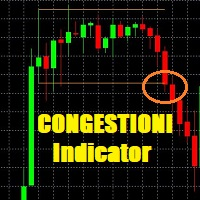
This indicator is very usefull to TRADE Trading Ranges and helps identify the following TREND. Every Trader knows that any market stay 80% of the time in trading ranges and only 20% of the time in TREND; this indicator has been built to help traders trade trading ranges. Now instead of waiting for the next TREND, You can SWING TRADE on trading ranges with this simple yet very effective indicator.
TRADING with CONGESTIONI INDICATOR:
The CONGESTIONI Indicator identify a new trading range and ale

現在20%OFF!
初心者やエキスパートトレーダーに最適なソリューションです。
このインディケータは、エキゾチックペア・コモディティ・インデックス・先物など、あらゆるシンボルの通貨の強さを表示することに特化したインディケータです。金、銀、原油、DAX、US30、MXN、TRY、CNHなどの通貨の強さを表示するために、9行目にどのシンボルでも追加することができます。独自の機能を多数搭載し、新しい計算式を採用したため、ユニークで高品質、かつ手頃な価格のトレーディングツールとなっています。新しいトレンドやスキャルピングチャンスのトリガーポイントを正確に把握することができるため、あなたのトレードがどのように改善されるか想像してみてください。
ユーザーマニュアル:ここをクリック https://www.mql5.com/en/blogs/post/708876
すべての時間枠に対応します。あなたはすぐにトレンドを見ることができるようになります! 新しいアルゴリズムに基づいて設計されているため、潜在的な取引の特定と確認がより簡単になります。これは、8つの主要通貨と1つのシンボルの強弱

Info:
Working trading pairs : XAUUSD, GOLD Timeframe: H1 Min deposit: $100 Min leverage 1:20 Works with any broker, though an ECN broker is recommended Live signal : https://www.mql5.com/en/signals/2383428 Features:
No martingale No grid trading No averaging No dangerous money management techniques Hard stop loss and take profit for every trade Stable results since 1999 with 99.9% quality quotes Not sensitive to broker conditions Easy to install and use FTMO and Prop firm ready Complies wi

Gold Signal Swing Pro XAUUSD with Auto TP SL (MT4) — 7層フィルター + RR保証システム搭載 XAUUSDスイング完全トレードシステム リペイントなし。リドローなし。ラグなし。すべてのサインは確定後に変わりません。 購入者限定特典:買い切りライセンスをご購入いただいた方に、AI Zone Radar($59相当)+PDFマニュアルを無料プレゼント。購入後にMQL5でメッセージをお送りください。 AI Zone Radar: https://www.mql5.com/en/market/product/175834 MT5版もあります: https://www.mql5.com/ja/market/product/177643?source=Site +Profile+Seller ゴールドトレーダーのコミュニティで実際に使用され、精度と使いやすさで高評価。 こんな方におすすめ 仕事や家事で忙しく、M5/M15に張り付けない方 厳選されたサインだけで運用したい方 寝てる間や外出中もポジションを持っておきたい方 1サインで大きく取りた

EA Gold Stuffは、金取引のために特別に設計されたExpert Advisorです。 この作業は、ゴールドスタッフインジケーターを使用した注文の開始に基づいているため、アドバイザーはトレンドに従うことを意味する"トレンドフォロー"戦略に従って動作します。
重要! 指示とボーナスを得るために購入後すぐに私に連絡してください! トレンド スキャナーの強力なサポートを利用して、無料のインジケーターを入手し、プライバシーを守ります。あーみー! リアルタイムの結果はここで見ることができます
パラメータ
新しいシリーズを開く-新しいシリーズの注文の開始をオン/オフします。 開始ロット-開始ロット。 トレードバイ-Expert Advisorが購入できるようにします。 トレード売り-Expert Advisorが売ることを許可します。 ヘッジを使用する-機能が有効になっている場合、アドバイザーは買いと売りの両方の方向を取引し、機能が無効になっている場合、アドバイザーは一方向 マネー Manadgementを使用-オン/自動ロット計算の使用をオフにします。 オートロットオー

手動トレードのための、本格的なトレードパネル。正確なエントリーから口座の保護まで、トレードの全工程をチャート上のひとつのウィンドウで完結させます。設定したリスクに正確に合わせてロット数を計算し、RR Tool でチャートに線を引きながらトレードを組み立て、成行注文・待機注文・Grid・OCO を発注できます。ポジションの管理はパネルが引き受けます。最大5段階の分割決済、6種類のトレーリングストップ、建値、Virtual SL/TP を搭載。日次・週次・月次の上限が資金を守り、上限を超えると自動で作動します。
ガイドと無料の Live デモ 無料の Live デモ版はこちらでご利用いただけます ( Free Live Demo )。 製品の操作ガイドはこちらです ( User Manual )。
NT Trade Manager は、トレーダーの作業の流れ全体を、チャート上のコンパクトなパネルひとつにまとめます。ターミナルのウィンドウを行き来する必要も、エントリーのたびに手計算する必要もありません。自分の意思で手動トレードする人のためのツールです。裁量トレーダーからスキャルパー、スイ

MT4バージョン: https://www.mql5.com/ja/market/product/90950 MT5バージョン: https://www.mql5.com/ja/market/product/93706
Rebate Hunter – マルチペアヘッジグリッドEA(ダイナミックアダプティブ)
Rebate Hunterは、安定した取引量を確保しながら、バスケット利益をコントロールできるよう設計された、マルチペアヘッジグリッドEAです。このEAは、売買を同時に開始し(ヘッジエントリー)、ダイナミックアダプティブグリッドディスタンスと自動バスケットクローズシステムを用いてポジションを管理します。
このアプローチは、安定した利益サイクルと高い取引量を重視しつつ、様々なボラティリティ状況に対応できるEAを求めるトレーダー向けに構築されており、取引量ベースのリベートプログラムの恩恵を受ける口座に最適です。
主な機能 真のヘッジエントリー(買い+売り) Rebate Hunterは、エクスポージャーのバランスを保ち、方向性への依存を軽減するために、2つのポジションを同時に

News Filter EA: Advanced Algo Trading Assistant News Filter EA is an advanced algo trading assistant designed to enhance your trading experience. By using the News Filter EA , you can integrate a Forex economic news filter into your existing expert advisor, even if you do not have access to its source code. In addition to the news filter, you can also specify trading days and hours for your expert. The News Filter EA also includes risk management and equity protection features

現在30%OFF!
このダッシュボードは、複数のシンボルと最大9つのタイムフレームで動作するソフトウェアの非常に強力な部分です。 このソフトは、弊社のメインインジケーター(ベストレビュー:Advanced Supply Demand)をベースにしています。 Advanced Supply Demand
ダッシュボードは、素晴らしい概要を提供します。それは示しています。 ゾーン強度評価を含むフィルタリングされた需給値。 ゾーン内/ゾーンへのPips距離。 ネストされたゾーンがハイライトされます。 選択されたシンボルの4種類のアラートを全ての(9)時間枠で提供します。 それはあなたの個人的なニーズに合わせて高度に設定可能です。
あなたの利益!
すべてのトレーダーにとって最も重要な質問です。
市場に参入するのに最適なレベルはどこか? 成功のチャンスとリスク/リターンを得るために、強力な供給/需要ゾーン内またはその近くで取引を開始します。
損切りの最適な位置はどこですか? 最も安全なのは、強力な供給/需要ゾーンの下/上にストップを置くことです。
最適な利益

EAブラックドラゴンはブラックドラゴンインジケーターで動作します。エキスパートアドバイザーはインジケーターの色で取引を開始し、注文のネットワークを構築したり、ストップロスで作業したりすることができます。
実際の作業の監視、およびその他の開発については、https:// www.mql5.com/en/users/mechanic/sellerを参照してください 。
ここですべての設定を見つけることができます!推奨事項
通貨ペアEURUSDGBPUSD 時間枠M15 推奨保証金1000ドルまたはセント 推奨設定デフォルト設定入力パラメータ 初期ロット-初期ロット; ロット乗数-後続の注文のロット乗数。 自動ロット-自動ロット計算を有効/無効にします。 自動ロットサイズ-自動ロットが有効になっている場合にアドバイザーがロットを使用するデポジットの金額。 距離-注文間の距離。 最大ロット-アドバイザーが開くことができる最大ロット。 利益を得る-利益を得る; ストップロス-ポイントでストップロス。 トレイルスタート-トレーリングストップがアクティブ化されたポイントでの利益。

One Gold EA をご紹介します。これは、Meta Trader プラットフォーム上の洗練された金取引ロボットで、高度な市場分析でトレーダーを支援するために開発されました。当社の独自のテクノロジーは、ニューラル ネットワークとデータ駆動型アルゴリズムを活用して、過去およびリアルタイムの金市場データを分析し、意思決定に役立つ洞察を提供します。従来の手動戦略とは異なり、One Gold EA は最小限の介入で動作し、取引プロセスを合理化し、関連するリスクの削減を目指しています。高度なニューラル プラグインの使用によりロボットの分析機能が強化されますが、他の取引ツールと同様に、One Gold EA は利益を保証するものではないことに留意することが重要です。ただし、より情報に基づいたデータに裏打ちされた洞察を提供することで、取引パフォーマンスを向上させる可能性を考慮して設計されています。One Gold EA は、金市場を継続的に監視して、人間のトレーダーが見つけるのが難しいパターンや傾向を検出します。このシステムはさまざまな市場状況に適応できるため、特に金取引のような非常に不安定な環

BUY 1 and GET 1 FREE - Promotion!
Buy Forex GOLD Investor with a huge –60% discount and GET 1 FREE EA by your choice! Promo Price: $217
(Regular Price: $547 — You Save $330! ) After purchase contact me to get your GIFT EA! You can also contact me to get the list of available GIFT EAs! Forex GOLD Investor is one of the best expert advisors developed to trade on GOLD(XAUUSD) in the forex market. Forex GOLD Investor consists of 3 trading systems . The first one is based on scalping trading strat

DayTrader PRO DayTrader PROは、ジョン・エリュース(John Ehlers)のラグuerreフィルターと強力な自動最適化エンジンを組み合わせた、高度なトレーディング・インジケーターです。固定されたパラメーターを使用するのではなく、直近の市場状況に基づいて最適な設定を自動的に検索するため、手動による絶え間ない調整をすることなく、変化する市場のボラティリティに適応できます。 本インジケーターは、明確な「買い(BUY)」および「売り(SELL)」シグナルを生成し、現在の市場ボラティリティから算出された適応型のストップロス(Stop Loss)およびテイクプロフィット(Take Profit)レベルを表示します。トレンド、効率レシオ(Efficiency Ratio)、ボラティリティ、およびローソク足フィルターが内蔵されており、精度の低いセットアップを排除し、シグナルの精度を向上させます。 リアルタイム・パフォーマンスパネルには、現在最適化されている設定、プロフィットファクター(Profit Factor)、勝率(Win Rate)、ドローダウン(Drawdown)、

The Goblin Gold Scalper EA is a fully automated trading robot that has been developed over the years. EA's trading strategy has been optimized for Gold with a unique strategy based on Price Action and basic indicators. This is a scalper strategy so it usually trades in a short period of time, trades are closed quickly with Stop Loss and Trailing Stop. EA has optimized settings and now it's simple to use for everyone. You just need to set your Lot Size. Feature: + Fully automated trading 24/5 w

VR Smart Gridは、MetaTrader 4とMetaTrader 5向けに開発された完全機能の取引アドバイザーで、古典的なグリッド取引戦略に基づいて構築されています。ロボットは独立してポジションを開き、管理し、部分的に決済し、市場の変化に適応する効率的な注文グリッドを作成します。15年間の開発を経て、このアドバイザーは数千の変異とテストを経ています。これは実際のアカウントとデモアカウントでの体系的な改善の結果です。 セットファイル、製品のデモ版、説明書、特典が入手可能 [ブログ]
のバージョン [MetaTrader 5] インテリジェントなポジション平均化 VR Smart Gridの主な特徴の1つは、複数の平均化モードです。スマート平均化と部分平均化が含まれています。ロボットは現在の市場状況を分析し、ポジションを最適な部分に分割し、平均決済価格を計算します。これにより、現在の市場価格にできるだけ近くなります。このアプローチにより、注文グリッドを柔軟に管理し、チャートを常に監視する必要なく、ドローダウンからのポジションをより効果的に回復できます。 8つのポジション管理方

BUY 1 and GET 1 FREE - Promotion!
Buy GOLD Scalper PRO with a huge –60% discount and GET 1 FREE EA by your choice! Promo Price: $177
(Regular Price: $447 — You Save $270!) After purchase contact me to get your GIFT EA! You can also contact me to get the list of available GIFT EAs! Live Results: https://www.mql5.com/en/signals/2353871 GOLD Scalper PRO is a fully automated trading system which takes much of the work out of trading, leaving you free to do other things! You should not be fooled

Wall Street Robot is a professional trading system developed exclusively for US stock indices, focused on S&P500 and Dow Jones. These markets are known for their high liquidity, structured movements and strong reaction to global economic flows, making them ideal for algorithmic trading strategies based on precision and discipline. By concentrating only on these indices, the system is able to adapt closely to their behavior, volatility patterns and intraday dynamics, instead of trying to oper

The XG Gold Robot MT4 is specially designed for Gold. We decided to include this EA in our offering after extensive testing . XG Gold Robot and works perfectly with the XAUUSD, GOLD, XAUEUR pairs. XG Gold Robot has been created for all traders who like to Trade in Gold and includes additional a function that displays weekly Gold levels with the minimum and maximum displayed in the panel as well as on the chart, which will help you in manual trading. It’s a strategy based on Price

Gold Pro Scalper
Precise entry points for currencies, crypto, metals, stocks, indices! Indicator 100% does not repaint!!!
If a signal appeared, it does not disappear! Unlike indicators with redrawing, which lead to loss of deposit, because they can show a signal, and then remove it.
Trading with this indicator is very easy.
Wait for a signal from the indicator and enter the deal, according to the arrow
(Blue arrow - Buy, Red - Sell).
I recommend using it with the Trend Filter (download

GoldJump EA is an Expert Advisor based on a gold scalping strategy specifically designed for the M1 timeframe with a structured risk management approach. This EA utilizes fast price movements during the Asian trading session to identify entry opportunities, targeting short yet consistent market moves. The system is equipped with Drawdown control (DD Max), measured Stop Loss (SL), and optimized Take Profit (TP) features to maintain performance stability and efficient margin usage. The GoldJump EA

BUY 1 and GET 1 FREE - Promotion!
Buy Forex Diamond EA with a huge –60% discount and GET 1 FREE EA by your choice! Promo Price: $217
(Regular Price: $547 — You Save $330!) After purchase contact me to get your GIFT EA! You can also contact me to get the list of available GIFT EAs! Live Results: https://www.mql5.com/en/signals/2379493 Forex Diamond EA – Reliable Automated Trading Powered by Smart Algorithms Forex Diamond EA is a proven expert advisor designed to deliver consistent results us

BlueDigitsFx公式エコシステムへのアクセス インフラ更新情報、トレーディングリソース、製品リリース情報、およびBlueDigitsFx公式エコシステムへのアクセスを取得できます。 Telegramエコシステム
ウェブサイト
MT5版 BlueDigitsFx Easy 123 System — MT4向け高性能な反転・ブレイクアウト検出システム 市場の反転とブレイクアウトを見つけるためのオールインワン非リペイントシステム — 構造的な分析、明確なシグナル、確認ベースのトレードを重視するトレーダー向けに開発されています。 BlueDigitsFx Easy 123 Systemは、MT4向けのビジュアルインジケーターおよびアラートシステムであり、市場構造の変化、ブレイクアウト、トレンド反転をシンプルかつ明確に識別するのに役立ちます。 このインジケーターは、構造化された「123」パターンに基づいて動作します。 ステップ 1 :潜在的な相場の失速ポイントで大きな矢印を表示し、新高値または新安値を識別します。 ステップ 2 :市場構造のブレイクを検出し、トレンド反転の可能性を確

デイトレーダーマスターは、デイトレーダーのための完全なトレーディングシステムです。システムは2つのインジケーターで構成されています。 1つの指標は売買する矢印信号です。それはあなたが得る矢印インジケーターです。 2つ目のインジケーターを無料で提供します。 2番目のインジケーターは、これらの矢印と組み合わせて使用するために特別に設計されたトレンドインジケーターです。 インジケーターは繰り返さず、遅れないでください! このシステムの使用は非常に簡単です。 2色の線で表示されている現在のトレンドの方向に矢印信号をたどる必要があります。青は買いの傾向です。赤い色は売りの傾向です。青い矢印は買いシグナルです。赤い矢印は売りの合図です。トレンドラインの色と一致するように、矢印の色と信号の方向が必要です。 矢印インジケーターは、主に時間間隔M5とM15での日中取引のために作成されました。ただし、技術的には、システムは他の時間間隔で使用できます。 インジケータには、PUSHメッセージ機能を備えたポップアップアラートが装備されています。 購入後、必ず私に書いてください!私はあなたにシステムとの取引の

Iberian EA Ultimate - FX H4 is a fully automatic professional Forex expert advisor.
This EA trades according to trends (NO scalping, NO martingale) This EA combines various strategies to verify the possibility of a trend and a series of global validations to give the final approval to the opening of the order Despite its complexity, detecting trends is not always the greatest difficulty, it is also necessary to know when to close the operation. In this case, the success of the EA is supported b

Money Flow Profile MT5 HERE
Here our more valuable tools
SMC Trend Trading , Easy SMC Trading , Institutional SMC Architect Volume Analysis Tools , Volume flow Profile , Market volume profile , FVG with Volume , Liquidity Heatmap Profile , Volume Spread Analysis This Master Edition is engineered for clarity and speed, featuring a unique Auto-Theme Sync system that instantly beautifies your chart layout upon loading. Key Features: True Money Flow Calculation: Goes beyond stand