 MetaTrader 5
 エキスパート
 インディケータ
 ライブラリ
ライブラリ
 ユーティリティ
 ウィジェット
 ルール
ルール
YouTubeにあるマーケットチュートリアルビデオをご覧ください
ロボットや指標を購入する
仮想ホスティングで
EAを実行
EAを実行
ロボットや指標を購入前にテストする
マーケットで収入を得る
販売のためにプロダクトをプレゼンテーションする方法
MetaTrader 5版新取引ユーティリティ - 55
 以下はMetaTrader5での取引を簡素化する取引プログラムです。ユーティリティにカーソルを合わせると、その説明と目的が表示されます。
Trading Assistent is a multifunctional trading panel that combines all necessary tools for professional trading. The panel provides complete control over positions, in-depth risk analysis, and fast order execution.
MAIN FUNCTIONAL BLOCKS
Position Management:
- Real-time viewing of all open positions
- Sorting by symbol, profit, volume, and type
- Visual indication of profitable and losing positions
- Bulk closing operations
- Breakeven function for profit protection
Trading Operations:
- I
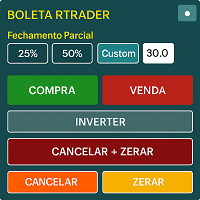
Boleta RTrader - A Boleta Mais Completa para MetaTrader 5 A ferramenta definitiva para traders que buscam precisão, agilidade e controle total sobre suas operações no MetaTrader 5.
**IMPORTANTE**: É aconselhável desabilitar no gráfico do MT5 o histórico de negociações somente quando for usar saídas parcias e precisar movimentar a ordem parcial para evitar delay. --- PRINCIPAIS FUNCIONALIDADES: EXECUÇÃO DE ORDENS **Compra e Venda Instantâneas**: Execute ordens a mercado com um único clique **

This Expert Advisor (EA) for MetaTrader 5 (MT5) has been designed to automatically manage Stop Loss (SL) and Take Profit (TP).
Main Features
Automatic Detection of Manual Positions : Monitors new manual positions without SL/TP and applies the configured rules Multiple Orders : Opening of multiple orders under the same conditions as the original position Hidden SL/TP : The hidden mode allows creating SL/TP invisible to your broker Equity Protection": Allows defining a threshold for the accou

TRADE WITH MAGIC – Professional One-Click Trading Panel
| Crystal AI Systems
Trade With Magic is a fast, lightweight, and highly efficient one-click trading panel designed for traders who require precise manual execution and full control over magic numbers, comments, and risk parameters. It is suitable for both manual trading and advanced EA testing environments where ac
FREE

Description Smart SL/TP Modifier Pro is a professional utility designed to help traders easily manage Stop Loss (SL) and Take Profit (TP) levels directly from their MetaTrader 5 chart.
It provides interactive on-chart control lines and intuitive buttons for quick modification of all active orders with just one click. This tool is especially useful for traders who manage multiple positions manually but want to ensure consistent and fast SL/TP adjustment. Main Features Modify all open trades
FREE

Tool Auto Modify SLTP – Protect Your Trades, Optimize Your Strategy In trading, risk is always present. Just one forgotten SL/TP can turn a promising trade into a loss. Even experienced traders occasionally make mistakes. That’s why Tool Auto Modify SLTP was created – to keep you protected and let you focus on your strategy. Key Features: Manage Orders for All Symbols: Monitor and adjust SL/TP for all your trading pairs. Three Flexible Risk Modes: Point-Based: Set fixed SL/TP distances. Account

EV Trade Panel is an Expert Advisor for MetaTrader 5 designed to support manual trading through a clean, dark-themed interface with fully adjustable controls. It provides a structured workspace where traders can execute orders efficiently, manage risk with precision, and handle positions in real time. The panel is adaptable to different instruments such as forex pairs, gold, indices, and other volatile symbols, and it fits naturally into any trading routine or timeframe. Main Features Order exec

Here our more valuable tools
SMC Trend Trading , Easy SMC Trading , Institutional SMC Architect Volume Analysis Tools , Volume flow Profile , Market volume profile , FVG with Volume , Liquidity Heatmap Profile , Volume Spread Analysis You Give an Instruction: When you run the script, a window pops up with a dropdown menu. You choose exactly what you want it to do from the list (e.g., "Close Profit Only" or "Delete Pending Orders"). It Scans Your Positions: The script then reads

How the Chart Cleaner Script Works
The Chart Cleaner is a one-click tool designed to instantly wipe your chart clean.
When you drag and drop the script onto a chart, it scans for and removes all visual objects—including trend lines, horizontal lines, text labels, shapes, and any other drawings you have placed.
The result is a completely clean, uncluttered chart, giving you a fresh workspace for your analysis. It's the fastest way to reset your chart to its default state.

MultiChartSync5 - Multi-Chart Auto-Sync Tool User Guide Program Overview MultiChartSync5 is a professional MetaTrader 5 multi-chart synchronization tool that enables automatic timeline alignment and synchronized navigation across multiple chart windows, significantly improving efficiency for multi-instrument and multi-timeframe analysis. Core Features 1. Intelligent Chart Synchronization Automatic Chart Alignment : All secondary charts automatically align with the master chart's candlestick t
Quantitative Synchronization Terminal Server MT5 is a professional MQL5 script for the MetaTrader 5 (MT5) platform, specifically designed to synchronize and load historical bar data and historical tick data from the server to the local terminal.This script helps traders ensure their local terminal has complete historical data, which is crucial for backtesting, technical analysis, and strategy development. Quantitative Trading Guide public chat: Join Us Quantitative Trading Guide public channe
FREE

V-Connect Tick Data Validator is a utility for MetaTrader 5. It checks each tick and rejects invalid data.
Features - Checks bid and ask prices - Checks spread and time - Uses only MQL5 functions - Logs results in the Experts tab - Real-time filtering:
- Negative or zero spreads - Stale timestamps (>60 seconds) - Reversed bid/ask - **<1ms overhead** — runs on low-spec VPS - **Journal audit trail** — "TICK PASSED" / "TICK REJECTED" How to Use Attach to a chart. In your EA: if (validate_tick(tick
FREE
Risk Manager is an MT5 Expert Advisor that opens a market order with a precisely sized lot at the cursor’s vertical level as Stop-Loss, using a single hotkey. Side is detected automatically: SL below price → BUY, SL above price → SELL. Risk is computed in account currency via OrderCalcProfit, so it works correctly on FX, metals, indices, and crypto.
Why traders use it Eliminates mental math and lot calculators. Turns any discretionary setup into a consistent, risk-fixed execution in one keystr

IanFX XAUUSD Trade Panel v5 — Open Trades on Your Phone, Manage Everything from the Panel IanFX Trade Panel is a professional, ultra-responsive manual trading panel designed specifically for XAUUSD scalpers, intraday traders, and multi-layer position builders. Built for mobile-first execution. Pre-load your zone prices, lot sizes, SL/TP, and grid settings into the panel. When the moment comes — tap one button. No fumbling through MT5's clunky order dialog on a tiny screen. No retyping number

=================================================== THE FUN & FRIENDLY GUIDE TO THIS PRO SCALPING TOOL V2 ===================================================
Welcome, fellow alchemist of the financial markets! If you're reading this, you’ve unlocked one of the most interesting, dramatic, occasionally chaotic, but ultimately POWERFUL tools in the XAUUSD universe: **Your Trailing_SLTP**.
Grab a cup of coffee (or something stronger), and let’s begin your journey.
----------------------------

MQL5ブログ: https://www.mql5.com/en/blogs/post/765148 MT4版: https://www.mql5.com/en/market/product/154458 MT5版: https://www.mql5.com/en/market/product/154459
期間限定無料
Telegram注文 [tambangEA] は、より速く、よりクリーンで、よりコントロールされた取引ワークフローを求めるトレーダーのために開発された、プロフェッショナルなセミマニュアル取引アシスタントです。
この製品は、既に独自の市場分析を行っており、取引の実行、管理、監視をより効率的に行う方法を必要としているトレーダー向けに設計されています。硬直的なブラックボックス戦略を押し付けるのではなく、取引判断を効率的な行動へと導く、実用的なチャートダッシュボードを提供します。
プレミアムなビジュアルレイアウト、クイックアクセスボタン、ライントリガー機能、シンボルチェンジャー、リアルタイム取引統計、そしてTelegram連携機能を備えたTelegram Orde
FREE

Smart Stop Scanner – マルチアセット対応の市場構造型ストップロス分析システム 概要
Smart Stop Scanner は、複数の市場にわたるストップロス構造をプロフェッショナル品質で監視するために設計されたツールです。 実際の市場構造、重要なブレイクアウト、価格アクションロジックに基づいて最も意味のあるストップゾーンを自動的に検出し、 高精細(DPI対応)で見やすい統一パネルに表示します。 Forex、ゴールド、インデックス、メタル、暗号資産など幅広い市場に対応しています。
ストップレベルの算出方法
従来型のインジケーターや任意の計算式は使用していません。 代わりに、 ブレイクアウト、より高い高値、より低い安値 といった実際の市場構造イベントを検出します。 ストップレベルはこれらの構造ポイントから直接生成されるため、より自然で信頼性が高く、 実際の市場動向に即したストップ設定が可能になります。
主なハイライト • 高精度のマルチアセット対応
Forex、メタル、ゴールド、インデックス、暗号資産など、幅広い銘柄をサポートし、桁数やティックサイズを自動処
Trailing Stop Utility PRO – マルチモード・マルチシンボルの高度なトレーリング管理ツール バグや不具合を見つけた場合はお気軽にご連絡ください。
皆様のフィードバックはツール改善のために非常に重要です。 概要 Trailing Stop Utility PRO は、複数シンボルや複数時間足に対応した高機能なトレーリングストップ管理ツールです。
軽量で安定しており、すべての MT5 バージョンに対応します。 手動取引、EA取引のどちらにも対応し、Percent・Pips・ATR の3モードに加え、シンボル別/マジックナンバー別プロファイル、アダプティブATR、エクイティロックを備えています。 主な機能 1. 複数のトレーリングモード Percent Mode – 価格のパーセンテージで距離を設定
Pips Mode – 固定ピップス
ATR Mode – ATR に基づくボラティリティ対応トレーリング 2. シンボル・Magic Number プロファイル 各シンボル、各EA用に個別設定可能。
上書き設定やワイルドカードにも対応。 3. アダプティブ ATR 高速

【先着10名限定セール】特別価格: $35 (通常: $90) 残り: 10枠 認知度向上のため、先着10名様に限り割引価格で提供します。
過去検証、チャートパターンを探すことだけに時間を費やしていませんか?
何度も画面をスクロールして、目当てのチャート形状を探し続ける。 やっと見つけたと思ったら、下位足ではそれがどのあたりにあるか分からなくなる。 少しチャート画面を動かしたり、ズームやズームアウトすると、もうどこだかわからなくなる。 本ツールを使えば:
過去チャートを自動かつ高速で動かせるので、効率的に検索できます。 注目したい時間ポイントが決まれば、どんなにチャートを動かしても瞬時にそこへアクセスできます。 さらに過去チャートを再生し、リアルタイムさながらの値動きを再現できます。 分析の効率化と模擬トレード体験の繰り返しで、あなたのトレードスキルを劇的に引き上げます。 製品概要 チャート検索及び模擬トレード効率を最大化する「Chart Auto Flow」と分析精度を高める「Focus Time Line」を完全統合した、MT5専用の強力なハイブリッドツールです。 チャート
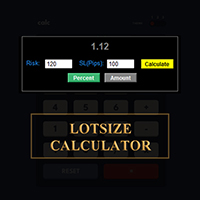
MetaTraderでロットサイズを計算しましょう!
トレーダーの皆さん、こんにちは。リスク管理重視のトレーダーですか?もしそうなら、これはまさにあなたのためのツールです。Ibrahimと申します。口座残高に対するリスク率に基づいてロットサイズを計算できるツールを開発しました。このツールは、リスクを%で指定するのではなく、リスクを負いたい絶対値がある場合にも、ロットサイズを計算するのに役立ちます。例えば、残高から100ドルのリスクを負いたいと指定できます。
MT4バージョン: https://www.mql5.com/en/market/product/155026
無料ですので、ぜひお試しください。コメント欄で、今後コミュニティ向けに開発してほしいツールや、今後追加してほしいツールがあれば教えてください。
ハッピートレーディング、ハッピーオートメーション!
FREE

ROSSI CAMPOS TRAILING STOP AUTO EA - あなたの利益を守るインテリジェントガーディアン! なぜ作られたのか?
効率的なトレーリングストップがないために利益が失われることが何度もありました。既存のソリューションは複雑すぎたり、重かったり、信頼性に欠けていました。そこで、軽量で正確、そして信頼できるアシスタントを作ることにしました — 手間なく自動で利益を守ってくれるものを。 使い方は?(プログラマー以外向け) 設定項目: 初期ストップロスとテイクプロフィット — 基本的な保護として トリガー — いくつ利益が出たらトレーリングストップを開始するか ステップ — 価格に合わせてストップロスが動く幅 市場がトリガーに達すると、EA が自動的にストップロスを調整し、利益を確保しつつリスクを低減します。まるで 24 時間 365 日そばにいるプロのようです! ユニークな特徴: 軽量 & 安定 — フリーズや衝突なし 直感的な設定 — フィールドを入力するだけ! 高精度 — リアルタイムのティックに基づく計算 汎用性 — どんな資産・時間足にも対応 完全自動 —

Here is the Japanese translation, maintaining the exact format and including the English terms in parentheses, as requested: 決済機能付き平均エントリー価格EA (Entry Price Averages EA with Close Orders) ユーザーへの注意点 — あなたに適したツールを選択してください: * 視覚的な平均価格表示 (visual average price display) のみが必要な場合は、弊社の 平均エントリー価格 MT5 (Entry Price Averages MT5) をご利用ください(すでにチャート上にエキスパート (expert) がいる場合)。 * インタラクティブなコントロール (interactive controls) とチャートから直接注文を管理/決済する機能 (manage/close orders directly from the chart) が必要な場合は、この製品をご利用ください。 Mt4

ROSSI CAMPOS ULTRA TRADER EA – あなたの利益を守るインテリジェントガーディアン! なぜ開発されたのか?
市場に出回っている多くのソリューションは複雑で重く、または正しく機能しませんでした。そこで私は、軽量で正確、そして信頼できるシステムを作ることにしました。 独自の特徴: 軽量かつ安定 — フリーズや競合はゼロ。 直感的な設定 — フィールドを入力するだけで準備完了! ミリ単位の精度 — 現在のティックに基づく計算。 汎用性 — どんな銘柄・時間枠でも動作。 完全自動 — 手動での操作は不要。 パフォーマンス:2025年6月3日から7月31日までの期間中、ROSSI CAMPOS ULTRA TRADER EAはバックテストで94%の精度を達成しました。WIN$Nミニ先物契約を取引し、レイテンシは10ms、1契約、マーチンゲールが有効になっています。テストは人工的な調整なしで実際の市場流動性に基づいて実施されました。 注意:ROSSI CAMPOS ULTRA TRADERは世界中のあらゆるティッカーに使用および適応可能ですが、ここで示されているバックテ

この EA は主に XAUUSD のスキャルピング用です。
目的 トレード管理から感情を排除 ― ポジションを自動で保護し、利益を確定させ、プレッシャーの下で難しい判断をする必要をなくします。
機能 ️ 自動ストップロス 直近の高値/安値+バッファに基づいて SL を設定 手動配置のストレスなし 自動部分利益確定 2モード: 固定移動:価格が X 動いた後 50% をクローズ R 比率:1.2R の利益目標で 50% をクローズ 勝者を走らせながら利益を確保。
️ ワンクリックボタン すべてクローズ 売り/買い/利益/全て オプション:時間でフィルター(直近 60分) よくある問題を解決 早すぎる利益確定 神経質なストップ移動 感情的な判断 一貫性のないリスク管理 ️ キー設定 振り返り:20分(SL 設定用) バッファ:0.2 ピップ 追加の安全 部分 %:50%(利益確定サイズ) R 比率:1.2R(利益トリガー) 最適対象 感情的な干渉なし

MT5標準では分足以上のタイムフレームしか利用できず、1秒足や5秒足などの超短期チャートは提供されていません。 本ツール「 Seconds Chart Generator 」はティックデータをもとにリアルタイムで秒足チャートを生成し、トレーダーが超短期の値動きを精密に観察できるように設計されたユーティリティEAです。 通常のチャートにアタッチするだけで簡単に利用でき、生成された秒足チャートはカスタムシンボルとして自動的に作成されるため、独立したチャートとして開いて分析することが可能です。 さらに、通常のインジケータも併用できるため、既存の分析手法と組み合わせて活用できます。
注意事項(重要) 本ツールは「秒足データ生成」を行う特殊なEAです。 MQL5標準のデモ版機能ではティックデータの扱いが制限されているため、デモ版では動作しません。 デモ版をチャートに適用しても秒足は生成されませんが、これは不具合ではなく MT5側の仕様 です。 まずは Simple版 で動作を確認頂いてから 、フル版を購入頂ければ幸いです。 Seconds Chart Generator の機能: 1

MT5標準では分足以上のタイムフレームしか利用できず、1秒足や5秒足などの超短期チャートは提供されていません。 本ツール「 Seconds Chart Generator SimpleVer 」はティックデータをもとにリアルタイムで秒足チャートを生成し、トレーダーが超短期の値動きを精密に観察できるように設計されたユーティリティEAです。 通常のチャートにアタッチするだけで簡単に利用でき、生成された秒足チャートはカスタムシンボルとして自動的に作成されるため、独立したチャートとして開いて分析することが可能です。 さらに、通常のインジケータも併用できるため、既存の分析手法と組み合わせて活用できます。 このユーティリティでは1秒足・5秒足・15秒足のチャートをリアルタイムに生成できます。 現在は期間限定で機能制限を撤廃しており、 2026年9月1日までフル機能をご利用いただけます 。 実際のチャート上で秒足を十分に体験できるため、導入前の確認にも最適です。 使ってみて気に入られましたら、 製品版 を購入して頂ければ幸いです。 SimpleVer の機能: 1秒足・5秒足・15秒足チャートを
FREE

Order Filled Sound Free for now, if useful for you, leave 5 stars comment. Will be free for live!
Order Filled Sound automatically plays a notification whenever an order is executed — including Take Profit (TP) and Stop Loss (SL). You can easily customize the sound in the EA properties or replace it with your own sound file ( *.wav ).
To use your own sound, simply copy it into the following folder:
C:\Program Files\MetaTrader\Sounds This tool ensures you never miss an important trade event aga
FREE

Product name BVCandleStream
##概要 スキャルピングおよびプライスアクション分析のために、カスタムのティックベースシンボル(等ティックバー)を自動生成するバックグラウンドサービスです。
標準シンボルの生ティックを、1本あたりのティック数が固定されたカスタムバーに変換し、これらの合成ティックチャートに対して任意の標準MT5インジケーターやEAを適用できるようにします。
主な特長 1. ティックベースのバー生成 開いているチャートのシンボルを監視し、ティックを指定本数( InpTicksPerBar )ごとにまとめたバーを自動生成 Bid / Ask / Mid いずれかの価格基準を選択可能 TickVolumeの表示で、バーの生成程度を目視判定可能 2. 履歴+リアルのシームレス連結 過去ティックをさかのぼってヒストリカルバーを構築。 ヒストリ生成完了後、リアルタイムティックへ即接続し、バーを継続更新。 3. カスタムシンボルによるチャート表示 標準のインジケータが適用可能。
4. マルチチャート対応 MT5 上で開いた複数チャートを自動スキャンし、対象シン
FREE

Crystal Trade Manager – Advanced MT5 Risk and Trade Control Utility Overview
Crystal Trade Manager (CTM) is a professional MetaTrader 5 utility designed for risk management, trade automation, and instant execution control.
It provides traders with an integrated system for protecting equity, managing daily drawdowns, controlling lot sizes, and applying automation features such as automatic SL/TP, break-even, and trailing stop. The tool is suitable for manual traders, prop-firm challenge particip

Manual Grid Pro – Total Control, Absolute Precision Manual Grid Pro is an advanced tool designed for traders who want to master grid trading with manual, semi-automatic, or fully automated control , combining flexibility, full customization, and intelligent risk management . This EA allows you to trade major or secondary currency pairs in convergent or divergent mode , using limit or stop orders , with fully adjustable parameters to fit any trading style or strategy. ️ Main Features Smart

Close All Pro MT5 – Fast PnL Control is a powerful trade manager MT5 utility that gives you total control over your trades. With a single click, you can close all MT5 orders, monitor real-time profit and loss, and manage your floating PnL directly from a clean on-chart panel. The tool is lightweight, responsive, and built to help traders save time, reduce emotional stress, and maintain focus. Whether you trade manually or through an EA, this MT5 profit panel provides the visibility and precisio

HotKey Trade: Invisible and Fast Execution It is a minimalist order executor designed for scalpers and price action traders. It eliminates cumbersome panels and operates at maximum speed using only your keyboard.
Key Points:
100% Clean Chart: No panels or buttons blocking your view of the price. Instant Execution: Fires orders to the market without menus or clicks. Dynamic Lot Management: Change your volume and view it only when you need it Quick Commands:
[ C ] – Buy (BUY) [ V ] – Sell (SELL

King ElChart Telegram Bridge A professional bridge between MetaTrader and Telegram. It can send and receive trading signals instantly and manage trades automatically. FEATURES • Two modes: Sender and Receiver • Works on any symbol or timeframe • Fast and lightweight • Easy setup and real-time status display
NOTE After purchase, please contact me via MQL5 private messages to receive the bridge package and assistance with setup.

TimeFrame_Matcher is a kind of Tactical Timer. Description (RU): Sharp spikes in volatility and liquidity in the market are often tied to a specific time—the closing of higher candlesticks (xx:00, xx:30, H4, H1, etc.). At these moments, traders working on different timeframes simultaneously review their positions.
For a day trader, being caught off guard by such a "junction" means uncontrollable risk.
TimeFrame_Matcher is a professional attention management tool. It doesn't predict the direct
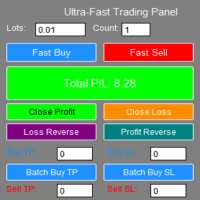
**"Fast Trading Panel 1.0"** is a highly efficient trading tool specifically designed for the MT5 platform. It integrates rapid order placement, intelligent closing, and batch management to provide traders with an ultimate operating experience and professional risk management capabilities.
- **One-Click Fast Ordering**: Supports custom lot sizes and batch orders, allowing instant buying and selling. - **Real-Time Parameter Adjustment**: Trading parameters take effect immediately without reload

Boost Your Trading with the Trade AST PRO Imagine having a personal trading assistant that transforms how you trade. With our EA, success is just one click away: Drag & Drop Smart Setup Place entry, SL and TP by simply dragging lines on the chart Automatic real-time risk and volume calculations Instant adaptation to every market move Lightning-Fast Execution Direct BUY/SELL buttons on the chart MARKET mode for instant entry PENDING mode for planned trades Auto Mobile Mirror Co
FREE

ChrisFX AUTOBOT – Smart Semi-Automatic Control ChrisFX AUTOBOT is a semi-automatic Expert Advisor designed for active traders who want to stay in control while benefiting from automated risk management.
It features an automatic BreakEven system and smart partial close management , offering the perfect balance between manual decision and algorithmic precision. Main Features BUY / SELL buttons directly on the chart Automatic BreakEven after X points (fully configurable) Automatic partial close (50

=== Attention ===== before stating to use this project please watch the video.
this is the first step of all-in-one project which will be updated day by day. This version (1.01) will be for Trade - Entry. you can have Market and pending orders - lot size - take profit and stop loss. Take profit and stop loss have 4 different type which is point - money - percent - price and we have RR for take profit. You can calculate lot size based on points and money. you can have visual stoploss and takepr

Close Trade A simple, fast, and practical tool for managing and closing trades in MetaTrader
In the trading world, there are countless methods and strategies for opening and closing positions. Sometimes, due to volatile market conditions or multiple open trades, you need a tool that allows you to close all or specific trades instantly and efficiently. Close Trade is designed precisely for that, a lightweight, reliable, and easy-to-use tool for complete trade and order management in MetaTrader.
FREE

Forex EA Manager - Professional Position Management Tool Overview Forex EA Manager is a sophisticated MetaTrader 5 Expert Advisor designed to provide professional position management capabilities for forex traders. This EA focuses on risk management and trade optimization through advanced order management features. Key Features ️ Risk Management Automated Stop Loss & Take Profit : Configurable SL/TP levels with pip-based calculation Flexible TP/SL Control : Enable/disable functionality b

Tired of fumbling with lot size calculations and manually managing every trade? The Visual Risk Manager (VRM) is a professional-grade trading panel designed to streamline your trading and enforce discipline. This Expert Advisor is not a strategy; it's a powerful utility that allows you to manage your risk and execute trades with unparalleled speed and precision, directly from your chart. Why You Need the Visual Risk Manager Stop letting emotions and guesswork control your trading. VRM ensures t

1.Multi-horizon telemetry: calculates profit, equity drawdown, open positions, and positions opened today for each period, feeding both the report tab and the risk engine.
2.Draggable on-chart console with twin tabs—Report for at-a-glance P/L & drawdown plus the Unlock Trading button, and Risk Manager for editing thresholds, timeouts, and toggles without opening MetaTrader dialogs.
3.Fully configurable rule stack: every limit offers Alert, Push, Email, Close Positions, Close Orders, Lock Tr

FJUNIVERSE | MT5 ボラティリティ&最小ロットスナップショットツール ワンクリックで強力なスキャナーが、マーケットウォッチ内の全銘柄の実リスクとボラティリティを即座に明らかにします — 現在のチャート時間枠を使用。 このスクリプトは、ブローカー定義の最小ロットでのUSDリスク額を正確に計算し、読み込まれた全ローソク足に基づく完全なボラティリティプロファイルを生成します。結果はクリーンなCSVファイルに保存され、MetaTraderジャーナルにバー数付きで出力されます。 主な機能: MINPRICEを計算:価格が0まで下落した場合のリスク( 最小ロット × Ask × 契約サイズ ) SNAPを表示:現在のAsk価格(完全な桁数) MINLOTを表示:ブローカーが許可する最小取引ロット すべての利用可能なバーでボラティリティを%で計算(常に正の値): AVGD 平均日次レンジ % ( |H-L|/O ) AVGL 平均上昇幅 % ( |H-O|/O ) AVGS 平均下落幅 % ( |L-O|/O ) MINL 最小非ゼロ上昇幅 %(フラットキャンドル除外) MINS 最小

【先着10名限定セール】特別価格: $30 (通常: $40) 残り: 10枠 認知度向上のため、先着10名様に限り割引価格で提供します。
「見たい時間」を簡単に、一瞬で。マルチタイムフレーム分析に、究極の同期を。
上位足で注目した時間ポイントが、下位足ではどこにあるのか。
何度もスクロールして探し直す必要はもうありません。 単一チャートはもちろん、複数チャートを同期させて、狙った時間ポイントへ高精度に一斉フォーカス。
「探すストレス」をゼロにし、分析精度を極限まで高めます。
あなたのチャート分析を劇的に変える、フォーカス特化型ツールです。 製品概要 【選べる3つのフォーカス・モード】 Single Line:注目する1つの時間ポイントへ、ワンクリックでフォーカス移動 Multi Lines:複数の時間ポイントを設定し、順番にフォーカス移動 SnglSync :複数チャートを同期させ、1つの時間ポイントへ一斉フォーカス 【主な活用メリット】 瞬時の復帰:どれだけチャートを動かしても、ズームや時間足を変更しても、ワンクリックで元の注目ポイントへ迷わずフォーカス移動できます。 検証

RC Trade Helperは、マニュアルトレーダー向けに設計された包括的なトレーディングアシスタントです。このアプリケーションは、チャート上で直接、迅速な注文実行、高度なリスク管理、効率的なトレード管理を行うための一連の視覚的ツールを提供します。 注意:購入前に、デモ口座でアプリケーションをテストできます。この商品はストラテジーテスターでは動作しません。 トレード操作 ワンクリックでトレードの実行と管理が可能: チャート上で視覚的なレベル確認により、成行注文と待機注文(ストップ、リミット)を発注。 すべてのポジションを決済、またはすべての待機注文を削除。 買いポジション、売りポジション、買い待機注文、売り待機注文の選択的な決済。 すべてのトレードライン(エントリー、ストップロス、テイクプロフィット)をチャート上のデフォルト位置にリセット。 チャートワークスペースを整理するため、すべてのトレードラインを非表示または表示。 トレードラインをロックして誤った移動を防止、またはトレード設定を反転。 ポジションサイジングとリスク管理 複数のトレードボリューム計算方法を提供: 固定ロットサイズ

Auto SL/TP Manager (自動SL/TPマネージャー) 手動トレードを二度と無防備な状態にしないでください! 急いでポジションを建てて、ストップロス (SL) やテイクプロフィット (TP) の設定を忘れたことはありませんか?「Auto SL/TP Manager」は、あなたにとって不可欠なセーフティネットです。 このエキスパートアドバイザー (EA) は、あなたのアカウントを24時間365日監視し、SL/TPが設定されていないオープンポジションに対して、あらかじめ定義されたリスク (SL) と利益 (TP) のレベルを自動的に適用します。 これは、 手動トレーダー 、 スキャルパー 、またはモバイルデバイスから開いたトレードであっても、 すべて のトレードが自分の戦略に従って確実に保護されるようにしたいすべての人にとって完璧なツールです。 主な特徴 完全自動化 : 未設定のオープンポジションを常時スキャンし、SL/TPを適用します。 高度な設定が可能 : ストップロスとテイクプロフィットをPips単位で簡単に定義できます (例: 5.0 = 50ポイント)。 強力なフィ

Momentum Candle Alert — マーケットメーカーの動きを捉える マーケットメーカーの動きを見逃さないでください!
Momentum Candle Alert は、強いモメンタムキャンドルをリアルタイムで検出し、市場の重要な動きを簡単に把握できます。 使い方:
アラートをチャートに追加し、希望の時間足を選択して、通知したいポイント数またはドルの変動幅を設定します。 主な特徴: 価格変動をリアルタイムで監視。 ローソク足のサイズが設定した閾値(ポイントまたはドル)を超えたときに自動通知。 3つのモード: 買いのみ、売りのみ、または両方 。 デフォルトモードは 買いのみ で、簡単に変更可能。 軽量・高速・リソース効率が高い。 チャートを見続けなくてもモメンタムを把握可能。 シンプルで実用的なツールを求めるトレーダーに最適です。

Simple Position Manager is a professional-grade MT5 script designed for efficient trade management. This versatile tool allows traders to quickly apply Take Profit, Stop Loss, and Breakeven settings across multiple open positions with precision and reliability. Key Features Multi-Position Management Apply TP/SL to all open positions of the current symbol simultaneously Intelligent position filtering by symbol Batch modification capabilities Smart Breakeven Technology Automated breakeven tri
FREE

Keep your MetaTrader 5 charts alive, updated, and always in sync — automatically.
The MT5 Auto Refresh Utility is a smart, zero-lag chart updater designed for traders who want real-time accuracy across every open chart. Whether you use complex dashboards, multi-timeframe systems, or long-running analysis setups, this utility ensures your charts stay active and refreshed without manual clicks or chart reloading. Why You’ll Love It Automatic Chart Refresh
Refreshes your MT5 chart at a fixed int

K-line Terminator - a countdown tool that accurately grasps every second Core Summary: Still anxious about not knowing when the current candlestick will end? 'Candlestick Terminator' is an indispensable tool in your trading toolbox! It utilizes a clear and intuitive countdown timer to display the precise time remaining for the currently active candlestick in real-time, helping you avoid making hasty decisions during the chaotic moments of candlestick transitions, thus allowing you to enter, exit
FREE
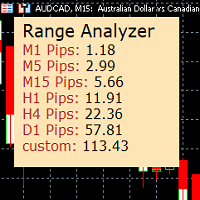
Range Analyzer calculates the Average True Range (ATR) values for different timeframes in pips to give a fast and simple overview about the volatility of the chosen symbol.
Settings are very easy:
bars for calculation: Choose the number of bars for calculation or use the default value (14 periods).
from bar: Choose the youngest bar to start the calculation or use the default setting (0 = current bar). custon timeframe: Choose another timeframe.
You can use it for forex, crypto, indices, comm
FREE
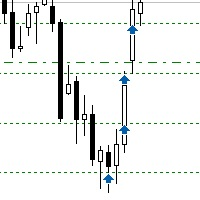
Sometimes the markets are in such a trending phase that it is impossible not to notice and it is enough to simply buy with the trend. 1) So, we scroll through the charts of different instruments, and see a good entry point, so let's specify the desired price for the first order in the Price_for_First_Order parameter and the direction in the Trend_Direction parameter, this is already enough for a good deal. (If Price_for_First_Order=0, the position will open immediately at the market price.) 2) T

Apeiron Edge Alerts - Advanced Price Level Alert System Overview Apeiron Edge Alerts is a powerful and intuitive alert management tool designed for active traders who need reliable notifications when price reaches critical levels. Track unlimited price levels across multiple timeframes with customizable alert settings, visual feedback, and persistent session management. Key Features Flexible Alert Creation Draw Mode : Click anywhere on the chart to create instant horizontal line alerts Make M

Guardian Equity PropFirm EA for MetaTrader 5 Guardian Equity PropFirm is an Expert Advisor designed to automatically enforce daily and monthly loss limits. It is especially useful for accounts subject to strict risk management rules, such as those required by proprietary trading firms. The EA continuously monitors the account and performs automated actions if predefined thresholds are exceeded. Key Features Daily loss control: Set a maximum daily loss percentage (e.g., 4%). Monthly loss c

Description SilverEdge Trade Console is a fast, layer-based trading console for MT5 that lets you place, manage, and exit trades in a few keystrokes. It combines one-tap market orders, guided pending orders, per-layer TP/SL control, and a built-in break-even/trailing engine—wrapped in a clean dashboard that docks anywhere on your chart. Designed for scalpers and intraday traders who need speed, consistency, and clear logs. Features Layer-Based Workflow (1–9): Assign and work within layers to sep

Script Name: Close All Positions Language: MQL5 Type: Utility Script Primary Function: Instantly close all open positions on the current trading account Purpose The “Close All Positions” script is a lightweight and efficient tool designed for traders using MetaTrader 5. Its main purpose is to help users quickly exit all active trades with a single click, especially during volatile market conditions or when risk management requires immediate action. Instead of manually closing each position on
FREE

AutoLotEqualizer – Smart Position Balancing Tool AutoLotEqualizer is a precision trade management utility designed to keep your total BUY and SELL volumes balanced automatically.
It detects differences between your open BUY and SELL positions and opens compensating trades — ensuring both sides stay equal in exposure.
This helps grid, hedge, and basket systems maintain symmetry and control over total position risk — all while saving you time and manual effort. ️ Key Features Automatic Lot Ba
FREE

EA Info Display Master Stop clicking through charts to find your EA configurations! Get a complete overview of all running Expert Advisors with their symbols and magic numbers in seconds. Managing multiple EAs across different symbols? Monitoring performance on FX Blue or other platforms? This tool instantly displays: All running EA names Their symbols and magic numbers Account details (number, broker, currency) Direct FX Blue statistics links (other provider will follow! Tell me what you need)

Colors schemes powerful MetaTrader 5 script designed for traders who value speed and a personalized trading environment. With a single click, you can instantly transform your chart's appearance using one of several professional, pre-designed color schemes, including popular styles like ICT/SMC. How to Use: In your MetaTrader 5 terminal, open the Navigator window (Ctrl+N). Find the Colors schemes script under the "Scripts" section. Drag and drop the script onto the chart you want to customize. A

Sniper Utility Rimani sempre aggiornato sui tuoi trade, ovunque tu sia. Sniper Utility invia notifiche immediate ogni volta che uno dei tuoi ordini raggiunge il Take Profit o lo Stop Loss .
Perfetta per trader attivi che desiderano monitorare le proprie operazioni senza dover controllare costantemente il terminale. ️ Funzionalità principali Notifica istantanea alla chiusura dell’ordine (TP o SL) Compatibile con notifiche push su dispositivi mobili Supporto per ordini manuali, EA e p

## ️ Descrizione
**Margin Alert Notifier** è una utility che monitora in tempo reale il livello di **margine** del tuo conto di trading e ti **avvisa immediatamente** quando scende sotto una soglia definita. Ti aiuta a prevenire situazioni di *margin call* o *stop-out*, mantenendo il controllo del rischio in ogni momento.
---
## Funzionalità principali
- Avviso automatico quando il **Margin Level (%)** scende sotto la soglia impostata. - Messaggio personalizzabile (puoi inseri

1. Brief Description of Gina Panel Code Functionality for End User The "Gina Panel" is a customizable trading dashboard Expert Advisor (EA) for MetaTrader 5 (MT5). It provides a graphical user interface (GUI) overlay on your chart to simplify trading and account management. Key functionalities include: Account Monitoring : Displays real-time balance, equity, profit/loss, margin levels, and net positions in a compact panel. Trade Execution : Quick buttons for buying/selling at market, setting lot
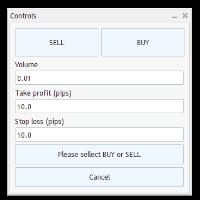
Trade Panel – Smart Order Execution Tool for MetaTrader 5 Trade Panel is a lightweight and intuitive trading assistant designed to simplify manual order execution in MetaTrader 5. It allows traders to quickly place BUY or SELL orders with custom lot size, stop loss, and take profit values — all managed through a clean, responsive interface. Key Features: Fast order placement with one-click confirmation Real-time visualization of Stop Loss and Take Profit lines Editable fields for lot size and pi
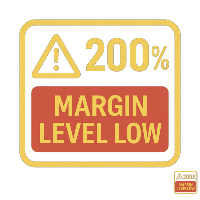
Margin Level Monitor EA Stay ahead of margin calls with real-time alerts and visual feedback. This Expert Advisor is designed for traders who prioritize risk management. It continuously monitors your account’s margin level and triggers alerts when it drops below a customizable threshold (default: 200%). Whether you're trading manually or using other EAs, this tool keeps you informed and protected. Key Features: • Continuous Monitoring: Checks your margin level every few seconds. • Mult

General Overview This Expert Advisor (EA) is a semi-automatic trading assistant for MetaTrader 5 that provides a graphical user interface (GUI) panel directly on the chart.
It allows traders to quickly place pending orders (Buy Limit, Sell Limit, Buy Stop, Sell Stop), set Stop Loss (SL) and Take Profit (TP) levels for all positions, close all open trades, and delete pending orders. Key Features Interactive Control Panel:
Displays input boxes, buttons, and labels on the chart.
You can manu

GUARDIAN EA PRO - SMART ACCOUNT PROTECTION "Don't let losses get out of control - Let Guardian protect you 24/7!" KEY FEATURES SMART ALERT SYSTEM Step-by-step alerts by profit/loss percentage (5%, 10%, 15%...) Real-time notifications via Telegram & Push Notifications Customizable intervals between alerts EMERGENCY PROTECTION Auto close all positions when reaching maximum loss threshold Drawdown protection - Prevent deep losses Trading time limits - Safe automatic

Binance Copier allows to seamlessly and easily copy trades between MT5 and Binance Futures! The tool's main feature is to replicate trades and all available orders between MetaTrader 5 and Binance that can be applied to both Expert Advisors and manually opened ones.
Before purchase please familiarize with comparison between MT5 to Binance and Binance Copier Key Features: Bidirectional Copying - MT5 → Binance (Master Mode): Copy your MT5 trades to Binance - Binance → MT5 (Slave Mode): Mirror Bi

パーシャルクローズマネージャー – 取引量を自動調整する便利ツール パーシャルクローズマネージャーは、MetaTrader 5上でポジションを部分的に決済するための強力なツールです。取引中のリスク管理をより柔軟に行うことができ、利益の一部を確保しながら残りのポジションを伸ばすといった戦略を簡単に実現します。手動入力を減らし、スムーズな操作性と高い精度を両立しています。 主な機能: 部分決済機能: クリック一つで保有中のポジションの一部を決済可能。スキャルピングからスイングトレードまで幅広く対応します。 自動ボリューム計算: ツールが自動的に決済ロット数を計算し、入力ミスを防ぎつつスピーディに実行。 複数注文対応: 同一銘柄の複数ポジションに対して同時に部分決済を適用でき、時間の節約になります。 ドラッグ移動可能なテーブル: テーブルヘッダーをドラッグして、チャート上の好きな位置に自由に配置可能。 パーシャルクローズマネージャーは、資金管理やポジション制御をよりスマートに行いたいトレーダーにとって、欠かせないプロフェッショナル向けツールです。

Anti Revenge Trading Police Bot v1.80 (Revenge Trading Protector) 開発元: Mindfultradeness
復讐トレードのサイクルに囚われていると感じますか?毎回の損失が再入場を誘惑しますか?あなたのそばに立つガーディアン、Anti-Revenge Police Botを想像してください。これは復讐トレードを克服する究極のツールです!この革新的なユーティリティは、あなたのあらゆる動きを見守り、閉じた損失を検出し、カスタマイズ可能なクールダウンを起動して毒性衝動を止めます。リアルタイム介入により、すべてのポジションと保留注文を閉じ、希望に満ちたマインドフルトレーディングの旅へと導きます。どう働くか、共に設定を進めましょう!
主な機能と利点: - **リアルタイム多言語 HUD with プログレスバーとカウントダウン:** あなたの言語で動的な表示を即座に確認し、取引の明確さを提供します。 - **Anti-Revenge Police:オープンポジションを閉じ、保留注文を削除:** 衝動的な再入場を防ぎ、安心感
FREE

**Sync MT5 – リアルタイムマルチチャート分析マネージャー**
MT5プラットフォームをプロフェッショナルな分析ステーションに変革します。Syncは、複数のウィンドウ間でチャート、オブジェクト、クロスヘアを同期する包括的なツールであり、これまでにない精度と効率で取引できるようになります。
**主な機能**
1. **スマートチャート同期** - 複数のチャート間でシンボルと時間枠をワンクリックで同期。 - グループシステム – 戦略や資産ごとにチャートを整理。 - 不必要な更新を防ぐ調整可能な感度。
2. **高度なクロスヘア(デュアル軸)** - グループ内のすべてのチャートで同期されたクロスヘア。 - ローカル時間またはサーバー時間での表示。 - 各チャートでクロスヘアポイントへの自動ナビゲーション。 - ESCキーによる迅速な有効化/無効化。
3. **完全なオブジェクト管理** - チャート間でのライン、四角形、テキスト、矢印の自動同期。 - スクロールと検索機能付き管理パネル。 - 作成された最
MetaTraderマーケットは、履歴データを使ったテストと最適化のための無料のデモ自動売買ロボットをダウンロードできる唯一のストアです。
アプリ概要と他のカスタマーからのレビューをご覧になり、ターミナルにダウンロードし、購入する前に自動売買ロボットをテストしてください。完全に無料でアプリをテストできるのはMetaTraderマーケットだけです。

取引の機会を逃しています。
- 無料取引アプリ
- 8千を超えるシグナルをコピー
- 金融ニュースで金融マーケットを探索