 MetaTrader 5
 エキスパート
 インディケータ
 ライブラリ
ライブラリ
 ユーティリティ
 ウィジェット
 ルール
ルール
YouTubeにあるマーケットチュートリアルビデオをご覧ください
ロボットや指標を購入する
仮想ホスティングで
EAを実行
EAを実行
ロボットや指標を購入前にテストする
マーケットで収入を得る
販売のためにプロダクトをプレゼンテーションする方法
MetaTrader 5版新取引ユーティリティ - 52
 以下はMetaTrader5での取引を簡素化する取引プログラムです。ユーティリティにカーソルを合わせると、その説明と目的が表示されます。
TradingView/Telegram to MT5 Automation EA with Unified Risk & Position Management Automate MT5 trades from TradingView alerts and Telegram commands through a lightweight desktop bridge. All signals are normalized into uniform “signal files” that the EA ingests, executing with consistent risk controls, execution filters, and lifecycle management. No DLLs required. What It Does
Three trading methods: TradingView: strategy alerts via webhook → desktop bridge → EA Telegram: simple commands (e.g., “L

OneKey Trader v1 – Advanced Keyboard-Controlled CFD Scalping EA One Button, One Trade, No Stress. OneKey Trader v1 for MetaTrader 5 (MT5) Keyboard Execution ️ Daily Guardian Pro HUD Optimized for US30 / USTEC Power for scalpers who need speed, control, and advanced risk management without sacrificing visual clarity. Main Features 1) Keyboard trading for instant execution Customizable hotkeys for market and pending orders. Immediate control : Enable/disable ESC , lot size Z / X , TP

One-Click Trade Manager for MetaTrader 5 The Close Manager Buttons EA is a powerful utility designed to give you full control of your open positions and pending orders with just one click.
Forget about manually closing trades one by one during fast market moves—this EA does it instantly, safely, and efficiently. Key Features Close All Trades – instantly close every open position Close Only Buy Trades – exit only BUY positions while keeping SELL trades running Close Only Sell Trades – exit only
FREE

Opening EA - Start Edition
Is a tool to trade the OpeningStrategy! The Opening EA is a semi-automated EA for MetaTrader 5! This means that the trader must actively start the EA using the Start button and stop it using the Stop button.
This EA pursues an opening strategy which, at the start of trading, e.g. on the DAX or Nasdaq, etc., opens a trading channel with predefined TP's (TakeProfit). Two pending orders with the same lot size are set at the beginning. As soon as one of the pending order
FREE

Упростите свой технический анализ. Инструмент помогает быстро и точно определять на графике блоки заказов и размечать ликвидность. Превратите хаос ценовых движений в четкую торговую схему для более точных решений. Экономьте время на анализе, сосредоточьтесь на принятии решений. Инструмент заточен под торговую систему "Алхимия трейдинг", с его представлением о блоках заказа.
FREE
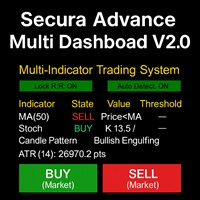
# Secura Multi Dashboard - Advanced Trading Assistant ## **Professional Multi-Indicator Analysis Platform** Secura Multi Dashboard is a comprehensive trading assistant designed for traders who demand clarity, precision, and efficiency. This powerful EA integrates multiple technical analysis tools into a single, intuitive interface, helping you make informed trading decisions without overwhelming complexity.
### ** Key Features:**
** Multi-Indicator Consensus System** - Simultaneous anal
FREE

Auto Symbol Switcher for MT5 – Watchlist Rotation for Multi-Asset Charts Auto Symbol Switcher for MetaTrader 5 is a utility panel that automatically cycles the active chart through a list of symbols. It is designed for traders who follow many markets and want the chart to move through a watchlist without clicking symbols one by one. The tool is navigation-only: it does not open, modify or close any trades and it does not change your account in any way. You can use the panel for Forex, indices, c

The RPP script computes the optimum weights of a portfolio of symbols (stocks, forex pairs, indices, etc.) using the Risk Parity Algorithm. You can read the theory of the Risk Parity algorithm in this Wikipedia page . Inputs : 1) Symbols in the portfolio. 2) Time frame you are interested in. 3) Number of past bars to compute the correlations. 4) Print the covariance matrix (true/false) 5) Print the correlation matrix (true/false)
Output : Optimum weights for each symbol in the portfolio. These

• Please test the product in the Strategy Tester before purchasing to understand how it works.
• If you face any issues, contact me via private message—I’m always available to help.
• After purchase, send me a screenshot of your order to receive a FREE EA as a gift. Visual Dynamic Price Alert: Your Personal Market Monitor Stop wasting hours watching charts for a price that may never come. The Visual Dynamic Price Alert is a professional and intuitive tool designed to do the watching for you

Inverted_Chart_EA Utility Expert Advisor Inverted_Chart_EA creates and maintains a mirror-inverted chart of any symbol and timeframe.
It automatically generates a custom instrument (e.g. US30_INV ) and keeps its price history updated in real time, with bars mirrored around a chosen pivot. This utility gives traders a new way to analyze the market from a different perspective by flipping the chart upside down. Why use an inverted chart? Highlight hidden patterns – price formations that look ordin

Visual Weekdays Indicator: Master the Market's Weekly Rhythm Unlock a new dimension of market analysis with the Visual Weekdays Indicator, the ultimate tool for traders who understand that time is as critical as price. The market ebbs and flows with a distinct weekly rhythm, with each day presenting unique characteristics, volatility, and trading opportunities. This powerful indicator is engineered to make this rhythm instantly visible and fully customizable on your chart, providing you with an

• Please test the product in the Strategy Tester before purchasing to understand how it works.
• If you face any issues, contact me via private message—I’m always available to help.
• After purchase, send me a screenshot of your order to receive a FREE EA as a gift.
Visual Spread Monitor: Your Essential Tool for Precision Trading Take control of your trading costs and master your market entries with the Visual Spread Monitor, the ultimate indicator for tracking and analyzing one of the mos

Watch your account Protect your capital with precision alerts for Balance, Equity, Margin, Margin level . Introducing: Balance, Equity, Margin, Margin level, Telegram Alerts and more expert advisor, A smart Expert Advisor for Meta Trader 5 that monitors your account in real time and sends instant alerts when critical thresholds are breached. What Makes This EA Different? Balance 1 Alerts: When your balance drops to 75% or 50% or any percent you want. Balance 2 Alerts: When your balance drops t

Quantum Order Manager is a professional trading utility built for traders who demand precision, efficiency, and strict risk control. It offers an intuitive interface for managing trades, calculating position sizes, and automating essential trading functions, without relying on manual calculations or external scripts.
Suitable for scalpers, day traders, and swing traders, it helps streamline trading workflows while maintaining full control over strategy and execution. Key Advantages: 1. Efficie

This expert advisor named TradeManager provides a manual trading management panel in MetaTrader 5 that allows precise control over open positions.
It is designed for traders who want dynamic management of Stop Loss (SL), Take Profit (TP), Break Even (BE), and Partial Close functionality. Key Features: Dynamic Trade Management : Manually set or drag-and-drop SL, TP, and BE levels. Supports partial closing at different profit levels (1:1, 1:1.5, 1:2). Automated Drawing : Automatically draw

Architectural Griding Expert Advisor: Advanced Grid Trading System Overview This Expert Advisor (EA) is a sophisticated grid-based trading system designed for MetaTrader 5 (MT5). Developed by me, this EA automates grid trading strategies with separate configurations for Buy and Sell grids, allowing traders to capitalize on market ranges, trends, and reversals. It incorporates advanced risk management, customizable grid levels, lot sizing modes, and a user-friendly graphical interface (UI) for r

このエキスパートアドバイザー(EA)は、取引管理を簡素化し、ポジション管理をより効率的に行うための実用的なボタンを複数提供します。複数のエントリーポイントを持つトレーダーや、注文を素早く管理する必要があるトレーダーに特に適しています。わかりやすいインターフェースと直感的な操作により、複雑な設定を必要とせずに一括操作を簡単に実行でき、手動操作によるミスを減らします。 主な機能 ブレークイーブン管理 5ポイント BE 10ポイント BE 20ポイント BE 100ポイント BE 1000ポイント BE カスタム BE 距離 BE の解除 ブレークイーブンポイント(DERISK) カスタム Stop Loss EasyButtons パネルから直接 SL を設定 ポイント単位でカスタム SL 距離を設定 ポジションのエントリー価格から SL を計算 BUY / SELL ポジションに対応 既存の TP を保持 ブローカーの Stop Level / Freeze Level を検証 Pip / Point ガイド 現在のシンボルにおける point と pip の関係を表示 例:
1 pi

あなたは、過剰取引、感情的な注文、または口座の過度なドローダウンに悩まされていますか?
Risk Guardian EA MT5 はあなた専用のリスク管理アシスタントです — 自動で取引を行うことはありませんが、次のサポートを提供します: 日々のリスクを厳密に管理
連続損失後のリベンジトレードを回避
トレーディングの規律を強化
長期的な安定した資金曲線を維持 このEAは取引戦略ではなく、手動取引や他のEA向けに包括的な資金リスク管理保護を提供します。 主な機能
日次損益保護 当日の決済済み注文の損益合計をリアルタイムで計算 日次損失上限に達した場合、取引は禁止 制限期間中に新規ポジションを開いた場合、強制決済される 連続損失管理 連続損失回数を自動検出 上限に達した場合、クールダウン期間に入る(例:2時間) クールダウン期間中に新規ポジションを開いた場合、即時決済 保有時間制限 ポジションが最大保有時間を超えた場合、自動的に決済 複数時間足 EMA トレンドフィルター エントリー時に M5 と M15 の EMA トレンドが一致している必要があ

「3つのスクリプト、1つの目的:取引をより速く、安全に、そしてより利益率高く」
MT5で利益最大化と投資保護をワンクリックで実現する3つのツール: 1️⃣ Breakeven Command — 損切り(Stop Loss)を瞬時に建値(ブレークイーブン)へ移動し、利益確定済みの取引を無リスク化。
2️⃣ MultiTakeProfit — 複数レベルで部分利確し、トレンドを活かしてさらなる利益を狙う。
3️⃣ SetStopLossAllTicket — すべてのオープンポジションに数秒でストップを設定、個別編集は不要。 主な利点: 超高速・手間いらずの実行 取引の完全コントロール デイトレード/スイング/スキャルピングに最適 MetaTrader 5 に100%対応 時間を最適化し、利益を守り、自信を持って取引しましょう。 1. Breakeven Command
ワンクリックで利益の出ている取引を安全化。面倒なく利益を守りたいトレーダーに最適。損切りを即時に建値へ移動し、取引のリスクをゼロに。
即時保護: 利益が損失へ転じるのを防ぐ。
超高速実行: 面

「3つのスクリプト、1つの目的:取引をより速く、安全に、そしてより利益率高く」
MT5で利益最大化と投資保護をワンクリックで実現する3つのツール: 1️⃣ Breakeven Command — 損切り(Stop Loss)を瞬時に建値(ブレークイーブン)へ移動し、利益確定済みの取引を無リスク化。
2️⃣ MultiTakeProfit — 複数レベルで部分利確し、トレンドを活かしてさらなる利益を狙う。
3️⃣ SetStopLossAllTicket — すべてのオープンポジションに数秒でストップを設定、個別編集は不要。 主な利点: 超高速・手間いらずの実行 取引の完全コントロール デイトレード/スイング/スキャルピングに最適 MetaTrader 5 に100%対応 時間を最適化し、利益を守り、自信を持って取引しましょう。 1. Breakeven Command
ワンクリックで利益の出ている取引を安全化。面倒なく利益を守りたいトレーダーに最適。損切りを即時に建値へ移動し、取引のリスクをゼロに。
即時保護: 利益が損失へ転じるのを防ぐ。
超高速実行: 面
「3つのスクリプト、1つの目的:取引をより速く、安全に、そしてより利益率高く」
MT5で利益最大化と投資保護をワンクリックで実現する3つのツール: 1️⃣ Breakeven Command — 損切り(Stop Loss)を瞬時に建値(ブレークイーブン)へ移動し、利益確定済みの取引を無リスク化。
2️⃣ MultiTakeProfit — 複数レベルで部分利確し、トレンドを活かしてさらなる利益を狙う。
3️⃣ SetStopLossAllTicket — すべてのオープンポジションに数秒でストップを設定、個別編集は不要。 主な利点: 超高速・手間いらずの実行 取引の完全コントロール デイトレード/スイング/スキャルピングに最適 MetaTrader 5 に100%対応 時間を最適化し、利益を守り、自信を持って取引しましょう。 1. Breakeven Command
ワンクリックで利益の出ている取引を安全化。面倒なく利益を守りたいトレーダーに最適。損切りを即時に建値へ移動し、取引のリスクをゼロに。
即時保護: 利益が損失へ転じるのを防ぐ。
超高速実行: 面

DF Fib Trader Pro DF Fib Trader Proは、MetaTrader 5向けに設計された自動取引システムです。 フィボナッチベースの価格水準とトレンドおよびストラクチャー分析を組み合わせ、エントリーポイントとエグジットポイントを決定します。このEAはロングポジションとショートポジションの両方をサポートし、リスク管理パラメータも組み込まれています。
主な機能: • フィボナッチ・リトレースメントとエクステンション・ロジックを用いて、エントリーポイント、SLポイント、TPポイントをプロットします。 • ロットサイズと損切り/利益確定レベルを設定可能 • エントリーポイントは1つまたは2つから選択可能 • 市場状況に応じて、固定または動的な損切り/利益確定をサポート • 複数の時間枠と通貨ペアに対応 • 最大スプレッド、スリッページ、取引頻度の制御オプションを搭載 • 自動取引管理:損益分岐点、トレーリングストップ、部分決済オプション • 希望に応じて成行注文もサポート入力項目の概要: • リスク管理:ロットサイズ、取引ごとのリスク、最大取引回数 • エントリー
FREE

これはロットサイズ計算エキスパートアドバイザーです。
固定リスク額で取引していて、固定金額でロットサイズを計算したい場合、これが最適なオプションです。
例:
次のポジションに100ドルのリスクを負いたいのですが、 どのロットサイズを使用すればよいかわかりません。 EAには、EAの「エントリーライン」にリアルタイム市場価格を追従するオプションがあるため、成行注文で取引を開始したい場合は、水平線でストップロス価格を選択する必要があります。
指値注文を出す場合は、EAのエントリーラインとストップロス価格の2つの水平線を調整する必要があります。 取引のリスク額を任意の金額に変更できます。 水平線を設定したら、EAの「発注」ボタンをクリックするだけです。ポジションまたは指値注文が即座に開きます。
このEAの機能:
1. リスク額を変更できます。
2. 「即時注文」または「保留注文」を変更できます。
3. 水平線を調整するだけで、ポジションのロットサイズを計算し、損切りと利益確定を設定できます。
4. ワンクリックで注文を発注できます。
5. 計算や入力は不要です。2本の水平

The Close All Charts utility is designed for quick and convenient closure of all open charts in the MetaTrader 5 (MT5) platform. It will be especially useful for traders who work with a large number of instruments and charts simultaneously, as well as for those who prefer to maintain order in their workspace. When testing advisors in the strategy tester with different parameters, a large number of charts often open. The Close All Charts utility is able to close them in just 1 second, which avoid
FREE

### FTBP Telegram Panel - Your On-Chart Notification Center
**FTBP Telegram Panel** is not just an Expert Advisor, but a full-featured tool for traders who want to receive instant notifications about their trades in Telegram and manage the visual style of their terminal. The product is completely free!
### Key Features
* **Instant Telegram Notifications:** Get alerts for every opened and closed trade, including the ticker, volume, and financial result. * **Interactive Control Panel:** Forget
FREE

The product is used to trade base on any Alert signal in MT5 Easy to setup, simple format with custom keyword All option to management orders as trailing stop, breakeen, partial close, time filter, news filter ... Option to auto open grid orders How to setup and guide: Let read all details about setup and download indicator for auto get Alert Signal here Do not buy if you even can not install demo EA to your VPS ( some VPS block download EA from mql5 market)
We always bring customers high q

TS Super Panel es una utilidad de trading para dibujar en el gráfico zonas BUY y zonas SELL relevantes. NUEVO PRODUCTO. PRECIO ESPECIAL POR TIEMPO LIMITADO Esta utilidad no se puede probar desde el probador de estrategias. Para descargar una versión DEMO puedes hacerlo desde la entrada del blog: https://www.mql5.com/es/blogs/post/763961 Con TS Super Panel podremos trabajar con hasta 50 símbolos de forma independiente. Conmutar entre un símbolo y otro es realmente rápido. En cada símbolo se pod

Overview ORA Trade Manager 2 MT5 is a powerful manual trade management dashboard designed for MetaTrader 5. It provides traders with quick and efficient control over their open positions, allowing them to modify SL/TP, set breakeven, and close trades with just one click. This EA is not an automated trading system—it’s a manual trade assistant that helps traders manage multiple positions efficiently without manually adjusting each one. Key Features One-Click Trade Management Modify Stop
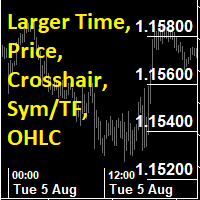
This utility indicator provides accessibility and readability, by displaying a larger price scale, time scale, crosshair, and symbol name/tf/ohlc information. All features are sizeable and can be styled separately, and are optional to show.
All Features optional to use font, size and color options
Price Scale
option to hide the default MT5 price scale option to show horizontal lines at price levels prices drawn can be at round numbers (ie automatic rounding to multiples of 5/10/20/25 points),
FREE

️ Equity Protector EA – Auto SL & Trailing Stop for MT5 Protect your capital. Automate your risk. Maximize your control. The Equity Protector EA is a powerful risk management tool designed for Meta Trader 5 traders who prioritize capital preservation and smart trade automation. Whether you're a scalper, swing trader, or long-term investor, this EA ensures your account stays protected while optimizing trade exits with precision. Key Benefits Drawdown Shield
Automatically monitors your accoun

Semi-Automatic Grid EA - Professional Grid Trading System Revolutionary Approach to Grid Trading Unlike fully automatic grid EAs that open positions without your control, Semi-Automatic Grid EA gives YOU complete control over entry points while automating grid management. This hybrid approach combines the precision of manual analysis with the efficiency of automated execution. Key Features Manual Control Over Entries Set your own BUY and SELL trigger levels based on your market analys

What It Does Scans Multiple Symbols Simultaneously From all pairs for the signal in real time. Detects Overbought/Oversold Conditions Using customizable RSI thresholds (e.g., 80 for overbought, 20 for oversold) and Alerts You Instantly . Send you Notifications to MT5 in your PHONE Using MetaQuotes ID Pop-up Alerts Telegram Push Messages Whether you're at your desk or on the move, you’ll know the moment a signal hits.
FREE

ProTrader Command Professional Trading Analytics & Risk Management System Transform your MetaTrader 5 into a professional trading platform with real-time analytics, automated risk management, and performance tracking. Core Features Real-Time Trading Dashboard Professional MT5 Interface Enhancement Live account metrics displayed directly on your chart Performance indicators with color-coded status alerts Position overview showing all trades at a glance Risk status monitoring with visual warnings
FREE

Guardian Shield EA - Risk & Profit Protection System ️ Ultimate Account Protection Guardian Shield is a specialized utility Expert Advisor designed to provide comprehensive risk management and profit protection for your trading account. It monitors all running positions in real-time and takes immediate action when predefined profit or loss thresholds are reached. Key Features Advanced Risk & Profit Guardian Real-time Monitoring : Continuously tracks total P&L across all positions Du
FREE

You only need to load this EA into a single chart. Key Features Session Lockdown Blocks ALL trades outside London/NY sessions Instant position closing at session end NEW: Pre-close alerts (configurable minutes before session end) Smart Daily Limits Profit Target: Set $ or % goals to lock in gains Loss Limit: Hard-stop protection against bad days NEW: Choose between Balance (closed P&L) or Equity (including floating P&L) Dual-Layer Protection Prevention: Stops orders before execution Elimination
FREE

Free MetaTrader 5 indicator that displays "CALL IT A DAY" when London & New York sessions close. Customizable alerts, session tracking, and a guilt-free reminder to log off. Perfect for workaholic traders!
Tired of staring at charts when the market’s already clocked out? Session Guardian is your sassy trading assistant that slaps a giant "CALL IT A DAY" on your screen when both London and New York sessions are closed—because even traders deserve happy hour. Key Features:
Big, Bo
FREE

Bitcoin Manager Panel is designed for traders to take advantage of automated trading and catch in a fast mode strategy positions which reach to fibonacci levels. It is mostly created for crypto currency trading because of high volatility and fibonacci retracement respecting levels. All in all it has a module Fibo as it can be seen on the panel which if clicked it will plot fibonacci indicator automatically and trade only when an important level of fibo is found and broken.

Advanced Risk Manager EA is a non-trading account protection utility for MetaTrader 5. It does not open trades — it monitors your account in real time and enforces configurable risk rules automatically. How It Works At the start of each trading day, the EA records your opening balance. Every tick, it recalculates your live P&L. If your daily loss reaches the configured threshold, all open positions are closed instantly and trading is locked until the next day. Optionally, it locks trading once a
What It Does Scans Multiple Symbols Simultaneously From all pairs for the signal in real time. Detects Overbought/Oversold Conditions Using Two MA with customizable inputs and Alerts You Instantly . Send you Notifications to MT5 in your PHONE Using MetaQuotes ID Pop-up Alerts Telegram Push Messages Whether you're at your desk or on the move, you’ll know the moment a signal hits.

What It Does Scans Multiple Symbols Simultaneously From all pairs for the signal in real time. Detects Overbought/Oversold Conditions Using MACD with customizable inputs and Alerts You Instantly . Send you Notifications to MT5 in your PHONE Using MetaQuotes ID Pop-up Alerts Telegram Push Messages Whether you're at your desk or on the move, you’ll know the moment a signal hits.

What It Does Scans Multiple Symbols Simultaneously From all pairs for the signal in real time. Detects Overbought/Oversold Conditions C ustomizable inputs and Instant Alerts . Send you Notifications to MT5 in your PHONE Using MetaQuotes ID Pop-up Alerts Telegram Push Messages Whether you're at your desk or on the move, you’ll know the moment a signal hits.

MT5 Alert Telegram Notifier PRO VERSION is a specialized toolsdesigned for the MetaTrader 4 (MT4) platform. One of its key features is its ability to operate concurrently with Expert Advisors (EAs) on a single MT4 chart, combining the power of automated analysis with communication convenience. Sending Order Notifications to Telegram Groups or Channels: This indicator has the capability to send real-time order notifications directly to the Telegram group or channel of your choice using the B

• Please test the product in the Strategy Tester before purchasing to understand how it works.
• If you face any issues, contact me via private message—I’m always available to help.
• After purchase, send me a screenshot of your order to receive a FREE EA as a gift. Body Focus Candles: Enhanced Market Visualization This indicator provides a powerful and unique way to visualize price action by focusing on the most critical component of a candlestick: the body . By isolating the price movemen
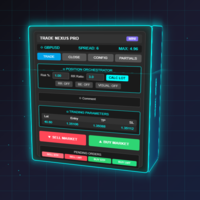
Transform Your Trading with Advanced Automation Management EA TRADE NEXUS PRO is a sophisticated MetaTrader 5 Expert Advisor designed specifically for every trading pair. This EA combines intelligent position management with precise risk control.
Key Features That Set Us Apart Position Orchestrator System
Risk Calculation Based on Stop Loss in Pips/Points. Orders : You can set pending orders such as limit orders, market orders and stop orders Dynamic Risk Control : Customizable risk p
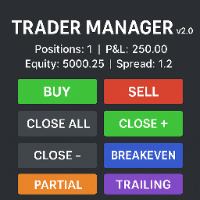
Enhanced Trader Manager Panel v2.0 The Enhanced Trader Manager Panel v2.0 is a powerful, all-in-one trading assistant for MT5 that combines advanced risk management, quick execution, and smart trade handling into a clean and user-friendly interface. Designed for both beginners and professional traders, this tool saves time, reduces errors, and gives you full control over your trades directly from the chart . Key Features One-Click Trading – Instantly Buy or Sell with automatic SL & TP pl

Ping:信頼できる取引のための不可欠なツール あなたのインターネットプロバイダーとVPSは安定した接続を約束していますが、本当に信頼できますか?1ミリ秒が重要となる世界では、遅いまたは不安定な接続は、利益の損失や損失につながる可能性があります。 Ping スクリプトを使用すると、次のことが可能になります。 情報に基づいた意思決定: 異なるVPSサーバーやブローカーの速度を視覚的に比較し、あなたの取引戦略に最適な最速で最も信頼性の高い接続を選択できます。 リスクの排除: これは、注文の実行速度が結果に直接影響するスキャルパーや高頻度トレーダーにとって特に有用です。 問題の特定: インターネットやVPSがいつ故障しているかを素早く検出し、取引に影響が出る前に対応できます。 妥協のない作業: 私たちのスクリプトは、他のExpert Advisorと競合することなく、あらゆるチャートと時間足で動作します。可能な限り便利で目立たないように設計されています。 Ping スクリプトは、MetaTrader 5ターミナル専用に開発された、接続速度と信頼性を監視するあなた自身のモニターです。ブローカー
MRDTトレードマネージャー - MT5用プロフェッショナルトレーディングツール ワンクリックで効率的なトレードを実現 MRDTトレードマネージャー は、MetaTrader 5プラットフォーム上でプロ級のポジション管理を可能にするスクリプトです。チャートに固定されたボタンで、重要なトレード機能に即座にアクセスできます。 主な利点: 超高速執行 - ワンクリックで即座に注文執行 包括的なポジション管理 - 全てのポジション、買いのみ、売りのみを即時決済 リスク管理機能 - ポジションの一部決済が可能 自動ブレイクイーブン - ストップを約定価格に移動 現在の銘柄に集中 - アクティブなチャートの銘柄のみを管理 主要機能: クイックトレードボタン - 設定可能な固定ロットサイズ 即時決済 - 全ポジション、買いのみ、売りのみを閉じる 半分決済 - 約50%のポジションを減らす ブレイクイーブン保護 - ストップを約定価格に移動 シンプルなインターフェース - チャートに常に表示されるボタン こんな方に最適: 高速執行が必要なデイトレーダー 速い市場

https://www.mql5.com/en/blogs/post/768319 ホットキー i - EAコントロールパネル。 E - トレードアシスタント。 G - パフォーマンスパネル J - ニュースフィルターパネル B - 買い。 S - 売り。 1-2-3 - 買い(ロット数はカスタマイズ可能) 4-5-6 - 売り(ロット数はカスタマイズ可能) L - Buy Limit。 M - Sell Limit。 U - Buy Stop。 N - Sell Stop。 Q - ストップロスを削除。 W - テイクプロフィットを削除 C - すべての保有ポジションを決済。 X - 特定のポジションを決済。 Z - すべての未約定注文をキャンセル。 T - トレーリングストップ。 P - 部分決済。 K - ブレークイーブン。 O - ポジション 7-8-9 - カスタム時間足 A - リスク/リワードガイドを描画 F - フィボナッチリトレースメントを描画 R - 長方形を描画 V - 垂直線を描画 H - 水平線を描画 D - トレンドラインを描画 Y - テキストを描画 ホッ
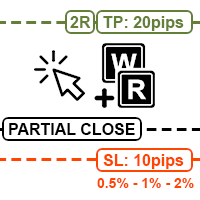
MT5チャート上で直接リスク計算、注文発注、ポジション管理ができる、ホットキー操作の高速ユーティリティ。 画面の半分を占領し、いざという時に限って動作が重くなる、扱いにくく肥大化した取引パネルにうんざりしていたため、このツールを開発しました。すっきりしたチャートと、キーボードとマウスだけで手動売買を素早く実行・管理できる環境が欲しかったのです。 これは手動トレーダー向け、特に約定速度、クリーンなチャート、そして正確なリスク管理を重視するスキャルパーやデイトレーダー向けに設計されています。 より詳しい概要は動画をご覧ください。 主な機能: 高速注文執行: Q キーで成行注文、 W キーで指値・逆指値注文。マウスをストップロスの水準に合わせて発注するだけ。手動でのロット計算は不要です。 逃したエントリーのリスク計算(ホットキーE): 価格がすでに動いてしまった場合でも、以前のタイミングでエントリーしたと仮定してロットサイズを計算できます。希望のエントリー位置にマウスを合わせて E キーを押し、ストップロスの位置に移動するだけで、EAがリスクに応じた正確な出来高を計算します。 スマートなリス

Info Exporter MT5は、ターミナル情報、アカウント情報、取引履歴、注文履歴をローカルCSVファイルへエクスポートし、メールを送信したり、Apps ScriptでデプロイされたURLを使用してGoogleスプレッドシートに直接エクスポートしたりできます。 CSVへのエクスポート、メールを使用したエクスポート、Googleスプレッドシートへのエクスポートから選択できます。また、エクスポートしたファイル名やスプレッドシート名を変更することもできます。 使用する入力パラメータ: export terminal informations ? : 端末情報をエクスポートするかどうかを選択します。値は true または false に変更できます。 terminal info file or sheet name : デフォルトは「 Terminal_Info 」ですが、入力プロンプトで変更できます。 export historical deals ? : 取引履歴をエクスポートするかどうかを選択します。値は true または false に変更できます。デフォルトは false で、
FREE
EA Portfolio Analytics Dashboard Pro - Advanced Multi-EA Performance Monitor EA Portfolio Analytics Dashboard Pro is a professional MetaTrader 5 tool designed for advanced portfolio management and real-time performance analytics. Monitor all your Expert Advisors simultaneously with institutional-grade metrics. Key Benefits: Multi-EA Performance Matrix: Track unlimited EAs and their statistics in a single view. Real-Time Risk Analytics: Monitor key metrics like Sharpe Ratio, Value at Risk (V

Isheguve Trend Scoutで市場分析をマスターしよう! トレンドラインを手動で引き、市場の重要な変化を見逃すことにうんざりしていませんか? Isheguve Trend Scoutは、チャート上のトレンドラインを自動的に識別して描画することで、トレードを優位に進めるために設計されたMQL5ユーティリティアプリです。 Isheguve Trend Scoutを選ぶ理由 労力いらずのトレンド検出: 推測はやめて、アプリに作業を任せましょう。Trend Scout Proは過去の価格データをインテリジェントに分析して重要なスイングポイントを見つけ、正確なトレンドラインを自動的に描画します。 完全カスタマイズ可能: あなたの取引スタイルに合わせてアプリを調整できます。上昇・下降トレンドラインの有効化/無効化を簡単に切り替え、好みの色を選択してチャートの表示をパーソナライズできます。 現在の時間足でどの時間足でも分析可能: スキャルパー、デイトレーダー、長期投資家のいずれであっても、現在の時間足で価格の動きを監視しながら、希望の時間足でトレン
FREE

Utility TimeLs Close Positions は、MetaTrader 5 においてポジションの管理と自動決済を行うためのツールです。 時間、シンボル、方向、マジックナンバー、コメントに基づいて、オープンポジションをいつどのように決済するかを柔軟に制御できます。 特定の曜日に取引を無効にできます
すべてのポジションを決済する特定の時刻を設定できます
シンボル、方向(買い/売り)、マジックナンバー、コメントでフィルタリングが可能です
「取引1」「取引2」「取引3」の最大3つの単発決済イベントを日付と時刻で設定できます
現在の設定と今後の決済イベントを表示する情報パネルをチャート上に表示するか選べます
チャート上の文字サイズと色をカスタマイズできます
Multiple Orders Utility EA(MT5バージョン) Multiple Orders Utility MT5は、大きな値動きを待たずに、小さな値動きで素早く利益を得られるように設計されています。 有用性:
このツールは、ユーザーが指定した数、またはブローカーが許可する最大数の注文を、同一通貨ペア・同一方向に同時に発注します。 戦略:
100~200ピップスを狙うのではなく(それは時間がかかりすぎたり現実的でない場合があります)、短い利益目標で複数の注文を同時に開くことができます。
例えば、5つの注文をそれぞれ20~25ピップスの利益目標で設定すれば、価格がわずか25ピップス動くだけで合計125ピップスの利益を得ることができます。 このツールは使いやすい反面、ストップロス(SL)とテイクプロフィット(TP)が小さいため、エントリー前に市場分析と価格の進行方向を正確に把握する必要があります。SLとTPの比率は1:1または1:2を推奨します。 ストップロスなしで取引するのは厳禁です! リスクを軽減するために、このEAには ブレークイーブン(Breakeven)機能 が
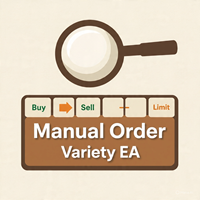
Manual Orders Variety Utility EA は、ユーザーがチャート上のボタンをクリックするだけで、 Buy(買い) 、 Sell(売り) 、 Buy Stop(買いストップ) 、 Sell Stop(売りストップ) 、 Buy Limit(買い指値) 、 Sell Limit(売り指値) といったさまざまな注文を手動で発注できるように作られたユーティリティ型エキスパートアドバイザーです。 機能特徴: ユーザーの設定に応じて、チャート上のボタンからワンクリックで単発注文や複数注文を任意の種類で手動発注可能。 すでに開いているポジションをクローズしたり、未約定の指値・逆指値注文を削除可能。 ブレークイーブン(損益分岐点調整) や トレーリングストップ などのポジション管理機能を搭載。 ユーザー設定によって、このEA以外で開かれたポジションも管理可能。 ローソク足の残り時間を表示するカウントダウンクロックを搭載し、ユーザーはその位置をチャート上で自由に設定可能。 スプレッド計算機 を搭載し、現在の通貨ペアのスプレッドを表示。設定した最大値を超えると文字色が赤に変わり、必

Easy Order Watcher — スマートなトレード監視と通知 どこにいてもトレードをコントロールできます。
Easy Order Watcherは、軽量かつパワフルなエキスパートアドバイザー(EA)です。リアルタイムトレードを追跡し、ポジションが重要な利益または損失レベルに達すると、ユーザーが設定したしきい値に基づいて即座に通知します。また、リアルタイムの証拠金レベルと、ユーザーのタイムゾーンに合わせてタイムスタンプ付きのアラートを表示します。
デスクから離れている場合でも、複数のトレードを管理している場合でも、このEAは、ユーザーの戦略に合わせてカスタマイズされた高精度のアラートで最新情報を提供します。
v1.10の新機能: カスタムタイムゾーンのサポート タイムゾーン(+/-時間)をローカル時間に合わせて調整することで、アラートを確認する際の混乱を解消できます。
ユーザー定義の利益/損失マイルストーン 固定値に縛られることなく、独自のしきい値(例:利益+50ドルごと、損失-100ドルごと)を設定できます。
主な機能: ゼロからプ

トレーディングスキル&ストラテジーテスター – マルチインジケーター・ビジュアル実行EA MT5ビジュアルテスターは、トレーディングスキルを磨き、戦略を練習し、実行速度をテストするためのプロフェッショナルツールです。7つの切り替え可能なインジケーター、瞬時に操作できる買い/売り/決済ボタン、そしてカスタマイズ可能なパラメータを搭載。初心者から上級者まで、リアルマネーをリスクにさらすことなくトレーディングを練習するのに最適です。
リアルマネーをリスクにさらすことなくトレーディングをマスター トレード初心者でもベテランのプロでも、優れたアイデアと利益を生む取引の違いは、実行力にあります。 ストラテジーテスターのトレーディングスキルは、MetaTrader 5ビジュアルテスター用のパーソナルトレーディングシミュレーターです。エントリータイミング、トレード管理、そしてストラテジー実行を安全な環境で練習でき、実際の市場データも使用できます。
主な機能 7種類のプロフェッショナルインジケーター – すべて切り替え可能
EMA50とEMA200 (トレンド確認)
ストキャスティクスオシ

Buy Sell Multiple Panel - Execute Bulk Orders in a Single Click! Description Save time and seize market opportunities instantly. This powerful panel allows you to place multiple buy or sell orders simultaneously, each with custom lot sizes, take-profit, and stop-loss levels. Perfect for sophisticated entry strategies and managing complex trades efficiently. Key Features Bulk Order Execution: Open multiple market orders at once with just one click. Flexible Lot Sizing: Set individual lot sizes f

Fast CopyTrade LAN — Local Trade Copier for MetaTrader 5 Overview
Fast CopyTrade LAN is a fast, DLL-free local trade copier for MetaTrader 5. It instantly copies trades between MT5 accounts on the same PC — copying OPEN, PARTIAL, MOD (SL/TP) and CLOSE from a Provider to one or more Receivers. This copy trader uses the MT5 Files folder for secure local messaging, requires no external files, no DLLs, and is fully Market-compliant. Advantages Fastest local copy trading with very low latency Market
FREE

The Smart Trading Tool is a powerful all-in-one solution designed for traders who want precise and professional technical analysis in MetaTrader 5. With it, you can: Draw supply and demand zones perfectly identified by timeframe. Mark key liquidity zones to anticipate market moves. Plot ICT OTE zones and detect IFVG (Imbalances / Fair Value Gaps) with accuracy. Use an interactive Trading Box to instantly calculate the risk/reward ratio of your trades. With its intuitive design and advanced featu
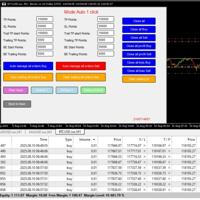
English Easy Trading Manager is an Expert Advisor designed to simplify trade management, enabling traders to quickly set and adjust trade parameters without manually modifying orders.
It supports both Automatic Mode and Semi-Automatic Mode , making it ideal for traders who want the system to protect profits, reduce risk, and offer flexible control. Key Features Auto Mode – Automatically applies TP, SL, Trailing Stop, and Break-even settings to new orders
Semi-Auto Mode – Manually adjust TP/S

Demonstration Video: https://youtu.be/JEsU5Qic_bo?si=-feUD0Zr3qdPjomg Elevate Your Trading with Precision and Control Introducing the Ultimate Trade and Alert Assistant by Feedosky — a powerful, highly customizable Expert Advisor for MetaTrader 5. This EA combines advanced multi-level price alerts with fully independent trade execution, giving you complete control over how you react when price reaches important levels. Why Traders Love UTAAA in 2025 The smartest multi-level price trigger system

Enhance Your Manual Trading Workflow in MetaTrader DrawTrade is a total reimagining of how you interact with MetaTrader by introducing a flexible and intuitive interface designed specifically for manual traders. It enhances chart navigation, improves drawing responsiveness, and streamlines trade execution — all with tools that feel natural to use and quick to master. Core Navigation Improvements Mouse Flick Navigation
Quickly pan across charts with a flick of the mouse, improving chart expl

TradeGuard Pro – Automatic Stop Loss Utility with Telegram Notifications
TradeGuard Pro is a useful utility designed to improve MetaTrader 5 trading. TradeGuard Pro is a powerful utility designed to enhance your MetaTrader 5 trading by automating stop loss management, delivering real-time Telegram notifications, and providing detailed trade tracking. Perfect for forex, crypto, and metal traders. Key Features Automatic Stop Loss Management
Set initial stop losses (pips or ATR for non
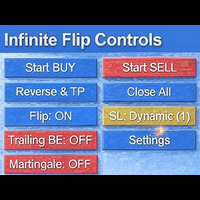
FlipPro Unlimited EA Manual
1. Introduction
FlipPro Unlimited is an Expert Advisor (EA) designed for the MetaTrader 5 (MT5) trading platform. It is a versatile trading tool that allows users to initiate buy or sell positions with customizable stop loss (SL) mechanisms, and it supports automated flipping of trade directions upon hitting SL. The EA includes features like dynamic or fixed SL, trailing to breakeven (BE), martingale pending orders, target profit closure, and a common take profit (

“One-Click Flatten — Fast, Clean, Reliable” Close all orders and positions in your account with a single click — no hassle, no fumbling through tabs.
Time-saving tool for traders needing instant exit from the market—especially during volatile moves or news events.
Emotion-free execution reduces human errors and hesitation—just click and it's done.
Easy to use: load the EA in MT5 and let it handle the rest. Perfect for both beginners and seasoned traders.
Fu
FREE
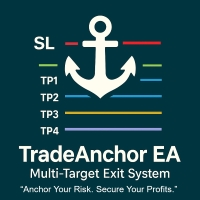
MultiTP Trade Manager EA — Advanced Trade Management Made Effortless (MT5)
Limited Offer – First 100 Downloads FREE!
Be among the first 100 traders to download Trade Anchor Manager (MT4/MT5) completely free of charge. Hurry – once the limit is reached, the offer closes instantly! After trying it out, we’d love if you could leave a review and share your thoughts – your feedback helps us improve and lets other traders know what to expect.
Need this Trade Anchor Manager for MT4? http
FREE

Sam's Automatic SL-TP System
Take your gold trading to the next level with Sam's Automatic SLTP System! This Expert Advisor (EA) is designed to simplify your trading by automatically applying your predefined Stop Loss (SL) and Take Profit (TP) levels to every trade you place on gold (XAUUSD) – effortlessly and without manual intervention. No more worrying about setting SL and TP for each trade! Once you configure your desired SL and TP values in the EA’s settings, the system takes care of the
FREE

RTrade panel is easy trading panel use both (Stop Loss & Take Profit) based on pips with easy interface can be use by anyone
Panel Feature: -Open position based on (Lot) size
-Auto detect entry price -Use Stop Loss based on (pips) -Use Take Profit based on ( pips ) -Close all position in one button click
i will add more function in future update if you like it write your review
FREE

️ Prop Firm Risk Management Expert Advisor – Your Account’s Security Shield! If you are trading in prop firm challenges , this Risk Management EA is exactly what you’ve been looking for!
In the world of prop trading, there’s no room for mistakes – one wrong or emotional trade can wipe out your account and weeks of hard work…
But with this smart and precise EA , you can trade with confidence, knowing you’ll never cross your prop firm’s red lines. This EA is a tested, reliable, and powerful too
MetaTraderマーケットは、他に類のない自動売買ロボットやテクニカル指標の販売場所です。
MQL5.community ユーザーメモを読んで、取引シグナルのコピー、フリーランサーによるカスタムアプリの開発、支払いシステムを経由した自動支払い、MQL5Cloud Networkなど、当社がトレーダーに対して提供するユニークなサービスについて詳しくご覧ください。

取引の機会を逃しています。
- 無料取引アプリ
- 8千を超えるシグナルをコピー
- 金融ニュースで金融マーケットを探索