 MetaTrader 5
 エキスパート
 インディケータ
 ライブラリ
ライブラリ
 ユーティリティ
 ウィジェット
 ルール
ルール
YouTubeにあるマーケットチュートリアルビデオをご覧ください
ロボットや指標を購入する
仮想ホスティングで
EAを実行
EAを実行
ロボットや指標を購入前にテストする
マーケットで収入を得る
販売のためにプロダクトをプレゼンテーションする方法
MetaTrader 5版新取引ユーティリティ - 61
 以下はMetaTrader5での取引を簡素化する取引プログラムです。ユーティリティにカーソルを合わせると、その説明と目的が表示されます。
Mtf Candle Alert Telegram – A Reliable Tool for Market Analysis Analyze the market, identify trends, and refine your strategy. Mtf Candle is an advanced indicator designed for traders seeking a structured approach to market visualization. This tool enhances technical analysis by providing a clear and organized display of market trends. What Does Mtf Candle Offer? Comprehensive Bar Analysis – Monitor bars across multiple timeframes and assess market direction. Trend Statistics – Track the sequen

Autogrids Autogrids EA is a cutting-edge trading automation tool designed to give Forex traders an unparalleled edge in the market. Built on a powerful quantitative strategy, it analyzes the frequency distribution of daily price movements, leveraging historical data to create a highly optimized operational grid. ️ Key Features Dual Strategy Mode: Quantitative or Manual Grid: Choose between the Quantitative Mode, which automatically generates grids based on the statistical distribution of d

Скрипт для быстрого закрытия рыночных и отложенных ордеров. Этот зацикленный скрипт гарантированно закроет все выбранные ордера. Он будет работать, пока не закроет все выбранные позиции и удалится когда сделает свою работу. Если у Вас много открытых позиций этот скрипт поможет вам. Интуитивно понятный интерфейс 1) Просто бросьте его на график. 2) Выберите ордера, которые надо закрыть. По умолчанию выбраны все! 3) нажмите кнопку "Close". Если вы забыли включить Авто торговлю, будет выдано сообщен
FREE

A trailing stop loss is a risk-management tool that automatically adjusts the sell trigger point for a financial instrument as its price rises or falls and by using this trailing sl program it insures that your trades will be risk free each and every time How it works A trailing stop loss is set at a fixed distance from the current market price, either as a percentage or a fixed dollar amount. When the price moves in a favorable direction, the stop price moves with it to maintain that distance

Equity Shield Pro 1.1
Equity Shield Pro 1.1 is a powerful utility EA designed to safeguard your trading account by actively monitoring and enforcing equity protection and profit management rules. Whether you’re trading personal accounts or working through proprietary firm challenges, this EA ensures strict adherence to risk and profit targets, enabling you to maintain discipline and consistency. Fully compatible with all challenge types, Equity Shield Pro 1.1 is specifically crafted to meet th

Trade Manager Rocket The execution layer MetaTrader 5 was missing Your strategy is only as good as your execution. Most traders know what to trade — they lose consistency in how they execute it. Incorrect lot sizes, slow entries, and manual break-even management quietly destroy accounts that had every reason to survive.
MetaTrader 5 gives you a charting platform. It doesn't give you execution discipline.
That gap — between your decision and a correctly sized, cleanly executed trade — is where
FREE

An excellent assistant for those who trade using Sniper strategy, Price Action, Smart Money.
The Advisor finds and draws:
-Reversal Levels and Reversal Zones
-Continued Movement
-Current trend and trend
-6 Patterns of the Sniper trading system
-Draws a story for a set number of bars
All graphical constructions can be customized to your taste, and you can also prohibit the construction of
separate formations.

[FEEL FREE TO DM ME IF YOU NEED SUPPORT] MANotifier.mq5 - Moving Average Crossover Notification Utility The MANotifier.mq5 is a utility designed for MetaTrader 5 that monitors the crossover of two Moving Averages (MAs) and sends notifications based on the crossing events. The utility supports various notification types, including mobile notifications , email alerts , and on-screen pop-up alerts , making it ideal for traders who want to stay informed of key market events in real-time. Key Feature

The Nrp Suchin Smart DCA Assistant v2.2 is a versatile Expert Advisor (EA) designed to enhance trading strategies with a focus on DCA (Dollar-Cost Averaging). It is a comprehensive tool that offers support for automated trading systems, assists other EAs, and provides functionality for manual traders. This EA stands out by seamlessly integrating with diverse trading environments, enabling traders to optimize their strategies with precision and flexibility. Whether you rely on automated trading o

Product Description: OnePrice Click MultiTrade EA The OnePrice Click MultiTrade EA is a powerful tool for traders who seek precision and efficiency in managing multiple trades within the MetaTrader 5 platform. This automated trading solution allows users to open multiple trades simultaneously, either at a specific price level or with the click of a button. Designed with flexibility and user-friendliness in mind, the OnePrice Click MultiTrade EA is perfect for both novice and experienced traders

Telegram Controls (Telecontrol) — performs communication between the bot Telegram and the terminal MetaTrader 5 . It helps aggregate data from multiple terminals and manage them using a bot in Telegram . The service is convenient for working on multiple MT5 terminals, allowing each terminal to be individually configured for optimal display and perception of information. All terminal data is collected in one Telegram channel, and the settings panel allows quick adjustments and saving of changes i
FREE
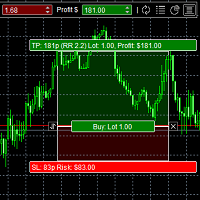
The panel was created to manage trading positions: to open new trades and close existing ones. To open new transactions, you can set the position volume, Stop Loss in points, risk in dollars or as a percentage, Take Profit in points or Profit in dollars, you can set the Profit/Risk parameter. It is possible to place a panel on the active chart to visually set the parameters of a new transaction, select a market order or a pending one. If you fix the RR parameter, then when Risk changes, Profit w
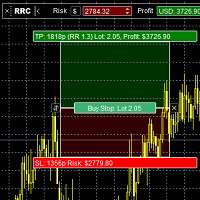
Risk Calculatorr Panel MT5
Professional trading assistant for MetaTrader 5.
Open trades faster, calculate precise risk instantly, and manage positions like a professional trader.
WHY TRADERS NEED THIS PANEL
Many traders lose money because they:
• use wrong lot size • risk too much per trade • enter too slowly • manage positions emotionally • open trades without clear RR ratio
This panel helps solve these problems in seconds.

Download DEMO here https://www.mql5.com/en/blogs/post/759772
An ultimate panel you've never seen before. Compact and nice Trade panel with large Total P/L and it's percentage display. Groups for trades summary available: Ticket, Symbol, Type, Category, and Magic. Average price field helps you know your trading average price and direction. Set magic and comment of your trading in a very easy way. Group closing by symbol, type, category or magic - only by one click. Close All button for a quick

Description The indicator based on Average True Range (ATR) is designed to accurately determine the possible range of price fluctuations on a selected timeframe. This tool is ideal for both beginner traders and experienced professionals looking to effectively plan their trades. Key Features: Displays possible price fluctuation levels on the chart, simplifying visual analysis. Utilizes the power of the ATR algorithm to calculate precise volatility values. Adapts to any timeframe, providing releva
FREE

Ruler is important but just a simple tool. Why people make it too complex? Easy Ruler makes it great again. Almost zero setup required, nothing annoying on chart, quick and accurate. Easy Ruler MT5 just help you measure 2 points on chart quickly and accurate. That's all!
To support you better, it has magnet mode to pick points more accurate and works on indicator windows too (38 indicators that provided by MT5 by default). This smart ruler provides these information right on chart in no time t

Auto SLTP Pro can help you setSL & TP automatically for positions & pending orders * 2 modes: - Points - USD * Symbol Filter: Select All or a specific symbol * For pending orders: Select true to set SLTP for pending orders Note: Only valid for positions (pending orders) without SL&TP! Join my channel here for more useful management tools: * Remote Tools via Telegram: Super Assistant, Master Close, Master Control, Master Notify * Free Tools: Tele Notify, Price Alert, Quick Close
FREE

Swap Sort is an MQL5 script designed for traders and investors to streamline their decision-making process by efficiently analyzing and organizing swap fees for financial instruments. This tool is ideal for professionals who want to optimize their trading strategies by minimizing costs and maximizing profits.
Swap fees can significantly impact the success or failure of a trade, as high fees can erode profits over time, while favorable swaps can enhance returns for positions held overnigh.
Wit

あなたに代わって、あなたの正確なエントリーおよびエグジット条件でトレードできるトレーディング ボットがあるかどうか疑問に思ったことはありませんか。心配する必要はありません。Pebble がここにあります!
RSI トレーディング パネルでトレード パラメータを設定し、[トレード開始] を押すだけで完了です。残りの作業は Pebble が行います。
Pebble を使用する利点は次のとおりです:-
トレードから人間の感情を排除します。
24 時間年中無休でアクティブであり、トレード条件を検索します。
自動的に注文を出し、ストップ ロスを損益分岐点に移動します。
ポジションは、SL と TP だけでなく、RSI 条件に基づいて終了することもできます。 RSI 期間をパネルから直接変更します。
サブウィンドウ 1 に緑と赤の線を配置して、それぞれ購入レベルと販売レベルを簡単に視覚化できるようにします。
FREE
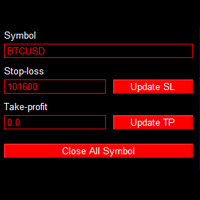
これは、任意のシンボルに属するすべての未決済注文のストップロス、利益確定、または注文をクローズするのに役立つ EA です。使い方は簡単で、取引するシンボルを入力し、ストップロス価格またはテイクプロフィット価格を入力して「更新」ボタンをクリックするだけです。
一括注文クローズ機能と同様に、注文をクローズしたいシンボルを入力し、「すべてのシンボルをクローズ」ボタンをクリックするだけです。すべての注文が終了するまで、直ちにご注文は徐々に終了されます。
このツールは、多くの注文をオープンし、以前は一度に 1 つの注文ずつ継続的に SL と TP を設定していた人に適しています。今では、わずか 1 クリックでより速く設定できるようになります。

MetaCluster Makes Any Market Transparent! MetaCluster is a professional trading and analytical system for effective trading on Forex , Crypto markets , and Binary Options . MetaCluster performs volume-cluster analysis simultaneously across multiple timeframes of an asset (Multi-Timeframe Analysis), identifying and displaying Target Zones for trade entries that remain invisible when analyzing a single timeframe. This allows you to see the traces of the Market Maker (smart money) and follow him,

Fe el free to contact me for any extra features :) [SEE MT4 VERSION https://www.mql5.com/en/market/product/128848 ] The Local Copier EA is an Expert Advisor (EA) designed to synchronize trading positions between a master account and a slave account, operating in either Master or Slave mode. Key Features: Master Mode :
In Master mode , the EA monitors open positions and stores relevant trade details. These details include symbol, volume, stop loss, take profit, and position type, which are used

Expert Advisor that synchronizes positions between a Master and Slave account but with a twist: it reverses every trade . Master opens Buy → Slave opens Sell (same volume, SL/TP mirrored) Master opens Sell → Slave opens Buy (adjusted SL/TP) Continuous sync: positions closed on Master = closed on Slave, new positions are instantly reversed Perfect for hedging , contrary strategies , or testing directional bias across two accounts. For Support & Customization I’m here to ensure you get the most

Introduction Welcome to the world of Forex trading, where every tick of the market can be influenced by news events. Introducing our expert advisor for MetaTrader, your ultimate tool for navigating the complexities of news trading. This innovative advisor is specifically designed to automate your trading strategy during key macroeconomic releases, ensuring you never miss an opportunity. When important indicators are announced, volatility often spikes, creating potential for profit. Our expert
FREE

とてもシンプルな過去検証ツールです。 Startをクリックすると、過去チャートの一番過去にさかのぼって始まります。 スプレッドは0.2pips、最大10回ナンピンが可能です。 ローソク足の大きさと時間枠をパラメータとして設定できます。 検証中に時間枠を変更することは出来ません。 ボタンの機能は以下の通りです。 ------------------------------------------------------------ Resume/Pause: 自動スクロールのストップ・再開 Next bar: ローソク足を一つづつ進める Speed1,2,3: 自動スクロールのスピード Skip: チャートを少しスキップ Start/End: 開始・終了 Buy: 1ポジション買い注文
Sell: 1ポジション売り注文 Close: 全ポジションの決済 ------------------------------------------------------------
売買の結果は左上にポイント数(勝ち回数:負け回数)として表示されます。
FREE

a script created with ChatGPT. It changes the symbol in every other chart window to the symbol of the window where you run the script. The story behind it. I use MT5 across 2 monitors. Same price/symbol, different candles. because changing the symbol in every window was tedious. So I had ChatGPT write this script. Important: this script only changes the symbol, everything else like indicators or objects is not transferred to other chart windows
FREE
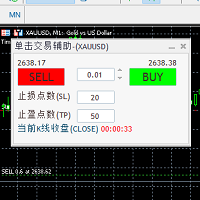
Comes with a one click order trading shortcut key and a trading panel that counts down the closing time of the candlestick in seconds. The take profit and stop loss points can be set in the panel; The displayed countdown seconds are the closing countdown time of the current candlestick in the chart cycle; A trading panel with built-in one click order trading shortcut key and K-line closing time countdown seconds

A simple Reverse Position tool.
Just a simple tool to make you reverse your position from e.g long position to short position. This tool also allow you to set SL and Risk to Reward Ratio, so you are safe while reversing your position. Also calculates your all volume order in current open position and reverse all of the open position to make opposite position. works on any symbol, just load the EA and add to your symbol you want to trade.
Remote Trade Copier is an advanced tool designed for efficiently copying trades between accounts in both local and remote modes. It allows for lightning-fast order replication from a master account to a slave account. In local mode, trades are copied instantly, while in remote mode, the copying process takes less than 1 second. MT4 Version (Only Local)
MT5 Version (Only Local)
MT4 Full Version (Local & Remote) Local mode refers to both MetaTrader platforms being installed on the same system,

The "Smart Partial TP & Daily Loss Limit Manager" is a versatile and powerful MQL5 indicator designed to help traders manage their trades more effectively. It combines two essential features that improve trading discipline and profitability: partial take-profit (TP) closing based on risk-reward ratios and a fixed daily loss limit to protect your capital. Key Features: Partial Take-Profit (TP) Close: This feature allows traders to set a percentage for partial TP closure (e.g., 50%). Once the pric
FREE

Advanced Trailing Stop Loss Utility Optimize your trading strategy with the Advanced Trailing Stop Loss Utility , a powerful tool designed to dynamically protect your profits and minimize losses. Whether you're a beginner or an experienced trader, this utility ensures that your trades remain secure while maximizing potential gains. Key Features: Dynamic Stop Adjustment : Automatically adjusts the stop loss level as the market moves in your favor, locking in profits while allowing for market fluc

このツールは、MT5の経済指標の使いやすさを向上させ、データをMT4とシームレスに共有できるという2つの大きなメリットを提供します。例えば、10年以上前の経済指標データをトレーニングやバックテストで効果的に使用することができます。また、MT4の PracticeSimulator とも互換性があり、過去データを使用したトレード練習からMT4での本番トレードまで活用できる貴重なツールです。 MT4で経済指標をシームレスに共有するために 。 >> MT4版 MT5経済指標の向上 過去データへのアクセス : 10年以上前のイベントを含む経済指標データを分析し、詳細なバックテストと履歴のレビューが可能です。 カスタマイズ可能な表示 : 経済指標はチャート上に目立たず表示され、背景に溶け込むように調整できます。 自動タイム調整 : タイムゾーンやサマータイムを自動的に調整し、過去のイベントの正確な表示を保証します。 MT4の互換性とメリット シームレスなデータ共有 : MT5の経済指標データを直接MT4チャートで使用し、本番トレードや練習に対応します。 PracticeSimulatorとの統合
FREE

Get you a Free Utility EA that will show closed positions results on your chart
fun little feature that make every trader really happy
EA will not open or manage position only show historical results on the chart
chose color and size
Please leave 5 start review if you liked this free tool
make sure to check out my trading EA the EA Bull scalper https://www.mql5.com/en/market/product/116071?source=Site+Profile+Seller or the EA Bear Scalper https://www.mql5.com/en/market/product/123680?s
FREE

Virgilio is a multifunction control panel consisting of several panels, each of which performs one of the most useful functions used by traders.
Its aesthetic is unique, designed to blend into any working environment and offer a user experience that makes work even more enjoyable.
Its operativity is simple and intuitive, developed with attention to details to be as userfriendly as possible.
Its main panel displays all the basic account and chart data.
The first panel offers the user the possib

Hermes is a control panel that allows you to easily and effectively open market positions and place pending orders. In addition, thanks to its send and receive functions, Hermes can connect two or more terminals, copying the operations of one to the other or to the others.
The send and receive functions for orders and market positions are independent of each other, i.e. it is possible to send positions to be copied to one terminal and orders to another, or to copy positions from one terminal and

This tool highlights on the chart the areas of greatest interest to a trader with bands or lines of varying colour intensity indicating the levels on which the price on the chart in question has been stationary the longest.
It works in the classic mode, drawing a histogram on the right-hand side of the chart, or in a new mode consisting of bands of varying colour intensity, with the most intensely coloured ones representing the price levels with the most intense volumes.
Volumes are always calcu

Kronos is a multi-timer that displays local time, server time and the countdown of the current period. The programme is multilingual, with a choice of English, Italian and Spanish Language selectables in input.
Available in four colours and with the choise of five types of font to be used.
Like any other programme we have created, the graphic interface is developed to be non-invasive and intuitive.
At start-up, the three windows that make up the graphic interface of Kronos are closed on the left
This tool automatically generates support and resistance based on calculations, thus eliminating any subjectivity when plotting support and resistance. Additionally, it allows to identify trend changes (when support and resistance are together), continuation of downtrend (when resistance is below support). Two standard deviations are also added, so that TP and SL zones can be identified. In its configuration it is possible to calculate quantitative support and resistance for timeframes of 1 wee

Ziwox Global Economy Tools What are the Ziwox Global Economy Tools? The Ziwox Global Economy Tool is a comprehensive solution for forex traders, providing historical economic data and index charts for the most critical countries in global trading. Designed to enhance trading decisions, this tool allows you to easily access, analyze, and visualize key economic indicators from countries like the EU, US, GB, CA, AU, NZ, JP, CH, CN, IT, DE, FR, BR, MX, ZA, SG, HK, IN, NO, KR, ES, and SE. Traders can
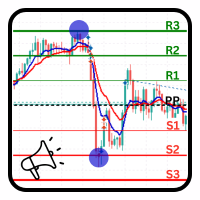
PivotPoint Notifier – Dynamic Pivot Point Tool with Alerts Description: The PivotPoint Notifier is a versatile and customizable MetaTrader 5 tool designed to dynamically calculate and display key support and resistance levels on your chart. It supports four different pivot point calculation methods— Standard , Woodie , Camarilla , and Fibonacci —allowing traders to select the one that best suits their trading strategy. This tool automatically plots the Pivot Point (PP) , Resistance levels (R1, R

Take full control of your trading with the BalanceGuard Expert Advisor. This smart risk-management tool continuously tracks your account equity and activates a protective stop once your predefined drawdown limit is reached—so you never risk more than you’re comfortable with. Featuring adjustable drawdown settings and a clean, intuitive dashboard that displays essential account statistics, BalanceGuard empowers you to trade confidently while protecting your capital.

This trading bot is designed for MetaTrader 5 (MT5) to manage open positions effectively by automating partial closures based on a predefined risk-reward ratio. It includes Telegram integration to send notifications directly to your group or channel about trading activities, including entry, stop-loss, and take-profit levels. Key Features : Partial Close Management : Automatically closes a percentage of the trade volume when the target level is reached. Risk-Reward Calculation : Sets profit leve
FREE

Looking for a way to manage account drawdown for Prop Firms or general risk management purposes? Look no further; this simple expert advisor does exactly that!
Account Balance Percentage Limit If your current account balance is $5000 and you set a 10% limit ($500), Equity Sentinel will close all trades when the account equity reaches equal or less than $4500 and close all charts.
Floating Drawdown Percentage Limit If your current account balance is $5000 and you set a 5% limit ($250), Equity S
FREE

リスクコントロールアドバイザー
「リスクコントロール」は、MetaTrader 5 の高度なポジションマネージャーであり、指定されたリスクパラメータとリスク/リワード比率(RR)に基づいて、部分的なポジションクローズのプロセスを自動化します。このアドバイザーは、トレーダーがオープンポジションを効果的に管理し、リスクを最小限に抑え、潜在的な利益を最大化するのに役立ちます。 その他の製品 -> こちら 主な機能: - 指定されたパラメータに基づいた自動部分決済; - リスクレベルとリスク/リワード比率(RR)の柔軟な調整; - パラメータの簡単な設定のための直感的なユーザーインターフェース; - ワンクリックでアドバイザーパネルを非表示/表示する機能; - チャート上の部分決済レベルの視覚的な表示; - スプレッドレベルの視覚的な表示と、ポジションエントリー時のスプレッドの考慮。 詳細な手順:
https://maks-haven.notion.site/Trade-Manager-for-Metatrader-5-c43cd84a0a174f23ac3829110b255110

この 自動取引ロボット は、あらゆる金融市場で正確かつ安全、効率的に取引を行いたいトレーダー向けに設計された強力で柔軟なツールです。幅広いカスタマイズ可能な機能を備え、エントリー、エグジット、リスク管理を完全にコントロールしながら、洗練された戦略を実行できます。 主な機能: リスク管理と緊急対策: エクスポージャーの手動ロック: 実際の損失を出さずに未決済ポジションをバランスさせ、リスクを手動で管理します。 「パニック」ボタン: 一度有効化するとキャンセル不可。資本保護のための緊急機能です。 取引と決済のコントロール: 全ポジションのクローズ: すべての未決済ポジションを素早く終了します。 利益または損失ポジションのみをクローズ: ポジションを柔軟に管理可能。 レバレッジとグリッド戦略: 自動レバレッジ: 設定した条件に基づきポジションを追加します。 トレンドに沿ったグリッド: 一定間隔で注文を出し、ロットを調整します。 ストップの自動移動と保護: 標準トレーリングストップと平均価格ベース: 市場の動きに応じてストップを

Optimal F Service Application Type: Service Application Functions: Calculation of the optimal fraction and trade volume to achieve maximum growth of the equity curve, based on the results of previous trades. About this app Capital management is the most crucial and often underestimated component of any trading system. Proper capital management can enhance—and sometimes significantly improve—the performance of your trading algorithm.
This application automatically calculates the optimal fractio
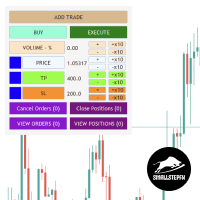
The SSFx Manual Backtester EA revolutionizes manual strategy testing in MQL5's strategy tester by offering an intuitive, feature-rich interface for managing trades with ease. Testing manual strategies has traditionally been cumbersome, but this tool simplifies the process, allowing traders to simulate forward testing using historical data as though trading in real-time. Key Features: Add Trades Seamlessly: Click the "Add Trade" button to temporarily pause the strategy tester, giving you time to

Breakout Strategy: Full Automated and Semi-Automated Trading Robot Starting with you, continuing with the robot. "After purchasing the bot, message me on WhatsApp or email, and you'll receive a powerful and highly useful indicator—perfect for trading the New York session—as a free gift!" Contact: WhatsApp How the Semi-Automated Robot Works Test is free : https://t.me/ForexAssistant The robot provides flexibility by allowing the user to define a specific area for price monitoring. Here's how
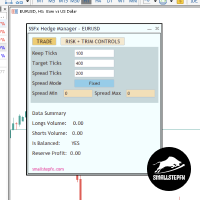
Simplify Trade Management with the SSFx Hedge Manager
The SSFx Hedge Manager is a robust Expert Advisor (EA) designed to streamline your trading experience by managing open positions through smart hedging techniques. It uses profits from winning trades to close out losing ones gradually, helping you minimize losses and maximize overall efficiency. Whether you're a seasoned trader or a beginner, this EA makes trade management seamless and stress-free. Key Features Automated Hedging :
The EA acti
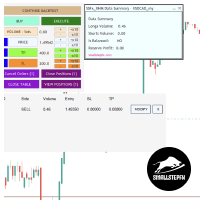
SSFx Ultimate Hedge Manager EA Description:
The SSFx Ultimate Hedge Manager EA is the pinnacle of trade management tools for the MT5 platform. Combining the advanced trade management features of the SSFx Hedge Manager EA with the comprehensive backtesting capabilities of the SSFx Manual Backtester, this ultimate product empowers traders to refine and optimize their strategies with unmatched flexibility. This EA focuses on a hedging-based approach to risk management, providing traders with a dyn

* Super Assistant is an useful management tool that helps traders perform management tasks on MT4/MT5 account remotely via Telegram such as: - Get info (account, details of positions, pending orders, floating PL, price, economic news, etc) - Open trade (open instantly with preset parameters) - Manage trade (set SLTP automatically, break-even mode, max risk, close time every day, etc) - Close trade (close all, buy, sell, win positions by one click, set awaiting close by PL, time) - Set up notifi
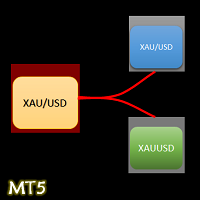
- The Symbol Changer Utility for MetaTrader is a tool that enables traders to switch between various symbols on the MetaTrader trading platform easily and quickly. - It is designed to change the symbol of the current and all open chart windows and the timeframe of the current chart window (by clicking the button). - The tool retrieves symbols from the Market Watch, displaying only the necessary symbols in the market watch.
FREE

Hi Traders, Have you ever traded using the DCA (Dollar-Cost Averaging) method with limit orders and wanted to set up Take Profit automatically? This DCA Limit Auto TP Panel is the perfect tool to support your strategy. Key Features: Lot Size: Configure the lot size for your pending orders. Martingale: Automatically increase the lot size for subsequent pending orders. Take Profit: Set your profit target in points and activate automatic Take Profit. Stop Loss: Define your risk managem

Local Trade Copiier is a professional utility designed to copy and synchronize trades between trading accounts. With its easy 1-minute setup, this trade copier allows you to copy trades between multiple MetaTrader terminals on the same Windows computer with lightning-fast copying speeds of under 0.5 seconds. Whether you're a beginner or a professional trader, the Local Trade Copiier MT5 offers a wide range of options to customize it to your specific needs. It's the ultimate solution for anyone l

This tool is designed to visualize the position and trades history and its information, such as the entry and exit points, sizes of the trades, Reward to risk ratio, Risk percent, Profit, Target and stop-loss on the chart. it makes showing trades on the chart more informative and easier to use. it's a strategic tool that enhances your trading experience on MT5 platforms. By providing a clear visual representation of your trades and customizable settings, it empowers traders to make informed deci
FREE

Positions Risk Analyzer Utility
The Trade Analyzer is a powerful tool designed for real-time monitoring of your trading performance directly on the chart. It provides insights into: Total Open Positions : Number of active trades. Potential Profit (TP) : Estimated profit if all Take Profits are hit. Potential Loss (SL) : Maximum potential loss if all Stop Losses are triggered. Floating Profit/Loss : Real-time net profit or loss of all open trades. This utility dynamically updates its calculation
FREE

Quick Close Pro by one click: * Close Buy positions * Close Sell positions * Close Win positions * Close All positions * Close All pending orders * Close All by Mobile: Select true to close all positions quicky from your Mobile by closing any position on Mobile. To close all positions by one click from your Telegram, please refer Master Close . Join my channel here for more useful EAs. Thank you!
FREE

Break-Even Pro * 3 BE modes: - RewardRisk_Single for single trade (only valid for positions with SL) - Points_Single for single trade - Points_DCA for multiple DCA trade * Start Value: value of RR or # points to start SL moving * Offset: distance in points between BE level & entry * Symbol Filter: Select All or a specific symbol * Partial Close (%): Close % initial volume when moving SL to BE (0 for no partial close) Join my telegram channel here for more useful free EAs. Thank you!
FREE

Hedging Manager Pro for MT5 Take Control of Your Trades – The Ultimate Manual Hedging Solution! Hedging Manager Pro for MT5 is a powerful tool designed to empower traders with precision and speed in critical market situations. Unlike automated EAs, this tool gives you full manual control over your hedging actions, allowing you to safeguard your capital and manage your positions with ease and efficiency. Key Features and Benefits : Manual Hedging at Your Fingertips : Hedge your positions instantl

**** New version - 1.66 **** Bug fixes, small improvements.
A Tick Chart app. It lets you create real-time tick charts, based on number of ticks per candle. You can choose the amount of ticks per candle, and the amount of ticks to load. Supports showing trade history and trade levels. When you add this EA to an instrument it automatically generates a custom symbol with the _Tick added to the name. The tick chart should open automatically. Make sure the timeframe of the tick chart is set to M

This tool is designed to visualize the position and trades history and its information, such as the entry and exit points, sizes of the trades, Reward to risk ratio, Risk percent, Profit, Target and stop-loss on the chart. it makes showing trades on the chart more informative and easier to use. it's a strategic tool that enhances your trading experience on MT5 platforms. By providing a clear visual representation of your trades and customizable settings, it empowers traders to make informed deci

The best way to place and close trades using your keyboard. Perfect for Scalpers, sniper entries.
The default keys are as follows: 8= Buy (Lots set by user) 5= Sell (Lots set by user)
9= Closes All Buy Positions 6= Closes All Sell Positions 2= Opens a Sell and a Buy position instantly.
0= CLOSES All Positions //These are the default keys, can be changed upon request.

Quick Trade Manager (QTM) は、MT5チャート上で迅速かつ直感的なトレードを可能にするパワフルなツールであり、カスタム(合成)銘柄にも完全対応しています。 QTMは、ワンクリック取引をさらに使いやすくし、チャート上での迅速な取引機能を拡張します。設定されたリスク率に基づいてポジションサイズを自動計算できます。また、すべてのカスタム(合成)シンボルを完全にサポートしています。例えば、QTMは秒足チャートだけでなく、Renkoチャートやその他の任意のカスタムタイプのチャートでの取引にもご利用いただけます。
こちらもお役に立つかもしれません RS Trade Copier - 本格的なグラフィカルインターフェースを備えた超高速ローカル取引コピー機です。設定は約1分で完了し、口座番号を手動で入力する必要はありません。MT5とMT4間のコピーをあらゆる組み合わせでサポートします。
QTMの主な機能 クイックトレードパネル QTMを起動すると、マーケット注文(Buy/Sell)を行うための便利なパネルがチャート上に表示されます。このパネルはMT5の標準クイックトレードパ
FREE

プロップファームの選択 あなたの財務的な可能性を発掘する準備はできていますか?Gold Diggerを今すぐ購入して、真のゴールドディガーになりましょう! Gold Digger EAの説明: よく分析されたグリッドシステムを利用して、月間4-8%のリターンを達成 概要 Gold Diggerは、XAUUSD(ゴールド)を取引するために特別に設計された高度なグリッドトレーディングシステムを使用する洗練されたエキスパートアドバイザー(EA)です。このEAは、月間4-8%の安定したリターンを提供することを目指しています。このEAは、プロのトレーダーや機関投資家のために設計されており、厳密な定量分析、適応アルゴリズム、および包括的なリスク管理戦略を組み合わせて、さまざまな市場状況での取引パフォーマンスを最適化します。 Gold Diggerは、Myfxbookによって検証された実績を誇っています。興味のある方は、以下のリンクから特定の月の詳細なパフォーマンス指標とライブアカウントの状況を確認できます。 グリッドシステムの分析 Gold Diggerの戦略の中心は、その高度に最適化されたグリッ
FREE

Middle Line — ポジション管理の鍵! このユニークなMetaTrader 5用スクリプトは、2つの重要な平均価格レベルを自動で計算し、簡単かつ効率的にポジションを管理できるようにします: 総平均価格 :すべての未決済ポジションを考慮し、取引全体のバランスポイントを表示します。 最も有利なポジションを除いた平均価格 :リスクを最小限に抑えるため、どこでボリュームを調整するべきか判断できます。 平均価格レベルは即座にチャート上に表示されます: 実線 :総平均価格を表します。 破線 :最も有利なポジションを除いた平均価格を表します。 Middle Line を使えば、ボリュームを減らすべきポイントや最良のポジションを自信を持って保有する方法をすぐに見つけることができます。 なぜトレーダーはMiddle Lineを選ぶのか? 時間を節約 :瞬時に計算され、チャート上に重要なレベルが表示されます。 正確な分析 :各ポジションのボリュームを考慮し、最大限の精度を実現します。 汎用性 :どんな金融商品や取引スタイルにも対応します。 簡単操作 :結果はチャートとターミナルウィンドウの両方に
FREE

製品名: StopAndTake — シンプルで高速・正確なSL/TP管理スクリプト 製品説明: StopAndTake は、ポジション管理においてスピード、正確性、信頼性を重視するトレーダーのために設計された軽量で直感的なスクリプトです。このツールを使用することで、選択したチャート上のすべてのポジションに対して、**ストップロス(SL) と テイクプロフィット(TP)**のレベルを瞬時に更新することができます。操作は非常に簡単です。 メリットと利点: シンプルさ: 初心者にもわかりやすいミニマルなインターフェース。 超高速: すべての操作が数秒で完了します。 高精度: SL/TPのレベルをミリ単位の精度で設定。 簡単操作: スクリプトをチャートにドラッグするだけで、自動的に作業を完了。 信頼性: 変更を加える前にすべてのデータを検証し、エラーや意図しない動作を防ぎます。 主な機能: 自動SL/TP調整: 現在のシンボルのすべてのポジションに対してレベルを瞬時に更新。 多様なトレードタイプに対応: BUYとSELLの両方のポジションを管理。 シンプルなロジック: BUYポジションではS
FREE

"Clean Pending Orders"
現在のシンボルにあるすべての保留中の注文を数秒で削除! このシンプルで効果的なスクリプトは、スピードと利便性を重視するトレーダー向けに設計されています。スクリプトを実行するだけで、現在のシンボルにあるすべての買い注文と売り注文を即座に削除します。 利点: 即時削除: すべての注文が数秒で削除されます。 現在のシンボルのみ: 他のシンボルには影響しません。 使いやすさ: クリック一つでターミナルがクリーンに。 ログ記録: 削除された内容を表示し、エラーを通知します。 使い方: 現在のシンボルに保留中の注文があることを確認します。 MetaTrader 5でスクリプトを実行します。 すべての保留中の注文が自動的に削除されます。 このスクリプトは誰向け? 複数のシンボルを管理し、保留中の注文を迅速に削除する必要があるトレーダー。 簡単な自動化ツールを探している方。 新しい取引セッションを開始する前にターミナルを整理したい方。 今すぐ無料でダウンロードし、取引を簡素化しましょう! その他のツール: Clear All Stops and T
FREE

すべてのストップロスとテイクプロフィットを削除 — SL/TPレベルを即座に削除するシンプルな解決策 ワンクリックですべてのストップロスとテイクプロフィットレベルを削除! すべてのストップロスとテイクプロフィットを削除 は、すべての未決済ポジションに設定された SL および TP レベルを迅速かつ効率的に削除したいトレーダー向けに設計された便利なスクリプトです。そのシンプルな操作と即時の実行は、ダイナミックな市場条件で欠かせないツールとなります。 主な利点: • 時間の節約: 各ポジションを手動で編集する必要はありません — すべて自動で処理されます。
• 複数シンボルのサポート: スクリプトは、すべての取引中のシンボルのレベルを削除します。
• 使いやすさ: スクリプトをチャートにドラッグするだけで完了!
• 信頼性: 実行前に各ポジションをチェックし、正確な動作を保証します。 使用方法: スクリプトを MetaTrader 5 のチャートにドラッグします。 スクリプトがすべてのポジションの SL および TP レベルを自動的に削除します。 取引の完全な自由を楽しみましょう! 対象ユ
FREE

現在のシンボルでポジションを閉じる 現在のシンボルでのすべてのポジションを閉じるためのシンプルで信頼性の高いスクリプトです。面倒な作業を省き、貴重な時間を節約します。 利点: 現在の資産に焦点を当てる: 選択したシンボルの取引のみを閉じ、他のポジションには影響しません。 迅速で便利: 1回の実行で数秒で全ポジションを閉じます。 あらゆる戦略に対応: 複数ポジションや単一の資産に対応します。 安全性: 各ポジションを処理し、エラーをログに記録します。 仕組み: MetaTrader 5ターミナルでスクリプトを起動します。 スクリプトが現在のシンボルのすべてのオープンポジションを自動的に検出します。 他の資産を変更せずに、すべての取引をワンクリックで閉じます。 このツールが適しているのは? 単一シンボルのポジションを迅速に閉じる必要があるトレーダー。 短期戦略を使用し、迅速さを重視するユーザー。 時間を節約し、重要な決定に集中したいすべての方。 私の他のツール: Clear All Stops and Takes on Current Symbol
選択したシンボルのすべてのストップロス
FREE

現在のシンボルのすべてのストップとテイクをクリア 選択したシンボルのポジションに設定されたすべてのストップロス(SL)とテイクプロフィット(TP)レベルを素早く効率的に削除するツールです。手作業はもう不要—このスクリプトが数秒で完了します! メリット: 対象を絞った管理: 現在のシンボルのSL/TPのみを削除し、他の資産には影響を与えません。複数のポジションを持つトレーダーに特に便利です。 迅速かつ便利: ワンクリックで選択したシンボルのすべてのストップロスとテイクプロフィットレベルを削除します。 柔軟な適用性: 単一のシンボルを扱うトレーダーにも、複数の資産を管理するトレーダーにも最適です。 使い方: スクリプトを実行するだけで、現在のシンボルのすべてのポジションを自動的にチェックします。SLまたはTPが設定されている場合、それらを即座に削除します。他のシンボルのポジションはそのまま維持されます。 このツールが適しているのは? 単一のシンボルを取引し、迅速に調整が必要なトレーダー。 複数の資産を管理しながら、選択的にポジションをコントロールしたい人。 自動化や効率的な取引管理を求め
FREE
MetaTraderプラットフォームのためのアプリのストアであるMetaTraderアプリストアで自動売買ロボットを購入する方法をご覧ください。
MQL5.community支払いシステムでは、PayPalや銀行カードおよび人気の支払いシステムを通してトランザクションをすることができます。ご満足いただけるように購入前に自動売買ロボットをテストすることを強くお勧めします。

取引の機会を逃しています。
- 無料取引アプリ
- 8千を超えるシグナルをコピー
- 金融ニュースで金融マーケットを探索