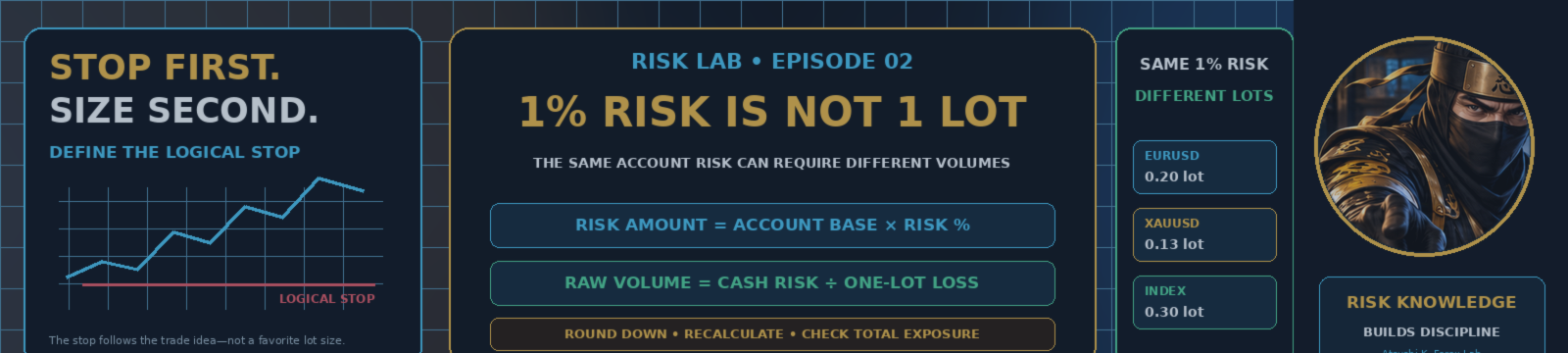

One percent risk is not a lot size.
It does not mean 0.01 lot, one mini lot, one percent of the required margin, or a position whose notional value equals one percent of the account.
The same 1% account-risk budget can require 0.20 lot on one setup, 0.13 lot on another, 0.30 lot on a third—and no valid trade at all when the broker's minimum volume is already too large.
The volume changes because the logical Stop distance, symbol specification, contract size, account currency, and broker rules change.
If the original Stop is reached under the assumptions used for the calculation, the planned account loss is approximately the selected percentage of the documented account base.
Approximately matters. Spread expansion, commission, slippage, gaps, delayed execution, financing, and broker conditions can make the realized loss different from the planned figure.
Start with the Logical Stop—not a Favorite Lot Size
A position-size calculation should preserve the trade idea, not distort it.
The backward workflow is:
- Choose a large or familiar lot size.
- Move the Stop closer until the cash loss looks acceptable.
- Place the Stop inside normal market noise.
- Widen the Stop after entry and increase the original risk.
The more consistent workflow is:
- Choose the price where the original trade idea becomes invalid.
- Choose the account risk in money or percentage.
- Estimate how much 1.00 lot would lose from Entry to Stop.
- Divide the cash-risk budget by that one-lot loss.
- Normalize the result downward to a valid broker volume.
- Recalculate the final Stop risk and required margin.
- Review costs and total open exposure.
Choose Balance or Equity—and Document the Policy
The video examples use current Account Equity.
Balance reflects closed profit and loss but excludes current floating profit and loss.
Equity includes the current floating result and is closer to the amount the account can absorb at that moment.
Either can be used as part of a documented policy. The important point is consistency.
Do not switch from Equity to Balance only when that produces a larger trade, or use whichever base makes the next position look more comfortable.
Use a consistent and documented account base.
Calculate the Cash-Risk Budget
The first formula is:
Risk Amount = Account Base × Selected Risk Percentage
Illustrative example:
- Account Equity: 10,000 USD
- Selected Risk: 1%
- Cash-Risk Budget: 100 USD
One percent is an example, not a universal safe number.
The appropriate limit depends on the strategy's observed drawdown, the trader's capital purpose, total portfolio exposure, execution risk, and tolerance for a losing sequence.
Estimate the One-Lot Loss in the Exact MT5 Environment
A fixed shortcut such as “one lot always equals 10 USD per pip” does not work across every symbol and account.
Forex quote currencies, account-currency conversion, XAUUSD and index contract sizes, Tick Size, Tick Value, profit-calculation mode, and broker-specific symbol definitions can all change the result.
For MQL5 users, OrderCalcProfit is useful because it calculates the estimated profit or loss for the current account and market environment and returns the result in the account currency.
A conceptual workflow is:
one_lot_pnl = OrderCalcProfit( order_type, symbol, 1.00, entry_price, stop_price ) one_lot_loss = abs(one_lot_pnl) raw_volume = risk_amount / one_lot_loss
This is pseudocode for the calculation sequence, not a compiled production function.
The important inputs are:
- BUY or SELL direction
- The exact broker symbol
- 1.00 lot
- Planned Entry price
- Planned Stop price
Calculate the Raw Position Size
Once the one-lot loss is known:
Raw Position Size = Maximum Cash Risk ÷ Absolute One-Lot Loss at Stop
The raw value is not automatically a tradable volume.
It must still be checked against the broker's:
- SYMBOL_VOLUME_MIN
- SYMBOL_VOLUME_MAX
- SYMBOL_VOLUME_STEP
- SYMBOL_VOLUME_LIMIT
Tick Size, Tick Value for profit and loss, and Contract Size also belong in the broader symbol-specification review.
Round Down to the Valid Volume Step
If the purpose is to stay at or below a cash-risk limit, ordinary nearest rounding can move the volume upward and exceed the budget.
Example:
- Raw Volume: 0.357
- Volume Step: 0.10
Rounding to 0.40 increases the risk. A risk-capped workflow normally uses 0.30 and then recalculates the final values.
A conceptual normalization may use the number of valid steps below the raw volume. Depending on the symbol rules, the logic may be aligned from Volume Min or from zero.
steps =
    floor(
        (raw_volume - volume_min)
        / volume_step
    )

normalized_volume =
    volume_min
    + steps * volume_step
This simplified concept still requires handling for floating-point error, volume digits, Volume Min, Volume Max, Volume Limit, and existing positions or pending orders in the same direction.
If the Broker Minimum Is Already Too Large, Skipping the Trade Can Be Correct
Suppose the calculated volume is 0.004 lot while the broker minimum is 0.01 lot.
Forcing the minimum volume would exceed the planned cash risk.
Possible responses include:
- Skip the trade
- Do not pull the Stop closer without a logical market reason
- Review the capital, symbol, or timeframe
- Consider an environment with a smaller contract or volume increment
“Minimum lot” does not mean “small enough for every account.”
Three Illustrative Examples with the Same 100 USD Risk Budget
EURUSD Example
- Account Equity: 10,000 USD
- Risk Budget: 1% = 100 USD
- One-Lot Loss at Stop: 500 USD
100 ÷ 500 = 0.20 lot
XAUUSD Example
- Risk Budget: 100 USD
- One-Lot Loss at Stop: 750 USD
100 ÷ 750 = 0.1333...
With a 0.01 Volume Step, the final volume is 0.13 lot.
Estimated Stop loss after normalization:
750 × 0.13 = 97.50 USD
Index Example
- Risk Budget: 100 USD
- One-Lot Loss at Stop: 280 USD
100 ÷ 280 = 0.3571...
With a 0.10 Volume Step, the final volume is 0.30 lot.
280 × 0.30 = 84 USD
Rounding upward to 0.40 lot would estimate:
280 × 0.40 = 112 USD
That exceeds the illustrative 100 USD budget.
These are simplified examples for explaining the process. They are not fixed specifications for every broker's EURUSD, XAUUSD, or index contract.
Account Currency and Symbol Type Can Change the Result
A USD account, JPY account, and EUR account may receive different account-currency results for the same symbol and price move.
Gold and index CFDs can also have different Contract Size, Tick Size, Tick Value, and calculation modes across brokers.
Use the exact symbol name and account environment rather than assuming that a pip-value shortcut from one Forex pair applies to every product.
Margin and Stop Risk Are Different Numbers
Margin is estimated collateral required to open the specified volume.
Stop Risk is the estimated profit or loss from Entry to the planned Stop.
A highly leveraged account can require relatively low margin for a position whose Stop loss is still large.
Low required margin does not make a large position safe.
OrderCalcMargin can estimate the margin required for the planned operation in the account currency. Its standalone calculation assumes no current pending orders or open positions, so the complete account still requires separate checks.
After choosing the final volume, review:
- Final Stop risk
- Required margin
- Remaining free margin
- Expected margin level after entry
- Combined margin from other positions
Recalculate with the Final Rounded Volume
Do not stop after calculating the raw volume.
Use the final normalized volume to recheck:
- OrderCalcProfit
- OrderCalcMargin
- Volume Min, Max, Step, and Limit
- Final cash loss at the Stop
- Existing open risk
- Correlated exposure
- A reasonable cost allowance for the actual method
This final pass catches the difference between the mathematical raw value and the volume the broker will actually accept.
Spread, Commission, Slippage, and Gaps Can Increase the Realized Loss
A planned Stop does not freeze the final loss amount.
The result can be affected by:
- Spread
- Commission
- Slippage
- Swap or financing
- Price gaps
- Fast markets
- Stop execution away from the requested price
- Rejected or delayed requests
A cost buffer can be included, but there is no universal percentage that fits every symbol, broker, Stop distance, and holding period.
Use OrderCheck as a Pre-Check—not a Promise
OrderCheck can help review whether a request appears to have valid parameters and sufficient funds at that moment.
It can also return information such as the projected balance, equity, margin, free margin, margin level, result code, and broker comment.
However:
A successful OrderCheck does not guarantee that the later real order will be executed.
Price, spread, market state, account state, available margin, symbol rules, and broker-server conditions can change before the real request.
One Percent Per Trade Does Not Mean One Percent Total Account Risk
Suppose the account already has:
- EURUSD Long
- GBPUSD Long
- USDCHF Short
Although each ticket may have its own Stop and risk calculation, all three can represent a similar USD-weakness theme.
Before approving another trade, review:
- Current open risk
- Pending-order risk
- Correlated or thematic exposure
- Daily loss limit
- News-event risk
- Weekend-gap risk
- Portfolio margin
New Total Risk = Existing Open Risk + New Trade Risk
Correlation is not fixed, but ignoring the common theme can make several “1% trades” behave like one much larger account bet.
Your Eight-Step Position-Sizing Checklist
- Account Base: Balance or Equity, chosen consistently
- Logical Stop: Where the trade idea becomes invalid
- Cash Risk: Risk Amount from the documented base
- One-Lot Loss at Stop: Estimated in the exact MT5 environment
- Raw Volume: Cash Risk ÷ One-Lot Loss
- Valid Volume: Rounded down and checked against broker rules
- Final Stop Risk and Margin: Recalculated using the final volume
- Costs and Total Exposure: Spread, commission, slippage, and portfolio risk
Copy This Record into Your Journal
Symbol: Direction: Entry: Stop: Risk Percentage: Risk Money: Volume Min: Volume Step: Raw Volume: Final Volume: Final Estimated Loss: Required Margin: Total Open Risk: Notes:
Watch the Full MT5 Position-Sizing Walkthrough
How to Calculate Lot Size in MT5 | The 1% Risk Rule
The approximately seven-minute lesson covers Account Base, Logical Stop, Risk Budget, OrderCalcProfit, Raw Volume, Volume Step, EURUSD, XAUUSD, index examples, account-currency differences, margin, costs, OrderCheck, and correlated risk.
See the Same-Risk Comparison in One Minute
Same 1% Risk. Different Lot Sizes. | MT5 Position Sizing #Shorts
The Short uses its own script, newly generated Andrew narration, a vertical 1080×1920 layout, moving female-NINJA action, large English captions, and the EURUSD, XAUUSD, and index comparison.
Continue with Risk Lab
Subscribe to Atsushi K. Forex Lab for the next Risk Lab lesson
The playlist is named Risk Lab | Trading Risk Management & Position Sizing. The official playlist URL was not available when this article was prepared, so no URL has been invented.
The next planned episode is:
Why Moving a Stop Loss Changes the Original Trade
Use the Checklist Before Your Next Order
Before the next order, stop guessing the lot size.
Define the logical Stop, calculate the one-lot loss in the exact MT5 environment, normalize the volume to the broker's rules, and recheck the final account risk.
Then review margin, costs, and total exposure before deciding whether the trade still fits the account.
Official Technical References
- MQL5 Reference — OrderCalcProfit
- MQL5 Reference — Symbol Properties
- MQL5 Reference — OrderCalcMargin
- MQL5 Reference — OrderCheck
- CME Group — Proper Position Size
Risk notice: Forex and CFD trading involves substantial risk. The formulas and examples in this article are simplified educational illustrations, not personal financial advice, broker specifications, or guarantees of execution or loss.