SmartVSV

SmartVSV Panel.

Swing trade with pending orders or scalp with your keyboard.

You can try this panel out with the free version SmartVSV1. https://www.mql5.com/en/market/product/91194

Chart objects.

  • This tool will help you to find orderblocks, fair value gaps and liquidity. If you use session ranges or Sunday open in your strategy, it will draw them for you. 
  • If you are looking at another chart (such as DXY, Gold etc) while trading, SmartVSV has a minichart button for you. 
  • You can set an alert. Click alert button and drag alert line.
  • Click any button  once and SmartVSV will draw an object. Click once more and object will be deleted. 
  • Clear button will delete all objects on chart.


Trading tools and QuickTrade with keyboard. 

  • At the right side of panel we have buttons for open and close positions. 
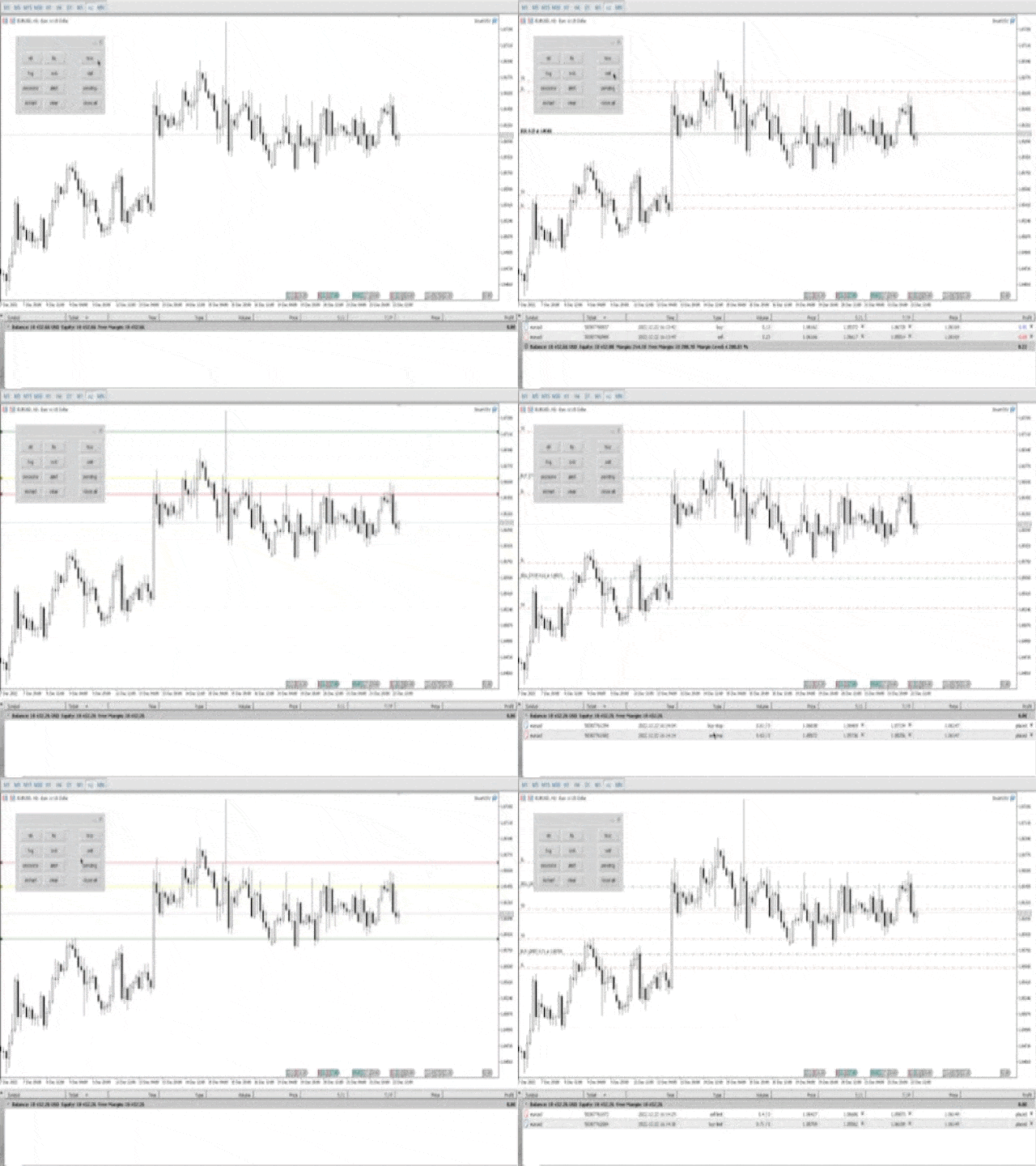
  • First click of buy, sell or pending button will draw TP, SL and entry price (for pending orders). 
  • Drag this lines an click second time. Order will be placed. Lots will be calculated from your SL and risk per trade(You can set them in points in EA settings).
  • Pending orders can be limit and stop. It depends on entry, SL and TP lines position.

  • Press F and panel caption become red. It means that QuickTrade is active and you can buy, sell and close positions with keys Q-buy, W-sell, E-close.
  • You can change these settings. Open experts in your toolbox. When you press any button its number appears in expert journal. Write this number in EA settings menu.
  • Don't forget to set TP and SL in points for QuickTrade. Risk will calculated just like in trades from panel.
  • Press "I" on your keyboard to call a QuickTrade guide.


Settings:

  • QuickTrade: here you can set keys for activate QuickTrade and trade keys,  TakeProfit and StopLoss ONLY FOR QuickTrade function.
  • Money management: set your risk percent per trade, TakeProfit and StopLoss (for trades from panel), magic number.
  • Minichart settings: set timeframe (current or any other timeframe), minichart symbol (can be the same with different timeframe or any other), minichart size and scales.
  • Bar Timer: set color and size of timer or switch it off.
  • Sessions: set time for 3 sessions. Time format HH:MM 24h.
  • Object colors: set colors for orderblocks, fvg, liquidity, order lines, week open line, alert line and sessions.






Prodotti consigliati
Trade Control Panel
Jerry Jilun Anak Liban
Trade Control Panel Function Normal One Click Function Close All Close All Profit Close All Loss Close All Pending Order Close All Sell Close All Buy Advance One Click Function 1.  Close Partial Lot Sell by Percent It will help you partial close for all open position by desire percent you wanted. No longer partial close one by one for every open position Manual input for desire percent 2. Close Partial Lot Buy by Percent It will help you partial close for all open position by desire percent
Price Action Builder Premium
Florea E. Sorin-Mihai Persoana Fizica Autorizata
The Price Action Builder Premium expert advisor is an extension of the freely available Price Action Builder Basic :     it provides 2 new candlestick patterns besides the pinbar (already available in the basic edition);     in most configurations, backtesting usually shows an average yearly return rate increased by approximately 50%;     the account growth curve is also smoother, due to larger number of trades, almost double (2x) compared to the free version. While aimed primarily at obtaining
Rosy Pro Panel MT5
Theresia Yovitha Herwanda
5 (1)
Download DEMO here  https://www.mql5.com/en/blogs/post/759772 An ultimate panel you've never seen before.  Compact and nice Trade panel with large Total P/L and it's percentage display. Groups for trades summary available: Ticket, Symbol, Type, Category, and Magic. Average price field helps you know your trading average price and direction. Set magic and comment of your trading in a very easy way. Group closing by symbol, type, category or magic - only by one click. Close All button for a quick
Utility TimeLs Close Positions è uno strumento per gestire e automatizzare la chiusura delle posizioni in MetaTrader 5. Consente un controllo flessibile su quando e come chiudere le posizioni aperte, in base a orario, simbolo, direzione, magic number e commento. Puoi disattivare il trading in determinati giorni della settimana Puoi impostare un orario specifico per chiudere tutte le posizioni aperte Puoi filtrare la chiusura per simbolo, direzione (Buy/Sell), magic number o commento Puoi program
Horizontal Line Trade Assistant EA  Semi-Automated Trading Assistant      IMPORTANT :     On the main/purchased program a user can click on the Horizontal line and change it to Buy or Sell, and drag by double clicking on it. Please keep in mind that this option is not available on demo version, due to some restrictions/limitations of Strategy Tester, some Object related operations are not available in the  Strategy Tester. But, it will not prevent you from Testing, please drop an Object to chart
T Manager for Price action Traders
Haidar Lionel Haj Ali
4.5 (10)
T Manager, the ultimate trade management solution designed by traders for traders. If you are searching for a simple and efficient trade panel, trade manager, or trade assistant, you are at the right place.   The market contains a diverse number of those tools , but this one is designed by traders for traders . I designed this tool, and I am using it daily. Take my advice and stop buying tools blended with un-useful features that you will never use,   T Manager provides you with the essential y
THIS PRODUCT CAN NOT BE TEST IN STRATEGY TESTER. PLEASE TRY DEMO VERSION: https://www.mql5.com/en/market/product/58096 RISK AND TRADE MANAGER RISK AND TRADE MANAGER   is an advanced trading panel designed for manual trading.   Utility helps to manage trades effectively and efficiently with a single click. MAIN FEATURES Convert and display Stop Loss (SL)   Pips into % and amount to view the clear picture of the trades if SL hits. Fund allocation for individual trade in % and in amount. Get alert
The CloseByPercentLossOrProfit Expert Advisor closes some positions as the total profit of loss for the entire account reaches a specified value. The profit or loss is specified as percentage of the account balance. In addition, the Expert Advisor can delete the pending orders. Allow AutoTrading before running the Expert Advisor. Instructions: Run the Expert Advisor on the chart. Input parameters: Language of messages displayed (EN, RU, DE, FR, ES) - the language of output messages (English, Rus
RiskManagementEA
Nguyen Huu Chung
# Risk Management EA - User Manual ## Table of Contents 1. [ Overview ]( #overview ) 2. [ Installation ]( #installation ) 3. [ Features ]( #features ) 4. [ Input Parameters ]( #input-parameters ) 5. [ User Interface ]( #user-interface ) 6. [ How to Use ]( #how-to-use ) 7. [ Advanced Features ]( #advanced-features ) 8. [ Troubleshooting ]( #troubleshooting ) --- ## Overview **Risk Management EA** is a professional trading tool designed to help traders manage risk, split orders, and aut
Synchronizer
PATRICK PAARSCH
This Expert Advisor monitors all open positions across all symbols in MetaTrader 5. Whenever a Stop Loss (SL) or Take Profit (TP) is manually set or adjusted on any position, the EA automatically applies that value to all other open positions , regardless of symbol or order type (Buy/Sell). This ensures consistent and synchronized SL and TP levels across your account. Perfect for mobile trading via tablet or smartphone!
Draw price ranges with automatic percentage calculations, customizable visuals, and smart label positioning. Easy to use with intuitive controls - just click and analyze! Key Features ️ Intuitive Drawing Interface One-Click Activation : Simply click the "Draw Price Range" button to start Visual Guide Line : Yellow dashed line helps you position points accurately Two-Point Drawing : Click Point A and click Point B - it's that simple! Real-Time Preview : See your range before finalizing Aut
Overview The script displays information about the trade account and the current financial instrument. Information about the trade account: Account - account number and type (Real, Contest or Demo); Name - name of the account owner; Company - name of a company that provide the access to trading; Server - trade server name; Connection State - connection state; Trade Allowed - shows whether trading is allowed on the account at the moment; Experts Allowed - shows whether it is allowed to trade usin
Boleta de negociação, adiciona automáticamente as ordens Take Profit e Stop Loss quando excutada uma ordem de compra ou venda. Ao apertar as teclas de atalho (A, D, ou TAB), serão inseridas duas linhas de pre-visualização, representando as futuras ordens de take profit (azul) e stop loss (vermelho), as quais irão manter o distanciamento especificado pelo usuário. Ditas ordens só serão adicionadas ao ser executada a ordem inicial. Ao operar a mercado, as ordens pendentes de take profit, e stop lo
The TELEGRAM BROADCAST utility helps to instantly publish your trading in the Telegram channel. If you have long wanted to create your Telegram channel with FOREX signals, then this is what you need. ATTENTION. This is a DEMO version, it has limitations - sending messages no more than 1 time in 300 seconds PAID version:  https://www.mql5.com/en/market/product/46865 https://t.me/moneystrategy_mql TELEGRAM BROADCAST can send messages: Opening and closing deals; Placing and deleting pending o
FREE
Quick Style MT5
Maxim Polishchuk
4.75 (12)
The Quick Style utility is designed for facilitation and acceleration of working with the properties of graphical objects. Left-click a graphical object while holding the Shift key to open the quick access window for configuring the object properties. In the window, you can change the color, style and line width with one click, including those of other graphical objects. All changes are displayed immediately. To close the Quick Style , simply click the free space on the chart. The utility is eas
FREE
Questo strumento può aiutarti a chiudere tutti gli ordini aperti con un clic, basta fare clic su "Chiudi tutto". Se desideri chiudere solo gli ordini redditizi, fai clic sul pulsante "Chiudi redditizi" Dopo aver cliccato, tutti gli ordini fluttuanti verranno chiusi; Se desideri chiudere solo gli ordini con perdite fluttuanti, fai clic sul pulsante "Chiudi perdibili" Dopo aver cliccato, tutti gli ordini con perdite fluttuanti verranno chiusi. Questo strumento è stato testato per un anno. La funzi
Click Trading
Jawad Tauheed
5 (2)
One Click Trading – Auto TP SL Developer TraderLinkz Version 1.00 Category Utility What it does Adds missing TP and SL to your manual trades and pending orders Sets them once per ticket Lets you move TP and SL afterward Works on hedging and netting accounts Scans on every tick and reacts on trade events Why you want it You place faster entries You get consistent risk and exit targets You reduce fat finger errors You keep full manual control Quick start Attach the EA to any chart Keep TP and SL e
FREE
Size Calculator allow you to calculate the size you need for your position giving two parametres: the number of pips risked and the money risked, for example if you want to risk 20 USD on 200 pips, then you will need to input 200 in the case reserved for pips and 20 in the case reserved for risk, the size will appear in left top carner of the chart in your metatrader 4 platform,    Size Calculator  support the following symbols : EURUSD GBPUSD AUDUSD NZDUSD  GOLD WTI  EURJPY GBPJPY USDJPY AUDJP
This is a break even(BE)/break even-plus(BE+) EA. It moves your stop loss to BE or BE+ based on pre-set percentage of current TP. You can edit the percentage in the input section. This EA sets breakeven for both manually and auto-opened trades.   Moving stop-loss to a       breakeven or BE+  is popular among traders who wish to safeguard their trades and to let the trades run without incurring a risk of loss. With  this  EA , you can have your stop-loss orders moved to a breakeven point automati
AW Metatrader to Telegram MT5
AW Trading Software Limited
5 (1)
Un sistema automatizzato per l'invio di notifiche in modo che nessuno dei tuoi abbonati perda i tuoi eventi di trading dal tuo terminale di trading. Un'utilità che invia notifiche al messenger di Telegram su qualsiasi operazione di trading sul tuo account. Istruzioni passo passo per collegare l'utility a un canale in Telegram ->   QUI   / MT4 ->   QUI vantaggi: Installazione semplice e istruzioni dettagliate, Possibilità di inviare screenshot regolabili, Testo di notifica personalizzabile tramit
Position Tool Position Tool is a manual trading assistant for MetaTrader 5, designed to help traders visualize positions, manage risk, and plan trades clearly on the chart . This product does not perform automated trading and does not provide trading signals . It is intended for traders who prefer full control over their trading decisions . Key Features Draw Long and Short positions directly on the chart Automatic Risk/Reward (R:R) visualization Adjustable entry, stop-loss, and take-profit level
One Click Trader  is a tool designed for MetaTrader 4 platform, which enables you to take your trading to the next level. It enables you to open, manage and close your trades in simple an efficient way by just one click of your mouse button. "-"   ,  "+"  change OCT window size  Up arrow minimizes the OCT panel Down arrow maximizes the OCT panel Right arrow displays the next panel with additional features Left arrow hides the panel with additional features Red  SELL  button enables you to open s
This utility can compare simultaneously time frames of different instruments and keep under control   the nine major time frames  of an instrument. It is composed by two changers, a crosshair and some additional components : the  multicharts time frames changer   is designed to  compare  simultaneously  up to thirty time frames  of different symbols with the  keyboard or the button the multicharts symbols changer can  link up to nine charts and control simultaneously the nine major time frame b
Trade Panel MetaTrader 5 - feature-rich tool that adds the desired and highly-demanded functions to the terminal to enhance trading experience. Orders execution with one click You can open and close orders easily, using the panel. Buttons to open Market, Limit and Stop orders in both buy and sell directions are located on the Main tab, while there are multiple options to close already existing positions and cancel orders: Close/cancel all Close/cancel buy and sell positions/orders separately Clo
Risk Controller Expert Advisor, un programma che ti consente di controllare il rischio totale dei tuoi consulenti di trading sul tuo conto. Con questo programma, puoi controllare il rischio massimo che sarà consentito sul conto per tutti i consulenti. Ad esempio, imposti il rischio del 30% del drawdown massimo, il che significa che se i tuoi robot di trading azionario superano il rischio del 30%, il Risk Controller chiuderà tutte le posizioni dei consulenti e può anche chiudere tutti i grafici
Multi Symbol Trailing
Vladimir Karputov
5 (1)
L'utility "   Multi Symbol Trailing   " sposta lo Stop Loss per tutte le posizioni attualmente aperte (multi-symbol trailing). È destinato principalmente ad assistere nel trading manuale. Non ci sono restrizioni per l'utilità né per il nome della coppia di valute né per l'identificatore individuale (numero magico): l'utilità elabora assolutamente tutte le posizioni attualmente aperte. L'unità di misura dei parametri "   Trailing Stop   " e "   Trailing Step   " è il punto (la differenza tra il p
SmartTrail PRO MT5 — All-in-One Trade Management Panel Your all-in-one trade management companion for MetaTrader 5. SmartTrail PRO takes the stress out of position management. Whether you trade manually or use Expert Advisors, it protects your capital with intelligent, volatility-adaptive stop management — across all symbols, all account types, automatically. Why SmartTrail PRO? Most traders lose not because of bad entries, but because of poor exits. SmartTrail PRO solves this by providing a com
Basic Trade Buttons
Kriengsak Peitaisong
Basic Trade Buttons is a tool to help you to quickly open and close trades, place take profit and stop loss points by clicking on the button of each job that you preferred. Once you attached this tool to mt5 chart, the program will calculate a trade volume(Lots size) automatically to prepare to send to the trade server when you click on 'Buy' or 'Sell' button. Click on 'TP', 'SL' or 'Close' button to place take profit, stop loss based on the predefined levels or to close all open positions respe
Pannello di trading,Trading manuale,Gestione ordini,Gestione del rischio,Trade Manager,Assistente di trading,Stop Loss,Take Profit,Trailing Stop,Scalping JoOrderTrade Plus – Pannello di Trading Avanzato per MT5 Due avvisi estremamente importanti Per il corretto funzionamento dello strumento, è OBBLIGATORIO abilitare l’opzione "Algo Trading" nelle impostazioni di MetaTrader 5 . Senza questa attivazione, il pannello non funzionerà . Il pannello JoOrderTrade Plus può presentare alcuni piccoli bug
Padroneggia la condivisione di segnali forex con il Telegram Signal Sender MT5, un potente strumento progettato per automatizzare e semplificare il processo di invio di segnali di trading al tuo canale Telegram, perfetto sia per i fornitori di segnali principianti che per quelli affermati. Molto apprezzato nelle comunità di trading come Forex Factory e Reddit’s r/Forex, e messo in evidenza nelle discussioni su Investopedia e nei forum MQL5 per la sua efficienza nella distribuzione dei segnali, q
Gli utenti di questo prodotto hanno anche acquistato
Trade Assistant MT5
Evgeniy Kravchenko
4.42 (208)
It helps to calculate the risk per trade, the easy installation of a new order, order management with partial closing functions, trailing stop of 7 types and other useful functions. Additional materials and instructions Installation instructions - Application instructions - Trial version of the application for a demo account Line function -   shows on the chart the Opening line, Stop Loss, Take Profit. With this function it is easy to set a new order and see its additional characteristics bef

Forex Trade Manager MT5
InvestSoft
4.96 (620)
Benvenuto a Trade Manager EA, lo strumento definitivo per la gestione del rischio , progettato per rendere il trading più intuitivo, preciso ed efficiente. Non è solo uno strumento per l'esecuzione degli ordini, ma una soluzione completa per la pianificazione delle operazioni, la gestione delle posizioni e il controllo del rischio. Che tu sia un principiante, un trader avanzato o uno scalper che necessita di esecuzioni rapide, Trade Manager EA si adatta alle tue esigenze, offrendo flessibilità s
Local Trade Copier EA MT5
Juvenille Emperor Limited
4.96 (128)
Sperimenta una copia di trading eccezionalmente veloce con il   Local Trade Copier EA MT5 . Con la sua facile configurazione in 1 minuto, questo copiatore di trading ti consente di copiare i trades tra diversi terminali di MetaTrader sullo stesso computer Windows o su Windows VPS con velocità di copia ultra veloci inferiori a 0.5 secondi. Che tu sia un trader principiante o professionista,   Local Trade Copier EA MT5   offre una vasta gamma di opzioni per personalizzarlo alle tue esigenze speci
Versione Beta Telegram to MT5 Signal Trader è quasi pronto per il rilascio ufficiale in versione alpha. Alcune funzionalità sono ancora in fase di sviluppo e potresti riscontrare piccoli bug. Se riscontri problemi, ti preghiamo di segnalarli, il tuo feedback aiuta a migliorare il software per tutti. Telegram to MT5 Signal Trader è uno strumento potente che copia automaticamente segnali di trading da canali o gruppi Telegram al tuo account MetaTrader 5 . Supporta canali pubblici e privati e cons
Trade Dashboard MT5
Fatemeh Ameri
4.97 (117)
Tired of complex order placement and manual calculations? Trade Dashboard is your solution. With its user-friendly interface, placing orders becomes effortless, by a single click, you can open trades, set stop loss and take profit levels, manage trade lot size, and calculate risk to reward ratios, allowing you to only focus on your strategy. Say goodbye to manual calculations and streamline your trading experience with Trade Dashboard. Download  Demo Version  right now. You can find  Details of
FarmedHedge Pair Trading Dashboard
Tanapisit Tepawarapruek
5 (1)
Farmed Hedge Yield Farming - Professional Pair Trading Dashboard (Manual - Hybrid - Semi/Automated EA) VERSION 3 - WILD HARVEST UPDATE Trading Approach: - Manual Trading: Primary focus - Auto Pilot: Optional supplementary feature - Full Automation: Not the main purpose Recommended Timeframe: H1-H4 DEMO VERSION Download the free demo to test functionality. Use Strategy Tester with Visual Mode to see how it works. VERSION 3 - NEW FEATURES Summary Dashboard (SRA Panel) - Quick pair selection w
Copy Cat More Trade Copier MT5 (Gatto Copiatore MT5) è un copiatore di trade locale e un framework completo di gestione del rischio ed esecuzione progettato per le sfide di trading odierne. Dalle sfide delle prop firm alla gestione di portafogli personali, si adatta a ogni situazione con una combinazione di esecuzione robusta, protezione del capitale, configurazione flessibile e gestione avanzata dei trade. Il copiatore funziona sia in modalità Master (mittente) che Slave (ricevente), con sincro
Trade Manager DashPlus
Henry Lyubomir Wallace
5 (13)
DashPlus è uno strumento avanzato di gestione delle operazioni progettato per migliorare l'efficienza e l'efficacia del trading sulla piattaforma MetaTrader 5. Offre una suite completa di funzionalità, tra cui calcolo del rischio, gestione degli ordini, sistemi di griglia avanzati, strumenti basati su grafici e analisi delle prestazioni. Caratteristiche Principali 1. Griglia di Recupero Implementa un sistema di griglia flessibile e di media per gestire le operazioni in condizioni di mercato avve
Telegram to MT5 Coppy
Sergey Batudayev
5 (8)
Da Telegram a MT5:   la soluzione definitiva per la copia del segnale Semplifica il tuo trading con Telegram su MT5, il moderno strumento che copia i segnali di trading direttamente dai canali e dalle chat di Telegram sulla tua piattaforma MetaTrader 5, senza bisogno di DLL. Questa potente soluzione garantisce un'esecuzione precisa dei segnali, ampie opzioni di personalizzazione, fa risparmiare tempo e aumenta la tua efficienza. [ Instructions and DEMO ] Caratteristiche principali Integrazione d
Smart Stop Manager MT5
Daniel Stein
4.33 (3)
Smart Stop Manager – Esecuzione automatica dello stop-loss con precisione professionale Panoramica Smart Stop Manager è il livello di esecuzione della linea Smart Stop, progettato per i trader che richiedono una gestione dello stop-loss strutturata, affidabile e completamente automatizzata su più posizioni aperte. Monitora continuamente tutte le operazioni attive, calcola il livello di stop ottimale utilizzando la logica di struttura di mercato Smart Stop e aggiorna gli stop automaticamente se
Exp COPYLOT CLIENT for MT5
Vladislav Andruschenko
3.82 (34)
Trade copyr per MT5 è un trade copyr per la piattaforma МetaТrader 5   . Copia le negoziazioni forex   tra       eventuali conti   MT5   -   MT5, MT4   -   MT5 per la versione COPYLOT MT5 (o MT4   -   MT4 MT5   -   MT4 per la versione COPYLOT MT4) Fotocopiatrice affidabile! Versione MT4 Descrizione completa   +DEMO +PDF Come comprare Come installare     Come ottenere i file di registro     Come testare e ottimizzare     Tutti i prodotti di Expforex Puoi anche copiare le operazioni nel termina
HINN MagicEntry Extra
ALGOFLOW OÜ
4.69 (13)
HINN MAGIC ENTRY – the ultimate tool for entry and position management! Place orders by selecting a level directly on the chart! full description   ::  demo-version  :: 60-sec-video-description Key features: - Market, limit, and pending orders - Automatic lot size calculation - Automatic spread and commission accounting - Unlimited partitial take-profits  - Breakeven and trailing stop-loss and take-profit  functions - Invalidation leves - Intuitive, adaptive, and customizable interface - Works
YuClusters
Yury Kulikov
4.93 (43)
Attention: You can view the program operation in the free version  YuClusters DEMO .  YuClusters is a professional market analysis system. The trader has unique opportunities to analyze the flow of orders, trade volumes, price movements using various charts, profiles, indicators, and graphical objects. YuClusters operates on data based on Time&Sales or ticks information, depending on what is available in the quotes of a financial instrument. YuClusters allows you to build graphs by combining da
The product will copy all telegram signal to MT5 ( which you are member) , also it can work as remote copier.  Easy to set up, copy order instant, can work with almost signal formats, image signal,  s upport to translate other language to English Work with all type of channel or group, even channel have "Restrict Saving Content", work with  multi channel, multi MT5 Work as remote copier: with signal have ticket number, it will copy exactly via ticket number. Support to backtest signal. How to s
Ultimate Extractor
Clifton Creath
5 (9)
Ultimate Extractor - Professional Trading Analytics for MT5 *****this is the local HTML version of Ultimate Extractor. Check out Ultimate Extractor Cloud on mql5 for the Cloud version****** Ultimate Extractor transforms your MetaTrader 5 trading history into actionable insights with comprehensive analytics, interactive charts, and real-time performance tracking. What It Does Automatically analyzes your MT5 trading history across all Expert Advisors and generates detailed HTML reports with inte
Trade Manager DaneTrades
Levi Dane Benjamin
4.36 (28)
Trade Manager per aiutarti a entrare e uscire rapidamente dalle operazioni calcolando automaticamente il tuo rischio. Incluse funzionalità che ti aiutano a prevenire l'eccessivo trading, il vendetta trading e il trading emotivo. Le operazioni possono essere gestite automaticamente e i parametri di performance del conto possono essere visualizzati in un grafico. Queste caratteristiche rendono questo pannello ideale per tutti i trader manuali e aiuta a migliorare la piattaforma MetaTrader 5. Suppo
Equity Protect Pro: Il tuo esperto di protezione del conto completo per un trading senza preoccupazioni Se stai cercando funzionalità come protezione del conto, protezione del capitale proprio, protezione del portafoglio, protezione multi-strategia, protezione dei profitti, raccolta dei profitti, sicurezza del trading, programmi di controllo del rischio, controllo automatico del rischio, liquidazione automatica, liquidazione condizionale, liquidazione programmata, liquidazione dinamica, trailin
Seconds Chart MT5
Boris Sedov
4.59 (17)
Seconds Chart — uno strumento unico per creare grafici in secondi su MetaTrader 5 . Con Seconds Chart , puoi generare grafici con timeframe definiti in secondi, ottenendo una flessibilità e una precisione d'analisi ideali, non disponibili nei grafici standard in minuti o ore. Ad esempio, il timeframe S15 indica un grafico con candele di 15 secondi. Puoi utilizzare qualsiasi indicatore e Expert Advisor con supporto per simboli personalizzati. Lavorare con loro è comodo quanto operare sui grafici
Smart Stop Scanner – Analisi multi-asset degli stop-loss basata sulla reale struttura di mercato Panoramica Smart Stop Scanner offre un monitoraggio professionale dei livelli di stop-loss su più mercati. Il sistema identifica automaticamente le zone di stop più rilevanti basandosi sulla reale struttura di mercato, sulle rotture significative e sulla logica del price action, presentando tutte le informazioni in un pannello chiaro, coerente e ottimizzato per schermi ad alta risoluzione (DPI-awar
Auto Trade Copier for MT5
Vu Trung Kien
4.41 (27)
Auto Trade Copier is designed to copy trades to multiple MT4, MT5 and cTrader accounts/terminals with 100% accuracy. The provider and receiver accounts must be on the same PC/VPS. With this tool, you can copy trades to receiver accounts on the same PC/VPS. All trading actions will be copied from provider to receiver perfectly. This version can be used on MT5 accounts only. For MT4 accounts, you must use Auto Trade Copier (for MT4). Reference: - For MT4 receiver, please download Trade Receiver Fr
MT5 to Telegram Signal Provider è un'utilità facile da usare e completamente personalizzabile che consente l'invio di segnali specificati a una chat, canale o gruppo Telegram, rendendo il tuo account un fornitore di segnali. A differenza della maggior parte dei prodotti concorrenti, non utilizza importazioni DLL. [ Dimostrativo ] [ Manuale ] [ Versione MT4 ] [ Versione Discord ] [ Canale Telegram ]  New: [ Telegram To MT5 ] Configurazione Una guida utente passo-passo è disponibile. Nessuna cono
Custom Alerts AIO: Monitora tutti i mercati — senza alcuna configurazione Panoramica Custom Alerts AIO è una soluzione di monitoraggio dei mercati pronta all’uso che non richiede alcuna configurazione. Tutti gli indicatori necessari — FX Power, FX Volume, FX Dynamic, FX Levels, IX Power — sono integrati internamente. Non vengono mostrati grafici, rendendolo ideale per generare alert in tempo reale in modo discreto ed efficiente. Supporta tutte le classi di asset offerte dal tuo broker: Forex,
Anchor: The EA Manager A coordination system for traders running multiple EAs. Anchor ensures only one EA can trade at a time, preventing conflicting positions and keeping your portfolio safer. Attach Anchor to any chart. Configure your EAs and their magic numbers. Anchor handles the rest. Built for portfolios. Built for discipline. Built for prop firms. The Problem Running multiple EAs on the same account creates risk. Two gold EAs can open opposite positions on the same candle. Three EA
Timeless Charts
Samuel Manoel De Souza
5 (3)
Timeless Charts è una soluzione di grafici avanzata, progettata per i trader professionisti che necessitano di grafici personalizzati / timeframe personalizzati – inclusi grafici a secondi / timeframe a secondi, grafici Renko / barre Renko, grafici a cluster / footprint e strumenti avanzati simili a quelli disponibili nelle piattaforme più popolari. A differenza dei tradizionali grafici offline o dei semplici indicatori personalizzati, questa soluzione crea barre completamente personalizzate con
Trade Assistant 38 in 1
Makarii Gubaydullin
4.91 (23)
Strumento multifunzionale: Calcolatore di Lotto, Ordini Grid, Rapporto R/R, Gestore di Trade, Zone di Domanda e Offerta, Price Action e molto altro Versione Demo   |   Manuale Utente L'Assistente di Trading   non funziona nel tester di strategie : puoi scaricare la   Versione Demo QUI  per testare l' utilità . Contattami   per qualsiasi domanda  / idee di miglioramento / in caso di bug riscontrato Se hai bisogno di una versione MT4, è disponibile qui Semplifica, accelera e automatizza il tuo  
The News Filter MT5
Leolouiski Gan
4.74 (19)
Questo prodotto filtra tutti gli esperti consulenti e i grafici manuali durante il periodo delle notizie, così non dovrai preoccuparti di improvvisi picchi di prezzo che potrebbero distruggere le tue impostazioni di trading manuali o le negoziazioni effettuate da altri esperti consulenti. Questo prodotto viene fornito anche con un sistema completo di gestione degli ordini che può gestire le tue posizioni aperte e gli ordini in sospeso prima della pubblicazione di qualsiasi notizia. Una volta che
Telegram To MT5 Receiver
Levi Dane Benjamin
4.53 (15)
Copia i segnali da qualsiasi canale di cui sei membro (compresi quelli privati e ristretti) direttamente sul tuo MT5.  Questo strumento è stato progettato con l'utente in mente offrendo molte funzionalità necessarie per gestire e monitorare gli scambi. Questo prodotto è presentato in un'interfaccia grafica facile da usare e visivamente accattivante. Personalizza le tue impostazioni e inizia ad utilizzare il prodotto in pochi minuti! Guida per l'utente + Demo  | Versione MT4 | Versione Discord
VirtualTradePad One Click Trading Panel
Vladislav Andruschenko
4.59 (73)
Pannello di trading per il trading in 1 clic.   Lavorare con posizioni e ordini!   Trading dal grafico o dalla tastiera. Con il nostro pannello di trading, puoi eseguire operazioni con un solo clic direttamente dal grafico ed eseguire operazioni di trading 30 volte più velocemente rispetto al controllo MetaTrader standard. I calcoli automatici di parametri e funzioni rendono il trading più veloce e conveniente per i trader. Suggerimenti grafici, etichette informative e informazioni complete sugl
Uber Trade Manager
Meelis Hynninen
4.88 (16)
UTM Manager è uno strumento intuitivo e facile da usare che offre un'esecuzione delle negoziazioni rapida ed efficiente. Una delle caratteristiche distintive è la modalità "Ignora spread", che ti consente di fare trading al prezzo delle candele, ignorando completamente gli spread (ad esempio, consente di scambiare coppie di spread più elevate su LTF, evitando di essere esclusi dalle negoziazioni a causa dello spread). Un altro aspetto chiave di UTM Manager è il suo copiatore commerciale locale u
Risk Manager for MT5
Sergey Batudayev
4.35 (17)
Expert Advisor Risk Manager per MT5 è un programma molto importante e secondo me necessario per ogni trader. Con questo Expert Advisor sarai in grado di controllare il rischio nel tuo conto di trading. Il controllo del rischio e del profitto può essere effettuato sia in termini monetari che in termini percentuali. Affinché l'Expert Advisor funzioni, è sufficiente allegarlo al grafico della coppia di valute e impostare i valori di rischio accettabili nella valuta del deposito o in % del saldo
Altri dall’autore
SmartVSV1
Vladimir Svirin
5 (2)
This is the demo version of SmartVSV Panel.  https://www.mql5.com/en/market/product/91131 It is the same as original panel with all graphic objects and settings. Main difference is that you can not trade with this demo, but you can see all orders' parameters such as entry, TakeProfit and StopLoss. Also you can test QuickTrade. All functions are explained with alerts. When you add it to your chart press "I" to call information alert.
FREE
QuickTradeVSV
Vladimir Svirin
From 0 to 9...  the only keyboard buttons you need to trade with this EA! If I am wrong just write which button should I add in the comment section. I recommend you to test this tool on demo account first. This version of QuickTradeVSV can help you to: 1 - Open buy position with TakeProfit and StopLoss (Lotsize is calculated by your Account Balance and StopLoss). 2 - Open buy position with fixed LotSize. 3 - Open sell position with TakeProfit and StopLoss (Lotsize is calculated by your Account B
Filtro:
Nessuna recensione
Rispondi alla recensione